#support-2
1 messages · Page 42 of 1
 proper pulsar
a) those screenshots are unreadable
 worldly venture
fair nuff xD
proper pulsar
And b) I asked for the storage type, not the mysql credentials
worldly venture
oh my bad, ill look in 2 sec because the guy im doing it with is afk for 2 sec. Thx in advance for helping 🙃
proper pulsar
You're welcome
worldly venture
So we're looking in the config, what is it called in the config? We're looking for storage but idk what we're looking for 😂
 barren fable
Should be storage-method
worldly venture
yeah we didn't change that... it says h2What should we change it to? We're using mysql
barren fable
mysql then
worldly venture
Trying it right now 😄
proper pulsar
I mean I don't know what that huge comment block above the setting could be for, but ok
worldly venture
it works, thanks guys! Good luck, have a good one!
 last canopy
mayby any player can help my how to instal spingot or give link to download coz i cant saw link on website of spingot
 lime oxide
Where can I get some help
proper pulsar
@lime oxide here
lime oxide
Oki, so how should I start. hmm. So I created the groups and the prefixes. (/lp group default meta addprefix 1 "&7[Guest] &7") On the tutorial it automaticly showed [Guest] infront of the name. But it doesent do that on my server @proper pulsar
lime oxide
Where can I find that plugin essXchat?
proper pulsar
!chat @lime oxide
 wintry cloudBOT
LuckPerms does not display things in chat!
LuckPerms is only able to send information to formatting plugins so that they display them properly. LuckPerms does not put the prefix in front of your name, you need a chat formatting plugin to do it, and you need Vault. Same goes for the tablist! If the information appears correctly when you run /lp user <user> info, LuckPerms is doing its job!
Prefix isn't showing?
What plugins can I use to format chat?
lime oxide
ty! Ill check it out if it works!
 worthy inlet
Hey guys
I know this isnt exactly luckperms related but
does anyone know of any good free queue plugins with donator priority support?
 dire copper
Hello, im trying to switch from GroupManager to LuckPerms...my question is: does LuckPerms have something like "globalgroups" from Gm?
Or do i have to set every permission to every group for every world that i want?
 cerulean cipher
no you can set global perms also
 high raven
@dire copper everything in LP is global by default. It's only not if you set it
dire copper
@high raven ok and how do i do that?
wintry cloudBOT
Hey Gopnik in Babushkas basement! Please don't tag helpful/staff members directly.
high raven
!context
wintry cloudBOT
You can set a permission or group on a per-world/per-server basis, through what we call "contexts".
 LuckPerms wiki
wintry cloudBOT
LuckPerms wiki
wintry cloudBOT
Learn about the process of migrating from another permission plugin.
LuckPerms wiki
dire copper
Yeah i tried that but that is a mess...
high raven
It's a bit strange yeah
dire copper
because Luckperms thinks that globalgroups are groups...
so instead of my 6 groups lp gives me 25 groups or so...
high raven
You can set it to migrate as global afaik, not too sure what it does in effect though
You're right in that it's probably easiest to just redo it if you have only 6 groups
You can paste lists of permissions into the editor too, making it even easier
!editor
wintry cloudBOT
LuckPerms offers an easy to use, powerful Web Editor, with which you can add, delete and change permissions of groups and players.
LuckPerms wiki
dire copper
Just a quick question: is it possible to delete the default group in the editor? if yes,how?
cerulean cipher
you can rename default group with /lp group <group> setdisplayname <name>
dire copper
oh..ok but i cant delete it?
cerulean cipher

GitHub
A permissions plugin for Minecraft servers. Contribute to lucko/LuckPerms development by creating an account on GitHub.
 lilac hazel
You can't delete the default group
dire copper
i read the Default Group Page now...and yeah as i understand now i could just set the Default groups Parent to my actual Default Group (New Rank)?
Could that work?
dire copper
ok thank you
dire copper
So...im almost finished now..but how can i give a player just one specific rank? (without these "tracks")
wintry cloudBOT
Find all of the available LuckPerms commands on the wiki.
General commands
User commands
Group commands
Permission commands
Parent commands
Meta commands
Track commands
Log commands
LuckPerms wiki
dire copper
Ok, did that..thank you!
dire copper
Can someone please give me a simple explanation how meta formatting works... read a few "explanation" pages now but i just dont get it...
high raven
!stacking have you read this?
wintry cloudBOT
Display multiple prefixes/suffixes alongside a player's name.
LuckPerms wiki
dire copper
Yes i read this
Im trying to make that it looks like this in Chat: (Rank) ("Extra" Rank(If available)) (Player) (Message)
But it shows (Rank) (Rank) (Player) (Message)
2 times the same rank
lilac hazel
That will be your chat plugins doing. You will need to configure it
dire copper
Im using EssentialsChat with this configuartion: {PREFIX} {DISPLAYNAME} {MESSAGE}
lilac hazel
Remove prefix
 quick lagoon
should be, yes
 lunar mist
Hello! How do I give default ranks permission to /warp a? essentials.warps.a doesn't work
 quaint idol
mOd AbUsE
lunar mist
Then they can use warp b,c,.. too
 prisma hinge
hi
i have an problem my server is based on two host with diferent IP in the main host i have bungecord witch is conecction the twice servers and have a good comunications when i put luckperms in the second server and set the mysql of the main server in the second host dont load the luckperms
ho can help me please
 slow osprey
I have a similar problem I have 2 different machines and I couldn't connect them together.
prisma hinge
i see that the luckperms can not connect to the first host where i have the MySql
but i put the correct table the correct port and ip adress
 stuck coyote
2 different machines != 2 different MC servers
prisma hinge
yes but they are comunicated with bungecord
that you say is i must make the same mysql in the second server
stuck coyote
All servers need to have the same MySQL data for synced permissions
prisma hinge
yes in the sections where you put your data base i connect to mysql i put the main ip adress and port password an all
but can not connect
to
stuck coyote
!errors
wintry cloudBOT
Here's a page with some common storage system errors.
LuckPerms wiki
stuck coyote
Read this page
 stuck coyote
Read the page and follow the steps
prisma hinge
i read and i have an error that luckperms is not connecting to the IP and port
how can i make mysql
in the ip adress not in localhost
here
stuck coyote
GitHub
A permissions plugin for Minecraft servers. Contribute to lucko/LuckPerms development by creating an account on GitHub.
Rech the "Check if the following is correct" part
 tame hollow
Socket fail to connect to host:207.244.241.19, port:3306. Connection refused (Connection refused)
probably a firewall issue
prisma hinge
i have mysql in localhost
in the main host
maby i must put the ipadrres of the host
stuck coyote
Then you added the wrong data to the LuckPerms config
slow osprey
what will be my problem ??
stuck coyote
Use bytebin, privatebin is not loading
slow osprey
The luckperms plugin is located on the bungeecord and server, and both are separate machines
room not loaded
stuck coyote
Then you cant use localhost on both
tame hollow
"localhost" refers to the same machine
stuck coyote
You need to use the IP of the server that runns the MySQL server
slow osprey
Well
stuck coyote
Send the console logs like the latest.log
slow osprey
I threw it to look at the ip addresses, sir
  # Define the address and port for the database.
  # - The standard DB engine port is used by default
  #   (MySQL: 3306, PostgreSQL: 5432, MongoDB: 27017)
  # - Specify as "host:port" if differs
address: 37.123.102.118:3306```I did it all this way
stuck coyote
is the port in the firewall open?
slow osprey
wintry cloudBOT
Please use https://bytebin.lucko.me to send files in the future. I have automatically uploaded Yeni_Metin_Belgesi_2.txt for you: https://bytebin.lucko.me/zKgYh99nqX
stuck coyote
is the database user created as localhost user?
When creating a user you need to use
username@'%' to allow access from all IPs
There is stuff missing
also, do not copy and paste your console window, use the latest.log
quick lagoon
if you are doing self hosting and the servers are not on the same network you probably need port forwarding as well
prisma hinge
stuck coyote
lol
slow osprey
- server error https://bytebin.lucko.me/377MDcuwRc
spigot server on other machine
Port forwarding pings can be exchanged now, without any problems.
stuck coyote
- Is the port open?
- Is the database user created as
username@'%' - Is remote access enabled in the MySQL config?
slow osprey
- yes
- I do not know
- yes
stuck coyote
Use the mysql client, type SELECT host, user FROM mysql.user;
stuck coyote
- YOu shouldnt use root for such stuff
- the
rootuser is not allowed to login from anywhere else besideslocalhost( from the same server the mysql server runs on )
slow osprey
so this payidarnw is linked to my same folder? I don't understand how to start it.
is she active now
stuck coyote
Use this to create a user and allow it access to the database
CREATE USER '[USERNAME]'@'%' IDENTIFIED BY '[PASSWORD]';
CREATE DATABASE IF NOT EXISTS [DATABASE NAME];
GRANT ALL PRIVILEGES ON [DATABASE NAME].* TO '[username]'@'%';
FLUSH PRIVILEGES;
if its related to lp, sure!
stuck coyote
DROP USER '[USERNAME]'@'[HOST]';
just ask the question LUEshi
tame hollow
preferably in #support-1 so you don't clutter this channel
 bronze steeple
alright moving there
 still portal
guys anyone have a ready list of perm that could be added for member vip mod owner
quick lagoon
everyone's setup is unique, so we dont do ready list of perm here
dire copper
Hello guys i got a little problem... i only have the owner "rank" but in scoreboard and tab it shows [Owner] [MVP+]
slow osprey
i installed this mysq but i couldn't run it 😄
dire copper
No reply needed, i fixed it myself 🙂
slow osprey
I still have failed.
tame hollow
can't really help without any info
slow osprey
I have either 2 machines and I cannot connect mysql board in only 1
How many hours have I been struggling
I created a new mysql with commands, I can only connect with workbach and I need to transfer something into it.
tame hollow
probably a networking issue, not exactly LP related I'm afraid and not much we can assist with here
you can try in off topic but the help you receive is only as good as the info you provide
 mighty spear
prisma hinge
mighty spear
prisma hinge
What happen if i use the Luckperms only on bungeecord?
barren fable
Permrs will only work on BungeeCord
prisma hinge
Permrs will only work on BungeeCord
@barren fable at real time?
wintry cloudBOT
Hey SpokeyTV! Please don't tag helpful/staff members directly.
tame hollow
what
 small carbon
@slow osprey have you connected mysql in the end? i have the same issue
tame hollow
usually these issues are different for everyone and you're better of just sharing your errors
slow osprey
I could not connect
If you have 2 servers, you can not connect, you do not need to share. 😄
tame hollow

you can't just assume everyone has the same issue as you
almost every setup is different
we don't know how you're hosting your servers
this person could have an entirely different setup to you
so please, share your errors
small carbon
so, I have issue with connecting multiple servers to one mysql base. I have connected 'sw' server's lp correctly, but 'lobby''s and the bungeecord lp cant connect, even if 'sw' server is turned off
tame hollow
gonna need to see the errors
small carbon
i connected lobby's lp by coping sw's lp config file and changing only server name, but bungee still makes error https://pastebin.com/gLpPkkkR
tame hollow
please don't copy the config
especially if it's from a bukkit server to bungee
the configs are quite different
tame hollow
still not a very good idea
small carbon
i fixed issue with lpb, it hadn't seen mysql username, i've added ' at the start and end of username in config file username: '792857'
tame hollow
oh yes, numbers need to be converted to string
lunar mist
Hi! Is it possible to add placeholders as prefix with luckperms?
barren fable
!placeholders If you mean if there's an placeholder for the LuckPerms' prefix, yes, there is, take a look here:
wintry cloudBOT
Display data such as user prefixes and groups from LuckPerms in other plugins.
LuckPerms wiki
barren fable
I think it... depends.
You can put anything in prefixes you want. And if a plugin parses placeholders after putting in the prefix, I think that's possible
lunar mist
Because I am using a plugin 'Prison' which has %prison_rt% but when I put it in the prefix it doesn't work
tame hollow
that's not how it works
lunar mist
How do I make it work good sir?
tame hollow
that would depend on your chat plugin or whatever plugin you're trying to put the placeholder
lunar mist
essentialschat I think
essentialsxchat*
Nvm its LuckPerms
and placeholder is Prison
tame hollow
essentials doesn't support placeholders
lunar mist
So what do you suggest me to do?
tame hollow
i'm not entirely sure on what you're trying to do
lunar mist
I am making an Prison server and every prison has his own letter A-Z and I want it to be in front of their names sooo... [Default] [(their current rank)] (name)
wintry cloudBOT
Display multiple prefixes/suffixes alongside a player's name.
LuckPerms wiki
lunar mist
So I would make a new prefix and place it as highest priority?
But how would I use the placeholder then?
lunar mist
Yes the plugin is Prison and the Placeholder is %prison_rt% or {prison_rt}
tame hollow
hmm, well you will need a plugin that support placeholders in chat
DeluxeChat is an option
lunar mist
Alright will try it tomorrow
 long sleet
Does someone know a good tablist plugin?
 unique saddle
Is there a single command to remove somebody from all ranks in a track?
cerulean cipher

SpigotMC - High Performance Minecraft
@unique saddle what do you mean like remove ranks?
unique saddle
I want to clear a user from any/all groups within a given track (but not all groups/permissions generally)
So that no matter where they are on the track, it will remove them
cerulean cipher
i would say /lp user <user> parent cleartrack <track>
unique saddle
Thank you!!
cerulean cipher
did that work?
unique saddle
Sorry I didnt see this 😅 It seems to work @cerulean cipher
cerulean cipher
ah good good 🙂
high raven
Boys you're being quite unprofessional
I'd quit while you're ahead
I think you know lol
I know mbax doesn't care
but wiz? that's just not nice - please don't use luckperms to get on wiz's nerves
Yeah that's your final final warning for bugging wiz. Despite how much I disagree with wiz's policy on people pinging him, please at least respect him here
cya
 soft pond
How do I copy over the groups from one server to another?
wintry cloudBOT
If you wish to change your storage type (e.g. to YAML or MySQL) you may need to follow these instructions to ensure your groups and permissions are migrated to the new storage type.
Read more about the Storage types
LuckPerms wiki
soft pond
How do I connect them to the same DB?
OK I see
but I can't log into the server as it is corrupted
lunar mist
@tame hollow now its totally fucked
wintry cloudBOT
Hey Spookje! Please don't tag helpful/staff members directly.
 tidal blade
Do you have vault installed?
lunar mist
Yes sir
tidal blade
Do you have PlaceholderAPI installed
lunar mist
Yes sir
tidal blade
Do /papi ecloud download Player Then do /papi reload
quick lagoon
then check with papi parse USER %player_name%
lunar mist
tidal blade
You need to download the ecloud expansion for that plugin as well. Then use the reload command for papi again.
lunar mist
I can't
 dim swift
Hello, on my server the context system does not work. Do I have to set something up in the config?
high raven
no, did you modify the contexts file? also, what do you mean doesn't work
quick lagoon
in your lp config.yml for each server, you need to set server: servername
dim swift
no, did you modify the contexts file? also, what do you mean doesn't work
@high raven No. The permission will not apply even if the context is "true"
wintry cloudBOT
Hey Prixix! Please don't tag helpful/staff members directly.
quick lagoon
context is "true"?
dim swift
in your lp config.yml for each server, you need to set
server: servername
I am running it on a single spigot server
quick lagoon
ah
high raven
!context
wintry cloudBOT
You can set a permission or group on a per-world/per-server basis, through what we call "contexts".
LuckPerms wiki
dim swift
My context is for example world=world
high raven
check this page out
dim swift
Ah nevermind I was on the wrong world and didnt noticed it 😅
quick lagoon
oh...
 frail steppe
Do I need any permission to shoot how to set up LuckyPerms for my country?
high raven
You want to make a video in your language guiding people?
frail steppe
yes
lime oxide
Hi, I need some help again. Is someone avaible rn?
frail steppe
It is not impossible for our language.
high raven
@lime oxide ask away
lime oxide
oki so
I need some help with the sethome limit permission
I have different ranks on my server
and each rank has different sethome limit
high raven
that seems to be essentials, you need to set up home limits in config and add the right perm to the groups
!moss can show you which perm it is, i think its essentials.sethome.multiple.<rankdefinedinconfig>
wintry cloudBOT
Essentials
Make sure you are using EssentialsX and Vault for prefixes. For any other issues with Essentials, you should seek support in either #general or the official EssentialsX support Discord.
EssentialsX Discord
high raven
the classes set up in essentials for multiple homes
lime oxide
Im a little bit confused
frail steppe
So can I make a Video?
high raven
yes @frail steppe
frail steppe
thx 🙂
tame hollow
essentials should have docs on setting that up with permissions
lime oxide
Now do I have to add each rank here with the limit?
tame hollow
lime oxide
I already found that website but couldnt help me
tame hollow
what do you mean
lime oxide
I have to add that to luckperms editor?
Okay, I think I know how to do it! thanks!
Ill try it
 quiet frigate
I had this problem
how can I add someone to a group, and show the prefix
whenever I do, it says I was added, but it doesn't show the prefix when I speak
 wicked coral
make sure you have vault installed
quiet frigate
i do
wicked coral
ok then make sure you have a chat plugin that supports vault
quiet frigate
?
wicked coral
do you have essentialschat or a different one
wicked coral
ok then make sure that in your essentials config you have change-displayname set to true and add-prefix-suffix true as well
wicked coral
alright, restart and see if it works
quiet frigate
k
 crude oar
is it possible to put wildcards in the middle of perms like worldguard.region.bypass.*.*.fly kind of thing
or if it's not possible is there a way to do something like that
quaint idol
!advanced I believe it is
wintry cloudBOT
Discover some of the more advanced concepts of LuckPerms, such as permission calculation, shorthand permissions and more.
LuckPerms wiki
barren fable
R=worldguard\.region\.bypass\..+\..+\.fly might work
 quick orchid
so If i wanted to add a permission to a player if they were in a plot they had a flag set to true in or were trusted is there a way I would be able to do that
would I have to create a new context? the plugin is plotsquared v5
high raven
To directly answer you, yes, however that's pretty tough. What are you trying to do? Maybe there's another way
quick orchid
I want to be able to use a plugin but only when you are on a plot you own or have a flag for
so how would I go about making a context that would read if they have persm for according to plotsquared
and I have never really done anything besides yaml before so I'll have to start at the beginning :X
high raven
Yeah I wouldn't recommend that nor can I tell you where to start tbh, I'd try and find another solution than learning to custom-code plugins before you learn Java
quick orchid
meh why learn to walk when you can skip it and learn to fly
high raven
Because in this case flying has the chance to ruin your dev prospects while crippling your server at the same time
 glad glacier
that is a recipe for disaster
 cedar belfry
I think plotsquared has an option for that already
quick orchid
Couldnt find it anywhere
cedar belfry
Or I'm thinking of skyblock
quick orchid
well I have to run to thed post office but then Ill watch this and we can start coding that custom plugin https://www.youtube.com/watch?v=RRubcjpTkks
☕ If you want to learn to program, I highly recommend the audiobook "Computer Programming Languages For Beginners By Adesh Silva". You can get it for free here: audibletrial.com/alexlee ☕
- Learn Java quickly by watching this video to the very end. If you do, you will walk aw...
quaint idol
ah yes, that will work
cerulean cipher
learn java in 14 minutes, ummm o.....k haha
glad glacier
lol
quaint idol
it took me like 3-7 days just to understand the concept of Object-based programming
cerulean cipher
agreed, i mean i self taught myself python in about 3 weeks
and i thought that was good, java is a VERY annoying language, but very useful
quaint idol
yeah I'm self taught  &
&  programming enthusiast
crude oar
@quick orchid so are you trying to make it so people can only set flags on their own plot?
cerulean cipher
nice work
quaint idol
I say enthusiast since I haven't really made anything of note lol
quick orchid
no so that they will have permission to use a plugin on their plot or on a plot where according to plotsquared they have a flag or trust
crude oar
ah yeah idk if thats possible but you can ask in the P2 server about it
crude oar
rip
cerulean cipher
My claim to fame is i have (PCPP2 & OCPJP) if thats what excites people nowadays haha
barren fable
it took me like 3-7 days just to understand the concept of Object-based programming
Wow, that is fast. It took me like a half year (3 months at least).
quaint idol
at first I had no fucking idea what I was doing, then at some point it just clicked
cerulean cipher
yeah it always goes that way with any language though, what is this...i give up....oh SNAP!
 formal lily
I did pretty well with python when I was in college, but my issue now is I dont have anything I want to make
I want to learn more languages/get better at coding, but I dont have any projects to actually apply it to
formal lily
We're talking generally about programming, so isnt this where we are supposed to be? /s
quaint idol
inb4 banned
high raven
>:(
 worthy snow
hellp how i can use Luckperms for bungeecoords ?
quaint idol
!bungee
wintry cloudBOT
If you run a Bungeecord network, learn how to correctly setup LuckPerms on all server instances (including Bungee).
Also read:
Syncing data between servers
https://github.com/lucko/LuckPerms/wiki/Syncing-data-between-servers
LuckPerms wiki
 trail garden
How do i make a essentials kit for a specific parent group?
high raven
You make the kit in essx kits file and then give perms to use that kit to a group
!moss can help with essx kit makin
wintry cloudBOT
Essentials
Make sure you are using EssentialsX and Vault for prefixes. For any other issues with Essentials, you should seek support in either #general or the official EssentialsX support Discord.
EssentialsX Discord
crude oar
nice i went from 348 to 294 permissions by merging some together
high raven
Noice
crude oar
cant wait to go thru the other ranks that aren't just default tho lol
high raven
It'll be fun!
crude oar
mhm
 low sierra
Default is the most fun
crude oar
trial mod, mod, and admin all have an average of like 70 perms
so i mean it's better than 300
but it still adds up to about 200
crude oar
i think only i as the owner have * but i also know how to negate perms that i don't want
high raven
!nwc alert
wintry cloudBOT
Wildcard issues
Some plugins are created in a way which results in odd behaviour when the root '*' wildcard is used.
More information:
high raven
!nwc alert
wintry cloudBOT
Wildcard issues
Some plugins are created in a way which results in odd behaviour when the root '*' wildcard is used.
More information:
quaint idol
ohmahgahd is larry spamming banbanban
high raven
@crude oar you have been found in violation of nwc law
quaint idol
mOd aBuSe
low sierra
lArRy aBuSinG
crude oar
is this the option that spams console when i make a lot of editor changes
or is there no way to disable the spam
low sierra
That would be it
crude oar
or is it this
low sierra
It would be the first one
The second one stops another server on bungeecord to sync permissions
crude oar
thought so
high raven
Both
One disables the 'sent'
And one the 'received'
First disabled would fix most of that spam
crude oar
lp should have a feature to mass modify the configs so u don't have to open all the different server ones
quaint idol
uh that could go really bad
high raven
That's like impossible unless you sync them all to the same db like the perms
crude oar
rip
high raven
An option for that, well, I don't see how it's useful tbh
Just copy/paste between spigots.
low sierra
https://www.spigotmc.org/resources/auto-sync-synchronize-server-files.73893/ I feel this could accomplish it be careful when using it though
crude oar
so would disabling this break perms from syncing instantly
high raven
No
crude oar
or is that only just for the console logs
high raven
That's just for the message telling you that the SQL change was made
Sync should still work for sure
crude oar
i mean this one
high raven
Yeah I know
The one you sent originally would break sync
But I knew you wouldn't be so silly intentionally
crude oar
yeah so these 2 are fine to be false then
high raven
Indeed
crude oar
sweet thx
high raven
Less console spam
low sierra
or just like use the editor and do mass permission entrys
low sierra
yeah figured as much I wouldn't either
crude oar
at least i can easily have all servers reload the config :p
 fair prairie
Hello!
I've got a small problem.
Okay, so the other day /warp just worked fine. Today, for some reason i don't have permission tu use it. For test, I opped my self, but I still can't use it.
high raven
If you are sure you don't have any other permissions plugins, try undoing whatever change you did which caused it. If not successful, try verbose to see what node you're being denied
!verbose
wintry cloudBOT
LuckPerms provides a verbose command to help you find out what permissions a command/plugin is checking.
LuckPerms wiki
fair prairie
I can't read it, becaue my anticheat is spamming like crazy
wtf
someting is really wrong
oh, because i'm with 1.15.2
why is luckperms spamming so hard?
tame hollow
it will be another plugin checking for that meta
run /lp verbose record and share the link
fair prairie
It's been done.

LuckPerms - A permissions plugin for Minecraft servers.
LuckPerms is a permissions plugin for Minecraft servers.
tame hollow
you should be able to filter out the meta checks, maybe add !meta to the verbose filter
fair prairie
Oh thank you. I've got a final problem.
When I type /warp I get this:
but i've got the permission node
quick lagoon
it’s set to false
wintry cloudBOT
LuckPerms allows you to set weights in order to determine the priority of certain nodes, like permissions and even prefixes. A higher weight number is a higher priority.
LuckPerms wiki
 lethal oasis
having issues with commands in command blocks. they seem to no longer work
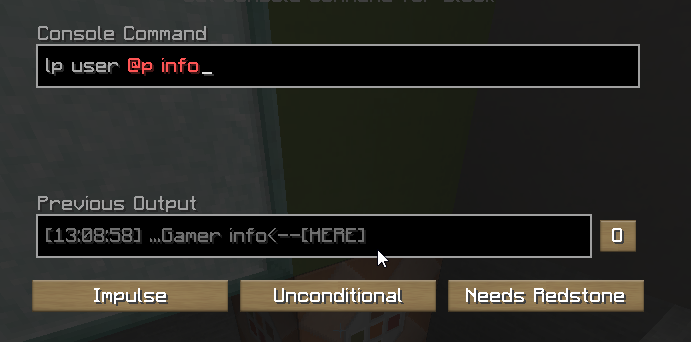
i enabled the config option to resolve them and still nothing
high raven
though it doesn't autocomplete, does it work if typed out?
lethal oasis
yeah
 granite plover
i joined this dis so i could figure out how to give non oped players access to tpa commands
barren fable
Give them the permission to do tpa. The permission should be somewhere in the docs of the plugin that does the command
lethal oasis
how can i copy all the permissions from one group to another
granite plover
alright thx
lethal oasis
or change the default group, i dont mind
barren fable
!default
wintry cloudBOT
LuckPerms provides a group that every player is added to upon joining the server, called default. You can use multiple methods to change the default group or change the name of it.
LuckPerms wiki
lethal oasis
my default rank had no permissions and we want to go back to the default rank as our base rank but we have players in the old default rank
high raven
just add your 'new' default rank as a parent of default
lethal oasis
yeah but then i have players in two groups, some on one and others in the other
how can i move all the players to only one group
barren fable
!bulkupdate can do that
wintry cloudBOT
Quickly update a large amount of user and group permissions by using the bulkupdate command.
LuckPerms wiki
lethal oasis
ok that seems to have successfully applied
 inland delta
How do you make lp staff have a seperate infoboard?
Without manually inputting usernames?
barren fable
You aren't supposed to
 violet shadow
Well Id like to
barren fable
Why?
violet shadow
because I cant transfer it to my other server because of the size and Id like to be able to check some stuff
and certain perms
barren fable
You can use the import and export function
barren fable
/lp export <file>
/lp import <file>
violet shadow
..
barren fable
Then just make a local server with the database and let LP read it and export then?
violet shadow
File corrupted :)
why make something complicated when you can make it simple and let us open it..
 daring stirrup
Because people are more likely to break it, hence why they also dont suggest using YML
violet shadow
Well at least tell the ones that know how it works how to open it without any hassle
quick lagoon
!switchstorage
wintry cloudBOT
If you wish to change your storage type (e.g. to YAML or MySQL) you may need to follow these instructions to ensure your groups and permissions are migrated to the new storage type.
Read more about the Storage types
LuckPerms wiki
quick lagoon
you can always change it to the file storage of your liking, such as YAML which is readable
violet shadow
I see but doesnt that make it slower to read for the server
barren fable
If the file is already corrupted, when you open it, what would you gain?
I'm not even sure if there is a password. https://github.com/lucko/LuckPerms/blob/d8ac1998589a9eb57c59efdd3412504fd2e7d753/common/src/main/java/me/lucko/luckperms/common/storage/implementation/sql/connection/file/H2ConnectionFactory.java#L83
violet shadow
well I can open other db files fine without a password.
and maybe by opening it i'd be able to check some permissions to try and get stuff fixed by myself
fair prairie
Hello! How does bugee guard works?
high raven
It's explained in pretty good detail on GitHub, basically it makes sure that players are connecting to your backends through your proxy and if not, stops the connection
 mighty flume
wintry cloudBOT
mighty flume
wintry cloudBOT
Please ask your question!
Please ask the question you have. Don't ask to ask, or ask to DM someone. There are people here to help you, but we need to know what to help you with, so please just ask the question you want to in as much detail as possible!
Or, try here first:
Why shouldn't I ask to ask?
quaint idol
@mighty flume ^
wintry cloudBOT
Hey Alfotube1907YT! Please don't tag helpful/staff members directly.
quaint idol
oh you asked in all the channels 😐
 lilac rain
hi what do i need for prefixes for bungee luckyprems plugin?
quaint idol
!bungee
wintry cloudBOT
If you run a Bungeecord network, learn how to correctly setup LuckPerms on all server instances (including Bungee).
Also read:
Syncing data between servers
https://github.com/lucko/LuckPerms/wiki/Syncing-data-between-servers
LuckPerms wiki
 supple ridge
!usuage
wintry cloudBOT
Sorry! I do not understand the command !usuage
Type !help for a list of commands.
supple ridge
!usage
wintry cloudBOT
Here's a guide to help users understand and use LuckPerms for the first time.
LuckPerms wiki
lilac rain
i've created prefix and i cannot see it in the chat and i'm using essentialschat
supple ridge
what version of minecraft
lilac rain
1.15.2 bungee
supple ridge
you need to install a chat addon for example i have nucleus im not sure what it is for 1.15.2
lilac rain
essentialschat don't wotk with LP?
supple ridge
is it for that minecraft version
lilac rain
yeah pex prefix working but LP not
supple ridge
wdym LP isnt working ? were you able to give yourself permission to use it?
high raven
@lilac rain you can only have one perms plugin - make sure you dont have pex and lp at the same time
lilac rain
no i dont have
high raven
also yes if you have EssX, EssXChat, and Vault, prefixes should work
!chat should help (if you read it and the two links it contains)
wintry cloudBOT
LuckPerms does not display things in chat!
LuckPerms is only able to send information to formatting plugins so that they display them properly. LuckPerms does not put the prefix in front of your name, you need a chat formatting plugin to do it, and you need Vault. Same goes for the tablist! If the information appears correctly when you run /lp user <user> info, LuckPerms is doing its job!
Prefix isn't showing?
What plugins can I use to format chat?
lilac rain
for bungee too right?
high raven
for bungee, if you want cross-server chat, that's a different plugin. EssX only works within each server
quick orchid
I will pay someone with in game currency to fix my permissions
tame hollow
Lol
prisma hinge
whats your issue
quick orchid
on my server there are 7 worlds. one of those worlds is a plot world (town) 3 are miningworlds (mining overworld nether and end) and 3 are survival worlds that players can claim land with the lands plugin. I am trying to make it so that players have a permission except in the spawn regions, other players plots, and in claimed areas that they arn't a part of
prisma hinge
world guard should automatically do this
if you set the flags to not allow build break on the spawn region
the lands claimed regions shouldnt allow people to do permissions within lands they are not a part of
quick orchid
so i gave them the permission then added another line to take it away when they are in the spawn regions, then another one to take it away with a context added by lands and another one to take it away when the placeholder %plotsquared_has_build_rights% is no
the problem is the plugin doesn't support worldguard
prisma hinge
which plugin?
luck perms shouldnt need to handle permissions down to the world region
high raven
build rights are granted through PS
quick orchid
The one stop marketplace for all the Minecraft plugins you will ever need.
its not a build
high raven
Songoda plugins can have problems too
prisma hinge
if it doesnt support world guard im not sure how to help you
im pretty cure luck perms cannot set a permission based on what region you are in
quick orchid
wg-region
high raven
yes
quick orchid
part of extracontext
high raven
you need to enable that manually in the EC config
high raven
the worldguard context should work regardless of the other plugin if you make a WG region
and make the context setup correct that is
quick orchid
I can't make a region for every plot from plotsquared
and that I can find plotsquared doesn't add any context
high raven
no, you definitely can't
PSq should have a perm for breaking unclaimed/other people's plots
just make sure they dont have it
quick orchid
the plugin doesn't respect that
prisma hinge
i think his problem is he wants to stop people from stealing entities from plots using that egg plugin
quick orchid
so I have to find a way to disable the plugin while they are in a plot they don't have build in
hence the %plot_has_build% placeholder context
the problem I am having is that it doesnt let the player egg animals anywhere
high raven
does papi parse <yourname> <thatplaceholder> change depending on whose plot you're on?
like yours v not yours
quick orchid
I have the placeholder working but somethin is throwing it off where it won't work unless I am in the plotworld in a plot I have build in
high raven
wdym won't work
quick orchid
1 min may have figured it out
nvm I failed
I mean it says I dont have permission
here is a link to my editor mind the mess
https://luckperms.net/editor/VcY30vwkAV
LuckPerms - A permissions plugin for Minecraft servers.
LuckPerms is a permissions plugin for Minecraft servers.
the permission is ultimatecatcher.catch.*
I want to use the plugin in all the worlds except town where they should only be able to use it on a plot they have build in, the spawn regions, and in the survival worlds (badlands) land claims
the permissions are in the default group
if someone fixes my perms and makes it all nice and shiny ill give them $10000 In game currency
 daring peak
Quick question if I gave a person the perm * but set it to false would that negate all there permissions?
daring peak
Ok thanks
high raven
Any more specific nodes override less specific ones
daring peak
Ok ty
 gritty thistle
are you able to set a parent based on a context value?
high raven
Like set a parent only in a certain context?
gritty thistle
yes
high raven
Yep
gritty thistle
how do
this is what I feel like would work but I'm no LP pro /lp group default permission set group.vip true context
but that doesn't work
¯_(ツ)_/¯
high raven
The easiest way I know is actually in the editor lol, one sec
(in the editor it just adds the parent with context ezpz)
gritty thistle
that sounds a lot smarter
gritty thistle

no bueno
incase it wasn't clear, I wanted to apply the rule globally
not per-player
high raven
So wait you want to add a permission/set a group to everyone, in that context?
gritty thistle
I want people to be given a group when a context is met
high raven
So wdym globally, given to each player that's inheriting default?
Or just run a command when they do a thing
gritty thistle
given to each player that's inheriting default
to give you a bigger picture
I'm the developer of DiscordSRV
lucko recently added LP contexts support into DiscordSRV
gritty thistle
I'm trying to throw together an example that people can use
high raven
I see
gritty thistle
so that when they give someone a role on discord, the person will have the role in-game
high raven
Add the group as a parent of default with the context
`lp group defauly parent add perm.thingy context=linked
gritty thistle
I tried that
/lp group default parent add vip discordsrv:linked=true
didn't work
high raven
And it's a group with the dsrv context perms inside?
Or like just perms for when the dsrv contexts are met
Same thing but u catch my drift
What returns when you run that command
It should definitely do something
gritty thistle

by doesn't work, I mean that I don't have the VIP parent when I do meet that context condition
high raven
When you run lp editor, just cause it's an easy way to cross check, does that parent group exist in group default with context key as discordsrv:linked and value as true?
gritty thistle
LuckPerms - A permissions plugin for Minecraft servers.
LuckPerms is a permissions plugin for Minecraft servers.
high raven
Yeah looks good there
Does the context get fulfilled for like a node added directly to the player
And does the context show in lp user <name> info?
gritty thistle
Does the context get fulfilled for like a node added directly to the player
don't know what you mean
And does the context show in lp user <name> info?
yes
 high raven
Ok so for a player that's linked, does using lp user <name> permission set essentials.fly discordsrv:linked=true let them fly when linked
Or similar node but u catch my drift
high raven
luckperms.verbose
Or any dsrv function
Literally any perm that default players can't do by default
gritty thistle
is there one built into luckperms to change gamemode
gritty thistle
yeah, that works
high raven
that's weird cause it should definitely be applying to everything then - try adding that same perm without the context into VIP, remove it from default, and see if it's just the info command lying to ya
gritty thistle
que
high raven
alright
one more try 😛
Try removing minecraft.command.gamemode from default
add it, without any contexts, into VIP
see if they can use /gamemode when linked and can't when not
gritty thistle
doesn't work

LuckPerms - A permissions plugin for Minecraft servers.
LuckPerms is a permissions plugin for Minecraft servers.
quick lagoon
!weights
wintry cloudBOT
LuckPerms allows you to set weights in order to determine the priority of certain nodes, like permissions and even prefixes. A higher weight number is a higher priority.
LuckPerms wiki
high raven
Don't think it's the weights lol but you can certainly try 😛
gritty thistle
higher weight higher priority?
high raven
yeah
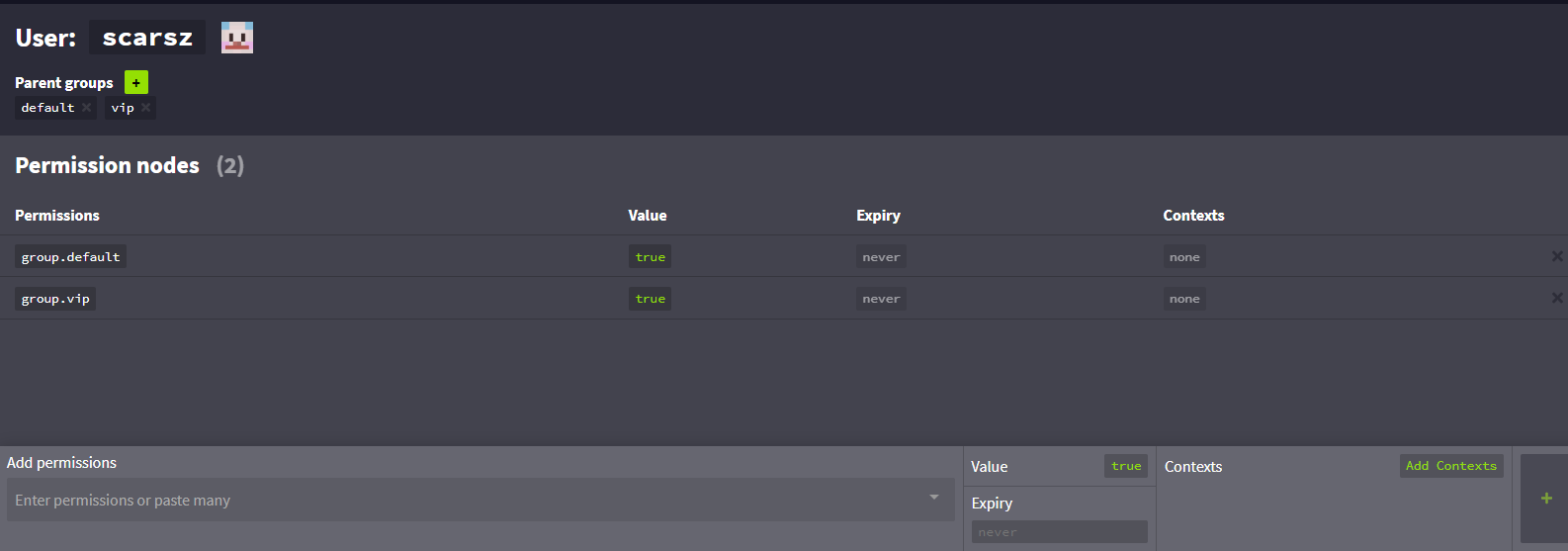
this shows you as having both
which should give you gamemode perms 4 sure
regardless of context actually
gritty thistle
it was weight
high raven
was it really?! that's insane lol I wonder how in the world weight does that
gritty thistle
LuckPerms - A permissions plugin for Minecraft servers.
LuckPerms is a permissions plugin for Minecraft servers.
high raven
it's not like anything overrides anything
oh yeah in this editor it totally does 😂
welp, glad it's working :))
gritty thistle
to be clear my original issue isn't solved 😕
just the gamemode permission thing works now
high raven
yeah, the original problem was that it doesn't show you as in VIP?
gritty thistle
problem was that I don't get the vip parent when I meet the context
high raven
how are you checking this - the info command?
gritty thistle
yeah
high raven
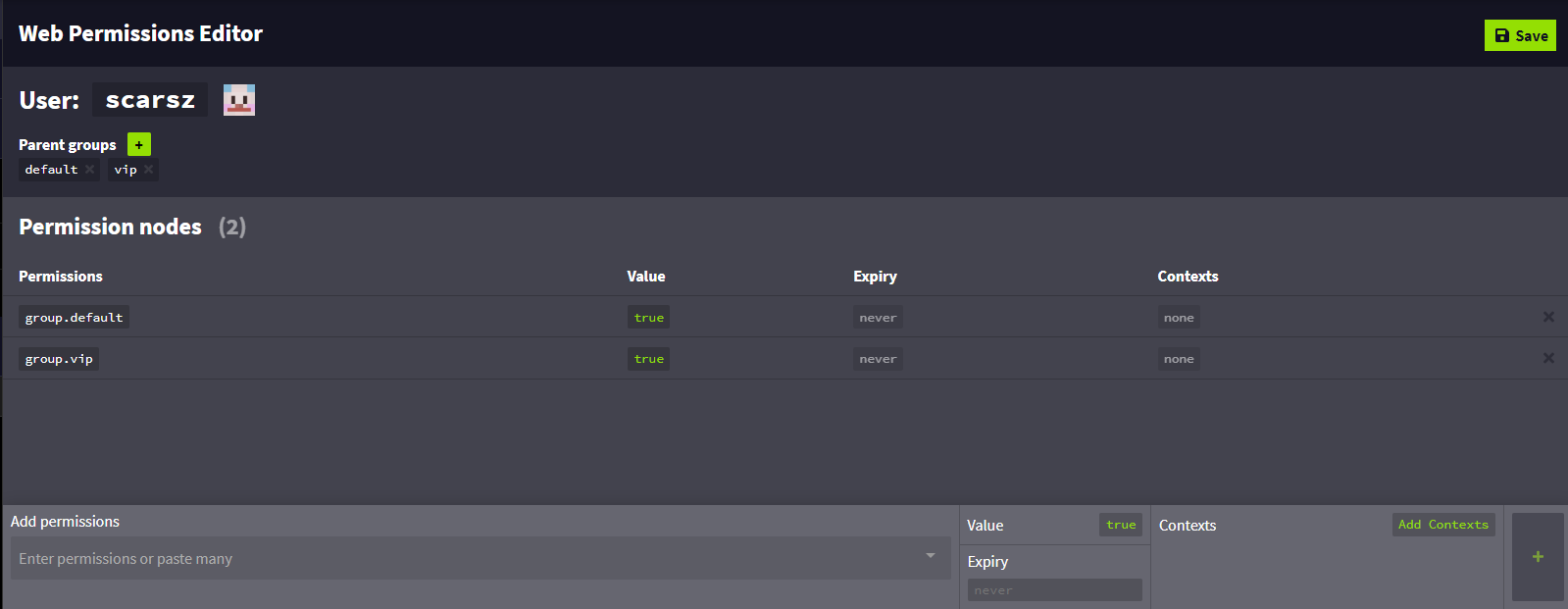
https://i.imgur.com/qmOI0mL.png this does show you as having the VIP parent, and I have one surefire test. Run lp group default meta setprefix 1 default and then lp group vip meta setprefix 2 vip, then see what prefix the info command shows ya
 gritty thistle
I manually gave myself vip for that
high raven
ah
try with just default
on your user
(I've seen more bugs (1) with the info command than with the parent/inheritance system (0)) which is why I'm more eager to believe it's an info command bug haha
gritty thistle
negative
high raven
it gives you the default prefix?
gritty thistle

LuckPerms - A permissions plugin for Minecraft servers.
LuckPerms is a permissions plugin for Minecraft servers.
high raven
hm, it's showing no prefix at all - did you set the one on each?
i also don't see it in the editor
gritty thistle
I never set prefixes
high raven
i know, it's just another internal luckperms-y way to see what might be wrong :p
the higher weighted prefix will show if you inherit it in any way
including through this new plugin-set context that might break the info command or something
gritty thistle
 high raven
ahaha extra confusion 😂
it's not fully broken, just half
im laughing pretty hard at the fact that that worked
gritty thistle
i'd ping lucko but don't want clippy to yell at me
high raven
He's asleep anyhow lol
gritty thistle
fwiw, I don't have the /gamemode creative permission
high raven
do you have any plugins other than dsrv and LP?
gritty thistle
no
high raven
so you are inheriting default's nodes... kinda
vip's*
can you try running lp user <you> permission checkinherits minecraft.command.gamemode
see what it returns
gritty thistle
[20:18:40 INFO]: [LP] scarsz has permission minecraft.command.gamemode set to false in context global. (inherited from default)
high raven
try setting a weight of 1 on default and 2 on VIP
the null weight can be screwy
same with 0 sometimes
 quaint idol
ohai scarsz 
quaint idol
lol
high raven
successfully breaking it too it seems
quaint idol
lol lemme scroll up and see why scarsz is here
gritty thistle
trying to give parent based on context
quick lagoon
try remove group.default from vip
high raven
worth a shot
high raven
pulling my hair out at this point this should definitely be working ahaha
gritty thistle
LuckPerms - A permissions plugin for Minecraft servers.
LuckPerms is a permissions plugin for Minecraft servers.
there's where we're at
high raven
if you add VIP as a parent without any context, the gamemode command works?
gritty thistle
yes
quaint idol
does a different DSRV context work?
gritty thistle
I tried with discordsrv:role=vip originally, didn't work either
high raven
Luck broke luckperms 🥳
gritty thistle
I still have the VIP role on myself in the dsrv server
quaint idol
lol
high raven
Scarsz, try adding it with a native context
quaint idol
is it behaving properly with a default context i.e. world=<>
high raven
name your server in the config
gritty thistle
wat
quaint idol
then server=scarszland context
gritty thistle
context for what
high raven
on the VIP parent
gritty thistle
que
gritty thistle
o
gritty thistle
[20:25:16 INFO]: [LP] Web editor data was applied to group default successfully.
[20:25:16 INFO]: [LP] (1 addition and 1 deletion)
[20:25:16 INFO]: +  group.vip (true) (server=scarszland)
[20:25:16 INFO]: -  group.vip (true) (discordsrv:linked=true)
> lp user scarsz info
[20:25:37 INFO]: [LP] > User Info: scarsz
[20:25:37 INFO]: [LP] - UUID: d7c1db4d-e57b-488b-b8bc-4462fe49a3e8
[20:25:37 INFO]: [LP]     (type: mojang)
[20:25:37 INFO]: [LP] - Status: Online
[20:25:37 INFO]: [LP] - Parent Groups:
[20:25:37 INFO]: [LP]     > default
[20:25:37 INFO]: [LP] - Contextual Data: (mode: active player)
[20:25:37 INFO]: [LP]     Contexts: (discordsrv:linked=true) (discordsrv:boosting=false) (discordsrv:role=programming primate) (discordsrv:role=contributor) (discordsrv:role=vip) (world=world)
[20:25:37 INFO]: [LP]     Prefix: "default"
[20:25:37 INFO]: [LP]     Suffix: None
[20:25:37 INFO]: [LP]     Primary Group: default
[20:25:37 INFO]: [LP]     Meta: (weight=1) (primarygroup=default)
¯_(ツ)_/¯
high raven
server isnt showing as an available context for some dumb reason
probably cause storage type ugh
high raven
use world=world
quaint idol
lol that would be why
gritty thistle
half broken again
> lp user scarsz info
[20:27:01 INFO]: [LP] > User Info: scarsz
[20:27:01 INFO]: [LP] - UUID: d7c1db4d-e57b-488b-b8bc-4462fe49a3e8
[20:27:01 INFO]: [LP]     (type: mojang)
[20:27:01 INFO]: [LP] - Status: Online
[20:27:01 INFO]: [LP] - Parent Groups:
[20:27:01 INFO]: [LP]     > default
[20:27:01 INFO]: [LP] - Contextual Data: (mode: active player)
[20:27:01 INFO]: [LP]     Contexts: (discordsrv:linked=true) (discordsrv:boosting=false) (discordsrv:role=programming primate) (discordsrv:role=contributor) (discordsrv:role=vip) (server=scarszland) (world=world)
[20:27:01 INFO]: [LP]     Prefix: "vip"
[20:27:01 INFO]: [LP]     Suffix: None
[20:27:01 INFO]: [LP]     Primary Group: default
[20:27:01 INFO]: [LP]     Meta: (weight=2) (primarygroup=default)
no /gamemode creative permission
high raven
editor link pls
gritty thistle
luckperms confirmed broke
LuckPerms - A permissions plugin for Minecraft servers.
LuckPerms is a permissions plugin for Minecraft servers.
wintry cloudBOT
Suggestions and Bug Reports
If you would like to request a feature for LuckPerms, or report a bug, feel free to open an issue on GitHub!
Issue Tracker:
high raven
yep
basically
send your editor and the latest screenshots
before that though, try this: /lp applyedits x8z3VlXwn2
see if context still broke
high raven
Parent group with context not applying properly
that's your title lol
make sure to include the prefix inherits
the permission node for some reason does not
and checkinherits shows the wrong inheritance
weights are set
and it's not just the dsrv contexts
either there is some obscure luckperms logic law that this breaks and all is well and I'm being dumb and forgetting something incredibly obscure, or luckperms do be broke
quaint idol
I scrolled through and don't see anything dumb, I'm seconding the luckperms be broke opinion
gritty thistle
GitHub
Trying to apply a parent with any context (tested server=foo, world=world, discordsrv:linked=true) does not work as expected. I properly inherit the prefix of the target group, but none of it&#...
should I add anything else @high raven
wintry cloudBOT
Hey Scarsz lol! Please don't tag helpful/staff members directly.
gritty thistle
i'll clip your balls off bro don't @ me
high raven
😱 😡
😂
looks pretty decent
if he needs anything else he will tell ya
I'll go ahead and ping him now 😛
aight
thanks for the bug report
quaint idol
lowkey think verified people should be exempt from clippy yelling at them
gritty thistle
oh boy
zinger time
this works: https://luckperms.net/editor/i3tbaXa8yX
LuckPerms - A permissions plugin for Minecraft servers.
LuckPerms is a permissions plugin for Minecraft servers.
I removed the deny permission on default
quick lagoon
hmmmmmmmm
high raven
!advanced might have a rule I'm forgetting one sec
wintry cloudBOT
Discover some of the more advanced concepts of LuckPerms, such as permission calculation, shorthand permissions and more.
LuckPerms wiki
high raven
nope
nada
add that to the bug report for sure
if you add VIP as a parent of default with no context whatsoever, can you do /gamemode?
@gritty thistle hope ya don't mind the ping but if the no context works the same then it's likely not a bug
i think it should be different and actually functional though
lmk
gritty thistle
wat
 gritty thistle
inherited parents should really be in that list, maybe in a different color
not in that list, no
> lp user scarsz parent info
[21:05:40 INFO]: [LP] scarsz's Parents:  (page 1 of 1 - 1 entries)
[21:05:40 INFO]: > default
yes but that's with group.vip true with no context on the default group
high raven
so it works when VIP is a parent with no context (even with default having the gamemode permission false)?
gritty thistle
default doesn't have the false permission rn
gritty thistle
no perm
LuckPerms - A permissions plugin for Minecraft servers.
LuckPerms is a permissions plugin for Minecraft servers.
high raven
wont let ya do it?
gritty thistle
negative
high raven
ughgghhghgh
gritty thistle
that definitely feels like a bug
high raven
this is not even context related then
just dumb
might wanna add that to the issue 😔
thanks
for now, for the example, you can just not set the gamemode command to false
in default group
(it's false by default anyways)
 slim scarab
So if I leave an perms unclaimed by any level, it is false by default, correct?
high raven
unless the plugin to which the perm belongs says otherwise, but that's usually not the case
slim scarab
hm
high raven
(it's bad practice)
slim scarab
im starting from stratch and i have several ranks set up so its a bit overwhelming to set each permission for everything
high raven
@gritty thistle Ben found the problem lol, I'm a whole dumbass: https://i.imgur.com/Hwyz52O.png
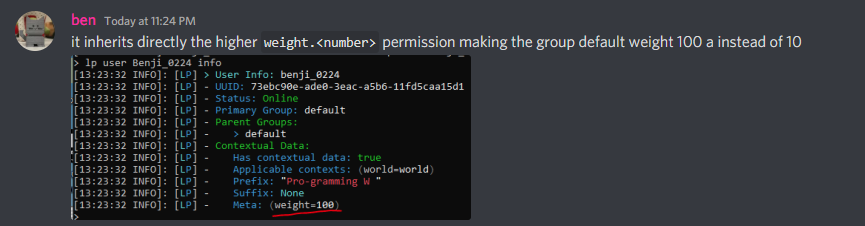
you need to set weight.2 to false in default I think
then it should work
gritty thistle
wat
high raven
making them the same weight and then it's all downhill from there



 tame hollow
Everything is inherited
gritty thistle
can't say I'm a fan of weights being inherited though
side note, turbo, would you be open to working on a project similar to the luckperms web interface but for discordsrv
tame hollow
What would it do?
I'm not really looking to start any new projects any time soon tho
gritty thistle
just a web interface for the discordsrv configuration
i've been going through my head about having a web interface like luckperms for discordsrv because the config is so long/detailed
either a web interface or an in-game gui for simpler variables
idk, just a random side thought
 open marsh
Hey. So i have a little problem. As i was trying to get groups. I saw that the default group was the group that had the highest priority. So the default were shown at place 1, manager on place 2, and owner on place 3. Do you maybe know what happened?
open marsh
I found out that default group is still on 1st place on tab. how can i change that?
high raven
your tablist formatter
open marsh
k.
slim scarab
wait if weight is inherited how would it know which weight to go with first, the node itself or irs parent?
high raven
goes with the highest node it inherits currently afaik
slim scarab
alright
final question for the night
how can I get a list of all permission nodes my server has at hand
is there like a spit out list somewhere
slim scarab
thank you
slim scarab
but if it hasnt checked... not there. okay.
high raven
for that, it's a per-plugin-docs things
slim scarab
wish there was a way for me to like ./lp allpermslist and it runs a check on every plugin, getting its info and spit it out
that way I could just print it out and assign it on paper and go back and do the perms without missing that or that
high raven
that's true, but tbh if you run /help for each plugin as a non-op it should give you some extra, and afaik LP can't run the check for plugins its a complex system where players need to be there and the plugin kinda has to initiate and idrk but it's weird
if you have a list of plugins
you can google their perms lists
and then you have a list of perms!
slim scarab
but but so much work, my poor hands
(im doing just that right now, was hoping for a shortcut :))
quick lagoon
!paste full error
wintry cloudBOT
Please use pastebin!
Seeing a paste of the problem makes everything so much easier! Use https://bytebin.lucko.me/ for easy pasting!
For console errors:
Pastebin any relevant segments of the console log. If it's a startup error, this includes the entire startup log!
Other errors:
Pastebin the entire LuckPerms config file (passwords removed) as well as any other relevant files!
prisma hinge
okidoki
gimme a sec
# The following block defines the settings for remote database storage methods.
#
# - You don't need to touch any of the settings here if you're using a local storage method!
# - The connection detail options are shared between all remote storage types.
data:

  # Define the address and port for the database.
  # - The standard DB engine port is used by default
  #   (MySQL: 3306, PostgreSQL: 5432, MongoDB: 27017)
  # - Specify as "host:port" if differs
  address: MySQL 3306

  # The name of the database to store LuckPerms data in.
  # - This must be created already. Don't worry about this setting if you're using MongoDB.
  database: mydatabase

  # Credentials for the database.
  username: myusername
password: mypassword```how is address mysql lol
- remove the port number
- ensure password is in quotes 'password'