#support-2
1 messages · Page 41 of 1
 worn shoal
 oblique wyvern
Hey I have an error with the mysql base, indeed, the plugin specifies to be below 30 seconds of the value of the wait_timeout of the base .....
But if the database has a value of 10 seconds that cannot be modified because it is blocked by the host, is there a solution?
 proper pulsar
Complain to your host
Tell them I said they are fucking retarded if they think that's a good idea
oblique wyvern
xD
 desert escarp
It was a good idea if they don't support minecraft servers lol
I've been trough that, you can work around, but you don't want to. Change the host
oblique wyvern
I just paid it, if it was a long time, I would change, it annoys me to have paid for nothing xD
desert escarp
Know that feeling, bro
Tried VPS because reasons, the company wouldn't cooperate on making way for LP to fully work so I flipped them a finger. Wasted money.
oblique wyvern
I think that's what will happen to me too x)
desert escarp
Unfortunately. Until you are going to make huge cash on the server you don't need anything else than random good MC server hosting company.
When it comes to getting those monies you will know by then what to do.
proper pulsar
@oblique wyvern how long ago have you paid?
What issues were you having @desert escarp ?
oblique wyvern
for only a few days
desert escarp
Didn't even bother to find out. I was blocked when it came to importing any settings or using the editor. Something was on the ports or whatever.
oblique wyvern
I asked for a refund of the blow, but I had as an answer that the installation was carried out, therefore no refund possible
desert escarp
Many other things had the same issue, my co-worker told me that it's lost case and I just went with that
oblique wyvern
Thank you for your answers, you are great 🙂
proper pulsar
@desert escarp if they were blocking HTTPS requests literally nothing would work on that server
So I doubt you got a VPS
 bronze tangle
I gave myself the bungeecord permission but still I don't have the permission. I have luckperms on the proxy and on every server. I also linked them via MariaDB. Still, it doesn't work. Can anyone help me there
proper pulsar
@oblique wyvern threaten to sue. You know your consumer rights
desert escarp
Maybe they have scammed me. I don't care now :v
bronze tangle
for example, i gave myself permission for bungeecord.command.alert
but I don't have it
 quick lagoon
!verbose
 wintry cloudBOT
LuckPerms provides a verbose command to help you find out what permissions a command/plugin is checking.
 LuckPerms wiki
quick lagoon
LuckPerms wiki
quick lagoon
lpb verbose record- run bungeecord commands
lpb verbose upload- upload link here @bronze tangle
bronze tangle
i dont have any perm for lpb
quick lagoon
its synced to a common sql database right?
quick lagoon
then you have perms for lpb if your perms are all synced
 prisma hinge
hello i have a problem: why i don't have the default prefix ?
proper pulsar
!chat @prisma hinge
wintry cloudBOT
LuckPerms does not display things in chat!
LuckPerms is only able to send information to formatting plugins so that they display them properly. LuckPerms does not put the prefix in front of your name, you need a chat formatting plugin to do it, and you need Vault. Same goes for the tablist! If the information appears correctly when you run /lp user <user> info, LuckPerms is doing its job!
Prefix isn't showing?
What plugins can I use to format chat?
prisma hinge
ok thanks
 potent warren
Can anyone help please?
/lp group default permission set factions.* false world=skyblock
I used this command for a couple of the worlds (changing 'skyblock' of course) but it still allows me to claim everywhere? I am fully updated (I've had this error for a while so updated the plugin to see if it fixed it) but it made no difference. If anyone could help I would be eternally grateful
quick lagoon
!verbose check if the perm nodes is set to true or not
wintry cloudBOT
LuckPerms provides a verbose command to help you find out what permissions a command/plugin is checking.
LuckPerms wiki
potent warren
I checked and everything is set how it should be, but the permissions are now just not doing anything
quick lagoon
!errors
wintry cloudBOT
Here's a page with some common storage system errors.
LuckPerms wiki
 broken quail
@quick lagoon
wintry cloudBOT
Hey danyel_dj! Please don't tag helpful/staff members directly.
broken quail
I can't find which is mine
quick lagoon
> [17:52:37 WARN]: java.sql.SQLTransientConnectionException: luckperms-hikari - Connection is not available, request timed out after 5000ms.
 calm wadi
hello guys what are the luckperms permissions ??
 mental trench
Stick to 1 channel
 willow walrus
what are parent groups
bronze tangle
!verbose
wintry cloudBOT
LuckPerms provides a verbose command to help you find out what permissions a command/plugin is checking.
LuckPerms wiki
 full flume
@willow walrus
A parent group is a groups that passes Inheritance onto child groups.
Eg.
VIP has minecraft.command.teleport
Vip+ has minecraft.command.ban
If vip Is a parent to vip+ then vip+ will also have the teleport permission
 vivid patio
how to change nick color in chat tab?
vivid patio
for example?
 high raven
EssentialsX and EssentialsXChat, and the plugin TAB
 crude oar
I have the ViveCraft plugin on my server and it's supposed to add the person to a group which it does correctly but it's not supposed to define a specific world (code is here https://github.com/jrbudda/Vivecraft_Spigot_Extensions/blob/f7a58dca0d4dfce74a20826eb8795755e2466e38/src/org/vivecraft/VSE.java#L464). is there a config option on LP's side i'm missing or something?
or if they're doing something wrong i could relay the message
high raven
Default context could be doing it if the contexts file is modified
crude oar
literally haven't touched it lol
high raven
Hmmmm
Don't see how lp could be doing it then, tbh
Probably best to give them a shout?
crude oar
yeah i talked to them
they think it might be an LP issue
im talking to them a bit more tho so we'll see what they say
high raven
Kk
 soft cosmos
if they're just using vault then nop it's not their fault
check your LP config file
the option is vault-server I think
crude oar
ok yeah setting vault-ignore-world: true seems to have fixed it so i guess now i just hope that i don't have anything else that needs that to be false lol
aight looks like it was an issue with the vivecraft plugin as the dev sent a jar and it seems to work as it should now
 final creek
Hey there, where can I get support with a question I had about luck perms?
 tame hollow
here works
final creek
Ok.
I'm kind of confused with how global ranks work across a bungee-cord network. My scenario is this, I have the latest version of LuckPerms installed on a bungeecord and also on 3 other server connected to the bungeecord. However, When creating groups on one server, they would not appear on any of the others. I have no clue why but I feel like I'm missing something really obvious.
tame hollow
!sync
wintry cloudBOT
To sync data between servers, you need to connect each LuckPerms plugin to the same database (for example MySQL) and set up a messaging service.
LuckPerms wiki
final creek
The groups would sync using pluginmsg right?
tame hollow
if you mean with a local storage like H2 or YAML, no
you need a remote database like mysql
and then you would want to use sql messaging service
tame hollow
lol it's okay, that's why we're here
final creek
Thanks, also as I switch this over to a MySQL database, how would I move the exsisting data from h2 to it? or is there no way to?
quick lagoon
!switchstorage
wintry cloudBOT
If you wish to change your storage type (e.g. to YAML or MySQL) you may need to follow these instructions to ensure your groups and permissions are migrated to the new storage type.
Read more about the Storage types
LuckPerms wiki
final creek
Thanks!
For the MySQL database, (because i am a noob at this) would i need to make a table for the plugin or will it make its own?
final creek
Everything is ok so far and no errors. However the ranks still are only appearing on the original server and not all of them. I made sure that all the servers were connected to the correct MySQL database and had correct credentials but can't find the problem. Was I supposed to copy and import the file to each of the servers?
quick lagoon
show lp info of one backend server and lpb info from your bungeecord proxy
tame hollow
looks like they both have the groups.
final creek
On those they do. But here there isn't any but default. I tried doing sync and networksync as well..
tame hollow
are you sure it's using the exact same database as the others?
quick lagoon
unless... you changed apply-global config stuff in LP config.yml
final creek
Yep, Same database names.
tame hollow
surely it would still load the groups though
final creek
they are all set to true for apply-global.
tame hollow
any errors in console?
final creek
Oh wait there are errors.
tame hollow
yeah let's see those
quick lagoon
!paste pleasee
wintry cloudBOT
Please use pastebin!
Seeing a paste of the problem makes everything so much easier! Use https://bytebin.lucko.me/ for easy pasting!
For console errors:
Pastebin any relevant segments of the console log. If it's a startup error, this includes the entire startup log!
Other errors:
Pastebin the entire LuckPerms config file (passwords removed) as well as any other relevant files!
wintry cloudBOT
MySQL SSL Error
Caused By
Establishing SSL connection without server's identity verification is not recommended.
https://pastebin.com/c90uY2mn | Sent by coolman89
quick lagoon
ah read that link ^
tame hollow
clippy to the rescue!
final creek
Yep! and I found the problem, apperently in the affected servers config file the useSSL and verifyServerCertificate were missing.
Thank you both for the help. It means a lot.
Have a nice night!
tame hollow
sweet :)
quick lagoon
Glad you got it working ! 😉
 fringe marlin
Hello,
I currently use the UltraPermissions plugin, I want to migrate to LuckPerms but I would have liked to know if there is a tool to migrate permissions from one plugin to another?
high raven
There is, unfortunately, not
The UP api is a big secret
and so a true migration service is not possible rn :((
fringe marlin
Okay no worries, we're going to waste a little time but we'll do it all by hand :p
Thank you for your reply :p
wintry cloudBOT
LuckPerms offers an easy to use, powerful Web Editor, with which you can add, delete and change permissions of groups and players.
LuckPerms wiki
high raven
take a peek ^
fringe marlin
Okay ahah, thank you very much ^^
tame hollow
!meta
wintry cloudBOT
You can set prefixes, suffixes and other meta data in LuckPerms for players and groups. Note that LuckPerms does not manage chat. You need to use another plugin to show prefixes/suffixes in chat.
LuckPerms wiki
tame hollow
for me soz
 white shale
Is there a way to restrict the luckperms.user.parent.add.self permission to only allow inheritance from certain groups? I want my admins to be able to drop and re-add their perms when they are playing not 'working'.
I've read the wiki but I think there's something I'm missing here.
 winter cave
Guys
I started a server
But I want normal players to.use commands such as sethome login etc
And I cannot..
 austere aspen
/lp editor
winter cave
Can please someone call me and walk me.through..
quick lagoon
!usage to get started
wintry cloudBOT
Here's a guide to help users understand and use LuckPerms for the first time.
LuckPerms wiki
quick lagoon
you should look into each plugins documentation for permission nodes
!verbose if you want to check or cant find them.
wintry cloudBOT
LuckPerms provides a verbose command to help you find out what permissions a command/plugin is checking.
LuckPerms wiki
austere aspen
for home for example is
winter cave
And where I paste these nodes?
austere aspen
essentials.home
quick lagoon
!editor @winter cave will be a good place
wintry cloudBOT
LuckPerms offers an easy to use, powerful Web Editor, with which you can add, delete and change permissions of groups and players.
LuckPerms wiki
winter cave
I got to the editor
austere aspen
but plugins and minecraft don't have mysterys for me
winter cave
It shows me tracks and groups and I can edit groups
austere aspen
sorry for bad english
winter cave
Its okey bro
austere aspen
ok so click the group default
and you have bar where you can type and if you start typing like essentials
there will show you posybylitys
omg i cant type lol
winter cave
I clicked "groups" and I can change group name weight prefix etc
winter cave
What is display name?
winter cave
And suffix?
quick lagoon
tbh have you read the wiki?
winter cave
Guys can someone call me?
quick lagoon
no, sorry
austere aspen
/lp user/group <user|group> meta setsuffix [priority] <suffix>
[priority] i think this is weight
quick lagoon
!meta
wintry cloudBOT
You can set prefixes, suffixes and other meta data in LuckPerms for players and groups. Note that LuckPerms does not manage chat. You need to use another plugin to show prefixes/suffixes in chat.
LuckPerms wiki
quick lagoon
mate read the wiki ^
austere aspen
i am to help him
winter cave
Zool
austere aspen
sorr mabye layter
winter cave
Key..
quick lagoon
i dont exacly remember every single plugin and command
@austere aspen thats was the wiki is for dude
austere aspen
stfu xd
 barren fable
You can ignore them if you don't know 'em
quick lagoon
@austere aspen why did you call me lol
winter cave
Yes but for example I want to make simple members to use login,home etc
And I can't
I want to make member names green and owners red for example
austere aspen
@quick lagoon sorry i was ment to call jonito
wintry cloudBOT
Hey Zoolthar! Please don't tag helpful/staff members directly.
quick lagoon
ah
austere aspen
but he don't pick up my call
 silk prairie
Hi i need help, so i have a bungee network.
Everything has been setup correctly.
But when i add a permission (Server Specific), my donator ranks dont inheret that?
/lp group default permission set <perm> true survival
Donator rank has parent add default.
/lp group guard parent add default
quick lagoon
have you set server: servername for all your LP config.yml on all servers?
quick lagoon
!weights have you set this up?
wintry cloudBOT
LuckPerms allows you to set weights in order to determine the priority of certain nodes, like permissions and even prefixes. A higher weight number is a higher priority.
LuckPerms wiki
silk prairie
Weights also been setup correctly.
quick lagoon
send lp editor
silk prairie

LuckPerms - A permissions plugin for Minecraft servers.
LuckPerms is a permissions plugin for Minecraft servers.
Dont look at the old ranks (God to YGS)
prisma hinge
how to use luckperm in 1.15.2?
silk prairie
But if guard has parent add default
it should inherit al the default perms
including server specific perms
But it doesnt inherit server speicific perms
which is really irritating.
prisma hinge
please how to use luckperm in 1.15.2?
prisma hinge
no
silk prairie
What do you mean with how to use luckperms in 1.15.2
quick lagoon
!usage @prisma hinge
wintry cloudBOT
Here's a guide to help users understand and use LuckPerms for the first time.
LuckPerms wiki
silk prairie
lmao
prisma hinge
thank
quick lagoon
@silk prairie can you screenshot lp info for your survival server
silk prairie
quick lagoon
lp verbose record <playername>(player in donor rank ONLY)- do command that has survival context
lp verbose upload- send link here
 acoustic elm
For some reason the prefix isn't showing up. I have EssentialsXChat installed and everything. Also have added myself into the group but still doesnt display it. This is on 1.15.2
quick lagoon
!chat
wintry cloudBOT
LuckPerms does not display things in chat!
LuckPerms is only able to send information to formatting plugins so that they display them properly. LuckPerms does not put the prefix in front of your name, you need a chat formatting plugin to do it, and you need Vault. Same goes for the tablist! If the information appears correctly when you run /lp user <user> info, LuckPerms is doing its job!
Prefix isn't showing?
What plugins can I use to format chat?
acoustic elm
Can anyone help please
silk prairie
LuckPerms - A permissions plugin for Minecraft servers.
LuckPerms is a permissions plugin for Minecraft servers.
Guard cant do /tpaccept
which default can
and guard has parent add default
so it should work
quick lagoon
the player in verbose link you showed is in group.owner
silk prairie
okay wait
LuckPerms - A permissions plugin for Minecraft servers.
LuckPerms is a permissions plugin for Minecraft servers.
This one should work
silk prairie
Im in group guard
🙂
and im not opped
and i cant do tpaccept
while default can
Permission speicific to a server dont inherit for some reason
silk prairie
Yes bent look at this
quick lagoon
hmm
tame hollow
you're running an old version of LP btw
quick lagoon
!update yea, but i dont think it issue was with that?
wintry cloudBOT
You can download LuckPerms for Bukkit/Spigot, BungeeCord, Sponge, Nukkit and Velocity.
Additional downloads
quick lagoon
haha yes
 halcyon drift
is there a way to use essentials x chat with lp bungee version ?
halcyon drift
sorry ^^'
acoustic elm
It still doesn't show a prefix. Would that be a issue with essentials chat?
halcyon drift
Turbo my issue is that no prefix is shown while I got lpbungee on waterfall and essentialsx chat installed on paper
quick lagoon
have you synced all your LP on all servers to a common sql database?
tame hollow
you need LP on the servers as well, not just bungee
quick lagoon
!bungee
wintry cloudBOT
If you run a Bungeecord network, learn how to correctly setup LuckPerms on all server instances (including Bungee).
Also read:
Syncing data between servers
https://github.com/lucko/LuckPerms/wiki/Syncing-data-between-servers
LuckPerms wiki
 polar pagoda
How Can i remove all players from a group/permission with bulk?
maybe something like this? /lp bulkupdate all delete "permission == group.test"
quick lagoon
/lp bulkupdate users delete "permission == group.groupname"
quick lagoon
yes haha
proper pulsar
""
quick lagoon
””
proper pulsar
Nope
quick lagoon
yea its ios
tame hollow
stupid apple
proper pulsar
I mean for normal text it’s fine
halcyon drift
is it obligatory to have a mysql server to put this plugin on bungeecord ?
quick lagoon
yes, else the lp-bungeecord is useless
and all your servers will have sperate permissions
with no way of syncing them, unless you have an sql database
halcyon drift
well I'll make one
halcyon drift
I guess but mysql is fine ^^
prisma hinge
Somehow Can I give someone a rank quickly?
barren fable
What do you mean "quickly"?
prisma hinge
What is the fastest command
barren fable
!usage the one in that guide
wintry cloudBOT
Here's a guide to help users understand and use LuckPerms for the first time.
LuckPerms wiki
 median dew
Dear Luckperms Support, we downloaded both Luckperms and Luckperms BungeeCord for a BungeeCord server, successfully installed them and connected the MySQL. However, with / lpb, despite multiple rights assignment in the console, only the error message with references to the command for luckperms. * Is indicated without further information in the logs. Sincerely, SneaX
 mighty spear
Are they both configured to the same storage method @median dew ?
 fast kite
Is it possible to replace <user> with @p with this command /lp user <user> promote <track> [context...]
Oh hi! @mighty spear
wintry cloudBOT
Hey Boxxy! Please don't tag helpful/staff members directly.
 half schooner
hey is it possible to remove a single inherited permission from a lower rank to a higher one. Basicly the one above being the same apart from a select few permissions?
 quaint idol
set it to false on the higher rank
half schooner
how do i remove those few permissions from the inheritance though?
it only gives me one permission node to work with
also how do i set a group as default?
 full forum
does this change (https://github.com/lucko/LuckPerms/pull/2300) also apply for self defined static contexts?
 charred prairie
im am trying to change the prefix to another prefix how do i do that
Poppy 🐾Today at 2:29 PM
same command
the prefix will be replaced
GamingProToday at 2:30 PM
ik
but then i deleted the group then did /lp group owner meta addprefix 30 '&4&l[Owner] ' server and added myself to the group and it didnt work
can anyone help me
can someone pls help
full forum
@charred prairie how can u add yourself to a group, that does not exist?
full forum
@charred prairie if you issue the command /lp group owner meta info
what does it tell u about youre groups prefixes and suffixes?
full forum
@charred prairie exactly the same command works for me
charred prairie
@full forum i did it again its still not working
do you know how to help?
@full forum
full forum
@charred prairie no I cant. the commands are correct, as far as I can tell. No idea. It works for me
@charred prairie would you mind to share an lp editor seesion to? via direct message of course
median dew
Are they both configured to the same storage method @median dew ?
@mighty spear yes it is
wintry cloudBOT
Hey SneaX! Please don't tag helpful/staff members directly.
prisma hinge
i having a issue when i ever i gave my owner role op and try using it it doesnt work and it says i dont have permission
quaint idol
Are you on sponge?
prisma hinge
no spigot
quaint idol
define "gave my owner role op"?
prisma hinge
trying to gave my group even my user own user so pretty much /op the basic command to op your self on the server
quaint idol
access to the /op command is not the same as being op
prisma hinge
well im trying to give my owner role it and it doesnt want to work
is there another solution to be giving my owner role all the perms
 muted bear
 willow lynx
Can anyone help me setup global ranks?
Everything is connected to the same MySQL database but nothing transfers
 cerulean cipher
run /lp networksync
willow lynx
Already tried
cerulean cipher
interesting
wintry cloudBOT
Please use pastebin!
Seeing a paste of the problem makes everything so much easier! Use https://bytebin.lucko.me/ for easy pasting!
For console errors:
Pastebin any relevant segments of the console log. If it's a startup error, this includes the entire startup log!
Other errors:
Pastebin the entire LuckPerms config file (passwords removed) as well as any other relevant files!
willow lynx
I will
cerulean cipher
thanks
willow lynx
np
cerulean cipher
glad we got it sorted for you mate 🙂 @willow lynx
anything just give me a shout 🙂
 lilac hazel
^ would help people in the same boat if you were to share the solution.
Incase anyone else runs into the issue.
high raven
tis the luckperms way
prisma hinge
Should default rank have 988 weight
prisma hinge
right
full flume
Unless you want 988 other ranks for default to inherit
high raven
*but not override
 jovial sandal
ok
prisma hinge
what is permission for break and place the block ?
 fiery mica
Hello, i need plugin for donatecases, have anybody?
high raven
@fiery mica this is your last warning. Stop spamming channels, ask in #general , and let people respond if they know
 high raven
what
 gleaming osprey
Hey guys
does anyone have a list of all the essential commands that are neccessary to add if im doing a factions server?
quick lagoon
high raven
that's entirely up to you
i dont think ben read the message fully lol
you need to decide what your players can and cant do though
gleaming osprey
how do i let my players place/destroy blocks
high raven
delete essentialsxantibuild
gleaming osprey
okay thank you
bronze tangle
can you inherit groups without the prefix stacking up?
quick lagoon
!stacking
wintry cloudBOT
Display multiple prefixes/suffixes alongside a player's name.
LuckPerms wiki
bronze tangle
and which element do I have to use?
How can I remove this? Please instructions and no link
quick lagoon
are you using luckpermschat plugin?
bronze tangle
yes
quick lagoon
for your chat fomatter
ok
so change prefixes to prefix in luckpermchat config.yml
bronze tangle
ok thx
 cyan salmon
how do i change the color of my chat
high raven
chat formatting plugin
cyan salmon
oh ok
 cursive dove
is there anyone on here that can help me out?
cerulean cipher
Depends what help you need haha
tame hollow
!ask
wintry cloudBOT
Please ask your question!
Please ask the question you have. Don't ask to ask, or ask to DM someone. There are people here to help you, but we need to know what to help you with, so please just ask the question you want to in as much detail as possible!
Or, try here first:
Why shouldn't I ask to ask?
prisma hinge
IT Not Work when i do /pl The Name ist Red but why ?
quaint idol
!paste look for startup errors in console, send here pelase
wintry cloudBOT
Please use pastebin!
Seeing a paste of the problem makes everything so much easier! Use https://bytebin.lucko.me/ for easy pasting!
For console errors:
Pastebin any relevant segments of the console log. If it's a startup error, this includes the entire startup log!
Other errors:
Pastebin the entire LuckPerms config file (passwords removed) as well as any other relevant files!
quaint idol
*please
quaint idol
Have you tried looking for one yourself?
quaint idol
Look up tebex or buycraft
 mystic lotus
Thy
prisma hinge
quaint idol
What version minecraft @prisma hinge?
prisma hinge
1.8
barren fable
Yes, all 1.8 things are compatible with 1.8.8.
prisma hinge
nop this pl not :/
barren fable
What plugin?
barren fable
It's LuckPerms, no y
LuckPerms only works with 1.8.8, not 1.8, you need to use 1.8.8. But everyone that wants to join using 1.8 can still do that even if your server is 1.8.8
prisma hinge
Since I have to look for something else. what happened to permission Ex?
quaint idol
abandonded
prisma hinge
how do you mean
quaint idol
As in, the author hasn't been maintaining it
He's writing PEX v2, but that's still nowhere near ready for release afaik
prisma hinge
i hate The Autor xD
 indigo dawn
There is a problem. Players with a rank and potentially players without a rank can use moderator commands. What do I do?
 primal nexus
pex dead? woah
proper pulsar
@prisma hinge update to 1.8.8
primal nexus
18 days ago last updated lol
proper pulsar
All plugins will work with it
And all players can still join
You should have never even made a plain 1.8 server to begin with
It's like you're begging to be hacked
prisma hinge
nop i didnt can
proper pulsar
Why?
prisma hinge
because I had to search out everything new anyway what was found
proper pulsar
That sentence doesn't make sense
prisma hinge
Jz does not want to take a new version because I have to search all plugin + new.
 stuck coyote
No you don't. All plugins are 1.8.8 compatible if they work with 1.8
 vapid inlet
Is there by the chance someone can help me upgrading luckperms? Because I have an old version and I don't want to loose any data
 devout garnet
i think theres something on the wiki about what you need to look out for
i'm pretty sure for me i just replaced the jar and it worked
prisma hinge
hi, im using mongodb and have my cluster set up. I know my username and password, but what is the address? Does anyone know?
i didnt need to instaled a new version i found a other pl
proper pulsar
@vapid inlet stop your server, make a backup, replace the LP jar, start your server: done
I've been here for 3 years I think. And that works for every version from that time frame and probably even further
 runic sedge
Can I delete this file
luckperms-h2.mv.db
If I am switching to mysql
for storage
@proper pulsar
wintry cloudBOT
Hey Mystik! Please don't tag helpful/staff members directly.
wintry cloudBOT
Please use https://bytebin.lucko.me to send files in the future. I have automatically uploaded message.txt for you: https://bytebin.lucko.me/TDrk8O2uff
MySQL SSL Error
Caused By
Establishing SSL connection without server's identity verification is not recommended.
https://bytebin.lucko.me/TDrk8O2uff | Sent by Clippy
runic sedge
Establishing SSL connection without server's identity verification is not recommended.
that's what clippy says at least
what do I do to fix this
soft cosmos
click the link it gave to you
wintry cloudBOT
Hey Mystik! Please don't tag helpful/staff members directly.
primal nexus
oof
runic sedge
lol
primal nexus
not funny.
runic sedge
which link tho Luck
primal nexus
read rules first of all
runic sedge
ok
primal nexus
second, click link
primal nexus
primal nexus
bot legit replied it to u
runic sedge
that was
primal nexus
¯_(ツ)_/¯
primal nexus
no he didnt
primal nexus
 primal nexus

GitHub
A permissions plugin for Minecraft servers. Contribute to lucko/LuckPerms development by creating an account on GitHub.
is ur answer
primal nexus
just add useSSL: false verifyServerCertificate: false
primal nexus
weird people get that error
runic sedge
just remove the #
primal nexus
never happend for me lol
primal nexus
u use a diffrent server for the db?
runic sedge
What do you mean
oh wait
yeah
I have databases
with
proxy
and I use that one database with 4 servers
vapid inlet
@proper pulsar So I dont need to delete the file just the .jar?
wintry cloudBOT
Hey DJ Winston! Please don't tag helpful/staff members directly.
 raw inlet
Buenas alguien que me ayude
Tengo Tebex y cuando instale el complemento me pidio que instalara el complemento pero para bungeecord entonces ahora como le hago para ejecutar comandos desde la consola del bungeecord para el luckperms
Good someone to help me
I have Tebex and when I installed the plugin it asked me to install the plugin but for bungeecord then now how do I run commands from the console of bungeecord for the luckperms
high raven
You install luckperms bungee on the proxy and use the proxy console aka the bungee server console @raw inlet
@vapid inlet correct. Just the .jar
raw inlet
Thany you
proper pulsar
@vapid inlet what file?
 frosty shadow
Hello, need some help with the extension part of Luckperms for setting a default rank to another rank.
Ive added the .jar in LuckPerms/extensions, and added the
  my-defaults-rule:
    if:
      has-true: <group.default>
    take:
      - group.default
    give:
      - group.chiller
    set-primary-group: chiller```
in the config file. but when a new player joins it still doesn't put them in the chiller rank. Any help? or suggestions?Pretty sure the folder must be named extensions
 surreal sinew
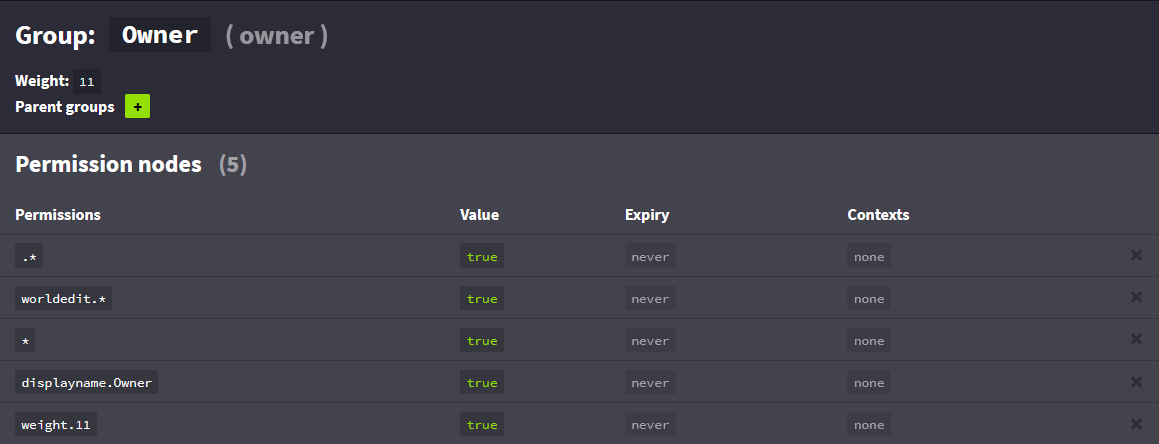
Any ideas why I can't get worldedit permissions working with this group?: https://i.imgur.com/k7xCBZq.png
 wintry cloudBOT
LuckPerms provides a verbose command to help you find out what permissions a command/plugin is checking.
LuckPerms wiki
surreal sinew
👍
frosty shadow
me?
proper pulsar
And take note of the second part
@frosty shadow in that case I don’t know. Sorry
@vapid inlet I’m off in a little while. So if you want my answer you better answer quickly
surreal sinew
I don't get any verbose output when running the command
EDIT: I think it was interference from another plugin
Edit 2: It was. 🤦♂️
frosty shadow
@proper pulsar wait i notice that there are two jar files in the github website. which one am i suppose to be using? or do i use both ? they are called : extension-default-assignments-1.1.0.jar and extension-legacy-api-1.0.0.jar
wintry cloudBOT
Hey iBoogie! Please don't tag helpful/staff members directly.
frosty shadow
oh sorry for the ping.
proper pulsar
The first one
surreal sinew
!chat
wintry cloudBOT
LuckPerms does not display things in chat!
LuckPerms is only able to send information to formatting plugins so that they display them properly. LuckPerms does not put the prefix in front of your name, you need a chat formatting plugin to do it, and you need Vault. Same goes for the tablist! If the information appears correctly when you run /lp user <user> info, LuckPerms is doing its job!
Prefix isn't showing?
What plugins can I use to format chat?
frosty shadow
> [02:15:12 ERROR]: Error occurred while enabling LuckPerms v5.1.26 (Is it up to date?)
is 5.1.26 not the latest ?
high raven
No, but that's probably not the cause. Try deleting the whole libs folder and update, and then restart. If same error, then pastebin the entire startup log
!update
wintry cloudBOT
You can download LuckPerms for Bukkit/Spigot, BungeeCord, Sponge, Nukkit and Velocity.
Additional downloads
frosty shadow
high raven
Ah, you're on 1.8.0 right
frosty shadow
the server version is on 1.12.2
high raven
Ok can you paste the entire start log please
frosty shadow
do you think its bc im running bungeecord
high raven
There's a bungeecord version of luckperms
That goes on the proxy
This is not the proxy is it
I need to see the entire startup log please
high raven
Ok delete the libs folder, update, and restart
Libs folder within luckperms folder
!update
wintry cloudBOT
You can download LuckPerms for Bukkit/Spigot, BungeeCord, Sponge, Nukkit and Velocity.
Additional downloads
frosty shadow
okay i already did that but ill do that again i guess
high raven
!update from here
wintry cloudBOT
You can download LuckPerms for Bukkit/Spigot, BungeeCord, Sponge, Nukkit and Velocity.
Additional downloads
high raven
You're not using the latest version
high raven
Yeah, there are a lotta updates haha
high raven
Make sure to download it from the same site as the lastest LP and yeah it should
!upgrade and make sure everything in the instructions here for installation of the extension are followed perfectly
wintry cloudBOT
Read about upgrading LuckPerms from v4 to v5.
LuckPerms wiki
frosty shadow
actually it worked
with me doing nothing
well updating the luckperms plugin did but you get the point
the setting default rank works
thanks larry
high raven
Np!
surreal sinew
Is there a way to add contexts to a bunch of nodes at once with the web editor?
high raven
A couple ways, either add all the nodes to one group, and add that group several times to another group with different contexts
Or use bulkupdate to change the context of literally every node, which is a bit less effective
surreal sinew
Okay
tame hollow
Was that pr merged?
 scarlet field
So let's say I have two servers in bungeecord. One is a survial server and another is a skywars server. I want to give a player the /sethome and /home command on the survival, but not on the skywars. How do I allocate permissions for this? Please @ me when you have a response
wintry cloudBOT
You can set a permission or group on a per-world/per-server basis, through what we call "contexts".
LuckPerms wiki
tame hollow
Yes.
 broken pier
help pleas for
[luckperms-hikari connection adder/WARN]: Wed May 27 04:18:15 CEST 2020 WARN: Establishing SSL connection without server's identity verification is not recommended. According to MySQL 5.5.45+, 5.6.26+ and 5.7.6+ requirements SSL connection must be established by default if explicit option isn't set. For compliance with existing applications not using SSL the verifyServerCertificate property is set to 'false'. You need either to explicitly disable SSL by setting useSSL=false, or set useSSL=true and provide truststore for server certificate verification.
quaint idol
!errors
wintry cloudBOT
Here's a page with some common storage system errors.
LuckPerms wiki
 strange junco
Hello, can someone explain to me how I should do to install LuckPerms in a network but that the permissions are by modality
tame hollow
!bungee
wintry cloudBOT
If you run a Bungeecord network, learn how to correctly setup LuckPerms on all server instances (including Bungee).
Also read:
Syncing data between servers
https://github.com/lucko/LuckPerms/wiki/Syncing-data-between-servers
LuckPerms wiki
runic sedge
Hi, can someone please help me with a couple permissions? I need to do essentials.gamemode.* server=lobby. I have registered the server name in bungeecord as well as the config in LuckPerms. When I add the permission in the web editor, it is displayed like this(seperately):
essentials.gamemode.* server=lobby, I just want the essentials.gamemode.* to be a permission that my builders can use only in the lobby. All the other permissions that I have, should be global, and work in all servers. How do I do this?
Please @runic sedge Me with the answer, If you can find out how I can accomplish this. Thank you very much.
nevermind
It was solved
cerulean cipher
just click on the permission and delete the space between them
it picks up spaces wierdly
 woeful mango
Larry, Ben, Tobi
i think i might have found out the issue
on the Bungeecord Litebans permission issue
same as the 3 guys yesterday
if i do User set permission it works, but if i set it onto the group with the context ofc server=bungee world=survival it doesn't work.
lilac hazel
Unless you have a backend server named "bungee" in the luckperms config file, it will not work.
The "bungee" proxy does not have worlds, you can't use the world context on proxy perms.
 undone fulcrum
hi can someone help me
i think my mysql keeps timing out and it spits a bajillion errors in console until it crashes
quick lagoon
!paste your error
wintry cloudBOT
Please use pastebin!
Seeing a paste of the problem makes everything so much easier! Use https://bytebin.lucko.me/ for easy pasting!
For console errors:
Pastebin any relevant segments of the console log. If it's a startup error, this includes the entire startup log!
Other errors:
Pastebin the entire LuckPerms config file (passwords removed) as well as any other relevant files!
undone fulcrum
quick lagoon
looks a lot like your server is lagging
undone fulcrum
oh, so should I buff the ram a little bit?
quick lagoon
not sure tbh, it may be a CPU bottleneck and not ram
 lunar granite
quick lagoon
lunar granite
quick lagoon
!locale
wintry cloudBOT
Learn how to change all the message from LuckPerms.
LuckPerms wiki
woeful mango
usb_hub no i don't
survival is survival
faction is faction
lobby is lobby
bungeecord is bungee
is there any wrong with my ranks setup
or config setup
lilac hazel
I have no idea what you rranks setup is.
I just know that if your bungeecord proxy's instance of Luckperms has the server name "bungeecord" and you try to use a context for server=bungeecord world=[whatever] it will never work. Bungeecord does not have worlds. You will need to use a global server context or if you are after one server (or two or more) specify them in indivbidual nodes.
 jaunty cedar
kann mirwer plotsquared für die version 1.15.2 hier in den chat sneden dan tagen aber auch gerne per pv
barren fable
!chat
wintry cloudBOT
LuckPerms does not display things in chat!
LuckPerms is only able to send information to formatting plugins so that they display them properly. LuckPerms does not put the prefix in front of your name, you need a chat formatting plugin to do it, and you need Vault. Same goes for the tablist! If the information appears correctly when you run /lp user <user> info, LuckPerms is doing its job!
Prefix isn't showing?
What plugins can I use to format chat?
 gilded lance
L
primal nexus
u need essentialsXchat
prisma hinge
haiii
high raven
@lilac hazel the proxy sees world contexts as actually specifying servers, and server contexts as actually specifying proxies
@woeful mango this is just on groups? If you set the permission to a user directly it works?
 rocky sierra
Hello
Im trying to update the plugin
but when im trying to run the server with a newer version
my server shuts down
high raven
Authme? Do you have authme
 tidal blade
@rocky sierra If you have AuthMe installed, read this: https://github.com/lucko/LuckPerms/wiki/FAQ#when-i-install-luckperms-my-server-shuts-down
GitHub
A permissions plugin for Minecraft servers. Contribute to lucko/LuckPerms development by creating an account on GitHub.
 hasty aspen
Hello. I am using LuckPerms on my server. I want to set my permissions to per-world, but when I set it to more then one world, it blocks the command in all worlds, even in worlds where the node is allowed. How do I fix this? This seems very odd.
Thank you for your time.
high raven
!update and it should work, let me know if it does
wintry cloudBOT
You can download LuckPerms for Bukkit/Spigot, BungeeCord, Sponge, Nukkit and Velocity.
Additional downloads
high raven
Get the latest from here ^
hasty aspen
@high raven I will try it tomorrow. Thank you for the help.
wintry cloudBOT
Hey NonsenseNathan! Please don't tag helpful/staff members directly.
woeful mango
Larry yes i did it works on the users
i tried contacting him doing with groups
worked fine for him idk why
 shy plover
Excuse me, could someone tell me how I can eliminate a role to many people at the same time?
quick lagoon
!bulkedit
wintry cloudBOT
Quickly update a large amount of user and group permissions by using the bulkupdate command.
LuckPerms wiki
woeful mango
i just told him i want it to be seperated and his telling me its redundant 🤣
and he set it on lobby when i was asking for survival seperated from factions
i might figured out something
he did /lp u <user> parent add <group> with the server=bungee world=lobby
so i have to change my parent set
don't tell me that was all the problem?!
😱
high raven
yeah that's how contexts for bungee networks are added... you were already doing that though
parent set and parent add do similar things though
 molten jungle
Hello, how to undo webeditor changes?
molten jungle
ohhh
I opened two tabs of different servers, changed rights on the second server, but the rights of the second server copied to the first!
high raven
Also @woeful mango Ruan said he updated the plugin but he's using commands in his examples that are retired and no longer work on the latest version
high raven
@molten jungle are the servers synced? you can edit them both from one editor if they're synced. But it's not live, so there is no reason for them to auto transfer over
woeful mango
parent add <group> server=bungee world=survival
molten jungle
no
woeful mango
you need to sync them
molten jungle
its is are two different servers with different databases!
woeful mango
jesus
high raven
i mean it still works
woeful mango
yeah but much work
high raven
but the permissions on one will not magically copy over to another
woeful mango
yup
high raven
If you send a command that you say you're running, and then run something different, there is no way to help
woeful mango
i just got last of the track due to the stress with this plug-in
and didn't think of any bright ideas
lost*
high raven
like sending the commands you were actually running? 😂
woeful mango
i was only following what you guys said and ruan said
didn't actually did anything stupid or experimented
molten jungle
ohh
high raven
i was only following what you guys said and ruan said
you were not following what I said at all lol
server=bungee
world=servername
woeful mango
i did that on the permissions
but i didn't do that in the parents
so it was my fault
at the end.
high raven
so the user had the parent in a lesser context
woeful mango
haha, at last
i was doubting if i would switch to another punishing plug-in
but i knew Litebans was the only the best out there
high raven
you would have had the same problem 😂
woeful mango
true
woeful mango
Larry
new problem
the meta isn't working idk
i did server=bungee, world=survival
 fringe verge
anyone know like nametag plugins?
so it shows faction above players head and what rank they are?
 proven shadow
hey does luck perms have any placeholder for placeholder api?
quick lagoon
!placeholder
wintry cloudBOT
Sorry! I do not understand the command !placeholder
Type !help for a list of commands.
quick lagoon
!placeholders
wintry cloudBOT
Display data such as user prefixes and groups from LuckPerms in other plugins.
LuckPerms wiki
proven shadow
thank you!
woeful mango
CMI
didn't have issue with it
when i put the meta to server=bungee, world=survival
it doesn't work
quick lagoon
try context with server=servername
woeful mango
;v
quick lagoon
without bungee
woeful mango
i can't do that
quick lagoon
for prefix context
woeful mango
there's staff with the
parent add helper server=bungee, world=survival
the meta context should be same right?
ben
prisma hinge
Anyone can help me? I have a bug I have a network and I have global ranks and in every server I have the same version of LuckPerms and the same database but when I put a rank in a server in some servers doesn't work. Anyone can help me?
woeful mango
. . . .
 robust flint
HELP ME !
I use the krakenlevel plugin. I want to write the level of the player to the prefix with Luckprem, but it does not.
I used it this way. /lp group default meta setprefix 9 "&7[&fLv. %krakenlevels_level% &7] &7"
quick lagoon
show lp user USER info
 untold lava
Hi there.
Is there any command to give a user a rank for a specified time? And is it possible to add time with a command? I want to give players the possibility to win ranks in an event, but if the player already has that rank his rank time should be increased and not set to the amount. :3 👍
quick lagoon
!commands look into settemp
wintry cloudBOT
Find all of the available LuckPerms commands on the wiki.
General commands
User commands
Group commands
Permission commands
Parent commands
Meta commands
Track commands
Log commands
LuckPerms wiki
quick lagoon
GitHub
A permissions plugin for Minecraft servers. Contribute to lucko/LuckPerms development by creating an account on GitHub.
untold lava

 ty
ty
 dusk walrus
I got a few thousand users divided over a few servers i'd like to combine them all into one database, any clue on how to go about that? /lp import seems to skip users if they are already there.
untold lava
but if I run the command a second time it says <user> already inherits from <group>
I am using this command /lp user/group <user|group> parent addtemp <group> <duration>
I want to add like 30 days, and want to run it again to give the player 60 days access. Do you know what I mean? :c
dusk walrus
GitHub
A permissions plugin for Minecraft servers. Contribute to lucko/LuckPerms development by creating an account on GitHub.
untold lava
fml, I haven't read the table. Sorry for asking.
Thanks again
 buoyant burrow
Hey I would like to assist with an ongoing github issue, who do I need to contact/tag to talk about it? (Pls Ping me)
 shell geode
so it shows faction above players head and what rank they are?
@fringe verge You can use NameTagEdit or TAB
 full pebble
For MySQL how can i use the flags "autoReconnect=true&useSSL=false"?
high raven
Autoreconnect? Never seen that option, I think it does autoreconnect- useSSL error solution is here
!errors
wintry cloudBOT
Here's a page with some common storage system errors.
LuckPerms wiki
full pebble
ok
 daring inlet
@full pebble At the SQL Server Point. Let's say you have an IP it would be xxx.xxx.xxx.xxx?autoReconnect=true&useSSL=false
full pebble
ty
daring inlet
np
Wait! Sorry, at database. Eg: database: crystanv_db6?autoReconnect=true&useSSL=false
@full pebble
full pebble
oh ok so thats what the error was lol
daring inlet
Sorry. I just coded some PHP and mixed it with the Config ^^
full pebble
haha
dusk walrus
Oh, amazing a merger. I kindof just merged the sql tables of all my servers this will be easier
hasty aspen
@high raven It works. Thank you 🙂
wintry cloudBOT
Hey NonsenseNathan! Please don't tag helpful/staff members directly.
high raven
np!
final creek
hey is anyone here available to help me with an issue I am facing?
high raven
ask away
final creek
Thanks. So recently, I setup luckperms to work with MySQL as a messaging service and as storage, but as of now when I launch the server I am presented with a lot of errors. It was working fine up until now and no changes were made to the plugin or the SQL database.
high raven
!paste the whole log, including the errors and the stuff before+after
wintry cloudBOT
Please use pastebin!
Seeing a paste of the problem makes everything so much easier! Use https://bytebin.lucko.me/ for easy pasting!
For console errors:
Pastebin any relevant segments of the console log. If it's a startup error, this includes the entire startup log!
Other errors:
Pastebin the entire LuckPerms config file (passwords removed) as well as any other relevant files!
final creek

Pastebin
In addition it will not let me login and keeps presenting the error in the console
high raven
[18:35:48 WARN]: SLF4J: Failed to load class "org.slf4j.impl.StaticLoggerBinder".
[18:35:48 WARN]: SLF4J: Defaulting to no-operation (NOP) logger implementation
[18:35:48 WARN]: SLF4J: See http://www.slf4j.org/codes.html#StaticLoggerBinder for further details.
pretty sure this means you have another plugin shading this incorrectly- if you recently added a plugin, remove it and see if that stops.
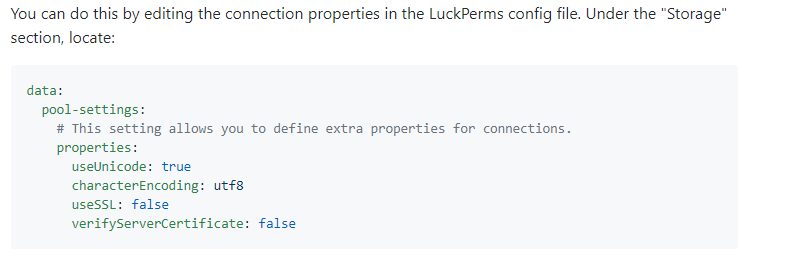
[18:35:53 WARN]: Caused by: me.lucko.luckperms.lib.mysql.jdbc.exceptions.jdbc4.MySQLNonTransientConnectionException: Public Key Retrieval is not allowed
this is indicative that you should set verifyServerCertificate to true and useSSL to false (in the place that the error wiki for the useSSL error says to add it)
!errors
wintry cloudBOT
Here's a page with some common storage system errors.
LuckPerms wiki
 high raven
the first error might be causing the second - try addressing it first
final creek
I haven't changed any plugins to the server.
Do you know which kind of plugin might be interfering?
high raven
/plugins output pls
high raven
screenshot or pastebin
final creek
high raven
hm, try removing half the plugins, see if the error stops. If it does, you know the problem is in that half. If not, it's in the other. Remove half of the problem half and so on
proper pulsar
@high raven that's nothing to worry about and quite normal
[18:35:48 WARN]: SLF4J: Failed to load class "org.slf4j.impl.StaticLoggerBinder".
[18:35:48 WARN]: SLF4J: Defaulting to no-operation (NOP) logger implementation
[18:35:48 WARN]: SLF4J: See http://www.slf4j.org/codes.html#StaticLoggerBinder for further details.
Hm, do you have any idea of the public key retrieval issue?
final creek
I had that error and it would still work but now im not sure what is causing it
final creek
Plugins don't seem to be the issue
 charred oasis
Make sure your server names are setup in the config
 supple ridge
If im running my server through Shockbyte what version of LuckPerms would i download
tidal blade
Spigot, sponge, or???
supple ridge
how would i check
tidal blade
You should know what you're using.
supple ridge
becuz im running on custom.jar, forge?
tidal blade
SPongeForge? Spigot Forge thing?
supple ridge
im playing Stoneblock 2
quick lagoon
maybe send your full startup log
supple ridge
where would i find that?
tidal blade
the latest.log file
supple ridge
send it through here?
tidal blade
!paste
wintry cloudBOT
Please use pastebin!
Seeing a paste of the problem makes everything so much easier! Use https://bytebin.lucko.me/ for easy pasting!
For console errors:
Pastebin any relevant segments of the console log. If it's a startup error, this includes the entire startup log!
Other errors:
Pastebin the entire LuckPerms config file (passwords removed) as well as any other relevant files!
supple ridge
tidal blade
Right, you're using sponge. You need to use sponge forge. That custom jar has too many issues. https://www.spongepowered.org/downloads/spongeforge/stable/1.12.2 Get a proper SpongeForge jar from here.
Then use the Luckperms-Sponge version from https://luckperms.net
LuckPerms - A permissions plugin for Minecraft servers.
LuckPerms is a permissions plugin for Minecraft servers.
supple ridge
okay sounds good thank you!
quick lagoon
!help (for me)
wintry cloudBOT
Available commands:
!advanced
!api
!argumentbased
!ask
!bulkupdate
!bungee
!cauldron
!chat
!colours
!commandequivalents
!commands
!config
!context
!default
!downloads
!editor
!errors
!essentials
!extensions
!extracontexts
!faq
!helpchat
!inheritance
!install
!locale
!meta
!migration
!notworking
!nowildcard
!pasteit
!permissions
!placeholders
!selfhosting
!stacking
!storage
!suggestions
!switchstorage
!sync
!tracks
!upgrade
!usage
!userinfo
!verbose
!weight
!whyluckperms
!wiki
tame hollow
hey mate, maybe don't run so many servers :P
 upbeat pewter
!editor
wintry cloudBOT
LuckPerms offers an easy to use, powerful Web Editor, with which you can add, delete and change permissions of groups and players.
LuckPerms wiki
 maiden shale
hey, if i start my server, i get so many warns https://hastebin.com/aweraxafuy.shell
tame hollow
!errors
wintry cloudBOT
Here's a page with some common storage system errors.
LuckPerms wiki
maiden shale
now it works, i changed nothing
tame hollow
magic!
maiden shale
no script logic
 torpid isle
@soft cosmos question for you good sir
wintry cloudBOT
Hey Zenzu! Please don't tag helpful/staff members directly.
torpid isle
once I add the luckperms plug do I need to give everyone perms for mining/eating/ etc?
barren fable
It depends
LuckPerms itself does not restrict anything other than it's own commands (/lp). If something like breaking blocks is not allowed it's another plugin that does that
 flint path
Hey, i was wondering how do i change a users primarygroup. It is stuck on default for an admin and i cant change it, all other admins have their primarygroup as admin, not sure what i did wrong.
quaint idol
!weight
wintry cloudBOT
LuckPerms allows you to set weights in order to determine the priority of certain nodes, like permissions and even prefixes. A higher weight number is a higher priority.
LuckPerms wiki
 willow socket
hi
quick lagoon
hi
quick lagoon
!usage
wintry cloudBOT
Here's a guide to help users understand and use LuckPerms for the first time.
LuckPerms wiki
willow socket
k thx
 misty bloom
If I use tracks does that work like parent groups too then?
high raven
No, it's just a way of organization and doesn't do any inheritance
misty bloom
Okay, ty.
Another question xD
If I write like prefix.1.(prefix) What does the 1 mean?
Weight too?
But like highest weight first or last
wintry cloudBOT
LuckPerms allows you to set weights in order to determine the priority of certain nodes, like permissions and even prefixes. A higher weight number is a higher priority.
LuckPerms wiki
misty bloom
Yea I know but like does it the add the highest weighted prefix first?
high raven
Dude it's literally described in my own words on the wiki
If a player inherits several, the highest weighted one shows
misty bloom
So I can't show more than one prefix?
quick lagoon
!stacking
wintry cloudBOT
Display multiple prefixes/suffixes alongside a player's name.
LuckPerms wiki
misty bloom
Ty
 lunar mist


 prisma hinge
this is kinda offtopic
but pls can some1 help
i installed mariadb
what on earth do i do next???
im trying to install it for luckperms
anyone know?
plsssssssss
 cinder torrent
does anyone here know how to remove the weighting system on luck perms? if the player has 2 groups then i want him to show 2 groups in chat when talking.
and i also wanted to ask if its possible to give a player a group but hide the group when he/she is talking in chat
 cedar belfry
!help
wintry cloudBOT
Available commands:
!advanced
!api
!argumentbased
!ask
!bulkupdate
!bungee
!cauldron
!chat
!colours
!commandequivalents
!commands
!config
!context
!default
!downloads
!editor
!errors
!essentials
!extensions
!extracontexts
!faq
!helpchat
!inheritance
!install
!locale
!meta
!migration
!notworking
!nowildcard
!pasteit
!permissions
!placeholders
!selfhosting
!stacking
!storage
!suggestions
!switchstorage
!sync
!tracks
!upgrade
!usage
!userinfo
!verbose
!weight
!whyluckperms
!wiki
cedar belfry
!stacking
wintry cloudBOT
Display multiple prefixes/suffixes alongside a player's name.
LuckPerms wiki
cedar belfry
There you go @cinder torrent
cinder torrent
@cedar belfry Thank you so much!
and is it also possible btw to hide the groups?
when the player is talking in chat?
 peak apex
https://pastebin.com/M4PYaLcd I already tried I saw the solution page if it still doesn't take is mysql error?
Pastebin
 worldly venture
Hi, so im trying to get LuckPerms working. Im trying to get it running on multiple servers, and follow the wiki. I changed the data sync-minutes, messaging service. I don't know if im missing something. its my first time so i could be doing something completly wrong 😅
wintry cloudBOT
If you run a Bungeecord network, learn how to correctly setup LuckPerms on all server instances (including Bungee).
Also read:
Syncing data between servers
https://github.com/lucko/LuckPerms/wiki/Syncing-data-between-servers
LuckPerms wiki
worldly venture
Yeah we have a database from the host, and used it. with name, host, username and password
proper pulsar
Did you also change the storage type in the LP config?=
worldly venture
yes i did
proper pulsar
And can I just see /lp info and /lpb info
If it doesn't work run it from the console
proper pulsar
@worldly venture you didn't change the storage type
Clearly says so in the screenshot
worldly venture
We did
we because im doing it with someone else xD
Do you think thats not working or is it somehting else?
proper pulsar
Again the info command doesn't lie
worldly venture
yeah ik