#support-2
1 messages · Page 36 of 1
 quick lagoon
quick lagoon
quick lagoon
Uh if you did /lp export
 stone heart
i have a lp plugin bacup
quick lagoon
You can do /lp import file back
stone heart
no i did /lp sync in a server where there only was a default rank
no all ranks everywhere are gone
only default
quick lagoon
Do you have the /lp export file?
quick lagoon
What you can do is to change storage method back to hw
h2*
!switchstorage then do this
 wintry cloudBOT
If you wish to change your storage type (e.g. to YAML or MySQL) you may need to follow these instructions to ensure your groups and permissions are migrated to the new storage type.
Read more about the Storage types
 LuckPerms wiki
quick lagoon
LuckPerms wiki
quick lagoon
just do the same for every server
The dB, messaging, storage method config
Do it for all servers
stone heart
or should i just copy the whole config into the other server?
ok i have the ranks now on the other server to
quick lagoon
No
stone heart
oh
quick lagoon
The dB, messaging, storage method config
stone heart
?
stone heart
i dont get it what is it
quick lagoon
The dB, messaging, storage method config do this for all servers
like how you config jn
quick lagoon
Yep
quick lagoon
Messaging service and storage method as well?
quick lagoon
How?
stone heart
ranks are not configured
quick lagoon
do /lp info for all servers
stone heart
quick lagoon
And save your config
stone heart
stone heart
wintry cloudBOT
Please use pastebin!
Seeing a paste of the problem makes everything so much easier! Use https://bytebin.lucko.me/ for easy pasting!
For console errors:
Pastebin any relevant segments of the console log. If it's a startup error, this includes the entire startup log!
Other errors:
Pastebin the entire LuckPerms config file (passwords removed) as well as any other relevant files!
quick lagoon
Lol typo @stone heart
stone heart
h2 still
quick lagoon
mysql
stone heart
OH
quick lagoon
Not myqsl
quick lagoon
!swichstorage do this lol
wintry cloudBOT
Sorry! I do not understand the command !swichstorage
Type !help for a list of commands.
quick lagoon
!switchstorage
wintry cloudBOT
If you wish to change your storage type (e.g. to YAML or MySQL) you may need to follow these instructions to ensure your groups and permissions are migrated to the new storage type.
Read more about the Storage types
LuckPerms wiki
 prisma hinge
Hi. It would be great if someone could help me. Basically, I own a network server. We moved to a dedicated host about a month ago and since the transition, everything has been messed up. Recently, all servers in our network crashed due to a 'database issue' and our only dev struggled to get them back, and so far has only managed to get one. On this one open server I have noticed that as I start to type /lpb, not even enter it, the server completely crashes and takes forever to get back. Also, all our ranks are cleared. I will point out that I am not a dev, and our only one is getting really pissed off and requesting pay even tho we didn't say we'd pay him when we hired him. Is there anyone that can help - and make sure ranks are safe in the future??
stone heart
i exported with h2 i think
prisma hinge
just realized this is the wrong channel
quick lagoon
@prisma hinge make backups
stone heart
everything works i think
quick lagoon
nicee
prisma hinge
I can't - I can't even get the server on
quick lagoon
!paste If there is error
wintry cloudBOT
Please use pastebin!
Seeing a paste of the problem makes everything so much easier! Use https://bytebin.lucko.me/ for easy pasting!
For console errors:
Pastebin any relevant segments of the console log. If it's a startup error, this includes the entire startup log!
Other errors:
Pastebin the entire LuckPerms config file (passwords removed) as well as any other relevant files!
stone heart
now i need to add permissions but not the same for each world
quick lagoon
!context
wintry cloudBOT
You can set a permission or group on a per-world/per-server basis, through what we call "contexts".
LuckPerms wiki
stone heart
ty
stone heart
how to delete a displayname
quick lagoon
!commands
wintry cloudBOT
Find all of the available LuckPerms commands on the wiki.
General commands
User commands
Group commands
Permission commands
Parent commands
Meta commands
Track commands
Log commands
LuckPerms wiki
quick lagoon
!editor or use this
wintry cloudBOT
LuckPerms offers an easy to use, powerful Web Editor, with which you can add, delete and change permissions of groups and players.
LuckPerms wiki
 mighty spear
@prisma hinge First take a backup of everything you have currently, if you're on a dedicated machine you can do this without the server being online. Then, can you send us the errors via pastebin?
quick lagoon
You don’t need to be a dev to do this
prisma hinge
Ik nothing about this - I've been kinda stuck into this because our dev suddenly wants pay
quick lagoon
then do what jay said
stone heart
uhm i want to get acces to /server for every rank
how?
and disable damage
essentials.protect.damage.disable
 tame hollow
use LP on bungee and add the permission for server command to the default group
stone heart
permissions .yml
tame hollow
that file should be ignored and has nothing to do with what you just said
stone heart
but i dont want to have essentials.protect.damage.disable on every server
quick lagoon
!context
wintry cloudBOT
You can set a permission or group on a per-world/per-server basis, through what we call "contexts".
LuckPerms wiki
stone heart
or is lp not permission synvrf
tame hollow
so don't apply it globally
quick lagoon
or is lp not permission synvrf
@stone heart what!?
use context
Read the link I sent
stone heart
sorry im not that good at english. I am reading the link you send :)
do i need to set essentials.protect.damage.disable for all ranks seperetly?
like this
quick lagoon
server=servername
at the end
Make sure you config your server: servername in lp config
quick lagoon
can’t rmb sry
 pliant forge
!tab
wintry cloudBOT
Sorry! I do not understand the command !tab
Type !help for a list of commands.
pliant forge
!help
wintry cloudBOT
Available commands:
!advanced
!api
!argumentbased
!ask
!bulkupdate
!bungee
!cauldron
!chat
!colours
!commandequivalents
!commands
!config
!context
!default
!downloads
!editor
!errors
!essentials
!extensions
!faq
!helpchat
!install
!locale
!meta
!migration
!notworking
!nowildcard
!pasteit
!permissions
!placeholders
!selfhosting
!stacking
!storage
!suggestions
!switchstorage
!sync
!tracks
!upgrade
!usage
!userinfo
!verbose
!weight
!whyluckperms
!wiki
quick lagoon
@pliant forge what do you need?
pliant forge
I want to have a higher rank higher in tab then a lower rank
Ive set all weights
But iron can still be higher then owner
pliant forge
Alright then I know that too
 fervent pollen
Could I get some assistance with setting seperate prefixes
quick lagoon
will need more details
fervent pollen
I currently have 27 ranks 16 of those are ranks that could be upgraded by paying for the rank with in game money. The other ranks are donor and staff ranks. I want the chat string to look something like this in game [staff/donorrank] [purchasablerank][displayname]: [chat]
If that makes sense
quick lagoon
!meta to set prefix if you havent
wintry cloudBOT
You can set prefixes, suffixes and other meta data in LuckPerms for players and groups. Note that LuckPerms does not manage chat. You need to use another plugin to show prefixes/suffixes in chat.
LuckPerms wiki
quick lagoon
!tracks
wintry cloudBOT
Tracks provide a method for you to promote/demote players along a track (or ladder) of groups.
LuckPerms wiki
quick lagoon
!stacking
wintry cloudBOT
Display multiple prefixes/suffixes alongside a player's name.
LuckPerms wiki
fervent pollen
ben do you mind walking me thorugh one?
quick lagoon
You will need to read and understand these 3
quick lagoon
There isn’t nothing much I can go through. I will be just repeating the guides from the link I sent
 tulip bison
Execuse me,
/pex world <world> inherit <parentWorlds>
Is there a function corresponding to?
fervent pollen
I currently have 27 ranks 16 of those are ranks that could be upgraded by paying for the rank with in game money. The other ranks are donor and staff ranks. I want the chat string to look something like this in game [staff/donorrank] [purchasablerank][displayname]: [chat] the guides are a little vague when explainig what weight the second prefix should be.
 quaint idol
!stacking
wintry cloudBOT
Display multiple prefixes/suffixes alongside a player's name.
LuckPerms wiki
fervent pollen
I did that and it broke my config
quaint idol
Well then you likely messed up your yml stynax
fervent pollen
Ill show ya
prefix:
format:
- highest_on_track_staff
- highest_on_track_rank
duplicates: first-only
start-spacer: ''
middle-spacer: ' '
end-spacer: ''
suffix:
format:
- highest
duplicates: first-only
Heres my string
quaint idol
and what happens when you try to load LP with that config?
tulip bison
- The 'duplicates' setting refers to how duplicate elements are handled. Can be 'retain-all',
'first-only' or 'last-only'.
from config.yml
 quaint idol
oh that's why
fervent pollen
?
quaint idol
- highest_on_track_staff should be - highest_on_track_staff-track
fervent pollen
OOF
quaint idol
(or could rename staff-track to be just staff)
fervent pollen
so ozraru it should be duplucates: retain-all
?
So 11 when I save that and reload the config, for example me, If i want to have [OWNER] [16][name]
Should i set my primary group to owner? and then lp user [name] parent add [16]
It broke the config
quaint idol
chances are you messed up stynax
fervent pollen
meta-formatting:
prefix:
format:
- highest_on_track_staff
- highest_on_track_donor
- highest_on_track_rank
duplicates: retain-all
start-spacer: ''
middle-spacer: ' '
end-spacer: ''
suffix:
quaint idol
what does console say?
fervent pollen
Nothing
tulip bison
Why did you think it broke the config?
fervent pollen
Are weights relevant during this?
Because when i do /lp reloadconfig in game, all the prefixes disapear
quaint idol
yeah, as it chooses the heighest weighted prefixes off of each track for each section
"highest_on_track"
fervent pollen
hmm
So i have to have seperate weights for each category?
Not weight 1-27 if i have 27 total ranks?
1-16 for RANKS
1-4 for DONORS
1-5 STAFF
Right?
quaint idol
That should be ok
fervent pollen
Alright ill update you
quaint idol
(although more gap between weights is recommended for when you inevitably want to add more groups)
quaint idol
yeah
fervent pollen
Gotcha, ill change and update you
So this is essneitally what i have

So now go back into the config and add the highest_on_track etc?
tulip bison
Could you show me the track?
 tulip bison
meta-formatting: prefix: format: -"highest_on_track_staff" -"highest_on_track_donor" -"highest_on_track_ranks" duplicates: retain-all
for config.yml
fervent pollen
prefix:
format:
- highest_on_track_staff
- highest_on_track_donor
- highest_on_track_ranks
this what I have
Do i need the ""
 proper pulsar
Just put them
fervent pollen
Sure
Ok so once all that is saved and done
What exact command should i execute in game
proper pulsar
Restart the server
tulip bison
Sorry, maybe isn't need
Do i need the ""
fervent pollen
I can schedule a restart
Brain so when the server restarts what command should I execute to have the prefixes cumulative
proper pulsar
None
The restart does that
And I mean you can try a reload of LP, but not sure if that config part is reloadable
/lp reloadconfig
fervent pollen
Oh ok
Good point
I was doing /lp user [me] parent ADD 1
so that the prefix would add onto me
proper pulsar
Since you don't have a format selected that looks for prefixes from you it won't show
proper pulsar
You have 3 formats
All 3 just look for prefixes of groups on specific tracks
You (the player) is not a group and therefore can't be targeted by any of those
What you can do is add a 4th entry with just highest
proper pulsar
Then it'll respect per player prefixes
Be sure to set the duplicates setting to either first-only or last-only (I think)
proper pulsar
One second
fervent pollen
Cause i had retain all
tulip bison
I want the chat string to look something like this in game [staff/donorrank] [purchasablerank][displayname]: [chat]
proper pulsar
So if any of those formats return the same prefix with retain-all you would see duplicates
With that setting you say even if there are duplicates you only want to see one of them
So if you want personal prefixes (if they exist) to be at the front, put highest as the first entry and set duplicates to last-only and if you want them at the end, put highest at the end and use first-only
proper pulsar
Not by that config
Unless you made errors in the config
Check the console for errors
fervent pollen
Litterally nothing
fervent pollen
Brainstorm
Are you free?

The member is duplicated but the [number] prefix isnt displaying
fervent pollen
proper pulsar
What's your prefix stacking?
I need to see your config @fervent pollen
At leas that part
proper pulsar
The prefix stacking section of LP
fervent pollen
meta-formatting:
prefix:
format:
- highest_on_track_staff
- highest_on_track_donor
- highest_on_track_ranks
- highest
duplicates: last-only
start-spacer: ''
middle-spacer: ' '
end-spacer: ''
suffix:
format:
- highest
duplicates: first-only
start-spacer: ''
middle-spacer: ' '
end-spacer: ''
proper pulsar
Well you have -track in the name of your tracks
fervent pollen
Huh?
 high raven
Your stacking format needs to have the whole track name
high raven
highest_on_track_donor-track
fervent pollen
Ohh ok
- highest_on_track_staff-track
- highest_on_track_donor-track
updated tot hat
So now I see ALL groups i inherit now. So i now have 6 prefixes
wintry cloudBOT
LuckPerms does not display things in chat!
LuckPerms is only able to send information to formatting plugins so that they display them properly. LuckPerms does not put the prefix in front of your name, you need a chat formatting plugin to do it, and you need Vault. Same goes for the tablist! If the information appears correctly when you run /lp user <user> info, LuckPerms is doing its job!
Prefix isn't showing?
What plugins can I use to format chat?
proper pulsar
Run the command there to see what LP considers the prefix
proper pulsar
No
Run /lp user <user> info
If the prefix that shows there is correct, it's your chat plugin
not LP
high raven
Set add-prefix-suffix to false in the essentialsx config, if you use it
fervent pollen
 high raven
That's what you set up to display no
fervent pollen
Im using CMI
high raven
Your LP prefix is exactly what you set it to show
proper pulsar
Also keep in mind that it seems like you haven't fully set up your tracks
high raven
In chat, not sure how but make sure there is only one prefix placeholder for cmi chat format line
fervent pollen
I wanna say thank you guys for being patient with me. I really appreciate your help guys

Here is my CMI chat formatting
high raven
What actually shows in chat
fervent pollen
like in game?
high raven
Also, at this point let's move to #general
Yes in game
Send the screenie to off topic
 coral forge
for some reason one of my groups has two prefixes:
proper pulsar
That's your chat formatting plugin, not LP
 mental falcon
That will be your chat configuration controlled by whatever plugin you have that handles that. Makes sure your format isn’t “{prefix} {displayname}” and just “{displayname}” the displayname contains the Meta already
proper pulsar
As it clearly shows in the screenshot @coral forge
proper pulsar
In any case not a LP issue, so #general please
Or even better reach out to the support of your chat plugin
coral forge
i worked it out, but im wondering how you do username colors. i tried using the essentialschat permission nodes but it didn't work
i saw in the wiki that there's a username-color meta but that didn't work either
proper pulsar
That's an example
If it's on the LP wiki
In any case that's on your chat plugin
So what I just said
coral forge
ok
high raven
!colors for the list of codes to use
wintry cloudBOT
 tropic jay
is there anyone who can help?
 lilac hazel
!ask @tropic jay
wintry cloudBOT
Please ask your question!
Please ask the question you have. Don't ask to ask, or ask to DM someone. There are people here to help you, but we need to know what to help you with, so please just ask the question you want to in as much detail as possible!
Or, try here first:
Why shouldn't I ask to ask?
 alpine epoch
help please
high raven
What's the console error
 vagrant notch
Hello, can I change the moderator somehow?
proper pulsar
elaborate?
quaint idol
Display name seems to be set to admin, he want's to rename the internal name to admin as well I think
vagrant notch
yes
quaint idol
AFAIK (could be wrong) the only way you could do that is by making a new group with the correct name, copy all the perms over, then delete the old group. You'd need to re-add everyone to the new group though, due to how LP stores group membership
Was in fact wrong, listen to larry
high raven
you can use the rename command
and bulkupdate to change all inheritances
not too hard to do, one sec I'll pull up that you need
!commands
wintry cloudBOT
Find all of the available LuckPerms commands on the wiki.
General commands
User commands
Group commands
Permission commands
Parent commands
Meta commands
Track commands
Log commands
LuckPerms wiki
high raven
!bulkupdate
wintry cloudBOT
Quickly update a large amount of user and group permissions by using the bulkupdate command.
LuckPerms wiki
quaint idol
thx larry
high raven
then run this :/lp bulkupdate all update permission group.admin "permission == group.moderator"
basically you're renaming moderator to admin, and then making sure anyone that already has moderator will be updated to have admin
@vagrant notch
high raven
well, I assume it worked 😆
 quiet arch
I dont know if this is the place to ask for help but i need some
quick lagoon
!ask @quiet arch
wintry cloudBOT
Please ask your question!
Please ask the question you have. Don't ask to ask, or ask to DM someone. There are people here to help you, but we need to know what to help you with, so please just ask the question you want to in as much detail as possible!
Or, try here first:
Why shouldn't I ask to ask?
quiet arch
!ask I am having problems with Essentials and Luckperms
wintry cloudBOT
Please ask your question!
Please ask the question you have. Don't ask to ask, or ask to DM someone. There are people here to help you, but we need to know what to help you with, so please just ask the question you want to in as much detail as possible!
Or, try here first:
Why shouldn't I ask to ask?
quiet arch
I am having problems with Essentials and Luckperms
quick lagoon
explain your problem
 tidal blade
What is the problem
quiet arch
When i add perms to someone and a prefix they arent showing up and the perms arent allowed for the other person
tidal blade
!chat For the prefix issue
wintry cloudBOT
LuckPerms does not display things in chat!
LuckPerms is only able to send information to formatting plugins so that they display them properly. LuckPerms does not put the prefix in front of your name, you need a chat formatting plugin to do it, and you need Vault. Same goes for the tablist! If the information appears correctly when you run /lp user <user> info, LuckPerms is doing its job!
Prefix isn't showing?
What plugins can I use to format chat?
tidal blade
!verbose this should help with perms not working issue.
wintry cloudBOT
LuckPerms provides a verbose command to help you find out what permissions a command/plugin is checking.
LuckPerms wiki
 tulip shore
!usage
wintry cloudBOT
Here's a guide to help users understand and use LuckPerms for the first time.
LuckPerms wiki
 hazy ermine
is it possible to have multiple prefixes at the same time
wintry cloudBOT
Display multiple prefixes/suffixes alongside a player's name.
LuckPerms wiki
 raw kindle
hrm i changed the wait_timeout, and rebooted but it still is 8 hours appearantly
however global is changed
so does anyone know how i can reset the mysql session? feel stupid
 sleek surge
Can you add a context to a track? Like i created a track named "world" and i want the context for all permission in there to be set as world=world and another track called "kitpvp" to be world=kitpvp?
tidal blade
@sleek surge Just make all the permissions in the groups on the track use the context, and when you use the promote command, use the context at the end of the promote command
sleek surge
Promote command?
quick lagoon
like lp user USER parent add groupname world=worldname
tidal blade

GitHub
An advanced permissions plugin for Bukkit/Spigot, BungeeCord, Sponge, Nukkit and Velocity. - lucko/LuckPerms
 steel arrow
Hello, I can’t fix the problem, the message is cluttering my console, do you have a solution?
quick lagoon
!errors look at ssl part
wintry cloudBOT
Here's a page with some common storage system errors.
LuckPerms wiki
quick lagoon
add the 2 lines stated to all your server's lp config.yml
steel arrow
I saw on a wiki page that I had to fill in "storage-method: Mysql" useSSL=false, but even with its not working, I use a local IP address
quick lagoon
read it link i sent ^
steel arrow
yes, but I’m not that part
  pool-settings:
    # This setting allows you to define extra properties for connections.
    properties:
      useUnicode: true
      characterEncoding: utf8
      useSSL: false
verifyServerCertificate: false```yea do this for all your server's lp config.yml
?
after:
characterEncoding: utf8
just add the 2 lines:
      useSSL: false
verifyServerCertificate: false```do it for all server in all lp config.yml
steel arrow
ok, I’ll add them and let you know
steel arrow
ok, it works for now, I had not added "verifyservercertificate: false" had to be for its, thank you, good day
pliant forge
Can I remove the (Tuinierder@bungee) [U] (Tuinierder)
Parent set admin?
Or change it
I've copied the lang.yml
proper pulsar
Just turn off the log @pliant forge
pliant forge
How do I do that?
Somewhere in the configs?
And only in the bungeecord or in all servers?
proper pulsar
log-notify: true @pliant forge
pliant forge
Alright I'll check it out
prisma hinge
My server is now 1.12.2, but i want to update it to 15.2. Should that work with the plugin? Or do i need to save somehow the permissions, and update the plugin and put the permissions back.
 devout garnet
luckperms supports 1.8.8 thru 1.15.2 so you should be fine, just make sure you update the plugin to the latest version
tame hollow
1.8.8*
 hollow gorge
also, if you want to reuse the same worlds, make sure you're first upgrading to 1.13.2 for a proper migration
prisma hinge
Ok, thanks!
And is it also possible to change the permissions of group in the console, or is it only possible in-game?
prisma hinge
But not in a text document right?
tame hollow
if you mean editable storage, sure, just read the config and change the appropriate setting
!storage
wintry cloudBOT
LuckPerms allows you to store data in a variety of storage types, read about the benefits and drawbacks of each type on the wiki.
LuckPerms wiki
tame hollow
we don't recommend editable storage though, web editor is better for managing perms
 spare tundra
Hi ! I've a little question about commands. Is it possible to execute LP commands in commands blocks ? 
tame hollow
you will need a third party plugin to do that
 topaz trout
Can i get some help with luck perms
It wont work on our server..
It is probably interfering with EssentialsX but i do now know how to fix it.
tame hollow
very vague, please explain in more detail
spare tundra
you will need a third party plugin to do that
have you a plugin which can do that ?
wintry cloudBOT
Hey Papy de Barjo! Please don't tag helpful/staff people directly.
spare tundra
Ok thanks. And sorry for the ping 😅
 rough wasp
if I'm to upgrade a server to a newer version, lets say 1.12.2 would it be possible to just copy and paste over the config file or would I have to do it by hand all over again?
high raven
If you're on luckperms v5, you don't need to do anything, just upgrade the server. If you're on v4, read this:
!upgrade @rough wasp
wintry cloudBOT
Read about upgrading LuckPerms from v4 to v5.
LuckPerms wiki
 green remnant
How do I set permissions to a specific world? If I do /lp group default permission set essentials.back true, it works, but if I do /lp group default permission set essentials.back true world=world, it doesnt work.
high raven
Generally that's how you do it, mind sending your editor link and a little more info?
wintry cloudBOT
LuckPerms offers an easy to use, powerful Web Editor, with which you can add, delete and change permissions of groups and players.
LuckPerms wiki
green remnant
high raven
@green remnant all contexts on a permission need to be applied for it to work. If you set two worlds on one permission, the player would have to be in both fir it to apply.
so basically it wont
green remnant
oh okay
high raven
you'd need to set a new permission node with the second world context
green remnant
cool thanks
 lavish tinsel
Hello, I have tried changing the prefix of my name but it is not working
lilac hazel
!nw
wintry cloudBOT
Please tell us what's going on!
We really would absolutely love to help you out! However, telling us that it isn't working wastes everyone's time. Please, just describe the issue you're having clearly and with as much detail as possible, and send any relevant screenshots of whatever problems you're having.
For Console Errors:
lilac hazel
@lavish tinsel need more info. "not working" isn't something we can use to diagnose a problem
lavish tinsel
I got it working
 tranquil haven
Larry Yesterday at 9:24 PM
Then in your chat format line make (%luckperms_prefix%) and use stacking with highest on track 'normal' and then highest on track donor (which is the coloured +)Kry'S Yesterday at 10:20 PM
damn I still don't really understandben Yesterday at 10:22 PM
- esnure format your chat plugin such that it shows {PREFIX} {DISPLAYNAME}
- use stacking with highest on track 'normal' and then highest on track donor (which is the coloured +)
I tried following everything that was said, but I have Essentials and TAB, so I am unsure what format to set for what
Along with that, I have already attempted it and by setting the luckperm chat format values to highest on track for both ranks(timed) and +(donator) as seen in the paste bin
https://pastebin.com/Hj6ezRd7
In both tab and chat, I want it to show, for example, Member+ for those who donated and played for that amount of time, while the member and + stay alternate colors
 high raven
You gotta add two bullet points under prefix, and set up two tracks. One for donor (the +) and one for normal players
In the order of
- highest_on_track_donor
- highest_on_track_normal
That way the highest prefix a player has in each track is the one that shows in the prefix placeholder
tranquil haven
I have the tracks
high raven
Then lp user <user> info for a player in both tracks should show both prefixes, one after another
tranquil haven
Is it safe to reload the plugin
high raven
Best to save the config and restart the server
Especially since config changes were made
tranquil haven
didn't seem to work
nvm I put in donor instead of patron. even then, it still didn't change tab ranks/titles
high raven
Does it show correctly in lp user <user> info
tranquil haven
Because donor wasn't the track name, it wasn't appearing I believe
Everyone in chat was given their timed rank without the + since I miss wrote the track name. But again, it didn't show in tab even though it changed in chat
high raven
Tab is up to the tab formatter, which probably doesn't constantly check for changes
Basically this
!chat
wintry cloudBOT
LuckPerms does not display things in chat!
LuckPerms is only able to send information to formatting plugins so that they display them properly. LuckPerms does not put the prefix in front of your name, you need a chat formatting plugin to do it, and you need Vault. Same goes for the tablist! If the information appears correctly when you run /lp user <user> info, LuckPerms is doing its job!
Prefix isn't showing?
What plugins can I use to format chat?
quick lagoon
!moss
wintry cloudBOT
Essentials
Make sure you are using EssentialsX and Vault for prefixes. For any other issues with Essentials, you should seek support in either #general or the official EssentialsX support Discord.
EssentialsX Discord
 shy plover
hello good night or day
I have a problem and it is that since we made the command that to verify the permissions
every day at the same time I run the command my server has crashed
quick lagoon
!paste the error message
wintry cloudBOT
Please use pastebin!
Seeing a paste of the problem makes everything so much easier! Use https://bytebin.lucko.me/ for easy pasting!
For console errors:
Pastebin any relevant segments of the console log. If it's a startup error, this includes the entire startup log!
Other errors:
Pastebin the entire LuckPerms config file (passwords removed) as well as any other relevant files!
quick lagoon
if your server crashed, how can there be no error message.
also what command specifically you are talking about?
shy plover
It has been the only thing I have changed on my server, I even put the previous lockett Plugin back and it always crashes at the same time
high raven
Send the crash log via bytebin
There is a crash log, if the server crashes
Usually a bunch of nicely formatted stacktraces
shy plover
sure, in what falls again, I send it
 novel night
Is it possible to give someone perms to set themselves as a certain group. For example say there Group they will join is knight. Would the players permissions be “luckperms.user.parent.set.knight” if there is a way to do this please let me know
quick lagoon
you should run lp user USER parent add GROUPNAME
!commands for more commands details
wintry cloudBOT
Find all of the available LuckPerms commands on the wiki.
General commands
User commands
Group commands
Permission commands
Parent commands
Meta commands
Track commands
Log commands
LuckPerms wiki
novel night
But I have something setup atm that they click something and it makes them run the command
Ik the commands
quick lagoon
the plugin that does the "click something and it makes them run the command" needs to be able to run the command from console
quick lagoon
yea then thats the issue
pliant forge
Is /lpb user <name> parent set <rank>.
The same as /lp user <name> parent set <rank>?
Or will the lp user... Only set it for that specific server and not for the whole bungeecord?
quick lagoon
if all your LP in servers and bungee proxy is synced to a common sql database, there will be no difference
pliant forge
Oké it's connected to a MYSQL database
quick lagoon
yea then will be global (i.e. all servers) unless you set context
 gleaming hornet
how do i set per world permissions (multiverse)?
quick lagoon
!context
wintry cloudBOT
You can set a permission or group on a per-world/per-server basis, through what we call "contexts".
LuckPerms wiki
 severe needle
Every time i use the latest luckperms it does this for all plugins same exact error code :(
Im using Mohist (modded server).
5.0.108 works fine except when i update and i let it regenerate the config file.
Both are using same SQL since im using velocity for my proxy.
severe needle
Also is it possible to get older builds the oldest jenkins lets me see is Build #1052 (Apr 23, 2020 2:06:09 PM) This is 5.0.138 and it gives same errors my current build that works is 5.0.108
proper pulsar
That looks like an issue with CoreProtect
See if they have updates available
@severe needle
severe needle
Its does it to every single plugin with identical error but i shall go check for updates
for 1.12.2 its uptodate
Are there downloads for between LuckPerms-Bukkit-5.0.108.jar too LuckPerms-Bukkit-5.0.138.jar So i can see where it breaks? Since 108 works fine but 138+ doesint and i cant find jar files below 138 on jenkins
 mystic mango
how do you set a permission?
./lp group <name> permission set <permission> doesn't seem to be doing anything
severe needle
if you use the editor you can insert them that way /lp editor. It gives you a link and when you want to apply everything you added hit save and it gives you a new link to paste in chat/console
proper pulsar
@severe needle in that case report it to GitHub
severe needle
I shall 🙂 I apresiate your time ❤️
proper pulsar
You’re welcome
Btw next time be sure to mention that you’re using that weird version of Spigot @severe needle
severe needle
I did o-o i mentioned it above? o-o Mohist o-o
severe needle
😉
wintry cloudBOT
Hey Himo! Please don't tag helpful/staff people directly.
 rigid pier
Well, I was using an Login Authenthicator, so when you are premium, your UUIDS changes to the premium UUID. Then I wanted to use only Offline UUIDs even if you are premium, is there a way to fix now my account?
That happens only to my account, error logs: https://pastebin.com/z1nrqwkf
proper pulsar
That message means LP has fixed it
It'll show once
for every player that as premium
rigid pier
but the permissions got delete
i mean when i login like a offline uuid
and after it i login with a premium uuid
the permissions getting deleted
is there any was to fix it?
@proper pulsar
wintry cloudBOT
Hey Himo! Please don't tag helpful/staff people directly.
proper pulsar
Does the UUID change while you are online?
proper pulsar
As long as the UUID doesn't change while you are online it doesn't matter
 vivid spoke
hey brainstone
or anyone
do you know a way to do a command block for a per world basis?
proper pulsar
What do you mean?
vivid spoke
like i do /effect give @a speed 10000 5
but it affects players of a second world i have
vivid spoke
kk
prisma hinge
Hey! Does LuckPerms support Vault's method to grab offlinePlayer permissions?
wintry cloudBOT
Learn how to use the LuckPerms API in your project.
Example usages
LuckPerms wiki
proper pulsar
@prisma hinge yes it does. But be sure to do it async
(Which you should do anyways when working with offline players, regardless of which plugin is hooked into vault)
prisma hinge
Sweet. Trying to get offline player ban exemption working with AdvancedBans, so I figured I'd just depend Vault and use their api instead of writing my own stuff
tranquil haven
So I attempted to do the meta formatting from earlier
and this is how it turned out instead of (Veteran+)
high raven
So you have two prefixes, but your formatting for each prefix is so that it has its own brackets?
Plus the + has to be just a + and not Patron+
And your prefixes should just be just the words, don't include the brackets
tranquil haven
Yeah I can fix that, but it'll still show before veteran and in its own brackets
How do I add preset brackets
high raven
You can change the order of what shows by putting the other track first in meta formatting
And you add them right into the chat formatting line of your chat formatting plugin
If you use essxchat, you need to turn add prefix suffix to false and then add a {PREFIX} in front of {DISPLAYNAME} and just add the brackets around the {PREFIX} placeholder like ({PREFIX})
tranquil haven
I'm pretty sure Essentials has it built in because its in its config, and then I also have TAB which I think you mentioned also doing it
high raven
For tab it's the same thing, just add the brackets around the %vault_prefix% placeholder
And if you don't turn add-prefix-suffix off in the EssentialsX config and add the prefix placeholder, there's no way to add brackets around just the prefix
tranquil haven
https://pastebin.com/3FDHTU9m
here's a list of my TAB config, which placeholder area do I put the brackets in
high raven
You don't need per group formatting
Just set one format for everyone's tabprefix that is &7(&r%vault_prefix%&r)&7&r
tranquil haven
So replace this stuff?
Groups:
Owner:
tabprefix: '&8&l(&dOwner&8&l) &7'
tagprefix: '&8&l(&dOwner&8&l) &7'
Admin:
tabprefix: '&8(&cAdmin&8) &7'
tagprefix: '&8(&cAdmin&8) &7'
Moderator:
tabprefix: '&8(&bModerator&8) &7'
tagprefix: '&8(&bModerator&8) &7'
high raven
I'd use the _OTHER_ group format
It comes standard with the plugin
And sets for everyone
Plus, per group formats only work if lowercase
tranquil haven
other?
 serene bay
hello, i need some help, i have done the prefixes for my ranks by using lp group [name] meta setprefix, However is it possible also to format the name of players in a group and aslo their chat color
 night kelp
My console is being spammed with this https://pastebin.com/4cru7tfJ
 devout forge
!errors @night kelp
wintry cloudBOT
Here's a page with some common storage system errors.
LuckPerms wiki
tranquil haven
I tried using &7(&r%vault_prefix%&r)&7&r but it didn't show up correctly in tab
For example, it shows (%vault_prefix%) Kry'S
high raven
Try googling the default TAB config and use their prefix placeholder @tranquil haven
devout forge
you probably have the2 groups, but didn't setup weights
so it takes the wrong group as primary
high raven
It's stacking, if you're on both tracks, it will@tranquil haven
@devout forge that's usually the case but where prefix stacking is concerned it usually isn't
devout forge
ah k, didn't really see the rest of the messages, my bad
tranquil haven
so if I add highest_on_track_staff it wont switch me or others?
tranquil haven
?
high raven
I can't read your mind haha, idk how you want to set it up
tranquil haven
I jsut don't want to be shown as a vet as owner lol
and the same for the rest of my staff
 zealous portal
i change it with import etc but that make a lot of bug
player can't eat , prefix disappear
high raven
Make sure the groups still have the right perms, you only have Luckperms as a perms plugin, and your chat formatter is correctly configured and you have vault
zealous portal
yes but i reput permissionsEX because luckperms was not the solution i explain : for example when i put a blaze spawner in the ground in turn on pig
and someone they me to put luckperms to fix it but no 😢
zealous portal
i'm french, i try my best to use english
in minecraft, when i place like a blaze spawner, it turn instantly in pig spawner and someone say to me that i need to change permissionsEX with luckperms
but the problem is still here
hollow gorge
Neither PEX nor LP handle block-placing.
It's either a plugin denying the placement of such spawners (and turns it into a pig spawner, which is the default) or you don't actually get a blaze spawner, but the default pig spawner.
high raven
You can't have both pex and LP. Neither will work
hollow gorge
Also this ^
And if you're in creative can you just right-click the spawner with a blaze spawnegg, to change the mob
zealous portal
yeah larry, when i put luckperms i migrated my permissionsex and remove it
it's only work when i'm OP
players could place them before i upgrade essentials to essentialsX
high raven
Do you know what it does and why you need it
zealous portal
to be honest, no
high raven
Then yes absolutely
tame hollow
Hint, it's in the name
zealous portal
so, i remove it?
shy plover
good, yesterday I reported that my server crashes and that the only plugin I had inserted was luckperms, before introducing luckperms it had never crashed.
zealous portal
okey thank's
shy plover
I was told to give the crash log
shy plover
high raven
Okay
So this part of the log tells you what caused the crash
You have worldedit, and that's the cause
That's all I really know, I'm not a huge worldedit wealth of knowledge. Try asking in EngineHub the worldedit support discord, the invite link is pinned in #general
shy plover
Thank you very much, very kind of you.
zealous portal
and larry i remove essentialsxantibuild and the problem is still here, i seach everywhere in google i found no solution :/
high raven
Remove any other plugins that you don't know what they do
zealous portal
i all know what they do
now
this is just a problem when i upgrade to essentialsX but why i really don't know
high raven
!moss ask em here
wintry cloudBOT
Essentials
Make sure you are using EssentialsX and Vault for prefixes. For any other issues with Essentials, you should seek support in either #general or the official EssentialsX support Discord.
EssentialsX Discord
 merry wharf
Does anyone know of a good VSCode YAML color extension?
merry wharf
Well, yes and no because LuckPerms has a config.yml file
tame hollow
That's a real stretch bro
merry wharf
As for the support - it has only a partial support
For example, true/false have the same color as a normal string
When it comes to colors that indicate invalid formatting - sometimes it displays correctly, sometimes not
tame hollow
You probably just need to change your theme
merry wharf
Seems like so at first glance
If it is the issue indeed, then the default light theme is lacking YAML support
tame hollow
Light theme 
 torpid wasp

merry wharf
Yep
Unless I have to because it's dark - not quite a fan of dark theme
 karmic flower
If you're using BungeeCord/Velocity, please ensure that IP-Forwarding is setup correctly on all of your backend servers!
Is that true?
@rigid pier
rigid pier
what do u mean
i have been set everything correctly in the bungee and all the spigot servers
@karmic flower
karmic flower
Do you have plugins which manage UUID like FastLogin?
karmic flower
I'm not sure, but something tells me that the problem is in it
I never use this plugin btw ¯_(ツ)_/¯
karmic flower
I use LuckPerms on a cracked and normal server and everything is ok
but I don’t have plugins that somehow affect to players UUID
karmic flower
Custom
karmic flower
I'm not recommend to use FastLogin, it may causes to the same problem
@rigid pier
karmic flower
Try to use simple Authme
karmic flower
There are many auth plugins (but also paid, unfortunately)
rigid pier
for premium users
karmic flower
What it do?
rigid pier
its make premium users get auto logged
when they join the server
they don't need to use /login
its fine i can buy plugins
but give me a good plugin
please
if u have one
karmic flower
Sry, I'm afraid to advice u bad plugin, because I used authme only 😦
rigid pier
i'm gone try dyanmicbungeeauth
for last time
if its work
i will keep it
if it don't
i will try
authme
karmic flower
ok ¯_(ツ)_/¯
 stone orbit
how can i display the prefix in tab?
 covert star
so as described in General 1 chat im still having a hard time understanding how the association works between the different groups tracks weights suffix's prefixes
can yall help me to understand how they refrence to each other in a hieracrchey
lilac hazel
!weight
wintry cloudBOT
LuckPerms allows you to set weights in order to determine the priority of certain nodes, like permissions and even prefixes. A higher weight number is a higher priority.
LuckPerms wiki
covert star
i have already read the documentation as stated in gen 1 and im still confsued
 halcyon helm
if you promote a player to a group with (for example) 100 weight and he's already in a group with 10 weight, the player will have the higher group prefix before his displayname,
but still have the 10 weight group
is that what you wanna know ?
covert star
mp
no
still confused
so let me get this right and tell me if im wrong if i promote a user to admin and user has a weight of 1 but admin has a wieght of 100 their still getting the wieght of 1 becuase their still in that group until i remove them right
halcyon helm
yes
covert star
ok so how do tracks play into it
halcyon helm
but the prefix of the admin will be the only one you will see before the displaynames
covert star
ok
halcyon helm
i'm sorry i don't understand what you mean by "how do tracks play into it"
covert star
how do tracks work
better questiong ignore the last one
i think i got it @halcyon helm so if i set a admin to have a weight of 100 and a user of 1 for a weight and i tell them that they have prefix access to certain things like admins can access the prefix luckperms.all but user can only access the prefix and suffx from luckperms.meta.user.info
is that right
halcyon helm
wait i translate that an,d i tell you
halcyon helm
If you want admin to have permission of a group with less weight you have to set admin parent of (for example) default, admin will have all the command of default, i'm sorry i'm french and this is hard to me to understand even with google translate (wich sucks)
covert star
no worries
karmic flower
Yes, I think that is right
the higher the weight, the higher the priority of the group
covert star
so @karmic flower if i said that admins had access to all luckperms prefix and users only had access to luckperms user prefix then their wirhgts would be 100 and 1 why would use the wieght their if their set in the allowed and ednied prefixes
quaint idol
!weight
wintry cloudBOT
LuckPerms allows you to set weights in order to determine the priority of certain nodes, like permissions and even prefixes. A higher weight number is a higher priority.
LuckPerms wiki
covert star
thats not helpfull already read ut
still confused a bit less now that leo hadgradciously helped me
quaint idol
what was your issue?
covert star
please read chat history i really dont want to explain it again
im sorry just really frustrated by the whole permissions right now and got like 5 people breathing down my neck about it
high raven
@covert star tracks have nothing to do with weights or inheritance, they're just a way to order groups. Weight works exactly how it's written in the first paragraph of the wiki. Players can have multiple groups, and if there are nodes that each group has, but have different values (like prefixes or permissions) the higher weight one takes precedence
covert star
i got that thanks
high raven
Other than that, all permissions/nodes that a player has from all groups will apply if there are no conflicts
covert star
jus trying to get permissios now
its just way confsuing right now
so i need to create a node then add nucleus to that node then add the node to the group then add the prefix to that node then add wieght to the group and add it to a track then promote the user in that track in order for the to user the nucleus commands right
covert star
ok
quaint idol
sort of
you
- make a group
- add nodes to the group
- add a prefix to the group (optional)
- add the group to people
covert star
can i please voice chat with yall its just getting so confusuing
covert star
wehere do i begin
high raven
Make a group nucleus admin?
covert star
we recently installed lp on a server along with nuclues and we are trying to setup the permissions but its a laundry list of over 1165 prefixes and suffixs and its really confsuing
while also trying to understadn the permissions plugin
high raven
Okay, so the prefixes and suffixes are cosmetic, they just show up in chat, why not focus on adding perms first?
quaint idol
but its a laundry list of over 1165 prefixes and suffixs
I garuntee it is not
covert star
oh really read this ``
wintry cloudBOT
Please use pastebin!
Seeing a paste of the problem makes everything so much easier! Use https://bytebin.lucko.me/ for easy pasting!
For console errors:
Pastebin any relevant segments of the console log. If it's a startup error, this includes the entire startup log!
Other errors:
Pastebin the entire LuckPerms config file (passwords removed) as well as any other relevant files!
covert star
quaint idol
those are permissions not prefixes
covert star
henace the confusion
high raven
Prefixes have NOTHING to do with what you're trying to do
Forget about prefixes for now
Suffixes too
They're irrelevant
What you are trying to do is add permissions to a group
covert star
yes
high raven
Have you created the groups already
high raven
Okay
Are you using the editor?
Or just commands?
The editor is easier and clearer
quaint idol
1 10 50 100
for wieghts
good, you spaced them out 👍
high raven
Okay, I'm here to help if you're willing to keep trying :)
covert star
no worries i can use it
high raven
Okay okay
covert star
probably not much different from sublimne
high raven
So, in group guest, do you know what permissions from that list you have to add
Do you know what things you want guests to be able to do
high raven
Okay
covert star
the guest is a temp tag
high raven
Sounds good
high raven
So default group has a displayname of guest?
covert star
so i guess they can do /accept
high raven
Everyone that just enters the server will have default group
covert star
right they should have the group guest not default
unless they are already on the server
high raven
You need to add guest as a parent of default, then
Or simply use default as a replacement for guest
covert star
larry want to voice chat and i can screenshare to make it easier my typing is getting bad
eirther works
high raven
No worries, I can't rn because I'm on mobile and on the go lol
high raven
Okay that's really simple
Just add two permissions nodes to default
And we can make it look like guest later
high raven
All you need to do is add the permission node for /rules (not sure which one, usually looks like essentials.rules)
Or nucleus.rules
covert star
ok got it
high raven
It depends heavily on what plugins you use, cause they set them
covert star
where using nuc
high raven
So you add the permission for being able to do /rules to group default
Type it in the bottom box, hit enter and then +
While you're on group default
covert star
is their a one incleded for nuclues and or sponge
high raven
I don't know, tbh
covert star
let me look
give me 2 sec
ok so if they do /accept does it give me an option to auto promote the user
or guest to a user
high raven
Unfortunately no, you'll need another plugin to promote them
covert star
any ideas
high raven
It just has to be able to run console commands with a player that runs /accept
Try rule accept plugin on google.?
Never used one, tbh
high raven
Ok can you send the spigot link
covert star
Sponge Forums
Description This plugin is designed to force users to read and accept the rules of the server before being able to do certain actions. (configurable) This plugin features bStats Features Configurable restrictions for not accepting the rules Configurable feedback messages ...
high raven
Oops sponge lol
covert star
no worruies
covert star
let me see if i can find a recent one
doesnt work its got a bug for the modpack were using
still looking
covert star
all good still looking
 full flume
What bug does it have?
covert star

GitHub
/rules works fine but /acceptrules gives and unknown command error. Running on an ATM3 5.10.1 server running latest stable sponge release.
full flume
If you can reproduce it and shoot me the error I can try and fix it
covert star
are you the mod dev
full flume
No, just bored
wintry cloudBOT
Hey Joseph! Please don't tag helpful/staff people directly.
full flume
:c
covert star
just joking
high raven
okay joseph, add the perm to accept the rules to default group
high raven
do not reload
covert star
ok
high raven
it will all go away
high raven
 covert star
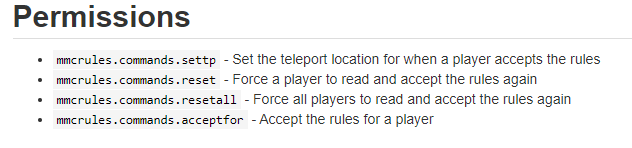
mmcrules.commands.settp - Set the teleport location for when a player accepts the rules mmcrules.commands.reset - Force a player to read and accept the rules again mmcrules.commands.resetall - Force all players to read and accept the rules again mmcrules.commands.acceptfor - Accept the rules for a player
goti t
high raven
you look on the ore page
covert star
way ahead of you
high raven
then you add mmcrules.commands.acceptfor to default
high raven
that's not a listed permission so it won't do anything
it's probably not needed to add a perm to accept
covert star
its shows for me that it is
covert star
how
high raven
just like the others
quaint idol
same way as all the other ones
high raven
type weight.1 into the box on the bottom, hit enter and +
all permissions that you add are nodes btw
covert star
covert star
ok
high raven
add a weight.10 to it
covert star
ok ty for all your help i think i got it from here
high raven
np!
covert star
😄
wintry cloudBOT
Hey Joseph! Please don't tag helpful/staff people directly.
covert star
oops i forgot sorry clippy
high raven
All commands?
covert star
yes for admins
high raven
Nucleus has that feature I think where one permission allows all admin commands
but just within nucleus
What are you trying to do? Best to say that
covert star
what if i give it the base for all mods
like minecraft. and nucleus. and luckperms. and sponge.
high raven
Ah
You want wildcards
minecraft.* is all Minecraft perms
luckperms.* is all luckperms perms
covert star
ok
high raven
The * just means 'anything'
quaint idol
be careful though, wildcards means people can do ANYTHING in the category, i.e. minecraft.* includes all the banning, kicking, and unbanning perms
high raven
Also this
covert star
i understand its just for admins and owner
high raven
!nwc
wintry cloudBOT
Wildcard issues
Some plugins are created in a way which results in odd behaviour when the root '*' wildcard is used.
More information:
covert star
ok if we encounter it will look at that refrence
i got a workaround its called copy paste
covert star
can i rename the group default to guest
 barren fable
!default
wintry cloudBOT
LuckPerms provides a group that every player is added to upon joining the server, called default. You can use multiple methods to change the default group or change the name of it.
LuckPerms wiki