#support-2
1 messages · Page 35 of 1
 quick lagoon
 deep shale
Okay thank you, but most HDD servers don't have this problem
quick lagoon
are you running your OS on the same HDD?
quick lagoon
yea bcu most server although run on HDD have their os on seperate drive
deep shale
My map is pregenerated so i didn't think this was it
quick lagoon
i cant really point to any specific plugin as all your crash have different stace trace, unless you know that a certain action that cause a server crash
deep shale
Ok thank you i will try to relieve my hard drive
quick lagoon
Its just a host of possible issue combine together tbh, like having a HDD, having a CavesBiome datapack, and if you run MC client on the same com as your server it may cause more hardware bottleneck as well
deep shale
Okay thank you very much for your help, I still find it weird that it happens with few players, and sometimes not when there are many
 devout garnet
Oh yeah trust me you do not really want to be running an mc server on an HDD in 2020
No one really does that anymore
quick lagoon
In summary, there is 3 thing crash your server from the logs you sent:
Player join, Chunkmaster chunk generation, Player teleport
Which all needs chunk loading, means needs to read the chunk data from your HDD.
devout garnet
Unless you have a really good hdd (and even then itll still not be as good)
deep shale
Okay thank you very much for your help, I thought running a server on HDD was not a problem, I'm going to change that.
Sorry for asking in the wrong place, this problem happened at the same time when I installed luckperm but it was probably just a coincidence
 naive knot
Help meeee I have spammed console
[luckperms-hikari connection adder/WARN]: Tue Apr 28 00:13:42 CEST 2020 WARN: Establishing SSL connection without server's identity verification is not recommended. According to MySQL 5.5.45+, 5.6.26+ and 5.7.6+ requirements SSL connection must be established by default if explicit option isn't set. For compliance with existing applications not using SSL the verifyServerCertificate property is set to 'false'. You need either to explicitly disable SSL by setting useSSL=false, or set useSSL=true and provide truststore for server certificate verification.
 high raven
!errors your solution is here
 wintry cloudBOT
Here's a page with some common storage system errors.
 LuckPerms wiki
naive knot
LuckPerms wiki
naive knot
Thank you good man
 timid vault
can someone help me for some reason i cant get my luckperms to connect to the database?
high raven
is it a connection time out error?
timid vault
[LuckPerms] Failed to init storage implementation
high raven
!paste the whole thing, huge chunk of all those lines
wintry cloudBOT
Please use pastebin!
Seeing a paste of the problem makes everything so much easier! Use https://bytebin.lucko.me/ for easy pasting!
For console errors:
Pastebin any relevant segments of the console log. If it's a startup error, this includes the entire startup log!
Other errors:
Pastebin the entire Luckperms config file (passwords removed) as well as any other relevant files!
timid vault
ill dm you the link larry
quick lagoon
please just paste it here
timid vault
high raven
Connection is not available, request timed out after 5008ms.
You're not able to connect, that's about all the error says
!errors check here for some possible solutions
wintry cloudBOT
Here's a page with some common storage system errors.
LuckPerms wiki
timid vault
thats wird bc i got the database setup i used qoutes on everything?
high raven
gotta leave the formatting the same
timid vault
tried that aswell
high raven
don't ever add or remove quotes, just fill in values
timid vault
what i got is adress: 000.0.0.0:000 username 12_345667877 Password: 'adasdasdadafsd'
thats bassicly how its setup
high raven
did you fill in the name of the db on the sql?
high raven
There's nothing more that error says than it couldn't connect, so something is not allowing the connection
quick lagoon
how is address 000.0.0.0:000
timid vault
that adress is a example
high raven
security ben
timid vault
not gonna post the actual adress
quick lagoon
oh i see
timid vault
yeah the name is correct i even got the capitials in there so idk
even got the port even tho its not needed probabbly
high raven
There's nothing more that error says than it couldn't connect, so something is not allowing the connection
that's about all i've got
try without the port, check firewalls, etc
timid vault
yeah tyx tho
high raven
!update
wintry cloudBOT
You can download LuckPerms for Spigot/Paper, BungeeCord, Sponge, Nukkit or Velocity.
Additional downloads
high raven
!download
wintry cloudBOT
You can download LuckPerms for Spigot/Paper, BungeeCord, Sponge, Nukkit or Velocity.
Additional downloads
 hoary comet
I have a question. I have a bungee network. Whats the difference between LPbungee and just LP? Do they work exactly the same? If I use LPB for groups like Staff, will it sync to all other servers?
and yes I use MySQL.
high raven
!sync it will sync if you do this
quick lagoon
LPbungee allows lp to reconigse the use of bungeecord permission
wintry cloudBOT
To sync data between servers, you need to connect each LuckPerms plugin to the same database (for example MySQL) and set up a messaging service.
LuckPerms wiki
hoary comet
LPbungee allows lp to reconigse the use of bungeecord permission
so basically, its not for full permissions use just like LP?
high raven
You need LP on every server you want it work on, and if you want permissions for things like /server you need lp bungee too. you can sync them all up once you set them up by connecting them to the same databse
 quartz vine
Yeah, but you should download different LP versions: one for Bungee and another one for Spigot Backend Servers\
hoary comet
Yeah I have lpb installed on my proxy, and lp on all my other servers.
You need LP on every server you want it work on, and if you want permissions for things like /server you need lp bungee too. you can sync them all up once you set them up by connecting them to the same databse
Ah. Okay. Thanks!
table-prefix: 'luckperms_'
this does not need to be changed right?
high raven
nope leave it
hoary comet
okay. Thanks
 proper pulsar
It must not be changed!
If you want the permissions to be synced
Or in other words they must be the same for all instances
hoary comet
got it.
 shy plover
Is there a way to remove or add a specific permission to all users?
quick lagoon
dont double post
 vivid spoke
i'm kinda confused on how to implement permissions on a world to world basis
I want there to be one world with mcmmo and one world without
proper pulsar
Use the commands or the editor to set per world perrmissions
We don't support editing the storage files manually (meaning we do not provide help with it. Not that it doesn't work) and strongly discourage it
@vivid spoke
vivid spoke
ok
quick lagoon
!context on how to set context
wintry cloudBOT
You can set a permission or group on a per-world/per-server basis, through what we call "contexts".
LuckPerms wiki
proper pulsar
!editor for the editor
wintry cloudBOT
LuckPerms offers an easy to use, powerful Web Editor, with which you can add, delete and change permissions of groups and players.
LuckPerms wiki
proper pulsar
☝🏼 that's what we recommend using
vivid spoke
oh dang
proper pulsar
Or commands
proper pulsar
Looks right
vivid spoke
so this will only happen when they are inside the world event?
therefore the name context?
proper pulsar
Yes
vivid spoke
thanks
proper pulsar
You're welcome
Now after you applied the changes you can check the storage files to see how it's done there if you really want to keep using the YAML files
 gleaming radish
Il y a des français ?
 barren fable
Je parle un peu français, mais pas trés bien. Quelle est ta question?
gleaming radish
super
30 secondes
Quand un joueurs casse un block sa met sa "Don't have permission to do this" coment résoudre ce problème ?
wintry cloudBOT
LuckPerms provides a verbose command to help you find out what permissions a command/plugin is checking.
LuckPerms wiki
gleaming radish
je vais essayé merci beaucoup 🙂
proper pulsar
@prisma hinge Make sure you click the plus button in the lower right
 stone orbit
its because of lp plugin?
 stiff egret
#general not related to lp. Your online-mode in your server.properties is set to false.
proper pulsar
@stone orbit that's vanilla Minecraft
stone orbit
wdym
stone orbit
yes
proper pulsar
Telling you to turn on online-mode unless you have a very good reason not to
 tame hollow
It has nothing to do with LP. The message is very clear.
stone orbit
BrainStone and i have a good reason?
proper pulsar
If you have to ask, probably not
I mean why did you turn it off in the first place?
stone orbit
i want to host my server for my discord, and many ppls have no lesence
and my helpers
proper pulsar
Well in that case you need it
stone orbit
i know
proper pulsar
But be aware that running offline servers is a hassle in of itself
Unless you know what you are doing you'll run into lots and lots of issues
stone orbit
i know what im doing
proper pulsar
If you need to ask what that message is, then I have sincere doubts
stone orbit
I want ask how can i disable it (answered)
proper pulsar
Turn on online mode
 slow parcel
Hi I am currently setting up a nukkit server and I am using luckperms I have got prefixes set up but they are not showing up. I know that I have to get a chat thing for it to work but I don't know which one to use so that the prefix show.
proper pulsar
!chat
wintry cloudBOT
LuckPerms does not display things in chat!
LuckPerms is only able to send information to formatting plugins so that they display them properly. LuckPerms does not put the prefix in front of your name, you need a chat formatting plugin to do it, and you need Vault. Same goes for the tablist! If the information appears correctly when you run lp user <you> meta info, LuckPerms is doing its job!
Prefix isn't showing?
What plugins can I use to format chat?
proper pulsar
Well, no for Nukkit there
My bad
I don't know
Selecting the right plugin is best asked in #general, as it's not related to LP
Or better even ask on the Nukkit Discord
They can help better with plugin suggestions
slow parcel
Ok thank you for your help
proper pulsar
You're welcome
 merry wharf
I'm having an issue
Despite inheriting minecraft.time, I can't use /time unless I'm an operator
wintry cloudBOT
LuckPerms provides a verbose command to help you find out what permissions a command/plugin is checking.
LuckPerms wiki
proper pulsar
And the permission would be minecraft.command.time anyways
 pearl prairie
I'll just move to this one, so i've read through verbose and have been looking for the comands but i don't know where to find what commands someone needs to use shopgui+ on the server i'm on
tame hollow
Have you checked the docs for that plugin?
Or filter the verbose results so you get less spam
pearl prairie
i have
quick lagoon
we canT remember ever permission nodes for every plugin, I suggest to join their discord for help if you are unsure of wat permission nodes is needed for shopgui+ plugin
 prisma hinge
looking for someone who is good with LuckPerms and knows how to use it very well dm me for more info
quick lagoon
!ask
wintry cloudBOT
Please ask your question!
Please ask the question you have. Don't ask to ask, or ask to DM someone. There are people here to help you, but we need to know what to help you with, so please just ask the question you want to in as much detail as possible!
Or, try here first:
Why shouldn't I ask to ask?
prisma hinge
looking for someone who is good with LuckPerms and knows how to use it very well dm me for more info
tame hollow
@prisma hinge don't spam!
prisma hinge
Hello, could someone assist me please?
devout garnet
people generally help you if you ask a question and they know the answer
you didn't ask anything so no one knows the answer
tame hollow
!ask
wintry cloudBOT
Please ask your question!
Please ask the question you have. Don't ask to ask, or ask to DM someone. There are people here to help you, but we need to know what to help you with, so please just ask the question you want to in as much detail as possible!
Or, try here first:
Why shouldn't I ask to ask?
prisma hinge
Right,
My players can't seem to use /spawn or /home
But I thought I added those permissions?
high raven
Which did you add
wintry cloudBOT
LuckPerms provides a verbose command to help you find out what permissions a command/plugin is checking.
LuckPerms wiki
high raven
You'd also need essentials.home and several others depending on how you want it to work
Use verbose as turbo mentioned to see what nodes are denied
Then you can add the
Them
prisma hinge
It's coming up all true
tame hollow
can we see?
prisma hinge
devout garnet
filter verbose on essentials
devout garnet
try /lp verbose on <their username> & essentials.home
tame hollow
antibuild 
 steady river
ben
steady river
what?
quick lagoon
yes?
steady river
so like is there a way that i can dm you and show you what i am doing to port forward?
 fickle linden
hello
I am confused
:(
I tried to set a prefix
using this prefix.{prefix} e.g prefix.&3Mod
and it doesn't work
it still shows the group below
fickle linden
what is priority?
 unique parcel
weight
unique parcel
higher number = more important, just like group weights
fickle linden
thanks
fickle linden
I see, I am just used to pex, still in the middle of sorting things out lol
so useful
unique parcel
yep - always remember that LP uses its weighting system like how weights should be, so higher is more important - opposite of pex that used lower as more important. LP is also not limited to 100 numbers. I leave a 1k gap between each group weight to allow for plenty of expansion later if needed. that way you dont have to renumber anything. with LP, you can also use negative numbers.
quick lagoon
but to keep it simple dont use negative numbers unless really needed haha
unique parcel
lol
 pliant forge
I need help with the prefixes of luckperms bungeecord, what I try it won't work. Do I have to install vault on my bungeecord server too or is it something else I need to do?
(I have vault on my server same as essentialsxchat and essentials)
pliant forge
Are you talking to me?
proper pulsar
Yes
pliant forge
Alright I switches yesterday from bukkit to bungeecord luckperms (lost all data (doesn't matter)). Now I have created a few ranks and I want to let them have a prefix. But that doesn't work even I did it the same as the bukkit luckperms tune where it showed them.
proper pulsar
Do you have LP still on the backend servers (Bukkit)
pliant forge
No
proper pulsar
Then it can't work
Permissions are not a built in concept
They don't carry over between Bungee and the backend servers
You need a proper network setup
!bungee
wintry cloudBOT
If you run a Bungeecord network, learn how to correctly setup LuckPerms on all server instances (including Bungee).
Also read:
Syncing data between servers
https://github.com/lucko/LuckPerms/wiki/Syncing-data-between-servers
LuckPerms wiki
proper pulsar
!sync
wintry cloudBOT
To sync data between servers, you need to connect each LuckPerms plugin to the same database (for example MySQL) and set up a messaging service.
LuckPerms wiki
proper pulsar
And your data probably isn't lost
(Unless you deleted the LuckPerms folder on Bukkit)
If you didn't you can get it back with this
!switchstorage
wintry cloudBOT
If you wish to change your storage type (e.g. to YAML or MySQL) you may need to follow these instructions to ensure your groups and permissions are migrated to the new storage type.
Read more about the Storage types
LuckPerms wiki
proper pulsar
Ok
pliant forge
Normal luckperms on the other servers or also the bungeecord luckperms?
proper pulsar
Normal
pliant forge
Alright
 full lark
Would this be right for rank formatting?
format: '%highest_on_track_staff%%highest_on_track_donorranks%%highest_on_track_ranks%{DISPLAYNAME}: {MESSAGE}'
proper pulsar
You want to stack prefixes?
full lark
So if a player is a staff rank, donor rank and regular rankup I want them all to show yeah
Mainly for players that donate and rankup using ingame currency
proper pulsar
!prefixstacking
wintry cloudBOT
Sorry! I do not understand the command !prefixstacking
Type !help for a list of commands.
proper pulsar
!stacking
wintry cloudBOT
Display multiple prefixes/suffixes alongside a player's name.
LuckPerms wiki
proper pulsar
Read this
full lark
Thats what I'm going off
Do I format my file like this?
prefix:
  format:
    - "highest_on_track_prison"
    - "highest_on_track_donor"
    - "highest_on_track_staff"
  start-spacer: "★ "
  middle-spacer: " | "
end-spacer: " "```You need to configure it in the LP config
full lark
Ah ok
I only ask because I'm having an issue
where the rank isn't changing to the next one.
proper pulsar
What do you mean?
full lark
For example if a player is rank A and upgrades to rank b with mod rank also it will not update the prefix in chat
pliant forge
Do I have to do something with the pool settings/size?
proper pulsar
No
pliant forge
Alright
full lark
It worked before so i'm not sure whats changes xD
proper pulsar
Typically if you don't know what a setting is for, don't touch it
pliant forge
I'll leave it untouched
full lark
Would i use for example 1,2,3,4,5,6,7,8,9
proper pulsar
You can easily check with /lp user <user> meta info (or /lp group <group> meta info
And to see the calculated prefix, leave out the meta
And yes
But I'd recommend leaving gaps of ~10 or even ~100
proper pulsar
Essentially a random one will be chosen
Or more specifically the alphabetically first one
proper pulsar
The first one is in the bungee config (not the Bungee LP config)
and the other is in the spigot config (also not the Spigot LP config)
pliant forge
Ooh OK I'll check it out
full lark
Thank you @proper pulsar
wintry cloudBOT
Hey TheOnlyYorksman! Please don't tag helpful/staff people directly.
full lark
Sorry for the tag xD
proper pulsar
You're welcome
 night kelp
Is it possible to convert a flatfile to MySQL?
 lilac hazel
!switchstorage @night kelp
wintry cloudBOT
If you wish to change your storage type (e.g. to YAML or MySQL) you may need to follow these instructions to ensure your groups and permissions are migrated to the new storage type.
Read more about the Storage types
LuckPerms wiki
night kelp
Thanks!
shy plover
I have a problem with the lockette, I give myself permissions but it tells me that I do not have permissions.
maybe its problem of LP?
lilac hazel
!verbose
wintry cloudBOT
LuckPerms provides a verbose command to help you find out what permissions a command/plugin is checking.
LuckPerms wiki
lilac hazel
That will tell you what permission nodes are being checked, you m ay have missed one
Look for "Undefined" or "false"
beside anything with lockette nodes
shy plover
I got lost with so many values 😂
lilac hazel
Perhaps try running verbose in another way
There are ways that don't show everything in chat.
shy plover
can you explain a little if not much discomfort of course.
shy plover
yes
lilac hazel
See how record says it won't notify you via chat?
shy plover
yes
lilac hazel
Perhaps that might be one you need to try
shy plover
It would be best to run this by console, right?
lilac hazel
In game works
You neeed to trigger the permissionchecks in game./
Either by using the command or doing whatever you don't have perms for
shy plover
Could you give me an example?
lilac hazel
So you turn on verbose
Say you get permission denied when you run /home
You would run /home
shy plover
/lp verbose on
lilac hazel
then you would save the results from the verbose logger.
I would use "upload"
that way you get a nice tidy link that you can review the results on
shy plover
I think it was a very bad idea to do that
I throw the server with 200 people
it was very very very very very very bad idea
OMG
lilac hazel
Just log out then log back in
I'd highly suggest using a filter on your username or the person having issues
Also, nobody else can see the verbose messages other than you so don't worry about that.
shy plover
buddy, run the command and my server literally crashed with 200 people inside
 quaint idol
what command?
lilac hazel
Verbose with no filters
shy plover
nothing happens, don't worry, it's my mistake for not knowing how it works
 coral parcel
Hey got an issue, didn't want to interrupt discussions in general 1.
I've used luck perms before on a 1.10.2 modded version of minecraft but this time we're in a 1.15.2 version and we're trying to just ensure that the groups are working properly and displayed properly. at the moment people only have the prefix of '[]' before their names.
we've created the group 'moderator' with a temporary weight of 100, and created a prefix for it by using
/lp group moderator meta addprefix 100 "[&aMod&f]"
We've done the same command but with setprefix as well, given it and check to make sure it was given to a player, but the prefix hasn't changed at all, we've messed with some weights, ensured that there isn't a separate rank that is overwriting the player's prefix, we've double checked essentials configs and I'm afraid we're at a loss.
Any help would be appreciated, thanks!
high raven
If you have multiverse, factions, or towny, they can be adding the []
as for why [Mod] isn't showing, i refer you to this:
!chat
wintry cloudBOT
LuckPerms does not display things in chat!
LuckPerms is only able to send information to formatting plugins so that they display them properly. LuckPerms does not put the prefix in front of your name, you need a chat formatting plugin to do it, and you need Vault. Same goes for the tablist! If the information appears correctly when you run lp user <you> meta info, LuckPerms is doing its job!
Prefix isn't showing?
What plugins can I use to format chat?
coral parcel
Okay... new issue 😅
Went to go try some of the commands listed in here, and nothing's showing u almost as if none of the commands are going through, but we are opped and it's still in the server, we haven't tweaked any configs and we tried restarting the server
high raven
!usage follow this to begin with
wintry cloudBOT
Here's a guide to help users understand and use LuckPerms for the first time.
LuckPerms wiki
proper pulsar
If you run a LP command and it comes back with Just that the server is using LP and what version it is, you don't have permissions
coral parcel
no like it didn't come back with anything
proper pulsar
What happens when you run the commands in the console?
coral parcel
same thing, no reaction
we just took out luck perms and we're just putting it back in now
Ok, readding the plugin seemed to help
proper pulsar
That’s odd
coral parcel
very haha, but it works now
proper pulsar
Readding
Does that involve restarting the server?
Well in fact, did adding it in the first place involve restarting it?
@coral parcel
coral parcel
yea, so we had to manually add all plugins while the server was down, started the server and it worked fine, other than the prefixes issue (which we may have just solved but i haven't tried yet)
we removed it, restarted it, added it, restarted it and it seems to be working now but i still gotta test some things
(only restarted to re-add it so many times cause we're working on multiple things at once)
tame hollow
in any case, if a plugin isn't working correctly, check the console for errors during start up.
coral parcel
We got it all working now! Totally missed the part about requiring EssentialsXChat the first time reading the wiki, thanks so much for your help!
quick lagoon
!commands
wintry cloudBOT
Find all of the available LuckPerms commands on the wiki.
General commands
User commands
Group commands
Permission commands
Parent commands
Meta commands
Track commands
Log commands
-
LuckPerms wiki
quick lagoon
look into the Permission commands
 shut urchin
Perfect thank you!
quick lagoon
np!
shy plover
Well, I have been trying all day and I have no way, I do not know if it is a problem of LuckPerms or the lockette plugin, it does not detect the administrator permissions, with permission if, but with luckperms no.
quick lagoon
!verbose to check the permission nodes lp is checking when you run lockette commands
wintry cloudBOT
LuckPerms provides a verbose command to help you find out what permissions a command/plugin is checking.
LuckPerms wiki
shy plover
quick lagoon
did you run any lockette commands?
shy plover
does not use commands as such
quick lagoon
try without a filter
shy plover
Administrator permissions are for removing posters.
Trying without filters I shot the server with 200 people inside.
quick lagoon
filter your username then
shy plover
i try
quick lagoon
then open chest etc while verbose is enabled
shy plover
me dice varios permisos posibles, pero ninguno de lockette
sorry i said in spanish
it tells me several possible permissions, but none of lockette
quick lagoon
did you open chest locked by lockette when verbose is on?
shy plover
yes
quick lagoon
also can i have your /plugins output
shy plover
and he only sent me what I put on top
Well no, I did not sell anything with the lockett plugin, execute commands, try to open chests, many things and directly without detecting the lockett permissions
quick lagoon
also can i have your /plugins output
^^
shy plover
nor does he show it to me there.
quick lagoon
i know, i just want to know your plugin list...
so can i have a screenshot of when you run /plugins
unless you are using mods?
shy plover
Can I send it to you privately? I have very much things there
quick lagoon
its just plugin list, send here
shy plover
Friend, I have a fairly large server, dwelling on all the plugin list I have is giving freedom to half the world open doors.
tame hollow
Nonsense. Just send it.
shy plover
yes i am using permissions from there but it won't let me
 tidal blade
Won't let you how? What does it say
tidal blade
!verbose
wintry cloudBOT
LuckPerms provides a verbose command to help you find out what permissions a command/plugin is checking.
LuckPerms wiki
shy plover
omg buddy, I've already done that several times, but it directly doesn't give lockett info
tidal blade
An what did verbose say? Do /lp verbose record then try the chest then do /lp verbose paste and send us the link
shy plover
tidal blade
and send us the link
shy plover
What is this problem due to?
high raven
You've given us about 1/4 of the information we need to make an informed guess, even, so really, can't say at this point
shy plover
What else do I need?
high raven
for now, give yourself the * node and see if it works
shy plover
it doesn't work either I already have the *
tame hollow
what exactly is the problem? i couldn't quite gather it
shy plover
ok, I will explain it as detailed as possible
A few days ago I made a change from Pex to LP, more than anything because many friends recommended it to me, it certainly has been a great change, but I have had problems with some permissions, it does not detect them, for example, this plugin allows to place private chests And certainly administrators should be able to open the chest of any user, I have given all the permissions, both to the range, and to myself, all, up to *, this problem only happened with LP with PEX there was no problem.
high raven
What version of minecraft, and what exact lockette plugin do you use
send the link where you got it if possible
high raven
send a screenshot of lp info
shy plover
allow me a moment i am starting the server again
wintry cloudBOT
Please use pastebin!
Seeing a paste of the problem makes everything so much easier! Use https://bytebin.lucko.me/ for easy pasting!
For console errors:
Pastebin any relevant segments of the console log. If it's a startup error, this includes the entire startup log!
Other errors:
Pastebin the entire LuckPerms config file (passwords removed) as well as any other relevant files!
high raven
or any other pastebin service you like
shy plover
shy plover
all console log?
high raven
from the recent startup yeah
shy plover
a sec
high raven
just from beginning to Done!
lilac hazel
Bungeecord?
shy plover
yes
lilac hazel
all servers got bungeecord mode set to true in the spigot.yml file?
tame hollow
You're also a bit outdated on LP version
lilac hazel
Ok
tame hollow
!download for latest
wintry cloudBOT
You can download LuckPerms for Spigot/Paper, BungeeCord, Sponge, Nukkit or Velocity.
Additional downloads
shy plover
if you want I update it and try
tame hollow
probably won't fix the issue, but worth a shot
high raven
it might be that lockette is just super old 🤷♂️
lilac hazel
@shy plover When you moved from PEX to LP, did you check to confirm everything had copied correctly, groups were labelled correct etc?
could you post your /lp editor link
high raven
@shy plover did you enable-permissions in the lockette config? check to ensure that's turned on
shy plover
some problems i had and the solutions, the only thing that is giving me problems is this, everything else works perfectly, everything is imported perfectly.
@shy plover did you enable-permissions in the lockette config? check to ensure that's turned on
@high raven
wintry cloudBOT
Hey Zhenk! Please don't tag helpful/staff people directly.
high raven
is it just lockette?
high raven
it might have something to do with the way lockette does permissions, but I'm not sure - have you looked into alternatives?
does lockette have an info command
like /lockette info or /lockette version or somthing
shy plover
yes, try to find alternatives, but, alternatives I did not find them, try to search if there was any different version, but there is only for 1.10 up, it does not work.
high raven
hm, was hoping to see if it registered a perms plugin lol
shy plover
info no work
lilac hazel
Can you post your editor link?
high raven
seeing your /plugins might help diagnose this too. Not sure but worth a shot
lilac hazel
I wonder if it's anything to do with the group names having symbols in them &6&lREY&F
&3✫ &lSMOD
high raven
if the permissions don't register in verbose for the whole plugin, doubt it
shy plover
I wonder if it's anything to do with the group names having symbols in them
&6&lREY&F
@lilac hazel
that's what I just put in a few hours ago, I have this problem for days.
wintry cloudBOT
Hey Zhenk! Please don't tag helpful/staff people directly.
shy plover
I also changed them in my localhost to see if it could be, but I do not change anything
lilac hazel
Your weights from group Youtuber all the way up to owner are 1005
quick lagoon
but the funny thing is verbose doesnt show any lockette perms
lilac hazel
hm
high raven
try with a lowercase L
shy plover
if you like I can change the weights
shy plover
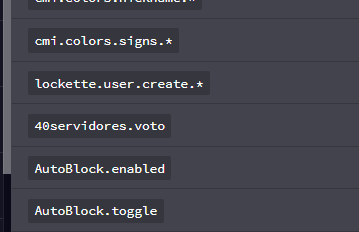
i have lockette.*
 tame hollow
but the funny thing is verbose doesnt show any lockette perms
@quick lagoon which leads me to believe either lockette isn't using the standard permission checking system, or something else is interfering
shy plover
tame hollow
there is a version of Lockette on Spigot which looks like it may be updated, maybe try using that?
shy plover
there is a version of Lockette on Spigot which looks like it may be updated, maybe try using that?
@tame hollow only 1.10 to 1.15 Minecraft servers
wintry cloudBOT
Hey Zhenk! Please don't tag helpful/staff people directly.
high raven
Zhenk, try and backspace the pings so clippy doesnt get mad
shy plover
Ok, sorry
tame hollow
lilac hazel
I mean it's a bit of an ask, can you not use the protocol control whatever it's called plugin and run a slightly newer version of MC so you can run the more updated plugins?
tame hollow
I don't know anything about this plugin though so take my advice with a grain of salt lol
just google "lockette spigot"
high raven

SpigotMC - High Performance Minecraft
literally just googled the words in the screencap
shy plover
I'm going to upload it and see how it is
Work :3
I have more than 60,000 registered users, this does not cause problems.
Thanks for the good support and sorry for the inconvenience.
tame hollow
oh that's good to know! :)
shy plover
Any suggestion you want to give me? they saw under my server's panties xd xd
lilac hazel
Most people here already have established servers 😛
They aren't really interested in yours so you don't need to worry lol
They come here to ask for support regarding permissions and setup.
 maiden shale
hey, does anyone here know a economy plugin that shows the money in "k"? It should work without vault
 solar shore
@shy plover a modern alternative to Lockette is https://www.spigotmc.org/resources/blocklocker.3268/
works for 1.15
SpigotMC - High Performance Minecraft
maiden shale
Is there any PlaceholderAPI placeholder to show it in thousands? 130000 to 130k
tame hollow
probably need to make a javascript placeholder or something
quick lagoon
if you have issues, just state it
 analog vault
Okay basically, there's some strange crash when someone upgrades a villager on 1.15.2
And all I can find is Luckperms
I'm helping out on a server for someone
 quick lagoon
i dont see any luckperms errors in the error message or stracktrace
hoary comet
Anyone knows whats wrong here? I've installed LP to migrate from pex, but I can't connect to the server. If I remove LP it works fine.
[Disconnect] User itsArtige has disconnected, reason: [TAB] Not already loaded... Try again in a few seconds
hoary comet
Ah. It was the tab. I was behind by 1 update. xD thanks man
 feral pebble
np lol
pliant forge
It worked with the ranks and I have a few done. The only problem is is that my first rank (iron) shows test as prefix, but in the webeditor stands [Iron], but in game there is test.
I've tried to change it ingame and on the web editor but it won't change in game
feral pebble
did u save the web editor
pliant forge
Yes
 ivory kelp
Hello Luckyperm Support-Team, me and my friend are trying to create a Minecraft Server (1.15.2) and were excited to use your Ranksystem Plugin which proved to be better then we imagined. We watched tutorials and are pretty sure we know how your plugin works now, yet the issue lies with Essentialsx. We put both plugins on the Server (we already made the Prefixes for or ranks) and at first we had prefixes of our Luckyperm plugin but all players without OP lost all their rights including opening chests or even picking up items they couldnt even use swords. So we thought Essentialsantibuild was the cause and removed it but as soon as we did our prefix for luckyperm disappeared as well. we tried reinstalling Essentialsx but the prefixes wont show again. We appreciate any help we can get. Thank you
analog vault
Havr you got vault installed?
ivory kelp
yes
analog vault
!prefix
wintry cloudBOT
You can set prefixes, suffixes and other meta data in LuckPerms for players and groups. Note that LuckPerms does not manage chat. You need to use another plugin to show prefixes/suffixes in chat.
LuckPerms wiki
analog vault
@ivory kelp ^
quick lagoon
!chat as well
wintry cloudBOT
LuckPerms does not display things in chat!
LuckPerms is only able to send information to formatting plugins so that they display them properly. LuckPerms does not put the prefix in front of your name, you need a chat formatting plugin to do it, and you need Vault. Same goes for the tablist! If the information appears correctly when you run lp user <you> meta info, LuckPerms is doing its job!
Prefix isn't showing?
What plugins can I use to format chat?
ivory kelp
is it in the config?
pliant forge
Still don't know why my iron rank shows test as prefix. But in the webeditor stands [Iron]
analog vault
Is it weighted correctly?
unique parcel
send your lp editor link and we can look
pliant forge
Already fixed it but thanks
unique parcel
nice
feral pebble
does anyone here use mongodb
prisma hinge
Is there a way to have a permission so something except one specific world? Like for example !survival, so it applies to every world but survival?
If not, is there a way for a permission to apply to multiple worlds, like say using commas doing world1,world2,world3?
pliant forge
If I want to add permissions to a rank, do I have to set that for every single server (bcs I'm using a bungeecord server)
wintry cloudBOT
To sync data between servers, you need to connect each LuckPerms plugin to the same database (for example MySQL) and set up a messaging service.
LuckPerms wiki
pliant forge
Already did that
But if I do /lpb editor. It will only take me to some of the plugins inside my bungeecord and not the other plugins from the other server
unique parcel
because you are using lpb you are targeting the bungee server. permission suggestions in the editor only show for perms that have been checked in that servers session.
high raven
@prisma hinge set a global node to true for the permissions and then set a node with context for the forbidden world to false
!context
wintry cloudBOT
You can set a permission or group on a per-world/per-server basis, through what we call "contexts".
LuckPerms wiki
 crude oar
for some reason it says this person has that perm but i don't think any rank they have actually has the perm and it's on on their player either lol
 icy sentinel
Check your inheritance for the ranks
crude oar
kk
high raven
And send a screenshot if inconclusive haha
crude oar
looks like it's just set to undefined
icy sentinel
To be super sure, you can set this permission to false for the group.
crude oar
yeah that's what im doin
icy sentinel
👍
crude oar
ok i even set it to false for the person and they're still able to do it so i think my plot plugin's glitched lol
icy sentinel
Okay try this
crude oar
fortunately they're mod so it's not a big deal
crude oar
i would but then it spams worldedit lol
icy sentinel
I see.
crude oar
yeah i was thinking that
crude oar
lp editor while verbose is on? or are u talking about that with the record option lol
high raven
Lol no just send the editor link and then try the verbose method
It will show the same as checkinherits though
crude oar
nvm it seems to work now, guess they just had to switch worlds lol
high raven
Lol cool
crude oar
oh wait it looks like they did have the perms, i just didn't see it cuz it was set to a world and the unset command didn't have a world specified when i did it
figured it out anyways haha
crude oar
weird why it didn't say anything with the check command or whatever
unless that only checks the person's perms and not group perms
high raven
@lapis tree send a screenshot of lp listgroups and your editor link
 lapis tree
high raven
lapis tree
lapis tree
high raven
what command are you running to open the editor
lapis tree
how do i set weights again
high raven
in the editor?
high raven
!commands check out group command section
wintry cloudBOT
Find all of the available LuckPerms commands on the wiki.
General commands
User commands
Group commands
Permission commands
Parent commands
Meta commands
Track commands
Log commands
-
LuckPerms wiki
 hollow gorge
Uhm.... you could - you know - use zero-width spaces for the last field...
After all do they work (see the updated help command in #general)
high raven
yeah, saw it, but made the PR before i saw it lol. feel free to use your magical chars in a PR tho, i don't even know where to get em
hollow gorge
I got them from JDA as they use those for a addBlankField method
crude oar
yo larry wanna help us with a perm thingy in the moss server lol
high raven
kk
 blissful lodge
Hi, is there a way to automatically execute a command when a group expires to someone? Let's say I have a player with VIP rank, they can nick themselves and I want them to be unnicked when their rank expires
high raven
not with luckperms, no
the best you could do is find a plugin that sets nicks with permission nodes, which luckperms will remove
blissful lodge
oh I see, thanks for the answer!
prisma hinge
Hey which version of luckperms support 1.9?
quaint idol
latest
prisma hinge
Thank you!
lilac hazel
You've got a case of the viral latest there 😛
prisma hinge
Hey is it possible to configure groups via the server files? Instead of doing it all with commands?
quick lagoon
!editor you can use this
wintry cloudBOT
LuckPerms offers an easy to use, powerful Web Editor, with which you can add, delete and change permissions of groups and players.
LuckPerms wiki
prisma hinge
Thank you!
tame hollow
just fyi it is not really recommended to change to editable storage, as you tend to run into more errors
but if you really want to, it is an option, just check the config.
quick lagoon
!switchstorage but if you really want to use a yaml file to edit perms, you can but not suggesred
wintry cloudBOT
If you wish to change your storage type (e.g. to YAML or MySQL) you may need to follow these instructions to ensure your groups and permissions are migrated to the new storage type.
Read more about the Storage types
LuckPerms wiki
prisma hinge
So the web editor could cause some errors?
prisma hinge
Okay thank you! I'll stick to the editor!
high raven
Fantastic!!
lilac hazel
The editor is love. The editor is life.
prisma hinge
One more question! What is a "track"?
lilac hazel
!tracks
quick lagoon
!tracks
wintry cloudBOT
Tracks provide a method for you to promote/demote players along a track (or ladder) of groups.
LuckPerms wiki
Tracks provide a method for you to promote/demote players along a track (or ladder) of groups.
LuckPerms wiki
quaint idol
gg
lilac hazel
doubleclippy
prisma hinge
Ooh like rank ups
lilac hazel
They house groups
high raven
Yes like easy rank upz lol
lilac hazel
example: if you have a rank you want to reset when someone dies
and you have a donor rank you want them ot keep
You use tracks
You only reset the track that houses their ranks they get until they die
prisma hinge
Just read the wiki and udnerstood it thanks!
lilac hazel
👍
high raven
Oh thank God
prisma hinge
Basically different groups for the ranks
high raven
First person today to read wiki, ILY mate
prisma hinge
Staff track for the staff ranks, donor track for the donor ranks
lilac hazel
Yes!
high raven
10/10 brain capacity
 soft walrus
I have a question. I followed the wiki and made it remote storage on a server in BungeeCord. When I move the server after setting new permissions, the permissions are not reflected. How can I get permissions to be updated on all servers instantly?
quick lagoon
!sync
wintry cloudBOT
To sync data between servers, you need to connect each LuckPerms plugin to the same database (for example MySQL) and set up a messaging service.
LuckPerms wiki
quick lagoon
are all your LP on all your servers connected to the same database?
soft walrus
yes
quick lagoon
can you show me /lp info on a server that you said the perms did not "update"
soft walrus
sure
tame hollow
you should use sql message service
pluginmsg only works when someone is online on the other servers
just how bungeecord plugin messaging works, sql is a much better option.
soft walrus
ty! ill try it
Isn't it necessary to install Luckperms within bungeecord/plugins when I use SQL?
high raven
To control bungee level permissions like /server yes
tame hollow
that's actually a benefit of the sql messaging service, you don't need the bungee version at all
but what larry said
soft walrus
I tried it and it worked.
Thank you for your support!
tidal blade
Luckperms does not handle who can join or can't join a server
lilac hazel
I mean, it blocks everybody if it's set up incorrectly lol omega 😛
@stone heart Using Bungeecord?
lilac hazel
Why not make the servers you want to restrict access to "restricted" in the bungeecord config
 stone heart
well
lilac hazel
then set perms for groups/players you want toa ccess them
lilac hazel
That's not the answer I was looking for lol
stone heart
lilac hazel
and in the config is that server set as restricted?
stone heart
lilac hazel
You've got LP bungee hooked up to a database with all your other servers?
stone heart
also i cant connect to any server atm
uhm i did something wrong
server not allowed even not while op
lilac hazel
!paste logs here please
wintry cloudBOT
Please use pastebin!
Seeing a paste of the problem makes everything so much easier! Use https://bytebin.lucko.me/ for easy pasting!
For console errors:
Pastebin any relevant segments of the console log. If it's a startup error, this includes the entire startup log!
Other errors:
Pastebin the entire LuckPerms config file (passwords removed) as well as any other relevant files!
stone heart
i have no log
lilac hazel
You will have a log
stone heart
currently i cant even switch servers
prisma hinge
on my server nobody but admins/owner can tab through commands
can someone help
lilac hazel
You can't tab commands if you don't have access to their permissions. afaik
prisma hinge
they have some commands, they just cant tab through them
prisma hinge
why do admins have it but mods dont though
lilac hazel
Do you have a plugin blocking it?
stone heart
why cant i have acces to /server with op
lilac hazel
We've got no idea why, it's not in LP's scope of things to handle
because op isn't a bungeecord thing
stone heart
i try everything but i cant switch servers
lilac hazel
any bungeecord permissions require you to have the permission set either via LP-bungee or via the bungeecord inbuilt groups permissions thing
lilac hazel
No you don't
do you have your bungeecord + spigot servers sync'd to teh same databse
!sync
wintry cloudBOT
To sync data between servers, you need to connect each LuckPerms plugin to the same database (for example MySQL) and set up a messaging service.
LuckPerms wiki
lilac hazel
!bungee
wintry cloudBOT
If you run a Bungeecord network, learn how to correctly setup LuckPerms on all server instances (including Bungee).
Also read:
Syncing data between servers
https://github.com/lucko/LuckPerms/wiki/Syncing-data-between-servers
LuckPerms wiki
lilac hazel
Yes
stone heart
stone heart
the server is self hosted
lilac hazel
You won't see your groups without syncing them to a database.
stone heart
can you send link again
i lost it in my 99 tabs

GitHub
An advanced permissions plugin for Bukkit/Spigot, BungeeCord, Sponge, Nukkit and Velocity. - lucko/LuckPerms
lilac hazel
Have you set up ip-fowarding
stone heart
yes
lilac hazel
and enabled bungeecord mode on all the backend servers in spigot.yml and paper.yml (if it exists)
lilac hazel
Ok
Now you need to hook them up to a database
MySQL, mariaDB
etc etc
they all need to be on the same database to communicate with one another
lilac hazel
You'll need a database
if you have one, yeah
if not you'll need to install and set one up
quick lagoon
!context use this
wintry cloudBOT
You can set a permission or group on a per-world/per-server basis, through what we call "contexts".
LuckPerms wiki
stone heart
in survival vip is not allowed to have fly but in lobby allowed
wait i can use readable & editable text files to for it?
oh
data cannot be shared
lilac hazel
!editor
wintry cloudBOT
LuckPerms offers an easy to use, powerful Web Editor, with which you can add, delete and change permissions of groups and players.
LuckPerms wiki
lilac hazel
best way to edit permissions without breaking anything
stone heart
i lost the command to getacces to lpb
/lpb user Thijsp permission lp.* true
luckperms.*
done
mqsl cost money : (
quick lagoon
??
stone heart
https://www.mysql.com/downloads/ this is not free?
lilac hazel
there's lots of ways to have a database lol
stone heart
no
it is now but everything will be transfered when its done
is it possible to have a max of 1 rank
nou double
so if i do add default when im owner i get default
quick lagoon
you want group inheritance?
prisma hinge
i added my friend to a group
but she cant use the respected permissions
nor has the prefix of it
quick lagoon
!verbose to check the perms
wintry cloudBOT
LuckPerms provides a verbose command to help you find out what permissions a command/plugin is checking.
LuckPerms wiki
stone heart
oh if i do lp user Thijsp parent set helper will i be set to helper if i have a higher rank?
quick lagoon
do /lp user USER info to see if lp prefix has been set for the user
@stone heart yes
it just set you to only inherit from group helper and nothing else
hollow gorge
Yes
tidal blade
!chat
wintry cloudBOT
LuckPerms does not display things in chat!
LuckPerms is only able to send information to formatting plugins so that they display them properly. LuckPerms does not put the prefix in front of your name, you need a chat formatting plugin to do it, and you need Vault. Same goes for the tablist! If the information appears correctly when you run /lp user <user> info, LuckPerms is doing its job!
Prefix isn't showing?
What plugins can I use to format chat?
 foggy bluff
Hello, I'm having a small issue allowing permissions for bungeechat. I'm running bungeechat version 2.2.1 and luckperms 5.0.88. Whenever I type a messages I recieve the message saying I don't have permission to use this command. Can anyone help shed light on this situation?
tidal blade
Have you got Luckperms on all servers. An connected to the same remote database
foggy bluff
Yesy
When I started the spigot servers there seemed to be no issue with them connecting to the database
quick lagoon
!verbose check the perms nodes
wintry cloudBOT
LuckPerms provides a verbose command to help you find out what permissions a command/plugin is checking.
LuckPerms wiki
foggy bluff
That seems to be logging every other action I do but not sending a message
I just realised I can talk in global chat but not local chat
quick lagoon
its suppose to log all actions
try filter your username
or someone that doesnt have the perm
foggy bluff
How do I filter?
It's a deafult perm, everyone should have it
quick lagoon
/lp verbose on [filter]
foggy bluff
You are a legend
stone heart
is there a way to do the /lp user thijsp group set ... in all servers at once without a database?
foggy bluff
Thank you so much, I found the permission that wasn't working
quick lagoon
np!
tidal blade
@stone heart Add the group to default as a parent
quick lagoon
@stone heart you need an sql database for perms to sync between servers
tidal blade
and if you have inhertiance setup, everyone will get it and yeah you need a database for it
stone heart
the synqing is to hard for me i dont want the server anywhere else then on my pc
tidal blade
You cannot have permissions sync across servers without a remote database
quick lagoon
you can setup an sql database on the same pc as your server
look online for tutorials on that
quick lagoon
for hosting on your own pc, yes
quick lagoon
then google for a 64bit version lol, there is like tonnes of database setup tutorials online
but 32bit works fine, unless you have like over few thousand player server
even then its should cause an issue if you have sufficient powerful hardware
pliant forge
Can you change the message of when a player gets a rank?
 karmic flower

 quick lagoon
!locale
wintry cloudBOT
Learn how to change all the message from LuckPerms.
LuckPerms wiki
pliant forge
I'll check that
stone heart
well i try 32 bit since it i cant find a 64 installer.msi
wintry cloudBOT
If you run a Bungeecord network, learn how to correctly setup LuckPerms on all server instances (including Bungee).
Also read:
Syncing data between servers
https://github.com/lucko/LuckPerms/wiki/Syncing-data-between-servers
LuckPerms wiki
pliant forge
Ok
stone heart
ok
i have msql
explain me please what to do to create everything
what is my mqsl hostname ?
if i run it on my own pc
is it localhost then?
quick lagoon
yep
quick lagoon
quick lagoon
Example of MySQL database server (schema) creation for use by RapidMiner Server to store config files, cron jobs, app requests, and other support data
gui part
quick lagoon
Key in the details of your database in LP config
stone heart
this is good?
quick lagoon
Yes if you named your database JavaUnit
stone heart
ãnd then?
stone heart
quick lagoon
Yep
stone heart
messaging service?
quick lagoon
Yea
stone heart
k only 1 thing
the whole server needs to be transfered to another pc if its finished
quick lagoon
!switchstorage you may want to do this
wintry cloudBOT
If you wish to change your storage type (e.g. to YAML or MySQL) you may need to follow these instructions to ensure your groups and permissions are migrated to the new storage type.
Read more about the Storage types
LuckPerms wiki
stone heart
will that be possible?
quick lagoon
Not sure, I only have mysql same as com as teh server
quick lagoon
Show me your /lp info
stone heart
in minecraft?
quick lagoon
Yes
quick lagoon
On the server taht you connected to dB
stone heart
needed to do lobby
quick lagoon
ok
stone heart
quick lagoon
Ok it working
stone heart
yes it works