#support-2
1 messages · Page 34 of 1
 quick lagoon
@gaunt echo what is the exact command you run?
 gaunt echo
/lp user Fred20cm permission set worldguard.region.bypass.Gruteon and marcions.dungeon_albero.keep-inventory false
Marcions*
do i need to invert region flag and world?
from output
is like it inverts
quick lagoon
it issue is with teh spaces
gaunt echo
ye, I think it too
quick lagoon
do /lp user Fred20cm permission set "worldguard.region.bypass.Gruteon and marcions.dungeon_albero.keep-inventory" false
gaunt echo
it seems work
I'm testing it
why those "?
it works!! ty so much
I have yet to understand why
Do i need to type those quotation marks for every command?
 high raven
The ones with spaces, yes. It tells the code that everything in the quotes is included and is not a break into new criteria
 pale nest
Heyo, this may be a strange request, but does /lp support placeholder? Like /lp u %player% perm set etcetc?
 stiff egret
Hey guys, sorry if this is a long message just want to explain every step that I did to limit troubleshooting questions. So, permissions have been acting weird lately, currently if I add a permission to a group and set a player to said group (lp user (player) parent set (group), the player does not get the permissions within the group. With verbose I can see the exact permission needed and I give the group that permission, I also searched the permission and that group has it, and I got the info on the user and that user's group has the permissions but they still do not have the perms. So, the group perms overall aren't working for some reason, however if I do personal player permissions they work fine and do it instantly. I've tried networksync, sync, etc. Restarting all servers, nothing is working. I'm on a bungee network with all spigot and bungee having luckperms, all having version 5 (however 1 server had legacy support in an extensions file so I added it to all but the issue persists). The database is on MongoDB.
TLDR: Adding permissions to group not working, but adding perms to a user does, I've tried everything.
Any ideas?
 toxic helm
Can someone help me with this, I'm trying to add a bungee side permission and it won't apply on that specific server
(tag me please). going to bed
 prisma hinge
You have a plugin for juste /rankup with luckperm ?
high raven
@pale nest LP has no functions which require it to support placeholders in running a command, but any other plugin with player placeholders like you have there should be able to run, just make sure you're using the right one (Luckperms also has a PlaceholderAPI expansion)
@stiff egret send a screenshot of /plugins please
stiff egret
I mean it happens on all servers, so I don't think it should matter but here
high raven
@toxic helm are all servers connected to the same database and have you set a messaging service?
Thanks clumsy, looks all good there. Are there any console errors, warns, or severes on startup or any time?
high raven
Ofc!
!paste can you pastebin a startup log here, and send screenshots of lpb info on the bungee as well as lp info on any of the other servers?
 wintry cloudBOT
Please use pastebin!
Seeing a paste of the problem makes everything so much easier! Use https://bytebin.lucko.me/ for easy pasting!
For console errors:
Pastebin any relevant segments of the console log. If it's a startup error, this includes the entire startup log!
Other errors:
Pastebin the entire Luckperms config file (passwords removed) as well as any other relevant files!
pale nest
LP has no functions which require it to support placeholders in running a command, but any other plugin with player placeholders like you have there should be able to run, just make sure you're using the right one (Luckperms also has a PlaceholderAPI expansion)
yea... the only issue is that sponge is uh "special" xD
high raven
Oh yeah, sponge is weird, what're you trying to do @pale nest
stiff egret
Larry, you mind opening dms for a sec? I'd rather not post my internal servers ips (connecting to databases)
high raven
Just remove them from the bytebin @stiff egret (if you have a problem I can't solve, someone who can might miss out on solving it too)
pale nest
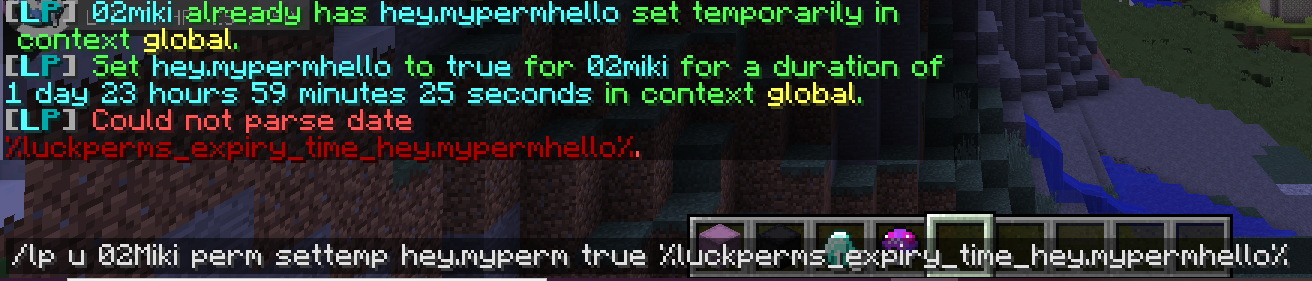
I need to create a custom command which checks for a perm length and uses it in an LP command. So basically, /lp u %player% (which I can already fix, this isn't the issue) perm settemp hey.myperm true %luckperms_expiry_time_hey.mypermhello%
high raven
Why the second placeholder?
pale nest
cause I need to check the duration of a permission, in order to set another perm to the same length
high raven
I don't think you can do that in the same command - if you're custom coding this, perhaps check the duration first and use what it returns straight into the next step which is the command. The bonus is that if there is no duration, you can cancel the whole operation before the command is run
pale nest
ye... I don't know how to code so rip xD If only the plugin I use for custom commands supported placeholders ;-;
high raven
If you run that command within LP yourself does it work
With the second placeholer only
stiff egret
Server 1 - https://i.imgur.com/XOvPYoZ.png - https://bytebin.lucko.me/SkSUgBW1Gl
Server 2 - https://i.imgur.com/knfo5Ph.png - https://bytebin.lucko.me/M23RsF5xyG
Bungee - https://i.imgur.com/HennmCx.png
Bungee Startup - https://bytebin.lucko.me/rRHyIa7ND2
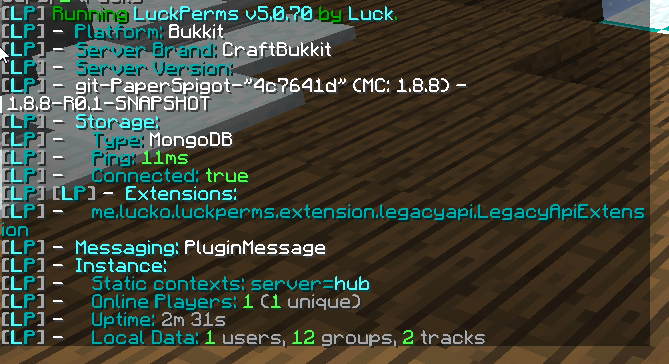
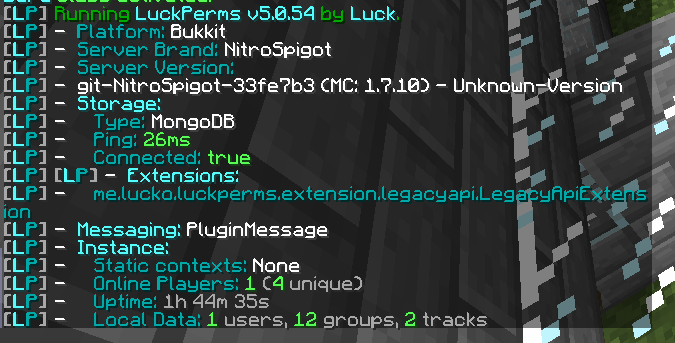
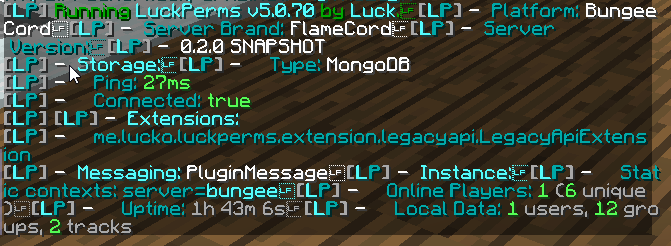
(sorry for the big images, idk how to remove them)
stiff egret
haha cool
Just an fyi, my hub plugin needed the legacy extension and then this issue began happening so I added it to all servers just in case
high raven
Set messaging-service to sql in all configs and restart and test
First step, if ya don't mind
stiff egret
I had that actually before, but then I read that SQL is for multiple proxies so I changed it to pluginmessages
Or originally I had auto, then issue, then sql, then plugin message
pale nest
 high raven
Yeah it's helpful for multiple proxies as well but a good db sync too
stiff egret
Ah, I'll change it back just incase
high raven
@pale nest does /papi parse <username> <placeholder> work? What does it return?
 proper pulsar
pale nest
proper pulsar
pale nest
welp see, I forgot to put luckholders on the test server, sorry lmao, sec
stiff egret
Changed to sql, still the same.
high raven
/papi ecloud download luckperms and /papi reload
Clumsy you restarted all the servers?
pale nest
nah sponge doesn't have that xD I need to download a jar
stiff egret
Correct.
high raven
damn was hoping for an easy fix lol Clumsy
can you send a startup log for the bungee too
stiff egret
Oh sure
pale nest
 high raven
v5.0.54
stiff egret
Ahh, I need to update
high raven
!downloads maybe update from here
wintry cloudBOT
You can download LuckPerms for Spigot/Paper, BungeeCord, Sponge, Nukkit or Velocity.
Additional downloads
high raven
Latest versions, definitely stable and fine to use
stiff egret
So I don't need to make config changes (main reason why I didn't update)?
high raven
nope, same config
stiff egret
:D
high raven
make sure to update all of them to the same latest version
high raven
Yep, takes a while though, sometimes the easy way is the fast way 😂
pale nest
yee xD and tutorials online especially for sponge aren't that common xD
pale nest
yea it did parse it when i /papi parse
I've been already using luckholders for other things and it worked this far
high raven
Ah, try again with the command with only the second placeholder on that server
seems you didn't have it previously
pale nest
yea the first thing is the output

the first [LP] is the /lp cmd, the date below is /papi parse
high raven
ah, oh well, you could make an issue on github and ask for the functionality of papi placeholder parsing within lp commands 😛
pale nest
well the luckperms placeholder plugin isn't even official so I doubt that he'll add it any time soon xD (there isn't an official one)
high raven
Just placeholder parsing abilities
pale nest
Well even in that case, I noticed that the date format wouldn't be fine
high raven
there's an official papi expansion for luckperms, it's not inconceivable
pale nest
cause it needs to be "space less"
there's an official papi expansion for luckperms
sadly not for sponge xD
high raven
i know, but they're all the same system 😉
pale nest
I prolly could, but he'd need to also add a placeholder without spaces ig
toxic helm
Yes, same databasee and messaging service was set to pluginmsg
high raven
oh ye, that's another task, prolly not too hard tho Miki, worth a shot 🤷♂️
@toxic helm set it to sql instead of pluginmsg
pale nest
thanks for the help btw :3
high raven
ofc!
stiff egret
Okay, so I tried adding 1 command to a group on one of the spigot server 1, it worked fine. Then tried adding another on the spigot 2 and it says no permission. Tried the same on spigot 1 says perm was added then no permission. It's just so wack and random. But I specifically add a permission on spigot 2 for a group it doesn't work, then when adding it to a player it does.
also for some reason now after the update whenever I do verbose now, it just spams me with meta data brings my cpu usage to 100% and crashes the server. I also changed back to pluginmsg because my database is mongodb and doesn't work with sql messaging lol.
bungee startup: https://bytebin.lucko.me/rRHyIa7ND2
Let me know if you have any other ideas ;3 I may just try switching to mysql again (switched from it because the wait_timeout on my hosts sql host was wrong)
high raven
you can run lp verbose record and then lp verbose upload to stop the spam
it'll web viewer the verbose log for ya
stiff egret
520k counts lmao for like 15 seconds
high raven
Add a test node called test.permission.node to default group in S1, then can you send the lp editor link from spigot 1 AND spigot 2 without syncing or anything
stiff egret
So, ur saying add the perm on s1 with the web editor, paste on server 2 and see if it already has it?
stiff egret
gotcha will try
stiff egret
the perm shows up on both editors :P
high raven
then it's there and syncing, if you didn't manually add or applyedits on S2
stiff egret
Yeah, and I didn't manually add it on s2
high raven
Can you send the editor link here? nobody can see any server info nor can they change anything
stiff egret
https://editor.luckperms.net/0vGtCjbRhY (please don't judge me for the multiple ranks, I'm stupid and don't know the command to add a person to inherit 2 ranks other than via web gui)
That's why I'm cleaning up and perfecting my settings today lol
I'm assuming your looking for a negated permission for what I want, but I made sure there wasn't any for the perm.
high raven
First question- does LP work for other perms that are not from this specific plugin you're having trouble with
actually, what is the exact thing you're trying to do
and what is not happening the way you expect it to
stiff egret
It sometimes works, it's weird... But I just tried multiple plugins and it didn't work either.
Okay, so in my hub there's gadgets, and each has a permission. I give the rank the gadget perm but it doesn't work and still says no permission. However, when I add it to a specific player it works just fine
And I'm in the group, and have no other inherited groups (only a couple user permissions, not related to gadgets)
And from my limited knowledge on bukkit coding, I don't think player.hasPermission("permission.test") can detect if it's a group perm or a user perm so it has to be something with luckperms
high raven
what does verbose say exactly when you try and run the gadget command that you're unable to
stiff egret
uh it says the word when it's not true or false
but it's true in the web editor
and when I lp search the perm, the group I'm in shows up
high raven
run lp checkinherits <perm>
 winter apex
Hi, I'm new to luckperms. I was going through the tutorial and i gave myself all minecaft permissions (minecraft.*) but i still cant use most of the default minecraft commands such as /gamemode. before i installed the mod i could use these perfectly fine and im also OP.
Is there a way i could fix this?
It says u dont have permission to use this command
 quaint idol
!verbose @winter apex
wintry cloudBOT
LuckPerms provides a verbose command to help you find out what permissions a command/plugin is checking.
 LuckPerms wiki
winter apex
LuckPerms wiki
winter apex
Thanks!
 lilac hazel
I don't think minecraft has a wildcard for its perms, it's never worked whenever i've tried it. YOu may need to add every perm individually.
wintry cloudBOT
Find all of the available LuckPerms commands on the wiki.
General commands
User commands
Group commands
Permission commands
Parent commands
Meta commands
Track commands
Log commands
LuckPerms wiki
high raven

GitHub
An advanced permissions plugin for Bukkit/Spigot, BungeeCord, Sponge, Nukkit and Velocity. - lucko/LuckPerms
stiff egret
Ohhh, u didn't say to do it to the group. But yeah, it has it inherited from self.
Any other things? I just got mysql setup since I think it might be mongo being weird
Damn.... just transferred to mysql
same thing
 torpid wasp
So I'm working on getting LuckPerms setup with MongoDB, do I need to set a connection string? It's throwing this error:
Exception in monitor thread while connecting to server
oh I just switched from mongo
I just entered my connection url in mongodb_connection_URI:
torpid wasp
AH ok
stiff egret
it's format is mongodb+srv://(user):(pass)@(hostname)/(somethingblah)
if u can find it
torpid wasp
No need for a hostname?
torpid wasp
Ah awesome
stiff egret
and it worked for the past 2 months :P
switched to mysql cause an issue, but issue still persists :(
torpid wasp
Ooh fun, a new error: me.lucko.luckperms.lib.mongodb.MongoSocketReadException: Prematurely reached end of stream
stiff egret
uh
dm me the config? the top part at least?
remember to remove the password
maybe I can help lol, not sure tho
Server 1 - https://i.imgur.com/XOvPYoZ.png - https://bytebin.lucko.me/SkSUgBW1Gl
Server 2 - https://i.imgur.com/knfo5Ph.png - https://bytebin.lucko.me/M23RsF5xyG
Bungee - https://i.imgur.com/HennmCx.png - https://bytebin.lucko.me/rRHyIa7ND2}
^^ now on mysql now since I thought it might have been a mongo issue
Have checked with /lp search and /lp group inherits, still no permission. Giving the user the permission directly works, so it's not the plugin. And there isn't any negated permissions.
ISSUE: Group permissions aren't working, but adding perms to user works fine.
high raven
@stiff egret just gonna ask, have you tried with sql messaging now you've switched?
stiff egret
Yep.
Sorry :(
This must have something to do with the legacy extension I guess
But my hub plugin needs it
high raven
Hm, does it all work without the legacy extension?
 deep shale
OK thank you very much for your precious help, I will try to find interesting pieces of logs
And here is my lp editor link, there is not a lot of permission or others, maybe the problem comes from a poorly written permission, but I think I did everything right. https://editor.luckperms.net/brk7djHRpA
I'm going to be hard to find but I also had (rarely) a warning message saying that essentials had taken a long time to find permission through Vault (all my plugin are up to date)
(sorry for the double message, but in the other channel a lot of people are talking, and I don't want to tag the staff)
stiff egret
The hub plugin completely dies without it (hub plugin has the permission I'm to add for players) the rest of group permissions have been working fine.
Like I just gave said group * perms
but I still don't have perms
Okay, so I gave * perms on server1, then force updated, went on server2 and perms were applied. However still not on server1
and after going back to server1, I did /lp editor and * was there
 prisma peak
How can I disable the hover over in verbose?
 tame hollow
you can't
prisma peak
kk
winter apex
Is there a way to see a list of default commands from Minecraft so I can add each one individually? @lilac hazel
tame hollow
lilac hazel
Interesting that i'd get a ping? also ^
 teal pulsar
Hello, somebody know how to delete the logs that starting with [luckperms-hikari housekeeper/INFO] ?
 mighty spear
@teal pulsar You can't unfortunately, why would you want to do that?
teal pulsar
it's spamming my log unnecessarily
 hollow gorge
If it "spams" the console does it mean you have a different logging level (i.e. debug) for the console
mighty spear
Either that or it's spitting errors or something when it shouldn't be. Exactly what is spamming?
teal pulsar
messages like this one: [12:41:28] [luckperms-hikari housekeeper/INFO]: 12:41:28.178 [luckperms-hikari housekeeper] DEBUG me.lucko.luckperms.lib.hikari.pool.HikariPool - luckperms-hikari - Pool stats (total=10, active=0, idle=10, waiting=0)
hollow gorge
12:41:28.178 [luckperms-hikari housekeeper] DEBUG
Your console is set to debug (somehow)
Not a LP issue tho
teal pulsar
oh ok
 long violet
hey litle question im not sure about something
There is no timestamp for the unsettemp ?
ah its for removing a temp perm ok
 merry wharf
Is it possible to list all the inherited permissions?
long violet
hey guys i dont understand the timestamp thing 
The 1482694200 value is the timestamp instant + 1482694200 ms ?
aaah idk why but latest 3 characters is deleted from the time stamp
long violet
its just that in internet timestamp have milis
so + 3 caracters at the end
if i understand correclty
high raven
Depends on how that timestamp works. This one is 'absolute' in that it's not a number to be added on to a set time, but rather it points straight at a set day and time, no matter when you set it it will always expire at the same time @long violet
 shell gulch
Hello, LP seems to be unable to reconnect to my MariaDB server if connection is lost, the only way is to restart the server instance.
high raven
Can you pastebin the error that shows when it loses connection? Does it visibly show that it's trying to reconnect and just not, or is there no output?
high raven
Is that while the database loses connection or after you're certain it's back up?
Seems to be hikari problem
shell gulch
after it's back up
if i try to connect to the database via bash it connects without any issue
the db is on a remote server
high raven
Hmm, strange, perhaps make a GitHub issue for this one, so luck can confirm it's either hikari or LP and fix it if its LP haha
shell gulch
https://github.com/lucko/LuckPerms/issues/2223 done, did i miss anything in the issue report?
GitHub
LP is unable to reconnect to my MariaDB server if the connection gets lost, the only way is to restart the server instance. The console starts spamming this exception (https://paste.lucko.me/WXyKKP...
high raven
No looks really good, thanks!
shell gulch
thank you
prisma hinge
Can someone help me figure out why luckperms isnt working
no errors or anything it just wont do anything
high raven
!paste a startup log
wintry cloudBOT
Please use pastebin!
Seeing a paste of the problem makes everything so much easier! Use https://bytebin.lucko.me/ for easy pasting!
For console errors:
Pastebin any relevant segments of the console log. If it's a startup error, this includes the entire startup log!
Other errors:
Pastebin the entire Luckperms config file (passwords removed) as well as any other relevant files!
 raven fable
hi, im in trouble with a rank plugin. in practice in set a parent to the default group, lets call it rank1, so default inherits all rank1 perms. but when a player rankup, yes he gets the new rank prefix etc but he still have this inherited group cause its in default, so he has both kit rank1 and rank2, and i dont want this. the best thing would be to set 2 default groups but im reading its not good for luckperms on how it stores users. so what could be a solution to this?
high raven
!tracks use a track and run the promote command on rankup
wintry cloudBOT
Tracks provide a method for you to promote/demote players along a track (or ladder) of groups.
LuckPerms wiki
high raven
It removes from old group on track and sets new one
high raven
Set the rank1 kit node to false in rank2
And make sure rank 2 has a higher weight than 1
high raven
If you want a group to inherit another groups permissions, but not some of them, you've just gotta set the ones you don't want them to inherit to false in the highest weighted group a player has
Or the next highest weighted group, in your case
raven fable
so in practice i need to set false all rank1 perms in rank2 rank3 etc
high raven
All the perms?
raven fable
oh i can set to false the inheritance
high raven
If you don't want a group to inherit any permissions, just remove it as a parent
Just take the group.rank2 node out of rank 1
raven fable
thats how i set my groups https://editor.luckperms.net/RCoDc1Pj6I
so what are u telling me to do?
raven fable
the only solution to this for me is to install extension-default-assignments
but a cool thing could be that u can decide default-groups and still lp will not store them in the storage system
prisma hinge
is there a way to disable a single command in luckperms?
like, i gave some people the "*" perms but i want them to not be able to do /kill.
or something.
 barren fable
Just the permission for /kill to false
high raven
@raven fable if you don't want group 2 to inherit group 1 permissions, just remove group 1 as a parent of group 2
raven fable
yes i know this but maybe u did not understand my issue. thats the thing, there are these groups which are made for ranks, its also a track where every group has its own weight and everything well done. the only problem is with the first rankup, because of course a new player has the default group. i could use the default group as a rank group and remove it when someone rankups, but the default group is global since every lp is sync in my server, so i dont want this. so i created another group, the actual rank1, and since i cannot set more default groups i read all the wiki page "default groups" and here there are no real solutions to this problem. the only one i can find is to use the extension, but this will compromise my database size.
i was just wondering if there is some solution i cannot find
high raven
Try just setting default as the first rank on the track? Then you can still inherit the default perms if you want, for every group, and they'll still have them... For groups you don't want to inherit default permissions just don't set default as a parent
The user doesn't need to have default group to have its perms
Just the group they're in needs default or a child of default as its parent
raven fable
well with your solution this server will remove default group globally, so in every server players will get no permission and i need to refact everything
high raven
Just add the node group.default to every group and it'll inherit default perms
Or even the first group on an inheritance chain
As long as it's in the beginning every group will inherit it
prisma hinge
is it alright if i ping a mod if they responded to me
hold on let me read the rules
nope.
I tried that, but the "*" permission appears to override the "kill false" permission. I used the browser editor, did I do something wrong?
 tired seal
 tidal blade
@tired seal Don't ask your question in multiple channels. Just ask in one and wait.
high raven
@prisma hinge if you set a node to false it should override wildcard for sure. Try setting it to false in a higher weighted group than the one you're in and add that group to the player as well
prisma hinge
It worked, thank you! Another question, is there a way to give a player command block perms without /opping them?
stiff egret
Would there be any reason why * wouldn't let me access to a command but being opped does? Or is my luckperms just really messed up.
 coral relic
https://pastebin.com/6aY63sg0 pls help
 stiff egret
there uuid is being messed up? Do you have an online server within a bungee server? idk
tidal blade
@coral relic Do you have any plugins that mess with a players UUID?
tidal blade
Are you running a cracked server - Letting non-premium players join?
coral relic
No
tidal blade
Then you must have something that changes or modifies a players UUID
coral relic
do you thin it could be Aegis?
stiff egret
I doubt it
 thick saddle
deep shale
thick saddle
deep shale
Hello, sometimes i have this big bug, that shutdown my server, can someone help me?
https://bytebin.lucko.me/Q2XS5hoXF7
 clear pagoda
Anyone know if you can apply a context to all existing permission nodes with a bulk command?
I have all my permission nodes without context but now moving to a multi-server setup.
tidal blade
@clear pagoda Simply do /lp bulkupdate all server <servername> "server == global" That will add the server context to ALL permissions in all groups and in all users
clear pagoda
perfect.. so I have another server currently with perms on H2 database that I want to add to same MySql so just add the first context before adding the next?
tidal blade
Yeah.
clear pagoda
cool, thanks!
hmm didn't like that format OmegaWeapon_
It kicked out the command usage from bulk update
clear pagoda
Omega?
clear pagoda
That worked great tagging all perms with context however when I imported from the other server it replaced all the perms
I was thinking it would keep the existing context and add to it with the other servers context
deep shale
okay thank you, i thought it was luckperm because it is written several times in error, could you just tell me why you think it is chestShort?
clear pagoda
Is there a way to merge records vs replace on import?
deep shale
So that I can explain it to the creator😊
high raven
@deep shale just pastebin him that whole error
deep shale
Okay thanks a lot 🙏🏻
high raven
@clear pagoda not as far as I know, at least not with the traditional method
What are you trying to do though
deep shale
But can you explain me a little, just to check that my old crashes are also due to this?
If you don't want np
clear pagoda
Larry, so have an existing server using Luckperms with MySQL wanted to add a server context so that I could start connecting another new skyblock server
high raven
!sync them both to the SQL database
wintry cloudBOT
To sync data between servers, you need to connect each LuckPerms plugin to the same database (for example MySQL) and set up a messaging service.
LuckPerms wiki
clear pagoda
the skyblock server is stored in H2 now though
so was able to connect with both servers .. added a context for the skyblock before exporting H2
high raven
Make a backup to be safe. Import the Skyblock server data once you connect them both to to database
clear pagoda
then connected to mysql with existing server and did an import from the skyblock
it vaporized the existing 'towny' context perms
high raven
Are other groups and perms still there? Like a partial merge?
clear pagoda
so there's similar groups on both servers .. but figured adding context to them would make them unique?
did not see other context of original server after import, the towny one
high raven
The perms still sync, but they'll only apply where the context is ideally
clear pagoda
so restored a backup
high raven
Strange, there is a way to do this and it'll be patchy but I'll give it a shot. Please send editor links for both servers
And keep the backup lol
clear pagoda
So I'm back to one on MySQL and the other on H2
neither have the context applied now
high raven
that's fine, send editor links for both and I'll give you an applyedits link to merge them onto the sql
clear pagoda
ok hang on a sec
deep shale
okay, thanks again, it's great to find people like you willing to give their time to help
clear pagoda
https://editor.luckperms.net/YsnmhbCSzM (skyblock) on H2
https://editor.luckperms.net/6KuLcmTTRt (towny) on MySQL
high raven
thanks, give me a minute
high raven
the contexts you'll have to add to the permissions yourself, or use bulkupdate now, up to you
clear pagoda
yeah was using the bulkupdate before merging
/lp bulkupdate all update server <servername> "server == global"
high raven
The skyblock ones have context
want me to add towny ones to the towny ?
if so, what's towny server called, just towny?
clear pagoda
sure just bulk everything on the towny server .. yup towny
high raven
mind if I don't copy over all the player data? that's a lot of extra bulk
high raven
keep that backup handy and run /lp applyedits VSdAydfC0d, to see if it works for you. I haven't added the contexts yet but can if that works
@clear pagoda
clear pagoda
run that on the Towny, MySql right?
clear pagoda
lots of same groups so might want to context first
clear pagoda
skyblock to towny .. towny is the mysql
high raven
one sec
clear pagoda
context them first too ..otherwise it will be a mess no?
high raven
k i gotta go for a little while, should be able to back soon, working and everything
just a little patience now, it'll be good
clear pagoda
ok
clear pagoda
Have to head off now. I sent you a friend request so we can pick up where we left off.
high raven
@clear pagoda heyo, just wanted to let you know that I have the code to transfer skyblock over, but you'll need to run the bulkupdate on towny first
stiff egret
Larry, there would be no reason why * perms wouldn't give me access to a command but op does, right?
high raven
Sorry what
stiff egret
Like, if I am op I can use a command just fine and have permission to it. But if I deop myself, and give myself * perms, I don't have permission to the command.
There would be no reason for why that is happening right?
wintry cloudBOT
LuckPerms provides a verbose command to help you find out what permissions a command/plugin is checking.
LuckPerms wiki
high raven
Is it a bungee network
stiff egret
Verbose doesn't record anything for the command while i'm unopped
high raven
and are you running a bungee command
stiff egret
Yes it is, but I am almost positive it is a spigot command.
high raven
Best to describe exactly what command
quick lagoon
and when you run it which verbose on you dont see any permission checked?
stiff egret
It works while opped and with verbose on tells me the right permission, but unoppoed and * perms, nothing
high raven
send a screenshot of /plugins
 high raven
yep, totally can
stiff egret
CoreProtect, LuckPerms, Gson-for-1-7-10, VoteRoulette, ClearLag, PlugMan, Hub, MineSecure, MessageAnnouncer, Votifier, PrismChatFormat, ProtocolLib, FastAsyncWorldEdit, PrismTools, ExploitFixer, CraftingStore, Hats, RankAnnouce, Vault, IPWhiteListBukkit, WorldEdit, Lazarus, HolographicDisplays, LiteBans, CrateReloaded, HolographicDisplaysPatch, Verus
high raven
it's the prism command right
stiff egret
Just tested, /alerts isn't a command on other servers connected to bungee
No
Verus is the anticheat
high raven
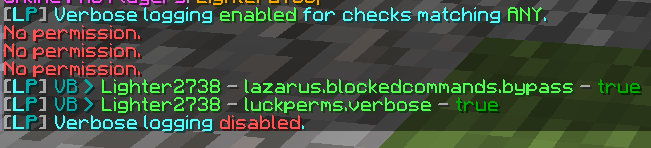
Verbose says absolutely nothing?
stiff egret
Correct.
high raven
Verbose always says something, when LP is working correctly. Send a screenshot of /lp info
stiff egret
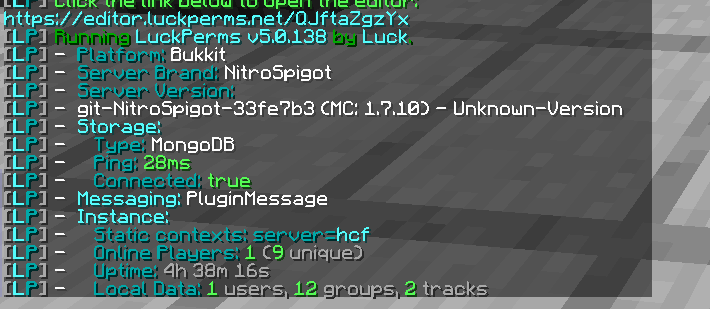
Idk how I broke luckperms, 2 days ago we were talking about my hub permission problem, that magically was fixed after a few hours
stiff egret
Um.... I wanna say one of my plugin devs told me that we can use newest version but that makes no sense.
It's spigot sided
I'll try legacy version 1s sorry
It is legacy
actually, just checked plugins folder, it's updated from 2 days ago
 high raven
Hm, looks like it might be the anticheat not allowing *. I think there's a chance that's actually a config option for the anticheat, to only allow OP players to use it perhaps. Try turning on autoop in the luckperms config and restart, and give yourself the permission luckperms.autoop, see if that works
stiff egret
Okay that works perfectly, thank you. Now I'm not sure what to do from here. I'm trying to allow lower staff members to do /alerts without giving them op.
And even with verbose on and giving them said permission, they still don't have perms.
high raven
It might have a solution for ya
oop first message didnt send - " Check out the docs for the anticheat "
stiff egret
There isn't "docs" but there is a perm list with everything. I have it all setup correctly. Literally it was all working fine but then 1 day they just didn't have the permission anymore, it was really odd.
high raven
hm, does sound like something on that plugin
perhaps try updating?
stiff egret
Every time I ask, no one else is having any problems.
This discord is lagging hard lol
high raven
Yeah something's up with discord, just confirmed on their website - Unresolved incident: Issues connecting, sending messages, and possibly more.
 stiff egret
The anticheat is really popular (with my game mode) and other people haven't had any problems, and the plugin auto updates on restart.
high raven
is it designed for 1.7.10, though
stiff egret
It works 1.7-1.14, but I know people running it on 1.7 just fine.
Everytime I ask they say it's something wrong with my perms plugin, but we've tried everything
high raven
Yep, just about. Do you have the legacy extension or not on that server
Probably yes, right?
stiff egret
I do not, I wanna say I did yesterday though. I completely deleted everything and started brand new to see if that fixed it.
Lemme test with it installed?
high raven
If it worked with it installed, why not?
stiff egret
Same thing ;/
high raven
Very strange. Are you on MySQL still?
stiff egret
I was originally on Mongo, switched to a brand new Mysql to see if that fixed a diff issue (with hub perms) and it didn't so I switched back to Mongo. I always got wait_timeout errors and I use my host's mysql so I don't think I can change it.
I haven't tried backing up, deleting whole mongo db, and reimporting. You think I should try that next?
high raven
That does not seem like it'll fix anything
stiff egret
Yeah, idk
high raven
Does verbose pick up other plugin permissions?
stiff egret
Yes
high raven
Then all I can say is that Luckperms is probably working just fine, but something's going on either with the anticheat or with how the anticheat interacts with LP
Do you have any errors, warns, or severes that might provide more info?
stiff egret
Nope, everything says something along the lines of starting up successfully.
Rip
Thanks for all the help, I guess other people might begin reporting that the anticheat perms are messed up, idk.
high raven
You can definitely make an issue on GitHub, say that verbose picks up every plugin perfectly except this one and that this plugin works, and you're certain of it
And that OP alone gives perms to it
and no other node, because verbose picks up no other nodes
stiff egret
Okay will do. Larry, this is a really REALLY gross solution. But theoretically, if I gave all the people needing permission to the plugin luckperms.autoop then if I deny access to lets say essentials.* and give them access to essentials.seen, are they able to get /seen ?
(if I did this I'd obviously remove all their perms to all other plugins and bukkit perms)
high raven
That might not work, if they have op i'm not sure if the OP would override stuff. You'd have to test that extensively to be sure
stiff egret
Op doesn't seem to override negated permissions, so I may go this route.... Thanks lol
stiff egret
Larry..... I don't know how... but some how it was my plugin. I had a ConsoleOnly event that blocked /op and it has never interfered with anything, but somehow interfered with the anticheat commands/perms. I am so dumbfounded.
Nvm.... I blocked the command /a and my scuffed coding skills made all commands starting with a blocked...
Yikes
Thanks for spending all the time trying to troubleshoot with me though, really appreciate it, I now know more about luckperms :)
high raven
Fantastic! glad it's all working
quick lagoon
just ask
 calm quarry
I have this specific rank named King, Problem is I have girls playing in my server. I want them have a Queen Title instead of King but Same permissions tho, please help
high raven
make another group
with the same perms
and a different prefix
and set them the other group
calm quarry
yes I tried that but somehow its still showing the King prefix
high raven
take the king group away from them...
high raven
keep the weight the same as king and just remove king from them
calm quarry
does inheriting from king to get same perms work?
quick lagoon
but it will inherit the prefix as well, so i dont think it will work
high raven
correct. you could set the weight of queen 1 higher
if you set up weights the big brain way, and have a gap of 100 at least between groups
calm quarry
so setting the weight higher will do? will it not inherit the prefix too?
high raven
just set the prefix weight higher my dude
calm quarry
okay mah dude
 undone vine
Hey, i got a question. Can you do so a player dosnt have any permissions at all? So he cant build, mine, craft - whatsoever ?
high raven
set the node * to false
all plugins you have will be denied him. you might need to get a plugin to prevent mining and such though, or set him to adventure mode
it won't do it straight out of the box, but the node * denies everything that can be denied
undone vine
thanks!
barren fable
Altougz most perms should already be denied by default.
 median crypt
Hi, is there someone who could tell me if i can allow players to enable gamemode survival and gamemode spectator but not creative?
all i can do is allow gamemode with all its argumantsa
median crypt
only using luckperms on paper server
quick lagoon
I don’t think Bukkit permission ahve this ability, but essentialsX do
median crypt
can i usse luckperms and essentialsX at the same time?
quick lagoon
Yes
median crypt
okay, thanks
 raw zinc
Does anyone know how to fix where there is 2 players are in user one is just steve and other one just uuid?
They are both me with different perms
not sure how that worked
barren fable
Do you run a cracked server?
raw zinc
I am running a bungeecord
barren fable
With online-mode turned on I hope. Anyways, can you send your editor link?
raw zinc
server 1 syncs up with bungge cord but server 2 just seems not to
server 3 syncs up with 1 and bungeecord
tame hollow
make sure you have bungeecord: true in your spigot configs
barren fable
With what?
 keen stump
look
when I get this, my server freezes
i can t connect
command in putty not working
nothing works
keen stump
please help :/
 graceful nova
how do i set it up to where i have spawn protection but people can still interact with things like chests
 twin merlin
How do I actually install the Luckperms extension-legacy-api? I've tried following the instructions here: https://github.com/lucko/LuckPerms/wiki/Upgrading-from-v4-to-v5
but it doesn't seem to do anything. I've tried putting the extension in the root luckperms/extensions folder, and in mods/plugins/LuckPerms/extensions.
The goal is to get LuckHolders to work again
@graceful nova That highly depends on what claim plugin you have
twin merlin
Griefdefender is the one I'm using
Other options can be found here: https://ore.spongepowered.org/?categories[]=protection
 civic rain
How do I give a user a global rank across all servers? When I set a user's parent to helper for example with the context server=global the rank doesn't show between servers even after a /lp sync
graceful nova
yo
flarkinater
how did you set that up
to where you can interact with things like crates and chests???
@twin merlin how do i download it?
What is it called???
can we get into a call and you can help me i have 1.4k on yt and i can shout you out for helping me 🙂
twin merlin
Griefdefender can be found here: https://www.spigotmc.org/resources/griefdefender.68900/
If you're using Sponge, you have to either pay for it, compile the source into a mod yourself, or use one of the versions the community has compiled from here: https://discord.gg/R7VYrg
If you need more help with setting up Griefdefender I suggest we move to that discord server linked^
twin merlin
$15, but like I said, you can use one of the community versions (which is legal, it's the same mod, just compiled in a way you can actually use rather than having to figure it out yourself)
Head to that discord server and look at the #community-built-jars channel
graceful nova
what ab for sponge tho?
they are all bucket
ok i found onw
so how do i use it?
Please
@twin merlin
twin merlin
I pinged you in the Griefdefender support server, these questions aren't really relevant to luckperms
high raven
@keen stump that's a server crash caused by itabplayer and your plugin manager, looks like. It's not luckperms for sure
 finite thicket
I assume this may be possible using tracks but im not quite sure. Say that my permissions groups are as follows:
default
VIP
MVP
Moderator
Admin
I want someone to be able to have two different ranks. For example, VIP and MVP to be completely seperate from other ranks.
So that VIP could have cosmetic advantages and when purchased, default could have VIP rank but if say a Moderator has not
purchased this rank, they do not have the permissions yet, even though they are above the default group in weight.
I can explain a bit more if necessary i realise its a little confusing
barren fable
Users can have multiple groups. And tracks don't do inheritance on their own.
prisma hinge
The weight would only affect the nickname
finite thicket
Thanks 🙂
https://sourceb.in/2a775f1de5 I keep getting this error when trying to apply changes through web editor
after i hit save and type the apply command it does that error
barren fable
Make sure your server is connected to the internet and can access that website
finite thicket
It worked just now, huh weird. Thanks!
 serene bay
hello, what authentication plugins do you guys use as authme doesnt support luck perms
high raven
The best advice you'll get is to make your server non-cracked
serene bay
instead of having my owner prefix it just says world, how do i fix this
quaint idol
[world] would be multiverse
could you /lp user <yourself> info, screenshot, and send here @serene bay
keen stump
@high raven i don t heave a plugin for plugin manager or itab
wintry cloudBOT
Hey Cristi | Areanydd! Please don't tag staff members.
keen stump
I heave that prisonranks plugin
But the dev send me here
Told me to ask the dev from luckperms..
high raven
https://i.imgur.com/1Iuqejr.png there is nothing in the thread dump to suggest luckperms. TAB, PAPI and prisonranksx seem to be causing it, at least that is what is listed in the thread dump. Did the prison ranks dev say it was luckperms?
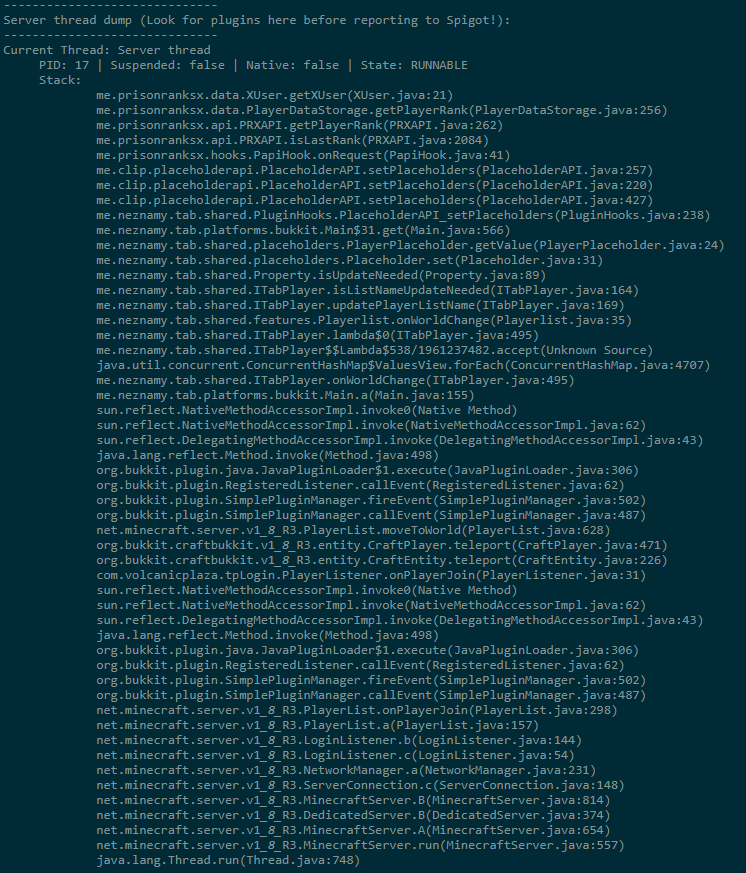
Without knowing why he said to ask luckperms, there is no indication that luckperms could be the cause.
tidal blade
Yeah, that has nothing to do with luckperms from what I can tell. The only plugins mentioned are the tab plugin and placeholderapi
high raven
(and prisonranksx lol, which is weird cause the dev should know it's not LP)
tidal blade
I'd say it's more of an issue with the prison ranks plugin.
keen stump
mhm
high raven
Luckperms is literally not in that stacktrace... there's no indication whatsoever it's LP
keen stump
ok, thanks
 teal hazel
barren fable
teal hazel
barren fable
Look on startup for errors.
quick lagoon
!paste the errors for us to take a look as well
wintry cloudBOT
Please use pastebin!
Seeing a paste of the problem makes everything so much easier! Use https://bytebin.lucko.me/ for easy pasting!
For console errors:
Pastebin any relevant segments of the console log. If it's a startup error, this includes the entire startup log!
Other errors:
Pastebin the entire Luckperms config file (passwords removed) as well as any other relevant files!
 feral pebble
https://bytebin.lucko.me/oOPZZIRfOp i tried switching to mongodb and theirs a few settings im not sure of
hollow gorge
Do what the error is telling you
feral pebble
well
I have checked console
I dont really understand it tbh
Idk what the port should be nor the password because idk which one i should use
hollow gorge
How about sharing errors you may have?
You really expect us here to read minds, don't you
hollow gorge
That's not the error itself. It's just the kick reason...
barren fable
That's not the error Andre meant. There should be a console error (most likely on startup)
hollow gorge
@feral pebble NullPointerException: database
You didn't provide a database name.
 spark valve
@hollow gorge
the chat prefix not working to me but on the tab menu its working
can you help me? sorry for the tag
 inner zinc
quick question about server context; if i dont set any server in context, will the permission work on all servers?
stiff egret
correct
high raven
!faq @spark valve read the prefix part here
wintry cloudBOT
Check out some of our frequently asked questions.
LuckPerms wiki
prisma hinge
Hello, so i have a issue. when i do /lp user justreddy parent add manager and then /lp user justreddy parent remove manager. it doesnt set me back to owner
smh
i guess this is a bug
oh ye. i use a plugin that gives me ranks like in skeppy his vids :p
high raven
If you had owner before, it will leave you with just owner
high raven
use lp user <you> info to see what ranks LP think you have
high raven
?
prisma hinge
well
ok so ill explain it better.
When i use a plugin that gives me ranks to a gui. it executes the command /lp user {user} parent add {rank} and u can give temporary ranks with that plugin
when it expires. it runs the command /lp user {user} parent remove {rank}
But then it doesnt set me back to my original rank
thtas the issue i have
high raven
do that entire process as owner, send a screenshot of lp user <you> info after you remove the second parent
prisma hinge
i willl
barren fable
What is the name of the plugin btw?
barren fable
Oh, had a free version that also had similar problems. But looks like it's not
prisma hinge
i guess ur talking bout RankGrantPlus then...
since thats the free version of GrantX but with so few feauters
barren fable
Yes.
 north ginkgo
Guys i have luck perms am using on my server for a while and the prefix is working fine for the groups, but am doing another server and when i uploaded it on the new server the prefix are not showing at all
prisma hinge
u have essentialsXchat
prisma hinge
set that to true for groyps
north ginkgo
but i already have * on the owner group
prisma hinge
f
lilac hazel
YOu want the two servers to be exactly the same?
prisma hinge
if u use bungeecord
north ginkgo
yeah
prisma hinge
connect those 2 plugins with mysql :p
lilac hazel
Just copy the config's for LP and the chat plugin over to the new server
make sure you've also got vault installed
north ginkgo
okay lemme try that
lilac hazel
It should theoretically just clone the other server's format
If you copy everything in the luckperms folder, all permissions should come with it
lilac hazel
sweet
prisma hinge
k so.. this is my group now
now ill grant myself owner for 30s
i did that
now it expires
lilac hazel
can you screenshot them so its easier to read? 😛
prisma hinge
ill try
but
what happens iss
When i use a plugin that gives me ranks to a gui. it executes the command /lp user {user} parent add {rank} and u can give temporary ranks with that plugin
when it expires. it runs the command /lp user {user} parent remove {rank}
But then it doesnt set me back to my original rank
that plugin is called GrantX btw
prisma hinge
yep im sure
lilac hazel
set will wipe all your existing ranks and set only one
lilac hazel
Well if it doesn't remove the rank originally then you should sitll have it
add doesn't overwrite
prisma hinge
Here is the command btw
grant:
  - "lp user %target% parent add %group%"
expiry:
  - "lp user %target% parent remove %group%"
revoke:
  - "lp user %target% parent remove %group%"
Hmm, that was what I saw with RankGrant+ too, remember something around the lines of they set on granting back, will check the source code to be sure tough
lilac hazel
Are you just wanting to add a temporary rank for like a week or something?
prisma hinge
like when i temporary grant someone a rank
and it expires
i want it so he gets back to his old rank
lilac hazel
Could you not use the addtemp feature?
lilac hazel
Tobi just said he'd look at the source code to see what's going on because it''s clearly buggy 😛
prisma hinge
ye
thatd what the support guy in his discord said to me..
in the discord server of the plugin maker in talking
and my grammar is great
lilac hazel
There's not much I can offer to you in ways to fix this if it's another plugin not executing correctly sorry
lilac hazel
For now there's always the addtemp feature of LP if you need temporary ranks
prisma hinge
yes i know that
but. grantx has a temp feature in it by itself so
its not needed rn. but its sad that its buggy
the luckperms add thingy then
lilac hazel
Can you use addtemp in the grantx command execution
and remove the other options it has like expiry and revoke?
GitHub
An advanced permissions plugin for Bukkit/Spigot, BungeeCord, Sponge, Nukkit and Velocity. - lucko/LuckPerms
prisma hinge
that will break the plugin
lilac hazel
Using addtemp from there?
Ah
Maybe just make it run /lp info or something when revoking or expiring
so it at least has a command to run
prisma hinge
idk if thats gonna work tho
since the plugin is only made for giving ranks or perms trough a gui
lilac hazel
🤷 no idea sorry
barren fable
Looked on source, no idea tbh.
prisma hinge
oof
high raven
Have it grant the rank 'permanently' through the gui and use the addtemp command?
prisma hinge
@high raven it has a temporary feature inside it.
wintry cloudBOT
Hey JustReddy! Please don't tag staff members.
high raven
I know but obviously that isn't working too well lol
high raven
If you add three groups to yourself, add the fourth temporarily with the gui, do all 4 go away?
When the 4th goes
prisma hinge
that how higher the weight the more thing it had or something
aight my mc freezes
it overides the lower ranks
i set the timer @ 1minute
so after that minute
it executes the command /lp user %player% parent remove %rank%
%rank% is grantx placeholder btw
it expires and still have the mod rank
owner,
high raven
So it removes the highest weighted group a player has?
lilac hazel
How does it know what rank %rank% is?
high raven
Primary group, almost certainly
prisma hinge
its a great dev tbh
high raven
So it removes the highest weighted group a player has?
???
prisma hinge
no it doesnt
i just stay as the highest
weigjt group
atm owner
it doesnt remove anything
high raven
When it expires?
high raven
I thought that was the whole problem, it took all groups away
high raven
??
prisma hinge
when the rank expires
it runs the cmd /lp user %player% parent remove [group]
but the problem is
it doesnt
it doesnt remove my group
so i stay as ownee
owner
instead of my previous rank
prisma hinge
i dont know
what placeholder therefor is
grant:
- "lp user %target% parent add %group%"
expiry:
- "lp user %target% parent remove %group%"
revoke:
- "lp user %target% parent remove %group%"
permission:
grant:
- "lp user %target% permission set %node%"
expiry:
- "lp user %target% permission unset %node%"
revoke:
- "lp user %target% permission unset %node%"
Changed it to this some minutes ago
lilac hazel
Does that work?
prisma hinge
nope
its the same
THis are the GrantX placeholders btw
%id% - The ID of the grant.
%time% - The date of when the grant was issued.
%target% - The username of the player receiving the grant.
%target-uuid% - The UUID of the player receiving the grant.
%staff% - The username of the staff member granting the grant.
%staff-uuid% - The UUID of the staff member granting the grant.
%type% - The type of the grant, Rank or Permission.
%rank% - The name of the rank or permission.
%real% - The group name of the rank or the permission node of the permission.
%duration% - The duration of the grant, in words.
%seconds% - The duration of the grant, in seconds.
%expiry% - The date and time of grant expiry.
%reason% - The reason for the grant.
%next-best-group% - The next best rank's group name after the current one.
%revoker% - The name of the staff who revoked the grant.
%revoker-uuid% - The UUID of the staff who revoked the grant.
high raven
Check out the grantx docs for the placeholdera
prisma hinge
gotya above
high raven
Try %real%
prisma hinge
in place of?
high raven
Group or rank
 viral oriole
anyone know of a plugin that will allow me to stop players from joining certain servers within a bungeecord network... like a whitlist
viral oriole
yes
prisma hinge
go to ur bungeecord config.yml file
go to ur server
set restricted to true
then scroll up to bungee admin thing
where the bungeecord admin things are
viral oriole
what next?
prisma hinge
then
type in admin
in the bungeecord config.yml file
- bungeecord.command.server.(server name)
admin:
- bungeecord.command.alert
- bungeecord.command.end
- bungeecord.command.ip
- bungeecord.command.reload
- bungeecord.command.server.{server name}
viral oriole
is that it?
viral oriole
ok but people can still join through the server selector tho
prisma hinge
then disable that
in the server selector
file
:)
u can litterly remove it
in the server selector
viral oriole
ok
prisma hinge
:)
 fair summit
strange issue here, ive used lp on 2 other servers and never encountered this. What going on here?
im using essentialsxchat and lp
fair summit
its really annoying lmao
prisma hinge
i underatand
remove the prefix
add it agsin
idk if the problem will be fixed the
tho
fair summit
tried that, issue persists
fair summit
my first though is that another plugin im using as adding another prefix to chat?? but none of the configs say so
prisma hinge
oof essentials and not essentialsX
fair summit
format: '&7{PREFIX}&r {DISPLAYNAME}&r &7{SUFFIX}&r: {MESSAGE}'
prisma hinge
not that it matters tho
fair summit
it is essentials x
fair summit
wait so the prefix becomes part of {DISPLAYNAME}?
fair summit
so chat becomes [Member]MilesNocte, is there any way to add a space in there?
oh
lol thanks
fair summit
im used to using nucleus instead of essentialsx, nucleus is nice cause i didnt have to do any of this lol
prisma hinge
lol
 spiral aspen
It does not connect me to the database only on one server, in others it works well
spiral aspen
Connect on all my servers, but not this one
high raven
@spiral aspen try deleting and regenrating that config, and fill it in again. something's gone strangely wrong
spiral aspen
I deleted the folder and re-created everything and it seems to be working, it is the first time that error happens to me
tame hollow
Was probably an outdated library
spiral aspen
I use the same configuration on my servers of the same version and in the rest it works, the truth is rare
delete the library even
 sturdy swan


 hoary comet
Does luckperms 5 support 1.12 spigot?
high raven
yes
hoary comet
Thanks!
high raven
!downloads get the latest here
wintry cloudBOT
You can download LuckPerms for Spigot/Paper, BungeeCord, Sponge, Nukkit or Velocity.
Additional downloads
hoary comet
Just asking before I start migrating the files. :D
high raven
make a backup!!
hoary comet
Oh definitely.
viral oriole
alight so I did this but apparently I do not have permission to join the server
lilac hazel
Are you in the group with the permission set?
viral oriole
my b for you usb_hub
wintry cloudBOT
Hey T2ThatGuy! Please don't tag staff members.
viral oriole
lilac hazel
Let me check my perm layout. Not sure that's correct
viral oriole
oki
quick lagoon
!verbose perhaps try using this to see the permission nodes lp is checking
wintry cloudBOT
LuckPerms provides a verbose command to help you find out what permissions a command/plugin is checking.
LuckPerms wiki
viral oriole
ok thanks usb
lilac hazel
I don't think that other person knew what they were talking about lol
viral oriole
Thanks it works now ^^
lilac hazel
Sweet 🙂
prisma hinge
lmao
woopsie
Im was probs blind when i saw bungeecoord tutorial
i use bungeecord mysefl tho
so i know how it work
and im just dumb so
 unkempt elk
Hello, veterans. I've some question.
How can I make a person with certain permission,
Can kick a certain people that comes in their place.
As Example, A teacher on a Roleplay server able to kick his student out of the classroom, only if the teacher were inside the classroom and the student also inside the classroom.
If the teacher is outside of the classroom, he can't kick his student inside the classroom.
Also teacher can't kick any student outside of classroom.
How can I achieve this? I know it's need to be done with worldguard, but it's just worldguard or I need another plugin installed for it.
quick lagoon
!usage for basically of giving permissions
wintry cloudBOT
Here's a guide to help users understand and use LuckPerms for the first time.
LuckPerms wiki
quick lagoon
for kicking, it’s up to the plugin you install. You can use WorldGuard and set regions so you can only run commands in a certain region set using lp context.
!context
wintry cloudBOT
You can set a permission or group on a per-world/per-server basis, through what we call "contexts".
LuckPerms wiki
quick lagoon
For kicking, you can prob use vanilla /kick or a plugin if you want or require more features
unkempt elk
Is that means they can kick player outside of their region?
quick lagoon
Depends on how you set it, you can set it such that they can only run /kick when they are in a certain region. But to check if the person they are kicking is in a WG region, most likely need a plugin with such a feature as it’s not up to LP to do such checking
unkempt elk
Ah, that's what I'm targeting for. do you know any plugin that has features like that?
quick lagoon
Hmm sorry I’m not very sure, maybe you can ask in #general , also Google is your best friend for this 🙂
unkempt elk
Google always be my best friend, but not at this situation. I can't find any T_T
 bold karma
Is there a way to make it so i can add everyone on my server to a group?
 full flume
They are in a group when they join, which is default.
If you're wanting them to be in a seperate group initially, read this !default
!default
wintry cloudBOT
LuckPerms provides a group that every player is added to upon joining the server, called default. You can use multiple methods to change the default group or change the name of it.
LuckPerms wiki
full flume
There we go 😎
 vivid spoke
so default has vanilla minecraft permissions?
full flume
You can add permissions to that group, but it doesn't have those by default
vivid spoke
is there a way i can see all permissions on my server?
full flume
You can see all that were already set with /lp editor
if you're wanting to see all permissions that potentially exist, i don't believe that's possible (without some weird methods)
Documentation is your best bet, or you can use lp verbose to check for permissions being checked against you
!verbose
wintry cloudBOT
LuckPerms provides a verbose command to help you find out what permissions a command/plugin is checking.
LuckPerms wiki
vivid spoke
i dont get it is lp verbose like checking what pulgins are doing to me in real time?
barren fable
Exactly.
full flume
verbosely checking 😉
vivid spoke
if i want to disable dynmap from popping up from /help
do i do dynmap.* false
like i wanna remove this line
lilac hazel
Setting dynamap.* to false will negate all perms for that node.
 wispy spruce
the only problem i have currently is i cant use any bukkit and essential cmds even as op since i installed this doesn any1 know how to fix?
 lament parcel
Can i have the link for luckperm 1.7.10 please?
tame hollow
!downloads
wintry cloudBOT
You can download LuckPerms for Spigot/Paper, BungeeCord, Sponge, Nukkit or Velocity.
Additional downloads
lament parcel
Thanks
high raven
!usage @wispy spruce start here
wintry cloudBOT
Here's a guide to help users understand and use LuckPerms for the first time.
LuckPerms wiki
wispy spruce
thats does not help me
high raven
!paste your startup log @wispy spruce
wintry cloudBOT
Please use pastebin!
Seeing a paste of the problem makes everything so much easier! Use https://bytebin.lucko.me/ for easy pasting!
For console errors:
Pastebin any relevant segments of the console log. If it's a startup error, this includes the entire startup log!
Other errors:
Pastebin the entire Luckperms config file (passwords removed) as well as any other relevant files!
wispy spruce
high raven
So, what's not working exactly
wispy spruce
...
high raven
Like what exactly is not working, saying you can't use commands is not really helpful for solving problems
high raven
Can't ? Can you elaborate? Does it say no permission or unknown command
wispy spruce
no permissions
high raven
!verbose try running verbose from console and see what it says when you try and run the command in-game
wintry cloudBOT
LuckPerms provides a verbose command to help you find out what permissions a command/plugin is checking.
LuckPerms wiki
deep shale
Hello, i have the permission "*" to have them all. But I would like to remove one, I tried to put it on "false" but I still have it. How to do it?
lilac hazel
Are you op?
high raven
!verbose send a screenshot of what verbose says when you run the command, if you aren't op @deep shale
wintry cloudBOT
LuckPerms provides a verbose command to help you find out what permissions a command/plugin is checking.
LuckPerms wiki
tame hollow
false permissions should be denied on Op anyway
high raven
Remember litebans yesterday? Bad plugins, you never know lol
tame hollow
i wonder if that person ever reported the issue...
quick lagoon
ChatEx is also pretty bugged imo
high raven
Yep, oh well, luckperms provides essx and chatex and literally a thousand other kinds of support haha
deep shale
yes i'm op, thanks for the information I am going to remove it😊
what is unfortunate is that F3 + N doesn't work without op ..
high raven
It should, just add minecraft.command.gamemode as a permission
deep shale
I have the "*" permission, I still try to add your perm and it doesn’t work anyway, it gives me the same message as on a solo world where I would not have activated the commands
high raven
Can you still do /gamemode creative?
wintry cloudBOT
LuckPerms provides a verbose command to help you find out what permissions a command/plugin is checking.
LuckPerms wiki
tame hollow
i'm not sure about those debug shortcuts tbh
quaint idol
I think I read somewhere it checks if you are op
deep shale
yeah it's not hard no problem, but it's weird if it works for you 😅 And no, verbose doesn't work for that one
Yes Larry i can do all the commands, but I think like _11 that it checks if we are op
quaint idol
bit of google-fu lead me to this on the bug tracker, it appears that is indeed the case
https://bugs.mojang.com/browse/MC-100796
deep shale
Ok thanks for the information !
I often have inexplicable server crashes, can someone help me?
(I'm not sure if it's related to luckperm)
https://bytebin.lucko.me/Nj6rJH001f
https://bytebin.lucko.me/oFZLagpxmU
https://bytebin.lucko.me/IfsndrJZg6
Larry I deleted ChestSort but it still does them, so I don't think that was the problem unfortunately
quick lagoon
are those 3 different servers?
deep shale
Xeon E31220 (3.10 GHz ) 4go RAM
I always have 20tps because i don't have many players
crashes happen sometimes with only 2 players
The problem is that I really don't know where it comes from
quick lagoon
I doubt its an lp issue, bcu all 3 crash comes from different issues
quaint idol
1st one is chunkmaster likely
quick lagoon
yea
deep shale
Okay but I think it's three different problem comes from the same plugin
quick lagoon
luckperms?
deep shale
I don't know
quaint idol
2nd one; someone just logged in...possibly relevant?
quick lagoon
you are using a SSD or HHD for your server?
quick lagoon
ah that is the most liekyl issue tbh