#support-2
1 messages · Page 30 of 1
 trail orchid
 gaunt prawn
Is there a way, using in game commands, that I can list all permissions assigned to a group?
I'm not wanting to use the editor, just show the list printed in chat. Something like the listmembers, but for the permissions.
Typically, right after I ask, I find it.
/lp group <groupname> permission info
Thanks anyway!
 twin sundial
LuckPerms causes a lag spike whenever a player joins my server (according to /timings). How to prevent this? I have 16 GB and a high-end CPU dedicated to my server.
 lilac hazel
How many users does your server have?
 glossy moat
@lilac hazel whats the cmd again to add someone to a group lol
lilac hazel
!usage
 wintry cloudBOT
Here's a guide to help users understand and use LuckPerms for the first time.
 LuckPerms wiki
lilac hazel
LuckPerms wiki
lilac hazel
It's under either user or group commands on the right hand side.
glossy moat
and how do we make prefixes?
lilac hazel
!meta
wintry cloudBOT
You can set prefixes, suffixes and other meta data in LuckPerms for players and groups. Note that LuckPerms does not manage chat. You need to use another plugin to show prefixes/suffixes in chat.
LuckPerms wiki
 high raven
@twin sundial is there any other plugin that's doing something with players on login, like authentication or a rank-setting script?
 quick lagoon
AuthMe plugin?
twin sundial
@lilac hazel 5
@high raven no, but I noticed similar player join lag from WorldGuard in the timings too
wintry cloudBOT
Hey ! Please don't tag staff members.
twin sundial
Oh oops sry
high raven
It's not constantly loaded though, that's nearly impossible unless it's absolutely tiny
LP is almost definitely not the cause of the lag, but it may be continuing it due to some other source of lag on player join that LP must wait for and then do its thing to the players on join after the lag
 night inlet
I want to copy user permissions for other ranges, but doing so I lose the prefix and the user appears
lilac hazel
You'll want to set weights on your groups
From the lowest ranking to the highest ranking
Higher the weight value, the more important the group.
You also want to do as the link I sent suggests.
lilac hazel
Not helping..
night inlet
@lilac hazel Thank you Bro !
lilac hazel
Working?
night inlet
Yes
lilac hazel
Awesome
night inlet
❤️
 unkempt elk
Hello, can anyone help?
I want a placeholder to show some text that has been set up to appropriate permission, as an example If a player has permission.vip the placeholder would show "you are vip" at a GUI/scoreboard/anywhere that support placeholder
quick lagoon
hmm then you will have to look for a plugin that has such a feature
luckperm only managers permissions and prefix/suffix for a given permission group
unkempt elk
Alright thanks 😄
lilac hazel
@unkempt elk You could use suffixes and set the scoreboard to display luckperms_suffix
😛
just don't display the suffix in chat
quick lagoon
but that requires a scoreboard plugin right? @lilac hazel
unkempt elk
But what If i want create it alot 😮
 fair stag
Hello, I tried using luckperms bungeecord with specifiy the server but it doenst work for me and also dont realy get how it works. can someone help? I read the documentation about server= but I think i did what they said.
wintry cloudBOT
You can download LuckPerms for Spigot/Paper, BungeeCord, Sponge, Nukkit or Velocity.
Read more:
Additional downloads
LuckPerms wiki
fair stag
oef
 kindred bramble
@quick lagoon Seeing as the #support-1 is getting a little crowded, if you have any insight into the issue I've got could you give me a hand with it here?
quick lagoon
so your issue is when someone is rank expert, the cant promote ppl from starter to intermediate?
@kindred bramble
kindred bramble
That's right @quick lagoon I spoke to someone on github and they mentioned that I need more perm nodes than I had set, but they didn't tell me which. They said to use verbose, which I did but that record around 1,500 nodes and some of which I don't want an expert to have. https://github.com/lucko/LuckPerms/issues/2158

GitHub
Hi there, I have the permission nodes set up from the bottom FAQ of https://github.com/lucko/LuckPerms/wiki/Argument-based-command-permissions. I have enabled Argument based permissions in the conf...
quick lagoon
You can give luckperm.user.promote.track.next-group
not sure if it’s correct but that’s wat the wiki mentioned
kindred bramble
Yeah I tried that before, still wouldn't work. I have it setup exactly as the wiki mentioned but apparently I need more
kindred bramble
Sure, give me a sec
kindred bramble
No worries, sorry I just changed to a sql storage so I'm setting it up again, thanks for the help anyway!
quick lagoon
i see, npp!
 barren fable
https://luckperms.turbotailz.com/verbose/LrNO8w5KTiac (That's the new verbose viewer, in beta, but it has a filter/search option, and if you filter for "promote" in the web interface, you'll most likely see what nodes you have to give.)
Atleast that's what I woul dod
kindred bramble
Ah thanks! I'll try that
 prisma hinge
I’m trying to set suffixes and I’m unable to space it away from the player’s name. Can you help with that?
 proper pulsar
Configure your chat format to have the space or add it to the prefix
If you're using commands wrap the prefix in ", then spaces are accepted
prisma hinge
Thanks
proper pulsar
You're welcome
prisma hinge
Also how do I add 2 suffixes at the same time?
proper pulsar
!stacking
wintry cloudBOT
Display multiple prefixes/suffixes alongside a player's name.
LuckPerms wiki
proper pulsar
@prisma hinge ☝🏼
 somber knot
why when i'm trying to make prefix or suffix on my group it doesn't appear to be on my name
proper pulsar
!faq second section @somber knot
wintry cloudBOT
Check out some of our frequently asked questions.
Read more:
LuckPerms wiki
somber knot
i tried alot of stuff from here it doesn't work non of them. i did also checked tho for tutorials still doesn't work.
proper pulsar
There’s not a lot of stuff on there. That’s the list of things you need to do
Anyways does the prefix show properly when you run /lp user <user> info?
somber knot
lemme check
by the way is not supposed to be /lpb?
because /lp doesn't seems to be working
 tulip timber
you need to install luckperms on your spigot server instance as well
or whatever type of server youre using
somber knot
i didn't know that
alright maybe that's would be the cased of why is not working
lemme check that out.
proper pulsar
!bungee
wintry cloudBOT
If you run a Bungeecord network, learn how to correctly setup LuckPerms on all server instances (including Bungee).
LuckPerms wiki
proper pulsar
!sync
wintry cloudBOT
To sync data between servers, you need to connect each LuckPerms plugin to the same database (for example MySQL) and set up a messaging service.
LuckPerms wiki
 shy hemlock
Hey I have 3 servers and one of it is a bungee base.
The bungee server has the Bungee version of luckperms and the other two has the spigot version of LP
All three servers are connected to one MySQL database, however when I gave my default group permission to bungeecord.command.server, it doesn't work. Any fixes?
And whats the command to set a group to a person on a specific server?
proper pulsar
@prisma hinge what exactly do you need help with?
proper pulsar
!context @shy hemlock for the per server stuff
wintry cloudBOT
You can set a permission or group on a per-world/per-server basis, through what we call "contexts".
LuckPerms wiki
proper pulsar
Are you using the same table prefix in all instances?
proper pulsar
That's ok
prisma hinge
ecuyer 1 st rank
chevalier 2nd rankk
i want, only ecuyer can use /kit ecuyer
and only
chevalier cann use /kit chevalier
with parent group
chevalier is parent to ecuyer
proper pulsar
Read the documentation for the plugin that's giving the kits
proper pulsar
Permissions depend solely on the plugin the originate from
Feel free to ask in #general
prisma hinge
u know if i can do that with essentials ?
proper pulsar
You're welcome
 twilit totem
I have granted my players permission to use minecraft.command.help, but for some reason none of my players can use /help. Has anyone encountered this before?
wintry cloudBOT
LuckPerms provides a verbose command to help you find out what permissions a command/plugin is checking.
LuckPerms wiki
 tame hollow
use that
 glacial jungle
how can i do that in my sql
tulip timber
in the config look for ssl
and do this:
'properties:
useUnicode: true
characterEncoding: utf8
useSSL: false'
the first three lines will be there, just add the last line
tulip timber
np
glacial jungle
i tried to find config and i didn't find it
tulip timber
its in /plugins/luckperms
glacial jungle
oh seriously? i thought it was in mysql i'm really dumb
tulip timber
lol
glacial jungle
anyways it seems to be working thx
tulip timber
np
 sudden steppe
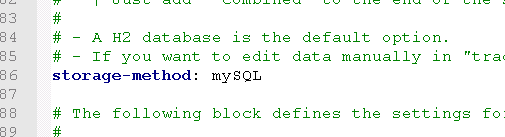
Hey so I'm having some problems. I have a minecraft network with multiple servers under a bungeecord, and I followed the documentation to connect all of them to a PostgressSQL database, and now it seems that the plugins been using a flatfile storage the whole time.
Can someone help me?
lilac hazel
Have you changed the storage type?
lilac hazel
have you set up a messaging service
sudden steppe
it says I havent configured a messaging service
sudden steppe
I use postgress
lilac hazel
look for messaging service in the config file
Either sql or none
is what you want it set as
sudden steppe
but is postgress supported?
lilac hazel
set it to none
sudden steppe
i have it set to auto so i guess thats the problem
lilac hazel
you don't use mySQL or mariaDB
lilac hazel
all servers must match
sudden steppe
inlcuding the bungeecord?
should I match the messaging service on the lp for bungee too?
wait thats a dumb question
lilac hazel
yeah
sudden steppe
usb_hub I tried and it didn't do anything
lilac hazel
@radiant plaza Yes.
lilac hazel
and nothing syncs?
 radiant plaza
 sudden steppe
toadd to that
lilac hazel
can you post /lp info
sudden steppe
for what server?
lilac hazel
any that isn't syncing
radiant plaza
 sudden steppe
also the bungeecord perms dont work. I cant do /server to switch
lilac hazel
@radiant plaza what if you do /lp user [yourname] permission checkinherits bungeecord.command.server
what does tha treturn
radiant plaza
That works
lilac hazel
yeah what does it return
radiant plaza
But I want it to be a group 😄
lilac hazel
You haven't .. changed it
sudden steppe
but I have postgress configured
sudden steppe
i did but it's not....
lilac hazel
 radiant plaza
usb_huh, may I have permission to PM you?
barren fable
You have restarted the server? You have actually saved your changes?
lilac hazel
I have disabled dms please use this chat to request help
radiant plaza
ight
sudden steppe
data:
  address: ---------
  database: --------
  username: ---------
password: '----------'```I think the SQL needs to be capitalised.. I am not too sure but people have had issues where they don't capitalise things.
barren fable
Try just postgresql (no double e)
sudden steppe
im an absolute bufoon
sudden steppe
my dad works with databases
whenever he says postgre
he pronounces it
postgres
lilac hazel
It sounds french..
sudden steppe
not postgre
lilac hazel
Blame them 😛
sudden steppe
yeah
barren fable
No problem
I once needed to setup a postgresql db (for testing a project) anf then needed to login with the user postgres but used postgre, it's really confusing
sudden steppe
yeah
I see
I have been enlightened
also
nvm
awesome
I changed the storage method and now its giving me this
I swear, I've had this problem before
all the credentials are correct, and yet the plugin won't connect
high raven
Send the console errors via pastebin please
radiant plaza
Whats the difference between /lp and /lpb?
sudden steppe

Pastebin
barren fable
One targets the Bungee the other a backend server
sudden steppe
i've gotten this before and let me tell you
it's not the database's problem
everyone says that it's not an lp error
but I can access the db perfectly fine
radiant plaza
https://gyazo.com/446cbc97dec69e4f751fd17253bcfd01
command I did is
/lp user DontBombMe permission set Manager server=hub
 barren fable
The user now has the Manager permission in server=hub.
Sure you didn't mean parent add?
radiant plaza
So its parent add and keep server=hub to give that user manager group for only hub?
barren fable
Yes, just use parent add instead of permission set
glacial jungle
i'm pretty don't know how to use mysql if MyISAM is storage engine what file should i change from here into MyISAM? becuz it gives me error if i don't do that.
barren fable
You don't change anything in the database. You use commands or the web editor.
shy hemlock
How do I make a default group for a specific server?
high raven
!default
shy hemlock
huh
wintry cloudBOT
LuckPerms provides a group that every player is added to upon joining the server, called default. You can use multiple methods to change the default group or change the name of it.
LuckPerms wiki
high raven
That wiki page is a pretty good explanation
tulip timber
@sudden steppe is anything corrupted, was recently on a server that kept having that happen and the db was repeatedly corrupted, cant give too many details because I dont know them
sudden steppe
Nah, it's just that the postgre server doesnt seem to be configured properly
although it is
IDK at this point
I'll try reconfiguring it
glacial jungle
@barren fable well i pretty don't know what to do becuz i'm getting error this error always
wintry cloudBOT
Hey i'myourguy! Please don't tag staff members.
high raven
@sudden steppe it might be LP having trouble connecting to it for another reason. Make sure no firewalls or other software are preventing the server's access to the db
sudden steppe
I'll try
thing is
its on the same machine as the server
AND on top of that, I can't connect to it however I try
high raven
localhost?
high raven
that is weird haha
do you have the latest version no. from https://luckperms.net

LuckPerms - An advanced permissions plugin for Bukkit/Spigot, BungeeCord, Sponge, Nukkit and Velocity
LuckPerms is an advanced permissions plugin for Bukkit/Spigot, BungeeCord, Sponge, Nukkit and Velocity
sudden steppe
trying to deploy the server on an old home computer before sending it off to a big data center
yes
it seems that the configuration of the postre database isn't right
and I think i messed up there
I'll look into the config once more but I don't know at this point
I've had it with databases
 eager pendant
I need a little simple help and that's why I come here
quick lagoon
ok
eager pendant
I have more than 2 hours trying to repair this and it is always the same
quick lagoon
!errors
wintry cloudBOT
Here's a page with some common storage system errors.
LuckPerms wiki
quick lagoon
look at the ssl part @eager pendant
eager pendant
it didn't work, I tried several solutions that it says there but none worked for me @quick lagoon
quick lagoon
have you set it for all your servers and bugeecord proxy?
eager pendant
in the end i think it's just a notification error because everything works fine
Anyway thank you very much @quick lagoon
quick lagoon
yep that is a security warning, bcu not using ssl is "less security" thus the warning
 elder widget
Hello, how can you do, that everybody have acces to /kits?
quick lagoon
!verbose
wintry cloudBOT
LuckPerms provides a verbose command to help you find out what permissions a command/plugin is checking.
LuckPerms wiki
high raven
@elder widget You give the node for kits to the default group, or whatever group you want to be able to
Start here:
!usage
wintry cloudBOT
Here's a guide to help users understand and use LuckPerms for the first time.
LuckPerms wiki
proper pulsar
@eager pendant are you using other plugins on the bungee that connect to mysql?
Also be sure to restart after changing those settings
 tawdry pendant
does anyone know why a prefix wouldn't show up in chat?
proper pulsar
!faq second section @tawdry pendant
wintry cloudBOT
Check out some of our frequently asked questions.
Read more:
LuckPerms wiki
 crude oar
does this just happen whenever someone times out No permissions data present for player
high raven
@crude oar not necessarily, it often happens with bad authentication plugins and such which assign new uuids at random times
crude oar
hmm
i am on a proxy tho so maybe that's why it happened when they timed out
i mean their ping wasn't very happy either lol
high raven
Lol that's pretty low haha
 quasi nacelle
Hello, I am wondering if someone can help me, I am having an issue with LuckPerms
I am trying to get permissions working in a plotworld generated by plotsquared but the permissions are not carrying from the overworld where they were set
quasi nacelle
just one server
quasi nacelle
1.15.2 MC
LP 5.0.72
Luckperms, worldedit, vault, essentials, essentialsspawn, essentialschat, worldguard, plotsquared, luckpermsGUI
high raven
Have you set contexts on any permissions?
quasi nacelle
not specifically
i don't really understand contexts that well, has changed drastically since I last ran a server
 upbeat kettle
I migrated de Pex for the luckperms were the positions transferred too?
tame hollow
Usually everything is transferred
If prefixes stop showing then you should read the FAQ
!faq
wintry cloudBOT
Check out some of our frequently asked questions.
Read more:
LuckPerms wiki
barren fable
What do you mean by "access"?
tulip timber
./lp <user/group> <username/groupname> permission info
tame hollow
/LP editor
upbeat kettle
I have LuckBungee here how do I integrate with LuckPerms Spigot?
barren fable
You can use a database to store permissions in one central place
barren fable
!storage should be this page
wintry cloudBOT
LuckPerms allows you to store data in a variety of storage types, read about the benefits and drawbacks of each type on the wiki.
LuckPerms wiki
barren fable
prisma hinge
help.
I have created a track where a Vip will go to a VIP + but when using it in a user that is not in Vip it will automatically go to Vip, I don't want this to happen, I just want the user who has the Vip rank to go to Vip + someone help me thank you very much.
barren fable
Well, if a user isn't on the track, they get promoted to the first group. Why do you use the command on a user you don't want to have promoted?
prisma hinge
I want to put it in my store, but if a user buys an upgrade from vip to vip +, it will be given automatically, it would look like an error and would take advantage
high raven
@prisma hinge use the parent set command in store for the original vip and vip+, and make it so that a user must have purchased vip to buy the upgrade
That's on the store's side, though, make them need an account that has vip already
 stiff sphinx
hi i need help with allow /kill command to a group (minecraft.command.kill not working)
high raven
If you have another plugin that handles /kill you'd have to give that permission, like essentials might be
!verbose use verbose to find the node if you can't find it online
wintry cloudBOT
LuckPerms provides a verbose command to help you find out what permissions a command/plugin is checking.
LuckPerms wiki
stiff sphinx
tnx
 viral torrent
little question i am making the perms global over the bungee now is my question if i make lets say creative ranks same weight as survival but perms are set per server wil it interfair with it
 tidal blade
not if using contexts on them
viral torrent
alright yeh i will use context on them thanks for the anwser
 full flume
Is the editor down right now?
quick lagoon
Works for me
full flume
Hm, I'll tinker around lol
Looks like my firefox browser decided it didn't like it. Edge works.
That'll be a debug for another day
quick lagoon
Ahh I see
 dreamy rivet
i'll post in here as don't want to interrupt the general-1 chatter 🙂 is there a way to stop the following console spam?
13:24:28 [SEVERE] Thu Apr 02 13:24:28 UTC 2020 WARN: Establishing SSL connection without server's identity verification is not recommended. According to MySQL 5.5.45+, 5.6.26+ and 5.7.6+ requirements SSL connection must be established by default if explicit option isn't set. For compliance with existing applications not using SSL the verifyServerCertificate property is set to 'false'. You need either to explicitly disable SSL by setting useSSL=false, or set useSSL=true and provide truststore for server certificate verification.
I tried adding useSSL=false to the end of address: localhost in config.yml like so but it didn't like it:
address: localhost/useSSL=false
address: localhost/?useSSL=false
using MySQL for the LuckPerms DB
ah looks like there is an option for it automatically
quick lagoon
!errors
wintry cloudBOT
Here's a page with some common storage system errors.
LuckPerms wiki
 sage current
Can anyone help? i have an issue where when i say "/lp editor" it seems to run the command "/lp help" this started happening after a server crash but nothing is showing up in console so i dont know why its happening
dreamy rivet
will just uncomment this bit 🙂
You can also use this section to disable SSL connections, by setting:
useSSL: false
      characterEncoding: utf8 # under this line
      useSSL: false # add this
verifyServerCertificate: false # and this```yeah will do 🙂
sage current
i have looked online but i have not yet found a fix to my issue
quick lagoon
@sage current can you send your latest.log via pastebin
sage current
okay
dreamy rivet
hmm it didn't like me enabling useSSL: false
This setting allows you to define extra properties for connections.
#
# By default, the following options are set to enable utf8 encoding. (you may need to remove
# these if you are using PostgreSQL)
#   useUnicode: true
   characterEncoding: utf8
#
# You can also use this section to disable SSL connections, by setting:
   useSSL: false
   verifyServerCertificate: false
properties:
  useUnicode: true
  characterEncoding: utf8
you hvae to do this:
    properties:
      useUnicode: true
      characterEncoding: utf8
      useSSL: false
      verifyServerCertificate: false
thanks, was just uncommenting in the default config file where it was 🙂
sage current
should i paste the entire latest.log or do you need a specific part?
quick lagoon
just everything
dreamy rivet
that's not erroring now 🙂 thanks!
is this anything to worry about bungeecord side?
13:33:46 [SEVERE] [main] INFO me.lucko.luckperms.lib.hikari.HikariDataSource - luckperms-hikari - Starting...
13:33:46 [SEVERE] [main] INFO me.lucko.luckperms.lib.hikari.HikariDataSource - luckperms-hikari - Start completed.
quick lagoon
no
dreamy rivet
super 🙂
sage current
Pastebin
dreamy rivet
*>/luckperms migration powerfulperms localhost powerfulperms powerperm_usr <password> players
13:36:39 [INFO] Command not found
/lp migration PowerfulPerms
13:36:52 [INFO] Command not found
*
so now LP is configured as it should be
still getting this in my BungeeCord console
tried without slashes at beginning too
*13:36:52 [INFO] Command not found
luckperms migration powerfulperms localhost powerfulperms powerperm_usr <password> players
13:38:05 [INFO] Command not found
lp migration PowerfulPerms
13:38:29 [INFO] Command not found*
 keen prawn
How do I do that ? The supporter of players inherits the rights
barren fable
In BungeeCord it's lpb
dreamy rivet
a thank you good sir 🙂
would you recommend doing:
lpb migration powerfulperms localhost powerfulperms powerperm_usr <password> players
over the following?
lpb migration PowerfulPerms
GitHub
An advanced permissions plugin for Bukkit/Spigot, BungeeCord, Sponge, Nukkit and Velocity. - lucko/LuckPerms
 woeful mango
mate mate mate
i'm kindd suck at LP Bungee
got any tips how default users get the default rank in my prison server
i think when they joined the prison server they have the survival default rank
keen prawn
How do I do that ? The supporter of players inherits the rights
woeful mango
i deleted mine since his question was there
dreamy rivet
fair enough
woeful mango
don't want to get flooded
dreamy rivet
lpb migration powerfulperms localhost powerfulperms powerperm_usr <password> players
13:42:18 [INFO] CONSOLE executed command: /lpb migration powerfulperms localhost powerfulperms powerperm_usr <password> players
13:42:18 [INFO] [LP] Command not recognised.
Will give normal command a go
quick lagoon
replace <password> with your actual password?
dreamy rivet
I did, just putting like that here for security lol
lpb migration PowerfulPerms
13:45:44 [INFO] CONSOLE executed command: /lpb migration PowerfulPerms
13:45:44 [INFO] [LP] Command not recognised.
🤔
quick lagoon
@sage current are you opped?
proper pulsar
Make sure LP is installed on your bungee
sage current
yes
dreamy rivet
it is 😄
proper pulsar
And that you used the bungee version, not the bukkit version
dreamy rivet
yup
proper pulsar
Also you still need powerful permissions installed
dreamy rivet
yup
13:45:25 [INFO] Enabled plugin reconnect_yaml version git:reconnect_yaml:1.15-SNAPSHOT:f1c32f8:1489 by SpigotMC
13:45:26 [INFO] __
13:45:26 [INFO] | |) LuckPerms v5.0.130
13:45:26 [INFO] |_ | Running on BungeeCord - BungeeCord
13:45:26 [INFO]
13:45:26 [INFO] [LuckPerms] Loading configuration...
13:45:26 [INFO] [LuckPerms] Loading storage provider... [MYSQL]
13:45:26 [SEVERE] [main] INFO me.lucko.luckperms.lib.hikari.HikariDataSource - luckperms-hikari - Starting...
13:45:26 [SEVERE] [main] INFO me.lucko.luckperms.lib.hikari.HikariDataSource - luckperms-hikari - Start completed.
13:45:26 [INFO] [LuckPerms] Loading messaging service... [REDIS]
13:45:26 [INFO] [LuckPerms] Loading internal permission managers...
13:45:26 [INFO] [LuckPerms] Performing initial data load...
13:45:26 [INFO] [LuckPerms] Successfully enabled. (took 599ms)
13:45:26 [INFO] Enabled plugin LuckPerms version 5.0.130 by Luck
13:45:26 [INFO] Enabled plugin VentureChat version 2.18.3 by Aust1n46
13:45:26 [INFO] [PowerfulPerms] PowerfulPerms is now running on server mode ONLINE
13:45:26 [INFO] Enabled plugin PowerfulPerms version 4.5.2 by gustav9797
got bungee version of LP, PowerfulPerms running still. both loaded successfully
doesnt seem to recognise the migration command using lpb
proper pulsar
Looks like you need to migrate on the backend servers
proper pulsar
Ok
 mint gyro
Hi, my server crash on start .. After the Done () For help, type "help" or "?" only with LuckPerms
mint gyro
yes ?
tidal blade
So you have AuthMe installed as well?
mint gyro
yes
tidal blade
!faq Read the section at bottom of page about server shutting down.
wintry cloudBOT
Check out some of our frequently asked questions.
Read more:
LuckPerms wiki
mint gyro
thx !
sage current
uh
quick lagoon
@sage current are you using bungeecord?
sage current
i dont think so
quick lagoon
can you try removing all the plugins other than luckperm
sage current
ok
quick lagoon
and then do lp info in console
high raven
@sage current if you run lp editor in console does it work?
sage current
both of them say unknown command
sage current
i did not use a slash and yes it is one server
quick lagoon
GitHub
An advanced permissions plugin for Bukkit/Spigot, BungeeCord, Sponge, Nukkit and Velocity. - lucko/LuckPerms
high raven
!migration @mint gyro
wintry cloudBOT
Learn about the process of migrating from another permission plugin.
LuckPerms wiki
sage current
ah it seems to work
i am going to try adding back plugins and see if error comes back
quick lagoon
there were issues with all your essentials plugin
[14:12:24] [Server thread/ERROR]: Could not load 'plugins/._EssentialsXGeoIP-2.17.1.0.jar' in folder 'plugins'
sage current
ok
quick lagoon
same for all your essentials .jar files
 stuck coyote
Where did you get that error log from?
quick lagoon
he sent it awhile ago
stuck coyote
Interesting error, Invalid Plugin.yml. The plugins seem to be corrupted, also why is there a ._ in front of every essentials plugin?
stuck coyote
Re-Downloading them should fix tha issue 😛
quick lagoon
yea
stuck coyote
Maybe check the MD5 Checksum of the zip file
dreamy rivet
seeing weird behaviour whilst trying to setup LuckPerms.
I have two spigot servers, they have IP addresses ending .137 and .138
I have one bungeecord server, that has an IP address ending .136
I've pointed BungeeCord at itself locally for the database.
and I've pointed one of the spigot servers, the one ending .138, at the remote BungeeCord server .136 and it's MySQL DB, but it is trying to connect to itself even though I have defined the remote address in the config:
address: X.X.X.136
already have remote mysql connections allowed on .136
just wondering if the bungee instance tells the spigot instances to try go local as the bungee config uses local
quick lagoon
56:03] [Server thread/WARN]: Caused by: java.sql.SQLException: Access denied for user 'root'@'<138 IP address>' (using password: YES) most likely password wrong or database/your server have firewall blocking
!errors
wintry cloudBOT
Here's a page with some common storage system errors.
LuckPerms wiki
full flume
Gonna ask here before submitting an issue/feature request
So let's say there's 2 groups
group_A & Group_B
Default, has an option set of "home-count 5", and a group weight of 0
Group_A inherits from default, and the group has a weight of 30
Group_B has an option set of "home-count 10", and the group has a weight of 15
Player_Z has both Group_A and Group_B, but the player gets 5 homes because Group_A's weight is higher, despite inheriting the option from default, a lower weighted group.
Is there a way around this without moving weights around? (as I don't want Group_B to have a higher weight than Group_A)
quick lagoon
@full flume you can either have group_A inherit Group_B or repeat perms in group_A
dreamy rivet
@quick lagoon thanks, looks like root user was only allowing localhost connections and not from %.
the fact it was referencing it's own IP was confusing me. it was just erroring saying "you can't access mysql remotely FROM that local IP"
working now 🙂
gave it the ol' GRANT ALL PRIVILEGES ON . TO 'root'@'%' IDENTIFIED BY 'password';
quick lagoon
awesome! 🙂
full flume
Yeah I didn't want group_A to have Group_B's perms however, otherwise I would've.
I did look up and see that I might be able to just set the meta false for group_a, so maybe I'll try that.
dreamy rivet
ran the long migration command from the creative spigot server as a test
got some good messages and a lot of errors haha
Good stuff:
*[15:15:51] [pool-11-thread-1/INFO]: [LP] MIGRATION [PowerfulPerms] > Found table: players
[15:15:51] [pool-11-thread-1/INFO]: [LP] MIGRATION [PowerfulPerms] > uuid - varchar(36)
[15:15:51] [pool-11-thread-1/INFO]: [LP] MIGRATION [PowerfulPerms] > name - varchar(32)
[15:15:51] [pool-11-thread-1/INFO]: [LP] MIGRATION [PowerfulPerms] > prefix - text
[15:15:51] [pool-11-thread-1/INFO]: [LP] MIGRATION [PowerfulPerms] > suffix - text
[15:15:51] [pool-11-thread-1/INFO]: powerfulperms-migrator-pool - Shutdown initiated...
[15:15:51] [pool-11-thread-1/INFO]: powerfulperms-migrator-pool - Shutdown completed.
[15:15:51] [pool-11-thread-1/INFO]: [LP] MIGRATION [PowerfulPerms] > Found 782 uuids. Starting migration.
[15:15:51] [pool-11-thread-1/INFO]: [LP] MIGRATION [PowerfulPerms] > Starting group migration.
[15:15:55] [pool-11-thread-1/INFO]: [LP] MIGRATION [PowerfulPerms] > Migrated 297 users.
[15:15:55] [pool-11-thread-1/INFO]: [LP] MIGRATION [PowerfulPerms] > Success! Migration complete.
[15:15:55] [pool-11-thread-1/INFO]: [LP] MIGRATION [PowerfulPerms] > Don't forget to remove the PowerfulPerms jar from your plugins folder & restart the server. LuckPerms may not take over as the server permission handler until this is done.*
should I worry about the large amount of errors I got (in the pastebin)?
cause I know PP has a few tables outside of players even though the migration part only looks at the players table specifically
mysql> show tables;
+-------------------------+
| Tables_in_powerfulperms |
+-------------------------+
| groupparents |
| grouppermissions |
| groupprefixes |
| groups |
| groups_old |
| groupsuffixes |
| permissions_old |
| playergroups |
| playerpermissions |
| players |
| players_old |
+-------------------------+
11 rows in set (0.00 sec)
quick lagoon
@dreamy rivet use /lp editor to see if lp got the perms
dreamy rivet
will do
damn this is fancy af
it looks like it found all the groups, but hasn't put any permissions or players into those groups
from what I can tell
should I remove the PowerfulPerms jar, give spigot a restart, do /lp editor again and see if it populates? I presume this would show it if it had got all the players and their perms already
dreamy rivet
I'm happy to import the permissions manually if I have to if there is an easy way to do it
quick lagoon
@dreamy rivet maybe its this?
[15:15:51] [pool-11-thread-1/WARN]: Thu Apr 02 15:15:51 UTC 2020 WARN: Establishing SSL connection without server's identity verification is not recommended. According to MySQL 5.5.45+, 5.6.26+ and 5.7.6+ requirements SSL connection must be established by default if explicit option isn't set. For compliance with existing applications not using SSL the verifyServerCertificate property is set to 'false'. You need either to explicitly disable SSL by setting useSSL=false, or set useSSL=true and provide truststore for server certificate verification.
did you set ssl to false in lp config
dreamy rivet
I did. that's just from PowerfulPerms as it doesn't have useSSL as an option
quick lagoon
ah
dreamy rivet
LP is working good now without SSL 🙂 just the migration threw lots of errors and that seems to be reflected from the editor. it looks like it found all the groups, but hasn't put any permissions or players into those groups.
 hardy glacier
How can I set just the prefix to be a color and not the whole name?
quick lagoon
just an example &e[prefix]&r
&r is to clear formating for anything after the prefix
quick lagoon
im not sure, havent used powerful perms before? maybe the mods can help?
dreamy rivet
no worries 🙂 doubt they're still around haha, hasn't been updated in years sadly. i'll see how to manually setup perms in LuckPerms
quick lagoon
as in lp mods
quick lagoon
apparently we cant tag them, and i think most of them have dm lock or smt to prevent dm support spam.
hardy glacier
Ah that worked thanks Ben
quick lagoon
npp 🙂
tame hollow
best thing would be to open a github issue
dreamy rivet
thanks 🙂
tame hollow
fully outlining the steps you've taken to reproduce the error
dreamy rivet
will do
GitHub
Hi there. I have 1 BungeeCord VM and 2 Spigot VMs, currently running the latest PowerfulPerms, version 4.5.2 (not developed any more) alongside the latest versions of ProtocoLib and Placeholder API...
quick lagoon
oh yea @dreamy rivet did you try using teh latest version of lp from https://luckperms.net/
LuckPerms - An advanced permissions plugin for Bukkit/Spigot, BungeeCord, Sponge, Nukkit and Velocity
LuckPerms is an advanced permissions plugin for Bukkit/Spigot, BungeeCord, Sponge, Nukkit and Velocity
dreamy rivet
yeah i'm running 5.0.130
I put the version show on spigot site in issue, will update that on github 🙂
thanks
quick lagoon
Oh ok, I see
prisma hinge
how to make permission changes sync to all server automatically. any1 pls help me 😦 im urgent
stuck coyote
by setting up a messaging method
quick lagoon
@prisma hinge are you using bungeecord?
stuck coyote
in the luckperms config
GitHub
An advanced permissions plugin for Bukkit/Spigot, BungeeCord, Sponge, Nukkit and Velocity. - lucko/LuckPerms
quick lagoon
@prisma hinge have you setup luckperm bungee and a SQL server?
prisma hinge
yes im done @quick lagoon
stuck coyote
read the page I sent in
prisma hinge
@stuck coyote oke im reading ^^ tyssmmm
 plain harness
Seit wann ist luckperms nicht für die 1.8.8?
stuck coyote
LuckPerms works with 1.8.8
plain harness
luckperms 1.8.8 bei mir geht nicht
 fast kite
 hollow gorge
@plain harness Make sure
- You actually use 1.8.8 (NOT 1.8)
- You use the right version for your server type (https://luckperms.net)
plain harness
deutsch
also mein server wo luckperms drauf ist ist auf 1.8.8 und luckperms wird bei /pl Luckperms ist rot
hollow gorge
The main chat here is in eglish for the sake of moderation (Even tho me and some of the mods/users speak german) so I suggest to keep it.
prisma hinge
How can I grant myself rights at luckperms bungeecord?
hollow gorge
And I would check both console and the output of /version as I'm fairly sure it will proof to you, that you're using 1.8
@prisma hinge Give yourself luckperms.*
(Also only ask in one channel please)
prisma hinge
I have that but still it does not have to change anything in the config at luckperms bungeecord?
 hollow gorge
?
prisma hinge
I have no permission on luckperms bungeecord
hollow gorge
Do you actually use /lpb?
prisma hinge
yes
hollow gorge
And how about showing screenshots?
we can't magically read minds here or see your PC
prisma hinge
That means that I have no rights to lpb
hollow gorge
we can't magically read minds here or see your PC
prisma hinge
Do you have anydesk?
 hollow gorge
Show the output of lpb user <your IGN> info and lp user <your IGN> info
Run the second command on the console of your spigot server (where you're currently on)
hollow gorge
Link is invalid.
prisma hinge
hollow gorge
Idk what you're doing wrong here, but that image doesn't work either
Probs the site being shit...
prisma hinge
wait
hollow gorge
Use imgur or directly upload the image here
hollow gorge
You didn't do what I requested you to do
prisma hinge
should I send you a screenshot?
hollow gorge
Show the output of
lpb user <your IGN> infoandlp user <your IGN> info
Run the second command on the console of your spigot server (where you're currently on)
prisma hinge
hollow gorge
Did you not even read the second line of my message?
Seriously
And are you really running a offline-mode BungeeCord network?
prisma hinge
ohhh wait
"And are you really running a offline-mode BungeeCord network?" no
My bungeecord server ist online
hollow gorge
It's not according to your user info
But from what I can tell did you mess up your setup on either BungeeCord or Spigot, in terms of making a server network
prisma hinge
i am use the cloudsystem timocloud
hollow gorge
Double check that bungeecord is enabled in the spigot.yml of your server and that ip-forwarding is set to true on the config.yml of BungeeCord
And yeah... TimoCloud can be shit sometimes
prisma hinge
So I made it all true to jz and jz that is also online
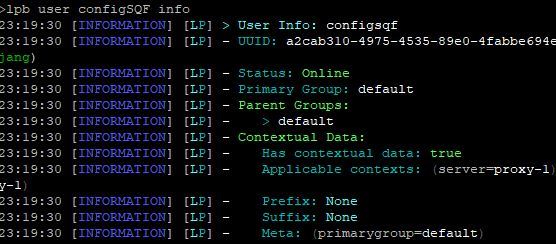
If I want to configure my prefix/suffix with Essentials how do I do it? Because it saves the prefix defined with LuckPerms but not the one with essentials.
high raven
@prisma hinge essentials doesn't set prefixes, only nicknames. Essentials displays prefixes from luckperms or another vault-compatible plugin
high raven
So what's the problem?
prisma hinge
Look at the Essentials configuration and when I write in game, it's not what's written in the configuration
high raven
can you send a screenshot of /lp info and /plugins and /lp user <you info
 half adder
What does displayname do? Can it remove the <playername> and change it to playername:?
half adder
i was unable to find it documentation on it
high raven
@half adder displayname sets a display name for the group that other plugins will display (like PAPI and such)
prisma hinge
LuckPerms, WorldEdit,ViaVersion, HolographicsDisplays,Vault, WorldGuard,Essentials, EssentialsChat,EssentialsSpawn
Plugin ⏫
half adder
so how can i change <[Gold] Playername]> to [Gold] Playername:
high raven
In your chat formatting line beng
@prisma hinge it looks like your essentialsxchat is defaulting to the default chat format. Are there any errors or warns or severes when you start the server?
prisma hinge
 cunning geyser
without having to use luckperms bungeecord, how can I give a player a rank on all servers?
high raven
@cunning geyser no need to go to #support-1
cunning geyser
ok
high raven
@cunning geyser if you want all servers to be synced, you need to connect them all to the same db and have LP-bungee on the bungee server. Without it, you'll have to make each change individually on each server
!sync explains how to sync
wintry cloudBOT
To sync data between servers, you need to connect each LuckPerms plugin to the same database (for example MySQL) and set up a messaging service.
LuckPerms wiki
high raven
!bungee is for setup
cunning geyser
ok thank you
wintry cloudBOT
If you run a Bungeecord network, learn how to correctly setup LuckPerms on all server instances (including Bungee).
LuckPerms wiki
prisma hinge
#repost @high raven
wintry cloudBOT
Hey Nouz! Please don't tag staff members.
high raven
Yeah essentialschat has a pretty big error
You might need to run your config through http://yaml-online-parser.appspot.com/
 rapid skiff
Hey, I have a problem with LP. My problem is that I have bungeecord network set up and on every server I have LP installed. Every plugin is connected to the same database and I have one problem - I can't use bungee commands. I typed "lpb user <nick> permission set luckperms.* true" in console and it still doesn't work. Do you know a fix to this?
prisma hinge
Larry, i downloaded EssentialsX on spigot
high raven
@rapid skiff can you screenshot lpb info in the console
prisma hinge
I don't know why i have this error
lilac hazel
@rapid skiff luckperms-bungee installed on the bungeecord server as well?
rapid skiff
Yes
lilac hazel
Oh and larry, my servers still seem to be online, funny .. 😆
high raven
@prisma hinge you likely accidentally added a space somewhere in the config - the parser I linked to will point to it
😆 what a surprise usb, what a surprise
lilac hazel
Ikr 😛
lilac hazel
Is that the same database and tables as the rest of your servers?
rapid skiff
Yes
lilac hazel
Hmm
rapid skiff
It's really weird problem
lilac hazel
What software are you running on your backend servers, spigot, paper, etc
rapid skiff
Paper 1.14.4
lilac hazel
Have you changed the bugneecord mode in spigot.yml
rapid skiff
Yep
lilac hazel
Have you set up ip-fowarding
high raven
Can you please screenshot what displays when you run the command for setting the permission?
rapid skiff
It's on true (I have every setting in my memory bruh)
Right now it says that I have this permission already, but before it said that everything went ok
lilac hazel
Just running through the most common causes of LP not working through to backend machines
rapid skiff
I can use /lp but i cant /lpb
high raven
@cunning geyser you don't need to use bungee, they all just need to be connected to the same database for them all to sync, just wanted to clarify
rapid skiff
@lilac hazel like what? host and example paper?
oh nevermind
But actually this is the weirdest issue
lilac hazel
A lot of the time when running paper, people forget to change spigot.yml's setting
then LP has a fit and doesn't sync or conenct to other servers etc
high raven
@rapid skiff so what exactly isn't working? I'm sorta confused here
high raven
and that's on the bungee server?
rapid skiff
Yes
high raven
Can you try updating to the latest LP from https://luckperms.net
LuckPerms - An advanced permissions plugin for Bukkit/Spigot, BungeeCord, Sponge, Nukkit and Velocity
LuckPerms is an advanced permissions plugin for Bukkit/Spigot, BungeeCord, Sponge, Nukkit and Velocity
lilac hazel
./lpb works fine from backend servers for me, you got the right permissions?
rapid skiff
I have the same thing
I was able to make some ranks and now it's show (in game) that i dont have perms for any sub commands...
@high raven i'm updating
wintry cloudBOT
Hey SnkMeme! Please don't tag staff members.
cunning geyser
Larry how do I change my data base though?
high raven
!switchstorage @cunning geyser
wintry cloudBOT
If you wish to change your storage type (e.g. to YAML or MySQL) you may need to follow these instructions to ensure your groups and permissions are migrated to the new storage type.
Read more about the Storage types
LuckPerms wiki
cunning geyser
ok thank you
high raven
If you run lp instead of lpb in the same console does it work?
rapid skiff
you mean lp user <nick> perm set luckperms.* true ?
high raven
yeah
rapid skiff
In bungee console it says: "command not found"
rapid skiff
It says that I have this permission (because I am trying to solve this for like 2 days now)
prisma hinge
Larry, problem fix thx you
high raven
So the command works in console, where does it cease to work?
high raven
Is snkmeme your nickname or your username?
high raven
Your minecraft account name, though?
rapid skiff
Yeah
high raven
add the permission * to your uuid
rapid skiff
via /lp ?
proper pulsar
Larry, have you check if they have IP-Forwarding enabled and the bungee mode?
high raven
Yeah
rapid skiff
I have both set to true
proper pulsar
Verified that all instances are connected to the same database?
rapid skiff
Checked
high raven
62edf487-7ed8-4796-84e5-6e6662912d70 is your uuid, use it instead of your name
rapid skiff
ok im confused now
proper pulsar
@rapid skiff have you by any chance copied the Spigot LP config to Bungee or vice versa?
rapid skiff
nope
high raven
does it work with lp?
proper pulsar
Can I see your startup log?
high raven
Are you sure you're in the right server? It sounds like you're switching back and forth between bungee and spigot servers and consoles tbh
rapid skiff
lpb command i used in bungee console
Log
I had to send this as i file sorry
Server was running for a long time so look at the end of the file
or for a while
@high raven I don't know if it will be useful but when i typed bungee ip into server, it showed lobby server motd instead of bungee motd...
wintry cloudBOT
Hey SnkMeme! Please don't tag staff members.
high raven
Caused by: java.sql.SQLTransientConnectionException: luckperms-hikari - Connection is not available, request timed out after 5000ms.
How come the db didn't connect when LP started up?
Caused by: me.lucko.luckperms.lib.mysql.jdbc.exceptions.jdbc4.MySQLSyntaxErrorException: Access denied for user 'customer_113576_luckperms'@'%' to database 'mysql'
That's unusual for a good server startup
It means LP didn't connect to the db
rapid skiff
Prepare for mega confussion
I checked password, username etc
And everything is right
proper pulsar
@high raven those are old logs
rapid skiff
oh
proper pulsar
Bungee writes to same file again and again
Current lines are at the end
Currently it starts up fine
high raven
ahhh
rapid skiff
I can send LPB config if you want
high raven
Set the node * in context global for yourself
rapid skiff
bungee or normal?
high raven
in both?
rapid skiff
Yep
high raven
And you still can't run any commands in either?
rapid skiff
Server in game
high raven
You have all luckperms permissions then, unless you just set that one
rapid skiff
Console
rapid skiff
Works just fine
rapid skiff
What do you mean by that?
high raven
Well, you have all permissions for LP, and when you run the right command in the right console, it works
and your sync works
!verbose try using verbose to see why you can't select servers
wintry cloudBOT
LuckPerms provides a verbose command to help you find out what permissions a command/plugin is checking.
LuckPerms wiki
high raven
just try running the commands you don't have perms for and see what shows up
high raven
including when you run commands you don't have permissions for?
high raven
Alright, run lp verbose record, run the commands you dont have permissions for, and run lp verbose upload
rapid skiff
Ok
https://luckperms.net/verbose/#uyczR1wy0b this is what i get
LuckPerms - An advanced permissions plugin for Bukkit/Spigot, BungeeCord, Sponge, Nukkit and Velocity
A web based viewer for LuckPerms verbose recording logs.
proper pulsar
Btw, can I just quickly interfere?
high raven
ofc
rapid skiff
yep
high raven
Did you run any bungee commands, like /server Snk?
proper pulsar
Can I see the outputs of /lp user <user> info and /lpb user <user> info
From the respective consoles of course
proper pulsar
Ok. I need your configs
Remove all IPs and PWs
Bungee and one backend should be enough
proper pulsar
How long is the password?
rapid skiff
20 characters
proper pulsar
Ok. THen it's fine
Bungee config, line 406 include-global: false
Need I say more?
high raven
if include global is set to false, it won't allow anything
high raven
everywhere... why'd you change it?
rapid skiff
WAIT
high raven
!config explains what it does
wintry cloudBOT
Learn what each of the config options are for.
LuckPerms wiki
rapid skiff
IM AN IDIOT
high raven
?
rapid skiff
I changed it in a wrong config
Sorry it's 1am and im sleepy
Emmm
It was set automatically to true in bungee config
 steady coyote
After Mariadb, which remote storage type would be considered the best?
rapid skiff
It's hard to say
high raven
Any of them will work, MySQL seems to be the easiest and simplest
steady coyote
Alright, thanks!
steady coyote
Just found out that the vm I'm running my servers on isn't an LTS, so Maria doesn't support it
rapid skiff
It happens
high raven
ah, well best of luck! 
high raven
yeah, the general rule is, don't change it unless you know why you need to be changing it
especially in configs
glad it worked!
rapid skiff
yeah, the general rule is, don't change it unless you know why you need to be changing it
@high raven Actually i didn't change anything in config except for databases so that's weird
wintry cloudBOT
Hey SnkMeme! Please don't tag staff members.
rapid skiff
But most importantly - it finally works
high raven
that's what matters haha
rapid skiff
It was only on a lobby server
Everywhere else it was on true\
Yeaa
Im quite happy
And i can go to sleep because it's 1am and i have to wake up tommorow
high raven
Go, be free, you've succeeded
high raven
np!
 gaunt python
nobodys in this channel
 naive grail
Is there an easier way to do it...
Bulk Update Help?
I need to remove world=world off all users for whatever group they are in?
Or even add an additional 2 worlds??
tidal blade
lp bulkupdate users update world global "world == world" "permission ~~ group.%"
That will look for all users that have a group set with a world context and change it from world=world to world=global
 slow atlas
can anyone help me with some permission guidance?
proper pulsar
Elaborate
slow atlas
sure
so im trying to add permissions to a server that allows just one role to be able to use certain /commands
proper pulsar
!context for per server permissions
wintry cloudBOT
You can set a permission or group on a per-world/per-server basis, through what we call "contexts".
LuckPerms wiki
slow atlas
ahhhhh...because im on minehut and im using your guys plugin
thx
i dont want to op them entirely but i still want to give them the ability to do /call /kill....etc
wait i still dont understand....what would be the way of going about using contexts to singal out certain permission to be used by some of my buds
i just want to make them able to use commands that are basic commands..but nothing like banning or any other permission hat are too powerfull
slow atlas
yep
proper pulsar
Well in that case forget contexts
slow atlas
ahh kk
slow atlas
well i dont want to completely op them because not gona lie i dont trust all of them with full op power
so i want to make them able to use basic plugin commands like /call and /kill...you know basic ass commands that wont get anyone in trouble
proper pulsar
!usage
wintry cloudBOT
Here's a guide to help users understand and use LuckPerms for the first time.
LuckPerms wiki
proper pulsar
You're welcome
high raven
@proper pulsar would this work? https://i.imgur.com/hAQqgVB.png
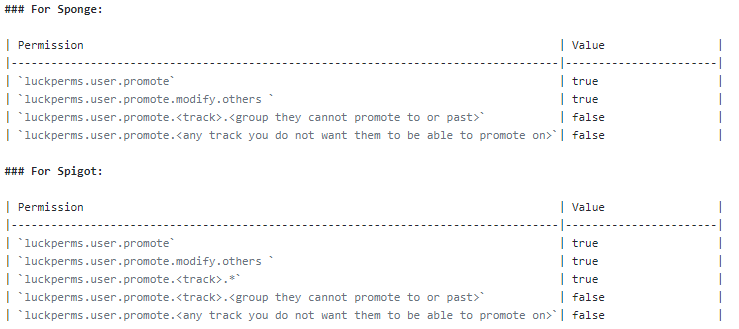
would I also have to add a luckperms.user.promote.<any track you do not want them to be able to promote on>.* as false?
proper pulsar
You don’t need the last one on spigot
high raven
the last one in the image?
proper pulsar
Yes
high raven
makes sense ty
high raven
Is the sponge one granting too many perms?
proper pulsar
Yes
high raven
i can limit it by setting the wildcards for all of them to false in new rows
proper pulsar
Bingo
proper pulsar
Try to think about it
high raven
😆 i ammmm haha, think it's just the first two
proper pulsar
Btw, can you come up with a combined setup that works on both at the same time? 😈😈
In any case I’m going to bed
high raven
probably, if i use my head, which is truly rare but maybe i can
It's the first two tho, i got that. Gn!
half adder
What does it mean when this is highlighted dark yellow and has an "m" next to it
high raven
i think it means you've modified that group
naive grail
lp bulkupdate users update world global "world == world" "permission ~~ group.%"That will look for all users that have a group set with a world context and change it from
world=worldtoworld=global
@tidal blade
Can you change it to nothing? Global breaks for me?
wintry cloudBOT
Hey Steevie! Please don't tag staff members.
tidal blade
If you remove the context, it goes to global by default anyway
naive grail
Okies i'll try this out when no one is on later hopfully.
LuckPerms is still broken for me using BulkUpdate so i have to move the files to another server to do any bulk updates then move them back.
It's so stupid
tidal blade
What do you mean "broken using bulkupdate"
naive grail
tidal blade
You need to use the command exactly like I did
naive grail
I did
tidal blade
Don't remove the " "
naive grail
I didn't
GitHub
Speaking to luck. Bulk update replacing permissions is broken. http://prntscr.com/r2mf0b
I paste it in and console removes it
tidal blade
@naive grail LP version?
naive grail
@tidal blade V5.0.72
git-Paper-171
wintry cloudBOT
Hey Steevie! Please don't tag staff members.
tidal blade
!downloads Try Updating LP
wintry cloudBOT
You can download LuckPerms for Spigot/Paper, BungeeCord, Sponge, Nukkit or Velocity.
Read more:
Additional downloads
LuckPerms wiki
naive grail
Which one?? Latest build would you suggest?
tidal blade
Yeah, Latest
naive grail
Okay will try this when server is quiet, as i dont want to use Plugman to change this and crash it all 😂
 strange basin
how do i reload the plugin?
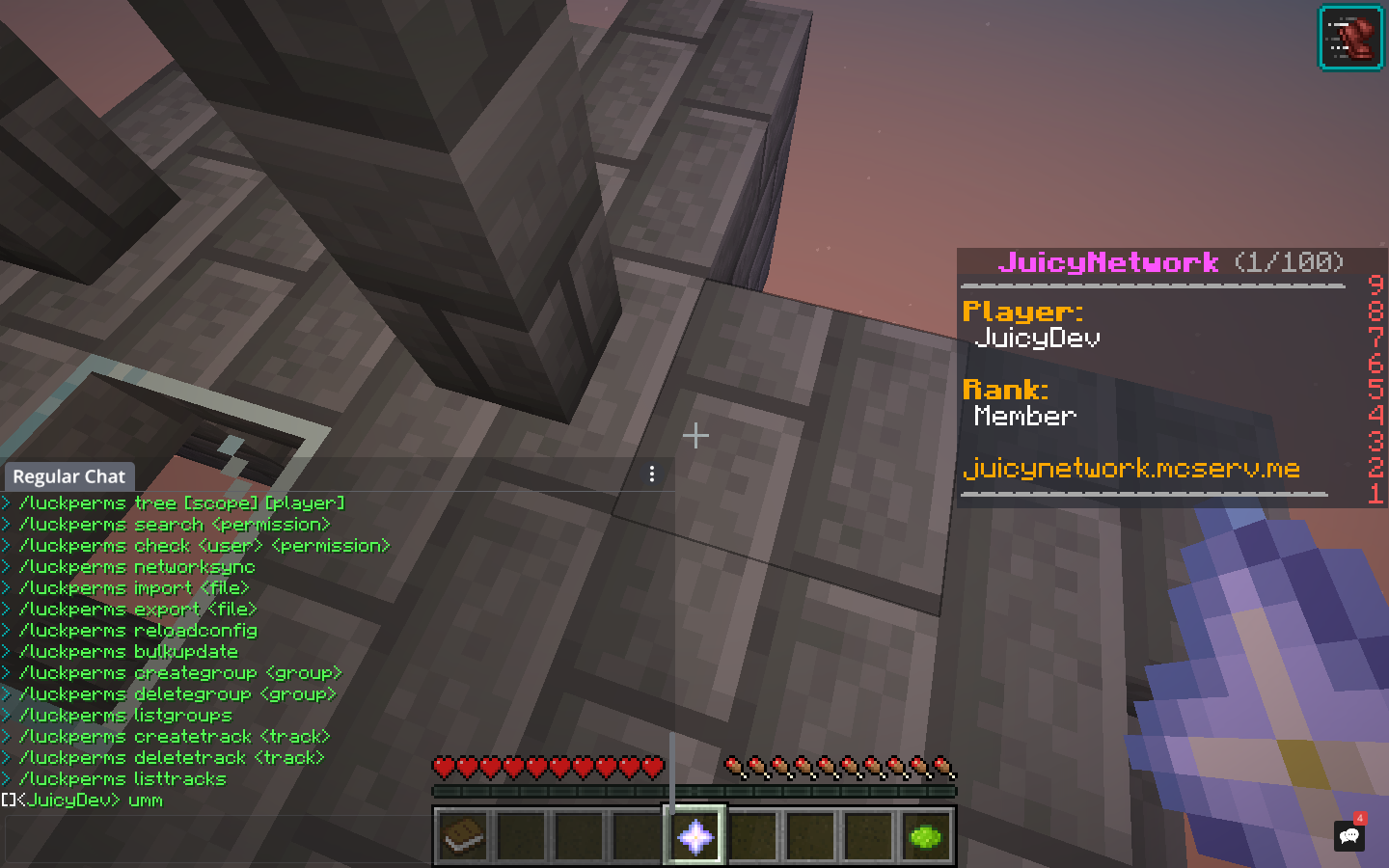
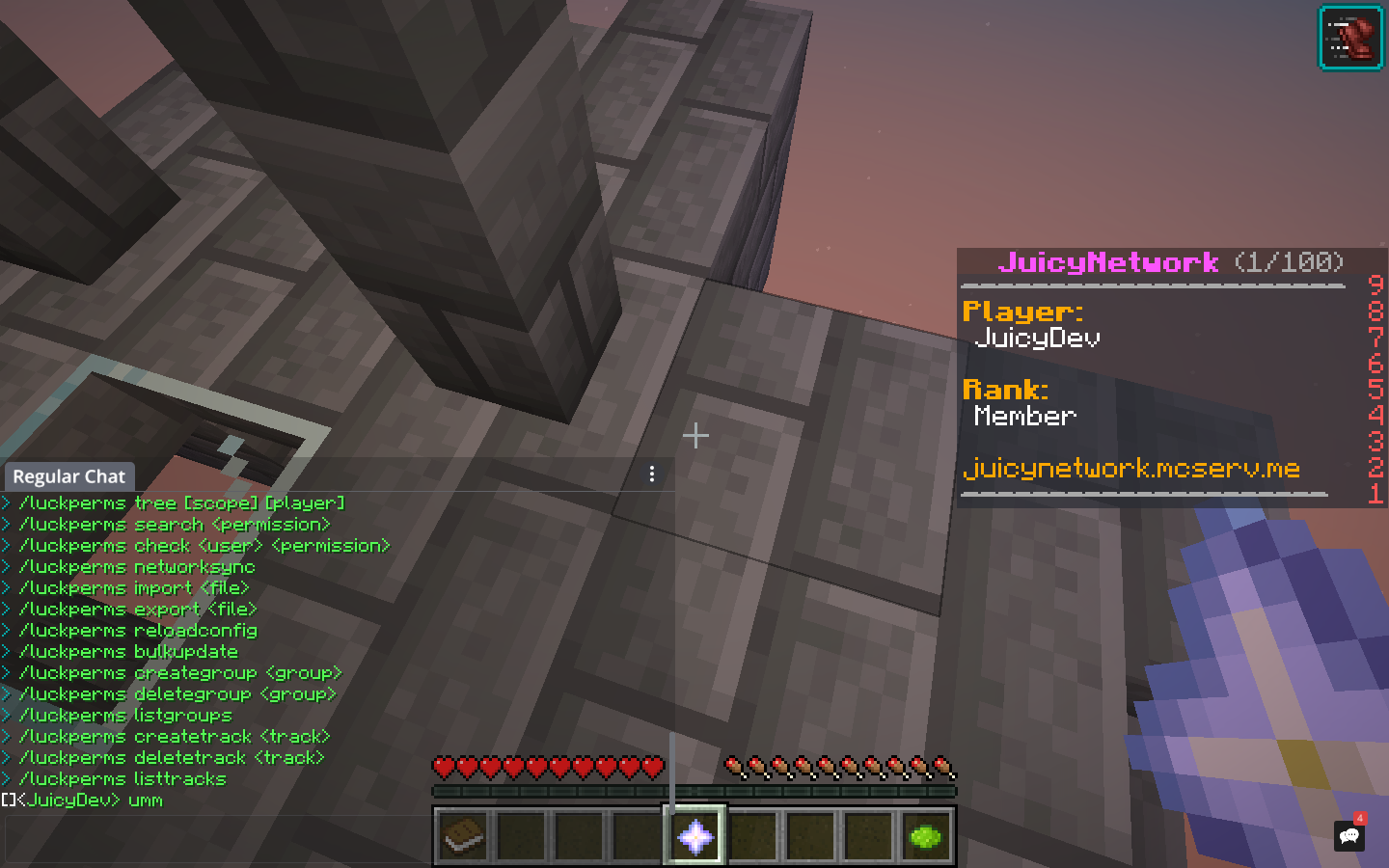
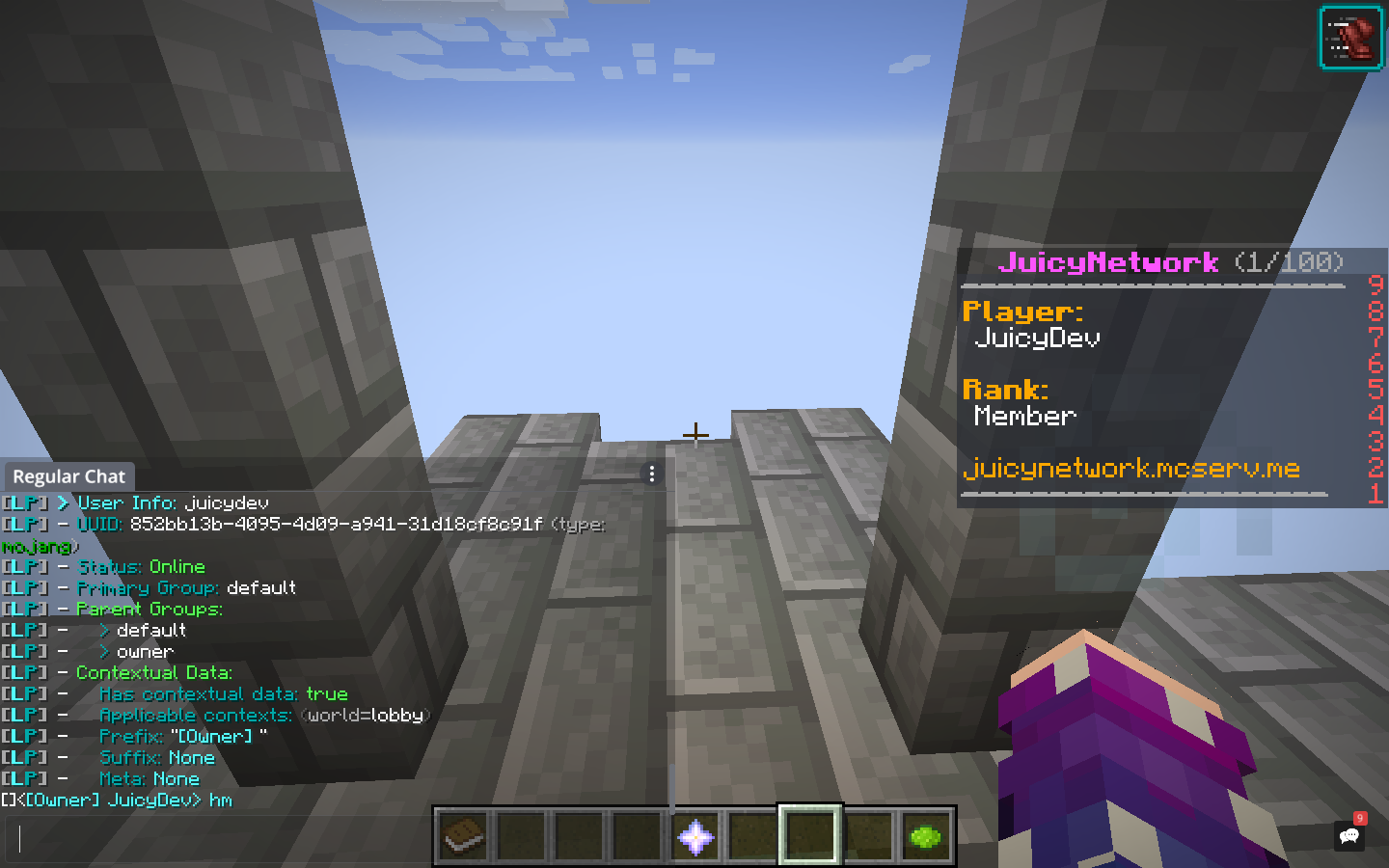
i gave myself the owner role, still says member at %vault_rank%
do i need to restart the server?
strange basin
Papi and vault
and it says <JuicyDev>: hi
while i changed to [Owner] <JuicyDev>: hi
its green
for some reason
i made the member green
high raven
Send screenshots instead of describing, I can't glean the meaning of 'its green'
 high raven
Did you set the prefix to be a green colour code?
strange basin
Yes
strange basin
I set it to &a[Owner] (space)
quick lagoon
put &r at the end
strange basin
ok
strange basin
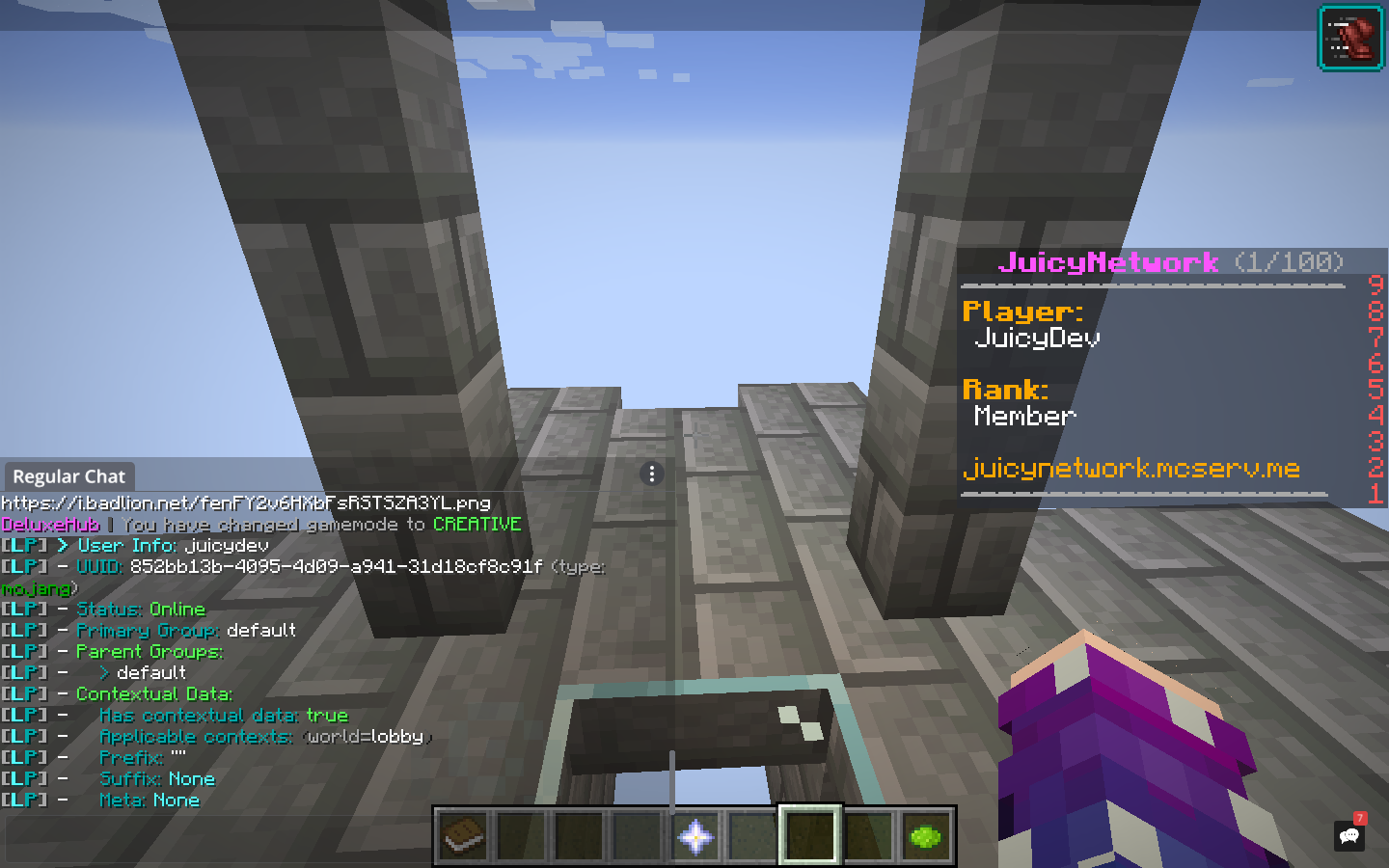
i added myself to the owner rank, still says i am default that i renamed to member
high raven
does it show in
lp user <you> info?
send a screenie please
 high raven
and what shows when you run lp user <you> parent add <owner rank name>


 high raven
Chat works now?
high raven
it's a different command
strange basin
it dosent update