#support-2
1 messages · Page 25 of 1
 prisma hinge
prisma hinge
prisma hinge
i know but how can i give all the premission to myself ?
 proper pulsar
That's the right question
While not recommended, but you can use *
It's much better to give you per plugin permissions
So if permissions of a plugin start with xxx. then give yourself xxx
Exceptions are plugin that have special admin permission nodes
prisma hinge
how do i do that i don`t even have premission to gamemode 1
 hollow gorge
!usage
 wintry cloudBOT
Here's a guide to help users understand and use LuckPerms for the first time.
 LuckPerms wiki
hollow gorge
LuckPerms wiki
hollow gorge
To find what permissions a plugin has, check its documentation or use Verbose
!verbose
wintry cloudBOT
LuckPerms provides a verbose command to help you find out what permissions a command/plugin is checking.
LuckPerms wiki
prisma hinge
and how do i show a prefix in my chat for a role ?
 barren fable
!meta
wintry cloudBOT
You can set prefixes, suffixes and other meta data in LuckPerms for players and groups. Note that LuckPerms does not manage chat. You need to use another plugin to show prefixes/suffixes in chat.
LuckPerms wiki
hollow gorge
Learn the plugin...
wintry cloudBOT
Check out some of our frequently asked questions.
Read more:
LuckPerms wiki
prisma hinge
im trying i use this command /lp verbose on Luck & (essentials | worldedit) but it won`t do anything
how would i make a Owner rank in lp ?
proper pulsar
Note that you copied an example
Without understanding what that does
I mean is your username "Luck"
Or do you have essentials installed?
prisma hinge
no if i have essentails it crashes
proper pulsar
Because Spigot plugins don't work on Sponge
They are completely different systems
In any case that's besides the point
My point being read the page properly and don't just copy paste the first command you come across
prisma hinge
i just wanna have all the premissions on my character why is it so complicated ?
proper pulsar
I gave you an answer
If you don't have permissions to run a command, run it from the console
prisma hinge
is there a solution so i can do it ingame ?
proper pulsar
Of course not
I mean not unless you have permissions to do so
Imagine if anyone could just give themselves full permissions
You can do it after you have full permissions ingame
I mean you OPed yourself from the console too, why is it an issue to run the LP command from the console?
 worn osprey
hey
prisma hinge
i mean i don`t wanna do it every single time
proper pulsar
You don'T need to
prisma hinge
and it would be iritating for mods
worn osprey
how could i switch a file (luckperms-h2.mv.db) to sql
wintry cloudBOT
If you wish to change your storage type (e.g. to YAML or MySQL) you may need to follow these instructions to ensure your groups and permissions are migrated to the new storage type.
Read more about the Storage types
LuckPerms wiki
proper pulsar
Last time I give you the link
worn osprey
dosent work
proper pulsar
Yes it does
worn osprey
i try again
proper pulsar
Also "doesn't work" is the worst possible error description
prisma hinge
so with sponge can i install plugins or not ?
proper pulsar
Of course you can
Who said you couldn't?
You just need Sponge plugins
(I mean duh)
prisma hinge
i ment with spongeforge
proper pulsar
SpongeForge = Sponge
prisma hinge
oke i figured out how it works ^^
proper pulsar
Great
proper pulsar
That's how permissions work
 teal pulsar
Hello, I have this messages which is spammed every 30 secs in my console, how I can disable it ?
[luckperms-hikari housekeeper/INFO]: 20:52:45.526 [luckperms-hikari housekeeper] DEBUG me.lucko.luckperms.lib.hikari.pool.HikariPool - luckperms-hikari - Pool stats (total=10, active=0, idle=10, waiting=0)
teal pulsar
LuckPerms 5.0.50 Bukkit, Debian 9, other plugins: Protocol Lib and 3 of my creations
teal pulsar
1.14.4
teal pulsar
AH, Spigot
proper pulsar
But in any case try to reproduce it without any of your plugins and without Protocol Lib
teal pulsar
ok I will try
teal pulsar
the messages appears even if I remove all other plugins
proper pulsar
odd
 azure girder
why this
default-assignments: default: if: has-true: <group.default> take: - group.default give: - group.slave set-primary-group: slave
not working
 tidal blade
LP version?
azure girder
LuckPerms-Bukkit-5.0.72.jar
tidal blade
Default assignments was removed in LP v5
azure girder
so how to make a default group?
tidal blade

GitHub
An advanced permissions plugin for Bukkit/Spigot, BungeeCord, Sponge, Nukkit and Velocity. - lucko/LuckPerms
!default
wintry cloudBOT
LuckPerms provides a group that every player is added to upon joining the server, called default. You can use multiple methods to change the default group or change the name of it.
LuckPerms wiki
tidal blade
Using a displayname and making default inherit the other group is the best way
azure girder
/luckperms group default parents add slave?
tidal blade
parent not parents. But yes
an you can use /lp for short instead of writing out /luckperms
azure girder
if i install the extension.jar it will fix the default-assignments?
tidal blade
Yes, but as that page explains. YOu should look at moving away from that feature and doing it differently.
 tame hollow
there is no need for default assignments with what you are doing
 azure glen
Hello! Can anyone help me configure LP with MongoDB? I've been trying it over and over, but I can't get it to work. Thank you.
 valid bolt
Does anyone have a clue on why I'm getting this error? https://hastebin.com/vuyubiciza.cs
I've already made sure that each server is running the same version of LP, I've tried copying files from my other servers that connect perfectly fine. Redownloading and I just can't get it to work. The moment I try connecting to ANY database (not just the one that has the permissions/groups) it throws this error. =/
 mighty spear
@valid bolt What server JAR?
@azure glen It should be as simple as plugging in the username, host, etc and starting it up, do you have any errors?
 neat shore
@mighty spear Can you help me?
wintry cloudBOT
Hey Riley! Please don't tag staff members.
neat shore
Do you have an idea of what it could be?
https://hastebin.com/bezumuwuhi.bash
This spams quite a bit after the server runs a while when people join or something and then it eventually crashes the bungee
tame hollow
Just an FYI Riley, mods aren't actually here to help, we're here to moderate, anyone is capable of helping you, not just us.
tidal blade
An asking in both channels will not get you any help faster.
azure glen
Yes I have errors, it says: "Cluster description not yet available. Waiting for 30000 ms before timing out"
 feral pebble
So i changed my database type and i forgot it wipes all your LP data... anyway to get it back. i changed from H2 To mysql
 static pendant
I think there is no way of importing h2 to mysql so this is probably a no.
 lament stream
Hello im pretty new to plugins and i would like to set up Luck perms so it only alows a player to use 1 playervault ( im using the old playervaults not playervaultsX btw )
anyone know how i can do this ?
 lilac hazel
Well, assuming you have permssion based "vaults"? Just give them the permission to use one?
I'm not sure how your plugin works, but if there's no permissions to lock down to one max, then there's no way you can do it, or no way Luckperms can help you achieve what you want
 bleak flame
Can anyone help me with a voteplugin/lp problem? i'm trying to give a reward for voting but i dosnt seem to works and i'm not sure if it the command i put in the vote config or if i did it wrong in the config... So anyone know a littel about luckperms console commands?
 high raven
@bleak flame what do you want the reward to do?
bleak flame
Give a temp permission for fly
This is what i have set it to do 'lp user %player% permission settemp essentials.fly true duration3600'
high raven
That gives them permission to use /fly but if they toggle it, it won't necessarily kick them out of it, and it won't let them unfly after the duration
bleak flame
well that is a whole new problem i didnt think about lol
Is there another way to do it?
high raven
Haha you'll probably need a different plugin
bleak flame
yeah okay probaly
bleak flame
i think i found one b4 but wanted to just use lp but didnt think about the fact that when the permission expires they can't go out of fly lol
But my problem was actualy it not giving the temp perm tho
And i wasnt sure if that was cuz the command was wrong or cuz the voteplugin isnt configured correct
 analog vault
!errors
wintry cloudBOT
Here's a page with some common storage system errors.
LuckPerms wiki
proper pulsar
@feral pebble @static pendant of course you can keep your data when switching storage types
It doesn’t wipe the data. Just the new storage doesn’t have any data
Changing it back to the old one will restore it
And if you want to bring it over have a look here
!switchstorage
wintry cloudBOT
If you wish to change your storage type (e.g. to YAML or MySQL) you may need to follow these instructions to ensure your groups and permissions are migrated to the new storage type.
Read more about the Storage types
LuckPerms wiki
analog vault
Mon Mar 23 22:13:41 CET 2020 WARN: Establishing SSL connection without server's identity verification is not recommended. According to MySQL 5.5.45+, 5.6.26+ and 5.7.6+ requirements SSL connection must be established by default if explicit option isn't set. For compliance with existing applications not using SSL the verifyServerCertificate property is set to 'false'. You need either to explicitly disable SSL by setting useSSL=false, or set useSSL=true and provide truststore for server certificate verification.
I get that butt
my properties settings
are set like this?!
pool-settings: # This setting allows you to define extra properties for connections. properties: useUnicode: true characterEncoding: utf8 useSSL: false verifyServerCertificate: false
proper pulsar
Did you restart the server after changing the settings?
analog vault
serveral times
analog vault
@proper pulsar i've done it multiple times?!
wintry cloudBOT
Hey aidanohart! Please don't tag staff members.
analog vault
whoops
hollow gorge
Then the wan might not be from LP itself.
Any other plugin using a remote database?
proper pulsar
And please check if you are getting any errors in the console
analog vault
Legit I just started development
[22:22:29 INFO]: Plugins (13): LuckPerms, WorldEdit, PlaceholderAPI, PlugMan, ViaVersion, Vault, WorldGuard, ProtocolLib, ViaRewind, Essentials, EssentialsChat, ViaRewind-Legacy-Support, EssentialsSpawn
hollow gorge
Legit I just started development
What?
Making a server is not developing stuff
proper pulsar
Because it's wrong and confusing
Correcting someone is not arguing btw
And you haven't answered my question
And please don't tell me you used PlugMan to restart
analog vault
No lol
I restarted the panel
`> [22:21:45 INFO]: [LuckPerms] Loading configuration...
[22:21:46 INFO]: [LuckPerms] Loading storage provider... [MYSQL]
[22:21:46 WARN]: [Server thread] INFO me.lucko.luckperms.lib.hikari.HikariDataSource - luckperms-hikari - Starting...
[22:21:46 WARN]: [Server thread] INFO me.lucko.luckperms.lib.hikari.HikariDataSource - luckperms-hikari - Start completed.`
and then that ssl thign comes every 5 seconds
and my pool settings seem ok
pool-settings: # This setting allows you to define extra properties for connections. properties: useUnicode: true characterEncoding: utf8 useSSL: false verifyServerCertificate: false
proper pulsar
What LP version?
analog vault
5.0.72
wintry cloudBOT
You can download LuckPerms for Spigot/Paper, BungeeCord, Sponge, Nukkit or Velocity.
Read more:
Additional downloads
LuckPerms wiki
analog vault
oh rip
LuckPerms | An advanced permissions plugin 5.0.72
that's the spigot page..
proper pulsar
Report it on GitHub please
analog vault
oh dammit
ok
thanks brainstone (i wont ping you) i made a issue ticket on git hub
 humble inlet
HI
feral pebble
thanks brain
high raven
@humble inlet hi!
proper pulsar
You are all welcome
 unique parcel
Spend a few days away and new channels pop up lol
tidal blade
Lol
lilac hazel
Locked down for the next 4 weeks, gonna have lots of spare time to keep an eye on popup channels
tidal blade
Lol I don't think there will be any more popup channels.
 woeful sky
Is anyone available to help me with my mysql connection for a bungee network?
The bungee server connects just fine to the mysql server, but both of the spigot instances error out with [LuckPerms] Failed to init storage implementation when they try to connect to the same database using the same credentials
IP forwarding is correctly setup and all funcionality of the servers works, except for luckperms
Bungee in online mode with ip forwarding on
Spigot servers in offline mode with bungeecord set on
Well that's stupid
I created a new mysql db and it works
 soft cosmos
🙂
woeful sky
Thank you 🙂
 shut wren
how can i make the player rank to default?
 topaz junco
hey ^ also similar to my question.
How do i make a certain group default so when members join they automatically get added to that group
prisma hinge
Hey my friends cant use anvil and enchant without OP. How can i give them a permision to do it? @proper pulsar maybe u can help
wintry cloudBOT
Hey mkmmkmkmmk! Please don't tag staff members.
prisma hinge
oh sorry ;'c
analog vault
server.properties > change spawn-protection=0 @prisma hinge
that oculd be it?
could*
@prisma hinge tell me if this worked or not!
prisma hinge
its not 😦
maybe i wrote the permission worng
@analog vault it didint work but maybe i wrote the permision wrong. Im the newbe in this
 nimble trout
Hi, I have a problem with luckyperm compared to authme.
authme stops the server when luckyperm is installed
analog vault
@nimble trout what are the errors in console?
nimble trout
 analog vault
firstly, i wouldn't recommend running your server in offline mode
What version of authme do you have
nimble trout
AuthMe-5.4.0.jar
prisma hinge
@analog vault heeeeeeelp :((
analog vault
@prisma hinge @ me in #support-1
@nimble trout It could be a cause of a database, have you synced a database with Authme?
nimble trout
no the authme config is practically by default
analog vault
you haven't changed anything?
nimble trout
if some basic parameter example blindness, spawn and we changed PermissionEx for Luckyperm
if i reinstall authme by default you think everything comes back correctly?
nimble trout
I am testing and will keep you posted Thank you for your help.
@analog vault with authme by default the server crashed
analog vault
@nimble trout Update to the latest version of AuthMeReloaded
nimble trout
can you send the link? please
nimble trout
[Pterodactyl Daemon] ---------- Detected server process in a crashed state! ----------
proper pulsar
This crash isn't caused by LuckPerms
 lapis stump
Anyone know if its possible the run a command when a permission expires?
 quasi jolt
Hello I am German and I wanted to ask how you can do this so that you can assign permissions to a specific sub-server.
If I assign some, this permission will not be accepted
 next sky
A few questions regarding LP v5:
Any changes (worth mentioning) in speed (especially load times)?
How about the API? Lot's of breaking changes?
(Please ping when replying)
 charred solstice
we (MrSchockYt) use sql but we need fly not in bedwars. how can we give permissions to a specific sub-server
next sky
So your question is wether or not it's possible to give someone a permission, that is only active if the player is on a specific server?
charred solstice
yeeah
next sky
or active everywhere except for one server
charred solstice
no only one server
but we have sql and if we give on one server fly it is on all
next sky
You can find a server name option in the config file (config.yml).
you can set that to "bedwars" and set the fly permission with context "bedwars". (Can help in via DM if needed xd)
analog vault
@charred solstice
This is super simple!
/lp user/group <user|group> permission set <node> [true|false]
@next sky ^^^^ much easier 🙃
next sky
@analog vault they want the permission to not be set on one server and asked how to do it. How about actually reading before you hit me with the "🙃"
analog vault
bruh taht's what i said
[true|false]
/lp user/group <user|group> permission unset <node>
nimble trout
@analog vault
the problem is solved Thank you for your help good evening
analog vault
no problem
@charred solstice Look above where @next sky mentioned something
/lp user/group <user|group> permission unset <node>
prisma hinge
Hi guys I'm using luckperms and started setting permissions again today for a new plugin, but when I run any command it just says
Running LuckPerms v5.0.72
and doesn't actually do anything. I'm not sure why or where to start fixing it.
analog vault
@prisma hinge I take it your op?
prisma hinge
yes
well
ill op myself to be safe
well i made sure and tried again
still not working
nvm it wasnt saying successsful
the op was the problem.
it also turns out a chat plugin i had censored commands for some reason
prisma hinge
well
actually i was wrong
it still won't work
even with op
i guess ill reiterate the problem:
Hi guys I'm using luckperms and started setting permissions again today for a new plugin, but when I run any command it just says
Running LuckPerms v5.0.72
and doesn't actually do anything. I'm not sure why or where to start fixing it.
hollow gorge
Server type and version?
Update LP
What commands did you try?
prisma hinge
e Mar 24 19:17:37 CET 2020 WARN: Establishing SSL connection without server's identity verification is not recommended. According to MySQL 5.5.45+, 5.6.26+ and 5.7.6+ requirements SSL connection must be established by default if explicit option isn't set. For compliance with existing applications not using SSL the verifyServerCertificate property is set to 'false'. You need either to explicitly disable SSL by setting useSSL=false, or set useSSL=true and provide truststore for server certificate verification.
next sky
@prisma hinge 🙄
analog vault
!errors
wintry cloudBOT
Here's a page with some common storage system errors.
LuckPerms wiki
prisma hinge
i checked
next sky
I wrote you the solution hours ago
prisma hinge
not work
next sky
Then disable ssl
prisma hinge
i did
prisma hinge
im stupid
analog vault
no wait
next sky
When the db is not reachable from outside and on the same server!!, that is safe.
prisma hinge
where do ipaste that
analog vault
look at the top line
prisma hinge
ye
analog vault
pool-settings:
find that under your password option in luck perms
for your database
and then go al teh way down to
prisma hinge
i found
analog vault
`split-storage:
Don't touch this if you don't want to use split storage!
enabled: false
methods:
# These options don't need to be modified if split storage isn't enabled.
user: h2
group: h2
track: h2
uuid: h2
log: h2`
and highlight it all and paste the message.txt file there
prisma hinge
analog vault
would you like me to send you it?
prisma hinge
yes
prisma hinge
analog vault
this is what you should use, just put your database stuff back in!
analog vault
what now?
analog vault
I did say you don't have to have luckperms on your proxy server
analog vault
huh
next sky
A few questions regarding LP v5:
Any changes (worth mentioning) in speed (especially load times)?
How about the API? Lot's of breaking changes?
(Please ping when replying)
 keen prawn
hey i have the problem as my ranks are not displayed in the tab list but in the chat.
analog vault
@keen prawn What plugin are you using?
next sky
I did say you don't have to have luckperms on your proxy server
huh!?
analog vault
no you don't
hollow gorge
You should do what the error is telling you
prisma hinge
hey andre, sorry i had something come up after i askjed that earilier question
Same problem, I'm using luckperms and started setting permissions again today for a new plugin, but when I run any command it just says
Running LuckPerms v5.0.72
and doesn't actually do anything. I'm not sure why or where to start fixing it.
its not working
liek i tried all
hollow gorge
Server type and version?
Update LP
What commands did you try?
prisma hinge
alright
its offline
1.15.2
latest version
and i tried perm and user assignment to groups
hollow gorge
Offline as in cracked mode?
prisma hinge
yes
hollow gorge
Welp. I'm sorry, but I won't help you with offline servers. It's against my personal principles
prisma hinge
actually it will be an online server
but i need a friend to test it
and he has cracked
im gonna see if online works
WAIT
it was in online the whole time
ok thats not it then
prisma hinge
does * give permission to all perms I forgot xd
 candid dune
yes
prisma hinge
aight thanks
high raven
@next sky v5 is, as far as I undertand it, a lot better. as far as going from v4 to v5, there's an entire wiki page on it and how it's generally a better system for both users and developers: https://github.com/lucko/LuckPerms/wiki/Upgrading-from-v4-to-v5
GitHub
An advanced permissions plugin for Bukkit/Spigot, BungeeCord, Sponge, Nukkit and Velocity. - lucko/LuckPerms
next sky
ty
next sky
and plugins that relied on v4 api can be made to work with the extension as well
I write all plugins myself, only 2 directly depend on LP, shouldn't be too complex or hard
high raven
then you'll be good!
 fiery hill
So when I have;
vault-include-global: false
I can chat in the server, all is hunky-dory, however my prefix doesn't show:
https://i.imgur.com/WheWs35.png
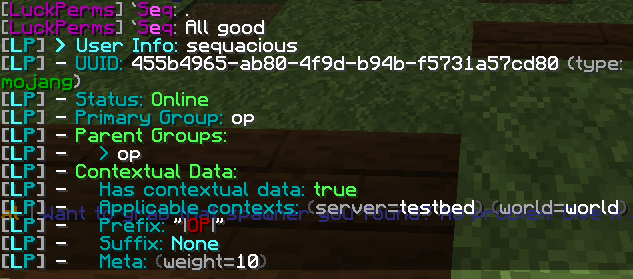
However, when that value is true, this happens:
https://i.imgur.com/tvgeNbI.png
My chat shows in console but not in game
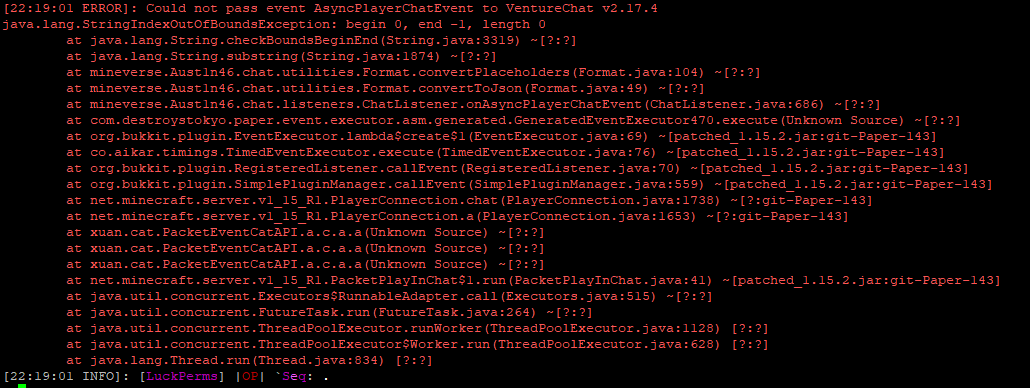
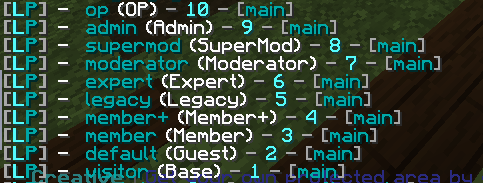
As far as I can tell, I've set up inheritance/parents, negated and granted perms and weights 100%
So I have no clue why this is borked
I'm in the "op" group on this track only
https://i.imgur.com/JyHZhlZ.png
 high raven
what version of paper/spigot, LP, and Vault are you using?
fiery hill
Paper 1.15.2 Build 143
LP v5.0.100, also tested on release build
Vault v1.7.3
Vault is seeing LP fine
https://i.imgur.com/eNIuUcp.png
 high raven
is there a specific reason you need vault-include-global: true?
fiery hill
I need it true
high raven
my mistake haha
fiery hill
If it's not true it doesn't properly resolve global prefixes
Guessing it doesn't resolve those perms either but idk
When running /papi parse Sequacious %luckperms_prefix%
it correctly gets it, so it's not erroring on parsing the prefix which was my first thought
high raven
that's good at least
I'm not sure what's going on, but there's a good chance it's venturechat
i use it too, and it's really picky
fiery hill
I've asked them and no-one else has had this issue
high raven
yeah it's certainly not common
high raven
i think venturechat requires placeholders surrounded in {}, just making sure they are?
fiery hill
Yep
My VC format;
format: '&7[&5LuckPerms&7] {prefix} {nickname}&7:'
Shows fine in console https://i.imgur.com/mKdEzbm.png

In game just nothing
high raven
if there's a character missing in the format line it might be trying to include values that must be excluded
is it properly surrounded by '
fiery hill
Yes
high raven
if you use {luckperms_prefix} instead of {prefix} does it work?
{prefix} afaik is barely supported and may be conflicting with vault's designations
fiery hill
No, same deal. Tried using highest_on_ladder too
tame hollow
why
fiery hill
VC dev literally just got back to me @high raven
"Default error when the format is either invalid, or has some issue. LuckPerms loves to substitute empty fields as "null". If you don't have a prefix or suffix on a group, make sure to set it to empty string.
"
prisma hinge
because the other one was more cleaner
i and was able to add commands without having to retype it
tame hollow
retype it?? what
prisma hinge
Yeah like before all you had to do was type out the permission and click enter for each group
high raven
@fiery hill i don't know about that but give it a shot i guess?
prisma hinge
Now you have to type it out each time
and the design is sloppy
i dont like the groups on the side id rather it on the top
high raven
copy+paste @prisma hinge ?
prisma hinge
its really a downgrade
when the old design was easier
the new design makes me wanna shoot myself
high raven
I'm pretty sure the old design was simply different; all you have to do is learn the new one and it really is just as simple or simpler
tame hollow
well i'm sorry that i was not able to please everyone. most people like it.
prisma hinge
i dont like it
tame hollow
if you don't like it then you can downgrade to v4 and use the old one.
prisma hinge
ill lose all my groups and permissions
high raven
also @prisma hinge that's quite a bit of an exaggeration... and people shooting themselves is a devastating thing to happen, probably definitely not cool to make light of it
prisma hinge
sorry larry
tame hollow
nah, you won't lose anything.
prisma hinge
just change the jar?
prisma hinge
which version
tidal blade
You'll need v4 if you want the old outdated editor.
An the only way to get v4 now is to go back through spigot/sponge version history for the plugin.
tame hollow
you can get it on spigotmc.org
 broken cloud
hey we need help on general one
broken cloud
ok
prisma hinge
yeah they wont see it tho
high raven
@prisma hinge Turbo made the new editor... at least be respectful bro
prisma hinge
OH
high raven
@broken cloud check #support-1
prisma hinge
turbo tbh its not bad
tame hollow
😂
prisma hinge
just too much for my small brain
fiery hill
I like the new editor, it's a bit bulky but still good
As in a lot of padding around text
tame hollow
i mean it's in beta, still work to be done on it
prisma hinge
just suggestion move the groups back to the top and ill love it
tame hollow
i'm just too tired out from my actual job to do any work on it these days.
no, the groups at the top was not good at all.
high raven
If you have valuable suggestions, I'm sure Turbo wouldn't mind seeing them, just not baseless criticisms
tame hollow
horizontal scrolling is terrible.
 tame hollow
you might like groups at the top if you only have that many...
some people have hundreds
high raven
that's the real reason ^
tame hollow
and you can't filter them
prisma hinge
well you can just click the groups to the end
prisma hinge
and thats there issue for having 100 groups
and how do you have 100 groups like how
prisma hinge
did you make the old editor?
tame hollow
even my network had about 100 groups
no Luck made the old one
he much prefers the new one
 tame hollow
there is discussion about it on github, it's not that easy
because the new one allows for multiple permisisons to be added at once
prisma hinge
thats legit the only thing bad about it i lied about the design
high raven
also, is there not the simple method of inheriting + the simple method of copy/pasting a list?
prisma hinge
maybe stretch it out a little but its good
Like when i visit the page i feel like im being held at gunpoint because everything is so close together
tame hollow
ctrl -
fiery hill
Is there a way to set a group to always be primary regardless of weight or is it simply auto-determined by that?
high raven
it's always determined by that AFAIK - if a player has a group that is the highest weight it is by definition primary iirc
fiery hill
So I think I've determined that VentureChat is just erroring when trying to resolve any luckperms placeholder
So that's fun
Tried setting format to;
'&7[&5LuckPerms&7] {luckperms_prefix_element_highest_on_track_Donator-Ranks}{luckperms_prefix_element_highest_on_track_Main} {player_displayname}'
And it does the same.
It does not error when just using {player_displayname}
fiery hill
What version of VC, LP and PAPI are you using?
high raven
not certain let me check
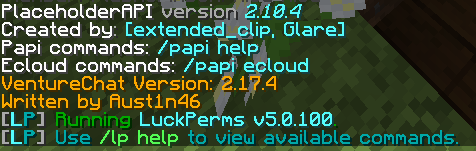 high raven
same except lp 5.0.63
i know i know
im gonna try to update and see what happens
ok so updated to LP 5.0.104
still works
fiery hill
I want to cry
high raven
try, if you can, to replace the jarfile for VC
fiery hill
I've been at this for days. I've replaced everything you can think of
high raven
load with new config and change only the format for global
you dont have to keep it, just test
fiery hill
Errors without me even changing the config
high raven
then it's probably VC and vault? try getting your vault from the bukkit page here: https://dev.bukkit.org/projects/vault
fiery hill
Still errors, VC dev is saying it has to be because a prefix or suffix is null for some group
high raven
run /lp editor and send the link?
fiery hill
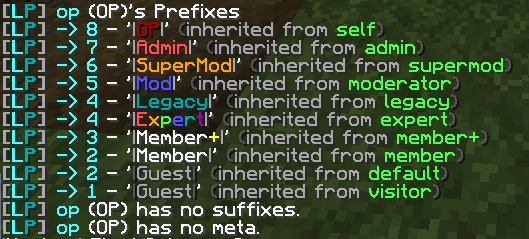
https://i.imgur.com/ZeCGLfT.png
Only group I'm in is OP
 high raven
I know, but if the VC dev is adamant, it'll help if I can see the /lp editor (I can't edit your groups without you running a command in your console)
fiery hill
May I dm?
high raven
no need lol just send it here
this discord has seen so many editor links haha
alright, Im not seeing any null values for prefix or suffix
fiery hill
Right?!
high raven
try setting an arbitrary prefix and suffix
see if VC can handle that
if not, then it's definitely not LP handling it as 'null'
fiery hill
It handled it fine by setting Prefix and Suffix to 'Test'
Are you serious
It can't handle the | character
Really...
high raven
ah
you might want to let the VC dev know about that
in the meantime -Name- or even a unicode \u007C
if you use \u007C does it work? that's just a unicode |
fiery hill
Just shows it as text
high raven
maybe wrapped in " " or ' '?
fiery hill
Nope, no dice
high raven
aw
well, the VC dev might fix it for you? let him know and there's a chance that maybe, someday
fiery hill
I just don't understand why this worked with PowerfulPerms
I literally changed nothing about the prefixes
high raven
it might have something to do with your storage method?
fiery hill
The fact that this is the issue bothers the hell out of me.
It also baffles me why the LuckPerms placeholders work using | when PowerfulPerms is installed.
fiery hill
Ik
high raven
so weird tho
fiery hill
Tell me about it
high raven
definitely tell Austin about it
fiery hill
Did 30 mins ago
high raven
lol im guessing he's gonna try rly hard to test it but get nothing and be just as confused
oh wait
same thing happens to me
it's the |
high raven
link me to the discussion page and ill reply saying as much
fiery hill
Do you use other unicode prefixes?
fiery hill
SpigotMC - High Performance Minecraft
@MaximoTG98 Create command aliases to get around command conflicts. I already created some defaults for /message, tell, etc. It's right in the...
high raven
you haven't replied letting him know it is the | character
fiery hill
We're discussing it in DMs
high raven
ah
then tell him a rando on the internet with no connection also reproduces the error
high raven
it's a bug lol he just needs to find where it is and squash it
fiery hill
How would one escape a character in a LuckPerms prefix?
high raven
idk what you mean?
fiery hill
 high raven
so it works if you have a \ ? lol
fiery hill
Yeah...
tidal blade
Try wrapping the prefix in " "
fiery hill
Breaks again
tidal blade
@fiery hill What is your intended use for it? What are you wanting to achieve in the end
high raven
A prefix including the character| breaks venturechat for some reason, cause of the way it's coded, right?
fiery hill
I want to be able to use |OP|, |Member| e.t.c as prefixes while still having VentureChat allow me to talk.
He says PowerfulPerms must escape prefixes differently from LP
He being VC dev
tidal blade
@fiery hill Go to the config.yml and in the meta stacking section, you'll see start-spacer & end-spacer Add | to to it so like end-spacer: "|"
fiery hill
I don't want them between all my prefixes, just the primary. That's the problem I'm having
tidal blade
You should be able to directly add it into the prefix without needing to escape the character
high raven
yeah lol but venturechat suuuucks xD
fiery hill
I can, however when I do that VentureChat freaks the f out and doesn't let me chat
That dev is blaming LP
high raven
Aust1n46 is wrong
tidal blade
To be honest, Luckperms has nothing to do with how prefixes get displayed. Luckperms only assigns it to a user/group
So if the | is causing issues in VC when it's getting displayed in chat. It is more of a VC issue when displaying the prefixes.
high raven
lol send the dev a screenie of that 😂 ^
fiery hill
I intend too, because Omega is 100% correct.
high raven
he can come to the discord and ask Omega himself lol
it's his plugin causing the issues
 high raven
yeah, same thing happens with me, also only VC
tidal blade
Other chat plugins accept it So if it only issues out on VC the culprit is pretty obvious.
fiery hill
PP must've done something funky with prefix displaying if it made it work huh
tidal blade
PP?
high raven
so it only worked when you had that second permissions handler installed?
fiery hill
PowerfulPerms, displays those prefixes in VC fine
tidal blade
You should not have two permission plugins installed at one time. But, like I said. Luckperms does not handle displaying prefixes. It only assigns it to users/groups and the chat managers do the rest.
fiery hill
It was only ever installed at the same time for a migration, which also didn't work right but that's another discussion.
high raven
if you try with just PP does it work?
high raven
so it might be a compatibility issue with LP, cause it's not gonna be solely VC if VC allows it to work with PP
maybe send him the error log and ask him to check the specific errors?
fiery hill
I've sent him all errors I've had.
His response summed up is;
"Yeah that's a generic error for a bad format"
fiery hill
Uses Vault and Papi
high raven
you've run /papi ecloud download luckperms for sure right
high raven
yeah, just super confused is all
well i guess it's up to Aust1n46 to rectify this, cause the | symbol does not break LP, it's the | symbol, LP, and VC together
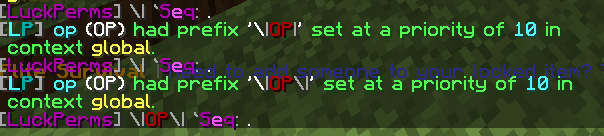

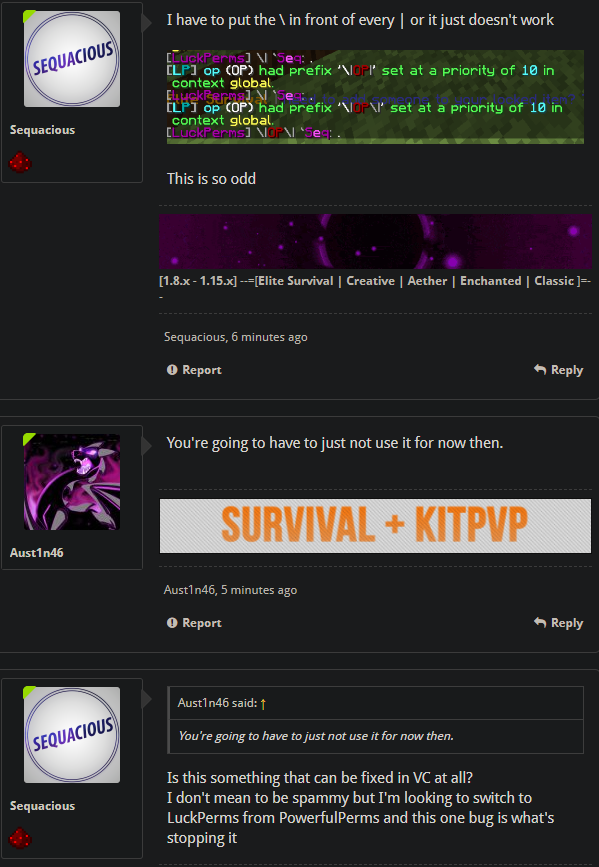 high raven
tis thiccc i know
lol whattt
his plugin no work and he do this?
you could try opening an issue on github... we know it's the combo of VC and LP, so maybe LP can be modified easily to fix it?
fiery hill
Omega, your thoughts?
tidal blade
Why would luckperms change to allow a prefix to display properly for VC. Luckperms is a permission plugin. It has nothing to do with how prefixes are displayed. It works with other chat plugins. So if the VC dev is too ignorant to fix it, then switch chat plugin.
high raven
good thoughts omega
fiery hill
Welp, looks like I'm stuck with PP for a while because I can't viably switch chat plugin right now.
Shite
tidal blade
Switching chat plugins is easy.
high raven
wdym? there are a lot of plugins that support DiscordSRV and the features you need.. why not?
fiery hill
I use VC for a lot more than just chat
tidal blade
There are other better plugins out there that could do a lot more.
next sky
I wonder why LP 5 loads slower than v4? o.O
fiery hill
Larry would you be able to report the | prefix bug in the VC discussion?
He's said it's something he might fix and if more people report it, it should kick his butt into gear
high raven
Absolutely @fiery hill
 sterile oxide
I am running lp on a network all connected with mysql. How can i give someone * perms on 1 server and not let them give themselves * perms on the rest of the servers?
I know how to give them perms for 1 server. But he can then give himself perms on another server by just doing /lp user "name" permission set * server={server}
Or do I just need to give all perms except lp?
high raven
!argumentbased @sterile oxide to prevent what you want to prevent
wintry cloudBOT
Fine tune exactly what users with permission to use LuckPerms can do.
LuckPerms wiki
sterile oxide
@high raven do i need to edit that in all of the configs or just the bungee one?
high raven
i'm pretty sure all of them but you can try just the bungee one first to see if it works (easy way)
neat shore
BrainStone or someone please help - my server crashed I see luckperms stuff at the bottom
high raven
pastebin the error log please
high raven
@neat shore your server crashed
lack of resources or just a bunch of lag, im not certain which
neat shore
so the error doesnt explicitly point out a plugin?
or like what type is causing the lag, perhaps entities?
@high raven
high raven
@neat shore I was reading it!
You need to send that pastebin link directly to paperspigot, open an issue and describe everything that happened here, and include that pastebin link: https://github.com/PaperMC/Paper/issues

GitHub
High performance Spigot fork that aims to fix gameplay and mechanics inconsistencies - PaperMC/Paper
@neat shore ^
high raven
- they are but you may need to run /lp networksync to force it to update
- yes, you can set up per-world or per-server, check out the wiki page on contexts below:
!context
wintry cloudBOT
You can set a permission or group on a per-world/per-server basis, through what we call "contexts".
LuckPerms wiki
high raven
@marble jacinth
 marble jacinth
Hi
high raven
i answered both above ^
marble jacinth
oops, missed that. Thanks will take a look! :o)
Ah, so instead of just adding a prefix and not assigning a context to make it global, I can add 2 prefixes but put a different server context for each...
high raven
yep
next sky
@lilac hazel loading time
marble jacinth
Sweet, thanks!
 bronze oyster
who needs help with permissions per world?
high raven
np!
lilac hazel
Loading time on startup?
high raven
@bronze oyster I already helped??
next sky
yep. I mean that relatively small amount is, a little bit, noticable for a minigames network where servers start and stop relatively frequently. (imagine things like BW 1v1)
Sure, it's not that big of a deal, but I still wonder what's up with the increased loading time 
(I might add that this is the difference on a relatively beefy hexa core root server)
next sky
yup. MySQL/MariaDB on the same server. While that could be the cause, I kinda doubt it. When nothing but the LuckPerms version changes, I doubt it's the DB. (Also the amount of roles, tracks and permissions/permission holder entries is pretty small)
lilac hazel
Well, if you consider LPv4 to be older than LPv5, usually newer plugins have more features
so it may take longer to load
next sky
I did consider that (I wrote the other plugins, ~30k lines). Again, not THAT big of a deal, I just wondered why the load time for stored permission data doubled.
lilac hazel
Oh is that what is taking forever
perhaps your database is not responding fast enough
next sky
Oh is that what is taking forever
No, only a small portion is active on the same bukkit server and at the same time. I included utils/framework, plugins for bungeecord in that calc.
Again, I'm not talking "forever", I'm talking "double the permission load time for luckperms"
([LuckPerms] Successfully enabled. (took 1515ms))
perhaps your database is not responding fast enough
Nope. Switched back and forth 3 times. The db is stored on RAID 10 SSD storage with sufficient CPU power and RAM (32 GB)
next sky
Bad wording on my side: I am using custom paper (more efficient redstone, slightly improved math utils..) (yes, I tried normal spigot/paper, it IS LP). With bukkit I meant "not bungee"
Since no one seems to be able to answer the question (thanks @usb_usb for the time and trying to track it down, though), I guess I'll just accept it ._.
lilac hazel
./lp info
next sky
?
lilac hazel
what's the ping to the database?
next sky
1 ms
lilac hazel
Ah ok
high raven
speeedy
lilac hazel
1993ms for me as well
next sky
WHAT!?
next sky
Is your DB on the moon? 😄
next sky
I was about to say... xD
lilac hazel
I guess it has to establish a connection to the database
etc
any encryption needs to be decrypted if there is any
next sky
and sure, that time is totally fine and similar to mine. I was only wondering because it was usually in the 900 ms range with latest LP 4 with literally nothing else changed (I switched betwee 4 and 5 multiple times in a row to be sure it#s not something else)
lilac hazel
what's your messaging service set to?
next sky
sql. i think. 1 sec..
lilac hazel
try setting it to none
see if it makes a diference
One less thing for LP to connect
next sky
that's what I'm referring to (and again: https://discordapp.com/channels/241667244927483904/690683905677983756/692476983166107810)
lilac hazel
Yeah it's the same for me
high raven
you need a permission for it?
feral pebble
when i do /lpb user lowriderollie permission set *
high raven
!verbose will tell you what permission is checked when you run the command
wintry cloudBOT
LuckPerms provides a verbose command to help you find out what permissions a command/plugin is checking.
LuckPerms wiki
lilac hazel
Google bungeecord permission nodes
That or look in the config file for bungeecord, they're listed in there.
barren fable
Also you need to use /lpb verbose if you want to check for permissions on Bungee
feral pebble
guys
i did /lp verbose
and not it looks like i have a hacker console
in chat
now*
high raven
it's telling you what perms are being checked haha
barren fable
If it shows the same permission(s) over and over again you can add a filter
high raven
very strange
feral pebble
seems so
high raven
if you restart the server and do it all again does the same issue happen?
feral pebble
ill try
barren fable
Also just rejoining should do something!
high raven
what resources are you running the server on?
feral pebble
spigot 10gb ram windows 10 server 2019 some xeon processor
raid of 3 harddisks
rejoining didnt fix
feral pebble
nope
static pendant
Wierd
barren fable
Does it also crash if you use it on console? There you should be able to know what nodes are spamming the most, and then add a filter based on these.
static pendant
Maybe Check your Minecraft logs
feral pebble
well my minecraft didnt fully crash
it was a kick
with a java error
but did stop responding for a bit
rip a server restart didnt fix the lag
but my friend gets no lag
barren fable
Sure it isn't your client then?
feral pebble
How do i check
static pendant
Minecraft logs
barren fable
Also what Java error?
static pendant
Can you send screen?
feral pebble
?
static pendant
Screenshot of the kick message
high raven
olli it sounds like your minecraft client is underpowered massively
static pendant
This sound a lot like client problem
feral pebble
ok
high raven
not the server, but your game
feral pebble
ill have alot
a look*
[21:52:40] [Render thread/INFO]: Stopping!
that uhh
it
in my latest
thats all there is
ok
fml client
i found the actual log
static pendant
😑
feral pebble
dont judge
static pendant
I won't
static pendant
IT keeps spamming for some update
feral pebble
well is it normal for it just to start happening when i turn verbose on
static pendant
I would recommend not using the badlion client in your server for some time. Or try to reinstall it. And make sure all gamefiles of the badlion client are deleted before reinstalling again
feral pebble
Okay
static pendant
Just for knowledge 😄
static pendant
NAH just have 7 years of experience with servers and a Lot of client problems whah
 hidden spear
okay I'm going to restate my question here as it got buried in the other channel.
I would like my moderators to have permission to add and remove players from the whitelist, but I don't want them to have access to the other commands such as turning the whitelist on/off. Is this possible?
I've tried googling the problem and reading the wiki but I haven't found a solution
high raven
!argumentbased @hidden spear
wintry cloudBOT
Fine tune exactly what users with permission to use LuckPerms can do.
LuckPerms wiki
hidden spear
I read that article, but couldn't work out how to apply that information to the /whitelist command?
tidal blade
!verbose @hidden spear Just give the players permissions to use the whitelist command. Either google them or use verbose
wintry cloudBOT
LuckPerms provides a verbose command to help you find out what permissions a command/plugin is checking.
LuckPerms wiki
hidden spear
so I can't be more specific than that without a plugin?
high raven
so I'm not too certain that LP argumentbased can be used in the context you need - yeah you'll probably need a plugin for advanced whitelist permissions
hidden spear
okay, I'll look into plugins and weigh up the necessity.
also thanks for the verbose feature somehow I missed that when going through the wiki...
high raven
hope it all works out!
hidden spear
thanks 😄
 sullen delta
groups don't inherit other groups
tidal blade
Then make them inherit other groups
sullen delta
oof
they inherit other perms but not permissions
oof sorry
but not essential perms
prisma hinge
how do i set a new default group?
tame hollow
!default
wintry cloudBOT
LuckPerms provides a group that every player is added to upon joining the server, called default. You can use multiple methods to change the default group or change the name of it.
LuckPerms wiki
prisma hinge
Hi, I found a bug!
No messages with "data" are sent, for example when I type "/lp editor groups" it only sends:
[LP] Preparing a new editor session, please wait... [LP] Click the link below to open the editor:
and then there's no link
same when i type "/lp group test permission info" it only sends:
[LP] test's Permissions: (page 1 of 1 - 3 entries)
prisma hinge
4.4.26 on paper 1.12.2
tidal blade
Try updating. https://luckperms.net

LuckPerms - An advanced permissions plugin for Bukkit/Spigot, BungeeCord, Sponge, Nukkit and Velocity
LuckPerms is an advanced permissions plugin for Bukkit/Spigot, BungeeCord, Sponge, Nukkit and Velocity
prisma hinge
Thanks!
static pendant
Ik ga stuk
tame hollow
wut
tidal blade
Huh?
static pendant
Inside joke for dutch people and it's not even funny
tame hollow
 proper pulsar
Anzeige ist raus
 livid scroll
Brain
format: '{GROUP} {DISPLAYNAME}: &7{MESSAGE}'
that is what i have as format in essentials config
but it just shows default in front of my name
and when i added myself to owner role it still says default
in front of my name?
static pendant
The weight of the owner prefix needs to be higher than the default
livid scroll
and how do i fix?
static pendant
./lp editor
static pendant
Gimme a sec
livid scroll
ok
static pendant
The 0 is the weight and it needs to be higher in your owner rank. So press on this bar in your editor and change the number (in my case 0) to like 800
livid scroll
ok
so i did that and i gave myself owner
but it still says "default"
ingame


 static pendant
Is the prefix on the group or on your user?
livid scroll
What do u mean with that?
static pendant
You can give the player a prefix but you can also give a group a prefix
static pendant
./lp user USERNAME meta addprefix 800 PREFIX
livid scroll
still says default
unique parcel
closer to the bottom of the config is a chat section
unique parcel
its the format area you ss above
static pendant
Yes
 static pendant
What?
livid scroll


 proper pulsar
gives help
There
Best I can do with that information
Ah wait
Have you tried turning it off and on again?
 west bay
they might've dropped the plugin in the folder too hard, plugins are fragile
 hybrid flame
wwut
uh
I need help with:
I had to fix something with my server and everything, and when im done i edited the lp groups and everything and after i tried testing it, it was working after 1 hour i returned to the server and tried to grant someone a rank it didnt work, what it did say You have added prefix and those stuff
west bay
what
we dont need the plot, just what did you try doing and what didnt happen
and some screenshots, screenshots are always nice
west bay
/grant isnt a luckperms command
your gonna have to go to the RankGrant+ discord or message that dev
this is for LuckPerms support 🤷♂️
hybrid flame
I know but like, isnt the prefix from luck perms...?
cause it clearly says in the website
west bay
it could just be how you setup essentials
but that isnt a luckperms command
and it isnt a luckperms addon either
west bay
install EssentialsXchat & go into the essentialsX config, find EssentialsChat and edit stuff there
proper pulsar
!faq @hybrid flame
wintry cloudBOT
Check out some of our frequently asked questions.
Read more:
LuckPerms wiki
hybrid flame
.
west bay
GitHub
An advanced permissions plugin for Bukkit/Spigot, BungeeCord, Sponge, Nukkit and Velocity. - lucko/LuckPerms
 serene arch
does enybody know how could a user have 2 preffixes? For example:
proper pulsar
!stacking
wintry cloudBOT
Display multiple prefixes/suffixes alongside a player's name.
LuckPerms wiki
serene arch
ow ty very much 😄
proper pulsar
You're welcome
 silent plaza
Hello how to add rank
west bay
/lp user {user} parent set {group} @silent plaza (replace {user} with the user you want to add a rank to and replace {group} with the name of the rank you want to add)
silent plaza
uh that hard
proper pulsar
No spoonfeeding please