#issues
1 messages · Page 12 of 1
 lilac dewBOT
 lilac dewBOT
Please try using LuckPerms 5.1.98 or newer, and set register-command-list-data to false in the LP config.yml.
You seem to be using the Bukkit-Legacy build, but this is not necessary, as you are running a modern version.
Try again using the normal bukkit jar download.
https://luckperms.net/download
Please try deleting the /plugins/LuckPerms/libs folder and restarting your server.
Yeah, this is something that you need to report to FAWE.
lilac dewBOT

If one sets a permission for a worldguard region to false, the permission will still be executed when using the forbidden command in the region. Lp verbose shows true even though the permission for the region is set to false.
How to reproduce:
- Create a worldguard region.
- lp group permission set false wg-region=test (I tested it with permissions from different plugins)
- Execute the command as player in the correct group while lp verbose on & !worldguard is running -> lp ve...
lilac dewBOT

I'm on 5.1.98 and can't find register-command-list-data in the config.yml?
lilac dewBOT
Just add
register-command-list-data: false
to the bottom of the file :)
lilac dewBOT
 lilac dewBOT

Description
Please add an option to set parent temp groups to run consecutively based on group tracks.
Assume a track includes GroupA > GroupB, GroupC
The user gets parent addtemp GroupC for 20 days
The user then gets parent addtemp GroupB for 10 days
Currently GroupB will never be noticed as it's timer will be expired before GroupC (has priority) has expired.
Proposed behaviour
Adding a consecutive option would effectively pause the GroupB from being effective until Grou...
lilac dewBOT
lilac dewBOT

Description:
An issue with towny and luckperms that was fixed in a version previously.
When a new player joins a town, they cannot run town commands until they reconnect to the server.
https://github.com/TownyAdvanced/Towny/issues/4264
Expected Behavior:
Player should be able to run /plot and /res commands once they join a town, without needing to reconnect to the server.

I don't see how this could be Luckperm's fault. Permission checks are handled on the other plugins end. If I had to guess, Towny is caching the permission results and only rechecking them after a relog.
Just to rule out LP, try turning on verbose with /lp verbose on <yourIGN> & towny, then trying the affected commands before a relog. If you could send a screenshot of that, that would be ideal.
lilac dewBOT

When running any LuckPerms command that outputs the name of a user its always lowercase now. This can be pretty annoying if we need the real version of their usernames for whatever reason like using it in another plugin or just to know what their actual username is.
Can we display the user's real names in commands again?
lilac dewBOT

Is this server offline mode? If not, it is irrelevant, because usernames in almost all (there are admittedly a couple of exceptions) situations can only have the one sequence of characters, uppercase or not?
lilac dewBOT
No, my server isn't in online mode and I wasn't even aware there could be multiple players with the same and different cased usernames (although that is another very important reason to implement this suggestion)
My only issue originally was just that it's annoying to go through that extra step of getting the getting the real username when I do need it, especially when I didn't used to have to.

This issue sounds completely unrelated to LuckPerms, you shouldn't need to rely on LP to get a user's proper username. LP is simply a permission plugin, not a username authentication plugin.
lilac dewBOT

Why does the capitalization matter in the first place? Usernames are not case sensitive.
lilac dewBOT

Does someone know when is this going to be merged?
lilac dewBOT

I've been finalizing the oernissions system. Though I am in school so you'll need to give me a bit of slack there.
lilac dewBOT

After creating a database MySQL in pterodactyl and putting the information in the configuration file, the plugin gives a timeout error
`[14:10:29 ERROR] [LuckPerms]: Failed to init storage implementation
[14:10:29 ERROR]: java.sql.SQLTransientConnectionException: luckperms-hikari - Connection is not available, request timed out after 5000ms.
[14:10:29 ERROR]: at me.lucko.luckperms.lib.hikari.pool.HikariPool.createTimeoutException(HikariPool.java:695)
[14:10:29 ERROR]: at me.lucko.luckper...
lilac dewBOT
Alright so I tested it on my alt and I did have issues with commands, but not as many as most players are reporting to me.
I am also getting reports of the same issues, but different systems on my server. All minor systems like a cosmetic effect got unlocked and they had to relog to get it. Those aren't connected to the towny plugin in any way.
BeardedBen issued server command: /t add AlpacaSpice
[com.palmergames.bukkit.towny.Towny] [Town Msg] StaffRoom: BeardedBen invited AlpacaSpi...
lilac dewBOT

Description
Luckperms fails to load on nukkit 1.0.
java.lang.RuntimeException: java.lang.NoSuchMethodError: 'int com.google.gson.JsonObject.size()'
at cn.nukkit.plugin.PluginManager.enablePlugin(PluginManager.java:440) [nukkit.jar:?]
at cn.nukkit.Server.enablePlugin(Server.java:746) [nukkit.jar:?]
at cn.nukkit.Server.enablePlugins(Server.java:735) [nukkit.jar:?]
at cn.nukkit.Server.(Server.java:496) [nukkit.jar:?]
at cn.nukkit.Nukkit.main(Nukkit.java:112) [nukkit.jar...@Turbotailz Yes, I don't rely on LP to get the user's proper username its just nice to have so I don't have to go through the extra step of getting it when I do need it.
And one of the most common examples of when it matters are if there are other plugins which use case sensitive usernames to retrieve player data easily for a command sender providing a username. Previously I could just search for like all players in a certain group, get their exact usernames from LP and feed it into anothe...
lilac dewBOT

Description
Ever since commit https://github.com/lucko/LuckPerms/commit/4d5a24f2c419cc93b8d238c181bcc47b54c1fd90, some people have been having the issue the title suggests (as shown here, here, here, [here](htt...
lilac dewBOT
Stick with this version for now :) https://ci.lucko.me/view/LuckPerms/job/LuckPerms/1152/
lilac dewBOT
Description
Please change the default value of use-vault-server to false ;-;
https://github.com/lucko/LuckPerms/blob/5e48224c78401f3ac25fa555ba63140f5a56e958/common/src/main/java/me/lucko/luckperms/common/config/ConfigKeys.java#L448-L451
Proposed behaviour
In the config file for the bukkit build, the pre-defined value is false and the context the plugin makes through Vault queries takes the server context from the server setting. If, for some reason, the setting isn'...
lilac dewBOT
LuckPerms always stored the usernames in lowercase.
lilac dewBOT

Hello,
I believe you guys should implement a temporary permission system for users. To further explain, I'll lay out an example of the issues I have, and why I want this.
During the duration of a map, I have upgrade systems that give my players permissions to do certain things, I will generally set this permission in the context of that specific server. This works fine, however, at the end of the map I want to clear these permissions. The problem here is that, there are some permissions...
Maybe think about using groups instead of users? That way you can add the groups to users and instead of clearing the group from the users, clear the permissions in the group.
lilac dewBOT

From the look of it, you get 'Connection refused'
I would make sure that there is no iptables or so in the way.
What you can try is this:
'mysql -h 127.0.0.1' on the command-line and see if you get the same results.
Because if you are using only mysql, it will connect by default using the socket, not tcp.
lilac dewBOT
I did that command, and the result was a Error 28000: Access denied for user 'root'@'localhost' (it's a password issue)
So I think that the database is working. It's MySQL, not any variant like MariaDB or mongoDB.
Any other TIPS?
lilac dewBOT
The issue with that, is when I have like 20 rankups, and I don't think making 20 groups makes a lot of sense you know what I mean. If I put them all into 1 group, then they'd have too many abilities.
lilac dewBOT

You probably need to use the Docker IP address @vaio2005 . I believe this is usually 172.18.0.1
Confirm with docker ps

lilac dewBOT
Well, This is not a Luckperms issue then I guess.
You need to figure out how the networking works if you are running docker.
Do you run MySQL in docker as well? Then take a look at docker networking and read up on that.
Addressing in docker using IP is a bad thing, because it might be random.
Dockers internal DNS is better for that.
lilac dewBOT
Sorry for close and reopen, using phone is kinda bad. MySQL is not in docker.it is in the host system.
I don't know precisely how ptero works, so I guess my mc servers are using docker.

Description
Add confimation for importing new data for not an empty database with a notification that old data will be deleted before importing new data.
We recently decided to switch from the h2 storage type to mongodb. To do this , we performed data export and then, when importing to the shared database, we realized that importing a backup, the old data is deleted. Thus, our servers have suffered a lot due to the lack of notification about the loss of old data.
Proposed behavio...

Well I do agree with the confirm command, and the suggestion is probably possible as it already done for bulk edit.
But if you have read what the command does before running... you won't have face this issue lol. See: https://github.com/lucko/LuckPerms/wiki/Command-Usage:-General#lp-import-filecode---upload---merge. It clearly says "the existing permissions setup will be overriden and replaced." and if you want to merge instead, use ...
I have a not very nice way to fix the error:
Try downloading the latest version of gson and putting it in the folder with mods (preferably) or plugins, or in the library folder.
https://search.maven.org/artifact/com.google.code.gson/gson/2.8.6/jar
Try :)
In part, I agree with you, but it would still be good to add a notification. Let's just say, just to be safe :)
In my opinion, the default behaviour should be --merge and users should have to use a flag to import to a fresh database.
A confirmation before wiping any data should be added, though.
lilac dewBOT

Pterodactyl is a constant issue for people because they don't understand how it works, so here is a sum up
- Pterodactyl uses docker form gameservers, that allows it to easily create and destroy gameservers without complicated setups
- If you want to use MySQL in Pterodactyl, you cannot use 127.0.0.1, because each gameserver has its own internal IP adress and is not directly connected to the system. You can either use
172.18.0.1( default IP when using Pterodactyl ) or ``172.17.0.1`...

same error, plugin wont load on 1.8.8 https://pastebin.com/f6a6xGZS
lilac dewBOT

Does not work at all right now:
[16:45:55 ERROR] [luckperms]: Failed to init storage implementation
[16:45:55 ERROR]: java.sql.SQLTransientConnectionException: luckperms-hikari - Connection is not available, request timed out after 5005ms.
[16:45:55 ERROR]: 	at me.lucko.luckperms.lib.hikari.pool.HikariPool.createTimeoutException(HikariPool.java:695)
[16:45:55 ERROR]: 	at me.lucko.luckperms.lib.hikari.pool.HikariPool.getConnection(HikariPool.java:197)
[16:45:55 ERROR]: at me.lucko.l...Right now I solved this using isolated classloader, but now I get another issue with less information this time.
[17:07:39 ERROR]: java.util.concurrent.CompletionException: java.sql.SQLTransientConnectionException: luckperms-hikari - Connection is not available, request timed out after 5000ms.
[17:07:39 ERROR]: 	at me.lucko.luckperms.common.storage.Storage.lambda$makeFuture$1(Storage.java:104)
[17:07:39 ERROR]: at java.base/java.util.concurrent.CompletableFuture$AsyncRun.run(Comple...Note: will squash before merging.
Not ready yet. Have to debug some messaging-related bugs.
lilac dewBOT

Description
I have a second server that has a symbolic link of the folder yaml-storage for just permissions, that was fixed in 5.1.93, the slight issue is the only way to get the permissions to update on this second server once they are changed on the main server, is to run /lp sync Could we please have FileWatcher watch symbolic links too.
Expected behavior
For FileWatcher to automatically pick up changes to symbolic link folders.
Environment details
- Ser...
lilac dewBOT

I've had the same issue and opened an issue on Towny, seems like this is a luckperms related issue. Works on relog of player everytime.
lilac dewBOT

Description
when you activate the fastlogin premiumUuid option, when trying to enter the server, luckperms sends an error message to the console and does not let me enter the server.
The message is this:
(LP) doesn't have data pre-loaded, they have never been processed during pre-login in this session. - denying login.
Permissions data for your user was not loaded during the pre-login stage - unable to continue. Please try again later. If you are a server admin, please check...
lilac dewBOT

Description
Have the ability to remove groups from a specific user with a specific meta tag.
So say a user has groups with the meta tag 'Visual' once running this it'll remove all the groups from the specific user with the meta tag 'visual'.
ALTERNATIVE
Allow specific bulkupdates to specified users.
Proposed behaviour
The feature would work by scanning the current groups the specified user has, and checks to see if any have the meta tag that's specified, after doing s...
I tried using luckperms with MySQL on 127.17.0.1 and 127.18.0.1, each of them gave a connection issue. The database bind address is * (with /usr/sbin/mysqld --help --verbose). Am I missing something?
(I set it to 0.0.0.0 just to test, and still is not working)
lilac dewBOT

Description
when I addtemp parent exceed 24 days. the display thou papi will wrong.

Reproduction steps
/lp user asdf80730 parent addtemp vip1 24d
/papi parse asdf80730 %luckperms_group_expiry_time_vip1%
/lp user asdf80730 parent addtemp vip1 1d
/papi parse asdf80730 %luckperms_group_expiry_time_vip1%
- Open the config.yml file and set example to true.
- R...
That's a PAPI bug that's been fixed in the latest dev builds :)
https://ci.extendedclip.com/job/PlaceholderAPI/
lilac dewBOT
Not 127, its 172. 172.18.0.1 not 127.18.0.1
lilac dewBOT

Description
CONSOLE executed command: /lpb editor
SEVERE ERROR
Reproduction steps
tried to execute editor from ingame and from console, same error
- Open the config.yml file and set example to true.
- Restart the server
- Run /lp user example permission set x from the console
- See error
Expected behaviour
gives link, nope!
Environment details
running byngeecord with 2x paperspigot and 1x spigot servers 1.16.2
- LuckPerms v...
lilac dewBOT
LuckPerms version: `latest dev experimental build'
That tells us nothing. Luckperms doesn't have dev or experimental builds. In the future, please tell us the actual version number (/ver luckperms or /lp info)
Either way, your enviroment is irrelevent. The error is your server not being able to contact https://bytebin.lucko.me, the backend service that powers the various luckperms web editors. Check your firewall etc.
lilac dewBOT
ok... i updated version.. told u i was on latest dev build... i didnt have it at the time... so how do i access firewall? i have installed bungeeguard the only thing besides ipforward i was gonna add whitelist only to the proxy also, but i dont have a firewall, im using apex hosting, i would use a firewall if i could cause its actualy the best way to setup a bungeecord server so no one can access the buckkit and paper/spigot servers....
regardless....
so its a contact/response issue......
At this point I'd suggest talking to Apex's support with regards to the editor issue.
lilac dewBOT
well i was able to work around and change the wildcard prefix .... now i have plugin issues with the specific plugin i was tryin to make work.... i will close this issue considering that its not a lucky perms issue now, but!!!! wildcards in names are a issue... id suggest being able to use " " quotes in namespace for weird players who decide to choose random names... (or plugins that autoset)
lilac dewBOT

Description
When setting permissions luckperms is not detecting permissions from plugins in each server.
Reproduction steps
none
Expected behaviour
permissions are updated in all bungeecord servers
Environment details
LuckPerms Bungeecord v5.1.98
- Server type/version:
ExampleSpigotrunning version1.12.2build??? - LuckPerms version:
v???
Any other relevant details
Do you have LuckPerms Bukkit in all your backend servers as well?
You need LP in all your backend servers too, read here for more info https://github.com/lucko/LuckPerms/wiki/Network-Installation
LuckPerms Bungee only takes care of Bungeecord permissions. If what you want to achieve is synchronize all your server's permissions, you need to follow this guide https://github.com/lucko/LuckPerms/wiki/Syncing-data-between-servers
Does the server allow cracked mc account to join?
lilac dewBOT
Does the server allow cracked mc account to join?
yes
lilac dewBOT

Description
If someone has a Permission, but then gets it again for a short time by being assigned to a group for a short time, and then the group is removed from him after that time, then he no longer has the permission.
Proposed behaviour
An option in the Config. If you set it to "true" and then someone has a permission and gets it again by being assigned to a group, then he still have it after the time has elapsed.
If the option is set to "false", everything is as...
lilac dewBOT

Description
On LuckPerms.jar (5.1.98) i keep getting [15:02:15 INFO]: [LuckPerms] Failed to load NMS for this server version: version v1_16_2 PLEASE CONTACT AUTHOR for some reason (PaperSpigot 1.16.2)
Proposed behaviour
This should probably be fixed and I suggest i hope it gets fixed eventually and if not I will just use spigot page one or wait for new update
My startup log with error:
https://pastebin.com/gxnPUWf9
lilac dewBOT
Can you reproduce this with only LuckPerms installed on your server, and a fresh download from https://luckperms.net ?
Also, the correct label for this would have been the issue one - this is not a suggestion for the plugin but rather a report of a bug.
lilac dewBOT
Seems to also affect 1.16.2? Got this today https://hastebin.com/mudunafaga.sql
lilac dewBOT
Oh, how do i change it from suggestion to bug? I was just told to post it here
Description
Empty DSRV contexts throw errors when calculating potential contexts for editor session
Reproduction steps
- Install LP and DSRV
- run
/lp editor - See error: https://paste.gg/p/anonymous/7d9ca3d66e2d474898b7f56ee284f73e
Expected behaviour
No empty contexts, or, if present, no error.
Environment details
Precise details unknown, sadly.
Any other relevant details
Reported by a user. Perhaps a decent fix is to hav...
This error is not originating from LuckPerms, and in fact seems to come from "SongodaCore".
SongodaCore is doing something silly with the server logger there, which I guess is why it appears as coming from LP.
This is an issue in the code I PRed to DiscordSRV, woops.
Seems like a fix has already been implemented - it just needs to be applied to the estimatePotentialContexts method too - https://github.com/DiscordSRV/DiscordSRV/commit/2a6c027f28821644d90baa7de77296dd67d9ea1e
Perhaps if you ask nicely they'll copy it over, if not I'll try get around to PRing the change soon.
I don’t understand what you mean.
Also be so kind and explain your use case.
This isn't a LP issue, perhaps try reporting it to the FastLogin author.
lilac dewBOT
lilac dewBOT

Description
We've a server running on Spigot 1.16.1. In the course of the 1.16.2 update we wanted to switch to paper, but LuckPerms seems not to work. In console, it still shows the correct permissions but they are not "synced" to the players. If I delete the LuckPerms folder and let it regenerate, I get the message that the user can't be found even I'm online. In the log line 1702 you can see the message. Also, there are no error shown in console.
Reproduction steps
Un...
lilac dewBOT
Okay, I've found out that RealScoreboard causes the issue which does smome mess if the version isn't supported.
lilac dewBOT
Oh, I'm only now finding out that you can't add someone to a group for a short time. This can only be done with Permissions. Then I just make an extra issue for it.
Description
You can give people temporary permissions, but you can't temporarily parent them into a group.
Proposed behaviour
If you temporarily parent people to a group, then the player has the permissions of the group temporarily.
The command would probably be: /lp user %player_name% parent settemp vip 30d
This is very useful when offering a subscription option.
You can do this easily - reading the wiki helps in situations where you're not sure of a feature.
lp user <name> parent addtemp <parent> [temporary modifier]
This is the temporary modifier value that you can add to the end of a permission so it accumulates on the time instead of replacing. I believe the table can be found here explaining what temporary modifiers do https://github.com/lucko/LuckPerms/wiki/Command-Usage:-Parent#lp-usergroup-usergroup-parent-addtemp-group-duration-temporary-modifier-context
lilac dewBOT

LuckPerms don't run in this version
I've heard rumors that current LP has issues on 1.12.2 and under on the latest version. Try this build for the time being, and check back later.
That was fixed in the absolute latest version @underscore11code - the newest one should work well
@GoT-HiM Download the latest version of Luckperms from https://luckperms.net/download.
What version LuckPerms do you have? "Latest" tells us nothing, that could mean anything.
lilac dewBOT

I think it would be a great idea to add Time Ranks to Luckperms, you know Default > Member is an Hour of game play.
I belive if you did that more people will download your plugin due to the fact everyone is looking for timed ranks.
Im not sure how hard it will be to add. but by adding a clock or timer for how long players have been on since the receive the Default Rank, cause as soon as they join the server they will be Default. I have no idea how to code. but i do know people and what...

There are plenty of plugins out there that can do this for you.
As mentioned on Discord, not only is this out of scope for this plugin it’s also not possible as LuckPerms doesn’t track online time of players.
lilac dewBOT
But did you noticed my other issue too? How can do this?
lilac dewBOT
You still haven't explained it any better, nor your use case.
Assigning a group to a player (temporary or not) never copies the permissions over.
If you want a permission to persist, just assign it to the player directly.
You still haven't explained anything. What you write doesn't make any sense whatsoever.
lilac dewBOT

Im having this issue as well. Paper 1.16.1, Luckperms MySQL, latest Towny release.
lilac dewBOT
If someone has a Permission, but then gets it again for a certain amount of time by being parented to a group for a certain amount of time, and then he is de-parented the group is from him after that time, then he no longer has the permission, because the plugin does not remember the permissions that the player had before he was parented to the group for this certain amount of time.
Yes it does.
Permissions assigned directly to players persist and don't get removed when a parent gets removed.
Ok thank you! So If I parent someone to a group temporarily and lets say he had the permission "luckperms.editor" and then he is parented to the group "admin" for 1 week and in this group he gets all the Luckperms permissions, but after the week he is de-parented from the group, he still has "luckperms.editor"?
Unfortunately, this is not how temporary permissions/groups work - they are based on an expiry time, not a duration.
Did you even test this before coming here to request that as a feature?
Same with temporary groups.
I mean there's documentation for a reason.
All usernames are converted to lowercase for certain datastores - it makes case insensitive lookups and queries much easier if all of the data is already in the same case.
Changing this isn't a high priority for me, sorry.
2adaea2dac6c390028e28f69e2cbdbf7ce49878f
Using groups is what I was going to suggest too - remember users can inherit from more than one at a time!
Unfortunately, I don't think this is something Java's file WatchService API supports this - not much I can do about that - sorry!
Sorry, I think this behaviour is too complex for inclusion directly within LuckPerms - it's quite niche!
Perhaps you could achieve what you're after using a different approach, or through use of the developer API in a separate plugin.
lilac dewBOT

1.16.2 latest releases still don't work
lilac dewBOT
Easy solution would be to just store both the lowercased name and actual cased name and use the lowercase one for lookups and regular one for displaying but I can understand if that's too much work if only one person is asking for it :(
lilac dewBOT
Easy solution
Absolutely not. Not even close
Easy solution would be to just store both the lowercased name and actual cased name and use the lowercase one for lookups and regular one for displaying but I can understand if that's too much work if only one person is asking for it :(
Isn't it easier having every username in the same case instead of having to look players up with weird combinations of both upper and lower case?
Usernames aren't generally case sensitive anyway so I don't understand what the issue is.
lilac dewBOT
Hmm weird, I dont know Java but did some research just to see if I could find a workaround, looks like Symbolic links are transparent unless you specifically look for them, but they have a specific exception if the file is renamed or moved, no mention about checking for if its been updated.
https://docs.oracle.com/en/java/javase/11/docs/api/java.base/java/nio/file/package-summary.html
Many operating systems and file systems support for symbolic links. A symbolic link is a special file...

Generally the path of least resistance would be to use one of the intended methods to sync your LP data such as MySQL, MongoDB, etc. These are designed for syncing data between multiple programs and you should use them as intended.
If you did want to jank-rig your own solution you would need something to run a console command on other servers, something like https://www.spigotmc.org/resources/commandsync.115/
You might actually be able to make use of LP's messaging services to do that b...
lilac dewBOT
Generally the path of least resistance would be to use one of the intended methods to sync your LP data such as MySQL, MongoDB, etc. These are designed for syncing data between multiple programs and you should use them as intended.
If you did want to jank-rig your own solution you would need something to run a console command on other servers, something like https://www.spigotmc.org/resources/commandsync.115/
You might actually be able to make use of LP's messaging services to...
lilac dewBOT
 lilac dewBOT
Easy solution
Absolutely not. Not even close
@BrainStone What about that is not easy besides a database schema change.
Easy solution would be to just store both the lowercased name and actual cased name and use the lowercase one for lookups and regular one for displaying but I can understand if that's too much work if only one person is asking for it :(
Isn't it easier having every username in the same case instead of having to look players up with weird combin...
What about that is not easy besides a database schema change.
The database scheme change. In all storage types.
Also you clearly stated to store both the normal cased username and the lowercased username, not to just store the normal cased name and perform case insensitve lookups.
What about that is not easy besides a database schema change.
The database scheme change. In all storage types.
Also you clearly stated to store both the normal cased username and the lowercased username, not to just store the normal cased name and perform case insensitve lookups.
Yes?
lilac dewBOT
You have to understand that LP as of now uses a unversioned database scheme. Reliably upgrading these is near impossible.
And your original solution suggested to add a second name column that keeps the capitalization. That's very impractical, It would make a lot more sense to just have the existing column not lowercase the strings and to compare case insensitive.
lilac dewBOT

We updated towny with a bugfix where perms weren't being assigned correctly. We're pushing it as a prerelease to see if that resolves the issue. Keep an eye out for the 0.96.2.17 towny prerelease jar.
lilac dewBOT
Yeah.... I commented your ticket.
Towny devs usually close stuff fast and say "not my problem".
Update, I'm seeing issues with plugins like jobs reborn and such, doing the same thing now.
lilac dewBOT
The messaging service does not trigger for changes detected from configuration files.
Regarding the other replies above: Using a remote database to sync data between servers is a totally valid suggestion - it is literally what it was designed for. The flatfile storage was not designed with this in mind. You're running into problems (and are going to keep running into problems) because what you are trying to do is not particularly sensible or supported.
I have implemented setups like t...
lilac dewBOT
The messaging service does not trigger for changes detected from configuration files.
Regarding the other replies above: Using a remote database to sync data between servers is a totally valid suggestion - it is literally what it was designed for. The flatfile storage was not designed with this in mind. You're running into problems (and are going to keep running into problems) because what you are trying to do is not particularly sensible or supported.
I have implement...
lilac dewBOT
There are a few things to point out when making a change to permissions regardless of setup/storage method.
- You can always run commands from console. Being the one that can edit server files, I'm very sure you have console access... so I don't see the "insane process" being valid
- You can also use commands for permission changes, such as
lp group <group> permission set <node>to do a quick addition of permission node (and many others stuff using the relevant commands). You don't have...
There are a few things to point out when making a change to permissions regardless of setup/storage method.
1. You can always run commands from console. Being the one that can edit server files, I'm very sure you have console access... so I don't see the "insane process" being valid

2. You can also use commands for permission changes, such as `lp group <group> permission set <node>` to do a quick addition of permission node (and many others stuff using the relevant com...
lilac dewBOT
Quick question: Do you have the base storage folder symlinked or everything inside it?
Quick question: Do you have the base storage folder symlinked or everything inside it?
No. Just the YAML folder, each server needs its own config.yml to tell each server what its called.
I thought of some more issues with MySQL/Commandline.
- You have to be online to make any changes, you cant just work on anything offline. I found this out today on my laptop when I was out and about and wanted to make some quick changes to permissions, Opened up made them ready for when Im...
lilac dewBOT
There is really no point is giving the downside of one method, just so you can use your own method, it just annoys people. And don't expect people to spend hours just to give/code you the solution lol...
lilac dewBOT

Description
I think you should add modification to the tablist
Proposed behavior
like the rank will show next to your name in tab, there would be a header, a footer, and like just a tablist with custom stuff
This is entirely out of scope for Luckperms, a plugin designed to handle permissions and permissions only. A plugin like TAB does what you need and is designed to do so.
been looking for a 1.16.2 plugin for luckperms
Almost any plugin will work with LuckPerms if they were developed properly
ok so im dumb and i typed TAB [1.5.x - 1.16.2] and the plguin did not show on
I hyperlinked the plugin in my first response. In case that was unobvious, here - https://www.spigotmc.org/resources/tab-1-5-x-1-16-2.57806/
lilac dewBOT

Description
I have not set any player perms or group perms, but by default all perms is on true on veinminer. No problem if i use ultra permissions (i have copy in same perms for hand) And i not set any perms for veinminer in any groups.
Reproduction steps
Yes i done several steps and get help on DC.
this is only part of perms player shall not have access too, players get access too all veinminer commands
https://luckperms.net/verbose/YruRTYJpWn
No player not op, h...
Looks like the player you're testing with has that permission from somewhere. Run lp user <name> checkinherits veinminer.toggle to see where it's coming from. If it returns undefined, run /lp editor and send the the link.

I don´t know if good idea to post it with all user uuid.
User uuids aren't private and can be found by simply googling their names. Send the link
User uuids aren't private and can be found by simply googling their names. Send the link
lilac dewBOT

Description
Every time I open the editor there are more and more no name users added, right now its at 323 when we only have 3 players playing
Reproduction steps
Not sure, it seems to get worse over time, maybe on restart
- Open the config.yml file and set example to true.
- Restart the server
- Run /lp user example permission set x from the console
- See error
Expected behaviour
Only show users who exist
Environment details
- Server type...
What setting in the config are you talking about?
When i look on it, it give player /veinminer mode, /veinminer toggle /veinminer version but not /veinminer reload.
And all of veinminer perms, i think players get this some how, ultra permissions can block this for player use some how. I think you need add something to LP, some block all perms from get use if I not add it.
veinminer.veinmine.*
veinminer.toggle
veinminer.mode
lilac dewBOT
Nothing in the config, I think its adding non existent users to the database.
I see them in the editor, we only have 3 players but over 300 users in LP
Look at the screenshot here http://gamerguys.net:85/lp1.png
lilac dewBOT
Looks like a miss configuration. You have perms set to true directly for the user, which will be prioritised over perms inherited from group. And this spins also why you are experiencing perm being true even if it's not set in any group. The issue you face not due to a incompatible or a bug.

Your luckperms version is important as it may have been an old bug that was fixed. Send screenshot of /lp info
Your luckperms version is important as it may have been an old bug that was fixed. Send screenshot of /lp info
Your luckperms version is important as it may have been an old bug that was fixed. Send screenshot of /lp info
Your luckperms version is important as it may have been an old bug that was fixed. Send screenshot of /lp info
Your luckperms version is important as it may have been an old bug that was fixed. Send screenshot of /lp info
Your luckperms version is important as it may have been an old bug that was fixed. Send screenshot of /lp info
Your luckperms version is important as it may have been an old bug that was fixed. Send screenshot of /lp info
Your luckperms version is important as it may have been an old bug that was fixed. Send screenshot of /lp info
Your luckperms version is important as it may have been an old bug that was fixed. Send screenshot of /lp info
Your luckperms version is important as it may have been an old bug that was fixed. Send screenshot of /lp info
Your luckperms version is important as it may have been an old bug that was fixed. Send screenshot of /lp info
Looks like a miss configuration. You have perms set to true directly for the user, which will be prioritised over perms inherited from group. And this spins also why you are experiencing perm being true even if it's not set in any group. The issue you face not due to a incompatible or a bug.
Yes i know, it way i use a other player some not have admin group and on...
Cant run minecraft right now, but here it is ran from console
12.09 07:05:11 [Server] pool-5-thread-1/INFO [LP] Running LuckPerms v5.1.82 by Luck.
12.09 07:05:11 [Server] pool-5-thread-1/INFO [LP] - Platform: Sponge
12.09 07:05:11 [Server] pool-5-thread-1/INFO [LP] - Server Brand: SpongeForge
12.09 07:05:11 [Server] pool-5-thread-1/INFO [LP] - Server Version:
12.09 07:05:11 [Server] pool-5-thread-1/INFO [LP] SpongeAPI: 7.3.0-299f484b6 - SpongeForge: 1.12.2-2838-7.3.1-RC4077
12.0...
I upgraded it and will see if hat helps, is there any way to remove all of the extra users?
I know SQL if there is a way to connect to the db, I cant find a config file with the users in it
lilac dewBOT
Seems to be so in any case with these two plugins, so perms are handled quite differently and it is not easy to know what is a bug or user error.
But may put perms on false in the group and see if the person who makes the plugin can change a bit (because on the server it is not so good to give everyone access to all tools directly).
I simply have to watch out for this in the future in the plugin I add.
Yes i give glizh_ perms, but it was for testing it on an account that does not have ...
lilac dewBOT
If you are using SQL database as perm storage, then perms won't be in a config file, but rather sqltables in your SQL database, so you need to login to your SQL database to see it. User's sqltable name should be named luckperms_user iirc.
If you are using the latest version of luckperms from https://luckperms.net/download, you will also be able to delete users using the new web editor feature.

The changelog for .17 states
- Fix permissions not being give to members who've just joined a town.
But I believe the permission issue persisted for Town rank changes too. So changing permissions while the player is online, not just when they join the town. I will be testing this in a few minutes though, just wanted to let you know if it was missed.
lilac dewBOT

Greetings,
Today as usual when I was editing permissions everything was working fine and suddenly I got an error.
"Unable to communicate with the editor. Check the console for the error".
Here is the console log.
Seems that cloudflare is having issues, https://www.cloudflarestatus.com/
I get it work now, but cloudflare can still have issues.
Aah, seems like there is nothing I could do right now.
Thanks!
lilac dewBOT

lang.yml doesn't working in some way, I tried diffrent servers, computers, versions and translations...
Some of values not changing in mine. He is worked out (even we use same version)
https://discordapp.com/channels/241667244927483904/241667244927483904/754420625279549520
and I also told someone else to try this and he worked out too, he just restarted the server. Last time i tried it on a server and it didn't work, just like my computer
Example, German translation not working too,...
lilac dewBOT

I tried to configure to appear more than one prefix in the chat following this tutorial: https://github.com/lucko/LuckPerms/wiki/Prefix-&-Suffix-Stacking
So I did following this code:
prefix: format: - "highest_on_track_prison" - "highest_on_track_donor" - "highest_on_track_staff" duplicates: first-only start-spacer: "" middle-spacer: " " end-spacer: ""
So my configuration file looks like this:
`prefix {
format = [
"highest_on_track...
lilac dewBOT
Confirmed working during Discord conversation, issue lies with the chat plugin.
lilac dewBOT

spigot 1.16.2
luckperms don't work with this error
Error occurred while enabling LuckPerms v5.1.93 (Is it up to date?)
java.lang.NoClassDefFoundError: me/lucko/lu
ckperms/lib/okhttp3/OkHttpClient$Builder
at me.lucko.luckperms.common.plugin.AbstractLuckPermsPlugin.enable(AbstractLuckPermsPlugin.java:123) ~[?:?]
at me.lucko.luckperms.bukkit.LPBukkitBootstrap.onEnable(LPBukkitBootstrap.java:162) ~[?:?]
at org.bukkit.plugin.java.JavaPlugin.setEnabled(JavaPlugin.java:263) ~[server.jar:git-S...
Try delete the libs in *LuckPerms folder.
(please at least get the plugin name correct lol)
lilac dewBOT
Try delete the
libsin *LuckPerms folder.
(please at least get the plugin name correct lol)
thanks! it fixed
lilac dewBOT
 lilac dewBOT

Description
So i recently installed a 2nd server, and a bungee proxy onto a dedicated server that i rent, and now when i do /lp then hit space, i get kicked with DecoderException : java.lang.IndexOutOfBoundsException: readerIndex(0) + length(1) exceeds writerIndex(0): UnpooledSlicedByteBuf(ridx: 0, widx: 0, cap: 0/0, unwrapped: PooledUnsafeDirectByteBuf(ridx: 2, widx: 2, cap: 2048)) @ io.netty.handler.codec.MessageToMessageDecoder:98.
Im sure its something that i have se...
Firstly, what is Yatopia?
Also are you running the luckperms command on your backend server or on bungeecord?
Try using Paper and not Yatopia - keep everything else the same regarding LP.
Also, send a full log including when you try and run the command and the full error following it - leave no lines out.
Thanks! 😄
lilac dewBOT
- Yatopia is a fork of Tuinity, which itsself is a fork of Paper --> https://github.com/YatopiaMC/Yatopia
- With the latest build of paper i get kicked the same as when i was on Yatopia
- There is no log, cause i never get the command out, it happens while im typing the command. Like as soon as i hit space after typing
/lpit kicks me. - The only thing that i see is from the bungeecords console which reads this -->
<img width="1271" alt="fadsafdsfdasfdsa" src="https://user-images.g...
- For bungee proxy are you using some fork or just stock bungeecord?
- Can you try with only luckperms plugins installed on both paper and bungeecord server?
- Stock bungeecord
- Yeah, gimme a min to set it up.
lilac dewBOT
oof, ok so with stock bungee(and waterfall...) and a fresh paper(and yatopia too..) it does not happen.
So its deffo a plugin (or mabey a config i have) thats causing it.
Anyone got any ideas as to which plugin might be causing it, other than removing half of em, then trying, rinse and repeat till i find the problem child.
lilac dewBOT
Hard to say without a list of plugins bit a binary search is likely the best way to find out.
lilac dewBOT
I'm assuming that updating Towny has fixed the issue?
As far as I know this issue has been fixed in Towny itself.
https://github.com/lucko/LuckPerms/issues/1330#issuecomment-689791023
Seems to be misconfiguration then, not a bug :)
So in the prefix/suffix stacking section you can select several different formats that will end up building the combined prefix. I think it would be very useful that if you specify the same format twice that instead of adding the same prefix/suffix twice the second adds the next best.
So if you specify this:
meta-formatting:
  prefix:
    format:
      - "highest"
      - "highest"
You get the two highest prefixes, not the highest twice.
This should of course wor...
lilac dewBOT
Apologies for the delay. No complaints from players, so yes.
lilac dewBOT
Seems to be misconfiguration then, not a bug :)
Depends a lot on what you are used to how prems also work.
In any case, it seems to be quite different between these two plugins (one allows some defualt perms others do not even allow these).
So not only "misconfiguration", the error is how different these two plugins I compare work with perms.
lilac dewBOT
I like it! As usual it should probably be locked behind some default-true config option (next-highest-match?) in case somebody out there needs their duplicates really badly and wants to revert it, but tbh it's a pretty neat addition request.
Thinking about this, it would also be nice to have a way to just show the second highest. Perhaps there is a way to toggle an option to be hidden in the final display, but factored into the calculation. For example, prefixing it with a !:
``...
lilac dewBOT
I was thinking about allowing any index with a syntax like that:
meta-formatting:
  prefix:
    format:
      - "highest[3]"
      - "highest[1]"
Now I'm not sure if this should be 0 or 1 indexed but I think you get the gist. That also covers your edge case.
And if there's no index specified it gets determined automatically.
lilac dewBOT


I put the luckperms 5.1.107 and this is the new error.
Please check for errors during startup.
lilac dewBOT

I really don't know what to do anymore. I've tried pretty much everything I can think off. The problem is that changes are not applied on my server. I was able to give a few players the wildcard (/lp user USER permission set * true). This works without any problems.
However: I can't take away these permissions. I originally wanted to try if Universe Guard 2 was working correctly, so I wanted to disable the wildcard for one of the players. Ok, that sounds easy. /lp user USER permission set * ...
lilac dewBOT

If you want to remove a permission, simple do /lp user [user] permission unset [permission]
Setting a permission to false will not remove it, just disallow said user access.
lilac dewBOT
If you want to remove a permission, simply do /lp user [user] permission unset [permission]
Setting a permission to false will not remove it, just disallow said user access.
Doesn't work. I unset permission for *, but the player can still use all the commands.
lilac dewBOT
Run lp editor in console and send the link it generates here please
Also, please update your version of luckperms from http://luckperms.net
lilac dewBOT
 lilac dewBOT

Description
Hello,
Currently LuckPerms supports adding legacy color codes to things like group displaynames, e.g. &4Admin. These color codes are parsed everywhere LuckPerms shows the group's displayname, such as lp group admin info, lp listgroups, and confirmation messages when setting group permissions.
Bukkit uses the following to define hex colors: &x&r&r&g&g&b&b. Assuming this syntax, an admin group with a colored displayname of &x&f&f&0&0&0&0Admin displays as `&xAd...
There's currently #2419 for that. By the looks of it, while Luck is aware and does want to implement it, it seems like it's most definitely not a high priority feature; after all, LP doesn't handle chat ¯\_(ツ)_/¯
lilac dewBOT
Confirmed for Paper 1.13.3 build 198 + LuckPerms 5.1.107 + ExtraContext 2.0-SNAPSHOT.
lilac dewBOT
That's because the WorldGuard region contexts keys are worldguard:region (to check in which region a user is in) and worldguard:in-region (to check if a user is in any region), which is info you can get by doing /lp user <user> info.
https://github.com/LuckPerms/ExtraContexts/blob/master/src/main/java/me/lucko/extracontexts/calculators/WorldGuardRegionCalculator.java#L17-L18
lilac dewBOT
I am irritated? The mentioned keys do not work when assigning permissions, they are neither completed ingame nor in the web editor and do not exist in the Wiki (https://github.com/LuckPerms/ExtraContexts). There is only the context wg-region. Furthermore lp <user> info does not throw out any extra context information: https://imgur.com/a/L28HXNT? I currently have the following loaded ExtraContext version on the server and can't find any other download/version: _https://ci.lucko.me/job/Ext...
lilac dewBOT

Description
Whenever I try to add a part to a user, or promote him on a rankstrack it gives him the correct rank but includes a duplicate with another servers context.
Reproduction steps
- /lp user promote on one of the servers
- User will randomly get the same rank, with another servers' context on it
Expected behaviour
User should get promoted on the track without getting any duplicates
Environment details
- Server type/version: `Paper-199...
lilac dewBOT
Did you enable the WorldGuard region contexts in the LuckPerms ExtraContexts config?
https://github.com/LuckPerms/ExtraContexts/blob/5a2ac809aaecc37a0b89f6f3cae16461d5d86981/src/main/resources/config.yml#L14
lilac dewBOT
Yeah I did, my config looks like this:
# ExtraContexts
# made with <3 by Luck


# Set a provider to true to enable it.
# Contexts are explained in more detail here:
# https://github.com/lucko/LuckPerms/wiki/Context


# Provides the 'wg-region' context.
# Returns the name of each WorldGuard region the player is currently in.
#
# e.g. wg-region=spawn
worldguard: true

# Provides the 'gamemode' context.
# Returns the players current gamemode.
#
# e.g. gamemode=creative
g...
So I have recently changed my server from paper to bungee, reinstalled most of the plugins that I needed to install. Followed an youtube tutorial step by step on how to install it for bungee. Doesn't work. When I apply changes the changes apply but they dont work in game. For instance I can make an prefix, but it doesnt show ingame while I correctly made it.
lilac dewBOT
Firstly, bungeecord is a proxy server, which links multiple spigot/paper servers together. So you can’t replace your paper server with it. Then, not all plugin needs to be installed in bungeecord, some only need to be installed on the respective spigot/paper server. As for luckperms, you need normal luckperms on all normal server and luckperms-bungee on bungeecord proxy. https://www.luckperms.net/downloads
To add on, you need to sync all of luckperms to a common sql database. https://github.com/lucko/LuckPerms/wiki/Syncing-data-between-servers
lilac dewBOT

Description
A way to create a rank specific permissions that are not passed through inheritance.
Proposed behaviour
That will permit to create plugins that allow a rank to have access to something specific to that rank without passing it forward to other ranks.
perhaps a checkmark that when checked, set a permission to be specific to a rank. By default that option is disabled.
This can already be done by simply setting the permission node to false in the group which inherits said permissions.
lilac dewBOT

Hi,
Yestarday this bug make crash some player to my server....
[18:36:35] [luckperms-scheduler-worker-46/WARN]: [me.lucko.luckperms.lib.hikari.pool.PoolBase] luckperms-hikari - Failed to validate connection me.lucko.luckperms.lib.mariadb.MariaDbConnection@23a8780b ((conn=1298871) Connection.setNetworkTimeout cannot be called on a closed connection). Possibly consider using a shorter maxLifetime value.
[18:36:35] [luckperms-scheduler-worker-46/WARN]: java.sql.SQLTransientConnectionExcep...
lilac dewBOT
Please follow the issue format
I don't know what to say more this error occured without doing anything on my server so I don't know what to say more
lilac dewBOT

`- luckperms-hikari - Failed to validate connection
- cannot be called on a closed connection). Possibly consider using a shorter maxLifetime value.
- Connection is not available, request timed out after 5003ms.`
Fix your database,
lilac dewBOT

Edit: Due to fabric's console output not supporting colors, I will probably write a PR to allow implementations to designate their capability of printing colored console output
https://www.curseforge.com/minecraft/mc-mods/fabric-console

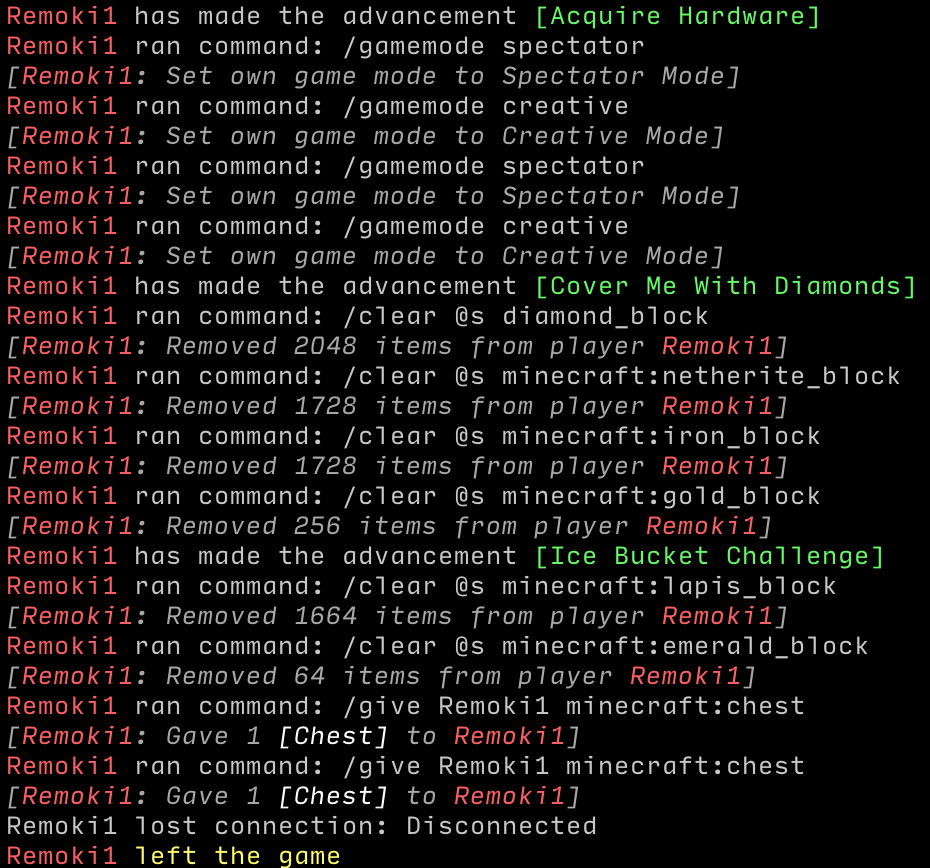
With this mod, the console...
lilac dewBOT

Hi there im having a big issue when i type /lp editor!
when i type /lp editor it comes up with this [Unable to upload permission data to the editor.]

lilac dewBOT


I have a group with a prefix with color codes and it is on the web editor, I save it, it says that the prefix is there, but when I assign myself the group and do /lp user info it doesn't show the prefix.
- Make a group with a prefix
- Save it
- Assign it to the player
- /lp user info
For the "Prefix" category to have the assigned prefix
Environment details
- Server type/version:
ExampleSpigotrunning version1.12.2build??? - LuckPerms version:
v???
...
Have you tried updating Luckperms?
Settings the player's prefix through commands won't work (It doesn't assign the prefix to the player's meta)
Updating LuckPerms did nothing.
Fixed by reinstalling Vault
lilac dewBOT
No errors whatsoever. Like you see in chat I'm just getting the log on both backend servers that a user got promoted, or that his rank changed in context GLOBAL.
Just realise, in your config messaging-service: none, it should be set to sql for all of LP
Exactly the same result when all servers are set to "auto" or to "sql"
Also why is auto-push-updates: false? It should be true else perms may not update properly
One of the things I was testing to see if that was causing it. Also exactly the same result with auto-push-updates: true
oh well, hard to conclude anything without anyone else facing the same issue, or a proper reproducible step. 2 things you should try is reproduce with only Luckperms plugin installed, and with a complete fresh database and server setup.
lilac dewBOT

Would it be possible to implement new placeholders for the player's group's suffix and prefix?
For example, I am changing player name colours by appending colour codes to the end of player prefixes but I don't want this to affect my tablist which is using %luckperms_prefix%.
I suggest a new %luckperms_group_prefix% prefix to solve this issue.
Thanks.
-VendoAU
I understand. I've already tried that.
Another interesting detail:
This ONLY happens with both backend1 and backend2 server online. If one of the two goes offline it does not happen and everything works as expected.
lilac dewBOT
You might be interested in the prefix/suffix element placeholders which can use any of the elements from this page.
lilac dewBOT
You might be interested in the prefix/suffix element placeholders which can use any of the elements from this page.
Thanks, I was able to get my desired result by creating a track containing all groups called "groups" and then using %luckperms_prefix_element_highest_on_track_groups%
lilac dewBOT
Hi there when i type /lp editor nothing comes up in the console

Server version and luckperms version
If you're able to, see if the server is able to connect to https://bytebin.lucko.me (What stores the data for the editor)
Hi there ive just updated it because it was a older version and its now coming up with this error. and its a spigot server
!
edhgdfghfdghfdh
 lilac dewBOT
@Moose1301 This is not a spigot version issue.
Your server not being able to contact our servers for the editor
Ok is there anyway of fixing that?
Contact your host, there is nothing we can do to get your server to be able to connect.
Im the host of the server im hosting it from my house! but im not sure how to do that
lilac dewBOT
lilac dewBOT
Open up command prompt, run ping https://bytebin.lucko.me and send a screenshot of the output.
Go into your browser, go to https://bytebin.lucko.me and send a screenshot of the page that comes up.
lilac dewBOT

 lilac dewBOT
are you behind a school or work firewall?
lilac dewBOT
This is either a problem on your computer or network. You might have an antivirus program installed which is blocking the connection (disable it and see if it works), or the issue could be higher up in the network chain. Not a lot we can do about that, you're going to have to investigate.
lilac dewBOT
Description
Sometimes when stopping the server I get these warnings.
Reproduction steps
I don't know man, sometimes it happens sometimes it doesn't, though when it happens, it does so when stopping the server, it doesn't randomly happen at other times.
Expected behaviour
Well I would expect it to close the connection and not make any queries after lol
Environment details
- Server ...
lilac dewBOT
Pfffttt aren't you supposed to help these sorts of people?
(jk)
lilac dewBOT

I have tried again and again after creating a permissions setup with different groups and such to enter in the command that the editor give you to sync the permissions with your server, But not only can I not manage to do that I can't even attempt to add myself or another player to a permission group. There is so much going though my console and I'm not sure how to fix any of this!!! Please help!
Here is what I See in console:
https://pastebin.com/S3R5xJfR
lilac dewBOT
Your pastebin link does not go anywhere
lilac dewBOT
When you use the editor, did you:
- Press the + button after typing in the permission?
- Press the save button on the top right and run the apply edits command (best in console)
- Create a new editor session after every apply edits?
It will be very useful if you send your editor link as well.
lilac dewBOT
When you use the editor, did you:
- Press the + button after typing in the permission?
- Press the save button on the top right and run the apply edits command (best in console)
- Create a new editor session after every apply edits?
It will be very useful if you send your editor link as well.
Yea I did. Everything with the editor was fine. It was when I have to input the command that the editor gives you after saving when the problem starts.
lilac dewBOT
Hi there ive tryed everything like turning the firewall of the server running my minecraft server and ive tryed turning of the firewall on my main pc but nothings worked and ive even turned the firewall of on my router and ive chcked all the setting on my router but nothing made a diffrence
lilac dewBOT

Description
Due to a problem caused by EssentialsX in this issue, the sheer amount of essentials.hat.preventtype. permissions that appear in the permissions selector in the web editor have reached the web editor's limit, so all permissions in alphabetical order past essentials.hat.preventtype.(...) have been omitted.
This issue has been open on EssentialsX's tracker since July 30 and somehow hasn't gained more traction, even t...
lilac dewBOT

Description
A way to view each permissions built in description.
Proposed behaviour
My thought would be when you hover your mouse over the permission name, it gives you a description of what the permission does. This text is typically already built into each plugin, so you would just need to be able to pull this information within the web editor.
Another way, would be to add a new text box to the right of the permission. There's plenty of empty room to fit this in. You coul...
lilac dewBOT
It's been 2 months now. Can I do anything to help fixing this issue ?
lilac dewBOT
Actually, looks like the latest version (5.1.107) solves the issue.
I can only hope that you know what you've done to fix this issue which won't happen next time ;)
lilac dewBOT
If this is a web editor suggestion, it would probably be best to add it to lucko/LuckPermsWeb
lilac dewBOT
lilac dewBOT

Description
I'm running into an issue with staff members who inherit a permission from multiple groups, they aren't able to inherit a positive permission from the higher weighted group.
I believe this is caused by a circular inheritance bug.
Essentials grants the permissions essentials.back.into. for loaded worlds to all players by default, set by the plugin.
https://github.com/EssentialsX/Essentials/commit/b29f98c525c49647828b96c4986ee55dd28b92b4#diff-d515c857ac85b710ac67...
lilac dewBOT

Description
In the web editor and then go to users. I see UUID's and names, the UUID's have other permissions then the names (https://imgur.com/a/u0WUxZ7)
Error in the console
[19:11:32 WARN]: [LuckPerms] LuckPerms already has data for player 'WifiVibes' - but this data is stored under a different UUID.
[19:11:32 WARN]: [LuckPerms] 'WifiVibes' has previously used the unique ids [2c22d302-a5fa-38ae-b58d-dd6fb37fea2f] but is now connecting with 'baec620d-572a-4c0...
lilac dewBOT
It is fixed by changing bungeecord=true in the spigot.yml in the backend server.
Thank for the help all.
lilac dewBOT
Thanks! ill copy and paste this there. Isn't there a github feature to loop in another repository?
lilac dewBOT

So when i do /lp group owner meta setprefix 999 "&4Owner " it puts two of them

like that does anyone know how to fix this?
Please provide a screenshot running /lp user <yourself inheriting owner group> info.

if i did it wrong let me know i think i did
i was confused sorry if i did it multiple times
?? That's literally not what I asked for. Run /lp user <yourself> info and share a screenshot.
well im sorry ima run that command "/lp user <yourself inheriting owner group> info" that what you said sounded like what i just did sorry

command is /lp user <yourself> info you need to include the playername. Also the latest screenshot isn’t loading for me
yea it wasn't for me either i resent it
Okay... now run and share a screenshot of /lp user <yourself> meta info.

looks like, you haven’t even ate prefix, or delete it midway. screenshot /lp group owner meta info
oh i removed the group off of me for now

Well, it appears properly in there, so it's probably an issue with your chat formatting plugin. You might want to give this section a read: https://github.com/lucko/LuckPerms/wiki/FAQ#why-are-prefixessuffixes-not-working specifically the item that reads "If you are using Essentials..."
yes i am using essentials
i have it set as false as well so it would not be a problem right?

Remove the # at the beginning.
ah ok that worked ty very much for the fast response as well
you can re open it if you would like
lilac dewBOT

Description
It would be very useful to be able to filter the list from permission/parent/etc info command. Would especially be very useful for filtering the context server=
Proposed behaviour
Default behavior (no filter)
Lets say executing the command /lp group foobar permission info shows
[LP] foobar's Permissions: (page 1 of x - x entries)
> example1 (server="server1") (world="world")
> example6 (server="server2") (world="world")
> example2 (server="serve...
This still doesn't work for me. I'm fully updated too
lilac dewBOT

I think I found the issue. Different plugin, so closing this.
Hey, I'm having this issue as well. Which plugin was it for you?
lilac dewBOT
Have you tried the 5.1.107 version ?
Also, we might have changed some default config values such as :
primary-group-calculation: all-parents-by-weight

inheritance-traversal-algorithm: depth-first-pre-order

context-satisfy-mode: at-least-one-value-per-key

include-global: true
include-global-world: true
apply-global-groups: true
apply-global-world-groups: true

meta-value-selection-default: highest-number

Description
LuckPerms throws errors when players change dimensions, but only after server reloads. This behavior was not present in LuckPerms 5.1.93.
Reproduction steps
- Start the server.
- Observe no errors or warnings.
- Reload the server with
/reload confirm. - Observe the errors and warnings below.
Expected behaviour
Should use player login/disconnect/change world events without throwing errors.
Environment details
- Server type/vers...
You shouldn't ever use /reload as it can cause issues like this.
Never use reload. It's a despised feature that most plugins are NOT designed to cope with. https://matthewmiller.dev/blog/problem-with-reload/
/reload should never be used on a server you care about.
lilac dewBOT
Here's a hint. Why do you need to type /reload confirm? Because just /reload says specifically that this command should never be used, and things will break. When you run full /reload confirm, it repeats that before starting the reload. That's not for no reason. Ignoring warnings like this is how you get your server corrupted or damaged.
lilac dewBOT
I'm making a plugin of my own and it's cumbersome to stop/restart the server every time I make a change. That's why I use reload. I never noticed any issues with LuckPerms before updating to the latest version, which is why I opened this issue.
If you're making your own plugin AND you know it's reload-safe (save files, clear lists/maps, unregister event listeners, etc.), at worst you should use something like PlugMan or ServerUtils (this one I use when testing, recommended :p) to reload that specific plugin only (still not advised).
Alright, I guess I'll close the issue then.
lilac dewBOT
An idea for a slightly more elegant solution; currently the /lp editor command dumps all the needed info (current perm setup & known perms) into a single Bytebin. I wonder if it could be better if, after a preset size of perm nodes, it splits that section off into a second bytebin, where it doesn't have group/user perms also using space. This would cause the editor to become a bit slower to load on both ends (due to 2 requests needing to be made instead of one), but then all perms would b...
GriefPrevention is causing all that error spam. Ensure you're up to date on both LP and GP, otherwise go talk to GP support.
lilac dewBOT
To counter this error I make this :
maximum-lifetime: 300000 # 5 minutes

connection-timeout: 10000 # 10 seconds
Since I did this there has been no more crash.
Do you think it's because of what I did?
lilac dewBOT
A reminder that permissions can be set via the editor even if autocomplete doesn't have it. Simply type it in.
Thank you - a few days after opening this issue, I had realised this, although I forgot to mention that here.
I wonder if it could be better if, after a preset size of perm nodes, it splits that section off into a second bytebin, where it doesn't have group/user perms also using space. This would cause the editor to become a bit slower to load on both ends (due to 2 req...
These settings kind of broke my ranks and doesn't work still. I've reverted back to how they were. I guess I'm gonna have to wait till they fully fix it without having to change settings.
lilac dewBOT
Pretty sure alll but the first are default values there.
Guys. Please don't randomly change these values if you don't understand them. The defaults are perfectly fine.
lilac dewBOT
Sorry if I was unclear. Background info for those unaware, the backend for the web editor, Bytebin, is just a basic pastebin. Obviously it has a size cap per paste, which is where the problem arises from.
Basically I'm proposing there be 2 pastes sent. The first one will be the known permissions, probably separated by commas, newlines, or maybe a JSON list of strings. The URL of that will be saved, and attached with the second paste, which contains all the other data as normal. When the ed...
lilac dewBOT
GriefPrevention is causing all that error spam. Ensure you're up to date on both LP and GP, otherwise go talk to GP support.
What is LP and GP?
lilac dewBOT

I am creating a new hcf server, and the problem is when I put luckperms for version 1.7.10 and this lazarus is active I cannot chat, I leave this photo for you to review.

Sorry if my English is bad but I'm Argentine, :D.
- Are you using LuckPerms-Legacy version?
- Does this Lazarus plugin use luckperms API?
- Please follow the issue template.
lilac dewBOT
- Are you using LuckPerms-Legacy version?
- Does this Lazarus plugin use luckperms API?
- Please follow the issue template.
1- yeah im using luckperms legacy
2- Idk if lazarus use luckperms api
3- I don't understand what you're trying to tell me with that xD
 lilac dewBOT

Just an update that I have not forgotten about this! We have code for the rewrite: https://github.com/Tim203/Floodgate and I'll get back to this once that has entered a testing phase.
lilac dewBOT
 lilac dewBOT
Via the api. I did not found any_hing in the docs
Blu#0002, if i remember correct. But i am disabled and have no access for the next 1-2 days
My apologies, I thought you were saying you were banned from our Discord.
lilac dewBOT
No Problem.
@Laarryy you may know how to receive the duration over the api? i have seen a Node Object with expire fields. but there is no NodeType for PermissionGroup. Just for Permission, chat and some other things
lilac dewBOT
but there is no NodeType for PermissionGroup
NodeType.INHERITANCEis what you're looking after.
lilac dewBOT
Oh, thx. I thought it is just for the inheritances, not for the permissiongroup itself. I will try that!
lilac dewBOT

 lilac dewBOT
I suggest you
lpUser.getNodes(NodeType.INHERITANCE)
      .stream()
      .filter(Node::hasExpiry)
      .filter(node -> !node.hasExpired())
      .collect(Collectors.toList());
It will return a List<InheritanceNode> with the user's parent group nodes that have an expiry and have not expired yet. Why a list? Well you can have multiple or no parent groups with an expiry time.
lilac dewBOT
lilac dewBOT

When in-game prefix won't stack!
Config.
prefix: format: - "highest_on_track_person" - "highest_on_track_staff" - "highest_on_track_normal" duplicates: first-only start-spacer: "★ " middle-spacer: " | " end-spacer: " "
Please follow the issue template.
I suggest you follow the issue template. Include things like screenshot of lp user USER info and as well the web editor link will be good. Also explain how is not working? Errors or not showing in tabs, or not showing in chat.. etc....
lilac dewBOT

Luckperms Version: 5.1.93
Minecraft version 1.16.3
Hello I don't know what happened but I was just playing in the server and it automatically signs me out and it says like this please refer in the picture
IMG: https://imgur.com/a/q89rgcD
Pastebin: https://pastebin.com/ZM0vXpYJ
The error just means luckperms cant connect to your database. either the db or lp config is wrong. If it was working before, maybe your database is just facing some down time. you can see: https://github.com/lucko/LuckPerms/wiki/Storage-system-errors
lilac dewBOT

so i created some groups in my server and it just doubles the rank

You most likely have an issue with your chat plugin (possibly due to having multiple of them). Screenshot lp user USER info just to ensure lp is working as expected

yep LuckPerms is working, look into your chat plugin config.
then you can ask in their discord https://discord.gg/casfFyh or create an issue at https://github.com/EssentialsX/Essentials/issues
lilac dewBOT

Description
Reproduction steps
- Open the config.yml file and set example to true.
- Restart the server
- Run /lp user example permission set x from the console
- See error
Expected behaviour
Environment details
- Server type/version:
ExampleSpigotrunning version1.12.2build??? - LuckPerms version:
v???
Any other relevant details
Hello, can i ask?
after i install the luckperms into plugins folder and restarting my server it works but i have something issues, my server wont opened and always force close.
but if i delete the luckperms it worked hopefully, i dont know why but anyone can help me? it will helpfull
sorry for my english
this is the cmd
https://pastebin.com/ZhsaTw0c
Thank you now works, sorry if i disturb
lilac dewBOT

Luckperms Version: 5.1.107
Minecraft version 1.15,2
I am trying to run luck perms, I left the bungecoord on for about 10 minutes and I come back to this error message: https://pastebin.com/M7E3NatD
I have it connected to a database, the database is online.
lilac dewBOT
Those errors indicate a communications error with the database.
lilac dewBOT

Description
The same operation require more time each time you repeat it
register a permission on plugin startup with bukkit (pluginmanager) api
Reproduction steps
register a permission on plugin startup with bukkit (pluginmanager) api
long now = System.currentTimeMillis();
Bukkit.getPluginManager().removePermission(perm.getName());
Bukkit.getPluginManager().addPermission(perm);
Bukkit.getPluginManager().recalculatePermissionDefaults(perm);
logIssu...
lilac dewBOT
do not do /reload or plugman reload. https://matthewmiller.dev/blog/problem-with-reload/
lilac dewBOT

Description
Server got crash sometimes
Reproduction steps
I didn't know when it happens,it does always happan randomly
Expected behaviour
Should not crash the whole server
Environment details
System Info: Java 1.8 (Java HotSpot(TM) 64-Bit Server VM 25.261-b12) Host: Windows Server 2019 10.0 (amd64)
- Server type/version:
Paperrunning version1.15.2buildgit-Paper-387 - LuckPerms version:
LuckPerms version 5.1.107
[crash.log](https:...
Please use a paste service to send your logs and config. https://bytebin.lucko.me/
lilac dewBOT

[lucko/LuckPerms] Issue opened: #2657 placeholder of %luckperms\_group\_expiry\_time\_% is not rihgt
Description
When I use %luckperms_group_expiry_time_%,the time not show right
I set my player in group vip 30days but it show 59h
Reproduction steps
- Open the config.yml file and set example to true.
- Restart the server
- Run /lp user example permission set x from the console
- See error
Expected behaviour
Environment details
- Server type/version:
ExampleSpigotrunning version1.12.2build??? - LuckPerms version:
v???
...
- Follow the issue template.
- Update PAPI to a dev build.
does it show correctly in /lp user USER info? if so, then report the bug to placeholderAPI, if I am not wrong, they have fixed this bug in the latest PAPI build.
lilac dewBOT
Why dont you try removing the extra "" from the placeholder before the %?
%luckperms_group_expiry_time****%
lilac dewBOT
do not do
/reloador plugman reload. https://matthewmiller.dev/blog/problem-with-reload/
using reload is not a requirement to replicate this bug:
i added
long start = System.currentTimeMillis();
for (int i = 1;i<300;i++) {
Permission perm = new Permission("test."+i);
Bukkit.getPluginManager().removePermission(perm.getName());
Bukkit.getPluginManager().addPermission(perm);
Bukkit.getPluginManager().recalculatePermissionDefaults(perm);
}
...
lilac dewBOT
I ran a test myself to see how much of a role LuckPerms really plays in here. Here I list the method and variables taken into account:
- The test is run by running a command as a player, so a player has to be online and thus permissions have to take effect on a
Permissibleobject. - I ran six tests in total, with every possible combination of the following two-state variables:
- Using LuckPerms or Bukkit's default permission system (basically: Is LuckPerms installed?)
- Reporting th...
lilac dewBOT

I did a fresh install of LuckPerms on Ubuntu 20 with Bungeecord, Spigot, and MySQL 8. The only DB tables that were created were "messages" and "user_permissions". I looked into the MySQL.sql DB Schema for LuckPerms and found that the "tracks" table uses "groups" as a column name and "groups" is a reserved word in MySQL 8 and therefore cannot be used in this way. I am not sure what else this may affect, but it seems that MySQL 8 is not compatible with the current version of LuckPerms.
lilac dewBOT
I did some more tests
- each test runs 20 times in a timed task
- each test print the final result at the end of each time it runs
the interesting value is not which code require more time as absolute value but how this changes between time#1 and time#20 of the same code
- my first 2 tests aimed to understand which part of my previus test required growing time so i splitted them to check permission creation time and permission registering time, surprisingly them were both wi...
Did you run this test with Bukkit's default permission system (LuckPerms not installed at all)?
lilac dewBOT
It was on LuckPerms, i tested now with default and it gave similar results
i also added another timer for removePermission operation it also give almost 0 ms time required on each test
ex: (newpwermission: 1) (addpermission: 672) (removepermission: 2)
so i tried to decompile and i noticed that Permission constructor also calls for recalculatePermission, which do nothing if the permission was never added to the PluginManager, so the first time you create a Permission require...
lilac dewBOT

Fresh install of luckperms on my bungeecord network server in question which has the errors is spigot 1.8, all connected to a mysql database. getting errors in console.
`[19:03:46] [pool-9-thread-1/WARN]: java.lang.RuntimeException: Error uploading data to bytebin
[19:03:46] [pool-9-thread-1/WARN]: at me.lucko.luckperms.common.web.WebEditor.post(WebEditor.java:151)
[19:03:46] [pool-9-thread-1/WARN]: at me.lucko.luckperms.common.commands.misc.EditorCommand.execute(EditorCommand.java:175...
Please send the output of /lp info and paste on https://gist.github.com/ your logs/latest.log (and send the url)
You might also want to try updating LuckPerms first, updates do wonders https://luckperms.net/download
Additionally, the latest version of LP-Bukkit works only on 1.8.8 and above. Please update your server to 1.8.8 for security purposes, or use Luckperms-Legacy if you insist on an unsecure version of minecraft with exploits and no gameplay difference.
lilac dewBOT

I would suggest that you add a Rank Tree so people can recognize whats the higher rank and what rank has the most permissions.
Yes, it's "weight" but in a tree-like view
This will help new users to understand parenting and the theory behind ranks!
Hope you add it
Geo
lilac dewBOT

Description of issue: I try to add someone to a newly created rank, it says "There was an error saving X's Userdata." and outputs the error in the log.
Reproduction Steps: Make a new rank with Luckperms MySQL and try to add a default member to it.
Console Log: https://bytebin.lucko.me/COh899pVag
lilac dewBOT
Hiya, apologies, turns out the issue was that the certificate for the website wasnt being accepted, all i needed to do was update java and change my dns to googles public dns and it was solved.
lilac dewBOT
I would suggest that you add a Rank Tree so people can recognize whats the higher rank and what rank has the most permissions.
Yes, it's "weight" but in a tree-like view
This will help new users to understand parenting and the theory behind ranks!
Hope you add it
Geo
lilac dewBOT
Description
When a holder has temporary meta nodes (of any kind, chat or non-chat meta nodes), /lp user|group meta info doesn't show they are temporary.
Reproduction steps
- Set some temp prefix/suffix/meta on a user/group.
- Run
/lp user|group meta info. - Observe, no durations are shown.
Expected behaviour
I would expect the command to print the expiry time.
Environment details
- Server type/version:
Paperrunning version1.16.3...
lilac dewBOT

It gives theses errors when I'm loading on Bungee (Waterfall).
Any solutions ?
I have the same errors on my Paper server (1.16.3)
lilac dewBOT
the error is Caused by: me.lucko.luckperms.lib.mysql.jdbc.exceptions.jdbc4.MySQLNonTransientConnectionException: Public Key Retrieval is not allowed
See https://github.com/lucko/LuckPerms/wiki/Storage-system-errors#mysql-public-key-retrieval-is-not-allowed for a fix
lilac dewBOT
Got these errors now:
https://pastebin.com/bZGy1vtr
lilac dewBOT

Description
Migration for PowerRanks.
Proposed behaviour
Migration for PowerRanks.
lilac dewBOT
I think this is the sort of thing that plugins should document - I don't think duplicating it elsewhere is a good idea.
Try setting the post traversal inheritance sort option to true in the LP config.
Install the legacy API extension.
Thanks for the report, but I'm not sure that's actually the cause. I've used LP with MySQL 8 with no problems before.
Try deleting all LP tables and restarting the server to see if they generate correctly.
Did you previously create a LuckPerms database using an old version of the plugin?
If so, you may need to reset the tables and restart to regenerate them.
I tried that and had the same behavior. I also tried reinstalling
completely. I switched to MariaDB and did not have any issues at all.
On Mon, Oct 12, 2020, 3:26 PM Luck notifications@github.com wrote:
Thanks for the report, but I'm not sure that's actually the cause. I've
used LP with MySQL 8 with no problems before.Try deleting all LP tables and restarting the server to see if they
generate correctly.—
You are receiving this because you authored the thread.
Reply to...
I only noticed it when I went to manually build the tables.
On Mon, Oct 12, 2020, 3:35 PM Thomas Laird tommakazi777@gmail.com wrote:
I tried that and had the same behavior. I also tried reinstalling
completely. I switched to MariaDB and did not have any issues at all.On Mon, Oct 12, 2020, 3:26 PM Luck notifications@github.com wrote:
Thanks for the report, but I'm not sure that's actually the cause. I've
used LP with MySQL 8 with no problems before.Try deleting al...
Nearly all plugins already document this and many permission plugins (like ultra permissions) pull this data already from those plugins. There's nothing on luckperms side that is needed to store this information. Just like right now, luckperms doesn't store every single permission from all plugins on the web. And they also don't store the permissions themselves in any database locally or on a online database. Luckperms just reads the permissions provided by the plugin. All that's needed is th...
lilac dewBOT

I have luckperms installed on a sponge server for 1.12.2 and just installed nucleus to give more commands that I can use for myself and others like /tpa, /spawn, /home etc. After installing nucleus, the permissions for pixelmon disappeared from luckperms completely. Is there a way to re-display them?
In what context do you mean they have disappeared? Re-display them where, how?
Need more info.
So, for example, when you open the editor and use the search bar at the bottom, it gives you a full list of permissions right? Before, the permissions for pixelmon and the other mods I have installed were "pixelmon.command.[]" or "wondertrade.command.[]" but now all that is there are nucleus commands.
Right, so that list isn't actually a "full list of permissions", it's merely a list of suggestions based on what LuckPerms knows. There are certain reasons why permissions will be shown there:
- The permissions have been defined correctly within the plugin/mod (I actually have no idea about mods so can't say whether there is some sort of interface for defining permissions which is readable from a plugin like LP)
- The permissions have been checked since the server was last restarted - LP ...
The issue also persists in-game as well. If I were to use tab to auto-complete, pixelmon and other mods don't show up as an option to set permissions for.
Did you read what Turbotailz sent?
Yea, I'm doing what he suggested to do with the /help command but it doesn't seem to be working. I'll restart the server and my own client and see if that fixes the issue
The /help command seems to have worked. Thanks!
lilac dewBOT

Description
When using the web editor, contexts get cleared whenever you add changes to the list.
Before sending
After sending

This can get annoying when adding perms for a network server.
Proposed behaviour
My idea to fix this is a lock butt...
lilac dewBOT
Hey, thanks for the PR. Unfortunately this is going to need a bit of rebasing now that the translation branch has been merged.
lilac dewBOT
I don't like rebases lol I'm always unsure if I messed up . _. lmk if I did
lilac dewBOT

Description
After the commit which changes LuckPerms from using Text to Adventure, command output doesn't seem to work on Velocity.
Reproduction steps
- Start proxy.
- Run ANY LuckPerms command.
Expected behaviour
I expect to run a command and see what the output is.
Environment details
- Server type/version:
Velocityrunning version1.1.0build264 - LuckPerms version:
v5.2.2
Any other relevant details
Nothing out of the ordinary with logs or ...
lilac dewBOT
Description
When running lp info and using a remote database as storage method, it prints an unformatted color code before the ping indicator.
Reproduction steps
- Make LP make use of a remote storage method and restart the server.
- Run
lp info. - Observe, on the ping indicator line, it prints
Ping: &a{duration}ms.
Expected behaviour
A nicely formatted and color coded output :)
Environment details
- Server type/version:
Paperrunnin...
lilac dewBOT

I installed luckperms on my bungeecord network server in question which has the errors, is spigot 1.12.2, getting errors in console:
[19:03:46] [pool-9-thread-1/WARN]: java.lang.RuntimeException: Error uploading data to bytebin
[19:03:46] [pool-9-thread-1/WARN]: at me.lucko.luckperms.common.web.WebEditor.post(WebEditor.java:151)
[19:03:46] [pool-9-thread-1/WARN]: at me.lucko.luckperms.common.commands.misc.EditorCommand.execute(EditorCommand.java:175)
[19:03:46] [pool-9-thread-1/WARN]: ...
lilac dewBOT
Can you check that the computer running the Minecraft server can access https://bytebin.lucko.me/ ?
Also it will be great if you follow the issue template.
lilac dewBOT
It says me this: bytebin bytebin.lucko.me
[about bytebin] [upload]
[10:43:10] [main/INFO]: Environment: authHost='https://authserver ... bytebin.lucko.me › ...
... illegal reflective access operation has occurred, Illegal reflective access by me. lucko.luckperms.common.dependencies.classloader.ReflectionClassLoader'.
lucko/bytebin: stupidly simple "pastebin" service - GitHub github.com › lucko › bytebin
I host a public instance at https://bytebin.lucko.me; you can use it ...
lilac dewBOT
Thanks - but I'm happy with how it looks at the moment :)
There are still a number of codestyle issues which have not been resolved.
In future, please try to review the "files changed" tab to make sure your changes are correct, and nothing extra has creeped it's way in.
I had a go at rebasing your PR and fixing up the issues myself. After having a closer look and think about what's going on here, I'm concerned that we're implementing a "kind of" security measure, which I am not sure can necessarily be trusted. It's possible for mods to run ...
Closing for now - please see my comment on #2633
lilac dewBOT

Description
java.lang.ExceptionInInitializerError: null when luckperms inititalizes on velocity 1.0.10
Reproduction steps
- Download the latest stable velocity
- Download any luckperms version from 5.2.1 and above
- The errors shows in the console
Expected behaviour
It should not show this error
Environment details
- Server type/version: Velocity 1.0.10 - stable
- LuckPerms version: occurs on 5.2.1 - 5.2.8
Server log: https://gist....
lilac dewBOT
Thanks for reporting this :)
Is this addressing a particular bug? It shouldn't be necessary to check for cancellations - other plugins should have no reason to cancel our messages - and if they do, then they should probably be cancelled via the LuckPerms events.
This is just moving the logging around? I don't see why it's necessary..?
lilac dewBOT

Hi, plugins like ExploitFixer limit the amount of PluginMessages because players can spam them with stuff like books/custompayload to cause the server to crash, and it is a good practice to always check that events are cancelled, it makes other developers life a pain when developers doesn't ignore on cancellation.
Cancellation is super important and has to be done before anything else is done, join event is important to be properly cancelled too as machines can be used to spam connections....
lilac dewBOT
Messages sent from players are ignored:
They're only accepted in the other "direction" - from the backend server. It would therefore not be possible for a malicious user to exploit/packet spam this system.
It is good practice to consider whether events are cancelled and how to react when that is the case. It ...
lilac dewBOT

Description
Player will disconnected from server for the first time they join after the server is start or restart
Reproduction steps
- Start / Restart NukkitX Server
- Player join the server -> Player Disconnected
- There is error log in console: Caused by: java.lang.NullPointerException: locale
- But if player join the server again, it will not get the error
Expected behaviour
Player can join the server normally
Environment details
- Ser...
Thanks for reporting, should be fixed by the above commit.
lilac dewBOT
The wiki page Ben linked is my exhaustive advice on this subject I'm afraid - sorry.
lilac dewBOT
Hi, thanks for the detailed report.
re: your observations that PluginManager#addPermission takes longer when using LuckPerms
This is normal and to be expected. LuckPerms changes the way Permission registration works, and stores the information in a slightly different way. The reason for doing this is to make permission checks and calls to Permissible#recalculatePermissions much faster.
I believe the trade off is worth it. Registration of permissions is something that (should...
lilac dewBOT
Sometime, I got disconnected from server with below error log, the step is the same with above issue
[LuckPerms] Exception thrown when setting up permissions for 00000000-0000-0000-0009-01f2342be9c7 - TuritLX - denying login.
java.lang.IllegalStateException: LPPermissible already injected into player Player(name='TuritLX', location=Location (level=hub, x=242.57899475097656, y=60.0, z=1331.6788330078125, yaw=10.1416015625, pitch=-1.594879150390625))
at me.lucko.luckperms.nu...
lilac dewBOT
Hmm, this may be more a Nukkit bug - it seems the player login event is being called more than once.

I believe luck perms on bungee enables servers to suffer crashes from bot attacks. I THINK that the plugin loads data for a player (or issues code for a player) before their connection is successful and they have actually joined. Right now I believe it issues code for a player if they have an attempted connection despite that connection not turning into a join. This means large scale bot attacks could crash the bungee.
lilac dewBOT
I dont think its in the scope of LuckPerms to prevent bot attacks. Also do provide with more detailed info then "I think" or "I believe". Can you actually justify your claim?
You misunderstood. You cant make a plugin version for bungee if you dont intend to have it so you it works through bot attacks. The point I was making was not to prevent bot attacks, its simply to issue code after a successful join so a bot attack doesnt crash
lilac dewBOT
LuckPerms loads data on the LoginEvent - this is only called after a connection has been authenticated, assuming the server is in online mode. Most botted users will not get past the auth state.
If they do, then you'll need an extra plugin to try to detect these accounts and cancel their login before it is handled by LuckPerms.
lilac dewBOT
[18:23:35] [pool-3-thread-14/WARN] [luckperms]: An exception was thrown by me.ryanhamshire.griefprevention.claim.ClaimContextCalculator whilst calculating the context of subject luckperms.api7.SubjectProxy(ref=luckperms.SubjectReference(collection=user, subject=e36216f3-5b7c-3f3b-9804-f3b29d5b2a89))
[18:23:35] [pool-3-thread-14/INFO] [STDERR]: [me.lucko.luckperms.common.context.ContextManager:calculate:128]: java.lang.NullPointerException
[18:23:35] [pool-3-thread-14/INFO] [STDERR]: [me.l...
lilac dewBOT

Hi.
I can't seem to change my "agent" to "president" behind my name in chat, not even the switchprimary group command works.
Anyone who can help?


Most likely cause is incorrectly configured weight.
lilac dewBOT
Description
With the introduction of Pirate English, now there are two different English dialects; when LP tries to register it, it goes no no (stack trace at the bottom).
Reproduction steps
- Run
/lp translations install - Observe, it throws.
It also happens on plugin load after installing the other dialect.
Expected behaviour
Not this

...
lilac dewBOT
Oh thank you so much! It worked, I didn't know it was even a thing, until you sent me that link.
lilac dewBOT
Not an issue, just a question. Is there currently a way to add a one-time command? Not temporary permissions, but where a person gets access to a command to use it just once.
Not really possible, permissions aren't bound to commands only, but plugins can check for a certain permission anytime, when moving around, doing certain actions, running other commands, even when showing up command suggestions while typing them in chat!
While this at first seems like (and would be) a great idea at first, it isn't really possible due to the nature of "permissions are not always for commands, they can be checked at all times".

Hey, today I started updating my 1.14.4 server to 1.16.3, after downloaded the latest versions of all my old plugins, I started by setting up LuckPerms. I ran the usual command, /lp user playername permission add *, but received absolutely no output from console. Strange. I try running /lp editor and still with no output. I don't know what on earth is happening as it has been a while since I last worked on plugins, please help!
Reproduction steps
- Download LP
- ...
Thanks for the response. Should I understand, then, that the only way to implement this on a server would be to integrate this functionality into the plugin that manages the command?
[lucko/LuckPerms] New comment on issue #2684: LuckPerms plugin unresponsive but still appears in /pl
Hmm I'll test ASAIC, but mind putting your server logs (located in logs/latest.log) in gist and share the link? Not necessarily the entire log but at the very least all the start up.
Correct, it would be up to the plugin author to implement such feature, as they are the only ones that can fully control when the action is completed successfully.
[lucko/LuckPerms] New comment on issue #2684: LuckPerms plugin unresponsive but still appears in /pl
Luckperms cant download the dependencies it needs. You have something blocking it like a firewall or anti-virus software. Or if you are using a server host it may be their network config issue.
[lucko/LuckPerms] New comment on issue #2684: LuckPerms plugin unresponsive but still appears in /pl
Luckperms cant download the dependencies it needs. You have something blocking it like a firewall or anti-virus software. Or if you are using a server host it may be their network config issue.
Thanks for the tip, I'll open a ticket to my host.
lilac dewBOT

Description
This would come in 2 parts:
- Introduce a new wave of placeholders that function off of other specified users. This is kind of like the "parseother" PAPI expansion, except this would be done via internal luckperms placeholders and only for luckperms related things. For instance:
%luckperms_{otherusername}_meta_key%. This would return the meta_key for the specified player. Another example that would benefit us greatly:%luckperms_{otherusername}_in_group_{group}%. We are ...
lilac dewBOT

LuckPerms: 5.2.15
Minecraft: 1.16.3
Paper: 245
Placeholders in question:
%luckperms_first_group_on_tracks_%
%luckperms_last_group_on_tracks_%
Problem:
when i use these placeholders to display the group that the player has on the premium ranks track, it simply either displays the first or last group that is on the track, regardless of which group the player has or if they're even on the track.
Example:
if the player is in the default group with no other groups, %luckperms_last_g...
lilac dewBOT
If I'm reading this correctly, the placeholder is displaying exactly what it's meant to and what you're describing is what the placeholder says it does.
lilac dewBOT

these logs appeared mainly when the AEGIS platform was entered;
lilac dewBOT
If I'm reading this correctly, the placeholder is displaying exactly what it's meant to and what you're describing is what the placeholder says it does.
%luckperms_first_groupon_tracks%
%luckperms_last_groupon_tracks%
if what you're saying is correct then the wording is misleading.
https://i.postimg.cc/MTKHjTTG/1.jpg
%luckperms_first_group_on_tracks_<tracks>%
Description: Returns the name of the first group a player has on the given tracks. Track...
lilac dewBOT
i would like to get confirmation whether those placeholders are supposed to display the first/last group on tracks in the database, or if they're supposed to display the first/last group on tracks that the player in question has.
can someone please confirm so that i can continue my work?
if it's the former then i will simply resort to using placeholders for prefix elements.
lilac dewBOT

Description
I have a bunch of plugins with their permissions, but LuckPerms doesn't seeing its permissions list in tree before i will not execute its command.
Examples:
https://luckperms.net/treeview/0B18M470sc
https://luckperms.net/treeview/ZkSmDJmOEm
Reproduction steps
- Install all the needed plugins
- Start the server
- Run /lp tree and use the link provided by LP
- Run some not seeing in tree plugin commands
- Run /lp[ tree again and use provided link.
...
lilac dewBOT
that is not the function of /lp tree, lp tree can only: Generates a tree view of permissions registered to the server. The tree is built using data exposed to the server by plugins, and expanded over time as plugins check for permissions. If the plugin has not registered the permission node or Lp has not checked on the given node, it impossible for lp tree to show it. /lp tree is only really useful when your server is active for a while and most relevant perms are checked, even so, ...
lilac dewBOT
Any progress on this?
lilac dewBOT
When it gets merged or updated with new commits, it'll be progress. Just need to wait patiently.
I am finalizing a first draft for the permissions backend for fabric api. There are also other things this is pending on such as the new networking api and entity events module.
lilac dewBOT

Description
LuckPerms isn't working, when I join and execute any luckperm command I dont recieve an output. Not even a command not found which is telling me that luckperms is doing at least something.
Reproduction steps
- Install the plugin
- Restart the server
- Join the server
- Enter a command
Expected behaviour
I expected luckperms to give me an output from the command.
Environment details
Server Version: Spigot 1.8.8
LuckPerms Versi...
lilac dewBOT
Description
Proposed command would take the bytebin data and apply the opposite of whatever changes were made (additions become removals and removals become additions).
Proposed behaviour
Will allow the effective undoing of misdone applyedits commands, and will make screwing up with the editor less final.
 lilac dewBOT
After further investigation this is a bit more complex then I thought, so no PR from me. However, @Fefo6644 suggested in the discord to potentially merge this with #2501.
lilac dewBOT
Make sure you are using the latest version of ViaVersion. :)
 lilac dewBOT

I have this same issue. Using Hero Chat, but other gradients work in chat.
lilac dewBOT

inside my player files i have the setting
primary-group: admin
But the player does not get the permission of admin
This only happen if i add admin to the parents...
parents:
- admin
- player
i thought parents are the thing other called inheritance:....
this is since the migration of the permissionsex database
LuckPerms_5.1.93
I'm not sure quite what you're saying. If you're trying to say setting the primary group to something doesn't take affect unless you add the group to parents, yes, that is how it should be.
By default you shouldn't need to touch the primary-group, it should be automatically calculated based off of weight.
i tried aggain with the latest version same issue
ok so:
i migrated the dabase from permissionsex to LuckPerms
This is how my playerfile looks after --(i chose the yaml storeage)
uuid: f24df990-9c6b-4f32-938a-4c91a26d31f4
name: Cloude_Lecaw
primary-group: admin
permissions:
- gadgetsmenu.suits.frog.*
parents:
- spieler
now when i log in im still counting as player until i add the group admin to the parents
Yes, that's correct behavior*. If a user doesn't inherit from a group, it can't be their primary group. As stated in my above comment, the primary-group should be automatically calculated without admin intervention.
*If the first example is what our /lp migration spat out, then perhaps there's a bug in the PEX migration. That's a different issue.
tl;dr this is working as expected.
i tried it aggain.
Now all worked fine and all staff players got teir right groups added
Well thank you for helping with support <3
lilac dewBOT
Description
More than often, people (like me :D) expect the group rename command to also update the group inheritors parent groups list.
Proposed behaviour
Maybe letting the group rename command run a bulk update query should be default behavior, and in the cases where we don't want to update the inheritors parent groups, a flag or a boolean could be provided.
Open for discussion :)
lilac dewBOT
Traversal change does seem to fix the issue, thanks.
lilac dewBOT

@chouuul did this work for you?
lilac dewBOT

In config I activated "require-sender-group-membership-to-modify" to solve the problem of people being able to promote themselves, but now, with the highest rank, and every permission, I am completely unable to do anything that doesn't involving making people owner. How can I have that restriction without having it affect owner rank?
lilac dewBOT
So I fixed the problem. For anybody else that had this problem, I fixed it by adding group.(group here) in permissions. I had a problem with that because only 2 of my groups showed up, so i just manually typed group.(missing group) and it works! Hope this helped anyone with the same problem
lilac dewBOT

Well, like the note says:
Server Operator status has no effect on sponge
i.e. there is no /op in sponge servers. And as stated in the wiki:
This is an intentional behaviour of SpongeForge. As soon as a permission plugin is installed, it will disable the OP system.
To fix this, give the groups and users the required permissions for the plugins. If you want OP-like permissions, you can use the wildcard*but this is considered [bad practice](https://nucleuspowered.org/docs/nowildc...
lilac dewBOT

Description
**I would like a command such as /lp set caps, to automatically capitalize the first letter of every group created. As of now, I have to go and use /lp group setdisplayname for each group.
the setdisplayname you gotta do it manually for each group
./lp set caps can automatically do it for all created groups
/lp group owner setdisplayname Owner
It's a name, so it needs to be capitalized ;-;
but lp defaults to lowercase
So it's a quality of life feature, and wou...
Description
**I would like a command such as /lp set caps, to automatically capitalize the first letter of every group created. As of now, I have to go and use /lp group setdisplayname for each group.
the setdisplayname you gotta do it manually for each group
./lp set caps can automatically do it for all created groups
/lp group owner setdisplayname Owner
It's a name, so it needs to be capitalized ;-;
but lp defaults to lowercase
So it's a quality of life feature, and wou...
lilac dewBOT
I reckon that a good solution to this would be an enhancement to the creategroup command, it being something along the lines of /lp creategroup <name> [weight] [displayname] (which I might or might not be working on already :d).
lilac dewBOT
lilac dewBOT
I reckon that a good, more flexible solution to this would be an enhancement to the
creategroupcommand, it being something along the lines of/lp creategroup <name> [weight] [displayname](which I might or might not be working on already :d).
That would work as well! :) Can't wait to see if you do, or do not add it!
lilac dewBOT

Description
Issue is that the Plugin is refusing connection to MySql after upgrading to MariaDB 10.5.7
Reproduction steps
upgrade to MariaDB 10.5.7 and restart your server
Expected behaviour
LuckPerms being able to communicate with MariaDB 10.5.7
Environment details
- Ubuntu 10.04:
FlameCordrunning version0.4.2 - LuckPerms version:
v5.2.23
<!-- If you think it would be helpful, please also include a "pastebin" of any relevant config...
lilac dewBOT
I do not know much about the details of this however it seems to be a new error popping up due to a recent release of MariaDB (10.5.7) which causes this error if the config is set to mysql for the storage method:
04.11 20:13:36 [Server] WARN java.util.concurrent.CompletionException: java.sql.SQLException: Malformed communication packet
04.11 20:13:36 [Server] WARN at me.lucko.luckperms.common.storage.Storage.lambda$makeFuture$1(Storage.java:105)
04.11 20:13:36 [Server] WARN at jav...Hello,
looking further into this I can see this isn't a error on your end but more a error with MariaDB - https://jira.mariadb.org/browse/MDEV-24121
lilac dewBOT

Description
We have multiple command blocks at spawn to set prefixes, suffixes, keep inventory true or false, and natural health regen true or false.
Each command block gives a player the permission by targeting them with the @p selector
lp user @p permission set noregen.on true server=neatobuilds
/lp user @p permission set essentials.keepinv false server=neatobuilds
lp user @p meta setsuffix &4
lp user @p meta setprefix &4
Reproduction steps
- Start server
2...
lilac dewBOT
Can you try to reproduce on a clean server (i.e. nothing other than LP installed). The errors are the server not responding, which I'm doubtful is LP's fault since just about everything we can do off the main thread, we use a different thread(s).
lilac dewBOT
ok I copied over the command blocks to another server and removed all the plugins except Luckperms but still got a crash
start and crash log
let me try switching to a local database now
lilac dewBOT
here is the crash again on a H2 database after I imported the data from the mysql database
start and crash
we can do the command no problem by typing it in but when a command block does the command it crashes
lilac dewBOT

Description
I updated LP 5.2.3 to LP 5.2.24 in order to fix a string error: https://hastebin.com/aqixazibiy.apache
Reproduction steps
- Replace LP 5.2.3 with LP 5.2.24 and start up the server.
Expected behaviour
Expected LP to not fail upon start up.
Environment details
- Server type/version: SpongeForge 1.12.2
- LuckPerms version: LP 5.2.24
Startup Log: https://bytebin.lucko.me/1ubHLlFge8
Any other relevant details
Dualspira...
lilac dewBOT

To clarify - when our event listener registration code scans the methods, it sees this and fails because CatalogKey does not exist in API 7, nor will it exist in API 8 (it's been renamed to ResourceKey.
My suspicion is that it's because you're compiling against an API 8 snapshot that is well out of date - the builds on `repo.spo...
lilac dewBOT

Description
LuckPerms using me.lucko:adventure-api:4.0.0, translatable components with no args will only render translated value.
All children of the translatable component lost.
> lp info
[LP] Running
.....
Reproduction steps
- run
/lp info
Expected behaviour
[LP] Running LuckPerms vXXX by luck
Environment details
- Server type: Not Minecraft Server, ~JetBrains IDEA~
- LuckPerms version: [0ea0ce9d268dce264a5a58138d...
This has already been fixed, you won't be able to reproduce it using the latest version: https://luckperms.net/
I am using this repo's latest commit.
The runtime dependency differs from the one used in the build.gradle file - the reason you are having this problem is because you are running using your IDE.
Try actually loading the built jar file on a server, you will see that it works correctly.
lilac dewBOT
Thanks, should be all sorted.
LP primarily targets API 7, but we build against 8-SNAPSHOT to add support for SubjectDataUpdateEvent which was added (years ago actually..) at the start of 8's development cycle.
I know more recent API 8 changes aren't compatible, I'm holding off on that until it gains a bit more stability.
But all errors related luckperms. So what's wrong?
Crash isn't LuckPerms related.
But all errors related luckperms. So what's wrong?
lilac dewBOT


when someone is in group admin and in group member, he doesnt get admin permissions. the group member overwrites all admin permisisons.
as the pictures show member has a weight of 10 and admin of 100, admin is also primary group. (removing the play...
lilac dewBOT

Recently we updated MariaDB to the version (10.5.7) and Luckperms can't connect anymore with the database, we get this error.
`[17:41:19 ERROR] [LuckPerms]: Exception occurred whilst enabling SQL messaging service
java.lang.RuntimeException: java.sql.SQLException: Malformed communication packet
at me.lucko.luckperms.common.messaging.sql.SqlMessenger.init(SqlMessenger.java:57) ~[?:?]
at me.lucko.luckperms.common.messaging.MessagingFactory$SqlMessengerProvider.obtain(Messa...
What is the storage-method in your LP config?
Set it to mariadb then. Should fix the issue, see #2701


 lilac dewBOT
Please follow the issue template. Thanks!
lilac dewBOT

[15:05:48 INFO]: [LuckPerms] Enabling LuckPerms v5.1.93
[15:05:48 INFO]: __
[15:05:48 INFO]: | |) LuckPerms v5.1.93
[15:05:48 INFO]: |_ | Running on Bukkit - CraftBukkit
[15:05:48 INFO]:
[15:05:48 INFO]: [LuckPerms] Loading configuration...
[15:05:50 INFO]: [LuckPerms] Loading storage provider... [MYSQL]
[15:05:50 WARN]: SLF4J: Failed to load class "org.slf4j.impl.StaticLoggerBinder".
[15:05:50 WARN]: SLF4J: Defaulting to no-operation (NOP) logger implem...
Change storage-method to mariadb
[15:15:56 INFO]: [LuckPerms] Enabling LuckPerms v5.1.93
[15:15:56 INFO]: __
[15:15:56 INFO]: | |) LuckPerms v5.1.93
[15:15:56 INFO]: |_ | Running on Bukkit - CraftBukkit
[15:15:56 INFO]:
[15:15:56 INFO]: [LuckPerms] Loading configuration...
[15:16:07 INFO]: [LuckPerms] Loading storage provider... [MARIADB]
[15:16:07 WARN]: SLF4J: Failed to load class "org.slf4j.impl.StaticLoggerBinder".
[15:16:07 WARN]: SLF4J: Defaulting to no-operation (NOP) logger impl...
lilac dewBOT

I'm trying to set Moderator group, so it can't change group of player with group Admin, but it's not working.
To do that I'm using Argument based command permissions and Moderator permission looks like that.
luckperms.user.parent.set
luckperms.user.parent.set.modify.others
luckperms.user.parent.set.builder
And now - What should I add to make it work as I want it to ?
Hi guy,
I would like to offer you a new command that would help server a lot.
This command would be used to see how much time a player has left for an add permission with this command: lp user {player} permission settemp ...
This command would simply allow to know how much time he has left before losing his advantages.
Thanks in advance for reading.
You can see the remaining time on temporary nodes with /lp (group|user) <group|user> (parent|permission|meta) info :)
lilac dewBOT

Also quite excited. Thanks for your work ok this @DoctorMacc
lilac dewBOT
Like that ?
lp user DjeyMute permission jobs.boost.all.money.0.5 info
No, the command would be /lp user DjeyMute permission info, it prints all permissions the user has directly. If you want to display the remaining time, you should use the available placeholders instead (see https://luckperms.net/wiki/Placeholders).
lilac dewBOT

I installed luckperms to my server hosted by akliz and made sure the config file was h2. So I didn't change anything.
When i try to join the server i get A database error occurred whilst loading permissions data.
https://bytebin.lucko.me/8WRxUFhOKK
Could you please provide a full start up log
I updated the bytebin link. It should contain the full startup log
What version of LP/Sponge are you using (probably should have followed the issue template).
lilac dewBOT
How is it happens that nobody ever aswers on my questions. ?
Using verbose mode is really the only way to do this properly
https://github.com/lucko/LuckPerms/wiki/Argument-based-command-permissions
- did you enabled arguement-based in luckperms config.yml
- use verbose to see the perms https://github.com/lucko/LuckPerms/wiki/Verbose
please show your verbose output when doing the relevant commands.
and all permission from verbose are there exept for
luckperms.user.parent.set.usecontext.global
and that's all
do send a screenshot of the verbose output.

I dont see any issue, if you don't want to be able to add someone to admin, then set luckperms.user.parent.set.admin to false.
but just prevent form giving this group


 lilac dewBOT
I can't believe there is no way to do that...
I mean that's literally the purpose of this feature. Your verbose logs show that everything is true so maybe you've set a wildcard permission somewhere or maybe you're even opped (always deop yourself when doing any permission debugging).
@Turbotailz I think what he wants like if i am a mod, I caant touch the permissions for users in admin group. For me id suggest using tracks instead of parent set command.
lilac dewBOT
Okey so I'll use trakcs then
@benwoo1110 and that's exactly what I meat..
Thanks guys for help
lilac dewBOT
I'm missing a condition that checks if player has a specified group.
For example:
I want to promote a player using a track, but I want that to happen only if player has the first group in this track.
track: Builder->Stuff->Owner
player: has group Default
me: /lp user player promote track <-- and now this won't be executed, because the player has not the group builder.
The condition perm would look like this:
_cperms.has_group={group_name}.luckperm...
lilac dewBOT

I have the same issue with the new update (5.2.26) after restoring the previous version (5.1.107) it stopped happening.
lilac dewBOT

I start my server, it gets to the part where it loads luckperms, it successfully loads until after loading the database, in which this happens.
I've upgraded the MySQL driver in 00d4a2a1dac1b4ebcb067f746010b35d8c889669 from 5.0 to 8.0.
That may resolve the issue, if not, we will just need to wait for the MariaDB server fix to filter back down - not much more I can do!
As noted on the GitHub page, ConditionalPerms is no longer supported.
What you want to do is supported already anyway:
/lp user lucko promote staff --dont-add-to-first
This has definitely been fixed in the latest version - I suspect you may in fact not be using the version you think you are.
Table 's116528_redeshadeserver.luckperms_tracks' doesn't exist
You seem to be missing one of the required tables, the easiest fix is to delete the database and let LuckPerms regenerate it (assuming you haven't started to setup LuckPerms yet)
If you can't do that, then you may need to recreate the table manually.
That's not the case - any permissions in admin will override the same nodes also set in other groups.
However, wildcards will not override non-wildcard permissions in lower groups - that's just the nature of the way the system works.
I suggest using the verbose command to see where things are going wrong, then adjust your permissions setup accordingly.
Thanks - silly mistake from me.
Should be all fixed in the latest version.
they're supposed to display the first/last group on tracks that the player in question has.
This is correct.
However, it considers all groups the player has and the groups which they have indirectly (i.e. inherit)
Perhaps it would be more useful to only consider the groups which they have directly - I'm happy to change it if that would be better. Placeholder related requests go here: https://github.com/LuckPerms/LuckPermsPlaceholders :)
lilac dewBOT
And wouldn't it be possible to make a prettier order?
Because I would like my players to use it to see how much time they have left but the visual is not very nice.
Because we can change the command but we cannot recover the time that a player has left for the permission :/
lilac dewBOT
Hey, thanks for the suggestion.
I think this is likely to be quite tricky to implement within the confines of the MC chat - however it's something we may consider for the web editor.
Hey, this is an interesting idea.
Unfortunately, it's not possible to easily implement placeholders for offline players because loading their data requires I/O - and can potentially happen on the main server thread.
It's the same reason why Vault queries for offline players do not happen by default.
If PlaceholderAPI ever introduced the idea of an async placeholder - this would be possible - but until then, unfortunately it's not.
Thanks for the suggestion nonetheless :)
Hi - sorry, this is unlikely to be worked on.
PowerRanks isn't a particularly popular plugin at the moment, so the time required to implement it likely wouldn't be worth it.
I would accept a good PR implementing this functionality, but unfortunately it's not something I'm going to be able to work on myself.
Have you restarted the server since updating the config?
Any errors in the console?
The fact that even the start spacer isn't showing is a sign that there is something wrong with your configuration :p
I believe this has been fixed by 00d4a2a1dac1b4ebcb067f746010b35d8c889669
I've confirmed that groups has been correctly escaped in all places, so even though it is a reserved keyword it should be fine!
Not much I can do - to be honest it throwing an exception is probably the best behaviour in this case.
I've done a lot of looking through the source code and testing this locally - I haven't been able to reproduce, and frankly not sure how it would even be possible.
The only conclusions I can come to are that either you are mistaken about what's actually happening, or there's another plugin doing something funky with LuckPerm's API. Either way, there is not much I can do investigate further.
If you come across any further details which you think may be useful, please feel free to post th...
Not quite as easy as just doing the reverse -- with group deletions for example, the deleted data isn't actually in the payload.
Nice idea, but don't think an implementation in this way is viable.
Closing this issue in favour of the current PR.
Closing this in favour of the PR above
Hey - thanks for this!
If the messaging implementation is still pending further testing, do you think it would be worth merging the driver changes anyway?
lilac dewBOT
Giving everything a quick rebase before I ready LP for fabric api's new networking api.
lilac dewBOT
Yes, driver itself works fine.
lilac dewBOT
Group deletions was precisely the example that was put when discussing the "applying the opposite changes" reversion; that's where something like an export to bytebin before applying the changes would come in handy.
Another possible problem would be the fact that importing data doesn't fully revert on a snapshot-like the entire state of the system. Yes, --replace and --merge exist but that is in case of conflicting nodes, all the other ones would simply get added. So maybe yes, for edi...
lilac dewBOT

Hello everyone.
Few days ego, we decided to launch towny plugin on our server. For short time it was OKAY.
Yesterday I noticed some important commands for residents and mayors not working.
/t spawn - shows Town spawn is forbidden.
/plot claim - You do not have right permissions.
We are using:
LuckPerms-Bukkit-5.2.30
Towny-0.96.3.0
Spigot 1.16.3
lightEconomy v2.7.4
Data is storing on Myslq.
Server working on Windows OS
If we put towny permission nodes on L...
lilac dewBOT
Make sure you are using the latest Towny version. As far as I know all of the compatibility issues between LP and Towny have now been resolved.
Failing that, I'm going to need more information in order to reproduce the problem.
lilac dewBOT
LukcyPerm and Towny is latest version on our server.
maybe its will help:
**Command: /t spawn**
[00:30:00] [luckperms-scheduler-worker-6/INFO]: [LP] VB > Fluxus - towny.admin - false
[00:30:00] [luckperms-scheduler-worker-6/INFO]: [LP] VB > Fluxus - -* - undefined
[00:30:00] [luckperms-scheduler-worker-6/INFO]: [LP] VB > Fluxus - * - undefined
[00:30:00] [luckperms-scheduler-worker-6/INFO]: [LP] VB > Fluxus - -towny.* - undefined
[00:30:00] [luckperms-scheduler-worker-6/INFO]:...
19:23:12 [INFO] Discovered module: ModuleSpec(name=reconnect_yaml, file=modules/reconnect_yaml.jar, provider=JenkinsModuleSource())
19:23:12 [INFO] Loaded plugin reconnect_yaml version git:reconnect_yaml:1.16-R0.4-SNAPSHOT:4199b0c:1537 by SpigotMC
19:23:12 [WARNING] Error enabling plugin LuckPerms
java.lang.NoClassDefFoundError: org/bukkit/plugin/java/JavaPlugin
at java.lang.ClassLoader.defineClass1(Native Method)
at java.lang.ClassLoader.defineClass(ClassLoader.java:756)
at java.securi...
You installed the Bukkit version of LuckPerms, use the Bungee version instead.
https://luckperms.net/download
lilac dewBOT
Just a word of advice, saying you have the "latest version" of something isn't helpful at all. You need to provide the actual version number.
lilac dewBOT

Description
mysql connections no longer work properly since LuckPerms driver update when using TLS. this also breaks other plugins that use mysql somehow. downgrading LuckPerms fixes everything.
Caused by: java.sql.SQLNonTransientConnectionException: (conn=90) SSL hostname verification failed : IPv4 host "178.63.199.211" doesn't correspond to certificate CN "limework.net" and SAN[{DNS:"creative.limework.net"},{DNS:"grafana.limework.net"},{DNS:"imap.limework.net"},{DNS:"limewo...It seems that the IPv4 host isn't included on the cert?
Perhaps try using the hostname in the config instead?
lilac dewBOT
Have you read the main issue, I specify all versions there:
We are using:
LuckPerms-Bukkit-5.2.30
Towny-0.96.3.0
Spigot 1.16.3
lightEconomy v2.7.4
But anyways, I fixed that problem.
Added Clean LuckyPerm and Towny plugins, before removed all old folders and connection between Mysql
lilac dewBOT
I start my server and get this issue:
java.util.concurrent.CompletionException: java.sql.SQLException: Malformed communication packet
Here are my logs: https://hastebin.com/unicubasah.sql
Set your storage-method: mariadb in LP config (see #2701), and also update LuckPerms as well :) https://luckperms.net/download
See #2701, your hosting provider may say it's MySQL but are using MariaDB instead (which isn't totally false, MariaDB is based on MySQL, but a recent MariaDB causes this issue, again, see #2701).
One issue I see with this is that we get a lot of users asking for help specifically with the GM migration because they don't understand that they need to add true to the end of the command. Adding another argument here will only confuse things a lot more. I think we need to have defaults in this case, where they would both default to true and migrate permissions globally.
lilac dewBOT

Description
While server is starting up and you try to join, it doesn't let you join the server and it gives this error in console: https://hasteb.in/gusuwobu.swift
Reproduction steps
- Open the config.yml file and set example to true.
- Restart the server
- Run /lp user example permission set x from the console
- See error
Expected behaviour
N
Environment details
- Server type/version:
ExampleSpigotrunning version1.12.2build???
...
lilac dewBOT

Description
Hello! We run a modded server and there is PvP issue. If both players have a same group of perms - they cant beat each other (no damage or reclining). If group of perms will be different (default and admin in this case) - they can succesfuly beat each other.
Reproduction steps
1.Make a two different groups of player in editor and set it for two players
2.Try to beat each other by hand and by sword
Expected behaviour
There will be no damage or rec...
LP does not prevent entity damage by any means, but I suggest you try the verbose logger to see if it's a permissions issue :) https://luckperms.net/wiki/Verbose
lilac dewBOT

Description
Using AdvancedAchievements 6.7.1
Updated to LuckPerms 5.3.32 and now console is spammed like crazy like this
[09:35:11 ERROR]: Could not pass event PlayerDropItemEvent to AdvancedAchievements v6.7.1
com.hm.achievement.exception.DatabaseReadError: Database read error while retrieving ItemDrops statistics.
        at com.hm.achievement.db.SQLReadOperation.executeOperation(SQLReadOperation.java:42) ~[?:?]
at com.hm.achievement.db.AbstractDatabaseManager....Cool! Looking good :)
I assume the new networking API will allow us to implement the async login event nicely? 😃
lilac dewBOT
lilac dewBOT

Yes, I have essentials chat and essntials and prefixes arent working.
- follow issue template.
- show screenshot of
/lp user USER info
lilac dewBOT
You need that.
Ok
It only worked on the tab not in the chat.
lilac dewBOT

Did you install Vault? If you don't have Vault, install it. Can you also send a screenshot of /lp user <user> info
lilac dewBOT

Description
So I have 2 servers a test server and a main server (Currently switching Permissions plugins and working on the test server)
After working for a bit I realized the console wouldn't send any commands and I thought it was just me but after testing I found out it only happened on the server with luck perms (I checked the config and saw the thing about OP but not about sending messages)
Reproduction steps
I don't know how to reproduce this bug and I thought thi...

create a link of lp editor and try to create prefixes for my groups and they do not work for me I was checking if I wrote it correctly and it was correct then I was changing the color codes also I had to reinstall the plugin and it still did not work for me
lilac dewBOT
LuckPerms does not perform any chat/tablist formatting of its own!
LuckPerms only acts as the source for prefixes / suffixes, it doesn't actually apply them. You need an appropriately configured chat/tablist formatting plugin for them to be displayed. If the values appear correctly when you run /lp user <user> info, LuckPerms is doing its job!
FAQ answer: Prefix isn't showing?
https://luckperms.net/wiki/FAQ#why-are-prefixessuffixes-not-working
List of chat/tablist fo...
LP should not have an effect on the console (as no plugin should be able to).
Can you try to reproduce this with only LP and Spigot?
lilac dewBOT
lilac dewBOT

I recently try to use LuckPerms for my spigot server. I have created all my group and set all the permissions but I have an issue with the warp sign/command from essential.
After setting all my groups and there's prefix, I have restarting my server.
Then I create a warp with this "/setwarp Ressource"
Then I use "/lp editor" to add permissions to...
lilac dewBOT
- You need to stop debugging permissions with op, de-op yourself to make things easier for you
- You'll probably find Verbose mode is useful for these things - it will tell you in real time what permissions are lacking for a particular action.
lilac dewBOT
Your are the best. I see I miss a permission : essentials.signs.warp
Using "/lp verbose on" and see the console all the permissions is very helpfull !
lilac dewBOT

Currently doesn't build :/
Error log: https://pastebin.com/FsUSX62G
lilac dewBOT
I've had an idea on how this could be implemented and minimize impact when updating:
Add a config setting that reenables the old (insane) behavior. In the default config it is set to false. But if the setting is missing it defaults to true.
lilac dewBOT
This has been updated to the latest commit of Master, and the repository for Floodgate has been updated. The rewrite is still incoming but the code here is for the released build of Floodgate.
lilac dewBOT

Description
To use the luckperms api also in other modules at CloudNet v3.
Proposed behaviour
Only integrade the CloudNet v3 api into the LuckPerms Module and create a Provider.
lilac dewBOT
lilac dewBOT

A few days ago I configured the plugin all okay, today I want to make new groups and the prefixes of the new groups do not work, they do not appear as such, any solution? I have a vault, I have the latest version of everything and I do not know what happens, in the console I do not get any error

, the UUID is based off of your name.
lilac dewBOT

What 11 said, and just to clear potential worries about sharing an lp editor link: it is 100% safe to share it publicly
lilac dewBOT
Is is possible to update it with a group per world permission? For example, the vip group can use all their permissions in the world, world_nether but not in the world_the_end. That would remove the need to go through selecting each individual permission.
A "add your worlds" menu that allows you to create a quick selector of worlds where permissions and groups apply, like a checkbox or something.
You can already achieve per-world parentship and permissions with what we call "Contexts", they allow parent groups, permissions, prefixes, etc. to be applied when a certain set of conditions (the user's "contexts") are met. https://luckperms.net/wiki/Context :)
lilac dewBOT

Description
Hi is it possible to introduce a papi that shows all the suffixes and / or prefixes of a user regardless of their priority? for example% luckperms_prefixs% and% luckperms_suffixs%? thanks
Proposed behaviour
I think that adding these two popes does not involve any change in the config level, but only an aspect of utility for the server administrators
lilac dewBOT
This would need to be changed in the crowdin project too.... yikes
lilac dewBOT
No, that isn't exactly what I have suggested. Here, I made an example. Either by excluding what world that permission would exclude or the other way around. When you create a group, you assign a world to that group so everything within that group inherits that context. So I could create groups that only works in specific worlds.

lilac dewBOT

18:30:44 [WARNING] [LuckPerms] A LinkageError has occurred whilst initialising Hikari. This is likely due to classloading conflicts between other plugins.
18:30:44 [WARNING] [LuckPerms] Please check for other plugins below (and try loading LuckPerms without them installed) before reporting the issue.
18:30:44 [WARNING] [LuckPerms] Class org.slf4j.LoggerFactory has been loaded by: ajQueue (net.md_5.bungee.api.plugin.PluginClassloader@6c779568)
18:30:44 [WARNING] [LuckPerms] Class org.slf4j....
lilac dewBOT
The important part is this:
[LuckPerms] A LinkageError has occurred whilst initialising Hikari. This is likely due to classloading conflicts between other plugins.
[LuckPerms] Please check for other plugins below (and try loading LuckPerms without them installed) before reporting the issue.
[LuckPerms] Class org.slf4j.LoggerFactory has been loaded by: ajQueue (net.md_5.bungee.api.plugin.PluginClassloader@6c779568)
[LuckPerms] Class org.slf4j.ILoggerFactory has been loaded by: ajQue...Was looking through the current issues listed in #1836 and this suggestion is already part of it. Apparently #1772 is already a thing!
lilac dewBOT
Description
Running a LuckPerms command through the verbose command command does not report any permission checks for LP.
Reproduction steps
- Run
/lp verbose command lp info - Observe
Expected behaviour
It should appear on my screen/in console report checks for luckperms. permissions.
Environment details
- Server type/version:
Paperrunning version1.16.4build288 - LuckPerms version:
v5.2.40
lilac dewBOT

Hello, Well I've been having an issue with Luck perms on our server, and when I use /lp user parent add it adds correctly, then I run the command /lp user parent switchprimarygroup and it switches successfully, but on Tablist, and in chat it still says their old rank, but when they travel through the nether, it updates to the new rank, but when they travel back it changes back to the default rank, and I don't know if this is a "Bug" or server Issue, or I'm doing something wrong, but I wou...
Primary groups should be defined by the highest weight group you inherit, unless you changed the luckperms config. https://luckperms.net/wiki/Weight
lilac dewBOT

I just built this successfully and works as expected on my paper server. Thank you!
lilac dewBOT
This is a side effect of the fact that /lp verbose command does not support commands which execute async (therefore including LP itself).
There's no easy way to fix this unfortunately.
lilac dewBOT
If it can't be fixed, then a message warning the user that it won't work is probably a good idea.
lilac dewBOT

I feel that multi language services can be added. Isn't it more convenient to automatically download updates from the cloud?
err... I think it's best to add a language folder to the luckperms folder to automatically update multiple languages. I'm just a suggestion.
Your pastebin link doesn't work, and you haven't followed the template.
The way you do this is to make the group inheritance itself server specific with contexts.
lilac dewBOT

@Turbotailz Hmm, in my case i needed to split server context and world migration, because i wanted to migrate permissions and groups with server context but not using world context so i put in globally, if i put in one argument on the same true, my specific case isn't possible, add information in documentation isn't possible ?
lilac dewBOT

hi, i took a warn like this can you help
`[02:02:29] [Server thread/WARN]: SLF4J: No SLF4J providers were found.
[02:02:29] [Server thread/WARN]: SLF4J: Defaulting to no-operation (NOP) logger implementation
[02:02:29] [Server thread/WARN]: SLF4J: See http://www.slf4j.org/codes.html#noProviders for further details.
[02:02:29] [Server thread/WARN]: [LuckPerms] Loaded class us.myles.ViaVersion.api.protocol.ProtocolRegistry from ViaVersion v3.2.0 which is not a depend, softdepend or loadbefo...
lilac dewBOT

Ok so I can set the prefix and it shows but if i try to set it to [Owner] it doesn't change but when I change it to (Owner) it shows that.

lilac dewBOT

Hey im having trouble understanding the prefix stacking. Ive read the wiki and forums and tried multiple things but I'm still having no luck.
I'm trying to have my chat show the following: {X} [Mystic] Vese883:
I've put all my member ranks on a track named Member
I've put all my staff ranks on a track named Staff
I've put all my Donor ranks on a track named Donor
Here is my config https://pastebin.com/NMsmnAj4
lilac dewBOT
Test jar LuckPerms-Sponge-5.2.43.kar compiled from this branch: https://we.tl/t-8AYRD2N0kp
lilac dewBOT

Description
Hey, it would be so nice if you can add a command to clear the logs. /lp log clear
Proposed behaviour
You can run /lp log clear which resets the whole log database. It would also be nice, if the command also resets the tables AUTO_INCREMENT value, so new logs will start at zero
lilac dewBOT
What is your use case for this?
Wiping audit logs from within the application always sounds like bad idea.
lilac dewBOT
Saving memory, the log gets bigger and bigger after the time bro
Description
Hi is it possible to introduce a papi that shows all the suffixes and / or prefixes of a user regardless of their priority? for example% luckperms_prefixs% and% luckperms_suffixs%? thanks
Proposed behaviour
I think that adding these two popes does not involve any change in the config level, but only an aspect of utility for the server administrators
Download LuckPerms Placeholder extension
lilac dewBOT
Just truncate the table.
But those few MBs shouldn't matter at all.
lilac dewBOT

There is an issue, that you absolutely don't care about your sub repository ExtraContext. There is outdated README.md which provides not working contexts, so players are reporting issues why do their contexts not work, I even told you on Discord, so please be that kind and check the repository. Thanks
Something about open source software: Luck, and everyone else, does not do this professionally - only when time is available. From my observations, Luck finds the time to clear out his repositories once every few weeks.
As it's done for free, waiting like 36 hours and then demanding attention is not a good strategy.
Please, do not do this. This issue does not belong on this repository, and when Luck has the time to go through his repos and address them, he will. No whining on your pa...
lilac dewBOT
Yes but it does not include the placeholders that show all suffixes / prefixes of a user, the existing placeholder is the following: "luckperms_suffix" or "luckperms_prefix" which show the prefix or suffix with the highest priority, I am requesting the placeholder "luckperms_suffix" and "luckperms_prefixs" to show all the prefixes and / or suffixes of a user without considering the priority.
I know it is free, but you provide outdated, not working information. I see that the problem is, that the repo is inactive. If there was no time like you say even this repo will be dead, and sorry there are issues older than 1 year, so don't tell me there was no time to check this repo. Really, since when a few weeks is more than one year. I just wanted to help people, because there is outdated, not working information, I think this means open source.
lilac dewBOT

Please follow the template in order to make properly understanding and implementing suggestions as smooth and fast as possible
Please follow the template in order to make properly understanding and implementing suggestions as smooth and fast as possible
Just accidentally pressed Enter before filling out the form ¯_(ツ)_/¯
lilac dewBOT
I've just refactored most of the uuid/username lookup & validation code: 53fb46ee8540565d9652c7e7ed3a2d32e1f0891b
This is now all exposed in our API, so other plugins can more easily integrate with our checks instead of having to patch support in across the places where it is implemented in LP.
So -- the changes added in this PR can now be more succinctly implemented with the following code:
import net.luckperms.api.LuckPerms;
import net.luckperms.api.event.EventBus;
impor...There is a common module in Floodgate, yes.
I'll deliberate on how to best handle this. Thanks for the heads-up!
lilac dewBOT

Description
After installing the plugin the following stacktrace is thrown at me on server startup:
[13:05:36] [main/INFO]: Environment: authHost='https://authserver.mojang.com', accountsHost='https://api.mojang.com', sessionHost='https://sessionserver.mojang.com', servicesHost='https://api.minecraftservices.com', name='PROD'
[13:05:37] [main/INFO]: Reloading ResourceManager: Default, bukkit
[13:05:38] [Worker-Main-5/INFO]: Loaded 7 recipes
[13:05:40] [Server thread/INFO]: Sta...Delete the libs/ folder and restart the server
Interesting... that fixed the issue.
What might have been the problem here?
Interesting... that fixed the issue.
What might have been the problem here?
One of the libs didn't download correctly. If everything is good you can close the issue.
lilac dewBOT

Hey!
Today I was trying to setup LP on a local server - and right at the beginning I can't get the permissions to work - the permissions default to false, so even after giving myself luckperms.* etc. I don't have the permissions to do anything I wouldnt otherwise.
(see console in the top of the screenshot)

I tried looking into it by doing what I and Fefo could think of (in d...
lilac dewBOT
Description
Server seems to crash randomly.
There is never any error, or console output, only the top part of the github gist's in console.
Reproduction steps
Not entirely sure what is causing it. but the server is hard crashing.
- Open the config.yml file and set example to true.
- Restart the server
- Run /lp user example permission set x from the console
- See error
No error codes. Server does not crash when this is done.
Expected behaviour
The se...
lilac dewBOT
Please link to your server's startup log, and also fill in the Environment Details and steps to reproduce section - it is asked because it is important in solving your issue.
Preliminarily, it looks like somehow Java itself is crashing, and not the server, which Luckperms itself does not normally do. A startup log as well as the things requested of you in filling out this report would go a long way to understanding what is going on here.
lilac dewBOT
Here is the most recent startup log https://gist.github.com/MrMcyeet/e6ffe1bf29cf2ce6d6fdf86d00ea739d
What all are you asking for when you say environment details?
If its this, then this is here.
openjdk version "1.8.0_275"
OpenJDK Runtime Enviroment (build 1.8.0_275-8u275-b01-0ubuntu1~20.04-b01)
OpenJDK 64-Bit Server VM (build 25.275-b01, mixed mode)```
and for the reproduction steps. I simply do not know.
It seems random. As far as I can tell, there is no simple "D...Hey, thank you for the PR.
Sorry it's taken me a while to respond. I've been deliberating as to whether this change is a good idea. I think ultimately I've come to the conclusion that adding more flags to the migration command is a mistake. (I regret adding the one for migrateAsGlobal! It seems to confuse people)
Thank you for contributing and submitting your improvement as a pull request, but I think at this time it doesn't make sense to merge into the main project.
Hopefully you ...
lilac dewBOT
I don't think this is a plugin-caused issue.
Some things to check:
- Make sure your system has enough memory spare (i.e. not allocated to the Java process)
- If for example, your system has 3G memory total, only allocate 2G to the Java process and leave the remaining 1G for the operating system.
- Consider updating to Java 11, your issue may be Java runtime related, so upgrading to the current LTS is probably a good idea
Could you give an example use case? I can't see when this would be useful.
Please use Discord to ask questions: https://discord.gg/luckperms
This tracker is only for bugs/suggestions.
In future, please use Discord to ask questions: https://discord.gg/luckperms
Regarding your issue, try running /lp user <user> info or /lp user <user> meta info to see/understand which prefix is being selected.
I agree with Brainstone:
Wiping audit logs from within the application always sounds like bad idea.
If you want to clear the log, then do it directly from the database. :)
Please don't ignore the issue template. It is there for a reason.
Redis persistence has always been a bit dodgy. It might've improved in recent years, but from a quick glance at https://redis.io/topics/persistence it seems it still suffers from similar flaws.
The performance gain you'd get from using Redis over something like MySQL is going to be quite small, and since LP does all of its operations async anyway, the difference is going to have no impact.
Using Redis as a persistent database is not something I would recommend doing, and for that reason...
lilac dewBOT

I start getting this errors when I use LagAssist plugin. (Starts at 17:06).
2020-11-24-3.log
lilac dewBOT
You're using an outdated version of the plugin, and have ignored the issue template.
lilac dewBOT
Yes, of course, an example would be the following: if I wanted to add a kind of notes on a user through suffixes, making them all visible to the staff through deluxechat, or if I wanted to assign 4 or 5 prefixes to a user and make them visible in chat all 4 or 5 without having to use tracks. Thanks!
lilac dewBOT

Description
I keep on getting this error while using luck perms web editor:
There was an error loading the data. Either the URL was copied wrong or the session has expired.
Please generate another editor session with /lp editor.
Reproduction steps
In the Console I wrote lp editor and it gave me a link and I followed it. It said loading and then this error message several times for the past 24 hours
- Open the config.yml file and set example to true.
- Restart th...
If you have ad blockers and/or antivirus, try disabling all of them. If you can, test with another wireless network like using your cellular service instead if home network etc.
This issue you face is usually just down to your network setup and most of the time, there isn't much luckperms can do about it.
Please fill out the last section of the issue template. These are important pieces information.
If you have ad blockers and/or antivirus, try disabling all of them. If you can, test with another wireless network like using your cellular service instead if home network etc.
This issue you face is usually just down to your network setup and most of the time, there isn't much luckperms can do about it.
Let me try that now thanks for that suggestion
lilac dewBOT

Hello, I made another PaperSpigot server (using Waterfall) authlobby.
Each server have no problem with connecting to MySQL luckperms, but this has.
I read that site with Storage System errors... Iam sure, that everything is set-up right.
Error:
https://paste.hostify.cz/?9605c8a39567b44e#9Fot6zaK5yEmTtdSi6G9vtqcftz5fiAukuJcJ5zftdfi
the error just means something wrong with the following listed on the Storage System errors wiki. Usually there isn't much LuckPerms can do, since it's up to your network, database setup and/or inputting correct database information for it to work.
lilac dewBOT

Description
I'm using PostgreSQL as my database and would love to use scram-sha-256 instead of md5 as my authentication type. It looks like this could be fixed by using a newer version of one of the dependencies.
I've provided two websites further below.
Reproduction steps
- Configure PostgreSQL to use
scram-sha-256(password_encryption = scram-sha-256) - Configure pg_hba.conf to use
scram-sha-256instead ofmd5 - restart the PostgreSQL server
- ...
lilac dewBOT
One thing, when you update someone's permissions, you will want to call Sponge.getCommandManager().updateCommandTreeForPlayer(ServerPlayer); for any player that has had their permissions updated so Sponge will send the updated command tree to the player.
lilac dewBOT
Sure will do - do you know if it's safe to call that async?
lilac dewBOT

I have setuped database in my bungeecord network, but i want import ranks to database from survival, i tried /lp import luckperms-h2.mv.db, i heard that luckperms-h2.mv.db is the file where are the ranks stored, so help?
You should follow this guide if you want to change the storage method: https://luckperms.net/wiki/Switching-storage-types
The file name of the export file is anything (backup, data, perms, etc).
lilac dewBOT
i tried, but still dosen't work
What did you try exactly? Please write down the exact steps you did.
lilac dewBOT
Well i did /lp export data then /lp export perms then i restarted server, then i did 2 same again exept import over export and in other server i did /lp sync
lilac dewBOT
- Stop your server. Switch your
storage-methodback to how it was originally (I presume it wasH2). - Start your server and run
/lp export data. - Stop the server, Switch your
storage-methodto the new database one. - Start the server, run
/lp import data. - Voilà.
lilac dewBOT
Adding notes would be better achieved using meta (/lp user Luck meta set note "some note") but bear in mind there are restrictions on the length if you are using SQL based storage. A purpose built notes plugin would be a better idea!
I've added a placeholder for you that will return all values for a given key: meta_all
https://github.com/LuckPerms/LuckPermsPlaceholders/commit/8558c6d7c368d811e20a84a6dcf6bc4dfae1e802
Making more than one prefix visible can be best achieved using the...
lilac dewBOT

@dualspiral @lucko That would not be safe to call async.
lilac dewBOT

how is this going? is still WIP?

Description
In a multi server environment with 100+ servers after assigning a permission and / or group to a user this user then looses the permission or group randomly in the future. This is an intermittent issue.
Reproduction steps
- assign permission or group to user
- wait indefinite amount of time
- user reports loss of group
Expected behaviour
User does not lose group / permission
Environment details
Servers mixed 1.12.2 PaperSpigot ...
lilac dewBOT
Yes, as I plan on waiting until the Floodgate rewrite to complete.
lilac dewBOT
Thanks 👍
Added that, here's another jar: https://we.tl/t-7EKaJk4gGE
lilac dewBOT
Description
Too many times I find myself needing to edit multiple permissions for groups, and this requires opening an editor for each group each time! I suggest introducing an editor command for tracks, that will display all groups in a track and support editing them all at once. The command can be: /lp track [track name] editor
Proposed behaviour
If we use the command /lp track staff editor it will open the web editor and provide a list of all groups on that track. Th...
This seems like a legit suggestion tbh. No changes required from the editor end @lucko :P
making changes using that on a live server is not the best idea
I'm curious as to why you think this?
I'm curious as to why you think this?
If I generated an /lp editor link and spend like 10 mins working on perm stuff, and then I push those changes, it will revert any other changes made AFTER I generated that link (perks bought, timed perk expires etc). It is v risky, so I never use /lp editor when making changes
lilac dewBOT
This used to be the case in LP v4 - but we changed the system in v5.
Now only the changes are applied, not the whole state.
lilac dewBOT
Oh? I was not aware of that change. Though, either way, I think a track editor option couldn't hurt. I'm always gonna be a bit wary I think aha
lilac dewBOT
That's fair!
And yep, definitely still a valid suggestion, thanks!
lilac dewBOT
Luck perms version: 5.2.35
Server version: Hyperion 1.8.8 (most used cannon jar)
Issue: Luck perms is causing an issue with featherboard whereby doing /fb reload is causing the scoreboard to default to an outpost scoreboard instead of the default one. The outpost scoreboard is only meant to be active in the outpost world. However, when I do /fb reload (doesnt matter what world I am in), you will see in the gif below (where I am in the normal world) that it defaults to outpost. It is not...
lilac dewBOT
Please don't ignore the issue template - it is there for a reason.
You haven't given me enough information to be able to look into the problem.
I suggest you use the verbose command to try to identify exactly which permission check is failing.
https://luckperms.net/wiki/Verbose
Simply pointing out that the problem doesn't occur when LP is installed doesn't imply that there is a bug or problem in LP. I mean, of course a permission based scoreboard isn't going to work when you don't h...
lilac dewBOT

When a player activates a command block via pressure plate with the command block executing this command "lp user @p parent add (role)", the server instantaneously crash with this server log.
Please follow the issue template.
Description
Bulk deletion of "LIKE" or unconstrained operations on plaintext based storage types gives nonsensical results. Ranges between not working at all to prompting wrong "statistics" data or working partially.
This is not the case for SQL based storage methods (either local or remote), presumably because the operation itself is delegated to the SQL service instead of "doing it manually".
Reproduction steps
- Open the config.yml file and set
storage-methodto ...
lilac dewBOT

Description
When i got multiverse core to use multiple maps in the server, luckperms prefixes in chat disappeared forever.
I tried to make new roles and update the plugin but nothing worked, the only one was a MITO plugin that gives a tag to 1 player.
Reproduction steps
- Open the config.yml file and set example to true.
- Restart the server
- Run /lp user example permission set x from the console
- See error
No error
Expected behaviour
Envir...
lilac dewBOT
Thanks for the v detailed report.
Please could you confirm whether the above commit fixes the issue?
lilac dewBOT

Hello, I just installing LuckPerms for the first time, about 30 minutes ago, and about 10 minutes ago, an issue started crashing my server everytime I joined it. This is a warning when I join the server, and then after about 10 seconds it times me out and prints about 5 million lines of error and then stops.
It's really annoying and I just can't figure the problem out.
lilac dewBOT
Please
- follow the error report outline
- provide the full log
lilac dewBOT
What's the output of /lp user <user> info for any user that should have a prefix?
lilac dewBOT
This is one of 11 ranks that are in the game.
and just to show you, this is vip rank
lilac dewBOT
Prefixes are clearly showing. So LP is working. The issue stems from your chat plugin.
lilac dewBOT
thats the strangest part, because i have tags working in this chat plugin :/ https://imgur.com/a/7PbGjcV
lilac dewBOT
In any case this is really not LP related as you could clearly see LP has prefixes for players.
lilac dewBOT

Looks like the crash report you provided was not an actual crash/error report. That message is generated when a server is lagging. If your server did exit unexpectedly, please provided the actual error log. Additionally, I was not able to reproduce with 1.16.4 Paper and the latest version of LuckPerms.
Looks like the crash report you provided was not an actual crash/error report. That message is generated when a server is lagging. If your server did exit unexpectedly, please provided the actual error log. Additionally, I was not able to reproduce with 1.16.4 Paper and the latest version of LuckPerms.
Problem is, server is not lagging at all before the pressure plate was activated. Its a brand new server with 2 players on it, pretty sure isn't server side lag.
Activating the command block via pressure plate, causes the lag, then causes the "crash"
It's interesting because I know since 1.13 selectors (like the @p) don't work on plugin commands. I'll review the relevant processing code, but I don't think LP has special support for them either. Are you using spigot/paper?
It's interesting because I know since 1.13 (on spigot) selectors (like the @p) don't work on plugin commands. I'll review the relevant processing code, but I don't think LP has special support for them either. Are you using spigot/paper?
Yes, I'm using paper 1.16. Do note that, the command did actually execute and promoted the player who stepped on the pressure plate. Just that it crashed afterwards.
Okay, may I have a list of your active plugins then. It would seem one of them is doing the processing, and taking long at that. Again, @p shouldn't work as of 1.13, it was a spigot decision.

Looks like it works fine by itself when I add CommandHook. You may be running out of resources. Either way, it's not a problem with LP.

lilac dewBOT
Ok, let me try upgrading the server and try once more
lilac dewBOT
LP has special support for target selectors.
lilac dewBOT
Well, I don't know if that's a separate issue, but target selectors do not work when using LP by itself.
Well, I don't know if that's a separate issue, but target selectors do not work when using LP by itself.
Did you enable their parsing in LP config?
lilac dewBOT
Right. It’s a config setting that needs to be enabled. Completely forgot 😅
lilac dewBOT

Description
%luckperms_group_expiry_time_supporter% is resulting in 5d 59h 36m... When it should be a 30-day (4 week) countdown. The command that was used to give the rank was lpb user {uuid} parent addtemp supporter 30d accumulate
Placeholder:

Parent Inspection: /lp user parent info

Description
This error shows up in the console now and then: https://pastebin.com/062yFdpw
Environment details
- Server type/version:
Tuinityrunning version1.16.4builded9e0c4 - LuckPerms version:
LuckPerms (5.2.32)
I suggest you send your full startup log, instead of just a few line. And also good to update https://luckperms.net/download and test with only luckperms installed.
I'll try updating, this error has been around for a few months though on older versions as well. This error does not occur on startup, but randomly when the server is running. Startup: https://pastebin.com/DEt3p3tz
lilac dewBOT
Description
Attempting to match meta nodes by meta key with NodeMatcher.metaKey(String)/NodeMatcher.metaKey(MetaNode) on meta nodes whose meta key isn't 100% lowercase yields false results.
Reproduction steps
Sample snippet:
final String META_KEY = "SomeMetaNodeKey";
final MetaNode META_NODE = MetaNode.builder(META_KEY, "10").build();

// ...

final User user = this.userManager.getUser(player.getUniqueId());
if (user == null) {
  throw new Runt...
Description
When displaying registered permissions from plugins, they are all printed in lowercase. Since permissions are case-sensitive, this is not a good idea. Users can easily get confused when the permissions selected from the given list don't work because of unshown uppercase characters.
Reproduction steps
With /lp tree [plugin], the tree of permissions are all lowercase
With /lp editor, the suggested permissions are all lowercase
Expected behaviour
...
Since permissions are case-sensitive
Not for LP, no. LuckPerms doesn't discriminate all lowercase permission nodes from others. Independently of the platform, LP makes the asked permission lowercase to compare against the stored ones which are also lowercase.
This is precisely to avoid capitalization issues.
The only cases I can think off the top of my head where nodes (not necessarily permission nodes) are case sensitive is chat nodes (prefix/suffix), meta nodes and group display name.
My plugin makes use of user-given permissions that get registered on-demand. When checking if a player has the set permission, it is returning false when I add the lowercase permissions suggested by LuckPerms. When I add the case-sensitive version, it works.
lilac dewBOT
How are you checking for the permission in your plugin?
Could you confirm whether the above commit fixes this issue?
lilac dewBOT
Yep, seems like that did it 😄

Kind of a separate issue / kind of not (since it's not API but it is due to the case sensitivity), but the lp search command seems to be suffering from a bit of the same of a problem.

lilac dewBOT

Description
When I set a user to a group and then change their group to another, the user now has the first group's meta set as their personal meta.
Reproduction steps
- Run the command /lp user parent set
- Run the same command but with a different group
- The user now has the meta of the first group as their personal meta
Expected behavior
That not to happen.
Environment details
- Server type/version:
YAPFA-1.15.2 (PaperSpigot) - LuckPerm...
I suggest you send screenshots of lp user USER info and lp user USER meta info
lilac dewBOT


The issue is you have prefix Manager set for your own self (not group perms) with a higher weight. You should see https://luckperms.net/wiki/Weight
Or maybe what you want to do is also to remove the prefix to set to yourself, since it seems you want the prefix from the group instead. You can use the command or the web editor
The prefix "Manager" was set by the plugin when I set the group "tecnico" to me

"inherit from self" means you as a player has it, nothing to do with the group.
Yeah but when I set myself a group and I run meta clear the group’s prefix gets set as a personal prefix
Sent from Mailhttps://go.microsoft.com/fwlink/?LinkId=550986 for Windows 10
From: Ben Woomailto:notifications@github.com
Sent: Wednesday, December 9, 2020 3:39 PM
To: lucko/LuckPermsmailto:LuckPerms@noreply.github.com
Cc: ItsMacsmailto:gbg@outlook.it; Authormailto:author@noreply.github.com
Subject: Re: [lucko/LuckPerms] Parent meta gets also applied to user meta (#2762)
[imag...
no, clearing prefix wont cause any prefix to be set unless you are doing the command wrong. What exact command did you do to "clear the group’s prefix". And note you already have the Manager prefix set as a user node, so clearing group prefix doesn't nothing to remove that.
The main issue is you have a prefix set to the user itself, and you got confused that it was given due to the first group the player was in, when this not the case.
By clearing all the user’s meta with /lp user <user> meta clear, I expect for the meta to be clean, and for the user to only have the group’s prefix.
But, instead, when I do it, LuckPerms automatically sets the group’s prefix to the player as a personal prefix.
I didn’t set the “Manager” tag myself, when I have set the corresponding group to myself, I got that user meta. I didn’t touch any user meta other than cleaning it.
Sent from Mailhttps://go.microsoft.com/fwlink/?LinkId=550986 for W...
interesting, so do
- add user to a group and screenshot
/lp user USER meta info - do
/lp user <user> meta clear - screenshot
/lp user USER meta infoagain
Ok so,
By doing that I just found out that my groups were incorrectly set.
Thank you for your help.
lilac dewBOT
Seems like the /lp search issue is related to H2's case sensitivity. I wasn't aware until now, but it seems like H2 is not case insensitive like MySQL is.
I've been able to fix this for LIKE (what LP calls "similar") lookups - but not equals. I don't think it's a huge deal though.. Going to close for now since the original issue is sorted. :)
Thanks, should be fixed by the above commit :)
Please don't ignore the template.
Nothing here to suggest there's an issue with LP itself.
The most likely cause of this is another server in the network saving an old copy of user data on-top of the newer changes - this will override.
If you have any plugins that make changes to LP data via the API, ensure that they load a fresh copy of user data from the DB before making any changes and saving.
lilac dewBOT

I'm facing the exact same problem here using LuckPerms 5.2.35. All messages a broadcasted twice on the server where the command was executed.

broadcast-received-log-entries is set to false on all bukkit servers and true on proxy.
Also using the pluginmsg channel.
lilac dewBOT

Description
The plugin crash on startup while trying to connect to MongoDB.
These are the logs:
`
javax.net.ssl.SSLHandshakeException: extension (5) should not be presented in certificate_request
at sun.security.ssl.Alert.createSSLException(Alert.java:131) ~[?:?]
at sun.security.ssl.Alert.createSSLException(Alert.java:117) ~[?:?]
at sun.security.ssl.TransportContext.fatal(TransportContext.java:307) ~[?:?]
at sun.security.ssl.TransportContext.fatal...

I understand that you get lots of requests from people that don't have a clue what they are doing, and as much as this answer typically works for most users, it's note really a solution as I believe the problem lies somewhere within your application (and here's why). I have no knowledge of the inner workings of your plugin, which is why I was hoping that mentioning the things we did would help jar something that you may be familiar with since you wrote the system. I'm hoping with the followin...
This is in response to the following bug report: https://github.com/lucko/LuckPerms/issues/2751
I would have responded there, but the issue has since been closed, and we have more information to add that will help with a possible solution. I will repost the initial report here and modify it a bit to fit the new research we've done.
Description
In a multi server environment a user is assigned a "temporary" permission node. ("temporary" in quotes to mean that it's either an actual temp...
lilac dewBOT
Thanks for the extra information & v. detailed report.
You bring up some good points, I'll have a think about how best to proceed and get back to you. :)
lilac dewBOT
Again, no offense/disrespect meant at all. I just spend all day dealing with "not so happy" people and I've become a very grumpy person. No real rush so if this takes a while to fix so be it, it's just something we've always dealt with but has finally hit that level of "pain" where we want to get it resolved.
lilac dewBOT
I construct the permission string, register the permission, then use Permissible#hasPermission with the constructed string.
It may fix it to check if they have the registered permission instead of the string but this may be something that developers (including myself) will overlook.
lilac dewBOT

Description
Every time someone leaves the server there's long error messages coming from luckperms. At first luckperms still works but after a while it stops working entirely. I don't know what caused this, I tried deleting and reinstalling luckperms which worked for a while but then it started happening again. It happened right after a reload, so could it be that, or is it an issue with some other plugin?
Environment details
- Server type/version:
Paperrunning version `1.16.4...
Have you used the command /reload at all? I seem to recall errors like this coming up when I was using /reload for development work.
Have you used the command
/reloadat all? I seem to recall errors like this coming up when I was using /reload for development work.
yeah it happened right after a reload
Yup that's 100% why. /reload is a command that should never be used, it causes lots of issues like this. Restart the server, and the issues will resolve themselves.
For more information, see this blog by Me4052: https://matthewmiller.dev/blog/problem-with-reload/
Ok, thanks for the help!
lilac dewBOT

Description
Basically every few minutes, all the users from the server get the ''Timed out'' screen and it crashes with the LuckPerms log.
Reproduction steps
- Have LuckPerms v5.1.26 along with PaperSpigot 1.8.8
- Wait a few minutes
- See error
Expected behaviour
Well, the server not to crash after a few minutes.
Environment details
PaperSpigot 1.8.8 + ViaVersion (Dev build)
- Server type/version:
ExampleSpigotrunning version1.12.2build???...
You are quite a number of builds behind, see if it still happens with the latest one https://luckperms.net/download
Also, keep in mind that stack trace you pasted isn't necessarily an error. The crash log includes information from all threads running on the server, and since LuckPerms does most of its work asynchronously, you will probably see a lot of them. If anything, please provide the entire crash log and the whole server log as well (located in logs/latest.log) :)
lilac dewBOT
I think the likely cause of this issue will be fixed by the above commit.
I'm going to let it sit as a PR until I get a chance to properly test & re-review what I've written, but it seems to work ok at first glance :)
lilac dewBOT

Hi there I need to know what placeholder to use to only show luckperms group color for Featherboard reasons
or is there a way for me to create a custom placeholder like what I've done here with BTLP

lilac dewBOT
You could set the colour code as meta values, then use the meta placeholder.
https://luckperms.net/wiki/Meta-Commands#lp-usergroup-usergroup-meta-set-key-value-context
https://luckperms.net/wiki/Prefixes,-Suffixes-&-Meta
https://luckperms.net/wiki/Placeholders#luckperms_meta_meta-key
lilac dewBOT

Description
Whenever I try to create a new group i get an error message
Reproduction steps
- /lp group creategroup name
Expected behaviour
Following error messages appears in the console & nothing happens ingame
Environment details
- Server type/version:
PaperSpigotrunning version1.16.4build323 - LuckPerms version:
v5.2.35
Console Error:
https://pastebin.com/6jxrZ1z2
Any other relevant details
lilac dewBOT

I'm considering running a fabric server on my bungeecord network but only if LP for fabric can run on the same database as my paper and travertine servers do. I only just figured out that I can run a fabric server on bungeecord. Will the fabric version be compatible with the spigot version? As a starting developer most of your discussion goes over my head so I thought I'd just ask.
lilac dewBOT
The PR has now been merged into master: 478fddc4866fdf5191500ed9a33361bda00a9d30
I'd appreciate it if you could have a try using v5.2.55 or newer to see if it fixes the issues you're having.
lilac dewBOT

Description
The following warning appears in console:
Reproduction steps
- Open the config.yml file and set example to true.
- Restart the server
- Run /lp user example permission set x from the console
- See error
Expected behaviour
Environment details
- Server type/version:
ExampleSpigotrunning version1.12.2build??? - LuckPerms version:
v???
Any other relevant details
Description
The following warning appears in console:
[Server thread/WARN]: [LuckPerms] Loaded class us.myles.ViaVersion.api.protocol.ProtocolRegistry from ViaVersion v3.2.1 which is not a depend, softdepend or loadbefore of this plugin.
Reproduction steps
- Startup server with ViaVersion and LuckPerms
- Observe warning in console
Expected behaviour
No warning to appear in console
Environment details
- Server type/version:
PaperMCrunning version `1.16.4...
lilac dewBOT
Not sure if this helps but I think it have something to do with MySQL

lilac dewBOT
Bumping it because I've yet seen another case where this causes massive issues.
Yeah I support this change.
lilac dewBOT
It's pretty difficult to explain why it happens to some people. Sure, we can just tell them to set the prefixes again with a world context to cover the proxy but some people have a lot of groups and we typically get a lot of resistance when suggesting this solution.
Please consider adding proxy context soon 🙏
It's not just difficult to explain the why but it's even more difficult to suggest somewhat decent solutions. Even helper groups that inherit the actual group twice, once with the per server context and once with the per world context, always fall short somewhere.
It always boils down to being a lot of work that really isn't necessary or the setup being very stiff. Often both.
I know you dread of making that change, but it needs to happen. The sooner, the better.
And frankly I don't ...
lilac dewBOT
I'd like to keep the server context as it is, but rename world to connected-server on Bungee/Velocity.
I'm open to other names, ideally something shorter. backend-server is another consideration.
Currently, the server context is a way of isolating permissions to a specific LP instance, whether that's a Minecraft server or a proxy server doesn't matter - it's still a server. I don't think it's necessary to change. (unless anyone has anything to say to convince me otherwise)
This is especially useful for per server groups and their respective prefixes.
I guess this is a fair point I overlooked, hmm


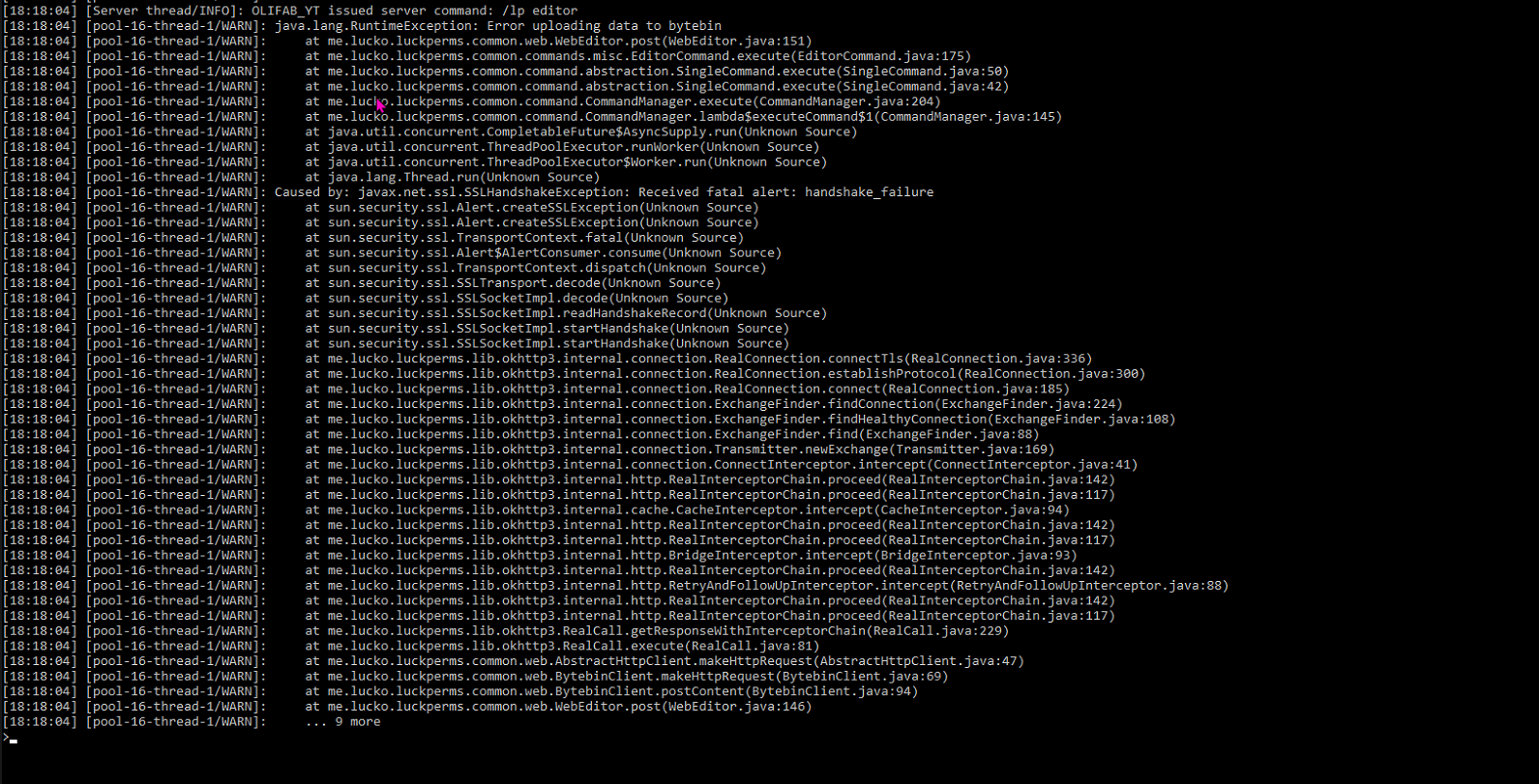
One point has been mentioned several times here, which is, that it helps to distinguish context more easly, especially when using LP on both proxy and server.
Most people won't think of "server" when they want to set a perm, group, ... on a proxy-level. A server for them is often the backend one and it can easly get confusing with when you want to set permissions for the Spigot Server only and then one for the proxy only...
2 different instances of LP both using the server context can becom...
Thanks, should be resolved :)
lilac dewBOT
This may be resolved by the above commit.
If not, would you mind putting together a minimal test case which demonstrates the issue? I'd be happy to take a look. :)
It seems like you've modified the LuckPerms table in some way? That's not the standard schema...
The easiest fix is probably to delete the LP tables and let the plugin regenerate them.
Nothing there to suggest LP is the cause of a crash
Seems like you can fix this using a command-line flag: https://stackoverflow.com/a/61143833
I'm not sure there's anything I can do in LP to fix this, since if anything it's going to be a Mongo driver issue.
Thanks for the report.
This might be fixed by #2602 - but I haven't got time to test/implement it myself at the moment (I'm not really a postgres user)
I'm quite reluctant to add more filters to these commands - they already have sorting flags etc! It gets a bit complex to maintain when there's so much going on.
Perhaps if I were able to refactor it into something a bit more generic it could be do-able
Great to hear! I can test a snapshot as soon as one is available
lucko notifications@github.com schrieb am Mo., 14. Dez. 2020, 16:31:
Thanks for the report.
This might be fixed by #2602
https://github.com/lucko/LuckPerms/pull/2602 - but I haven't got time
to test/implement it myself at the moment (I'm not really a postgres user)—
You are receiving this because you authored the thread.
Reply to this email directly, view it on GitHub
<https://github.com/lucko/LuckPerm...
lilac dewBOT
Description
I updated to version 5.2.55 today and promoting along a track seems to have broken. it works once, but it looks like its not removing the old rank so when it tries to promote again it fails because the player has 2 ranks on the track. https://paste.dedimc.io/oquhofolum.md
Reproduction steps
- install luckperms version 5.2.55 and no other plugins (no previous luckperms folder)
- Restart the server
- Run
/lp editorand add group one, two and three and ...