#support-1
1 messages · Page 1033 of 1
 woven jackal
woven jackal
woven jackal
haha thats fine i have mysql setup
 foggy quartz
!switch you will follow this guide for that migration
 wanton stratusBOT
If you wish to change your storage type (e.g. to YAML or MySQL) you may need to follow these instructions to ensure your groups and permissions are migrated to the new storage type.
Read more about the Storage types
 LuckPerms wiki
foggy quartz
LuckPerms wiki
foggy quartz
!sync And then to sync them up all together follow this other guide
wanton stratusBOT
To sync data between servers, you need to connect each LuckPerms plugin to the same database (for example MySQL) and set up a messaging service.
LuckPerms wiki
woven jackal
will that keep my perms?
foggy quartz
Yes, as they are already in the database
woven jackal
and if i where to use the /lp editor on hub would it apply on all or do i have to use cmds?
ok
foggy quartz
Once they are all in sync, it doesn't matter where you make changes
woven jackal
ok ill get to it
foggy quartz
Changes will propagate through the entire network
woven jackal
ty!!!
foggy quartz
Np
 quiet oasis
how do i use lucky perms
wanton stratusBOT
Here's a guide to help users understand and use LuckPerms for the first time.
LuckPerms wiki
 full herald
!editor once youve finished that
wanton stratusBOT
LuckPerms offers an easy to use, powerful Web Editor, with which you can add, delete and change permissions of groups and players.
LuckPerms wiki
 midnight shell
@everyone #ICareAboutClimateChange
[Please Watch]
https://youtu.be/iw2AHyMmGT8
Let us unite and fight climate change

This is NOT ANOTHER typical video about climate change. Dare to see it and it'll never be the same for you. Full video in Spanish: https://youtu.be/3X-Z0kMfh4M
Climate change is a global challenge that has no borders and to combat it requires coordinated work by all countries...
woven jackal
@foggy quartz what file do i do?
wanton stratusBOT
Hey Tom_Gaming109YT! Please don't tag helpful/staff members directly.
foggy quartz
Imagine trying to ping over 10 thousand people
quiet oasis
a
woven jackal
whoops
foggy quartz
Nice move MrPizza
woven jackal
/luckperms export <file> it says
woven jackal
what file do i do?
midnight shell
jeez
foggy quartz
Keep generals for support please
midnight shell
ok sorry ill dothat next time
but watch it trust me
fight climate change people lets go :>
foggy quartz
data, backup, perms, whatever name you want the export file to have
woven jackal
right ok i gott u
foggy quartz
When using import, use the same name
 left isle
I have a problem. I just installed luckperms bungee and it installed everything correctly except for one thing: my minecraft player can't do any commands or chatting anymore. Am I doing something wrong or is this a bug?
 drifting hull
!bungee
wanton stratusBOT
If you run a Bungeecord network, learn how to correctly setup LuckPerms on all server instances (including Bungee).
Also read:
Syncing data between servers
https://github.com/lucko/LuckPerms/wiki/Syncing-data-between-servers
LuckPerms wiki
drifting hull
I suggest you to read through it
foggy quartz
Help
Its me again
storage errors
[20:36:15 WARN]: [me.lucko.luckperms.lib.hikari.pool.PoolBase] luckperms-hikari - Failed to validate connection me.lucko.luckperms.lib.mariadb.MariaDbConnection@38128c8a ((conn=168361) Connection.setNetworkTimeout cannot be called on a closed connection). Possibly consider using a shorter maxLifetime value.
....
the wiki
left isle
Thanks a lot. Didn't know that that was the case..
 simple citrus
wanton stratusBOT
simple citrus
wanton stratusBOT
Hey ALZWΞI-D1! Please don't tag helpful/staff members directly.
 split veldt
!commands
wanton stratusBOT
Find all of the available LuckPerms commands on the wiki.
General commands
User commands
Group commands
Permission commands
Parent commands
Meta commands
Track commands
Log commands
LuckPerms wiki
split veldt
Permission commands
 stark lake
Can LuckPerms assign permissions to vanilla teams?
drifting hull
What do you mean by teams?
stark lake
Like the /teams kind of teams
 nocturne chasm
No
 worldly plank
Hey is there a way to get Luckperms working on 1.16.3
 flat parcel
Yes, LP supports everything 1.8.8 and newer on the newest build
drifting hull
@stark lake you can use @a[team=<team>] as target
stark lake
OK
flat parcel
for clarification, that only applies to commands. Vanilla teams cannot have permissions assigned to them.
drifting hull
Yea
flat parcel
!faq
wanton stratusBOT
Check out some of our frequently asked questions.
LuckPerms wiki
worldly plank
That doesn't answer any of my questions
It only stops the plugin itself
I tried 2 versions
worldly plank
wanton stratusBOT
Please use https://bytebin.lucko.me to send files in the future. I have automatically uploaded latest.log for you: https://bytebin.lucko.me/3qMGlT3yvd
worldly plank
I tried lowering the version of it but still didn't work
that's why it says 5.1.93
flat parcel
delete the /plugins/Luckperms/libs folder, restart.
split veldt
was about to say that, had to check what the folder was named :L
worldly plank
wanton stratusBOT
Please use https://bytebin.lucko.me to send files in the future. I have automatically uploaded latest.log for you: https://bytebin.lucko.me/4W0D6iLDbe
split veldt
[20:56:13] [Server thread/INFO]: [LuckPerms] Successfully enabled. (took 2431ms)
flat parcel
Something else is shutting it down
worldly plank
[20:56:09] [ForkJoinPool-1-worker-39/INFO]: [LuckPerms] It is safe to ignore any warning printed following this message starting with 'WARNING: An illegal reflective access operation has occurred, Illegal reflective access by me.lucko.luckperms.common.dependencies.classloader.ReflectionClassLoader'. This is intended, and will not have any impact on the operation of LuckPerms.
[20:56:10] [Server thread/INFO]: [WooMinecraft] Loading WooMinecraft v1.2.0-1.14.4
flat parcel
I see an error from viaversion, could be that?
split veldt
doesn't look like VV is shutting it down?
worldly plank
I have no clue this server just got started
flat parcel
It is safe to ignore any warning starting with ...
split veldt
[20:56:20] [Server thread/INFO]: Timings Reset
[20:56:22] [Craft Scheduler Thread - 1/INFO]: [Vault] No new version available
[20:56:26] [Server thread/INFO]: Stopping the server```6 seconds between started and stopping
worldly plank
i did that myself
split veldt
there we go
 hoary light
!perm
wanton stratusBOT
Sorry! I do not understand the command !perm
Type !help for a list of commands.
hoary light
!help
wanton stratusBOT
Available commands:
!advanced
!api
!argumentbased
!ask
!bulkupdate
!bungee
!cauldron
!colours
!commandequivalents
!commands
!config
!context
!cookbook
!default
!downloads
!editor
!editorsafety
!errors
!essentials
!extensions
!extracontexts
!faq
!formatting
!helpchat
!inheritance
!install
!libsdir
!locale
!meta
!migration
!notworking
!nowildcard
!pasteit
!permissions
!placeholders
!selfhosting
!stacking
!storage
!suggestions
!switchstorage
!sync
!tracks
!translations
!upgrade
!usage
!userinfo
!verbose
!weight
!whyluckperms
!wiki
foggy quartz
[20:36:15 WARN]: [me.lucko.luckperms.lib.hikari.pool.PoolBase] luckperms-hikari - Failed to validate connection me.lucko.luckperms.lib.mariadb.MariaDbConnection@38128c8a ((conn=168361) Connection.setNetworkTimeout cannot be called on a closed connection). Possibly consider using a shorter maxLifetime value.
....
Can anybody help ?
foggy quartz
Hello I would like to deactivate the fly essentials in certain world that I put as permission
flat parcel
!context
wanton stratusBOT
You can set a permission or group on a per-world/per-server basis, through what we call "contexts".
LuckPerms wiki
 lilac nest
Does anyone know what is the command to add / me in group permissions?
full herald
!verbose will know, we wont
wanton stratusBOT
LuckPerms provides a verbose command to help you find out what permissions a command/plugin is checking.
LuckPerms wiki
foggy quartz
can anyone help me. I got a problem
wanton stratusBOT
Please ask your question!
Please ask the question you have. Don't ask to ask, or ask to DM someone. There are people here to help you, but we need to know what to help you with, so please just ask the question you want to in as much detail as possible!
Or, try here first:
Why shouldn't I ask to ask?
foggy quartz
!ask
wanton stratusBOT
Please ask your question!
Please ask the question you have. Don't ask to ask, or ask to DM someone. There are people here to help you, but we need to know what to help you with, so please just ask the question you want to in as much detail as possible!
Or, try here first:
Why shouldn't I ask to ask?
foggy quartz
I got luckperms on the server and i am trying to set prefix and display name and i did but it wont show in game
flat parcel
!chat
wanton stratusBOT
LuckPerms does not perform any chat/tablist formatting of its own!
LuckPerms only acts as the source for prefixes / suffixes, it doesn't actually apply them. You need an appropriately configured chat/tablist formatting plugin for them to be displayed. If the values appear correctly when you run /lp user <user> info, LuckPerms is doing its job!
FAQ answer: Prefix isn't showing?
List of chat/tablist formatting plugins that work with LuckPerms
 fallow hill
Can I use HEX in the lp editor for prefixes
flat parcel
If your chat plugin supports it, yes
fallow hill
nice ty
 low portal
Hello, any ideas on how I can simply set up essentialX with luckperms?
full herald
check pins for a list of essx perms
low portal
I just want people with no speecial rank to be able to use commands like /tpa
full herald
!usage as well
wanton stratusBOT
Here's a guide to help users understand and use LuckPerms for the first time.
LuckPerms wiki
full herald
and add it to the default group
low portal
do i have to edit them with commands?
foggy quartz
Or with the web editor
low portal
can't i just edit the groups from the server data base?
foggy quartz
No, don't touch the files
I mean, you can if you really want to, but if you mess up, you're on your own
!switch check this guide if you want to use another storage method
wanton stratusBOT
If you wish to change your storage type (e.g. to YAML or MySQL) you may need to follow these instructions to ensure your groups and permissions are migrated to the new storage type.
Read more about the Storage types
LuckPerms wiki
fallow hill
How do I use HEX? Do I put a # before everything or?
split veldt
Depends on your chat plugin's format.
flat parcel
👍
low portal
I still don't get it, where do I find the groups?
I found them on the web editor but I can't add any essenstialsx commands
full herald
Check pins for a list of their perms
flat parcel
!moss
wanton stratusBOT
Essentials
Make sure you are using EssentialsX and Vault for prefixes. For any other issues with Essentials, you should seek support in either #general or the official EssentialsX support Discord.
EssentialsX Discord
 meager bay
Ok so all of a sudden my database stopped working can someone help please
flat parcel
define stopped working
meager bay
Perms don't transfer from one server to another
All creds are 100% correct
And messaging is not none
drifting hull
!colors
wanton stratusBOT
full herald
Can you send /lp info on each of your servers?
meager bay
Lobby
meager bay
Other server
flat parcel

flat parcel
I'm team  arbonhat personally
foggy quartz
Set add-prefix-suffix to false and add the prefix in the chat formatting settings...
flat parcel
but yeah do that if you want to stick with EssX
the fact that it defaults to adding ranks to the displayname is honestly so stupid lol
wanton stratusBOT
Hey gigalegit-! Please don't tag helpful/staff members directly.
foggy quartz
but it starts being
<Preifx: Nickname:> Message
??????
This is #general territory btw :d
This is #general territory btw :d
 hasty bolt
lp user PiXxlZz group tempadd nitro 30d
heute um 23:11 Uhr
[Sun, 25. Oct 2020 23:11:25 CET INFO] [LP] Command not recognised.
i get this
full herald
Do you have outdated lp
flat parcel
group -> parent
full herald
Isn't group an alias to parent?
hasty bolt
group and parent both is worked
flat parcel
try with parent instead of group
hasty bolt
ok
flat parcel
oh duh
 blind
blind
foggy quartz
using group will work just fine
hasty bolt
Batman
BOT
heute um 23:21 Uhr
lp user PiXxlZz parent tempadd nitro 30d
DiscordSRV
BOT
heute um 23:21 Uhr
[Sun, 25. Oct 2020 23:21:31 CET WARN] Task #4181 for TrickOrTreat v0.5.8 generated an exception
[Sun, 25. Oct 2020 23:21:31 CET INFO] [Avatar] Sushidrache: xD
[Sun, 25. Oct 2020 23:21:31 CET INFO] ItsBennyX issued server command: /vanish
[Sun, 25. Oct 2020 23:21:33 CET WARN] Task #4179 for TrickOrTreat v0.5.8 generated an exception
[Sun, 25. Oct 2020 23:21:33 CET INFO] [LP] Command not recognised.
foggy quartz
did you even read my messages
foggy quartz
yessir
hasty bolt
thanks
foggy quartz
np
foggy quartz
Anyone using LPC and managed the get the chat colour for groups working?
full herald
lpc isnt official and is generaly bad
foggy quartz
Yeah i was aware it isn't official just figured alot would use it, how come it's bad?
full herald
its not terrible, its just not the best imo
 toxic wagon
An you won't get support for it here either.
foggy quartz
You may get help in #general tho 🤷♂️
Well i'm open to recommendations as to what to use haha
 drifting quail
what is lpc?
full herald
luckperms chat
drifting quail
Huh
 cold haven
Whats the difference between MySQL and MariaDB?
full herald
mariadb is just a fork of mysql iirc
drifting quail
Mysql is proprietary
cold haven
I know that, how does lp handle em differently since i thought they were essentially the same thing?
Different drivers?
drifting quail
Ye
foggy quartz
It's just the driver that's different
LP is abstracted from it and handles them in the exact same way, so it's up to the driver to "do stuff"
drifting quail
Ave ORM
drifting quail
I was wrong
cold haven
thx!
foggy quartz
there isn't too much data transferred when LP connects to it (we are talking in the order of kilobytes!), so it'll be fine probably
what could potentially be a problem is the ping
fallow hill
How long does papi take to load in luckperms stuff
 frozen sun
Hiya everyone, just here for some help. So basically, LuckPerms absolutely refuses to set the prefix on some groups, but it'll do it no problem for others. i.e. I'll do /lp group test meta setprefix test, and it'll say it updated it, but in /lp group test info, it refuses to reflect that, and as a result, wont show up in chat. Any help would be appreciated because I'm going to die trying to figure this out.
foggy quartz
How long does papi take to load in luckperms stuff
huh?
sounds like a strange question...
foggy quartz
I mean.. it's up to PAPI to download things from the ecloud and it depends on the server's connection, firewall, ISP (maybe they are blocking certain addresses), antivirus if on windows (same thing as before)
fallow hill
oh wow
foggy quartz
you can just drop this one in (I think the one on ecloud has a bug iirc)
and give the server a good restart
foggy quartz
plugins/PlaceholderAPI/expansions I think
Hiya everyone, just here for some help. So basically, LuckPerms absolutely refuses to set the prefix on some groups, but it'll do it no problem for others. i.e. I'll do /lp group test meta setprefix test, and it'll say it updated it, but in /lp group test info, it refuses to reflect that, and as a result, wont show up in chat. Any help would be appreciated because I'm going to die trying to figure this out.
@frozen sun mind showing a screenshot oflp group <group> infoon a group that you say "refuses to take the prefix"?
lp group <group> meta info too
frozen sun
Yea sure, gimme a sec
fallow hill
/papi reload wont do the trick?
foggy quartz
I would restart the server if I were you
frozen sun
I'm aware the name is dumb its a testing group lol
foggy quartz
well of course not
it's not a normal thing
¯_(ツ)_/¯
LP will still work with the UUIDs behind the scenes tho
@frozen sun /lp info?
foggy quartz
do you.. uhm.. do you actually need the extensions?
that's out of the question anyway
frozen sun
fair enough :p
foggy quartz
!paste your config file (remove passwords if any), there might be settings interfering with how contexts are applied
wanton stratusBOT
Please use pastebin!
Seeing a paste of the problem makes everything so much easier! Use https://bytebin.lucko.me/ for easy pasting!
For console errors:
Pastebin any relevant segments of the console log. If it's a startup error, this includes the entire startup log!
Other errors:
Pastebin the entire LuckPerms config file (passwords removed) as well as any other relevant files!
frozen sun
hold, forgot to remove sensitive shite
foggy quartz
>_>
foggy quartz
do you.. uhm.. do you actually need the extensions?
but yeah note aside, if you don't need/are not using the extensions, I personally suggest you remove them
 slate maple
what could potentially be a problem is the ping
says my pings like 900 lol
foggy quartz
says my pings like 900 lol
is the server in Russia and the db in South Africa or something??
That is unhealthily high
 proud hound
yeah 900 ping is just about going around the world
 foggy quartz
🙄
slate maple
im on my slow school internet plus a slow vpn thingy thats why high ping lol
proud hound
are you hosting a server on school internet
slate maple
its localhost
 hexed kernel
school internet
http://www.dumpaday.com/wp-content/uploads/2014/05/well-there-is-your-problem-right-there.jpg
 slate maple
for testing
hexed kernel
There is nothing more permanent than a temporary solution
slate maple
i know its my internet, i was wondering if the database would connect
i dont think it works
hexed kernel
School internet firewall?
hexed kernel
VPN through school internet? ♿
slate maple
says connection timed out or something
yes lol
only way i can access most stuff
ill have to test stuff at my house only i think
hexed kernel
Why not use a smartphone hotspot?
slate maple
i have 2gb rn and i cant get it rn
but i use that usually when i can
i was just wondering if it would connect on school internet
i gtg now
hexed kernel
Sad
 keen mulch
im getting this message everytime i join A database error occurred whilst loading permissions data. Please try again later. If you are a server admin, please check the console for any errors.
flat parcel
Please read the error.
keen mulch
yes but ive been sent the file and its happened
flat parcel
If you are a server admin, please check the console for any errors
keen mulch
Pastebin
Pastebin.com is the number one paste tool since 2002. Pastebin is a website where you can store text online for a set period of time.
thats what it comes up with
flat parcel
!errors
wanton stratusBOT
Here's a page with some common storage system errors.
LuckPerms wiki
 little sphinx
@tall inlet not the place to post such thing
foggy quartz
hum
 maiden tree
i'm kind of new to luckperms and i can't find a way to get everyone to be able to /kill and there is a shop plugin and defaults cant buy from it and i dont know how to use luckperms to fix it
flat parcel
!usage
wanton stratusBOT
Here's a guide to help users understand and use LuckPerms for the first time.
LuckPerms wiki
frozen sun
Pasting from a few hours ago since this never got anywhere:
basically, LuckPerms absolutely refuses to set the prefix on some groups, but it'll do it no problem for others. i.e. I'll do /lp group test meta setprefix test, and it'll say it updated it, but in /lp group test info, it refuses to reflect that, and as a result, wont show up in chat. Any help would be appreciated because I'm going to die trying to figure this out.
wanton stratusBOT
LuckPerms allows you to set weights in order to determine the priority of certain nodes, like permissions and even prefixes. A higher weight number is a higher priority.
LuckPerms wiki
maiden tree
alr
 fair plover
Heloo
foggy quartz
👋
fair plover
Hows it going
 nova gyro
lpb groups dont get perms from lp groups right
nova gyro
Okay, I'm trying have per server staff so like I don't want kitpvp staff to have perms on survival for example
doing mysql, would that happen or
flat parcel
!context is what you want then
wanton stratusBOT
You can set a permission or group on a per-world/per-server basis, through what we call "contexts".
LuckPerms wiki
 frail pier
ik its not the best but could someone help me set up perms for me and my friends server
 hasty tree
if you have any specific questions feel free to ask them here
it's unlikely that you are going to find someone to help with the setup personally
much better to learn how to do it yourself
nova gyro
I did /lpb group owner meta setprefix "(my prefix)"
and no prefix is shown when I'm in that group
hasty tree
!chat
wanton stratusBOT
LuckPerms does not perform any chat/tablist formatting of its own!
LuckPerms only acts as the source for prefixes / suffixes, it doesn't actually apply them. You need an appropriately configured chat/tablist formatting plugin for them to be displayed. If the values appear correctly when you run /lp user <user> info, LuckPerms is doing its job!
FAQ answer: Prefix isn't showing?
List of chat/tablist formatting plugins that work with LuckPerms
 nova gyro
right and you can see there when I try adding myself into that group, I'm already in it
nova gyro
Vault installed and there's no change
hasty tree
show /plugins
nova gyro
 hasty tree
yeah i need to see the whole list mate
hasty tree
how about /ess version
 proud hound
if only this screen https://prnt.sc/v6undl could easily show it >:(

oh well, bukkit bad
proud hound
essxchat not working
nova gyro
so have it red
nocturne chasm
/plugins, update all essentialsx, and screenshot /lp user <you> info
You have 3 different versions of essx modules
hasty tree
just download the latest of those three from the essentials website

 nocturne chasm
lp or lpb
nova gyro
lpb
nocturne chasm
Show lp info and lpb info
 nocturne chasm
!sync
wanton stratusBOT
To sync data between servers, you need to connect each LuckPerms plugin to the same database (for example MySQL) and set up a messaging service.
LuckPerms wiki
hasty tree
you really should set your network up properly... ^ read that link
nova gyro
you see that's the thing
nocturne chasm
LPB can't magically send data to the bukkit side without luckperms bukkit & a db
hasty tree
attitude? lol
nocturne chasm
Attitude ?
little sphinx
really...
proud hound
the only attitude I smell is from the noob who's just told off the people helping him
 nova gyro
I have been under the impression that doing mysql would make it where staff on lets say a kitpvp server would also have perms on a survival server
when I just want them to have it on a single server
nocturne chasm
!context
wanton stratusBOT
You can set a permission or group on a per-world/per-server basis, through what we call "contexts".
LuckPerms wiki
little sphinx
!context
wanton stratusBOT
You can set a permission or group on a per-world/per-server basis, through what we call "contexts".
LuckPerms wiki
hasty tree
you use contexts then
proud hound
!context
wanton stratusBOT
You can set a permission or group on a per-world/per-server basis, through what we call "contexts".
LuckPerms wiki
nova gyro
jesus
little sphinx
😉
proud hound
and the being nice to the people helping you shit
nocturne chasm
!bungee also make sure bungeecord is setup correctly
wanton stratusBOT
If you run a Bungeecord network, learn how to correctly setup LuckPerms on all server instances (including Bungee).
Also read:
Syncing data between servers
https://github.com/lucko/LuckPerms/wiki/Syncing-data-between-servers
LuckPerms wiki
nocturne chasm
Not according to luckperms
Is storage-method set to mysql?
And messaging-service or whatever to sql
nova gyro
ok so that couldve been the issue
but now that I changed it from h2 to mysql
i get a bunch of red lp errors in proxy console
toxic wagon
!psate
wanton stratusBOT
Sorry! I do not understand the command !psate
Type !help for a list of commands.
toxic wagon
!paste
wanton stratusBOT
Please use pastebin!
Seeing a paste of the problem makes everything so much easier! Use https://bytebin.lucko.me/ for easy pasting!
For console errors:
Pastebin any relevant segments of the console log. If it's a startup error, this includes the entire startup log!
Other errors:
Pastebin the entire LuckPerms config file (passwords removed) as well as any other relevant files!
nova gyro
does it need to have certain capitalization
nocturne chasm
Shouldnt matter
nova gyro
wanton stratusBOT
Here's a page with some common storage system errors.
LuckPerms wiki
toxic wagon
@nova gyro The most likely cause, is one or more of the details in the LP config for the database is wrong.
nova gyro
[07:29:21] [main/ERROR]: Caused by: me.lucko.luckperms.lib.mysql.jdbc.exceptions.jdbc4.CommunicationsException: Communications link failure
nocturne chasm
Yes it cant connect to the database
little sphinx
mhmm
nova gyro
ight ill recheck the info
little sphinx
read the link and what Omega said
nocturne chasm
!bulk
wanton stratusBOT
Quickly update a large amount of user and group permissions by using the bulkupdate command.
LuckPerms wiki
foggy quartz
thx
nova gyro
in the config, "address" is the host?
toxic wagon
address is the databases IP address
nova gyro
database is the name
and the rest is obv
im gonna try and switch db and see what happens
little sphinx
you are not using some random free website Db right?
nova gyro
na lol
nocturne chasm
You didnt put http or something like that in address right?
nova gyro
may be dumb but not that much 😉
nocturne chasm
Make sure that theres no firewall and that the database is already created and obviously the credentials
nocturne chasm
Not, free ones are usually bad
 heady mist
nocturne chasm
heady mist
nocturne chasm
!paste full startup log
wanton stratusBOT
Please use pastebin!
Seeing a paste of the problem makes everything so much easier! Use https://bytebin.lucko.me/ for easy pasting!
For console errors:
Pastebin any relevant segments of the console log. If it's a startup error, this includes the entire startup log!
Other errors:
Pastebin the entire LuckPerms config file (passwords removed) as well as any other relevant files!
proud hound
too many connections
 paper sedge
yo idk if I'm the only one who's ever experienced this, but I literally cannot remove a user's rank. Each time they relog they have the old rank that I'm trying to take away.
using h2 local db
nocturne chasm
Screenshot lp user<user> infoz
heady mist
I am making a server on a bunee and there I need to connect to one database, 24 servers, and this is the problem
nova gyro
toxic wagon
@heady mist https://luckperms.net/wiki/Storage-system-errors#mysql-exceeded-max-connections See if this helps

LuckPerms - A permissions plugin for Minecraft servers.
LuckPerms is a permissions plugin for Minecraft servers.
heady mist
hm, ok
toxic wagon
@nova gyro Did you change the table_prefix setting in the config.yml for luckperms?
 south flare
Hi Guys! I have a question. I'm trying to let my mods use /lp user Crumbs parent add Prisoner but not be able to add themselves to mod or admin groups. I've enabled argument-based-command-permissions: true and set permission on the mod group to luckperms.user.parent.add.prisoner
I've tested a couple of different things to get to this point and it seems like im either able to add any group or add none at all.
Happy to take advice and provide more detail. Hope you guys can help! Thanks 😄
nova gyro
@toxic wagon to what :S
wanton stratusBOT
Hey simplytex! Please don't tag helpful/staff members directly.
nova gyro
rn it's luckperms_
heady mist
@toxic wagon
wanton stratusBOT
Hey Lemon4elo! Please don't tag helpful/staff members directly.
heady mist
not fix my problem
nocturne chasm
Did you type the first one in the mysql console?
nocturne chasm
Might wanna stop all servers first then
heady mist
 jolly rock
Hey everyone, I was wondering if it is possible to assign server-specific permission nodes such as essentials.kit to a luckperms bungee group. Right now, I have had to install luckperms bungee to all my spigot servers and sync them to a MySQL database in order to give global spigot plugin permissions. This has been working fine, however, I recently installed buycraft to my bungeecord network, and would like to be able to give players luckperms roles, however, it's "Push Commands" only allow me to execute commands on the bungeecord console.
In summary, my two questions are:
- can you if it is possible to assign server-specific permission nodes to a luckperm bungee group
- if not, can you assign luckperm (not luckperm bungee) roles through the bungeecord console
nocturne chasm
!context
wanton stratusBOT
You can set a permission or group on a per-world/per-server basis, through what we call "contexts".
LuckPerms wiki
jolly rock
I don't think that answers my question, If i type: /lpb user test permission set essentials.kit the user will not recive the permission
nocturne chasm
Screenshot lp info and lpb info
little sphinx
@jolly rock do you have luckperms on all servers and synceed to a common sql database?
proud hound
if they're all connected to the same db, including the bungee, then yes it's possible and that's what happens by default
jolly rock
yes
little sphinx
Screenshot
lp infoandlpb info
jolly rock
does lpb info need to be on a mysql aswell?
nocturne chasm
Yes
proud hound
no worries 😄
jolly rock
Would I still need to keep luckperms in the spigot servers?
little sphinx
yes
toxic wagon
Yes
jolly rock
perfect thanks
 trail geode
Reload Luckperms with plugman is safe?
trail geode
Ehh my bungee 😦
nocturne chasm
Yes restart it
trail geode
I have one more question
nocturne chasm
Yes?
south flare
Is there a way to check what causes a denied permission?
nocturne chasm
Then the permissions is either set to false or undefined
toxic wagon
@south flare A denied permission is caused by the permission not being granted.
trail geode
Currently I use lp in bungeecord and spigot too. TAB plugin is not working beacuse its installed on bungeecord and I give rank only in spigot server. For example: lp user someone parent set owner server=survival. If I add this to lp bungeecord' contexts file then it will work?
  "static-contexts": {
    "server": "survival"
  },
  "default-contexts": {}
}```luckperms.user.parent.add.prisoner
luckperms.user.parent.remove.prisoner ``` This doesn't seem to be enough to allow the group (mod) to add the group (prisoner)@south flare Did you enabled Arguement-Based-Permissions in the LP config, then restart the server?
south flare
Hi Guys! I have a question. I'm trying to let my mods use
/lp user Crumbs parent add Prisonerbut not be able to add themselves to mod or admin groups. I've enabledargument-based-command-permissions: trueand set permission on the mod group toluckperms.user.parent.add.prisoner
I've tested a couple of different things to get to this point and it seems like im either able to add any group or add none at all.
Happy to take advice and provide more detail. Hope you guys can help! Thanks 😄
@south flare
This was my original post. sorry
trail geode
They told me to come here 😄
toxic wagon
Use lp verbose on <yourname> & luckperms Then run the parent add command for prisoner and see what shows up
south flare
[20:45:55 INFO]: [LP] VB > crumbs744 - luckperms.user.info - true
[20:45:55 INFO]: [LP] VB > crumbs744 - luckperms.user.parent.info - false
[20:45:55 INFO]: [LP] VB > crumbs744 - luckperms.user.parent.set - false
[20:45:55 INFO]: [LP] VB > crumbs744 - luckperms.user.parent.add - false
[20:45:55 INFO]: [LP] VB > crumbs744 - luckperms.user.parent.remove - false
[20:45:55 INFO]: [LP] VB > crumbs744 - luckperms.user.parent.settrack - false
[20:45:55 INFO]: [LP] VB > crumbs744 - luckperms.user.parent.addtemp - false
[20:45:55 INFO]: [LP] VB > crumbs744 - luckperms.user.parent.removetemp - false
[20:45:55 INFO]: [LP] VB > crumbs744 - luckperms.user.parent.clear - false
[20:45:55 INFO]: [LP] VB > crumbs744 - luckperms.user.parent.cleartrack - false
[20:45:55 INFO]: [LP] VB > crumbs744 - luckperms.user.parent.switchprimarygroup - false
what does the & luckperms do?
toxic wagon
Makes only luckperms permissions show up
You could be missing the permission luckperms.usecontext.global as well as luckperms.modify.user.others
trail geode
Okay I made it powercas
south flare
let me try modify.user.others first.
The group mod has these permissions (amongst others) set at the moment. [20:52:21 INFO]: > luckperms.log.notify [20:52:21 INFO]: > luckperms.modify.user.others [20:52:21 INFO]: > luckperms.usecontext.global [20:52:21 INFO]: > luckperms.user.parent.add.prisoner [20:52:21 INFO]: > luckperms.user.parent.remove.prisoner
The verbose output shows the same results as above.
little sphinx
@south flare did you even enable argument based permission in luckperms config.yml?
and restart the server after enabling it
south flare
yes i did, is there a way to verify its correct?
little sphinx
perm check for luckperms.modify.user.others and other arguebased stuff should show when verbose is enabled while running the command you did jn
also maybe you need to set the base perm node luckperms.user.parent.add
 honest temple
chucha aquí todos hablan ingles
 shy trellis
Hey!
shy trellis
I've got this error randomly
[11:54:23 WARN]:        at me.lucko.luckperms.common.actionlog.ActionJsonSerializer.deserialize(ActionJsonSerializer.java:88)
[11:54:23 WARN]:        at me.lucko.luckperms.common.messaging.message.ActionLogMessageImpl.decode(ActionLogMessageImpl.java:49)
[11:54:23 WARN]:        at me.lucko.luckperms.common.messaging.LuckPermsMessagingService.consumeIncomingMessageAsString(LuckPermsMessagingService.java:204)
[11:54:23 WARN]:        at me.lucko.luckperms.common.messaging.sql.AbstractSqlMessenger.pollMessages(AbstractSqlMessenger.java:105)
[11:54:23 WARN]:        at me.lucko.luckperms.common.plugin.scheduler.AbstractJavaScheduler$ErrorReportingRunnable.run(AbstractJavaScheduler.java:124)
[11:54:23 WARN]:        at java.util.concurrent.ThreadPoolExecutor.runWorker(ThreadPoolExecutor.java:1149)
[11:54:23 WARN]: at java.util.concurrent.ThreadPoolExecutor$Worker.run(ThreadPoolExecutor.java:624)```._.XD
nocturne chasm
!paste entire startup log
wanton stratusBOT
Please use pastebin!
Seeing a paste of the problem makes everything so much easier! Use https://bytebin.lucko.me/ for easy pasting!
For console errors:
Pastebin any relevant segments of the console log. If it's a startup error, this includes the entire startup log!
Other errors:
Pastebin the entire LuckPerms config file (passwords removed) as well as any other relevant files!
nocturne chasm
!update
wanton stratusBOT
You can download LuckPerms for Bukkit/Spigot, BungeeCord, Sponge, Nukkit and Velocity.
Additional downloads
shy trellis
[12:05:22 WARN]:        at me.lucko.luckperms.common.actionlog.ActionJsonSerializer.deserialize(ActionJsonSerializer.java:88)
[12:05:22 WARN]:        at me.lucko.luckperms.common.messaging.message.ActionLogMessageImpl.decode(ActionLogMessageImpl.java:49)
[12:05:22 WARN]:        at me.lucko.luckperms.common.messaging.LuckPermsMessagingService.consumeIncomingMessageAsString(LuckPermsMessagingService.java:204)
[12:05:22 WARN]:        at me.lucko.luckperms.common.messaging.sql.AbstractSqlMessenger.pollMessages(AbstractSqlMessenger.java:105)
[12:05:22 WARN]:        at me.lucko.luckperms.common.plugin.scheduler.AbstractJavaScheduler$ErrorReportingRunnable.run(AbstractJavaScheduler.java:124)
[12:05:22 WARN]:        at java.util.concurrent.ThreadPoolExecutor.runWorker(ThreadPoolExecutor.java:1149)
[12:05:22 WARN]:        at java.util.concurrent.ThreadPoolExecutor$Worker.run(ThreadPoolExecutor.java:624)
[12:05:22 WARN]:        at java.lang.Thread.run(Thread.java:748)
Still
After restart
nocturne chasm
Can you screenshot /lp info
shy trellis
nocturne chasm
You didnt update
shy trellis
I did
wanton stratusBOT
You can download LuckPerms for Bukkit/Spigot, BungeeCord, Sponge, Nukkit and Velocity.
Additional downloads
little sphinx
all server including bungee
shy trellis
What
little sphinx
your version is 5.1.26
little sphinx
latest is 5.2.16
little sphinx
...
 tranquil elk
hi guys, i need help for configuration luckperms in bungecord.
(Sorry my english, i dont speak english very well 😅 )
nocturne chasm
!ask
wanton stratusBOT
Please ask your question!
Please ask the question you have. Don't ask to ask, or ask to DM someone. There are people here to help you, but we need to know what to help you with, so please just ask the question you want to in as much detail as possible!
Or, try here first:
Why shouldn't I ask to ask?
tranquil elk
i know, powercas_gamer,
but I dont able to configure.
wanton stratusBOT
Learn what each of the config options are for.
LuckPerms wiki
tranquil elk
I want to configure, the perms in the bungecord, and that they work in the whole network, the problem that in 1 minigame, I use pex, and not luck ...
nocturne chasm
!migration read this to go from pex to lp
wanton stratusBOT
Learn about the process of migrating from another permission plugin.
LuckPerms wiki
shy trellis
Yhea, thanks for help
nocturne chasm
!network these 2 links how to setup a bungee network & sync the data
wanton stratusBOT
If you run a Bungeecord network, learn how to correctly setup LuckPerms on all server instances (including Bungee).
Also read:
Syncing data between servers
https://github.com/lucko/LuckPerms/wiki/Syncing-data-between-servers
LuckPerms wiki
tranquil elk
How do I delete the "default" position or rename it to "member"?
i am portuguese, and i dont likes "default" xD
wanton stratusBOT
LuckPerms provides a group that every player is added to upon joining the server, called default. You can use multiple methods to change the default group or change the name of it.
LuckPerms wiki
 serene kiln
I'm brand new to hosting a server and have been learning a lot with help and just doing things on my own. Buuuut I've hit a wall and need some help. 😅
I recently went through a large list of CMI perms in order to set up my Elite group (basically an Admin, not OP, but has access to said list of perms) and for regular players to have access to a few perms. I was about 90% successful in granting the perms I wanted.
First Wall: I want everyone to be able to use sign editing (shift + right click to edit) and color codes (&# before text) throughout the game, but only OP can do this right now and I have no idea why.
Wall Two: I want my Elites to be able to use WorldEdit, but they're only able to use //wand to get the wooden axe and select their pos1 and pos2, but after that they're unable to use any other commands (ex: //replace).
All of these things, to my knowledge, should work with the correct perms I added to the proper groups, but they don't 😅 Any help is greatly appreciated!
foggy quartz
!verbose will tell you what permissions you need @serene kiln :)
wanton stratusBOT
LuckPerms provides a verbose command to help you find out what permissions a command/plugin is checking.
LuckPerms wiki
 orchid junco
I need help, anyone there to help?
foggy quartz
!ak
wanton stratusBOT
Sorry! I do not understand the command !ak
Type !help for a list of commands.
foggy quartz
!ask
wanton stratusBOT
Please ask your question!
Please ask the question you have. Don't ask to ask, or ask to DM someone. There are people here to help you, but we need to know what to help you with, so please just ask the question you want to in as much detail as possible!
Or, try here first:
Why shouldn't I ask to ask?
orchid junco
Before, can I send files here?
nocturne chasm
Yes
orchid junco
I was wondering why my luckperms is not working, I downloaded it for spigot or bukkit I put it in plugins but it still doesn't work, I tried also to download old versions but it didn't work could you explain why it doesn't work?
nocturne chasm
!paste entire startup log
wanton stratusBOT
Please use pastebin!
Seeing a paste of the problem makes everything so much easier! Use https://bytebin.lucko.me/ for easy pasting!
For console errors:
Pastebin any relevant segments of the console log. If it's a startup error, this includes the entire startup log!
Other errors:
Pastebin the entire LuckPerms config file (passwords removed) as well as any other relevant files!
orchid junco
Should I write my problem there?
nocturne chasm
Do what the embed says
orchid junco
nocturne chasm
Use 1.8.8
wanton stratusBOT
You can download LuckPerms for Bukkit/Spigot, BungeeCord, Sponge, Nukkit and Velocity.
Additional downloads
nocturne chasm
And that ^
foggy quartz
And yeah use 1.8.8, not 1.8
 topaz ermine
Hey, how can I assign everyone a group? Would /lp user ** parent add <group> work?
Please ping me when you respond thanks.
wanton stratusBOT
Quickly update a large amount of user and group permissions by using the bulkupdate command.
LuckPerms wiki
orchid junco
Does Luckperms need a prefix plugin?
foggy quartz
!chat Yes @orchid junco read this bit 👇
wanton stratusBOT
LuckPerms does not perform any chat/tablist formatting of its own!
LuckPerms only acts as the source for prefixes / suffixes, it doesn't actually apply them. You need an appropriately configured chat/tablist formatting plugin for them to be displayed. If the values appear correctly when you run /lp user <user> info, LuckPerms is doing its job!
FAQ answer: Prefix isn't showing?
List of chat/tablist formatting plugins that work with LuckPerms
foggy quartz
@ashen crescent https://github.com/lucko/LuckPerms/wiki/Bulk-Editing
 ashen crescent
/lp bulkupdate all delete "permission == essentials.fly
Instead of being essentials.fly only
how to delete all permissions
@foggy quartz
wanton stratusBOT
Hey BestTime! Please don't tag helpful/staff members directly.
ashen crescent
Oh sorry for tag
foggy quartz
Well:
- You don't want it to be for all data types, users only; and
- To remove all permissions, you don't specify any constraints
ashen crescent
What would be a example command for that
foggy quartz
/lp bulkupdate all delete "permission == essentials.fly"
> You don't want it to be for all data types, users only
foggy quartz
> To remove all permissions, you don't specify any constraints
foggy quartz
you want to keep the parent groups too?
 merry hull
The wiki states this. To clarify, this means that if I install luckperms on all of my servers and my bungeecord proxy it will sync?
foggy quartz
The wiki states this. To clarify, this means that if I install luckperms on all of my servers and my bungeecord proxy it will sync?
you also need a database, so they all share the same storage
(also specified in the "Syncing data between servers" page)
merry hull
gotcha, thanks!
foggy quartz
you want to keep the parent groups too?
@ashen crescent
ashen crescent
ya only default
foggy quartz
huh?
Let me rephrase: do you want to wipe all user data or are there specific things you want to keep?
ashen crescent
Well all permissions
foggy quartz
So you do want to keep the parent groups
ashen crescent
Ya, but is there a way to keep only default parent group and remove all other groups
foggy quartz
??? no??
foggy quartz
Yes, remove the word permission at the end of /lp bulkupdate users delete permission
so you are left with /lp bulkupdate users delete
ashen crescent
Thank you
 jade basin
Hello,This plugin copy PermissionEx,Yes?
nocturne chasm
No its better
jade basin
Ok
full herald
yeah and the us copied europe
jade basin
It seems to me or permissionEX? is more convenient, no need to climb the site
jade basin
._. luckprems super
nocturne chasm
You dont need to use the editor
foggy quartz
^^
jade basin
Pex just a little more convenient
foggy quartz
?whylp You can read this page on why you may prefer LP over PEX
Oh no
@wanton stratus
nocturne chasm
!whylp
wanton stratusBOT
Why should you choose LuckPerms? Read here to find out.
LuckPerms wiki
foggy quartz
?whyluckperms
nocturne chasm
!
foggy quartz
O ffs
Besides, pex is outdated, unmaintained, it has a crash exploit and even the author suggests you use LP instead
 quick tartan
Does anybody know how I can remove contexts using bulk update?
foggy quartz
What a great question
full herald
not sure if you can do it through commands, but you can do it pretty easily through editor iirc
quick tartan
the editor has bulk updating of user perms?
foggy quartz
Yes, you can do it with bulkupdate
the editor has bulk updating of user perms?
It has bulkupdate-esque capabilities
That's one example
To "remove" (turn into global actually) a server context from all data
quick tartan
ah, let me try that
nova gyro
what would I need to change my table _ prefix to instead of "luckperms_"
quick tartan
global seems to have worked, thanks @foggy quartz
wanton stratusBOT
Hey The_Moep! Please don't tag helpful/staff members directly.
foggy quartz
coolio
quick tartan
someone should mention that on the bulk editing wiki 👀
and the context one
(although I guess the context one is more aimed at the user-facing commands/the editor which can simply remove contexts directly)
 odd lake
Greetings and salutations!
Anyone around that might be able to give me a crash course? in LP? I have been tasked with setting up our brand new server, and am having trouble figuring it out. (Looked at the wiki, and am simply not getting it. haha)
full herald
!usage might be able to help teach you the basics
wanton stratusBOT
Here's a guide to help users understand and use LuckPerms for the first time.
LuckPerms wiki
full herald
!editor after reading that all the way through
wanton stratusBOT
LuckPerms offers an easy to use, powerful Web Editor, with which you can add, delete and change permissions of groups and players.
LuckPerms wiki
shy trellis
It came back
[15:52:48 WARN]:        at me.lucko.luckperms.common.actionlog.ActionJsonSerializer.deserialize(ActionJsonSerializer.java:88)
[15:52:48 WARN]:        at me.lucko.luckperms.common.messaging.message.ActionLogMessageImpl.decode(ActionLogMessageImpl.java:49)
[15:52:48 WARN]:        at me.lucko.luckperms.common.messaging.LuckPermsMessagingService.consumeIncomingMessageAsString(LuckPermsMessagingService.java:204)
[15:52:48 WARN]:        at me.lucko.luckperms.common.messaging.sql.AbstractSqlMessenger.pollMessages(AbstractSqlMessenger.java:124)
[15:52:48 WARN]:        at me.lucko.luckperms.common.plugin.scheduler.AbstractJavaScheduler$ErrorReportingRunnable.run(AbstractJavaScheduler.java:124)
[15:52:48 WARN]:        at java.util.concurrent.ThreadPoolExecutor.runWorker(ThreadPoolExecutor.java:1149)
[15:52:48 WARN]:        at java.util.concurrent.ThreadPoolExecutor$Worker.run(ThreadPoolExecutor.java:624)
[15:52:48 WARN]:        at java.lang.Thread.run(Thread.java:748)
Please use pastebin!
Seeing a paste of the problem makes everything so much easier! Use https://bytebin.lucko.me/ for easy pasting!
For console errors:
Pastebin any relevant segments of the console log. If it's a startup error, this includes the entire startup log!
Other errors:
Pastebin the entire LuckPerms config file (passwords removed) as well as any other relevant files!
foggy quartz
🤔
Is that the only server it happens on?
Also, mind sharing an editor session link?
shy trellis
Yeah, this is the only server
I think it's because the other servers got an older version of the plugin
odd lake
Is there a master permission for the SysAdmin group? Something that grants all permissions in one perm?
odd lake
SysAdmin has luckperms.* would that cover it?
foggy quartz
it doesn't actually
odd lake
The editor is nice. 😄
It's been almost 10 years since making a permissions file
Not sure if I have the tracks set correctly though
foggy quartz
Keep in mind that tracks don't imply inheritances
You'll need to set those "manually"
foggy quartz
!inheritance :d
wanton stratusBOT
Learn about inheritance.
LuckPerms wiki
odd lake
Is there a way for someone to double check what I've done, so I dont look like a derp when nothing works? lol
foggy quartz
I mean you could send a new editor link and I can check I guess?
Other than that, just try everything out ¯_(ツ)_/¯
odd lake
Like from the title bar?
LuckPerms - A permissions plugin for Minecraft servers.
LuckPerms is a permissions plugin for Minecraft servers.
foggy quartz
that a new one?
odd lake
How do I do that?
foggy quartz
.. run /lp editor again?
If you want to keep making changes, after each applyedits you need to create a new session
odd lake
do I have to apply the changes I made using the apply edits command, then do the editor command?
foggy quartz
Yep
odd lake
ahhhhh ok. Sorry haha
LuckPerms - A permissions plugin for Minecraft servers.
LuckPerms is a permissions plugin for Minecraft servers.
That should be it
we only have a few plugins
It's probably all derpped. XD
foggy quartz
yep, looks good
odd lake
Yeah?
foggy quartz
except for the default group :d which I can hear you asking already "how do I set boyo as default group?"
To which I respond "You don't, default is the default group"
!default give this a read
wanton stratusBOT
LuckPerms provides a group that every player is added to upon joining the server, called default. You can use multiple methods to change the default group or change the name of it.
LuckPerms wiki
odd lake
The thought has occured
So, would I remove boyo, and just change the default display name to boyo?
foggy quartz
mhm, you would move everything from boyo to default and set default's displayname to boyo
You can easily move everything both in the editor and with commands
foggy quartz
yep
 naive matrix
Hello, when i start up my server the console says that my luckperms will not work properly as "vault" is not installed. how do i install vault for this?
foggy quartz
naive matrix
and it works with 1.12.2?
foggy quartz
yes
foggy quartz
Can i give people perms to set more homes with luckperms?
 magic summit
!verbose If the plugin handling homes allows for more based on permissions, then yes, LP can do that. if you cant find the perm(s) needed based on the plugins docs, verbose can be quite useful. @foggy quartz
wanton stratusBOT
LuckPerms provides a verbose command to help you find out what permissions a command/plugin is checking.
LuckPerms wiki
foggy quartz
hello
I want to download luckperms for 1.8 server
but nothing I try is working
can someone send me the version that will work?>
Upgrade to 1.8.8
why?
1.8 had several security issues
there isn't luckperms for 1.8?
ok
There is LP for 1.7.10 and from 1.8.8 up to latest, but anything in between no.
Besides, 1.8 had several security issues
which version would work for 1.8.8?
(version of luckperms)
!download the one that isn't legacy (depends on your platform)
wanton stratusBOT
You can download LuckPerms for Bukkit/Spigot, BungeeCord, Sponge, Nukkit and Velocity.
Additional downloads
foggy quartz
ok thanks
 proud sun
I just recently had a greifing on my server and i dont know how it happened the guy just came on and gave himself the permission * and greifed my entire lobby my server is running on 1.8.8 anyone know how he could have done this?
 lapis atlas
So I have a lot of problems with that perms don't get activated so I have set essentials.warp.entrance - true - global only this doesn't work it keeps saying no permission to use this command
magic summit
!verbose @lapis atlas try verbose out!
wanton stratusBOT
LuckPerms provides a verbose command to help you find out what permissions a command/plugin is checking.
LuckPerms wiki
proud sun
I just recently had a greifing on my server and i dont know how it happened the guy just came on and gave himself the permission * and greifed my entire lobby my server is running on 1.8.8 anyone know how he could have done this?
magic summit
check the setup/security of your server, its not an LP issue.
lapis atlas
How can I make it so a person goes to spawn when they join?
 finite ledge
if ive got an issue with the plugin not working at all for me which chat should i use @flat parcel?
wanton stratusBOT
Hey Zycons! Please don't tag helpful/staff members directly.
flat parcel
If it's LP related, here or #support-2. If it isn't LP related, #general
finite ledge
Ok thank you
Ive got the issue of the luckperms not working on sponge at all. Ive tried multiple versions and not one has worked. Ive used LP before on a magma server but i recently had to change to sponge and it hasnt been working at all. when i type /LP it says its an unknown command. every other sponge plugin/mod ive used works fine just not LP
flat parcel
!paste there should be an error in console, send it pls
wanton stratusBOT
Please use pastebin!
Seeing a paste of the problem makes everything so much easier! Use https://bytebin.lucko.me/ for easy pasting!
For console errors:
Pastebin any relevant segments of the console log. If it's a startup error, this includes the entire startup log!
Other errors:
Pastebin the entire LuckPerms config file (passwords removed) as well as any other relevant files!
flat parcel
I'm seeing some pretty massive errors
like fill the page amounts https://i.imgur.com/dljiZlD.png
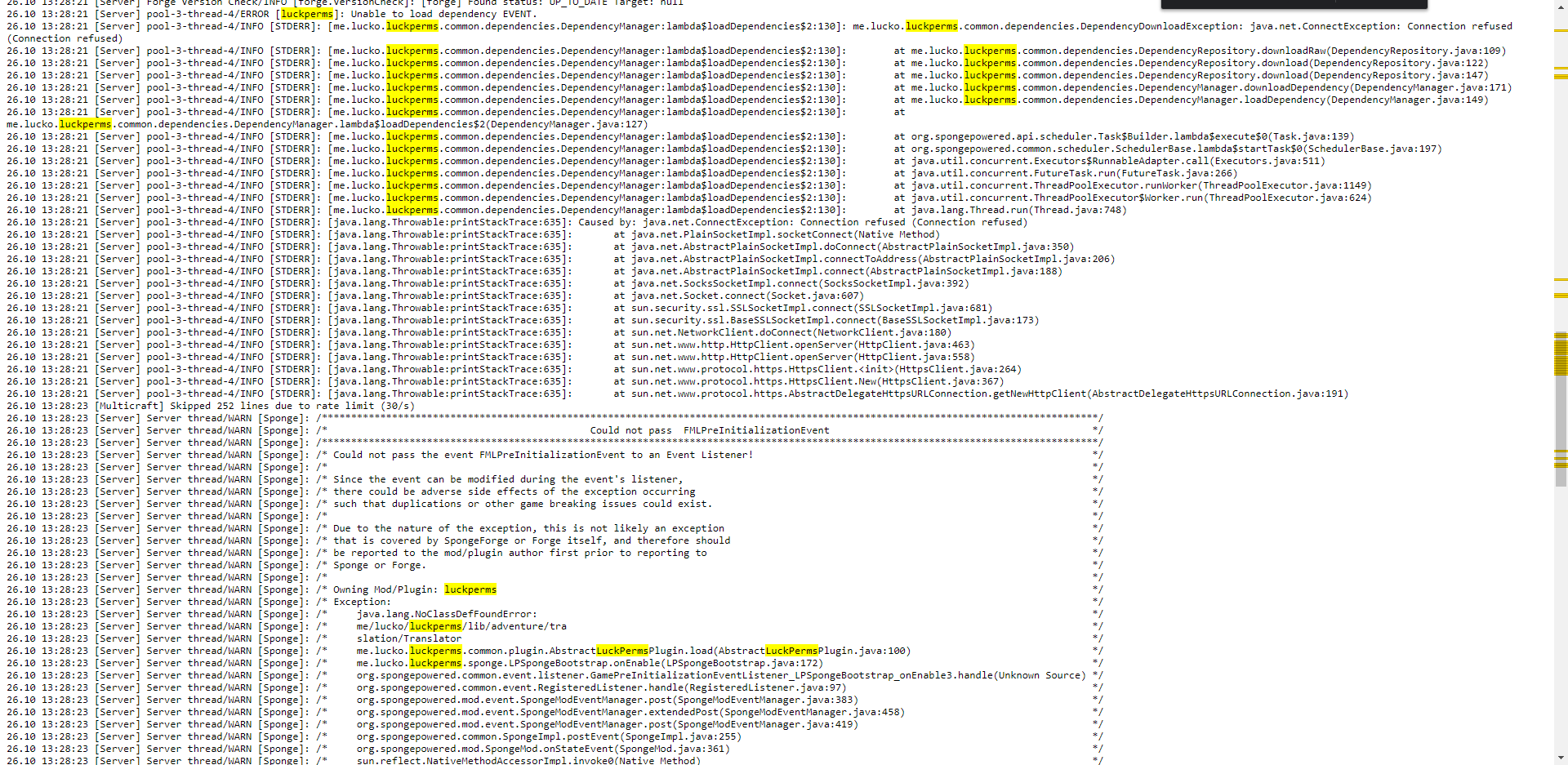



Either way, cause appears to be LP being unable to connect to external stuff to download some libraries it uses
finite ledge
do you know what could cause it? everything else works normal just not lp
flat parcel
Error is Connection Refused. Given we don't have the 10k+ members of this server spamming support, it's just a you problem. Unfortunatly I don't know off the top of my head where all LP pulls dependencies from. Best I can say is check your firewall
finite ledge
would there be a reason it wouldnt work if it was a webhosted server? because i pay monthly for the server to be up rather than be running it off of my own equipment
flat parcel
Some hosts have some aggressive firewalls, could be that
left isle
I have a problem. I just installed luckperms bungee and it installed everything correctly except for one thing: my minecraft player can't do any commands or chatting anymore. Am I doing something wrong or is this a bug?
Edit: Also I tried what Unofficial Suppowo told me yesterday, I installed it on both bungee and the paper servers. Still absolutely nothing
flat parcel
!cjat @fickle estuary
wanton stratusBOT
Sorry! I do not understand the command !cjat
Type !help for a list of commands.
wanton stratusBOT
LuckPerms does not perform any chat/tablist formatting of its own!
LuckPerms only acts as the source for prefixes / suffixes, it doesn't actually apply them. You need an appropriately configured chat/tablist formatting plugin for them to be displayed. If the values appear correctly when you run /lp user <user> info, LuckPerms is doing its job!
FAQ answer: Prefix isn't showing?
List of chat/tablist formatting plugins that work with LuckPerms
flat parcel
@left isle if you haven't set up any permissions, yeah you shouldn't be able to do basically anything. You'll need to take some time and set up perms
!usage
wanton stratusBOT
Here's a guide to help users understand and use LuckPerms for the first time.
LuckPerms wiki
left isle
I mean the chat messages don't get displayed and nothing I type is getting into the console or the log.
flat parcel
That probably means one of your plugins has a permission required for chat
!verbose to find it
wanton stratusBOT
LuckPerms provides a verbose command to help you find out what permissions a command/plugin is checking.
LuckPerms wiki
left isle
Like for instance if I typed /kill it would give me a permission error right? Not for me. And nothing like Username issued server command: /kill
That also doesn't work
I know for sure that there's no chat plugin enabled on my server
flat parcel
could you /pl, screenshot, send
left isle
Can't do it with a screen shot because my commands don't work, but here's the console output:
[18:52:53 INFO]: Plugins (12): AdvancedPortals, LuckPerms, SkinsRestorer, WorldE
dit, AdvancedLogin, ViaVersion, ViaBackwards, NoRainReloaded, ProtocolLib, World
Guard, AuthMe, MessageFilter
flat parcel
uh oh do I spy a cracked server
foggy quartz
does essentials has any support server?
flat parcel
!moss
wanton stratusBOT
Essentials
Make sure you are using EssentialsX and Vault for prefixes. For any other issues with Essentials, you should seek support in either #general or the official EssentialsX support Discord.
EssentialsX Discord
foggy quartz
cause I need help with essentials chat cause the luckperms prefix isn't working in the chat.
omg
the bot is genius!
flat parcel
Read that embed, likely has the solution
flat parcel
Hint: You likely don't have vault
foggy quartz
yep
flat parcel
Yeah that'll be why
left isle
Yes. Why? is there something wrong with creating one?
flat parcel
Piracy is bad, it's essentially stealing from mojang
Liam: Red in /pl means the plugin isn't enabled. That usually means there was an error during startup, most common cause is a config issue
 gritty fulcrum
hi I've been trying to set up a datapack that allows users to teleport items to each other. im trying to use luck perms to allow the user to acces the teleport cmd(/execute as @e[type=minecraft:item,limit=1,distance=..3] run teleport <username>) but i cant seem to get it to work without just giving them access to minecraft.command
flat parcel
Minecraft's built-in commands have very little in the way of permissions. There's minecraft.command.teleport, but that gives them access to the whole of /tp. Likely life will be easier if you grab another plugin to handle TPing with more permissions, most people use EssentialsX
gritty fulcrum
ok, thanks ill give it a try
 fickle estuary
Lp can not work with townychat ?
flat parcel
Should be compatible. What issue are you having?
fickle estuary
my prefixes not work, and i test all issues.. :/
left isle
I've payd for the plugins, and that's not piracy. I just disabled online mode that's all. No piracy.
foggy quartz
for the vault + luckperms + essentials, I should rewrite the format: in the config of essentials to something? or leave it as defualt
 warm dew
Hi, how to set up a standard group so that a person can only teleport. I set it up like this, but it doesn't work
flat parcel
!usage @warm dew
wanton stratusBOT
Here's a guide to help users understand and use LuckPerms for the first time.
LuckPerms wiki
flat parcel
@foggy quartz Default config should work for EssX
foggy quartz
@flat parcel it not seems to work
wanton stratusBOT
Hey LiamHaGever! Please don't tag helpful/staff members directly.
flat parcel
@left isle You may have paid for the plugins, but you are allowing people to join without having paid Mojang for an account. That's the definition of piracy.
!chat @foggy quartz
wanton stratusBOT
LuckPerms does not perform any chat/tablist formatting of its own!
LuckPerms only acts as the source for prefixes / suffixes, it doesn't actually apply them. You need an appropriately configured chat/tablist formatting plugin for them to be displayed. If the values appear correctly when you run /lp user <user> info, LuckPerms is doing its job!
FAQ answer: Prefix isn't showing?
List of chat/tablist formatting plugins that work with LuckPerms
flat parcel
Also if I miss you, please hop over to #support-2. Chat's going a bit fast atm lol
foggy quartz
Did you miss me? 🥺
nova gyro
whats a cheap good mysql host
flat parcel
Most MC hosts provide one
foggy quartz
is there any tutorial on using luck perms for bungeecord for 1.8.8 that explains even the format of the chat that will show the prefix?
warm dew
Now it works
Thx
 hardy anchor
Hellooo can someone help me with LuckPerms ? The server member don't get the roles permissions
flat parcel
@foggy quartz as the embed I sent above says, LP doesn't touch chat whatsoever. LP's only role in chat is providing the prefixes you set.
flat parcel
@hardy anchor Gonna need a bit more info then that
frail pier
Could someone help me set up luck perms
foggy quartz
We added some special roles like, the default one, moderator, admin, etc.. but ig they don't have the permission to do anything, even after applying the perms
I'm with @hardy anchor
wanton stratusBOT
Here's a guide to help users understand and use LuckPerms for the first time.
LuckPerms wiki
flat parcel
!editorsafe
wanton stratusBOT
Sorry! I do not understand the command !editorsafe
Type !help for a list of commands.
flat parcel
!editorlink
wanton stratusBOT
Sorry! I do not understand the command !editorlink
Type !help for a list of commands.
wanton stratusBOT
It is safe to send an editor link in public.
Any changes made in the editor have to be applied using the /lp applyedits command - impossible unless the person with the link is also connected to the server and with the required in-game permissions to use LuckPerms commands. It's effectively just as safe to share an editor link as it would be to share a screenshot of your permissions or a pastebin of a configuration file. The editor doesn't contain any sensitive data (except perhaps player names).
More Information:
Concerns about the proprietary nature of your permissions setup?
Please, don't be. We're here to help, not steal your permissions setup. Additionally, permissions can be tested by players simply joining your server and seeing what they can do.
foggy quartz
Oh well ok
LuckPerms - A permissions plugin for Minecraft servers.
LuckPerms is a permissions plugin for Minecraft servers.
flat parcel
that all looks fine
warm dew
To configure prefixes in the tab (for Example: Owner-Steve) , you need to install a separate plugin, or can you do this in this plugin?
wanton stratusBOT
LuckPerms does not perform any chat/tablist formatting of its own!
LuckPerms only acts as the source for prefixes / suffixes, it doesn't actually apply them. You need an appropriately configured chat/tablist formatting plugin for them to be displayed. If the values appear correctly when you run /lp user <user> info, LuckPerms is doing its job!
FAQ answer: Prefix isn't showing?
List of chat/tablist formatting plugins that work with LuckPerms
frail pier
how do i add a player to a certain group
flat parcel
!usage
wanton stratusBOT
Here's a guide to help users understand and use LuckPerms for the first time.
LuckPerms wiki
foggy quartz
He couldn't use food in game
flat parcel
!verbose
wanton stratusBOT
LuckPerms provides a verbose command to help you find out what permissions a command/plugin is checking.
LuckPerms wiki
fickle estuary
It really enerve me could you come to my server to see this, the prefixes lp do not work.. :/
foggy quartz
I don't understand how to use this command
flat parcel
!chat @fickle estuary
wanton stratusBOT
LuckPerms does not perform any chat/tablist formatting of its own!
LuckPerms only acts as the source for prefixes / suffixes, it doesn't actually apply them. You need an appropriately configured chat/tablist formatting plugin for them to be displayed. If the values appear correctly when you run /lp user <user> info, LuckPerms is doing its job!
FAQ answer: Prefix isn't showing?
List of chat/tablist formatting plugins that work with LuckPerms
flat parcel
@foggy quartz Verbose seems complicated, but it isn't really. All it does is print out permission checks as they happen. You seem to have a permission tied to eating food, so you can use verbose to see what it is
proud hound
skinsrestorer 
proud hound
!chat as well
wanton stratusBOT
LuckPerms does not perform any chat/tablist formatting of its own!
LuckPerms only acts as the source for prefixes / suffixes, it doesn't actually apply them. You need an appropriately configured chat/tablist formatting plugin for them to be displayed. If the values appear correctly when you run /lp user <user> info, LuckPerms is doing its job!
FAQ answer: Prefix isn't showing?
List of chat/tablist formatting plugins that work with LuckPerms
gritty fulcrum
Hi its me again. im still having the same problem as before. essX didnt really seem to help bc it cant be put into my command. is there and way i can give someone access to a specific command such as (/execute as @e[type=minecraft:item,limit=1,distance=..3] run teleport Snipercon55) . this command works if the person is op'd or has minecraft.commands in their perms
foggy quartz
well not as specific as that
proud hound
commands.yml
you can alias a command to that specifically
and then assign it a permission
proud hound
what not works
fickle estuary
prefixes, colours..
proud hound
!uinfo
wanton stratusBOT
Sorry! I do not understand the command !uinfo
Type !help for a list of commands.
Sorry! I do not understand the command !uinfo
Type !help for a list of commands.
wanton stratusBOT
Please take a screenshot!
Seeing a screenshot makes everything so much easier!
For prefixes not showing up in chat:
/lp user <user> info.
For database errors:
Server console: /lp info | Proxy console: /lpb info.
fickle estuary
😭
fickle estuary
Okay
gritty fulcrum
ive never done anything w/ commands.yml should i just lookup a vid?
 lusty terrace
Can i get support here?
wanton stratusBOT
LuckPerms does not perform any chat/tablist formatting of its own!
LuckPerms only acts as the source for prefixes / suffixes, it doesn't actually apply them. You need an appropriately configured chat/tablist formatting plugin for them to be displayed. If the values appear correctly when you run /lp user <user> info, LuckPerms is doing its job!
FAQ answer: Prefix isn't showing?
List of chat/tablist formatting plugins that work with LuckPerms
proud hound
yes @lusty terrace
proud hound
the first link
fickle estuary
yes
proud hound
you need a pluging to take it from luckperms and show it in chat
and you need vault
do you have both
lusty terrace
I already have a established connection with LP on my DB but console is spamming DB errors
proud hound
!paste
wanton stratusBOT
Please use pastebin!
Seeing a paste of the problem makes everything so much easier! Use https://bytebin.lucko.me/ for easy pasting!
For console errors:
Pastebin any relevant segments of the console log. If it's a startup error, this includes the entire startup log!
Other errors:
Pastebin the entire LuckPerms config file (passwords removed) as well as any other relevant files!
proud hound
@lusty terrace ^^