#support-1
1 messages · Page 986 of 1
 full herald
 wanton stratusBOT
LuckPerms allows you to set weights in order to determine the priority of certain nodes, like permissions and even prefixes. A higher weight number is a higher priority.
 LuckPerms wiki
full herald
LuckPerms wiki
full herald
set these up @west girder
 west girder
Will let you know if this works. ty!
 solemn sand
Hello there,
How do I default group the group I created?
When someone joins the server, they should get that group.
full herald
!default
wanton stratusBOT
LuckPerms provides a group that every player is added to upon joining the server, called default. You can use multiple methods to change the default group or change the name of it.
LuckPerms wiki
full herald
read that
solemn sand
I could not find the command.
full herald
its not really a command
you just need to parent those to default
so then theyre not really in the group
they just inherit everything from it
 elfin jasper
how do you set up ranks with luck perms?
full herald
!usage read this to learn the basics
wanton stratusBOT
Here's a guide to help users understand and use LuckPerms for the first time.
LuckPerms wiki
solemn sand
When a new person joins the server, he / she joins the "default" group.
full herald
yeah
@solemn sand so you need to parent the group you want to be the "new" default to default
and it makes them inherit everything from that group
 foggy quartz
Or just move the perms and meta to the default group 🤷♂️
Very easy to do with the editor now (and it's something you can do with one single command too lol)
full herald
havent used the editor since the update came out
solemn sand
/lp group default setdisplayname "group" ?
foggy quartz
The displayname is not the prefix, it's just like a second name
For the most part
!commands check the clone commands in "Group commands"
wanton stratusBOT
Find all of the available LuckPerms commands on the wiki.
General commands
User commands
Group commands
Permission commands
Parent commands
Meta commands
Track commands
Log commands
LuckPerms wiki
foggy quartz
Will clone all the perms and everything from the first group to the second
 hardy linden
does any one know why /give does not work?
wanton stratusBOT
LuckPerms provides a verbose command to help you find out what permissions a command/plugin is checking.
LuckPerms wiki
 frozen burrow
foggy quartz
frozen burrow
foggy quartz
What perms exactly? The ones on that group or the ones in other groups?
Nap time
Can anyone help me?
full herald
sure what do you need
foggy quartz
My tab is not in order and I want to change it but i am not sure how
How to change the order for my ranks
full herald
!weights
wanton stratusBOT
LuckPerms allows you to set weights in order to determine the priority of certain nodes, like permissions and even prefixes. A higher weight number is a higher priority.
LuckPerms wiki
foggy quartz
full herald
read that link
full herald
A higher weight is a higher priority
for example
admin's weight: 300
mods weight: 100
default weight: 10
foggy quartz
How to change the weight?
 bronze yarrow
rn anybody can tab to complete commands and see them from a preview list even if they cant use commands
is there a perm to hide this from default rank?
 lapis ibex
Are you talking about any command or just the /lp command?
lapis ibex
Well does that happen with yourself?
lapis ibex
Like you joined with your admin rank and then demoted yourself to default
bronze yarrow
yes
full herald
if youve just changed ranks or something i believe the autocomplete suggestions stay until either reloag or server restart
foggy quartz
HELP.
bronze yarrow
lp user NAME parent remove owner
lapis ibex
Relog is fine
foggy quartz
I fixed the first but now
lapis ibex
Try that
lapis ibex
!chat
wanton stratusBOT
LuckPerms does not display things in chat!
LuckPerms is only able to send information to formatting plugins so that they display them properly. LuckPerms does not put the prefix in front of your name, you need a chat formatting plugin to do it, and you need Vault. Same goes for the tablist! If the information appears correctly when you run /lp user <user> info, LuckPerms is doing its job!
Prefix isn't showing?
What plugins can I use to format chat?
foggy quartz
How to change or add to somes primary group?
lapis ibex
!usage
wanton stratusBOT
Here's a guide to help users understand and use LuckPerms for the first time.
LuckPerms wiki
lapis ibex
And change what name?
foggy quartz
lapis ibex
@bronze yarrow well that is beyond what LP can control
bronze yarrow
ooof
lapis ibex
I’d recommend you reach out to the general server support of your choice
bronze yarrow
kk
bronze yarrow
ok
bronze yarrow
!weight
wanton stratusBOT
LuckPerms allows you to set weights in order to determine the priority of certain nodes, like permissions and even prefixes. A higher weight number is a higher priority.
LuckPerms wiki
bronze yarrow
idk if this will help
bronze yarrow
er, if it has higher weight then it will prioritize to show up oever another
foggy quartz
Is there a plugin to make it so i can change peoples groups from ingame?
bronze yarrow
u can already do that ingame with luckperms
foggy quartz
What is the command?
bronze yarrow
so take people out and in of groups?
full herald
!permissions heres the perms for ingame
wanton stratusBOT
A list of permissions used by LuckPerms commands.
LuckPerms wiki
wanton stratusBOT
You can set a permission or group on a per-world/per-server basis, through what we call "contexts".
LuckPerms wiki
 keen cairn
how can i put a permission to a parent rank and make it doesn't inherit it?
full herald
you could parent a group to default with a higher weight
keen cairn
so this means default name cant be edited?
wanton stratusBOT
LuckPerms provides a group that every player is added to upon joining the server, called default. You can use multiple methods to change the default group or change the name of it.
LuckPerms wiki
full herald
actually it might
keen cairn
yes how
keen cairn
i changed the displayname but i can't find the prefix
full herald
!prefix
wanton stratusBOT
You can set prefixes, suffixes and other meta data in LuckPerms for players and groups. Note that LuckPerms does not manage chat. You need to use another plugin to show prefixes/suffixes in chat.
LuckPerms wiki
full herald
can you not just use a command?
foggy quartz
I have a quesiton.
Would i be able to make a users rank show up on my score boad?
[Different plugin]
 open mirage
!placeholders
wanton stratusBOT
Display data such as user prefixes and groups from LuckPerms in other plugins.
LuckPerms wiki
foggy quartz
is vault actuallly needed for anything?
 hardy peak
Yeah, sending prefixes/suffixes to chat plugins for example
hardy peak
Why would you need to remove a plugin to add another one
foggy quartz
Cuz its fucking minehut
hardy peak
Ah its another shitty free host
foggy quartz
they limit everything
hardy peak
Get a decent host
full herald
fivvers a legit website
 lofty token
lmao
lofty token
no
full herald
lmao fiverrs a million dollar company
lofty token
that's because the link he posted
bronze yarrow
but psot is scam
full herald
also thats not what scam means
lofty token
Something in your behavior has triggered our protection systems - we apologise for any inconvenience this process may have caused.
full herald
see
bronze yarrow
bruh
lofty token
huh thats weird
bronze yarrow
lofty token
weird lmao
bronze yarrow
XD
lofty token
yeah but that site isnt a scam
 mild otter
I see that "blocked" message too
foggy quartz
@queen latch this guy be advertising his own Fiverr lol
bronze yarrow
lmfao
bronze yarrow
XD
if you can help me make a bungee or something
and your so good to be charging
why you running a minehut server?
 queen latch
@foggy quartz Please do not advertise, first warning
queen latch
Either way here is not the place to advertise
foggy quartz
they asked for t lol
mild otter
No they didn't.
foggy quartz
Uhm no they did not....
You suggested it
Straight up
Ok so how do i make it show like it does on tab?
insted of like it does
[scoreboad]
lapis ibex
@foggy quartz LPs job ends at /lp user <user> info. If that displays the correct prefix/suffix LP is working and the permissions/prefixes/suffices/groups are set up properly
Displaying prefixes/suffixes/groups anywhere else is the job of the respective plugins
If you insist on asking on this discord instead of the support platform for the plugin in question at least ask in #general. Thank you
 daring yarrow
how do I give a builder perms to worldgaurd
lapis ibex
!usage
wanton stratusBOT
Here's a guide to help users understand and use LuckPerms for the first time.
LuckPerms wiki
daring yarrow
I tryed to give him perms already and not working
foggy quartz
yo apparently "I have a very old/outdated version of luckperms"
uh
is 1.8.9 no longer being supported?
or do the newer versions work with 1.8?
full herald
!download
wanton stratusBOT
You can download LuckPerms for Bukkit/Spigot, BungeeCord, Sponge, Nukkit and Velocity.
Additional downloads
full herald
yeah your good
foggy quartz
so new versions work with 1.8?
wanton stratusBOT
Sorry! I do not understand the command !migrate
Type !help for a list of commands.
full herald
!help
wanton stratusBOT
Available commands:
!advanced
!api
!argumentbased
!ask
!bulkupdate
!bungee
!cauldron
!chat
!colours
!commandequivalents
!commands
!config
!context
!default
!downloads
!editor
!errors
!essentials
!extensions
!extracontexts
!faq
!helpchat
!inheritance
!install
!locale
!meta
!migration
!notworking
!nowildcard
!pasteit
!permissions
!placeholders
!selfhosting
!stacking
!storage
!suggestions
!switchstorage
!sync
!tracks
!upgrade
!usage
!userinfo
!verbose
!weight
!whyluckperms
!wiki
foggy quartz
phew
full herald
!migration
wanton stratusBOT
Learn about the process of migrating from another permission plugin.
LuckPerms wiki
full herald
!upgrade
wanton stratusBOT
Read about upgrading LuckPerms from v4 to v5.
LuckPerms wiki
foggy quartz
I just replace the jar file right??
full herald
yeah
daring yarrow
what plug in is good for chat. for prefixs and stuff
full herald
essx and essx chat
daring yarrow
yes I do
I had essx chat plus towny chat so I dleted them bc it cause my prefixs to be tripled and now they wont show up at all
 toxic wagon
@daring yarrow You need 1 chat plugin and vault installed if you want prefixes in chat
!chat
wanton stratusBOT
LuckPerms does not display things in chat!
LuckPerms is only able to send information to formatting plugins so that they display them properly. LuckPerms does not put the prefix in front of your name, you need a chat formatting plugin to do it, and you need Vault. Same goes for the tablist! If the information appears correctly when you run /lp user <user> info, LuckPerms is doing its job!
Prefix isn't showing?
What plugins can I use to format chat?
daring yarrow
nvm fixed it
foggy quartz
you guys aren't ever gonna drop support for 1.8 right ;)
toxic wagon
No idea. That's upto luck. But Luckperms supports 1.8.8 Not 1.8
foggy quartz
yeah
I use 1.8.8
LP isn't really version dependent. Unless they ||(they = md_5)|| change the very core and extensions of the permissions system, everything will be fine; which will most likely not happen due to backwards compatibility.
toxic wagon
Unless you're on 1.8.7 or below
foggy quartz
It would need to completely redefine what a permission is in the first place
toxic wagon
Then it won't work 😛
foggy quartz
Legacy version :p
toxic wagon
Only for 1.7.10
foggy quartz
What is it with 1.8.x? 🤔
toxic wagon
1.8 Has major security exploits that were fixed in 1.8.8
foggy quartz
But is there anything stopping LP from working in that version?
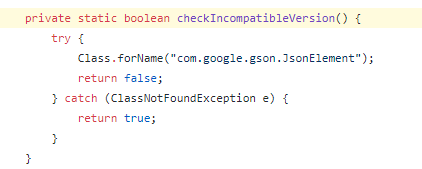
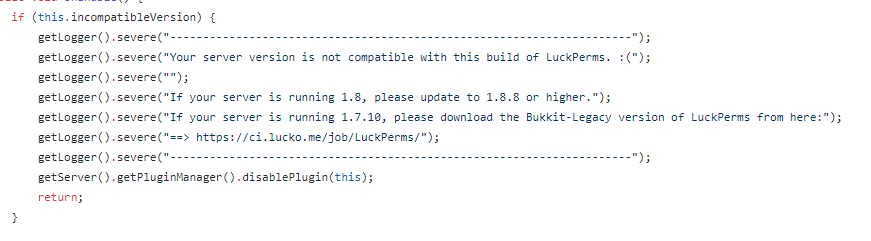
I mean the only thing the legacy version does is shade gson in it
toxic wagon
 foggy quartz
Well it literally just checks for the gson library lol
Sounds like legacy works on 1.8 and 1.8.4 too
Although not advisable to be on those versions
open mirage
is gson shaded in spigot or something?
lofty token
You need *
bronze yarrow
?
foggy quartz
i cant get luckperms to work do i have to use bungeecord?
 jolly stirrup
@foggy quartz es posible hacer que la etiqueta por encima de un jugador encabeza el color del rango?
wanton stratusBOT
Hey Don't judge a cover by its book.! Please don't tag helpful/staff members directly.
jolly stirrup
my bad on the ping
foggy quartz
How do i set a group to default?
full herald
!default
wanton stratusBOT
LuckPerms provides a group that every player is added to upon joining the server, called default. You can use multiple methods to change the default group or change the name of it.
LuckPerms wiki
bronze yarrow
@lofty token
I am opped
and it still doesnt work lmfao
Luckperms.* should give all perms
lofty token

bronze yarrow
so why cant I use /lp XD
lofty token
You need * perm?
foggy quartz
You need to be OPPED
Also you need the * permission
@lofty token
Not at all
How do i set a group to default?
bronze yarrow
so then?
foggy quartz
hi i have a question...
full herald
!default @foggy quartz
wanton stratusBOT
LuckPerms provides a group that every player is added to upon joining the server, called default. You can use multiple methods to change the default group or change the name of it.
LuckPerms wiki
full herald
read that
foggy quartz
No
full herald
yes
foggy quartz
Yes
Do
Okay...
im using essentialsXchat with luckperms, and i have set my prefix, but it will not show up in chat
full herald
!chat
wanton stratusBOT
LuckPerms does not display things in chat!
LuckPerms is only able to send information to formatting plugins so that they display them properly. LuckPerms does not put the prefix in front of your name, you need a chat formatting plugin to do it, and you need Vault. Same goes for the tablist! If the information appears correctly when you run /lp user <user> info, LuckPerms is doing its job!
Prefix isn't showing?
What plugins can I use to format chat?
foggy quartz
next to their name like [chill]gamer
aww
You need Vault as well
And read that embed
Read it
It didn't help
ok so
how would i connect essentialsxchat with luckperms tho
full herald
It didn't help
@foggy quartz then whatever your trying to do is not possible, or you didnt read it
bronze yarrow
Read it
@foggy quartz it is there cause Ive read it
foggy quartz
I have a group that isn't default i want to get it to default
bronze yarrow
^
bronze yarrow
yes
full herald
yes
jolly stirrup
Fedo is it possible for nametags above heads to show as the color of rank with essentialx
bronze yarrow
you will need Vault for so many plguins
bronze yarrow
Fedo is it possible for nametags above heads to show as the color of rank with essentialx
@jolly stirrup I know TABS can do that
foggy quartz
But not with EssX
jolly stirrup
my bad fedo
foggy quartz
Yikes
foggy quartz
my bad fedo
You do realize it's not Fedo, right?
foggy quartz
anyone have a link to essentialsX downloads?
jolly stirrup
@foggy quartz dm's
foggy quartz
Google "Essentialsx"
bronze yarrow
foggy quartz
Okay if you can't help me with the first think how can i transfer all perms from one group to another.... Not as a parent
Huh
bronze yarrow
!bulk
wanton stratusBOT
Quickly update a large amount of user and group permissions by using the bulkupdate command.
LuckPerms wiki
lofty token
Bruh give your self the * perm 💀
foggy quartz
!commands check the clone command in Group commands @foggy quartz
wanton stratusBOT
Find all of the available LuckPerms commands on the wiki.
General commands
User commands
Group commands
Permission commands
Parent commands
Meta commands
Track commands
Log commands
LuckPerms wiki
bronze yarrow
wdym
lofty token
You’re making it hard on yourself for no reason
LMAO
Just give the * perm to yourself
foggy quartz
!nwc @lofty token
wanton stratusBOT
Wildcard issues
Some plugins are created in a way which results in odd behaviour when the root '*' wildcard is used.
More information:
bronze yarrow
foggy quartz
Don't use *
lofty token
Oh
bronze yarrow
well do I use or no lmao
lofty token
No ig lol
foggy quartz
You do need luckperms.*
foggy quartz
i'm a bit confused about this plugin. i can't find it's permissions file. i'm trying to migrate from PermissionsEX
Just not bare *
bronze yarrow
so luckperms.* and luckperms.reload?
foggy quartz
Huh?
wanton stratusBOT
Hey 🌹RoseTheGamer❤! Please don't tag helpful/staff members directly.
bronze yarrow
;o
foggy quartz
@foggy quartz it's stored in a local database file
Not readable without special tools
oh.
why?
!editor check this tho
wanton stratusBOT
LuckPerms offers an easy to use, powerful Web Editor, with which you can add, delete and change permissions of groups and players.
LuckPerms wiki
foggy quartz
why?
Reliability
Speed
k
@foggy quartz wdym
I mean you can have just*and it will apply every node there is
But it is so not advised
bronze yarrow
oh
bronze yarrow
foggy quartz
Uuh
bronze yarrow
:o
foggy quartz
so wait
i still have problems
Try to run the command? Idk lol
i went to essentials
and went to config.yml
!moss
wanton stratusBOT
Essentials
Make sure you are using EssentialsX and Vault for prefixes. For any other issues with Essentials, you should seek support in either #general or the official EssentialsX support Discord.
EssentialsX Discord
foggy quartz
and changed "displayname" to false
Lol
@foggy quartz check that
but luckperms still aint displaying prefixes
i AM
i have both VAULT and ESSENTIALSX
Relax
i cant
......
sorry
Bud
im dumb : (
Stay frosty
Now
EssXChat?
yes
Liez
!userinfo screenshot please
wanton stratusBOT
Please take a screenshot!
Seeing a screenshot makes everything so much easier!
For prefixes not showing up in chat:
/lp user <user> info.
For database errors:
Server console: /lp info | Proxy console: /lpb info.
foggy quartz
i have EssentialsXChat, EssentialsX, Vault, and Luckperms installed
Is the prefix shown in there correct?
jolly stirrup
lmao
foggy quartz
Is the prefix shown in there correct?
@foggy quartz
confused
yes
Okay
it should be that
 little sphinx
!moss then
wanton stratusBOT
Essentials
Make sure you are using EssentialsX and Vault for prefixes. For any other issues with Essentials, you should seek support in either #general or the official EssentialsX support Discord.
EssentialsX Discord
bronze yarrow
what am I doing wrong?
little sphinx
LP doesn’t display anything in chat @foggy quartz
foggy quartz
I suggest their discord
little sphinx
Ask your chat plugin about it
foggy quartz
ah
alright
thanks
sorry
i kept not understanding that part
what am I doing wrong?
@bronze yarrow you still can't run applyedits?
bronze yarrow
nope
foggy quartz
lol i thought luckperms would display it after the displayname was turned to false
bronze yarrow
foggy quartz
thank you
foggy quartz
Sure I guess, they are safe to share anyway tho
bronze yarrow
fefo
after making the change
/lp works now
but
i cant use any form of /gm c, /gmc, /gm creative, or /gamemode creative
like rbuh
foggy quartz
yay its fixed
Uuh you just removed a global wildcard... and it was false
Doesn't make any sense
You sure that is the only applied change?
@bronze yarrow
bronze yarrow
yes
foggy quartz
Eeh..... 
Well all I can suggest is.. try with verbose? 🤷♂️
Idk lol that is so so strange
bronze yarrow
!verbose
wanton stratusBOT
LuckPerms provides a verbose command to help you find out what permissions a command/plugin is checking.
LuckPerms wiki
foggy quartz
Didn't you have a list of useful links? Lol
foggy quartz
Ikr
bronze yarrow
 half pumice
is there a way to remove a prefix from a user but keep them in a group?
full herald
is there a way to remove a prefix from a user but keep them in a group?
@half pumice use the false of the prefix
foggy quartz
Yeah wasn't it bugged?
full herald
so the user would have: prefix.whatever = false
and the group would have: prefix.whatever = true
@half pumice
foggy quartz
@full herald are you absolutely sure that works?
foggy quartz
Because not-permission nodes aren't evaluated like that
full herald
oh alright
half pumice
@full herald did not work
full herald
yeah read what fefo just said
bronze yarrow
am I missing something
full herald
my bad
bronze yarrow
it makes no sense XD
half pumice
yeah I don't speak luckperms language so I don't really understand that\
foggy quartz
Rose does it work if you fully type "gamemode creative"?
foggy quartz
@half pumice you can add the user a blank prefix with higher weight
foggy quartz
What does verbose report? 🤔
bronze yarrow
foggy quartz
I mean.... Idk at this point lol
bronze yarrow
all is good
foggy quartz
!moss complain to them I guess?
wanton stratusBOT
Essentials
Make sure you are using EssentialsX and Vault for prefixes. For any other issues with Essentials, you should seek support in either #general or the official EssentialsX support Discord.
EssentialsX Discord
bronze yarrow
k im there already
half pumice
Fefo, what im trying to do is if a player has VIP, that shows, but if they have VIP and mod just moderator will show
foggy quartz
!weights
wanton stratusBOT
LuckPerms allows you to set weights in order to determine the priority of certain nodes, like permissions and even prefixes. A higher weight number is a higher priority.
LuckPerms wiki
half pumice
sorry if there are dumb questions i am really new to luckperms
I set all the weights but it does not show
Mod and vip are in two seperate tracks
foggy quartz
You mean groups?
half pumice
I already set weights for all of them and it did not work I used prefix.<priority>.[ThePrefix]
For each group
VIP is lower then mod, yet the prefix still shows
half pumice
 exotic steppe
!moss complain to them I guess?
thanks fefo ❤️
foggy quartz
Yw
I mean verbose looks good ¯_(ツ)_/¯
@half pumice /lp user yourself meta info
And screenshot
Wait
You have stacking set up
That's why it shows all your prefixes
half pumice
Yeah and I don't want it to show both mod and VIP
So I was just wondering if there's a way to make it where I can remove just the prefix but not the group permissions for a player
foggy quartz
Yeah idk much about those settings, but I suggest you read the stacking wiki page a bit more thoroughly
!stacking sorry :c
wanton stratusBOT
Display multiple prefixes/suffixes alongside a player's name.
LuckPerms wiki
exotic steppe
idk if there's a better way than this but u could add em both to a track and just have the higher weighted one in said track show
foggy quartz
Can someone help me? Im using LuckPerms and KITPvP plugins and ive made a prefix like for owner rank, but I dont see the prefix when I type in chat (Ive given myself Owner group) Does anyone know how to fix it so I can see the prefix?
!userinfo screenshot please
wanton stratusBOT
Please take a screenshot!
Seeing a screenshot makes everything so much easier!
For prefixes not showing up in chat:
/lp user <user> info.
For database errors:
Server console: /lp info | Proxy console: /lpb info.
exotic steppe
||inb4 they dont have vault||
foggy quartz
lol
half pumice
<priority> - the priority to remove the prefix at
bronze yarrow
bigger issue XD
half pumice
What does this mean?
foggy quartz
Means you type the priority the prefix you want to remove is at
exotic steppe
you've got a plugin blocking it m8
foggy quartz
Idk
half pumice
How do I know what the prefix priority is at?


 exotic steppe
prolly
bronze yarrow
i set to only block tab thing
exotic steppe
use cdne (commanddoesnotexist)
bronze yarrow
and no comamnds
foggy quartz
lp group (group) meta info @half pumice will show priorities
dose i have to update to last verson or no need?
It is advised
Bugs are fixed
And stuff
link?
!download
wanton stratusBOT
You can download LuckPerms for Bukkit/Spigot, BungeeCord, Sponge, Nukkit and Velocity.
Additional downloads
exotic steppe
also fyi fefo all essx errors are in dark red so if there's a no perm message that's not dark red it's generally not essx unless someone changed the locale which most people prolly don't know how to do if they don't know how to add perms anyways :p
exotic steppe
lol
half pumice
that didn't show the priorities? just showed weights
It gave me 2 and 3, both of which did not work in the command
/lp user (player) meta removeprefix 3 vip chat
foggy quartz
Yeah that's to remove an existing prefix from the holder you're running the command on if applied...
i updated to last verons of luckprime
dose it bad?
What?
can i have help?
full herald
whats your problem?
foggy quartz
luck prime editor take soo long to get the link
full herald
i dont know what luckprime is but that sounds like a slow internet connection
foggy quartz
sory for my bad eng
luckperms
luckperms*
@full herald luckperms*
00000000000000000000000000000
full herald
please stop spamming lol
half pumice
@foggy quartz I got it I just had to edit the config for luckperms
wanton stratusBOT
Hey Bah! Please don't tag helpful/staff members directly.
half pumice
thanks for your help
foggy quartz
can;t /lpb editor can't /lp editor
I tried lol
why
"can't"
What does it show?
it just take 2mins to show the link?
why
and what is that
Okay one question at a time
!tracks for that
wanton stratusBOT
Tracks provide a method for you to promote/demote players along a track (or ladder) of groups.
LuckPerms wiki
foggy quartz
GOOD
BAD
i find better one
pex but not for servers LOL
Share a screenshot of lpb info from bungee console and lp info in one of your servers console
!perms
wanton stratusBOT
Sorry! I do not understand the command !perms
Type !help for a list of commands.
foggy quartz
!nelp
wanton stratusBOT
Sorry! I do not understand the command !nelp
Type !help for a list of commands.
foggy quartz
!help
wanton stratusBOT
Available commands:
!advanced
!api
!argumentbased
!ask
!bulkupdate
!bungee
!cauldron
!chat
!colours
!commandequivalents
!commands
!config
!context
!default
!downloads
!editor
!errors
!essentials
!extensions
!extracontexts
!faq
!helpchat
!inheritance
!install
!locale
!meta
!migration
!notworking
!nowildcard
!pasteit
!permissions
!placeholders
!selfhosting
!stacking
!storage
!suggestions
!switchstorage
!sync
!tracks
!upgrade
!usage
!userinfo
!verbose
!weight
!whyluckperms
!wiki
wanton stratusBOT
Sorry! I do not understand the command !hprims
Type !help for a list of commands.
wanton stratusBOT
A list of permissions used by LuckPerms commands.
LuckPerms wiki
foggy quartz
I asked for*

GitHub
A permissions plugin for Minecraft servers. Contribute to lucko/LuckPerms development by creating an account on GitHub.
i want this
Okay?
Can you do this?
Share a screenshot of
lpb infofrom bungee console andlp infoin one of your servers console
LOL
why it take soo long?
bad host?
That is a long time between the server and the database, maybe that's why it takes so long to get the editor link
database how to open it
full herald
are you renting a db away from your server host?
full herald
sql
bronze yarrow
thats a pog server icon
foggy quartz
I would complain to them about the high ping
how to fix it?
From the server to the database
full herald
complain to them
foggy quartz
bec i have 99plugins?
I would complain to them about the high ping
From the server to the database
full herald
nope its just them having terrible servers or connection or something
foggy quartz
UH
13TPS
MY SERVER IS FULLY TRASH
Okay
Okay
I don't fix lag
I help with LuckPerms
see plugins
Not with lag
whtat the plugins are no uses in survival
ples say
i want to remove some plugins
68plugins is trash and 26datapacks
bronze yarrow
u dont need that many plugins for survival wtf
foggy quartz
I have real life surviival
full herald
dont use datapacks on a server
foggy quartz
with new items
full herald
bad preformance
foggy quartz
new cave
with datapack
what i am doing promote LOL
help me
HELP M
E
calm down
I can't help with lag, I can try help with LuckPerms
But not lag
i thing i will just remove survival good?
Okay
i need you to chose game
skywars tnt games knok pvp
that is ready for upload
i will use knok pvp ok?
Okay
uh
survival just crashed
 clear hollow
Okay
west girder
I message earlier a problem I was having and am now encountering a new one. I set up weights for my groups, but now when a user inherits from two separate groups they no longer get the perms from the lower group. Any way to fix this?
foggy quartz
@foggy quartz please stay on topic, this is LuckPerms discord server, not "my server is breaking" discord server
@west girder weights have their own prefixes separate from group prefixes
Are you sure those are set up correctly?
west girder
I guess I'm not sure what you mean. What does the prefix have to do with permissions?
foggy quartz
I completely misread the message lol
west girder
All good 🙂
So essentially I had a player that had a VIP rank and is now staff. She still should have the perms from the VIP as well as the staff ranks. I had issues getting the staff rank to show up in chat/tab, so I added the weights, but now she can't use any of the perms from the VIP rank even though she inherits both.
bronze yarrow
that game from Moss
 hasty bolt
someone know how to make perms to player can give other player 7days a group?
bronze yarrow
since he tried helping me
i went to his stream and donated
to find out he didnt have stream messages on XD
full herald
someone know how to make perms to player can give other player 7days a group?
@hasty bolt use temp groups
foggy quartz
!argumentbased @hasty bolt
wanton stratusBOT
Fine tune exactly what users with permission to use LuckPerms can do.
LuckPerms wiki
hasty bolt
jeah i write other command /fighter (playername) that execute /lp user (playername) group tempadd fighter 7d
foggy quartz
@west girder my guess is that you have either your inheritances or weights set up the wrong way around
west girder
I have the staff rank higher than the vip rank, which it should be
Let me double check
Maybe I just missed something
foggy quartz
Can you send an editor link so I really a look?
hasty bolt
i have read some of the arguments but not sure whats the best for me
so create tempgoup its not better i think because the tempgroup has not permissions or i understand this wrong
hasty bolt
luckperms.user.promote i need this maybe?
foggy quartz
If you want to promote on a track, yes
hasty bolt
I want Group King can use all 30 Days give a normal member a group for 7 days 😄
foggy quartz
!permissions I guess you're taking a look at this?
wanton stratusBOT
A list of permissions used by LuckPerms commands.
LuckPerms wiki
hasty bolt
yeah this luckperms.user.parent.addtemp but that i can not give a player
foggy quartz
What?
hasty bolt
yeah that are not stuff members thats only a paid rank
So Player 1 buyed a Rank with this you can give other Player 7 days a Rank with 30d cooldown for the Command
foggy quartz
Uuhm you can do the first part with argumentbased but the second one you can't do with LP, you'd need another plugin for it
hasty bolt
cooldown i make with denizen script
foggy quartz
Can someone help? I have installed Vault, Luckperms, and KitPvP and ive added a prefix for myself. When I join the game it says Welcome [Owner]MyName but when I type in chat It doesnt show the prefix. I think this might be because of KitPvP because it shows a Level prefix thing, like Level 1. Can anybody help to fix this?
full herald
What chat formatter are you using
hasty bolt
luckperms.user.parent.addtemp.krieger can i use this with a max expire context?
foggy quartz
!chat please read this embed 👇 @foggy quartz
wanton stratusBOT
LuckPerms does not display things in chat!
LuckPerms is only able to send information to formatting plugins so that they display them properly. LuckPerms does not put the prefix in front of your name, you need a chat formatting plugin to do it, and you need Vault. Same goes for the tablist! If the information appears correctly when you run /lp user <user> info, LuckPerms is doing its job!
Prefix isn't showing?
What plugins can I use to format chat?
foggy quartz
luckperms.user.parent.addtemp.krieger can i use this with a max expire context?
@hasty bolt no idea, but if you enable arg based in your config you can use verbose to find out
!verbose
wanton stratusBOT
LuckPerms provides a verbose command to help you find out what permissions a command/plugin is checking.
LuckPerms wiki
west girder
Fefo just added you as a friend to send the link
foggy quartz
They are safe to share, dw
west girder
I know, but I'd just rather not post it here 🙂
hasty bolt
luckperms.user.parent.addtemp.krieger.7d thats more ez but dont think its work haha my english is not so good dont understand what is verbose
west girder
It's fine, I'll just give her the perms manually. Thanks anyways!
foggy quartz
!placeholders ?
wanton stratusBOT
Display data such as user prefixes and groups from LuckPerms in other plugins.
LuckPerms wiki
 grand jay
I believe I looked through this
all I saw was potentially adding meta to a group
BUT
with chat colors that does not work
foggy quartz
🤷♂️
grand jay
I may just code it into my own plugin
 maiden topaz
hey so I just installed luck perms on my server and I wanted to see if i could give myself /fly permission so I put in this command. /lp user (my name) permission set /fly and it says it enabled but when i deop myself it says i dont have permission for that command
wanton stratusBOT
Here's a guide to help users understand and use LuckPerms for the first time.
LuckPerms wiki
 delicate coral
hey so I just installed luck perms on my server and I wanted to see if i could give myself /fly permission so I put in this command. /lp user (my name) permission set /fly and it says it enabled but when i deop myself it says i dont have permission for that command
@maiden topaz if ur using essentials it would be essentials.fly
foggy quartz
Sorry Im probably just being dumb but I read the luckperms wiki thing for prefixes and I downloaded DeluxeChat but
toxic wagon
Did you also install vault
maiden topaz
how do I know what to type in for the node or can I just do /fly as the node
maiden topaz
got it
foggy quartz
And see which perm the command requires
little sphinx
@foggy quartz you probably need to ask deluxechat for the correct placeholder
foggy quartz
just /papi ecloud download vault
and /papi ecloud download player
/papi reload
done
little sphinx
assuming they are using papi yea
wanton stratusBOT
Please use pastebin!
Seeing a paste of the problem makes everything so much easier! Use https://bytebin.lucko.me/ for easy pasting!
For console errors:
Pastebin any relevant segments of the console log. If it's a startup error, this includes the entire startup log!
Other errors:
Pastebin the entire LuckPerms config file (passwords removed) as well as any other relevant files!
maiden topaz
since I don't really understand contexts could someone put in chat the command I would do to give permission to default group /time set day permission
little sphinx
!context
wanton stratusBOT
You can set a permission or group on a per-world/per-server basis, through what we call "contexts".
LuckPerms wiki
maiden topaz
still dont get it
 hasty tree
since I don't really understand contexts could someone put in chat the command I would do to give permission to default group /time set day permission
none of that suggests you need context
little sphinx
context is used for perm nodes to only apply per world, so firstly, do you want such a feature?
maiden topaz
all I want is for someone in the default group to be able to use /time set day command but not /time set night
maiden topaz
would the node be miencraft.command.timesetday ?
maiden topaz
so I cant do that?
wanton stratusBOT
Essentials
Make sure you are using EssentialsX and Vault for prefixes. For any other issues with Essentials, you should seek support in either #general or the official EssentialsX support Discord.
EssentialsX Discord
maiden topaz
ok thanks for the help
little sphinx
👍
foggy quartz
Oh nvm
Whenever I use my KitPvP plugin it gets rid of the prefix, does anyone know how to fix this?
little sphinx
in LP or in chat
if its in chat then it just means your KitPvP plugin is overriding chat
foggy quartz
Ok thanks :)
hasty tree
@exotic steppe those bugs you reported earlier should be fixed now, thanks
 proper fern
What are the color codes for java edition
open mirage
ColorSchemer
Here is a list of Minecraft Color Codes and Format Codes that are available. You can use it in chat and game commands.
proper fern
Thx
foggy quartz
So My friend Said On minehut Server You can add A permission For people to join and there will be no cap Can someone tell me that perm
 weak oxide
I need help. Basically I have luck perms on bungee because I want to only have to give a rank once and for it to be recieved globally. But I realise that you can only add permissions from other plugins that are also on the bungee so how would I go about giving ranks on the bungee and players receiving it on each servers individual luckperms plugin.
wanton stratusBOT
To sync data between servers, you need to connect each LuckPerms plugin to the same database (for example MySQL) and set up a messaging service.
LuckPerms wiki
lofty token
Yo
 dull crest
I get this problem now
https://pastebin.com/MWPpEdGu
Pastebin
Pastebin.com is the number one paste tool since 2002. Pastebin is a website where you can store text online for a set period of time.
little sphinx
@dull crest are you using a server hosting site or a vps or self hosting?
dull crest
self, no problem to acces database
little sphinx
actually maybe bytebin is down
can you access https://bytebin.lucko.me/
ok now its working for me at least
little sphinx
yea maybe cloudflare is having some issues
dull crest
yea, i can´t make editor link.
little sphinx
yea cloudflare looks down
dull crest
😦
little sphinx
i cant even access quite a few website i need for school rip
dull crest
sue them XD
little sphinx
wow...
 vapid lynx
Is it only on my side or is the "vault-unsafe-lookups" not working for anybody?
E.g. when I try to get a prefix of an offline player, papi prints out "04h>....".
little sphinx
can you screenshot it ingame? also what placeholder are you using?
vapid lynx
ingame it displays nothing, but in console it prints out
[08:58:42 INFO]: 04h>....
little sphinx
so what plceholder are you using?
vapid lynx
I'm using the classic "luckperms" placeholder, %luckperms_prefix%
and while I was testing it ingame, the /papi bcparse command threw an empty line
little sphinx
ah i dont think luckperms support offline placeholder api look up
vapid lynx
I've searched few topics on github and the "vault-unsafe-lookups" should enable it...
And also it won't send a prefix in join and leave messages... Apparently the same "bug"
little sphinx
GitHub
Hello, I'm using your plugin and I made a top player in which you can see the rank of the player, using placeholderapi, but your plugin doesn't allow placeholderapi to be parsed if ...
vapid lynx
Okay... Understood, but why it doesn'work on join/leave messages?
foggy quartz
Hi, I need help with something. I have a problem on my server with a plugin QA (QualityArmory) where you have to be opped to use the guns. Now, I tried to find the commands with LP to let people use them, but I only found outdated and non-working commands, or at least I have no idea how to use them. Does anyone know the more recent commands to give people permissions to use it? Thanks.
jolly stirrup
@foggy quartz that’s up to the permissions they configured in that plugin in...
It has nothing to do with luckperms
dull crest
Ben, i get a link now hope it stay working now 🙂
little sphinx
!placeholders
wanton stratusBOT
Display data such as user prefixes and groups from LuckPerms in other plugins.
LuckPerms wiki
foggy quartz
I already did all that
little sphinx
have you installed luckperms ecloud extension and also ensure that holograph plugin supports placeholder api?
foggy quartz
IDK
 primal hazel
caps
little sphinx
wdym you dont know lol
show output of /papi parse me %luckperms_prefix% @foggy quartz
little sphinx
is that the correct prefix?
little sphinx
if so then contact your holograph plugin support, my guess is bcu the placeholder doesnt point to any player
so there is no way of papi to know which playre prefix to show
foggy quartz
the user looking at it
little sphinx
idk lol, LP wont control that
foggy quartz
i cant find their support
little sphinx
i cant help with that unforunately
most good plugins have a support linked on their download page
!weights @primal hazel
wanton stratusBOT
LuckPerms allows you to set weights in order to determine the priority of certain nodes, like permissions and even prefixes. A higher weight number is a higher priority.
LuckPerms wiki
 craggy dust
how to set group default??
toxic wagon
!default
wanton stratusBOT
LuckPerms provides a group that every player is added to upon joining the server, called default. You can use multiple methods to change the default group or change the name of it.
LuckPerms wiki
little sphinx
toxic wagon
https://github.com/lucko/LuckPerms/wiki/Weight#group-weights There is an example of what it is for here.
GitHub
A permissions plugin for Minecraft servers. Contribute to lucko/LuckPerms development by creating an account on GitHub.
primal hazel
so i made my 3
little sphinx
and so?
little sphinx
!meta
wanton stratusBOT
You can set prefixes, suffixes and other meta data in LuckPerms for players and groups. Note that LuckPerms does not manage chat. You need to use another plugin to show prefixes/suffixes in chat.
LuckPerms wiki
toxic wagon
suffix.<weight>.<suffix> If you're wanting to add a suffix via the editor
little sphinx
also without the <> when you type it in lol
primal hazel
suffix.3.suffix
what is the last suffix
is that like the name?
and what is funny?
?
little sphinx
up to you to put what suffix you want
toxic wagon
You never mention deleting a suffix
clear hollow
He did in dev-api
little sphinx
and i cant convince him it wasnt related to dev api smh
primal hazel
...
toxic wagon
If you are using the editor. Just remove the suffix permission
toxic wagon
Otherwise use the command
little sphinx
....
toxic wagon
...
little sphinx
did you save and run apply edits command...
primal hazel
yes
toxic wagon
There is 0 reason to refresh the page.
toxic wagon
@primal hazel When you press the save button, did you use the command it gives you
primal hazel
what command? all i did was click on it and click delete and then saved
i can show you what i did in voice 1
toxic wagon
When you press the save button the editor gives you a command in a big popup message. Then you copy that command and use it on the server
primal hazel
o
little sphinx
and then check if it remove using a command like /lp user USER info or create new /lp editor session to check
primal hazel
i just skip it
toxic wagon
There is your problem right there...
little sphinx
evidently...
toxic wagon
Next time use the command like the giant bopup message tells you to do.
little sphinx
do you have vault install?
primal hazel
yes
toxic wagon
Do you have placeholderAPI installed?
primal hazel
yes
toxic wagon
Do you have the Vault PlaceholderAPI extension installed
primal hazel
no