#support-1
1 messages · Page 977 of 1
 foggy quartz
 wanton stratusBOT
Please tell us what's going on!
We really would absolutely love to help you out! However, telling us that it isn't working wastes everyone's time. Please, just describe the issue you're having clearly and with as much detail as possible, and send any relevant screenshots of whatever problems you're having.
For Console Errors:
 rose thistle
no i put it in the plugins folder
 static cove
he say he need going to do the 1.7.10 and it doesn't work for 1.7 he say
rose thistle
and it does not register
 little sphinx
!paste
wanton stratusBOT
Please use pastebin!
Seeing a paste of the problem makes everything so much easier! Use https://bytebin.lucko.me/ for easy pasting!
For console errors:
Pastebin any relevant segments of the console log. If it's a startup error, this includes the entire startup log!
Other errors:
Pastebin the entire LuckPerms config file (passwords removed) as well as any other relevant files!
little sphinx
full startup log
rose thistle
luckperms isnt mentioned there
rose thistle
so how would you no the problem
 full herald
Lmao read
little sphinx
means you have bigger problems beyond luckperms
rose thistle
i dont think so
foggy quartz
Send the startup log through the bytebin.
rose thistle
ok
foggy quartz
Explain why it works for the 13000 other people in this Discord then
static cove
he uses 1.7.10 luckperms not 1.8
rose thistle
little sphinx
so use luckperms legacy
rose thistle
i am
rose thistle
wow
little sphinx
you are using forge
little sphinx
!cauldron
wanton stratusBOT
Installing LuckPerms on a Cauldron, Thermos and any other Forge + Bukkit server software may require additional steps.
 LuckPerms wiki
rose thistle
LuckPerms wiki
rose thistle
so what do i do with this?
little sphinx
read?
rose thistle
thats it?
wanton stratusBOT
Sorry! I do not understand the command !ticket
Type !help for a list of commands.
little sphinx
!ask @thick jay
wanton stratusBOT
Please ask your question!
Please ask the question you have. Don't ask to ask, or ask to DM someone. There are people here to help you, but we need to know what to help you with, so please just ask the question you want to in as much detail as possible!
Or, try here first:
Why shouldn't I ask to ask?
 thick jay
how to can give rank with time ?
little sphinx
@rose thistle read and do teh action it says

GitHub
A permissions plugin for Minecraft servers. Contribute to lucko/LuckPerms development by creating an account on GitHub.
thick jay
@little sphinx i want just the command
wanton stratusBOT
Hey UN ! Aimen! Please don't tag helpful/staff members directly.
foggy quartz
So read the github linked
little sphinx
🥄
foggy quartz
youll find it there
thick jay
/lp user {name} group set Mod and ?
foggy quartz
Read the github
GitHub
A permissions plugin for Minecraft servers. Contribute to lucko/LuckPerms development by creating an account on GitHub.
thick jay
ok ok
little sphinx
lol
rose thistle
i did every thinig
thing*
and it didnt work
i renamed the file right
i checked every single letter
and capitals
little sphinx
well... i dont use 1.7.10 nor Cauldron, and luckperms offer absolutely no support for these fixes as stated in the wiki
rose thistle
i know that
 umbral surge
If someone has a Permission, but then gets it again for a short time by being assigned to a group for a short time, and then the group is removed from him after that time, does he still have the Permission?
little sphinx
do you mean like accumulation of timed rank?
full herald
If someone has a Permission, but then gets it again for a short time by being assigned to a group for a short time, and then the group is removed from him after that time, does he still have the Permission?
@umbral surge I dont think so
foggy quartz
I want to copy ranks from my server to my friends aternos server what do i do?
full herald
/lp export and then /lp import
or it might be /lp export web
and then /lp import weblink
umbral surge
@umbral surge I dont think so
@full herald Can you add that feature?
full herald
I dont really understand your situation and what you want to happen, but im sure it could be done another way
full herald
Well explain what you want to happen
Im guessing it could be done using tracks and maybe another plugin that handles giving the group to players
 edgy granite
is it possible to put groups from a other server on a new one?
 tiny beacon
hi my luckperms keeps disabling is it not up to date with 1.16.2?
full herald
is it possible to put groups from a other server on a new one?
@edgy granite yes
edgy granite
how? xd
full herald
/lp export web and /lp import <weblink>
i believe thats correct, correct me if it doesnt work
edgy granite
i will try it, one moment
foggy quartz
it just exports it as web.json.gz
wanton stratusBOT
Available commands:
!advanced
!api
!argumentbased
!ask
!bulkupdate
!bungee
!cauldron
!chat
!colours
!commandequivalents
!commands
!config
!context
!default
!downloads
!editor
!errors
!essentials
!extensions
!extracontexts
!faq
!helpchat
!inheritance
!install
!locale
!meta
!migration
!notworking
!nowildcard
!pasteit
!permissions
!placeholders
!selfhosting
!stacking
!storage
!suggestions
!switchstorage
!sync
!tracks
!upgrade
!usage
!userinfo
!verbose
!weight
!whyluckperms
!wiki
full herald
!migration
wanton stratusBOT
Learn about the process of migrating from another permission plugin.
LuckPerms wiki
full herald
@foggy quartz @edgy granite both read this
edgy granite
wait, i join on the server i need the groups and export them, and then?
full herald
/lp export --upload
edgy granite
and how can i put them on a new server?
full herald
lp import <codegiventoyou> --upload
 copper bear
uhh, how do i make it so that non-opped people can use kits? im using essentialsx
little sphinx
!moss
wanton stratusBOT
Essentials
Make sure you are using EssentialsX and Vault for prefixes. For any other issues with Essentials, you should seek support in either #general or the official EssentialsX support Discord.
EssentialsX Discord
copper bear
oki ty
well, ive tried like, adding the perm nodes to the default group
but it still doesnt work
edgy granite
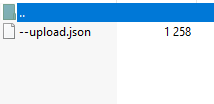
@full herald i got this file, i dont understand it xd https://prnt.sc/uc3aj0
 full herald
what command did you run?
edgy granite
-/lp export --upload
 dim wolf
what version of LP you have ?
copper bear
like this, right?
little sphinx
try and see? luckperms isnt a perms dictionary lol
edgy granite
@dim wolf 5.1.26
little sphinx
!update
wanton stratusBOT
You can download LuckPerms for Bukkit/Spigot, BungeeCord, Sponge, Nukkit and Velocity.
Additional downloads
dim wolf
^^
foggy quartz
Hi guys, I accidentally deleted my LuckPerms folder on my server, and lost all my groups, I uploaded a backup folder but i still don't have my groups, can you help me?
little sphinx
not much we can do tbh
 glacial prism
!help
wanton stratusBOT
Available commands:
!advanced
!api
!argumentbased
!ask
!bulkupdate
!bungee
!cauldron
!chat
!colours
!commandequivalents
!commands
!config
!context
!default
!downloads
!editor
!errors
!essentials
!extensions
!extracontexts
!faq
!helpchat
!inheritance
!install
!locale
!meta
!migration
!notworking
!nowildcard
!pasteit
!permissions
!placeholders
!selfhosting
!stacking
!storage
!suggestions
!switchstorage
!sync
!tracks
!upgrade
!usage
!userinfo
!verbose
!weight
!whyluckperms
!wiki
glacial prism
!essentials
wanton stratusBOT
Essentials
Make sure you are using EssentialsX and Vault for prefixes. For any other issues with Essentials, you should seek support in either #general or the official EssentialsX support Discord.
EssentialsX Discord
 open sparrow
!install
wanton stratusBOT
You can install LuckPerms on Spigot/Paper, Sponge, BungeeCord/Waterfall, Velocity and others. Check the installation guide for more info on setting up LuckPerms.
LuckPerms wiki
tiny beacon
ok ben I reported the thing I will be back later
 olive stone
!permissions
wanton stratusBOT
A list of permissions used by LuckPerms commands.
LuckPerms wiki
 steep granite
Is there a way to make more than one default role?
full herald
!default
wanton stratusBOT
LuckPerms provides a group that every player is added to upon joining the server, called default. You can use multiple methods to change the default group or change the name of it.
LuckPerms wiki
full herald
@steep granite I think it says how to do it at the bottom of the page
steep granite
Alright, thanks!
full herald
np
little sphinx
@full herald @steep granite Configure default assignments is no longer in use
you can only have one default group
full herald
alright
little sphinx
you can use Configure inheritance to add groups as parent of default
steep granite
I actually found a way. I did /lp group default parent add [role]
It doesn't create a new one, but it works for what I want to do
Thanks for the assistance, nonetheless
little sphinx
yea, which is Configure inheritance lol
 hasty drift
How do i make it so when people join the server they join the new group i made straight away?
little sphinx
!default
wanton stratusBOT
LuckPerms provides a group that every player is added to upon joining the server, called default. You can use multiple methods to change the default group or change the name of it.
LuckPerms wiki
full herald
yeah they removed that
@full herald @steep granite
Configure default assignmentsis no longer in use
 native stone
Am I blind, or is there no way to set a group to be the default group?
hasty drift
i just want to know how to make it so when people join the server they are put into the new group i made and not the default one
full herald
hasty drift
im not doing all the permissions again lol
full herald
@hasty drift
do this then
but skip the first one
and just parent the group to default
 young jetty
Hey, Im trying to set up admin priveliges for my Tekxit server, can you guys help me?
hasty drift
@full herald legend thank you!
little sphinx
!usage @young jetty
wanton stratusBOT
Here's a guide to help users understand and use LuckPerms for the first time.
LuckPerms wiki
young jetty
Im running 1.12.2 which version should I download?
little sphinx
!download
wanton stratusBOT
You can download LuckPerms for Bukkit/Spigot, BungeeCord, Sponge, Nukkit and Velocity.
Additional downloads
little sphinx
latest will work
young jetty
Yeah i think its that
 ashen crescent
What's command to add a player to a group
little sphinx
!usage
wanton stratusBOT
Here's a guide to help users understand and use LuckPerms for the first time.
LuckPerms wiki
young jetty
I dropped the Luckyperms jar into the mod file on my FTP, then restarted my server but its not appearing in the config directory of the FTP
little sphinx
mod?
young jetty
Do i need to create a plugins directory?
little sphinx
so you are using a forge server?
young jetty
Must be that then
little sphinx
wow
young jetty
Im well versed in all this mate haha
young jetty
So what do i do with that?
little sphinx
put both into mods folder
young jetty
The nukkit file and the spongeforge?
young jetty
Nevermind i hit it accidentally
got the right one
So then just restart and then what?
full herald
Just go through there and if you have any questions about the settings just ask them
but it should work pretty well out of the box
young jetty
So if i just change false to true if i want it to work?
ashen crescent
How do i remove a permission and remove a permission from a playerä
full herald
How do i remove a permission and remove a permission from a playerä
@ashen crescent /lp editor?
young jetty
How do i set up the storage for it?
ashen crescent
@full herald no by commands
i'm messing with configs when for example ranking and deranking
full herald
How do i set up the storage for it?
@young jetty it should just work, although if you need to sync multiple servers use the !sync command here
@ashen crescent
this might help
GitHub
A permissions plugin for Minecraft servers. Contribute to lucko/LuckPerms development by creating an account on GitHub.
young jetty
@full herald im just installing visual studio, is it just a matter of reading through it and changing what i need?
young jetty
Yeah ive just got a small server for me and my friends and im trying to give them teleport to waypoint permissions and permissions to use the cheat function on JEI,
Would i have to set up an admin group?
full herald
yeah
young jetty
thanks a lot for your help btw mate, id be fucked otherwise ahah
young jetty
So how do i set up an admin group?
little sphinx
!usage
wanton stratusBOT
Here's a guide to help users understand and use LuckPerms for the first time.
LuckPerms wiki
young jetty
in the server console?
full herald
yeah
young jetty
ill just read the wiki, ill hit you up if ive got any qs if thats alright mate?
full herald
yeah sure
young jetty
"lp user <your username> permission set luckperms.* true" ive put my username into this but i keep getting the error message user could not be found
full herald
does luckperms require that player to have joined the server once after the plugin was installed?
full herald
yeah might as well try
 cold garnet
Can you set luckperms to work directly with a virtual store
full herald
It would be the shop plugins job I think
But I believe most shop plugins support luckperms
 fleet mica
Hello, is it possible to sync luckperms to a discord and its roles?
foggy quartz
LP doesn't do the, you need another plugin for it
 hot mica
Im dumb sorry
full herald
!wildcard
wanton stratusBOT
Sorry! I do not understand the command !wildcard
Type !help for a list of commands.
hot mica
how would i do that
full herald
!help
wanton stratusBOT
Available commands:
!advanced
!api
!argumentbased
!ask
!bulkupdate
!bungee
!cauldron
!chat
!colours
!commandequivalents
!commands
!config
!context
!default
!downloads
!editor
!errors
!essentials
!extensions
!extracontexts
!faq
!helpchat
!inheritance
!install
!locale
!meta
!migration
!notworking
!nowildcard
!pasteit
!permissions
!placeholders
!selfhosting
!stacking
!storage
!suggestions
!switchstorage
!sync
!tracks
!upgrade
!usage
!userinfo
!verbose
!weight
!whyluckperms
!wiki
wanton stratusBOT
Wildcard issues
Some plugins are created in a way which results in odd behaviour when the root '*' wildcard is used.
More information:
hot mica
what command would i use to do that to a person
foggy quartz
My prefix isnt working ingame or in console
 gentle palm
!storage
wanton stratusBOT
LuckPerms allows you to store data in a variety of storage types, read about the benefits and drawbacks of each type on the wiki.
LuckPerms wiki
full herald
what command would i use to do that to a person
@hot mica lp user (username) permission set * true
My prefix isnt working ingame or in console
@foggy quartz thats your chat formatting plugin
#general to fix that
foggy quartz
I use EssentialsCHAT
full herald
!moss @foggy quartz
wanton stratusBOT
Essentials
Make sure you are using EssentialsX and Vault for prefixes. For any other issues with Essentials, you should seek support in either #general or the official EssentialsX support Discord.
EssentialsX Discord
full herald
they can help you there
 drifting hull
Do you have the key to the vault?
 hardy peak
does the prefix show in /lp user <username> info ?
 mental crag
The plugin dont load on my server
full herald
are you using the correct version for your server?
such as bukkit for spigot bukkit or paper servers
foggy quartz
!paste the startup logs @mental crag
wanton stratusBOT
Please use pastebin!
Seeing a paste of the problem makes everything so much easier! Use https://bytebin.lucko.me/ for easy pasting!
For console errors:
Pastebin any relevant segments of the console log. If it's a startup error, this includes the entire startup log!
Other errors:
Pastebin the entire LuckPerms config file (passwords removed) as well as any other relevant files!
hot mica
how to remove all perms from somebody
foggy quartz
lp user (user) permission clear
hot mica
Thanks 
foggy quartz
Maybe this will help?
 hot mica
How do i allow other admins to do things they are "exempt" from
Like viewing other admins inventories and ender chests
foggy quartz
Give them the permission for it?
hot mica
What i mean is when i give someone the * permsion it doesnt allow me to view there inventory/ E chest
it says they are exempt
wanton stratusBOT
Wildcard issues
Some plugins are created in a way which results in odd behaviour when the root '*' wildcard is used.
More information:
hot mica
What does that mean exactly?
foggy quartz
Read the linked page
hot mica
I see
 opaque garden
hello world
hot mica
But how do I do things to other admins who have *
foggy quartz
You set the permission that "protects" them from it to false for them
It wildly depends on the plugins/mods you're using, there isn't one permission that controls all that
hot mica
What comman would that be
foggy quartz
!commands check "Permission commands", and please, please, read your plugins/mods documentation to see what permissions they use for what
wanton stratusBOT
Find all of the available LuckPerms commands on the wiki.
General commands
User commands
Group commands
Permission commands
Parent commands
Meta commands
Track commands
Log commands
LuckPerms wiki
hot mica
Alright thank you
foggy quartz
Yw
 halcyon shard
hello, can i move my data to h2/sqlite db from mysql?
full herald
https://github.com/lucko/LuckPerms/wiki/Switching-storage-types read this @halcyon shard
GitHub
A permissions plugin for Minecraft servers. Contribute to lucko/LuckPerms development by creating an account on GitHub.
halcyon shard
thank you
full herald
np
tiny beacon
do we know when my issue with newer luckperms will be fixed? or just leave on the github page
edgy granite
i have a question, why is my prefix in tab like this (photo) and above me like this (photo) ?? https://prnt.sc/uc6az4

the tab prefix is true, but the prefix above me is false? hmu
full herald
Thats due to the plugin that your using above your head
Most likely not a luckperms issue
edgy granite
Is the only way to fix it, to switch the plugin?
edgy granite
okay ty
full herald
np
 snow needle
how do i make it to where when someone buys a rank, it doesnt show the default prefix, it shows the paid rank prefix
wanton stratusBOT
You can set prefixes, suffixes and other meta data in LuckPerms for players and groups. Note that LuckPerms does not manage chat. You need to use another plugin to show prefixes/suffixes in chat.
LuckPerms wiki
full herald
well then if you have a chat formatter such as essx chat then it will work
snow needle
yeah i ahve ess chat
full herald
you also shouldnt have to worry about putting a false on that other prefix if you have weights setup
then your all setup
foggy quartz
Yeah, setting prefix nodes, suffix nodes and group nodes to false won't do what you think if anything
mental crag
luck perms dont load
foggy quartz
Errors?
mental crag
see the log
foggy quartz
!pasteit
wanton stratusBOT
Please use pastebin!
Seeing a paste of the problem makes everything so much easier! Use https://bytebin.lucko.me/ for easy pasting!
For console errors:
Pastebin any relevant segments of the console log. If it's a startup error, this includes the entire startup log!
Other errors:
Pastebin the entire LuckPerms config file (passwords removed) as well as any other relevant files!
mental crag
full herald
so then whats your problem?
snow needle
i restarted my server to see if it would fix it
mental crag
me use /lp help and dont see nothing
foggy quartz
@mental crag please upgrade your server to 1.8.8 and check pinned messages
foggy quartz
Np
 proud hound
Yes, but no
 stark cave
yes but yes
tiny beacon
Fefo the luckperms kept disabling cuz of 1.16.2 error on 5.1.98 but on the spigot version it worked fine 5.1.93
snow needle
the prefix thing still isnt working
snow needle
the prefixes work but when i up someone rank, it doesnt show the new prefix
i deleted the false statement
but the weight of each is still the same
foggy quartz
Run /lp group vip meta info and share a screenshot of the output
snow needle
foggy quartz
You have your weights the wrong way around
Higher number = more property
Priority***
mental crag
The server stop alone
foggy quartz
!weights for more lol
wanton stratusBOT
LuckPerms allows you to set weights in order to determine the priority of certain nodes, like permissions and even prefixes. A higher weight number is a higher priority.
LuckPerms wiki
foggy quartz
@mental crag do you have authme?
mental crag
Yes
foggy quartz
!faq last question in here
wanton stratusBOT
Check out some of our frequently asked questions.
LuckPerms wiki
proud hound
!context
wanton stratusBOT
You can set a permission or group on a per-world/per-server basis, through what we call "contexts".
LuckPerms wiki
 glacial atlas
Ok so I've been trying to get LP to connect to my MariaDB database. Works on my other server but on my second server it doesn't work even with the SAME settings
mental crag
@foggy quartz i need a login plugin
wanton stratusBOT
Hey GatoGamer! Please don't tag helpful/staff members directly.
mental crag
What use for the server?
proud hound
Don't use offline mode
glacial atlas
So this is my settings I'm trying to connect with
https://hastebin.com/ulocetecir.bash
proud hound
What error do you get
glacial atlas
I don't get an error
proud hound
!paste your whole startup log
wanton stratusBOT
Please use pastebin!
Seeing a paste of the problem makes everything so much easier! Use https://bytebin.lucko.me/ for easy pasting!
For console errors:
Pastebin any relevant segments of the console log. If it's a startup error, this includes the entire startup log!
Other errors:
Pastebin the entire LuckPerms config file (passwords removed) as well as any other relevant files!
glacial atlas
My host service running on my linux server suppresses garbage from console. Hang on
Always forget about that lol
proud hound
Console lines are never ever garbage
proud hound
HANGING
 solar river
i still need help. can someone walk me through how to use context
like i made a context but i dont know what to do
glacial atlas
GitHub
A permissions plugin for Minecraft servers. Contribute to lucko/LuckPerms development by creating an account on GitHub.
proud hound
@solar river you don't 'make' contexts, you add them to permissions
There are several examples on the wiki I linked
definitely never touch the contexts.json to add world contexts to perms
solar river
ik
glacial atlas
Larry is that a failed to connect error from LP or something else
mental crag
proud hound
@glacial atlas try deleting the libs folder and restart. If you get the same error, use the link in the first pin and try 5.1.93
glacial atlas
ok
proud hound
@mental crag read the log
WARN Aborting initialization of AuthMe: [InjectorReflectionException]: Could not invoke method 'setup' for fr.xephi.authme.permission.PermissionsManager@4555d20a
05.09 20:00:16 [Server] WARN THE SERVER IS GOING TO SHUT DOWN AS DEFINED IN THE CONFIGURATION!
and read what fefo linked
!faq
wanton stratusBOT
Check out some of our frequently asked questions.
LuckPerms wiki
proud hound
The last question on here ^
proud hound
That log says otherwise
GitHub
A permissions plugin for Minecraft servers. Contribute to lucko/LuckPerms development by creating an account on GitHub.
read that^
do what it says
proud hound
you've also removed luckperms
glacial atlas
Oh, 5.1.93 works perfectly thanks!
glacial atlas
Yus
mental crag
you've also removed luckperms
no, the plugin is loaded, but nothing appears when i use it
proud hound
The portion of startup log you sent does not include LP starting up. Until you send a full, fresh startup log including everything with LP installed I will probably be able to help a lot more
mental crag
that's the issue, that doesn't appear to me, only that it's loaded
I sent the startup log, but nothing appears when I use it
foggy quartz
Hello, its possible to convert groupmanager config to luckperms ?
for permissions, group etc
proud hound
!migration yep @foggy quartz
wanton stratusBOT
Learn about the process of migrating from another permission plugin.
LuckPerms wiki
proud hound
@mental crag send a fresh startup log - make sure LP is in the plugins folder. At the very least there will be an error
foggy quartz
Thanks you
 robust mantle
Hey I have a question. I copied the luck perms folder and luck perms jar into my new server but it wont work. The Editor is completely empty. Not sure why. On my old server with the same exact files it's working fine. Same paper version, same plugins, etc
Any ideas?
proud hound
What storage method are you using
robust mantle
I notice that the db-file keeps resetting to default... What do you mean by storage method?
proud hound
If you use a database, your perms are on that database
that would be your storage method
MySQL, MariaDB, Mongo, PostgreSQL etc
or perhaps file database, like h2
or maybe flatfile like yaml or json
robust mantle
So you can't just copy the files over and expect it to work?
robust mantle
To be honest i don't know. I never set up anything like SQL
proud hound
start up the old server, run lp export <any name>
a file will be generated called <any name>.json.gz - move that file into the luckperms folder of the new server
start the new server, run lp import <any name>.json.gz
robust mantle
I'm waiting on it, reason i'm moving servers is cuz old hoster had an issue with server clock and wouldn't fix it. Might be slow
Console's telling me it's creating the files in the LuckPerms folder but they don't show up fsr
proud hound
refresh if you're using a host's website
robust mantle
Using FileZilla
proud hound
refresh filezilla :p
proud hound
np!
robust mantle
and then if i can clarify something:
||[LuckPerms] An exception was thrown by github.scarsz.discordsrv.hooks.permissions.LuckPermsHook whilst estimating potential contexts||
I'm guessing this is an incompatibility with discord srv ?
if u dont know that's okay lol
it's followed by a bunch of errors
wanton stratusBOT
Please use pastebin!
Seeing a paste of the problem makes everything so much easier! Use https://bytebin.lucko.me/ for easy pasting!
For console errors:
Pastebin any relevant segments of the console log. If it's a startup error, this includes the entire startup log!
Other errors:
Pastebin the entire LuckPerms config file (passwords removed) as well as any other relevant files!
foggy quartz
 proud hound
The command needs a true or false as the last argument
for global groups or something
lp migration groupmanager true iirc
@robust mantle that's a warning due to a sanitizer added recently, but shouldn't break anything
robust mantle
alright epic. Thank you for you amazing help
proud hound
np!
foggy quartz
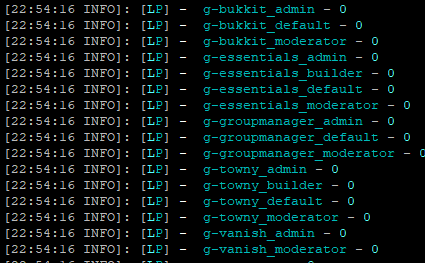
why i have this https://prnt.sc/uc7k9o in my group after migration ?
 foggy quartz
I just want for world group, no the end etc
 acoustic wing
How can I filter verbose to only show luckperms permissions?
like: luckperms.user.meta.settempprefix
proud hound
lp verbose on luckperms
acoustic wing
I tried that
acoustic wing
space isn't a delimeter? I see
proud hound
permissions can be any string, even though conventions usually say otherwise
acoustic wing
thanks Larry
proud hound
np
 zinc smelt
Hey how do i add another person to a group?
zinc smelt
Ah okay thank you very much
robust mantle
👍
foggy quartz
luckperms prefix is not compatible with essentials ?
because all perm work, but prefix no
!userinfo screenshot please
wanton stratusBOT
Please take a screenshot!
Seeing a screenshot makes everything so much easier!
For prefixes not showing up in chat:
/lp user <user> info.
For database errors:
Server console: /lp info | Proxy console: /lpb info.
foggy quartz
Is that the correct prefix that should show?
yes
but i don't have prefix in chat
and my format chat is good
!chat please read this embed :p
wanton stratusBOT
LuckPerms does not display things in chat!
LuckPerms is only able to send information to formatting plugins so that they display them properly. LuckPerms does not put the prefix in front of your name, you need a chat formatting plugin to do it, and you need Vault. Same goes for the tablist! If the information appears correctly when you run /lp user <user> info, LuckPerms is doing its job!
Prefix isn't showing?
What plugins can I use to format chat?
 digital acorn
Hey all. I'm having issues with LuckPerms and WorldEdit. I belong to a group that has worldedit.*, but I cannot use //wand for whatever reason.
Oh, strange. I can use the command but the autocomplete is blocked like I don't have access to it.
foggy quartz
have you tried relogging?
digital acorn
No, let me try
Ahh, that did it.
Cheers
How would I disable building for the default group?
proud hound
You'd need a plugin like worldguard
foggy quartz
can someone tell me why tracks and weights arent working for me
please help
send an editor link so we can take a look?
idk
I can't help with no details
Nobody can
tiny beacon
have you tried /lp group <name> weight <amount> or whatever it is?
and tracks, you create one, add a group to it and stuff i forgot exactly
foggy quartz
the track is made but no one inherits permissions from lower ranks on the track
Tracks don't set up the inheritance for you
tiny beacon
ah, did you parent each group to each other?
foggy quartz
and also the prefixes of higher weights wont show over lower weights
You have to do it yourself
Also, prefixes have their own weights, separate from the group weights, completely independent
do they have to parent ALL the ranks in the track?
tiny beacon
luckperms tracks and such is confusing af at first but you'll get it just is frustrating at first
nah you just parent groups at first
foggy quartz
so 3 has 2 and 2 has 1?
tiny beacon
like for example: chatmod - parented to default
support is parented to chatmod, mod is parentered to support and admin is parented to mod
./lp group <group> parent set <group name>
foggy quartz
!inheritance
wanton stratusBOT
Learn about inheritance.
LuckPerms wiki
foggy quartz
ok i fixed that
but i still dont know why the prefix weights wont work
the prefix weight is in the node right?
its the number between prefix and the title?
send an editor link so we can take a look?
ok
can i send it in dms
They are safe to share
ok
Can you point me a user whose prefix won't show properly?
the gym leaders
for some reason they dont show over ranks like hiker and ace trainer
Can you share a screenshot of /lp user <user> info on a user whose prefix won't show properly?
here u go
Yeah that's not what I asked for
Can you share a screenshot of
/lp user <user> infoon a user whose prefix won't show properly?
wanton stratusBOT
Hey FONC! Please don't tag helpful/staff members directly.
foggy quartz
ooohhh sorry
 maiden tundra
can luckperms be used with database using a server with a different ip?
 split veldt
Yes it can
foggy quartz
is that correct?
That does look correct
Hi guys! I am having a small issue, i am using DeluxeHub and i thought the permission node was %luckperms_prefix%
It no longer works...
Do you have placeholderapi installed?
Yes i do
And it is green in the /pl command
Do you have the LP PAPI expansion installed?
No? I did not need that in 1.8
Uhm, yes you do?
I am now in 1.16.2
LuckPerms doesn't integrate PAPI placeholders by itself
/papi ecloud download LuckPerms
and /papi reload
Ok... I'll check
Well i want the prefix for elite 4 to show
but it shows ace trainer
oh and also i noticed it will use the username color of other groups
Ohh! It works noe
so even though someone has electric gym their username color is for hiker
Thx!!
 rain shard
Hey, somehow LuckPerms isn't working on my server and the console just says [21:24:07 ERROR]: Error occurred while disabling LuckPerms v5.1.93 (Is it up to date?)
full herald
Hey, somehow LuckPerms isn't working on my server and the console just says [21:24:07 ERROR]: Error occurred while disabling LuckPerms v5.1.93 (Is it up to date?)
@rain shard what version is your server?
rain shard
1.12.2
foggy quartz
!paste the startup logs
wanton stratusBOT
Please use pastebin!
Seeing a paste of the problem makes everything so much easier! Use https://bytebin.lucko.me/ for easy pasting!
For console errors:
Pastebin any relevant segments of the console log. If it's a startup error, this includes the entire startup log!
Other errors:
Pastebin the entire LuckPerms config file (passwords removed) as well as any other relevant files!
full herald
i mean it is out of date, but not by that much
foggy quartz
shouldn't make that much of a difference
rain shard
I have used it before, idk why its not working now
foggy quartz
paste the logs
rain shard
How do I do that
rain shard
lemme just stop ip real quick
I had the problem in the morning, let me recreate the error
 open mirage
!errors
wanton stratusBOT
Here's a page with some common storage system errors.
LuckPerms wiki
 wanton stratusBOT
Please use https://bytebin.lucko.me to send files in the future. I have automatically uploaded latest.log for you: https://bytebin.lucko.me/6lVMQ7tR1m
foggy quartz
thanks clippy
rain shard
Roger that
foggy quartz
!faq last question in here 👇
wanton stratusBOT
Check out some of our frequently asked questions.
LuckPerms wiki
foggy quartz
your.. what
 raven zealot
any idea why there are so many words
maiden tundra
i have my config like this and same errors x_x
i see the Common errors and dont see any bad
raven zealot
does with all ranks
rain shard
It worked! Thanks a thousand!
Strangly It also worked before with Authme, so I thought that wasn't the issue
foggy quartz
Do you have Multiverse? @raven zealot
raven zealot
yeah
foggy quartz
oh I see the other part of the issue now, you'll want to turn off add-prefix-suffix in EssX config file as well
raven zealot
they are hashtagged??
 mossy depot
YO!!
foggy quartz
sup
mossy depot
Will lucky perm keep a list of players that have joined the server if even but for a short moment?
I'm looking at using Bukkitperms atm but this Luckyperm is my intrest
interest*
foggy quartz
Will lucky perm keep a list of players that have joined the server if even but for a short moment?
It won't store the users who don't have any special permissions
mossy depot
I used to host a server a very long time ago I used PEX
foggy quartz
If that answers your question
Users that join and are just in the default group aren't stored, since they just are in the default group, there is no need to store that data
mossy depot
So if you have a default user group for all new people that join I could in a way keep a log of all the users that have come through?
lul
foggy quartz
what?
mossy depot
you answered my question as I was asking it
full herald
why wouldnt you use a different plugin to log players?
foggy quartz
If you just want to keep record of all the players that have ever joined, Minecraft by itself already does that, it's called "world/playerdata"
full herald
lol
mossy depot
I was looking around but have not see a plugin for logging that yet
foggy quartz
What is it you want to achieve exactly?
mossy depot
just to know how many unique ID's have logged into the server
foggy quartz
Minecraft by itself already does that, it's called "world/playerdata"
mossy depot
how do you make sense of the gibberish file name?
 bitter coral
It's the UUID
foggy quartz
Tobi's been typing for a decade and said 3 words lol
bitter coral
Count all the files and you should know how many people have joined your server (there's a command for that for sure, StsckOverflow 🙏)
mossy depot
hm Gotta be a better way. So is luckyperm better than PermissionsBukkit?
foggy quartz
!whyluckperms will answer a few of those questions of yours ;)
wanton stratusBOT
Why should you choose LuckPerms? Read here to find out.
LuckPerms wiki
bitter coral
You're on the LuckPerms Discord, so don't expect any neutral answeer, especially not from me, lol
mossy depot
I expect bias
bitter coral
LP is best ❤
raven zealot
ok that actually removed one thanks
mossy depot
So I can still create the same system as my old sever where I have a starting group that can only interact with a button and after they do that.. they be given a rank up to work their way through a rules room to finally get into the server?
full herald
yeah probably if you use command hooks or something
mossy depot
Yeah Will have to use some command signs and such
foggy quartz
yeah probably if you use command hooks or something
in the couple latest versions, you can disableregister-command-list-dataand it'll work fine in command blocks @full herald
full herald
alright cool
mossy depot
Should still work with command signs though yeah?
 feral shard
full herald
feral shard
full herald
!moss ask on their server
wanton stratusBOT
Essentials
Make sure you are using EssentialsX and Vault for prefixes. For any other issues with Essentials, you should seek support in either #general or the official EssentialsX support Discord.
EssentialsX Discord
hot mica
is ther someone who made a copy and paste for all perms in the LP editor?
full herald
no because everyone has different groups and stuff
hot mica
i see
full herald
you probably dont want your player to have /home but maybe another person does
I think a few of those exist though
full herald
But they can be 5-20 dollars
hot mica
thats sad
full herald
so it must have everything
@hot mica You could use the * permission, although its not recommended because it can activate other permissions such as (for example, this permission probably doesnt exist) essentials.nohomes
hot mica
yea
bitter coral
!nowildcard
wanton stratusBOT
Wildcard issues
Some plugins are created in a way which results in odd behaviour when the root '*' wildcard is used.
More information:
mossy depot
Thanks for infos.. I may check this out.
maiden tundra
Only needs port 3306 for MySQL database access?
full herald
yeah
foggy quartz
That's the default port
If you assigned something else, you'll have to use that other one lol
rain shard
Whenever I try to imput a command it shows nothing
full herald
what version of lp are you using
rain shard
last one
 flat parcel
that tells us nothing.
We need an actual version number
(/lp info or /ver Luckperms)
rain shard
LuckPerms-Bukkit-5.1.93
wanton stratusBOT
Please use pastebin!
Seeing a paste of the problem makes everything so much easier! Use https://bytebin.lucko.me/ for easy pasting!
For console errors:
Pastebin any relevant segments of the console log. If it's a startup error, this includes the entire startup log!
Other errors:
Pastebin the entire LuckPerms config file (passwords removed) as well as any other relevant files!
rain shard
nothing shows in the console
full herald
just copy and paste your whole console
im sure theres something like Luckperms was disabled because: reason
flat parcel
startup log?
rain shard
you want my last log?
flat parcel
yes
rain shard
okay
flat parcel
you can also just dump the latest.log here and @wanton stratus will automatically upload it for you
wanton stratusBOT
Please use https://bytebin.lucko.me to send files in the future. I have automatically uploaded latest.log for you: https://bytebin.lucko.me/JtMRJ6mUJf
rain shard
Thanks slippy
flat parcel
What server software is this?
flat parcel
yeah that was a really wierd log lol
wanton stratusBOT
Please use https://bytebin.lucko.me to send files in the future. I have automatically uploaded latest.log for you: https://bytebin.lucko.me/nT8aKXMSMv
flat parcel
and what server software is this?
flat parcel
Is magma a forge-bukkit hack, or is it some sort of sponge fork?
rain shard
magma is just like any another software, it allows to use forge and spigot
flat parcel
!thermos
wanton stratusBOT
Sorry! I do not understand the command !thermos
Type !help for a list of commands.
flat parcel
!kcauldron
wanton stratusBOT
Sorry! I do not understand the command !kcauldron
Type !help for a list of commands.
wanton stratusBOT
Available commands:
!advanced
!api
!argumentbased
!ask
!bulkupdate
!bungee
!cauldron
!chat
!colours
!commandequivalents
!commands
!config
!context
!default
!downloads
!editor
!errors
!essentials
!extensions
!extracontexts
!faq
!helpchat
!inheritance
!install
!locale
!meta
!migration
!notworking
!nowildcard
!pasteit
!permissions
!placeholders
!selfhosting
!stacking
!storage
!suggestions
!switchstorage
!sync
!tracks
!upgrade
!usage
!userinfo
!verbose
!weight
!whyluckperms
!wiki
flat parcel
!cauldron
wanton stratusBOT
Installing LuckPerms on a Cauldron, Thermos and any other Forge + Bukkit server software may require additional steps.
LuckPerms wiki
rain shard
But it worked before, thats the problem
flat parcel
And also, you are trying to run sponge stuff on a forge/bukkit server, which as I'm sure you can understand, obviously won't work
and a really old version of LP at that
rain shard
yup, I used to use sponge
flat parcel
Either way that is where my support stops, as you have said you are using authme, and I do not support those who support or encourage piracy
rain shard
Thanks for the support anyways!
I have Original minecraft, but my friends don't
thats sad
flat parcel
tell them to buy it, it's only $25 and it's literally stealing from mojang
rain shard
I know but in the quarentine, things are going hard to them
Thats why I'm also hosting the server to them
Anyways, Thanks for the support!
 chrome grove
Hey Team Quick Q, Is there a auto advance the track based on time, I am currently running an MC Eternal Server with Sponge
flat parcel
Would need an external plugin to handle that
chrome grove
Would you have a recommendation on what plugin would work witht hat
flat parcel
Nope, I'd recommend making use of google and the like
flat parcel
!moss
wanton stratusBOT
Essentials
Make sure you are using EssentialsX and Vault for prefixes. For any other issues with Essentials, you should seek support in either #general or the official EssentialsX support Discord.
EssentialsX Discord
flat parcel
(Non-LP issues in the appropiate discord or #general, I assume you use EssX for invsee)
hot mica
I understand but all commands have been put under a mod role
So i assume exempt is appart of LP
flat parcel
False.
hot mica
Dang
flat parcel
We do not provide an exempt system
flat parcel
that is on the side of the plugin that provides invsee
!moss if you are using EssentialsX for invsee, this is their support discord.
wanton stratusBOT
Essentials
Make sure you are using EssentialsX and Vault for prefixes. For any other issues with Essentials, you should seek support in either #general or the official EssentialsX support Discord.
EssentialsX Discord
hot mica
Ohh I found it
So I use nucleus as a all around plugin and it has many commands
So theres a exept thing that stops people fro doing a command on someone else
And i disabled it in LP but it still is doing it
So
foggy quartz
Hey! I'm new to luckperms, I installed it for nukkitX (bedrock edition) but I can't seem to find a tutorial for how to use it. Can someone please help?
flat parcel
!usage 😛
wanton stratusBOT
Here's a guide to help users understand and use LuckPerms for the first time.
LuckPerms wiki
foggy quartz
Thanks!
digital acorn
What console program was used to create the screenshots for the LuckPerm documentation?
flat parcel
!editor and just normal windows cmd.exe I expect
wanton stratusBOT
LuckPerms offers an easy to use, powerful Web Editor, with which you can add, delete and change permissions of groups and players.
LuckPerms wiki
 oak idol
anyone know how i can make it so only admins can use a certain warp in essentails?
foggy quartz
!essentials they'll help you out :)
wanton stratusBOT
Essentials
Make sure you are using EssentialsX and Vault for prefixes. For any other issues with Essentials, you should seek support in either #general or the official EssentialsX support Discord.
EssentialsX Discord
 swift quest
Hi, What is the command for migrations permissionEx with luckperms../lp migration
little sphinx
!migration
wanton stratusBOT
Learn about the process of migrating from another permission plugin.
LuckPerms wiki
 upper scarab
someone manage to use luckperms on pterodactyl on same machine? i cant u.u
open mirage
did you follow the checklist in #support-2 pins
 quick river
Hey can you not edit meta stuff in the web editor anymore?
wanton stratusBOT
LuckPerms offers an easy to use, powerful Web Editor, with which you can add, delete and change permissions of groups and players.
LuckPerms wiki
 hasty tree
I mean you always have been able to @quick river what makes you think otherwise?
little sphinx
huh
its just a permission node
GitHub
A permissions plugin for Minecraft servers. Contribute to lucko/LuckPerms development by creating an account on GitHub.
quick river
I was ctrl+f-ing "[M]" and not seeing it but I am looking at other ranks and seeing it so who knows.
Vergil luck
foggy quartz
its just a permission node
noooooooooo ;-; it is not
little sphinx
wot
hasty tree
I was ctrl+f-ing "[M]" and not seeing it but I am looking at other ranks and seeing it so who knows.
@quick river where did you get the [M] from?
a bit more context on the issue would be good
quick river
My prefix
It's not an issue
I'm sure it just wasn't loaded on the dom for some reason
No worries
hasty tree
nodes from other groups wont be loaded into dom, no
a proper search feature will be added soon
foggy quartz
SOON™️
quick river
Well I was in the right group
Lots of perms though
not sure what's up there :I
Probably just a Vergil error
 toxic wagon
yeah-nah
foggy quartz
yeahnah
 cloud tartan
Why does it show group name and not prefix?
toxic wagon
That's upto your chat plugin
foggy quartz
!chat please read this box 👇
wanton stratusBOT
LuckPerms does not display things in chat!
LuckPerms is only able to send information to formatting plugins so that they display them properly. LuckPerms does not put the prefix in front of your name, you need a chat formatting plugin to do it, and you need Vault. Same goes for the tablist! If the information appears correctly when you run /lp user <user> info, LuckPerms is doing its job!
Prefix isn't showing?
What plugins can I use to format chat?
cloud tartan
lol you are right guys, it's because the rank is called default
and I have chat configured only for default rank
ty
foggy quartz
lol np
flat parcel
!bu;lupdate
wanton stratusBOT
Sorry! I do not understand the command !bulupdate
Type !help for a list of commands.
little sphinx
a certain list or all players?
flat parcel
wow.
toxic wagon
Remove groups from players or just the permissions
little sphinx
!bulk
wanton stratusBOT
Quickly update a large amount of user and group permissions by using the bulkupdate command.
LuckPerms wiki
 calm rock
ty
 mint totem
whats the command again for a temporary permission
toxic wagon
!commands Permissions Commands
wanton stratusBOT
Find all of the available LuckPerms commands on the wiki.
General commands
User commands
Group commands
Permission commands
Parent commands
Meta commands
Track commands
Log commands
LuckPerms wiki
mint totem
thank
 tiny lantern
how do i make a group the default group?
little sphinx
!default
wanton stratusBOT
LuckPerms provides a group that every player is added to upon joining the server, called default. You can use multiple methods to change the default group or change the name of it.
LuckPerms wiki
toxic wagon
!default
wanton stratusBOT
LuckPerms provides a group that every player is added to upon joining the server, called default. You can use multiple methods to change the default group or change the name of it.
LuckPerms wiki
little sphinx
loll you cannot change the default group, but you can config inheritancee
tiny lantern
so what command would i use to inherit from a group called member to the default
sorry im new to this
drifting hull
!inheritance
wanton stratusBOT
Learn about inheritance.
LuckPerms wiki
tiny lantern
I dont see the usage for how to inherit from another group on there, hence why i came here
wait i think i found it
drifting hull
I dont see the usage for how to inherit from another group on there, hence why i came here
That’d be weird
Oh nice
 covert swan
please help
toxic wagon
!ask
wanton stratusBOT
Please ask your question!
Please ask the question you have. Don't ask to ask, or ask to DM someone. There are people here to help you, but we need to know what to help you with, so please just ask the question you want to in as much detail as possible!
Or, try here first:
Why shouldn't I ask to ask?
toxic wagon
@covert swan If you're needing help with something, then you need to explain the issue.
toxic wagon
Luck in disquise
foggy quartz
how do you use world edit without op using luck perms permissions so i dont have to give people op to use world edit instead just give a certian group world edit?
 native furnace
Yo im high as hell and want someone to help me out with my permissions just starting out
wanton stratusBOT
Here's a guide to help users understand and use LuckPerms for the first time.
LuckPerms wiki
foggy quartz
whats that command
toxic wagon
Read that Link as well @foggy quartz
foggy quartz
but whats the command to do it
native furnace
thanks chief
toxic wagon
But read that link it will tell you
foggy quartz
ok thanks
 feral river
What is needed for CP to be accessible thru server console?
This may not be a LP thing, but still.
feral river
Alright, thanks.
little sphinx
clearly it says perms is undefined
means you need to set them
if you set them but it still doesnt work, them prob you are doing it wrongly, so do tell us how you are going about setting permissions
quick river
undefined = true?
little sphinx
no....
toxic wagon
undefined = not set
quick river
so why does verbose say I have it
Trying to figure out why some players have permissions they shouldn't
as in
little sphinx
what command did you run?
little sphinx
to check for perms
quick river
the command at the bottom of the screenshot was me trying to deop myself
but I'm not op so don't have permission
little sphinx
the one that show perms is undefined
quick river
ah, /lp user VergilPrime permission check animatednames.group.prisoner
and checkinherits
and then the same two commands for all of 6 groups I am in
all show undefined
I also have another player logged in who returns true for featherboard.group.default despite only being in one group, having no permissions outside that group and that group not having the permission
both animatednames and featherboard are by MaximVDW and so far those are the only two plugins I have seen this issue in, but that might be because they are all I have been working with so far
quick river
little sphinx
prob you gave perms wrongly, send editor link, a new session
quick river
what do you mean "gave perms wrongly"
I'll admit I'm tired but you can see what permissions I am checking in the first screenshot
toxic wagon
send a new /lp editor link
quick river
Privately or?
toxic wagon
here
quick river

LuckPerms - A permissions plugin for Minecraft servers.
LuckPerms is a permissions plugin for Minecraft servers.
wanton stratusBOT
LuckPerms allows you to set weights in order to determine the priority of certain nodes, like permissions and even prefixes. A higher weight number is a higher priority.
LuckPerms wiki
quick river
toxic wagon
-10 for owner means default is more important
quick river
correct
little sphinx
usually ppl dont want that but ok.......
anyways i dont see animatednames.group.prisoner (i mean i may just missed it)
quick river
Owner is just used for testing and stuff
so I don't generally pay attention to it
I'm liable to mess with it's weight for testing purposes etc
I am the owner so the only person it effects is me.
little sphinx
anyways i dont see
animatednames.group.prisoner(i mean i may just missed it)
@quick river where did you set this perm node?
quick river
I'm not convinced I have set it :/
it would be under prisoner but I don't think I ever set it
bitter coral
/lp search animatednames.group.prisoner should say where it is set (if it is set)
quick river
It's not a prison server, prisoner is literally jailed players so it's primarily used for blocking players from doing things
it's not set
bitter coral
Then set it
quick river
Tobi you're aware of the fact that the problem is that it's returning true even though I don't have it right?
You are saying giving it to a group will cause it to stop applying to me?
toxic wagon
Do you have * or animatednames.*
quick river
or I should set to false
little sphinx
its possible due to your animatednames plugin having child node given? so like animatednames.admin or smt gives a set of child perm nodes
little sphinx
ah
quick river
:I
little sphinx
bcu * means all permission
quick river
yeah that was it
I didn't think of it because I don't generally use star perms if I can avoid it
little sphinx
!nwc yea
wanton stratusBOT
Wildcard issues
Some plugins are created in a way which results in odd behaviour when the root '*' wildcard is used.
More information:
quick river
also that search thing is super helpful, thanks Tobi
foggy quartz
who owns luck perms
toxic wagon
Luck does
quick river
the people!