
#support-1
1 messages · Page 971 of 1
 proud flax
also i was curious about what displayname does. i wanted to have the players ranks be shown. and wasent sure if that can be done with lp
 foggy quartz
!prefix for that
 wanton stratusBOT
You can set prefixes, suffixes and other meta data in LuckPerms for players and groups. Note that LuckPerms does not manage chat. You need to use another plugin to show prefixes/suffixes in chat.
 LuckPerms wiki
foggy quartz
LuckPerms wiki
foggy quartz
Let's say that the displayname is an "alias" for the group
basically mods where able to break things in a region claim but once they were promoted they couldnt anymore
well that's interesting because I don't see any difference whatsoever between mod permissions and admin permissions (other than the weight, displayname and the group they inherit)
Excluding those, they have the exact same set of permissions
 open monolith
is there any way to import from luckperms to pex?
foggy quartz
!migrate
wanton stratusBOT
Sorry! I do not understand the command !migrate
Type !help for a list of commands.
foggy quartz
clippy pls >_>
 proud hound
!migration
wanton stratusBOT
Learn about the process of migrating from another permission plugin.
LuckPerms wiki
foggy quartz
oh I read it the other way around
proud flax
so from a lp standpoint looks good?
foggy quartz
Yep
proud flax
hmmm
foggy quartz
Might be op
If you're testing with an op, everything breaks
open monolith
yes but im using luckperms and i need to migrate to aquacore but they only mirgrate from permissionsex
proud flax
op?
foggy quartz
operator
proud flax
like in admin the op permmision?
foggy quartz
nono, being actual server operator
/op
Maybe the person that was able to break everything was op?
proud flax
oh yeah im the only server op
wanton stratusBOT
LuckPerms provides a verbose command to help you find out what permissions a command/plugin is checking.
LuckPerms wiki
foggy quartz
wat
proud flax
i got a new player and when they joined and talked in chat [TEAM] was in the beginning of there username then they logged out then in again and it was gone
 tiny delta
is there a way to activate all commands for one parent
foggy quartz
i got a new player and when they joined and talked in chat [TEAM] was in the beginning of there username then they logged out then in again and it was gone
yeah luckperms doesn't really do that unless you set a prefix for it (which I see none of), must be another plugin behaving
is there a way to activate all commands for one parent
you want to give a group/user all permissions?
proud flax
ok i was just concerned that they where using hacks
foggy quartz
Honestly, chat "hacks" would be the least of my concerns lol
proud flax
lol those are a thing?
foggy quartz
How can I use hex code in the Luckperms plugin?
 hasty tree
like you would with any plugin
note that the rgb support comes from the formatting plugin you use not LP
proud flax
is there a way to hide /commands for players? like the autocomplete?
hasty tree
not with LP
proud flax
dang
 clever shale
There are plugins that hide that sort of stuff
 charred lion
is there a way to use luckperms with commandblocks?
i want to make the admin role toggleabble
or
the admin role for an specific user
proud hound
!argumentbased
wanton stratusBOT
Fine tune exactly what users with permission to use LuckPerms can do.
LuckPerms wiki
charred lion
thanks!
charred lion
so, if my dude has this one, he should be able to toggle between admin and default without a problem?
he really wants to play default with no issues
hasty tree
there will be other nodes to use as well
best way to find out which ones is by running verbose mode after enabling the argument-based-command-permissions option in the config
charred lion
well if he can set the parents we win
his parents*
Sinner
@foggy quartz i use solidworks and the default type blocks the view
wanton stratusBOT
Hey Jolmev! Please don't tag helpful/staff members directly.
charred lion
srry clippy
 weak wing
hi i tried putting luckperms into my server but it wont work
hasty tree
!nw
wanton stratusBOT
Please tell us what's going on!
We really would absolutely love to help you out! However, telling us that it isn't working wastes everyone's time. Please, just describe the issue you're having clearly and with as much detail as possible, and send any relevant screenshots of whatever problems you're having.
For Console Errors:
charred lion
ok, he specifically wants to still have the role admin but when he dies, he wants to lose his objects and experience like a normal user, can i send my editor? i don't want this to affect op though
 little sphinx
you prob have a plugin that is causing it
charred lion
essentials maybe
little sphinx
possibe;
charred lion
but the other roles work fine
charred lion
i thought about adding another group with higher weight
little sphinx
especially if you do something like essentials.*
charred lion
you prob gave permission to bypass certain things
@little sphinx i didn't configure the admin part :'v
wanton stratusBOT
Hey Jolmev! Please don't tag helpful/staff members directly.
charred lion
srry clippy
little sphinx
is the player op?
charred lion
especially if you do something like
essentials.*
@little sphinx it does have that one
wanton stratusBOT
Hey Jolmev! Please don't tag helpful/staff members directly.
charred lion
no
charred lion
(he's the owner, he puts himself op with console)
i'm op too but oficially a builder :v
little sphinx
charred lion
i was moderator with op before and i was trying to configure all the moderator commands i used without the need of op
almost there! 😄
little sphinx
you ahve to look into that docs to see what perms to you want to give the players ^^
 raw geyser
Hi i try with all the options i have but i cant get fix this if i put /lp user name meta info https://gyazo.com/c6b2024734f3a1a0172b07553457775c
so prefix looks ok but i dont know why in chat looks like this ,add another admin in another color with no reason :/ https://gyazo.com/52899476e7bad26ee5a52feed44b5ecb
Here is my essentials config i use essentialsXchat 2.18 https://bytebin.lucko.me/ibmARxGoFc
Can someone please help me

 charred lion
ok
little sphinx
!chat @raw geyser
wanton stratusBOT
LuckPerms does not display things in chat!
LuckPerms is only able to send information to formatting plugins so that they display them properly. LuckPerms does not put the prefix in front of your name, you need a chat formatting plugin to do it, and you need Vault. Same goes for the tablist! If the information appears correctly when you run /lp user <user> info, LuckPerms is doing its job!
Prefix isn't showing?
What plugins can I use to format chat?
charred lion
thanks ben
little sphinx
np!
little sphinx
!moss
wanton stratusBOT
Essentials
Make sure you are using EssentialsX and Vault for prefixes. For any other issues with Essentials, you should seek support in either #general or the official EssentialsX support Discord.
EssentialsX Discord
raw geyser
but i dont get it works
little sphinx
ask them tthen ^^
charred lion
thanks a lot!
 steady abyss
what would you guys recommend? MySql, MongoDB or what would be the best overall?
charred lion
it's always essentials >:@
hasty tree
mariadb @steady abyss
steady abyss
thats currently the best database for minecraft? nice... ill look into it
little sphinx
👍
 ruby harness
Can someone help me answer a few questions? please 😭
foggy quartz
!ask
wanton stratusBOT
Please ask your question!
Please ask the question you have. Don't ask to ask, or ask to DM someone. There are people here to help you, but we need to know what to help you with, so please just ask the question you want to in as much detail as possible!
Or, try here first:
Why shouldn't I ask to ask?
ruby harness
I have problem with my server minecraft! I was Add Ranks & Permissions with LuckyPerms to my server but when i done i chat test, it didn't have prefix rank Previous my name
foggy quartz
Most likely not a problem with luckperms
wanton stratusBOT
LuckPerms does not display things in chat!
LuckPerms is only able to send information to formatting plugins so that they display them properly. LuckPerms does not put the prefix in front of your name, you need a chat formatting plugin to do it, and you need Vault. Same goes for the tablist! If the information appears correctly when you run /lp user <user> info, LuckPerms is doing its job!
Prefix isn't showing?
What plugins can I use to format chat?
foggy quartz
I dont see the issue with what I said
proud hound
okay 😄
hasty tree
likely a problem with luckyperms
 deft briar
i need help so badly with perms
weak wing
me too
deft briar
my dev delete my lp and now i have redo all the perms and idk what i had in it 😦
hasty tree
that's what backups are for
proud hound
!usage @weak wing (yes you can)
wanton stratusBOT
Here's a guide to help users understand and use LuckPerms for the first time.
LuckPerms wiki
deft briar
i didnt know he would do it
proud hound
yes you can
weak wing
@proud hound it says Unable to read the jar file LuckPerms-Sponge-4.2.17.jar - ignoring
wanton stratusBOT
Hey 3kko! Please don't tag helpful/staff members directly.
wanton stratusBOT
You can download LuckPerms for Bukkit/Spigot, BungeeCord, Sponge, Nukkit and Velocity.
Additional downloads
proud hound
latest from ^
weak wing
yes
weak wing
okay ill try the latest again
proud hound
the latest from the site I linked pls
weak wing
okay
deft briar
can essantial mess up my plugins?
steady abyss
so I fully setup mysql with luckperms.... for server: in config.yml should i set both the velocity and spigot server to
server:global
I am trying to have it so perms are shared on ever single server I make
proud hound
Yes
hasty tree
@deft briar look in your browser history for the most recent editor session and send it here
proud hound
(the link)
deft briar
editor session
weak wing
larry is nucleus 1.14.6-s7 compatible with the latest luck perm?
wanton stratusBOT
Please use pastebin!
Seeing a paste of the problem makes everything so much easier! Use https://bytebin.lucko.me/ for easy pasting!
For console errors:
Pastebin any relevant segments of the console log. If it's a startup error, this includes the entire startup log!
Other errors:
Pastebin the entire LuckPerms config file (passwords removed) as well as any other relevant files!
weak wing
do i dm it to u?
deft briar
he try fix it now so i can go back 😦
proud hound
nope, just send it here
weak wing
ok
proud hound
@deft briar gotta send that link
steady abyss
or would I set both velocity and spigot server to
server: proxy
do i start from the top or start from the error
deft briar
cant now mess with it all ready
steady abyss
that will make it so if i setup perms on one server it will go to every server?
steady abyss
perfect ill use global ty Larry
hasty tree
well either you want some stuff back, or nothing at all @deft briar
weak wing
larry i uploaded what do i do next
proud hound
send the link
weak wing
hasty tree
 steady abyss
10/10 ^
proud hound
@weak wing please send the entire log, not just starting at that line
weak wing
okok
steady abyss
that redefined the term send it for me.
hasty tree
😆
deft briar
this is what my dev did and i had like 8 ranks https://luckperms.net/editor/sxyVE8n76J
LuckPerms - A permissions plugin for Minecraft servers.
LuckPerms is a permissions plugin for Minecraft servers.
hasty tree
oof there's like nothing in there
deft briar
i cant do nothing now
proud hound
is that the most recent?
hasty tree
no point trying to salvage it lol
proud hound
the most recent anyone has?
deft briar
ya
weak wing
hasty tree
what if you search your logs for applyedits
deft briar
will it work i go site histor y?
proud hound
@weak wing do you use an online host, to which you are uploading the LP jar?
weak wing
whats lp jar
deft briar
i found it i think
weak wing
the luck perm?
deft briar
the old editor
proud hound
ok, use WinSCP or Filezilla to upload to the host
weak wing
okay
proud hound
not webftp
weak wing
is filezilla kind of like luckperms?
proud hound
not at all
hasty tree
lol what, no
deft briar
lol
proud hound
google it 😉
proud hound
goooogle it
deft briar
turbo i found the site from 3 days ago
hasty tree
is that the most recent?
hasty tree
send the link
 deft briar
LuckPerms - A permissions plugin for Minecraft servers.
LuckPerms is a permissions plugin for Minecraft servers.
weak wing
larry this isnt a virus rigfht
proud hound
not if it's actual filezilla
deft briar
i use winSCp
weak wing
is filezilla that good?
proud hound
they're both fine for uploading one file to a host
 toxic wagon
FileZilla makes life a lot easier.
weak wing
okok
deft briar
winSCP is easy to use for noob
toxic wagon
WinSCP is really good as well.
proud hound
client
proud hound
because you're the client connecting to the host
weak wing
do i get filzilla pro?
proud hound
no need?
weak wing
okok
hasty tree
@deft briar try this command /lp applyedits jxCjELdIxy
weak wing
so just normal
deft briar
i still cant fix spawn tho
foggy quartz
Turbo, do uploaded exports also last a week?
proud hound
@deft briar did you get your rank back
hasty tree
ye
proud hound
@foggy quartz yep
deft briar
that lp not working
foggy quartz
Will work for me to not fill my server with little files
hasty tree
what does "not working" mean
foggy quartz
I'll use it for daily backups >:D
foggy quartz
_>
deft briar
how can i be able build at spawn?
toxic wagon
If you have EssentialsX-AntiBuild remove it
and change spawn-protection in the server.properties file to 0
hasty tree
 toxic wagon
You drag the luckperms.jar into the plugins folder
deft briar
i have Essentials spawn
toxic wagon
proud hound
remove it, and upload a fresh one. Pretty sure the one you have is corrupted.
hasty tree
trial and error, it's a great skill to have
weak wing
okay
deft briar
turbo what im doing right now 😒
hasty tree
what happened when you ran the command i gave you before?
you said "nothing happened" which isn't very helpful
deft briar
nope
hasty tree
that's not an answer lol
deft briar
i try it nothing happened on my sheet
hasty tree
sheet?
proud hound
what did it say in console. Take and send a screenshot
hasty tree
please send screenshots, you aren't making a lot of sense
proud hound

toxic wagon
I think they ran the command and they wanted the editor to update for them
without creating a new one
toxic wagon
Yes
deft briar
weak wing
do i click on quic connect
proud hound
i am beginning to think you don't need me to guide you through this step by step @weak wing
just go for it
weak wing
larry i need u man
toxic wagon
@weak wing You do realise this is a Luckperms Support Discord. Not a Spoonfeed Hand holding discord.
weak wing
😦
foggy quartz
Well it is that now
hasty tree
🔫 always has been
weak wing
❤️
deft briar
turbo doing the copy and paste right now 😦
deft briar
lol or get dev that know what he doing
toxic wagon
or always back up your stuff
hasty tree
^
deft briar
he wanted try powerrank plugin 😝
hasty tree

proud hound
powerranks is a disaster waiting to happen
 deft briar
thank you 🥰
this is why i love lp
what he didnt like XD
he wanted the : things XD
toxic wagon
Does he realise that isn't to do with luckperms. It's the chat plugin that does that.
deft briar
ik and im still learn tho lp ranks still 😦
i can do perms but not ranks sadly
how do u get : in chat? anywhere?
toxic wagon
Like I said, that's upto your chat plugin 😛
deft briar
so Essentials chat right
proud hound
probably, if that's your only chat plugin
hasty tree
probably, we don't know your server
deft briar
kk lol thats what i have for plugin
proud hound
It is done with the home plugin you have, probably essentials
then you assign the appropriate permissions
weak wing
can i snip and tell me which one
 weak wing
larry which one idk
weak wing
but i trust u more
proud hound
They are all me, with different accounts and bodies
I am the Pure Spirit of Helpful Support™️
(You can trust them too don't u worry)
weak wing
okay\
 steep meteor
hey so what exactly does this mean https://cdn.discordapp.com/attachments/713991762104025103/750231420273950730/unknown.png

i made some group changes i was wondering what this was tho
weak wing
thank you larry
proud hound
google is truly a life saver
weak wing
u2
 flat parcel
!default
wanton stratusBOT
LuckPerms provides a group that every player is added to upon joining the server, called default. You can use multiple methods to change the default group or change the name of it.
LuckPerms wiki
toxic wagon
@deft briar The automatically get the group default
weak wing
larry i need help again
flat parcel
:typing:
weak wing
i tried gamemode 0 and it wont let me go on creative
flat parcel
wat
toxic wagon
You probably need to give yourself permission for it.
weak wing
i did
flat parcel
uh it might be
define "won't let me go on creative"
i.e. is it a no perm message?
(Simply saying it isn't working tells us nothing, that much is obvious as you wouldn't be here otherwise)
weak wing
nvm i got it
deft briar
soo this happened trying fix ranks
flat parcel
What's the issue?
flat parcel
stick an &r after the owner prefix
or better yet, between the prefix and the name in your chat plugin config
deft briar
what i has
 open mirage
do it with the prefix then since you have it set to change display name
deft briar
like this?
 kindred oar
How to set up the prefix and the suffix in tablist?
open mirage
use a plugin like TAB
toxic wagon
Get a tablist plugin
flat parcel
do you have vault?
toxic wagon
Does the prefix/suffix show in lp user <name> info
kindred oar
 toxic wagon
That does not answer any of the questions asked.
open mirage
that plugin doesn't seem to have the feature you want anyways
kindred oar
I mean that is the tablist i used
flat parcel
you have %preix%, theres a typo there
kindred oar
But is that right %prefix% %suffix% ?
toxic wagon
@kindred oar Do you have vault installed and does the prefix/suffix show in /lp user <name> info
kindred oar
you have
%preix%, theres a typo there
I changed it before already
flat parcel
it depends on the plugin Zarosi
flat parcel
also try using the Vault PAPI expansion (/papi ecloud install vault /papi reload then %vault_prefix% and %vault_suffix%)
Assuming you do have vault, like I asked
kindred oar
Vault papi?
flat parcel
what server software?
kindred oar
Spongeforge
flat parcel
ah that could be why
kindred oar
Where can i install that?
toxic wagon
@kindred oar does the prefix/suffix show in
/lp user <name> info
flat parcel
Go talk to the other plugin's support then (or move to #general), LP is doing what it should
 deft briar
i wish i could do that 😦
flat parcel
do what?
kindred oar
So yeah IDK still how to fix it
deft briar
{prefix} playername
flat parcel
wdym why can't you
deft briar
no
hasty tree

deft briar
i want it color prefix and white name
open mirage
so then add &r to the end of your prefix
deft briar
it is
toxic wagon
When you set the prefix do "<prefix> &r"
Replace the <prefix> with the actual prefix you want
An it will add a space and change the name colour to white
deft briar
like this and im using winscp
open mirage
that line is commented
toxic wagon
Remove the #
At the front
An you'll want to change apply-prefix-suffix to false as well
In the same config.yml file
toxic wagon
@kindred oar Ask the support team for your tablist plugin.
deft briar
well im getting there 😦
flat parcel
An you'll want to change
apply-prefix-suffixtofalseas well
toxic wagon
An you'll want to change
apply-prefix-suffixtofalseas well
toxic wagon
@kindred oar No. They should have thier own discord server.
kindred oar
ahh ok
deft briar
i have this in file add-prefix-suffix: false
flat parcel
is it commented out?
deft briar
no file on wins
toxic wagon
If there is a # before the add-prefix-suffix: false remove it
flat parcel
# in yaml means anything after it will be ignored
 weak wing
yo larry
 warm finch
Looking for a Suggestions. So if people get something mid season from store or crate that gives them a permission. Such as a GKIT I want a way to remove it at the end of a season. Currently I have to manually go through the player base deleting the perms that dont carry over to the next season. As you can imagine this is a long and tedious way to do it. I thought about timed perms but that might continue to next season without me wanting it to
Please ping me otherwise I might miss the resposje ❤️
weak wing
yo turbo
hasty tree
if you have something to say just say it
weak wing
okay
foggy quartz
how to set another group to default?
hasty tree
make it a parent of default
 lofty token
hey guys i have a question
so i'm trynna negative some commands but it doesn't work for some reason.
hasty tree
what exactly are you trying
lofty token
hasty tree
if it's - before the permission then that's wrong
lofty token
oh
hasty tree
make it false
lofty token
OHHHHH
sick dude
thank you!
uh another thing 
- permission doesn't work or am i doing something wrong again?
hasty tree
probably
foggy quartz
make it a parent of default
@hasty tree how?
wanton stratusBOT
Hey GenStars! Please don't tag helpful/staff members directly.
 thorn burrow
my prefixes wont show up in chat and idk whats wrong i have essentials chat installed
flat parcel
!chat @thorn burrow
wanton stratusBOT
LuckPerms does not display things in chat!
LuckPerms is only able to send information to formatting plugins so that they display them properly. LuckPerms does not put the prefix in front of your name, you need a chat formatting plugin to do it, and you need Vault. Same goes for the tablist! If the information appears correctly when you run /lp user <user> info, LuckPerms is doing its job!
Prefix isn't showing?
What plugins can I use to format chat?
foggy quartz
how to set another group to default? what is command or idk
flat parcel
!default
wanton stratusBOT
LuckPerms provides a group that every player is added to upon joining the server, called default. You can use multiple methods to change the default group or change the name of it.
LuckPerms wiki
 gilded loom
hello
i need help:c
when modify my config.yml on hub server, the console will be crashed:c
 brittle pulsar
Hello. I'm having issues with MySQL. When the server starts, it can't connect to the server. this is the error: https://hastebin.com/qelagunire.md
wanton stratusBOT
Here's a page with some common storage system errors.
LuckPerms wiki
flat parcel
!paste @gilded loom
wanton stratusBOT
Please use pastebin!
Seeing a paste of the problem makes everything so much easier! Use https://bytebin.lucko.me/ for easy pasting!
For console errors:
Pastebin any relevant segments of the console log. If it's a startup error, this includes the entire startup log!
Other errors:
Pastebin the entire LuckPerms config file (passwords removed) as well as any other relevant files!
brittle pulsar
the problem is that I believe that I have everything setted right.
little sphinx
your believe is wrong evidently lol
gilded loom
https://pastebin.com/rd26SJGk that is my error:c
Pastebin
Pastebin.com is the number one paste tool since 2002. Pastebin is a website where you can store text online for a set period of time.
little sphinx
@gilded loom delete context.json and restart
flat parcel
what server version ily?
brittle pulsar
the database is working, since other applications are using it. the connection is localhost, and I tried with both 127.0.0.1 and 0.0.0.0. the port is the default. Since it is localhost I don't think that there are ports or firewall
gilded loom
@little sphinx ohh man, ty
wanton stratusBOT
Hey ilynoice_! Please don't tag helpful/staff members directly.
brittle pulsar
i did that
flat parcel
filliravaz, what panel do you use?
gilded loom
another request
brittle pulsar
pterodactyl. Is it blocking the databases?
gilded loom
how to import my pex permissions to luck?
little sphinx
!migration
wanton stratusBOT
Learn about the process of migrating from another permission plugin.
LuckPerms wiki
flat parcel
#support-2 pins fillizavaz
gilded loom
ty
brittle pulsar
(I tried with creating a database in it, didn't work and made it directly)
well I will try
nothing
(note, right now the database I'm using is NOT made in pterodactyl, but directly from MySQL (specifically, phpmyadmin))
open mirage
I don't think you can connect to localhost from a docker container so maybe try setting your bind address to 0.0.0.0, forwarding the port and connecting through your server's public ip
brittle pulsar
I don't know anything that you said right there to be honest
flat parcel
by nature of what docker is, it might not be able to connect to an external DB like that
the entire point of docker is isolation
brittle pulsar
so if I try a database made with pterodactyl, it should work right?
flat parcel
yes
brittle pulsar
well it doesn't.
flat parcel
did you use the correct ip as per #support-2 pins?
brittle pulsar
i used the ip both that pterodactyl said, and what is in that pin
any more suggestions?
In the config, the database password should be in the '' right? Just to be sure.
 whole flume
can someone help me?
brittle pulsar
Don't Just Say "Hello" in Chat.
whole flume
ok im starting my server
ill show you my issue
so every time i start my server
it shows up this
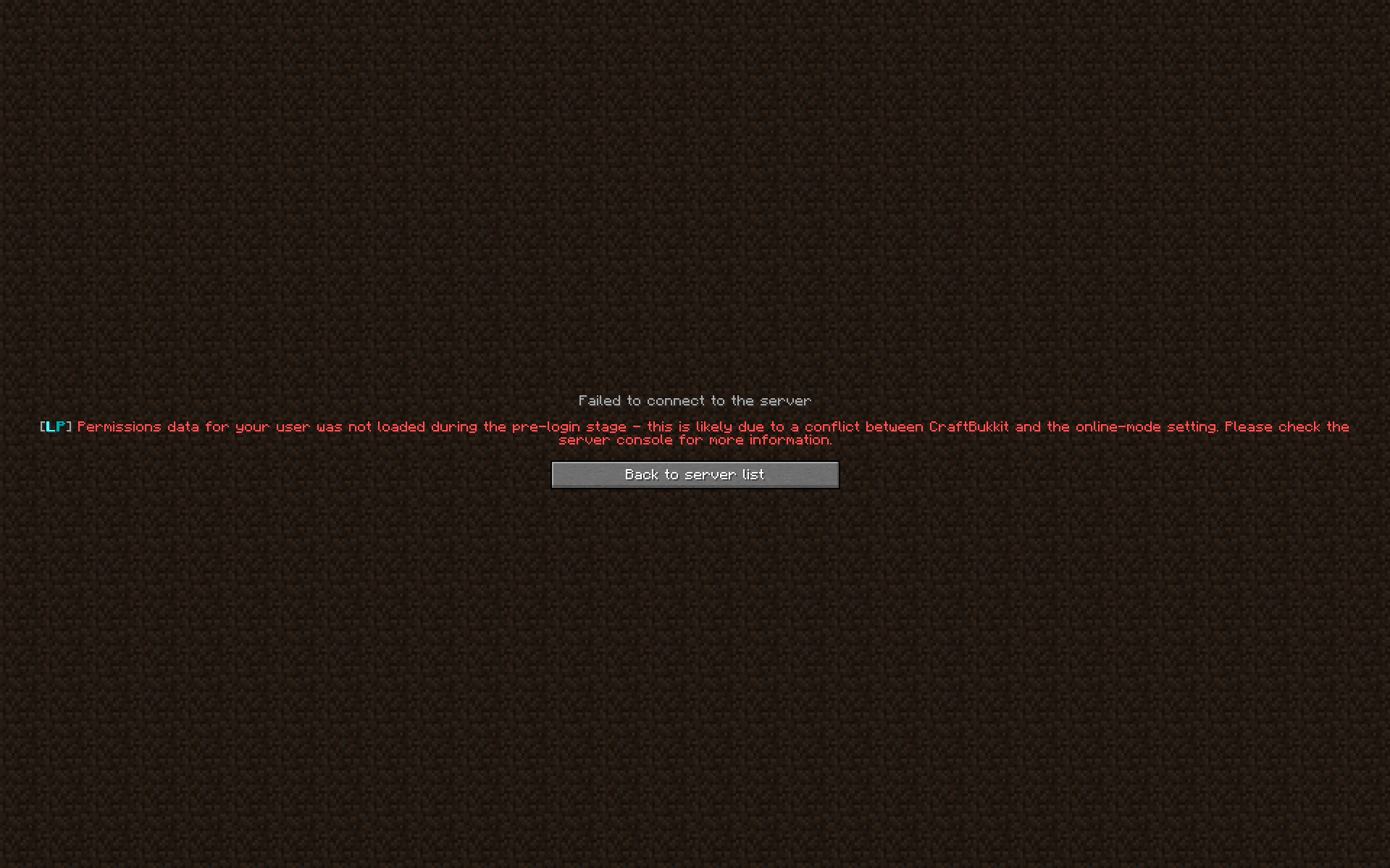
its on online mode false because i use cracked
and that just shows up
wanton stratusBOT
Please use pastebin!
Seeing a paste of the problem makes everything so much easier! Use https://bytebin.lucko.me/ for easy pasting!
For console errors:
Pastebin any relevant segments of the console log. If it's a startup error, this includes the entire startup log!
Other errors:
Pastebin the entire LuckPerms config file (passwords removed) as well as any other relevant files!
 nocturne chasm
!offline
wanton stratusBOT
Sorry! I do not understand the command !offline
Type !help for a list of commands.
 whole flume
wanton stratusBOT
whole flume
wanton stratusBOT
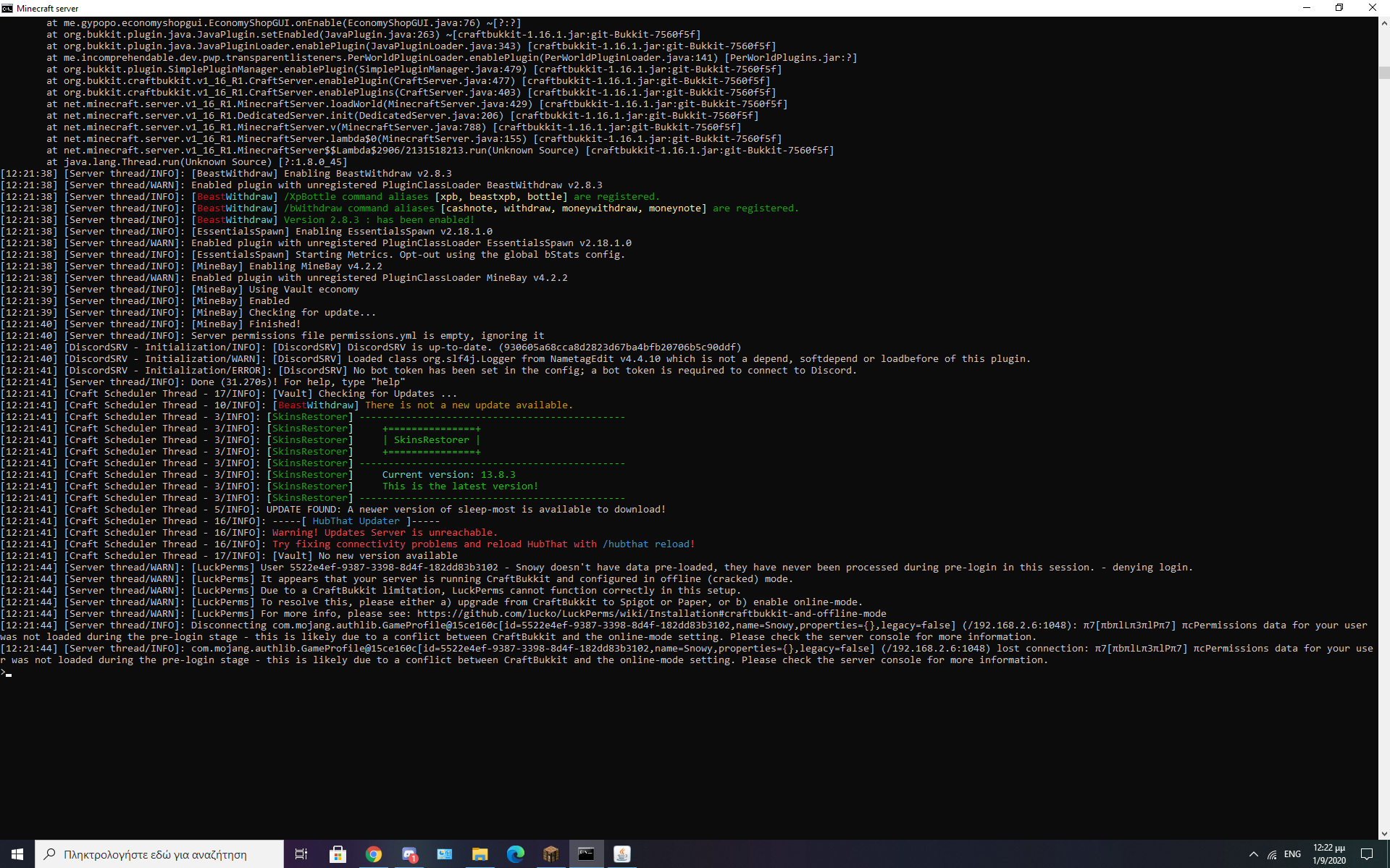
Please use https://bytebin.lucko.me to send files in the future. I have automatically uploaded message.txt for you: https://bytebin.lucko.me/Ga9KFRn63b
nocturne chasm
Whole error
open mirage
[LuckPerms] To resolve this, please either a) upgrade from CraftBukkit to Spigot or Paper, or b) enable online-mode.
nocturne chasm
Also why offline mode?
nocturne chasm
Most people don't suport it
brittle pulsar
If you're using craftbukkit you should upgrade to spigot/paper
nocturne chasm
Drag & drop paper jar
brittle pulsar
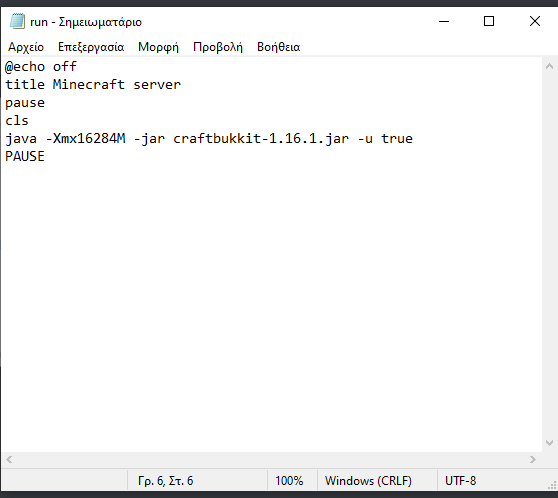
generally just change the .jar file
nocturne chasm
brittle pulsar
and you should change the jar file in your start.bat or something
whole flume

can u guys hop on vc 1 i stream and u help?
cuz i made this server yesterday
trying to add more things and copy my other 1
 nocturne chasm
Download paper first
whole flume
I did
whole flume
i have it downloaded
brittle pulsar
true ben
moving to #general
anyway
how to fix my mysql connection issue?
I legit tried everything
toxic wagon
!paste the full error or check out the errors wiki page
wanton stratusBOT
Please use pastebin!
Seeing a paste of the problem makes everything so much easier! Use https://bytebin.lucko.me/ for easy pasting!
For console errors:
Pastebin any relevant segments of the console log. If it's a startup error, this includes the entire startup log!
Other errors:
Pastebin the entire LuckPerms config file (passwords removed) as well as any other relevant files!
toxic wagon
!errors
wanton stratusBOT
Here's a page with some common storage system errors.
LuckPerms wiki
brittle pulsar
I checked that github
(I'm using pterodactyl and I have followed the pins in #support-2 )
nothing of that sort works
(my mysql is working btw)
 craggy wraith
PtErO 
brittle pulsar
please someone :C
craggy wraith
@brittle pulsar Caused by: java.net.ConnectException: Connection refused (Connection refused)
u sure u have it correct?
brittle pulsar
it's localhost
do I need to open the firewall?
for a local thing?
I don't think so, but I may be wrong
brittle pulsar
yes
craggy wraith

toxic wagon
https://github.com/lucko/LuckPerms/wiki/Storage-system-errors#luckperms-cannot-connect-to-my-mysql-server This whole section is based on that error.

GitHub
A permissions plugin for Minecraft servers. Contribute to lucko/LuckPerms development by creating an account on GitHub.
Gives you a detailed list of things to check
brittle pulsar
I checked that section 10-15 times
craggy wraith
hm
brittle pulsar
You are using the correct address and port YES
You are using the correct username / password YES
That the database exists and is accessible by the user YES
That the server is online & accepting connections IT IS ONLINE SINCE OTHER THINGS ARE USING IT
There are no firewall rules blocking the connection LOCALHOST
MySQL is bound to the correct port, and is accessible from the server where LuckPerms is installed BOUND CORRECTLY, IS ACCESSIBLE
Check that your MySQL max connections limit is not being exceeded. By default, LuckPerms will use 10 connections per server. If you have lots of plugins connecting to the same server, you will need to increase this limit. IT IS SET TO UNLIMITED
tbh, I'm really frustrated right now since I have a server offline for that problem
 toxic wagon
You are welcome to make one
@brittle pulsar Make sure storage-method an messaging-service are correct, make sure the username and password has full access to database
 upper maple
im not even going to clone this locally lol
brittle pulsar
storage-method: mysql
messaging-service: auto
toxic wagon
@brittle pulsar Change messaging-service to sql
toxic wagon
@upper maple https://github.com/lucko/LuckPerms/wiki/Locale-and-Translations#contributing-translations
GitHub
A permissions plugin for Minecraft servers. Contribute to lucko/LuckPerms development by creating an account on GitHub.
upper maple
yeah @toxic wagon https://github.com/LuckPerms/locale/pull/25
wanton stratusBOT
Hey MrIvanPlays! Please don't tag helpful/staff members directly.
nocturne chasm
Isnt it 172.18.0.1 for ptero?
hasty tree
be nice to the bot
toxic wagon
An how about follow the rules..
brittle pulsar
even if I put 172 instead of 127 it's not working
upper maple
cough I said  cough
cough
nocturne chasm
even if I put 172 instead of 127 it's not working
@brittle pulsar any firewalls blocking the connection?
brittle pulsar
I don't believe so. I can try opening the ports, but that would be unsafe, right?
I'm not a master of firewalling in unbuntu and I don't know how to open a port just for a specific IP address
time to google that
toxic wagon
@brittle pulsar Is the database on the same machine as the minecraft server
brittle pulsar
Yep. The server is in pterodactyl, so it is in docker (??)
i did this sudo ufw allow from 172.18.0.0/16 to any port 3306 but it's not working
by the way now it says even this [12:13:00 WARN] [LuckPerms]: Messaging service 'sql' not recognised.
little sphinx
yea that is the result of your sql database unable to connect
brittle pulsar
so how can I make it work
little sphinx
idk i dont have any way of checking your sql database
brittle pulsar
what can I do to check my sql database
toxic wagon
Are other plugins using the database, an can they connect to it fine?
toxic wagon
So no other plugins are connected to the database, or are other plugins having issues connecting as well
brittle pulsar
No plugins connected because it's the only plugin on the bungee right now
toxic wagon
By the way, if you're wanting to use localhost. The IP for localhost is 127.0.0.1
brittle pulsar
going to edit the config and retry
not working. I followed the pins in general2 since I'm using ptero
toxic wagon
That was a fast edit and server restart
brittle pulsar
Yeah, beign a bungee on SSD it's kinda fast
and it doesn't have any other plugins on it
toxic wagon
Well if you've done everything on the errors wiki page, and the pin in general-2 Maybe contact their support
brittle pulsar
I'm sorry, their who
brittle pulsar
I have a VPS so no one
toxic wagon
An the database is on that same VPS as the minecraft server
toxic wagon
@magic dome ^^ You got any ideas 😛
weak wing
is luckperms editor good?
hasty tree
try it and see for yourself
brittle pulsar
If anyone knows anything, please help
toxic wagon
@weak wing The editor is amazing
 scarlet rapids
есть русские?
 solemn canyon
I downloaded LuckPerms for Velocity, do I need to put it in the Velocity file or backend file?
And am I need normal LuckPerms?
toxic wagon
Velocity Goes in Velocity, normal goes in all backend
solemn canyon
And am I need normal LuckPerms?
toxic wagon
Yes
brittle pulsar
Hello. did anyone figure out my problem with MySQL? I'm willing to give access to the panel.
toxic wagon
!bugreport Try making an issue on github and waiting for a reply.
wanton stratusBOT
Suggestions and Bug Reports
If you would like to request a feature for LuckPerms, or report a bug, feel free to open an issue on GitHub!
Issue Tracker:
solemn canyon
I'm preparing my server on my PC, I did'nt buy server, host etc. Can I set up MySQL temporarily on my computer
Is this possible
toxic wagon
Yes of course, Google will help with it
toxic wagon
If you're wanting servers to sync permissions between eachother then yes.
solemn canyon
Is it like Proxy server?
toxic wagon
??
little sphinx
little sphinx
what-
toxic wagon
o.O They are not that expensive.
brittle pulsar
what you watched is the managed MySQL
solemn canyon
Do I need to learn the MySQL language
toxic wagon
Not really. You just need to create a database etc..
solemn canyon
My computer is Windows, will my actions go to waste if I want to open the server as Linux?
and I can't find 64 bit MySQL server
little sphinx
if you want to use a different os for mysql server ofc you need to set it up for that os as well
solemn canyon
What if I use Google Cloud SQL? Supports MySQL as far as I understand
little sphinx
if you want to and know how to use it, you can
assuming it support mysql which it should?
solemn canyon
I want to ask something.
Backend Servers> Allows players to play games.
Proxy> Provides servers to each other.
Database or SQL whatever> Stores and protects players' information and data.
Am I right?
toxic wagon
Close enough yeah.
The Database, does not store ALL information. Only the data for the plugins that you connect to the database.
solemn canyon
hmm okay
So what would you suggest? Should I connect all the plugins to the database?
toxic wagon
Not all plugins let you. It depends if the plugins support it.
solemn canyon
So if I am going to code the plugin myself, should I provide database support?
little sphinx
thats up to your plugin's needs
solemn canyon
ok
toxic wagon
An it's not exactly a small thing to just add database support
foggy quartz
If by world you mean just the world and ONLY the world, no, luckperms stays intact
weak wing
okay
foggy quartz
If instead you remove either your plugins folder or the luckperms folder, then that will be wiped too
weak wing
ok ty
foggy quartz
np
foggy quartz
ikr
weak wing
yes larry
 main warren
Is luckperms compatible with Deluxemenus
foggy quartz
Why wouldn't it? LP just manages permissions 🤔
If anything, it would be DM that doesn't support LP
main warren
Im trying to make it so i can change the + colour
i have MVP+
and im trying to make it so i can change the colour
Any ideas how?
main warren
Yeah
this is on my server
Hypixel copy sorry but it had to be said
@foggy quartz Its not a hypixel copy
I was just wondering how to change the + colour
foggy quartz
I mean if it's just one prefix, then you can't. However, you can use multiple prefixes (one for the "MVP" and others for the colored "+") and stack them
Stacking
main warren
then how would i make a GUI to change the colour?
foggy quartz
Change thei rgrooup
oh in the gui you mean
idk
ask help in the helpchat discord?
!helpchat
wanton stratusBOT
Helpchat
Helpchat is a general plugin assistance discord as well as the home of DeluxeChat, PlaceholderAPI, and many more.
Helpchat Discord
main warren
Yeah
foggy quartz
This ephemeral incapacitation is becoming rather arduous to deal with don't you cerebrate?
I mean, they are the ones that made DeluxeMenus, not us....
whats the node for changing gamemodes
 full herald
what plugin are you using @foggy quartz
foggy quartz
well they both have commands for it
 short totem
After hooking up the MySQL data bases on the network how does one sync them together? or make perms/ranks/prefixes carry over?
foggy quartz
so either node would be fine
foggy quartz
!sync @short totem
wanton stratusBOT
To sync data between servers, you need to connect each LuckPerms plugin to the same database (for example MySQL) and set up a messaging service.
LuckPerms wiki
short totem
@foggy quartz Ty
wanton stratusBOT
Hey Ds! Please don't tag helpful/staff members directly.
foggy quartz
@foggy quartz but
if another plugin has conflicting commands with essentials
essentials will prioritize that other plugin
I mean, there's a setting for that, but that's its default behavior
short totem
So our lobby wont sync with our survival server, everything is hooked up correctly i double checked,
foggy quartz
!paste the LP config files of both servers (remove the passwords)
wanton stratusBOT
Please use pastebin!
Seeing a paste of the problem makes everything so much easier! Use https://bytebin.lucko.me/ for easy pasting!
For console errors:
Pastebin any relevant segments of the console log. If it's a startup error, this includes the entire startup log!
Other errors:
Pastebin the entire LuckPerms config file (passwords removed) as well as any other relevant files!
 proven comet
Hey could i get some help real quick?
foggy quartz
ofc
proven comet
Some of my staff purchased a rank, but now on the tablist they are lower than other with a higher rank than them
foggy quartz
That's not an issue with luckperms
That depends mostly on your tab plugin ordering
It probably has a setting for that
foggy quartz
Youll have to see which group is taking priority
in your tab sorting
That depends mostly on your tab plugin ordering
make sure to check its settings
!weights also make sure the weights are set properly
wanton stratusBOT
LuckPerms allows you to set weights in order to determine the priority of certain nodes, like permissions and even prefixes. A higher weight number is a higher priority.
LuckPerms wiki
foggy quartz
Nice config
short totem
Would be nice if it worked properly
foggy quartz
Okay... and the survival one?
full herald
nice db
foggy quartz
Theres no password
short totem
lol i didnt make it
foggy quartz
so good luck tryna get into it
short totem
Ik, Fefo told me to remove the password lol
full herald
nah keep password so i can get your db
main warren
I found a workaround
foggy quartz
I'm assuming both servers are on the same machine?
short totem
yup
foggy quartz
No startup errors?
short totem
nope
foggy quartz
mm do /lp info on both servers and check if they say "connected: true" (or something like that)
short totem
Yes both say true
foggy quartz
Hey, can I change with LuckPerms before a player nametag or do I need an extra plugin ?
!prefix
wanton stratusBOT
You can set prefixes, suffixes and other meta data in LuckPerms for players and groups. Note that LuckPerms does not manage chat. You need to use another plugin to show prefixes/suffixes in chat.
LuckPerms wiki
foggy quartz
Ds share screenshots of both /lp info output
short totem
Mhm
short totem
Didnt work
foggy quartz
what "didn't work"?
the creategroup? the networksync?
!prefix
@foggy quartz No, I did not mean that, I meant that:
wanton stratusBOT
Hey the.informatiker! Please don't tag helpful/staff members directly.
short totem
yeah
foggy quartz
lol
"yeah" to what...
what did /lp networksync say?
was the group created successfully?
short totem
yeah it was created successfully
foggy quartz
That looks something another plugin will do, not luckperms
No that is not what I meant ;D
I don't mean the prefix in the tab but in front of the player name.
short totem
foggy quartz
No that is not what I meant ;D
I don't mean the prefix in the tab but in front of the player name.
Same thing, that's not something luckperms manages
Okay thank you
short totem
I fixed it
 short totem
There was a different plugin overriding the prefix, no idea how but whatever lol
(in lobby)
foggy quartz


 short totem
Same lol
 frozen prism
does anyone know how to make an op
full herald
/op
foggy quartz
Hey, ich suche einen Java Developer für meine Minecraft Plugins.
I search a java dev for my minecraft plugins^^
Lg
Learn java yourself
save $
 mild otter
and this ain't the pace for that lmao
 strange thistle
anyone know how to solve this problem/
foggy quartz
https://ci.lucko.me/job/LuckPerms/1152/
Use this build for now
 sacred stirrup
hi
foggy quartz
Hello
strange thistle
https://ci.lucko.me/job/LuckPerms/1152/
Use this build for now
thx a lot <3 i will try
sacred stirrup
[17:48:38] [luckperms-scheduler-worker-5/WARN]: luckperms-hikari - Failed to validate connection me.lucko.luckperms.lib.mysql.jdbc.JDBC4Connection@516cd2d9 (No operations allowed after connection closed.). Possibly consider using a shorter maxLifetime value.
[17:48:38] [luckperms-scheduler-worker-5/WARN]: luckperms-hikari - Failed to validate connection me.lucko.luckperms.lib.mysql.jdbc.JDBC4Connection@1b2570cd (No operations allowed after connection closed.). Possibly consider using a shorter maxLifetime value.
[17:48:38] [luckperms-scheduler-worker-5/WARN]: luckperms-hikari - Failed to validate connection me.lucko.luckperms.lib.mysql.jdbc.JDBC4Connection@2e7244e2 (No operations allowed after connection closed.). Possibly consider using a shorter maxLifetime value.
[17:48:38] [luckperms-scheduler-worker-5/WARN]: luckperms-hikari - Failed to validate connection me.lucko.luckperms.lib.mysql.jdbc.JDBC4Connection@30559e71 (No operations allowed after connection closed.). Possibly consider using a shorter maxLifetime value.
[17:48:38] [luckperms-scheduler-worker-5/WARN]: luckperms-hikari - Failed to validate connection me.lucko.luckperms.lib.mysql.jdbc.JDBC4Connection@71868b8 (No operations allowed after connection closed.). Possibly consider using a shorter maxLifetime value.
[17:48:38] [luckperms-scheduler-worker-5/WARN]: luckperms-hikari - Failed to validate connection me.lucko.luckperms.lib.mysql.jdbc.JDBC4Connection@378bd38e (No operations allowed after connection closed.). Possibly consider using a shorter maxLifetime value.```what is this ?
foggy quartz
!errors check here 👇
wanton stratusBOT
Here's a page with some common storage system errors.
LuckPerms wiki
 sturdy bluff
Hi there please could someone help me with this error. I use a plugin called TAB, and I have already contacted the developer, however he sees nothing wrong on the plugin side. Basically the Rank section in my tablist uses the LuckPerms prefix, but it isn't picking it up and updating it
When I go to a rank above my previous ranks, it just sets me to the highest rank I had before. If that makes sense
little sphinx
@sturdy bluff what placeholder are you using?
sturdy bluff
%luckperms_prefix%
strange thistle
https://ci.lucko.me/job/LuckPerms/1152/
Use this build for now
it working fine :) thank you!
little sphinx
@sturdy bluff if you do /papi parse me %luckperms_prefix% does it show the correct info?
sturdy bluff
Nope
I am currently rank Legend, but it shows the prefix for Dedicated
My Text Chat Prefix is also set to Dedicated
Hmmm
foggy quartz
!userinfo screenshot pls
wanton stratusBOT
Please take a screenshot!
Seeing a screenshot makes everything so much easier!
For prefixes not showing up in chat:
/lp user <user> info.
For database errors:
Server console: /lp info | Proxy console: /lpb info.
foggy quartz
EngineHub Pastebin Service. Store logs, profiles, and reports with ease.
im getting this warn
sturdy bluff
foggy quartz
Did you try reading what it says? @foggy quartz
sturdy bluff
There's the screenshot
It's appearing with the correct Primary Group, but not correct prefix
little sphinx
!weights
wanton stratusBOT
LuckPerms allows you to set weights in order to determine the priority of certain nodes, like permissions and even prefixes. A higher weight number is a higher priority.
LuckPerms wiki
little sphinx
most likely prefix weights is the wrong order
foggy quartz
RocketMan make sure your prefix weights are set up properly, as they are separate from the group weights
little sphinx
you can see with lp user USER meta info
foggy quartz
^
sturdy bluff
So if the weight is higher than the rest, it will show it?
sturdy bluff
Fixed. Thank you guys 🙂
full herald
mod?
 queen latch
Ty
 sour breach
@little sphinx just noticed you here too
wanton stratusBOT
Hey boyproO19! Please don't tag helpful/staff members directly.
little sphinx
lmaoo
deft briar
question whats the command change color rank ?
proud hound
That isn't handled by LP :)
No clue
You can change the colour of a prefix using hex if 1.16 or legacy codes if older
!colours
wanton stratusBOT
 loud ruin
Hey guys, how do I make the people that just join my server, which end up in the "default" group automatically gets assigned to another specific group?
- Player joins the server.
- Player is default group.
- Player is automatically given rank/group "NOOB".
ty!
full herald
!default
wanton stratusBOT
LuckPerms provides a group that every player is added to upon joining the server, called default. You can use multiple methods to change the default group or change the name of it.
LuckPerms wiki
proud hound
Default is default and that's just it- give default a displayname and prefix of NOOB and add NOOB as a parent of default @loud ruin
full herald
just rename default
proud hound
No
full herald
why not?
loud ruin
"DO NOT RENAME DEFAULT" says in readme i think, people do it a lot and causes issues
proud hound
Because LP will make a new default group that's empty and still give default
full herald
alright
loud ruin
But thanks larry, I will try giving the prefixes!
proud hound
No worries!
loud ruin
Anyone care to quickly join my server to see if i set it up correctly?
proud hound
Best way to test is to leave, run lp user <your ign> clear in console, and rejoin
To LP, you'll be fresh
loud ruin
and then reassign the lp perms?
proud hound
Yep
 junior spoke
hello
loud ruin
I like you Larry!
proud hound
Give yourself owner through console again, basically
loud ruin
😄
proud hound
:)
junior spoke
what is this? [16:06:02 WARN]: Exception in thread "Craft Scheduler Thread - 1160" [16:06:02 WARN]: org.apache.commons.lang.UnhandledException: Plugin sHub vsHub-v5.7 [Space Development] generated an exception while executing task 19 at org.bukkit.craftbukkit.v1_7_R4.scheduler.CraftAsyncTask.run(CraftAsyncTask.java:57) at java.base/java.util.concurrent.ThreadPoolExecutor.runWorker(ThreadPoolExecutor.java:1128) at java.base/java.util.concurrent.ThreadPoolExecutor$Worker.run(ThreadPoolExecutor.java:628) at java.base/java.lang.Thread.run(Thread.java:834) Caused by: java.lang.NoClassDefFoundError: me/lucko/luckperms/LuckPerms at me.activated.hubcore.permissions.RankManager.getRank(RankManager.java:77) at me.activated.hubcore.layouts.BoardLayout.lambda$getPlayerScoreboard$0(BoardLayout.java:45) at java.base/java.util.ArrayList.forEach(ArrayList.java:1541) at me.activated.hubcore.layouts.BoardLayout.getPlayerScoreboard(BoardLayout.java:41) at me.activated.hubcore.layouts.BoardLayout.getScoreboard(BoardLayout.java:31) at me.activated.hubcore.utils.board.BoardManager.run(BoardManager.java:43) at org.bukkit.craftbukkit.v1_7_R4.scheduler.CraftTask.run(CraftTask.java:71) at org.bukkit.craftbukkit.v1_7_R4.scheduler.CraftAsyncTask.run(CraftAsyncTask.java:53) ... 3 more
wanton stratusBOT
Please use pastebin!
Seeing a paste of the problem makes everything so much easier! Use https://bytebin.lucko.me/ for easy pasting!
For console errors:
Pastebin any relevant segments of the console log. If it's a startup error, this includes the entire startup log!
Other errors:
Pastebin the entire LuckPerms config file (passwords removed) as well as any other relevant files!
junior spoke
loud ruin
Thanks Larry, it's working now 👍
proud hound
That's not the full log
loud ruin
When adding weight/priority on prefixes etc, weight is 3>1 and priority is 3<1 right?
Priority goes from lower is better
Weight goes from higher is better
Am I correct?
 kindred crane
Hey! Stupid question time. /lp sync should update my luckperms to newest version?
If not, should a shovelhead like me just replace .jar to have it updated?
I'm working on 5.1.26 and I've spotted 5.1.93
foggy quartz
I need some majorrelp
major help
anyone know why im getting uuid errors in bungee
@loud ruin more weight = higher priority
@kindred crane no, that's for synchronizing the loaded data with the storage
@foggy quartz screenshot?
 narrow linden
hey, there's any way to make players choose their own tags? Even with several tags
foggy quartz
With another plugin yes
narrow linden
did you know some?
foggy quartz
let me load my server
well you could give them perms to modify their own prefix with argument-based but it'll be easier if it's done through another plugin, honestly @narrow linden
narrow linden
hmm and you know any plugin to do that? thanks 🙂
foggy quartz
thats the error but guess what I have done everything known to man
Deluxetags maybs
 hardy peak
or command blocks, if you're determined to not use another plugin
narrow linden
thx @foggy quartz ❤️