#support-1
1 messages · Page 961 of 1
 plush dove
plush dove
plush dove
trying to* 😄
 little sphinx
@charred yacht are you using a bungeecord network?
 toxic wagon
@charred yacht Try lpb instead of lp
 charred yacht
ok
little sphinx
uhhh
charred yacht
doesnt work
little sphinx
omega i think wrong person lol
charred yacht
XD
little sphinx
yea he pinged the wrong person
charred yacht
dang it
little sphinx
@plush dove so if you run /lp editor and /lpb editor are the ranks the same?
charred yacht
yeh it doesnt tell me why they cant use mute
toxic wagon
@charred yacht Try lp verbose on (the players name) then get the player to run /mute and see what it says.
little sphinx
other than that? whats the output?
plush dove
@little sphinx yes but the weird part is i see 2 users in the editor but they are both me but then one user on the survival server and one on the hub server
 wanton stratusBOT
Hey ϛ66Ɩsnǝuʇous! Please don't tag helpful/staff members directly.
charred yacht
just says this
little sphinx
what about the perms from groups? @plush dove
toxic wagon
@charred yacht Thats not the command I said.
little sphinx
@charred yacht output when you did lp verbose on (the players name)
toxic wagon
@charred yacht Try
lp verbose on (the players name)then get the player to run/muteand see what it says.
little sphinx
no lol
toxic wagon
@charred yacht Please show me the output for /pl
toxic wagon
After you use that verbose command. Make the player use the /mute command.
charred yacht
they crashed
little sphinx
lmao
toxic wagon
Well when they rejoin make them run that command.
plush dove
@little sphinx oke i will explain so everything is correctly connected to the mysql database but when i add myself to a group it will give me that rank in only the server i have executed that command on and not on all the other servers
wanton stratusBOT
Hey ϛ66Ɩsnǝuʇous! Please don't tag helpful/staff members directly.
little sphinx
@plush dove what is the exact the command you used to add yourself a group?
also do respect Please don't tag helpful/staff members directly.
toxic wagon
@charred yacht They need to run the /mute command once you have run the verbose commamd.
charred yacht
ok
little sphinx
also if you other players running, you are using verbose filter of their playername right?
little sphinx
!paste your lp config
wanton stratusBOT
Please use pastebin!
Seeing a paste of the problem makes everything so much easier! Use https://bytebin.lucko.me/ for easy pasting!
For console errors:
Pastebin any relevant segments of the console log. If it's a startup error, this includes the entire startup log!
Other errors:
Pastebin the entire LuckPerms config file (passwords removed) as well as any other relevant files!
charred yacht
its not showing his msg when he types it
toxic wagon
After he runs it. It should give you a list of permissions.
little sphinx
yep there you go
charred yacht
so now what
toxic wagon
Go through that list of permissions and look for the one relating to the command you want him to run and if it says undefined. Add it.
toxic wagon
Ab Is advancedBans i assume. That would be overriding essentials.
little sphinx
charred yacht
im using that command
little sphinx
you may have gave them exempt perms
little sphinx
idk, you got to check
charred yacht
only perms they have is that
toxic wagon
AdvancedBans probably has its own mute command so that would be overriding essentials.
toxic wagon
An the ab perm you shared before is undefined.
plush dove
i may have found the problem, when i want to add a context to a permission it only shows my hub server but doesnt show my survival server, and when i add myself to a group in the survival server it makes a seperate user in the editor.
toxic wagon
@charred yacht then do the verbose command again and make them run the warn command and it will show you permissions for that.
charred yacht
ok
little sphinx
or you can look into advanced ban wiki for permission nodes and what each perm node does
toxic wagon
AdvancedBan has a discord server for support as well. Maybe ask there if you get stuck.
plush dove
?
toxic wagon
@plush dove Show me lp user (name) info and lpb user (name) info
 warm canopy
hi, you know the commande for give rank in mineweb ? im put this lp user {PLAYER} parent addtemp vip 30d but in consol i have this [LP] {player} is not a valid / uuid nickname.
little sphinx
then you need to ask mineweb what is the correct placeholder
that can replace it with the actual playername
toxic wagon
There are many different placeholders that different plugins or website uses. Contacting them is the quickest way to finding out tje correct one.
warm canopy
ok thx 🙂
 foggy quartz
!paste if you have any console errors @signal drum
wanton stratusBOT
Please use pastebin!
Seeing a paste of the problem makes everything so much easier! Use https://bytebin.lucko.me/ for easy pasting!
For console errors:
Pastebin any relevant segments of the console log. If it's a startup error, this includes the entire startup log!
Other errors:
Pastebin the entire LuckPerms config file (passwords removed) as well as any other relevant files!
charred yacht
ok so i added a wild plugin to my server but idk how to give people perms to use it
little sphinx
you have 2 options:
- read that plugins docs for permission nodes
- If cannot, then use verbose to debug
charred yacht
ok
plush dove
@toxic wagon
wanton stratusBOT
Hey ϛ66Ɩsnǝuʇous! Please don't tag helpful/staff members directly.
plush dove
that bot is annoying xD
 hasty tree
Stop tagging then
 little sphinx
this is more of an open support, so anyone that willing to answer will do so, so dont need to direct it to anyone by tagging
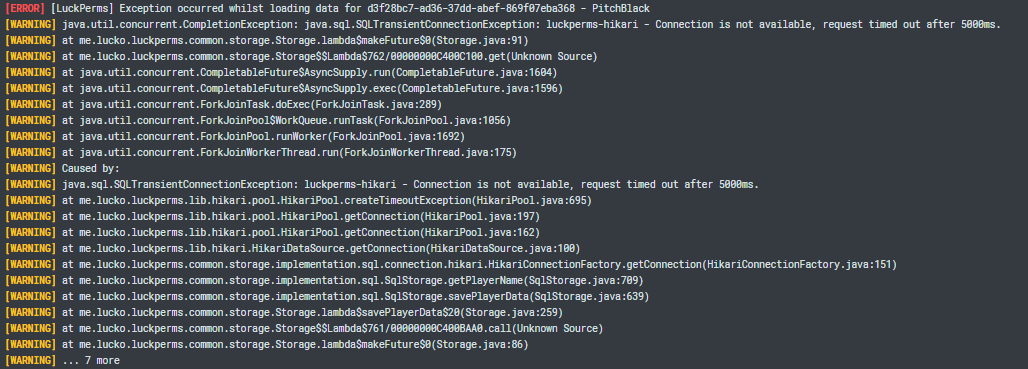
@signal drum are you using an sql database?
!errors if so
wanton stratusBOT
Here's a page with some common storage system errors.
 LuckPerms wiki
 signal drum
yes sir
little sphinx
looks ok really, even the prefix is syncing
perhaps the issue is the permission nodes your set that are wrong?
plush dove
haven't set permission nodes yet only prefixes to i see if it would work on other servers
wanton stratusBOT
LuckPerms does not display things in chat!
LuckPerms is only able to send information to formatting plugins so that they display them properly. LuckPerms does not put the prefix in front of your name, you need a chat formatting plugin to do it, and you need Vault. Same goes for the tablist! If the information appears correctly when you run /lp user <user> info, LuckPerms is doing its job!
Prefix isn't showing?
What plugins can I use to format chat?
plush dove
should i make a before and after screensshot when i try to make add myself to a group
little sphinx
sure
from what i see, you set your self to owner group
and you are in it
so i dont really see an issue with adding/setting player to group or syncing
plush dove
yeah thats not exactly what i mean, i can add myself to a group but it does not show on other server so. so what i want is to sync ranks between servers. for example when i add myself to the owner group in the hub server and i connect to my survival server i will have the same rank as i have on the hub server
little sphinx
@plush dove which server exactly, bcu the 2 current server/proxy are you showing is syncing correclty
i suggest for the server taht is not showing/syncing, screenshot lp info and lp user USER info
plush dove
i mean between on survival and the hub
little sphinx
so for the server that you say its not syncing do the above ^
@charred yacht the perm node taht is shown as false vs the one in the editor is completely different
charred yacht
oh
plush dove
oke
little sphinx
prob default to false
so then set it to true
if you want players to have access to it
charred yacht
how do i set it to true
little sphinx
set it just like how you set other perms
 stiff tree
Hello i have a issue prefix.0.&f[&cYouTuber&f] this is do and than ingame he Say [Youtuber5f] but how it can
charred yacht
doesnt work
little sphinx
so verbose is still saying its false?
charred yacht
yes
little sphinx
!chat @stiff tree
wanton stratusBOT
LuckPerms does not display things in chat!
LuckPerms is only able to send information to formatting plugins so that they display them properly. LuckPerms does not put the prefix in front of your name, you need a chat formatting plugin to do it, and you need Vault. Same goes for the tablist! If the information appears correctly when you run /lp user <user> info, LuckPerms is doing its job!
Prefix isn't showing?
What plugins can I use to format chat?
little sphinx
@charred yacht send your editor link here
little sphinx
here
charred yacht

LuckPerms - A permissions plugin for Minecraft servers.
LuckPerms is a permissions plugin for Minecraft servers.
stiff tree
@little sphinx he dont do it in chat but on scoreboard
wanton stratusBOT
Hey De Gaming Lion NL! Please don't tag helpful/staff members directly.
stiff tree
oh
little sphinx
then you need to check with your scoreboard plugin how to put prefix on it
usually they interface with vault or placeholderAPI
stiff tree
yea but i got other ranks and its working normal
little sphinx
type offline
ensure that bungeecord: true in spigot.yml @plush dove
@stiff tree does prefix show correctly in lp user USER info
signal drum
little sphinx
@charred yacht your editor is empty
charred yacht
how
charred yacht
i did
little sphinx
after every edit
charred yacht
i can see the permissions
little sphinx
little sphinx
!errors @signal drum you are using an sql database right?
wanton stratusBOT
Here's a page with some common storage system errors.
LuckPerms wiki
charred yacht
charred yacht
ok
signal drum
ye i already
charred yacht
LuckPerms - A permissions plugin for Minecraft servers.
LuckPerms is a permissions plugin for Minecraft servers.
little sphinx
you didnt set wild.wildtp
little sphinx
lol its ok, I once started with being new as well
plush dove
thanks man it worked i appreciate your time and afford
little sphinx
np!
little sphinx
mhmm
wanton stratusBOT
Please ask your question!
Please ask the question you have. Don't ask to ask, or ask to DM someone. There are people here to help you, but we need to know what to help you with, so please just ask the question you want to in as much detail as possible!
Or, try here first:
Why shouldn't I ask to ask?
 warm furnace
alr so im really confused here, im trying to add a prefix to my name that say [Owner] in blue. It seems like ive added it but when I try to chat its just like normal
little sphinx
!chat
wanton stratusBOT
LuckPerms does not display things in chat!
LuckPerms is only able to send information to formatting plugins so that they display them properly. LuckPerms does not put the prefix in front of your name, you need a chat formatting plugin to do it, and you need Vault. Same goes for the tablist! If the information appears correctly when you run /lp user <user> info, LuckPerms is doing its job!
Prefix isn't showing?
What plugins can I use to format chat?
warm furnace
little sphinx
you need a chat plugin, and vault for a spigot/paper server
see the clippy embed ^^
warm furnace
im using essentials chat
little sphinx
!moss
wanton stratusBOT
Essentials
Make sure you are using EssentialsX and Vault for prefixes. For any other issues with Essentials, you should seek support in either #general or the official EssentialsX support Discord.
EssentialsX Discord
little sphinx
you need vault plugin as well
 chrome brook
is it possible to add space to prefix?
 merry ember
im
gonna have
a seizure
trying to FIGURE IT OUT
ive added the prefix and added the gorup to myself
and i cant see the tEXT
 frozen dagger
How do you make ranks eg Member rank worse that diamonds so in chat it says you have diamond while still having perms for members???? If that makes any sense
(Ive tryed make member rank parent group) but astill not wokring
merry ember
i use essentialsx and essetialschat
 mild otter
!chat
wanton stratusBOT
LuckPerms does not display things in chat!
LuckPerms is only able to send information to formatting plugins so that they display them properly. LuckPerms does not put the prefix in front of your name, you need a chat formatting plugin to do it, and you need Vault. Same goes for the tablist! If the information appears correctly when you run /lp user <user> info, LuckPerms is doing its job!
Prefix isn't showing?
What plugins can I use to format chat?
merry ember
brov
whats a good one then
the lp user thing works perfectly
i just cant see te prefixes
mild otter
I didn't say abandon the plugin. Try and resolve it. #general might be able to help or the discord for the plugin
!moss
wanton stratusBOT
Essentials
Make sure you are using EssentialsX and Vault for prefixes. For any other issues with Essentials, you should seek support in either #general or the official EssentialsX support Discord.
EssentialsX Discord
frozen dagger
How do you make ranks eg Member rank worse that diamonds so in chat it says you have diamond while still having perms for members???? If that makes any sense
(Ive tryed make member rank parent group) but astill not wokring
merry ember
AHHHHHHHHHHHHHHHHHHHHHHHHHHHHHHHHHHHHHHHHHHHHHHHHHHHHHHHHHHHHHHHHHHHHHHHHHHHHHHHHHHHHHHHHHHHHHHHHHHHHHHHHHHHHHHHHHHHHHHHHHHHHHHHHHHHHHHHHHHHHHHHHHHHHHHHHHHHHHHHHHHHHHHHHHHHHHHHHHHHHHHHHHHHHHHHHHHHHHHHHHHHHHHHHHHHHHHHHHHHHHHHHHHHHHHHHHHHHHHHHHHHHH
mild otter
Can you not
mild otter
Read the chat embed, there's a link there. Still don't advise just abandoning a plugin because you won't ask for help
- not giving any details/screenshots

foggy quartz
@merry ember there is literally a list of chat plugins in the link in the embed
But I wouldn't expect to install a chat plugin and for it to magically work as I expect, you will have to play with its formatting settings
And EssXChat works perfectly fine
merry ember
i have vault
 full herald
!weight
wanton stratusBOT
LuckPerms allows you to set weights in order to determine the priority of certain nodes, like permissions and even prefixes. A higher weight number is a higher priority.
LuckPerms wiki
full herald
!parent
wanton stratusBOT
Sorry! I do not understand the command !parent
Type !help for a list of commands.
full herald
!help
wanton stratusBOT
Available commands:
!advanced
!api
!argumentbased
!ask
!bulkupdate
!bungee
!cauldron
!chat
!colours
!commandequivalents
!commands
!config
!context
!default
!downloads
!editor
!errors
!essentials
!extensions
!extracontexts
!faq
!helpchat
!inheritance
!install
!locale
!meta
!migration
!notworking
!nowildcard
!pasteit
!permissions
!placeholders
!selfhosting
!stacking
!storage
!suggestions
!switchstorage
!sync
!tracks
!upgrade
!usage
!userinfo
!verbose
!weight
!whyluckperms
!wiki
full herald
if admin is a parent of mod, does that mean mod gets admin powers or admin gets mod powers
should i have default in the parent here, or should i not
foggy quartz
if admin is a parent of mod, does that mean mod gets admin powers or admin gets mod powers
Means mod gets admin powers
 molten tree
hi, how do i make a group the default group when a new user joins
full herald
so in the picture i sent, if i put default in here, it would make sense right
!default @molten tree
wanton stratusBOT
LuckPerms provides a group that every player is added to upon joining the server, called default. You can use multiple methods to change the default group or change the name of it.
LuckPerms wiki
foggy quartz
If you meant mods to get default perms, yes
full herald
alright thanks
foggy quartz
!inheritance might want to take a look this
wanton stratusBOT
Learn about inheritance.
LuckPerms wiki
full herald
thats what i was looking for thanks!
molten tree
i have prefixes set in my groups but they dont show in chat, how can i fix this?
full herald
are you using essentials?
luckperms doesnt handle that stuff
you need a chat plugin such as essentialsx chat
or vault chat
@molten tree
molten tree
so if i install essentialsx chat it should strart to display them? @full herald
full herald
yeah, you need essentialsx and essentialsx chat addon
and then you need to configure it
please move to off topic if you need help configuring it
molten tree
ok ty
full herald
np
 pearl flax
does anyone have a prebuilt permisions file?
full herald
those dont really exist
you need to customize your own
its really easy if you do /lp editor
full herald
most of these plugins are really useless
but i really recommend just spending an hour or two to make permissions more relevant to your server
 orchid crest
hello, i have a problem, i did "/lp u _EliteNinja m setprefix &6&lMOD&8&e" and my chat didn't change
mild otter
!chat
wanton stratusBOT
LuckPerms does not display things in chat!
LuckPerms is only able to send information to formatting plugins so that they display them properly. LuckPerms does not put the prefix in front of your name, you need a chat formatting plugin to do it, and you need Vault. Same goes for the tablist! If the information appears correctly when you run /lp user <user> info, LuckPerms is doing its job!
Prefix isn't showing?
What plugins can I use to format chat?
full herald
!sync @pearl flax
wanton stratusBOT
To sync data between servers, you need to connect each LuckPerms plugin to the same database (for example MySQL) and set up a messaging service.
LuckPerms wiki
 flat parcel
 proud hound
Yes, as the #rules clearly state, please do not advertise for services 😄
I've removed your message and simply ask they you do not do it again
 pallid crow
Has anyone had any issues with Luckperms running on Magma 1.12.2 and worldedit?
 olive gale
can i nickname ppl in tab with this plugin?
full herald
get TAB
foggy quartz
i frogot how to in the web editor to make groups names like to say [Owner] gushwin
full herald
luckperms doesnt handle any of that stuff @olive gale
olive gale
k thx for the help
full herald
@foggy quartz luckperms doesnt handle that. you need a chat manager
it might be able to do that actually
 grave zinc
Do you guys know the permission for /iname
foggy quartz
it use to
full herald
i think it still does
grave zinc
😛
full herald
what plugin is /iname for
charred yacht
hey how do i edit the prefix colors on luckperms
grave zinc
I think essentials idk
full herald
but essentials does all the actual formatting and makes it easier
pallid crow
Essentialsx chat
foggy quartz
i have that plugin
pallid crow
Works great with essentials
foggy quartz
so how would i say make my name ingame show my rank like [Owner] gushwin
pallid crow
Yeah luckperms simply will not work with worldedit..
 open mirage
you also need vault with essentials chat
foggy quartz
oh i forgot that man im dumb lol
pallid crow
Luckperms is picking up worldedit perms as commandwrapper.
foggy quartz
How do i make roles
full herald
use lp editor
/lp editor
@foggy quartz
and theres a plus near the group thing to create groups
open mirage
!usage
wanton stratusBOT
Here's a guide to help users understand and use LuckPerms for the first time.
LuckPerms wiki
 drifting hull
prefix.<weight>.<prefix>
suffix.<weight>.<suffix>
Yes I know the syntax, just asking if it’s possible to give people suffixes through the editor and not through the command. Anyhow by your message I can tell that this is possible so thanks
full herald
talk?
proud hound
!chat @foggy quartz
wanton stratusBOT
LuckPerms does not display things in chat!
LuckPerms is only able to send information to formatting plugins so that they display them properly. LuckPerms does not put the prefix in front of your name, you need a chat formatting plugin to do it, and you need Vault. Same goes for the tablist! If the information appears correctly when you run /lp user <user> info, LuckPerms is doing its job!
Prefix isn't showing?
What plugins can I use to format chat?
full herald
could you rewrite that
proud hound

pallid crow
Alright I really need some help with this permission issue and I don't think it has anything to do with luckperms but I got roasted out of worldedit for asking for help.
full herald
yeah what do you need
pallid crow
Alright I got a weird setup
Running Magma and running worldedit as a mod.
Still gives the same config and has the same perms
pallid crow
But for some reason luckperms does not accept the normal perms
full herald
what do you mean?
pallid crow
But I can find random perms for it with commandwrapper.WE stuff on it.
For example you would give someone something like
worldedit.*
For all the perms
full herald
yeah
full herald
huh thats wierd. i cant help but maybe someone else can
pallid crow
I can always show a picture of the tree as well if that helps.
Also if I give someone commandwrapper.* it will give them the perms
full herald
@chrome brook ask in #luckperms-api
pallid crow
This is just frustrating the hell out of me and I feel it's on worldedit and not with luckperms.
foggy quartz
I mean LP has nothing to do with that.
pallid crow
Right? But if you mention it in their discord theyll toast you away quicker then you can explain whats going on.
And theres no alternative to worldedit that I know of...
foggy quartz
You said you're using magma, what if you use WE as a plugin instead of as a mod?
pallid crow
It works sorta.
Mods aren't supported with the plugin like with the mod.
And I've never ran into this issue beforehand.
foggy quartz
Mods aren't supported with the plugin like with the mod.
wat
pallid crow
The plugin works great with Vanilla ID's
pallid crow
Sure.
orchid crest
it says "a group named vip could not be found" when i do
/lp user parent add &a&lVIP&r
can anyone help me please
open mirage
you don't use the prefix... you use the group name
 lost temple
Prefixes don't show up, I have essentials and vault installed.
No matter what i do or change it doesnt show any prefixes or suffixes ingame
foggy quartz
Does it show when you do /lp group <group> info?
lost temple
yes it does show up
foggy quartz
Then it's something on your chat plugin config, EssentialsX in this case
lost temple
Anything i need to check?
wanton stratusBOT
Essentials
Make sure you are using EssentialsX and Vault for prefixes. For any other issues with Essentials, you should seek support in either #general or the official EssentialsX support Discord.
EssentialsX Discord
orchid crest
how can i set rank for people in luckperms? when i type something in chat, it would show: [Member] _EliteNinja: "Message"
/lp user parent add &a&lVIP&r
you don't use the prefix... you use the group name
@open mirage
how can i do it?
orchid crest
I did but i removed them, i will create now give me a sec
Done, what is next please?
foggy quartz
!commands check the "Parent commands" link
wanton stratusBOT
Find all of the available LuckPerms commands on the wiki.
General commands
User commands
Group commands
Permission commands
Parent commands
Meta commands
Track commands
Log commands
LuckPerms wiki
foggy quartz
!usage is also a great place for starters
wanton stratusBOT
Here's a guide to help users understand and use LuckPerms for the first time.
LuckPerms wiki
orchid crest
There are so many commands, i dont know which one i should use. which one should i use for my case?
foggy quartz
I suggest you read the usage section first, see how everything works and how to work with things
pearl flax
how can i rename the default group
foggy quartz
!default
wanton stratusBOT
LuckPerms provides a group that every player is added to upon joining the server, called default. You can use multiple methods to change the default group or change the name of it.
LuckPerms wiki
foggy quartz
Check that link
pearl flax
thanks
 jovial lake
Hi, players can't build or break blocks unless they are op. How do I fix this?
pearl flax
give the essentials.break permission
jovial lake
Is there one for place or is that it?
pearl flax
i think there is
jovial lake
Also it doesn't work
foggy quartz
!verbose will help you
wanton stratusBOT
LuckPerms provides a verbose command to help you find out what permissions a command/plugin is checking.
LuckPerms wiki
orchid crest
@foggy quartz is it possible if i get the command please? my english isn't that good to understand everything there
wanton stratusBOT
Hey Ninja! Please don't tag helpful/staff members directly.
pearl flax
its literally /lp verbose
orchid crest
/lp user/group <user|group> parent set <group> [context...] this one?
foggy quartz
That same one
orchid crest
would it be like that in the end? /lp group mod parent set mod &6&lMOD&8&e
i entered it and it doesn't work and even tho i did /lp user name parent set mod
open mirage
@orchid crest https://github.com/lucko/LuckPerms/wiki/Prefixes,-Suffixes-&-Meta#how-do-i-actually-set-prefixes-and-suffixes-for-a-user

GitHub
A permissions plugin for Minecraft servers. Contribute to lucko/LuckPerms development by creating an account on GitHub.
jovial lake
Yeah verbose just didn't help at all. Any other suggestions?
Any other permissions that allow to break and place blocks?
mild otter
Do you have any antibuild plugins or worldguard?
jovial lake
No, I only have worldedit and pixelmon based plugins with nucleus and lp
mild otter
Are they trying to break at spawn?
open mirage
maybe you're in the spawn radius?
mild otter
yee
jovial lake
Im far away from spawn
signal drum
Hello
Can i ask whats the difference of the bungeecord luckperms and the bukkit one?
Like whats the upsides
foggy quartz
No upsides nor downsides.
One is for your Bukkit plugins, and the other for your Bungee ones. It's the same thing but for Bungee commands instead.
It isn't a replacement for the network, you still need LP on your backend servers.
 shadow flicker
How can i remove the entry with the 1 value? ```
[21:47:10] [pool-6-thread-1/INFO] [minecraft/DedicatedServer]: [LP] -> griefdefender.economy-block-sell-return = '1.0' (inherited from griefdefender_option) (gd_claim_default=global)
[21:47:10] [pool-6-thread-1/INFO] [minecraft/DedicatedServer]: [LP] -> griefdefender.economy-block-sell-return = '20.0' (inherited from griefdefender_option) (gd_claim_default=global)
(meta)
signal drum
Oww okk so if im running a bungeecord i need to knstall it to the bungeecord server and normal ones on the rest servers
foggy quartz
If you want to control what commands players and staff have access to on proxy as well (such as /server and /send), then yea I suggest you install it on bungee as well
Again, you will need it on the other servers, LuckPerms for Bungeecord isn't a replacement for the whole network.
If you want your groups and permissions and user data to be synchronized everywhere
!sync is for you
wanton stratusBOT
To sync data between servers, you need to connect each LuckPerms plugin to the same database (for example MySQL) and set up a messaging service.
LuckPerms wiki
shadow flicker
lp group griefdefender_option meta unset griefdefender.economy-block-sell-return gd_claim_default=global
[21:54:49] [pool-6-thread-1/INFO] [minecraft/DedicatedServer]: [LP] griefdefender_option doesn't have meta key 'griefdefender.economy-block-sell-return' set in context gd_claim_default=global).
do i need luckperms for bungeecord if im using velocity as my proxy
i have bungeequack
foggy quartz
@shadow flicker I don't know much about GD but IIRC it uses permissions to store data... so I would leave that as it is
shadow flicker
there are 2 conflicting entrys.
because GD fucked up my config.
one is 1 the other is 20
foggy quartz
@full herald I mean you don't need it, same thing I said above
full herald
but is there any important commands that it prevents defaults from using
foggy quartz
🤷♂️ I mean depends on what you want players to have access to on proxy
@shadow flicker could you send an /lp editor link?
shadow flicker
i thought meta didn't show up on lp editor?
foggy quartz
It does
shadow flicker
foggy quartz
After all, everything is a node
shadow flicker
seems theres a lot missing
foggy quartz
/lp group griefdefender_option meta info?
shadow flicker
[21:54:09] [pool-6-thread-1/INFO] [minecraft/DedicatedServer]: [LP] -> griefdefender.economy-block-sell-return = '1.0' (inherited from self) (gd_claim_default=global)
[21:54:09] [pool-6-thread-1/INFO] [minecraft/DedicatedServer]: [LP] -> griefdefender.economy-block-sell-return = '20.0' (inherited from self) (gd_claim_default=global)
but if i try and unset it..
/lp group griefdefender_option meta unset griefdefender.economy-block-sell-return gd_claim_default=global
[22:03:49] [pool-6-thread-1/INFO] [minecraft/DedicatedServer]: [LP] griefdefender_option doesn't have meta key 'griefdefender.economy-block-sell-return' set in context gd_claim_default=global.

proud hound
That unset meta is different from the set one in the info
shadow flicker
?
proud hound
You don't need to use anything except the meta key, try /lp group griefdefender_option meta unset griefdefender.economy-block-sell-return
shadow flicker
[LP] griefdefender_option doesn't have meta key 'griefdefender.economy-block-sell-return' set in context global.
shadow flicker
the editor doesn't even show the keys
 bitter coral
/lp group griefdefender_option meta unset griefdefender.economy-block-sell-return gd_claim_default=global
shadow flicker
[22:12:01] [pool-6-thread-1/INFO] [minecraft/DedicatedServer]: [LP] griefdefender_option doesn't have meta key 'griefdefenfer.economy-block-sell-return' set in context gd_claim_default=global.
Made a typo
proud hound
Run lp editor fresh and send the link
bitter coral
Try again (maybe mine works, idk, prbbly not)
proud hound
Also run lp info and send a screenshot
shadow flicker
[22:12:49] [pool-6-thread-1/INFO] [minecraft/DedicatedServer]: [LP] griefdefender_option doesn't have meta key 'griefdefender.economy-block-sell-return' set in context gd_claim_default=global.
 trail heath
how can i set a no fly zone for a specific world?
proud hound
That would be either context, if players have fly turned off on world change, or another plugin
!context can grant perms to do like '/fly' but won't stop then from flying if they are already
wanton stratusBOT
You can set a permission or group on a per-world/per-server basis, through what we call "contexts".
LuckPerms wiki
trail heath
Thanks
proud hound
@shadow flicker editor links are safe to send publicly- the information on them must be applied to your server by you or a person with in-game perms to do so
shadow flicker
LuckPerms - A permissions plugin for Minecraft servers.
LuckPerms is a permissions plugin for Minecraft servers.
proud hound
That's weird! The editor doesn't seem to know they exist! Mind sending a screenshot of the full output for lp group griefdefender_option meta info as well as just info and permission info
(all for that group)
shadow flicker
 foggy quartz
That's a lot of meta that doesn't show up in the editor
I blame @hasty tree Well after all I don't, I blame transient nodes >:(
shadow flicker
So basically. i can't fix this?
Because the commands don't work and it doesn't show in the editor

foggy quartz
Could you /lp export --upload and send the code? There's got to be something somewhere..
trail heath
I've tries multiple contexts but its just not disabling flight
also tried world: undermine
foggy quartz
@trail heath disabling the flight permission on a certain context doesn't mean it will be disabled, it means they won't get access to the command!
trail heath
ok ive been changing in and out doing /fly but its still allowing the command
foggy quartz
Did you change the server config in the LuckPerms' config.yml?
trail heath
no i did not lemme try that
foggy quartz
That's why, you don't type in the server name in your bungeecord config, but the server value in the LP config
trail heath
ok thanks ill try that
warm canopy
il y a quelqu'un qui connais le placeholder pour luckperm sur mineweb, boutique vente de grade, la commande a mettre ?
ils la cnaissent pas sur mineweb !
foggy quartz
@potent rover translate please :(
warm canopy
oh sorry loll
foggy quartz
Wut
warm canopy
is there anyone who knows the placeholder for luckperm on mineweb, shop grade sale, the order to put?
they don't know it on mineweb !
im put this but is not good (lp user {player} parent addtemp Matelot 30d)
foggy quartz
I mean if they don't know it themselves... that's an issue lol
{user}? {username}?
🤷♂️
warm canopy
yes i can try user
this is an exemple Exemple: give {PLAYER} 1 1[{+}]broadcast {PLAYER}
but it's for vanilla not for luckperms
foggy quartz
im put this but is not good (lp user {player} parent addtemp Matelot 30d)
Did you try that but with {PLAYER} (uppercase) instead of {player} (lowercase)?
warm canopy
yep same
foggy quartz
🤷♂️
That's not a luckperms issue, it's on the website side of things to replace the placeholder with the appropriate data
@shadow flicker Interestingly enough, the export command also exports only this for that group:
wow that's
uuh
huge
shadow flicker


 shadow flicker
theres one due in an hour or so
il take another look at it tomorrow
The default options section default-options controls the default transient meta values that GD will set in LP at server startup.
There are 4 subsections within this section.
HMM
Well thats an annoyance
seems a restart may fix it
Still not shown to the person doing commands in any good way
warm canopy
i need delete rank before give a new rank ?
warm canopy
because i have a permanent rank and im try to buy a 30d rank
wanton stratusBOT
Find all of the available LuckPerms commands on the wiki.
General commands
User commands
Group commands
Permission commands
Parent commands
Meta commands
Track commands
Log commands
LuckPerms wiki
warm canopy
ok im try
im put this and is not good - lp user Bobbber parent addtemp Matelot 30d
i have the rank in editor but is not the parent rank
warm canopy
is not for the weight ?
i can put this lp user Bobbber parent clear and lp user Bobbber parent addtemp Matelot 30d
proud hound
!weight
wanton stratusBOT
LuckPerms allows you to set weights in order to determine the priority of certain nodes, like permissions and even prefixes. A higher weight number is a higher priority.
LuckPerms wiki
warm canopy
i need to put a higher weight for temp rank ?
all my group have a weight
but I'm trying to buy a rank smaller than the one I already have
shadow flicker
@foggy quartz restart fixed it
proud hound
Read about what weight does on the wiki
wanton stratusBOT
Hey Clienthax! Please don't tag helpful/staff members directly.
shadow flicker
Shoo clippy
proud hound
Clippy's right :p
foggy quartz
GO GET HIM CLIPPY!
proud hound
Be nice to clippy

 warm canopy
I see the 2 ranks in the editor but the one that is visible in the game is the one with the highest rank
ok
jovial lake
Hiya again, still can't figure out why we can't break and place anything. Verbose didn't help at all with giving me the permissions needed. Any other help?
shadow flicker
well ops arn't a thing in spongeforge if you are using luckperms
so what do you mean by an op
jovial lake
Nevermind, it doesn't even work with that anymore. It only works if someone has the minecraft.* permission
shadow flicker
is this at spawn ?
jovial lake
No
shadow flicker
can you do a /sponge timings paste , so i can check config
proud hound
@jovial lake you just need to add permissions - for all perms add * as a permission
sponge doesn't do op when there's a perms plugin
but beware
!nwc
wanton stratusBOT
Wildcard issues
Some plugins are created in a way which results in odd behaviour when the root '*' wildcard is used.
More information:
shadow flicker
- is a recipe for disaster
proud hound
Yep
shadow flicker
please never mention it to newbs again 😂
proud hound
It's good to demonstrate how * works as a wildcard. Plus, I always include that warning, so if they decide to keep it, it's on them
@jovial lake also make sure that the player you're testing isn't within spawn-protection radius (in server.properties)
shadow flicker
even better, turn off spawn-protection and use GD for that
it just conflicts anyway
jovial lake
It's definitely not spawn protection
shadow flicker
so wheres that timings paste
jovial lake
Sorry, will do rn
proud hound
timings will only show what plugins are running, at least in any sense relative to breaking/placing blocks
shadow flicker
it also has the sponge config
proud hound
Verbose will show you what permission you need to add
jovial lake
That command isn't working
jovial lake
Verbose doesn't work
shadow flicker
also GD caches a lot of shit
so its likely it needs to be enabled on a fresh start before login
proud hound
try lp verbose on <player that can't break blocks' name>
then have them break blocks, or try to
the permissions that pop up in your chat when they do are what permissions you need to add
jovial lake
So... apparently uh... he was set to adventure mode... somehow...
shadow flicker
lmfao
jovial lake
So yeah... it's fixed I think
orchid crest
@orchid crest https://github.com/lucko/LuckPerms/wiki/Prefixes,-Suffixes-&-Meta#how-do-i-actually-set-prefixes-and-suffixes-for-a-user
@open mirage
it's not working
GitHub
A permissions plugin for Minecraft servers. Contribute to lucko/LuckPerms development by creating an account on GitHub.
proud hound
!chat
wanton stratusBOT
LuckPerms does not display things in chat!
LuckPerms is only able to send information to formatting plugins so that they display them properly. LuckPerms does not put the prefix in front of your name, you need a chat formatting plugin to do it, and you need Vault. Same goes for the tablist! If the information appears correctly when you run /lp user <user> info, LuckPerms is doing its job!
Prefix isn't showing?
What plugins can I use to format chat?
orchid crest
proud hound
then?
 heady lance
can i get help with luck perms
foggy quartz
Ofc
heady lance
ok so i set up owner rank
that looks liek
[Owner]
i want it to show up on my side bar
how do i do that
ops
Score score4 = obj.getScore(ChatColor.GRAY+ ">> " + ChatColor.GOLD + "Rank: " + ChatColor.WHITE + "didint set up lol");
score4.setScore(2);```Let's move to #luckperms-api
any1 know why my rank is interfering w/ another color code?
??/
proud hound
add &r before the other colour code
wanton stratusBOT
Hey Blooda! Please don't tag helpful/staff members directly.
proud hound
I cannot read your mind either lol
You sent a screenshot, but what does it mean
&r will reset following colour codes, basically
warm canopy
mdr,,, il y avait une espace de trop entre le PLAYER et ADDTEMP donc la commande fonctionnait pas...
j'ai passer la journée a chercher le bon placeholder loll
jai 48 ans je commence a plus rien voir ahahah
foggy quartz
o _o
warm canopy
mais maintenant ca fonctionne bien 🙂
oh english ....sorry again
mdr ,,, there was too much space between the PLAYER and ADDTEMP so the command was not working ...
I spent the day looking for the right placeholder loll
I'm 48 years old I'm starting to see nothing hahahah
i have toomany discord server !!! english, french, english...
proud hound
no worries! glad it's working!
warm canopy
until the next anomaly 🙂
 rustic socket
can anyone help? I want to start a survival server that has ranks and I want one of the ranks to give the customer to get some claim blocks, how would I go about this?
proud hound
get a claim block plugin that has permissions or meta for claimblocks and add that to the group
proud hound
The database? It's like a minecraft server for data - a data server. For how to set it up, you should use google. Then once you have it set up, enter its details in the LP config correctly and migrate perms to it
pearl flax
ok
bitter coral
What is your issue
 analog birch
So
I'm in a server
and not too long ago we added the plugin
and all the normal commands like /spawn
and all that stff
/tpa
the normal players don't have access to it and I am trying to figure out how to give it to them
open mirage
!usage
wanton stratusBOT
Here's a guide to help users understand and use LuckPerms for the first time.
LuckPerms wiki
hasty tree
almost hit verified 
proud hound
Oop
analog birch
So
I understand what they did
They ran a command to give group admin permission to ban people
And I understand I can run a command to make default group do some commands
but the problem is it only pops up op commands and not commands like /tpa and /spawn
can anyone help
toxic wagon
You just need to give them the permission to those commands
analog birch
which commands
toxic wagon
The commands you want them to have...
analog birch
how
when I ran /lp group rank1 permission set minecraft.command.spawn
and I had someone do /spawn
it didn't work
toxic wagon
Then you probably have a plugin overriding the normal minecraft permissions
analog birch
It won't pop up with the option for those type of comands
hasty tree
!verbose
wanton stratusBOT
LuckPerms provides a verbose command to help you find out what permissions a command/plugin is checking.
LuckPerms wiki
hasty tree
try that ^
analog birch
so I just did /lp verbose on and it spammed my chat, I must've done something wrong
hasty tree
that's... not the correct order
analog birch
oh
hasty tree
username first
toxic wagon
Username then command
proud hound
nope
proud hound
/lp verbose command cityyno /tpa
toxic wagon
Give you a list of permissions needed for the /tpa command
toxic wagon
Just use that command.
toxic wagon
What did it say
analog birch
toxic wagon
Press enter anyway and see if it works
toxic wagon
!update your luckperms version then try again
wanton stratusBOT
You can download LuckPerms for Bukkit/Spigot, BungeeCord, Sponge, Nukkit and Velocity.
Additional downloads
analog birch
whaaaaaaaaaat
I am not the owner of the server
I guess I have to wait for them to get online
toxic wagon
Use /lp verbose on <players name> That will be less spammy
Then have the player run the tpa command
proud hound
have <player's name> run the tpa command
 rotund sinew
I need help setting up the prefixes, It says I have them in but they are not showing in game
toxic wagon
!chat
wanton stratusBOT
LuckPerms does not display things in chat!
LuckPerms is only able to send information to formatting plugins so that they display them properly. LuckPerms does not put the prefix in front of your name, you need a chat formatting plugin to do it, and you need Vault. Same goes for the tablist! If the information appears correctly when you run /lp user <user> info, LuckPerms is doing its job!
Prefix isn't showing?
What plugins can I use to format chat?
 tacit dome
where can I find a list of commands
toxic wagon
!commands
wanton stratusBOT
Find all of the available LuckPerms commands on the wiki.
General commands
User commands
Group commands
Permission commands
Parent commands
Meta commands
Track commands
Log commands
LuckPerms wiki
tacit dome
thanks
rotund sinew
I believe That helped thank you
analog birch
@toxic wagon and so that will help me understand why I can't set rank1 permissions to be able to run certain commands?
wanton stratusBOT
Hey Cityyy! Please don't tag helpful/staff members directly.
analog birch
sorry
analog birch
wym
toxic wagon
Verbose will show you the correct permissions to set
proud hound
yeah you need to do it on a player without perms
hasty tree
are you able to use the command?
hasty tree
the point is to use it on someone who doesn't have the permission
open mirage
because it's not set
proud hound
because you have not set it on that user or that user's group
open mirage
think so
hasty tree
essentials is not a permission
proud hound
no
toxic wagon
The full permission.
toxic wagon
Not just part of it
open mirage
essentials.tpa
hasty tree
the verbose report is showing you what it is
hasty tree
all good. look at the page i linked, it has all the permissions for all the essentials commands
you may find it useful
instead of running verbose for every command
pearl flax
whats the permission to switch between servers
proud hound
gooooooogle it
pearl flax
fffff
toxic wagon
floppy, clipper, clippy xD @little sphinx
pearl flax
yes
little sphinx
Including LP bungee
pearl flax
yes
little sphinx
And sync to a common sql database
pearl flax
do i have to do it per server
little sphinx
You need to sync all servers to a common sql database
So you first neeed an sql database
little sphinx
Screenshot lp info lpb info
@pearl flax ofc
Or else how your servers connect to the sql database?
rotund sinew
My prefixes are still not working after redownloading esentialsX
proud hound
Do you have vault
rotund sinew
no I do not
pearl flax
ok i reloaded the configs on all servers
little sphinx
@pearl flax restart
pearl flax
😐
proud hound
😐
rotund sinew
could you send a link to vault
little sphinx
Your friend Google will help
proud hound
"vault plugin"
rotund sinew
do I need anything else
toxic wagon
If you want essentials to handle the chat you need EssentialsXChat installed as well. Otherwise any chat plugin will do.
hasty tree
you don't have essentials chat
toxic wagon
If you want essentials to handle the chat you need EssentialsXChat installed as well. Otherwise any chat plugin will do.
foggy quartz
Mate, it doesn't just reset
pearl flax
well it did after i went to the sql
hasty tree
tim is right, configs don't just reset like that
little sphinx
@pearl flax luckperms config or?
pearl flax
no the actuall bungee cord configs
analog birch
Is there a reason why players can't place lava or do you think thats another plugin?
hasty tree
another plugin
little sphinx
you have essentials AntiBuild? @analog birch
foggy quartz
SQL doesn't have anything to do with bungeecord, but it does with the plugins inside the servers
hasty tree
again, another use for verbose lol
foggy quartz
Turbo add an auto announcer that says "If you're having issues finding permissions for a command use verbose" or whatever
hasty tree
!verbose
wanton stratusBOT
LuckPerms provides a verbose command to help you find out what permissions a command/plugin is checking.
LuckPerms wiki
hasty tree
:P
foggy quartz
Get clippy to detect when someone mentions a few of the key words lol
pearl flax
like the real clippy
foggy quartz
"permission, command, cant, doesnt work, wont work"
"chat"
LOL
"prefix"
!chat
wanton stratusBOT
LuckPerms does not display things in chat!
LuckPerms is only able to send information to formatting plugins so that they display them properly. LuckPerms does not put the prefix in front of your name, you need a chat formatting plugin to do it, and you need Vault. Same goes for the tablist! If the information appears correctly when you run /lp user <user> info, LuckPerms is doing its job!
Prefix isn't showing?
What plugins can I use to format chat?
hasty tree
yeah i'm not gonna be the one to figure out that regex lol
foggy quartz
HoW HaRd CaN iT bE
hasty tree
updates to clippy are pretty infrequent regardless
foggy quartz
Yeah makes sense
Get essentials chat
..?
arent we talkin bout chat formating xd
proud hound
Updates to clippy are a stone's throw away from being less infrequent smh my head @hasty tree but you seem to dread if that ever comes
foggy quartz
LOL
arent we talkin bout chat formating xd
@foggy quartz No we are talking about Clippy, the bot
and how it needs to be updated LOL
 oak igloo
is there a way to add a user to a perm group with out them being online?
if i try /lp user johndoe parent add test
it returns with a user for johndoe could not be found.
Thanks for any help!
proud hound
use the players uuid
oak igloo
thanks, ill try that.
pearl flax
rip
little sphinx
!paste
wanton stratusBOT
Please use pastebin!
Seeing a paste of the problem makes everything so much easier! Use https://bytebin.lucko.me/ for easy pasting!
For console errors:
Pastebin any relevant segments of the console log. If it's a startup error, this includes the entire startup log!
Other errors:
Pastebin the entire LuckPerms config file (passwords removed) as well as any other relevant files!
toxic wagon
Do as it says and check console for errors
pearl flax
doesnt say anything
hasty tree
Updates to clippy are a stone's throw away from being less infrequent smh my head @hasty tree but you seem to dread if that ever comes
@proud hound that had nothing to do with your version of clippy but more the fact that Luck is barely active here to make anything happen. Stop being so defensive 🙄
foggy quartz
It will say something
little sphinx
Surely it does, send your full log @pearl flax
pearl flax
oh i think its connecting to the wrong server
proud hound
Lol i know @hasty tree I'm honestly just poking fun at you for saying you don't like it's java
 toxic wagon
Then code your own version turbo xD
hasty tree
i'm happy with the current version :P
proud hound
If you made a clippy that could do what clippyv2 can I would be thrilled
foggy quartz
The wonders of programming is that you get to make things yourself!!!!!
proud hound
Yeah only if you know the language
foggy quartz
Funnnn :DDD
proud hound
JS, sadly
hasty tree
i mean the current version is definitely lacking but it's hard to know what to do with it because Lucko doesn't make clear what he wants from it :P
foggy quartz
Eeeww js!!
foggy quartz
https://cdn.discordapp.com/attachments/642062687374934032/716026067269451877/mind_js.png
https://cdn.discordapp.com/attachments/642062687374934032/716025918803542016/mp03ZnKw49B-AYVu_LL1SbuZ-Q-PYSVKdA-3rAe5qKQ.png


 hasty tree
ye, but at the end of the day, it's all up to Luck
mild otter
Lmao
hasty tree
#general 🙄
there are reasons why that happens
someone just feels like poking fun at JS :P
foggy quartz
Staff talks about random shit = its fine
normal member says 1 thing #general !!!!!!!!!!!!!!!!!!!!!!!
proud hound
Stop being so defensive @hasty tree 🙄
hasty tree
hey it wasn't random shit, we were talking about the discord bot
funny larry
i forgot to laugh
foggy quartz
LOL
hasty tree
proud hound
🙄
foggy quartz
foggy quartz
little sphinx
@pearl flax thats not your server log
pearl flax
ik it isnt
hasty tree
wtf is that
pearl flax
idk which server it connected to
little sphinx
But uh ip_forwarding: true
hasty tree
it looks like some hybrid config
pearl flax
thats the waterfall config
foggy quartz
It does
hasty tree
did you copy the luckperms config into the bunge config
foggy quartz
That's a mixture of LP and BC configs
hasty tree
yeah i have no words
pearl flax
wanton stratusBOT
Please use https://bytebin.lucko.me to send files in the future. I have automatically uploaded config.yml for you: https://bytebin.lucko.me/3qp4P830Kp
pearl flax
its a yml
foggy quartz
Nobody knows
little sphinx
Idk too
pearl flax
no answer?
hasty tree
 proud hound
You've evidently done some things to your files which are beyond any of our comprehensions
pearl flax
this is big brain time
proud hound
The bungee config is for bungee, if there is LP stuff in there, remove it
pearl flax
ok
hasty tree
rename the file, let it regen