#support-1
1 messages · Page 954 of 1
 flat parcel
 fathom junco
it Doesnt show me the perm name
in the lp edito
its not lp.editor....
something
i nede that something name
so i can remove it from a group
flat parcel
Have you looked at the wiki page I have linked you?
fathom junco
yes
flat parcel
Look at the table of permissions. What is 7th from the top?
fathom junco
yes
yes
its open in 3 tabs
and i cant find what im searching for
I DID
i swear i did
but i cant find the perm name in lp editor
my hand rly hurts from typing please tell me
flat parcel
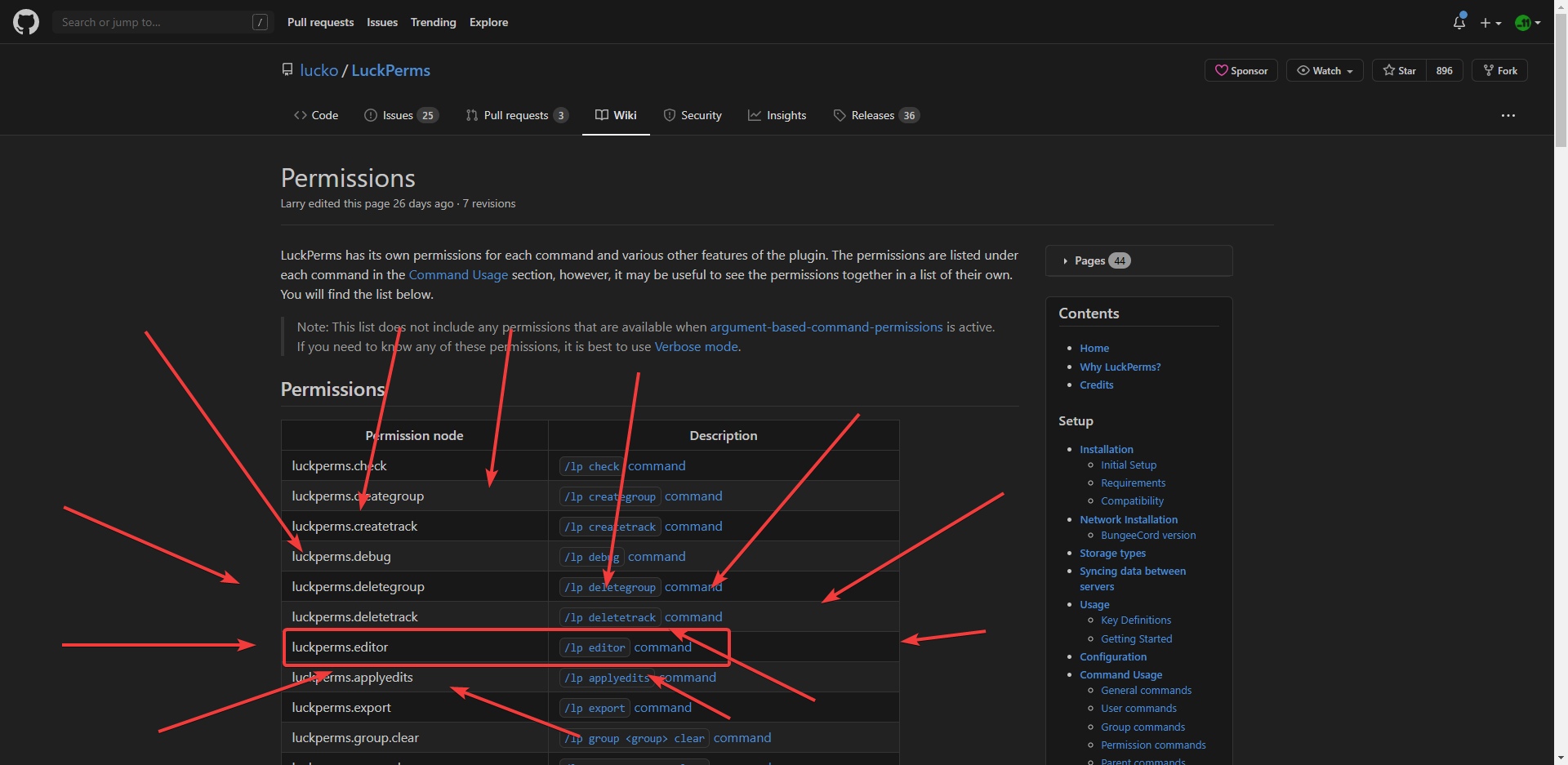 fathom junco
I KNOW
 terse cloak
lmaooo
flat parcel
send a /lp editor link here please
and say what group can access it that you don't want to be able to
terse cloak
Wow, luck perms migration from other plugins is actually so easy. Thanks devs if any are watching.
 open mirage
hey you’re from pterodactyl
fathom junco

LuckPerms - A permissions plugin for Minecraft servers.
LuckPerms is a permissions plugin for Minecraft servers.
imma go sleep soon its 1am
fathom junco
****im tired from this XD ***
fathom junco
?
flat parcel
What's the player who can access /lp editor who you don't want?
fathom junco
everyone that have that rank
flat parcel
what rank
flat parcel
are they opped?
flat parcel
I don't appreciate being yelled at.
fathom junco
I WILL SAY ONE THING
 proud hound
Hakim, stop spamming and be polite. Those rules are enforced
fathom junco
THANK U SO MUCH I LUF U, U HELPED ME SO MUCH AND IM SORRY IF IM BEAING ANNOYING IM JUST DUMB BUT THANK U SO MUCH SOOOOOOOOOOOOOOOOOOOOOOOOOOOOOOOOOOOO MUCH
flat parcel
holy caps
fathom junco
he made my day rly
flat parcel
my god
 frozen dagger
how u add someone to a gorup?
fathom junco
THANK U
proud hound
!usage @frozen dagger
 wanton stratusBOT
Here's a guide to help users understand and use LuckPerms for the first time.
 LuckPerms wiki
frozen dagger
LuckPerms wiki
frozen dagger
thanks
fathom junco
good night/day guys 🙂
also im sry larry
before i go
i jsut need 1 more thing: how do i reset the nick ?
 whole dragon
heyy
anyone free to hel pme out
We're expanding to a network and I kinda need help setting up everything
just need to make sure im doing this right : p
proud hound
!bungee is the ultimate guide
wanton stratusBOT
If you run a Bungeecord network, learn how to correctly setup LuckPerms on all server instances (including Bungee).
Also read:
Syncing data between servers
https://github.com/lucko/LuckPerms/wiki/Syncing-data-between-servers
LuckPerms wiki
proud hound
Both links
whole dragon
yep but
I kinda wanna do something weird
uh
basically I wanna have global ranks but
with different permissions
and prefixes
thats possible right?
wanton stratusBOT
You can set a permission or group on a per-world/per-server basis, through what we call "contexts".
LuckPerms wiki
proud hound
Just add context of which server you want each prefix to show on
proud hound
Thank you! That's great to hear!!
whole dragon
do I need to restart my bungee sproxy
so it knows the servers
or thats not how it works?
proud hound
First, read and follow the pages I linked- then you should see how it works
 uneven vault
Is there any way to set up a logging discord bot for when ranks are changed they get logged in discord?
 hasty tree
not with LP itself, you will need to find or create something to do that for you.
uneven vault
Thank you!
 bitter sail
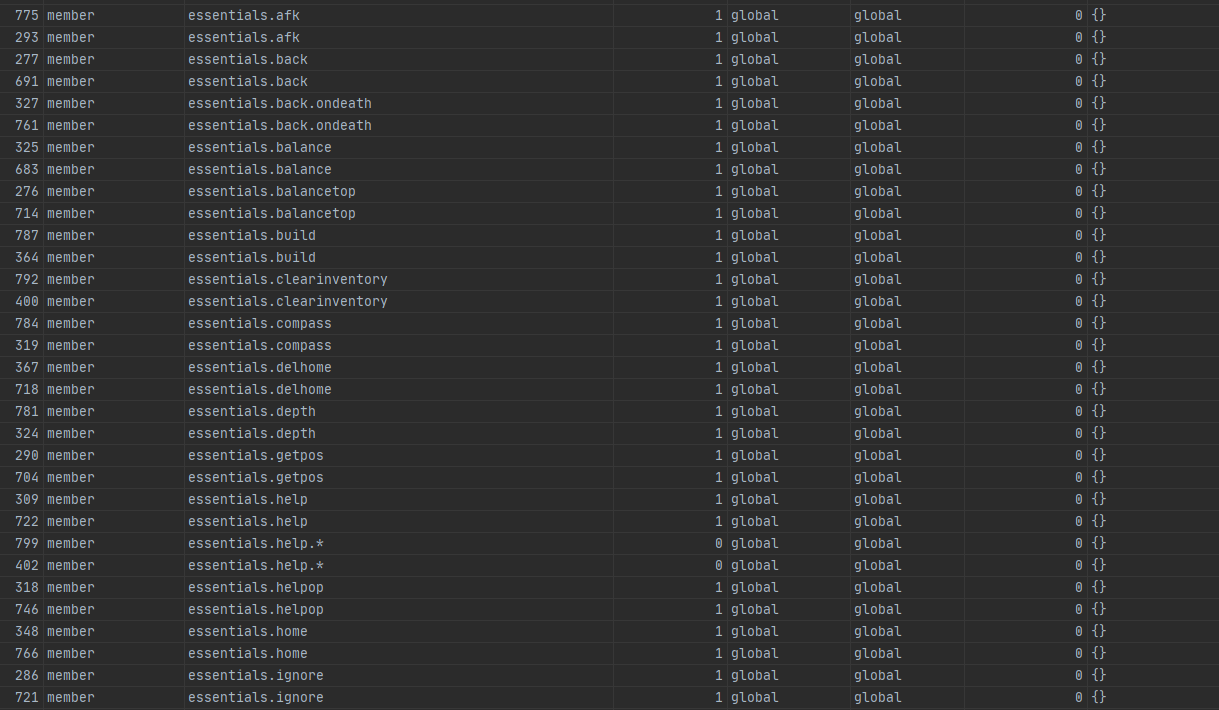
Hey so I was looking in the MySQL DB and noticed a lot of duplicate perms that don't show up in the editor or anything, is it safe for me to remove the duplicates?
https://i.imgur.com/zOUeZJW.png


 lapis ibex
@bitter sail I mean why does it matter?
bitter sail
Just to keep it clean and simple, no reason to keep them if they serve no function
lapis ibex
Make a backup and try it
bitter sail
Yep it works fine, just curious to why there is duplicates in the first place
lapis ibex
don't know
 potent umbra
How can I have LuckPerms check what permissions currently exist?
I'm trying to get things straightened out but /lp tree didn't quite cover it all.
lapis ibex
Well that shows all permissions LP knows about
There's no way to know what permissions exist simply because they can be dynamically generated
If you want to know what permissions are being checked in realtime use verbose
!verbose @potent umbra
wanton stratusBOT
LuckPerms provides a verbose command to help you find out what permissions a command/plugin is checking.
LuckPerms wiki
 devout bone
Hey ! Just a litlle question : to remove the permission for a group it's the command : "/lp group default permission set imageonmap.* false" ?
lapis ibex
Well do you want to delete the permission you previously gave or do you want to deny it? @devout bone
devout bone
I want to deny the access to all the command of this plugin
lapis ibex
Then that's the correct way
devout bone
Thanks ! I have a problem, it's not working
lapis ibex
Elaborate
devout bone
The plugin give by default the permission to everyone. So I use this command to deny the access to all the command of this plugin (image on map) : /lp group default permission set imageonmap.* false
But it's not working
lapis ibex
What about that is not working?
Is the command not working?
Does it seem like the permission doesn't apply?
devout bone
It seem like the permission doesn't apply. I can always* use the command
lapis ibex
Ok. Do you have the default group directly or inherited?
devout bone
Ok, it's work, a mistake from me. Thanks for help !
lapis ibex
You're welcome
 versed acorn
how do I make a role a default role?
 foggy quartz
Use the default group
versed acorn
I have a group titled villagers that I want as default
foggy quartz
Make it a parent of default
foggy quartz
np
potent umbra
@lapis ibex Ah, ok. I suppose there's not an easy way to force these things to generate?
wanton stratusBOT
Hey PUNISHED COSTANZA! Please don't tag helpful/staff members directly.
potent umbra
Apologies, I didn't know that was frowned on. It might "check" if I try to use the command and am denied, right?
 lilac geyser
What database library is used for LuckPerms so as to support that huge amount of database type? Can I use it for JS?
lapis ibex
!default @versed acorn
wanton stratusBOT
LuckPerms provides a group that every player is added to upon joining the server, called default. You can use multiple methods to change the default group or change the name of it.
LuckPerms wiki
lapis ibex
@potent umbra permissions depend entirely on the plugin
And they may change as the plugin runs
versed acorn
I was given stone tools when I joined my server, is that luckperms or essentials?
versed acorn
okay
hasty tree
@lilac geyser LP uses HikariCP which is Java only
lapis ibex
@lilac geyser not quite. @hasty tree is not correct. LP uses Hikari to pool the database connections. It uses a separate library for every database type. Also all the queries are handwritten. Not library support there
And of course those libraries don't exist for JS
What kind of question is that?
 lunar pelican
any plugin to display placeholders with the prefix of the groups of luckperms?
 toxic wagon
!chat
wanton stratusBOT
LuckPerms does not display things in chat!
LuckPerms is only able to send information to formatting plugins so that they display them properly. LuckPerms does not put the prefix in front of your name, you need a chat formatting plugin to do it, and you need Vault. Same goes for the tablist! If the information appears correctly when you run /lp user <user> info, LuckPerms is doing its job!
Prefix isn't showing?
What plugins can I use to format chat?
proud hound
!placeholders and any chat formatting plugin that supports PAPI
wanton stratusBOT
Display data such as user prefixes and groups from LuckPerms in other plugins.
LuckPerms wiki
lunar pelican
thx :D
hasty tree
brain that's what happens when no one else replies :P
thanks for correcting
although there are libraries that exist for Node which do similar things
lilac geyser
Just wanting to support multiple database type and saw if someone has ported the project
lapis ibex
Well there's nothing to port because it's not a single library
And you won't see all to many database based Java libraries ported to node simply because Java offers quite a deep integration
Like there's plenty of predefined elements
lilac geyser
👌
 fathom pine
Is their a messages file in luckperms
toxic wagon
!locale
wanton stratusBOT
Learn how to change all the message from LuckPerms.
LuckPerms wiki
 errant hawk
Im using the latest Paper server with luckperms and its generating errors on multiple events
ie
[00:04:32 ERROR]: Could not pass event PlayerLoginEvent to LuckPerms v5.1.93
and
[00:04:32 ERROR]: Could not pass event PlayerChangedWorldEvent to LuckPerms v5.1.93
followed by a large error, any idea what might cause these events to be unrecognized?
Could this be cause by /reload confirm? I know thats unsupported and I may have used it.
proud hound
yes
never reload
restart the server, see if it still happens
if so, pastebin the entire error
 real coyote
hey, is there anyway to make chat colour a different colour than my prefix? the command i'm using is as follows:
/lp user [my username] meta setprefix 1 &8[&4Owner&8]&4 I only want the last &4 to change my username but not messages
proud hound
that would be up to your chat formatting plugin
perhaps try adding an &r after your name placeholder in the format
real coyote
ooh right, okay thank you
hasty tree
@proper fern can you not
 proper fern
Ok
 rare patio
Hey
Is there a way to do timed /fly with luckperms?
Like it would disable /fly once the permission runs out
proud hound
nope
proud hound
np!
 gray aurora
Hi, I have this issue : I have ServerRestorer plugin to backup all of my server data but it cannot save the luckperms database, so i lose every permission setting anytime i perform a backup without stopping the server, is there a solution to unlock the database file of luckperms to let me backup it ?
i use the h2 local file
toxic wagon
If you want to make a backup of luckperms just do /lp export <random name>
The H2 database file is not able to be "unlocked" Just use the export command to backup luckperms
 split veldt
I ran into this problem as well. Using a remote database solves all backup problems, as the h2 database can't be read / copied while it is in use.
fathom junco
guys, whats the perms name so peaple can break blocks
HELP
hello ?
anyone ?
please ,
hasty tree
you need to learn a thing called patience
delete essentials antibuild if you installed it
fathom junco
i dont have it
i only have essnetialsX and essentials.chat
what do i do to let peaple break blocks
or build them
hasty tree
if they are near spawn then it could be spawn-protection in your server.properties
fathom junco
ok
 languid trail
Пишите на русском
fathom junco
and how to let admins for exaple break and place blocks when a region is set to build/block-break/please deny
 mellow sage
Look at world guards documentation
 regal cloak
still have not any idea why does not weoks web editor
wanton stratusBOT
You can download LuckPerms for Bukkit/Spigot, BungeeCord, Sponge, Nukkit and Velocity.
Additional downloads
regal cloak
i try everything
hasty tree
we don't know what "everything" is
regal cloak
works
hasty tree
how did you "just update jar file"
 tidal token
i have for the most part set up luckperms on one server and i want to convert it to bungee so i dont have to redo everytihng how do i do this?
hasty tree
!switch
wanton stratusBOT
If you wish to change your storage type (e.g. to YAML or MySQL) you may need to follow these instructions to ensure your groups and permissions are migrated to the new storage type.
Read more about the Storage types
LuckPerms wiki
hasty tree
^ same concept
assuming you're already on the default storage type
otherwise just connect all the other servers to the same database if already using mysql
 finite parrot
I have a BungeeSystem. Permissions are mb.[command], when I'm giving me the Permission It doesn't give me it and I have no Permissions to execute the Command. I have this problem with every Plugin
finite parrot
?
toxic wagon
Do you have Luckperms-Bungee installed on the bungee server and the normal version of luckperms installed on all the backend servers. An have all instances of luckperms connected to the same remote database?
finite parrot
Yeah of course
 glad grail
What should a luckperms plugin.yml look like?
wanton stratusBOT
Learn how to change all the message from LuckPerms.
LuckPerms wiki
toxic wagon
!placeholders
wanton stratusBOT
Display data such as user prefixes and groups from LuckPerms in other plugins.
LuckPerms wiki
toxic wagon
It's not really an issue with Luckperms, more the scoreboard plugin. So #general or ask in their support
glad grail
My console says "17.08 13:52:00 [Server] ERROR Could not load 'plugins/LuckPerms-Bukkit-5.1.93.jar' in folder 'plugins'
17.08 13:52:00 [Server] INFO org.bukkit.plugin.InvalidDescriptionException: Invalid plugin.yml
17.08 13:52:00 [Server] INFO at org.bukkit.plugin.java.JavaPluginLoader.getPluginDescription(JavaPluginLoader.java:170) ~[patched_1.15.2.jar:git-Paper-304]
17.08 13:52:00 [Server] INFO at org.bukkit.plugin.SimplePluginManager.loadPlugins(SimplePluginManager.java:148) ~[patched_1.15.2.jar:git-Paper-304]
17.08 13:52:00 [Server] INFO at org.bukkit.craftbukkit.v1_15_R1.CraftServer.loadPlugins(CraftServer.java:360) ~[patched_1.15.2.jar:git-Paper-304]
17.08 13:52:00 [Server] INFO at net.minecraft.server.v1_15_R1.DedicatedServer.init(DedicatedServer.java:234) ~[patched_1.15.2.jar:git-Paper-304]
17.08 13:52:00 [Server] INFO at net.minecraft.server.v1_15_R1.MinecraftServer.run(MinecraftServer.java:900) ~[patched_1.15.2.jar:git-Paper-304]
17.08 13:52:00 [Server] INFO at java.lang.Thread.run(Thread.java:748) [?:1.8.0_262]
17.08 13:52:00 [Server] INFO Caused by: java.util.zip.ZipException: error in opening zip file
17.08 13:52:00 [Server] INFO at java.util.zip.ZipFile.open(Native Method) ~[?:1.8.0_262]
17.08 13:52:00 [Server] INFO at java.util.zip.ZipFile.<init>(ZipFile.java:225) ~[?:1.8.0_262]
17.08 13:52:00 [Server] INFO at java.util.zip.ZipFile.<init>(ZipFile.java:155) ~[?:1.8.0_262]
17.08 13:52:00 [Server] INFO at java.util.jar.JarFile.<init>(JarFile.java:166) ~[?:1.8.0_262]
17.08 13:52:00 [Server] INFO at java.util.jar.JarFile.<init>(JarFile.java:130) ~[?:1.8.0_262]
17.08 13:52:00 [Server] INFO at org.bukkit.plugin.java.JavaPluginLoader.getPluginDescription(JavaPluginLoader.java:158) ~[patched_1.15.2.jar:git-Paper-304]"
 bitter coral
The LP jar file is probably corrupted, try to down and upload it again
toxic wagon
!downloads Yeah, download a new jar and try again.
wanton stratusBOT
You can download LuckPerms for Bukkit/Spigot, BungeeCord, Sponge, Nukkit and Velocity.
Additional downloads
 novel yarrow
Hi, are there uncompatible plugins with LuckPerms?
I have EssentialsX, WorldGuard, WorldEdit and TitleManager
toxic wagon
Not really.
 weak wing
hi,
would lp bulkupdate users update permission prefix.200.% "permission ~~ prefix.2000.%" work in changing the weight of custom prefixes applied to users from 2000 to 200?
 chilly jetty
hello i have a prefix issue i have set my weights where default is first rank with a new displayname and all ranks above it have higher weights than each other but all ranks still take on the default prefix i have redone the group 2 times now to see why and i cannot seem to come up with any idea why i have 2 other tracks of groups and they are set the same way i could really use help as ive already used the wiki and have solved all of my other problems there but this one i cannot find a fix for why would my other two groups show their respected prefixs and inherit the permissions from lower ranks but this one track
hasty tree
that paragraph is lacking some serious punctuation
did you see the FAQ on prefixes?
!faq
wanton stratusBOT
Check out some of our frequently asked questions.
LuckPerms wiki
chilly jetty
ill go over again just in case
hasty tree
specifically this part
 green plover
I'm a fairly long time user of LuckPerms but im not sure if this is possible, could I use an LP command to simultaneously check if a player has a position in a specified track, and if so, promote; while also saying if not, add them to track and then promote on the track?
hasty tree
parent settrack
i'm not really sure what you mean by the last part tho
if you mean to add them to the first group on the track then i think you can just do /lp user <user> promote <track>
green plover
wait
so if im reading this right, promote automatically adds the member to the first position of the track if they arent any rank in that track?
hasty tree
yes
novel yarrow
Not really.
@toxic wagon Thanks!
wanton stratusBOT
Hey Santi! Please don't tag helpful/staff members directly.
novel yarrow
Indeed
fathom junco
is there anyway we can change the commands to something we want ? with lp
like /lp user (user) promote/demote (group)
chilly jetty
ok so help me understand his one i redid my inheritances. when i used the lp user user meta info it showed that my default has a higher number than the ranks above it.
fathom junco
can we change it to set rank or something ?
like /lp user (user) promote/demote (group)
is there anyway we can change the commands to something we want ? with lp
to set rank or setrank ?
or nah ?
chilly jetty
hakim use youll need a ranking plugin for that
chilly jetty
check out blockyranks
 spice basin
Hey, is there a significant performance hit for a player having a lot of permissions?
I'm planning on using a bunch of permissions as counters for an aggregate weighting system, to assign titles based on the number of unlocked abilities from rpg classes.
I can work around it if I need to, but the plan was for each training level to just add trainingname.<#> to the player
fathom junco
can i ask something for essentials ?
spice basin
If needed I can just have it look for the highest number they have and give it an equal weight
fathom junco
how do i see the full config file
idk why buy sometimes it doesnt show me the full config file
chilly jetty
lp editor
fathom junco
it contain 800 ligns but sometime i only see 70
spice basin
@fathom junco essentials has their own discord, you will probably get more specialized help there.
chilly jetty
thanks for everything guys figured out my prefix issue turns out my prefix priority was higher than higher ranks i feel stupid with such a simple fix
foggy quartz
what is full command to get person i specific group without using lp editor?
and not using track
in
 oblique ether
Hey, I have created a rank with a suffix, but the suffix doesnt pop up in the minecraft server, But when I type /lp user (name) info It says the suffix actually is there.
foggy quartz
is there anything like /lp user name setgroup
oblique ether
/lp user <name> parent add <group>
foggy quartz
@oblique ether how to remove person form specific group with command?
oblique ether
/lp user <name> parent remove <group>
foggy quartz
ty
hasty tree
Hey, I have created a rank with a suffix, but the suffix doesnt pop up in the minecraft server, But when I type
/lp user (name) infoIt says the suffix actually is there.
@oblique ether then you either don't have a chat plugin, vault, or both
wanton stratusBOT
Hey Bjorn❣! Please don't tag helpful/staff members directly.
 little sphinx
!chat
wanton stratusBOT
LuckPerms does not display things in chat!
LuckPerms is only able to send information to formatting plugins so that they display them properly. LuckPerms does not put the prefix in front of your name, you need a chat formatting plugin to do it, and you need Vault. Same goes for the tablist! If the information appears correctly when you run /lp user <user> info, LuckPerms is doing its job!
Prefix isn't showing?
What plugins can I use to format chat?
 primal snow
with my group default /f fly is disabled but you can get a note that gives you the command, when someone uses it at their user page it says factions.fly allowed but they still cant do the command, does someone have a solution?
little sphinx
!verbose
wanton stratusBOT
LuckPerms provides a verbose command to help you find out what permissions a command/plugin is checking.
LuckPerms wiki
 rough notch
This is a bit of a strange question
I use luckperms and stuff for ranks
And I also use tebex to buy ranks, obviously, but a change is coming to my server soon and I'll need to make an offline mode store
If bungeecord is set to online mode but the server the tebex store will be on is in offline mode, should the ranks carry over even if a user changes their username?
hasty tree
well if you set up IP forwarding correctly and set bungeecord: true in each servers spigot.yml then players will keep the same UUID
so it won't matter
foggy quartz
Hey, I tried to put a custom symbol in the prefix and it s not showing. Can someone help me?
The code I tried to put was \uE001
It should show the symbol that i added in my texturepack.
hasty tree
not showing where
foggy quartz
In the chat
It s showing \uE001 instead of the symbol.
The permission from the rank is
prefix.0.\uE001 &c
hasty tree
does it show in /lp user <user> info
little sphinx
i dont think its up to LP to parse \uE001 to a symbol
foggy quartz
In other plugins it s shows the right symbol.
 sleek zealot
how to give out a prefix to a player separately without changing his group?
foggy quartz
Through the website editor I made a rank, and completed the Prefix box with that
Version of lp is 5.1.26
Server version 1.13
finite parrot
Luckperms is spamming the Console with error codes when I start my Server. Help pls
little sphinx
!paste
wanton stratusBOT
Please use pastebin!
Seeing a paste of the problem makes everything so much easier! Use https://bytebin.lucko.me/ for easy pasting!
For console errors:
Pastebin any relevant segments of the console log. If it's a startup error, this includes the entire startup log!
Other errors:
Pastebin the entire LuckPerms config file (passwords removed) as well as any other relevant files!
little sphinx
@sleek zealot so it the user directly?
sleek zealot
yea
little sphinx
start commadn with /lp user USER ....
foggy quartz
So is there any fix for my problem?
 wide pawn
is nametagedit supported?
foggy quartz
@hasty tree
wanton stratusBOT
Hey mituishere.! Please don't tag helpful/staff members directly.
finite parrot
!paste
@little sphinx https://bytebin.lucko.me/VDgeeBMouk
and now?
wanton stratusBOT
Hey byJanne! Please don't tag helpful/staff members directly.
hasty tree
try adding the prefix with a command in game @foggy quartz
and can you please share the applyedits command here
little sphinx
!errors @finite parrot
wanton stratusBOT
Here's a page with some common storage system errors.
LuckPerms wiki
foggy quartz
Same thing with the in game command.
wide pawn
do you need to use Vault plugin when using Luckperms?
foggy quartz
Yes.
Vault is for prefixes and suffixes
If you don t have it, prefixes and suffixes will not work
 plucky merlin
How to "deny a permission" with luckperms through the config file
not talking about in game using false but talking about in a config file
foggy quartz
@hasty tree Same thing with the in game command.
wanton stratusBOT
Hey mituishere.! Please don't tag helpful/staff members directly.
 hardy peak
@plucky merlin the config file doesn't manage permissions... ?
little sphinx
!editor
wanton stratusBOT
LuckPerms offers an easy to use, powerful Web Editor, with which you can add, delete and change permissions of groups and players.
LuckPerms wiki
foggy quartz
Some help?
potent umbra
I'm reading the Default Groups page on LuckPerm's GitHub page. If I'm understanding correctly, I should be using the default group as a baseline, right? Like, some schmuck joins my server and needs the most baseline permissions, he gets default, right? But it says "For this reason, I made it so that the default group is not configurable." Does this mean I can't change the permissions that apply to the default group?
hasty tree
nothing we can do, make an issue on github
potent umbra
If that's so, then how do I even use it?
hasty tree
of course you can change the permissions, default is just like any other group except that it can't be deleted
potent umbra
Ah, ok. I see now.
I didn't even know it existed until I saw that GriefDefender made "heavy" use of the default group, and now I'm scared and I have to read more, which just makes me more scared.
 random island
Can someone help me? Per world permission doesnt work, im adding a permission to the group default with the context: world hub
And they don’t get the permission
proud hound
If you are adding it via command, mind copy/pasting the exact command you're using?
wanton stratusBOT
Please use https://bytebin.lucko.me to send files in the future. I have automatically uploaded message.txt for you: https://bytebin.lucko.me/HoKMsDSQbW
wanton stratusBOT
You can download LuckPerms for Bukkit/Spigot, BungeeCord, Sponge, Nukkit and Velocity.
Additional downloads
random island
If you are adding it via command, mind copy/pasting the exact command you're using?
@proud hound /lp group default permission set essentials.speed true world=hub
wanton stratusBOT
Hey Jesse016! Please don't tag helpful/staff members directly.
proud hound
Can you screenshot what the plugin outputs when you run it
wanton stratusBOT
Hey Jesse016! Please don't tag helpful/staff members directly.
proud hound
Ok now go into hub world and screenshot the output of lp user <yourname> info
random island
hardy peak
are you sure you only need this permission to use the speed command?
you can try to verbose the command, or at least checkinherits this permission first
proud hound
Yep, mostly. It's open source so there have been some contributors
fathom junco
okeyyyy, cs thats a great plugin 🙂
i have another Q: what plugin can i use so i can change the command (lp user (username) promote/demote (group) to the command : (setrank (username) or (promote username (group))
HElp
open mirage

BukkitWiki
commands.yml is a configuration file that houses custom defined aliases and command block overrides for your CraftBukkit server.
The command block override system provides a quick and easy way to force the server to use the commands provided by Mojang (as opposed to the ones b...
fathom junco
im using spigot
open mirage
Pretty sure it’s in spigot
fathom junco
does this changes the commands ?
proud hound
read it
fathom junco
i will 🙂
also
OMG, im sry if im asking too much, im dumb
i have the server sign plugin, i can use it to set up signs with commands that runs when players click on it
but
no one can use it if there no opped
what do i do ?
proud hound
Have the sign plugin run commands as console and not the player
any good sign command plugin allows it
foggy quartz
hey :), could you help me out with some stuff i am not able to figure out myself?
*tried wiki too
the idea is to give people some minecraft rights, they would usually have as op. Like /gamemode spectator
now i did create a group admin and added minecraft.command.gamemode to it
now everyone in the group can do /minecraft:gamemode spectator
but there are no requirements shown by the chat bar
like its a unknown command, but still working?
proud hound
bukkit doesn't have permissions for separate gamemodes, it's either none or all
and the tabcomplete thing where it shows up red isn't handled directly by LP
foggy quartz
strange thing: /gamerule or /difficulty is not affected?
proud hound
you may have a plugin overtaking gamemode
foggy quartz
i dont mind if all gamemodes are able to be picked
i installed vault, essentialsX as recommended
proud hound
essx has commands for gamemode
foggy quartz
i found now this in config
If you do not wish to use a permission system, you can define a list of 'player perms' below.
This list has no effect if you are using a supported permissions system.
If you are using an unsupported permissions system, simply delete this section.
Whitelist the commands and permissions you wish to give players by default (everything else is op only).
These are the permissions without the "essentials." part.
To enable this feature, please set use-bukkit-permissions to false.
player-commands:
but i assume luckperms is a supported permission system?
proud hound
it definitely is
that's not what you need to do anyways
give the essentialsx permission to select gamemode
essentials.gamemode.spectator iirc
it's googleable 😛
foggy quartz
not for me, i tried and didnt find a thing
anyways now i can use /gamemode
but it still tells me it is a unknown command o,o?
proud hound
that's not handled by LP
this, btw, is the first result when you google essentialsx permissions
foggy quartz
there was no information which plugin did create this error... nor does this help me.. i already was on this site
proud hound
?
foggy quartz
there isnt very much documentations i want to say
nvm have a good day, you helped me already out with one thing
@proud hound ban >:(
wanton stratusBOT
Hey Fefo6644! Please don't tag helpful/staff members directly.
proud hound
@cerulean fulcrum no ads please
foggy quartz
Shut up clippy I'm saving the world
proud hound
thanks fefo
foggy quartz
Np
foggy quartz
What is it you need?
foggy quartz
Okay, what is it you don't understand? People here can help guide you
 timber zealot
@foggy quartz come to my server rn now and make perms for me plz
foggy quartz
lol no
timber zealot
plz
foggy quartz
I'm not going to do your work for you, I can help you understand certain things or explain others, but not do your work
Besides
I'm nowhere near a computer other than my phone
timber zealot
aghhh
 loud escarp
Wasay just youtube it and whatever problems you run into just ask in general
foggy quartz
!usage is a great place to start too
wanton stratusBOT
Here's a guide to help users understand and use LuckPerms for the first time.
LuckPerms wiki
timber zealot
@loud escarp i wanna make bedwars perms plz help
 modest rose
Hello!
This is stupid but, how do I set the right color? ^^'
wanton stratusBOT
LuckPerms does not display things in chat!
LuckPerms is only able to send information to formatting plugins so that they display them properly. LuckPerms does not put the prefix in front of your name, you need a chat formatting plugin to do it, and you need Vault. Same goes for the tablist! If the information appears correctly when you run /lp user <user> info, LuckPerms is doing its job!
Prefix isn't showing?
What plugins can I use to format chat?
modest rose
Ups, sorry.
And thanks for help!
foggy quartz
Np
timber zealot
can someone help me to make perms on my server plz
proud hound
If you have any specific questions we can answer, but we're not gonna do your setup
timber zealot
lol u just roast me
proud hound

loud escarp
Hey Larry
So I have a question if anyone could answer, I want to change my name look, would that be the suffix?
proud hound
The actual name?
That would be a nickname, which LP can't handle
prefix and suffix are things that come before and after the name
foggy quartz
Barry
 long tundra
Hi
foggy quartz
Hello!
This is stupid but, how do I set the right color? ^^'
@modest rose Change the ''&'' to §
§ = alt+21
Most chat plugins support & as the "color char"
modest rose
@modest rose Change the ''&'' to §
@foggy quartz
The game doesn't support that character, I can't even copy-paste.
 shrewd thistle
@modest rose what's the issue?
modest rose
 dire orbit
i need help configuring perms for shopGUI
shrewd thistle
that prefix is set with lp?
modest rose
Yes.
foggy quartz
And I do have EssentialsXChat
@modest rose I use it too
shrewd thistle
could u send me a link to your editor?
dire orbit
pls help
foggy quartz
modest rose
Yes.
shrewd thistle
@dire orbit what's the issue?
modest rose
I'll check the Essentials stuff first
dire orbit
i neeh help configuring perms for shop GUI
shrewd thistle
what type of help?
foggy quartz
dire orbit
configuring permissions for shopGUI
shrewd thistle
!nw @dire orbit
wanton stratusBOT
Please tell us what's going on!
We really would absolutely love to help you out! However, telling us that it isn't working wastes everyone's time. Please, just describe the issue you're having clearly and with as much detail as possible, and send any relevant screenshots of whatever problems you're having.
For Console Errors:
shrewd thistle
what's the problem though, what help do you need?
dire orbit
just setup perms
shrewd thistle
pls describe
dire orbit
do u know what shopGUI is?
dire orbit
yeah
shrewd thistle
I'm guessing they have all of their perms in their docs
there should be a list of perms and what they do
you can add those to your groups
shrewd thistle
!usage | pls see wiki on basic setup
wanton stratusBOT
Here's a guide to help users understand and use LuckPerms for the first time.
LuckPerms wiki
modest rose
@foggy quartz, seems to be working thanks you very much!
foggy quartz
no problem!
shrewd thistle
!verbose | @dire orbit ok, so I searched up the plugin, are u using shopgui or shopgui+?
wanton stratusBOT
LuckPerms provides a verbose command to help you find out what permissions a command/plugin is checking.
LuckPerms wiki
dire orbit
no just shopGUI
dire orbit
ok also another question
i see that in the starting default wiki they have a section called 'default'
is there a way to give all the players one role?
shrewd thistle
the default role is automatically given to all players
shrewd thistle
you can add perms to the default group
foggy quartz
!default
wanton stratusBOT
LuckPerms provides a group that every player is added to upon joining the server, called default. You can use multiple methods to change the default group or change the name of it.
LuckPerms wiki
foggy quartz
read that
foggy quartz
tl;dl: you can't change which group is the default group
dire orbit
ok oh yeah another question
foggy quartz
me: read that
also me: tl;dr
shrewd thistle
the data is saved in sqlite i believe
dire orbit
whats the wiki to adding tags
shrewd thistle
!context | is this what you mean by tags?
wanton stratusBOT
You can set a permission or group on a per-world/per-server basis, through what we call "contexts".
LuckPerms wiki
dire orbit
like when a player talks they get a [tag] before their name
shrewd thistle
that is called a prefix
dire orbit
oh ok
shrewd thistle
!prefix | this wiki
wanton stratusBOT
You can set prefixes, suffixes and other meta data in LuckPerms for players and groups. Note that LuckPerms does not manage chat. You need to use another plugin to show prefixes/suffixes in chat.
LuckPerms wiki
shrewd thistle
np!
 stoic comet
How to setup a default group?
shrewd thistle
!default | pls see wiki
wanton stratusBOT
LuckPerms provides a group that every player is added to upon joining the server, called default. You can use multiple methods to change the default group or change the name of it.
LuckPerms wiki
stoic comet
Sure
 sly topaz
is there already a default group I can configure without any permissions plugins? I am trying to avoid downloading perm plugins and just give my default group access to sethome
shrewd thistle
a perm plugin is highly highly recommended for any server
you'll need one to give perms to players
sly topaz
well, I found a way a couple of month ago to give default players command perms without any perms plugins installed. I didn't even have vault
is this something to do with commands.yml or permissions.yml?
or was that just a fluke
shrewd thistle
it may be permissions.yml
but again, still highly recommend vault, lp and essX
very basic plugins for any server
sly topaz
k
I just don't know how to configure luckperms outside of the console
is there a permissions.yml-like file?
wanton stratusBOT
LuckPerms offers an easy to use, powerful Web Editor, with which you can add, delete and change permissions of groups and players.
LuckPerms wiki
stoic comet
I've essential chat and vault, and prefix dont work...
shrewd thistle
@stoic comet how have you setup the prefix?
shrewd thistle
have you setup the prefix in ess chat?
stoic comet
How?
shrewd thistle
in essx config file
stoic comet
And then?
stoic comet
screenshot?
Im from mobile now
shrewd thistle
format: '{PREFIX} {DISPLAYNAME}{MESSAGE}'
you need to have the {PREFIX} placeholder in there
stoic comet
I have "Essentials' folder
shrewd thistle
config.yml in folder
stoic comet
And in this config.yml
shrewd thistle
there is that line which you need to modify
shrewd thistle
gotta scroll down to the ess chat section of the config
stoic comet
Maybe
shrewd thistle
do you have access to a computer at the moment?
stoic comet
Nop
shrewd thistle
ok
well, lmk when you do and if you scroll down to that section you should find it
foggy quartz
Every day Is a sofference
ooh... life
stoic comet
In trying to get a dual GPU pv
With razen 5
Is It good?
8gb ram
Can i use 128x pure bdcraft
?
Ok sorry
foggy quartz
hi guys
shrewd thistle
ello
shrewd thistle
!editor | @foggy quartz
wanton stratusBOT
LuckPerms offers an easy to use, powerful Web Editor, with which you can add, delete and change permissions of groups and players.
LuckPerms wiki
stoic comet
LuckPerms - A permissions plugin for Minecraft servers.
LuckPerms is a permissions plugin for Minecraft servers.
foggy quartz
!editor?
wanton stratusBOT
LuckPerms offers an easy to use, powerful Web Editor, with which you can add, delete and change permissions of groups and players.
LuckPerms wiki
shrewd thistle
@foggy quartz that is a link to the wiki page
shrewd thistle
it talks about the web editor feature
shrewd thistle
ye
shrewd thistle
ye, lp is pretty awesome
stoic comet
I now
stoic comet
Today I managed to set up MySQL
foggy quartz
wym
shrewd thistle
the perm * gives all perms
stoic comet
Export and import to have all the groups, right?
shrewd thistle
@stoic comet yes
stoic comet
In order not to have to give all permissions back
shrewd thistle
!switch | @stoic comet pls see this one
wanton stratusBOT
If you wish to change your storage type (e.g. to YAML or MySQL) you may need to follow these instructions to ensure your groups and permissions are migrated to the new storage type.
Read more about the Storage types
LuckPerms wiki
stoic comet
I would like to create a shop
shrewd thistle
!usage | @foggy quartz there is actually a guide here for new users
wanton stratusBOT
Here's a guide to help users understand and use LuckPerms for the first time.
LuckPerms wiki
foggy quartz
ok thanks
stoic comet
But if I buy a rank I need it on the whole server. How can I do?
stoic comet
Then, if someone buys the fly and enters a bedwars they can fly
shrewd thistle
!context | @stoic comet you can setup context for each perm node
wanton stratusBOT
You can set a permission or group on a per-world/per-server basis, through what we call "contexts".
LuckPerms wiki
shrewd thistle
key = world, value = <world name>
stoic comet
Ok
shrewd thistle
yes correct
 tall marten
hello!
stoic comet
i
shrewd thistle
ello
tall marten
So i came across a bug using LuckPerms
shrewd thistle
ok...
tall marten
the Prefix doubled twice
stoic comet
Yes..
tall marten
and i had to delete the Prefix and now how do i set it back?
shrewd thistle
!prefix | pls see wiki guide, the prefix is just a perm node like any other
wanton stratusBOT
You can set prefixes, suffixes and other meta data in LuckPerms for players and groups. Note that LuckPerms does not manage chat. You need to use another plugin to show prefixes/suffixes in chat.
LuckPerms wiki
stoic comet
Lp user/group (name) meta prefix 'prefix'
shrewd thistle
not a bug, you may have just done something incorrectly
shrewd thistle
u can use the editor
stoic comet
Edotir
shrewd thistle
add the perm literally just a *
foggy quartz
oh thats a perm?
stoic comet
something like
shrewd thistle
yes
foggy quartz
nice
shrewd thistle
you may hear the word wildcard, it refers to the *
foggy quartz
stoic comet
lp user/group (name) permission set *
foggy quartz
found it
shrewd thistle
yup
stoic comet
Right? Alan?
shrewd thistle
I find the editor is easier for new users but yes, the command is correct
tall marten
why wont the [owner] rank not work?
stoic comet
** IQ 1000000 **
foggy quartz
also another question
tall marten
mine is
shrewd thistle
@tall marten can I see your editor?
tall marten
Huh
foggy quartz
is 4 gigs of ram decent?
tall marten
How do i take screenshots on pc?
foggy quartz
and 4 cores
shrewd thistle
@tall marten are you not using the web editor?
tall marten
no
foggy quartz
@tall marten google greenshot
stoic comet
is 4 gigs of ram decent?
@foggy quartz for a server or a privite?
shrewd thistle
!editor | this wiki @tall marten
wanton stratusBOT
LuckPerms offers an easy to use, powerful Web Editor, with which you can add, delete and change permissions of groups and players.
LuckPerms wiki
foggy quartz
@stoic comet server.
sly topaz
do you need a perms plugin for perms or can I just use perms.yml
foggy quartz
its my rasp pi
stoic comet
@foggy quartz ovh Is a vps hosting here in Italy
shrewd thistle
@sly topaz again, strongly recommend lp, vault and essx. Not sure why you don't want to use
stoic comet
@stoic comet server.
@foggy quartz yes
foggy quartz
i just have that domain and selling it lol @stoic comet
shrewd thistle
@sly topaz it makes everything so much easier, why would you choose to make your life harder?
foggy quartz
bit overkill idk
sly topaz
because it actually is more complicated than setting up a perms.yml
foggy quartz
thanks to everyone that helped
shrewd thistle
ok sure then, up to you
stoic comet
@sly topaz it makes everything so much easier, why would you choose to make your life harder?
@shrewd thistle because its funny 😂
stoic comet
Lmao
shrewd thistle
@foggy quartz np!
sly topaz
but do I need a perms plugin for changing default user perms or can that be done without one?
I am not saying that I wont get lp
i just need to know if I have to
 silent rock
Is there a way of creating permissions per world like Vip ank has that kind of perm in survival and not in a pvp world .
Feel free to tag me.
stoic comet
What is the difference between bungee lp and normal lp?
shrewd thistle
!context | @silent rock pls see wiki
wanton stratusBOT
You can set a permission or group on a per-world/per-server basis, through what we call "contexts".
LuckPerms wiki
sly topaz
well, if you don't want to help someone with a basic question, then you don't have to @shrewd thistle
silent rock
Ight i will
shrewd thistle
@stoic comet bungee lp controls bungee perms and is installed on bungee proxy server
stoic comet
Ah tnx
tall marten
One sec
shrewd thistle
np
stoic comet
Does it mean that through the proxy console I can give myself permission to do / alert?
Not the proxy console but using /lpb
shrewd thistle
@tall marten looks fine
stoic comet
@tall marten u use bing
shrewd thistle
maybe check your essx config
shrewd thistle
@stoic comet lp bungee can be accesed from any backend with /lpb
shrewd thistle
@tall marten also, make sure that you are in the owner group
tall marten
@tall marten u use bing
@stoic comet No i dont
I use chrome
its my default browser
how do i add players to groups?
tall marten
It says im in the owner group
stoic comet
group.(name)
shrewd thistle
maybe need to set weights
tall marten
No other group
stoic comet
Is the perm
shrewd thistle
u are using essx chat right?
tall marten
no
shrewd thistle
vault?
shrewd thistle
I'm assuming you saved the editor and used a new one each time you saved right?
tall marten
EssChat andvault
I'm assuming you saved the editor and used a new one each time you saved right?
@shrewd thistle yeep
tall marten
I removed it xD
shrewd thistle
so fixed now?
shrewd thistle
i don't think that will help
can you screenshot the essx chat section of the config?
shrewd thistle
ok, then you need to add the prefix thing to the front
tall marten
i did
shrewd thistle
ok, reload essx and see if works
tall marten
no idea
shrewd thistle
remove
tall marten
how
 hearty birch
https://paste.helpch.at/dihayapemu.shell
it cant connect to mysql?
shrewd thistle
!chat | @tall marten pls try this one
wanton stratusBOT
LuckPerms does not display things in chat!
LuckPerms is only able to send information to formatting plugins so that they display them properly. LuckPerms does not put the prefix in front of your name, you need a chat formatting plugin to do it, and you need Vault. Same goes for the tablist! If the information appears correctly when you run /lp user <user> info, LuckPerms is doing its job!
Prefix isn't showing?
What plugins can I use to format chat?
shrewd thistle
!errors | @hearty birch pls see this one
wanton stratusBOT
Here's a page with some common storage system errors.
LuckPerms wiki
tall marten
im using vault
shrewd thistle
@tall marten pls follow the steps that it tells you and hopefully it will fix
I don't really have a whole list of the possible things that could go wrong
tall marten
@shrewd thistle im using LCP
tall marten
LuckPerms chat
shrewd thistle
so you have essx chat and lpc
tall marten
i REMOVED ESSX CHAT
shrewd thistle
ah
tall marten
I also have Vault
shrewd thistle
well now we know what was causing the doubling from before
shrewd thistle
cause you had both installed before right?
shrewd thistle
ok, now just do what you had before and it should fix the issue
shrewd thistle
I'm so confused
tall marten
Yes
shrewd thistle
u used essx chat, lpc and nametagedit?
shrewd thistle
ok, lemme just hop on i guess
tall marten
dont u need server ip?
foggy quartz
what permission is it to allow people to get a kit from a sign
foggy quartz
yeah
foggy quartz
that helped a ton thank you so much
shrewd thistle
np!
foggy quartz
I fw the pfp
shrewd thistle
?
foggy quartz
I fuck with the profile pic
foggy quartz
my chat doesnt show any ranks or prefixes ??
mellow sage
!chat
wanton stratusBOT
LuckPerms does not display things in chat!
LuckPerms is only able to send information to formatting plugins so that they display them properly. LuckPerms does not put the prefix in front of your name, you need a chat formatting plugin to do it, and you need Vault. Same goes for the tablist! If the information appears correctly when you run /lp user <user> info, LuckPerms is doing its job!
Prefix isn't showing?
What plugins can I use to format chat?
tall marten
!tab
wanton stratusBOT
Sorry! I do not understand the command !tab
Type !help for a list of commands.
tall marten
!help
wanton stratusBOT
Available commands:
!advanced
!api
!argumentbased
!ask
!bulkupdate
!bungee
!cauldron
!chat
!colours
!commandequivalents
!commands
!config
!context
!default
!downloads
!editor
!errors
!essentials
!extensions
!extracontexts
!faq
!helpchat
!inheritance
!install
!locale
!meta
!migration
!notworking
!nowildcard
!pasteit
!permissions
!placeholders
!selfhosting
!stacking
!storage
!suggestions
!switchstorage
!sync
!tracks
!upgrade
!usage
!userinfo
!verbose
!weight
!whyluckperms
!wiki
tall marten
Wait a min
foggy quartz
how come no ones prefixs are shown in my chat
tall marten
@foggy quartz Idk man
shrewd thistle
!chat | @foggy quartz pls see wiki
wanton stratusBOT
LuckPerms does not display things in chat!
LuckPerms is only able to send information to formatting plugins so that they display them properly. LuckPerms does not put the prefix in front of your name, you need a chat formatting plugin to do it, and you need Vault. Same goes for the tablist! If the information appears correctly when you run /lp user <user> info, LuckPerms is doing its job!
Prefix isn't showing?
What plugins can I use to format chat?
tall marten
!tablist
wanton stratusBOT
Sorry! I do not understand the command !tablist
Type !help for a list of commands.
tall marten
!prefixtab
wanton stratusBOT
Sorry! I do not understand the command !prefixtab
Type !help for a list of commands.
shrewd thistle
@tall marten there is no command for that
foggy quartz
....
tall marten
it worked before without plugins :D
shrewd thistle
cause essx chat lol
tall marten
oh crap
shrewd thistle
I'd use essx chat rather than lpc if I were you
novel yarrow
I can't believe it worked
shrewd thistle
lol, the wiki works
novel yarrow
I didn't know about the Vault thing, because in the wiki says, that essentialsx chat was enough
My only doubt rn is if I should update to the latest version of Vault
shrewd thistle
it's a release so should be fine
novel yarrow
Ik this isn't the right place to ask but, should I update Vault to latest version? Because there is no 1.12.2
shrewd thistle
vault doesn't really make any big changes lol
shrewd thistle
yeah
vault is literally the most essential plugin for any server
more essential than essentialsx
tbh
shrewd thistle
vault links lots of plugins together and lets them work together
it doesn't do anything by itself but if you want plugins to work with each other u need vault
example: vault links lp to essx
novel yarrow
Ahhh, thx man
shrewd thistle
np
novel yarrow
With that I am finally done, I finally finished my server
:b
Btw, last thing, how can I put nicknames?
shrewd thistle
pro tip: before looking for a feature, check if essentialsx has it first
 fluid vale
hello
shrewd thistle
ello
fluid vale
how do I give players the basic mc perms
like if they use diamond sword or pressure plates it says you are not allowed to use that
shrewd thistle
see: https://bukkit.gamepedia.com/CraftBukkit_Commands
for default mc perms
BukkitWiki
The following are all the server commands either a server administrator or admin in-game can enter with CraftBukkit out-of-the-box. In addition to the original vanilla SMP commands there are 4 additional commands which are specific to CraftBukkit. CraftBukkit provides built-in...
foggy quartz
like if they use diamond sword or pressure plates it says you are not allowed to use that
That to me sounds more like WorldGuard...
 dark pawn
!permissions
wanton stratusBOT
A list of permissions used by LuckPerms commands.
LuckPerms wiki
fluid vale
That to me sounds more like WorldGuard...
@foggy quartz lol I think yes
thenks a lot
I'll try it outside the spawn
ooof no
it's says you are not permitted to use diamond sword
fluid vale
I just realised I can't use anything
 hollow plover
Ok, this is gonna be a long one.
I have a bungeecord server and I installed luckperms(for bungeecord) on my bungeecord server. The problem is i cant edit the permissions for other plugins unless they are on the bungeecord server. Meaning i have world edit on one of my servers but none of its permissions show up in luckperms. Do i have to run all my plugins on my bungeecord server and then just limit the plugins to certain servets through luckperms or is there a way luckperms can manage all my plugins on the different server from the bungeecord server?\
help plz
hollow plover
do you mean do i have LP on all of my seperate servers?
shrewd thistle
yes
hollow plover
no
hollow plover
and then?
shrewd thistle
think of lp and lpb as 2 completely different plugins
hollow plover
right
shrewd thistle
if you want to adjust the perms of the stuff on your backend servers
you do it with lp
if you want to change bungee specific perms, use lpb
hollow plover
ok so how do i have lp share all the same groups on all my servers
shrewd thistle
!sync | @hollow plover pls read this wiki
wanton stratusBOT
To sync data between servers, you need to connect each LuckPerms plugin to the same database (for example MySQL) and set up a messaging service.
LuckPerms wiki
hollow plover
this explains it all?