#support-1
1 messages · Page 944 of 1
 hardy peak
 wanton stratusBOT
Please use pastebin!
Seeing a paste of the problem makes everything so much easier! Use https://bytebin.lucko.me/ for easy pasting!
For console errors:
Pastebin any relevant segments of the console log. If it's a startup error, this includes the entire startup log!
Other errors:
Pastebin the entire LuckPerms config file (passwords removed) as well as any other relevant files!
hardy peak
😔
 potent rover

 umbral surge
Hello, I have a question about "Luckperms":
How can I actually rename a group? I have called an obsidian group, but Now I would like to call it "Overlord". In the Web Editor, this is not possible 😭
 short iron
Trying to figure out a prefix problem. I'm a beginner with lp but I read the FAQ and already have vault and that stuff. I'm not concerned with having the prefix in chat atm, but just the group having one. Did I do something wrong in the editor?
hardy peak
@umbral surge https://luckperms.net/wiki/Group-Commands#lp-group-group-rename-new-name read the notes though

LuckPerms - A permissions plugin for Minecraft servers.
LuckPerms is a permissions plugin for Minecraft servers.
 foggy quartz
Sadly, rename doesn't take care of the holders that inherit it
A bulk update is needed
 river mica
Just a question, My SQL database filled with LP's information got corrupt and just deleted all tables.
Is there a way to force LuckPerms to export this information back into the database?
foggy quartz
Not necessarily, just the bulk update will update the group itself too I think, but yeah both to make sure
hardy peak
@short iron yeah, that &d at the end prevents it from working, don't set the prefix using the editor, use commands instead
foggy quartz
The &d doesn't break it, Pix did you save and apply the changes from the editor?
foggy quartz
Does it show in the editor when you create a new session?
short iron
/lp group ky meta addprefix 1 &7[&eKY&7]
tried this too
foggy quartz
Yeah that should work too
short iron
Does what show?
hardy peak
you sure prefixes support blatant spaces in the editor ? 🤔
foggy quartz
Yeah that should work too
hardy peak
you sure prefixes support blatant spaces in the editor ? 🤔
foggy quartz
Yes they do lol I used to do that
hardy peak
oh kay
foggy quartz
Not the best practice but hey, it served my needs
short iron
Even without the space it doesn't work
foggy quartz
Does it show in the editor when you create a new session?
short iron
Does what show?
foggy quartz
Anyone know how can I bulk update context for one group?
hardy peak
!bulkupdate @foggy quartz
wanton stratusBOT
Quickly update a large amount of user and group permissions by using the bulkupdate command.
 LuckPerms wiki
foggy quartz
LuckPerms wiki
foggy quartz
The prefix node pix
foggy quartz
I saw @hardy peak but It doesn't show how to do it for a specific group
@foggy quartz send the FULL startup log
short iron
All it shows in the editor
foggy quartz
Not just a single line
so for example, I want hub-member to only work in hub
Send latest.log from the logs folder in your server Xorpi
hardy peak
@foggy quartz better idea, only add the group as a parent using context
The group has global permissions, but you add it as a parent with context server = hub, so they only have the group on the hub server
foggy quartz
I did that but my old group doesn't have context set
So default is applying hub-member in hub but all perms in hub aren't set to hub
@short iron try clearing the meta (lp group (group) meta clear), restart and try again
so it's screwing up the prefix
short iron
/lp group ky meta addprefix 1 &7[&eKY&7]
And this command should work correct?
 drifting hull
Use “ ”
hardy peak
@foggy quartz not sure I understand everything, but don't think bulkupdate can be restriced to one group, so if that's really what you want/need, you would have to open the editor and manually add the server context to all the permissions
foggy quartz
I have over 100 perms
@short iron ya
I don't want to manually edit them
@foggy quartz just make a backup
wanton stratusBOT
Please use https://bytebin.lucko.me to send files in the future. I have automatically uploaded message.txt for you: https://bytebin.lucko.me/DNIZ8C5d7X
hardy peak
Then can you re-explain why you don't want to just add the group as a parent with context? Cause I don't see a problem with that
drifting hull
/lp group ky meta addprefix 1 &7[&eKY&7]
And this command should work correct?
I would suggest using”around the prefix
short iron
So
/lp group ky meta addprefix 1 "&7[&eKY&7]"
?
foggy quartz
No need for quotes if it doesn't contain spaces, but yeah it should work
hardy peak
Still not the full startup log @foggy quartz . Your problem can be caused by your server software, so we need to know everything
foggy quartz
Try with setprefix instead
drifting hull
So
/lp group ky meta addprefix 1 "&7[&eKY&7]"
?
Yea that works
foggy quartz
@foggy quartz stop your server, delete the /libs/ folder inside your LuckPerms folder and start it up again
hey I need help
i set it so that the users have the ability to set warps in the nether like this
but they still cant set them
Also Xorpi are you using LuckPerms Legacy?
hardy peak
for 1.7.10
foggy quartz
!download
wanton stratusBOT
You can download LuckPerms for Bukkit/Spigot, BungeeCord, Sponge, Nukkit and Velocity.
Additional downloads
foggy quartz
Get it from there, where it says Legacy
short iron
still nothing. Tried both addprefix and setprefix and with quotes and no quotes
foggy quartz
That's.... Interesting
drifting hull
Pix could you send /lp editor?
short iron
Wdym? Like the editor link?
hardy peak
@foggy quartz You wrongly used the context, it should be world:nether instead of nether:nether
drifting hull
Wdym? Like the editor link?
Yea
foggy quartz
@foggy quartz did you delete libs and restart after installing legacy?
short iron
LuckPerms - A permissions plugin for Minecraft servers.
LuckPerms is a permissions plugin for Minecraft servers.
foggy quartz
Is it still the same error?
Check the credentials you set in config.yml to connect to the database
Make sure they are correct
like this?
drifting hull
So
/lp group ky meta addprefix 1 "&7[&eKY&7]"
?
You don’t have a group called “ky”
foggy quartz
@hardy peak
short iron
I do though?
hardy peak
@foggy quartz If your nether is named world_nether yes I guess?
short iron
In game when I type
/lp group
One of the tab suggestions is "ky"
hardy peak
Then go ahead with this @foggy quartz , it's either nether or world_nether i'd say
foggy quartz
:(
short iron
Yea still nothing
hardy peak
It works tho
foggy quartz
@foggy quartz did you check the credentials to the database?
short iron
Since they're the same thing just different names it does the same thing
hardy peak
I only asked for the full startup logs and you never sent them :(
drifting hull
Since they're the same thing just different names it does the same thing
I see, so you have a chat plugin installed?
short iron
Such as Vault?
drifting hull
No
short iron
Essentials? Or what
foggy quartz
config.yml, look where it says storage method, what does it say?
drifting hull
Yea essentialsxchat for example
foggy quartz
Or storage something
short iron
Yea I have essentialsxchat
foggy quartz
config.yml, look where it says storage method, what does it say?
@foggy quartz
drifting hull
Pix let’s go to #support-2
short iron
Sure
hardy peak
This error also happens when using craftbukkit + offline mode iirc
foggy quartz
Okay huh, did you set up any groups yet?
hardy peak
only took 20 minutes to learn that
foggy quartz
Stop the server, try deleting the h2 file in the LuckPerms folder and start the server again
Yea
Okay start it up again
I don't see how that would remove your motd
Pff
drifting hull
Lol
foggy quartz
Hm
Okay, try using a different storage method then, in config.yml set it to json
Since h2 won't work for some reason
umbral surge
Hello, I have another question:
How can I prevent a permission being added to a player whenever a message is added in the chat that says which version of Luckperms you are using?
foggy quartz
What?
@umbral surge what do you mean?
Yes
Save, restart
Wait....
Search for the setting named
Split storage
Is it set to true or false?
Should be false by default
Huh.. okay, don't mind that then
Pf
Give me a minute
Oh wait, like, below split storage, is enabled set to true or false?
 south marsh
can you set it up so that permissions from a group get inherited but the prefix does not?
foggy quartz
@south marsh you can set an empty prefix
@foggy quartz okay then, leave it as it is, did you replace storage method to json?
drifting hull
can you set it up so that permissions from a group get inherited but the prefix does not?
Use weights
foggy quartz
Or you can use weights
Okay then start your server, no database errors with json lol
Doesn't matter
Because json is literally text, a database... Well... It's a database
That's in split storage, but it's disabled
So it doesn't matter
Start the server
Save the config and start the server
Which one of all? Paste log
!paste
wanton stratusBOT
Please use pastebin!
Seeing a paste of the problem makes everything so much easier! Use https://bytebin.lucko.me/ for easy pasting!
For console errors:
Pastebin any relevant segments of the console log. If it's a startup error, this includes the entire startup log!
Other errors:
Pastebin the entire LuckPerms config file (passwords removed) as well as any other relevant files!
foggy quartz
I mean that is full of non-luckperms errors
I wouldn't know where to start lol
Make sure all your plugins are 1.7.10 compatible
hardy peak
"[Vault] Stable Version: 1.7.3 is out! You are still running version: 1.5.5"
🤣
this version isn't even on spigot anymore
umbral surge
@umbral surge what do you mean?
@foggy quartz When someone gets a permission, in the chat is send a message that the server s using Luckperms and the version of Luckperms
But I don't want that
foggy quartz
 could you send a screenshot? because that never happened to me..
 narrow atlas
@foggy quartz can i give a role in luckyperms for time?
foggy quartz
Yea, let me grab the wiki link
LuckPerms - A permissions plugin for Minecraft servers.
LuckPerms is a permissions plugin for Minecraft servers.
narrow atlas
Ok thanks
 vivid ermine
Is there any way to have the ranks of my server on another server but it is not connected to the bungeecord?
Im using mongodb but don load the ranks
foggy quartz
What do you mean? Do you have a bungeecord network and don't want to link the servers' LuckPerms together?
vivid ermine
I have a bungeecord network, and I want to link one server dont connected to bungeecord
Pd sorry for my bad english
In total there are 4 servers: server "A" is bungeecord and server "b" and "c" are spigot servers connected to bungeecord, the last server is "d" is not connected to bungeecord, server "d" is the one that I want to connect with luckperms but without it being connected in bungeecord, you understand?
foggy quartz
@foggy quartz stop spamming please
I already read your message
I'm not blind
I honestly can't help with that sheer amount of errors. As far as LuckPerms is concerned, make sure to download the legacy version and delete the current jar you have in your server and delete the /plugins/LuckPerms/libs folder. That's as much as I can help with that
no, not the extension
 spark cedar
foggy quartz
spark cedar
foggy quartz
@vivid ermine you want the permissions in server D to not be related with the permissions in the rest of the network?
@foggy quartz delete the extension-legacy jar
You only need the LuckPerms-Bukkit-Legacy-5.1.86.jar
I do
@spark cedar what's the issue with the prefix?
foggy quartz
You need a chat plugin for it to be shown
hardy peak
!chat
wanton stratusBOT
LuckPerms does not display things in chat!
LuckPerms is only able to send information to formatting plugins so that they display them properly. LuckPerms does not put the prefix in front of your name, you need a chat formatting plugin to do it, and you need Vault. Same goes for the tablist! If the information appears correctly when you run /lp user <user> info, LuckPerms is doing its job!
Prefix isn't showing?
What plugins can I use to format chat?
foggy quartz
LuckPerms doesn't stick your prefix before your name automatically
south marsh
I'm trying to make it so that one group within a track which inherits permissions does not inherit the prefix, however due to stacked prefixes I get an empty spacer in front
drifting hull
Yea
They just won’t show up
I’m currently using that to easily toggle on and off my prefixes and suffixes
 manic copper
hey all r/mcdev is back in the hands of the community, for all of you who make plugins and other minecraft extras go check it out!
hardy peak
Yeah, so if you have a prefix set for group A, and group B has group A as a parent, normally group B would have group A's prefix, but you add the same prefix with false state, they won't have any prefix @drifting hull ?
hardy peak
You could try to do that @south marsh
drifting hull
Because higher groups override the permissions of lower groups
However I just use weights for prefixes..
south marsh
I can't figure out how to do that tho
hardy peak
use the editor
Let's say group A inherits group B. Take the prefix of group B, give it to group A and toggle the true/false button in the editor, and save
 silver bramble
Group prefix don't works
hardy peak
They do for most people, so you have something setup wrong probably
hardy peak
What is the output of /lp group <groupname> info ?
drifting hull
You probably need to install a chat plugin
wanton stratusBOT
LuckPerms does not display things in chat!
LuckPerms is only able to send information to formatting plugins so that they display them properly. LuckPerms does not put the prefix in front of your name, you need a chat formatting plugin to do it, and you need Vault. Same goes for the tablist! If the information appears correctly when you run /lp user <user> info, LuckPerms is doing its job!
Prefix isn't showing?
What plugins can I use to format chat?
hardy peak
well you need to
silver bramble
Now i waiting to my server run :(.
hardy peak
Consider getting a better host, aternos is really bad and not recommended
hardy peak
Nice!
silver bramble
Consider getting a better host, aternos is really bad and not recommended
@hardy peak I don't have money so, i can't change
 hollow mantle
lp group default meta setprefix <weight> <"prefix">
make sure prefix is in quotation marks
also, you need vault and a chat formatter to do this. Vault is a plugin. EssentialsXChat or VaultChatFormatter are chat formatters.
hardy peak
@foggy quartz didn't you already do that like 2 weeks ago. I feel like you're always there asking the same questions over and over xD
foggy quartz
thank you @hollow mantle
hardy peak
Add the wiki as a favorite in your internet browser, and when you have a question, check it before coming here ;) Adding a prefix to the default group is surely covered in it.
hollow mantle
oh also, you can use !help :)
it has answers to a lot of things. basically the wiki in a single command... which has sub commands
foggy quartz
just hard i mean like i remmber when its permex easy /pex addprefix
but now its diff
very diff
hollow mantle
true
hardy peak
If you remember the pex commands directly, this can be of help :)
https://luckperms.net/wiki/GM-&-PEX-Command-Equivalents
LuckPerms - A permissions plugin for Minecraft servers.
LuckPerms is a permissions plugin for Minecraft servers.
foggy quartz
i don't use ex
it was 6 years ago
i cameback after 6 years and start develop again
server.
hardy peak
hm kay
foggy quartz
i said example of permex
but it was harder too
in luckperms in website u can put all perms at once
its HOLY MOLY!
can someone tell me is there brown code color in minecraft.
vivid ermine
@vivid ermine you want the permissions in server D to not be related with the permissions in the rest of the network?
@foggy quartz no no, I want the permissions from the others servers
foggy quartz
how i can disable any command?
like /commandpanel panel-4
@foggy quartz no no, I want the permissions from the others servers
@vivid ermine without syncing them?
vivid ermine
Yes
hardy peak
@foggy quartz Find the permission node for the command, and deny it to whoever you don't them want to use it
foggy quartz
but how
Then you'd lp export <file name>, copy the file that's in the LP folder to the other server's LP folder and lp import <file name>
hardy peak
@foggy quartz You can use verbose.. but like it would be clearer to read that plugin's wiki (if it's a plugin)
foggy quartz
i have permission to do that command and i dont know how to disable the permission
@hardy peak
hardy peak
@foggy quartz To be clear, why do you want to disable it ? Because unless it's a command allowed by default, the members wouldn't have access to it unless they're given the permission to use it, and I hope you would trust your admins/op.
Also does this command come from a specific plugin/software?
wanton stratusBOT
Here's a guide to help users understand and use LuckPerms for the first time.
LuckPerms wiki
vivid ermine
Then you'd
lp export <file name>, copy the file that's in the LP folder to the other server's LP folder andlp import <file name>
@foggy quartz okay but I am using a data base
 proud hound
If commands, add false after the node
vivid ermine
Mongodb
proud hound
@vivid ermine same thing
vivid ermine
Okay thx
foggy quartz
If all your servers are using the same database all of them will be synced
vivid ermine
Dont sync the server I put the mongo db acces but dont load
foggy quartz
I'm sorry, I don't fully understand :\
 maiden lava
can I ask you to add custom fields and database rows? so that you can integrate with any of my sites?
foggy quartz
Hey we accidentally deleted our table for our sql database which had all of the LuckPerms data. We somehow got a file with an .csv ending but there are literlarry 11 million lines in that. It looks like everything is stored in there, sadly also everything else from our sql base.
Do you know guys know what we could do to restore our luckperms data? No we do not have any sql backups.
foggy quartz
literlarry
Larry you have a fans club
proud hound
If you have a backup of the tables, restore that. Otherwise I'm not sure what can be done with a csv
This is why backups should always be made
foggy quartz
Crap. This is frustrating. The table just vanished and now everything is gone. Thanks for ur help mate.
e
 rustic dagger
Hello, just downloaded LuckPerms, does anyone know where I can find the default minecraft perms list?
foggy quartz
@rustic dagger for the default vanilla commands it's minecraft.command.<the command>
rustic dagger
is there things like preventing mining certain block types?
I used to use permissionsEx 7 years ago, looking to come back to mc
foggy quartz
You'd need another plugin for that, luckperms doesn't do that
rustic dagger
Hmm, anything better than sponge, back in those days it was forgebukkit
foggy quartz
No idea
proud hound
@rustic dagger for the default vanilla commands it's
minecraft.commands.<the command>
@foggy quartz no 😛
foggy quartz
wym no >:(
proud hound

BukkitWiki
The following are all the server commands either a server administrator or admin in-game can enter with CraftBukkit out-of-the-box. In addition to the original vanilla SMP commands there are 4 additional commands which are specific to CraftBukkit. CraftBukkit provides built-in...
Take a look
foggy quartz
make me
proud hound
@rustic dagger ^^^^^
rustic dagger
I am running mods tho
proud hound
sponge has its own list
If you're using Cauldron or another forge bukkit hack it's those ^
unless a mod or plugin overrides them
rustic dagger
cauldron is what I used to use lol xD I couldn't remember wtf it was calle
cauldron doesn't exist anymore either tho
I'll stick to luckperms
but hopefully it gets the support that permEx used to have
I miss using /region set etc..
 dusky wraith
Guys while I clear myself from all the permissions, I still keep the highest on track display names by parsing the %luckperms_last_group_on_tracks_<track>% placeholder instead of the highest group I indeed am on the same track.
And that happens only to me
I looked mySQL, nothing there
 peak egret
Hi,
I was wondering if there was a way for me to use the track system but for certain groups, to then stop until theyve reached that group then carry on?
Example: Track created for groups> Default > Level1 > level 2 > Level 3 > Level4(must reach group first) > Level 5 > Level 6.
My "Goal" is to create a "Skip a Level" using TokenManager, so that they can purchase a group upgrade via tokens but they must reach "Level 4" without being able to purchase it, but once they have reached Level4, they can then purchase level 5 again etc.
Let me know if that doesn't make much sense lol
Or like be able to have a track permission for each group, so if theyre missing say track.level4 permission then they cannot purchase that upgrade, but once they are "Level 4" and now have the permission track.level5 they can purchase Level 5 upgrade
hardy peak
@peak egret if the command to promote them is run in the console (by your plugin tokenmanager) then there's no perm check being made, they're automatically promoted afaik
if it's run by the player itself, then you may be able to use argument based command permissions
with more info here https://luckperms.net/wiki/Argument-based-command-permissions
 worn canyon
So, I am planning to make my LuckPerms go with MySQL Database. Only thing is, I have quite a bit of permissions added to each server. I just found out that there is a /lp export filmename and saves all of the Groups and permissions.
If I were to export all of the servers Permissions / Groups, connect the LuckPerms to MySQL, can I import each of the server exported files into it, and seems like flawless transition.
Because I think it would be hell to do all of the permission nodes again
peak egret
@worn canyon Backup all data currently and try it I'd say, or test on a local test server and see if it works
foggy quartz
When importing, you'd add the --merge flag
lp import <file name> --merge for each one of the exported copies
worn canyon
Okay, and It shouldn't be able to add any deuplicates of permissions nodes
Cuz you know, each server most likely have essentials.spawn permission node
peak egret
@hardy peak Can't really see anything on that which could do what I'm wanting really, only track.next-group but dependant if "-group" is set to whatever I want, as could potentially mean they cannot get promoted if that permission is negated in their group?
hardy peak
yeah
peak egret
Essentially what I need is like a rankup plugin but with permissions so that they cannot promote if a certain group has X permission set to false
hardy peak
but that's the most perms you can get, don't think there are others perms checks you can add
peak egret
So guessing "track.next-group" is a defined permission and not editable to be per group you set? I.E "track.next-level1"
hardy peak
hmm you can definitely set the real groups somewhere
luckperms.user.promote.<track>.level1 allows to promote to level1 on the track <track>
but then again, this would only work if the command is run by the player itself
peak egret
right okay, will give it a go and see
thanks
Well actually that permission node would just give that group/user access to promote themself / others to "level1" though wont it?
hardy peak
Yes, but that was an example
You can set multiple groups here, or give multiple permissions
(tbh I'm not sure I grasp everything of your initial problem, but if this doesn't solve it, then nothing will in LP)
peak egret
Yeah okay, sadly not what I would be after then. May just need to create a plugin for it
worn canyon
To import is /lp import filename --merge right?
Because I got this.
Oh, I have to do the exact file name.
 wanton aurora
if i use pex and switch to luckperms does all the permissions and prefixes and stuff transfer automatically
hardy peak
!migration @wanton aurora
wanton stratusBOT
Learn about the process of migrating from another permission plugin.
LuckPerms wiki
wanton aurora
thank you
worn canyon
Oh sorry, read that wrong. Sorry, I am like in nervous mode right now
dusky wraith
Does anyone know about my problem?
hardy peak
nop sorry :c
dusky wraith
Hm ok
worn canyon
Someone mention about the lp import --merge and I dont see documentation about merge
foggy quartz
LuckPerms - A permissions plugin for Minecraft servers.
LuckPerms is a permissions plugin for Minecraft servers.
worn canyon
Merge flag does not work....
foggy quartz
What version of luckperms are you using? lp info, top line
worn canyon
5.1.26
foggy quartz
!update try updating to the latest version
wanton stratusBOT
You can download LuckPerms for Bukkit/Spigot, BungeeCord, Sponge, Nukkit and Velocity.
Additional downloads
worn canyon
Ah, yeah, I grabbed from what ever was on Spigot
foggy quartz
Yeah the spigot one isn't 100% up to date
hardy peak
don't forget to put the complete filename before the merge argument also
foggy quartz
The one on the website does so automatically
worn canyon
The merge works now. Thanks
Now I am going to have to redo all this over again...
Sigh.....
foggy quartz
lol good luck with that
foggy quartz
idk how many servers you have but it's a tedious, repetitive task
foggy quartz
Not really
worn canyon
Fefo, so you know, I did the lp export nameofserver
So, I can have a backup of the Permissions.
foggy quartz
mhm
worn canyon
Now I connected my LuckPerms to MySQL now
foggy quartz
All of them I assume
foggy quartz
you can ignore the .json.gz but yea, do that for every one of them and it should work smoothly
If not, well, that's what backups are for
worn canyon
Looks like I need the .json.gz
foggy quartz
Odd, I just tested without and it worked fine
worn canyon
Okay
Is the `lp import ServerName`` the --merge is in red
Is that suppose to be red?
foggy quartz
yeah don't mind it
foggy quartz
np!
foggy quartz
This rule doesn't take into account groups' weights, as if they were indifferent, is that intended?
 hardy linden
how do i choose what prefix I want from a group if I am in two groups and they both have a prefix
foggy quartz
!weights @hardy linden
wanton stratusBOT
LuckPerms allows you to set weights in order to determine the priority of certain nodes, like permissions and even prefixes. A higher weight number is a higher priority.
LuckPerms wiki
foggy quartz
prefixes have their own weights separate from the groups'
hardy linden
so how do i give one more priority?
foggy quartz
Read the wiki..
 bleak fractal
Hi, I am trying out the ExtraContext plugin.
I want to give a player a specific permission when he is in a specific worldguard region.
I put this up:
However, I still get the teleportation timer
foggy quartz
However, I still get the teleportation timer
@bleak fractal remove your context?
bleak fractal
I want the teleportation timer everywhere except for that worldguard region
bleak fractal
I might have found it
I had to enable it in the newly generated config.yml of the ExtraContext plugin
Maybe this will work
Well it still doesn't work 😛
foggy quartz
hello how can i give someone a tp permit?
foggy quartz
link?
 distant dune
check the permission node for ur kit plugin.
 shell gate
 flat parcel
allright
 oak ingot
foggy quartz
oak ingot
foggy quartz
@oak ingot You can use a hex code in your prefix but it is up to your chat plugin to recognise and implement said code.
!chat
wanton stratusBOT
LuckPerms does not display things in chat!
LuckPerms is only able to send information to formatting plugins so that they display them properly. LuckPerms does not put the prefix in front of your name, you need a chat formatting plugin to do it, and you need Vault. Same goes for the tablist! If the information appears correctly when you run /lp user <user> info, LuckPerms is doing its job!
Prefix isn't showing?
What plugins can I use to format chat?
proud hound
You basically just consult the chat plugin you use
foggy quartz
That works?
 foggy quartz
Noice
 ancient ruin
for some reason i can open a lp editor page anyone know why
cant*
and when i got to type it says do /lp editor
 hasty tree
@bleak fractal which wiki needs updating?
flat parcel
@ancient ruin (obnoxious name please nick yourself something mentionable)
Can you send the link, likely a localized issue
ancient ruin
link 2 what the problem is that i cant click on the link so i have to type it
flat parcel
screenshot?
hasty tree
are you talking about in game?
flat parcel
Log out of the server, select it in the menu, click "Edit", there should be a setting for what to do for links. Make sure it's set to either "Prompt" or "Open link in browser"
 last wind
Hello anyone here use GriefDefender Because i need help with somthing it should only take 10 minutes or less
last wind
ok
ancient ruin
there was only a edit resource pack edit thingy
when i clicked edit or where did u want me to click edit
flat parcel
What version MC client?
ancient ruin
1.16.1
flat parcel
gimme a sec for mine to boot
side note first time using 1.16, omg the new red splash screen and logo looks so bad. white was much better
foggy quartz
off topic 😛
flat parcel
here we go, settings --> Chat, make sure these are enabled https://i.imgur.com/Fc2nQQZ.png
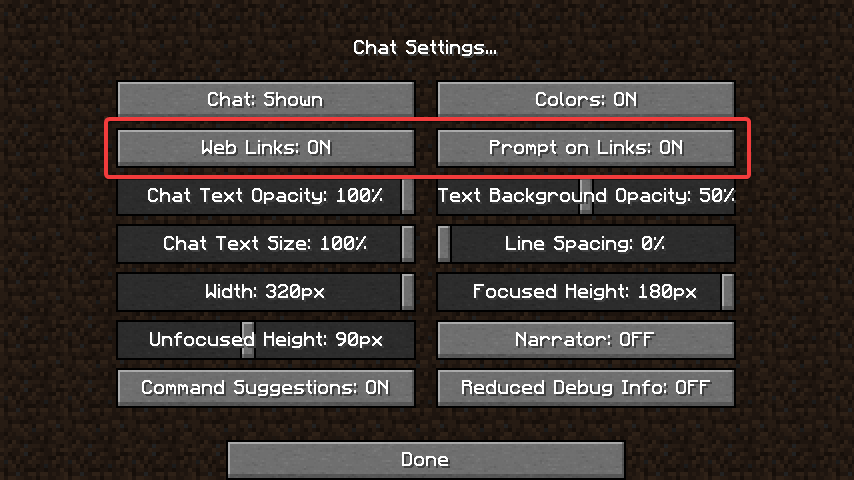
from there try clicking the link\
ancient ruin
k
if they r enabled already should i disable and renable>
?*
still dont work idk
its not just me its anyone on the server
hasty tree
have you tried restarting the server
hasty tree
potentially
proud hound
If you just type out the link exactly in your browser it works right
proud hound
What pops up
ancient ruin
There was an error loading the data. Either the URL was copied wrong or the session has expired.
Please generate another editor session with /lp editor.
the thing is it worked fine yesterday
hasty tree
do it from the console, copy and paste
proud hound
If you run lp editor in console something will appear
hasty tree
i find that hard to believe
proud hound
Screenshot what appears
hasty tree
screenshot everything please
 dusky pollen
Hi, I still don't have the prefix and suffix stacking. I did everything it says in wiki but still it's not working
hasty tree
I did everything it says in wiki but still it's not working
We're going to need to know what you tried and what exactly isn't working
lots of people say "i did everything on the wiki" when they in fact, didn't
dusky pollen
I've tried each rank have different weight. I tried changing the meta-formatting based on the wiki itself ofcourse with the same name indicates in my lp editor.
hasty tree
please send screenshots
what does the meta-formatting section look like
what does /lp user <user> info say
what does /lp user <user> meta info say
dusky pollen
lp user info:
https://cdn.discordapp.com/attachments/741996660992901173/742002159301820491/unknown.png
 proud hound
Is your prefix supposed to be Poseidon?
proud hound

 green sky
proud hound
green sky
proud hound
😔
dusky pollen
I mean it only shows poseidon and I wanted to be 3 prefixes
proud hound
Send the other screenshot Turbo asked and a pastebin of your LP config
dusky pollen
uhm that's yesterday. I deleted the files. Wait for me to redo it all
cause I don't know if it really works
LP config:
https://pastebin.com/pwCwErUR
Pastebin
Pastebin.com is the number one paste tool since 2002. Pastebin is a website where you can store text online for a set period of time.
Meta-info
changed my meta-formatting into:
prefix:
format:
- "highest_on_track_staff"
- "highest_on_track_donator"
- "highest_on_track_ranks"
hasty tree
do you have those three tracks?
dusky pollen
yes
hasty tree
your user only has one group, it should have a group for each track
dusky pollen
hasty tree
/lp user <user> showtracks
dusky pollen
hasty tree
ok, what does /lp user <user> info show now
dusky pollen
dusky pollen
nope
proud hound
Run lp editor and send the link
hasty tree
well.. go on
dusky pollen
done restarting
https://luckperms.net/editor/EZ5j5X4Nts here larry
LuckPerms - A permissions plugin for Minecraft servers.
LuckPerms is a permissions plugin for Minecraft servers.
proud hound
Send lp user name info and lp user name meta info again
foggy quartz
How do i delete a group
proud hound
!commands
wanton stratusBOT
Find all of the available LuckPerms commands on the wiki.
General commands
User commands
Group commands
Permission commands
Parent commands
Meta commands
Track commands
Log commands
LuckPerms wiki
dusky pollen
uhm larry?
wanton stratusBOT
Hey vuitton! Please don't tag helpful/staff members directly.
proud hound
Vuitton click on the link
The first one
And you might just find the command to delete a group
dusky pollen
uhm larry help me?
foggy quartz
So i cant delete a group in the website?
flat parcel
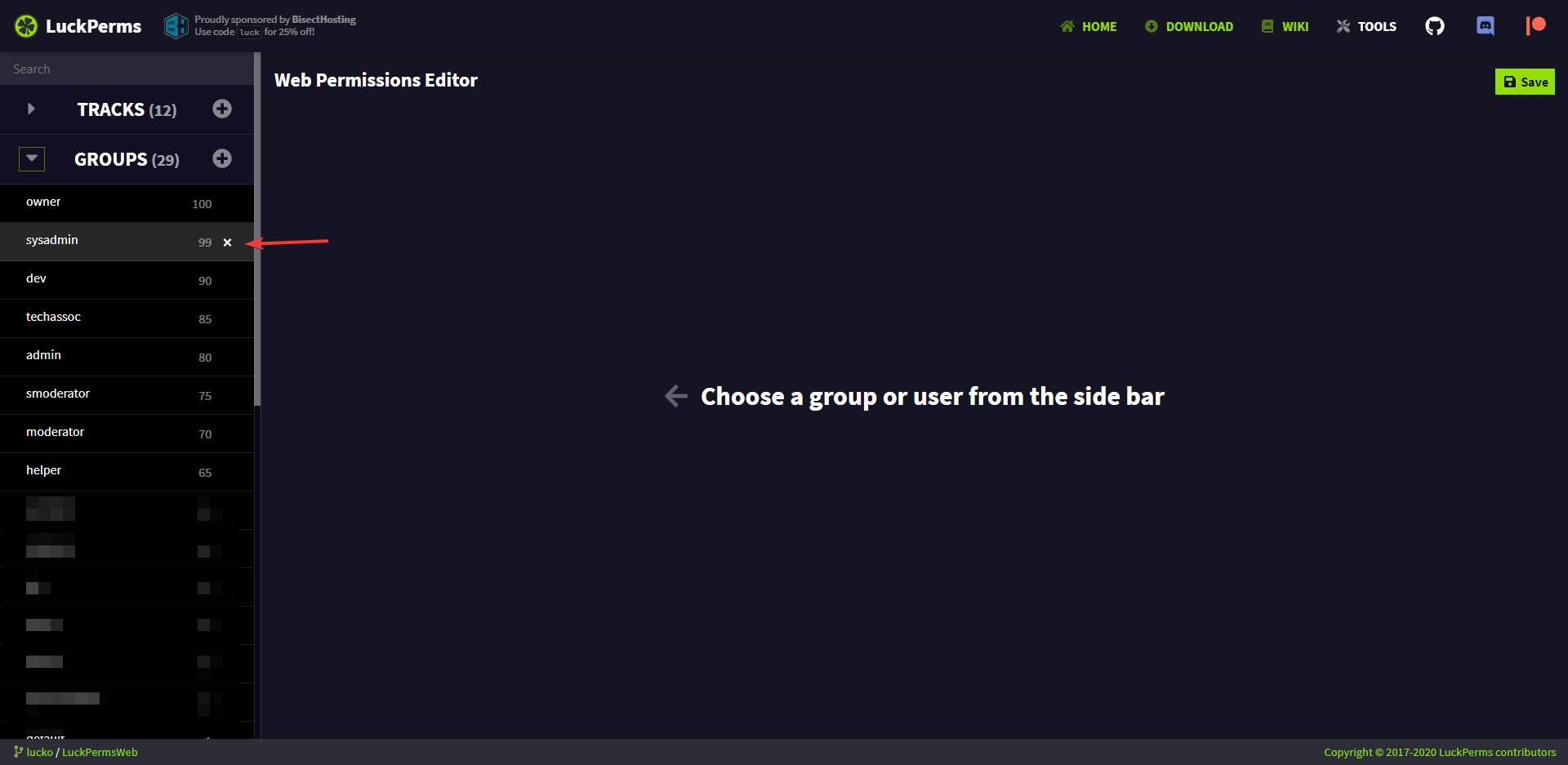
yes you can iirc, I think there's an X next to the group in the side list
proud hound
That must be new
Last I heard you couldnt
@dusky pollen send your latest LP config, or is the one above what you're currently using
dusky pollen
here latest
flat parcel
https://i.imgur.com/gpoEYEh.png @foggy quartz
 foggy quartz
i dont have that
flat parcel
send a screenshot of your editor please
flat parcel
just mouse over the group and it should show up
foggy quartz
Alriight
dusky pollen
@proud hound https://pastebin.com/Z4nSzB1k
Pastebin
Pastebin.com is the number one paste tool since 2002. Pastebin is a website where you can store text online for a set period of time.
wanton stratusBOT
Hey Tango! Please don't tag helpful/staff members directly.
proud hound
Hm, try adding more than 1 group to your tracks
proud hound
Can you restart and send the full startup log?
dusky pollen
sure
wanton stratusBOT
Hey Tango! Please don't tag helpful/staff members directly.
proud hound
There is a large portion of that log removed
Right where LP is starting
Four seconds of log just... Gone
I can't help
dusky pollen
Uhm it's because it's restarting?
proud hound
No
Removing a portion of the LP startup log, potentially containing errors, is not done accidentally
Plus I do not support piracy, and as an extension, offline mode servers. I can't help, sorry.
proud hound
I have no clue how you thought deleting those logs would help anyone
And btw I can run that setup just fine on my server, stacking works. The error you removed will tell you what is wrong
dusky pollen
If I redo everything. including server reset. does it help?
 pearl musk
How do you give suffix to a user
wanton stratusBOT
You can set prefixes, suffixes and other meta data in LuckPerms for players and groups. Note that LuckPerms does not manage chat. You need to use another plugin to show prefixes/suffixes in chat.
LuckPerms wiki
pearl musk
Is it /lp user <user> setsuffix suffixname
proud hound
If you're unwilling to read the page with examples spelled out for you, I'm unwilling to spell then out again
It is not. Not even close.
There are examples on the page I linked!
proud hound
then instead of group <name> you use user <name>
pearl musk
/lp user mynamehere mata addsuffix test
I tried that it didn’t work
What’s priority
hasty tree
weight
proud hound
mata isn't the word
hasty tree
!weight
wanton stratusBOT
LuckPerms allows you to set weights in order to determine the priority of certain nodes, like permissions and even prefixes. A higher weight number is a higher priority.
LuckPerms wiki
pearl musk
Ah right
This is weird the [] are from the prefix Isent it suppose to after my test
Text
 queen latch
Does it only happen on minechat?
proud hound
Chat formatting plugin
proud hound
you need to configure it how you want
 silk hornet
how i give permission to use one kit?
proud hound
depends on your kit plugin
silk hornet
essentials
 wanton stratusBOT
Essentials
Make sure you are using EssentialsX and Vault for prefixes. For any other issues with Essentials, you should seek support in either #general or the official EssentialsX support Discord.
EssentialsX Discord
pearl musk
There priorities to the deluxechat
proud hound
!deluxechat
wanton stratusBOT
Helpchat
Helpchat is a general plugin assistance discord as well as the home of DeluxeChat, PlaceholderAPI, and many more.
Helpchat Discord
silk hornet
thanks
foggy quartz
so I tried to solve the prefix problem from essentials config by setting that prefix-allow thingy to true ot something but the prefix of groups still doesnt appear..
i checkes /lp user info and it looks like luckperms is good on its side.. I checked my pluguns and it looks like I already have essentialsX installed which is required for luckperms but when i do /essebtials reload it just says "Essentials (version in numbers) reaload" which i think means that my Essentials is out dated and from this point im confused about what to do next
im the plugins folder in my servers file manager ive got EssentialsX but when I reload the essentials in game its saying the plugin is out dated
should I just buy chat control and use it for chat?
 vagrant coyote
Hey all, Im very new to LP and was told tp use the web editor and I did, I typed /lp editor in chat and clicked the link but then it says the session no longer exists or the URL was typed in wrong
foggy quartz
proud hound
@foggy quartz that's not the output of /ess version
proud hound
@vagrant coyote try running it in console and copy/paste the link
foggy quartz
foggy quartz
any quick solution
proud hound
uhm yeah
foggy quartz
no confusion pls
foggy quartz
oh ummm
yehah
insee
so larry what should i do now
nvm got it
larry ignoring me
 robust phoenix
@foggy quartz update your EssentialsXChat And EssentialsXSpawn
 clear hollow
Do you blame him when the issue is already mentioned to you?
robust phoenix
Both of it is still 2.17.2.125 while the main plugin is 2.18.0.0
foggy quartz
yeah ty @robust phoenix and larry
proud hound
It's already been noticed and rectified guys - no worries
foggy quartz
another question
uperms was giving me a hard time thats why i changes to luckperms
can i shift all the permissions from uperms to luckperms easily
is there any way to do that
proud hound
for uperms specifically and just about only - no sadly
their code is private and closed source, and the way data is stored makes it very difficult to automatically migrate
vagrant coyote
My /lp editor links still arent working 😦 How come? Ive done it in console too
foggy quartz
watch koz4christs video
proud hound
@vagrant coyote send a link
foggy quartz
i think he explained how to do that
proud hound
send one of your editor links and we'll see what's up
vagrant coyote
LuckPerms - A permissions plugin for Minecraft servers.
LuckPerms is a permissions plugin for Minecraft servers.
proud hound
also send the output of lp info
vagrant coyote
ok
proud hound
this link loads perfectly
proud hound
yeppers, on my end
vagrant coyote
But it shows this
foggy quartz
does my server get its own website editor for groups
vagrant coyote
LuckPerms
Web Permissions Editor
There was an error loading the data. Either the URL was copied wrong or the session has expired.
Please generate another editor session with /lp editor.
proud hound
the editor doesn't really work like that @foggy quartz
it uploads al your data at once, you edit it, and download it back with the applyedits command
!editor
wanton stratusBOT
LuckPerms offers an easy to use, powerful Web Editor, with which you can add, delete and change permissions of groups and players.
LuckPerms wiki
foggy quartz
theres security issues if im thinking right
hasty tree
there are none
foggy quartz
oh alright
hasty tree
unless you give someone else access to LP on your server
proud hound
yes
and you need to make a new one everytime you applyedits
https://luckperms.net/editor/NGQzoFUsIC @vagrant coyote even if you just click on this?
LuckPerms - A permissions plugin for Minecraft servers.
LuckPerms is a permissions plugin for Minecraft servers.
vagrant coyote
So just wondering, is it my computer? Or something else on my end as why its not working? 😦
Still the same


 vagrant coyote
mm :/ idk what to do
proud hound
try a different browser
vagrant coyote
ok
hasty tree
what

larry why are you pinging me
oh
try the link on a different device
could be something on your computer blocking the connection
usually it's like an ad blocker or anti virus
vagrant coyote
I dont really have a different device 😦 except my phone lol
hasty tree
try it then
proud hound
try on there
vagrant coyote
I do have an anti virus
foggy quartz
try on data if it still diesnt work
foggy quartz
it will work on data for sure if not WiFi
proud hound
not necessarily but it does increase the chances
hasty tree
if it works on wifi (on the phone), then it's the computer
 regal nova
Does anyone have any idea how to have the player name be the same color as the group name, but have the essentials chat brackets remain white?
hasty tree
#general but you would probably just make sure you're not resetting the colour format in the prefix so it continues into the username
regal nova
Sorry if that was off-topic, I wasn't sure. But I did try to remove the &r and it fixed it but makes the second ] also the same color as the prefix instead of being white
hasty tree
!essentials
wanton stratusBOT
Essentials
Make sure you are using EssentialsX and Vault for prefixes. For any other issues with Essentials, you should seek support in either #general or the official EssentialsX support Discord.
EssentialsX Discord
hasty tree
probably best to just ask in their discord
regal nova
thank you
foggy quartz
anyone know how to enable tnt above sea level?
foggy quartz
i thought it is
hasty tree
definitely not
 quaint gust
could someone help me with this
havnt run a server in years. apparently permissionex isn't a thing anymore and now I have to learn this new plugin haha
not sure how to do anything at all
foggy quartz
!usage is a great place to start
wanton stratusBOT
Here's a guide to help users understand and use LuckPerms for the first time.
LuckPerms wiki
quaint gust
Thank you.
foggy quartz
anyone know how to enable tnt above sea level?
@foggy quartz uninstall grief prevention lol
quaint gust
I know this is unrelated but do you have any experience with Dynmap? Trying to fully render the map but it's only rendering chunks that have been explored
quaint gust
doing /dynmap fullrender only renders explored chunks aswell
but the maps 15000x15000 😭
foggy quartz
ok so fly around
quaint gust
There is a way to fullrender without having to explore chunks
foggy quartz
no, fly around
foggy quartz
fly around
quaint gust
would you like some examples of servers that have done it
foggy quartz
no, fly around
quaint gust
here ill do a quick search rn to find a tut
foggy quartz
Why would I uninstall the whole plugin
nice, always good to consult google
That’s just one thing not working right..
First of all #general
Secondly, get Chunkmaster, it'll generate all your chunks up to a radius and it has dynmap integration
hehe
@foggy quartz its in the config
quaint gust
Found a solution. Is possible
in config u can change the center of rendering then do fullrender and it will stop rendering explored chunks instead start at centre and work out
😄
until you turn it off obv
seems to be working great
quaint gust
!usage
wanton stratusBOT
Here's a guide to help users understand and use LuckPerms for the first time.
LuckPerms wiki
quaint gust
Lookin at usage rn. Do all commands have to be done through console or after I give myself plugin perms can I do it all ingame
and how do I set a group as the default group for new players
wanton stratusBOT
LuckPerms provides a group that every player is added to upon joining the server, called default. You can use multiple methods to change the default group or change the name of it.
LuckPerms wiki
quaint gust
should I do that command ingame or in console
hasty tree
either is fine
quaint gust
👍
hasty tree
in game easier cause you can just click the link
quaint gust
restarting server w/ plugin rn ill see how it works
hey whats your IGn name tailz is familiar
EMC
quaint gust
Ahh
I used to know a guy named something like Tailz5555 something along those lines
ill lyk how plugin works
Oh hell yea. Just opened up the luckperms editor. This is so nice holy
ill be done perms in like 10 minutes jesus 👍 way better than permissionex
where can I do prefixes in this thing? and they support color?
 crisp wadi
Hello, how can i set up my luckpers for rank upgrades? ex: they have Titan rank and bought an upgrade to Overlord?
proud hound
Have the upgrade run an LP promote command
crisp wadi
If every rank upgrades have different price and in the lowest price there is promote
they will just do it and do it 😦
proud hound
You can't do it with LP alone
you need to use a plugin to charge them for /rankup and then run the command to promote them
crisp wadi
are there any plugin that supports luckperms?
crisp wadi
ok thankss
hasty tree
@quaint gust prefixes are added like normal nodes, you can see the special nodes here:
!editor
wanton stratusBOT
LuckPerms offers an easy to use, powerful Web Editor, with which you can add, delete and change permissions of groups and players.
LuckPerms wiki
hasty tree
otherwise just use the commands in game to set prefixes, run a new editor link and see how they are formatted
quaint gust
Ok great
when creating groups in the editor will they already be in-server or should I restart/reload the plugin for them to take effect
example I setup the default rank will it require reload
wanton stratusBOT
Learn how to use LuckPerms and all of its features by reading the wiki on GitHub.
Read more
LuckPerms wiki
hasty tree
you need to hit the save button, then use the generated command in game/console to pull in the changes
if you wanted to make further changes, generate a new editor with /lp editor
don't make changes to an existing session after doing the apply edits command
quaint gust
generated command?
hasty tree
after clicking save you'll get a command
hasty tree
a week
foggy quartz
best to make a new one every time you want to change something though**
hasty tree
yes
eventually i'll make it so the editor screams at you if you've already saved changes to an existing session lol
foggy quartz
lol nice
Can you make it close upon clicking the generated command?
Or when the command is pasted into the server, it knows and shuts the tab
idk that might be hard to do lol
hasty tree
can't do that
foggy quartz
Or better yet
hasty tree
and i don't like it lol
hasty tree
heh
that's a good idea
but there may be cases where it's needed
i don't really want to remove functionality, just add a notification
regal nova
Is there a way to make a user permissions only work on someones self, like setting a prefix
foggy quartz
/lp user <username> permission set <permissionnode>
hasty tree
you can always replace group with user in any of the permission or meta commands
!commands
wanton stratusBOT
Find all of the available LuckPerms commands on the wiki.
General commands
User commands
Group commands
Permission commands
Parent commands
Meta commands
Track commands
Log commands
LuckPerms wiki
regal nova
Yeah I’m trying to allow people to set their own prefixes but I don’t want them to change other people’s
proud hound
that is best done with either something like deluxetags, or if you want them to really use the LP commands themselves then this
foggy quartz
oh
proud hound
!argumentbased
wanton stratusBOT
Fine tune exactly what users with permission to use LuckPerms can do.
LuckPerms wiki
proud hound
Be warned, it's complex
foggy quartz
sell the tags in an online store 😆
regal nova
I plan on it
hasty tree
yeah that's easy
regal nova
Larry if I use deluxe tags will it screw with anything on Luck Perms?
foggy quartz
why is your pfp an excel icon
regal nova
I’m a huge excel guy
hasty tree
he uses an excellent plugin called LuckPerms
foggy quartz
This is my new pfp
regal nova
Ok so deluxe tags will just do all the prefixes and stuff, sounds good to me
dusky pollen
EssentialsChat isn't following the format into my chat
hasty tree
!essentials
wanton stratusBOT
Essentials
Make sure you are using EssentialsX and Vault for prefixes. For any other issues with Essentials, you should seek support in either #general or the official EssentialsX support Discord.
EssentialsX Discord
hasty tree
dusky wraith
Guys while I clear myself from all the permissions, I still keep the highest on track display names by parsing the %luckperms_last_group_ontracks<track>% placeholder instead of the highest group I indeed am on the same track.
And it happens only to my account, it works well for others
foggy quartz
hasty tree
link to editor?
dusky wraith
In a few mins, I will go to the pc and I'll give you anything you need
foggy quartz
im so lost as to where even to begin
proud hound
!usage >
wanton stratusBOT
Here's a guide to help users understand and use LuckPerms for the first time.
LuckPerms wiki
dusky wraith
Turboetailz add me so I can PM you
hasty tree
just post it here
dusky wraith
I don't want to share it publicly (not that it's anything great)
dusky wraith
ok
LuckPerms - A permissions plugin for Minecraft servers.
LuckPerms is a permissions plugin for Minecraft servers.
nvm
silk hornet
i have a proble with the permission to use the sings of essentials. some one know the permmision?
proud hound
!moss
wanton stratusBOT
Essentials
Make sure you are using EssentialsX and Vault for prefixes. For any other issues with Essentials, you should seek support in either #general or the official EssentialsX support Discord.
EssentialsX Discord
proud hound
this discord has a handy command you can use to find it
dusky wraith
also currently I have cleared all my permissions
foggy quartz
@larry i need support i have a problem with luckperms
wanton stratusBOT
Please ask your question!
Please ask the question you have. Don't ask to ask, or ask to DM someone. There are people here to help you, but we need to know what to help you with, so please just ask the question you want to in as much detail as possible!
Or, try here first:
Why shouldn't I ask to ask?
 hasty pebble
is there a way to sync data without using a remote database?
flat parcel
Nope
hasty pebble
using plugin messaging system doesnt work..
flat parcel
Well plugin messaging system is just a way of communicating that changes are made, it doesn't actually store anything
foggy quartz
@flat parcel i need support i have a problem with luckperms
wanton stratusBOT
Hey Nukecraft5419! Please don't tag helpful/staff members directly.
flat parcel
No ping.
I can't help if you don't say what you need help with
Back to Scx, The only supported way of having multiple servers using the same data is via one of the remote database options
foggy quartz
ok i have a problem i have a premium network only that they manage to exploit the bug to join with uuid of owner
flat parcel
That means you have bungee set up incorrectly
you need online-mode set to true in bungee, false in backend servers, ip-forward set to true on all of them, and your backend servers firewalled so the only way of connecting is via bungee
foggy quartz
I use flamecord and it is put both on all Bungee servers true and on flamecord ipforwarding true
flat parcel
Found the problem
shitty MC-Market snake oil forks usually break stuff
Use official proxies like Bungeecord, Waterfall
hasty pebble
dont use mc market forks
flat parcel
What server version?
foggy quartz
In the console logs the error came out that my name entered with a different uuid
flat parcel
this is sounding like you haven't firewalled your servers
foggy quartz
Hub Is 1.7-1.16.1, Kitpvp 1.7-1.16.1, Vanilla 1.16.1, Skyblock 1.16.1, Flamecord is all version
hasty tree
is bungeecord: true in every server spigot.yml
foggy quartz
all servers are with 127.0.0.1 and do not come out in the list if I try the only one that comes out in the list and the bungeecord
flat parcel
and is bungee online-mode=true?
maiden lava
А 👍
foggy quartz
Yes bungge is in online mode
Bunggecord=true in server.yml in all server
I don't understand why I did everything right and I myself still have this bug both before with waterfall and now with flamecord
foggy quartz
in spigot.yml sorry my erros
foggy quartz
even if I go back there I myself still have that bug
dusky wraith
do you have any solution ? or should I open an issue? at first I thought it was TAB's problem for many hours till I figured out it is a LuckPerms problem
flat parcel
do you have any solution ? or should I open an issue? at first I thought it was TAB's problem for many hours till I figured out it is a LuckPerms problem
what was your original issue?
dusky wraith
I couldn't sort the TAB correctly
flat parcel
Nukecraft, could you go back to waterfall, then screenshot & send here the response for /lp user <you> info and /lpb user <you> info while you are connected
dusky wraith
but only when I was online
flat parcel
uh TAB's sorting is TAB's problem, we don't touch that
dusky wraith
it's not
look at the proof
look at my editor
and the screen
I can even pm you my ip to come and see by yourself
dusky wraith
it's above in this channel
foggy quartz
ok now I try but for the permissions everything works, only I didn't put it in the waterfall luckperms because they exploited a bug and I made sure that it always goes global but not through the bunge
dusky wraith
https://luckperms.net/editor/uVAJBAo9lz
https://prnt.sc/twz6yr
also currently I have cleared all my permissions
LuckPerms - A permissions plugin for Minecraft servers.
LuckPerms is a permissions plugin for Minecraft servers.
 flat parcel
I'm sorry, but neither of that shows any issue. What is your end goal, and what do you think is not working on LP's side?
dusky wraith
for other people it returns the highest group which they inherit from in each track
flat parcel
(side note, I don't understand your group displaynames)
dusky wraith
for me it returns the highest on track
well that's because I have another plugin wiht prisonranks
and TAB only reads same digit numbers in order to sort
the prisonranks plugin does not accept 01 02 values etc
flat parcel
Yeah, sorting for TAB is handled on TAB's side using group names, not with LP
flat parcel
yes
dusky wraith
yeah