#support-1
1 messages · Page 881 of 1
 wanton stratusBOT
Find all of the available LuckPerms commands on the wiki.
General commands
User commands
Group commands
Permission commands
Parent commands
Meta commands
Track commands
Log commands
 LuckPerms wiki
 subtle spear
ok how do i show it?
 little sphinx
!chat
wanton stratusBOT
LuckPerms does not display things in chat!
LuckPerms is only able to send information to formatting plugins so that they display them properly. LuckPerms does not put the prefix in front of your name, you need a chat formatting plugin to do it, and you need Vault. Same goes for the tablist! If the information appears correctly when you run /lp user <user> info, LuckPerms is doing its job!
Prefix isn't showing?
What plugins can I use to format chat?
little sphinx
you need vault and a chat plugin
subtle spear
i have esentials
little sphinx
do you have vault?
subtle spear
hmm ok i think i dont
little sphinx
you need that
little sphinx
np!
 viscid fable
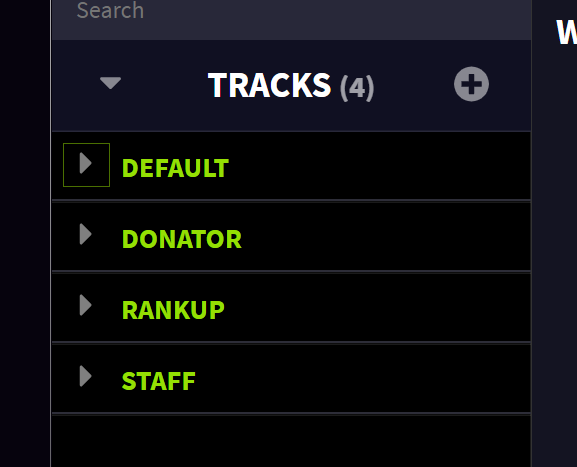
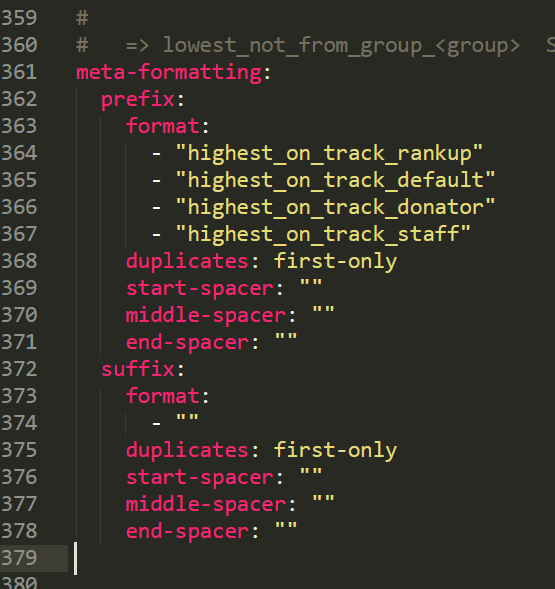
Can anyone help me with prefix stacking? I can't seem to figure out what's not working. https://prnt.sc/t5437h https://prnt.sc/t543ph

 little sphinx
!stacking
wanton stratusBOT
Display multiple prefixes/suffixes alongside a player's name.
LuckPerms wiki
viscid fable
I've read it over multiple times, still can't figure out the issue.
 lapis ibex
Irrelevant
Both are acceptable formatting in YAML
@viscid fable well you haven't explained what the actual issue is
viscid fable
My bad. It's not stacking the prefixes after adding the tracks to the meta-formatting
lapis ibex
Did you restart the server after changing the settings?
viscid fable
Yeah.
lapis ibex
Are you getting any errors in the console?
 eternal raptor
viscid fable
little sphinx
eternal raptor
viscid fable
little sphinx
!paste full error from console @eternal raptor
wanton stratusBOT
Please use pastebin!
Seeing a paste of the problem makes everything so much easier! Use https://bytebin.lucko.me/ for easy pasting!
For console errors:
Pastebin any relevant segments of the console log. If it's a startup error, this includes the entire startup log!
Other errors:
Pastebin the entire LuckPerms config file (passwords removed) as well as any other relevant files!
 lament fog
Hello, I have a mistake... Please help.
lapis ibex
@lament fog that's your database file
eternal raptor
lament fog
What's to do with it?
https://cdn.discordapp.com/attachments/241667244927483904/725025936038428672/2020-06-23_17.31.17.png
 lapis ibex
@viscid fable looks like you have a syntax error in the config. Check that there are no tabs and only spaces
lament fog
This one's wrong.
lapis ibex
!logs @lament fog
wanton stratusBOT
Sorry! I do not understand the command !logs
Type !help for a list of commands.
lapis ibex
!paste
wanton stratusBOT
Please use pastebin!
Seeing a paste of the problem makes everything so much easier! Use https://bytebin.lucko.me/ for easy pasting!
For console errors:
Pastebin any relevant segments of the console log. If it's a startup error, this includes the entire startup log!
Other errors:
Pastebin the entire LuckPerms config file (passwords removed) as well as any other relevant files!
lapis ibex
@eternal raptor look for startup errors
@lament fog can you see the box with the green border from Clippy?
little sphinx
https://bytebin.lucko.me/bQGv4uduBj
Brain, the error for Xyal_x
lament fog
Yes
lapis ibex
That's why I was asking for the startup log
@lament fog read what it says
That's what you need to do
lament fog
Ok
viscid fable
@lapis ibex Everything is using spaces, not tabs.
wanton stratusBOT
Hey fa! Please don't tag helpful/staff members directly.
lapis ibex
@viscid fable try to indent the prefix section two spaces more
If that doesn't work, try linting your config with an online YAML linter
 little sphinx
try put - "highest" for suffix instead of empty ""?
little sphinx
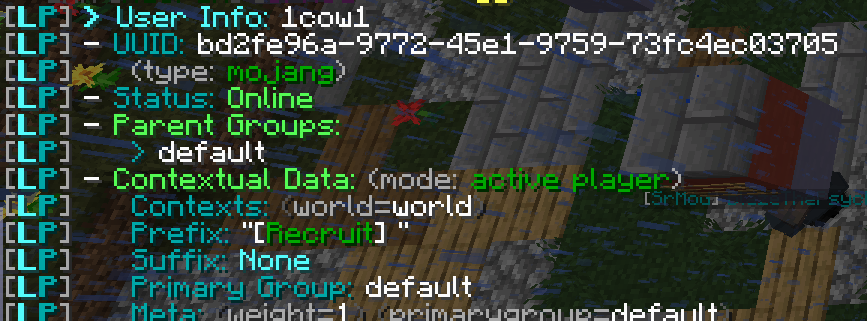
can you screenshot lp user USER info?
lament fog
viscid fable
 little sphinx
they are only in default group
lapis ibex
@lament fog It's failing to write the file
My guess would be that your disk is full
Considering everything else related to writing data is failing too
eternal raptor
well i'm not dealing with it, i guess i wont have server... the plugin is too buggy for me
lament fog
How to fix it?
lapis ibex
@eternal raptor all we are asking for is for you to provide us your startup log so we can see what issue you are having
The error you are seeing is 99.9% a configuration error
Meaning you didn't configure storage correctly
That is on you not the plugin
wanton stratusBOT
Find all of the available LuckPerms commands on the wiki.
General commands
User commands
Group commands
Permission commands
Parent commands
Meta commands
Track commands
Log commands
LuckPerms wiki
viscid fable
I have a rankup plugin, I don't want to manually add a parent group to each new user ben. Is there a way to make a second default group?
lament fog
@lament fog It's failing to write the file
@lapis ibex How to fix it?
wanton stratusBOT
Hey MrJanson! Please don't tag helpful/staff members directly.
wanton stratusBOT
LuckPerms provides a group that every player is added to upon joining the server, called default. You can use multiple methods to change the default group or change the name of it.
LuckPerms wiki
 sacred yacht
@viscid fable make the default rank inherit the second rank
viscid fable
Thanks slant.
 spark bay
hey everyone, so im like extremely new to server owning, and im having a lot of trouble trying to figure stuff out with this plugin, would anyone be down to help me in vc or something?
lapis ibex
@foggy quartz run /lpb info and /lp info
If they don't both show the same database storage type and messaging service, or you just get the version number for one, it's not set up properly
Assuming you gave yourself LP permissions directly or through a group
little sphinx
@spark bay explain the issue you facing here
spark bay
well hahaha, im not sure of like anything that im doing. ive tried reading the wiki and everything its just nothings really making sense to me i guess.
 foggy quartz
Yep both say Mysql and say connected adn have all 7 groups
lapis ibex
Looks good then
spark bay
its kinda just like, the whole plugin
foggy quartz
Thank you!
lapis ibex
!usage is a good place to start @spark bay
wanton stratusBOT
Here's a guide to help users understand and use LuckPerms for the first time.
LuckPerms wiki
lapis ibex
@foggy quartz you're welcome
foggy quartz
I have used LP for a while but i have never used bungee
lapis ibex
No problem
viscid fable
!default
wanton stratusBOT
LuckPerms provides a group that every player is added to upon joining the server, called default. You can use multiple methods to change the default group or change the name of it.
LuckPerms wiki
 sharp hinge
is there a command to put someone directly into a rank without having to promote them through the whole track?
 loud lance
is there another plugin that I need to have to show the prefix of the rank? (spigot)
wanton stratusBOT
Find all of the available LuckPerms commands on the wiki.
General commands
User commands
Group commands
Permission commands
Parent commands
Meta commands
Track commands
Log commands
LuckPerms wiki
sharp hinge
im an idiot, cheers
 muted oracle
does the weight affect anything? like permissions
lapis ibex
It's relevant for group ordering
And if something inherits multiple groups with conflicting nodes the weight decides who wins
sharp hinge
does this work with donationcraft?
lapis ibex
Never heard of it
loud lance
I tried to make a dark red prefix with a white chat message but when I make it makes the chat dark red as well
can I send a picture?
 flat parcel
stick a &r at the end of your prefix (or after the prefix placeholder in your chat plugin)
loud lance
how do I take away the <>
flat parcel
Chat plugin's config
loud lance
also putting a &r did not work :/
flat parcel

loud lance
This is what I did: /lp group admin meta addprefix 100 "&c[Admin]&r"
spark bay
i also have a prefix problem. With essentials, how do i remove the "admin" role to show my lucky perms role
loud lance
I use vaultchatformatter
loud lance
yeah
spark bay
oh lit, okay epic
loud lance
how did you change the chat message color?
spark bay
it just did it with the Essentials prefix
sharp hinge
Probs useless saying this but cmi makes all of this so much easier if u get that
spark bay
i didnt modify anything, i got that role cause i have op
loud lance
oh ok
spark bay
whats cmi?
sharp hinge
It’s like essentials but it has much more to it, it’s €15 though
spark bay
oh jeez yeah nah tehehe, ill stick with free till i can monetize and stuff
maybe eventually
loud lance
also what is the command to remove a prefix?
spark bay
hey, @loud lance do you mind if i dm you to help me set up the vaultchatformatter, or do you know the command to remove admin?
 storm swift
/lp user <username> meta removeprefix <priority> [prefix] [context] @loud lance
sharp hinge
You will have a much easier time using the online editor and just clicking the x on the prefix
loud lance
@spark bay Im having trouble with it myself lol
 mighty wasp
Does anyone know if there is a way to assign a default group (or just a few permissions) based on which forced host/ip they connect to? Would this be easy to implement in a custom plugin if there isn't one already?
loud lance
l1ttle what do I put for the context? im new to this and dont know what to do ._.
storm swift
!context
wanton stratusBOT
You can set a permission or group on a per-world/per-server basis, through what we call "contexts".
LuckPerms wiki
loud lance
yikes this is confusing
storm swift
just dont put anything in there and be happy
loud lance
ok
yeah im still having the problem where the server chat message is the color of the prefix
storm swift
chat plugin?
loud lance
ok ill see what happens
 candid sage
Guys, why when I have this
Why it's still disabled?
tried also restart
btw running on bungee
candid sage
but I enabled it?
loud lance
@storm swift thank you soooooo much it worked! I was getting so frustrated lol
candid sage
still same when I set there enable-ops: false
flat parcel
did you restart?
candid sage
reloaded config, but will try restart again
flat parcel
yeah disabling commands can't be reloaded, restart needed
flat parcel
enable-ops is still false...
candid sage
it was true!
storm swift
keyword WAS
candid sage
and I was confused that you said me it's wrong
flat parcel
flat parcel
storm swift
Your cursor was at auto-op
candid sage
yeah 😅 so wait, should I disable auto op too?
candid sage
and btw why it didn't work with auto op only, when I have permission luckperms.autoop?
storm swift
because everyone with luckperms.autoop is op, everyone else is NOT
flat parcel
caps l1ttle
storm swift
its only one word :/
candid sage
but wtf, when players had luckperms.autoop why they couldn't place command blocks?
op level was 4
foggy quartz
uh so i use the web editor, and it says no changes were made when i clearly made changes
 silver cape
Hi, can someone help me?
 bitter coral
maybe, who knows, I don't know
 naive flame
where would i paste my error at?
silver cape
Hello, hopefully someone can help me, download the Luckperms to make the permissions of a minecarft 1.7.10 server that I am developing but at the time of putting it it does not detect it, what version do I have to download to detect it?
I use Kcauldron
bitter coral

GitHub
A permissions plugin for Minecraft servers. Contribute to lucko/LuckPerms development by creating an account on GitHub.
naive flame
silver cape
But Tobi, my server is 1.7.10
foggy quartz
can i get any help? the problem is when i use the web editor, and it says no changes were made when i clearly made changes.
silver cape
@bitter coral But it dosen't work
wanton stratusBOT
Hey Suntirenyes! Please don't tag helpful/staff members directly.
silver cape
ok
foggy quartz
is there a way I could set the prefix [AH] in tab and chat but not in the score board?
scoreboard says Rank: [AH] [HE
and I want it to say [HELPER], is it possible?
 split veldt
!placeholders
wanton stratusBOT
Display data such as user prefixes and groups from LuckPerms in other plugins.
LuckPerms wiki
split veldt
Use the placeholder to select the group the users is in perhaps?
looks like you're using the entire prefix
split veldt
!ask @foggy quartz
wanton stratusBOT
Please ask your question!
Please ask the question you have. Don't ask to ask, or ask to DM someone. There are people here to help you, but we need to know what to help you with, so please just ask the question you want to in as much detail as possible!
Or, try here first:
Why shouldn't I ask to ask?
split veldt
Thats what you were after right @foggy quartz
foggy quartz
yeah but I want to show in color like in TAB
where are the support on github?
only way that comes to my mind is setting thte [AH] as a suffix
;-;
split veldt
%luckperms_primary_group_name%
set the display name to what you want it to display as
colour codes included
split veldt
Link to the github is available in the link in the title.
foggy quartz
or is it a permission
split veldt
its a placeholder
split veldt
do you have placeholderAPI as the placeholders page tells you?
anyway I gotta go, good luck 😄
foggy quartz
thx for ur titme
I can not cope with the plugin
😦
I'll take another plugin right away
please help
 tardy quartz
can someone please help me? I actually need the command I put in so default members of my server can open chests. Everything else is working fine, I just need this so I can open my server please
 swift sinew
!verbose
wanton stratusBOT
Sorry! I do not understand the command !verbost
Type !help for a list of commands.
swift sinew
!verbose
wanton stratusBOT
LuckPerms provides a verbose command to help you find out what permissions a command/plugin is checking.
LuckPerms wiki
tardy quartz
Again the same link I keep getting which I can't find usefull
swift sinew
it tells you what permissions you need to perform an action
aka, if you don't know what permission you need to allow chests to be opened
you can toggle verbose, and try opening a chest
tardy quartz
well maybe that's it, but getting help seems to be an issue also
swift sinew
wdym
swift sinew
luckperms doesn't actually display the prefix
silver cape
So?
swift sinew
it just feeds the player's prefix to some other plugin that you need to install
silver cape
Which one
swift sinew
there are many, you can try using TAB or MultiChat or any number of others, just google around for them
swift sinew
do you want prefixes in chat, the tab list, above the player's name, or where?
silver cape
Like, in tab and in chat
swift sinew
i personally use MultiChat for prefixes in chat, and BungeeTabListPlus for prefixes in the tab menu
if you don't use bungeecord you can replace BTLP with TAB
silver cape
Well, i don't know what is Bungee but well, i just gonna try some prefix in chat
Whit MultiChat
swift sinew
okay
silver cape
You could guide me to use it
 crude galleon
is there a better way to add a second default rank (level and default donator rank) any other way than using the extension "extension-default-assignments"?
 storm cliff
I have a question about an issue I have for a while.
What if someone donated on my server from the rank Member to Donator. And I later promote him to Moderator. And after that I would like to demote him back to his previous rank. How can I check what rank he had before?
swift sinew
!traks
wanton stratusBOT
Sorry! I do not understand the command !traks
Type !help for a list of commands.
swift sinew
!tracks
wanton stratusBOT
Tracks provide a method for you to promote/demote players along a track (or ladder) of groups.
LuckPerms wiki
swift sinew
tracks for mcdoggy^
storm cliff
And what if I promoted him from Moderator to Administrator and I would like to demote him back to his Donator rank and not his Member rank. Is there a way to check such things?
swift sinew
!promote
wanton stratusBOT
Sorry! I do not understand the command !promote
Type !help for a list of commands.
swift sinew
justdriessen do you want to do that with a command
crude galleon
i have the tracks setup already ivan, it's just that i need 2 starting points (using default for the donator rank and the A rank for the ranking system)
swift sinew
why can't you just make the starting points? what's the issue?
you can apply the A rank as part of the default rank
crude galleon
u mean giving the default group the group.a permission?
swift sinew
yes
storm cliff
Yes with a command Ivan
So I want to know what to do with donator > Helper > Moderator
And instead of going from Mod to helper to Member again
swift sinew
you can do /lp user <name> promote <track> to increment their rank by one
or you can do /lp user <name> parent set <group> to set their rank to whatever you need
storm cliff
Is there no other way to do it then that?
swift sinew
you can have another plugin change the ranks by interacting with the luckperms API
or you can probably even use the commands.yml file to create aliases of the /lp ... commands for easy use
crude galleon
ivan can i talk to u in a dm?
swift sinew
what for 😮
swift sinew
whats the question
crude galleon
to share the config and some picture, cus the thing with the prefixes ain't working
silver cape
The plugin that u recommend me to the chat preffix is not available fot minecraft 1.7.10
swift sinew
mcdoggy you can share them here 😉
crude galleon
okay
swift sinew
and suntirenyes I don't know any chat prefix plugins for 1.7.10, you'll have to google around for one
silver cape
K.
crude galleon
so i've set this in the config and restarted the server https://pastebin.com/q6LcPaaH
 echo magnet
anyone know how to remove [world], "Ranger" is from prisonranksx
crude galleon
so i'd expect to have the prisonrank listed since the default group has the a group permission with the prefix
swift sinew
what does the chat look like mcdoggykiip?
silver cape
Can someone say me a plugin to add prefix to a rank in LuckPerms
anyone know how to remove [world], "Ranger" is from prisonranksx
@echo magnet Are u using the Multiverse Core?
echo magnet
yes sir
silver cape
Ok
crude galleon
ignore the [Prison] tag, that's the world from multiverse-core
flat parcel
@echo magnet disable the prefix in multiverse's config
silver cape
@echo magnet put this command
flat parcel
!chat @silver cape
wanton stratusBOT
LuckPerms does not display things in chat!
LuckPerms is only able to send information to formatting plugins so that they display them properly. LuckPerms does not put the prefix in front of your name, you need a chat formatting plugin to do it, and you need Vault. Same goes for the tablist! If the information appears correctly when you run /lp user <user> info, LuckPerms is doing its job!
Prefix isn't showing?
What plugins can I use to format chat?
silver cape
-/mv config prefixchat false
echo magnet
ah tysm!
silver cape
:)
swift sinew
@crude galleon can you do /lp user <name> info to see what groups you have applied
swift sinew
oh mcdoggy i think your config is malformed
every track but 'prestiges' is indented an extra space too far
swift sinew
ah
crude galleon
see the raw paste
swift sinew
yeah you're right
wait so is your owner group inside multiple tracks?
wait scratch that
hmmm
it says you don't have the a group
crude galleon
but it's in default
crude galleon
prefix.&0[&4A&0]
swift sinew
can you do /lp user <name> showtracks and see what that shows
crude galleon
swift sinew
i think the issue lies in that config
try removing every track except prisoner, and see if you can get the a prefix to show up
swift sinew
what if you manually apply the a group to yourself
does the prefix show up then
/lp user <name> parent add a
crude galleon
still not
swift sinew
really? hmmm
swift sinew
do you have any groups on the prisons track which don't have prefixes
like maybe the dafault group?
crude galleon
all but a have no prefix
swift sinew
does the owner rank inherit any of those groups
crude galleon
it has the * permission
 latent sable
@lapis ibex
wanton stratusBOT
Hey Himo! Please don't tag helpful/staff members directly.
latent sable
anyone know how can i fix this when a player join the console send this message large message and its so annoying
https://pastebin.com/Bd8tdsqD
 crude galleon
swift sinew
crude galleon
swift sinew
i don't think the * permission affects the tracks or groups
silver cape
!chat
wanton stratusBOT
LuckPerms does not display things in chat!
LuckPerms is only able to send information to formatting plugins so that they display them properly. LuckPerms does not put the prefix in front of your name, you need a chat formatting plugin to do it, and you need Vault. Same goes for the tablist! If the information appears correctly when you run /lp user <user> info, LuckPerms is doing its job!
Prefix isn't showing?
What plugins can I use to format chat?
swift sinew
it's not the chat suntirenyes
it's the prefix not being built the way he wants
wait
waitwaitwait
oh my god
crude galleon
swift sinew
mcDoggyKiip the answer was right in front of me for about 10 minutes now
you know that prefix permission we almost glossed over
you didn't enter it correctly
you need to do prefix.<weight>.&4coloredname
crude galleon
i forgot the weight
swift sinew
yep ;-;
crude galleon
🤦
swift sinew
oh well, better that than something complicated
make sure the other tracks also have a weight
and don't forget to re-enter the tracks into your config the way you want
crude galleon
that's more like it
swift sinew
very nice
crude galleon
donator track works too 😄
crude galleon
just need to fix the rankup plugin to work since the defualt group != a
I just need to figure out how to trick the rankup plugin into thinking that the user is in group a
swift sinew
hm
i don't know what the configs look like for that plugin, but hopefully it lets you specify the names of the groups that you want players to be promoted up through?
lapis ibex
@latent sable
swift sinew
is there something wrong with using default as the first rank?
latent sable
yes @lapis ibex
crude galleon
Well it can't remove the default rank
swift sinew
ah gotcha
crude galleon
Since default holds the prefix for the other track (and permissions)
swift sinew
and you can't use the a rank because you don't actually have it assigned? the plugin refuses to rank you up?
crude galleon
Yeah, it needs to have group a as a parent
swift sinew
does the plugin maybe have a section in their config where they let you give the player their own default rank when the player first joins
also let's go to #general
 vast ether
can someone help me set up lp onmy server please
swift sinew
!help
wanton stratusBOT
Available commands:
!advanced
!api
!argumentbased
!ask
!bulkupdate
!bungee
!cauldron
!chat
!colours
!commandequivalents
!commands
!config
!context
!default
!downloads
!editor
!errors
!essentials
!extensions
!extracontexts
!faq
!helpchat
!inheritance
!install
!locale
!meta
!migration
!notworking
!nowildcard
!pasteit
!permissions
!placeholders
!selfhosting
!stacking
!storage
!suggestions
!switchstorage
!sync
!tracks
!upgrade
!usage
!userinfo
!verbose
!weight
!whyluckperms
!wiki
swift sinew
!useage
wanton stratusBOT
Sorry! I do not understand the command !useage
Type !help for a list of commands.
swift sinew
!usage
wanton stratusBOT
Here's a guide to help users understand and use LuckPerms for the first time.
LuckPerms wiki
vast ether
!install
wanton stratusBOT
You can install LuckPerms on Spigot/Paper, Sponge, BungeeCord/Waterfall, Velocity and others. Check the installation guide for more info on setting up LuckPerms.
LuckPerms wiki
 viscid nest
I like editing permissions on it rather than through commands
swift sinew
ah
wait so if you have over a thousand users you can only search through the thousand that show up?
interesting
viscid nest
Yes
 raven cypress
is there a placeholder for a users group in a certain world?
so if i have context world set on a prefix
and I want the placeholder to show that prefix
but in a different
world
ya feel me?
 queen latch
Not as far as I'm aware
 spare glen
Does luck perms work on servers with online mode= falsd?
wanton stratusBOT
Check out some of our frequently asked questions.
LuckPerms wiki
 hollow wraith
Hey all, check a few of these links by other people's commands, but didn't really pinpoint an answer for me.
I'm looking to get this through Sponge, and I am a little confused on which version to get (yes, usually you go with the latest, but..). In this case looking at the downloads there are 0 on the two most recent updates, and like 14k on the third. Was curious if there was a reason for that, and if I should just go with the 4.3.75 version instead of the 5.1.17.
 hasty tree
!downloads get the latest sponge from here
wanton stratusBOT
You can download LuckPerms for Bukkit/Spigot, BungeeCord, Sponge, Nukkit and Velocity.
Additional downloads
hollow wraith
oh, spiffy it is universal?
hasty tree
?
hollow wraith
One download works on any of them, including sponge, right?
From that site
er.. disregard, lol
hasty tree
the downloads are split into different platforms
so you want to download the sponge version
hollow wraith
I saw that once I clicked it, haha
Sorry, been in the sponge site nose deep for over an hour or two.
Thanks for your help. I'll be bookmarkin this site for sure 🙂
Off topic from Luck Perms, do you or anyone else by chance know of a mod or plugin that will allow me to "filter" out words from the chat? To help keep profanity and such from it to ensure a kid friendly environment.
Only thing I'm finding are things to color up your chat fonts and such
hollow wraith
oh ok, will do!
 golden junco
Okay so I have 3 categories of ranks: Staff, Donator, and Time-Based ranks. Is it possible to make it so that the Time-Basked prefix only show up on players (donators and non-donators) and if a player is added to staff then the time-based prefix will disappear.
 proud hound
Per-group chat formatting plugin
 glacial pine
hey, so I've got an odd issue and I'm wondering where I should go to get some answers.
I need a way to hide commands from tab completion that players don't have permission to, much like how only ops could see op-only commands before I installed luckperms.
I've been searching sponge and luckperms docs for answers, but currently can't find anything that might be able to help
proud hound
Usually players can only tab complete things they gave permission to
If you're testing using yourself, you may encounter issues with cacheing your perms making it appear that everyone can tabcomplete everything
glacial pine
the issue is that I tried that, but a new player who only has groups.default perms (which are listed here, https://luckperms.net/editor/JHy61UGN3m ) and they still see every command I can see with admin perms

LuckPerms - A permissions plugin for Minecraft servers.
LuckPerms is a permissions plugin for Minecraft servers.
proud hound
Have they ever joined and been given perms?
glacial pine
they haven't been given perms directly
they have only ever inherited from groups.default
it's worth noting (given the perms) that I am using Nucleus for SpongeForge
if that does break anything
hasty tree
LP isn't really in the realm of controlling tab completions
glacial pine
I see... Where should I ask for more help? It seems like the tab completion thing in SpongeForge doesn't work with the permissions being handled by LuckPerms
proud hound
Yeah I'm pretty sure that's actually sponge's job, at least for the sponge perms for sure
You can ask in the sponge discord, it's pinned in #general
glacial pine
thank you
 umbral geyser
how can I add permissions to groups other than the online editor?
proud hound
!usage
wanton stratusBOT
Here's a guide to help users understand and use LuckPerms for the first time.
LuckPerms wiki
proud hound
take a look there ^
hasty tree
!commands
wanton stratusBOT
Find all of the available LuckPerms commands on the wiki.
General commands
User commands
Group commands
Permission commands
Parent commands
Meta commands
Track commands
Log commands
LuckPerms wiki
 whole seal
sorry if this has already been asked but does the latest version work with the 1.16 release?
umbral geyser
k thanks
hasty tree
@whole seal assume it does and if it doesn't an update will probably be released soon enough
but also, learn to not ask that question after a new update, ever :P
whole seal
lmaoo sorry but thank you!
proud hound
the 1.16 release doesn't exist yet either haha
hasty tree
^ for spigot anyway
glacial pine
if there was a 1.16 release for spigot already, given that vanilla 1.16 only just dropped today, I would be amazed
foggy quartz
how do i put a space between the group and the username in chat
like instead of exampleexample it would be example example
foggy quartz
ok thanks
golden junco
If 2 groups hold the same weight will both prefixes show on the player profile?
wanton stratusBOT
Display multiple prefixes/suffixes alongside a player's name.
LuckPerms wiki
golden junco
Clippy really do be the goat around here

 rain lava
Using spigot. Anyone know if function-permission-level changes what bukkit/spigot commands an OP has access to? Previously when OPing myself I received every command. The minecraft docs seem to suggest it may.
little sphinx

Minecraft Wiki
server.properties is the file that stores all the settings for a multiplayer (Minecraft or Minecraft Classic) server.
When editing server.properties, it is important that the same structure as the original is used, although the order of the lines is arbitrary. The text before ...
but if you use lp, and set perm nodes to false in default group, it will override ops perms
rain lava
I did try false perms but they didn't seem to work. Maybe I did something wrong.
golden junco
Per-group chat formatting plugin
so is this really needed? Or could I get the same results using prefix stacking?
rain lava
Thanks for the link, I did find that which is why made me aware of the config key.
golden junco
Okay so I have 3 categories of ranks: Staff, Donator, and Time-Based ranks. Is it possible to make it so that the Time-Basked prefix only show up on players (donators and non-donators) and if a player is added to staff then the time-based prefix will disappear.
^This being my original question
rain lava
I believe that highly depends on your other plugins. But I think you can set a priority to prefixes. prefix.1000.[STAFF] for example overrides prefix.100.[DONATOR] I think.
It may also be the group priority, but that's working for me with EssentialsChat.
little sphinx
make Time-Based the same track as staff
wanton stratusBOT
Tracks provide a method for you to promote/demote players along a track (or ladder) of groups.
LuckPerms wiki
rain lava
Tracks are also pretty easy to setup in the web editor. /lp editor
golden junco
How would you go about enabling the donator ranks and time-based ranks to be shown together like this [donator] [time-rank] Aidan : for example. But when that player is promoted to Mod+ they lose the donator and/or time-rank they currently had.
 cyan rose
Is there a way to set the weight of a permission node on a rank?
proud hound
@golden junco per group chat formatting is the solution for that problem. It's like an if condition so that if they're staff the stacking settings dont get used, and you can use like %luckperms_prefix_element_highest_on_track_staff% for the staff group's format
@cyan rose only prefix/suffixes and groups themselves
little sphinx
why do you need to set weight of a permission node btw?
cyan rose
I want to deny minecraft.trigger to default and allow it to a higher rank.
wanton stratusBOT
LuckPerms allows you to set weights in order to determine the priority of certain nodes, like permissions and even prefixes. A higher weight number is a higher priority.
LuckPerms wiki
cyan rose
So I'd set the higher rank higher than the default rank?
proud hound
Yes, set minecraft.trigger to false for default, and then the other rank set it true and give the other rank higher weight
 dense crescent
Hey I run a bungeecord server and want to make a role specific to only one of my servers how do I create that
Tried to look into
little sphinx
have you synced your perms to a common database?
dense crescent
I figured out how to set server specific permissions but not ranks
Yeah
I run an sql
little sphinx
!context
wanton stratusBOT
You can set a permission or group on a per-world/per-server basis, through what we call "contexts".
LuckPerms wiki
proud hound
set the context on the rank you set
dense crescent
Thanks
proud hound
lp user <name> parent add <group> server=SERVERNAME
little sphinx
you need to define the servername in each lp config.yml first as well
dense crescent
Yup did that
golden junco
@proud hound That's getting into pretty deep in understanding for me. Can you just explain that a bit more in detail? So I can achieve that by utilizing group chat formatting in essentials, but I'll need to make a stacking settings first to connect to essentials?
wanton stratusBOT
Hey Aidan! Please don't tag helpful/staff members directly.
proud hound
Make your stacking work for non-staff and use the {PREFIX} placeholder in essentials to display it for everyone
then make a per-group format for each staff group, and use an EssX addon to be able to use PlaceholderAPI, I think it's called Chatinjector
then use the placeholder that I typed out to show only staff prefixes for staff groups
subtle spear
my desktop
 exotic steppe
is it possible to use regex in the check command
proud hound
i don't think so
I'm having personal regex problems right now actually so don't trust my word
exotic steppe
lol
 timid star
So, when I try setting up a command block, I get the result “[LP] @p is not a valid username / uuid”
This is only for when I use a luckperms command. I’ve read up on it a bit and it apparently has to do with how sponge or something integrates the @p. Is there a way to get this to work?
All I’m trying to have it do is
lp user @p parent add {parentName}
(There’s a few CMD blocks that were supposed to do the same thing)
I also tried the “@minecraft:player” or whatever from the first link that comes up when you google search it, same result but obviously @p got switched with that
proud hound
that's just bukkit, which sprite isn't even using 😛
sponge does as well, but to be able to use command selectors @timid star try enabling the selectors option in the sponge LP config
subtle spear
hmm ok how do you enable @p and all
little sphinx
!config
wanton stratusBOT
Learn what each of the config options are for.
LuckPerms wiki
little sphinx
resolve-command-selectors: true
subtle spear
wait in lp you enable it or in server.properties?
proud hound
LP
proud hound
stops interaction by non-ops within the defined radius
pretty simple to google that tho 😛
proud hound
it's an option already in the latest luckperms config
subtle spear
ohh
proud hound
!config has an example of where it is if you wanna find/add it
wanton stratusBOT
Learn what each of the config options are for.
LuckPerms wiki
 prisma zodiac
Larry VC?
proud hound
how about type 😛
proud hound
rest, approach your problem tomorrow!
prisma zodiac
I've been awake all night ;c
I shoud listen to u xD
Anyways, I got a quick question that's all.
prisma zodiac
Do I have to add like this
in order to get permissions for the default rank
'cause otherwise I don't have perms to execute any command at all.
Not even /spawn
proud hound
yeah you have to the perms individually
little sphinx
yea you can, its up to you want you want to give them
proud hound
for each thing you want people in that group to be able to do
prisma zodiac
Yeah, but like a few years back
I downloaded a plugin
every command was already added.
I didn't have to type everything.
Like the default permissions
little sphinx
name of the plugin?
prisma zodiac
like /spawn n stuff.
proud hound
I'd be curious to see what plugin would have the ability to find and add default permissions
bitter coral
Any bukkit one
prisma zodiac
I can return later with the plugin if I find it.
But I added the plugin
and the default permissions were added too.
bitter coral
You can do
permissions:
  - some.permission
    default: true
in plugin.yml or something like that
proud hound
well yes tobi
but knowing what permissions are supposed to be default without that
like for essentials
it's not possible to actually do that, it's just opinion
you'll find that premade or default ranks / perms are quite literally impossible to make - there are just too many different plugins and ways of setting things up. Some plugin authors have a list of suggestions on their wiki though
prisma zodiac
Can some1 send me the default permissions
for the "default" rank.
Instead of me searching for every single one..
little sphinx
there is no such thing as default permissions, as everyone setup is unique
prisma zodiac
Look
This is the default
for a player.
in the plugin "Essentials"
Could it be possible that Luckperms is blocking the Essentials permissions?
little sphinx
read the comment on the first line
prisma zodiac
little sphinx
yea
proud hound
additionally, you can paste that list into the editor and it will add them
prisma zodiac
They are the default that every server with the plugin /essentails have
essentials.
proud hound
those are all the possible essentials permissions
prisma zodiac
But these are the default commands added that every server usually has with the essentials plugin.
prisma zodiac
Anyways
proud hound
those are all the possible essentials permissions
prisma zodiac
These are possible essentials permissions right?
little sphinx
prisma zodiac
Why can't I execute these permissions in game?
little sphinx
its there, but you need to add them to LP
a permission manager
essentials is not a permission manager (mostly not)
proud hound
it ahs the functionality to manage its own permissions only, but that will break other plugin perms
hence why LP exists
and again
prisma zodiac
Ben that's the thing.
proud hound
you can paste that list into the editor
prisma zodiac
I need to add every permission
into the /lp editor link?
in order to execute them on the server?
little sphinx
you can use wildcards
like essentials.*
this means it gives ALL essentials perm nodes
tho
prisma zodiac
I know.
little sphinx
!nwc
wanton stratusBOT
Wildcard issues
Some plugins are created in a way which results in odd behaviour when the root '*' wildcard is used.
More information:
proud hound
into the box at the bottom, if you wanna add permission to do literally everything you need to add * to yourself or for essentials only, what ben said
subtle spear
little sphinx
then add what you want them to have @prisma zodiac
proud hound
#general for non-lp things please @subtle spear
@prisma zodiac that is * for essentials
prisma zodiac
subtle spear
ohwoops
prisma zodiac
proud hound
/fly
prisma zodiac
I can't execute
these on the server
with the default rank
It says I dont have perms.
little sphinx
yea bcu those are just list of perms, you havent set them in LP
prisma zodiac
yeah thats what I asked from the beginning
proud hound
but other plugins won't work
prisma zodiac
is the Luckperms blocking Essentials?
little sphinx
nope
proud hound
no, it's taking over permissions handling
little sphinx
no lol
proud hound
you need to either paste that list into the editor or add what you want to default group
little sphinx
in LP
proud hound
you just need to add essentials. in front of those
subtle spear
nope no prefix
wanton stratusBOT
LuckPerms does not display things in chat!
LuckPerms is only able to send information to formatting plugins so that they display them properly. LuckPerms does not put the prefix in front of your name, you need a chat formatting plugin to do it, and you need Vault. Same goes for the tablist! If the information appears correctly when you run /lp user <user> info, LuckPerms is doing its job!
Prefix isn't showing?
What plugins can I use to format chat?
little sphinx
something like essentialsXChat
hollow wraith
Ok, going through the group setup, I am having issues with adding all the original minecraft commands to the admin grp. They are not seeming to be the correct commands.
little sphinx
do you have essentials installed?
hollow wraith
For example, I can't set the weather, change time, or my gamemode
proud hound
which exact permissions are you adding as well
hasty tree
!verbose
wanton stratusBOT
LuckPerms provides a verbose command to help you find out what permissions a command/plugin is checking.
LuckPerms wiki
hollow wraith
But I can op myself now, lol
proud hound
do you have essentials
what exact perms are you adding
and have you trried verbose to see which perms you are being denied
hollow wraith
I'm using sponge, so I have that nucleus plugin
As for Verbose, I'm looking at how to use it now.
proud hound
ah, nuclues will overtake those so you need to add perms for nucleus
little sphinx
aalso note sponge will disable op system when a permission plugin is installed
hollow wraith
Ya, I noticed, it has prompted me a few times now.
Which is why I'm trying to add all these commands to the admin group, so I can go back to normal.
Can't build my map until I get this part fixed
little sphinx
Nucleus: https://discord.gg/A9QHG5H maybe ask them have be better?
for the perm nodes, Nucleus will have them as well
hollow wraith
So you think my issue is with Nuc and not a permissions thing with LP?
whew, this is a dance! haha
little sphinx
its with setting perms for nucleus
but we are not a dictionary of plugins permission nodes lol
hollow wraith
I'm sure, I was more so looking for a list of commands I could put into LP 🙂
Such as:
lp group admin permission set minecraft.command.ban true
The bold part.
little sphinx
we are not a dictionary of plugins permission nodes lol
hollow wraith
Like give and op both worked.
ok, thought there may be, if not I'll keep looking, thanks anyhow
proud hound
you need to google the nucleus docs for that
they exist
and the nodes will be on there 😄
little sphinx
and they have a discord support if you really dont understand how nucleus works ^^
hollow wraith
Nah, I literally just got all this about 6 hours ago, and have been reading docs this whole time.
So nose back into them. thanks for the help
oh, one question before I jet
Once I get ahold of these permissions, I will need to add each of them to the lp admin group I made, yes?
little sphinx
those that you want the admin group to have access to, yes
hollow wraith
So it may be possible to bypass that and just superuser myself through nuc?
wanton stratusBOT
Wildcard issues
Some plugins are created in a way which results in odd behaviour when the root '*' wildcard is used.
More information:
hollow wraith
Ya, I read that, which is what led me this path, haha
Ok, I'm gonna continue this dance! lmao
thanks again guys
little sphinx
np!
hollow wraith
AND I'm back, found the list and started plugging it in. And that led me to another hopeful question. Outside of punching the command into the console over and over, is there a quicker way to input all the permissions by chance?
I looked into doing it straight into the DB, but that was not really a good option, lmao
little sphinx
!editor
wanton stratusBOT
LuckPerms offers an easy to use, powerful Web Editor, with which you can add, delete and change permissions of groups and players.
LuckPerms wiki
 next totem
Is there a way to give a permission node giving the ability to set the rank of users, however only to one specific rank?
little sphinx
!argumentbased
wanton stratusBOT
Fine tune exactly what users with permission to use LuckPerms can do.
LuckPerms wiki
 solid panther
Does some one has a invite to the votingplugin discord?
next totem
So luckperms.user.promote.track-name would only let them promote to the ranks within that certain track?
little sphinx
you need all these per nodes
next totem
Thanks
proud hound
also one more, if you want to use global context
it's <basenode>.usecontext.global
if you don't know what <basenode> supposed to be, run verbose to find all the perms needed
 karmic plinth
Hello!
i’m kinda having issues with Editor / because I want to add allowance for using Worldedit ( Builder rank ) but it wont do anything?
little sphinx
worldguard region settings or worldguard permission nodes?
also is the issue with add permission nodes to lp, or not knowing what permission node to add to lp?
hasty tree
@torpid dove really? no advertising please
flat parcel
something something /rg flag passthrough allow
wanton stratusBOT
Find all of the available LuckPerms commands on the wiki.
General commands
User commands
Group commands
Permission commands
Parent commands
Meta commands
Track commands
Log commands
LuckPerms wiki
little sphinx
GitHub
A permissions plugin for Minecraft servers. Contribute to lucko/LuckPerms development by creating an account on GitHub.
karmic plinth
worldguard region settings or worldguard permission nodes?
@little sphinx Permission nodes
wanton stratusBOT
Hey comfyspelcka! Please don't tag helpful/staff members directly.
karmic plinth
I dont know what permission node to add tho
storm swift
Refer to WorldGuard's permission list (https://worldguard.enginehub.org/en/latest/permissions/)
little sphinx
!verbose as well if you really cant find
wanton stratusBOT
LuckPerms provides a verbose command to help you find out what permissions a command/plugin is checking.
LuckPerms wiki
little sphinx
EngineHub (WorldGuard, WorldEdit, Craftbook): https://discord.gg/enginehub a good place to ask as well
karmic plinth
Thanks!
 frigid edge
does luckperms bungeecord work with velocity?
wanton stratusBOT
You can download LuckPerms for Bukkit/Spigot, BungeeCord, Sponge, Nukkit and Velocity.
Additional downloads
frigid edge
oh i didn't think to check the downloads page haha. thanks
 orchid pagoda
Hi, does luckperms and essentialsX work together? If not, what would you recommend?
foggy quartz
little sphinx
luckperms works with every plugin that support permission (which is basically 99% of all plugins), so yes @orchid pagoda
!moss if you want to know more about essentialsX
wanton stratusBOT
Essentials
Make sure you are using EssentialsX and Vault for prefixes. For any other issues with Essentials, you should seek support in either #general or the official EssentialsX support Discord.
EssentialsX Discord
orchid pagoda
Hmmm, when i install essentialsX, the console shuts down. https://hastebin.com/ocabanahaq.sql
little sphinx
thats not due to LP
ask why in their discord ^
actually, @orchid pagoda can you send your full startup log
!paste
wanton stratusBOT
Please use pastebin!
Seeing a paste of the problem makes everything so much easier! Use https://bytebin.lucko.me/ for easy pasting!
For console errors:
Pastebin any relevant segments of the console log. If it's a startup error, this includes the entire startup log!
Other errors:
Pastebin the entire LuckPerms config file (passwords removed) as well as any other relevant files!
orchid pagoda
guessing thats the log file?
little sphinx
i need the full startup log
orchid pagoda
I'm guessing this. Not been asked for a startup log before
little sphinx
unzip it
little sphinx
orchid pagoda
Owwww i like that program https://bytebin.lucko.me/vl3wzF3Dah
 proven junco
I have a prison server, I am synchronizing with the lobby, I wish that the ranks groups were not synchronized with the lobby, but only the VIPs and staff groups, it is possible to do this?
little sphinx
!context just use this
wanton stratusBOT
You can set a permission or group on a per-world/per-server basis, through what we call "contexts".
LuckPerms wiki
little sphinx
@orchid pagoda if you are using forge, you should be using sponge, luckperm-sponge version and nucleus.
!download for lp-sponge
wanton stratusBOT
You can download LuckPerms for Bukkit/Spigot, BungeeCord, Sponge, Nukkit and Velocity.
Additional downloads
little sphinx
 orchid pagoda
I'm using the spigot luckperms
little sphinx
for forge server, id suggest using sponge, also bukkit+fogre hack server isnt a good idea
proven junco
can i create a context for the entire group, not the permission?
little sphinx
from my experience, its not reliable
@proven junco when you add players to groups do lp user USER parent add GROUPNAME server=servername or similar
!commands
wanton stratusBOT
Find all of the available LuckPerms commands on the wiki.
General commands
User commands
Group commands
Permission commands
Parent commands
Meta commands
Track commands
Log commands
LuckPerms wiki
orchid pagoda
Well, honestly. Sponge has it's issues too. A lot of them, or used to. Dunno about now. Sponge also has a lot of bloatware, that some may not want. Some just want to be able to use plugins, not have the program change the game files to add stuff it's self so to speak. Least with Mohist (Bukkit replacements) they just allow you to add plugins that (Hopping) work with all packs
proven junco
What if I created different tables for each server, like lplobby_groups, separating them from lpprison_group, but sharing player data
wanton stratusBOT
Learn what each of the config options are for.
LuckPerms wiki
little sphinx
GitHub
A permissions plugin for Minecraft servers. Contribute to lucko/LuckPerms development by creating an account on GitHub.
proven junco
perfect, i can use yaml to edit permissions more easily and sync then with mysql
storm swift
wait no
storm swift
you can't do that with split storage. split storage saves each type of data in different storage types
little sphinx
yea means to sync player data not the groups
use an sql database for user and local storage for groups basically
candid sage
Hi, how could I please give for ex. all of my players VIP rank for 2 days? I tried adding group.vip to default group, but then the commands which are false in default and true in vip still don't work
So is there any other idea to do that? And easilly remove it from them all? I don't wanna exactly specify time, bcse I'm not sure for how long to give it
little sphinx
so you want all your players to be in VIP group? or selected players?
 ember badge
I'm probably being an idiot here and can't find it anywhere, what's the permission to allow gamemode switch?
 sweet knoll
How can I make it so that every player who joins get put in the default group?
bitter coral
!default
wanton stratusBOT
LuckPerms provides a group that every player is added to upon joining the server, called default. You can use multiple methods to change the default group or change the name of it.
LuckPerms wiki
sweet knoll
Yup, I just read thru that. And it seems that they are automatically added, but just arent displayted with /listmembers, correct?
little sphinx
did you whitelist your playname with like /whitelist <playname> or smt
storm swift
Whitelist is a vanilla-feature which isn't supposed to use any kind of permission system, OP is the only way to bypass whitelist
 hasty totem
Is it possible to grab (with a command) all of the users that have X as a parent?
little sphinx
i dont think so? but may i ask what will be your use case for that?
foggy quartz
where do i message someone if i need help with my luckperms plugin ???
little sphinx
here
foggy quartz
okay thank you erm im kinda slow and new to servers for minecraft and cant seem to undderstand how to change my ranks to say like owner and admin and stuff could you help please
little sphinx
!usage
wanton stratusBOT
Here's a guide to help users understand and use LuckPerms for the first time.
LuckPerms wiki
foggy quartz
its telling me thfor the first thing my username isnt valid :/ ive tried my one for my server and the one for my minecraft any ideas?? sorry i just maybe getting it wrong]
wanton stratusBOT
Please use pastebin!
Seeing a paste of the problem makes everything so much easier! Use https://bytebin.lucko.me/ for easy pasting!
For console errors:
Pastebin any relevant segments of the console log. If it's a startup error, this includes the entire startup log!
Other errors:
Pastebin the entire LuckPerms config file (passwords removed) as well as any other relevant files!
foggy quartz
sorry my keyboards kinda messed up and ive got autism so i dont understand certain things i do try my best
oooof i figured it out this is what the error was
[LP] <oppazdie> is not a valid username/uuid. i forgot to remove the pointy brackets im so sorry 😦
storm swift
does luckperms support waterfall? just wondering if i will run a network in future
little sphinx
yes
storm swift
ok ty
little sphinx
@honest drum send me the internal error you are getting
 honest drum
'internal error when running this command
but when i do https://gyazo.com/d39b7044afcceceb08880f49d6f2ded3 /lp help i get this

 little sphinx
that is not an internal error
the 2 words "internal error" is not even there
its just you dont have perms to run lp command
!usage
wanton stratusBOT
Here's a guide to help users understand and use LuckPerms for the first time.
LuckPerms wiki
honest drum
no when i do /lp internal erro happens, wen i do /lp help i get that command
but okayt
,/lp help just brings up verison for me
little sphinx
yes bcu thats what is is support to do
foggy quartz
how do you give permissions for every command in one go?? do you have to set them one at a time? ive made myself owner rank so do i need to type all command individually or is there an every command permission?
little sphinx
you can set * permission node
honest drum
so when I type /lp help, its ONLY supposed to show version?
I am opped and have * but alright
little sphinx
its just you dont have perms to run lp command
can you run things like lp user USER info?
honest drum
then what command do i run if its not lp
storm swift
But if he didn't have perms for LP command, it would say "You do not have permission to run any commands"
little sphinx
if he just typing /lp it will show the version number
honest drum
i am typing /lp help
 half scarab
hey
little sphinx
he havent prove any evidence of internal errors whatever
storm swift
It says "Type /lp help to view available commands" so he CAN access LuckPerms
Might be a corrupted jar
honest drum
true
half scarab
i have a problem with prefix and suffixes not displayed on chat
storm swift
!chat
wanton stratusBOT
LuckPerms does not display things in chat!
LuckPerms is only able to send information to formatting plugins so that they display them properly. LuckPerms does not put the prefix in front of your name, you need a chat formatting plugin to do it, and you need Vault. Same goes for the tablist! If the information appears correctly when you run /lp user <user> info, LuckPerms is doing its job!
Prefix isn't showing?
What plugins can I use to format chat?
foggy quartz
so how do i set like a command for owner (me) to have permissions for every command? lol im so so confused :/
little sphinx
@honest drum did you give yourself perms to run lp lol
half scarab
!chat
@storm swift but i am using essentials (not the X) and dont work with formattings plugins
honest drum
But it seems every opped user does /lp help and it says the version so
storm swift
so how do i set like a command for owner (me) to have permissions for every command? lol im so so confused :/
/lp user <username> (without brackets!) permission set * [context] (If you don't know what context is, don't type anything there)
honest drum
I will reinstall a lower version and try
little sphinx
@half scarab may i ask why you are using the non X version?
storm swift
@storm swift but i am using essentials (not the X) and dont work with formattings plugins
Please move to EssentialsX, it's outdated
little sphinx
@honest drum run lp user USER permission set luckperms.* true in console and try again in-game
honest drum
alright
half scarab
@half scarab may i ask why you are using the non X version?
@little sphinxcause I didn't think to install the X version.
wanton stratusBOT
Hey Ghoster! Please don't tag helpful/staff members directly.
little sphinx
?
half scarab
i will try whith the X version
honest drum
ben your thing didnt work, but the spigot version of luckperms works fine now
little sphinx
use essentialsX, unless you ahve a very very old server version?
honest drum
thank you
half scarab
use essentialsX, unless you ahve a very very old server version?
1.7.10
little sphinx
ah tahts just old
honest drum
yea use old essentials for 1.7 and luckperms dont work for 1.8 only 1.8.8
little sphinx
luckperm does work for 1.7.10
half scarab
its working
little sphinx
!download the legacy version
wanton stratusBOT
You can download LuckPerms for Bukkit/Spigot, BungeeCord, Sponge, Nukkit and Velocity.
Additional downloads
little sphinx
you need vault as well (if vault support 1.7.10 lol)
half scarab
vault and luckprems suport 1.7.10