#support-1
1 messages · Page 789 of 1
 hasty tree
 supple flax
That's good to know
hasty tree
What exactly makes you think the permissions aren't working?
supple flax
The user is unable to use any of the permissions they should have access to
 toxic wagon
!verbose
 wanton stratusBOT
LuckPerms provides a verbose command to help you find out what permissions a command/plugin is checking.
 LuckPerms wiki
supple flax
LuckPerms wiki
supple flax
Will verbose show me the checks it's making for other users?
hasty tree
Yes
supple flax
Awesome
 foggy quartz
looking for someone who is good with LuckPerms and knows how to use it very well dm me for more info
 little sphinx
just state your issue here
hasty tree
!ask
wanton stratusBOT
Please ask your question!
Please ask the question you have. Don't ask to ask, or ask to DM someone. There are people here to help you, but we need to know what to help you with, so please just ask the question you want to in as much detail as possible!
Or, try here first:
Why shouldn't I ask to ask?
foggy quartz
looking for someone who is good with LuckPerms and knows how to use it very well dm me for more info
looking for someone who is good with LuckPerms and knows how to use it very well dm me for more info
looking for someone who is good with LuckPerms and knows how to use it very well dm me for more info
looking for someone who is good with LuckPerms and knows how to use it very well dm me for more info
toxic wagon
@foggy quartz Just explain your issue and you will get help. Please do not spam.
supple flax
Alright, verbose shows that for this user, essentials.* is false but essentials.mail is true, for example. Somehow, somewhere, essentials is being disabled for them.
Hold on, take back what I said.
little sphinx
i suggest you look at essentials perms list: https://essinfo.xeya.me/permissions.html
supple flax
They do have access to mail, but it looks like none of the permissions I set in default.yml are being checked for the user
little sphinx
!editor i suggest you use this to editor
wanton stratusBOT
LuckPerms offers an easy to use, powerful Web Editor, with which you can add, delete and change permissions of groups and players.
LuckPerms wiki
little sphinx
we dont really recommend or support editing directly to file
supple flax
awwww
little sphinx
it can work, but you may have edited the lines in the yaml wrongly
supple flax
Okay so the online editor shows all the commands I have in the yaml
supple flax
If I send the editor link here, doesn't that mean anyone here can edit my servers permissions?
oh nvm I see how it works
You'll see the perms I want to set if you go to the default group
Nvm guys it's actually working. We're just dumb
little sphinx
maybe you just havent save the yaml file jn 
supple flax
No it turns out the user actually was able to use /mail. Then I realized the other command we were testing with (/help) didn't have the correct permission in the file (I had multiverse.help and not essentials.help).
Thanks for helping me debug!
little sphinx
oh haha np!
 zenith pond
I’ve got a question... I want to make a semi-hardcore server when a player dies, they are then lowered to the default rank and have to start refresh. However, how could they keep their donator ranks?
 flat parcel
would need to be an external plugin
zenith pond
Do you have an idea of a plug-in for that?
zenith pond
Is that a plugin or Luck Perms?
 split veldt
!tracks
wanton stratusBOT
Tracks provide a method for you to promote/demote players along a track (or ladder) of groups.
LuckPerms wiki
little sphinx
but you will need another plugin that allows you to run command on death to do the rank reset
zenith pond
Okay, I think I understand how to reset the player to a default rank, but how would they be able to keep their Donator rank?
Nevermind, I think I found the answer in that link.
 rare widget
Is there a way I can change the name of a group without it like, affecting other people that have that specific rank.
little sphinx
you can change the displayname of the group @rare widget
little sphinx
/lp group <group> setdisplayname <name>
nothing, the groupname remains, it just displays the name differently (abit like an alias name)
zenith pond
So, if I have 3 tracks (In-Game, Donator, and Staff), can I make it so if the player dies, only their in-game purchasable rank is set to default, not staff or donator?
wanton stratusBOT
Quickly update a large amount of user and group permissions by using the bulkupdate command.
LuckPerms wiki
little sphinx
@zenith pond if you only reset groups in track In-Game, yes
rare widget
And that won't affect people that have it?
hasty tree
@zenith pond parent settrack command is what you're after
!commands see parent page below
wanton stratusBOT
Find all of the available LuckPerms commands on the wiki.
General commands
User commands
Group commands
Permission commands
Parent commands
Meta commands
Track commands
Log commands
-
LuckPerms wiki
little sphinx
yes, so you need to:
- rename group
- update the groupname that the player inherit from to the new groupname using bulkedit
rare widget
I'm confused
hasty tree
Alternatively just set the display name
rare widget
so now there's 2 steps?
I thought it was just "/lp track <track> rename <new name>"
is there something else?
little sphinx
oh track
rare widget
But I'm trying to rename a group
little sphinx
you said "change the name of a group"
rare widget
Well yes
little sphinx
that was for the other person..
hasty tree
Why are you mentioning tracks then
zenith pond
He was helping me out 😂
zenith pond
Not for you
little sphinx
yea it wasnt
hasty tree
Oh nvm Ben derped lol
rare widget
Oh
little sphinx
yes, so you need to:
- rename group
- update the old groupname that the player inherit from to the new groupname using bulkedit
this is for you
hasty tree
Or change display name 👆
little sphinx
Oh nvm Ben derped lol
wot
rare widget
What are the commands for that ben?
little sphinx
/lp group <group> rename <new name>
then
/lp bulkupdate users update permission group.oldname "permission == group.newname"
rare widget
I'm confused, I'm updating a permission? I thought groups and permissions were different
little sphinx
its when you use commands to give a user a group its actually giving the user group.GROUPNAME perms so the user inherits the perms from that group
rare widget
I don't see that though when I do /lp user <name> permission info
little sphinx
use lp editor

GitHub
An advanced permissions plugin for Bukkit/Spigot, BungeeCord, Sponge, Nukkit and Velocity. - lucko/LuckPerms
rare widget
Oh interesting
 warm pumice
Hello, what do I have to add to the owner that he has the complete rights? Only a * somehow doesn't work for me. if i want to enter / plugins he tells me that i don't have enough permissions.
hasty tree
- should work though
little sphinx
!verbose maybe try this to see what perms lp is checking and if the perm nodes are recognised as true
wanton stratusBOT
LuckPerms provides a verbose command to help you find out what permissions a command/plugin is checking.
LuckPerms wiki
warm pumice
@hasty tree Hmm, normal but somehow it doesn't xD
wanton stratusBOT
Hey 𝔁𝓥𝓪𝓹𝓮𝓻𝓧! Please don't tag helpful/staff people directly.
warm pumice
@hasty tree Can I show you a screen from the Permissions if that's correct?
wanton stratusBOT
Hey 𝔁𝓥𝓪𝓹𝓮𝓻𝓧! Please don't tag helpful/staff people directly.
little sphinx
you can send screenshot here.. and yea... rules
warm pumice
So if it is so right, then there is somewhere else the problem that an owner can not enter / plugins ^
wanton stratusBOT
LuckPerms provides a verbose command to help you find out what permissions a command/plugin is checking.
LuckPerms wiki
 proud hound
Did you save and applyedits?
 sweet sky
Is there a way to purge the entire database?
toxic wagon
I guess you could do lp bulkupdate all delete
To completely delete all user & group data
foggy quartz
Hello, I am having an issue
warm pumice
@proud hound yes
wanton stratusBOT
Hey 𝔁𝓥𝓪𝓹𝓮𝓻𝓧! Please don't tag helpful/staff people directly.
hasty tree
b r u h
sweet sky
okay so i started using bungeecord luckperms, if i do /lpb user USER parent set default will it basically effect all my servers? and if i do /lp user USER parent set default Server1 it will only effect the server1?
proud hound
The first command yes, the second instead of just Server1 you use server=server1
sweet sky
nah, i don't really need it
texting only server1 detects it automatically
and sees it as server=server1
proud hound
Kk
warm pumice
sorry, wrong habit xD
proud hound
So, what does lp user <you> info show
foggy quartz
need good builders to help me build a fully functional bedwars map dm me for more info and server ip
hasty tree
good riddance
warm pumice
he says that when I type / lp user info
proud hound
!verbose turn verbose on, what does it say when you try to run the command? Send a screenshot or use lp verbose record , run the command three times, and run lp verbose upload
wanton stratusBOT
LuckPerms provides a verbose command to help you find out what permissions a command/plugin is checking.
LuckPerms wiki
 jade mauve
Hey
proud hound
👋
jade mauve
i know this is the #1 question to be asked
but holy hell
i keep finding things from 7 years ago
flat parcel
what
jade mauve
I just want to make one of my ranks default
little sphinx
as in?
proud hound
!default
wanton stratusBOT
LuckPerms provides a group that every player is added to upon joining the server, called default. You can use multiple methods to change the default group or change the name of it.
LuckPerms wiki
jade mauve
but people keep sending me https://github.com/lucko/LuckPerms/wiki/Default-Groups
GitHub
An advanced permissions plugin for Bukkit/Spigot, BungeeCord, Sponge, Nukkit and Velocity. - lucko/LuckPerms
and im dumb and confused
jade mauve
IM SORRY
warm pumice
proud hound
For?
jade mauve
i just dont have the default section
proud hound
@warm pumice you likely set the wilcard to false, or something
jade mauve
in my config
little sphinx
Note: This feature got removed in v5 of LuckPerms, if you still need it, see this page.
proud hound
To make players have a group on join, add it as a parent of default, and weigh it higher than default
little sphinx
simple ^^
warm pumice
where can I change this?
jade mauve
yeah - i knew this was gonna be the most asked question. thank you
proud hound
@warm pumice in the editor is easiest
Send your editor link if you're unsure what you've changed
hasty tree
just add bukkit.command.plugins to your owner group
it's being inherited as false, probably from a wildcard as Larry said
warm pumice
Can I give you the link via PN will not everyone play around now xD
little sphinx
!ask sure
wanton stratusBOT
Please ask your question!
Please ask the question you have. Don't ask to ask, or ask to DM someone. There are people here to help you, but we need to know what to help you with, so please just ask the question you want to in as much detail as possible!
Or, try here first:
Why shouldn't I ask to ask?
 storm valve
I tried that
flat parcel
...he was typing
little sphinx
whoops
storm valve
Basically
little sphinx
just ask
storm valve
My prefix isn't showing and im the owner
but everyone elses is
I migrated from GroupManager
flat parcel
/lp user <you> info, screenshot, send here
little sphinx
the prefix is "", i think you need to set it up
storm valve
where can I do this
wanton stratusBOT
LuckPerms offers an easy to use, powerful Web Editor, with which you can add, delete and change permissions of groups and players.
LuckPerms wiki
proud hound
In your group
proud hound
No just /LP editor
proud hound
The node looks like prefix.<weight>.prefixhere and your prefixhere is probably just a color code
So change it ;)
proud hound
Yes
flat parcel
that looks right
storm valve
what should I change it too
storm valve
can write it for me ;D
flat parcel
prefix.50."&7&l<&c&lOwner&7&l>"
proud hound
prefix.50."&7&l<&c&lOwner&7&l>"
@storm valve
warm pumice
If an owner has *, he actually has all rights and commands for chatß or do I have to assign the permissions extra that he can use the plugin and so on
storm valve
then restart the server?
proud hound
If you have the node * set to true you have everything
@storm valve nope
Hit save top right
And copy the command and run it ingame
warm pumice
Yes is true
storm valve
 frigid mango
anyone willing to voice chat to help set up perms? ive tried twice now cant get defaults to be able to build
proud hound
Those quotes look weird @storm valve
storm valve
facts
frigid mango
ty ill try
proud hound
Ok @storm valve run a new session of /lp editor and remove the quotes, save and applyedits
storm valve
still glitched
proud hound
What does it look like now
storm valve
same
proud hound
same as what
storm valve
 proud hound
you ran the wrong applyedits code
the correct prefix was removed and the wrong was added
 storm valve
ok on it
proud hound
and send it here
storm valve
stillt he same
storm valve
proud hound
run this command /lp applyedits hDWJxBXrmP
warm pumice
hmmm, so I can no longer find a mistake why the owner can't ^^
proud hound
Ok run a new lp editor and send the link here
storm valve
ok
proud hound
I'll use my standard quotes for this one
storm valve
proud hound
what does it show as
storm valve
proud hound
hmm ok, one more editor session pls
proud hound
last try for this method: /lp applyedits y5ibZGiN0t
proud hound
hm ok one last idea
one more session, and then we can use another method to achieve this
proud hound
/lp applyedits T6JxFR9IbI
proud hound
New idea, this isn't going to work, your quotes are being funny. While I type, you can open a new session yourself and remove the quotes from the prefix in the editor
storm valve
ok
that fixed it
thank you so much 😄
godly support
can I ask one more question
proud hound
Change your meta-formatting section from this:
meta-formatting:
  prefix:
    format:
      - "highest"
    duplicates: first-only
    start-spacer: ""
    middle-spacer: " "
    end-spacer: ""
into this:
meta-formatting:
  prefix:
    format:
      - "highest"
    duplicates: first-only
    start-spacer: ""
    middle-spacer: " "
    end-spacer: " "
This section is in the luckperms config.yml file, and the change is in the end-spacer: from "" to " "
oop
it fixed all by itself? funky
proud hound
Well that's another option if you'd ever like to use it haha
storm valve
and a single permission to a player
wanton stratusBOT
Find all of the available LuckPerms commands on the wiki.
General commands
User commands
Group commands
Permission commands
Parent commands
Meta commands
Track commands
Log commands
-
LuckPerms wiki
storm valve
ty
little sphinx
you still havent set minecraft.command.plugins to true
proud hound
Also, you need to use & instead of § for chat colours, unless you have a system to convert it or something
warm pumice
minecraft.command to true or does it have plugins behind it? ^^
proud hound
??????????
warm pumice
he said that it is not true to me, but to me it is true xD or am I just confused?
little sphinx
set specifically bukkit.command.plugins
proud hound
https://i.imgur.com/WRgfWCg.png it is false here:

ben edit the node maybe?
it's bukkit.command.plugins
little sphinx
whoops sry, yea its that ^
proud hound
send a screenshot of /plugins
jade mauve
Hey Sorry again, so people are still coming in as default.
proud hound
they will come in as default for sure, but if your other group is a parent of default they will get its attributes as well
make sure the prefix weight for the other group is higher than default's
and the group weight
jade mauve
is there a way for them to auto rankup to the 2nd rank? I am just trying to not use default as well
at all*
yeah all ranks higher have ahigher weight
proud hound
It's not easy, possible, or even practical to do that, luckperms uses the default thing so that it doesn't waste massive amounts of storage saving data for the average user
!default explains very well, give the wiki link a read
wanton stratusBOT
LuckPerms provides a group that every player is added to upon joining the server, called default. You can use multiple methods to change the default group or change the name of it.
LuckPerms wiki
proud hound
You can also change the displayname of default to be the name of the second group, and then for literally all practical purposes it will be the second group
warm pumice
i can't enter this command in minecraft. Not even as an operating room. But I installed these plugins
proud hound
@warm pumice run it in console
warm pumice
Plugins (9): Essentials, EssentialsAntiBuild, EssentialsChat, EssentialsSpawn, GroupManager, LuckPerms, Modifyworld, TreeGravity, WorldEdit
proud hound
You have groupmanager
you cannot have two permssions plugins
that is the whole problem
!usage pretty sure it's on the guide too
wanton stratusBOT
Here's a guide to help users understand and use LuckPerms for the first time.
LuckPerms wiki
proud hound
eh it's not, but it's still a fact that you gotta delete GM
warm pumice
ok, thx
sweet sky
Is there a way to do such thing;
If someone runs /lp user Spontini permission set luckperms.* in ServerN1 it wont effect global, it will only effect the server the command executed in
jade mauve
!donate
wanton stratusBOT
Sorry! I do not understand the command !donate
Type !help for a list of commands.
jade mauve
!help
wanton stratusBOT
Available commands:
!advanced
!api
!argumentbased
!ask
!bulkupdate
!bungee
!cauldron
!chat
!colours
!commandequivalents
!commands
!config
!context
!default
!downloads
!editor
!errors
!essentials
!extensions
!faq
!helpchat
!install
!locale
!meta
!migration
!notworking
!nowildcard
!pasteit
!permissions
!placeholders
!selfhosting
!stacking
!storage
!suggestions
!switchstorage
!sync
!tracks
!upgrade
!usage
!userinfo
!verbose
!whyluckperms
!wiki
warm pumice
what am I stupid, now it works. anke for your help 🙂
proud hound
@sweet sky yeah, you just add the context. There isn't a shortcut for 'server command is run in', though
jade mauve
thank you, i need to do /lp group <group> setdisplayname <name> - the issue i had was trying to rename on the editor.
I appreciate the help and work you do.
sweet sky
I'm asking if there is a way to do it without adding the context
 twin pine
what was the command in the editor, that you add the permissions from another group?
flat parcel
Like inheritance GttMone?
jade mauve
for some reason default wont let me edit it, or idk. Ive only been using it for a couple hours, - anyway, appreciate it
proud hound
group.<groupname> @twin pine
twin pine
ok, thx
proud hound
to add the group to get permissions from
proud hound
@sweet sky you can set the default context in a server to be that server
There ya go ^
sweet sky
Awesome
Another question
if i do lp user PLAYER parent set GROUP global it'll work in network wide even if there is no server named as global, right?
proud hound
Another answer: it should, yes
not 100% on it, best to give it a quick test
but I certainly believe it will
sweet sky
alright
storm valve
@proud hound sorry for @ but
wanton stratusBOT
Hey Undrainable! Please don't tag helpful/staff people directly.
proud hound
You add the role you want to add as a parent of default group
storm valve
how can I do that in a editor
proud hound
add group.<group> to default, and make sure group has a higher weight (weight.<weightnumber> node) than default
proud hound
add a weight.85 to member
and a weight.1 to default, or whatever lower number you want (best to leave big gaps)
storm valve
ok
 stoic ore
Hi. I have a problem with the prefix at LuckPerms. Whenever I type /lp group owner meta addprefix Owner and then /papi parse Kintarox %luckperms_prefix%, only an empty line appears. It seems to me that LuckPerms does not take the prefix. How can I fix this? I have successfully and correctly downloaded the PlaceholderApi for Luckperms.
proud hound
what does lp user <you> info show
and try setprefix instead of addprefix after you send that screenshot 😉
foggy quartz
how do i make it so when players do /lp it says "you do not have access to this command" or whatever
proud hound
set the node luckperms.* to false, and the "Running Luckperms" message is the error for no permission
It's also hard-coded, and the easiest way to get around it is to alias /lp to something else, I suppose
proud hound
send a screenshot of what it shows
foggy quartz
im not opped or anything
proud hound
when you run it
foggy quartz
proud hound
what does /lp help show
proud hound
send your lp editor link
and your MC username, if there are several players registered
foggy quartz
proud hound
please, send the link
foggy quartz
thats all the commands
stoic ore
proud hound
@foggy quartz the link is safe to send, nobody can change your server with it
proud hound

that's the problem
you set the wildcard to true for yourself
@stoic ore run /lp group owner meta setprefix 100 Test
proud hound
np
proud hound
/lp group owner meta addprefix Owner
@stoic ore the example command you ran did not include a weight. You need to add a weight number before the prefix
flat parcel
!verbose
wanton stratusBOT
LuckPerms provides a verbose command to help you find out what permissions a command/plugin is checking.
LuckPerms wiki
proud hound
@foggy quartz use verbose to see what node is checked when they run /pl and deny it
 solemn temple
How to disable prefixes in chat
proud hound
just don't set one?
hasty tree
just don't put it in the chat format
proud hound
Then either set add-prefix-suffix to false in essentials config
or remove the prefix placeholder you have
solemn temple
but i want a prefix from a other plugin but i want the prefix for my scoreboard
hasty tree
prefix from a other plugin
 solemn temple
xD
proud hound
if you don't want luckperms prefix to show in chat, remove the prefix placeholder or do not set a prefix
stoic ore
it works, thanks 😄
proud hound
Prefix placeholder will only show one prefix too
solemn temple
But i use the placeholder for my scoreboard
solemn temple
on essentials chat?
proud hound
yes
solemn temple
ok but can i use the prefix from a other plugin still
proud hound
I don't know, you can't be that vague and expect me to
solemn temple
ok
little sphinx
ok but can i use the prefix from a other plugin still
means you need to choose only one of the plugin to set your prefix on.
proud hound
or use a unique placeholder yeah... most end to vault so i wasnt sure what that might mean
hasty tree
the question i want to ask is why are you using prefixes from another plugin
proud hound
don't ask it, you'll regret asking when the answer is ||PEX||
toxic wagon
ok but can i use the prefix from a other plugin still
I don't know, can you? Why not just do it in luckperms and have everything in one place?
hasty tree
☝️
i mean i can understand if it's like towny or something
most people just display both
stoic ore
Now I only have the problem that the name is not displayed in the same color as the rank. Although I took &f%player_name%.
for default
the Owner Rang is correct. but the default rang looks wrong
hasty tree
are you op
stoic ore
yes. Kintarox is op
hasty tree
there is an essentials setting that changes the op's nickname colour
stoic ore
Saminox is default
The red rank (Kintarox) is correct. But Samniox is not an op and has the rank default. But he also appears in red.
warm pumice
he default group can not mine and write anything with me. which plugins could prevent this?
Plugins (8): ChatManager, Essentials, EssentialsAntiBuild, EssentialsChat, EssentialsSpawn, LuckPerms, TreeGravity, WorldEdit
split veldt
Antibuild
hasty tree
you have two chat plugins
and a plugin with "antiBuild" in the name
so... take a guess :P
flat parcel
what.
little sphinx
?
proud hound
Don Pete not the place
toxic wagon
@foggy quartz That is no way related to luckperms and definitely not the time or place.
proud hound
what does lp user STE_SHA info show
 green sky
larry is just that good
proud hound
quite literally
warm pumice
Kintarox how did you manage to get the owner in front of the name in color, put it in prefix but everything is still normal in the chat
proud hound
!chat @warm pumice
wanton stratusBOT
LuckPerms does not display things in chat!
LuckPerms is only able to send information to formatting plugins so that they display them properly. LuckPerms does not put the prefix in front of your name, you need a chat formatting plugin to do it, and you need Vault. Same goes for the tablist! If the information appears correctly when you run lp user <you> meta info, LuckPerms is doing its job!
Prefix isn't showing?
What plugins can I use to format chat?
foggy quartz
What the problem BUG?
little sphinx
have you set online-mode=true in server.properties ?
proud hound
Cracked server and bad plugin @foggy quartz
foggy quartz
bad plugin
proud hound
bad tablist plugin yeah
wanton stratusBOT
Hey Knight Artorias! Please don't tag helpful/staff people directly.
proud hound
yes, yes
proud hound
You've surpassed the last warning
little sphinx
have you set
online-mode=truein server.properties ?
have you done this
foggy quartz
-_-
little sphinx
if no, then we cant help you any further
proud hound
he's gone Turbo, don't worry he will not ping us ever again
proud hound
🙌
hasty tree
you're the next wizjany
hasty tree
ah i guess you haven't witnessed the pure wrath of the infamous wizjany
proud hound
faster time-to-ban?
 ivory patio
nah wiz likes being grumpy
proud hound
probably great TTB stats
ivory patio
his specialty is banning quickly while making a huge scene
ivory patio
more of a @ w i z j a n y -> banned
proud hound
ahhhh
hasty tree
ye
insta ban
or if you say something silly like "paper 1.16 when" in the paper discord
proud hound
oh lol
hasty tree
i got kicked for that once 😆
proud hound
oof
well, Knight Artorias received about 2 warnings too many, so I don't feel too bad about that one
take that as a lesson kids, once you've been told to abide by the rules 3 times, the fourth will not be fun
like grade 1!
https://discordapp.com/channels/241667244927483904/241667244927483904/690648706059337849 oop i see what you mean
little sphinx
plus he argued that quoting will "force" you to quote someone and you should just "off notification" which well... utter bs...
proud hound
not a reason to ban him, but yeah that was kinda dumb
hasty tree
cranky boi
rare widget
Does anyone know if there's a way I can save edits on the luckperms editor but not implement it. Basically I'm wanting to save my work, but finish it in the morning, and then I will implement it. can I do this?
 delicate crow
Also, whats wrong with Offline Mode on a server? I thought I had to do that if I wanted to use Waterfall
 hasty wind
iirc only the proxy needs to be in online mode
hasty tree
that's one of the legitimate reasons to use it
@rare widget not really possible i'm afraid
 lapis ibex
@rare widget you can’t with the current webeditor
rare widget
Damn that sucks
rare widget
Yea but I'm afraid it's gonna like time out or some shit
rare widget
Damn I put a lot of work into it, but there's a lot to do, I hope I don't lose what I've done, I might cry
proud hound
save it onto a test/replica server
you can even self-host a paper server locally with just luckperms
and just apply your edits there
first /lp export your server and import it to the backup
then apply the edits
rare widget
Just be clear about something, the editor only changes the things I changed when applied right? Also, if I edit something from the other server, I can paste that onto my main server?
proud hound
the editor (without screwig around with bytebin) only applies changes since the start of the session
so saving it to a replica would only work if you are ready to go, I suppoes
rare widget
So I'm only editing groups, not users or anything, can I just apply these group saves to the other server and edit later your saying?
hasty wind
are you saying he saves the group to the other server, then loads them and saves to the main server?
btw how long does the editor work for, curious what the timeout is
proud hound
Well basically you'd need to lp export from the main and lp import to the replica, save changes to replica, carry on with editing later ON REPLICA, and then lp export from replica to main when you're ready to go
hasty tree
there is no timeout
hasty wind
isnt that the whole point about codepunishers problem
if there isnt a timeout to apply the changes then what
hasty tree
if the page somehow gets unloaded then all the data will be lost
proud hound
https://i.imgur.com/uteDdfs.png you can just let them sit there overnight - he basically wants a backup
 hasty wind
ok makes more sense
hasty tree
you could just hit save now and keep editing
hasty wind
i was assuming you were just doing a post once you press save and apply
proud hound
Well basically you'd need to
lp exportfrom the main andlp importto the replica, save changes to replica, carry on with editing later ON REPLICA, and thenlp exportfrom replica to main when you're ready to go
@rare widget if you follow this process, it'll be possible to save and apply changes to the replica and export them to the main server when you're ready.
Turbo's method also works, but has the drawback that if you lose the data, you still need to follow the process i described to continue editing (without applying to main). You could just keep the link for now, though, and do the whole process if something goes wrong overnight
hasty tree
It would probably be pretty easy to make it so it keeps the current changes in local storage
though I think at that point we need to start doing the "HEY WE USE COOKIEZ" prompt
rare widget
Local storage?
hasty tree
it's a browser thing
rare widget
When I click "save" and it gives me the thingy to copy. How long does that last, before it wouldn't work anymore.
proud hound
I was thinking of a 'Full Change' button where it saves literally everything in bytebin as an addition, moving everything out of the permissionHolders category
hasty tree
7 days
rare widget
Oh, so I could just leave the window open, but save, just incase something goes wrong. That sounds easiest, so that I could avoid having to do all those steps unless necessary.
rare widget
I'll do that, thx for the help!
proud hound
np!
Turbo, what'dya think? maybe call it Full Save? It could solve this problem, the migration problem, and probably a bunch more
cause a full save link would be able to be reloaded and you could continue editing without losing last session changes
hasty tree
want to avoid adding any confusing elements to the UI
proud hound
Maybe Web Migration?
hasty tree
think I'd prefer to utilise LocalStorage instead
proud hound
I'd write a wiki article for it
100% up to you lol, just thought about it a bunch today 😅
thought you wanted the cookie notification avoided is all
and the appetizing possibility of loading a full backup from a recent editor link
(easily)
hasty tree
I need to read more into the GDPR if that's the case
proud hound
sorry, if what's the case lol
so many 'that' possibilites
ah, GDPR is for the cookies 😔
hasty tree
I don't think it is needed
proud hound
you do you turbo, I am deflecting all litigation right to ya
hasty tree

proud hound

Besides, my idea would solve more than one problem ^
I'd PR it if I weren't a total noob 😂
so it's in your capable hands
jade mauve
can display names have spaces in them? Trouble shooting something and just want to make sure
example
groups dont. display names do
🧠
toxic wagon
Try wrapping the displayname in "DisplayName With Space"
An using the setdisplayname command
toxic wagon
Best to do it with the command To see if it works or not
jade mauve
well it works in game. i was just curious if that was an always no or sometimes yes thing off the top of your head
having issues with a plugin that uses luckperms
and cant figure out whats wrong at all
proud hound
Autorank still? real bummer, that one is
jade mauve
yeah. my brain hurts.
proud hound
maybe try another auto ranking plugin?
i think playtimerewards is one
#general regardless oops
jade mauve
oh yeah, i was just checking if spaces in display names was a big no no or not
i wonder if you can refund on spigot, buying something and not using it hurts my soul
proud hound
not sure, ask them maybe? https://discord.gg/spigotmc
 spice eagle
Hi, I would like to ask, is it not possible to do that if, for example, players end up permitting on a fly so that luckperms can execute a command that would turn off that fly when time runs out?
proud hound
Luckperms alone cannot do that, no
spice eagle
😦
jade mauve
@spice eagle if only essentialsX has /flytime or something RIP
 gritty forum
is there a way to download the permissions as a file?
gritty forum
sell it as a part of a package on mcm
proud hound
hmm
lp export <filename> will allow the permissions to be imported using lp import <filename> if the file's in the Luckperms folder.
spice eagle
Essentials dont have flytime
gritty forum
thankyou @proud hound ill give it a go 🙂
wanton stratusBOT
Hey Turtlely! Please don't tag helpful/staff people directly.
 summer dragon
hello!
proud hound
👋
summer dragon
I have a question
little sphinx
woah larry
toxic wagon
!ask
wanton stratusBOT
Please ask your question!
Please ask the question you have. Don't ask to ask, or ask to DM someone. There are people here to help you, but we need to know what to help you with, so please just ask the question you want to in as much detail as possible!
Or, try here first:
Why shouldn't I ask to ask?
summer dragon
Im totaly noob at this so... How can I give especific permissions... like only for command /playsound minecraft:block.note_block.snare ambient @s
proud hound
you'll need another plugin for that, minecraft nor bukkit provide that specific permissions
at that point, use an alias
i think an alias plugin might allow you to do that
summer dragon
Ok, I have something called mycommand I'll try using that

 merry tendon
hello I have a few groups on luck perms but how do I add someone to a specific groupe?
toxic wagon
!usage
wanton stratusBOT
Here's a guide to help users understand and use LuckPerms for the first time.
LuckPerms wiki
merry tendon
is this link going to help me?
little sphinx
yep
 amber jewel
ok guys i figured it out how to connect all sv to db
and now when i try to give my self a rank on a certain server it dont work
toxic wagon
!nw
wanton stratusBOT
Please tell us what's going on!
We really would absolutely love to help you out! However, telling us that it isn't working wastes everyone's time. Please, just describe the issue you're having clearly and with as much detail as possible, and send any relevant screenshots of whatever problems you're having.
For Console Errors:
 woven fern
hello i install luckpermsbungecord and add cc2 to vip group and cc2 don't have vip permsion
i need insta luckperms to all my servers
toxic wagon
!bungee
wanton stratusBOT
If you run a Bungeecord network, learn how to correctly setup LuckPerms on all server instances (including Bungee).
Also read:
Syncing data between servers
https://github.com/lucko/LuckPerms/wiki/Syncing-data-between-servers
LuckPerms wiki
toxic wagon
Nope
woven fern
why?
toxic wagon
Don't use cracked server. That will fix all issues
Luckperms is UUID based as always will be
woven fern
can i manage uuid in devapi?
toxic wagon
Luckperms will always be UUID based even in API
Doing permissions username based is bad and will cause issues anyway
!api
wanton stratusBOT
Learn how to use the LuckPerms API in your project.
Example usages
LuckPerms wiki
woven fern
hyyymmmm how can i install luckperms on cracked server???
 serene gorge
do you use any Premium login plugins?
woven fern
@serene gorge no
little sphinx
there is usually only 2 options: @woven fern
- deal with all the UUID issue and live with it
- set
online-mode=true(i.e. no crack server)
 brazen ivy
Gentlemen, is it possible that after I have connected all the servers to the same database to make the permissions for each server just as different? That is, if you give me a player degree on the hub and then I receive it on all servers, I would not want to have the same permissions on all servers, but custom. Is this possible?
little sphinx
!context @brazen ivy
wanton stratusBOT
You can set a permission or group on a per-world/per-server basis, through what we call "contexts".
LuckPerms wiki
woven fern
can i manage user uuid?
toxic wagon
What do you mean "manage user uuid"
brazen ivy
Thanks!
 steel trout
Hello I spent a few hours working on group manager and the commands to give people the ranks did not work and I was looking to switch to Luck Perms woul I be able to copy and paste the perms to LuckPerms or do I need to switch some things up
toxic wagon
!migration
wanton stratusBOT
Learn about the process of migrating from another permission plugin.
LuckPerms wiki
steel trout
Thx
 signal palm
hey
little sphinx
hi!
 signal needle
Hello
signal palm
Why in the editor do I only have 500user? ^^
little sphinx
!default
wanton stratusBOT
LuckPerms provides a group that every player is added to upon joining the server, called default. You can use multiple methods to change the default group or change the name of it.
LuckPerms wiki
little sphinx
the users will not be saved unless they have custom ranking/permission to save storage space
signal needle
Alright so, i have luckperms installed on my sponge-powered pixelmon 1.12.2 server, and added myself to the admin group, and added some nodes: minecraft.command.gamerule (Works), and minecraft.command.gamemode (doesn't work). also when i /op myself it doesnt give me access to any commands
little sphinx
so you are having issues with player losing their rank?
wanton stratusBOT
LuckPerms provides a verbose command to help you find out what permissions a command/plugin is checking.
LuckPerms wiki
little sphinx
@signal needle iirc op perms wont work if you have installed a permission plugin like luckperms on sponge-forge
signal palm
I haven't opened with luckperms yet, my server is under maintenance
signal palm
i can use the default perm for the first rank ?
little sphinx
yes you can
 magic dome
its very easy actually
/lp verbose record
/gamemode 1
/lp verbose upload
yep^^
magic dome
if you have users online add filters
signal palm
How i can copy all perms of one groups to the default group ?
little sphinx
you can give the perms group.GROUPNAME to default group
so perms from that group will be inherited to default group and all players willl have them
signal palm
hum ok
signal needle
huh, odd
 quick matrix
I may be a fucking idiot, but, I'm using the lightweight VaultChatFormatter Luck has made, https://prnt.sc/s7znoq - And i've changed my prefix to test, with a much higher weight than the rank owner, yet it's still displaying the prefix [OWNER]. Is this due to the fact that VaultChatFormatter does not support user-side prefix changes, but only group prefixes?
 signal needle
I did the verbose stuff
and
i know i have a nucleus plugin,
But should that be included too?
magic dome
then you need to add that permission
signal needle
ooooo
magic dome
yes
magic dome
Nucleus overwrites a lot of stuff
signal palm
i can't edit the perms in yml file ? like permissionsex
 late field
I'm having issues with SSL in the console. Am I suppose to add useSSL: false verifyServerCertificate: falseto this area # This setting allows you to define extra properties for connections. properties: useUnicode: true characterEncoding: utf8
magic dome
when you add that permission you should be able to use /gamemode 1 normally like before
signal needle
Ah alright
little sphinx
!storagetypes @signal palm
wanton stratusBOT
LuckPerms allows you to store data in a variety of storage types, read about the benefits and drawbacks of each type on the wiki.
LuckPerms wiki
little sphinx
!switchstorage you can change to yaml if you want @signal palm
wanton stratusBOT
If you wish to change your storage type (e.g. to YAML or MySQL) you may need to follow these instructions to ensure your groups and permissions are migrated to the new storage type.
Read more about the Storage types
LuckPerms wiki
quick matrix
Can someone help me? It's a fairly simple question to do with prefixes.
magic dome
@late field The config should have these variables already, you just need to change them
little sphinx
state your question @quick matrix
quick matrix
Should i just repaste?
little sphinx
yes
quick matrix
I may be a fucking idiot, but, I'm using the lightweight VaultChatFormatter Luck has made, https://prnt.sc/s7znoq - And i've changed my prefix to test, with a much higher weight than the rank owner, yet it's still displaying the prefix [OWNER]. Is this due to the fact that VaultChatFormatter does not support user-side prefix changes, but only group prefixes?
little sphinx
!errors @late field
wanton stratusBOT
Here's a page with some common storage system errors.
LuckPerms wiki
little sphinx
there is an ssl part you can see
late field
Yeah I'm using it but I can't find the area
little sphinx
    properties:
      useUnicode: true
      characterEncoding: utf8
      useSSL: false
      verifyServerCertificate: false
literally copied from the link i sent
magic dome
GitHub
An advanced permissions plugin for Bukkit/Spigot, BungeeCord, Sponge, Nukkit and Velocity. - lucko/LuckPerms
quick matrix
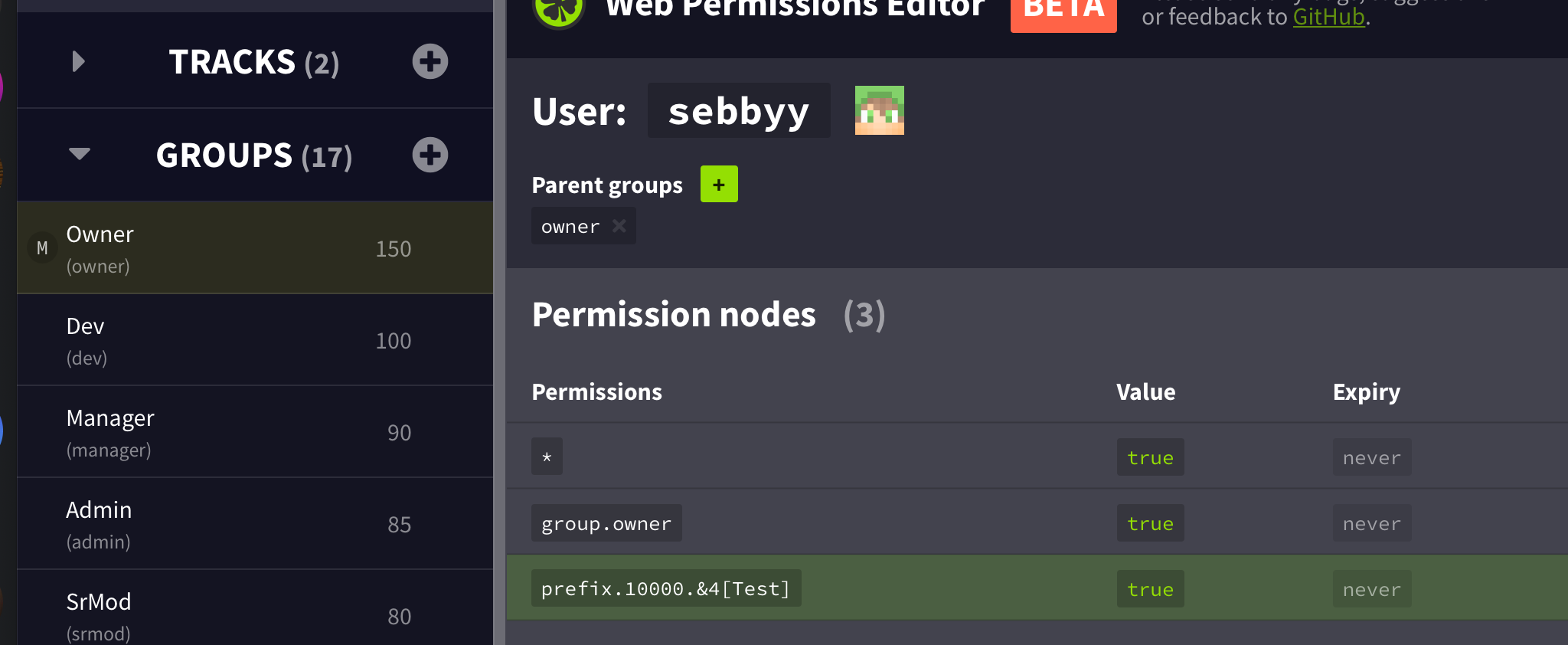
Maybe this makes it a bit clearer? https://prnt.sc/s7zs8l
 late field
I searched for useSSL but it didn't show
little sphinx
@quick matrix do you have vault plugin?
quick matrix
Yeah, got Vault and VaultChatFormatter
magic dome
@late field Write it how Ben sent it
little sphinx
show me your /lp user USER info @quick matrix
make sure you are in owner rank as well
quick matrix
prefixes display fine, it's just that the [Test] Doesn't display but [Owner] does, even though [Test] has a considerably higher weighting
late field
Am I suppose to change it in the Luckperms config or the Luckperms bungee config?
quick matrix
I have a feeling its due to VaultChatFormatter not being able to display user-side prefixes, and only group prefixes?
little sphinx
show me your
/lp user USER info@quick matrix
quick matrix
I did, it's the lightshot screenshot
late field
I can only find properties: useUnicode: true characterEncoding: utf8 useSSL: false verifyServerCertificate: falseIn the luckperms bungee config
magic dome
It has to be in all LP configs
little sphinx
Works when I click it?
not for me
 cedar urchin
how do i allow my players to use certain type of commands like /wiki for a pokemon
quick matrix
 little sphinx
@late field add that 2 ssl lines for ALL your lp config.yml
both bungee and normal
quick matrix
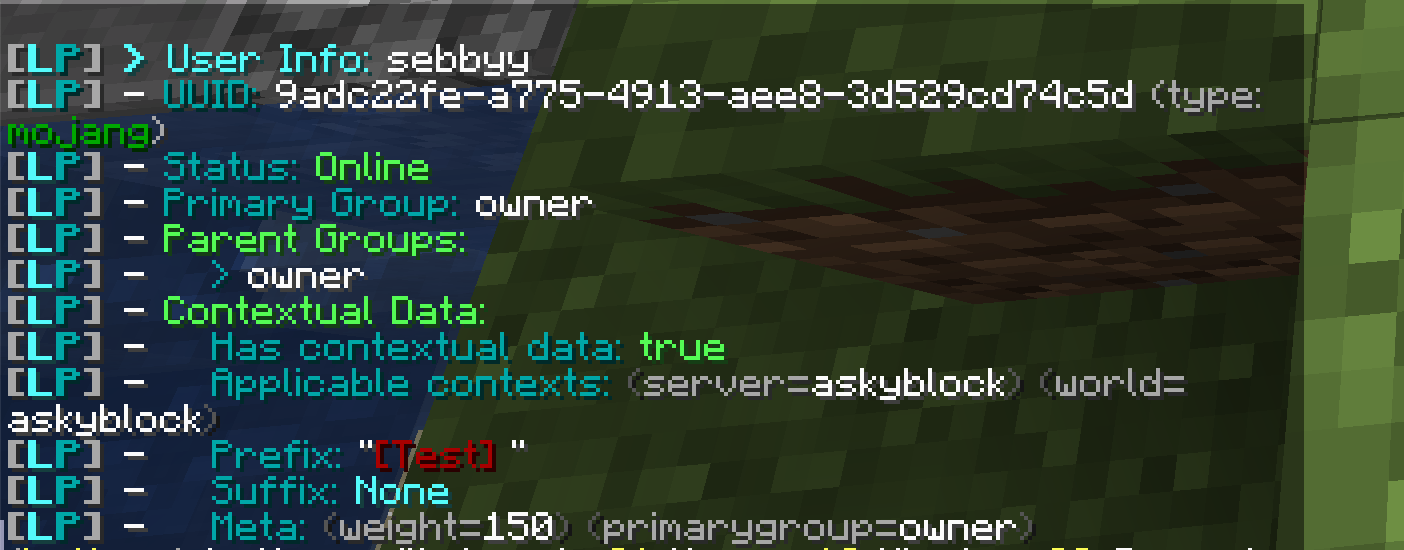
As you can see it detects prefix as [Test], but its displaying [OWNER] instead, do you not think this is due to VaultChatFormatter not being capable?
wanton stratusBOT
LuckPerms does not display things in chat!
LuckPerms is only able to send information to formatting plugins so that they display them properly. LuckPerms does not put the prefix in front of your name, you need a chat formatting plugin to do it, and you need Vault. Same goes for the tablist! If the information appears correctly when you run lp user <you> meta info, LuckPerms is doing its job!
Prefix isn't showing?
What plugins can I use to format chat?
magic dome
@late field
if it looks like this:
  properties:
      useUnicode: true
      characterEncoding: utf8
      #useSSL: false
      #verifyServerCertificate: false
Change it to
  properties:
      useUnicode: true
      characterEncoding: utf8
      useSSL: false
      verifyServerCertificate: false
if the 2 line is not there, just add it
quick matrix
No i know, but what im wondering is, is this due to VaultChatFormatter not being capable of displaying user-side prefixes.
late field
Ok I'll try it out thanks for the help
quick matrix
And only group prefixes.
little sphinx
@quick matrix no idea, i dont use VaultChatFormatter, but i dont is a limitation of VaultChatFormatter
cedar urchin
how do i allow everyone to use a certain type of command in my server?
quick matrix
Then why do you think its displaying the group prefix, even though my user prefixes has a MUCH higher weighting?
little sphinx
!usage you set permission nodes @cedar urchin there to get started
wanton stratusBOT
Here's a guide to help users understand and use LuckPerms for the first time.
LuckPerms wiki
cedar urchin
i cant find the luckperms document that referemce to that
magic dome
@signal needle Did you add the base permission?
little sphinx
@quick matrix its not weights issue, LP is working as it should
cedar urchin
because the command is for a modded server its different from minecraft
signal needle
Which one
magic dome
nucleus.gamemode.base
little sphinx
@quick matrix perhaps its really issue with VaultChatFormatter but #general for chat plugins
quick matrix
 little sphinx
!verbose @cedar urchin
wanton stratusBOT
LuckPerms provides a verbose command to help you find out what permissions a command/plugin is checking.
LuckPerms wiki
little sphinx
use this while you run modded commands
@quick matrix its a chat plugin issue #general
signal needle
i added the base command just now
little sphinx
LP works as clear shown in the screenshot you sent @quick matrix
quick matrix
alright, i'll put it in off-topic
little sphinx
my suggestion is try another chat plugin
magic dome
@signal needle I think I told you the wrong permission, it's actually nucleus.gamemode.base not gamemodes
magic dome
^^
late field
Hey Swoosh my old server use to be named Swoosh
signal needle
Lol
well, now i gotta get alllll the other commands
i've been busy from the morning
😫
late field
Do I need to add useSSL: false verifyServerCertificate: falseeven though I can see it up top?``` # You can also use this section to disable SSL connections, by setting:
useSSL: false
verifyServerCertificate: false
properties:
useUnicode: true
characterEncoding: utf8
...
    properties:
      useUnicode: true
      characterEncoding: utf8
      useSSL: false
verifyServerCertificate: false```like this @late field ^^
late field
So what's up top doesn't matter?
little sphinx
no, you need to move it down to like the example sent ^^
or if you cant find it in the config, you can just ADD the 2 lines
late field
Ok I'm restarting my servers, hopefully it works, thanks for the help👍
little sphinx
np!
merry tendon
hello I need help I recently instaled world edit but now the problem is that if a player has a wooden axe it will use world edit how can a player with a wooden axe can use it without using world edit?
 smoky perch
Hey
I need help
Is it possible to give all perms but the ones from a plugin to a group?
little sphinx
@merry tendon its not an LP issue, you can do something like //none or /none iirc, but #general please
merry tendon
ok
little sphinx
@smoky perch yes you can, just setup the appropriate perms for it
smoky perch
but what about putting all perms except a few
merry tendon
how do we add someone to a groupe?
little sphinx
you can * node and then deny specific @smoky perch
on how permissions are "calculated" https://github.com/lucko/LuckPerms/wiki/Advanced-Setup#permission-calculation
GitHub
An advanced permissions plugin for Bukkit/Spigot, BungeeCord, Sponge, Nukkit and Velocity. - lucko/LuckPerms
!usage @merry tendon
wanton stratusBOT
Here's a guide to help users understand and use LuckPerms for the first time.
LuckPerms wiki
merry tendon
ok


 little sphinx
!bungee have you followed this? @upper creek
wanton stratusBOT
If you run a Bungeecord network, learn how to correctly setup LuckPerms on all server instances (including Bungee).
Also read:
Syncing data between servers
https://github.com/lucko/LuckPerms/wiki/Syncing-data-between-servers
LuckPerms wiki
 tacit plover
hi idk if this is the right place to post but im new to the whole server thing and i got luckperms because i heard it was good but i have set a few groups but none of the prefixes or suffixes show up in chat
 upper creek
Yes @little sphinx
wanton stratusBOT
Hey Mackenzie Molloy! Please don't tag helpful/staff people directly.
tacit plover
anyone know why they arent showing
little sphinx
!meta @tacit plover have you set the prefix?
wanton stratusBOT
You can set prefixes, suffixes and other meta data in LuckPerms for players and groups. Note that LuckPerms does not manage chat. You need to use another plugin to show prefixes/suffixes in chat.
LuckPerms wiki
tacit plover
i have set them and they show up in the editor just not in chat
little sphinx
@upper creek are you running your bungee proxy on offline mode or by any chance the player joined on the backend mc server and not the bungeeporxy?
!chat have you installed both vault and a chat plugin @tacit plover
wanton stratusBOT
LuckPerms does not display things in chat!
LuckPerms is only able to send information to formatting plugins so that they display them properly. LuckPerms does not put the prefix in front of your name, you need a chat formatting plugin to do it, and you need Vault. Same goes for the tablist! If the information appears correctly when you run lp user <you> meta info, LuckPerms is doing its job!
Prefix isn't showing?
What plugins can I use to format chat?
upper creek
I have AlwaysOnline installed, could there be an incompatibility issue?
little sphinx
not sure, whats the function of AlwaysOnline?
upper creek
To allow users to join when mojang servers are offline
tacit plover
i have vault and i have permissions ex which i know has chat stuff built in
i havent changed anything in vault yet though so could it be to do with that
tacit plover
oh ok the tutorials i have seen have used permiisons ex
little sphinx
- remove permissionEx
little sphinx
!meta read this on how to set prefix on luckperms
wanton stratusBOT
You can set prefixes, suffixes and other meta data in LuckPerms for players and groups. Note that LuckPerms does not manage chat. You need to use another plugin to show prefixes/suffixes in chat.
LuckPerms wiki
tacit plover
ok thanks
little sphinx
@smoky perch you put specific perms like luckperm.someperms to false
specific perms overrides wildcards (i.e. * perms)
little sphinx
yes
smoky perch
thx
do you know any good chat formatting plugins to show prefix + factions from fuuid
tacit plover
ok so they do exist but do you know what plugins i can use to show the prefixes or suffixes in chat
little sphinx
!chat
wanton stratusBOT
LuckPerms does not display things in chat!
LuckPerms is only able to send information to formatting plugins so that they display them properly. LuckPerms does not put the prefix in front of your name, you need a chat formatting plugin to do it, and you need Vault. Same goes for the tablist! If the information appears correctly when you run lp user <you> meta info, LuckPerms is doing its job!
Prefix isn't showing?
What plugins can I use to format chat?
little sphinx
@tacit plover plugin like essentialXChat or VaultChatFomatter works
@smoky perch not sure as i dont use factions, you can ask in #general
tacit plover
ok thanks
 spiral hedge
Is recommended use this option in a network?
little sphinx
unless your are using redisbungee, and facing issue, just leave it
tacit plover
i installed essentials x and my names are still not showing up
the suffix and prefixes
little sphinx
show me your output of /lp user USER info
tacit plover
wanton stratusBOT
LuckPerms does not display things in chat!
LuckPerms is only able to send information to formatting plugins so that they display them properly. LuckPerms does not put the prefix in front of your name, you need a chat formatting plugin to do it, and you need Vault. Same goes for the tablist! If the information appears correctly when you run lp user <you> meta info, LuckPerms is doing its job!
Prefix isn't showing?
What plugins can I use to format chat?
little sphinx
read and see if it helps, if you still have issues ask in #general as chat formatters are not managed by LP plugin
!moss for essentialsX support if you want/need
wanton stratusBOT
Essentials
Make sure you are using EssentialsX and Vault for prefixes. For any other issues with Essentials, you should seek support in either #general or the official EssentialsX support Discord.
EssentialsX Discord
 cursive canopy
Hi Ben! I shared with you my issue earlier today: https://discordapp.com/channels/241667244927483904/241667244927483904/704878202258063381
I've updated my LuckPerms on all backend servers on my network
But still facing the same issue: Ranks magically appear back on global context after removing them.
little sphinx
you are sure there is no console or startup errors right?
cursive canopy
Nope
little sphinx
you deleted the ranks completely and checked in a new editor session that they are actually removed as well as right?
cursive canopy
Come to think of it. It might be part of our authentication plugin
Let me check
Yea it is
little sphinx
so the authentication plugin adds the rank back?
little sphinx
ohh i see
 vestal elbow
I have a question, I am creating a server and using the very well developed luckperms plugin for my ranks. I came across a problem thats probaly easy to fix but I am inexpierenced with plugins and configs etc, I need to have two ranks for one player ( for example: [Owner][age][Shop-Owner] ) I fixed the age with a diffrent plugin but I have to use LuckPerms for the Owner and Shop-Owner. I have no clue on how to fix this and I was wondering if a more expierenced person could help me out with this.
 hazy flower
its on the wiki i think
little sphinx
Ok so you have mentioned your expected behaviour, but can you explain your current behaviour and how it is not working? @vestal elbow
vestal elbow
Currently its this, I need to have a job rank after the [20]
But The age is a completly diffrent plugin
idk if that is a problem
little sphinx
So you want to display multiple ranks from LP is that right?
vestal elbow
yes
little sphinx
!tracks
wanton stratusBOT
Tracks provide a method for you to promote/demote players along a track (or ladder) of groups.
LuckPerms wiki
little sphinx
!stacking
wanton stratusBOT
Display multiple prefixes/suffixes alongside a player's name.
LuckPerms wiki
little sphinx
@vestal elbow you need to use tracks and stacking
vestal elbow
but would it be possible to have the age in the middle of them?
little sphinx
for that, you need the chat plugin config.
but would it be possible to have the age in the middle of them?
@vestal elbow
vestal elbow
chat plugin?
little sphinx
yes a chat formatter plugin that is used to display the prefix
vestal elbow
any recommendations?
little sphinx
!chat look at the last link
wanton stratusBOT
LuckPerms does not display things in chat!
LuckPerms is only able to send information to formatting plugins so that they display them properly. LuckPerms does not put the prefix in front of your name, you need a chat formatting plugin to do it, and you need Vault. Same goes for the tablist! If the information appears correctly when you run lp user <you> meta info, LuckPerms is doing its job!
Prefix isn't showing?
What plugins can I use to format chat?
vestal elbow
Ahhh alright, I really appreciate the help and the quick response
I'll try and figure it out and see if I can fix it
little sphinx
np! Any issue you can come back and ask. But please do read the wiki in details first. Thanks!
late field
What is the placeholder for the prefix and username Example: [Owner]JackOUT
little sphinx
for chat?
hazy flower
!placeholders
wanton stratusBOT
Display data such as user prefixes and groups from LuckPerms in other plugins.
LuckPerms wiki
hazy flower
i think
late field
For message title
little sphinx
message title, so not in chat?
hazy flower
for the player its %player%
little sphinx
oh that, you will need a plugin to do that
that formats message title, and supports placeholderAPI
then read the link on placeholders TurboSlayer sent
late field
I'm here
hazy flower
%luckperms_prefix% and %player% i believe
late field
Yeah I'll see if it works, thanks for the help👍
hazy flower
np
late field
It doesn't work only lets me use the first placeholder
hazy flower
maybe %player% is wrong then
let me check
%player_name%
is the correct placeholder
little sphinx
you need to /papi ecloud download Player
late field
I'll try it out, thanks again for the help
little sphinx
then use %player_name%
little sphinx
np!
brazen ivy
If I set for each server luckperms in config the respective server, can I use at server = nameserver something for example server = allservers?
little sphinx
if you have set server: servername in lp config then yes, you can use that servername for context
brazen ivy
but what if I want to take action all at once?
brazen ivy
I would like to make an NPC with a command to receive a certain degree for 24 hours just like on all servers. instead of being / lp group default ...... ....... server = survival. there is something like / lp group default .... ........ server = allservers
little sphinx
every permission you set can only have one context
so you have to set multiple permission nodes with different context if you so require
 noble mortar
https://pastebin.com/u1f2Nn9T Someone help me please!
foggy quartz
Hey! I came there from PEX. Tell me is there any function like a modifyworld?