#support-1
1 messages · Page 685 of 1
 lucid arrow
ok
 exotic pine
@hasty tree There are no error messages, it just doesn't work. I've tried to look at tutorials and done exactly the same.
 wanton stratusBOT
Hey NoahStav! Please don't tag staff members.
 hasty tree
then you need to very specific about what you are doing and what is happening
providing screenshots also helps
lucid arrow
how to i set a group to the default group?
hasty tree
!default
wanton stratusBOT
LuckPerms provides a group that every player is added to upon joining the server, called default. You can use multiple methods to change the default group or change the name of it.
 LuckPerms wiki
 patent shuttle
Can i set a player in a group for like 3 hours and then remove it autoamticly? Like a tempGroup
hasty tree
yes

GitHub
An advanced permissions plugin for Bukkit/Spigot, BungeeCord, Sponge, Nukkit and Velocity. - lucko/LuckPerms
patent shuttle
hmm
wanton stratusBOT
Check out some of our frequently asked questions.
Read more:
LuckPerms wiki
patent shuttle
So lets say i have a DEFAULT group for everyone
Then i have two oter groups called HUNTER and EPIC hunter.
when a players gives 10 skulls to an NPC a command runs that adds player to "hunter group" for 3 hours
if they talk to another npc with 20 skulls they get added to the EPIC HUTNER group for 3 hours.
Do i need to have "Default" "hunter" "epic hunter" in a track then? in that order?
The epic hunter should have all permissions from Hunter and default
The hunter should have all permissions from default
 tired turtle
Make hunter have default as parent and epic hunter have hunter as parent.
Then just parent tempadd hunter and epic hunter
Make sure to set weights to them
patent shuttle
so parent, not track?
tired turtle
tracks are for promotion or demotion
tired turtle
kinda
patent shuttle
/lp hunter epic parent add default
i got this right?
that adds all permissions from default to hunter
oh remov epic there
hasty tree
yes
patent shuttle
ok got this 😄 hehe
thanks for explaning this, i think i missunderstood the parent / track functions
/lp user SUPEROLA parent addtemp hunter 10 accumulate
something like this?
tired turtle
you may want to add a letter (like s for seconds or h for hours) to the number
patent shuttle
yeah i did
ehm, if a player ALWAYS are in the group default, by default ofc.. Do the rank "hunter" need default as parent when i do this?
tired turtle
you also need Vault
hasty tree
vault is installed
exotic pine
I have it too
tired turtle
Then it should work
If the prefix/suffix shows up in /lp user <user> info then your chat is messed up
exotic pine
tired turtle
Then it's your chat plugin
hasty tree
^
hasty tree
yeah so look in your essentials config
tired turtle
server or server network?
patent shuttle
/lp group hunter meta addprefix 10 [HUNTER]
is this the wrong command to set a prefix for hunter?
hasty tree
looks ok
hasty tree
yeah
but it's better to just use /lp user <user> meta info on someone who inherits that group
patent shuttle
Does not work =/
just wanted to see if the prefix was added to the group but its not =/
hasty tree
run the above command
patent shuttle
okey
hasty tree
screenshot the output
patent shuttle
hmm
this is the epic tho,
so if the * dont show up in chat its my chat plugins right?
hasty tree
it's the weight
your default group prefix has a weight of 10
while epic has a weight of 9
10 > 9
patent shuttle
oh
hasty tree
so defaults shows instead
 drowsy helm
How do you use luckperms over bungee network?
hasty tree
!bungee
wanton stratusBOT
If you run a Bungeecord network, learn how to correctly setup LuckPerms on all server instances (including Bungee).
LuckPerms wiki
drowsy helm
I'm not that good at english
hasty tree
then use a translator
drowsy helm
How do i connect to same database?
exotic pine
I fixed all my problems. So thanks for all the help, but is it that this plugin is in sync with Essentinals. Since essentials have provided more homes for higher ranks etc. Is it like that already in use?
hasty tree
luckperms doesn't "sync" with any other plugins.
@drowsy helm please read the FAQ here:
!faq
wanton stratusBOT
Check out some of our frequently asked questions.
Read more:
LuckPerms wiki
 winter flame
I read the faq about prefixes not showing. But it's still not working.
I'm using essentialsx and essentialschatx
And it's showing the prefix at /lp user <user> info
 lapis ibex
In this case thar means your chat plugin isn’t configured correctly
Or you’re missing Vault
lapis ibex
@thorny jewel this is the right channel
@winter flame yes
@thorny jewel yes exactly
Have a look here
!bungee
wanton stratusBOT
If you run a Bungeecord network, learn how to correctly setup LuckPerms on all server instances (including Bungee).
LuckPerms wiki
lapis ibex
!sync
wanton stratusBOT
To sync data between servers, you need to connect each LuckPerms plugin to the same database (for example MySQL) and set up a messaging service.
LuckPerms wiki
lapis ibex
!context
wanton stratusBOT
You can set a permission or group on a per-world/per-server basis, through what we call "contexts".
LuckPerms wiki
winter flame
My chat config: https://hasteb.in/onahoyir.coffeescript
winter flame
Yeah ok.
winter flame
Okay thx
lapis ibex
If the prefixes show correctly with /lp user <User> info LP is working correctly
 thorny jewel
ok, so if im right, I just set the server name instead of "global" and set all the servers up with MySQL ?
winter flame
I forgot the update essentialschatx it was on an old version. @hasty tree
wanton stratusBOT
Hey Dark_Ville! Please don't tag staff members.
winter flame
Oops
lapis ibex
@thorny jewel pretty much
 foggy quartz
Prefix works for default group and owner so far. But it doesnt for my other groups?
 red iris
So my server logs show this on start up:
WARNING: An illegal reflective access operation has occurred
WARNING: Illegal reflective access by me.lucko.luckperms.common.dependencies.classloader.ReflectionClassLoader (file:/Users/Frank/Downloads/minecraft/plugins/LuckPerms-Bukkit-5.0.39.jar) to method java.net.URLClassLoader.addURL(java.net.URL)
WARNING: Please consider reporting this to the maintainers of me.lucko.luckperms.common.dependencies.classloader.ReflectionClassLoader
WARNING: Use --illegal-access=warn to enable warnings of further illegal reflective access operations
WARNING: All illegal access operations will be denied in a future release
red iris
👍
tired turtle
It's something Luck is trying to fix, but for now is it not doing any damage and therefore can be ignored
 formal galleon
hi speak spanish?
tired turtle

Use the free DeepL Translator to translate your texts with the best machine translation available, powered by DeepL’s world-leading neural network technology. Currently supported languages are English, German, French, Spanish, Portuguese, Italian, Dutch, Polish, and Russian.
formal galleon
I have a question. What is the permission to add a prefix?
and thank you very much for the translator n.n
hasty tree
!meta
wanton stratusBOT
You can set prefixes, suffixes and other meta data in LuckPerms for players and groups. Note that LuckPerms does not manage chat. You need to use another plugin to show prefixes/suffixes in chat.
LuckPerms wiki
 daring ginkgo
How can i add the context to apply in 2 servers ?
tired turtle
You have to apply the context separate for each
wanton stratusBOT
A list of permissions used by LuckPerms commands.
LuckPerms wiki
 high iris
hey everyone, i don't want to make something to get banned so i'm going to ask before, can i ask you guys about a plugin (not for permissions) for my server ?
thorny jewel
Hey! I want the rank: "Admin" to have perm to give other players a rank, and the perm for that is:
"luckperms.user.parent.set"
But now the admin can give all ranks to default players. I just want the admin to be able to just give some ranks. Is this possible, whats the permission node?
lapis ibex
!argumentbased
wanton stratusBOT
Fine tune exactly what users with permission to use LuckPerms can do.
LuckPerms wiki
 zealous siren
On my server the members are able to set themselves in ranks how do I fix that?
hasty tree
don't give LP permissions to any groups other than roles you trust.
lapis ibex
And have you tested it with yourself or are actual players having that ability @zealous siren
zealous siren
I have tested myself only
 magic summit
if you followed the wiki, you gave yourself luckperms.* which means you will always have access...
 simple compass
I gave players a permission for the world world but the perm is just not working anymore for every world... How can I give a player a perm for only 3 worlds ? (world, world_nether, world_the_end)
magic summit
!verbose if you dont know the permission, use verbose to find what perms are being checked:
wanton stratusBOT
LuckPerms provides a verbose command to help you find out what permissions a command/plugin is checking.
LuckPerms wiki
simple compass
I know the permission !
magic summit
then set it false
simple compass
I set it to true for world world
magic summit
ok, so again, did you try verbose to see what is being checked?
zealous siren
Do you guys have a good tutorial for setting the plugin up with ranks and commands?
wanton stratusBOT
Find all of the available LuckPerms commands on the wiki.
LuckPerms wiki
magic summit
did you enable argument based and use verbose to see the perms being checked?
that was the point of staff giving you that link, at the top it says you have to enable the feature.
there may be more than that perm being checked.
daring ginkgo
ty Andre
zealous siren
Have you fixed your problem Yngve?
magic summit
what does verbose show?
thorny jewel
Yes, its enabled
lapis ibex
There’s only modify.self and modify.other
magic summit
yea, thats why i mentioned verbose
wanton stratusBOT
LuckPerms provides a verbose command to help you find out what permissions a command/plugin is checking.
LuckPerms wiki
thorny jewel
You know what I need, I just dont know what to type there.
hasty tree
I have no idea, because you haven't shown what your verbose outputs look like.
thorny jewel
Hey! I want the rank: "Admin" to have perm to give other players a rank, and the perm for that is:
"luckperms.user.parent.set"
But now the admin can give all ranks to default players. I just want the admin to be able to just give some ranks. Is this possible, whats the permission node?
./lp verbose on luck
?
hasty tree
Take the initiative and figure it out, or give us screenshots to show what you are struggling with.
thorny jewel
since its related to the luckperms plugin
But there is alot of perms for the luckperms plugin
hasty tree
still can't tell you what permissions to give because you haven't given us any feedback on using verbose
thorny jewel
Im talking about the verbose command
What should I type in the chat to search up the permission
thorny jewel
a screenshot about what?
hasty tree
or use the record method
hasty tree
you need to look through all of them and see which ones are relevant
the list will be longer than what appears in chat
probably better to use the record method
thorny jewel
ok thanks
But it doesnt say anything about the record
So I do: /lp verbose record luck
whats the next step?
I still dont get the spesific perm im looking for ...
hasty tree
sigh... i feel like i'm spoon feeding now.
you aren't understanding how the verbose command works.
please do /lp verbose record
try the commands you are wanting the other groups to use (adding groups)
then /lp verbose paste
send the URL here.
zealous siren
Are there any good tutorials on how to set this plugin up from start?
magic summit
!usage
wanton stratusBOT
Here's a guide to help users understand and use LuckPerms for the first time.
LuckPerms wiki
zealous siren
How do I change default group/rank?
lapis ibex
!default
wanton stratusBOT
LuckPerms provides a group that every player is added to upon joining the server, called default. You can use multiple methods to change the default group or change the name of it.
LuckPerms wiki
thorny jewel
Ye, so I did, and this is the link I got:
https://luckperms.net/verbose/#fK27hJGAa9
Its like 1000000 perms, how can I know the right.

LuckPerms - An advanced permissions plugin for Bukkit/Spigot, BungeeCord, Sponge, Nukkit and Velocity
A web based viewer for LuckPerms verbose recording logs.
tired turtle
By perhaps applying filters first?
hasty tree
Did you even enable the option in the config?
lapis ibex
@thorny jewel you also need to restart the server after enabling it in the config
It very clearly isn’t active.
thorny jewel
mb, I enabled it on the wrong server ...
lapis ibex
Unless you didn’t run a LP command between enabling and disabling verbose
thorny jewel
ok so this is what I got now:
https://luckperms.net/verbose/#h0HO4KvQP7
LuckPerms - An advanced permissions plugin for Bukkit/Spigot, BungeeCord, Sponge, Nukkit and Velocity
A web based viewer for LuckPerms verbose recording logs.
And I did run a LP command between enabling and disabling verbose
hasty tree
luckperms.user.parent.set.modify.others
lapis ibex
hasty tree
if you want to negate the spam, you could filter with /lp verbose on luckperms.user.parent.set
 queen light
Hey can someone help me? Is there an option to give a single permission NOT to an User? Like in PermissionsEx the - -perm function?
queen light
yes
hasty tree
e.g. /lp group <group> permission set <permission> false
or use the web editor, where it's a bit easier to use
queen light
thank you for the fast help ^^
thorny jewel
I added in the perms now, but the group can still give other players the "owner" rank, even tho its set to false.
hasty tree
I'm not sure those are the correct permissions. Verbose will tell you which ones are being checked.
Use the filter I mentioned above.
thorny jewel
You just sent me the perms.
hasty tree
?
hasty tree
Verbose will tell if a permission checks as true or false (or undefined)
hasty tree
You need to keep narrowing down the permissions with the filter if you keep seeing multiple permissions.
thorny jewel
How can I know what im searching for when im searching in permission nodes?
and I dont know the permission.
hasty tree
I don't know. You aren't showing us any results.
thorny jewel
I can send them agian
LuckPerms - An advanced permissions plugin for Bukkit/Spigot, BungeeCord, Sponge, Nukkit and Velocity
A web based viewer for LuckPerms verbose recording logs.
hasty tree
You need to use filters
thorny jewel
You told me to use record.
hasty tree
Did you use the command I told you...
/lp verbose on luckperms.user.parent.set
thorny jewel
I just did, and nothing is happening.
hasty tree
Are you trying the command after running verbose...
You do realise what verbose does, right?
thorny jewel
lapis ibex
And now try it with owner
thorny jewel
Give the owner rank instead of the admin?
It says the same, expect the last line:
Luckperms.user.parent.set.owner - true
hasty tree
i had to spin up a test server just to give you the answer
add these permissions to the group:
luckperms.user.parent.add
luckperms.user.parent.add.usecontext.global
luckperms.user.parent.add.modify.others
luckperms.user.parent.add.<groupname>
replace <groupname> with the name of the group you want them to add
This was all figured out by using verbose. So please try to learn how it works.
Some of the above permissions won't appear unless the one before it has been set.
This is all explained on the argument based command permissions wiki page:
https://github.com/lucko/LuckPerms/wiki/Argument-based-command-permissions#modify-another-player
thorny jewel
ok, so I should do: "add" instead of "set".
And for <groupname> if I want the player to be able to set the group "titan" I do:
luckperms.user.parent.add.titan - true
and if I dont want to let the player give the "owner" rank, I do:
luckperms.user.parent.add.owner -false
Thank you soo much ❤️
hasty tree
it would be false by default
and using add instead of set really depends on what you want them to do
lapis ibex
Ideally you have both
So write (set|add) in the permissions
Maybe even (set|add|remove)
And if the permission shows true with verbose you haven’t set it to false
Changes in the webeditor only apply after saving and running the command it shows
thorny jewel
Its still not 100%, so I added in the perms. But the rank "Admin" (where I added the perms), can modify my role "owner".
And I can also give the rank: "Owner" even tho I did not add the perm:
luckperms.user.parent.add.owner
thorny jewel
Im using set
I thought it was false by default, or do I need to set it in as false?
lapis ibex
Then do you see a slight issue with the node you set?
You clearly have a luckperms.* somewhere
The of course the permissions will be true
And awfully nice of you for ignoring my answer to your question
thorny jewel
I did not add luckperms.*
lapis ibex
Check your own permissions
thorny jewel
The set add and remove?
thorny jewel
I know that
and the player I tested with is my alt acc. and the acc does not have any spesific perms.
Only the perms in the group.
But wont the perm:
luckperms.user.parent.set
Give access to give all ranks?
lapis ibex
Are you on Sponge?
thorny jewel
Im giving up
thorny jewel
What do you mean?
thorny jewel
Im on Paper.
lapis ibex
Good. Then the answer is no
thorny jewel
Alright, but thanks for trying to help me. I just didnt get the perms im looking for.
lapis ibex
You found them
There’s just something else
Like a * permission or a luckperms.*one
Or OP
lapis ibex
All LP permissions show true so there clearly is
Or to be doubly sure
Run /lp verbose record <alt account>
Have the alt account run the command and then /lp verbose paste
Both verbose commands as yourself
 untold venture
can you send your editor link ?
thorny jewel
untold venture
what's your alt name ?
thorny jewel
Yngve7
untold venture
what group is he in ?
 wheat inlet
Is there any way to promote a user 10 groups ahead in a track that they're only a few groups into using a command?
untold venture
@thorny jewel what groups does your alt have ?
thorny jewel
Now it has default, but I tested with the group "admin".
 blazing compass
I was using Vault tags to display ranks above peoples heads but it stopped working, any suggestions for a plugin that will work?
blazing compass
my bad and ty :))
 urban cedar
Hello, I am having issues with setting permissions correct me if I am wrong.
/lp group test permission set headdb.command.hdb true
This should allow anyone in the group test, to use the command /hdb
tired turtle
If it is the right perm
urban cedar
what do you mean
 sage kite
Q: i'm trying to figure out how to get prefix/suffix to work in chat:
the displayname setting only sets the prefix for the player in regular chat, the prefix and suffix only apply when other plugins use the playername using LuckPerms
(also using EssentialsX, EssentialsXChat,ServerControllRelaoded that might affect chat formatting as well)
I've been looking through the configs of all of these plugins and set everything how i believe it should work correctly, but i'm still baffled... https://i.gyazo.com/edc90dfd1176f589146bebe6836e70bb.png
Thanks for any help
 untold venture
!meta
wanton stratusBOT
You can set prefixes, suffixes and other meta data in LuckPerms for players and groups. Note that LuckPerms does not manage chat. You need to use another plugin to show prefixes/suffixes in chat.
LuckPerms wiki
sage kite
ok, did all that. i'm assuming i need to ask SCR or EssentialsXChat what i'm missing
Thanks
urban cedar
Okay, if the command dose not give users in the test group permissions than, what are my steps to find out the problem?
tired turtle
!verbose
wanton stratusBOT
LuckPerms provides a verbose command to help you find out what permissions a command/plugin is checking.
LuckPerms wiki
lapis ibex
@urban cedar with “if the perm is right” Andre meant that that command will give the permission to the group. But it doesn’t do anything it that’s not the permission for the command. Permission nodes are determined/defined by the plugin author and can be pretty much anything
Check the plugin docs to find them out
Alternatively you can use verbose to figure it out yourself
urban cedar
Yeah thank you guys for the help, I assumed it would be the same as the command, so the issue was indeed that.
foggy quartz
I think my inquiry was lost, so I'll repost it if that is fine.
I decided to start up a server for some friends who wanted a place to goof off, a small private server. One of the features they wanted, however, were interchangeable titles (LP prefixes/suffixes) that can be earned or bought and changed out whenever they felt like it. To put that into an example...
Player A earned the Builder and Warrior titles. He wants to be able to display one at a time and be able to switch them at whim.
I have already set up the LP groups and prefixes (and suffixes) of each group in question, Nucleus to display them, and I am aware of weight allowing different groups to display dominantly over others, but this would affect all users with said group who may prefer to display a different group's title.
Admittedly, I am a tyro when it comes to these things and I don't want to say "plz add this feature." If anything, I just want some advice or guidance to the best solution for this situation.
 split veldt
That would be #general because LP only sets the prefixes, doesn't display them. You'll need something like an alias plugin, so they can switch their prefixes to pre-set ones you make, unless you use the advanced argument based permissions method but I don't think thats what you want.
@foggy quartz
 alpine cairn
why doesnt lp editor work?
 magic dome
Do you get any console errors when trying to use it?
alpine cairn
no
magic dome
or is your error related to functionality? You need to be more specific
alpine cairn
when i go to the link it says "There was an error loading the data. Either the URL was copied wrong or the session has expired.
Please generate another editor session with /lp editor."
magic dome
and nothing in the console?
tired turtle
Can you provide the link please?
alpine cairn
tired turtle
Works for me
alpine cairn
hm
tired turtle
So it's your browser
Make sure that you allow javascript and check the console of your browser
alpine cairn
do you use google chrome?
magic dome
Works with Chrome and with Firefox for me
alpine cairn
dang
tired turtle
What do you use?
alpine cairn
google chrome
tired turtle
okay
Like I said: Make sure to allow Javascript and that you run latest Google chrome
Maybe also clear cache
magic dome
Works even with Edge and Internet Explorer
tired turtle
Edge is a decent browser
magic dome
Sadly microsoft killed it and replaced it with yet another chromium based browser ;-;
alpine cairn
yeah no i tried edge and it doesnt work on that either
tired turtle
Then it's for sure your internet or PC
magic dome
maybe your anti virus blocks some javascripts
tired turtle
Or is a horrible antivirus in general
magic dome
cough Protegent cough
tired turtle
Anyway, It's nothing we have any control over and not an LP issue
alpine cairn
welp dang
i think its my internet cause ive tried it on my laptop phone and desktop
foggy quartz
I see. Thank you, Usb_Hub. I'll try to find something that matches that description, though I've been unsuccessful thus far.
 livid rivet
What is the difference between LuckPerms v4 and v5?
zealous siren
I have a problem now, my default players can set themselves in another ranks how do i change this?
patent shuttle
Is there a way to add +1 hour to everyone who are in a tempgroup ?
 toxic wagon
GitHub
An advanced permissions plugin for Bukkit/Spigot, BungeeCord, Sponge, Nukkit and Velocity. - lucko/LuckPerms
@zealous siren Then remove the permission for them to do it?
@patent shuttle https://github.com/lucko/LuckPerms/wiki/Command-Usage:-Parent#lp-usergroup-usergroup-parent-addtemp-group-duration-temporary-modifier-context
GitHub
An advanced permissions plugin for Bukkit/Spigot, BungeeCord, Sponge, Nukkit and Velocity. - lucko/LuckPerms
hasty tree
good news, you can now delete groups from the web editor :P
I should really work on adding the undo feature though, cause I know people are just gonna end up deleting groups and coming here to complain about it
split veldt
Yeah... I mean that could be an issue LOL
 river ivy
Does anyone know of a way to set moved to #general
Max Health at 40?
It defaults to 20 and I need it to be set at 40 for all players.
river ivy
So it's not a LP permission that could be setable?
 cunning quest
Can someone help me with MariaDB setup, i have the database created, the config setup. Still getting connection errors. The port is opened. Also read the common errors on the site.
03:19:11 ERROR]: [LuckPerms] Failed to init storage implementation [03:19:11 WARN]: java.sql.SQLTransientConnectionException: luckperms-hikari - Connection is not available, request timed out after 5000ms.
split veldt
Check your credentials
You may have entered the database connection address/name incorrectly
magic dome
!errors
wanton stratusBOT
Here's a page with some common storage system errors.
LuckPerms wiki
cunning quest
its correct, checked 3 times
also read that whole page, when i try GRANT ALL PRIVILEGES it does something weird
toxic wagon
GRANT ALL PRIVILEGES ON [databasename].* TO '[username]'@'[ipaddress]';
cunning quest
GRANT ALL PRIVILEGES ON luckperms.* TO 'root'@'%';
toxic wagon
So your Ip is % is it?
cunning quest
.... That is localhost
split veldt
Wish my IP was %... easy to remember
magic dome
actually % is mysql syntax and means all host ips
cunning quest
^
Anyways, that wouldn't cause this error
ERROR 1133 (28000): Can't find any matching row in the user table
toxic wagon
That error means it can't find the user in the user table.
magic dome
root always has all permissions, thats the point of root. but it may be that you have root@localhost but not root@%, one is just reachable trough localhost while the otger one is avaiable on all ips
cunning quest
okay now that worked
lol
still getting, [03:33:01 WARN]: java.sql.SQLTransientConnectionException: luckperms-hikari - Connection is not available, request timed out after 5000ms.
I don't think its my config either
magic dome
did you do as the page suggested?
cunning quest
Yeah
magic dome
What happens when you use the command mysql -h 127.0.0.1 -u root -p
cunning quest
After i enter the password
ERROR 1698 (28000): Access denied for user 'root'@'localhost'
magic dome
I think your mysql server is setup to not accept IP based connections, but just socked connections
cunning quest
So how do i fix it?
magic dome
MySql co fig, bind ip adress 127.0.0.1 to it
cunning quest
Already is binded to that, checked
magic dome
then me is out of ideas, but the error you get when using the command is propably the same thing that causes lp to not connect to the database. Maybe you changed your mysql root password?
cunning quest
no the root password works when doing mysql -u root -p
magic dome
yes, then it connects over the mysql socked and not over the ip
 strange osprey
how do I set a prefix to default?
hasty tree
!meta
wanton stratusBOT
You can set prefixes, suffixes and other meta data in LuckPerms for players and groups. Note that LuckPerms does not manage chat. You need to use another plugin to show prefixes/suffixes in chat.
LuckPerms wiki
strange osprey
What is going on here?
wanton stratusBOT
Check out some of our frequently asked questions.
Read more:
LuckPerms wiki
strange osprey
well lets fix vault
split veldt
You may wanna look at getting rid of essentials antibuild just fyi
 river coyote
Would anyone be abled to help me with some prefix issues?
toxic wagon
GitHub
An advanced permissions plugin for Bukkit/Spigot, BungeeCord, Sponge, Nukkit and Velocity. - lucko/LuckPerms
river coyote
I do have Vault and Chat control, both the latest builds. /lp user <user> info shows that I do have a prefix set
And I havent touched my config file at all
hasty tree
Make sure LP is the only permission plugin
river coyote
It is
hasty tree
Show /plugins then
river coyote
hasty tree
Maybe you just need to configure your chat plugin
 iron iron
Hi guys is there a way to set default names and chat colors ?
toxic wagon
Depends on your chat plugin
river coyote
Ill give that a try, never had to do that before.
iron iron
Im using nucleus and ultimatechat , nucleus wiki says that depends of my permissions plugins hahaha
toxic wagon
Permissions plugins have 0 do with name and chat colours.
hasty tree
Although you might set the colours with LP it's not really LP's job to document it
Since it's handled by another plugin
also why are you using ultimate chat when nucleus does chat as well?
seems excessive
iron iron
because i cant set an chat color :l im following the wiki and i cant do it
river coyote
Got it working, suffix formatting wasnt enabling itself, which is weird since previously it always did it out of the box. Thanks for the help!
iron iron
ok sorry
 white socket
Hi, ive been trying to set up luckperms for about 2 hours now and im not having any luck. Ive read a few of the githubs but im pretty sure im doing something wrong. So i am running a bungeecord i have bungee, hub, and 6 other servers all connected. What im trying to do is have all the ranks connect with each server but with different perms on each server. For example for hub theyll have a permission that will allow them to summon a pet pets.petaccess.cow but once they connect to a server lets say survival they wont be able to use that pet perm anymore but they can now use essentials.fly. Then theyd have bungeecord.server but it can be used on all servers. I have luckpermsbungee on my bungee server and its set as server: bungee and include-global: true i also have luckpermsbukkit on the survival with server: survival and include-global:true Ive tried to do /lpb group vip permission set essentials.fly true server=survival but it doesnt seem to be working. If anyone could help id appreciate it greatly.
toxic wagon
Have you connected all instances of Luckperms to a database @white socket It's be best and fastest way to make sure everything syncs correctly.
white socket
Oh forgot to add that, Yes i have the lpb setup with mysql but i forgot to add mysql the to bukkit. Lemme fix that
toxic wagon
All servers need to be connected to the same db
white socket
Thanks for all the help 😄 Seems to be working correctly now
 subtle vessel
hey
my name is red and i cant get rid of it
what command to get rid of all user settings
hasty tree
if you're using essentials it's probably op
there is a setting in the config to change that
hasty tree
guess i'll support essentials for the billionth time
dude it's literally the first option
hasty tree
do you have essentials?
hasty tree
go edit the config
subtle vessel
wheres config
subtle vessel
wow
hasty tree
go ask essentials support
 lost orchid
In server folder > plugins > EssentialsX > config.yml
In config.yml, find the option ops-name-color and change the value to none
 winged oak
There is a plugin that can change bungeecord config.yml perms from luckperms?
toxic wagon
Luckperms can handle all the bungeecord permissions itself if you use the LuckPerms-Bungee version
winged oak
how?
toxic wagon
!bungee
wanton stratusBOT
If you run a Bungeecord network, learn how to correctly setup LuckPerms on all server instances (including Bungee).
LuckPerms wiki
 hasty bolt
hey someone can help me? how i can set permission false only for default users?
toxic wagon
set the permission to false? instead of true
hasty bolt
jeah my problem is the jobs plugin allowed to use it without permissions
i want only npc can use this commands and default players not. But when i make permission false than all groups are not allowed more :/
toxic wagon
lp user|group <name> permission set <permission> true|false
Set the permission to false, instead of true.
toxic wagon
Because of inheritance, set it to true for the group above default
hasty bolt
the npc can execute only commands as op or npc and i cant add him to a group :/
toxic wagon
The same permission you set to false for default, go to the group above default, and set it to true.
hasty bolt
ok
foggy quartz
does luck perms work with sponge forge?
foggy quartz
okay thanks
hasty bolt
have now make true on admin group but dont work as op :/
toxic wagon
"dont work" tells us nothing. more details about what you're trying to do and what isn't working
hasty bolt
When i try the Command as op than he call you dont have permission
because default group the permission is on false
maybe i must add the permission in bukkit permission.yml?
hasty tree
no
that's not the solution here
you've been told what you need to do
maybe supply us with more info like your setup
screenshot /lp user <yourname> info
send it here
make an effort
toxic wagon
Plus, permission.yml is useless when you have a permissions plugin installed.
hasty bolt
toxic wagon
The problem is your admin group inherits it from default, you need to add the permission to true for a group higher than default that admin inherits from, or add it directly to admin
As i've said 3 times now.
hasty bolt
that its true on admin group
toxic wagon
Make sure admin group has a higher weight than default
hasty bolt
default its 5 and admin 100
but i try something dev send me a script to make it without permission
wanton stratusBOT
LuckPerms provides a verbose command to help you find out what permissions a command/plugin is checking.
LuckPerms wiki
hasty tree
also the checkinherits command might tell you where it's being set
/lp user <yourname> permission checkinherits <permission>
hasty bolt
yeah but the problem is i cant give an npc a permission group
ok now worked with script
but thanks for the fast answers here 🙂
 lethal bramble
Is there a fast way to set a group to based on timeplayed? Like starter for = 10 min and when they have more than 10 min ingame they become beginner for 1 hour etc etc
toxic wagon
You'll need a plugin that handles play time for that.
lethal bramble
oh okey! Thank you
lost orchid
Is there a permission for command blocks or does the player have to be an op?
toxic wagon
If you're on spigot, you need to be op and in creative mode.
tired turtle
On Sponge do you have a permission for command blocks
lost orchid
Ok thanks OmegaWeapon_.
 bitter coral
Yes Andre on Sponge there is a permission for command blocks, but probably #general as not LP related.
hasty tree
that would assume you have have not connected all servers to the same database
make sure to check these tips:
https://github.com/lucko/LuckPerms/wiki/FAQ#how-do-i-get-permissions-to-sync-across-multiple-servers
 celest hamlet
i found problem, i set server name bungee in bungeecord's luckperms config
hasty tree
that shouldn't be an issue at all and I think that is set that way by default.
hasty tree
then do lp user <user> info on either (lpb for bungee) and make sure the UUID is the same.
wanton stratusBOT
LuckPerms provides a verbose command to help you find out what permissions a command/plugin is checking.
LuckPerms wiki
 dense oar
is there a version for cauldron?
 barren burrow
I'm currently having a problem with using LuckPerms Sponge (5.0.70) with on a SpongeForge Server together with FTBUtilities.
I can't access the FTB Utilities.
I've tried to give myself the admin role in the mod, which works when LuckPerms isn't installed, however when LuckPerms is installed i can't access them and when i try to give myself the permissions using luckperms it doesn't work either.
celest hamlet
@hasty tree
server
wanton stratusBOT
Hey Dinfy! Please don't tag staff members.
celest hamlet
bungee
dense oar
Hi
barren burrow
solved my issue, bless verbose
celest hamlet
hasty tree
make sure you haven't changed any settings in the config like include-global or something
celest hamlet
lucid arrow
Hi can i get help
is there a way to add more world to use the permission now if i add a seccond world it replace
celest hamlet
Removed all plugins, left only luckperms. Still the same situation
lapis ibex
@dense oar use the legacy version
And there are some special instructions on the installation page
!install
wanton stratusBOT
You can install LuckPerms on Spigot/Paper, Sponge, BungeeCord/Waterfall, Velocity and others. Check the installation guide for more info on setting up LuckPerms.
LuckPerms wiki
lapis ibex
@lucid arrow just add a second node with the other world
lucid arrow
ok
celest hamlet
Removed plugin and config folder, and it helps. Don't know how
 rough wren
Can someone help me please. I have multiple groups on a track, the lowest being 'default'. Right now I'm positioned at the second ('gangster') as you can see in the path. But when I try to demote myself it says that about default no longer existing even though it shows it in the path and I have it as a file under the groups folder.
I've tried deleting default and making it again as well as deleting the track and making it again. I keep getting the same problem
 lone canyon
can somebody please tell me why it is repeating the suffix twice?
lone canyon
i have essentialsX
tired turtle
Well... Still no info we can use at all
lone canyon
i sent you the editor linjk
tired turtle
Send it here
lone canyon
lone canyon
what do you want ill send that then
tired turtle
It - at most - would be prefix and suffix stacking
Check your config for the chat formatting
lone canyon
luckperms?
lone canyon
{DISPLAYNAME}{SUFFIX} &8» &f{MESSAGE}
tired turtle
There is your issue
{DISPLAYNAME} contains prefix, user (nick)name and suffix
So remove {SUFFIX}
lone canyon
thank you its working now
strange osprey
why does it say default player
player is the prefix for group default
this is the essentials chat setting format: '&7[{GROUP}]&r {DISPLAYNAME}&7:&r {MESSAGE}'
strange osprey
so it is changing the displayname?
strange osprey
ok
tired turtle
And you sure didn't change default's displayname
strange osprey
it tells me the prefix is player
tired turtle
Prefix is not the display name
You really need to learn basics about groups and such
rough wren
Is there a way or a plugin that’ll remove all permissions from all plugins except the permissions given? I know there’s a way to remove permissions but I’d like to do that just so I don’t have to go and remove all the permissions I don’t want and instead just add the ones I do
tired turtle
Most plugins give permissions in a way that when you don't have it, you don't have it
lapis ibex
@rough wren are you on spigot/bukkit/paper?
rough wren
I’m on paper, and yea but a lot of the plugins I have give many permissions by default and most of them I don’t want
It’s not too big of a deal I was just wondering so I don’t have to go deny all the default permissions I don’t want on all my plugins
tired turtle
Then deny wildcards perhaps?
You're aware that you can do stuff like essentials.* to deny all essentials permissions, right?
rough wren
Yea I may just deny all permissions for all plugins using that essentials.* but for all my plugins and then just list the ones I want
So if I were to do essentials.* value: false or whatever to deny the permissions and then listed for example the permissions to do /msg I shouldn’t be able to do any essentials commands besides /msg right?
And if you guys don’t mind can you give me any advice on the question I asked about an hour and a half ago? I’ve tried a lot of stuff but nothings changed.. the one about the default group no longer existing so I can’t demote to it
 compact cove
https://i.gyazo.com/06cc4fb5a745b220985725334ff4f85d.png https://i.gyazo.com/1afb30436096ec305282e764c082dc7b.png


I can't get a prefix on my bungeecord server
 jagged shadow
do you have a chat plugin
jagged shadow
yeah
i'm trying to see if bungeecordchat works with lp
https://www.spigotmc.org/resources/bungee-chat.12592/ this plugin right?

SpigotMC - High Performance Minecraft
compact cove
 jagged shadow
you have lp set in the global context im pretty sure it won't work like that
I only know a little with bungeechat and lp but thats what I remember from the config saying that global disables sync
compact cove
 jagged shadow
oh i had it backwards
bungeechat should automatically hook into lp
have you read through the instructions on how to set it up?
jagged shadow
I'm not exactly sure, I can't exactly find whats wrong hopefully someone else can better figure it out
compact cove
Okay thanks
jagged shadow
goodluck
 tough spear
New LP web editor remove something that was REALLY useful :(
On the old version, I can put a permissions or anything in the permission field like:
suffix.10232.&1[&eP202&1]
And it keep the old one I add in the permission field, so I doesn't have to paste it again and again.
Is it possible to put this feature back?
Thanks again luck
foggy quartz
Hello guys, the plugin doesn't work on 1.8...
tough spear
it supposed to work on 1.8.8
foggy quartz
When I start my server, no folder is being created 😄
tough spear
Any error?
tough spear
show the server logs so someone can see if there is something
tired turtle
@tough spear Is planned to be re-added https://github.com/lucko/LuckPermsWeb/issues/128
The editor is still beta after all
@foggy quartz Then there must be an error. Check console and make sure you actually use AT LEAST 1.8.8
1.8 itself is not supported
foggy quartz
thank you andre
 gleaming flax
foggy quartz
gleaming flax
foggy quartz
ok so I was curious on if there was a way to change the prefix of a specific user and not a group. I searched on google and couldn't find anything
tough spear
Thanks Andre 🙂 I will finish yo copyu-paste my permission each time before the v1 release XD, but the copy thing was a nice thing to re-add 😉
tired turtle
@foggy quartz /lp user <user> meta addprefix <weight> <prefix>
@rigid elbow You could just deny the permissions in the group as permissions a group has override those it inherits by default.
foggy quartz
Can I add this to s GUI
tired turtle
?
foggy quartz
Is they anyway to add ranks to a GUI
tired turtle
That depends on whatever GUI plugin you want to use and is not LPs job
foggy quartz
hi
tough spear
ANyone know how I can create more groups base on my actual 500 luckperm groups?
Right now, it stop at 500 with permissions, prefix/suffix, weight, etc for each groups.
I just want to know if I can generate 5000 other groups that increase weight, prefix/suffix pirority, permissions etc?
 cold dune
Hi, i have latest version LuckPerms-Bungee-5.0.70.jar. When player enter in server i have this error.
https://pastebin.com/YNM2bH8q
What could be the reason?
 bitter coral
!errors
wanton stratusBOT
Here's a page with some common storage system errors.
LuckPerms wiki
cold dune
None of these options help
 celest canyon
Does the latest version 5.0.39 of luckperms support spigot 1.13.2?
magic summit
it supports >= 1.8.8 as shown on https://luckperms.net/
LuckPerms - An advanced permissions plugin for Bukkit/Spigot, BungeeCord, Sponge, Nukkit and Velocity
LuckPerms is an advanced permissions plugin for Bukkit/Spigot, BungeeCord, Sponge, Nukkit and Velocity
latest version is 5.0.70, not .39
celest canyon
Ok thank you, was using spigot to look at the plugin before, will use the luckperms.net from now on
magic summit
spigot is for like main stable versions, LP gets updated often, so it takes too long to constantly update spigot, the site above will always have the latest
not saying smaller updates arent stable though 😉 but always backup
tired turtle
Don't tag everyone. One and only warning
@foggy quartz Also #general is for non LP related questions
foggy quartz
fak
 fossil heron
Hello. So, when I when I type ./f who DarkEmpire, which is a faction owned by my friend who's offline it says internal error and it doesn't show "offline members" in chat. However, when i'm online and i do ./f who Bruh (my faction) it shows Online Members: coolthonix
then it says Offline Members: None
Now you might be asking crazy, but how does that have to do with luck perms? And I say this because in the console after the super big bug message it says, "Caused by: java.lang.RuntimeException: The operation to load user data for '3422127a-0b33-457b-9f51-2df0b0835280' was cancelled by LuckPerms. This is NOT a bug." That is why I've come here for help.
tired turtle
This is NOT a bug.
Read the full "error" as it explains to you what caused it
But in general: The plugin checks permissions through the main thread (using Vault) which is not encouraged by LP, but you can disable this "error" in the console
(unsafe-vault-lookup iirc)
fossil heron
Yeah I know it's not a bug, that's why I've come to set it so it doesn't get cancelled by LuckPerms.
Anyways, wait so how can I fix it?
tired turtle
Did you even read what I send?
fossil heron
Yeah?
tired turtle
Then you should know how to fix
fossil heron
unsafe vault lookup iirc?
tired turtle
Read the full "error" as it explains to you what caused it
It also gives the solution
 fleet pulsar
 final cosmos
Hey so I'm having an issue with prefixes. I'm using multichat on 1.15.2 and am adding the placeholder %PREFIX% to the global and local chat formats. For some reason the %PREFIX% shows up instead of my prefix. Is this a luckperms issue or an issue with multichat? I would ask over there but their discord is a ghost town. No errors in the console btw and luckperms is installed on the bungee cord server
I also tried to use gChat before multichat but the bungeecord server wouldn't start for some reason, no errors
tired turtle
Is Multichat a bungee plugin?
If yes, does the prefix show in LP when running /lpb user <user> info?
Note that LPB won't handle Spigot servers as those are something completely separate
final cosmos
Multichat runs on both the bungee server and the spigot servers. I also have luckperms installed on the spigot servers and they are all connected through a MariaDB database. /lbp and /lp both show my prefix
tired turtle
Then it's a issue of multichat as LP does its job
final cosmos
Ok I will try to get in contact with the developer of multichat. Thanks for your help!
 eager gulch
@final cosmos have you installed placeholder API?
final cosmos
@eager gulch It was something even stupider... I forgot to install vault on the servers
Everything is working fine now
 red crypt
What is the command to reset all ranks?
Let's say I want to make everyone who is in rank B-Z become rank A?
wanton stratusBOT
Quickly update a large amount of user and group permissions by using the bulkupdate command.
LuckPerms wiki
 worldly flare
How do I set per-world perms?
toxic wagon
!context
wanton stratusBOT
You can set a permission or group on a per-world/per-server basis, through what we call "contexts".
LuckPerms wiki
toxic wagon
Correct.
worldly flare
Okay, thank you
 dark trench
Is there a way to set per-server ranks?
toxic wagon
!context
wanton stratusBOT
You can set a permission or group on a per-world/per-server basis, through what we call "contexts".
LuckPerms wiki
foggy quartz
Hi
toxic wagon
Hi.
 haughty kraken
You update From v4 ?
tired turtle
Storage wouldn't be affected at all
Again: Updating does not mean you will lose stuff
tired turtle
*sigh*
 robust phoenix
thanks
tired turtle
If a plugin makes you lose stuff because you update it, then move to another one
celest hamlet
I gave all perms to one plugin. But I want to ban a specific one.
In example
cmi.* true
cmi.other.command false
Will this work?
wanton stratusBOT
You can set a permission or group on a per-world/per-server basis, through what we call "contexts".
LuckPerms wiki
untold venture
@celest hamlet yes it will work
GitHub
An advanced permissions plugin for Bukkit/Spigot, BungeeCord, Sponge, Nukkit and Velocity. - lucko/LuckPerms
queen light
Hey I have an issue with the Papi expansion for LuckPerms, is it already up to date?
haughty kraken
Error log?
queen light
Eh is there a specific way to show it? Or can I use pastebin?
haughty kraken
Pastebin
queen light
4.4.1
untold venture
update to v5
haughty kraken
And use extensions
untold venture
the expansion don't support LP v4 anymore
queen light
Oh sorry my bad I forgot to look for an Update ^^
celest hamlet
@untold venture
😦 it doesn't work
haughty kraken
untold venture
x_gaming and if some plugins breaks because they where using LP, check if they have an update, if they do try with it.
if it still doesn't work or there isn't any update, then use the legacy-api extension on the wiki
queen light
Okay thank you 🙂
 grim glen
k sorry
foggy quartz
hi
Is it possible to give a player who hasn’t join the server before, a special group?
untold venture
@foggy quartz nope
tired turtle
@untold venture Wrong. We appreciate the assistance, but we don't want wrong or incomplete information to be provided.
@foggy quartz Yes, by using their UUID instead of their name
untold venture
maybe you should add it on the wiki, like in the "Command usage: User " tab
 placid grove
hey, quick question, i want to try bulkupdate all my groups permissions so they work in the nether aswell as the overworld. what would the command look like?
untold venture
I'm not sure because I haven't used BulkUpdate a lot but I think yoy should do
/lp bulkupdate groups update permission <permission> "world == <name of your nether world" and then do the same command for your overworld world name
nope, I think it's not that
forget it
placid grove
yeah, ive been trying to wrap my head around it but i cant
untold venture
maybe do a backup of your permissions and try the command I sent
I might have found
/lp bulkupdate all update permission <your perm> "permission == <same perm>" "world == <your nether world>"
try that
tired turtle
probs your chat plugin and not LP
 stuck quiver
i dont have any chat plugin
stuck quiver
tired turtle
i dont have any chat plugin
EssentialsChat
stuck quiver
well i dont remember putting that in the server thanks
 south spear
how can I change a player's group by sending a message to luckperms based on spigot via bungeecord ?
is there any text sample?
south spear
I'm writing a group change system from Discord and I have to send it as a plugin message.
tired turtle
Better use the LP API (Or do it through Vault) then
And plugin messaging - if you talk about the rank sync - does not update a players role. It only tells LP to refresh its cached information.
foggy quartz
qui est fr
foggy quartz
Hey quick question, is the default group extension if statement in the config able to check a player is default group and not in group 1 in order to add them to group 1 without removing them from default group?
Or will I have to remove the default group? I ask this because I have LuckPerms connected throughout the whole Bungee network under one db and each server is meant to have a different default rank
tired turtle
!default
wanton stratusBOT
LuckPerms provides a group that every player is added to upon joining the server, called default. You can use multiple methods to change the default group or change the name of it.
LuckPerms wiki
tired turtle
I think the bottom of the page explains it
foggy quartz
Oh yeah I was looking at that page but I am not sure how the expression for "not in group" would be written in the config
tired turtle
I think it was just !
foggy quartz
default-assignments:
  my-defaults-rule:
    if:
      has-true: <group.default> && !<group.other>
    give:
      - group.member
    set-primary-group: member
So this would be fine?
foggy quartz
Is there an alternative to give a rank on first join?
tired turtle
The default page I linked has an alternative (Second option)
foggy quartz
I've seen it but I need to be able to promote them in the game without promoting them in other servers
Sorry if I'm being picky tho
untold venture
@foggy quartz It's an english discord server only/C'est un serveur discord anglais uniquement
tired turtle
You're aware you can set groups per server and also promote per server right?
untold venture
@foggy quartz -_-
tired turtle
foggy quartz
I'm aware. My set up is players can pay in game money to promote next server rank, but the first rank above default with a different prefix perms etc I wanted to be automatically given
I'll figure it out lol sorry if I was bothersome ^^'
haughty kraken
Any known issues with ProtocolSupport?
 elfin egret
Nop
 dull vine
is there way to sync data base between pex data base and lp data base?
i know that there is way to import/migrate
dull vine
its 1.7.10 and 1.12.2 server
 tacit ore
LuckPerms supported <1.8.8
But not sure if data from the two different version store data similarly
tired turtle
They should
magic summit
yea, ive seen people use legacy and regular together
foggy quartz
help
magic summit
we can not help you. youve given no error, no issue, your LP version, your MC, version. nothing. unfortunately, at the time, no one is able to read minds or know your server and its setup.
if you gave some info, we can try to help though.
foggy quartz
In essentials chat, you need to add the %vault_group% placeholder. Then do /papi ecloud download vault, /papi ecloud download LuckPerms, /papi ecloud download player.
WHAT DOUSE THAT MEAN?
magic summit
thats not a thing. just look in the pinned messages in #general and that will help you out.
make sure you are using EssentialsX and EssentialsXChat
and that you have vault installed.
foggy quartz
haughty kraken
I use VaultChatFormatter
 lunar swallow
anywhere specific that I should report a member of the server for DDOSing my server?
magic summit
it may be included in the EssentialsX part. not sure hwo your host does it.
report to discord maybe?
foggy quartz
i have ChatEssentials
magic summit
and? prob a member of many discords.
 olive heart
You're an unhappy bunny JG
magic summit
we have no proof of it happening. you just report to who you need to. I am very happy!!! ❤️
magic summit
the jar that has chat at the end. grantrank+ is not a chat plugin, i dont believe. it honestly doesnt matter what chat plugin you use. as long as it can pull from vault and has some type of prefix placeholder, whether it uses its own, like essentialsX does or it can pull from PAPI (your first post).
foggy quartz
magic summit
that is essentialschat, not essentialsXchat. it wouldnt work.
can you not upload your own files?
magic summit
then do that, why you doing all this unneeded stuff lol. yes there is. https://ci.ender.zone/job/EssentialsX/
that has essentialsX and the chat module, etc
foggy quartz
i already have EssentialsX
tired turtle
Also got EssentialsX itself?
tired turtle
yes
foggy quartz
ok
tired turtle
And remember to also have Vault as EssentialsXChat gets the prefix/suffix through it.
And I think this becomes #general
 pine wyvern
my groups do show, its just the <> at the start and end of name and everyones name is red
magic summit
banner, if using essentialsxchat, look in pinned messages in #general
@foggy quartz what shows for /lp user <user> info?
put someone that should have a prefix in place of <user>
magic summit
thats because you have &4 as the op color (top of ess config) not an LP thing
 vital sedge
@pine wyvern if you open your essentials config you should see something like this:

in your config it should say "ops-name-color: '&4'"
get rid of the &4 in that and you're done
tired turtle
It clearly states Set to 'none' to disable.
vital sedge
i use it like this, it works for me on my server.
dark trench
How could I reset all suffixes everyone have?
instead of removing them one by one individually
wanton stratusBOT
Quickly update a large amount of user and group permissions by using the bulkupdate command.
LuckPerms wiki
 last vigil
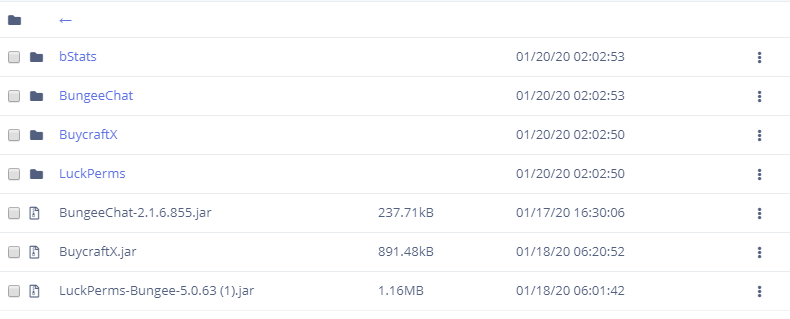
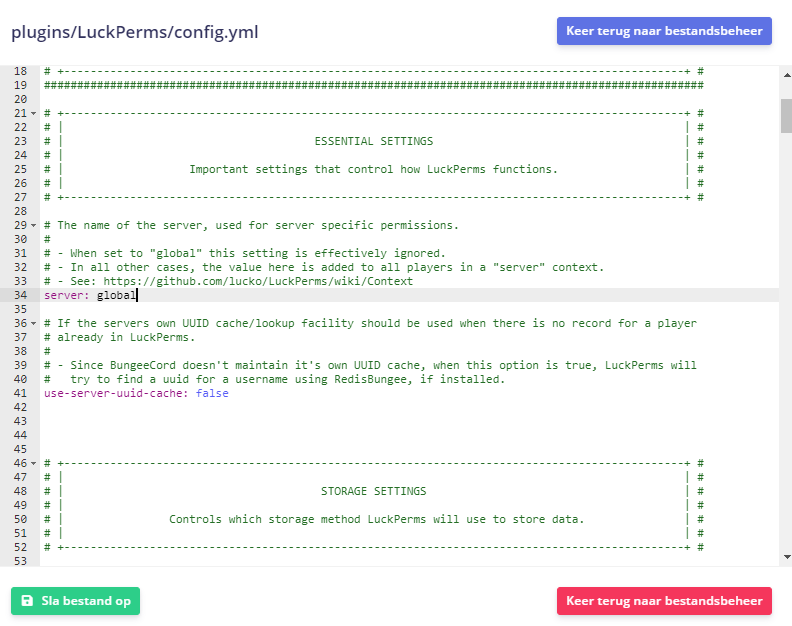
I need help, im trying to connect lucperms to my database. But my console spews out that luckperms cant load the luckperms config. And, it logs "org.bukkit.configuration.InvalidConfigurationException: while parsing a block mapping
in 'string', line 34, column 1:
server: "global"
". I don't know how to do this, im so confused
tired turtle
Share your config through https://hasteb.in (Remove username and password for the database first)
 lethal mirage



 lapis ibex
@last vigil did you change anything in the config?
@lethal mirage #general also check your console
foggy quartz
No @lapis ibex
wanton stratusBOT
Hey Splash420! Please don't tag staff members.
foggy quartz
BrainStone i DID not charge anything
tired turtle


You don't have any prefix/suffix set
And assuming you probs display prefix/suffix in chat is that absolutely normal
foggy quartz
can some one just fix the things for me im so confused
lapis ibex
@foggy quartz is your name @last vigil?
foggy quartz
what?
last vigil
nani
lapis ibex
(╯°□°)╯︵ ┻━┻
lapis ibex
Because I asked them if they changed the config