#support-1
1 messages · Page 656 of 1
 tired turtle
Is the bungee online or offline?
tired turtle
Then I won't help as I don't support offline servers and networks.
And your issue can be caused by exactly that as it gives cheaters a way to gain access to other groups/players.
 daring ginkgo
Ty @lapis ibex
 wanton stratusBOT
Hey SuperRats! Please don't tag staff members.
 foggy quartz
yah, i know offline mode servers are more insecure, but it is really rare that im online and i give permission to a user without touch my keyboard, without log on console, just lp log
but thank you bro
tired turtle
That wouldn't work at all as the UUID is NOT a actual valid UUID
Which is a reason to not use offline mode networks/servers
UUIDs in that mode are based of the name of the user.
And I remove this messages as sharing such stuff is not always liked by many people
foggy quartz
your expansion for luckperms does not enable and im using the lastest version of both plugin and expansion.
PlaceholderAPI lastest version too
Server version: spigot 1.13
Error:
Caused by: java.lang.NoClassDefFoundError: net/luckperms/api/LuckPerms
at me.lucko.luckperms.placeholders.LuckPermsExpansion.canRegister(LuckPe
rmsExpansion.java:48) ~[?:?]
at me.clip.placeholderapi.expansion.ExpansionManager.registerExpansion(E
xpansionManager.java:102) ~[?:?]
at me.clip.placeholderapi.expansion.ExpansionManager.registerAllExpansio
ns(ExpansionManager.java:154) ~[?:?]
at me.clip.placeholderapi.ServerLoadEventListener.onServerLoad(ServerLoa
dEventListener.java:52) ~[?:?]
at sun.reflect.NativeMethodAccessorImpl.invoke0(Native Method) ~[?:1.8.0
_221]
at sun.reflect.NativeMethodAccessorImpl.invoke(Unknown Source) ~[?:1.8.0
_221]
at sun.reflect.DelegatingMethodAccessorImpl.invoke(Unknown Source) ~[?:1
.8.0_221]
at java.lang.reflect.Method.invoke(Unknown Source) ~[?:1.8.0_221]
at
 hasty tree
did you put it in the right folder?
please don't paste console logs here, put them on paste bin or similar service
@foggy quartz

GitHub
An advanced permissions plugin for Bukkit/Spigot, BungeeCord, Sponge, Nukkit and Velocity. - lucko/LuckPerms
foggy quartz
i put it in plugins/placeholderapi/expansions
i think that is the correct place
the error is because some class that use to register placeholder doenst exist
but i dont know how to fix it so im here
 bitter coral
As I mentioned in the issue, what is is your exact LP version
"Latest" is not valid
foggy quartz
version 4.4.1 i write this in issue github too
you should put the lastest version on spigot page too
 civic tendon
bitter coral
civic tendon
bitter coral
!migration
wanton stratusBOT
Learn about the process of migrating from another permission plugin.
 LuckPerms wiki
 vital laurel
newst lp seems to have some issues with CMI for me, anyone else ?
 toxic wagon
What "issues" are you referring to?
toxic wagon
GitHub
An advanced permissions plugin for Bukkit/Spigot, BungeeCord, Sponge, Nukkit and Velocity. - lucko/LuckPerms
vital laurel
was a fresh server, didnt rly upgrade anyting
vital laurel
true! thanks
 smoky sigil
Heya guys! I just started plugins like today and am trying to figure out how to change a permission with EssentialsX. I was directed to install Luck Perms from those guys but cant find the permission to change. It is supposed to be "essentials.keepinv" and i want it to be turned off
wanton stratusBOT
Here's a guide to help users understand and use LuckPerms for the first time.
LuckPerms wiki
smoky sigil
ok ill see if i can figure out how to do that. thanks
 craggy wraith
@smoky sigil the dev that made essentials.keepinv
craggy wraith
Needs to be gone
smoky sigil
Its currently keeping it upon death, I would like it to disperse like vanilla.
craggy wraith
First day i was like WHY DO I KEEP MY INV
smoky sigil
Awesome, got the exp command now too. Thanks everyone 😄
 tired tide
how to do, for example, the player is absent from the server for a month, his VIP was deleted
hasty tree
not possible with luckperms
you can create something which runs the parent addtemp command every time they log on but that's about it
tired tide
supper
parent addtemp Don't check the days. it is set strictly. eg. wrote 40 days for 40 days and the group is given
hasty tree
i'm not sure i understand
tired tide
/lp user <Player> parent addtemp 40d Vip
for 40 days is given. whether the player came in or not
wrote in authme. they are sitting dumb. do not answer the question at all
hasty tree
yes, that's how the command works.
like i said, if you want it to do what you want, you will need something custom
tired tide
ok thanks
 analog yacht
Is there any way to demote, promote, or otherwise set the parent of all players at once?
Not just everyone online, but everyone?
hasty tree
!bulkupdate
wanton stratusBOT
Quickly update a large amount of user and group permissions by using the bulkupdate command.
LuckPerms wiki
 novel solar
Hi, sorry for my English, I have problem with admin perms: i give "*" and "nucleus.socialspy - false" for admins, but admins see all messages. how i can fix it?
hasty tree
!verbose
wanton stratusBOT
LuckPerms provides a verbose command to help you find out what permissions a command/plugin is checking.
LuckPerms wiki
 vale geode
how do is set default group in V5 ?
hasty tree
!default
wanton stratusBOT
LuckPerms provides a group that every player is added to upon joining the server, called default. You can use multiple methods to change the default group or change the name of it.
LuckPerms wiki
hasty tree
short answer - it's already set up, just add permissions
tired tide
why not rob /lp user MaxMayster permission settemp lord true 2 accumulate
writte You cannot set a date in the past!
tired tide
thank
hasty tree
Sets a permission temporarily for a user/group. Providing a value of "false" will negate the permission. Duration should either be a time period, or a unix timestamp when the permission will expire. e.g. "1mo3d13h45m" will set the permission to expire in 1 month, 3 days, 13 hours and 45 minutes time, while "1482694200" will set the permission to expire at 7:30PM on 25th December 2016.
tired tide
I do not understand this paragraph
"Sets a permission temporarily for a user/group. Providing a value of "false" will negate the permission. Duration should either be a time period, or a unix timestamp when the permission will expire. e.g. "1mo3d13h45m" will set the permission to expire in 1 month, 3 days, 13 hours and 45 minutes time, while "1482694200" will set the permission to expire at 7:30PM on 25th December 2016."
hasty tree
when you write just 2, the plugin thinks you are writing a unix time stamp, which would put the date as 1/1/1970
well what don't you understand
i can't read your mind :P
tired tide
1mo3d13h45m = 25th December 2016 what nonsense?
hasty tree
it's not saying that at all
"1mo3d13h45m" will set the permission to expire in 1 month, 3 days, 13 hours and 45 minutes time
while "1482694200" will set the permission to expire at 7:30PM on 25th December 2016."
they are two different examples
the latter is the unix time stamp
1mo3d13h45m is split into 1mo / 3d / 13h / 45m
tired tide
if I write / lp user MaxMayster permission settemp lord true 2d accumulate I will come through the next day. Will these 2 days last? or after 1 day will my group disappear?
tired tide
in the config there is such a parameter that it does not work or I don’t understand something? why doesn't time extend?
Controls how temporary permissions/parents/meta should be accumulated.
- The default behaviour is "deny".
- This behaviour can also be specified when the command is executed. See the command usage
documentation for more info.
- Possible options:
=> accumulate durations will be added to the existing expiry time
=> replace durations will be replaced if the new duration is later than the current
expiration
=> deny the command will just fail if you try to add another node with the same expiry
temporary-add-behaviour: replace
hasty tree
that's just a default, you are using accumulate in your command which overrides it.
tired tide
https://www.spigotmc.org/threads/purge-luckperms.406166/#post-3616551 I got a wrong answer here? the player entering the game does not extend the time of his group? Will she still be removed after 2 days?

SpigotMC - High Performance Minecraft
Привет всем. такой вопрос.
как это сделать, например, игрок отсутствует на сервере в течение месяца, его VIP будет удален
в authme есть функция...
vale geode
default-assignments:
rule1:
if:
has-true: (<group.vip> | <group.vip+>) & <titles.tilecollector>
has-false: <some.random.permission>
lacks: <prison/group.prison_titlepack>
give:
- prison/group.prison_titlepack
take:
- some.random.permission
rule2:
if:
lacks: <skyblock/group.sb_level1> & <skyblock/group.sb_level2> & <skyblock/group.sb_level3>
give:
- skyblock/group.sb_level1
rule3:
if:
has-true: <group.default>
take:
- group.default
give:
- group.newbie
set-primary-group: newbie
y this not work?
how do i set my default group to Newbie?
the api's i download for the extensions broke my ranks as well
 split veldt
!default
wanton stratusBOT
LuckPerms provides a group that every player is added to upon joining the server, called default. You can use multiple methods to change the default group or change the name of it.
LuckPerms wiki
vale geode
Clippy your not help bud
vale geode
you dont say
XD
i have just started a new server new players joining when am not online are stuck with no perms and cant do jack
split veldt
Oh theres no more default assignments? ._>
bitter coral
GitHub
An advanced permissions plugin for Bukkit/Spigot, BungeeCord, Sponge, Nukkit and Velocity. - lucko/LuckPerms
vale geode
the apis ?
vale geode
it not work i just tried that it broke my ranks
vale geode
after reset i joined server no rank i am owner btw same with a player that was on at the time
bitter coral
And what have you reseted?
bitter coral
What have you just done? What exact steps
split veldt
That default assignments bit was super useful 😦
vale geode
no perms or rank
split veldt
Yeah, but it suggests migrating away from it
bitter coral
We always suggested not using it
split veldt
Aka, it's being phased out
vale geode
omg thats the one i got
split veldt
Odd, i find it useful, to give users 2 default groups on joining.. Guess i could find another way to do it
bitter coral
But what api then?
vale geode
sorry i am calling it an api but it was the one i tried
bitter coral
Were there errors in console?
bitter coral
Are all groups still showing up in /lp listgroups?
bitter coral
Then you have your servers out of sync
vale geode
i dont
took out the files i put in and now all is good
apart from new players
why is there not a simple fix to this ? if i want my default group to be newbie y cant i just set it ?
hasty tree
just make newbie a parent to default?
that's what is recommended on the default page
!default
wanton stratusBOT
LuckPerms provides a group that every player is added to upon joining the server, called default. You can use multiple methods to change the default group or change the name of it.
LuckPerms wiki
vale geode
i think i get it now give default all of newbie perms annd replace it in the track ?
clippy man i swear to god XD
hasty tree
why do you have such a problem with a bot
hasty tree
how the hell is providing you information "trolling" 
vale geode
its a joke man sit down boy XD
hasty tree
get better jokes
 cyan lark
how to set rank of luck perms start?
wanton stratusBOT
LuckPerms provides a group that every player is added to upon joining the server, called default. You can use multiple methods to change the default group or change the name of it.
LuckPerms wiki
wanton stratusBOT
Here's a guide to help users understand and use LuckPerms for the first time.
LuckPerms wiki
 mystic hamlet
forge-1.12.2-14.23.5.2847-universal.jar
spongeforge-1.12.2-2838-7.1.8-RC3961.jar

Pastebin
hasty tree
Yes give it time
 fallen plover
I will, just wondered
 nova ether
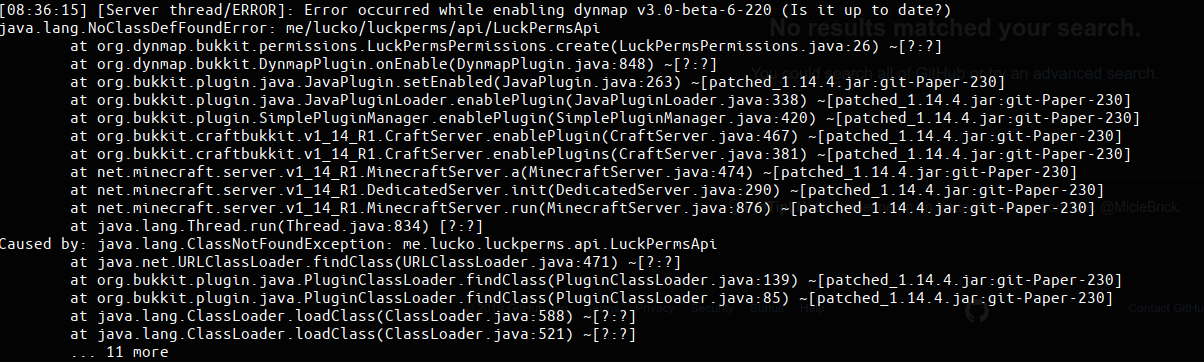
anyone have any idea what in the world dynmap might depend on luckperms for?
annd why the class is missing
 lapis ibex
@nova ether #647869503576997918
nova ether
hi
how's it going
oh
just saw the channel reference
only saw the ping first
whoops
 terse sky
has somebody an active nametag plugin for tab and chat?
 primal olive
My PC: Autosaving file...
Me: Where is it?
My PC: 🤷♂️::
 hallow pilot
I noticed that after updating the plugin, -bukkit.command.whatever doesn't work anymore.
hallow pilot
But then it disables it completely, like the permission doesn't exist.
 karmic owl
Where is support? xD
 nocturne chasm
here
bitter coral
Right here
karmic owl
Ok
mystic hamlet
I do not understand very well for what "Context" serves someone can explain it to me with an example?
bitter coral
!context
wanton stratusBOT
You can set a permission or group on a per-world/per-server basis, through what we call "contexts".
LuckPerms wiki
karmic owl
I have a azure database, and I want to connect 2 or 3 luckperms plugin to this database, what should I do?
bitter coral
I don't know anything about Azure Databases. But is it a custom database or MySQL, MongoDB, etc.?
karmic owl
SQL Database
hallow pilot
Hey Tobi, able to answer my question really quick?
karmic owl
This is the name
 stiff nymph
Tobi, do you know how to disable the * permission?
completely
bitter coral
[@]optimus: In the config there should be an option apply-wildcards, disable this
stiff nymph
Thank you!
bitter coral
[@]Yosi: Just ask
[@]Rubiz: LuckPerms only supports MySQL/MariaDB, MongoDB or PostgreSQL
hallow pilot
Just ask what? 😂
bitter coral
Most of these are supported by Aure according to this article: https://azure.microsoft.com/en-us/product-categories/databases/
karmic owl
I don't know the type of the database
bitter coral
If it is SQL, then try MySQL as your database-type in LuckPerms
[@]Yosi: The question?
 silk oyster
Hey with LuckPerms is there a way to assign a permission to 2 servers at once?
hallow pilot
I noticed that after updating the plugin, -bukkit.command.whatever doesn't work anymore.
bitter coral
Any erors in console?
hallow pilot
On the last update I didn't notice that issue, but suddenly now I have an issue with it.
silk oyster
Hey with LuckPerms is there a way to assign a permission to 2 servers at once?
karmic owl
(I changed the password obviously xD)
bitter coral
[@]Ev: Give the permission two times, but with different context
[@]Yosi: Perms beginning with a - weren't ever negated, you need to specifically set them to false
hallow pilot
So me setting it to false should fix it?
bitter coral
And removing the -, yes, that should ifx it then
karmic owl
So SQL that I have doesn't work with LP, so I have to purchase https://azure.microsoft.com/en-us/services/mysql/ or https://azure.microsoft.com/en-us/services/postgresql/ ?
Azure Database for MySQL is a fully-managed database service for app developers. Find a managed service provider that can meet all your database needs.

Try Azure Database for PostgreSQL to build reliable and intelligent applications for your organization.
wanton stratusBOT
Hey Rubiz👻็็็خ! Please don't tag staff members.
karmic owl
Sorry
 pine wyvern
whenever i do /lp migrate Bpermissions i get an error
lapis ibex
If you ask, then most likely
pine wyvern
lapis ibex
Is bpermissions up to date?
pine wyvern
yes
lapis ibex
And if so, when did you update to it
lapis ibex
Try to use the latest version
pine wyvern
It worked, ty
karmic owl
Tobi, its better purchase a vps and install mysql tool or something? Or purchase a MySQL database directly
The VPS is 12 cents per day, and MySQL is 90 cents per day
Can mysql connect to any open port?
I mean XAMPP
 untold venture
yes, just give the permissions to the default group
no, it's created by default
(the default group is created by default lol, I've just noticed that x))
pine wyvern
I got another question. How do I add myself to a group?
untold venture
/lp user <user> parent set <group>
pine wyvern
i did that yet Im still in a dif group :/
pine wyvern
owner, and ut says im in it yet my name still says im in builder grouop
untold venture
does it still shows builder in /lp user <user> info ?
pine wyvern
no, in the info it says im owner
untold venture
and where does it show builder ?
pine wyvern
when i talk, its the prefix
pine wyvern
this apart from it shows more from above
thats apparently my meta
this is what is listed under my prefixes
untold venture
woah
you could just make the prefixes with the context world=global instead of giving it for every world one by one
untold venture
for example, remove all prefixes of the Owner and readd it 1 time
if you don't set any context after the prefix, it will automatically be global
pine wyvern
so i remove it like this
pine wyvern
and then readd it only one time?
untold venture
you remove all prefixes of the admin, and then you readd 1 of them
pine wyvern
i readd it how?
untold venture
/lp group admin meta setprefix "&4[Admin] "
untold venture
it is automatically given for all groups
pine wyvern
ok
untold venture
worlds * not groups
untold venture
yes
 glad aurora
parent set
untold venture
but with a space between parent and set
@umbral dome you can probably find them with the /lp tree
pine wyvern
i still come up as builder when i chat
untold venture
I think it's under bukkit and not under minecraft @umbral dome
BannerSnake, have you done the same process for every groups?
untold venture
I can't find them Rhys, maybe use maintenance plugin instead of the vanilla whitelist?
pine wyvern
ims tuck with 'owner' prefix
untold venture
you can't change it with /lp user <user> parent set <another group>?
pine wyvern
no
untold venture
it's in the chat?
pine wyvern
ye
 fleet remnant
I have a small problem.
I used to use /lp user {user} group set {group} to give players ranks but in the newer version of luck perms you cannot so how do I do it now?
vale geode
can anyone help me out with this ?
luckperms-hikari connection adder/WARN Sun Dec 01 17:09:43 UTC 2019 WARN: Establishing SSL connection without server's identity verification is not recommended. According to MySQL 5.5.45+, 5.6.26+ and 5.7.6+ requirements SSL connection must be established by default if explicit option isn't set. For compliance with existing applications not using SSL the verifyServerCertificate property is set to 'false'. You need either to explicitly disable SSL by setting useSSL=false, or set useSSL=true and provide truststore for server certificate verification.
cant find useSSL=false
untold venture
GitHub
An advanced permissions plugin for Bukkit/Spigot, BungeeCord, Sponge, Nukkit and Velocity. - lucko/LuckPerms
you have to add it by yourself
@fleet remnant it's parent set and not group set
@pine wyvern remove the other owner rank you have (idk why it added those, weird)
pine wyvern
How?
untold venture
/lp user <user> parent list
and click on every groups you have and enter the commands suggested
nope
you can put it in console but you have to remove rhe slash I mean
untold venture
maybe parent info ?
pine wyvern
untold venture
lp user bannesnek parent remove owner world=pvpzone
then do the same thing by replacing pvpzone by the other world
pine wyvern
Which other world?
pine wyvern
?
untold venture
you have hi_the_end hi_nether hi grinder and animal
pine wyvern
So I type lp user BanneSnek parent remove owner world=pvpzone
So I type lp user BanneSnek parent remove owner world=hi
And all the world
S
untold venture
yep
pine wyvern
Done
vale geode
after setting up mysql i have no perms for /lpb ? i have set the database to all my servers one on bungeecord as well
untold venture
yes it should Banner
pine wyvern
Ok
Will Test tomorrow, thank you !
does migrating from bpermissions to luckperms migrate the default rank?
?
untold venture
have you changed the storage-method to mysql and setted your mysql credentials correctly? is there any errors in the console? @vale geode
yes Banner
pine wyvern
Ok
 toxic vigil
Hey everyone I'm having mad troubles with permissions because the prefixes arn't showing up
I believe the permissions are working but the prefixes arn't showing up
I'm using LuckPerms and bChatManager
pine wyvern
@toxic vigil is this after migrating?
toxic vigil
No fresh server
pine wyvern
Oh
toxic vigil
I read up that I needed a chat plugin but now that I have it it still doesn't work
nocturne chasm
Do you have Vault?
toxic vigil
Yeah
nocturne chasm
Does the prefix show in /lp user <user> meta info
toxic vigil
Ill test something out a second and Ill get back to you on that
Also I am using offline mode
And I just read there is a bug for Luckperms if offline is enabled
nocturne chasm
!usage
wanton stratusBOT
Here's a guide to help users understand and use LuckPerms for the first time.
LuckPerms wiki
 late kayak
Does luckperms have issues with dynmap?
Error occurred while enabling dynmap v3.0-beta-5-218 (Is it up to date?)
java.lang.NoClassDefFoundError: me/lucko/luckperms/api/LuckPermsApi
        at org.dynmap.bukkit.permissions.LuckPermsPermissions.create(LuckPermsPermissions.java:26) ~[?:?]
        at org.dynmap.bukkit.DynmapPlugin.onEnable(DynmapPlugin.java:848) ~[?:?]
        at org.bukkit.plugin.java.JavaPlugin.setEnabled(JavaPlugin.java:263) ~[patched_1.14.4.jar:git-Paper-230]
        at org.bukkit.plugin.java.JavaPluginLoader.enablePlugin(JavaPluginLoader.java:338) ~[patched_1.14.4.jar:git-Paper-230]
        at org.bukkit.plugin.SimplePluginManager.enablePlugin(SimplePluginManager.java:420) ~[patched_1.14.4.jar:git-Paper-230]
        at org.bukkit.craftbukkit.v1_14_R1.CraftServer.enablePlugin(CraftServer.java:467) ~[patched_1.14.4.jar:git-Paper-230]
        at org.bukkit.craftbukkit.v1_14_R1.CraftServer.enablePlugins(CraftServer.java:381) ~[patched_1.14.4.jar:git-Paper-230]
        at net.minecraft.server.v1_14_R1.MinecraftServer.a(MinecraftServer.java:474) ~[patched_1.14.4.jar:git-Paper-230]
        at net.minecraft.server.v1_14_R1.DedicatedServer.init(DedicatedServer.java:290) ~[patched_1.14.4.jar:git-Paper-230]
        at net.minecraft.server.v1_14_R1.MinecraftServer.run(MinecraftServer.java:876) ~[patched_1.14.4.jar:git-Paper-230]
        at java.lang.Thread.run(Unknown Source) [?:1.8.0_231]
Caused by: java.lang.ClassNotFoundException: me.lucko.luckperms.api.LuckPermsApi
        at java.net.URLClassLoader.findClass(Unknown Source) ~[?:1.8.0_231]
        at org.bukkit.plugin.java.PluginClassLoader.findClass(PluginClassLoader.java:139) ~[patched_1.14.4.jar:git-Paper-230]
        at org.bukkit.plugin.java.PluginClassLoader.findClass(PluginClassLoader.java:85) ~[patched_1.14.4.jar:git-Paper-230]
        at java.lang.ClassLoader.loadClass(Unknown Source) ~[?:1.8.0_231]
        at java.lang.ClassLoader.loadClass(Unknown Source) ~[?:1.8.0_231]
... 11 more```Or is that a dynmap issue?
Cause it was working perfectly until I added Luckperms
Nevermind
seems like a dynmap incompatibility issue
nocturne chasm
try adding the thing in #647869503576997918
 pliant ether
!usage
wanton stratusBOT
Here's a guide to help users understand and use LuckPerms for the first time.
LuckPerms wiki
 idle olive
@elfin egret sorry for the mention but is it possible to make one url to the latest version of luckperms at the homepage which redirects to the latest Jenkins version to support autoupdating software?
wanton stratusBOT
Hey iFlyinq! Please don't tag staff members.
untold venture
@idle olive
idle olive
That’s not a constraint URL
tired turtle
That is a thing
Or https://ci.lucko.me/job/LuckPerms/lastSuccessfulBuild/ for latest successful build.
There are options, if you search for it.
idle olive
Aha
 errant bobcat
Hello I need some help putting luckyperms onto my server
idle olive
Still the struggle that the file name is defined by the version :x
 frosty rune
hey i have an problem
frosty rune
can u guys help me plz
frosty rune
see when i enter to my server sometimes i have rank but i dont have perms
and i have to go to console and set me a rank
frosty rune
adn when i am in server i set the command /lpb editor iitx sae me waith but the link never apear
yes
an error when happedns that
idle olive
Which error?
frosty rune
java.lang.RuntimeException: java.net.ConnectException: Failed to connect to bytebin.lucko.me/2606:4700:30:0:0:0:681b:976a:443
[18:19:36 WARN]: at me.lucko.luckperms.common.web.AbstractPastebin.post(AbstractPastebin.java:147)
[18:19:36 WARN]: at me.lucko.luckperms.common.web.AbstractPastebin.postJson(AbstractPastebin.java:109)
[18:19:36 WARN]: at me.lucko.luckperms.common.commands.misc.EditorCommand.execute(EditorCommand.java:109)
[18:19:36 WARN]: at me.lucko.luckperms.common.command.abstraction.SingleCommand.execute(SingleCommand.java:50)
[18:19:36 WARN]: at me.lucko.luckperms.common.command.abstraction.SingleCommand.execute(SingleCommand.java:42)
[18:19:36 WARN]: at me.lucko.luckperms.common.command.CommandManager.execute(CommandManager.java:214)
[18:19:36 WARN]: at me.lucko.luckperms.common.command.CommandManager.lambda$onCommand$0(CommandManager.java:149)
[18:19:36 WARN]: at me.lucko.luckperms.common.command.CommandManager$$Lambda$283.00000000EB9DCB90.get(Unknown Source)
[18:19:36 WARN]: at java.util.concurrent.CompletableFuture$AsyncSupply.run(CompletableFuture.java:1601)
[18:19:36 WARN]: at java.util.concurrent.ThreadPoolExecutor.runWorker(ThreadPoolExecutor.java:1160)
[18:19:36 WARN]: at java.util.concurrent.ThreadPoolExecutor$Worker.run(ThreadPoolExecutor.java:635)
[18:19:36 WARN]: at java.lang.Thread.run(Thread.java:818)
[18:19:36 WARN]: Caused by:
[18:19:36 WARN]: java.net.ConnectException: Failed to connect to bytebin.lucko.me/2606:4700:30:0:0:0:681b:976a:443
[18:19:36 WARN]: at me.lucko.luckperms.lib.okhttp3.internal.connection.RealConnection.connectSoc
this one
idle olive
Paste the error in there and send the generated URL
frosty rune
i dont no what is so i send 2
@idle olive so what?
have u found the error problem
o something
idle olive
Do you use an own VPS/Dedigated server or a Minecraft server from a hosting?
frosty rune
vps
idle olive
What is the response of curl bytebin.lucko.me/2606:4700:30:0:0:0:681b:976a:443
wanton stratusBOT
Hey fahadbaig! Please don't tag staff members.
frosty rune
can u help me with this error
pz
plz
any body have a uckperms 4.3 bungeecord version
craggy wraith
why u want that version?
foggy quartz
Hi, sorry if this is a dumb question. I want players to be able to use the /kill @s command, but not any other use of the /kill command, is there a way to accomplish this with luckperms and bukkit without adding a specific "suicide" plugin?
 magic summit
LP only handles permissions. you are wanting control within a command. you would need a plugin that can control that, such as booscooldown or maybe mycommand. if using essentials, you can give the perm for suicide.
toxic vigil
Guys is there anything I can use to manage my server using the web?
Like autorestart, start stop, backups
toxic vigil
I see sorry
magic summit
youre fine
foggy quartz
yeah i hate essentials, I try to only use the minimal plugins and essentials adds a bunch of stuff I don't use, thak you for mention two plugins that might be more minimalistic than essentials
 onyx ibex
Hi, I have a problem with the placeholder
% luckperms_group_expiry_time_ <group name>%
when i put it in my scoreboard it returns wrong times for example i my: / lp user alias parent addtemp vip 1h30m replace world
and the placeholder maffiche 19706d 11h 34m on the other hand the delay of 1h30m him and well respected. it's just the display that bug
for info i on on lp 5.0.9
placeholder api and install well with the latest Expansion-LuckPerms have you got an idea of the problem?
sorry if it's not very clear, it's google trad x)
here are pictures that may be more clear
and I on bengee/spigot
en 1.14.4 x)
pliant ether
anyone want to play 1.14 hardcore server with me i just turned it on 51.79.97.60:41478
idle olive
GitHub
An advanced permissions plugin for Bukkit/Spigot, BungeeCord, Sponge, Nukkit and Velocity. - lucko/LuckPerms
Yes and no
Some things of the old editor were better and some things of this editor are better.
 storm parcel
hello im having trouble with prefix not showing up on my server any help?
magic summit
post in one chat please
storm parcel
sorry
hasty tree
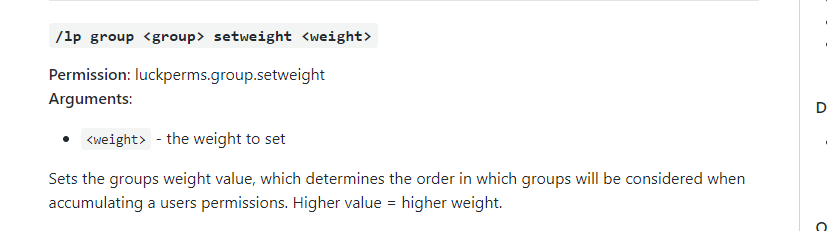
How is the weight on the web editor confusing? Genuinely curious.
@idle olive would be good to know what you think was better on the old editor so we can bring it to the new one.
craggy wraith

 junior hemlock
Can someone help me with luckperms?
craggy wraith
@ruby current yes.
junior hemlock
I dont know how to make it so only a certain role can use a certain warp.
craggy wraith
ChatEx was made to focus on permissionsEX
 ruby current
@craggy wraith what chat plugin can I use / would you recommend.
craggy wraith
try EssentialsChat or VaultChatFormatter
i use VaultChatFormatter myself
since i dont use essentials
junior hemlock
Wdym lmao
junior hemlock
Oh.
 noble rampart

junior hemlock
No like. Theres going to be 3 teams and each of them have their own warps.
How do I make it so that the team can only access their own warp
magic summit
then give each group that perm for that warp. easy: http://essinfo.xeya.me/index.php?page=permissions
craggy wraith
MOM JG STOLE MY QUESTION AGAIN
magic summit
answer faster 😉
craggy wraith
😭
im doing 3 thing
at the same time
REEE
@noble rampart update both plugins
Luckperms and PlaceholderAPI

no issues on my side
junior hemlock
Is there anyway to do the permissions in-game?
I have someone who sets everything up for me but I dont trust them with my console.
toxic wagon
Then give them permission to use the Web editor?
junior hemlock
How do I do that? XD
toxic wagon
!usage
wanton stratusBOT
Here's a guide to help users understand and use LuckPerms for the first time.
LuckPerms wiki
craggy wraith
lp group default permission set luckperms.editor
;p
luckperms.editor is the perm
junior hemlock
thanks
toxic wagon
But don't give it to default.
junior hemlock
Ik
craggy wraith
i had to steal it from u omega. sowwy 
junior hemlock
I have multiple roles and ill give that to administrator
Wait.
Whats the permission for warps?
ruby current
@craggy wraith okay, it's working with VaultChatFormatter
junior hemlock
I have the editor opened up
ruby current
Is displaying prefix/suffix in player list also possible?
noble rampart
@craggy wraith use /papi ecloud download LuckPerms
/papi reload
I have latest versions installed
junior hemlock
thanks
 noble rampart
can you pass me to test?
noble rampart
noble rampart
ruby current
Is it possible displaying the prefix/suffix of LuckyPerms in the player list like it's working with scoreboards (teams)?
craggy wraith
NametagEdit?
toxic wagon
Idk about LuckyPerms but LuckPerms will require you to have another plugin installed that handles it.
tired turtle
He only said it because Ferrums said it
craggy wraith
😂
toxic wagon
Need more detail than that. What permissions won't work? What are you trying to do?
junior hemlock
Im trying to make it so a certain role can use the /warp command
but it wont let them use /warp
toxic wagon
Have you given them the permission for it
junior hemlock
yes
toxic wagon
!verbose
wanton stratusBOT
LuckPerms provides a verbose command to help you find out what permissions a command/plugin is checking.
LuckPerms wiki
toxic wagon
check with that
toxic wagon
No
craggy wraith
warp permission = essentials.warps if i remember correctly
toxic wagon
@craggy wraith Stop assuming which plugins they have and spoonfeeding people. You can't always be around to give people the answer. They need to learn to work things out themselves.
junior hemlock
^
craggy wraith
im just trying to help people but looks like im not allowed to do that
toxic wagon
You can help, but how are people meant to learn if you give them the exact answer all the time. Help them to work it out for themselves. So they can work it out in future. Unless you want to always give them the answer without them learning anything
toxic wagon
!usage
wanton stratusBOT
Here's a guide to help users understand and use LuckPerms for the first time.
LuckPerms wiki
toxic wagon
There is an example there
noble rampart
@craggy wraith
hello
new versión of luckperms
Do not have this option?
default-assignments:
rule1:
if:
has-true: (<group.vip> | <group.vip+>) & <titles.tilecollector>
has-false: <some.random.permission>
lacks: <prison/group.prison_titlepack>
give:
- prison/group.prison_titlepack
take:
- some.random.permission
rule2:
if:
lacks: <skyblock/group.sb_level1> & <skyblock/group.sb_level2> & <skyblock/group.sb_level3>
give:
- skyblock/group.sb_level1
rule3:
if:
has-true: <group.default>
take:
- group.default
give:
- group.member
set-primary-group: member
toxic wagon
GitHub
An advanced permissions plugin for Bukkit/Spigot, BungeeCord, Sponge, Nukkit and Velocity. - lucko/LuckPerms
noble rampart
extension-legacy-api or extension-default-assignments
toxic wagon
It tells you which one to install.
noble rampart
Once I install it, it would only be to add the option that was before?
in config.yml
toxic wagon
It only lets you use that feature again, because it was removed in v5
noble rampart
It didn't help me, I went back to the previous version 
xd
another day I take it more calmly
Thanks also.
xd

craggy wraith
o i was pinged, oops
hasty tree
Instead of quitting, why not try to figure out what the problem is? People tried to help you and you did not listen.
Besides, why are you even using default assignments? You might not even need them.
toxic wagon
@noble rampart let me guess. You can't get the extension to work. Did you create the extensions folder in luckperms folder then add the extension jar into it.
noble rampart
yes
When placing the "defaultassignments" threw console error.
When I placed the "legalicy" it worked.
But the "assignments" did not work, it seemed as if it did not exist and my users place them as default and not as user
toxic wagon
Are you using the right extension? You need to place the default assignments extension in the extensions folder in the luckperms folder.
 fierce mulch
hasty tree
fierce mulch
hasty tree
Mind explaining that in a bit more detail?
 indigo pond
I need some help with the plugin (again)
toxic wagon
@fierce mulch Have you linked all servers to the same database and setup luckperms bungee correctly.
@indigo pond Then explain your issue.
indigo pond
Prefixes arent working
toxic wagon
Does the prefix show in lp user (name) info
indigo pond
Yes which i find rather odd because they didn't work with my old plugin either which is one of the reasons i switched back to luckperms.
toxic wagon
You need to install a chat plugin for it to show in chat.
indigo pond
I have essentialsxchat and VaultChatFormater installed
toxic wagon
Why do you have two chat plugins installed.
magic summit
throwing everything and seeing what sticks?
also need to make sure you have vault installed
indigo pond
I initially thought that essentials wasn't working but i will try removing one of them
wait
toxic wagon
Remove vault chat formatter
indigo pond
vault is missing
toxic wagon
You do not need vaultchatformatrer if you're using essentialsxchat
foggy quartz
I need assistance ASAP
toxic wagon
Then explain your issue...
foggy quartz
When we start up our bungee luckperms works completely fine (linked from the bungee to all the hubs)
When the server is online for about 10-30 minutes
we have over 150+ people connecte
it times people out
and then spams errors in bungee
from luckperms saying its not connected anymore
toxic wagon
Show us these error messages
foggy quartz
I will send a pastebin to pm's for you
toxic wagon
Send them here
indigo pond
hasty tree
Could that screenshot be any darker
foggy quartz
for bungee
toxic wagon
GitHub
An advanced permissions plugin for Bukkit/Spigot, BungeeCord, Sponge, Nukkit and Velocity. - lucko/LuckPerms
hasty tree
@indigo pond you are not using the correct version of essentials. Install EssentialsX
indigo pond
toxic wagon
And EssentialsXChat since you're wanting that
foggy quartz
okay ty
indigo pond
toxic wagon
all servers that are giving you that error
indigo pond
prefixes are still messed up
toxic wagon
What does ess version show now?
hasty tree
you don't happen to have another permission plugin installed like pex?
cause you will need to delete that.
 strong hawk
i really need help with my new server
toxic wagon
Then explain what you need help with
strong hawk
my friends cant break/place blocks
i know nothing about luck perms
im using sponge
toxic wagon
Are they trying to break/place blocks inside the spawn protection area?
toxic wagon
!verbose
wanton stratusBOT
LuckPerms provides a verbose command to help you find out what permissions a command/plugin is checking.
LuckPerms wiki
toxic wagon
That's a good way to tell what's happening
magic summit
its confusing to do /lp verbose on ?
toxic wagon
/lp verbose on <playername> Then get that player to try breaking and placing blocks
strong hawk
it says "minecraft.spawn-protection.overide - undefind
but hes out of spawn protection
toxic wagon
Obviously not if that permission is coming up.
strong hawk
ill try to shorten it
and see it\f that works
do you know anything about nucleus
it worked lol
toxic wagon
Depends what you need with nucleus
strong hawk
ok
 sinful cliff
ok so im super new to the whole server owner thing and i want to give people permissions like warp without opping them, any kind of help would be great
toxic wagon
!usage
wanton stratusBOT
Here's a guide to help users understand and use LuckPerms for the first time.
LuckPerms wiki
toxic wagon
Also, check the plugin documentation for the plugin that offers warps. It will give you all the permissions
sinful cliff
cool thanks
 lost sail
Hi lp startet nicht auf meinem nuukit wer kann mir bitte helfen
fallen plover
Hey.
I have LuckPerms installed on the bungee and all spigot servers. Everytime when I make a change however, the log shows twice.
Any idea how I can solve that?
fallen plover
I disabled the ''broadcast-received-log-entries:'' on the proxy and enabled it on ALL backend servers, but now it doesn't seem to broadcast at all
 fickle plank
I have the database file of a v4 Luckperms setup, do I have to create an entire environment to export it/ or use it in 1.14.4 or is there a simpler way I'm missing?
hasty tree
you don't need to do anything like that
just upgrade the plugin
backups are essential of course
fickle plank
So in theory swapping the database file I have into the plugins > LuckPerms file should work?
toxic wagon
Why not just use the export and import commands.
fickle plank
My original question was whether that's my only option
hasty tree
Maybe explain exactly what you're trying to do? It's not very clear.
toxic wagon
But yes, copy and pasting the database file should work fine.
fickle plank
I ended up getting it to work, not quite sure exactly where I was messing up.
Seemed the database file that I was adding was being overwritten on the first start?
Thanks for your help, sorry to hold you up 🙂
ruby current
Thanks
foggy quartz

stiff nymph
I run a server in offline mode and use luckperms for a long time.
Now from two days until now a hacker is being able to login and get permissions like * through luckperms and I don't know how he does it.
In the log message it says it is from console. but no one has access to the console I already changed de password
foggy quartz
Could be a backdoor, or a command block if you have those enabled?
Running a server in offline mode is very risky, and must be properly secured.
stiff nymph
yes i have some security measures, because it was already attacked before
so i checked no one accessed consol
maybe a hacked client could do that? give permissions as a console or op?
magic summit
that used to be a thing in like 1.8 with the op book or op sign.
disable vanilla op and use LPs autoop feature
magic summit
deny it from default? find better ways to secure your cracked server?
 hallow verge
is there away to disallow a permission in a single world ?
untold venture
yes
permission set <permission> false world=<your world> server=<the server (remove this if you don't use bungeecord)>
tired turtle
/lp group <group> permission set <permission> false world=<world>
hallow verge
derp thanks
hallow verge
I have tried essentials.gamemode.creative , minecraft.gamemode.creative and gamemode.creative in the above command and they can still use /gmc in said world . any suggestions ?
 heady needle
craggy wraith
heady needle
craggy wraith
Connection is not available, request timed out after 5020ms
 little jay
Am I correct in saying that I do not need to change anything really when updating v4 to v5?
Just backup and replace the JAR? (Using MySQL BTW)
hallow verge
i dont like the new web admin , it doesnt seem to work well .
 river ivy
Zak you may need to grab the extensions jar and place it in a folder named extensions inside of the LP folder.
untold venture
GitHub
An advanced permissions plugin for Bukkit/Spigot, BungeeCord, Sponge, Nukkit and Velocity. - lucko/LuckPerms
andrewkm I don't think so, and if it doesn't work, just add server= before the server name
river ivy
np, though I feel the upgrade was worth it personally. Only as we run like 30 plugins and it actually made life easier.
May I suggest creating a test server and testing it there just so you're comfortable with it.
 tacit ore
I believe it was intentional
Most commands were changed to be more consistent
Sorry... should rephrase that!
Most alias' were changed to be more consistent
hallow verge
I can not remove permissions through the new web editor
untold venture
the cross on the right
hallow verge
yeah i know , but when i clicked it it did nothing and then the whole page locked up and did not do anything but set there.
untold venture
works fine for me
untold venture
try to report it on github
hallow verge
anyways , now that i am pass that . I am trying to turn the gamemode command off in one world and the commands to deny permissions did not seem to work , but set them globally across all worlds on my server and that is undesirable . any suggestions ?
foggy quartz
how can i delete a group
nocturne chasm
iirc /lp deletegroup <group>
foggy quartz
thank you
 north sapphire
Yesterday I switched to latest Luck Perms but it shutdown my Dynmap. I don't know if it's a problem with you guys or dynmap
nocturne chasm
Whats the error?
north sapphire
I had no access to Dynmap at all
nocturne chasm
Also did you try adding the legacy api expansion? (#647869503576997918)
north sapphire
I didn't try anything honestly, I just reverted back to old one.
After reverting it worked properly
 sinful steppe
Does anyone know the essentials tp delay perm node?
sinful steppe
ok ty
 thick kernel
If I update from version 4 to 5, do I have to delete the Luckperms folder too?
tired turtle
 plush bluff
is there any way to put an rgb prefix?
tired turtle
No since you're limited to the supported colours of Minecraft
plush bluff
rgb with colours of minecraft
tired turtle
You can use & color codes in prefix and suffix, but it depends on the plugin you use for chat, tab, etc. to translate it
thick kernel
I can't import my backup... The error: the file does not exist backup1.json.gz ... I didn't type myself wrong.
 pearl whale
im getting this error on my bungee cord using luckperms v 5.0.10 https://hastebin.com/owajoquzek.sql
 prime swallow
hello fellow unlucky nerds
Can someone help me rq, I have it to where one of my donator groups can use /Fly in the "Plots" world, but not in the Overworld
Yet when they use /spawn, or go to their homes in the Overworld their fly is still enabled, anyway I can automatically disable that flying?
river ivy
set the /fly per world. under world set plots as name in place of global.
This is of course assuming you are using the web editor. my preferred method.
prime swallow
I already have that though.
My issue is that whenever they use /fly in one of these worlds, they can also go to a world where /fly is not permitted in and still fly around.
 sour ice
When setting up LuckPerms for Bungee, you set them up on the same database but you change the table prefix for each correct?
wanton stratusBOT
If you run a Bungeecord network, learn how to correctly setup LuckPerms on all server instances (including Bungee).
LuckPerms wiki
toxic wagon
!sync
wanton stratusBOT
To sync data between servers, you need to connect each LuckPerms plugin to the same database (for example MySQL) and set up a messaging service.
LuckPerms wiki
toxic wagon
@prime swallow You'll need to have a plugin to disable the fly on world change. As lp can only deny the permission.
prime swallow
already fixed it with Multiverse, all I had to do was just disable flying in that world 🤷♂️
sour ice
@toxic wagon So on all my servers the MySQL table prefix has to be the same?
wanton stratusBOT
Hey Cole! Please don't tag staff members.
toxic wagon
@sour ice Yes
sour ice
Alright thanks!
wanton stratusBOT
Hey andrewkm! Please don't tag staff members.
sour ice


some possibly explain what I did wrong?
I have the permissions set to "true" but it doesn't work at all.
Cant use /lp in game because my permissions arent working 🤣
wanton stratusBOT
Hey andrewkm! Please don't tag staff members.
sour ice
Yes, I have one named hub and one named hubtest, none work. BUT I also set the essentials.* to global.
So wouldn't it still work?...
toxic wagon
You don't really need to set that permission. As they can't use it anyway unless you set it.
toxic wagon
Make sure you're in the server called "hub" for the fly perm to work.
An that it's actually called "hub" at the top of the lp config.
sour ice
server: hub
toxic wagon
@sour ice Can you confirm all servers are hooked upto the same database, an that you're using sql or none for the messaging service.
sour ice
I can confirm
sour ice
If you add me as a friend I can send you my configs.
lapis ibex
@olive bramble afaik it also offers a one time payment option
toxic wagon
Wait. Did you save and apply the Web editor changes before you used verbose.
sour ice
Yes
Those permissions have been set for at least an hour
I've been just testing with basic permissions to try and get it to work.
before I move on
toxic wagon
In verbose it says .* is false but the screenshot shows it as true.
sour ice
correct
toxic wagon
Try saving the editor and using the command it gives you. Then see what verbose says. Because they don't match up


 queen pivot
hi - I am new. Used permissions Ex for years - about to make the switch!
toxic wagon
In-game what does lp user (name) permission info show @sour ice
@queen pivot Good choice.
sour ice
Well, I cant run that in game but I can check in console.
> [22:28:00 INFO]: [LP] gorillaevolved's Permissions: (page 1 of 1 - 3 entries)
> [22:28:00 INFO]: > essentials.* (true)
> [22:28:00 INFO]: > luckperms.* (true)
> [22:28:00 INFO]: > essentials.fly (true)
> [22:28:00 INFO]: [LP] VB > internal/console - luckperms.user.info - true
> [22:28:00 INFO]: [LP] VB > internal/console - luckperms.user.permission.info - true
> [22:28:00 INFO]: [LP] VB > internal/console - luckperms.user.permission.info - true```Stop the verbose then try again. It should be matching.
sour ice
stop verbose, start it then run that cmd again?
 toxic wagon
That is weird. Restart the server and seen if anything changes.
sour ice
Can you add me on discord? I can send you my configs as well.
toxic wagon
Just send them here but remove the ip and passwords..
sour ice
One moment
https://hastebin.com/vatikegoli.shell <-- this is the server i've been sending the screenshots from.
toxic wagon
apply-global-world-groups: false```
Make those trueAlright I’ll test it out in about ~20 minutes gotta go do something.
toxic wagon
okay, do it for all servers
sour ice
Alright
 vestal arrow
anyway to make it say when your rank is updated "your rank has been updated to"
tacit ore
@vestal arrow you'll need another plugin for that
 full arch
Hm. Is Dynmap trying to use the old LuckPerms API (v4?) here? I updated LP to v5 and this started happening
02.12 22:46:11 [Server] ERROR Error occurred while enabling dynmap v3.0-beta-5-218 (Is it up to date?)
02.12 22:46:11 [Server] INFO java.lang.NoClassDefFoundError: me/lucko/luckperms/api/LuckPermsApi
02.12 22:46:11 [Server] INFO at org.dynmap.bukkit.permissions.LuckPermsPermissions.create(LuckPermsPermissions.java:26) ~[?:?]
02.12 22:46:11 [Server] INFO at org.dynmap.bukkit.DynmapPlugin.onEnable(DynmapPlugin.java:848) ~[?:?]
02.12 22:46:11 [Server] INFO at org.bukkit.plugin.java.JavaPlugin.setEnabled(JavaPlugin.java:263) ~[patched_1.14.4.jar:git-Paper-230]
02.12 22:46:11 [Server] INFO at org.bukkit.plugin.java.JavaPluginLoader.enablePlugin(JavaPluginLoader.java:338) ~[patched_1.14.4.jar:git-Paper-230]
02.12 22:46:11 [Server] INFO at org.bukkit.plugin.SimplePluginManager.enablePlugin(SimplePluginManager.java:420) ~[patched_1.14.4.jar:git-Paper-230]
02.12 22:46:11 [Server] INFO at org.bukkit.craftbukkit.v1_14_R1.CraftServer.enablePlugin(CraftServer.java:467) ~[patched_1.14.4.jar:git-Paper-230]
02.12 22:46:11 [Server] INFO at org.bukkit.craftbukkit.v1_14_R1.CraftServer.enablePlugins(CraftServer.java:381) ~[patched_1.14.4.jar:git-Paper-230]
02.12 22:46:11 [Server] INFO at net.minecraft.server.v1_14_R1.MinecraftServer.a(MinecraftServer.java:474) ~[patched_1.14.4.jar:git-Paper-230]
02.12 22:46:11 [Server] INFO at net.minecraft.server.v1_14_R1.DedicatedServer.init(DedicatedServer.java:290) ~[patched_1.14.4.jar:git-Paper-230]
02.12 22:46:11 [Server] INFO at net.minecraft.server.v1_14_R1.MinecraftServer.run(MinecraftServer.java:876) ~[patched_1.14.4.jar:git-Paper-230]
02.12 22:46:11 [Server] INFO at java.lang.Thread.run(Thread.java:745) [?:1.8.0_77]
are there any plugins i can use? @tacit ore
tacit ore
Not that I know if, you can try asking in #general though
@full arch next time please use PasteBin or some other variations
Did you check #647869503576997918 ?
toxic wagon
GitHub
An advanced permissions plugin for Bukkit/Spigot, BungeeCord, Sponge, Nukkit and Velocity. - lucko/LuckPerms
full arch
Ah. Thanks, I feel stupid now. >.<
foggy quartz
Why i'm getting this with rank BAT?
Error in Console: https://pastebin.com/nHGcs0k1
Rank Bat Config: https://pastebin.com/QUbukuRh
toxic wagon
@foggy quartz What version of luckperms are you using
toxic wagon
This is a good example why yaml is bad... Too many weird errors. The config file looks fine.
lapis ibex
@tired turtle ☝🏼 (2 up)
tired turtle
?
tired turtle
I'm not clippy.
foggy quartz
Oh, there is V5
lapis ibex
I know I could open an issue, etc. but you've been working on that stuff
foggy quartz
I should update it?
toxic wagon
Updating is always good
lapis ibex
So I thought you might want to add that command
tired turtle
Did you actually read my message?
toxic wagon
@foggy quartz Maybe also move away from yaml files and stick with h2 database file. And use the web-editor for editing
lapis ibex
@tired turtle I know. Just an idea
foggy quartz
Soo how i can fix?
pearl whale
im getting this error on my bungee cord using luckperms v 5.0.10 https://hastebin.com/owajoquzek.sql
foggy quartz
7§l[§b§lL§3§lP§7§l] §cA database error occurred whilst loading permissions data. Please try again later. If you are a server admin, please check the console for any errors.
Omg
Updating to V5
tired turtle
If you are a server admin, please check the console for any errors.
I know reading is difficult but I'm sure you can do it
Also, a look at #647869503576997918 doesn't hurt either
toxic wagon
@foggy quartz What is the error in console then?
foggy quartz
toxic wagon
@foggy quartz Did you change the storage-method. When you updated
foggy quartz
No
toxic wagon
Can you please send us your config file
foggy quartz
Pastebin
toxic wagon
I think it's still caused by that error you got with the bat group. I didn't see any issues with the file for it though, Maybe try deleting that bat group file and make the group again, using the in-game commands or web-editor
pearl whale
can anyone help?
hasty tree
Someone could have helped in the last 18 minutes if you had just said what you needed help with 🙄
wanton stratusBOT
Hey cole! Please don't tag staff members.
hasty tree
Best to just repeat what you said
pearl whale
i have but
hasty tree
Cause people don't usually scroll.
pearl whale
im getting this error on my bungee cord using luckperms v 5.0.10 https://hastebin.com/owajoquzek.sql
here it is again
hasty tree
Do you use mysql?
pearl whale
MariaDB
hasty tree
Ok. Update your messaging service to use sql instead of pluginmsg
Needs to be the same on all servers
hasty tree
@elfin egret is that a bug to report? Or is it just cause the API extension is needed
pearl whale
now i get this error on my bungeecord https://hastebin.com/vifebesogi.rb
 elfin egret
just a case of making sure all of your servers are updated to the v5 version
pearl whale
and this error on one of my spigot servers https://hastebin.com/haguyafuca.md
all of there messaging service's are set to sql
and they are all connected to the same db
elfin egret
are they all running the v5 version of the plugin?
pearl whale
yes but ill check one more time
they all are
the bungeecord is running travertine and the spigot servers are running paper 1.8.8
if it matters its a fork of paper 1.8.8
and the mariadb instance is running on windows 10
 marsh glacier
Is there a way to move all users from one group into a different group without doing it manually one at a time?
tired turtle
!bulkupdate
wanton stratusBOT
Quickly update a large amount of user and group permissions by using the bulkupdate command.
LuckPerms wiki
sour ice
> [00:34:01 ERROR]: Error occurred while enabling LuckPermsMVdWHook v5.0-SNAPSHOT (Is it up to date?)
java.lang.NoClassDefFoundError: net/luckperms/api/LuckPerms
at me.lucko.luckperms.placeholders.LuckPermsMVdWHook.onEnable(LuckPermsMVdWHook.java:43) ~[?:?]
at org.bukkit.plugin.java.JavaPlugin.setEnabled(JavaPlugin.java:321) ~[server.jar:git-TacoSpigot-04511af6]
at org.bukkit.plugin.java.JavaPluginLoader.enablePlugin(JavaPluginLoader.java:339) [server.jar:git-TacoSpigot-04511af6]
at org.bukkit.plugin.SimplePluginManager.enablePlugin(SimplePluginManager.java:411) [server.jar:git-TacoSpigot-04511af6]
at org.bukkit.craftbukkit.v1_8_R3.CraftServer.loadPlugin(CraftServer.java:352) [server.jar:git-TacoSpigot-04511af6]
at org.bukkit.craftbukkit.v1_8_R3.CraftServer.enablePlugins(CraftServer.java:311) [server.jar:git-TacoSpigot-04511af6]
at net.minecraft.server.v1_8_R3.MinecraftServer.s(MinecraftServer.java:428) [server.jar:git-TacoSpigot-04511af6]
at net.minecraft.server.v1_8_R3.MinecraftServer.k(MinecraftServer.java:392) [server.jar:git-TacoSpigot-04511af6]
at net.minecraft.server.v1_8_R3.MinecraftServer.a(MinecraftServer.java:347) [server.jar:git-TacoSpigot-04511af6]
at net.minecraft.server.v1_8_R3.DedicatedServer.init(DedicatedServer.java:276) [server.jar:git-TacoSpigot-04511af6]
at net.minecraft.server.v1_8_R3.MinecraftServer.run(MinecraftServer.java:594) [server.jar:git-TacoSpigot-04511af6]
at java.lang.Thread.run(Thread.java:748) [?:1.8.0_212]```at java.net.URLClassLoader.findClass(URLClassLoader.java:382) ~[?:1.8.0_212]
at org.bukkit.plugin.java.PluginClassLoader.findClass(PluginClassLoader.java:102) ~[server.jar:git-TacoSpigot-04511af6]
at org.bukkit.plugin.java.PluginClassLoader.findClass(PluginClassLoader.java:87) ~[server.jar:git-TacoSpigot-04511af6]
at java.lang.ClassLoader.loadClass(ClassLoader.java:424) ~[?:1.8.0_212]
at java.lang.ClassLoader.loadClass(ClassLoader.java:357) ~[?:1.8.0_212]
... 12 more
> [00:34:01 INFO]: [LuckPermsMVdWHook] Disabling LuckPermsMVdWHook v5.0-SNAPSHOT```Any reason to why all of the placeholder plugins for luckperms isn't working?
I tried using PAPI, both downloading via ecloud and manually. Then tried the MVdWHook which is the error shown above.
Thoughts?
hasty tree
Did you update to LP v5?
sour ice
Yeah that fixed it 🤣
 ivory belfry
Anyone know why I can't migrate perms from PEX to LP? I run /lp migrate permissionsex and it tells me 0 everything imported and throws tons of NPEs in logs
sour ice
You able to post the errors?

 sour ice
Not sure 🤔
ivory belfry
hm
Just restarted, it seems to not be able to connect to my Mongo instance either
[18:42:39 WARN]: java.util.concurrent.CompletionException: me.lucko.luckperms.lib.mongodb.MongoTimeoutException: Timed out after 30000 ms while waiting to connect. Client view of cluster state is {type=UNKNOWN, servers=[{address=redacted, type=UNKNOWN, state=CONNECTING, exception={me.lucko.luckperms.lib.mongodb.MongoSocketException: redacted}, caused by {java.net.UnknownHostException: redacted}}]```added mongodb+srv:// to the address, seems to connect fine now but throws another NPE when I try to join and kicks me for a permissions failed to load error, I don't remember it being this difficult when I set up LP a while ago
hasty tree
Try using v5
ivory belfry
v5?
hasty tree
ivory belfry
Well I just downloaded it so I assume I have v5
hasty tree
Depends from where


 hasty tree
I'm not sure then. Make a GitHub issue.
ivory belfry
rip
foggy quartz
we have a group called pleb
default group inherits from pleb
pleb has the permission essentials.warps.*
but people cant use /warp
hasty tree
!verbose
wanton stratusBOT
LuckPerms provides a verbose command to help you find out what permissions a command/plugin is checking.
LuckPerms wiki
hasty tree
Or check the Essentials documentation on how to set up warps properly
magic summit
Hi confused, im JG
https://github.com/lucko/LuckPerms/wiki/Command-Usage:-Parent
GitHub
An advanced permissions plugin for Bukkit/Spigot, BungeeCord, Sponge, Nukkit and Velocity. - lucko/LuckPerms
hasty tree
!usage
wanton stratusBOT
Here's a guide to help users understand and use LuckPerms for the first time.
LuckPerms wiki
hasty tree
Learn your plugins
 west dagger
im new to nukkit
pocketmine is my goto but ofc the dude wont update
so sadly i had to switch
my server was ready to open
now i gotta restart
foggy quartz
PocketMine has been outdated, I don't remember since when though.
That clearly has been stated by AntVenom when attempting to travel far distances in search of a Farlands of some sort, and that wasn't a recent video.
 inland lance
Can i use Econ to give a player perms with LuckPerms?
foggy quartz
Correct me if I'm wrong, but isn't PocketMine outdated since like August 2016?
magic summit
@inland lance you would have to check with that plugin if it can execute commands and has a player placeholder.
inland lance
i want to use player econ with the luckperms to have people buy perms like /heal and such
ivory belfry
luckperms still refuses to connect to my mongo instance
[21:42:54 INFO]: Cluster created with settings {hosts=[cluster0-nmrvd.mongodb.net:27017], mode=SINGLE, requiredClusterType=UNKNOWN, serverSelectionTimeout='30000 ms', maxWaitQueueSize=500}
[21:42:54 INFO]: Exception in monitor thread while connecting to server cluster0-nmrvd.mongodb.net:27017
me.lucko.luckperms.lib.mongodb.MongoSocketException: cluster0-nmrvd.mongodb.net``` brave cedar


 toxic wagon
!usage
wanton stratusBOT
Here's a guide to help users understand and use LuckPerms for the first time.
LuckPerms wiki
toxic wagon
Read that @brave cedar
ivory belfry
I'm so sick of this I've tried literally everything
address: cluster0-nmrvd.mongodb.net/test?retryWrites=true&w=majority``````java
me.lucko.luckperms.lib.mongodb.MongoSocketException: cluster0-nmrvd.mongodb.net/test?retrywrites=true&w=majority```Same with just java me.lucko.luckperms.lib.mongodb.MongoSocketException: cluster0-nmrvd.mongodb.net
 jovial talon
I love this
 weak sapphire
Can I add a column to the luckperms database that luckperms wouldn't interact with?
 rare gazelle
You could also add your own table that refers to the same indices. Would be a lot cleaner.
weak sapphire
Yeah but I want to add nicknames to the players
So it would be synchronised between servers
But I don't know if database is a better solution than messaging
toxic wagon
@sudden falcon No advertising
hasty tree
@ivory belfry I'm not seeing any GitHub issues from you...
 vagrant seal
Question: Can you list multiple servers in LP like server = survival, skyblocks
Thank you!
hasty tree
No. Need to add multiple permissions for each server.
vagrant seal
Ty
 gaunt ginkgo
Hey, I have a problem. Turning off permissions overrides the permission of my job plugin. It worked sooner with pex. I use luckperm now.
LuckPerm
default group:
- brewery.user:
value: false
Jobsreborn
jobsconfig:
permissions:
brewery.user:
value: true
level: 10
brewery.createbarrel.small:
value: true
level: 10
brewery.openbarrel.small:
value: true
level: 10
brewery.cauldron.time:
value: true
level: 10
brewery.cauldron.insert:
value: true
level: 10
brewery.cauldron.fill:
value: true
level: 10
I hope someone can help me. 🙂
tired turtle
If you deny a permission then of course does it not work
gaunt ginkgo
And how do I solve this? -permission does not exist anymore. With PEX works fine..
hasty tree
what exactly are you trying to do?
magic summit
editing YAML perms without knowing how LP handles negating perms it seems.
gaunt ginkgo
@hasty tree On my server i will block for all users the brewery feature. But only player with the job (jobsreborn) should brew. With PEX works fine (use -brewery.user) but LP override the jobsreborn permission...