#support-1
1 messages · Page 654 of 1
 bright geyser
 muted cosmos
I was having an issue where the editor refused to generate with this error: https://pastie.io/qandki.groovy . I did what felt like everything to get it to work. Until today when I managed to somehow get it to work properly.
 tired turtle
Luck mentioned to us that it could've been Cloudflare causing issues
 tacit ore
[@]Andre, is this an issue on Luck's side? Or end-user side?
tired turtle
Probs on Lucks end.
He said it could've been with bytebin and Cloudflare
not sure tho
tacit ore
Hmmm, is he actively working on a fix for it?
 elfin egret
it's probably cloudflare blocking your ip
muted cosmos
The weirdest solution fixd the issue.
Fixed"
I switched from Spigot to Paper.
And it suddenly worked.
 bitter coral
Or your IP got changed or something on CF's end
You could try changing back to Spigot to see if Paper really fixes the issue, but of course it works now, so no need to do that
muted cosmos
Don't know what happened, Its all just weird.
I did change back to spigot briefly and the same issue happened.
Reverted back to Paper and it works flawlessly.
bitter coral
That"s very interesting, atleast we (maybe) have an solution now
 magic summit
well, paper is better anyway
muted cosmos
Yea. I'm still going to keep my eye on it over the next few days but yea. I'm very relieved.
tacit ore
Another reason for Paper being more superior 😄
 runic copper
00:53:27 [INFO] 00:53:27.713 [luckperms-hikari housekeeper] DEBUG me.lucko.luckperms.lib.hikari.pool.HikariPool - luckperms-hikari - Pool stats (total=10, active=0, idle=10, waiting=0)
00:53:57 [INFO] 00:53:57.713 [luckperms-hikari housekeeper] DEBUG me.lucko.luckperms.lib.hikari.pool.HikariPool - luckperms-hikari - Pool stats (total=10, active=0, idle=10, waiting=0)
00:53:59 [INFO] 00:53:59.098 [luckperms-hikari connection closer] DEBUG me.lucko.luckperms.lib.hikari.pool.PoolBase - luckperms-hikari - Closing connection me.lucko.luckperms.lib.mysql.jdbc.JDBC4Connection@1138d122: (connection has passed maxLifetime)
00:53:59 [INFO] 00:53:59.109 [luckperms-hikari connection adder] DEBUG me.lucko.luckperms.lib.hikari.pool.HikariPool - luckperms-hikari - Added connection me.lucko.luckperms.lib.mysql.jdbc.JDBC4Connection@c1b7da6
LP v5.0.8 BungeeCord
how to stop spamming? :D
tired turtle
Disable debug in wherever the log settings of your server are
runic copper
debug-logins: false it in all configs
tired turtle
Disable debug in wherever the log settings of your server are
runic copper
a okay
 wheat tundra
Is there a bulk command to remove everyone from groups, and to remove everyons permissions// set everyone back to 1 group.
 hasty tree
Not with a single command. Sounds like you might just be better off with starting a fresh database and only importing the group data.
wheat tundra
How can I do that?
muted cosmos
/lp export creates a data file
hasty tree
^ just open the file and delete all the user info
muted cosmos
Once youre done deleting what you need, do /lp import then the file name to import back the file with the updated data.
 lapis ibex
@hasty tree @wheat tundra yes there is: bulkupdate
hasty tree
yes, but he would likely have to do tons of commands for what he wants.
wheat tundra
Not sure how to use it.
hasty tree
and there's that ^ lol
lapis ibex
/lp bulkupdate users delete
hasty tree
really? that works?
lapis ibex
Then everyone is back in the default group
Yes
No constraint means everything
@wheat tundra run /lp bulkupdate users delete and restart your server. Everyone has been reset
hasty tree
(don't forget to backup)
wheat tundra
I just did it with export.
lapis ibex
The backup or resetting everone?
wheat tundra
Backup and deleted all user data
 foggy quartz
i think i asked this question before but didnt look at chat lul, but is there anyway to use a command block to set a parent group when someone joins the server
or like any other way
 toxic wagon
Players are automatically given the default group when they join. I'm guessing you're wanting to change that group?
foggy quartz
yes
toxic wagon
!default
 wanton stratusBOT
LuckPerms provides a group that every player is added to upon joining the server, called default. You can use multiple methods to change the default group or change the name of it.
 LuckPerms wiki
toxic wagon
LuckPerms wiki
toxic wagon
Keep in mind Option 3 (default assignments) has been removed in lp v5 - Option 2 is the best one
magic summit
or just leave in default group and make the prefix what you want the group called, only you or high level staff would know the group is called default lol
 zinc raven
Hello! I am using LuckPerms on a server and I have prefixes set to groups and myself set to that group, but when I type in chat it shows the default Essentials chat format?
This hasn't been a problem before, but it is now.
Oops just realized I'm not on latest, didn't know V5 was a thing.
hasty tree
make sure you have vault
and that EssentialsX is installed, not the original outdated version.
magic summit
(and the chat module)
zinc raven
Vault is installed, original is installed but everything else except prefix is working fine?
chat module is installed
Server is 1.14.4, if that helps
Would the original Essentials take effect on the prefix for LuckPerms?
vs EssentialsX
muted cosmos
Use EssentialsX
zinc raven
Ok
toxic wagon
EssentialsX version is more updated and more supported. I'd strongly suggest you update to it
muted cosmos
Its the up-to-date essentials.
hasty tree
old essentials also just straight up doesn't work with LP
zinc raven
didn't know that, ty
 weak skiff
can the unlucky mods please check their friend requests
trying to get an unban pls
lmk pls
toxic wagon
The mods will check their Discord friend requests when they feel like it.
weak skiff
.< okay
is there any other way to appeal for the discord?
im on an alt account and I got banned for saying the d word
and I really need some help with mySQL
toxic wagon
There isn't any other way. If you need help then just explain the issue.
weak skiff
okay, well I need to set up luckperms for all my servers, I have a hub server a survival server and a skyblock server and I have no idea how to link them
I just need it linked so that I can have advancedban working with bungee
toxic wagon
!bungee
wanton stratusBOT
If you run a Bungeecord network, learn how to correctly setup LuckPerms on all server instances (including Bungee).
LuckPerms wiki
toxic wagon
!sync
wanton stratusBOT
To sync data between servers, you need to connect each LuckPerms plugin to the same database (for example MySQL) and set up a messaging service.
LuckPerms wiki
magic summit
did you get the MVdW issue resolved?
weak skiff
wut?
magic summit
if the question isnt for you, dont worry 😉
hasty tree
you need it on everything
weak skiff
okay so I have 4 servers 1 of them is bungee, I get the normal luckperms on all servers and then luckperms bungee on bungeecord
yea?
hasty tree
yes
weak skiff
okay
hasty tree
then you configure them all to point to the same remote database (e.g. mysql)
weak skiff
ighty
I might need help with the mysql stuff n a bit
ight so
Turbo or mega
or void
can I DM one of u
hasty tree
or anyone lol
weak skiff
well
i dont know where to put the sql stuff in the config
I was wondering i could DM u a screenshot or somthing
cus I have some things that are the same
hasty tree
you don't need to dm anyone about that
hasty tree
you don't need to show that
 magic summit
the sync link above read it and just input those details from your ss into each config.
changing the storage method to MySQL as instructed
make sure to have the password in ' '
weak skiff
okay
im just a little confused on the port
do I need to have a port? cus my thing doesnt provide a port. Im assuming its the default
magic summit
you dont specify it, since the host didnt say its different, it will be 3306 and you dont need to do anything
weak skiff
okay i figured it was 3306
magic summit
so for address, it will just be the ip in the ss
dont add the port to the address though since its the default
weak skiff
oh okay
foggy quartz
is luck perms better than pex?
weak skiff
okay
so
It looks like everything is synced
I have all my perms exported
how do I transfer it back?
magic summit
!switchingstorage
wanton stratusBOT
If you wish to change your storage type (e.g. to YAML or MySQL) you may need to follow these instructions to ensure your groups and permissions are migrated to the new storage type.
LuckPerms wiki
magic summit
Nick lol is that really a question to be asked? LP is vastly better than pex
weak skiff
hey JG
how do i import my perms back?
i exported all the perms and called it luckpermsbackup
im now typing /lp import luckpermsbackup
but its not working
magic summit
you have to do it from the same server that you exported from
magic summit
as the export is a file. check your folder and see if there is a file extension
weak skiff
what kind of file does it need to be
cause currently its just a file
im assuming .json
weak skiff
okay.. hmm
weak skiff
it says in my minecraft chat luckperms.backup.json.gz
but it has no extension in filezilla
magic summit
also, youll need to run the import a few times to make sure it created all groups and assigned perms
i dont know what that first file is
the file will be named the same as you exported
hasty tree
is luck perms better than pex?
pex is so much better
weak skiff
okay
magic summit
let me edit my opinion then 😉
weak skiff
looks like i got things working actually
magic summit
nice
weak skiff
i had to add gz extension
magic summit
make sure to run the import a few times
hasty tree
luck changed the import/export method so yeah you probably have to add the extension now
magic summit
ah
hasty tree
poor guy has a lot of documentation to update 😂
toxic wagon
Everyone work together and spam him with PR's
magic summit

foggy quartz
You’re spam
toxic wagon
@hasty tree You'll have to update the web-editor page for him, since that's your domain
hasty tree
anyone can take screenshots 😉
weak skiff
okay so im having issues with setting up bungee perms
im trying to add bungeecord.command.alert to the admin rank
but its not working
hasty tree
its not working
please elaborate. what exactly isn't working? how did you add the permission?
any errors? etc.
weak skiff
i typed /lp group admin permission set bungeecord.command.alert
on each one of my servers
and it says that its added
but when i type /alert
it still says i have no perms
hasty tree
you should only need to do it on one server
i'm going to guess you haven't got the servers connected properly
hasty tree
can you do /lpb info
foggy quartz
It'll notify each server and auto sync
hasty tree
and also /lp info on any server
foggy quartz
What turbo siad
weak skiff
hasty tree
that's interesting
weak skiff
?
hasty tree
what command exactly were you using to add the permission?
weak skiff
well originaly I was doing /lp group admin permission set bungeecord.command.alert
but now im doing /lpb group admin permission set bungeecord.command.alert
and lpb worked
hasty tree
that really shouldn't be the case
are you sure you are using the same database for all servers?
weak skiff
yes
hasty tree
nvm you must be
weak skiff
they are all linking properly
hasty tree
huh. weird. maybe the messaging service is not working.
weak skiff
i mean
it seems to be working fine
im not sure what seems to be the problem...
maybe cause v5?
weak skiff
okay, but once again everything is synced properly at least it seems like it, I just made a test group and it transfered to my other servers with no problems
hasty tree
well that's good. sounds like it is working then.
congrats, you have got the hard part out of the way.
weak skiff
yes, Also i think i might have found the problem that u may be seeing. I have luckperms v 5.0.8 on all my servers, but i still have v 4.4.1 on my hub lol
hasty tree
that could be causing an issue
weak skiff
yea i am updating it now
 rare gazelle
(btw, you may want to set a server name on your servers, so you can make use of the context when the need arises)
weak skiff
Im not sure what you mean, I have my survival server named survival, my hub server named hub, ect. Unless you mean rename it for luckperms
rare gazelle
yeah, for luckperms. i only see a server= context in your bungee screenshot
 rustic notch
Question. How can I tell what the server name is? does it use the name from bungee?
 magic dome
there is a option in the lp config for that

GitHub
An advanced permissions plugin for Bukkit/Spigot, BungeeCord, Sponge, Nukkit and Velocity. - lucko/LuckPerms
rustic notch
But this doesn’t tell me where luckperms get its name from. Is it from the folder name or using bungee config to seek what servers are connected?
rare gazelle
from the documented entry in LuckPerms' config.yml on the server in question
rustic notch
Ok got it.
 upbeat tinsel
Hey is there any easy way to list several permissions for a world instead of making each permission have world=?
rare gazelle
if the permission names are sufficiently similar, you should be able to make good use of shorthand permissions (i.e. foo.bar.{one,two,three} instead of foo.bar.one, foo.bar.two and foo.bar.three separately)
upbeat tinsel
so i can do something like this?:
    value: true
world: world_creative```yes, although i'd recommend using the commands to add them over editing the files directly (however, that's your choice, of course)
upbeat tinsel
and is there a precedence of any sort?
like if group file has:
- essentials.spawn:
    value: false
    world: world_creative```
will that mean they can use `/spawn` everywhere EXCEPT world_creative?Yes. World specific perms override normal ones
upbeat tinsel
perfect ty
 minor stream
I wonder how this will go over here- https://devblogs.microsoft.com/dotnet/introducing-net-5/

Today, we’re announcing that the next release after .NET Core 3.0 will be .NET 5. This will be the next big release in the .NET family.
There will be just one .NET going forward, and you will be able to use it to target Windows,
1:1 Java/.NET Interop
Code in Java and compile to .NET IL (and get the performance boost of eliminating the JVM) or code in .NET and compile to Java
It'll also provide tools for developers to move off of java and onto languages like C#. I post it in general because it might be something Luck would be interested in for LP, etc.
wanton stratusBOT
LuckPerms offers an easy to use, powerful Web Editor, with which you can add, delete and change permissions of groups and players.
LuckPerms wiki
lapis ibex
@wintry timber what’s the problem?
 wintry timber
I upgraded to v5 but i guess that placeholderapi didn't do it so the chat was glitched
tired turtle
 steel mantle
Not sure if this is the correct channel, but has anyone here use the Commodore utility from Luck and has gotten it to work? Can you show the basics how to to implement it? Been trying for hours :/
tired turtle
You implement it like it is shown on the readme... The hard part is to add it to the tab-completion tho.
steel mantle
I think that's what I am having trouble with. So I need to add generic tab completion as normal?
steel mantle
Haha. Fair enough. 😛
steel mantle
Do you know of anyone that has implemented Commodore and has some basic examples of the complete setup?
tired turtle
I only know Luck using it
 spiral citrus
I can just do a drag and drop replacement for LP v5 if i'm feeling lucky right?
tired turtle
spiral citrus
All it says is that it's available for dl, not how to upgrade it
tired turtle
You didn't read the channel
wintry timber
I am using the legacy api but when placeholderapi tries to load the luckperms extension i get this error:
tired turtle
Where did you put the legacy-api extension?
wintry timber
I made a folder in the luckperms folder called extensions
spiral citrus
I'm blind asf, soz man
wintry timber
/plugins/LuckPerms/extensions
tired turtle
That should be right....
Not sure if the expansion for PlaceholderAPI actually works properly... 🤷
It's something only Luck can look into
 cold trellis
Is it possible to make rank changes via the proxy? either command or api. Looking to hook up a webstore, and preferably want all data sent to the proxy since our game servers are behind a firewall
wintry timber
For the time being i will downgrade to v4
tired turtle
@cold trellis Just make sure you use the Proxy version of LP (LuckPerms Bungee) and that it is connected to the same database as the versions on the backend server
cold trellis
so I can just use the api from the bungee version?
and is it also on maven like the normal api?
tired turtle
yeah. Bungee and spigot version have the same API.
cold trellis
alright, thanks
also to update, is it good to just shut the entire network down, update the jar everywhere and start it back up? no migrations needed? to v5
tired turtle
For upgrading from v4 to v5 you should read this page: https://github.com/lucko/LuckPerms/wiki/Upgrading-from-v4-to-v5
cold trellis
alright, thank you
tired turtle
But updates from minor version are often just a replacement of the jar.
cold trellis
yeah I need to go from v4 to v5
 steady jewel
the placeholderapi seems to be working with the legacy API extension for me
rare gazelle
works here as well
 forest wyvern
Pls add a simpler way to set a context I don't want to type everytime world ...
 silk locust
Any suggestions on a plugin which ranks up players in luckperms by using time played?
steady jewel
the millions of plugins that do that
silk locust
@steady jewel I know, but i require something uncomplicated and cross server supported
steady jewel
cross server supported sounds like custom plugins territory
silk locust
Running bungee server. I just need mysql integration in the plugin
bitter coral
Is the prefix showing in /lp user <user> info
 potent sundial
Hey, I'm kinda new to luckperms so if I wanna use database in two different servers do I just put in the same database login info and database name in both the servers?
tired turtle
Yup. That synchronizes them
potent sundial
K thanks
foggy quartz
guys
i am trying to let people who are not op'd access to tp but it dont work
help
wanton stratusBOT
LuckPerms provides a verbose command to help you find out what permissions a command/plugin is checking.
LuckPerms wiki
foggy quartz
whats verbose
bitter coral
Read the page that got linked
potent sundial
@foggy quartz Have you tried this? /lp group default permission set essentials.tp or /lp group default permission set minecraft.command.tp?
I have another problem
When I went on my database it was empty
muted cosmos
Caught an error: https://pastie.io/ehtjgg.sql It doesn't seem to break the plugin at all but it keeps popping up here and there.
tacit ore
@potent sundial what does /lp info say?
potent sundial
I haven't tried that yet
tacit ore
Run that command and see if it's linked to your database
It'll say something like this if you're connected to a MySQL database:
[LP] Running LuckPerms v5.0.8 by Luck.
[LP] - Platform: BungeeCord
[LP] - Server Brand: BungeeCord
[LP] - Server Version:
[LP] - git:BungeeCord-Bootstrap:1.14-SNAPSHOT:9e76966:1421
[LP] - Storage:
[LP] - Type: MySQL
[LP] - Ping: 1ms
[LP] - Connected: true
[LP] - Messaging: Sql
bruh how do i have /crazyenchantments for non opd people
tacit ore
Use verbose... Tobi linked that to you earlier
Or check the documentation from the plugin developer
potent sundial
potent sundial
Ye
tacit ore
!help
wanton stratusBOT
Available commands:
!advanced
!api
!argumentbased
!bulkupdate
!bungee
!commands
!context
!default
!editor
!errors
!faq
!install
!meta
!migration
!permissions
!placeholders
!stacking
!storage
!switchingstorage
!sync
!tracks
!usage
!verbose
!wiki
tacit ore
!bungee
wanton stratusBOT
If you run a Bungeecord network, learn how to correctly setup LuckPerms on all server instances (including Bungee).
LuckPerms wiki
wanton stratusBOT
To sync data between servers, you need to connect each LuckPerms plugin to the same database (for example MySQL) and set up a messaging service.
LuckPerms wiki
tacit ore
And that
tacit ore
BungeeCord Luckperms is only intended for the permissions with BungeeCord proxy and BungeeCord related plugins
It will not be able to manage permissions on the backend servers
You need to make sure you have LuckPerms installed on all backend servers
@potent sundial
What is the value of storage-method: in your config file?
potent sundial
The value is storage-method: h2
tacit ore
That's your problem
These are you options for databases
storage-method: mysql
storage-method: mariadb
storage-method: postgresql
storage-method: mongodb
Should I just keep the storage-method: h2 or what?
tacit ore
Did you read the links that @wanton stratus sent earlier about it?
potent sundial
Nah
potent sundial
On one of the servers I got this[20:35:10 INFO]: [LP] An update task has been requested. Please wait... [20:35:11 INFO]: [LP] Update task complete.
On the other one I got this: https://pastebin.com/3Y2DPAky

@tacit ore
 gusty sphinx
I think this is just me but when i go to the luckperms website to try to download the latest version, (im doing this because when i try to do /lp editor i get spam in the console and it never pops up a link to edit.) it only shows question marks for the version. image included.
 celest stratus
Is there a way to link Luckperms with Woltlab?
tacit ore
@gusty sphinx
Try this?
https://ci.lucko.me/job/LuckPerms/930/artifact/bukkit/build/libs/LuckPerms-Bukkit-5.0.8.jar
gusty sphinx
404 not found
celest stratus
Because I would like to connect my forum software with the Permissions system
gusty sphinx
gusty sphinx
nvm fixed the problem. a software was blocking the page
weak skiff
Is their a way to only sync staff ranks? I want to have my staff ranks all global across all my servers but I want to keep the donor ranks per-server. I also want to have 1 global donor rank
tacit ore
!context
wanton stratusBOT
You can set a permission or group on a per-world/per-server basis, through what we call "contexts".
LuckPerms wiki
tacit ore
Read that @weak skiff
weak skiff
thanks
 last swallow
Hi I'm created a bungeecord system using spigot and luckperms and I was hoping to restrict access to certain servers based on what group a user is in. I can't figure out how to do it, can someone help?
last swallow
i was hoping to not have to restart the bungeecord server everytime i had to add a user
last swallow
okay, ill set it back to restricted, is there another plugin i need to use instead of luckperms?
or as well as luckperms
hasty tree
You could let them join the server and have another plugin deny them build access or whatever
 marble wagon
well, luckperms is recommended whether you use another plugin or not
hasty tree
This isn't really a solution luckperms offers. But you can definitely use contexts in some way.
tacit ore
Weight and context will be important if you want to restrict users certain servers if it's dependent on the group they're in
last swallow
hmm
i guess what i'll do is create a hub world and have advanced portals setup to go to different servers, thanks for the advice
tacit ore
I mean, if it's linear it's really easy but if it's more complex then it gets fun >:)
last swallow
basically i want to have some servers that are "whitelisted" for my discord pals, and some servers that the public can access
i guess we should move this to #general
tacit ore
Nope, not necessary
Can easily do that with LuckPerms (assuming this is setup with BungeeCord?)
weak skiff
oaky so im confused as hell on the context thing, how do I add the context server=Survival for one of my ranks? I want to have the same rank names on both servers just different permissions as well as seperate payments, I have a system where you can win a rank through one of our in game shops and I want to do the same for my new skyblock server, but I dont want the ranks to transfer across servers.
tacit ore
Same name? Different permissions?
So just give them a prefix with a context of server=survival
weak skiff
yea so basically I would have Elite rank on survival witch gives you perms specific to survival but when they join skyblock I want them to be a member.
foggy quartz
i made some ranks like owner admin etc. but next day when i logged on it didnt show the prefix or anything or such. all the groups where there but none of the prefixes. also i use minehut
tacit ore
Ah
It'd be something like...
/lp user Maldred parent add Elite server=survival
/lp user Maldred parent add member server=skyblock
hasty tree
☝️
foggy quartz
?
last swallow
im confused
hasty tree
that wasn't a reply to you
weak skiff
ah okay, let me try it out
last swallow
oh nvm me
hasty tree
yikes 😂
tacit ore
LOL
foggy quartz
yep
foggy quartz
confused on why my stuff didnt save or something
hasty tree
sometimes i wish we had support tickets
foggy quartz
xd
runic copper
Hello
hasty tree
oh god, please use pastebin
muted cosmos
Use https://pastie.io/ to paste your errors into.
runic copper
LP 5.0.8, 1.14.4, Bungeecord server
last swallow
can i use my luckperms centralized mariadb database and still deny build permissions on a specific server?
wanton stratusBOT
You can set a permission or group on a per-world/per-server basis, through what we call "contexts".
LuckPerms wiki
last swallow
awesome thank you
tacit ore
Lotta people asking for context related issues today
 random solar
hey how do i add someone to a group?
lp user (name) group set (group) doesn't work
it says unknown command
runic copper
Bolt
It will be easier for a beginner to use LuckPermsGUI addon(non official)
it's very simple and useful
runic copper
pastie.io/osdumm.req
How to remove this console spam, help
random solar
also gui isnt working
runic copper
no
wait
@random solar Hey!
Regarding supporting Luckperms 5
Right now as only a few people use LuckPerms 5 VS people using LuckPerms 4, I would ask you do this:
Go to your main /LuckPerms/ folder. (this is probably at /plugins/LuckPerms)
Create a folder within this directory called extensions.
Download https://ci.lucko.me/job/extension-legacy-api/lastSuccessfulBuild/artifact/build/libs/extension-legacy-api-1.0.0.jar and put it in the extensions folder.
Restart your server.
 idle venture
tacit ore
idle venture
tacit ore
@random solar is LuckPerms highlighted red when you type /plugins?
random solar
no
tacit ore
Where are you running the command?
random solar
the other commands work but setting people's groups doesnt work
in game
i do /lp user (name) group set (group name)
tacit ore
Have you tried using the editor?
tacit ore
You can do that with the editor too though
random solar
i need to use buycraft to change user groups because it uses commands...
tacit ore
Ah gotcha, so you're not running it a plugin is?
And you're testing to make sure it works?
tacit ore
Can you run /lp group Vip info?
random solar
yea
random solar
last swallow
is there a place where i can see common minecraft permissions like build?
tacit ore
Huh, well that's strange
Honestly, not sure then sorry man...
@last swallow every plugin has different permission nodes, you'll have to take a look at the developer's documentation for that
tacit ore
You'll need a plugin then
last swallow
like anti-build?
last swallow
i mean i gueess i could just use the spawn protection since its just for this server
tacit ore
@random solar DERP!
I just saw your problem...
The proper command is...
/lp user (name) parent set (group)
or...
/lp user (name) parent add (group)
random solar
im literally using luckperms now
tacit ore
Maybe in an early version (before v4?)
random solar
it is group set
tacit ore
I've never seen that command before
toxic wagon
group is an alias for parent
toxic wagon
Not sure, i have never used group I only use parent which technically does the same thing
 jade epoch
eah the parent alias was removed
tacit ore
Confirmed!
/lp user <name> group add <group> was removed from v5
Tested on LuckPerms 4.4.31 and it works there though 😉
@random solar ^
random solar
ik thats why i downgraded
toxic wagon
@random solar You do realise parent add and group add do the same thing?
random solar
no they dont
tacit ore
They do though...
random solar
they dont
toxic wagon
group is an alias of parent
random solar
tive tested it
tacit ore
What's different about it?
random solar
parent gives all the permissions of the previous rank
ive used groups and parents for about 5 years now
toxic wagon
@random solar I think you're confusing set and add
set removes all current groups and sets the one
add just adds the group onto the player
toxic wagon
So I was correct, group & parent are the same. It's just an alias to make it easier for people to remember
toxic wagon
but in v5 it's been removed so it's only parent now
tacit ore
Makes sense... Luck did say he removed a TON of extra lines of code with v5
bitter coral
Altough aliases are probably 0
Checks can be done in the style of if (subcommand.equals("parent") || subcommand.equals("group"))
tacit ore
Right, just thought of that too
Unless it was 🤣
if (subcommand.equals("parent") ||
    subcommand.equals("group"))
Riiight
toxic wagon
Luck has standards so it would be what tobi said
tacit ore
Right, I guess he is using the Google Java Style Guide right?
elfin egret
You're actually both wrong :p
(er Maldred you were right the first time)

Cutting down lines of code wasn't the reason for doing it though
was more about making things consistent
 cerulean charm
Why is the luckperms website download version ahead of the Spigot page by a lot? Is it safe to use the website one?
toxic wagon
Because luck doesn't update the spigot page as much.
random solar
why is there <> around my names in game i removed them from essentials
toxic wagon
It's always better use the luckperms website version but yes, the spigot site version is safe to use.
@random solar Look at your chat plugin. Isn't a luckperms thing
toxic wagon
Luckperms has nothing to do with chat
hasty tree
@cerulean charm V5 was only just released, and it's more of a beta version, you should use it at your own risk.
cerulean charm
oof
hasty tree
I assume the spigot resource will be updated once Luck is satisfied with it's stability.
cerulean charm
i got an error when starting with it 🙂
toxic wagon
Then post the error
hasty tree
Well ...
What is it
There is also an upgrade guide you should read
Also #647869503576997918
tired turtle
Did you download the legacy-api extension for LP and installed it like it is explained in https://github.com/lucko/LuckPerms/wiki/Upgrading-from-v4-to-v5?
If not, do that
hasty tree
An honest mistake 😅
cerulean charm
XD
foggy quartz
hello
toxic wagon
hi
foggy quartz
hello I have a question
what is the layout of code i need to put in to give people access to specific comands from different plugins
for example /crazyenchantments
or /shop from GUIshop plugin
tired turtle
!usage
wanton stratusBOT
Here's a guide to help users understand and use LuckPerms for the first time.
LuckPerms wiki
foggy quartz
can anyone help me?
toxic wagon
Explain your issue
toxic wagon
Showing a screenshow without actually saying what's wrong is not helpful
tired turtle
That is most likely misconfigured prefix stacking or your chat plugin
foggy quartz
oh ok
foggy quartz
help me someone please
toxic wagon
explain what you need help with then
foggy quartz
ok so i need to let non op'd players access to crazyenchantments plugn commands
but they dont seem to show up
also how do i let them have accsess to commands from plugins
toxic wagon
Give them the permissions for the command..
Read the plugin documenation to find the permissions or use verbose
toxic wagon
Luckperms doesn't register any commands, but it's own commands. It will only show the permission in it's lists if the permission has been checked, The plugins documentation will give you a list of the permissions
using the command /help is a good way to generate the list more.
foggy quartz
no i mean what is the command to let them have access
toxic wagon
!usage
wanton stratusBOT
Here's a guide to help users understand and use LuckPerms for the first time.
LuckPerms wiki
foggy quartz
because letting people have access to these commands only works for minecraft commands not with plugins
toxic wagon
You need to give them the permissions for the commands.
foggy quartz
!usage
wanton stratusBOT
Here's a guide to help users understand and use LuckPerms for the first time.
LuckPerms wiki
toxic wagon
!bungee
wanton stratusBOT
If you run a Bungeecord network, learn how to correctly setup LuckPerms on all server instances (including Bungee).
LuckPerms wiki
toxic wagon
!sync
wanton stratusBOT
To sync data between servers, you need to connect each LuckPerms plugin to the same database (for example MySQL) and set up a messaging service.
LuckPerms wiki
 green fox
ok ima look at those
 craggy wraith
Omega i have an idea for clippy
how about adding stuff like
"i need help with bungee"
and then clippy executes the !bungee command
🤔
magic summit
because people usually are like "yo, how you do bungee?" etc
too many variables and would get spammy
hasty tree
how many of those are we going to need to add though? and how many variations of each question do we need to cover to ensure it happens correctly?
magic summit
😉
hasty tree
i think we're active enough to be able to do it manually
 hasty tree
it's a good idea but it's not easy to implement
craggy wraith
why not
hasty tree
read above
celest stratus
Hello I am using LuckPerms V5 and have a problem with the permissions. I gave myself the permissions "luckperms. *" As it stood in the chat (/ lp user <name> permission set luckperms. * True) And I still get the message why

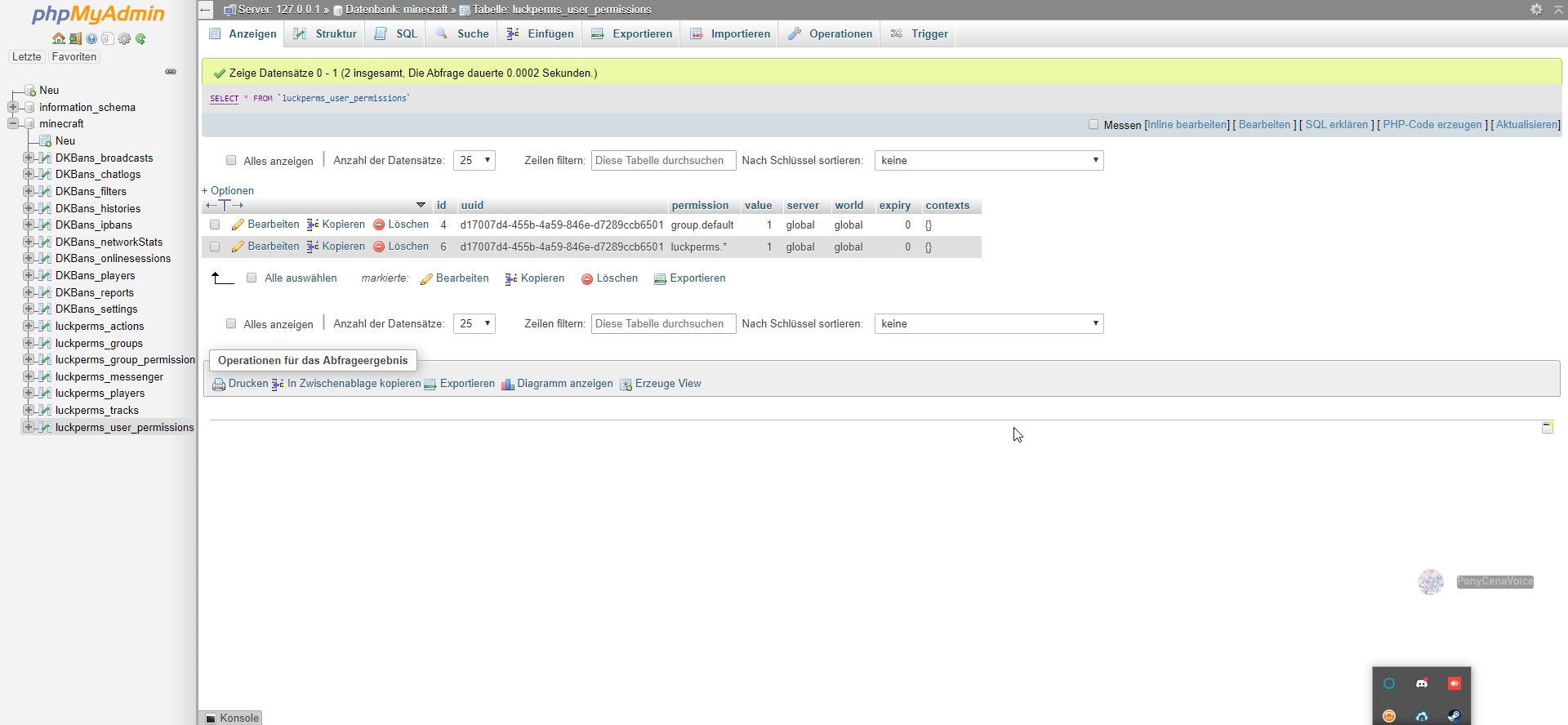
I use bungee cord and have a database in which everything is entered
toxic wagon
Did you use the console to add the permission?
hasty tree
it still didnt work
I don't know how you honestly expect anyone to have any idea what you mean. please be more specific in your pleas for help.
celest stratus
No, that was automatically entered! That's the reason why I ask you
hasty tree
What have you done? What errors are you getting? HAve you checked your console?
toxic wagon
An permissions don't automatically add themselves, so you would've had to add it
celest stratus
I meant it that I entered the command and this permission was entered automatically
I have how it was arranged / lp user <name> permission set luckperms. * True entered
toxic wagon
Are you getting any errors in console or anythin
celest stratus
You can see the log at: https://hasteb.in/secabuko
toxic wagon
Have you tried logging out and logging in again
toxic wagon
In the console do, lp info and show us the output
celest stratus
´´´[28.11.2019 01:50:43] INFO: [Lobby-1] [01:50:43 INFO]: [LP] Running LuckPerms v5.0.8 by Luck.
[28.11.2019 01:50:43] INFO: [Lobby-1] [01:50:43 INFO]: [LP] - Platform: Bukkit
[28.11.2019 01:50:43] INFO: [Lobby-1] [01:50:43 INFO]: [LP] - Server Brand: CraftBukkit
[28.11.2019 01:50:43] INFO: [Lobby-1] [01:50:43 INFO]: [LP] - Server Version:
[28.11.2019 01:50:43] INFO: [Lobby-1] [01:50:43 INFO]: [LP] - git-PaperSpigot-"4c7641d" (MC: 1.8.8) - 1.8.8-R0.1-SNAPSHOT
[28.11.2019 01:50:43] INFO: [Lobby-1] [01:50:43 INFO]: [LP] - Storage:
[28.11.2019 01:50:43] INFO: [Lobby-1] [01:50:43 INFO]: [LP] - Type: MySQL
[28.11.2019 01:50:43] INFO: [Lobby-1] [01:50:43 INFO]: [LP] - Ping: 1ms
[28.11.2019 01:50:43] INFO: [Lobby-1] [01:50:43 INFO]: [LP] - Connected: true
[28.11.2019 01:50:43] INFO: [Lobby-1] [01:50:43 INFO]: [LP] - Messaging: Sql
[28.11.2019 01:50:43] INFO: [Lobby-1] [01:50:43 INFO]: [LP] - Instance:
[28.11.2019 01:50:43] INFO: [Lobby-1] [01:50:43 INFO]: [LP] - Static contexts: None
[28.11.2019 01:50:43] INFO: [Lobby-1] [01:50:43 INFO]: [LP] - Online Players: 1 (1 unique)
[28.11.2019 01:50:43] INFO: [Lobby-1] [01:50:43 INFO]: [LP] - Uptime: 14m 31s
[28.11.2019 01:50:43] INFO: [Lobby-1] [01:50:43 INFO]: [LP] - Local Data: 1 users, 1 groups, 0 tracks´´´
toxic wagon
Restart the server and see what happens
celest stratus
nothing
 lean idol
May I ask a question here to see if someone is able to help? Please and thank you.
 cunning solstice
Thanks!
lean idol
I was making someone have this permission set to false, they are in the right group, and I have the permission set to false, yet they're still able to use the command in game /races about.
races.about false never survival survival none
Is there something I am doing wrong that is not completely denying them to use that command?
They're in the survival world, on the survival server, yet they're able to use the /races about command.
No point in hiding /plugins list when they can just /about the plugins they are using.
cunning solstice
When opped you can see someone's name. When they're not opped: Nothing
lean idol
If it means anything, I am in a Bungeecord network, and everything is connected via MySQL. Denying other commands and permissions seem to work, but this one doesn't seem to deny them.
tacit ore
Why do you need to hide it? If you're using the plugin, you should support the developer!
celest stratus
Sorry if I'm bothering but my problem has still not been resolved
lean idol
I have a "Hall of Plugins" in my Lobby world that displays plugins we use from Developers, and private plugins we do not want anyone else checking out.
tacit ore
Maybe the developer doesn't have a permission node for it?
Have you tried removing the context to it?
lean idol
They do, this is why I am using that particular permission to deny it.
tacit ore
Just keep it as a global false node
lean idol
Already had changed it, and it didn't work. I've done lp sync and lp networksync to make sure it was updated. Not entirely sure what I am doing wrong, unless the perm is there listed on the plugin page, but its no longer a part of the plugin.
tacit ore
Very possible!
lean idol
Is there something in the spigot/bukkit.yml file that has a setting that lets you list desired commands that are to be denied upon using them?
Same with Tab-complete, so players can not tab-complete, either?
I may of found my issue. I made MD5 have the character listed under there, so likely a perma admin at that even through OP/Deop commands/perms.
celest stratus
Hello, I still have my problem!
I have just made Luckperms new on the server and created a new database! Nevertheless, despite having it in the database the permission does not stand for Luckperms
tacit ore
Are you sure you're connected to the database?
Please run /lp info and send a screenshot
@cunning solstice don't be afraid to keep asking if your question gets filled in the backlog, some one around eventually will be able to help. To be honest, I don't think it's coming from LuckPerms though.
celest stratus
 magic dome
Hello, what is your problem exactly?
tacit ore
What command are you running @celest stratus ?
cunning solstice
I'm talking to Nucleus right now haha
celest stratus
What do u mean? @tacit ore
tacit ore
What's the command you're trying to run for the permission?
celest stratus
Only when I try to use LuckPerms ingame does it tell me I need the permissions
tacit ore
Permission for what though?
magic dome
You could try verbose
tacit ore
What command are you trying to run in-game
tacit ore
Hmmm, the permissions there...
That's strange
Yea try verbose like Rainbow suggested?
!verbose
wanton stratusBOT
LuckPerms provides a verbose command to help you find out what permissions a command/plugin is checking.
LuckPerms wiki
tacit ore
Report it on the LuckPerms GitHub?
celest stratus
But I do not quite understand how it helps me with my problem. What can I do with the verbose now
magic dome
itö tells you which permission checks were done
first do
/lp verbose record
then try /lp in-game
and last from the console: /lp verbose upload
celest stratus
https://luckperms.net/verbose/#bkI8Go1sul
But there is nothing at all

LuckPerms - An advanced permissions plugin for Bukkit/Spigot, BungeeCord, Sponge, Nukkit and Velocity
A web based viewer for LuckPerms verbose recording logs.
magic dome
Okay, can you show us /plugins then?
celest stratus
I found my problem it was constantly on a plugin called CherryChat
magic dome
okay? So what was the issue precisely
celest stratus
I found my problem it was constantly on a plugin called CherryChat o.O
I can not really say I deleted CherryChat and it works now o.O
magic dome
Alright then XD
celest stratus
I'm still wondering what a chat plugin has to do with permissions
magic dome
Thats a great question
Maybe ( Just a thought ) it required some weird permission in order to use the chat or console at all
wait then it would have shown in verbose .. nvm
You have a bungee network right?
You could use this bungee plugin by BrainStone as replacement https://www.spigotmc.org/resources/bungee-chat.12592/

SpigotMC - High Performance Minecraft
 proud iron
how do i give default group perms im new to luck perms and i dont know any commands
magic dome
!usage
wanton stratusBOT
Here's a guide to help users understand and use LuckPerms for the first time.
LuckPerms wiki
magic dome
take a look at this first
proud iron
Thx
 split veldt
connection parameters correct?
split veldt
how did you restart it
No firewalls or anything blocking access.
Turned off Servers. Restarted server.
you literally turned it off
Anything could have started back up on startup
And? My point still stands
You turned it off
Are you sure nothing came back on during boot
Or better yet, are you sure things that are supposed to start on boot, have actually started properly.
When you say system
One assumes you mean the hardware
AKA it went through a POST
So, check everything that was running before the shutdown, started back up
If you haven't changed anything in LP, it's not LP's fault.
How are you running the sql server?
hasty tree
Do any other plugins work with it?
split veldt
I've never had issues restarting my sql databases before other than when I had a power failure.
software wise
Your machine didn't get itself a new IP address on reboot did it?
thus nothing can connect
hasty tree
Do any other plugins work with it?
hasty tree
maybe one day i'll get an answer
toxic wagon
Asking too much there i think
lean idol
I guess user-error is the base of my problems, generally and always.
hasty tree
wow usb_hub loves to talk to himself
toxic wagon
yes he does
hasty tree
true
 eternal gazelle
Im runing pixelmon and i dont want dont want to have cheats on all the time just so i can use 2 simple commands
wanton stratusBOT
Hey KingClawblazer! Please don't tag staff members.
hasty tree
Wow pings me then leaves how r00d
eternal gazelle
Yeah and i felt bad and came back
 dire cave
ok, so i soent hours and hours yesterday setting up permissions for my server, and i know i saved everything properly. but today all that work appears to be gone
everything was set to never expire, i saved in the web editor, and ran the apply command in game, has anyone run into this before?
split veldt
What storage method were/are you using? @dire cave
dire cave
h2
split veldt
Did you move any files?
dire cave
nothing related to LP
split veldt
We're you using the editor
dire cave
yes
split veldt
Did you either press ctrl+s or click the save icon?
dire cave
yeah, and i ran the apply edits command in game
split veldt
And it came up with a huge list of what you added?
dire cave
yeah
when i open the editor or run a permission info command it comes up blank, but when i view the tree everything is still there
split veldt
You are outdated try what power as said
hasty tree
How do you host your server?
If it's with a service maybe they triggered a restore or something.
dire cave
i mean, for now they do
im gonna open a ticket with mcph because it looks like the permissions have reverted to a version from when i set up the plugin, cause its got all the tutorial permisssions from the wiki
split veldt
tutorial permissions?
dire cave
yeah, the wiki has a first time setup guide with examples of commands and stuff
and i always have problems with permisssions plugins it seems
i know its not meant to be a real tutorial, but it did help me wrap my head around lp
 fathom minnow
are placeholders meant to of broke in the recent update?
because featherboard doesnt show the return value for placeholders anymore
split veldt
Pretty sure theres something to do with the API needing converting? Not 100% sure
 nocturne chasm
fathom minnow
nocturne chasm
fathom minnow
@nocturne chasm I have read that hence why I am asking
alright thanks @split veldt
nocturne chasm
Did you install the expension?
fathom minnow
dw figured the issue out
dire cave
the only thing i can think of is i didnt make a new editor session every time i made more changes, but when i ran the apply command in game it showed all the changes i made
hasty tree
@fathom minnow well what was the problem? Kinda annoying for anyone who has the same issue to find that and not see a solution.
fathom minnow
@hasty tree ah sorry haha with featherboard if people didnt see the mvdwplaceholder hook got updated but it wasnt explicitly said in the v4 -> v5 update so that fixes the issue haha
wanton stratusBOT
Hey Dictator_Alideen! Please don't tag staff members.
fathom minnow
sorry forgot to say
 eager gulch
Is there a way I can see which mod/plugin registers which command? I have a mod/plugin overriding my default /tps command and the perms check doesn't show in /lp verbose
foggy quartz
Hi I have bungeecord. One of my servers is synchronized but second one isn't. I don't know why
nocturne chasm
!sync
wanton stratusBOT
To sync data between servers, you need to connect each LuckPerms plugin to the same database (for example MySQL) and set up a messaging service.
LuckPerms wiki
nocturne chasm
!bungee
wanton stratusBOT
If you run a Bungeecord network, learn how to correctly setup LuckPerms on all server instances (including Bungee).
LuckPerms wiki
foggy quartz
Okay I figured out that it's now working but my uuid is broken👌
It changed I don't know why
foggy quartz
Why does it create 2 players (2 uuids) but it's one account?
nocturne chasm
Probably something with offline mode? Dunno
foggy quartz
my servers are offline mode but bungee online mode.
nocturne chasm
Bungeecord set to true in all spigot.yml's?
nocturne chasm
Np
runic copper
Hello! How to fix it?
https://pastebin.com/a7jbdKzf
toxic wagon
Turn the debug off in config?
runic copper
I disabled this on all servers in configs LP
toxic wagon
Then restart the servers then it will stop
runic copper
Already done more than 10 restarts :C
tired turtle
Also in the server config, NOT LP config
runic copper
debug: false in all spigot.yml configs on all servers
tired turtle
Check bukkit.ym
There's some setting abou deprecated logger or something.
celest stratus
Hello I have a problem with my Permissions
I have a bungee cord server and a server named lobby according to MySQL database and also in the LuckPerms editor I have the necessary permissions to actually execute commands! But I still can not execute any commands from either LuckPerms or spigot
https://editor.luckperms.net/7AHWptCSsi <-- Here is the Editor Link
https://i.imgur.com/qeUzbZo.png
here is an Screenshot from /lp info
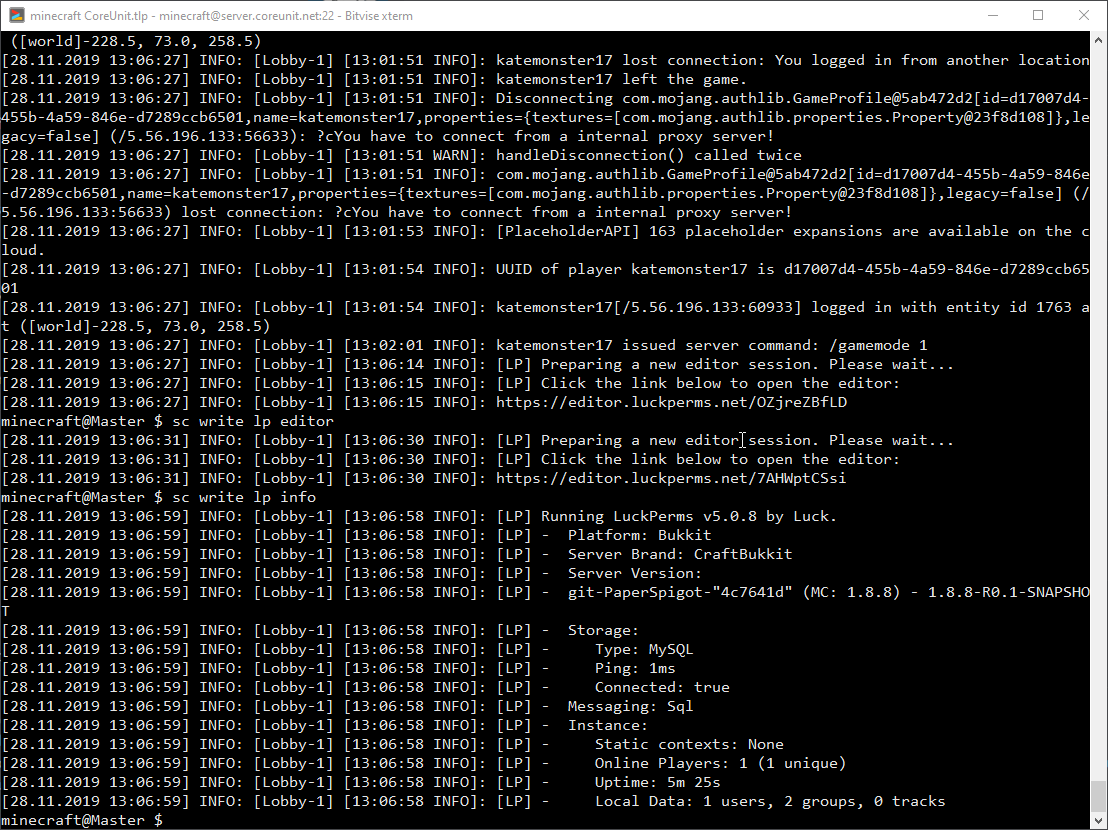
I also tried LuckPerms Verbose and I did not get any information
Strangely, I have for DKBans rights what I do not understand what it could be
Can anyone help me?
celest stratus
How do I get an older version of LuckPerms? I need LuckPerm's Bungee V4 and the normal one
tired turtle
celest stratus
My problem with the newer version of LuckPerms is that only after the server was reloaded with / reload then the rights work first
tired turtle
Don't. Reload. EVER
celest stratus
And since I use CloudNet I do not have the possibility to reload the minigames server
What else should I do the permissions do not work directly when the server is started but only when the server has been reloaded
Why is LuckPerm's V5 not working like LuckPerm's V4? I've never had any problems and now :c
tired turtle
It's 120% caused by plugins or similar using the v4 API of LP which was remade in v5
steady jewel
thank god for the new scrolling interface
tacit ore
It's beautiful
 vale geode
need help people ... my luckperms .jar keeps getting corrupted and deleting claims on my server any clues to why this is happening ?
also when it does this i cant login to the server as well
 sinful steppe
Is there a way to set a group to have a chat colour?
vale geode
use your chat plugin for that i think @sinful steppe
tacit ore
@sinful steppe two ways of doing that...
- Your chat formatting plugin should have this option
- End you prefix with a color code (ex.
[Admin]&7
sinful steppe
ok ty both 😄
magic summit
GP can have issues of deleting claims if your storage is full.
tired turtle
You seem to run a old version....
Because the error would now tell you to check the console
vale geode
just loading up V5 just now
will configs still work the way there are just now on V5?
vale geode
still not working with V5 same thing
tired turtle
Config should be mostly the same
foggy quartz
Happy thanksgiving, everyone!
tired turtle
One noticable change is the messaging service changing from none to auto
bitter coral
and default-assignements removed, but we ignore that
 solemn goblet
@vale geode did you get it working? If not r u using mariadb/mysql
vale geode
i am looking into the logs just now
solemn goblet
The question is what storage type you’re using. I may be able to help if you would provide me with the information necessary to do so.
Feel free to ping me if you need more help.
nocturne chasm
!sync
wanton stratusBOT
To sync data between servers, you need to connect each LuckPerms plugin to the same database (for example MySQL) and set up a messaging service.
LuckPerms wiki
bitter coral
If you are a server admin, please check the console for any errors.
 open wolf
I checked it
bitter coral
Then what are the errors
 teal coral
hey @bitter coral can u help me? how can i port groupmanager permissions to luckperms?
wanton stratusBOT
Hey Lyric4l! Please don't tag staff members.
teal coral
sorry
bitter coral
!migration
wanton stratusBOT
Learn about the process of migrating from another permission plugin.
LuckPerms wiki
teal coral
thanks, sorry for tag
wanton stratusBOT
Here's a page with some common storage system errors.
LuckPerms wiki
 teal coral
oh
sorry
thanks
i need help again
if i make you busy sorry
but i really need help
nocturne chasm
Explain what you need help with
 nocturne chasm
i think, dont think those things work with luckperms tho, haven't used gm
nocturne chasm
No don't know those sorry


 cursive scroll
the BETA editor is LIT 
wanton stratusBOT
Here's a guide to help users understand and use LuckPerms for the first time.
LuckPerms wiki
hasty tree
@teal coral read that. It's on that page somewhere.
teal coral
thanks
i need ask something
i need create group in skyblock server calling with "SkyLord", if i create this group and if i assign this group to a player.
Will that player's prefix "skylord" on the lobby server?
 viral current
@hasty tree this new editor is sexy
wanton stratusBOT
Hey Christmas Volt 🎄! Please don't tag staff members.
viral current
oh shush
hasty tree
If you apply the prefix as global to the skylord group then yes
viral current
yep
hasty tree
Answer the first question
 reef echo
Hello there
just got myself luckyperms, is there a way to automatically add a player to some kind of default group ? or is that already the case
hasty tree
@viral current you need to install the API legacy extension, as mentioned in the upgrade guide.
!default
wanton stratusBOT
LuckPerms provides a group that every player is added to upon joining the server, called default. You can use multiple methods to change the default group or change the name of it.
LuckPerms wiki
teal coral
how can i mark any permission to skyblock server?
wanton stratusBOT
You can set a permission or group on a per-world/per-server basis, through what we call "contexts".
LuckPerms wiki
teal coral
thanks
reef echo
i try to add myself to the default group (i think i changed it before), by using
/lp user ir0ns1ght parent set default
but when i use listmembers on default, it says 0 members etc
why is that ?
also it did not create a file in the users folder in the server ..
altough im registered in the UID cache
 stuck badger
Hi, does luckperms have conditional commands? I want to give specific players specific rank for some time ONLY if he has other rank already.
I want to use something like default-assignments, but triggerd on command for specific players, not for all
 brittle vessel
Hey, stupid question, on the github I only found how to update in bulk. How do I give permissions to a specific person or group?
 shut tusk
I just upgraded to v5 and the command /lp user player parent addtemp group time accumulate is not working, has it changed?
reef echo
@brittle vessel
/lp user xyz permission set permission.node.whatever
GitHub
An advanced permissions plugin for Bukkit/Spigot, BungeeCord, Sponge, Nukkit and Velocity. - lucko/LuckPerms
reef echo
playername. read the usage page and follow step by step. very easy and detailed
tacit ore
@reef echo @brittle vessel
Be careful using set as this will also remove all current groups already assigned. You can use add and this will simple add a group while still retaining your current groups
brittle vessel
Oops