#support-1
1 messages · Page 553 of 1
 lapis ibex
Why would you want it to be a no?
The answer is a no and a yes
LP itself doesn’t care about raw placeholders
 foggy quartz
I don't want to aggravate you or try to ask something that is too technical .__."
lapis ibex
There’s no way it could if it wanted to
But
Plugins that run commands as rewards or similar things do support placeholders
And I’m really struggling to understand what’s so hard to understand about that concept...
foggy quartz
aye, but understanding that doesn't help .__.
lapis ibex
Then you haven’t understood it
foggy quartz
ok
lapis ibex
Because it absolutely does help if you understand it
foggy quartz
command block behind a stone block with a button on it
push the button, command in command block is activated
lapis ibex
This has nothing to do with command blocks
foggy quartz
is there a command I can input into the command block that would put the player pushing button into a group?
lapis ibex
No. Because the selectors don’t work for plugins
foggy quartz
I just want to know if there's a way to add a player to a group other than the username/UUID
 bitter coral
Not from LP, there might be plugins that add selectors back
lapis ibex
Jfc
I told you a million times
How are you still not understanding it
Like how is this even possible?
I’m not exaggerating when I’m saying you are the first person I’ve ever seen that can’t understand the concept of placeholders
foggy quartz
I understand placeholders, I do.
I don't see how they can be used to add a player to a group in LP.
bitter coral
LP doesn't offers any placeholders
foggy quartz
ok so then there's no other way to add players to groups other than
/lp user Username/UUID parent add Groupname.
Thank you, that's all I needed.
bitter coral
... Unless there are plugind which parse placeholders
foggy quartz
I guess Quests doesn't
bitter coral
It should
lapis ibex
It does
foggy quartz
Ah man, I'm sorry Brain. I'll just stop trying to understand. I don't see how I could do it through Quest's interface for quest rewards, so it's just confusing to hear that it's possible when there's nowhere for it to happen
again, sorry for the headache. have a good day
lapis ibex
It is possible
foggy quartz
I believe you, but the Quests' support directed me to talk to LP's support, but it doesn't seem like an LP thing anymore
 sonic hemlock
I told the user how to do this but it seems like they don't understand, sorry for the inconvenience
lapis ibex
And trivial to do so
foggy quartz
idk where you told me to do it, you sent me two links
<player> is unrecognized in quest reward commands
sonic hemlock
again, no, read what I said on the quests discord
let's go back there and not bother these folks; luckperms works fine
foggy quartz
sure thing
 noble barn
Hey. Anyone who knows how to add more towny plots to someone with LP?
lapis ibex
@noble barn depends on towny
 jolly estuary
Can I have help
 tired turtle
Not without saying what the issue is
tired turtle
The LP GUI plugin is an unofficial add-on. It's not by luck and support isn't provided by us.
We have a web editor tho
 river heart
Honestly the GUI addon is cool, But i don't see a purpose if you got a freaking web editor
river heart
The web editor is just more epic and easy imo 😛
lapis ibex
BuT iTs NoT iN GaMe
 elfin egret
yeah why you'd want to use a chest gui to manage permissions is beyond me
but I'm pleased someone else decided to implement it in an addon
lapis ibex
I'd much rather use commands
 shut tusk
@elfin egret can you help me?
 wanton stratusBOT
Hey ThiagoROX! Please don't tag staff members.
elfin egret
maybe
shut tusk
sorry
river heart
Everyone is probably able to help you
shut tusk
off-topic
elfin egret
I'm going to look into it now :))
shut tusk
Thanks!
 hearty moss
I love you luck, you made warmroast so much better, the recent update is awesome
If you have magibridge installed and do a healthreport it prints beautifully in discord
 night hazel
Hey, I'm completely 100% new to server hosting. I'm getting errors when I try to execute any command (gmc, warp, etc.) but the command still works.
 naive flame
How do i make a group inherate the last permissions?
bitter coral
group.<groupname> eg. group.default
 tired pewter
hello guys im a bit of a noob and i want to make a pixelmon server to play with friends, does anyone know how i can add commands like /home, /feed, /tp
 main cedar
can someone recommend me to a tab plugin where the ranks will show up on tab, the plugin I have now does not work to well
bitter coral
What server software do you use?
main cedar
im running a 1.8 spigot
bitter coral
I can recommend TAB Reborn, but also heard good things about BungeeTabList
It doesn't automatically shows the prefixes, but using Vault and just set the _OTHER_ value you can make it exactly fit your needs
 blissful ravine
In order to add permissions to a group, should I just add it to the import.txt file?
like /lp group builder permission set worldedit.* true world=creative
would that work?
 sick breach
Hi, just a quick question
Do you know a way to limit the tab and command auto suggestion only for command that a player has permission on it.
I have the problem that default user still se so much plugin commands suggested what the cant use
sick breach
Hmm sh.. this feature will cause more questions than it helps
 mental flax
For example EssentialsX
 gilded cove
 north jackal
hello, quick question ... whqats the command to check what group(s) someone is in?
lapis ibex
/lp user <user> info @north jackal
north jackal
thanks, that works ... but is there any way to show secondaty groups also?
secondary
lapis ibex
Not that I’m aware of
north jackal
damn
lapis ibex
Well you can try /lp user <user> meta info
That’ll show all prefixes and the groups they come from
Though displaying the secondary groups is actually a pretty decent suggestion @north jackal
north jackal
yeah, it is not showing it through meta
lapis ibex
Mind to post it on GitHub?
 distant dune
secondary group? like a parent group?
north jackal
i dont know exactly how it works .... additional perms with /lp user user parent add secondgroup
distant dune
cant u just do lp user <user> parent info or lp user <user> group info
to see what groups the user is in
and yea parent add will add perms to the user from the spicified group
distant dune
yw
 feral robin
How do i implement previous yaml data into my SQL setup?
 toxic wagon
Read the wiki page Switching Storage Types @feral robin
feral robin
I will
But how do I simply copy/ paste data from a yaml file into the digital editor?
 split veldt
Export it first before changing file types. There's a hint
toxic wagon
You can't copy and paste multiple permissions into the web editor yet.
 magic summit
Well, if you search back in here, there is a way, you have to have the commands fully stated out and import the file.
But it’s a work around, not a main feature
feral robin
so ill have to do it line by line
It was from a previous server so i couldnt export it
toxic wagon
@feral robin Are the permissions coming from another permissions plugin and do you still have access to the files.
feral robin
yes i just have a pex yaml file
toxic wagon
Can you still access the old server. Otherwise you can install pex, use the yaml file you have then use the migration feature of luckperms to transfer it all to luckperms.
 empty hill
how to make it so people can set more than one home?
toxic wagon
Depends on what plugin you have for settings homes.
wanton stratusBOT
Hey fulp! Please don't tag staff members.
empty hill
can you stil help or i have to go to the nucleus discord ;-;
toxic wagon
Check the home section on the nucleus documentation, it has examples on how to do it with luckperms
foggy quartz
guys how to delete kit?
toxic wagon
That's upto your plugin that handles the kits @foggy quartz
foggy quartz
essentials
toxic wagon
Then look at the essentials documentation on how to delete kits.
 rich tartan
Probably a stupid question, but can I have a custom prefix defined depending on which world a player may be in?
For example, I'd like a prefix to show whether a player is in Survival, or SkyBlock
[SkyBlock] - [Owner] {player}: Hello World!
[Survival] - [Owner] {player}: Hello World!
1.14.2
magic summit
you could do with context, but allowing the chat plugin to handle it would be best - it seems with that tho that you are using a bungee chat plugin to talk between servers (or are using multiverse maybe for worlds?) either way, the bungee chat plugin can handle world placeholder or you can have the world display if using other plugins
foggy quartz
how can I make all servers on the bungeecord have the same ranks?
magic summit
!bungee
wanton stratusBOT
foggy quartz
thanks
magic summit

GitHub
An advanced permissions plugin for Bukkit/Spigot, BungeeCord, Sponge, Nukkit and Velocity. - lucko/LuckPerms
rich tartan
So, I have I guess you could say a Multiverse world. Albeit not really.
My SkyBlock plugin teleports the user to the SkyBlock world, then Essentials teleports the player back.
magic summit
level, sorry misunderstood at first, id look at a bungee chat plugin for bungee usage or something like venturechat
it has placeholders for worlds
rich tartan
I've found with Essentials Chat, that I can set "Worldname" but that's verbatim the name of the world folder, which is sloppy to say the least.
wanton stratusBOT
:paperclip: https://github.com/lucko/LuckPerms/wiki/Context
magic summit
^ that can be used for LP though to handle and look at prefix stacking
rich tartan
Possibly, but is MV compatible with 1.14.2 yet?
magic summit
no idea
magic summit
LP is though 😉
magic summit
you can set using LP and context - example (may not be the best, but just what comes to mind):
create groups for each "server" (world). setup prefix meta for that group. Look at prefix stacking and adjust accordingly. then use context to apply that group based on which world they are in.
rich tartan
Hmm, that might work. I'd need a bunch of testing though, let me see how far I can go. Thanks for the advice!
magic summit
@rich tartan oh - looking at docs, you can set meta with context, so no need for groups, lol
rich tartan
Really? Cause I don't even thing I have groups setup.
I stole this config file from a server I ran like a year ago, so I'm slowly relearning the whole thing
GitHub
An advanced permissions plugin for Bukkit/Spigot, BungeeCord, Sponge, Nukkit and Velocity. - lucko/LuckPerms
magic summit
copying only helps a little in learning something with this many options and greatly depends on how that server was setup. time to just dive in and make it unique to your server
and yes, that section states that you can set meta with context
rich tartan
I mean, I wrote this config file myself, once upon a time ...
It sounds like it might be what I'm looking for. I'm going to continue reading through this doc.
rich tartan
Ok, so, seems like this will work, but rather than having different perm groups per world, do you know if I can put multiple prefixes in one perm group? such as:
permissions:
- '*'
- weight.1000
parents:
- admin
prefixes:
- '&7[&3Survival&7]-&7[&3Owner&7]':
priority: 1000
value: true
world: Survival
- '&7[&3SkyBlock&7]-&7[&3Owner&7]':
priority: 1000
value: true
world: SkyBlock
suffixes:
- ? ''
: priority: 1000
meta:
- build:
value: 'true'```
Answer, yes, yes you can. quaint stump
How do I edit user data to give a player op? Using sponge.
 upbeat ivy
I can import something from pex and make work for an specify server?
foggy quartz
is it possible to sync perms and ranks across a bungeecord network without using any databases?
split veldt
@foggy quartz you'll need to do it manually
foggy quartz
@split veldt but I should still be able to set permissions for another server while Im on a different server on the same bungeecord?
split veldt
No
You will need to submit those permissions to the server you want them applied to
You won't be able to change permissions for one server while on another
Unless you do it from console
foggy quartz
fk
split veldt
Why not use a database
magic summit
@rich tartan anytime my friend 😉
 royal herald
If I use LuckPerms bungee do I need to also install the bukkit version on my spigot servers?
split veldt
@royal herald yes
royal herald
Ok thats what I thought
split veldt
It's a good idea to also get the latest version of the two from the link in the channel topic
 latent salmon
does anyone have a link to a list of commands or a general "how to" link
magic summit
!usage
wanton stratusBOT
:paperclip: https://github.com/lucko/LuckPerms/wiki/Usage
latent salmon
thank you
hello, again has any one here used MCprohostsing
I have a FTB server and im using sponge forge to support spigot and bukkit plugins.
and im running into this issue
foggy quartz
Okay so.. I can't find a way to "Re-enable Vanilla OP Settings" and because of that i cant edit anything in game anymore
 hasty tree
Sponge?
foggy quartz
Spigot
This is my first mc server and i have no coding experience btw so bear with me please ;w;
hasty tree
Uh, if its spigot then there should be no issues with op
What exactly are you trying to do?
foggy quartz
I can't edit anything because i have no permission to do anything in my own server, and when try to do /OP i get "Vanilla OP Settings Disabled"
hasty tree
That's a new one to me... cant really help there
foggy quartz
ah heck ;;
magic summit
@foggy quartz
that section in the config.yml is what disables the Vanilla OP and gives that message
foggy quartz
so should it be removed altogether?
magic summit
i have mine to disable vanilla and and i have to give myself luckperms.autoop from console and everything works fine
what version of LP are you using?
i mean, that is my config settings in the ss
foggy quartz
i believe the latest version? Trying to run a 1.14.2 server
magic summit
verify its 4.4.26 - link in #welcome and in the topic of this channel
if you have enable-op false, then you have to give yourself the luckperms.autoop permission to have op.
but for general permissions, everything should work correctly without having op
if you have perms setup
foggy quartz
Permissions tend to throw me off horribly when working on this stuff but i'll give it my best shot
magic summit
!verbose
wanton stratusBOT
:paperclip: https://github.com/lucko/LuckPerms/wiki/Verbose
foggy quartz
I've got it!! ty!!!
hasty tree
Ah yeah, I forget those settings are there.
It is true, by default, so you'd have to have changed it for your issue to have been a problem 😜
foggy quartz
Yeah, by fiddling with settings and not knowing what they mean, i'm the only person working on it rn. ;w;
hasty tree
Make sure to read the comments 😝
foggy quartz
tysm
hasty tree
See ya...
foggy quartz
hey guys i can't seem to find vanilla permission names anywhere, can somebody help me out
i wanna permit my mods to /whitelist
wanton stratusBOT
:paperclip: https://github.com/lucko/LuckPerms/wiki/Verbose
foggy quartz
ty
hasty tree
Google "minecraft vanilla permissions" will get you exactly what you need...
 hybrid birch
Hi i have Luckperms and made a prefix for a group that im in, but when i type in chat the prefix does not appear, i have only essentialsX, luckperms, and vault installed on my server, can anyone help me, i have been through countless threads looking for answers
 slim yoke
split veldt
slim yoke
split veldt
^
 glossy pumice
where I can download wssentialsXchat??
split veldt
Same place you downloaded essentialsX
glossy pumice
it does't apeear essentialsXchat
hybrid birch
thanks guys ill try it, and yeah globster its 2 below essentials x button
glossy pumice
in wich site?
hybrid birch
pmd you
glossy pumice
thanks
hybrid birch
Thanks alot guys, essentialsXchat solved it, lifesavers
quaint stump
How do I edit user data to give a player op? am using sponge
bitter coral
You can't give players op on sponge, when a permisions pugin is installed
lapis ibex
And you don’t need OP for anything on Sponge either @quaint stump
quaint stump
how can I give a player all the commands using luck perms?
magic summit
!usage
wanton stratusBOT
:paperclip: https://github.com/lucko/LuckPerms/wiki/Usage
lapis ibex
There’s the * wildcard. Though you really shouldn’t do that
The maximum we recommend is doing it on a plugin level
So if a plugin’s permissions start with example, then you give example.* or better on Sponge example (That Style of wildcards is native to Sponge permissions. Pretty much means the exact same thing)
@quaint stump
 plucky token
Is there any way to use Luckperms on a network without a MySQL database or not?
Please tag me if you have the answer to my question.
magic summit
@plucky token there is not. Most hosts offer a MySQL database (either free or paid). You also have the option to get a free one from another site (search this discord for links).
plucky token
Okay, thanks for your help!
 twin kernel
How can I fix this xD https://paste.helpch.at/nupipuhiyu.shell
I use the default settings tho
I know it say Possibly consider using a shorter maxLifetime value. but how lower should I go 🤔
Edit: Saw the wiki, I will contact the host.
 honest robin
Is there a way to have LP set perms for a user when they enter a WG region?
twin kernel
Dont think so but either wg or the more flags addon have a command to run commands on enter / leave
honest robin
Yeah I see those, but I need to add multiple perms on entry and the WGEF flag seems to overwrite itself when you add another
magic summit
you can add multiple commands in the flag - just separate by ", "
#general though
If you use the ExtraContext add-on, you can set additional contexts for LP though based on WG regions. I use it and its nice.
honest robin
How does that work?
magic summit
same as the reg contexts for server or world - just enable the modules you want in the ExtraContexts config, then on restart, when you do /lp user <user> info you will see the additional contexts
then you can add to permisisons, meta, etc
imo - easier to work with than flags and members with WG
feral robin
Making chat formatting work from EssentialsX chat?
honest robin
I'm looking to have users only be able to create shops (using Quickshops) when in a set region, would it work for that?
magic summit
thats in essentials config - section at top for prefix/suffix and down lower for chat formatting - not an LP issue
ashh, lets go to #general
lapis ibex
@honest robin yes
I’m assuming you don’t know what contexts are (in terms of LP) so have a look at that page:
!context
wanton stratusBOT
:paperclip: https://github.com/lucko/LuckPerms/wiki/Context
honest robin
I took a brief look but yeah, I've not messed with them in the past
lapis ibex
The plugin ExtraContexts turns WG regions into contexts.
honest robin
I'm just searching for it now
feral robin
@magic summit would the placeholders be in which plugins wiki?
honest robin
So I'd do /lp group default permission set quickshop.create.sell wg-region=test1 ?
magic summit
@feral robin placeholders are dependent on the plugin (in this case essentialsx). most plugins also utilize PlaceHolderAPI. Though, the prefix "should" show automatically when you installed essentialsXchat as the displayname placeholder contains the prefix, name and suffix. have you verified with /lp group <group> meta info that the pre/suffix is set?
ashh, if you want that perm only to be given when in that region, yes
honest robin
(if that's correct then it didn't work btw)
magic summit
you may need more perms that just that one to make a shop
feral robin
Ill check to make sure they are set
honest robin
That is the only one, I set a wg flag to set the perms for an individual player upon entry, remove upon exit and that works just fine. Spams the console though
magic summit
so you are using a wg flag, not LP? if so, then its not an LP issue
honest robin
That's in a different region
magic summit
you dont tell wg flag to run the LP command
magic summit
ok
honest robin
I'm just saying I tested it that way with the same perms and it works
lapis ibex
Go in the region and type /lp user <you> info
It should list your current contexts @honest robin
That’s useful to figure out what the context is called
magic summit
yea, had already said that (maybe they didnt enable that context) even tho i said that too
ive made that mistake
honest robin
 lapis ibex
Then you need to enable that context
magic summit
😉
 lapis ibex
👍🏻
magic summit
we all have our moments
honest robin
Thank you guys, much appreciated
lapis ibex
You’re welcome
feral robin
I fixed the essentials formatting, all groups have their prefixes/ suffixes
But when I give my alt a role, it never shows their new group and suffix
wanton stratusBOT
Hey Diamondkorben! Please don't tag staff members.
tired turtle
Then ask instead of pointlessly tagging people
 dusty niche
ok
sorry
my louckperms i downloaded earlier today does not show up the prefixs i made
tired turtle
If it shows when you do /lp user <user> info then it is an issue with the chatplugin (or wherever you want to show the prefix)
LuckPerms doesn't manage chat.
You need Vault and a plugin that supports it (On Spigot servers)
dusty niche
i tried many plugins but none showed them up
do you know one that will work on my nukkit server?
tired turtle
No.
tired turtle
I don't know. I never used Nukkit
mental flax
I think one man got it working
https://nukkitx.com/resources/gchat.156/
I think he used this one
 sturdy vortex
[19:23:45 WARN]: [me.lucko.luckperms.lib.hikari.pool.PoolBase] luckperms-hikari - Failed to validate connection me.lucko.luckperms.lib.mysql.jdbc.JDBC4Connection@2aac203e (No operations allowed after connection closed.). Possibly consider using a shorter maxLifetime value.
[19:23:45 WARN]: [me.lucko.luckperms.lib.hikari.pool.PoolBase] luckperms-hikari - Failed to validate connection me.lucko.luckperms.lib.mysql.jdbc.JDBC4Connection@200d3724 (No operations allowed after connection closed.). Possibly consider using a shorter maxLifetime value.
[19:23:45 WARN]: [me.lucko.luckperms.lib.hikari.pool.PoolBase] luckperms-hikari - Failed to validate connection me.lucko.luckperms.lib.mysql.jdbc.JDBC4Connection@3a320903 (No operations allowed after connection closed.). Possibly consider using a shorter maxLifetime value.
[19:23:45 WARN]: [me.lucko.luckperms.lib.hikari.pool.PoolBase] luckperms-hikari - Failed to validate connection me.lucko.luckperms.lib.mysql.jdbc.JDBC4Connection@7fdde376 (No operations allowed after connection closed.). Possibly consider using a shorter maxLifetime value.
[19:23:45 WARN]: [me.lucko.luckperms.lib.hikari.pool.PoolBase] luckperms-hikari - Failed to validate connection me.lucko.luckperms.lib.mysql.jdbc.JDBC4Connection@343b8163 (No operations allowed after connection closed.). Possibly consider using a shorter maxLifetime value.
[19:23:45 WARN]: [me.lucko.luckperms.lib.hikari.pool.PoolBase] luckperms-hikari - Failed to validate connection me.lucko.luckperms.lib.mysql.jdbc.JDBC4Connection@7dc634d7 (No operations allowed after connection closed.). Possibly consider using a shorter maxLifetime value.
[19:23:45 WARN]: [me.lucko.luckperms.lib.hikari.pool.PoolBase] luckperms-hikari - Failed to validate connection me.lucko.luckperms.lib.mysql.jdbc.JDBC4Connection@5796407d (No operations allowed after connection closed.). Possibly consider using a shorter maxLifetime value.
help me
spam logs
wanton stratusBOT
sturdy vortex
I changed values did not help
magic summit
(and pastebin or other site for long errors)
did you only change value once or have you tried a few? did you verify the change was saved and restart?
sturdy vortex
Yes a few times
north jackal
Hello :) When I do reloadconfig, I get this message [LP]: The configuration file was reloaded. (some options will only apply after the server has restarted) .... i am just curious which settings are not applied immediately?
north jackal
but any permissions would be applied immediately, yes?
split veldt
permissions don't require a reload or restart when updated/added/modified
north jackal
hmm, so what is reload for?
lapis ibex
Reloading the config @north jackal
magic summit
as the command is reloadconfig.... wow, that makes sense
north jackal
no need to be sarcastic
lapis ibex
I mean what else would it do?
north jackal
i had assumed it would reload all permissions, i didnt know about it automatically updating those .... not every user knows everything
lapis ibex
Permissions are not part of the config
And that's also not what where talking about
But rather the question in the style of "What does the On/Off button do?"
north jackal
other plugins i have used would consider everything part of the configuration .... this is a semanticf discussion
lapis ibex
I do understand the confusion and base question
Though asking a question that contains the answer is really begging for sarcasm and captain obvious reactions
magic summit
in any config, some options are not changed except on full server restart. imo, any config change should use a restart.
lapis ibex
Yes and no
I strive to make my plugins 100% reloadable
In essence I restart them on a reload
But it's hard
So I understand why not every dev does it like that
magic summit
yea
 celest summit
Hello, I am still having problems where my moderator cannot promote people on a track?
The player to promote goes up and down the track OK when I (owner) do it.
I have done a verbose and can give the web link if that can help identify the issue?
I hasave a pastebin of the verbose listing at https://pastebin.com/dN2tt252
Can anyone assit please?
Thank you.
 naive flame
How do i inhearit from another group like the permission for lp editor?
magic summit
Group.<group>
naive flame
How would i give a player perimissions
magic summit
!editor
wanton stratusBOT
naive flame
No like through buycraft
 amber sand
question: is there a way to make suffixes additive? I have suffixes for a particular plugin and prefixes for player/staff ranks.. but I'd like to add a gold asterisk to the ends of donator's names to show their commitment to my servers..
celest summit
oooh, that sounds like a good idea 😃
amber sand
yea, as of right now, m donators get their suffix replaced with the gold asterisk rather than having it just added
celest summit
so you want a suffix to the suffix ? 😃
Can anyone help with my promotion permission problem please?
lapis ibex
@amber sand have a look at prefix/suffix stacking
hasty tree
Read the migration page on the wiki
 next agate
I cant get Suffixes working with EssentialsX
 warm atlas
Hey I got a quick question
magic summit
there are other chat plugins, try venturechat
dont say you have a question, just ask the question lol
warm atlas
fair
I'm trying to develop a plugin and I want my permissions to auto-fill when I'm trying to set permissions for groups in LuckPerms
how do I set that up
magic summit
warm atlas
cool
 hollow tusk
Are there plans for LP to be available on 1.14?
magic summit
it is
next agate
I will @magic summit
magic summit
its ready now
next agate
Thanks
hollow tusk
how so @magic summit I couldn't find it on there website it just says up to 1.13
hollow tusk
yeah I saw that, but I wasn
magic summit
never hurts to try anyway 😉 hehe
hasty tree
#changelog shows updates as recent as yesterday
hasty tree
So you removed your chat plugin and you're wondering why prefixes wont show?
hasty tree
Do you have vault
next agate
Yeah
hasty tree
And does a prefix show with /lp user (user) info
next agate
The user is in the group
magic summit
show what you have from /lp group <group> meta info
hollow tusk
do you know if essentialsX also works in 1.14?
magic summit
that would be a question for them, not LP
hasty tree
Try it? Or ask ehir support.
hollow tusk
alright just checking if you knew. Thanks anyway
magic summit
!sync
wanton stratusBOT
hasty tree
!bungee
wanton stratusBOT
next agate
magic summit
so you dont have a prefix set for the group
next agate
I do
hasty tree
Not on the default group
next agate
It is on default group
magic summit
thats from /lp user <user> info show what the /lp group <group> meta info shows
hasty tree
Oh, you seem to have a server context applied
magic summit
i see it now, my fault
next agate
server context?
hasty tree
Notice the (server=)
next agate
Ah
next agate
What web editor?
hasty tree
/lp editor
next agate
Woah
This is amazing
I need to use this
Anyway, how do I remove the server context?
hasty tree
Find the prefix node and clear the server field
If it has anything in it
I'm curious as to how that will look tbh
next agate
Okay well it resets that field to global
Lemme restart
Doesn't work with venturechat or essentialschat
hasty tree
You need to save the changes in the web editor then use the command
next agate
Still nothing
magic summit
send the updated info from /lp group <group> meta info
magic summit
nice
 low wave
hey i have a few broken villagers on a server modpack. Is it possible to disable all villager trading?
low wave
damn, do you know what could be the reason of this error then?
i cant open a chest i just put down
wanton stratusBOT
:paperclip: https://github.com/lucko/LuckPerms/wiki/Verbose
magic summit
that will help sort out what perms are being checked
low wave
i will try that
distant dune
griefprevention/universeguard issue pretty sure not luckperms issue
magic summit
that super long griefprevention perm seems like it
 blissful pine
For some reason after I apply permissions they still dont work.
For example I made a group called mvp and gave myself the essentials permission for essentials.kit.mvp
i deopped myself to see if it would work and it doesnt
distant dune
run verbose and see what ur missing
do /lp verbose
run the command
and itll tell u in chat
or nvm
its probs cause u wrote the node wrong
its essentials.kits.mvp
blissful pine
yah
distant dune
u wrote kit.mvp
distant dune
give urself luckperms.*
blissful pine
dont i still have everything then? xD
distant dune
where were u doing it? lol
distant dune
lol k
blissful pine
dertheus - luckperms.verbose - true
is what it says
wtf every time i type in a command im not allowed to do luckperms just starts stating all of the perms i have
and everyime i do a command it just gives me all the ones im allowed to do
@distant dune maybe i should just reinstall it
distant dune
hmm
hasty tree
It should say whether they are true/false/undefined
blissful pine
oh
distant dune
do /lp editor and share the link
blissful pine
and what tf everytime i TYPE something in the chat it literally expands what perms i have in chat
k
dmed
hasty tree
You need to understand that verbose mode is VERBOSE, it is telling you all the permission checks in real time. If you dont want the spam, use a filter
!verbose
wanton stratusBOT
:paperclip: https://github.com/lucko/LuckPerms/wiki/Verbose
blissful pine
sorri turbo i didnt know what verbose meant xd
 molten nebula
is there luck perms for 1.14.2
blissful pine
im using the latest build for 1.14.2
molten nebula
yea i got the latest one from jenkins
foggy quartz
if i use luckperms for bungee do i have to also have it on each server?
magic summit
you need the bungee version on bungee and the bukkit/spigot version on your backend server(s).
!bungee
wanton stratusBOT
magic summit
!sync
wanton stratusBOT
foggy quartz
so im working with luck perms and all permissions work but my prefixes from the group dont show up in the chat
toxic wagon
Does the prefix show in /lp user <name> info
foggy quartz
yes
toxic wagon
You need a plugin that handles the chat formatting as luckperms does not deal with chat or displaying prefixes. Only supplying them to groups and users.
foggy quartz
what plugin do you recommend as in the past on youtube it looks like they worked
toxic wagon
Spigot or sponge?
foggy quartz
currently on my test server i have spigot, essentials, and luckperms
toxic wagon
You can get essentialsXChat if you want since you have Essentials (just make sure it's EssentialsX (The x is important)
You'll need vault installed as well.
foggy quartz
is the vault 1.7.2 the 1.12.2 version as it never states it in the game versions
toxic wagon
Just use the latest version of vault.
foggy quartz
cool the prefix works now thank you
blissful pine
I have vault and essentialsx and essentialxchat but for some reason when I format the text for the prefix as in &l{PREFIX} {USERNAME}: &7{MESSAGE} it doesn't bold the prefix and username. I've tried removing it too and it didn't work. I have it bolded when I setup the prefix with LuckPerms btw.
It has the color and everything just no bold.
Also I only have vault installed nothing is configured inside because the .yml had barely anything inside so I assumed I didn't have to do anything 🤡
toxic wagon
@blissful pine If you bold the prefix with luckperms see if it will bold the username at the same time. Instead of trying to do it through the chat format. It might work.
blissful pine
I'm sorry but what exactly do you mean if it will bold the name at the same time? Do u mean to remove the bold from LuckPerms and then put the bold in the formatting?
toxic wagon
Add bolding to the prefix via luckperms and see if it carries over to the name as well.
hasty tree
You probably have formatting in the prefix which will override the bold
blissful pine
@toxic wagon I already have it in LuckPerms.
wanton stratusBOT
Hey Dertheus! Please don't tag staff members.
blissful pine
Sry
toxic wagon
How did you format it into the prefix, did you do the bold or the colour first.
blissful pine
I removed the bold from the formatting and put it back in. Either way both didn't work
I did the
I'ma check rq
foggy quartz
When i add the lucky perms it works great on the individual servers. I want to connect all of them so i added it to the bungee but it errors saying Error enabling plugin LuckPerms
toxic wagon
@foggy quartz Did you use the bungeecord version on the bungee server then normal version on the other servers
blissful pine
I have the bold first.
toxic wagon
@blissful pine Try having the colour first.
blissful pine
Oke doke. I'll do it once on PC 👍😁
foggy quartz
I think i just added the normal versions to the bungeecord 😂
toxic wagon
@foggy quartz You need the Luckperms-Bungee on the bungeecord server
Then the normal version on all the other servers
foggy quartz
ummm i cant find the bungee version on google
toxic wagon
First link in the welcome channel
foggy quartz
thank you
Imortalshard i added the plugin to the bungee and now i cant connect to the network
04.06 20:33:55 [Server] INFO disconnected with: Kicked whilst connecting to lobby: [LP] A database error occurred whilst loading permissions data. Please try again later.
04.06 20:33:55 [Server] INFO -> UpstreamBridge has disconnected
toxic wagon
What does the console error say?
foggy quartz
that is the console error
toxic wagon
There would be more than that. Are there any errors on startup?
foggy quartz
when it was MySQL it caused a whole lot more errors
toxic wagon
There would be errors on server startup
We need to see the errors to be able to help fix them
foggy quartz
I turned it back to the MariaDB and now the server fails to start one sec while i get the errors for you
wait
it just took it forever
toxic wagon
Pick one storage type you want to use then give the errors for it. Switching back and forth won't help.
foggy quartz
04.06 20:37:40 [Server] INFO Command not found
04.06 20:37:58 [Server] SEVERE Exception occurred whilst loading data for fb4e4909-1443-457c-b655-2821c857c837 - TheBlueDefender
04.06 20:37:58 [Server] SEVERE java.util.concurrent.CompletionException: java.sql.SQLTransientConnectionException: luckperms-hikari - Connection is not available, request timed out after 5000ms.
04.06 20:37:58 [Server] SEVERE at me.lucko.luckperms.common.storage.Storage.lambda$makeFuture$0(Storage.java:86)
04.06 20:37:58 [Server] SEVERE at java.util.concurrent.CompletableFuture$AsyncSupply.run(CompletableFuture.java:1590)
04.06 20:37:58 [Server] SEVERE at net.md_5.bungee.scheduler.BungeeTask.run(BungeeTask.java:63)
04.06 20:37:58 [Server] SEVERE at java.util.concurrent.ThreadPoolExecutor.runWorker(ThreadPoolExecutor.java:1149)
04.06 20:37:58 [Server] SEVERE at java.util.concurrent.ThreadPoolExecutor$Worker.run(ThreadPoolExecutor.java:624)
04.06 20:37:58 [Server] SEVERE at java.lang.Thread.run(Thread.java:748)
04.06 20:37:58 [Server] SEVERE Caused by: java.sql.SQLTransientConnectionException: luckperms-hikari - Connection is not available, request timed out after 5000ms.
04.06 20:37:58 [Server] SEVERE at me.lucko.luckperms.lib.hikari.pool.HikariPool.createTimeoutException(HikariPool.java:697)
04.06 20:37:58 [Server] SEVERE at me.lucko.luckperms.lib.hikari.pool.HikariPool.getConnection(HikariPool.java:196)
04.06 20:37:58 [Server] SEVERE at me.lucko.luckperms.lib.hikari.pool.HikariPool.getConnection(HikariPool.java:161)
04.06 20:37:58 [Server] SEVERE at me.lucko.luckperms.lib.hikari.HikariDataSource.getConnection(HikariDataSource.java:100)
04.06 20:37:58 [Server] SEVERE at me.lucko.luckperms.common.storage.implementation.sql.connection.hikari.HikariConnectionFactory.getConnection(HikariConnectionFactory.java:131)
04.06 20:37:58 [Server] SEVERE at me.lucko.luckperms.common.storage.implementation.sql.SqlStorage.getPlayerName(SqlStorage.java:1023)
that is the list of errors when i tried joining
foggy quartz
toxic wagon
https://github.com/lucko/LuckPerms/wiki/Storage-system-errors#luckperms-cannot-connect-to-my-mysql-server Have a read of that
GitHub
An advanced permissions plugin for Bukkit/Spigot, BungeeCord, Sponge, Nukkit and Velocity. - lucko/LuckPerms
foggy quartz
Sorry for being a hasle i never used a cross server plugin for perms before
data:
Define the address and port for the database.
- The standard DB engine port is used by default
(MySQL: 3306, PostgreSQL: 5432, MongoDB: 27017)
- Specify as "host:port" if differs
address:
that portion there is that suppose to be the MySQL infor or the server info
ok i think that is what i skipped on the bungee
sorry thanks for the help....i might be back later for all i know 😂
toxic wagon
It's the database info
foggy quartz
ok
 wet surge
can somone dm me a solution? So i recently started a server spigot 1.8 and people say lucky perms is backwards compatable. When i install the plugin to the plugins folder and LuckyPerms folder never shows up. Ive tried earlier versions and they actually seemed to work, but no tutorial was shown on them. Please @ me or dm if you have a solution
magic summit
@wet surge are you using spigot 1.8 or spigot 1.8.8 ? that is a big difference (you should be using 1.8.8) LuckPerms (not lucky perms or any other spelling, lol) is compatible with 1.8.8+ as stated in many places. If using 1.8 - thats why its not working. Not sure what you mean by tutorial, there is a full wiki with a complete guide for LuckPerms.
!wiki
wanton stratusBOT
:paperclip: https://github.com/lucko/LuckPerms/wiki
empty hill
what's the permission to all defaults to use /checkspawns legendary
magic summit
you would need to read that plugins documentation. LP only holds the data that you put into it.
@empty hill you can use verbose from LP to hunt down perms tho
!verbose
wanton stratusBOT
:paperclip: https://github.com/lucko/LuckPerms/wiki/Verbose
 plain wadi
is it possible to make a rank inherit only other rank perms without its prefix?
split veldt
Then set a blank prefix?
plain wadi
that will create a space
split veldt
Or duplicate the prefix and set it to a false permission
split veldt
Do your prefixes have weights
plain wadi
same weight
split veldt
You might need to look on the wiki for answers then
plain wadi
i tried searching and didnt find an answer thats why i asked here
 weary solstice
Does LuckPerms work in 1.14.2 spigot?
 crimson jasper
anyone know why this prefix doesn't work? prefix.10.&7✪ &6&l
doesn't display the name in gold
but it does bold it
plain wadi
@crimson jasper ur using nucleus?
split veldt
Try swapping the colour and bold codes around
 dapper helm
Is there a way to allow a group to add players in a other group ? For example, I have a group called "Rocket Team Chief" and I want them to have the permission to add players ONLY in the group "Rocket Team". It is possible ? 🤔
split veldt
There is a way yes
Let me see if I can find it
@dapper helm I'll quote someone via a screenshot of their message: https://i.imgur.com/0XsgkMT.png
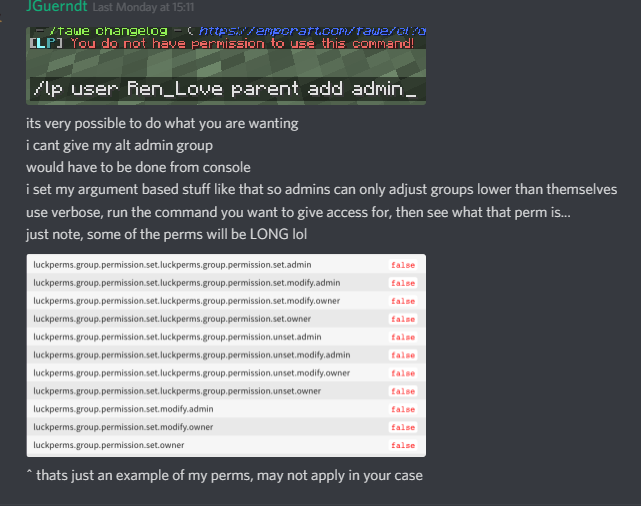
You could give them argument based permissions so they can perform the command to set a user to a particular group that you define with permissions
dapper helm
nice, thanks you ! i'll try this afternoon 😉
split veldt
np
hasty tree
A plugin that formats chat
 mossy stone
such as?
mossy stone
I am.. and it still doesn't work.
hasty tree
What chat plugin do you use
mossy stone
sec
o.O Sorry! I thought you meant only vault
Yeah no, I'm not using anything else for such
hasty tree
Well you'll need to find one you like and use that
mossy stone
Do you know any of these by any chance?
split veldt
EssentialsX, it's the easiest and most simple
mossy stone
Our server is designed to be as simple as possible, and you can't run essentialsx chat without the main piece which adds a lota features to the game
weary solstice
ChatEX
split veldt
You do know you can disable all the extras right
mossy stone
All other commands, etc?
split veldt
If you don't give permissions for them then nobody can use them
mossy stone
I'll try chatex first. 😄 Thanks!
weary solstice
😁
hasty tree
mossy stone
I already tried most of them, sorry for bothering though
split veldt
client=ms-android-samsung-gn-rev used windows and it still worked 😉
mossy stone
ikr lol
hasty tree
Yeah it's just query data, all that matters is what comes right after q=
Anyway. Good luck finding a chat plugin.
mossy stone
ChatEx worked, simple as heck. Thank you very much, @weary solstice
Sorry for the tag. Thanks Turbo and usb_hub / NZMC as well:D
weary solstice
Np :)
 west crown
How does one go about setting meta for max-homes through in game with luckperms / essentialsX
I thought it was just lp group default meta sethome #
split veldt
Pretty sure its a permission node
Not a meta node
Look up the documentation for EssX
west crown
Ahh so i do have to use essentials.homes.multiple.#
I guess it was just spongeforge for meta
split veldt
Yes
split veldt
Running both gives you a headache 24/7
hasty tree
There aren't many bukkit plugins that utilise meta
 serene moss
In the config file it says password: ''
When configuring database
Do i have to put the password between the '' or do i have to delete them and just put the password?
toxic wagon
add the password inbetween the ''
serene moss
Ok ty
What am i supposed to put here:
The following block defines the settings for remote database storage methods.
- You don't need to touch any of the settings here if you're using a local storage method!
- The connection detail options are shared between all remote storage types.
data:
toxic wagon
Data is fine, it's the parts under data you need to do
serene moss
I am using Bungeecord
toxic wagon
The parts you need to worry about are address database username password
serene moss
I want the permissions to sync
split veldt
You are doing it correctly then
serene moss
Okay
Do i need to do anything else than just connecting all the servers to the same DB?
toxic wagon
 toxic wagon
Yes
split veldt
It would pay to set the messaging service to SQL
toxic wagon
none or sql work fine for the messaging-service
serene moss
I set it up on all servers and restarted them, now when i try to connect i get: A database error occurred whilst loading permissions data. Please try again later.
toxic wagon
Can you please check the console for errors and upload said errors to hastebin.com and send us the link
serene moss
So we have a plugin that sends players to a random lobby, will i have to check the console for the lobby it tried to connect to, or the bungeecord?
toxic wagon
The server they tried to join
serene moss
hope thats correct link
It had alot of warnings
But it said it was sucessfully enabled at last
toxic wagon
GitHub
An advanced permissions plugin for Bukkit/Spigot, BungeeCord, Sponge, Nukkit and Velocity. - lucko/LuckPerms
serene moss
I created a database using the Pterodactyl panel, and on the Bungeecord server
Is that a problem?
toxic wagon
Nah, as long as you use the correct username, address, database name and passport
serene moss
I did
toxic wagon
If the port is different from the 3306 you'dd need to specify it as well
serene moss
Its 3306, but i specified it manually aswell
toxic wagon
is it localhost or remote
serene moss
Well the ip listed in the pterodactyl panel is 127.0.0.1:3306
toxic wagon
Does the username and password have access to the database?
serene moss
Idk, i just created a new database in Pterodactyl and it gave me a username and password
Oh
I see a possible problem
 magic root
Ptero is a bit weird since it runs things in docker.
I've always had to use something akin to 172.18.0.1:3306
serene moss
or no
I misread our server ports for 3300-3306 when they are actually 3000-3006
Ill try that Deenoh
So that same ip?
magic root
You'd be best off running ifconfig in your terminal and looking for the pterodactyl interface and making sure what the IP is
serene moss
I only have pterodactyl access, since i am not the owner/person who pays for the servers
magic root
Ah. I think that's the default, so you can try it. If that doesn't work I'd contact your host about it to make sure.
serene moss
Ok
Using that ip didnt fix the issue :/
Should i just try contacting the owner and ask him to run ipconfig?
magic root
Just ask what IP/Information you should be using for your DB. That way you're sure to get the information you need.
serene moss
So the owner says pterodactyl is using the main ip
like the one used to connect to server, but with :666
Should i try using the main ip and then :3306?
mental flax
Probably
 nocturne chasm
Make sure db name, user, password is correct and the host
serene moss
Oh i actually didnt realise until now that the Database name is not LuckPerms, but s13_LuckPerms
that might be the issue
thanks
Still doesnt work, could it be that i should not include the s13 and u13 thats in front of the database name and username?
toxic wagon
@serene moss You need to match the username, database and password exactly as it is for the database that you use
exactly as it was given to you
serene moss
Okay, i have done that, and it still doesn’t work
I really wanna get this solved, as we can’t join the server before it is
serene moss
I have confirmed that it’s the exact information, but it still doesn’t work.
I tried connecting using a Minecraft Chat client called MineChat, and it gave me 2 errors this time.
[LP] Permissions data for your user was not loaded during the pre-login stage - unable to continue. Please try again later.
and
Kicked whilst connecting to Lobby1: [LP] A database error occurred whilst loading permissions data. Please try again later.
mental flax
Check for errors in consolee
serene moss
mental flax
Do you have error on lp when loading?
serene moss
Anyone have an idea what is wrong?
nocturne chasm
startup log?
nocturne chasm
in your main directory /logs/latest.log i think
serene moss
Here it is
nocturne chasm
could you upload it to like hastebin.com?
serene moss
nocturne chasm
!errors
wanton stratusBOT
foggy quartz
What colors are there for prefix and suffixes?
 carmine sandal
You can use YAML storage type.
https://github.com/lucko/LuckPerms/wiki/Storage-types
GitHub
An advanced permissions plugin for Bukkit/Spigot, BungeeCord, Sponge, Nukkit and Velocity. - lucko/LuckPerms
 craggy tendon
lol. Can I use this without evrything but WITH BungeeCord... I cant speak good english, because i come from germany...
carmine sandal
@foggy quartz All Minecraft colors and format types.
foggy quartz
okay
carmine sandal
@craggy tendon You can install LuckPerms on all servers, include proxy BungeeCord and use pluginmsg sync method.
https://github.com/lucko/LuckPerms/wiki/Syncing-data-between-servers
GitHub
An advanced permissions plugin for Bukkit/Spigot, BungeeCord, Sponge, Nukkit and Velocity. - lucko/LuckPerms
Maybe I'm wrong about something. I have never used this data sync method.
How can I see all @wanton stratus commands?
 austere abyss
Heyy
Is there a way to import pex permissions into luck perms?
I'm looking to switch over
carmine sandal
Use this command: /lp migration permissionsex
austere abyss
Will that really do it all for me?
carmine sandal
PermissionsEx and LuckPerms must be enabled.
serene moss
@nocturne chasm I have checked the things in the list
carmine sandal
All you groups and users will migrate. More: https://github.com/lucko/LuckPerms/wiki/Migration
GitHub
An advanced permissions plugin for Bukkit/Spigot, BungeeCord, Sponge, Nukkit and Velocity. - lucko/LuckPerms
serene moss
There are some of the things I don’t know about though, since I just created the database using Pterodactyl
austere abyss
Can I disable pex now that I migrated?
carmine sandal
Yea
nocturne chasm
No idea myself then @serene moss, never really had issues using a database w/ Pterodactyl. Probalby just wait for someone who possibly knows?
serene moss
Welp
That would be bad, since I can’t connect to the server, and we are currently setting it up
And downtime is money 😦
 frozen harness
Is it possible to set up permissions that only work when you are in a certain game mode?
serene moss
Gamemodes as in Prison, factions and skyblock or gamemodes as in survival, creative and adventure?
frozen harness
Survival, creative, spectator
serene moss
Not that i know of :/
frozen harness
Hmm. Possible feature request.
bitter coral
Possible
serene moss
What would the use for it be though?
frozen harness
I want my admins to have to be in spectator mode in order to teleport. Basically I want them to do admin things only in spectator mode.
carmine sandal
LuckPerms have a context feature.
Maybe try to create your own context?
https://github.com/lucko/LuckPerms/wiki/Context
GitHub
An advanced permissions plugin for Bukkit/Spigot, BungeeCord, Sponge, Nukkit and Velocity. - lucko/LuckPerms
I refer to the wiki too often 😄 But there really are answers to many questions.
serene moss
Not really to my issue though, rip
carmine sandal
Also there is another idea. In order for the script to automatically reassign the group when the game mode command is executed. But its crazy.
@serene moss can you repeat your problem?
serene moss
Well, i get this error when trying to join after i have setup MySQL: A database error occurred whilst loading permissions data. Please try again later.
I have looked at the wiki and checked the host name, ip, username and password
frozen harness
I wouldn't know the first thing about writing a script and it doesn't look like the context allows for specific permissions to be used.
serene moss
But some of the things like if its online or if its blocked by firewall, i simply dont know, as i just created the database in Pterodactyl
carmine sandal
@serene moss Does your database use SSL?
serene moss
Idk what it is, i havent touched anything that has to do with SSL
carmine sandal
In fact, I recommend to use MariaDB and phpMyAdmin separately from Pterodactyl.
SSL it is specially security protocol for websites.
carmine sandal
Ohh... Sorry, I'm used to using only dedicated servers, not hosting.
serene moss
Oh i mean
WE have a dedicated server
At SoYouStart
32GB of ram, i7 4790K and 280GB SSD
carmine sandal
Then you can independently install MariaBD and DBMS phpMyAdmin
When you installing Pterodactyl you must set up a MySQL
serene moss
I just really want it to work with Pterodactyl, as it is my idea to use LuckPerms instead of PEX, which the owner of the servers wanted to since its "easier".
And i dont really want to make him create another database lol
Its also just that it SHOULD techincally work, but just doesnt
carmine sandal
Alright. Problems occur only when you connecting LuckPerms or other plugins also can not establish a connection?
serene moss
I have not tried with other plugins, its just LuckPerms i want to use with SQL currently
Maybe a ban plugin further down the line, but the server is very new and just being set up
carmine sandal
Maybe it's only Pterodactyl trouble.
serene moss
It could be pterodactyl thats the issue, but i have heard others using luckperms with database on pterodactyl
and they have said it works fine
carmine sandal
In this case, you should go to their discord server and try to ask already there.
Unfortunately, we can think about the problem for a long time. Maybe there will help faster as this is their problem.
serene moss
I will try, but i just think ill be referred to here xD
carmine sandal
¯_(ツ)_/¯
austere abyss
Is there a way to add a temp permission?
I'm making a skyblock server and I'm doing island upgrades
But I want them to reset after the server map ends
serene moss
You can specify time in the editor
bitter coral
permission settemp <node> <true|false> <time>
magic summit
@frozen harness you can do that, look for ExtraContext addon for LP, it gives game mode, WG region and I think one other context, just enable the ones you want from the ExtraContext config, then restart server and you can use spectator mode as a context. I use it and it works
austere abyss
@bitter coral I don't want to set time. Is there a way I could save it to a separate file and just clear data whenever I restart?
wanton stratusBOT
Hey Lion_fury! Please don't tag staff members.
bitter coral
"restart" = restarting the server or restarting the island?
austere abyss
Like a full map reset
bitter coral
Not I know p
frozen harness
@magic summit Thanks!
magic summit
😉
austere abyss
Darn
What about user data? Would that reset?
For example, If I add a perm directly to a user and not their group
magic summit
Lion, you could possibly use bulk edit to remove that perm, “/lp bulkupdate all delete "permission == perm.to.remove”
bitter coral
But well, when a group has a perm temp set and a user is in that group, bulkedit seems not right for that. As you can simply unset the permission of the group
austere abyss
Would I be able to do that with a *?
bitter coral
And bulkedit for one perm..
austere abyss
So I'm increasing island size for askyblock
magic summit
Yea, I thought they were giving the perm per player, sorry
austere abyss
Could I do /lp bulkupdate all delete permission askyblock.island.range.*
magic summit
You would need to use diff check
bitter coral
/lp bulkupdate all delete "permission ~~ askyblock.island.range.*" that shouls work if I'm not mistaken
austere abyss
Great thx
magic summit
Make sure to run it like the example shows, not how you tried, it won’t work since it needs to be told exact what it’s looking for and what to do
austere abyss
Do I need the quotations?
bitter coral
Yes
austere abyss
And the squiggle?
bitter coral
Yes
magic summit
I said exactly
austere abyss
Ok
magic summit
Lol
austere abyss
lol
magic summit
Ha Tobi, yea bulk edit on one perm slight overkill
 proven cloak
foggy quartz
proven cloak
foggy quartz
Do i have to install it on the spigot servers if i have it on bungee?
or does someone have a setup guide i can follow?
nocturne chasm
!bungee
wanton stratusBOT
austere abyss
How can I do a haspermission check?
foggy quartz
Can you have a permission on multiple servers but not all?
or is it just one or all?
austere abyss
Idk
foggy quartz
I have a really dumb question
that is probaly so basic but my dumb ass cant do it.
How do I add a username to a certain group?
Like I wanna set my friend to the admin group, but idk how.
foggy quartz
is user the players ign?
foggy quartz
thank you king
austere abyss
😄
serene moss
@carmine sandal welp
They just told me to change the ip via dedi terminal to 0.0.0.0
But that didn’t help
 queen latch
What's the issue?
serene moss
Well basically i get the issue: A database error occurred whilst loading permissions data. Please try again later.
I have done the steps on the wiki, but to no help
I won’t say that it can’t be me just being really dumb and missed something
serene moss
And also this is the third time I have had to explain the issue today
Using a ticket bot would make things much easier
tired turtle
not really
serene moss
Because all issues would be sorted
Well, the chat wouldn’t be cluttered with 3 different issues at a time
I would also be able to mute all other channels than my ticket, so that I only get notifications/unread marker when there is a message that I wanna see
Andre, why don’t you think it would be useful?
But well I really need my issue fixed, since I can’t continue with other things before it is.
 austere sapphire
Moved to this plugin today to replace group manager so far I love it great work chaps
Watched 14 videos to learn the the plugin so far no problems at all 😃
 fathom olive
So uh we moved from ChatEx to EssentialsXChat, and now chat colours don't work
We used to just put them at the end of a suffix (for message colours)
But now the message is just white
Is there a separate meta setting to set chat colour?
 keen prawn
If I change my db option of sql to mysql, the config will be empty in mysql, or convert by itself?
magic summit
@fathom olive you have to change the format under the EssentialsXChat section
GitHub
An advanced permissions plugin for Bukkit/Spigot, BungeeCord, Sponge, Nukkit and Velocity. - lucko/LuckPerms
fathom olive
I did, but using {displayname} the suffix shows up, but the colours don't alter message colour.
i.e using the format {displayname} {message}, with a suffix set as "&8:&c", all that's included in the suffix is the colon, and the "&c" doesn't carry over to the message content.
serene moss
Please guys, help me. Is am getting this error while trying to join: A database error occurred whilst loading permissions data. Please try again later.
I have tried all the things in the wiki already, but they didn’t fix anything
lapis ibex
And the error in the console? @serene moss
serene moss
This is the startup log: https://hastebin.com/afegilucuf.md
split veldt
Do you have the right address set?
Doesn't look like it can even find the database server you have set
@serene moss
serene moss
Well I believe so
I copied the excact address from the pterodactyl panel where I created the database
 kind quest
is there any way to bulk edit the worlds perms are active in?
wanton stratusBOT
:paperclip: https://github.com/lucko/LuckPerms/wiki
kind quest
thx i'll have a look
split veldt
@serene moss You may need to reconfirm you had the right one
serene moss
Nope I did not @carmine sandal
carmine sandal
Hmm
 clever spoke
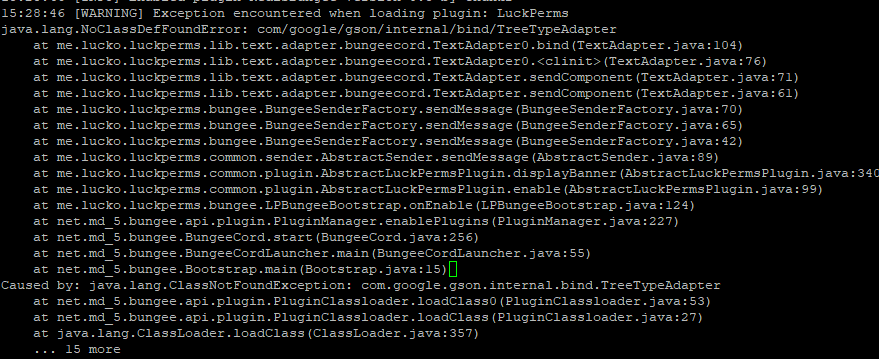
Can someone help me out as to why LuckPerms isn't loading on my BungeeCord instance? https://i.imgur.com/cYqOT6A.png
 clever spoke
gotcha, just that we run 1.8 and 1.7 so need to try something. I just tried HexaCord and works fine, cheers
magic summit
if on 1.8 - should be using 1.8.8
 fervent sun


