#support-1
1 messages · Page 538 of 1
 toxic wagon
 carmine moon
hmm how do I keep the role color without messing with name color
and also how can I have a space between the role and username
@toxic wagon
 wanton stratusBOT
Hey Fanta! Please don't tag staff members.
toxic wagon
You can add the space via the chat format.
toxic wagon
You can add a space at the end of the prefix as well like: "&4[Founder] &c" There is a space there and the &c will change the name colour to light red.
carmine moon
tysm
 fierce slate
@Fanta#1060 you can also edit the permissions with /lp editor and it's very easy to edit the prefix that way.
Or they can leave. Ouch.
 viral fern
Got any more info on this error?
> [21:43:11 WARN]: luckperms-hikari - Failed to validate connection me.lucko.luckperms.lib.mysql.jdbc.JDBC4Connection@61229d0a (No operations allowed after connection closed.). Possibly consider using a shorter maxLifetime value. I have followed as in https://github.com/lucko/LuckPerms/wiki/Storage-system-errors but it hasn't helped remove the message which is spamming me. Thanks in advance

GitHub
An advanced permissions plugin for Bukkit/Spigot, BungeeCord, Sponge, Nukkit and Velocity. - lucko/LuckPerms
 fathom minnow
@foggy quartz get a tablist which allows for functionality with vanish?
 split veldt
@viral fern is your datagbase connectable? Does it have too many connections and is it rejectng LP
viral fern
Yes, it connects fine - and all users have their ranks and i can change permissions and everything fine - its just spamming that error for some reason
split veldt
perhaps some of its connectons aren't being allowed, you may just be maxing out your database and lp is using the last 5 or so slots available leaving some unable to connect
 honest sparrow
does luck perms have an option to view installed plugins and click per plugin and per permision?
like a gui
 still arch
hi.
when I make an "addtemp" on a rank, the prefix does not change ... the player always has the prefix prefix of the 1st rank alros that normally he should have the new prefix
 hasty tree
@honest sparrow no
@still arch probably haven't set weights on prefixes
Do /lp user <user> meta info
To see what prefixes they are inheriting and the weights
honest sparrow
@hasty tree do you know if there is an addon?
wanton stratusBOT
Hey Cexay! Please don't tag staff members.
hasty tree
Nope
honest sparrow
can this convert from ultra permissions then?
hasty tree
I think that is one Luck couldn't do a migrator for
still arch
the priority of the rank owner must be 0?
honest sparrow
can i make a suggestion of adding a gui permissions manager like ultra permissions then?
fathom minnow
@honest sparrow /lp editor?
fathom minnow
no but it does autofill perms for known plugins and there are other features to list nodes
honest sparrow
that should do well thanks dictator
also are you the real dictator
or are you the fake one
 lapis ibex
@honest sparrow also if you’re just interested in the permissions LP knows about, use /lp tree
 cloud pilot
im dumb and cant figure out how to do permissions is there a premade config file i can just download
 bitter coral
Every plugins can specify there own permissions
cloud pilot
im setting up a pixelmon server i wanted grief protection and it needed luck perms so i downloaded it now i cant use any commands i tried reading the wiki but i dont get it i really just want a config file with basic permissions like admin and player
 distant dune
!usage
wanton stratusBOT
:paperclip: https://github.com/lucko/LuckPerms/wiki/Usage
distant dune
read that and u should be fine @cloud pilot
cloud pilot
thanks
 marble pewter
I am trying to use LuckPerms, but when I go to do /pl it is red.
bitter coral
Any issues when enabling?
marble pewter
Oh, It's not compatible. Do you know what version is compatible with 1.7.10?
Nevermind I got it.
 celest acorn
I think my patreon role was removed for some reason? I am still a patron on patreon, haven't changed anything. Is there something I missed?
celest acorn
I def do, I was luck's 1st or second patron
since January
maybe it has to do with my patreon linkage on discord
lapis ibex
@celest acorn you’ll need to talk to Luck I’m afraid
celest acorn
He has PMs disabled, which is why I posted here. Was hoping he would see it eventually.
lapis ibex
I’ll let him know
 quiet plover
i dont understand how mysql works once and now doesnt
lapis ibex
@quiet plover any error messages?
quiet plover
loading MYSQL
starting hikari
failed to init storage dao
[21:29:39] [Server thread/INFO] [STDERR]: [me.lucko.luckperms.common.storage.Storage:init:113]: java.sql.SQLTransientConnectionException: luckperms-hikari - Connection is not available, request timed out after 5001ms.
i read through the wiki
and i tried everything
 wanton stratusBOT
Hey Greqtest! Please don't tag staff members.
 frosty ibex
Mk
 tired turtle
2 things:
- Don't delete/edit messages with tags because people will still see the tag and "ghost pings" are more hated than normal ones. And
- Please check the console for any errors of LP and check the errors page on the wiki for any appearance of yours.
wanton stratusBOT
frosty ibex
K sorry, didn't read the rule when I tagged luck, won't happen again
GitHub
Version Française : Hey Salut, Je vous avez déjà envoyé un message privé sur spigot, et je me suis dis en re-lisant l'affiche de LuckPerms, qu'il fallait ouvrir un ticket sur Github...
That's all I found
Still not sure what's causing the issue
tired turtle
Do me a favour and start reading responses
 elfin egret
hey @celest acorn
Not sure what happened there
Probably the patreon bot derping
I've manually added the role back, should be good now!
frosty ibex
🤦 ty Andre
celest acorn
Thanks, luck
frosty ibex
Ehm I'm not sure which plugin is conflicting. The only ones I have are:
- ServerSelectorX
- EssentialsX + EssentialsXChat
- Multiverse
- PAPI
- TitleManager
- WorldEdit
lapis ibex
@frosty ibex not knowing the rules is ok (to an extend. I mean they are clearly written in #rules, but that's another issue). But please leave pings. Removing them makes it worse
@quiet plover have a look here:
!errors
wanton stratusBOT
quiet plover
I already did. It worked fine for mysql 8, but mysql 5.7 doesnt

 raven scaffold
hey how do i copy luckperms settings from one server to another
they're both running luckperms i just don't want to have to set it up again
split veldt
do you want them to both have the same permissions? @raven scaffold
raven scaffold
yes
split veldt
at all times or you just want to copy what you have existing from one server to another
raven scaffold
just copy what i have from one to the other
split veldt
just copy the luckperms folder in your plugins folder to the other servers plugins folder
 sturdy patrol
Hey, might be a stupid question, but how do I give myself all permissions in singleplayer? Trying to test a plugin that I'm working on, but I don't have any permissions of course, lol.
quiet plover
Im just saying what changed between it working and not working. Another plugin had an issue with tx_isolation, which was renamed in mysql 8. Thats why i downgraded. Weird enough that plugin now makes tables but throws an exception about a closed connection
It may very well be a config issue with mysql, but the config for luckyperms didnt change
split veldt
@sturdy patrol Open to lan - cheats enable.. But plugins on single player, how does that even work.
 foggy quartz
does this plugin worth with multiverse?
split veldt
Yes
foggy quartz
how would you set up permissions to only apply in worldXYZ but no where else?
toxic wagon
add world=<worldname> at the end of the command
split veldt
use the world filter and leave the server filter set to "global"
or, whatever your servers are named as
foggy quartz
so /lp group <groupName> permission set <permission> world=<worldName>?
toxic wagon
Yeah
frosty ibex
How might I add MySQL values to the bungee plugin?
toxic wagon
Or change the world option in the web-editor for pre-existing permissions @foggy quartz
@frosty ibex Add them in the luckperms bungee config
!bungee
wanton stratusBOT
frosty ibex
https://gyazo.com/52706dcc764785dd42bf0044ddaa6625
Is all I have when I open the folder, and ip-forward is set to true

I may be overlooking something, but I can't find anything that it could be.
split veldt
you're opening the .jar file?
frosty ibex
No, the folder
split veldt
try a fresh install perhaps?
frosty ibex
It's literally default, but I'll try once again.
 tame zodiac
i seem to be having issues with luck perms
i have the permissions set up and everything
i have made groups
but, the main problem is that they don't show up
even if i try to add it onto someone else
toxic wagon
@frosty ibex What are you trying to do
frosty ibex
Hook the permissions with my servers for bungee, and fix this issue: https://gyazo.com/b28d0d819539971de9eee219a8a467e6
toxic wagon
@frosty ibex What is the error saying in the console?
split veldt
https://i.imgur.com/5tm3xKB.png I just installed lp on a bungee server and this is what i got
 frosty ibex
split veldt
frosty ibex
split veldt
Seems to be working?
toxic wagon
@frosty ibex
frosty ibex
mhm?
toxic wagon
You need to use the luckperms bungee version on the bungee server
frosty ibex
I am
toxic wagon
and the spigot version on all the spigot servers
toxic wagon
It's better to use the same version number for all servers
split veldt
perhaps update to 4.4.17 fopr bukkit
 toxic wagon

LuckPerms - An advanced permissions plugin for Bukkit/Spigot, BungeeCord, Sponge, Nukkit and Velocity
LuckPerms is an advanced permissions plugin for Bukkit/Spigot, BungeeCord, Sponge, Nukkit and Velocity
frosty ibex
Aight, reinstalling then I gotta set up the MySQL, gimme a sec
That didn't fix the error.
Still have this: https://gyazo.com/5c44a0a66ea2bc9650ae907689aef16a
 toxic wagon
Same error in console?
split veldt
your database isn't reaching its max-connections by any chance
sturdy patrol
Plugins on singleplayer. You can put sponge into your mods folder just like you can on a server, lol. @split veldt
toxic wagon
What version is your server @frosty ibex
toxic wagon
That's why
toxic wagon
You need to be on 1.8.8 if you want to use the latest version
@frosty ibex You need to use the legacy version of luckperms to use 1.7.10
split veldt
@sturdy patrol You should be fine using open to lan and then enable cheats
sturdy patrol
Nope
split veldt
oh you have LP installed right?
toxic wagon
Just change the spigot servers to the legacy version and it should still work
frosty ibex
sounds good
sturdy patrol
Yeah lol, I'm just using a test server now instead xD
split veldt
I think LP blocks /op or similarly, cheats in this case.
toxic wagon
LP doesn't block op unless it's told to
https://github.com/lucko/LuckPerms/wiki/Configuration#enable-ops @sturdy patrol Have a look at that and the 2 settings below it
GitHub
An advanced permissions plugin for Bukkit/Spigot, BungeeCord, Sponge, Nukkit and Velocity. - lucko/LuckPerms
frosty ibex
Okay, that worked, and I can just install it on the other servers, hook them to the same database, and it will work?
toxic wagon
Yes, use legacy version on all your spigot servers, (if they are 1.7.10) and the bungee version on the bungee server
They will all work if you hook them into the database
frosty ibex
Thanks so much, you're a life saver.
oh and for this:
password: '' does the password go in the '' or instead of them?
toxic wagon
it can go in them
frosty ibex
mk ty
split veldt
Do you have a plugin to handle chat?
Essentials chat, etc
Multichat if bungeecord or anything?
hasty tree
You need a chat plugin to display prefixes
hasty tree
Also if it's a bukkit/spigot server you need vault
hasty tree
!meta
wanton stratusBOT
hasty tree
Everything is explained there
tame zodiac
ah okay
frosty ibex
Ehm, I have a issue. The data isn't syncing. I copy and pasted the config on all of my servers, but it didn't work. Could this be because I didn't set the information on the proxy?
hasty tree
I hope you didn't copy paste the whole config
hasty tree
Because there is some info that needs to be different on each server
frosty ibex
Welp, I guess I have some reinstalling to do :P
hasty tree
For the most part it is probably okay but you will want to make sure the server name is different on each install
Also make sure the storage method is mysql
If it's not syncing it's possible its still set to h2 or something
frosty ibex
Can the server name be anything?
frosty ibex
and is the storage-method: case sensitive?
frosty ibex
me?
tame zodiac
now that i've gotten the prefixes working, how would i go about getting the permissions to work
frosty ibex
/lp group <group> permission set <permission> <true/false> <context>
split veldt
by giving players/groups the permission node you want them to access
tame zodiac
they simply do not work
for example
i'd like to get a user to be able to do /help
but
even if i have it set up
it fails to work
wanton stratusBOT
:paperclip: https://github.com/lucko/LuckPerms/wiki/Verbose
hasty tree
Try that
tame zodiac
how do i access the web viewer
split veldt
./lp editor
hasty tree
/lp verbose record ... do commands... /lp verbose paste
frosty ibex
I like how we all instinctively put a . in front of any command even in discord, where it doesn't matter
 barren ibex
can i insert a non breaking space into prefixes?
if so how
frosty ibex
For my bungee support, do i need to create a config.yml in the LuckPerms folder?
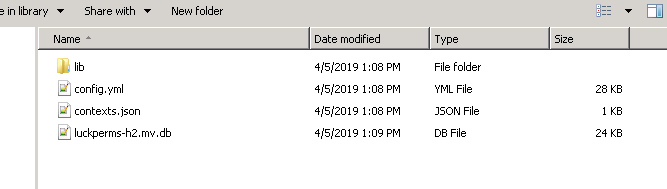
all I have is lib rn
it just loaded that way
toxic wagon
It should generate the config.yml
frosty ibex
It didn't though
hasty tree
Then you need to check the console for errors during start up
frosty ibex

Pastebin
split veldt
does your bungee support 1.7.0?
03.05 21:19:21 [Server] WARNING Exception encountered when loading plugin: LuckPerms
frosty ibex
Yes
frosty ibex
any idea what they mean?
split veldt
it's looking for a class that isn't in there by the looks of it, i'm no expert however.
did you pull the bungeecord from spigotmc.org?
frosty ibex
nah, got it set up i think its a custom jar
split veldt
someone made it for you?
frosty ibex
IDK, its a pebblehost staff who did it
split veldt
oh
can you not run your own versions
upload your own spigot.jar or bungeecord.jar files
 lost niche
is it updated for 1/14?
frosty ibex
Alright, I've gotta go for tonight, but I can't seem to connect my servers permissions via Bungeecord. There aren't even files in the LuckPerms folder of my proxy. Here's the startup log when I install the plugin (proxy):
Pastebin
tame zodiac
i forgot to say, but i highly appreciate the help in which you gave me
especially towards @split veldt as well as @hasty tree. i thank you both for seriously helping me
wanton stratusBOT
Hey blocy! Please don't tag staff members.
split veldt
No problem 😃
@frosty ibex Do you have the ability to uplaod your own bungeecord.jar to the server or have they locked you out of all that.
toxic wagon
@ruby sentinel Make default group a parent of vip. lp group vip parent add default
 ruby sentinel
amazing
toxic wagon
@sage vault Let's not spam.
 sage vault
YOU CAN NOT UNDERSTAND ME!
ruby sentinel
what
sage vault
I WANT IT
 light lily
Imortal, when I start my plugin, it says api is not loaded :/
toxic wagon
It's better if you show us the error message.
light lily
Pastebin
toxic wagon
For Luckperms API issues ask in #luckperms-api
light lily
the class LuckPerms is often mentioned in the error though
okay, but I'd really need an answer though :/
foggy quartz
mhh 1.14!
toxic wagon
?
toxic wagon
@iron needle Just explain what you need help with and someone will help
 iron needle
I'm trying to set a prefix for Owner group but its not showing
toxic wagon
Does it show in /lp user <name> info
toxic wagon
Then you need to make sure you have a chat plugin installed (and vault if you use spigot/bukkit)
toxic wagon
EssentialsXChat? Or just EssentialsChat
toxic wagon
Try using EssentialsXChat,
split veldt
Do you have essentials base installed?
iron needle
1 sec
toxic wagon
toxic wagon
Yes
toxic wagon
Yes
and normal essentials
Only have the EssentialsX and EssentialsXChat installed. None of the normal essentials
split veldt
Best if they come from the same version too
wanton stratusBOT
Hey KHAFx! Please don't tag staff members.
iron needle
srry
hasty tree
/ess version
iron needle
hasty tree
That's not essentialsX
iron needle
Ok
split veldt
https://www.spigotmc.org/resources/essentialsx.9089/ if you can't find it

SpigotMC - High Performance Minecraft
The download will provide you with all the essentials addons as well as the main plugin
iron needle
ty
 lapis comet
Would someone be able to help me? Trying to use "https://www.spigotmc.org/resources/♦-ultimatehomes-♦-highly-configurable-player-sethome-system-1-12-1-13-2.64210/" on my server. I was able to get the commands working, but have been able to allow users to have unlimited homes. https://gyazo.com/f501378789f8ad3586c6aca4847a3956 Here is a picture of the permissions, Thanks!
 bitter coral
The - doesn't works to negate permissions
You simply type in the permission and click on true and change it to false, that will negate it
lapis comet
So like this? https://gyazo.com/739c0fb7d892efff43b080dd7cbf48c3

Tried it but still having issues
AH nvm just fixed it
 silver canyon
HI, what is the permission to build/destroy a block in minecraft? I don't know it
bitter coral
That depends on your protection plugin or you have vanilla spawn protection enabled, to disable spawn protection simply set spawn-protection to 0 in server.properties
silver canyon
ok
toxic wagon
Check your chat format
iron needle
how
toxic wagon
Your chat plugin is a good start
iron needle
EssentialsxChat
toxic wagon
Check the chat format inside that plugins config.
toxic wagon
If you want.. It's not hard to check the format inside the essentials config.yml
toxic wagon
Yes
toxic wagon
Up to you, depends how you want the format to look
toxic wagon
Are you using the Bungee version of luckperms?
LuckPerms - An advanced permissions plugin for Bukkit/Spigot, BungeeCord, Sponge, Nukkit and Velocity
LuckPerms is an advanced permissions plugin for Bukkit/Spigot, BungeeCord, Sponge, Nukkit and Velocity
frosty ibex
Yes. I also use an outdated bungeecord version FYI
It says supporting versions >=Spigot 1.8.8
 toxic wagon
= 1.8.8
frosty ibex
I run a different bungee jar, I can upload it if it'd be helpful
toxic wagon
It's best to use the latest one
frosty ibex
Not sure if I can, as I need 1.7-1.8 compatibility
fathom minnow
@frosty ibex are you using travertine?
frosty ibex
Considering I don't know what that is then no
fathom minnow
travertine allows 1.7 - 1.14 support
frosty ibex
Is it for a bungee connection tho?
fathom minnow
yes its a fork of waterfall which is a fork of bungeecord
@frosty ibex
and i know for a fact luckperms bungeecord works with it
toxic wagon
@frosty ibex Luckperms needs 1.7.10 and the legacy version of luckperms to work.
frosty ibex
For bungeecord too?
toxic wagon
The bungee version on the bungee server then the legacy version on the 1.7.10 servers.
frosty ibex
Well the bungee version isn't generating the correct files
toxic wagon
Are you getting any errors on the bungeecord and are you actually stopping it then starting it after installing the plugin. Also have you tried actually updating bungeecord.
frosty ibex
I can't update it because I need to support 1.7
fathom minnow
@frosty ibex did you not read what either me or imortalshard said
frosty ibex
I can't use the version you suggested, there's no time to port it over. I am using the legacy version on my Spigots and the bungee on bungeecord
fathom minnow
@frosty ibex its literally a fork you dont need to change anything...
and once again read what imortalshard also said
'Are you getting any errors on the bungeecord'
frosty ibex
SEVERE Netty is not using direct IO buffers.
fathom minnow
cool now hopefully imortal can help you
otherwise to help even further send the startup log here in a hastebin
frosty ibex
fathom minnow
now they can properly help 😉
frosty ibex
Okay then
foggy quartz
hello guys
i`m useing luckperms
i have a problem
one day the luckpermss prefix isnt showing in the ingame chat
frosty ibex
Immortal? You there?
split veldt
@foggy quartz Are you running a plugin that handles and displays chat prefixes, as luckperms doesn't handle chat prefixes, it only sets them
foggy quartz
yes i am
but i don`t no what plugin are managing perfix
i checked essentialchat multivers
 mild wasp
Chatex
toxic wagon
@foggy quartz If you're using essentials make sure it's essentialsX and you have vault installed as well. Also make sure the prefix shows in lp user (name) info
foggy quartz
ㅐㅏ
frosty ibex
Any idea what my issue might be?
toxic wagon
I don't think it's luckperms related @frosty ibex. It think it's more your bungee server and how you have it setup.
frosty ibex
Okay, any idea specifically what the issue might be? I’m gonna try a 1.7-1.8 bungee jar
toxic wagon
https://ci.md-5.net/job/BungeeCord/1411/ Try that version.
lapis ibex
@frosty ibex if you need 1.7 support, use Traventine!
As mentioned several times before
You don’t need to change anything
Just replace your old bungee jar with the latest build of travertine and that’s it
bitter coral
With what?
 dapper valley
ahh
Simply someone just logged in to my server and could use this command: /lp user Mineriukas permission set *.* true
lapis ibex
Cracked server?
dapper valley
Ye
lapis ibex
Use online mode and that can’t happen
Stuff like that is an inherent problem of cracked servers. And not LP’s problem/issue
lapis ibex
Of course
Anyone can just use any name they want
And if you’re also using bungee and not securing the backend servers then yeah. That’s to be expected
dapper valley
I am using UUIDSpoof - Fix plugin, servers are firewalled
lapis ibex
Again. Not a LP issue
Either you have a security issue or your permissions are messed up
Either doesn’t belong here
#general at best
 radiant juniper
How can i set a user to a rank?
 open cradle
what are LP's dependencies
wanton stratusBOT
:paperclip: https://github.com/lucko/LuckPerms/wiki/Usage
lapis ibex
@open cradle none
radiant juniper
@lapis ibex but I still have a prefix
wanton stratusBOT
Hey Pomdre! Please don't tag staff members.
open cradle
@lapis ibex well luckperms is red
wanton stratusBOT
Hey Huskii! Please don't tag staff members.
lapis ibex
@open cradle check the console for errors
@radiant juniper erm not sure what you mean
radiant juniper
How can I change my primary group?
lapis ibex
It gets calculated automatically
Also the prefix is not based on the primary group, but rather on the weights of the prefixes
Pretty sure that is explained here:
!meta
wanton stratusBOT
lapis ibex
@radiant juniper
radiant juniper
Okay! Thanks i am new to lp 😄
 silent vault
brain? u there
lapis ibex
Just ask your question
silent vault
could you help me with this
i installed animatednames and i want it to say where prefix is Owner
how do i do that
also i dont want the suffix
lapis ibex
Check their docs?
silent vault
also dont mind the 2 and 20 at the end i have hacked client on
silent vault
?
lapis ibex
That has nothing to do with LP. As this is about how to configure another plugin. ANd that belongs in #general @silent vault
 remote lichen
Hi
I have luckperms for 1.14 and somehow my prefixes haven't worked yet.
Any have time to help me a bit?
remote lichen
Aah..
Wow that i didn't think of that
Any recommend chat format plugin i'd use for 1.14?
 delicate stream
Essentials has a chat plugin if you're already using it
lapis ibex
EssentialsX
bitter coral
EssentialsX doesn't supports 1.14 offically
delicate stream
Chat should be fine
remote lichen
That's what i was worried about
lapis ibex
@bitter coral and neither does Essentials xD
bitter coral
Yes
But EssentialsX works fine on 1.13 and on 1.14 I heard from people experiencing time switching when changing gamemodes
delicate stream
EssX itself should still work if you was intent on using that, beyond that, chat plugins aren't really something that break unless they go crazy with features
remote lichen
So i should just install essentialsX but only the chat plugin?
delicate stream
(Just, make sure you grab the dev builds, and some more internalish things might not work as expected)
bitter coral
^ But as EssXChat needs EssX there can be bugs at places you won't expect
delicate stream
You can't have just the chat plugin
EssXChat requires EssX, as it just adds on to it; deluxechat should be fine, just check the reviews
remote lichen
I will just jump the gun on EssX for now.
Or...
Ehh it's a hard choice
Because i know the developer of Deluxe chat and he adds so much random stuff to the table lol
Ugh nvm Deluxe chat had a money wall
Well too bad :/
 green acorn
There isn't a massive difference between what you can do with VaultChatFormatter and EssentialsX Chat, so if you really don't want to use EssentialsX and are happy with a more primitive chat plugin, VCF is probably worth a look
remote lichen
Okay
 silk night
how do i create a new group that displays the name and inheirts perms from my admin group?
foggy quartz
How to bulkupdate an uuid to delete all pemrs and groups and such
lapis ibex
@foggy quartz you want to remove everything from a certain player?
@silk night read those two:
!usage
wanton stratusBOT
:paperclip: https://github.com/lucko/LuckPerms/wiki/Usage
lapis ibex
!meta
wanton stratusBOT
silk night
ty
foggy quartz
@lapis ibex yes
wanton stratusBOT
Hey JohannesHQ! Please don't tag staff members.
lapis ibex
@foggy quartz use /lp user <user> clear
 lofty lark
I'm just really confused how do I change users groups ingame? do I need to do that through /lp editor?
 stoic ibex
lp user (user) parent set (group)
lofty lark
it's wrong ._.
lofty lark
thanks
foggy quartz
is luckperms compatible with spigot 1.14
iron needle
Is it ok to ask for developers here? to work free time in my server?
its not in rules
just the advertising part maybe a part of it
foggy quartz
Does anyone how to insert "luckperms_actions" to their db, i deleted that table by mistake (using workbench)
 proven forge
has anyone tested to see if luckperms works on 1.14?
tired turtle
It does
 austere pawn
Can anyone help me out? Players cant build nor destroy in my world and I already checked the config file
green acorn
Are you using EssentialsX AntiBuild?
bitter coral
It's either a issue in WorldGuard (or vanilla spawn protection, very unlikely)
frosty ibex
I'm using HexaCord and I can't figure out how to set up my MySQL database to sync
austere pawn
would anyone here like to hop in to my server and help check?
 whole wasp
any1 can help me?
toxic wagon
Only if you explain what you need help with. @whole wasp
whole wasp
i wanna make a default rank and i used the following commands:
/lp creategroup default
/lp group Admin meta setprefix default
/lp group (rank} parent add Default
what did i miss?
toxic wagon
You don't need to make the default group. It already exists.
distant dune
and for prefix u need to set some weights
toxic wagon
You can't delete the default group.
whole wasp
can i edit it?
toxic wagon
Yes of course.
whole wasp
how do i cange name/prefix?
wanton stratusBOT
:paperclip: https://github.com/lucko/LuckPerms/wiki
toxic wagon
If you using the editor. Use prefix.(weight).(prefix) for the prefix and displayname.(name) to set the name and prefix.
toxic wagon
You can't make a track default. But you can add the default group to a track.
lapis ibex
Also we don't provide suppoert for external plugins
wanton stratusBOT
toxic wagon
For different options
whole wasp
i renamed the default group
and prefix
can i add perms?
and new people will get them?
toxic wagon
Of course. If you renamed it with the displayname not the rename command.
bitter coral
LuckPerms just provides one prefix, every plugin can than get this prefix (directly or using Vault) and use it for it's purposes
bitter coral
There's none
whole wasp
when some1 joins, he gets that rank
bitter coral
!default
wanton stratusBOT
toxic wagon
@whole wasp I already told you. You can't make another group default. And I already linked that page to you.
bitter coral
Immortal already sent that link.... you would knoe if you read it
whole wasp
ok
bitter coral
Then you either didn't gave them the permission or set them the permission to false
whole wasp
ty it helped
whole wasp
no
bitter coral
You can use verbose in order to find out what perms you need to execute the command
whole wasp
if i wanna add a perm in 2 words, do i write it like this: Askyblock.Skyblockhub
 zealous light
nvm
whole wasp
to add those 2 worlds
bitter coral
Ah, already tought, doesn't looks like a Bukkit or Essentials message
You can't seperate worlds using commas, you'd need to set the permission for every world
whole wasp
ok
baddest plugin
doesntr work
tutorial sucks
see you
҉ ҉ ҉ ҉ ҉ ҉ ҉ ҉ ҉ ҉ ҉ ҉ ҉ ҉ ҉ ҉ ҉ ҉ ҉ ҉ ҉ ҉ ҉ ҉ ҉ ҉ ҉ ҉ ҉ ҉ ҉ ҉ ҉ ҉ ҉ ҉ ҉ ҉ ҉ ҉ ҉ ҉ ҉ ҉ ҉ ҉ ҉ ҉ ҉ ҉ ҉ ҉ ҉ ҉ ҉ ҉ ҉ ҉ ҉ ҉ ҉ ҉ ҉ ҉ ҉ ҉ ҉ ҉ ҉ ҉ ҉ ҉ ҉ ҉ ҉ ҉ ҉ ҉ ҉ ҉ ҉ ҉ ҉ ҉ ҉ ҉ ҉ ҉ ҉ ҉ ҉ ҉ ҉ ҉ ҉ ҉ ҉ ҉ ҉ ҉ ҉ ҉ ҉ ҉ ҉ ҉ ҉ ҉ ҉ ҉ ҉ ҉ ҉ ҉ ҉ ҉ ҉ ҉ ҉ ҉ ҉ ҉ ҉ ҉ ҉ ҉ ҉ ҉ ҉ ҉ ҉ ҉ ҉ ҉ ҉ ҉ ҉ ҉ ҉ ҉ ҉ ҉ ҉ ҉ ҉ ҉ ҉ ҉ ҉ ҉ ҉ ҉ ҉ ҉ ҉ ҉ ҉ ҉ ҉ ҉ ҉ ҉ ҉ ҉ ҉ ҉ ҉ ҉ ҉ ҉ ҉ ҉ ҉ ҉ ҉ ҉ ҉ ҉ ҉ ҉ ҉ ҉ ҉ ҉ ҉ ҉ ҉ ҉ ҉ ҉ ҉ ҉ ҉ ҉ ҉ ҉ ҉ ҉ ҉ ҉ ҉ ҉ ҉ ҉ ҉ ҉ ҉ ҉ ҉ ҉ ҉ ҉ ҉ ҉ ҉ ҉ ҉ ҉ ҉ ҉ ҉ ҉ ҉ ҉ ҉
toxic wagon
Okay then...
 magic dome
ban?
proven forge
when using luckperms where does it save all the permissions that i give?
proven forge
how can i view it?
hasty tree
But we recommend keeping it on h2 and just use the web editor for editing perms
bitter coral
!editor
wanton stratusBOT
hasty tree
/lp editor
proven forge
oh thanks
 strong hound
hi excuse me i try to convert this groupmanager permissions with the cmd lp migration groupmanager global but every time i try i get error, some help please?
distant dune
wat error u get
toxic wagon
@strong hound Try /lp migration groupmanager true Also make sure you have groupmanager still installed.
strong hound
ok
 raw geyser
/lp migration groupmanager true
[17:39:53 INFO]: Unknown command. Type "/Help" for help.
i am arckran
toxic wagon
Don't use the / in console
raw geyser
no of course i remove the /
toxic wagon
What does lp info show
proven forge
how do i make the groups show next to the player's name
toxic wagon
Get a chat plugin to display it
toxic wagon
https://github.com/lucko/LuckPerms/wiki/Command-Usage:-Group#lp-group-group-clone Either that, or add it as a parent for inheritance
GitHub
An advanced permissions plugin for Bukkit/Spigot, BungeeCord, Sponge, Nukkit and Velocity. - lucko/LuckPerms
raw geyser
i get the same error when i try lp info xD
toxic wagon
Depends what you're wanting to do
raw geyser
so probably is the luck permisions?
toxic wagon
@raw geyser Then Luckperms isn't installed.
If it is coming up with unknown command, then it means the plugin isn't installed @raw geyser
toxic wagon
Make sure the luckperms jar is added then start the server and see what happens
Make sure you check for any errors
raw geyser
[17:47:15 INFO]: [LP] MIGRATION [GroupManager] > Migrated 19 groups
[17:47:15 INFO]: [LP] MIGRATION [GroupManager] > Starting user migration.
[17:47:15 INFO]: [LP] MIGRATION [GroupManager] > Migrated 0 users.
[17:47:15 INFO]: [LP] MIGRATION [GroupManager] > Success! Migration complete.
Ty
so now i can remove the groupmanager jar and files?
toxic wagon
Yes
toxic wagon
!usage
wanton stratusBOT
:paperclip: https://github.com/lucko/LuckPerms/wiki/Usage
raw geyser
ok i give my self luck perms * but which is the cmd for change to group of another user? i cant found it
for example if i wanna give group admin to another user which is the comand?
 limber mauve
Okay wtf
Luck has an OG Account
Could be Discord Partner
but chose Discord Verification Program
whyyy
lapis ibex
@raw geyser all explained on the page immortal linked
raw geyser
yes i found it sorry
 humble compass
hey I was wondering if you could hid the "LP Log" messages in the server chat when you use commands like changing a prefix
toxic wagon
@humble compass /lp log notify off will hide the log message for you
lapis ibex
And they only show to people with a certain permission anyways. So your normal users won’t see it @humble compass
 river barn
is there a way to run LuckPerms entirely bungee wide? or does it have to be per world permissions only?
 bitter tulip
Hello I am trying to get two specific groups permissions to use /gamemode 1 and 2 with nucleus but it doesn't seem to be working.
split veldt
Pretty sure /gamemode is a minecraft command
minecraft.command.gamemode.creative
minecraft.command.gamemode.survival
bitter tulip
Yes but they want to use /gm 1
bitter tulip
which is nucleus
split veldt
Are the users in the gruops
split veldt
one?
bitter tulip
Yes.
split veldt
can you confirm they are in the group with /lp user [name] info?
frosty ibex
Is LuckPerms compatible with Paper 1.8.8?
bitter tulip
I forgot to give them the group.groupname permissions.
@frosty ibex check the versions for the plugin.
If it has a paper version which it does look for a 1.8 version.
split veldt
that would fix it, lol
bitter tulip
@split veldt ty
split veldt
np
toxic wagon
@frosty ibex Of course it is.
frosty ibex
Okay good
 magic summit
have sort of a weird question, there is another plugin that should do this, but id prefer if lp can. If there a way to give a perm based on a condition? namely, if player is in GMSP, they have a perm, but if not in that gamemode, they dont have it?
river barn
does anyone know where i can find a MySQL tutorial for linking bungee wide perms?
i have checked the wiki
magic summit
like to create a mysql database? to link, you just put your details in.
river barn
yes
magic summit
yes to create one?
river barn
i have MySQL open and its empty, I wanna create a database for lp
magic summit
ah
frosty ibex
What would this mean? I have the messaging-service: sql
magic summit
just input details and lp will create all tables
 frosty ibex
So does that mean I did it correctly and LuckPerms is just being dumb?
magic summit
i dont know your issue greq
magic summit
oh lol
frosty ibex
after doing /lp networksync
magic summit
i thought statt had that
river barn
you need a messaging service configured on your network
frosty ibex
messaging-service: sql is what I have
frosty ibex
Yes, the address, username, password, storage method, everything
magic summit
odd, i used the guide first time and never ran into issues
so ive not had any errors
magic summit
storage-method: MySQL
frosty ibex
for the proxy
river barn
sql - uses the SQL database to form a queue system for communication. Will only work when storage-method is set to MySQL or MariaDB. This is chosen by default when the option is set to 'none' and SQL storage is in use. Set to notsql to disable this.
frosty ibex
wdym?
magic summit
are you on a bungee?
magic summit
ok, do you have lp installed on the bungee or on the other servers "spigot/etc"
river barn
@magic summit will you help me learn how to setup the MySQL part for my bungee? I don't even know where to start inside the sql database
magic summit
you can dm me
frosty ibex
On both, but I have the legacy version installed on 2 of the three game servers
river barn
okay
magic summit
ok, and you have the bungee version on bungee and the other version on the other servers?
wanton stratusBOT
toxic wagon
!sync
wanton stratusBOT
magic summit
have sort of a weird question, there is another plugin that should do this, but id prefer if lp can. If there a way to give a perm based on a condition? namely, if player is in GMSP, they have a perm, but if not in that gamemode, they dont have it?
river barn
ty @toxic wagon
wanton stratusBOT
Hey Stattx! Please don't tag staff members.
river barn
Thank you for that help
frosty ibex
As for this, sync-minutes: -1 do I need that set to something other than -1 for it to work?
The MySQL database that is ^
toxic wagon
You don't need to change it from default
magic summit
when its setup, it will ping on any changes and update
frosty ibex
the minute I set storage-method: MySQL I start getting this error: https://gyazo.com/27890dee8e3031aa06c234c8d6118a75
 toxic wagon
@frosty ibex Then check the console for the error
river barn
try storage-method: sql
frosty ibex
proxy or the default server?
river barn
see if that works for you
frosty ibex
I tried that already
river barn
hmm
river barn
try with mysql all lower case
toxic wagon
@magic summit https://github.com/lucko/ExtraContexts#extracontexts Have a look at this
GitHub
Extra contexts for LuckPerms running on Bukkit. Contribute to lucko/ExtraContexts development by creating an account on GitHub.
@frosty ibex storage-method needs to be MySQL and the messaging-service needs to be sql
frosty ibex
that's what I have
I think I may be the dumbest person alive
I forgot to set one of the addresses
magic summit
oooo nice, now i dont have to get another plugin
river barn
at least you know how to setup a sql lmao
frosty ibex
xd
toxic wagon
@frosty ibex Usually helps if you check ALL the configs to make sure they are correct.
river barn
im reading what imortalshard sent me
toxic wagon
What is the error?
toxic wagon
@frosty ibex Caused by: me.lucko.luckperms.lib.hikari.pool.PoolBase$ConnectionSetupException: me.lucko.luckperms.lib.mysql.jdbc.exceptions.jdbc4.MySQLSyntaxErrorException: Access denied for user 'customer_71730'@'%' to database 'minecraft'
frosty ibex
is it the database name?
toxic wagon
The user doesn't have access to the database, make sure the username and password are correct and that the user actually has access.
frosty ibex
wait does the database name change?
toxic wagon
Depends on the name of the database. You need to check your database for the name, but by default it's minecraft
magic summit
your on pebblehost, your database name is same as username
toxic wagon
That error means you username or password is wrong, it can find the database, just can't get access
magic summit
its the customer_####
toxic wagon
@frosty ibex Your host should've given you the username and password
 magic summit
use whichever it is for the server you used to setup the mysql, like i used my bungee server, so its that servers info
when you go to your mysql databse from host, it will have that info
toxic wagon
That is the username you use, make sure your password is correct @frosty ibex
magic summit
the password is diff from your reg console login
magic summit
yep
frosty ibex
Yea. I'm sure the info is correct, my SQL database is on my hub, could that cause an issue?
So not the proxy
I mean at this point it can't hurt to try a different database
toxic wagon
See if you can login to the database with the username and password to make sure the account actually has permissions to the database
frosty ibex

That worked when loggin in
The configuration file now needs a secret passphrase (blowfish_secret).
does that mean anything?
toxic wagon
Make sure the username and password are the same in the configs and make sure the address and database name is the same in ALL configs
https://github.com/lucko/LuckPerms/wiki/Storage-system-errors#luckperms-cannot-connect-to-my-mysql-server That might help as well
GitHub
An advanced permissions plugin for Bukkit/Spigot, BungeeCord, Sponge, Nukkit and Velocity. - lucko/LuckPerms
Gives you a list of things to check
 vast orbit
Hey guys
How would I set a specific users group tag name
Example- Giving a user mod capabilities while keeping his Builder rank name
frosty ibex
Set the builder rank to the primary rank
toxic wagon
@vast orbit Just add mod to the user as a parent. Users can have more than 1 group
Just make sure inheritances and weights are all setup correctly.
vast orbit
But mod is a higher weight then Builder
I think I did /parentsettemp and it changes his tag
toxic wagon
Why not just use /lp user <name> parent add <group name>
and add the group to him. along with the builder one
He will have both groups then.
vast orbit
@toxic wagon even with that command it seems to be inheriting the mod tag
wanton stratusBOT
Hey AJ! Please don't tag staff members.
vast orbit
May I just do a custom tag name for him?
toxic wagon
THat is because the mod group and mod prefix have heigher weights
vast orbit
like &3[Builder]
frosty ibex
Or custom perms
vast orbit
Right, so how may I give him mod perms with keeping Builder rank
toxic wagon
you can set a specific one for the user using /lp user <name> meta addprefix <weight> <prefix>
toxic wagon
Heigher so it takes priority.
frosty ibex
``` where would I execute this?Great, I can take it from here
frosty ibex
and what would the ipadress be
vast orbit
Thanks a million
gosh darnit
Now his name is copying the color of the rank
&f doesnt seem to be fixing it at the end
toxic wagon
@frosty ibex In the terminal/shell for the database. Google it if you need to. The Ip is the database's IP
frosty ibex
gtg for the night
toxic wagon
Just add the colour at the end of the prefix EXAMPLE: '&4[Founder] &f'
vast orbit
ree its not working
Ill just make him a rank
I appreciate the feedback
okay wait
erm
If I do parent addtemp mod then a number
Is that the weight?
So I can put a value lower then jrbuilder?
nvm
toxic wagon
GitHub
An advanced permissions plugin for Bukkit/Spigot, BungeeCord, Sponge, Nukkit and Velocity. - lucko/LuckPerms
 tepid rapids
is there a command that gives all of the existing group the permission i want
tired turtle
You can let groups inherit permissions from others
tepid rapids
let me try for a sec
 storm anvil
okay so prefixes arent showing up when i add them in 1.14
austere pawn
prefix arent showing up for me also
toxic wagon
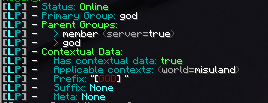
@austere pawn @storm anvil Do you have a chat plugin installed (and vault if you are using spigot) and does the prefix show in /lp user <name> info
 toxic wagon
Have you got a chat plugin installed?
austere pawn
what chat plugin?
toxic wagon
A chat plugin that handles the chat. Luckperms doesn't handle chat or displaying prefixes in chat, you need another plugin that handles them
austere pawn
ok. any examples of such plugins?
toxic wagon
GitHub
An advanced permissions plugin for Bukkit/Spigot, BungeeCord, Sponge, Nukkit and Velocity. - lucko/LuckPerms
austere pawn
ok thanks a lot! I finally got it working 😄
river barn
I have found a fix to all that error to networksync: (messaging is not configured) nonsense
what everyone needs to do is in the servers (spigot lp configs) messaging needs to be messaging-service: none And same for the bungee lp configs messaging also needs to be set to none.
there is a sql conflict happening if you use messaging-service: sql
storm anvil
still not working with vault and exxentialsx installed
magic summit
there are setting in essentialsx for prefix-suffix to be added in its config
toxic wagon
@storm anvil Still not working how, what's it doing?
@river barn If you use none for the messaging-service and MySQL for the storage-method, it will default to using sql anyway
magic summit
change-displayname: true and add-prefix-suffix: true
river barn
Yes imortalshard, thats the only way for the config to know to use sql as messaging-service. if we use messaging-service: sql it will cause it to error when the command is used "Luckperms Networksync"
storm anvil
it just doesnt display the prefix
magic summit
goataka, did you change those two things above in essentials config?
toxic wagon
@river barn Could you write up a github issue about it so it gets looked into to see if it is actually a bug
river barn
yes I will
toxic wagon
@storm anvil Does the prefix show in /lp user <name> info
toxic wagon
If you have EssentialsXChat and Vault installed (since you said you're using essentials) just check the chat format in the essentials config
as luckperms is doing it's job
river barn
imortalshard I have posted a issue in gihub
😃 thanks for all your help tonight as well
toxic wagon
@river barn Add Luckperms version and server versions as well. Just so people know what to use when replicating
 valid terrace
So anyone have any way to say, Disable world building in a certain world?
If thats possible?
toxic wagon
Do it with something like worldguard.
valid terrace
Is it not possible with Luckperms? I recall a while ago with perms such as PEX (Back in like 1.8 When i used to play a lot) i could set perms to build in certain worlds
toxic wagon
If you know the permissions for the building you can deny them for the certain world
valid terrace
Hmmm
I just run pixelmon, and the world Ultra i want to disable building in the entire world
toxic wagon
You could always use the verbose feature to find the permissions
valid terrace
How would i run that
toxic wagon
!verbose
wanton stratusBOT
:paperclip: https://github.com/lucko/LuckPerms/wiki/Verbose
valid terrace
I turned it on... Do i just Type in what i need?
toxic wagon
Once it's turned on. Just build or break stuff. It should give you a list of permissions
valid terrace
It just spams chat with a ton of permissions...
toxic wagon
You need to add filters. like /lp verbose on Imortalshard & !essentials
That will disable the permissions checks for essentials showing up in verbose
You can add more plugins like Imortalshard & (!essentials & !luckperms)
valid terrace
Ohhhh alright
toxic wagon
After you disable enough spammy plugins you should see the ones you want.
valid terrace
I see it popped up with a bunch of Griefprevention ones... But none i think i can use to disable a certain world :/
toxic wagon
You should be able to. Maybe read the documentation for it
storm anvil
@valid terrace you can just exclude essentials.build from the per world perm list or something like that
toxic wagon
@storm anvil That's only if they have Essentials-AntiBuild installed.
storm anvil
Or they could use another anti build plugin. Lots of different solutions! Thats what i like about plugins
Its going to take a bit to get the perms on my server sorted out
distant dune
@valid terracei responded in GP discord
 buoyant mural
I need help with setting the default rank I have a default rank which I want people to get when they first login in?
delicate stream
!default
wanton stratusBOT
 lavish tide
3 Star Specialists
toxic wagon
?
 blissful pine

 bitter coral
Was soll das jetzt? Ich weiß, Deutsch ist toll, aber.... was hat dieser Discord mit Militär zu tun?
 remote ocean
Is it possible to swap permissions around? Either in the web interface or in-game, to keep everything organised.
magic summit
imortal, the Extra Contexts worked perfectly!!! 😃 thanks my friend
toxic wagon
@remote ocean What do you mean swap them around
remote ocean
So have them grouped together, for example if I was to add an essentials permission but I wanted to make to make sure it was next to all the other essentials permissions instead of the top of the permissions list for that group/rank, is there a way to do that?
toxic wagon
GitHub
An advanced permissions plugin for Bukkit/Spigot, BungeeCord, Sponge, Nukkit and Velocity. - lucko/LuckPerms