#support-1
1 messages · Page 494 of 1
 hallow oasis
 wanton stratusBOT
Hey Serene! Please don't tag staff members.
hallow oasis
Actually my mistake I should have read the rules - Sorry for the tag!
 hasty tree
that certainly should work, have you set weights on your groups?
hallow oasis
I've not set any weights, would this cause that issue?
Also having "Group.Default" in my builder rank - will that auto promote everyone to builder as they join or will that simply give the builders permissions from the default group?
 warped fulcrum
@here can anyone help me, its probably really simple im just new
im just trying to make it so i can give players the ability to run a command in pixelmon
warped fulcrum
/pokeheal
hasty tree
@hallow oasis if you want players to receive the builder rank when they join, you will need to add it as a parent to default. currently you have it the other way round so builder inherits from default.
and yes, weights could certainly be the issue here. always set weights.
hallow oasis
Ok I will set the weights now! Thanks a lot. Also @warped fulcrum try adding this node to your group "pixelmon.command.pokeheal"
hallow oasis
Luckily LP is a super easy permissions plugin to use - Simply type /lp editor ingame to pull up the link to your editor. Here you can easily add commands to your groups.
hasty tree
you probably should read the usage guide if you don't know something as simple as adding a permission
!usage
wanton stratusBOT
:paperclip: https://github.com/lucko/LuckPerms/wiki/Usage
hallow oasis
Found the "weight" command in the wiki, here's to hoping this works! Thanks again.
Is a server restart necessary to get the inheritance to work properly after adding a weight?
I've made my default group weight 1, and the builder group weight 4.
hasty tree
shouldn't require a restart
what permissions are you expecting to work?
sometimes essentials has issues
hallow oasis
Well I am using /afk and /balance to test. They're both essentials. How can I go about fixing this?
warped fulcrum
okay i did the group and added the permission, how do i automatically give players the group acsess
hasty tree
right, just restart and see if it works
hallow oasis
If you set the node in the group "default" this will automatically give anyone coming into the server those permissions.
hasty tree
^
hallow oasis
If you want to set a "VIP" rank for that permission simply add "group.GROUPNAME" to the player you want.
Still doesn't seem to work properly unfortunately.
If all else fails I will simply create a copy of the default rank and go from there.
hasty tree
try verbose then maybe
or share your setup so i can make sure it's done right
/lp editor and paste the link
warped fulcrum
im not doing ranks, i was able to give specific players the group acsess but idk how to give all players it automatically, like whats the command
hasty tree
just assign things to the default group
because that's the group all players get when they join the server
warped fulcrum
whats the node for /kill?
hasty tree
!verbose
wanton stratusBOT
:paperclip: https://github.com/lucko/LuckPerms/wiki/Verbose
hallow oasis
Could I PM you the link? I don't want to paste it here for everyone.
 tired turtle
Sharing the link wouldn't affect you
hallow oasis
Ok great, have a look. I forgot I have to apply the changes.

LuckPerms - An advanced permissions plugin for Bukkit/Spigot, BungeeCord, Sponge, Nukkit and Velocity
A web based permissions editor for LuckPerms.
tired turtle
I'm sorry to ask, but what is your exact issue? A command not working?
(Didn't follow the entire chat so I'm sorry to ask that)
hallow oasis
Seems the players with the "builder" role cannot access any commands I have set for the "default" role. I.E. /afk
tired turtle
hm....
hallow oasis
I am trying to have builder (and all other groups I create) inherit the permissions from the default group as well.
Also, I have no errors in my console
hallow oasis
Very odd. Just had someone try another command from the default list "/motd" and it says they don't have permission. I've applied changes after every time.
tired turtle
Do you use Essentials or EssentialsX?
hallow oasis
I use EssentialsX currently.
tired turtle
okay.
That is really odd....
Did you check with the verbose command, if the permissions are checked?
hasty tree
can you also paste your config (remove any database details like host and passwords)
i have a suspicion about something
hallow oasis
Not sure I understand the verbose command fully, let me get the config.
Delete this after accessing it please.
Actually it won't matter I don't have anything in there.
hasty tree
hastebin would have been better :P
hallow oasis
Ah, give me a moment. I am actually just getting off work and about to head home. Will you be here in about 20 minutes? I'd love to get this resolved tonight.
hasty tree
okay i'm not seeing anything odd in there either
hallow oasis

Pastebin
BRB very soon - If you have any ideas please PM them over.
(Heading home)
tired turtle
So your server is sponge?
warped fulcrum
yea
tired turtle
There's no real op that you can have on sponge.
As soon as a permission plugin is installed does Sponge disable the OP system
tired turtle
So your best go is to apply the perms.
Afaik does it work like you can set luckperms to give all perms of lp
warped fulcrum
if i use luck perm mod do i need sponge?
tired turtle
I don't quite understand
tired turtle
I don't think so
If your server is sponge, you need the sponge version of LP
But when you want to run a normal server without mods (just with plugins) go with spigot instead
hasty tree
you can use luckperms on most versions of minecraft server
warped fulcrum
Im trying to use pokemon editor and it says i dont have permission
how do i get past that if i use sponge and luckperms
 kind ether
How can I make it so default members can build and destroy blocks?
also inherit the normal minecraft default permissions?
 twilit delta
If I use buycraft with luckperms should I just do lp user {name} parent set donator for it to update a players rank or is there a better way?
 scarlet vale
Sounds right
hasty tree
that's one way to do it
twilit delta
what are the other ways and do they have benifits?
hasty tree
well depends if you are using tracks or not
and if you have more than one donator rank
also you realise parent set will remove any other groups a user has
which may not be ideal
hasty tree
yep, generally add is more commonly used
twilit delta
cool 👍
scarlet vale
Sounds right.
twilit delta
that also answers my question I was about to ask as well
 obsidian copper
Hi
I get this
[06:08:42 WARN]: [luckperms-1] WARN me.lucko.luckperms.lib.hikari.pool.PoolBase - luckperms-hikari - Failed to validate connection me.lucko.luckperms.lib.mariadb.MariaDbConnection@679c4331 (Connection.setNetworkTimeout cannot be called on a closed connection). Possibly consider using a shorter maxLifetime value
Maximum lifetime is already short
30m
I dont have this problem on bungeecord while its connected to the same mariadb
 toxic wagon
@obsidian copper https://github.com/lucko/LuckPerms/wiki/Storage-system-errors#mysql-no-operations-allowed-after-connection-closed-error

GitHub
An advanced permissions plugin for Bukkit/Spigot, BungeeCord, Sponge, Nukkit and Velocity. - lucko/LuckPerms
obsidian copper
Alright i will change it when i am home, cant login my SSH rn
obsidian copper
@toxic wagon Why do i get this error on the build server and not on the bungeecord server
wanton stratusBOT
Hey PixelNotFound! Please don't tag staff members.
obsidian copper
they are on the same MariaDB
 humble heart
Hi, if i don't run a bungee server, do i have to use MySQL?
tired turtle
No. MySQL would only be required, when you want to sync permissions snd groups across multiple servers
humble heart
Noted. Thank you and have a nice day! 😃

 lapis ibex
If you're using a database, then yes. If you're using files, then no
Anyways the best way to stop bot attacks is by not running your server in offline mode or if it's behind a bungee, to protect it so only your bungee can connect to it
 brisk notch
wdym by "yes" and "no"
 undone void
how can i delete default group user files? is it possible
obsidian copper
To what should i change this
it says 600
does it mean minutes? seconds?
MS
To what should i change it if i want 31 minutes
LP is on 30minutes
1860?
lapis ibex
@undone void @brisk notch I meant that it shouldn’t create player files for users that just have the default group, but it will create an entry in the database
obsidian copper
Brain can you help me
lapis ibex
You can have that value pretty high
obsidian copper
I want it to be 31 minutes
But i dont know what i should type
for wait timeout
lapis ibex
Then you have to ask google what unit that is
obsidian copper

Stack Overflow
I changed these timeouts globally with:
SET GLOBAL wait_timeout=30; SET GLOBAL interactive_timeout=30
and noticed that I have another application running which got problems with these "low" timeo...
this was the only thing i found
 forest laurel
@elfin egret your plugin is the best permission plugin ever
wanton stratusBOT
Hey ๖̶̶̶ζ͜͡𝓲𝓖𝓪𝓶𝓮𝓻2к𝟏9ッ! Please don't tag staff members.
 minor stream
@foggy quartz Just ask here
 foggy quartz
alright well
minor stream
Unless you're coding a plugin against the LuckPerms api, then ask in #luckperms-api
foggy quartz
uh
no its about weights
this player has the helper rank but in chat he has a player purchaseable rank.
i have set weights of each rank

was wondering why the player rank is override the staff rank in chat
others in other discords ive asked in said that it has to do with the ranks not being on the same track
minor stream
Could you run /perm group helper meta info and /perm group lord meta info?
foggy quartz
ss it here then?
minor stream
Please. Also, track shouldn't affect that. It's just a little gimmick tool that provides easy ways to promote/demote players.
So I'm not sure what they're talking about.
foggy quartz
 minor stream
How are you doing your prefixes and suffixes?
foggy quartz
nametagedit for above head and in tab
deluxechat premium for in chat lmao
minor stream
That seems like a lot of redundant setup imo
foggy quartz
meh im only using deluxes for deluxetags
minor stream
So what I think is happening here is that your weights are irrelevant.
You have hard-coded prefixes through other plugins.
But that's why nte is working probably.
foggy quartz
if anything deluxe chat also has prioritys and i set them the same way
  lord:
    priority: 500
    channel: ''
    prefix: '&5[&dLord&5] '
    name_color: '&d'
    name: '%player_name%'
    suffix: ' %deluxetags_tag% &7> '
    chat_color: '&f'
    channel_tooltip:
    - ''
    prefix_tooltip:
    - '%player_name%'
    - '&bRank: %vault_group%'
    name_tooltip:
    - ''
    suffix_tooltip:
    - ''
    channel_click_command: /ranks
    prefix_click_command: /ranks
    name_click_command: '/msg %player_name% '
    suffix_click_command: ''
  helper:
    priority: 800
    channel: ''
    prefix: '&3[&bHelper&3] '
    name_color: '&b'
    name: '%player_name%'
    suffix: ' %deluxetags_tag% &7> '
    chat_color: '&e'
    channel_tooltip:
    - ''
    prefix_tooltip:
    - '%player_name%'
    - '&bRank: %vault_group%'
    name_tooltip:
    - ''
    suffix_tooltip:
    - ''
    channel_click_command: /ranks
    prefix_click_command: /ranks
    name_click_command: '/msg %player_name% '
    suffix_click_command: ''
What I would recommend is to leverage vault prefixes and suffixes, then have DeluxeChat and NTE rely on those values. That way, you configure once and guarantee consistency.
For instance, I only have two NTE groups. And everyone uses them.
Groups:
  Afk:
    Permission: nte.afk
    Prefix: '&8&o[AFK] %vault_suffix%&o('
    Suffix: ) &o%vault_prefix%&8&o%player_displayname%
    SortPriority: -1
  Default:
    Permission: nte.default
    Prefix: '&7%vault_suffix%('
    Suffix: ) %vault_prefix%&f%player_displayname%
    SortPriority: -1
The only difference is one gets applied when you're afk.
foggy quartz
oh my god i just realized i dont have vault set up for that smfh
i have that for the tool tips tho when you hover over the rank lmao
vs my config above ^
minor stream
Yeah. That's how I'd do it everywhere.
You seem to already have the vault placeholderapi plugin, so it shouldn't be too bad.
foggy quartz
yea i just forgot about the placeholder ngl
minor stream
I do pretty much the same thing with my chat channels too. The only difference between channels is the very first part of the format where it's given the color code and the channel name in brackets.
channels:
  OOC:
    color: gray
    chatcolor: gray
    mutable: true
    filter: false
    autojoin: true
    default: true
    distance: 0
    cooldown: 0
    bungeecord: false
    alias: o
    permissions: None
    format: '&7[OOC]{suffix}[{easytitlesreloaded_title}]&f {prefix}{nickname}&f:'
This is VentureChat though-
foggy quartz
sorta worked... ill tweak it..
thanks though!
minor stream
Sure thing
 harsh bay
is my server supposed to automatically close when i open the browser editor?
harsh bay
weird, mine does
doesn't crash
it fully saves and everything
its like /lp editor triggers a /stop
harsh bay
this is just a small server for friends run on my PC, for about 20 people, but I want some people to have admin and mod and stuff when I'm not a t my desktop
im running spongeforge with about 6 mods
harsh bay
just a sec
lapis ibex
@harsh bay
harsh bay
the bug hasn't happened again and my debug log has been overwritten
 frozen harness
Is it possible to use per world permissions/meta to set permissions so that you have like 3 homes available in one world and 4 separate homes in another world without giving permission just for 7 homes? Separate them per world?
lapis ibex
@frozen harness if the plugin separates the homes per world, then yes @frozen harness
Easy as cake to do from LP
@harsh bay if it happens again, then just send me the log
lapis ibex
LP can do per world stuff easily
frozen harness
Yes, and I love it!
foggy quartz
Hi,
obsidian copper
Suggestion, /LP editor should have a feature to create new groups
tired turtle
@foggy quartz My best guess is with a plugin that does that
obsidian copper
leap.* false never global global none
leap.ceo true never global global none
tired turtle
@obsidian copper This is a planned feature for the future afaik, but we can't guarantee that it will be added in the near time
obsidian copper
KK
How can i make everything with leap false except leap.ceo
how can i give a perm more weight
tired turtle
It should work like you showed above.
Because by default do "more detailed" permission override those with wildcards
 mossy mortar
tired turtle
mossy mortar
tired turtle
/lp user <your IGN> permission set <permission>
 robust atlas
HI! :D
robust atlas
Welp. I goof'd. All my new users are in the default group... annnnnd I need to figure out a way to autojoin them to the correct group, without wrecking staff >_>
tired turtle
I mean you can let default inherit perms of your main group
robust atlas
originally I had planned to put FJP or similar on, and so when new users joined, it'd auto correct.... but I was unable to build this in the order I was hoping :S
AND CommandBook isn't working on 1.13? O_O
wanton stratusBOT
 mental flax
You can probably use default assignment :o
robust atlas
I remember seeing this now. I think this is why I decided to go this route. :D
tired turtle
@red cargo Please ask here instead of doing so in DMs.
Here are more people that can help you, since not everyone (me included) do not use nukkit.
 red cargo
Does LuckPerms have a group formatting built into it for nukkit?
red cargo
Yes
robust atlas
I know in spigot, the assignment of the prefix/suffix content is done through LP, but it's use is done through any number of chat managers. I don't know about nukkit though. Perhaps there's a chat manager for nukkit which can utilize it.
red cargo
Ok
robust atlas
https://github.com/lucko/LuckPerms/wiki/Prefixes,-Suffixes-&-Meta#displaying-prefixes-and-suffixes
Looks like there's no support for it in nukkit.
GitHub
An advanced permissions plugin for Bukkit/Spigot, BungeeCord, Sponge, Nukkit and Velocity. - lucko/LuckPerms
red cargo
Oh, ok thanks for the help
robust atlas
https://nukkitx.com/resources/lpchat.86/ try this @red cargo

NukkitX
red cargo
Thanks!
robust atlas
WARNING: NO ONE HERE will be able to gurantee it works or isn't malicious.
use at your own risk :)
red cargo
Ok
robust atlas
It's CreeperFace though, so it's probably legit... but there's always that possibility it's not the same author, or that it's broken with newer builds of LP
 twin juniper
I'm running a Bungee network and I'm going to symlink the plugins folders of all of them. Will that cause any issues for LuckPerms?
Also, is there a permissions list of Luckperms permissions anywhere?
robust atlas
that'll cause problems for any plugin that needs to write files.
and there is a list on the wiki
twin juniper
Why would it cause an issue?
robust atlas
because if two servers try to write to the same file at the same time, it can cause the second to fail writing

Unix & Linux Stack Exchange
Let's say I open a file a for reading. What if an application, let's call it aWriter writes to this file in random intervals. Are there any possibilities of me receiving improper file contents if I...
sorry, first one loses
and here comes the expert :D
(possibly to prove me wrong)
 delicate stream
General gist is that plugins 1) often don't expect those files to change externally, so very rarely you're going to see some pro from that; 2) Plugins often don't even save their own data safely, what makes you think they've gone to support external read/write locks?
robust atlas
pets the cat
delicate stream
For config files, so long as the plugin isn't saving them it's fine to symlink that kinda thing, but for actual data, it's generally not a good idea unless the plugin actually has support for it
hasty tree
yeah, i wouldn't do that. symlink the .jar plugin file but not its configs.
you need the configs to be different for each server anyway, in that you need to change the server name.
 random vault
/lp user [player] meta setprefix &d&l is creating an invisible annoying space bettwen the rank and my name.
meta-formatting: prefix: format: - "highest" - "highest_from_group_byte" - "highest_own" start-spacer: "" middle-spacer: " " end-spacer: ""
This are my meta formatting settings
This is my "byte" prefix
prefix.1.&6&ki&6&lByte&6&ki&r&6&l (with a space)
and my player prefix &d&l (no space)
And the output un the chat is [Owner] Byte &d&lJasperHasArrived
(2 spaces bettwen "Byte" and the name)
Any solution?
hasty tree
probably your chat format?
random vault
Let me check
Thanks for the fast awnser tho
Nope, I just use '{DISPLAYNAME}&7:&f {MESSAGE}' so it uses the displayname from lp
It seems like setting the prefix &d&l creates a space.
hasty tree
wait you're stacking them right? remove the space from middle-spacer
random vault
Ok let me try
omg that was so easy, thanks Tubotailz.
That thing was getting so annoying ;P
robust atlas
check that middle-spacer. Maybe remove it, for testing. From what I got, you're assigning two prefixes... that space may be doubled up.
random vault
Yes @robust atlas its fixed now, thanks :p
red cargo
Can LuckPerms connect to a external SQL server?
tired turtle
LuckPerms supports remote databases like MySQL or MariaDB
hasty tree
that's how it is meant to work with a network
red cargo
Can I use a MariaDB with other plugins if I have LuckPerms setup for that server already?
red cargo
Ok, thanks 😀
foggy quartz
Hey
I can't get someone's perms to work
Like, one player gets perms
I do the same thing for another player
they don't get them
hasty tree
gonna need more info...
what commands are you using?
what perms?
are you using groups?
have you tried verbose?
!verbose
wanton stratusBOT
:paperclip: https://github.com/lucko/LuckPerms/wiki/Verbose
foggy quartz
So I got the command wrong.
fuck.
I was using meta set parent
No, its parent add
 sweet cove
Hi people, quick question
Is it possible to force a nickname for a user + keep its colour
frozen harness
stupid question, how do you format the world specific permission. I forgot.
 jade epoch
Hey, I have a weird question
I want to give my co-owner permission to promote and demote staff, but doing that gave him perms to set himself as owner.
Do you know how I could fix this?
I've got the luckperms.user.demote and luckperms.user.promote
hasty tree
@sweet cove not really LuckPerms related ask in #general
@frozen harness https://github.com/lucko/LuckPerms/wiki/Context
@jade epoch https://github.com/lucko/LuckPerms/wiki/Argument-based-command-permissions
hasty tree
sorry i probably should have split those messages up lol
hasty tree
also you may want to enable this in your config
https://github.com/lucko/LuckPerms/blob/master/bukkit/src/main/resources/config.yml#L288
jade epoch
What does it do?
hasty tree
read the comment...
hasty tree
your config is probably old, you can just add it
as long as you're using a more recent version of LP
jade epoch
ok
hasty tree
the setting was added 5 months ago so if you've updated since then you can add it to the config
jade epoch
oki
 vocal viper
yo its me again, welcome to the salty splatoon how tough are ya.
anyway does anyone know where the fork of that rpg/mcmmo plugin is for the current update of sponge?
 unreal lodge
Hey guys
So some sort of mod, mind explaining whats up here? https://pastebin.com/itHXkyvd
unreal lodge
It's star perms.
 idle fable
?
hasty tree
permission set
idle fable
/lp group owner permission set *
hasty tree
yes
idle fable
Ok
Thanks ;)
What is the ChatEX plugin for? I saw an error in the chat #issues
I'm sorry for my shit English, I'm using the google translator. xD
idle fable
/lp group default permission set essentials.modifyworld*
unreal lodge
So some sort of mod, mind explaining whats up here? https://pastebin.com/itHXkyvd
toxic wagon
@idle fable ChatEx is a chat plugin. It lets you format chat.
idle fable
Ok
/lp group default permission set essentials.modifyworld*
Is that the permission to break / build on the map?
toxic wagon
You can use the verbose command to find out the permissions that are being checked.
!verbose
wanton stratusBOT
:paperclip: https://github.com/lucko/LuckPerms/wiki/Verbose
idle fable
I do not have wifi, the plan of my mobile phone includes Whatsapp and Discord free. I forgot to pay the ticket, anyway thanks
toxic wagon
/lp export (name) You could've just looked at the wiki...
unreal lodge
@toxic wagonSo some sort of mod, mind explaining whats up here? https://pastebin.com/itHXkyvd
wanton stratusBOT
Hey Luigical! Please don't tag staff members.
unreal lodge
Sorry @wanton stratus been ignored for hours. Sure you understand you bot.
hasty tree
doesn't mean you can just randomly tag staff
toxic wagon
@unreal lodge if I knew I would've replied. Next time don't randomly tag me.
hasty tree
no answer generally means no one knows.
best to just add an issue to github.
unreal lodge
Sorry @hasty tree @toxic wagon
wanton stratusBOT
Hey Luigical! Please don't tag staff members.
hasty tree
🙄
foggy quartz
Good evening :)
Does luckperms have sub groups like group manager?
Thanks in advance 😃
hasty tree
if by sub groups you mean multiple groups then yes
foggy quartz
Thank you 😃
 twilit swan
will sponge version of luckperms connect with a database from spigot luckperms?
toxic wagon
Yeah it will. Just make sure you specify which server you want the groups/permissions going to. Or change the table name option so it stores it all in a different table for the sponge server.
twilit swan
I want groups and permission the same for staff more or less the same on all servers. i have a mix of spigot and spongeforge servers
toxic wagon
Then don't worry about changing the table name, just use the server context to justify the spigot permissions from the sponge permissions.
twilit swan
ok
foggy quartz
I need help with BungeeGuard, please, can anyone help me?
twilit swan
This channel is for LuckPerms.
hasty tree
luck does bungeeguard as well, though i'm not sure if this is the right place to ask for help with it
hasty tree
either that, or add an issue to github
foggy quartz
all right
frozen harness
if I give someone essentials.fly and then give them essentials.fly: value: false world:anarchy, does that cause issues or will they be able to fly in all worlds excluding the anarchy alias worlds
 green acorn
They will be able to use the /fly command except in that world, yes
That doesn't mean they are prevented from flying - if fly mode is left enabled or turned on by another plugin, they will still be able to fly
 abstract condor
How does luckperm bungee insteract with luckperns bukkit? i want to make a plugin for my proxy that has moderation stuff like /kick and itll have a permission node like server.kick, so are the permissions the same on the bungee and bukkit servers?
tired turtle
LuckPermsBungee is only for BungeeCord and doesn't interact with spigot.
The only thing it does in connection with spigot is acting as a receiver and transmitter for log and update messages from LuckPerms on the backend servers
abstract condor
even if i use a mysql database?
bc i want it so the perms are the same for everything
tired turtle
LP uses SQL as messaging service by default.
And when both Spigot LP and Bungee LP share the same database, they will share permissions
jade epoch
I have a question
..that I just forgot
i remembered it now
How do I stop my online config for creating a file for every member?
Every time a user joins they get a user tab
so say I have 20 members, there is 20 online tabs
harsh bay
people on my server can't go into other dimensions as they don't have sufficient permission
what is the node for dimensions?
 wraith vapor
I have a problem.
When i add a player to 2 groups with both groups a prefix
It doesnt show the second prefix
Why?
tired turtle
@harsh bay I assume Sponge?
You can always use the verbose command of LP to find permissions.
!verbose
wanton stratusBOT
:paperclip: https://github.com/lucko/LuckPerms/wiki/Verbose
 magic dome
yes
toxic wagon
@coral folio of course you do. Vault is also a good choice to get if you're using spigot.
 coral folio
Well vault not really needed..
might have to install essentials..
dont want it at all..try to make all on my own code but just too much
toxic wagon
Vault is needed if you're using spigot. An if you're wanting essentials make sure you get EssentialsX but there are plenty of other plugins out there that are purefuly chat focused.
foggy quartz
I am loosing users
due to luckperms errors
i have that stupid lp error connecting to database error again
[LP] A database error occured whilist loading permissions data. Please try again later.
my database is up and running and online
 clever mortar
hi
toxic wagon
o/
toxic wagon
I just replied but no i'm not here.
clever mortar
ok
foggy quartz
Web panel is down for me.
clever mortar
can som1 answer this question
should i get luckperms
pex and groupmanger dont work for me
i need spigot
oh shit
foggy quartz
?
delicate stream
...
clever mortar
alright
toxic wagon
@foggy quartz What luckperms version are you using?
foggy quartz
Latest for spigot. ^
toxic wagon
Works fine for me.
foggy quartz
Must be something on my side.
clever mortar
hey
guys
im using a server host
it doesnt work
it says error when creating group
yay
hasty tree
It'd be useful if you posted the error
forest laurel
@foggy quartz i have this problem too, but i have one solution. Restart your server and then it will work.
 dense fjord
is there a command to remove the log for luckperms when someone adds something to a person or group or something cause i know i can from the config but im talking for individual person
toxic wagon
The command /lp log notify on/off can be used to stop the logs showing for a certain player. Or just deny them the permission luckperms.log.notify
dense fjord
thank you
toxic wagon
@clever mortar Still haven't seen any errors so i'm guessing you're either not wanting it fixed or you are trying to fix it yourself.
clever mortar
@toxic wagon IT says cannot creat group or something like that
wanton stratusBOT
Hey Shamdoo! Please don't tag staff members.
toxic wagon
That's not very useful. Are there any errors in console or on startup
toxic wagon
Are there any errors in console or on startup
toxic wagon
Look at your console. Are there any errors when you start the server. Or after using the command. error creating group tells us nothing about what's happening
 modest quiver
Hello, is there a way to deny a permission node?
toxic wagon
Just add false after the permission node in the command
modest quiver
hmm
i did
lp group role_member permission tg.user false
but they still have permission to the command
tired turtle
What is the output when you've run that command?
toxic wagon
/lp group <groupname> permission set <permission> true/false
modest quiver
thats what i did
[20:58:00 INFO]: RainbowTea issued server command: /lp group role_member permission set tg.user false
[20:58:00 INFO]: [LP] LOG > (RainbowTea) [G] (role_member)
[20:58:00 INFO]: [LP] LOG > permission set tg.user false
 somber hazel
May be a stupid question, but what is the equivalent command to /manuadd [user] [group] in Luckperms? I can't find information on manually setting a player as a group
toxic wagon
@somber hazel https://github.com/lucko/LuckPerms/wiki/GM-&-PEX-Command-Equivalents#group-manager Read that
GitHub
An advanced permissions plugin for Bukkit/Spigot, BungeeCord, Sponge, Nukkit and Velocity. - lucko/LuckPerms
!usage
wanton stratusBOT
:paperclip: https://github.com/lucko/LuckPerms/wiki/Usage
toxic wagon
That would be a good page for you to read as well

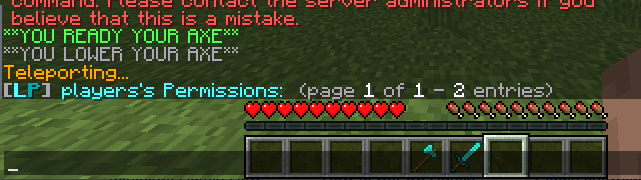 toxic wagon
What version of luckperms are you using @fresh mortar
 fresh mortar
@toxic wagon nothing 😒
wanton stratusBOT
Hey WyRe! Please don't tag staff members.
toxic wagon
Weird, does the permissions show in /lp user <name> editor
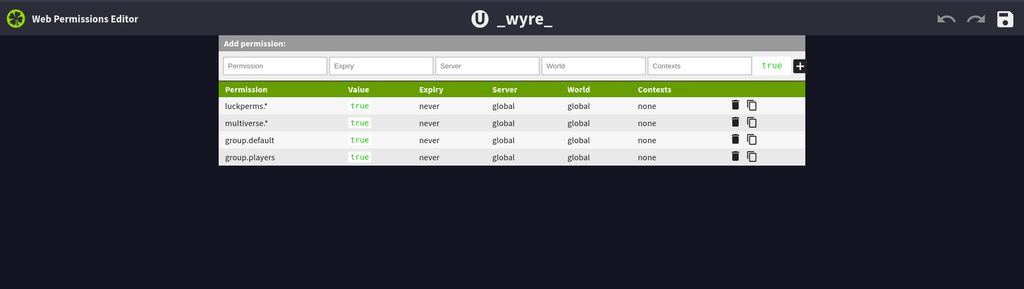 toxic wagon
Try a server restart and see what happens
fresh mortar
should I've got EssentialsXXMPP?
I've not enabled
but I've already restarted the server several times
mm nothing 😦
 ripe lichen
Hey guys, how do I give my administrators permission to use whatever vanilla Minecraft commands they need?
fresh mortar
lp user _WyRe_ info does work
but lp user _WyRe_ permission info does not :_(
neither lp help
ripe lichen
I feel like that's not what I asked
 echo pivot
What's the correct placeholder
For CMI autorank? LP says &p is not a valid username/uuid
ripe lichen
I'm seeing exactly everything except what I need on the wiki
toxic wagon
@ripe lichen Just give them the permissions for the commands
@echo pivot %player_name% should work fine.
ripe lichen
I can't find the name of the node
And it would be easier to use one node that gives them all the commands
toxic wagon
@fresh mortar XXMPP has nothing to do with it, i'm not sure what the issue is really. It's weird.
@ripe lichen Have you tried google, it's pretty easy to find the vanilla minecraft permissions
Otherwise use verbose to find the permissions
!verbose
wanton stratusBOT
:paperclip: https://github.com/lucko/LuckPerms/wiki/Verbose
fresh mortar
I've enabled verbose but I don't get any output yet
toxic wagon
That wasn't for you @fresh mortar
toxic wagon
I"M not exactly sure why it would be doing it, it's not something i've seen before haha
fresh mortar
well, should I report this to github?
toxic wagon
Yeah
 dense oak
有人会连接数据库吗
foggy quartz
I keep gettingan error saying [LP] A database error occured whilist loading permissions data. Please try again later. This is the 3rd time that i have had this problem, my database is up and running, and i do not see what the issue is
toxic wagon
Then read the errors in console
foggy quartz
[05:07:58] [pool-7-thread-1/WARN]: Caused by: java.sql.SQLException: null, message from server: "Host '192.168.1.51' is blocked because of many connection errors; unblock with 'mysqladmin flush-hosts'"
mysqladmin flush-hosts is not a valid command for mysql, how am i susposed to unblock it?
toxic wagon
@foggy quartz Just use FLUSH HOSTS; That should work.
 tender saddle
Hello, question. How do I disable certain commands for default users , like /pl or /plugins ?
 drifting obsidian
Negate their perms for it, though I'd take a look at https://mcserverrant.weebly.com/rants/why-you-shouldnt-hide-your-plugins if you're planning on negating /pl
tender saddle
would I just negate them with a minus symbol? Could you share an example for a command I might use to negate?
I believe the permission is named bukkit.command.plugins
twin juniper
Hey guys. Currently installing LP for Bungee and I'm just curious about the setup.
For the Bungee server itself, do I set server: to global or leave it as bungee?
Feel free to @ me with reply
toxic wagon
!bungee
wanton stratusBOT
toxic wagon
!sync
wanton stratusBOT
toxic wagon
@twin juniper Read those
twin juniper
Ty!
obsidian copper
LP prefixs are doing weird lol
toxic wagon
Right, and that tells us nothing so we can't help unless you give us more detail.
obsidian copper
I know i am getting screenshots rn
These are the default permissions
But this is the prefix and suffix i get
@toxic wagon Thats isnt right
wanton stratusBOT
Hey PixelNotFound! Please don't tag staff members.
toxic wagon
Have you got a chat plugin installed
toxic wagon
That chat format is when deluxechat isn't giving the rank a format.
toxic wagon
Make sure default has the chatformat permission
obsidian copper
But it works with other ranks except for default
I already did debug and deluxechat is handling the chat messages for default
toxic wagon
Give them the permission for the chat format.
obsidian copper
Okay
Same issue
chatformat.default I added this
[08:14:38 INFO]: [build_hub]<PixelNotFound> tes
[08:14:38 INFO]: [LP] VB > pixelnotfound - deluxechat.filter.bypass - false
[08:14:38 INFO]: [LP] VB > pixelnotfound - deluxechat.color - false
[08:14:38 INFO]: [LP] VB > pixelnotfound - deluxechat.formatting - false
[08:14:38 INFO]: [LP] VB > pixelnotfound - qaplugin.use - true
[08:14:38 INFO]: [LP] VB > pixelnotfound - chatformat.default - false
[08:14:38 INFO]: [LP] VB > pixelnotfound - deluxechat.url - false
Hmm this is weird
the default group has chatformat.default
toxic wagon
How did you add the permission
obsidian copper
lp check PixelNotFound chatformat.default
[08:15:31 INFO]: [LP] Permission check result on user pixelnotfound for permission chatformat.default: false
Using online editor
toxic wagon
Did you save the editor and run the command it gives you
hasty tree
the permission is saying false so it has been set to false somewhere
otherwise it would say undefined
obsidian copper
lp group default permission info
[08:16:48 INFO]: [LP] default's Permissions: (page 1 of 1 - 11 entries)
[08:16:48 INFO]: > animatednames.group.default (true)
[08:16:48 INFO]: > bukkit.command.help (false)
[08:16:48 INFO]: > bukkit.command.plugins (false)
[08:16:48 INFO]: > bukkit.command.version (false)
[08:16:48 INFO]: > chatformat.default (true)
[08:16:48 INFO]: > leap.default (true)
[08:16:48 INFO]: > namelessmc.command.getnotifications (true)
[08:16:48 INFO]: > namelessmc.command.register (true)
[08:16:48 INFO]: > namelessmc.command.report (true)
[08:16:48 INFO]: > namelessmc.command.validate (true)
[08:16:48 INFO]: > weight.1 (true)
hasty tree
then it's likely that user does not inherit default or inherits another group where it is set to false
/lp user <user> info
obsidian copper
lp user PixelNotFound info
[08:17:49 INFO]: [LP] > User Info: pixelnotfound
[08:17:49 INFO]: [LP] - UUID: e6a540e3-368d-4a64-8611-bae8540a508e (type: mojang)
[08:17:49 INFO]: [LP] - Status: Online
[08:17:49 INFO]: [LP] - Primary Group: default
[08:17:49 INFO]: [LP] - Parent Groups:
[08:17:49 INFO]: [LP] - > default
[08:17:49 INFO]: [LP] - Contextual Data:
[08:17:49 INFO]: [LP] - Has contextual data: true
[08:17:49 INFO]: [LP] - Applicable contexts: (server=build) (world=build_hub)
[08:17:49 INFO]: [LP] - Prefix: ""
[08:17:49 INFO]: [LP] - Suffix: " » "
[08:17:49 INFO]: [LP] - Meta: (weight=1)
I do have the correct Suffix and Prefix when i do that command
And parent group
hasty tree
no prefix
hasty tree
i see
obsidian copper
But the problem is that chat.format.default is true but when i do check is says its false
hasty tree
do they have access to those other permissions?
hasty tree
do they have access to those other permissions?
as in can they access commands related to those permissions
obsidian copper
Yes
[08:21:28 INFO]: [LP] Permission check result on user pixelnotfound for permission namelessmc.command.register: true
Its fixed now
Restarting did the job

 hasty tree
testing servers are 👌
obsidian copper
Thats not a bad idea xD
Lets do it lol
How can i make a group inherit from default
Stupid question?
toxic wagon
GitHub
An advanced permissions plugin for Bukkit/Spigot, BungeeCord, Sponge, Nukkit and Velocity. - lucko/LuckPerms
toxic wagon
Just give them group.default
toxic wagon
If you are a member of default group or in a group that directly or indirectly inherits default then you do
obsidian copper
But are you a member of default if you get set to another role
toxic wagon
If you use parent set then it depends if the group you set inherits from default
toxic wagon
Up to you
obsidian copper
kk cool
 fathom minnow
lapis ibex
fathom minnow
lapis ibex
“vc’s”?
toxic wagon
voice chats
foggy quartz
is there a basic permission node link anywhere?
toxic wagon
"basic permission node" For what?
foggy quartz
adding permissions to groups
toxic wagon
!usage
wanton stratusBOT
:paperclip: https://github.com/lucko/LuckPerms/wiki/Usage
foggy quartz
what would the permission be for /help ive always used essentails xD
toxic wagon
You can use the verbose command to find out what permissions are being checked.
!verbose
wanton stratusBOT
:paperclip: https://github.com/lucko/LuckPerms/wiki/Verbose
foggy quartz
What if you were to add a prefix, does that need to be done in config or can be done via command?
wanton stratusBOT
foggy quartz
ty
lapis ibex
Why exactly did you send a friend request?
twin juniper
I just setup Bungee with two servers and LP on all 3.
I opped myself but I can't access the /server command now.
Is that an LP issue?
hasty tree
op doesn't affect bungeecord
lapis ibex
No. Permissions are completely separate to each server
And you really shouldn’t be using OP anyways
twin juniper
I believe I have them setup globally.
lapis ibex
You don’t understand. Every server has separate permissions
Installing LP and linking all instances to the same database lets them have the permissions through LP
But OP is provided by Minecraft itself and not LP
twin juniper
Gotcha
Op disregarded then, I can link my servers with LP by installing it on the proxy and the subsequent servers and putting them all on the same database, no?
lapis ibex
That’s also one of the reasons why you shouldn’t use it. It’s outside of the control of LP
Yes exactly
!bungee
wanton stratusBOT
lapis ibex
!sync
wanton stratusBOT
lapis ibex
Read these two pages
twin juniper
I read the network installation one.
That's what I used to set it up.
I'll check out the sync.
lapis ibex
Ok. They have pretty similar information
twin juniper
So if they're on the same db and all set to global, I should be good, right?
Also, if sync-minutes is set to -1, does that mean it syncs non-stop or never?
lapis ibex
-1 is off. It syncs using the messaging service
Which is best to be set to sql
Make sure to use the same database (and table prefix) and messaging service for all LP instances
hasty tree
make sure you name your servers in the config, don't just keep them "global", then you can set server specific permissions/groups
twin juniper
I'm actually hoping to keep all the servers with the same permissions.
They will all essentially be copies of one another.
toxic wagon
Still, change the server name options, and the perms will still be global unless you give them the server context.
twin juniper
Change the server name in each individual server config?
toxic wagon
Yes
hasty tree
there's no harm in not doing it
you never know when you might want to add a server specific permission
twin juniper
Yeah, it's a nice identifier and may change the setup in the future.
Is there a minecraft.* or bukkit.* permission I should give myself as owner?
 queen latch
You can indeed give yourself both of those, and lots of plugins will support it too like luckperms.*, but don't give yourself * in general, because some plugins break when you give that
queen latch
It would just be *, permissions don't have an actual defined format they have to be
toxic wagon
No, Just * by itself, But that permission can break a lot of plugins.
twin juniper
Ah, yeah I was going to do each one individually.
I'm just curious what default permissions I should give myself as owner.
minecraft.* and bukkit.* are all I can think of.
queen latch
Hang on lemme send you across my editor
twin juniper
Okay, ty!
 bitter coral
Why you shouldn't give yourself *? I know that there are permissions like chatmanager.nochat but you can just negate these perms, if you know about them, which you should, because a good plugin has all of them in their doc / spigot / bukkit / somewhere page standing
queen latch
Yeah, you can negate the bad perms but that requires lots of effort and there will always be some you miss
toxic wagon
@bitter coral Okay, imagine you are a large network and you have like 60+ plugins each server and you give yourself *, now there is one issue that it causes and you want to negate the permission for that issue. You'd have to figure out which of the 60+ plugins it comes from, then work out which permission is causing it. Now imagine if multiple things are broken because of it. You'd spend hours trying to debug unnecessary issues.
queen latch
@twin juniper https://luckperms.github.io/editor/?rl7qEnqJ0M
Tech is my admin group
LuckPerms - An advanced permissions plugin for Bukkit/Spigot, BungeeCord, Sponge, Nukkit and Velocity
A web based permissions editor for LuckPerms.
twin juniper
No bukkit.*?
queen latch
Nope, there's not really many bukkit specific commands
toxic wagon
Like 4-5 if i remember correctly.
queen latch
mhm
bitter coral
Ok, you are right with that, but also you don't install like 60 or even just 20 plugins at once, you test them out, check if they are working
And even if you forgot to test them as a admin you will recognize the issue when you are back in the admin group, and if thr issue was never before and it has to do with a function from a plugin that you have recently added you know from which plugin it is and you know into which you need to look more
toxic wagon
An you can't test for every possibility and scenario. Things will come up months after you've tested it all. You can never 100% test every case.
hasty tree
- is just the lazy way out. put more effort into your permission system and you'll have a much better setup
lapis ibex
@bitter coral and there are also plugins that actually break. Like GriefPrevention for Sponge
foggy quartz
Does being op not matter wwith luckperms?
I'm op on my server but still cant do all permissions xd
toxic wagon
Op doesn't always give you everything.
foggy quartz
that sucks, its literally given me no perms XD
hasty tree
permission to do what? be more specific
foggy quartz
in my experience with 1.7.10 if i had op i can do perms of any plugin without the manual perms
now i gotta add permissions for so much as /tp
foggy quartz
yes
/lp user {user} set * true
is the cmd i needed if anyone wants it for reference
lapis ibex
@foggy quartz on Sponge OP gets disabled as soon as a permissions plugin is installed
@mental flax and no. Don’t do that
foggy quartz
ahh
hasty tree
he was just correcting the syntax
wraith vapor
When i add 1 player to 2 groups it only displays the prefix of the group with the highest weight. Is there any way to make it so both prefix 's are displayed?
foggy quartz
hey, so i am setting a prefix with luckperms in my groups, but it isnt showing the prefix's when people type
if its not compatible with showing prefixes, i also have chatmanager, but not sure if that can help show prefixes
how is it you add someone to a group?
foggy quartz
How to fix this problem? https://hastebin.com/qitawinoki.php (I have changed source code of AsyncPreLogin to ignore cancelled events and it crashes server
robust atlas
Is permissions.yml compatible with luckperms?
obsidian copper
lapis ibex
@robust atlas no
foggy quartz
anyone using griefprevention with sponge?
queen latch
@foggy quartz Ask your question rather than asking if anyone knows x 😛
foggy quartz
Do you know any of the permission nodes for grief prevention?
Seems that its just not working for me >.>
 fiery granite
Quick question, I have Argument based command permissions working for one set of permissions for staff, but the otehrs isnt, and no idea why
    world: PirateCraft_1
    value: true
- luckperms.user.parent.removetemp.privateer:
    world: PirateCraft_1
    value: true
- luckperms.user.parent.remove.privateer:
    world: PirateCraft_1
    value: true
- luckperms.user.parent.add.privateer:
    world: PirateCraft_1
    value: true
The parent add works but the addtemp does not
 terse wagon
https://pastebin.com/c0gytE3x Is this supposed to throw an exception? (happens when stopping the server)
Pastebin
 weary steppe
Is there a way to give for example Senior Mods a permission to grants certain ranks?
So they can't give themselves Owner Admin etc
lapis ibex
Read the wiki page Argument Based Permissions @weary steppe
weary steppe
So for example
They need this luckperms.modify.user.others
[base command permission].modify.[group name] and this example: lpb user <name> group set Helper
Would that give them access to grant the helper role?
lapis ibex
Enable the setting and use verbose to figure out the permission nodes
weary steppe
I've just made a track and given them access to the track
So they can only promote to helper/mod
lapis ibex
Ok
weary steppe
luckperms.user.demote.staff would that be it or do I not need to add the track name at the end?
wanton stratusBOT
:paperclip: https://github.com/lucko/LuckPerms/wiki/Verbose
somber hazel
for Luckperms, where is the permissions file?
like the actual file that has all of the groups and stuff?
groupmanager, for example, had groups.yml
lapis ibex
@somber hazel by default LP stores all permission data in a single binary file using the h2 database engine
somber hazel
how does one go about editing this?
lapis ibex
You can switch to something like YML, but it's best to use commands or the web editor
!editor
wanton stratusBOT
wanton stratusBOT
:paperclip: https://github.com/lucko/LuckPerms/wiki/Usage
somber hazel
huh, interesting
I prefer manually editing a file, but I can try the web editor. thanks
lapis ibex
And again, if it's not for you, you can still use YAML
foggy quartz
hihi so im using luckperms + bungee
but bungee commands (e.g. /server) aren't working anymore after installing lp
lapis ibex
Did you install LP on all servers including the bungee?
fiery granite
Any help for my situation above

 lapis ibex
@fiery granite try using verbose to debug
@foggy quartz make sure you follow these two guides
!bungee
wanton stratusBOT
lapis ibex
!sync
wanton stratusBOT
somber hazel
How to set a default rank? Migrated from GroupManager, new players do not have a rank.
lapis ibex
!default
wanton stratusBOT
foggy quartz
@lapis ibex been there done that
wanton stratusBOT
Hey Emil! Please don't tag staff members.
somber hazel
you cannot change the default group?
lapis ibex
It's spelled out on the page
somber hazel
"I made it so that the default group is not configurable."
lapis ibex
That's the answer
But there are three methods to effectively change it listed right below
@foggy quartz IP-Forwarding enabled on the bungee and Bungee mode on all backend servers?
foggy quartz
yes
lapis ibex
Ok
Can I see the outputs of /lpb info, /lp info, /lpb user <you> info and /lp user <you> info?

 lapis ibex
It clearly says you need to use a database storage type
foggy quartz
mY bAd
lapis ibex
No problem 😉
somber hazel
So I'm using an autorank plugin, after a certain amount of playtime the autorank plugin executes "lp user {their name} parent set {rank}" console output says it worked but it didn't change their rank
foggy quartz
Hello,
For some reason all the players got permissions for all essentials commands.
someone knows a fix
lapis ibex
@somber hazel how do you know it didn't work?
somber hazel
Players reached a certain amount of playtime, but their rank stays the same. The other commands that the autorank plugin does (give them items) work, but their rank stays the same.
I also logged in as an alt and went into console and did "lp user alsoChorals parent set citizen" console output said it worked but the rank did not change.
somber hazel
prefix, missing permissions, it was still the old rank
somber hazel
it says group is citizen, but perms and prefix point to it still being emperor (previous rank)
does it need to be case sensitive?
lapis ibex
No. It should all be lowercased
somber hazel
it is
lapis ibex
Then my guess is that the prefix of emperor has a higher prefix priority than citizen
somber hazel
You would be right. How would I fully change over to a different rank?
lapis ibex
parent set is the right command
You're probably using inheritance
That's where that is coming from
foggy quartz
Hello,
For some reason all the players got permissions for all essentials commands.
someone knows a fix
somber hazel
I see. So, lets say I were to go from "groupa" (lower priority) to "groupb" (higher priority) by doing lp user {user} group set groupb, the plugin should give the player the prefix from groupb, as well as the permissions?
foggy quartz
everytime i do FLUSH HOSTS; the error reapears in like 30 minutes
the use mysqladmin flush hosts thing
fiery granite
@lapis ibex I did use verbose
wanton stratusBOT
Hey GodsDead! Please don't tag staff members.
somber hazel
Does LuckPerms store playerdata in the db file as well?
lapis ibex
Yes
fiery granite
I did use verbose
and I cant even tag people to reply to them
so my message is now lost
fuck this, im making a github ticket
lapis ibex
Jesus
 feral ruin
I have a question
lapis ibex
Go ahead
feral ruin
How do you remove all the player-linked permissions?
idle fable
LuckPerms-Legacy need EssentialsX? Or Common Essentials?
lapis ibex
What do you mean by "player-linked"?
lapis ibex
@idle fable use EssentialsX
feral ruin
and permissions that players have themselves instead of being attached to a group
lapis ibex
Ah I see
feral ruin
Yeah...
lapis ibex
Run /lp bulkupdate users delete from the console
lapis ibex
No
feral ruin
Okay, Thank you!
lapis ibex
You're welcome
fiery granite

GitHub
I have Argument based command permissions working for one set of permissions for staff, they can add parent for a specific group, but they are refused to addtemp parent, this was working at one poi...
putting in a ticket so that its not lost
or ignored
idle fable
LuckPerms-Legacy need EssentialsX? Or Essentials default? with EssentialsX the prefixes do not work :c
lapis ibex
I've already answered you
bitter coral
You need Vault, too
fiery granite
I cant tag you
somber hazel
How do I edit this file? Notepad++ doesn't work (well, at least)
lapis ibex
@fiery granite Calm down. Seriously
fiery granite
you said to use verbose, which I did
lapis ibex
I haven't missed you
fiery granite
as I have stated in the ticket
lapis ibex
@somber hazel you don't
somber hazel
You said there was a way to edit it though...?
somber hazel
but you also said the file could be edited. the webeditor doesn't have everything
lapis ibex
@fiery granite the thing is you have a pretty weird issue, I don't really know what to do
fiery granite
^ EXACTLY
somber hazel
you said playerdata was located in the db file
fiery granite
thats why im asking here
 river heart
https://media.discordapp.net/attachments/426460575971672064/538829996467421195/unknown.png?width=1201&height=676 Anyone knows why it does this? Player does not have permission to use colorcodes but he can type them out for some reason.
 fiery granite
it used to work fine
lapis ibex
So I try to answer the easy questions first, since a lot are popping up
@somber hazel yes. Doesn't mean it's editable
If you wish to use a format similar to that of GM, switch your storage type to YAML
somber hazel
"How does one go about editing this?" "You can switch to something like YML, but it's best to use commands or the web editor"
?
how do you do that
lapis ibex
Read the wiki page "Switching Storage Types" if you want to keep your data
Also check out the config
It's pretty selfexplanatory
fiery granite
Cam I think you are getting confused between world playerdata and luckperms data
lapis ibex
@fiery granite can you do /lp verbose record <user>, let that user try to do a addtemp and then run /lp verbose paste and post the link.
And yes. The config doesn't have any player or permission data
somber hazel
@fiery granite I need to delete playerdata for one player. I've deleted the world playerdata, but Luckperms still recognizes this player
somber hazel
?
lapis ibex
Typical XY problem
fiery granite
./lp user <user> clear
somber hazel
oh, oops, didn't realize there was a command. thanks, sorry
fiery granite
😃 thats ok
hope I solved it for you
player data is seperate information, luckperms saves its own data seperately
idle fable
BrainStone but still not serving me :c
lapis ibex
@river heart LP is doing it's job. Try reaching out to Essentials support
fiery granite
@idle fable I dont think this is the best medium for help its too chaotic
river heart
Alright, I was expecting EssentialsX at first but i thought i'd ask it to be sure
somber hazel
Would it not be allowed if I could ask someone here to join my server and sit on it for 5 minutes so I can test autorank to see if it's properly promoting players? I've tried with an alt, but it has more than 5 minutes of playtime, and I cannot for the life of me get autorank to reset the playtime.
foggy quartz
@somber hazel dm me if you need help
somber hazel
thanks. tried removing their data from the file but it still remained, but the command worked I think
ill test it but if it still says old playtime I'll DM you @foggy quartz
foggy quartz
👌


 wanton stratusBOT
Hey Emil! Please don't tag staff members.
hasty tree
mate i'm already looking at it no need to tag
foggy quartz
sorry no need to get mad
hasty tree
lol i'm not mad?
just follow the rules, that's all.
well it seems your server can't connect to the database you've entered in the config
double check the info is all correct
feral ruin
How do you set a permission for a specific server using commands?
river heart
/lp user [name/group] permission set [permission] [servername]
river heart
Yup
feral ruin
Ty! :D
river heart
No problem
 hasty night
Is is possible to set a group instead or promoting and demoting? That way you could skip ranks
toxic wagon
@foggy quartz Please stop spamming useless messages.
foggy quartz
y
toxic wagon
@hasty night Just add/set the rank to the player.
hasty night
what would be the command for that?
toxic wagon
GitHub
An advanced permissions plugin for Bukkit/Spigot, BungeeCord, Sponge, Nukkit and Velocity. - lucko/LuckPerms
foggy quartz
Still can't do /server
or any bungeecord command
http://i.emil.ink/u/23.28.26-26.01.19.png this happens

 toxic wagon
@foggy quartz Have you given yourself permissions to the commands?
hasty night
the parent command will set the rank?
foggy quartz
@toxic wagon I'm OPed
wanton stratusBOT
Hey Emil! Please don't tag staff members.
toxic wagon
@foggy quartz You need to give yourself the permissions to the commands. OP doesn't matter
foggy quartz
The thing is