#support-1
1 messages · Page 460 of 1
 toxic wagon
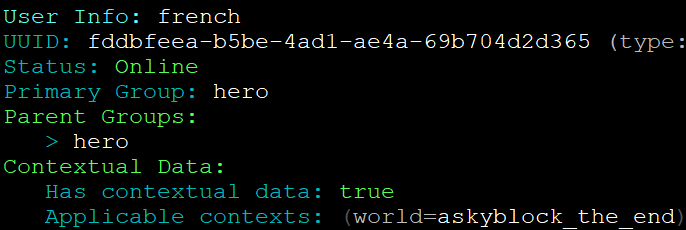
Are you prefixes showing in /lp user <name> info
 signal latch
uno secundo
welp it's on a network so it shoud if it works on other servers but one sec
0.0
yap
i am using /lp so it's not a sync issue
toxic wagon
Might be an issue with your EssXChat formats
signal latch
############################################################
# +------------------------------------------------------+ #
# |                   EssentialsChat                     | #
# +------------------------------------------------------+ #
############################################################

# This section requires the EssentialsChat.jar to work.

chat:

  # If EssentialsChat is installed, this will define how far a player's voice travels, in blocks.  Set to 0 to make all chat global.
  # Note that users with the "essentials.chat.spy" permission will hear everything, regardless of this setting.
  # Users with essentials.chat.shout can override this by prefixing text with an exclamation mark (!)
  # Users with essentials.chat.question can override this by prefixing text with a question mark (?)
  # You can add command costs for shout/question by adding chat-shout and chat-question to the command costs section."
  radius: 0

  # Chat formatting can be done in two ways, you can either define a standard format for all chat.
  # Or you can give a group specific chat format, to give some extra variation.
  # For more information of chat formatting, check out the wiki: http://wiki.ess3.net/wiki/Chat_Formatting

  format: '{DISPLAYNAME} >> {MESSAGE}'
  #format: '&7[{GROUP}]&r {DISPLAYNAME}&7:&r {MESSAGE}'

  group-formats:
  #  Default: '{WORLDNAME} {DISPLAYNAME}&7:&r {MESSAGE}'
  #  Admins: '{WORLDNAME} &c[{GROUP}]&r {DISPLAYNAME}&7:&c {MESSAGE}'

# If you are using group formats make sure to remove the '#' to allow the setting to be read```welp
it works on other servers
 lapis ibex
Have you enabled vault prefixes in the Essentials config?
lapis ibex
Yes it is

 winter wharf
Yeah, hastebin doesn't work for me either
signal latch
^^
idk y it doesn't work
it's basically same config as all my other server (no i didn't paste it in, i'm not that dumb)
 primal shadow
quick question, luckperms on all servers + bungeecord or just bungeecord
I'm assuming all of them
and bungeecord too
cause the servers are doing the checks
toxic wagon
LuckPerms-Bungee on bungeecord and LuckPerms-Spigot on all other servers
primal shadow
👍
 night helm
@signal latch Whats wrong?
 tired turtle
it does.
LP requires Vault and a chatplugin that runs with it (on spigot. It can be different on other server-types)
 elfin valley
wait what
luckperms needs to be in the bungeecord map if its a bc server?
i just placed it in every server besides the bungee one
well, way to clear up some space for me :D
tired turtle
nope
That's wrong
The BingeeCord-version of LP will only manage permissions of bungeecord and bc-plugins.
It won't interact with spigot perms at all
So you still need to have LP installed on Spigot, to manage spigot-permissions
lapis ibex
@elfin valley ^
 dawn wasp
I downgraded my server from 1.8.8 to 1.8 and Lucky Perms stopped loading
toxic wagon
That's because you need 1.8.8
dawn wasp
I cant have it because it kills my server
It just starts kicking everyone for "disconnect.spam"
tired turtle
That's more likely a plugin that doesn't work properly than the server
Rule #1 when something bad happens: Check the plugins first before blaming the Server itself
dawn wasp
I did there is no plugin with it
It just says in consol Kicked by server: Disconnect.spam
tired turtle
I don't think there's a reason like Disconnect.spam
dawn wasp
All of my players have been saying theve been getting kicked for it
tired turtle
What plugins are you using?
dawn wasp

It usually before the () it would say the plugin that did it
Unless I kick them in consol
Then theres nothing so I know its the server doing it
Let me get the plugin list
 toxic wagon
@dawn wasp Are you using Normal Spigot or something like PaperSpigot
tired turtle
What is AntiDisconnectSpam?
dawn wasp
Thats a new plugin im working on
Its trying to turn it off
Im trying to see if it works but so far no 😦
lapis ibex
@dawn wasp it’s most likely ViaVersion
dawn wasp
Oh
lapis ibex
They have a packet limiter
dawn wasp
Its strange because when anyone presses Tab in a command they get kicked
lapis ibex
Make sure you’re up to date on the plugin
dawn wasp
It used to be a 1.13.2 server
lapis ibex
Because that causes quite a lot of packets to send
lapis ibex
You could’ve just left the server at 1.13
dawn wasp
Ive gotten Lucky Perms working
lapis ibex
And install ViaBackwards
tired turtle
Can you read that real quick @dawn wasp ? https://andre601.com/iclpanlp
dawn wasp
I do
toxic wagon
@dawn wasp Best option. Use 1.13.2 then yse viabackwards and viaversion
 foggy quartz
Hello
tired turtle
It's for people like you that use the wrong name @dawn wasp
Because I'm sick of constantly response with "It's called LuckPerms!"
lapis ibex
You should add that image you made
tired turtle
Uhm... It is?
tired turtle
It's a slideshow with the two images...
But whatever.
I'm off to sleep since it's almost 4AM
lapis ibex
@foggy quartz if you need help with LuckPerms, just ask. No need to wait or anything
lapis ibex
Glad you like it
lapis ibex
Pretty sure it won’t apply at all @foggy quartz
toxic wagon
@foggy quartz You can make custom contexts with LuckPerms

GitHub
An advanced permissions plugin for Bukkit/Spigot, BungeeCord, Sponge, Nukkit and Velocity. - lucko/LuckPerms
 rancid hemlock
Hey, if the displayname of my group called vip is &a&lVIP, how can I type it on plugins config that request it? because the '&' symbol doesn't let it work but I need it for decoration
also tested with just vip, but didn't work
nevermind
fixed it
just added quotes and worked
 hasty tree
you could have just used the group's real name probably
 solar trail
Hey, would anything LuckPerms effect a player not applying to /Gamerule rules?
Only me, and a few others still take damage / die when doFallDamage is off.
 nimble apex
Unless there's a permission that denies fall damage or vice versa then I don't think so.
solar trail
Mhm. I'm stumped on what it could be then. o.O
 wet flower
@solar trail I think Essentials has some options for fall damage and such
Could check that out
If you have it ofc
 stuck sluice
is it possible to have server roles?
solar trail
We use Nucleus as our essentials plugin
and they've told me they don't have anything that affects fall damage
 queen latch
@stuck sluice Server roles?
stuck sluice
A role per server
queen latch
@solar trail It shouldn't do, but can you turn /lp verbose on then jump off something high so you take damage. It'll tell you if there's any permissions being checked
@stuck sluice You mean per-server groups? You can use the server context for that
stuck sluice
Ah okay thanks
 lyric isle
im getting a cloudflare error when i do /lpb editor or /lp editor. (The console to my server is just spitting out HTML)
toxic wagon
What version of luckperms are you using.
toxic wagon
Did you update both bungee and bukkit
toxic wagon
Hmm Okay. Try a different browser and see if it works.
tired turtle
Did you try it ingame?
lyric isle
thats all it does and in the console it just says a load of html and the errors i sent above
tired turtle
Do you run on any kind of panel?
lyric isle
Yeh pterodactyl
tired turtle
Shouldn't be a issue then....
queen latch
Can I ask what host you're with?
tired turtle
Can you copy the error and post it on https://gist.github.com please?
queen latch
Your ip is blacklisted for some reason
lyric isle
FreeMc. it worked fine.
 queen latch
@lyric isle Luck has just messed with the security settings to lower them. Any chance you could try again please?
queen latch
:) you're welcome
lyric isle
How would i set a person's group in game to a certain server (instead of globally)
Like the in game command
tired turtle
/lp user <user> parent set server=<server>
lyric isle
Thanks
 rain jasper
Hey, so I was using H2 database although trying to convert to MySQL? Is there a command to do so?
night helm
How do I check specific plugin perms with /lp verbose ?
@rain jasper check config. There is line for database selection I think
Change this storage-method: H2 to storage-method: MySQL
tired turtle
/lp verbose on <filter> where <filter> can be a perm, like f.e. essentials for all essentials-perms
night helm
@tired turtle Thank you
 wanton stratusBOT
Hey Peurost! Please don't tag staff members.
rain jasper
ty
@night helm Although that probably switched it to MySQL, is there anyway to convert the data that was stored in H2?
night helm
Oh sorry!. Before changing it to MySQL you need to to /lp export {file name} and after you switch and restart server do /lp import {file name}Don't blame me if something is wrong. Koz4Christ told that in a video 😃
@rain jasper
rain jasper
np ty
lapis ibex
@little jay depends on what you mean with update
 little jay
Add a permission.
lapis ibex
You can’t do that
tired turtle
bulk edit is more for editing/deleting perms (as the name suggests)
lapis ibex
Just add it to the groups in question
little jay
Kk.
foggy quartz
hey peeps, got a question is this the right place to ask?
queen latch
Sure!
(assuming the question is about luckperms or permissions 🤔)
((if the question is where do babies come from then please ask your parents))
foggy quartz
so im new to setting up server permissions etc, im running a small server for a few mates & we wanna run the spawner plugin, so far i have everthing installed including luckyperms ofc, and have created two groups for permissions, one group under ''opsilk'' for me which has been given access to all commands and anothergroup 'silkybois' that i want all server users to be added to by default, any ideas?
queen latch
*luckperms, not luckyperms 😝
Okay so to add all users to a group by default, add it as a parent of the group default
foggy quartz
all permissions are set for the groups, i just dont know how to default al users to the 'silkybois' group
and whoops xD
queen latch
So you would /lp group default parent add silkybois
foggy quartz
ahh gotcha, nice one cheers 😃
queen latch
Every player is a member of the group default by default (crazy I know) so if you make the default group inherit from silkybois all players will have it
foggy quartz
ill probably have a bunch of questions in the next few days/weeks haha
foggy quartz
haha cheers, were all 20+yr olds rediscovering the game we all used to play together lol
queen latch
Yeah sure! That's the best way to enjoy minecraft. Me and a couple of friends have started playing it again, we last played together about 5 years ago in the first year of school, now we're all 15/16 and playing it again for the nostalgia
foggy quartz
its a neat way to connect now that we're all scattered across the country at uni's and work etc, even when others are offline just seeing the changes they have made to the world and pranks we do to eachother etc
anyway thanks, gonna go test it out 😛
queen latch
👍
night helm
Am I the only one here who is 14yo? I started playing Minecraft cuz of nostalgia aswell. Played it when I was 11yo.
wet flower
I bet that there are people who are younger here
queen latch
@night helm I'm 15 but yeah that's not that unusual, the Minecraft community seems to be pretty young
night helm
Im not saying its unusual. Just it seems that all server owners, co-owners, developers are like 16+. xD
 pure hinge
Prob have todo with that you need $ to host it.
wet flower
^
pure hinge
Not saying kiddo cant have it. But in general parents are not a fan of it.
foggy quartz
im using shockybyte and their 6gb package is super cheap and so far not a single issue 😄
night helm
ShockByte is expensive as helll for me xD. My server community is from EU. So Germany servers are PERFECT. Cheap, Support is one of the fastests : https://torchnode.com/

TorchNode | We offer high end servers with stunning support for an affordable price.
night helm
Yeah.
primal shadow
do I need any dependencies for LP prefixes?
queen latch
Yeah, a chatmanager of some kind, and Vault
EssentialsXChat, Nucleus, VaultChatFormatter etc will all work
primal shadow
ty
queen latch
/lp verbose off 😃
primal shadow
I should add the prefix with the chatmanager (e.g. EssXChat)?
pure hinge
Yes
queen latch
Nope
Oh wait
You add the prefix to groups with LP
GitHub
An advanced permissions plugin for Bukkit/Spigot, BungeeCord, Sponge, Nukkit and Velocity. - lucko/LuckPerms
It works the same as PeX
primal shadow
in the meta
alright
I thought it was setdisplayname or something
what does the [context] mean/do?
queen latch
GitHub
An advanced permissions plugin for Bukkit/Spigot, BungeeCord, Sponge, Nukkit and Velocity. - lucko/LuckPerms
primal shadow
this would work right? /lp group default meta addprefix 2 "&8&l[&a&lA&8&l]&7 " server=prison
queen latch
Exactly 😃
queen latch
Yeah
winter wharf
What's meta used for?
wet flower
You have to use meta in order to add prefixes and suffixes and such
winter wharf
I have prefixes and suffixes without using it
queen latch
Nope, prefixes and suffixes ARE types of meta
Meta is everything luckperms stores about a group that isn't it's permissions
wet flower
right
queen latch
Prefixes, suffixes, weights, display names, and custom meta
winter wharf
What could be put under custom meta?
queen latch
Plugins can use custom meta to use LuckPerms as a database, basically
queen latch
So for example GriefPrevention sponge uses it to store claims and who's trusted on what claims
Most spigot plugins don't use it but it's used extensively in sponge
primal shadow
does the wildcard permission node '*' work with LP?
or do I have have to use like permission.*
it won't frick around with group inheritance?
queen latch
It does work with LP, yes, but it's not reccommended at all
It shouldn't fuck up inheritance
foggy quartz
hello
queen latch
Hey!
foggy quartz
how do I use bulk Update to move all global permissions to my survival server
foggy quartz
ill try
primal shadow
wildcard permission is just for myself
queen latch
Yeah, it can still break gameplay
night helm
Any way to do /lp verbose but dont show certain plugin. FeatherBoard spams whole cmd
foggy quartz
@night helm what I did was I used plugman to disable featherboard
@queen latch it worked well
queen latch
That's good 😃
night helm
I did it with filter and got the perms. Did all needed s*** in editor and it wasnt working so I needed that to see if I am missing any extra perms. I just saw that I edited default, but i had it renamed to player and need to redo like 30 mins job😭
queen latch
And you can filter it with /lp verbose on <filter>
Ripppo
This is why you shouldn't rename default 😛
night helm
All my plugins are configured so its Player.
I switched from Group manager (TRASH) so yeah.
foggy quartz
is there a way to change all of a specific groups permissions from survival to global with bulkupdate
and groupmanager is the worst perms plugin to existance
queen latch
GroupMangler
foggy quartz
"server == global" all update server survival /lp bulkupdate
queen latch
lmao
foggy quartz
well i mean not all the groups, just for example if it was "group helper"
queen latch
Hmm don't think so
foggy quartz
is there a way to bulk update all permissions from a specific plugin
queen latch
Yup, use the constraint "permission ~~ essentials.%"
foggy quartz
oh wow
queen latch
replacing essentials with whatever plugin you want
 onyx aspen
Hi, i cant find a way to give me op permissions in my server and i cant find any information about that in the Wiki :/
queen latch
/lp bulkupdate <all/groups/users> <delete/update <field> <value>> "permission ~~ essentials.%"
@foggy quartz
@onyx aspen OP permissions are nothing to do with luckperms - in fact it's not reccommended to give them
foggy quartz
ty
queen latch
The right way to do it is to give the appropriate perms from each plugin to an admin group and add yourself the admin perms
foggy quartz
lp bulkupdate all update server survival global "permission ~~ litebans.%
/lp bulkupdate all update server survival "server == global" "permission ~~ litebans.% is this correct
foggy quartz
oh okay thanks
didnt work
Invalid constraint global. Constraints should be in the format '<field> <comparison operator> <value>'.
queen latch
😄
foggy quartz
thanks
 radiant scroll
Could anyone help me setting up Luckperms with Mysql?
My question is if I fill the database infos & switch from yaml text files to MySQL is my existing data gets imported also? If not, how do I import all the 3k existing players?
Also do I need to enable sync-minutes: -1 to a different number ?
please tag me with @radiant scroll if you answer to my question so I get noticed
foggy quartz
lmao how do i add myself to a group
queen latch
GitHub
An advanced permissions plugin for Bukkit/Spigot, BungeeCord, Sponge, Nukkit and Velocity. - lucko/LuckPerms
GitHub
An advanced permissions plugin for Bukkit/Spigot, BungeeCord, Sponge, Nukkit and Velocity. - lucko/LuckPerms
And you don't need to change sync-minutes
queen latch
No, you don't need to sync manually
radiant scroll
Alright, sorry but I do not understand now, If I connect LP to mySQL does it automatically transfers data from existing yaml text datas from the plugin's folder?
queen latch
Oh I'm stupid I sent you the wrong page
radiant scroll
Its actually just a yes/no question 😛
queen latch
GitHub
An advanced permissions plugin for Bukkit/Spigot, BungeeCord, Sponge, Nukkit and Velocity. - lucko/LuckPerms
Read that page ^ It'll answer your questions
radiant scroll
Ohh now I see, thank you!
wanton stratusBOT
Hey andrewkm! Please don't tag staff members.
 short iris
does anyone have any info about why my prefixes may not be working for me? I downloaded luckyperms today and I also have vault and chatcontrol on my server
i am new to this so i am unsure of what I need to d oto show prefixes
do*
hasty tree
@short iris make sure you actually have a prefix with /lp user <user> info otherwise you'll have to check your chat format is setup correctly
also it's LuckPerms, not LuckyPerms :P
short iris
@hasty tree oopsxD and i do have a prefix
wanton stratusBOT
Hey Husky! Please don't tag staff members.
short iris
but it is not showing
hasty tree
then there is a fault with your chat plugin
hasty tree
i'd check your chat format
hasty tree
amateur has a server context
toxic wagon
@eager gulch You have the amateur prefixe set to a server=2 context
 eager gulch
How could I remove this? Sorry if this is simple to do
queen latch
Use the web editor 😃
toxic wagon
Quickest way would be with the editor /lp group <name> editor Then look for the prefix and change the 2 to global
queen latch
^^
eager gulch
Ah perfect, thank you!!
 unreal venture
why can I ban people on my server, hers my /lp verbose, I cant ban people either tho they have the perm https://luckperms.github.io/verbose/?tcZ1WHOhuR

LuckPerms - An advanced permissions plugin for Bukkit/Spigot, BungeeCord, Sponge, Nukkit and Velocity
A web based viewer for LuckPerms verbose recording logs.
unreal venture
hello?
winter wharf
I've no idea what you're trying to say
 viral current
@unreal venture what do you mean
foggy quartz
@unreal venture Are you asking why you cannot ban people?
Probably because you haven't given yourself the permission... Try this:
/lp verbose on funyducky & minecraft
hasty tree
that verbose paste is just full of GP stuff. ^ use a filter next time.
maybe not the minecraft filter as the ban command could be from something else like nucleus
just negate the GP stuff with !griefprevention
foggy quartz
Nope, I looked through the verbose verbose log... it is minecraft.command.ban that showed up.
hasty tree
ah, i couldn't see it
foggy quartz
Yeah, it is about midway in the file.
toxic wagon
he has minecraft.command.ban set to undefined.
hasty tree
duh, ctrl+f is a thing 😂
anyway yeah that's what you want to add @unreal venture minecraft.command.ban
nimble apex
I press save and the copy link is invisible, gotta love it!
toxic wagon
Blame @hasty tree For that one
 vast orbit
Howddyy
nimble apex
Legend says he never asked the question
nimble apex
/lp group test meta addprefix "[pizzahut]"
 elfin egret
wrap double quotes around the whole thing
vast orbit
i have the prefix
nimble apex
Just add a space in between quote and bracket.
nimble apex
Just be careful with other preset chat layouts. If you add a space there after the prefix placeholder it will double space it since you already had a space using the luckperms setup via quotes.
vast orbit
Gotcha, no I already have been using LuckPerms on my main server and imported everything from PEX.
Now I am just learning how to make and configure groups from scratch on my test server
Appreciate it
nimble apex
np
hasty tree
Oof @nimble apex are there any errors in the dev tools console?
nimble apex
I'll check
hasty tree
I did not think there would be any issues with that 🙃
nimble apex
app.js:65 Found params to load from
app.js:90 Got params: UJQFGaIDmJ
app.js:871 Loading from URL:
app.js:561 Saving data
app.js:589 Save id: 9leyu3yepk
app.js:561 Saving data
app.js:589 Save id: 30eEgrKgAm
No errors
 rapid lodge
@ Turbotailz Me, whenever there's a stacktrace in the console xD
nimble apex
Saved again and just doubled over
Before you ask I did open 3 different editors just to make sure
hasty tree
it's ok i know the cause, i'll work on a fix very soon
toxic wagon
It stopped working because turbo made some changes to it and messed it up
hasty tree
in the meantime you can enter this into the console to make it appear
$('#popup').css({position: 'absolute', zIndex: 1})
nimble apex
Aight, thanks.
hasty tree
PR sent @elfin egret
 grave hollow
having issues again with world permissions not denying the permission in the world "askyblock_the_end" and letting players fly when they jump into void and relog someone said if you add a permission with the world it will only work for that world but not sure why it lets it on all words and im forced to negate the permission for the world but it does not work - https://i.gyazo.com/19c1ccb06c67bbe8a48e14f172061537.png
https://i.gyazo.com/22da50a794a178cc703c0d81c3e7d7c5.png


 frosty stump
From 1 to 10, Is it a good idea to use permissions as a way to store data?
hasty tree
storing data in meta is not a bad idea :)
frosty stump
If I want the same permissions in all of my servers I need to use a Mysql database?
 final bobcat
Is there a method to have users on a track by default?
or added to a group
that isnt the default group
hasty tree
@frosty stump yes a remote database like mysql is recommended for that kind of setup
@final bobcat what's wrong with the default group?
frosty stump
Ok thanks!
final bobcat
So I wanted to have a user be on two different tracks for their prefixes
the default being their user group, while the other one displays stars next to their name
toxic wagon
@final bobcat Check the default groups page on the wiki. It will show you some options for the default group and changing it
@final bobcat or you can add the stars automatically in the prefix stacking area. (Check wiki)
final bobcat
The way I was doing the prefix stacking was mainly
[Group Class] [Stars (zero_star to five_star)] MyName:
So if someone completes an achievement, they get promoted on the stars track, while their group prefix is unchanged
I just need to make it so that they're in that zero_star group by default
so like if I wanted to set that default, I'd wanna do
default-assignments {
default-rule:
if:
has-true: <group.default>
take:
- group.default
give:
- group.trainer
- group.zero_star
}
 still drum
why luck perms so confusing
I'm so streesed
I just ported from groumanager
none of the prefixes wrk
how do I prefixes
and how do I rank
or even make ranks
 oblique pebble
Add vodka
still drum
piss off
hasty tree
But vodka goes well with cranberry juice
Anyway, you should probably check out the wiki. And be nice to people who may potentially be the ones helping you.
still drum
sorry
I'm never like that
had a panic attack switching freom gm to lucky b/c people were on
hasty tree
This is why you do these things on a test server and not on a production server
still drum
essentials update broke my permissions
toxic wagon
Are you using EssentialsX and vault?
still drum
Yes
hasty tree
Show us /ess version
 finite oar
Hello everyone! I need a permission management plugin for Thermos 1.7.10. Is LuckPerms will be suitable for me? I heard that LuckPerms is not working well on 1.7.10
 safe helm
GitHub
An advanced permissions plugin for Bukkit/Spigot, BungeeCord, Sponge, Nukkit and Velocity. - lucko/LuckPerms
 languid urchin
(Sorry for my English)
I have two VPS. One with MySQL and the other the server.
System: Ubuntu 16.04 LTS
I try to connect the LuckPerms with the MySQL and I throw errors do not know what to do.
This was the process of my installation:
mysql_secure_installation
sudo nano/etc/mysql/mysql.conf.d/mysqld.cnf
Bind-Address = 0.0.0.0```
* * I keep changes * *
sudo service mysql restarthelp me :c
toxic wagon
@languid urchin https://github.com/lucko/LuckPerms/wiki/Storage-system-errors#luckperms-cannot-connect-to-my-mysql-server Read the bottom bit of that about Communications link failure
GitHub
An advanced permissions plugin for Bukkit/Spigot, BungeeCord, Sponge, Nukkit and Velocity. - lucko/LuckPerms
languid urchin
Oh Thank you very much. I'll prove it when I wake up
 flat parcel
How do I fix this error?
[LuckPerms Pool Thread #29] WARN me.lucko.luckperms.lib.hikari.pool.PoolBase - luckperms-hikari - Failed to validate connection me.lucko.luckperms.lib.mysql.jdbc.JDBC4Connection@67c76ec6 (No operations allowed after connection closed.). Possibly consider using a shorter maxLifetime value.
toxic wagon
GitHub
An advanced permissions plugin for Bukkit/Spigot, BungeeCord, Sponge, Nukkit and Velocity. - lucko/LuckPerms
hasty tree
Its generally best to keep those at their default values
lapis ibex
@flat parcel your wait_timeout shouldn’t be this low. It’ll have a serious impact on your performance
elfin valley
Guys, do I need to change server-ip in server.properties if I use 2 VPS?
right now it's blank
It's a bungeecord server
ok this was meant to be in #general :/
lapis ibex
@elfin valley you only need that when you have multiple IP addresses on your server
elfin valley
I have spigot 3 servers, and 1 bungeecord
The 3 servers are on VPS2 and the Bungeecord is on VPS1, so they both have a different IP
Do I need to put the IP from VPS1 in there?
also, do I still need the Bungeecord map in VPS2, even though I already have one in VPS1 ?
please let me know
elfin valley
ok, the answer to that question is yes (for if anyone wanted to know)
got my server working @lapis ibex thank you for helping! (also sorry for this tag)
wanton stratusBOT
Hey mike! Please don't tag staff members.
 muted wyvern
Hello i decided to use LuckPerms instead of Pex but i dunno how can i set permissions in file not in console :<
( in addition i dont even know if it is possible )
toxic wagon
@muted wyvern Have you migrated all your permissions and everything over from Pex already?
muted wyvern
not really i just deleted pex 😛
but i just need 2 groups on my server with modifyworld perm
I tried to follow usage tut on wiki page
so i created admin
and added myslef to it
toxic wagon
@muted wyvern https://github.com/lucko/LuckPerms/wiki/Usage Have a read of this then and once you have made the groups, check out /lp editor - It's better than files.
GitHub
An advanced permissions plugin for Bukkit/Spigot, BungeeCord, Sponge, Nukkit and Velocity. - lucko/LuckPerms
Oh, you already did create them lol, Just do the last part then haha. Will make adding permissions easy for you.
toxic wagon
Type the command i mentioned above and use the link it sent you.
muted wyvern
i did but nothing appears
elfin valley
the plugin isn't installed correctly then
muted wyvern
[11:10:43 INFO]: [LP] Running LuckPerms v4.3.17.
[11:10:43 INFO]: > /lp user <user>
[11:10:43 INFO]: > /lp group <group>
[11:10:43 INFO]: > /lp track <track>
[11:10:43 INFO]: > /lp log
[11:10:43 INFO]: > /lp sync
[11:10:43 INFO]: > /lp info
[11:10:43 INFO]: > /lp editor [type]
[11:10:43 INFO]: > /lp debug
[11:10:43 INFO]: > /lp verbose <on|record|off|upload> [filter]
[11:10:43 INFO]: > /lp tree [scope] [player]
[11:10:43 INFO]: > /lp search <permission>
[11:10:43 INFO]: > /lp check <user> <permission>
[11:10:43 INFO]: > /lp networksync
[11:10:43 INFO]: > /lp import <file>
[11:10:43 INFO]: > /lp export <file>
[11:10:43 INFO]: > /lp reloadconfig
[11:10:43 INFO]: > /lp bulkupdate
[11:10:43 INFO]: > /lp creategroup <group>
[11:10:43 INFO]: > /lp deletegroup <group>
[11:10:43 INFO]: > /lp listgroups
[11:10:43 INFO]: > /lp createtrack <track>
[11:10:43 INFO]: > /lp deletetrack <track>
[11:10:43 INFO]: > /lp listtracks```give yourself op
elfin valley
or type lp editor in the console
muted wyvern
typed thats what appeared
oh sorry let me try again
my server reloaded when i type this so this might be a problem
toxic wagon
@muted wyvern Oh, you need to give yourself the the permission luckperms.* via the console. You can use the command /lp user <yourname> permission set <permission> true to add it.
lapis ibex
@elfin valley no. You don’t need to put the server IP in the server.properties
lapis ibex
Only when you have multiple IPs on the same machine/VPS
radiant scroll
I did exatcly as the page said
lapis ibex
It doesn’t hurt to do so, but it’s not required
muted wyvern
@toxic wagon actually i gave it to myslef
wanton stratusBOT
Hey ᵒˡᶠᵘ! Please don't tag staff members.
elfin valley
But, my servers need to connect to another VPS. That's why I thought I needed to put the IP in them.
lapis ibex
No
elfin valley
so just localhost?
lapis ibex
No
toxic wagon
If you gave yourself that permission than you should be able to use /lp editor @muted wyvern
lapis ibex
You are not listening
muted wyvern
ok i got it
lapis ibex
Leave it empty
elfin valley
But, how will my servers connect to my other VPS?
lapis ibex
Or set it to 0.0.0.0. Which is the same thing
elfin valley
My bungeecord VPS (which also has the MySQL database on it) is on another VPS
lapis ibex
If you don’t specify an IP or use 0.0.0.0 it will be available on all IPs the machine has
Which is one
radiant scroll
Guys why do I get errors when I am importing a save to mysql?
lapis ibex
That is for the server.properties only
radiant scroll
lapis ibex
Or the bind IP in bungee
radiant scroll
did it exactly like here https://github.com/lucko/LuckPerms/wiki/Switching-storage-types
elfin valley
So where do I put my IP then for the Bungeecord?
muted wyvern
okay do you maybe know how this modify world perm is named
elfin valley
I do not have a Bungeecord map in VPS2. Like I said, I have x2 VPS
1 for Bungeecord withdatabase, and 1 for the servers
lapis ibex
I’ve explained it 3 different times. If you can’t read what I say, I give up
lapis ibex
Where should you leave it blank?
toxic wagon
@muted wyvern If you do /lp verbose on <Yourname> & modifyworld You should see a list of the permissions that start with modifyworld
elfin valley
Server.properties
lapis ibex
And where else?
elfin valley
nowhere
lapis ibex
Ok.
Then it will work if the bungee has the right IP
Because the bungee connects to the server and not the other way round
muted wyvern
[LP] Verbose logging enabled for checks matching Olfu & modifyworld.
nothing happened
elfin valley
but is it bad to put your IP in there anyway?
like, would it hurt? bad for hackers?
toxic wagon
@radiant scroll Did you make the export, then stop the server and switch storage types then run the import command
muted wyvern
[LP] Verbose logging enabled for checks matching Olfu & modifyworld. thats all
toxic wagon
@muted wyvern Once you use that commend, try modify the world to get the list of permissions
toxic wagon
Break a block or something and the list of perms will show up now that you used that command
muted wyvern
nothing -_-
radiant scroll
Yes I did
radiant scroll
I did it exactly like that Imortalshard
its at 1000 errors now
what could those be?
toxic wagon
@muted wyvern Okay, /lp verbose off to stop the checking, the permission is usually modifyworld.* if i remember correctly which allows people to break and place anything
muted wyvern
Im building breaking and i dont see nothing in minecraft nither in console
toxic wagon
@muted wyvern If you're using EssentialsXChat and Vault, then yes
@radiant scroll Try it with the .txt
toxic wagon
@muted wyvern Yes
muted wyvern
ok im going to download it
radiant scroll
ok so level1 became leve1l somewhy in the export lol
yup exactly this happened, just checked the export file, I think this is a bug
toxic wagon
So it renamed the group to level1l
elfin valley
Can I use my domain host for connection with MySQL instead of the IP?
toxic wagon
@radiant scroll Just use /lp group <group> rename <new name> To change the name back.
elfin valley
Nevermind, I can lol
muted wyvern
im in red group
this is part of essential config
#format: '<{DISPLAYNAME}> {MESSAGE}'
  #format: '&7[{GROUP}]&r {DISPLAYNAME}&7:&r {MESSAGE}'
  format: '&7{TAG}&r {DISPLAYNAME}&r: {MESSAGE}'

  group-formats:
  #  Default: '{WORLDNAME} {DISPLAYNAME}&7:&r {MESSAGE}'
  #Admins: '{WORLDNAME} &c[{GROUP}]&r {DISPLAYNAME}&7:&c {MESSAGE}'
  red: '[red] {DISPLAYNAME}&7:&r {MESSAGE}'
  blue: '[blue] {DISPLAYNAME}&7:&r {MESSAGE}'
the group stood as level1 in the export file the group name in commands changed to leve1
radiant scroll
@muted wyvern could you please not crosstalk its super frustrating
muted wyvern
sorry dude where should i send it then?
radiant scroll
just wait 2minutes until I finish the convo
actually the mod who I was talking to left so nvm xD go on 😃
there should be really a ticket system tbh in these kind of support servers
muted wyvern
ok so im in red group
and essentials shows default chat format instead of dedicated group-format
thats what didnt work in pex so i moved to LP
but as i can see it is not working there too :<
elfin valley
the thing is, these guys help with other plugins too ^^
radiant scroll
@muted wyvern put a # to the front of default formatting
muted wyvern
like this?
#format: '<{DISPLAYNAME}> {MESSAGE}'
  #format: '&7[{GROUP}]&r {DISPLAYNAME}&7:&r {MESSAGE}'
  #format: '&7{TAG}&r {DISPLAYNAME}&r: {MESSAGE}'

  group-formats:
  red: '[red] {DISPLAYNAME}&7:&r {MESSAGE}'
  blue: '[blue] {DISPLAYNAME}&7:&r {MESSAGE}'
yes
but then you have to make sure that everyone is listed in red or blue groups else will have a total white default chat color
muted wyvern
goddamn it work <#
radiant scroll
😃
muted wyvern
thanks a million 🙏
radiant scroll
np
Btw if Im using MySQL and I want to change things in a group how do I do that now? xD
toxic wagon
@radiant scroll Check out /lp editor
 gloomy rivet
I changed the luckperms db storage type from h2 to yml and it cleared everything... is that meant to happen
radiant scroll
oh bro thats lit
toxic wagon
@gloomy rivet Did you export the data first then import it?
gloomy rivet
No, I can install a backup of the database and start again
toxic wagon
@gloomy rivet Read this: https://github.com/lucko/LuckPerms/wiki/Switching-storage-types
GitHub
An advanced permissions plugin for Bukkit/Spigot, BungeeCord, Sponge, Nukkit and Velocity. - lucko/LuckPerms
gloomy rivet
ok
vast orbit
I love this plugin so much
toxic wagon
ok
muted wyvern
It should be different that it is
Blue world should be blue :P
I had same problem in pex but instead of group i had default word
Its like essentials cant find formatting cause its # and also it cant find those groups so it put some default made in plugin formatting i guess ?
I have no idea need your help :/
foggy quartz
hi guys
have a quick question
where do i find a list of permissions that are for using luckperms commands
toxic wagon
@foggy quartz https://github.com/lucko/LuckPerms/wiki/Command-Usage
GitHub
An advanced permissions plugin for Bukkit/Spigot, BungeeCord, Sponge, Nukkit and Velocity. - lucko/LuckPerms
click on the command(s) and it will show the permission as well as info on the command
foggy quartz
oh i see
but where is there a minified table of all the commands and their permissions
toxic wagon
@foggy quartz You can also do /lp verbose on (name) & luckperms then run a command and it will show you the permissions. There isn't really a small table of all the Luckperms permissions as there are lots. But it's pretty easy to find the ones you want.
foggy quartz
lp supports command piping?>
muted wyvern
@toxic wagon do you also have no idea why it doesnt work?
wanton stratusBOT
Hey ᵒˡᶠᵘ! Please don't tag staff members.
muted wyvern
ok sorry
toxic wagon
@foggy quartz command piping?
foggy quartz
foggy quartz
your plugin doesnt handle syntax errors very well
toxic wagon
@foggy quartz images are horrible on my phone haha. Upload errors to hastebin.com then just send link. It's also Lucks plugin not mine haha.
foggy quartz
my name?
toxic wagon
Your username.
foggy quartz
verbose is username based??
toxic wagon
It can be.
foggy quartz
im running commands at the console
apparently console is not the username of the console
toxic wagon
Wants a player.
You can just use it without a username and it will look for all players.
Read the wiki page verbose to get more info about how the command works
foggy quartz
i used the command without specifying a username and it errored
toxic wagon
That's because you added the &
You only add that if you want to match user and plugin
foggy quartz
oh i see
toxic wagon
Do lp verbose on luckperms an it should work
foggy quartz
actually turning on verbose globally is more helpful as im just setting up nucleus at the same time
cool
toxic wagon
Tip though. Never use verbose without the filters (match options) unless you want it to check all players and all plugins at the same time (spam central)
foggy quartz
im the only player on the server
toxic wagon
The wiki page will give a lot more info on the filters as you can do a lot.
toxic wagon
Nucleus can still be spammy at times there are a lot of permissions it checks.
foggy quartz
whats the aspect of the verbose that keeps saying undefined?
toxic wagon
Means the player doesn't have the permission assigned to them. It's not false. Or true. They just don't have it.
foggy quartz
the default behaviour for undefined permissions is configured by the plugin developer?
toxic wagon
Yeah. Undefined just means the player hasn't been given the permission and isn't inheriting it.
foggy quartz
i also saw somewhere that luckperms has the option to disable the default behaviour for permissions configured by plugins
toxic wagon
Probably in the config somewhere if it does. I haven't really looked into that.
foggy quartz
hmm
well
this has been helpful
also, have a look into InvalidFilterException being handled with a non stack-trace error message
toxic wagon
Make an issue on github about it. Easier that way.
foggy quartz
@queen latch
wanton stratusBOT
Hey HassanTM! Please don't tag staff members.
foggy quartz
@elfin egret
wanton stratusBOT
Hey HassanTM! Please don't tag staff members.
foggy quartz
@wanton stratus ok sorry bot
wanton stratusBOT
Hey HassanTM! Please don't tag staff members.
 magic dome
Can you not please.
You do that with buycraft, you can set requurements for packages.
foggy quartz
Guys how i can make rankup in buycraft
ex: if i have Fighter rank i can rankup to slayer rank
but if i don't have fighter rank i can't rankup to slayer
really ??
magic dome
Yes
foggy quartz
but if i have rank from server not from buycraft and i want rankup still using requirements ?
which better LuckyPerms or UltraPermission?
wet flower
We're all going to say LuckPerms
wanton stratusBOT
Hey FutureDuck! Please don't tag staff members.
magic dome
@foggy quartz what chat plugin?
languid urchin
[10:26:24 INFO]: [LuckPerms] Loading storage provider... [MYSQL]
[10:26:24 WARN]: [Server thread] INFO me.lucko.luckperms.lib.hikari.HikariDataSource - luckperms-hikari - Starting...
[10:26:24 WARN]: [Server thread] INFO me.lucko.luckperms.lib.hikari.HikariDataSource - luckperms-hikari - Start completed.
[10:26:27 INFO]: [LuckPerms] Loading messaging service... [SQL]
[10:26:28 INFO]: [LuckPerms] Loading internal permission managers...
[10:26:28 INFO]: [LuckPerms] Performing initial data load...
[10:26:29 INFO]: [LuckPerms] Successfully enabled. (took 5821ms)
[10:26:29 INFO]: **** Beginning UUID conversion, this may take A LONG time ****
It means that it is connected to my MySQL without errors?
lapis ibex
@foggy quartz @languid urchin that’s in fact the normal startup log. What makes you think there’s an error?
wanton stratusBOT
Hey FutureDuck! Please don't tag staff members.
lapis ibex
Warnings are that what they are: Warnings.
Also reading the message would bring clarity.
And the reason the message is shown as a warning is because the logging system the database library uses is a different one. Resulting in an info message being shown as a warning
gloomy rivet
Is there a cmd to delete a group
 barren ibex
/lp deletegroup <groupName>
@gloomy rivet
foggy quartz
luck
why is he asking me to make a pull request for deleting a single line of code
im guessing the winky face indicates sarcasm
tired turtle
I mean it's quite obvious


 tired turtle
If Luck askes for a PR, with a winky face, then it's meant as a little hint, that if you don't like something, you could make a PR to suggest a change
foggy quartz
why would i suggest it, its obvious that its not user friendly and needs to be changed
tired turtle
Also imo is printing the stacktrace always a better solutions, since it doesn't only tell, what went wrong, but also tell the dev, where the error happened.
foggy quartz
lets print the stack trace on every error message then
 static bear
Legit question, I am beyond new to Bungeecord, and I don't know exactly how to set up LuckPerms to Bungeecord, I know I get the Bungee jar plugin, and Spigot.
I am used to PEX, But was told to upgrade to Luckperms e.e
upgrade?
more of change ig
tired turtle
StackTracer never really was meant to be user friendly, but rather to be a help for the dev, to find the source of an bug/problem.
It would be 10 times more difficult to just print a message like "Something went wrong. Try again..." and then search for the cause of the error, rather than simply having the stacktrace, that does not only tell you, what caused it (Caused by: NullPointerException f.e. tells me, that something returned null, where that isn't allowed.), but also, where it happened.
foggy quartz
you realize that users are not always the devs right?
why would an end user care about an internal error
especially when its an error about syntax in a command
 nimble lantern
Would having a vertical groups list be a valid option to implement instead of having it horizontal. I abstracted all my groups away but it's getting a bit to the point of becoming a messy bar
tired turtle
@foggy quartz I talk more about the creator of the project.
If we ask, to "get the error", then we can see, if that is a common error, that can be easly fixed, or an error, that needs a change from Luck's side.
You basicly ask for a change, that would make fixing bugs and errors like 3 times harder.
And LP isn't the only plugin, that prints StackTraces on errors.
To list some plugins, that also do that:
- EssentialsX
- FeatherBoard
- PlaceholderAPI
- PerWorldInventory
to name a few
StackTraces are an essential part of every java-developement and as I said earlier, not really a thing meant to be used and understood by the end-user (you)
foggy quartz
I take offence that you imply that I dont understand programming
my interest is vested in making the end user experience easier
in this specific part of the code, the end user would never need to give the stack trace to the developers for debugging as its not a problem with the code, but rather a problem with the user input
and user input can always be corrected by crafting specially designed error messages to inform the user how to progress correctly
do you really want users to show up here every single time they misspell a command?
tired turtle
They can, if they really want
foggy quartz
a stack trace should be synonymous with a problem in the plugin
if you see a stack trace in the console then that means theres a critical problem that requires attention
queen latch
^
tired turtle
@static bear Sorry for ignoreing you earlier >-<
LuckPerms (the spigot version) has a inbuild migration-command, that helps you moving perms from PEX to LP. See the migration-page for more explanation.
foggy quartz
if you go around printing stack traces for every user mistake youre not only giving yourself more work, but making the user believe the plugin is broken
queen latch
Stack traces should only be for technical errors
Everything else should be a nice error message
foggy quartz
thank you!
tired turtle
He's open to make PRs, as luck suggested
queen latch
"this user doesn't exist" vs "io.java.lang.blah.NullPointerException"
gloomy rivet
thanks
tired turtle
I myself (and probably Luck, since he suggested a PR instead of making a direct change. Don't quote me on that.) think, that it's still a better solution, since the thing in your case was for the fact, that a invalid filter was applied, which at least for me is a technical thing.
Also @queen latch
"technical errors" can mean a lot for some people. For me is a technical error just having a typo, while for others it's the complete plugin breaking down.
foggy quartz
then add levels of logging
tired turtle
🙄
queen latch
All I'm saying is, lots of users get scared by big red writing with technical words and don't even try handling it
foggy quartz
0 for no technical messages, 1 for stack traces on warning messages, 2 for stack trace the frick out of everything
tired turtle
Aka DiscordSRV level of debugging?
Honestly annoying
I would rather have the stacktrace directly, rather than go to a mod, ask for support, get the message to enable the debug, do it, reproduce the issue (and maybe not even get the result again) and then get support
But again: That's my opinion
queen latch
Instead of an io.yaml.yamlparse.YamlSyntaxException: yaml syntax exception, expecting block blah to end at blah
at <81 lines of java references>
I'd much rather have a nice user friendly "Your yaml syntax appears to be invalid - check the contents of plugins/LuckPerms/config.yml with http://yamlparser.com"
foggy quartz
and you would never need to ask a user to enable debugging if the plugin hit a critical error
because stack traces only need to appear when the developers need to know
tired turtle
*sigh*
foggy quartz
the only time youd need to ask them to enable debugging is if they cant get a feature to work and they arent making any apparent mistake
tired turtle
Can we just stop arguing?
foggy quartz
ive made the PR
tired turtle
You made your PR, it's done
tired turtle
Sorry that I'm the guy bringing that up.... but arguing about making the StackTrace-thing be f.e. an option and then just remove the printStackTrace in the PR...........
 copper basin
Hello,
I am having an issue when trying to get LuckPerms to run in my bungee server. I have put LuckPerms in my plugins folder on the bungee server but nothing reads. Here is my console when trying to load it https://pastebin.com/QyHwfZKm
 random vault
Hi!
lapis ibex
@random vault you need the bungee version for the bungee
tired turtle
^ Also some other plugins have the same issue
random vault
wot
random vault
Oh haha
copper basin
Thank you! and haha
lapis ibex
Anyways @random vault just ask your question. No need to ask to ask or wait or anything
tired turtle
Small pro tip @copper basin
Every plugin, that returns the error java.lang.NoClassDefFoundError: org/bukkit/plugin/java/JavaPlugin in the console can only be run on spigot, since the mentioned path doesn't exist in bungeecord
copper basin
Oh, thank you! You two have been very helpful!
random vault
Can I use LuckPerms like I use pex? A single file with all the info, for me that's really confortable as I used pex for over 2 years now.
wanton stratusBOT
Hey JasperEdits! Please don't tag staff members.
random vault
Sorry for that tag
lapis ibex
And @copper basin. If a plugin has Bukkit in its file name that generally suggests there are individual files for every supported platform 😉
tired turtle
@random vault There's a config-option to change the storage-type to yaml
https://github.com/lucko/LuckPerms/blob/master/bukkit/src/main/resources/config.yml#L73-L85
lapis ibex
@random vault you can. But it’s not recommended. We recommend using the web editor instead.
copper basin
I know 😦 I just couldnt find a place that had a different version
But now I have 😄 thank you!
lapis ibex
@random vault for the webeditor just run /lp editor and Click the link
random vault
Oh the web editor is soooooo confusing, I don't even now how to change the chat format
tired turtle
You don't with LP
queen latch
Yeah as the others have said it is slower than MySQL etc, the web editor is just as good as the file
lapis ibex
That’s part of the chat plugin mainly
queen latch
^^
lapis ibex
But you can add prefixes. Try adding a prefix with a command first to see the format
And adding them in the YAML wouldn’t be easier
random vault
Yeah, i mean prefixes
lapis ibex
The wiki has a good page for beginners called “Usage” and even has a list of command equivalents
random vault
this
lapis ibex
I know what a prefix is
I’ve already explained what to do
And also even if you were using YAML, prefixes are added differently
lapis ibex
But seriously. Just add a prefix once through a command
And then open a new web editor session
The format should be obvious
random vault
yea yea, I'll try, I think I have a bad impresson of this plugin, but people says that is really good. I'm gonna try it again with an open mind. Thx 4 quick help
lapis ibex
Btw in case you haven’t, you can migrate your old PEX data
random vault
last time i did that, prefixes didn't work, I'm going manual this time i think
lapis ibex
It won’t be a 1:1 conversion, but it’ll migrate mostly everything
Ok
And keep in mind the wiki is your friend 😉
random vault
Thx 😄
Oh and do i need to install lp on every server I have (i'm with bungee) or just the bungee one?
lapis ibex
All servers.
While the bungee is not necessary, it’s recommended
We also have two wiki pages on that matter
Network Installation and Syncing Data between Servers
queen latch
Bungee and spigot are seperate entities when it comes to perms
lapis ibex
When it comes to everything that isn’t in the MC protocol
queen latch
They couldn't care less about each other
lapis ibex
👍🏻
 neat ember
Hola
lapis ibex
Hi
lapis ibex
English only please
foggy quartz
BrainStone
lapis ibex
@neat ember https://deepl.com
Use the free DeepL Translator to translate your texts with the best machine translation available, powered by DeepL’s world-leading neural network technology. Currently supported languages are English, German, French, Spanish, Italian, Dutch, and Polish.
foggy quartz
does that mean that stack traces themselves are unreliable considering they are dependant on the platform to execute correctly?
neat ember
how do I install LuckPerms in the bungeecord
lapis ibex
No. StackTraces have nothing to do with the logging levels @foggy quartz
foggy quartz
I wasnt speaking of console logging levels, i was speaking of a custom implementation for internal logging that would allow for easier debugging.
neat ember
how do I install LuckPerms in the bungeecord @lapis ibex
wanton stratusBOT
Hey Sin_Alma! Please don't tag staff members.
lapis ibex
@foggy quartz I think that’s way over the top
queen latch
GitHub
An advanced permissions plugin for Bukkit/Spigot, BungeeCord, Sponge, Nukkit and Velocity. - lucko/LuckPerms
lapis ibex
@neat ember ^
nimble lantern
I'm having some trouble setting up prefixes with having two tracks.
Say, staff and donator. They can be combined, but it doesnt have to be that way. So someone can be [staff][donator] but also only [staff] or only [donator].
When user is not part of any track, it should be [player]
Currently I have:meta-formatting: prefix: format: - highest_on_track_donator - highest_on_track_staff
But this will not show the [player]
lapis ibex
@nimble lantern have a look at the wiki page prefix stacking
foggy quartz
@BrainSton depends what you are willing to consider in the overall furthering of the efficiency of the project 😅
lapis ibex
It’s a Minecraft plugin. Not an operating system
elfin egret
honestly i'm confused by your last comment
assuming we're talking about https://github.com/lucko/LuckPerms/pull/1284

GitHub
Stack traces should be reserved for critical errors within the plugin requiring attention from the developers.
 faint lynx
Someone has CommandSigns?
becaus idk how i would make a sign that only allows to be used with a group?
cuz i need the sign to be used by my group "B" and only able to be used by them
i readed commandsign's wiki
the command for permissions is "/csign set permission my.perm.to.use.my.sign"
yet idk how i will allow it to be used for a sertain group only
becaus example
Group A isnt able to use Rank B Sign
But Group B is able to use the sign
lapis ibex
@nimble lantern easiest fix world be adding player to the bottom of the donator or staff track
@faint lynx check for the permission group.b
foggy quartz
You can print a stack trace without there being a problem with the executing code for the sake of debugging
you create a generic exception just for the sake of finding which line of code issued the exception, so if an internal logging system was put into place, regular errors could be assigned an additional stack trace call which would be thrown if said logging level required
nimble lantern
I added it to the staff track. Now when a user is not staff, and has donated, it will display [donator][player]
lapis ibex
@foggy quartz you don’t really need something like that in most production code
foggy quartz
I know, it was just for the sake of excusing using a stack trace for the verbose filter command, which has now been resolved
lapis ibex
@nimble lantern I’ll check it out in a bit. My battery is pretty dead
nimble lantern
Ah ok.
I'm not sure whether it can be done with the current stacking possibilities
To give better explanation:
Three ranks: default, donator & staff
Two tracks: donator & staff
Four scenarios:
- User is no donator, no staff = [Player]
- User is donator = [Donator]
- User is staff = [Staff]
- User is donator and staff = [Donator][Staff]
faint lynx
i got CommandSigns, LuckPerms, TotalEconomy Installed
the following im trying to try to create is
Players can buy a kit by clicking the sign
But ONLY of they got anough cash
ive set it so they click the sign they get the permission to use the kit.
how ever idk how to have it take cash from them? TotalEconomy has 0 info about taking away the money.
I could try /sudo @p Boy18000 2000
my own name since there's no real balance pot i can set it to.
but that still makes them able to get the permission even though they got not anough money.
nimble lantern
@faint lynx It's not really a thing LuckPerms can do for you afaik
Check out https://dev.bukkit.org/projects/command-signs/pages/tutorial/advanced-usage. It says something about cost at the Restrictions and Permissions section
faint lynx
thats a plugin
foggy quartz
So with Luckperms, Im trying to display prefixes, and I have vault, and EssentialsX, and Vault is reading Luckperms, yet my prefix wont show up
faint lynx
you dont need vault and essentialsX to show the prefix @foggy quartz
the command to just show the prefix would be
/lp group [group] meta addprefix [weight] " [Prefix] "
if you did that just correctly it will just show the prefix
if not then 1 of those vault or essential is overwriting it
foggy quartz
I’m using the same config from my previous server, and the prefixes worked on it
faint lynx
essentialsX is also working with prefix etc
foggy quartz
I’ll double check though
hasty tree
well, you do need Vault, EssentialsX isn't required as it's just one of many chat plugins but Vault is definitely required on a Bukkit server
wet flower
Well no since LuckPerms aren't responsible for displaying the prefix or suffix
@foggy quartz you can send the config if you want to
Via a link
hasty tree
@foggy quartz please check a prefix is actually present by doing /lp user <User> info
hasty tree
okay so the problem lies within the chat plugin
foggy quartz
I’m away from my pc atm, but I’ll show you when I come back
hasty tree
you said Essentials, right?
foggy quartz
EssentialsX
hasty tree
okay, when you get a chance, do /ess version and show us the output
also the chat format from your config
foggy quartz
Alright
faint lynx
Turbo
could you help me with some thing
ive got a plugin for Signs
that Run commands once you click the sign
ive put in the command "/lp user @p permission set nucleus.kits.woodtier"
but once i click it
it only shows the version of luck perms
the /lp command
instead of that whole one
hasty tree
is there an option to make the sign run the command as console instead of the player? cause that sounds like what is happening
faint lynx
yes
that'd be
"/csign add console:<command…> You can also use a player name to run the command from this player if he is connected /csign add Hazae41:<command…>"
hasty tree
so, do that?
hasty tree
great 😄
wet flower
@foggy quartz
Dunno if you have that on true but mine is on false
And I believe it might be the thing that's causing the problem
Or this
Sorry it won't display the whole text
foggy quartz
Player list doesn’t really matter to me as much tbh
hasty tree
it shouldn't be necessary to change those options from their default values
faint lynx
yes
do playerlist just as well
could be usefull
and if not
just set it to what it was ^^
faint lynx
first try to disable the essentials prefix's
and then try to see if that fixed it
if not come back
foggy quartz
heres where it shows i should have a prefix; im going into the config rn
foggy quartz
idek what that is because i dont have it installed
foggy quartz
👀 idk how it got there
hasty tree
was that /ess version ?
hasty tree
@foggy quartz you're not using EssentialsX
foggy quartz
🤔
hasty tree
replace any essentials .jar files with the ones from here https://ci.ender.zone/job/EssentialsX/
hasty tree
not according to that output
foggy quartz