#support-1
1 messages · Page 414 of 1
 verbal sigil
Okey doke - updated message service to sql on all. 😂
and it is working. tyvm all for the help.
 fringe hinge
Okay thanks
 queen latch
Ah, can you hover over the different prefixes please? I have a theory
fringe hinge
 queen latch
The first two should have prefix information, the third should have message issued
fringe hinge
Nope, all three prefixes show the same thing
fringe hinge
fringe hinge
Do you think it's my chat plugin that's causing the issue?
queen latch
Luckperms provides the prefix correctly (see user info)
I think so
But might want to wait for somebody who actually knows about that kinda stuff
 tired turtle
@fringe hinge How do you actually set the chat? I mean what placeholders do you use?
fringe hinge
For the prefix? {pl_prefix} a placeholder provided by my chat plugin.
tired turtle
The entire format please
fringe hinge
      Message: "&c❤ "
      Sender_Permission: "chatcontrol.donor"
      Hover_Event:
        Action: SHOW_TEXT
        Values:
          - "&cThis player is donator"
          - "&cCheck out &4/store &cto obtain this perk"
    Prefix:
      Message: "&f{pl_prefix}&r"
      Hover_Event:
        Action: SHOW_TEXT
        Values:
          - "&8*-----* &f{player} &8*-----*"
          - "&7Prefix&8: &7{pl_prefix}"
          - "&7Group&8: &b{pl_group}"
    Player:
      Message: "{player} »"
      Hover_Event:
        Action: SHOW_TEXT
        Values:
          - "&7Message issued: &b{timestamp}"
          - "&7Click to send a PM"
      Click_Event:
        Action: SUGGEST_COMMAND
        Value: "/msg {player} "
    The_Rest:
Message: "{pl_suffix} {message}"```hm.... ChatControl...
fringe hinge
Yeah
fringe hinge
I'll try that, I just thought maybe the placeholder is bugged so I'm downloading the placeholder api luckperms module to see if that'll work since Luckperms seems to be displaying the prefixes correctly.
tired turtle
or wait
as far as I can see is the {prefix} one a ChatControl-thing... So maybe it's the chatcontrol prefix
I need to test that real quick
fringe hinge
Yeah %luckperms_prefix% didn't work, I guess the PlaceholderAPI on chatcontrols end isn't setup yet, it was red in the documentation, wasn't sure what that meant but I'm guessing that means it isn't working or something. I tried {prefix}, it just showed my chat without a prefix, probably because the placeholder doesn't exist
fringe hinge
🤔
queen latch
Try with multiple?

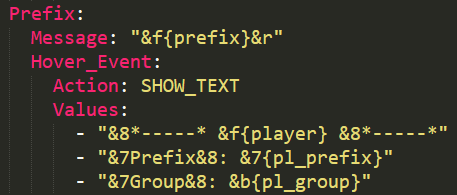 tired turtle
@fringe hinge
fringe hinge
Is that in the documentation?
tired turtle
yeah I guess
queen latch
Mhm
tired turtle
You should report that to the dev then
fringe hinge
I will, thanks for the help, even though it turned out to have nothing to do with my Luckperms setup =p
 hoary lark
howdy.
how to install to a bungeecord server
do i just drop it in the bungeecord proxy or?
 hasty tree
you need the bungeecord version of LP
the link to download it can be found in #welcome
 wanton stratusBOT
Hey Dryxx! Please don't tag staff members.
hoary lark
do i then just install directly to bungeecord? or each server?
hasty tree
all servers is recommended
 toxic wagon
Hey Luck, question for you. With the Add-on "Extra-Contexts" (or possibly another one, idk) is there a way to allow a permission/command to only be used into a WorldGuard region that they own or are a member of?
 elfin egret
Yes
toxic wagon
So the extra-contexts add-on does it? What would be the context, to use to make sure its one they own?
toxic wagon
Yeah
toxic wagon
Ah damn, alright. thought i'd ask cos i wanted something to allow them permission to a command only inside thier own region
hoary lark
so do i install bungeecord version on all servers
or just the bungeecord version to bungee server and normal version to others?
toxic wagon
Bungeecord version of luckperms on bungee, normal version on all other servers
hoary lark
can anyone confirm the above statement?
toxic wagon
https://github.com/lucko/LuckPerms/wiki/Network-Installation#the-bungeecord-version-of-luckperms There's your confirmation

GitHub
LuckPerms - An advanced permissions plugin for Bukkit/Spigot, BungeeCord and Sponge.
hasty tree
^
hoary lark
perfect
hasty tree
LuckPerms-Bungee is for Bungeecord only.
hoary lark
is there a wiki on how to use web editor for lp?
toxic wagon
GitHub
LuckPerms - An advanced permissions plugin for Bukkit/Spigot, BungeeCord and Sponge.
hoary lark
perfect
cheers
need an example of why I would do this:
Remember to use /lpb instead of /lp if you want to target your command to the BungeeCord version of LP.
toxic wagon
https://github.com/lucko/LuckPerms/wiki/Command-Usage Gives you a bit of info about that at the top of the page
GitHub
LuckPerms - An advanced permissions plugin for Bukkit/Spigot, BungeeCord and Sponge.
hasty tree
not many reasons really
if you use the same database for everything then it doesn't really matter which commands you use
only thing might be checking what contexts a user has on the bungee server
like /lpb user <user> info
 near vale
If a rank has a weight of 100 is it primary over a rank with the weight of 200
verbal sigil
So if you use the same db (SQL) /lp and /lpb don't really have a difference? That's just for separate db? like flatfiles.
No, Higher = more weight (More Priority)
toxic wagon
@near vale No, the rank with 200 will take priority
near vale
So I should have my member rank a larger weight then lets say owner
toxic wagon
@verbal sigil Yes, all using the same database won't have much of an impact which command you use.
verbal sigil
I don't know why you would do that. Owner has the highest on mine. You dont want members getting perms from the owner.
toxic wagon
@near vale No, owner rank is more important so it would have the higher priority
near vale
oh
well my builder rank has a higher weight than member but yet somehow members have builder rank?
tf
verbal sigil
Think of it like a ladder, the lowest has least permissions, if you do inheritance then higher will have the base perms + the higher level perms. Also ranks do not have to have interitance from other groups. If I understand correctly.
Users can have more than one group assigned to them.
 tepid jungle
yeah
verbal sigil
So you could have members, but say two builders. They could have member + builder just to get the builder perms.
tepid jungle
So I have a donor rank track. If they have the first donor rank, but because it is a track, and they move to the second donor rank, how should I keep the donor rank 1 perms?
Don't I use a command to inherit the permissions?
verbal sigil
in rank2 set group.rank1 to get inheritance.
near vale
they dont have builder assigned to them tho.
tepid jungle
As a permission node, Magnum?
verbal sigil
or /lp group rank2 parent set rank1
I believe.
verbal sigil
Yes as a node. I have found that if you do the /lp parent.. it sets group.rank1 for example to get the inheritance.
tepid jungle
Is there a way to check if a group is inheriting another group?
Maybe an inherit list?
hasty tree
/lp group <group> info
tepid jungle
Oh interesting.
So are tracks a good idea?
For donor ranks and staff ranks?
especially if the staff team is connected together closely?
toxic wagon
/lp group <group 2> parent add <group 1> for inheritances, parent add = adds the group parent set removes all other groups from the group or user and sets it to the one in the command
hasty tree
tracks can be useful, though not required
and note that tracks don't assume inheritance, you have to define that within the groups themselves
tepid jungle
that's what I noticed and I scrolled through the commands and found something related to an inherit another group option
Not sure
And thanks Imortal
So there's Helper, Mod, and Admin
If Mod inherits Helper, and Admin inherits Mod, I don't got to inherit the perms of Helper to Admin, correct?
So it's a chain?
Like Admin - > Mod which also inherits - > Helper (going down the list)
toxic wagon
That's correct
verbal sigil
I was just asking the same thing - but yours is worded much better Tech. Thank you.
tepid jungle
lol
verbal sigil
Oh yeah, I've only used two but this is by far superior.
tepid jungle
I was thinking of coding my own rank system but I don't think I realized how much work would need to be involved into it
Then I found LuckPerms
It saved me from it
PermissionsEx didn't cut it.
So can someone tell me how LuckPerms supports multiple servers (BungeeCord)? Or, in better wording, how it's generally setup?
I'm assuming through a database?
toxic wagon
@tepid jungle Yes, it does support it.
verbal sigil
So there are a couple ways (now I am new so anyone feel free to correct me) that I understand. If you use flatfile make sure you have the bungee version also. There is a setting to watch for file changes and there is a messaging service option (you can set to bungee) to propogate changes across the network. OR if you use SQL just make sure all use the same DB.
toxic wagon
https://github.com/lucko/LuckPerms/wiki/Network-Installation & https://github.com/lucko/LuckPerms/wiki/Syncing-data-between-servers
GitHub
LuckPerms - An advanced permissions plugin for Bukkit/Spigot, BungeeCord and Sponge.
GitHub
LuckPerms - An advanced permissions plugin for Bukkit/Spigot, BungeeCord and Sponge.
verbal sigil
If you can, then yes!
tepid jungle
Because it's pulling/putting data in the same zone
So uh I asked this a very, very long time ago. Since there's more people here and the plugin is even better, I'll ask again :P
Let's say I have donor ranks and staff ranks and I want it so if you have a donor rank (you're in donor track) and you also get promoted to staff (staff track), how do you make the prefixes go together?
Example: [Mod][T]
(Test would be the donor rank)
toxic wagon
You can use prefix stacking for that. https://github.com/lucko/LuckPerms/wiki/Prefix-&-Suffix-Stacking
GitHub
LuckPerms - An advanced permissions plugin for Bukkit/Spigot, BungeeCord and Sponge.
tepid jungle
It's literally a thing?
toxic wagon
Yes
tepid jungle
Wow
That's insane
Are there ways to shorten the prefix for let's say a donor rank combining with a staff rank?
I skimmed through it and I'll read the entire documentation tomorrow when I am not dead
toxic wagon
You have to add the shortened version of the prefix to the group
toxic wagon
Original would have to take lower priority but that would mean it wouldn't override the shortened one in when they don't have staff rank
verbal sigil
oooh. I could use that. RN folks have to choose a title (prefix) they want to use and if they have a custom one you can't use a predefined one without losing it.
hasty tree
If a user inherits multiple prefixes then the one with the highest priority will take precedence
 ionic locust
can someone help me
when i do /lp user oscrub (my playername) info
it says player not found
tired turtle
Are you even online on the server?
 summer quail
yo guys, a little random question but how do I play a sound at a player location?
 magic dome
Henlo frens
Smol Question:
How does the Vault integration work? When I enable it does it store Vault informations in the database? I am asking because I am trying to build a smol bungee network.
toxic wagon
Most mostly just lets you use the vault placeholders for groups and prefixes etc. It's also recommended to help prefixes show up as sometimes they don't without vault.
magic dome
next question: How do I set the primary group of a user? If I promote someone to admin I want that he has the admin prefix not the default prefix
toxic wagon
@magic dome If you set up the weights for the group and prefixes, than the prefix will be the admin one.
magic dome
jeez this is something to get into when you just worked with GroupManager before XD
 blazing field
Hi, how to disable operators with your plugins?
magic dome
I think there was a option in the config file for that
blazing field
@queen latch ?
queen latch
@blazing field perfect
blazing field
but the operator its not disable
queen latch
@rocky talon delete that and pop it in #general and I'll help ya ☺
@blazing field Wdym? Can you still use the op command? Give me more details. What server software, are you using bungee etc
Dont worry, I'll help you still, just in off topic. It might be luckperms related but I doubt
blazing field
I use thermos 1.7.10, and I can always use the command op I do not use bungee
queen latch
@blazing field with such an outdated and discontinued server I doubt it will work perfectly
blazing field
If the plugins work perfectly but there's just the operator command that does not want to be disabled, opir I do not give the permissions to do / op, / deop, the server should pass in 1.13 when it is output and that our developer will update the mods 😉
tired turtle
Uhm what?
Ever thought about switching world/rejoin the MC-Server?
Some permissions need a worldchange/rejoin to refresh, due to permission-caching
 wide kettle
Hi, bungee premissions not work o_O
tired turtle
Hi, more information please
wide kettle
Bungee version: #1316,LP ver 4.2.47
tired turtle
Do you use the BungeeCord-version of LuckPerms?
wide kettle
Yes
tired turtle
And what permissions aren't working?
wide kettle
sc.use from plugin staff chat
tired turtle
is that a bungee-plugin?
wide kettle
Yes
tired turtle
How did you set the permission?
wide kettle
lp group group permission set sc.use server=bungee
tired turtle
where do you run the command?
wide kettle
In game
tired turtle
What response do you get?
wide kettle
[LP] helper already has sc.use set in context global.
tired turtle
Then it should work...
If not, then:
A) the user doesn't have the group or a group that inherits that permission or
B) the plugin uses another permission and not that, which you set
wide kettle
You were right, the plugin uses a different permissions, but on the page spigotmc is written this.
Thank you
 vale night
Help? Why does it say "The mod luckperms was designed for spongeapi 8.0.0-SNAPSHOT but version 7.1.0-SNAPSHOT-d453c3e is in use. It may not work properly."?
blazing field
how to remove the default rank? and set a new default rank?
 storm geyser
It was build against API 8 simply because it's the latest version. It works perfectly fine on all sponge APIs, blazerage32
vale night
Oh, okay.
storm geyser
And you can't replace the default group, you either use it, set a displayname, or use default assignments to move players to a different group
blazing field
When I rename the rank "default" it does not rename but creates a rank as I rename them
storm geyser
That's why I said to set a displayname :P
https://github.com/lucko/LuckPerms/wiki/Default-Groups half way down this page
GitHub
LuckPerms - An advanced permissions plugin for Bukkit/Spigot, BungeeCord and Sponge.
blazing field
ok thank
 jaunty monolith
So I am trying to get the rank they are in to display on Featherboard, but I want it to be capital. How do I do that?
 worldly bramble
hello, i got a problem with LP in my server, the prefix/suffix didn't works on sponge, is it normal?
 summer jewel
@jaunty monolith Use /lp group <groupname> setdisplayname <name>
example: /lp group owner setdisplayname Owner
storm geyser
@worldly bramble what chat plugin are you using? Nucleus is recommended
storm geyser
No problem :)
 strange herald
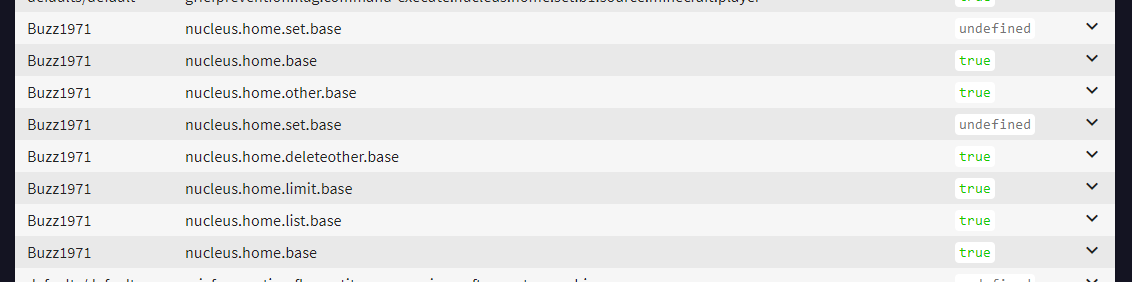
having an issue with perms not actually being granted I have added the perm for sethome but it is telling me that I do not have perms to do that I have admin perms also not sure where to look
hasty tree
GitHub
LuckPerms - An advanced permissions plugin for Bukkit/Spigot, BungeeCord and Sponge.
strange herald

LuckPerms - An advanced permissions plugin for Bukkit/Spigot, BungeeCord and Sponge
A web based viewer for LuckPerms verbose recording logs.
I dont know what I am looking at here
 storm geyser
That is telling you to add nucleus.home.set.base as well :P
strange herald
ok so I have - nucleus.home.set.1 for default users I need to add - nucleus.home.set.base also
storm geyser
nucleus.home.set.1 doesn't do anything, you should look at their home wiki page to find out how they set limits per group
near vale
Please help me

he doesnt even have the rank builder in the lp user editor
nor does he belong to the builders track
everyone who is overlord has the builder prefix?
this is builder

this is overlord https://gyazo.com/612409df51437e351d632e4911711771

this has been an ongoing issue for 2 weeks now
and is creating tons of problems
jaunty monolith
How does the LuckyPerms bungee work?
near vale
Help meeee
 foggy quartz
use permissionsex when using luckperms is hard lmao
storm geyser
@jaunty monolith it's the same as regular luckperms except it manages bungeecord permissions. I highly recommend you read the network installation page on the wiki
@near vale I can't do much without a full idea of what your inheritance system is like. If you send over /lp editor groups I can get a better idea
jaunty monolith
Is it possible to put someone in a bungee group and it feeds off of single server lucky perms information?
Like if I had staff on a network but each server had different permissions but I didn’t want to keep adding them to groups on each server
storm geyser
They must all be connected to the same MySQL database
jaunty monolith
Okay, is there a command that allows that to happen or
Like linking the groups
it looks like it’s talked about here but I am confused
storm geyser
If all luckperms instances are connected to the same database, you'd just use /lp user <user> parent add <group> and the user will then have that group across all servers. If no server is specified, it is applied globally
Otherwise you'd just add server=<server> to the end of the command, where the server variable is defined at the top of your luckperms config. That will only make the group apply to that specific server
jaunty monolith
So /lp user <user> parent add <group> server=<server>
Or /lp user <user> promote <track> server=server
?
Wait a second wouldn’t it be /blp
storm geyser
If the luckperms is installed on all servers and they're connected to the same database, it doesn't matter
And the first one will add the group to the user, but the second command will add them to a track which isn't what you asked for
jaunty monolith
Okay
 snow nymph
Uhmmm, how do you set a name on the server. I already tried "/lp group (name)->member setdisplayname &a[Member]".
storm geyser
What does that command return in chat?
storm geyser
Ah wait you mean add a prefix before their name? So [Member] merjilin in chat as an example?
snow nymph
Yes
storm geyser
/lp group <group> meta addprefix <priority> <prefix> where the priority increases as you go up your groups
storm geyser
It's a number that acts as a weight for that prefix. If a user belongs to multiple groups, the priority of the prefix is used to calculate which is displayed in chat.
In practice you just have that number increase as you go up your groups. So as an example default will have a priority of 1, member at a proitoty of 2, mod at a proitoty of 3 and then admin at a proitoty of 4
snow nymph
Owh, thanks!
storm geyser
No problemo :)
queen latch
Do you have a chat manager?
storm geyser
It must be EssentialsX and EssentialsXChat. Can you show me the exact jars you're using?
storm geyser
Do you have vault installed as well?
https://github.com/lucko/LuckPerms/wiki/FAQ#im-using-essentialschat-and-its-not-working a download link can be found here if not
snow nymph
I didn't have Vault installed XD
storm geyser
Is it working now at least? :P
storm geyser
S'all good :) Happens a lot
 stone sparrow
Hello, maby someone here can help me.
I have a plugin that needs to read the permissions of a player Before he login.
Becouse the plugin is about kicking someone who has not a particular permission before he login becouse of the join message.
The thing atm is that LP doesnt load the permissions fast enough Before the login message apairs.
I hope maby there is a way to make the plugin faster or a way to get the permission faster then the join message is send to the server.
Please, becouse im bussy you can use @stone sparrow if you reacted to this.
 foggy helm
any way to display just one highest weight prefix choosing from 2 tracks? for example displaying prefix from staffs track if player has one else from donor.
foggy quartz
Hey guys
So I'm going to work with luckperms, what is the best chat plugin for it?
I don't want to use essentials to remove the brackets
magic dome
There are tons of chat systems. If you use Bungee take a look at bungeechat. And the developer is very nice. Otherwise just try some out :3 ( you could also just go with the best rated chat system )
foggy quartz
Thanks alot!
hasty tree
/lp user <user> parent add <group>
hasty tree
Buycraft is compatible with any plugin because all you do is give it commands
foggy quartz
But the Weight system on LP is pretty dumb
it conflicts with alot
if you mess up 1 thing you mess everything up
hasty tree
What? Maybe you just don't understand it.
foggy quartz
If the weight for for example iron rank is lower than coal rank, and you try moving a user from coal to iron, they will keep the coal prefix
because the weight is higher
which is VERY annoying
hasty tree
they shouldn't even have the coal prefix in that case
how are you moving them to the group
foggy quartz
lp user setgroup (group)
hasty tree
can you show me your /lp editor
foggy quartz
Yeah that doesnt work at all for me
It just doesnt respond to anything i try putting on it
no matter if i disable my adblockers and such
foggy quartz
LuckPerms - An advanced permissions plugin for Bukkit/Spigot, BungeeCord and Sponge
A web based permissions editor for LuckPerms.
hasty tree
that's just one group, can you run /lp editor so i get them all?
foggy quartz
LuckPerms - An advanced permissions plugin for Bukkit/Spigot, BungeeCord and Sponge
A web based permissions editor for LuckPerms.
jaunty monolith
The weight thing is honestly a lifesaver
hasty tree
there's no iron group
hasty tree
i figured it was your actual setup
otherwise everything looks fine
if a group is higher than another group, it should inherit the lower group, but the lower group shouldn't inherit the higher group, so there should be no higher prefix on the lower group.
foggy quartz
So what youre saying is
The prefix should be as following
Owner 1000 (prefix)
Co-owner 999 (prefix)
And also, where do i see that weight my prefixes have?
hasty tree
/lp user <user> meta info will list all the prefix a user inherits
and show the weights
 lapis ibex
The meta command also shows the prefixes
foggy quartz
oh yeah i figured it out
 charred hull
Hey guys, I'm having an issue here on my factions server. All my other servers are 1.12.2, and my client is 1.12.2, but factions is 1.8. LP is working on it, but it's not syncing with the database
my rules aren't working or syncing across the server
foggy quartz
@charred hull make sure your credentials are correct.
And type /lp info
Is it connected?
Did you set h2 to mysql?
charred hull
yes, I copied this config from a known working server
they both connect to the same database
foggy quartz
Did you set the messaging to bungee or mysql?
charred hull
one sec let me check
foggy quartz
If you are using bungee, you have to add lp to your proxy. But i suggest to use sql. Sql is faster with syncing.
charred hull
I have mysql on my bungee server
hasty tree
Is the server 1.8.8?
charred hull
yes
foggy quartz
@charred hull messaging?
You have to set mysql to all servers than
Not only proxy
charred hull
it says 'none' on messaging
hasty tree
does /lp sync work?
foggy quartz
Than you have to set it to sql
Or whatever you want to use
Thats why its not synchronized
hasty tree
they default to sql I believe when you are connected to a mysql database
probably worth setting it to sql just in case
charred hull
why would it matter if all the settings are the same on known working servers though?
ughhhh I'm sorry guys, for giving you a hard time. I've been configuring all my servers today for about twelve hours and need a breather. Looks like I'm the moron who didn't set 'bungee=true' on my spigot.yml
🤦 🔫
 rancid pine
just checking: I can use a players UUID instead of their name with /lp user, right?
hasty tree
yes
charred hull
totally random and unrelated, sorry. anyone who's setup a faction server, would it be reasonable or just noob stupid, to give the default group the factions.* permission??
I've been asking everywhere and no one wants to answer me -_-
toxic wagon
@charred hull Giving the default group the permission factions.* would give them access to ALL commands on the factions plugin.
charred hull
right...errr...I'm guessing that's a bad thing?
toxic wagon
Well, unless you're wanting the default group to be able to create, edit, remove factions at free will, bypass any factions restrictions, and just cause all out chaos with factions, then yes it would be bad.
charred hull
😛 thanks for a straight forward answer 😄
I've been asking folks for over an hour now, and no one wants to help, or they want to charge me to set the permissions themselves
 gloomy rivet
Is it just me or is luckperms impossible to use
toxic wagon
LuckPerms is super easy to use and is a really overall amazing plugin. What are you having issues with, maybe i can help?
gloomy rivet
How do I set myself a group
I've created it but Idk how to assign a group for myself
toxic wagon
@gloomy rivet Have a read of https://github.com/lucko/LuckPerms/wiki/Usage
GitHub
LuckPerms - An advanced permissions plugin for Bukkit/Spigot, BungeeCord and Sponge.
gloomy rivet
Thank you @toxic wagon It's still confusing but time helps I guess
charred hull
@toxic wagon for faction 'leaders' they have their own permissions, do I need to create an additional group for all the faction leaders and put perms on that group, or does the plugin manage faction leaders??
toxic wagon
@gloomy rivet Explore the wiki, have a look at all the other pages, you'll discover the wiki will explain 90% of it and just ask if you have any more questions.
gloomy rivet
thx.
toxic wagon
@charred hull I haven't really used factions before sorry.
charred hull
alrighty
 hollow sundial
Hey I'm curious about how to enable permissions for regular players
toxic wagon
@hollow sundial Have a read of https://github.com/lucko/LuckPerms/wiki/Usage
GitHub
LuckPerms - An advanced permissions plugin for Bukkit/Spigot, BungeeCord and Sponge.
hollow sundial
Thank you so much this is the first guide i've found that's in depth. Quick question though. Is Luckperms a replacement for EssentialsX or something to go along with it? I'm very new to minecraft server owning and I'm learning all this from scratch
toxic wagon
Luckperms is a permission plugin, EssentialsX is completely different, but good to have.
hollow sundial
Is it okay if I share my current problem and maybe you can tell me if downloading Luckperms is the solution or not? 😃
See I downloaded EssentialsX and when I finally got the plugin working, it made it to where only op'd users could use commands. basically all commands are blocked from non op'd users currently
lmao
hasty tree
yep, you need a permission plugin to delegate permissions to users
so that's where LP comes in
hollow sundial
okay thank you (:
Do I have to go in and manually add each thing for each character?
i don't know how to explain it. Like each permission 1 by 1 for each group?
toxic wagon
Yes you do, that's where the web-editor is your friend. It's amazing at adding lots of permissions in a quick time. https://github.com/lucko/LuckPerms/wiki/Web-Editor
GitHub
LuckPerms - An advanced permissions plugin for Bukkit/Spigot, BungeeCord and Sponge.
hollow sundial
Is there a list of permissions that tell me the code to enter there so I can enable and disable them for certain groups? I'm assuming all logged in people are already in the default group. I just made an admin group but haven't given it any sort of power since technically the "op playernamehere" command gives me the permissions to edit things
by the way thank you for being so resourceful (:
You've been awesome
hasty tree
generally you want to check the documentation of the plugin you wish to set up, they will have a list of permissions
hollow sundial
I can't seem to find the exact place i'll try harder
toxic wagon
What plugin?
hollow sundial
I don't know half of what I'm doing that's why I asked if luckperms would help me be able to add permissions to my players that aren't an Op and just a regular person
i don't know if luckperms is only used for other plugins or what? i have no idea what code to type.
if you want me to throw out other plugins the only other things i have are essentialsX plugins and vault
hasty tree
here you go
http://wiki.mc-ess.net/doc/permissions
top hit for "essentials permissions" btw ;)
toxic wagon
https://essinfo.xeya.me/permissions.php Is the more updated list :3
hasty tree
oh, thanks for that, had no idea there was one haha
toxic wagon
A few things changed between EssX and Ess, so that has the updated list
hollow sundial
I have the updated list of EssentialsX and what not are those the codes i should be trying to add to the permissions list? also when you do it through minecraft it always says set help to true for default in context
and im trying to get the group default to have access to the /help command
think i may have figured it out
gloomy rivet
How do you check permissions that a group has?
gloomy rivet
Is there a way to edit permissions through config?
hasty tree
not really recommended but you can switch to 3 editable storage types
GitHub
LuckPerms - An advanced permissions plugin for Bukkit/Spigot, BungeeCord and Sponge.
GitHub
LuckPerms - An advanced permissions plugin for Bukkit/Spigot, BungeeCord and Sponge.
the web editor is far better than any of those
 eternal axle
i added uc.kit.kit.starter to default and it wont let the people with that in the group do the ./kit starter
queen latch
@eternal axle try /lp verbose on Username
With username being a person in that group's username
Get them to try the command, which will print out any permission checks that happen to you
toxic wagon
@eternal axle Do as void said but use /lp verbose on <username> & <Pluginname> for a more direct result then get the user to run the kit starter command and see what it comes up with.
eternal axle
@toxic wagon what does that do and still no
toxic wagon
It gives you a list of the permissions that it checks for with the command
eternal axle
ik i can give them perms for all of them but when i dont it says no perms
its ultimatecore
and its not working without giving them all perms and that also disgards the cooldown
toxic wagon
Check the inheritances for the groups. Make sure nothing is overriding the permissions.
toxic wagon
Screenshot what is says when they run the command after you do the verbose command.
eternal axle
no permissions
https://cdn.discordapp.com/attachments/467243543019126794/468053968686415882/2018-07-15_13.58.50.png

there @toxic wagon
imortal?
 dawn moss
is there a way to bulk paste permissions
anyone?
also where does luckperms store the permission files?
 hidden latch
/lp user <username> permission set luckperms.* true doesnt let me set permissions in game, even after restarting both the server and my client. Am I possibly doing something wrong?
^^ thats after /lp in game
storm geyser
@eternal axle don't use UC, it's support isn't particularly great. I'd highly recommend you switch to nucleus as soon as you can
eternal axle
nucleus dint run for the server
storm geyser
@dawn moss by default it does not use files, it is all stored in a h2 database as it is the most efficient local storage type. You can either use the editor (recommended) or switch to using yaml or json.
What version of sponge are you using? It's working perfectly fine for me
@hidden latch sponge or spigot?
eternal axle
bb11 make sure u run it in consol
hidden latch
I'm using spongeforge-1.12.2-2705-7.1.0-BETA-3206
eternal axle
not in game
hidden latch
yeah that's in the game console
eternal axle
ok
queen latch
Ah, just give yourself luckperms @hidden latch
eternal axle
wait game consol or server consol
queen latch
Wildcards don't do anything
hidden latch
*server console sorry
storm geyser
Can you update your luckperms to latest as well please. You're about 200 builds out of date. Latest can be found in the first link in #welcome
storm geyser
The one on the sponge site is out of date probably
hidden latch
ill try that thanks
storm geyser
But you also need to do lp user <user> permission set luckperms true in console for your user. Wildcards don't do much by default
dawn moss
@storm geyser
ah ok thx
it is just rly uncomfortable when i want to copy perms over form another server
queen latch
^^^
wanton stratusBOT
Hey JarlPenguin! Please don't tag staff members.
eternal axle
isnt there lp import?
dawn moss
from another server, not plugin...
eternal axle
oh
storm geyser
If you want to copy everything over, run /lp export perms, more data over, then run /lp import perms
eternal axle
yea
hidden latch
i c, it still says to use wildcards in the wiki rip
dawn moss
although i can make the folder "PermissionsEx" and then a subfile "permissions.yml" and copy the permissions in there and then lp import
would that work?
eternal axle
i was trying to say that thx also im not support just bourd
storm geyser
Wouldn't recommend that, Jarl. The export command duplicates your luckperms information into a .txt file, and then you run /lp import to import it back into LuckPerms. Entirely different thing to migrating from PEX
And sour, what version of sponge are you on? I'll grab a jar that work
eternal axle
the stable recommended
storm geyser
1.10.2, 1.11 or 1.12.2?
storm geyser
We're running this one and it's fine https://ore.spongepowered.org/Nucleus/Nucleus/versions/1.4.4-S7.0
dawn moss
i don't seem to be getting any particularly useful info when exporting, is anything wrong with that?
storm geyser
It will generate a txt file in the luckperms folder
hidden latch
im still having issues after updating to LuckPerms-Sponge-4.2.49
1:03:05 AM CONSOLE: [INFO] Server ran the command: /lp user Xekrom337 permission info
1:03:05 AM CONSOLE: [LP] xekrom337's Permissions: (page 1 of 1 - 1 entries)
1:03:05 AM CONSOLE: > luckperms (true)
1:03:47 AM CONSOLE: [INFO] Server ran the command: /lp user Xekrom337 permission set luckperms true
1:03:47 AM CONSOLE: [LP] xekrom337 already has luckperms set in context global.
i'm thinking it might be a mod im using but I'm not sure what so i'm going to try testing that
1am here tho so ima sleep first tho thanks for your help o/~
dawn moss
k thx
i got the problem solved by changing the storage type to yaml
thx everyone
 mint otter
@tired turtle LMAO
wanton stratusBOT
Hey Amar_Pro_Gamer! Please don't tag staff members.
mint otter
can i talk to you for a second, im being serious
tired turtle
Not in this channel.
And I won't argue with you about the stuff in DiscordSRV
mint otter
i litteraly said it, because someone said it and it didn't work, so i was testing if i ACTUALLY broke it, but turns out it wasn't broken.
wanton stratusBOT
Hey Void! Please don't tag staff members.
tired turtle
So think about your response or a ban will follow here too
@queen latch 1.13 stuff
1.13 has command-highlighting (or however it is called)
mint otter
Okay, You all think ur smart, but you're getting trolled.
elfin egret
amar, please don't argue here
 cyan cipher
hi. luckperms in lastes build supported 1.13?
elfin egret
yes
mint otter
hi luckkk
cyan cipher
where can I find a list of plugins compatible with 1.13?
mint otter
1.13 isn't out yet.
cyan cipher
in google dosck i found list 700 plugins and 7-9 plugins supported 1.13
mint otter
luck, why are so mad at me
cyan cipher
acctual is 1.13 pre 8
mint otter
prodash, idk this is like the second time i come here xd
there should be
lemme try to find it
wait nvm luck is here
cyan cipher
16.07 my brithday 17.07 new dlc gta online 18.07 minecraft 1.13
mint otter
can u tell him where it is, luck
mint otter
i thought it was LP related, he was asking about the 1.13 support.
magic dome
BRONY
queen latch
??
foggy quartz
My Default players are not gettng group Default...
queen latch
@foggy quartz They will. Every player will get the group default by design of the plugin
foggy quartz
But they aren't
queen latch
Show me what you've done to ascertain that they are not
queen latch
lmao
foggy quartz
lol
queen latch
Just a tip for asking for help in the future, when asking a technical question make sure to include what you've tried and what makes you believe the problem is what it is. It's not the person helping you's responsibility to pry the information out of you, and doing that could even help you solve the problem via what's known as Rubber Duck Debugging
 charred light
Hi, just curius. How long would it take for LuckPerms to be updated to 1.13? Me and a friend of mine is planing on starting a server, and LP is, as far as I know, one of the best permissions plugin out there 😃
queen latch
I believe it's already in progress
charred light
Ow ok 😃
storm geyser
The current jars should still work with 1.13
Luck has started with the new features however
charred light
ok, anywhere to find out what thoose features is?
storm geyser
Currently it is just the new command stuff which can be found in #news
I'm not too sure on the others, as I'm not entirely sure what else may be changed in 1.13
 frosty stump
Hey! Is there a way I can execute all of those commands but in less commands?
storm geyser
For individual users? Nope
frosty stump
ow ok thanks
 regal cloak
guys
how i can make gadgetsmenu send permisisons properly
Execute-Command: pex user {PLAYER} add {PERMISSION}
no send this
i want to use luckpers
storm geyser
Replace that command with the luckperms equivalent? lp user {PLAYER} permission set {PERMISSION} true
verbal sigil
@frosty stump You can save a little work by doing /lp user <name> editor Easy way to remove them without typing it out.
frosty stump
Yeah, but I wont be editing the perms
regal cloak
no seended gadgets 😦
verbal sigil
Sorry it looked by your command that you wanted to remove permissions. The editor can add, edit, or remove perms from group or user. I love that thing so much I'm trying to convince my team to change over. Right now I am hunting down an issue with our current plugin... hating it.
 knotty wasp
Since I've installed LuckPerms, players no longer spawn in their beds but rather spawn at the starting location (world spawn I think it's referred to?)
I'm guessing it's a permission issue, but can't find anything relating to this. Besides LuckPerms I've got Nucleus installed with the default nucleus permissions setup
queen latch
Try /lp verbose on playername to see what permission checks fail
queen latch
me_irl
storm geyser
Check the nucleus config. You've likely got it setup so they respawn at spawn
knotty wasp
kk
If true, respawning (like from death) sends the player to the world specified in "target-spawn-world", if false, sends them to the world spawn.
on-respawn=false
I don't remember changing this, but this seems to be the culprit? 🤔
or actually, maybe not
Whelp, affect-bed-spawn was set to true in nucleus' config. That fixed it.
Is it possible for players to be able to open doors/gates/buttons etc in the spawn protection area, but not mine blocks or otherwise alter the world?
storm geyser
Change storage-method: h2 to storage-method: mysql. There should be comments above that telling you exactly what you need to do
 unborn vessel
How do i change the default group?
tired turtle
@unborn vessel https://github.com/lucko/LuckPerms/wiki/Default-Groups
unborn vessel
Also i seem to be having a problem with two prefixes anyone know how to fix that?
hasty tree
might want to give a bit more info than that
 vestal lark
quick question ghow do i do the split config?
hasty tree
what do you mean?
vestal lark
in luck configs there is a option for split storage

it shows you can do it just not how
hasty tree
GitHub
LuckPerms - An advanced permissions plugin for Bukkit/Spigot, BungeeCord and Sponge.
hasty tree
why even use split storage then? just change the main storage type to yaml?
you will always be able to do commands in game
but the web editor is really best at adding/modifying permissions on groups/users
vestal lark
wait there is now a web ettitor
vestal lark
is there a way to easily reload it?
hasty tree
reload what, exactly?
vestal lark
the web editor
hasty tree
why do you want to reload it? to update it with current data?
vestal lark
yes
hasty tree
just generate a new link /lp editor
hasty tree
well if you're only doing changes in the web editor then you shouldn't really need to
but if you've made a change in game with a command then i guess you'd need to generate a new link
though I think the editor only updates changes you've made in the editor, so it probably doesn't matter
vestal lark
im running the /lp applyedits with its sepcial code and nothing is being applied
unborn vessel
@hasty tree as in i have two prefix's before my players name
wanton stratusBOT
Hey Sen! Please don't tag staff members.
hasty tree
@unborn vessel are they the same prefix just duplicated? perhaps check your chat format?
unborn vessel
Yeah
vestal lark
my system is not letting my apply my edits
hasty tree
not sure why that would be, sorry
@lapis ibex any idea on this? web editor updates not working when he does the command to save changes
verbal sigil
I'm a bit confused. As you can see I changed my /nick despite having perms = false. 🤔
hasty tree
those aren't all the permissions for changing a nickname with essentials
there should be essentials.nick as well
which isn't shown
 tough spear
How I can bulk-remove a permission from all users?
 indigo cairn
negating perms is so much more reliable
even though you can put -essentials.vanish.join and essentials.vanish.join at the same time,
hasty tree
essentialsXChat is just one of the many options
hasty tree
@tough spear you can use the bulkupdate command
e.g:
/lp bulkupdate all delete "permission == essentials.fly"
probably best to replace all with users
indigo cairn
LuckPerms doesn't recognize many of the new players, and they don't get default role assignments... help
same reason, use cannot be found
hasty tree
also suggest you add permissions to groups and not players
@indigo cairn is it an offline server?
indigo cairn
yeah, part of a bungee
hasty tree
is bungee in offline mode too?
indigo cairn
no
hasty tree
make sure to follow all steps here:
https://github.com/lucko/LuckPerms/wiki/Network-Installation
GitHub
LuckPerms - An advanced permissions plugin for Bukkit/Spigot, BungeeCord and Sponge.
foggy quartz
@hasty tree
wanton stratusBOT
Hey skydev! Please don't tag staff members.
 storm geyser
You also need vault installed
hasty tree
you need Vault also
foggy quartz
oh
hasty tree
and make sure you're using EssentialsX not just Essentials
foggy quartz
will do
oh it works now
thanks
jesus bungee was so easy to setup wtf
used to waste hours with pex
where can i donate
hasty tree
Luck does not accept donations
hasty tree
yep
tough spear
@hasty tree
I try:
/lp bulkupdate users delete "permission == essentials.afk.kickexempt"
It simply display all available commands for LuckPerms 😦
wanton stratusBOT
Hey maxlehot1234! Please don't tag staff members.
tough spear
Ok thanks, it works 😃
 mighty wigeon
when the player is not on a track, and has the default group. the prefix for the group isnt showing up (other group prefixes are)
foggy quartz
another question
let's say a group has the permission essentials.fly
is there a way to remove the perm only on one server?
hasty tree
yep! /lp group <group> permission set essentials.fly false server=<server>
foggy quartz
yeah this is like 100 times better than pex then
hasty tree
the same works if you only want the permission on just one server, just replace false with true
mighty wigeon
ye it is skydev, it takes alot of getting used to though
hasty tree
@mighty wigeon do you mean the prefix for the default group?
mighty wigeon
yes, i have set a parent to my member group tho
and the prefix was working before i did tracks
hasty tree
does member inherit default?
hasty tree
tracks shouldn't affect prefixes unless you've changed the meta formatting section of your configuration
try /lp user <user> meta info to see what prefixes they inherit, if any
hasty tree
no, i want to know if the user is actually inheriting any prefixes
hasty tree
can you send the link to /lp editor please
mighty wigeon
accept my fr and ill send in a pm
hasty tree
it's safe to send them here just fyi :)
mighty wigeon
cant somone just give themself a * perm?
hasty tree
no because you get given a command to execute on the server which will update the permissions and only you can do that
mighty wigeon
ah thats smart
hasty tree
so i see that everyone has the default rank, and default is inheriting member, and member has a prefix
and that prefix is not appearing
mighty wigeon
yes
hasty tree
what about your owner one?
mighty wigeon
thats appearing fine
only default
ever since i did tracks
(only default/member isnt on a track)
hasty tree
okay. can you paste the meta-formatting section of your config?
mighty wigeon
oh ye, sorry thats why it isnt working, i made it do a prefix for staff track and donation ranks.
but is there a way so if they belong to one of those tracks, it doesnt show. but only if they dont belong to any other track, it doesnt show?
meta-formatting:
meta-formatting:
prefix:
format:
- "highest_on_track_staff"
- "highest_on_track_ranks"
start-spacer: ""
middle-spacer: " "
end-spacer: ""
suffix:
format:
- "highest"
start-spacer: ""
middle-spacer: " "
end-spacer: ""
hasty tree
i'm finding it hard to understand that... so i'm going to say no :P
yeah, ok, no i don't think you can do that
mighty wigeon
:/ ok
hasty tree
maybe it's possible but i've never actually used the meta formatting so... perhaps it's possible?
mighty wigeon
ok, is there any mod who would know more about this?
hasty tree
check all the possible elements here:
https://github.com/lucko/LuckPerms/wiki/Network-Installation
see if one of them might work for you
GitHub
LuckPerms - An advanced permissions plugin for Bukkit/Spigot, BungeeCord and Sponge.
mighty wigeon
Thanks for your help though, youve been amazing ❤
unborn vessel
anyone know how to add a space
ive tried so many things
and im gonna feel so stupid when its simple
toxic wagon
That's if your chat formatting plugin
hasty tree
use quotes
toxic wagon
^ or that
hasty tree
like "[P] "
or check your chat format like Imortalshard said
dude i need a shorter version of your name xD
toxic wagon
Most people just us "mort"
unborn vessel
Ah ty
 clear ore
is there a plugin u need to let prefixes to show up in chat?
toxic wagon
Spigot or sponge?
clear ore
sponge
toxic wagon
Nucleus will do it.
hasty tree
did you configure the chat format?
foggy quartz
Hello, can you see this question please ? https://github.com/lucko/LuckPerms/issues/1100

GitHub
Hello, i read this section but i didn't understand enough for example which server's data will sync to other and if i enable sync in lobby server, all permissions,groups and users will sync...
wanton stratusBOT
Hey Matin_Dark! Please don't tag staff members.
hasty tree
When you connect servers to the same database, all groups and permissions are synced globally by default. You can easily set certain permissions and groups to only apply on certain serves by using contexts e.g server=lobby
foggy quartz
and member permissions are different on each server what should we do about that ?
hasty tree
I don't understand enough about your setup to answer that
Oh, sorry I think I misunderstood
You just set permissions with a server context, like /lp group default permission set essentials.fly true server=lobby
foggy quartz
ok thank you
hasty tree
Or another way is to create groups for each server, add all the permissions to each group (without a context), then add the groups as parents to another group that every player will inherit (i.e Default) but give those groups a context, e.g: /lp group default parent add lobby server=lobby, then all the permissions in the lobby group would only apply on the lobby server.
Hopefully that makes sense.
foggy quartz
wow nice ty
hasty tree
Feel free to close the issue on GitHub if you're satisfied :)
foggy quartz
done
verbal sigil
Well done Turbo - the server group is an excellent suggestion!
So, my issue - LP does not seem to be enforcing rules as expected. I already shared a screen and instead of screenshot spam let me ask this: How would you prevent a new user (default group) from using /nick ?
I have tried essentials.nick false & essentials.nick.* false it still allowed it and verbose shows that essentials.nick was not even checked. I have tried -essentials.nick true & -essentials.nick.* true and I am pretty sure every combination thereof. With the negated perms verbose shows a check of essentials.nick but comes back undefined.
tired turtle
So you did /lp Group Default permission set essentials.nick false?
hasty tree
don't ever use permissions with a - at the start because they don't work in LP
verbal sigil
I don't like negative perms either but it was a desperate measure. Yes I did as you said above. Here I'll set again and get a screenie-
storm geyser
Do you have EssentialsX and not Essentials or Spigot's Essentials?
foggy quartz
hey, i have a question
toxic wagon
Sure, what is it?
foggy quartz
how can I set global rank with specific permissions and a pre-defined rank on non-lobby server
with inherit or?
toxic wagon
If you're wanting a rank and/or permissions on a certain server you add server=<servername> to the end of the command (The server name is the name you define in the Luckperms config.
foggy quartz
lobby I guess?
toxic wagon
If that's the server you want that rank to be on, and not the other servers, and that's the name of the server in the luckperms config, then yes
foggy quartz
Is it possible to have that global rank, and the predefined one?
toxic wagon
Meaning the player having more than 1 rank? Yes
foggy quartz
global + predefined
toxic wagon
/lp user <Username> parent add <group name> will let you add multiple ranks to a player.
hasty tree
what do you mean by "predefined rank"
foggy quartz
on prison server i have a rank Builder, Mod, etc...
i want global rank + Builder for example
and global rank prefix
toxic wagon
Prefixes, you can do with prefix stacking if you're wanting more than one prefix: https://github.com/lucko/LuckPerms/wiki/Prefix-&-Suffix-Stacking
GitHub
LuckPerms - An advanced permissions plugin for Bukkit/Spigot, BungeeCord and Sponge.
toxic wagon
/lp user <Username> parent add <group name> will add the group to the player globally.
/lp user <Username> parent add <group name> server=<server name> will add the group for the said server only.
Are there multiple global ranks, or just the one?
foggy quartz
for the first time I want just one
toxic wagon
%luckperms_prefix_element_highest_from_group_<group>% User that placeholder to get the prefix from a certain group.
foggy quartz
/lp user <Username> parent add <group name> so easy to get global rank?
toxic wagon
Yes, that will add the group to the player on all servers
foggy quartz
So, I now need to put luckperms in bungee+spigot plugins and on lobby I will set global rank permissions and type the command for global rank and for specific server for that server only. Correct?
toxic wagon
Yes.
Make sure you use the Luckperms-BungeeCord for the bungee server and normal luckperms for all other servers. Then to set the global ranks do /lp user <Username> parent add <Global Group Name>. For Server Specific groups you do /lp user <Username> parent add <Group> server=<server name>
hasty tree
it doesn't really matter what server you do commands on if they're all connected to the same database
toxic wagon
As long as the server name matches the servername in the LuckPerms config.
foggy quartz
in luckperms config do i need to set lobby or prison (for specific rank)
toxic wagon
In the config, there will be an option at the top called servername: You change that to the servers name, then you use that name in the commands to make that group or permission only apply to that server
foggy quartz
Clear. Thank you for your help.
 void summit
Hello,I got this message when I or some player join:
[Essentials] Permissions lag notice with (GenericVaultHandler). Response took 83.068219ms. Summary: Getting prefix for SOMEONE
My permission plugin is LuckPerms. why does it does this?
I am using YAML for permission storage
foggy quartz
server laggy
 delicate stream
do NOT use yaml if you care about performance
 tough cypress
I have a quick question: can you set builing permission for groups, and if yes, how do you do so?
delicate stream
you'd need a plugin which provides said permissions, then you'd handle them as any other permission in LP
tough cypress
Ah I see, do you have any suggestions for a spongeforge server?
storm geyser
GriefPrevention is really the only good protection plugin for sponge
 vague steeple
^
foggy quartz
@elfin egret I have found a big bug on lp
wanton stratusBOT
Hey JohannesHQ! Please don't tag staff members.
foggy quartz
It uses more than 1000 connections
No joke
All other databases are too many connections


128 connections lp
toxic wagon
If i'm right, the connections timeout after 5 seconds by default, there are a few options in the luckperms config you can adjust for the connections.
foggy quartz
It happens when proxy is up
queen latch
@foggy quartz it should have a pool of 10 per instance
If you haven't changed the config
So if you had a network with 10 backends and a proxy then sure
clear ore
i enter the perms
and it still says i dnt have permission
most nucleus mods
commands*
toxic wagon
Use the verbose command and see it says. You might be missing some permissions. https://github.com/lucko/LuckPerms/wiki/Verbose
GitHub
LuckPerms - An advanced permissions plugin for Bukkit/Spigot, BungeeCord and Sponge.
clear ore
i type it right into the editor
toxic wagon
/lp verbose on <Your Name> & <plugin name> then run the command you're trying to use
void summit
How do I convert yaml to db storage?
toxic wagon
GitHub
LuckPerms - An advanced permissions plugin for Bukkit/Spigot, BungeeCord and Sponge.
void summit
thank you
clear ore
umm is the permissions broken
i've done the /lp verbos command
and i typed the node right
and it still says i have no permission
queen latch
No the permissions aren't broken
Turn verbose on and try to run the command, and send me a screenshot
 quick forge
not sure but pretty sure your doing it wrong
storm geyser
@foggy quartz what version are you using?
foggy quartz
4.2.17
 tender parrot
Hi there! I am having issues with minecraft permissions... none of the built in commands seem to work. Can anyone help?
storm geyser
what platform are you using and what commands are you trying to use?
tender parrot
Server is running on Ubuntu. Any commands built into minecraft (notably /help is not working)
storm geyser
Spigot or sponge?
tender parrot
Sponge
storm geyser
You'll find permissions for minecraft commands here: https://docs.spongepowered.org/stable/en/server/spongineer/commands.html Sponge overrides them with their own
for example, /help is sponge.command.help now
storm geyser
no problem!
clear ore
does anyone kno permission node to build at spawn?
foggy quartz
Hi! Spigot 1.13pre7 has been released.
Will you update the plugin for 1.13?
https://twitter.com/Spigot_MC/status/1018300573508984832?s=20

Now available - Bukkit, CraftBukkit, Spigot & BungeeCord 1.13-pre7 Development Builds
Likes
106
 Twitter
tired turtle
Twitter
tired turtle
@foggy quartz See #github-spam
Luck already made some changes, to implement 1.13 stuff, like highlighted command-syntax (see #news for examples)
foggy quartz
Thanks, just to know if I can go on working on my server
storm geyser
@clear ore Not a clue, but if you run /lp verbose record, attempt to break a block at spawn and then run /lp verbose paste, it will give you a link where you can find the permission
and yeah you should be fine, Trantred. There are no changes that LuckPerms needs to make for 1.13, but features will be added of course if they can
foggy quartz
Great. Thanks @storm geyser
wanton stratusBOT
Hey Tantred! Please don't tag staff members.
foggy quartz
Ahahaha
storm geyser
xD Sorry, bud
foggy quartz
Don't come to Italy for holydays!
Ops sorry!
Come whenever you want 😂
storm geyser
cri
foggy quartz
I am joking of course
 violet kite
um so I migrated my perms to luckperms from permissionsex
but then no one had the right permissions
does it also merge everyons group or do I need to readd them to a group?
and if the name of a group started with a capital letter do I have to change their group to be lower case?
and the world names also have capital letters so will luckperms not be able to properly find the worlds?
 brazen gyro
what are the commands??
 unreal venture
whats the diffrence between a Sufix and a prefix?
brazen gyro
(Prefix) NameOfPlayer (Suffix)
Like
Owner Player >
Owner will be the prefix
And > will be the suffix
You understand?
verbal sigil
@storm geyser Late answer to your question is yes I am using EassntialsX but I updated both luck and essentials voila. We have permissions enforced.
wanton stratusBOT
Hey Magnum! Please don't tag staff members.
verbal sigil
Thank you for your help.
unreal venture
not really
Prefix is like the rank name next to there user right
and whats Sufix?
 atomic knoll
Prefix is before the name and suffix after
foggy quartz
Issue got fixed
 jaunty haven


 strange herald
whats the command to add a player to a group?
 keen dagger
Can someone give me an example of rank A inheriting rank B (so B has the same perms as A)? I've look through bulk updating on the wiki, but I'm kinda lost.
Should I use bulkupdating or tracks?
foggy quartz
lp group b parent add a
keen dagger
@foggy quartz and then reload and then whenever I type /lp editor group B will have the same perms as group A?
foggy quartz
It says so, but It isnt working for me 😄
keen dagger
w
wanton stratusBOT
Hey Ambrosia! Please don't tag staff members.
keen dagger
I think it does
foggy quartz
It says in the rules:
1) Please do not directly tag me (Luck) or any of the moderators, ever!
So don't 😃
vestal lark
is there a different way to make someone a certain group instead of promote and /lp user (username) parent switchprimarygroup (Groipname)
regal cloak
how to disable in luckperm this command bukkit.command.plugins? this will wokr - -bukkit.command.plugins
foggy quartz
do /lp group/user (user/group) permission set bukkit.command.plugins false
indigo cairn
  vi-remover-rule:
    if:
      has-true: <group.VI> & (<group.V> | <group.IV> | <group.III> | <group.II> | <group.I>)
    take:
      - group.VI
a player has VI and III, yet it doesn't remove VI
 vale edge
Hey guys! I'm new to the permissions mod and I'm honestly having a bit of a hard time. I opened the console and did the intial lp user <your username> permission set luckperms.* true command with my username but I still can't do anything! I can't even do /help D:
hasty tree
that command only adds permissions to use LuckPerms commands, /help is not a LuckPerms command
hasty tree
You have to add permissions to be able to do anything. Look at documentations for any plugins you use to find what permissions you need to add. Alternatively you could add the * to yourself but that's not recommended.
Are you using Spigot or Sponge?
vale edge
Sponge 😃
hasty tree
Okay then Op will not be useful to you.
I believe the permission for /help is sponge.command.help
vale edge
I guess what I'm struggling with is that I can't figure out where to get the permissions file. The one I have isn't updating in the config file.
hasty tree
There is no editable permission file by default, try the web editor, it's great /lp editor
vale edge
OH!
 dusky shore
Is there a command I can do to give myself op commands or all of them
instead of doing each command individually
wait
i got a group with all perms
but how do i add myself to a group
 dire dagger
@dusky shore /lp user (your name) parent set (group name)?
dusky shore
il try
dire dagger
Hey, i know this is the LuckPerms discord server, but i have question with lucko's another plugint (Sorry my bad english, but i'm hungarian)
This plugin is the BungeeGuard
The BungeeGuard only work PaperSpigot? Or work with spigot?
And what is the supported version number.
Can give me a download link? I give the plugin from my friend, but this is an old version.
Thans for the help 😃
 finite flicker
Hi, I am migrating to new servers (dedicated) And now I am getting this error at me.lucko.luckperms.lib.mysql.jdbc.SQLError.createSQLException(SQLError.java:887)
I am using MariaDB 10.3
hasty tree
GitHub
LuckPerms - An advanced permissions plugin for Bukkit/Spigot, BungeeCord and Sponge.
wanton stratusBOT
Hey Asher! Please don't tag staff members.
 sly hearth
Thx
 small ether
Hey ! currently running a pixelmon server with lastest spongeforge and luckperms, having trouble giving op access to commands - wiki said about setting a enableops to true but i dont have that option in the config file ?
toxic wagon
@small ether The section in the config you're looking for is enable-ops:
hasty tree
it's sponge, so op is disabled with a permission plugin
hence why you won't find the op settings in the config
toxic wagon
Oh, i keep forgetting about that lol
small ether
isn't luckperms the permission plugin? please excuse my lack of knowledge, i'm coming from bukkit
toxic wagon
Yes it is.