#support-1
1 messages · Page 400 of 1
 storm geyser
 strange herald
hey I am new to all this I know you all gonna think "here we go again"
I installed LP and followed the setup for group adding and added myself to the admin group now how do I get the OP setting correct
strange herald
ok so if I am set as OP on my server consol then what happens
ok I did not see that page in the wiki thanks
I still dont see the option to grant permision for admin to fly ot is there no such thing
 toxic wagon
Just give them the permission? /lp group admin permission set <fly permission>
strange herald
where do I find the fly permission name to set?
 hasty tree
depends on what plugins you have installed, consult the documentation for the plugin, or use the verbose command

GitHub
LuckPerms - An advanced permissions plugin for Bukkit/Spigot, BungeeCord and Sponge.
toxic wagon
^ yeah that...
strange herald
So I need to find a plugin for flight I don't think I have installed a plugin for flight
 harsh bay
After coming from essentials on a vanilla spigot server, I now want a modded SpongeForge server. I've been trying to use this instead of groupmanager, and I'd like to know if there's any way to manage groups inside a text file?
harsh bay
I'm guessing I can get to this through in-game commands?
toxic wagon
/lp editior
strange herald
spongeforge 1.12.2 , forge 1.12.2 , griefprevention , luckperms , totaleconomy
harsh bay
Thanks
toxic wagon
GitHub
LuckPerms - An advanced permissions plugin for Bukkit/Spigot, BungeeCord and Sponge.
strange herald
sorry it took me so long to get that list to you I was entering all mods but then realised you asked for plugins so those are my plugins
toxic wagon
If you have nucleus that will do it.
strange herald
@toxic wagon was that for me?
toxic wagon
Yes
strange herald
what is nucleus
harsh bay
I've been using nucleus, but there are so many permissions I have no idea which ones to give to which roles
Nucleus is like essentials from Bukkit Servers if you know what that is @strange herald
toxic wagon
https://nucleuspowered.org/docs/modules/core.html @strange herald
strange herald
does either of the plugin need databasing like mysql because my server does not offwe databasing at the moment
toxic wagon
No it doesn't
strange herald
ok that worked awesome
but now I am on yet another quest to grant permision for world edit plugin for sponge
strange herald
holly crap
is there away to enter all those command perms instead of entering one by one
strange herald
@willow nacelle ?
 willow nacelle
you can edit perms through /lp editor
hasty tree
the web editor just lists the stuff you've already added. you need to add the permissions yourself.
pretty standard stuff for a permissions plugin.
strange herald
thats what I was talking about lol that is a huge list of perms to enter which using the wildcard would solve that time event but it says not to use the woldcards
like using * would give them complete perms for world edit
 delicate stream
worldedit.* is fine, especially as WE doesn't use perms for stupid things
strange herald
ah ok well thats even better
hasty tree
^
strange herald
lol
hasty tree
wildcards are not recommended in some cases.
strange herald
so what would i type to just grant access for my admins
hasty tree
/lp group admin permission set worldedit.*
strange herald
lol I was typing that out ok I figured that would be the case thanks guys
 topaz nebula
The weight system for the groups (lp group {group} setweight {weight}) is organized by the lowest number is at the top correct and is it the same for the meta/prefix ranking
or is it the other way around
topaz nebula
Alright I was thinking it was a hierarchical version
like wieghht 1 would be at the top
hasty tree
nope
topaz nebula
kk
 sullen nymph
are you able to make ranks/groups within the luckperms editor
hasty tree
no, you must use commands
sullen nymph
hmm
i forget how do the weight system work in it 1 is the highest and the lower you go is lower?
delicate stream
You can use as high as a value as you want (Well, within reason)
 cobalt cobalt
I have luckperms on my main server, but am opening up to a network server, how would i go about it so i can have a bungee plugins for specific staff commands and run luckperms for it to run on all server?
 lapis ibex
@sullen nymph higher weight for higher ranks. And use integers/whole numbers
@cobalt cobalt read the wiki page Network Installation 😉
 obtuse condor
@strange herald If you're using FAWE with WorldEdit (and I'm of the opinion that people should), it provides a super-permission fawe.permpack.basic which is "A bunch of worldedit perms which are okay to use on a creative server"
hasty tree
/lp group default info
 rotund socket
ik asking what should i put 20 or 40?
hasty tree
it's up to you
hasty tree
0 is probably the better option
rotund socket
lel
 karmic skiff
https://hastebin.com/ujuyomogit.rb Is this hang potentially caused by LuckPerms? Using the MariaDB storage service and plugin messaging for synchronizing.
lapis ibex
Unlikely
karmic skiff
What other sources could there be for the hang?
lapis ibex
Many. Could be other plugin, Minecraft itself etc
 lunar meadow
Is there a way to overwrite all prefixes with an individual user prefix? So, if the user doesn't have a prefix, it inherits the existing order, of they do, it uses that prefix?
hasty tree
Put a higher weight on their prefix
lunar meadow
But would that overwrite all the other orders?
Like, if my assigned prefix is &b*****&c from two groups, and I want to have the prefix of &6 personally
obtuse condor
I have an issue. A player was granted a permission via console:
>lp log userhistory HaruSusiFIN
[16:46:17 INFO]: [LP] Showing history for user harususifin  (page 1 of 1)
[16:46:17 INFO]: [LP] #1 (17 d 20 m 39 s ago) (Console) [U] (harususifin)
[16:46:17 INFO]: [LP] > permission set essentials.sethome.multiple.golden true
Unfortunately, on checking, they appear not to have this persmission:
>lp user HaruSusiFIN permission info
[16:46:41 INFO]: [LP] harususifin's Permissions:  (page 1 of 1 - 4 entries)
[16:46:41 INFO]: > essentials.sethome.multiple (true)
[16:46:41 INFO]: > essentials.sethome.multiple.wooden (true)
[16:46:41 INFO]: > group.endfarm (true)
[16:46:41 INFO]: > quickshop.ten (true)
Any place I should be checking?
 elfin egret
perhaps it has been removed since then?
obtuse condor
Would that not appear in the log?
elfin egret
depends, certain things don't show
obtuse condor
We have a web "shop" that sells this perm for in-game money
elfin egret
for example, any manual changes wouldn't appear
obtuse condor
and no human has removed it, according to those with access
Well, I've added the permission again, and this time he has it (and it' slogged twice)
lapis ibex
@lunar meadow if the priority of the individual prefix is higher than all the other ones, yes
obtuse condor
Does LuckPerms cache pending writes to the database, or does it write changes immediately?
lunar meadow
Higher like 100 > 1 or like 1 > 100 @lapis ibex
 wanton stratusBOT
Hey techkid6! Please don't tag staff members.
lunar meadow
.>
lapis ibex
Higher like mathematically higher
Like if the highest group prefix is 100, then all priorities starting from 101 will be higher
lunar meadow
Gotcha
elfin egret
@obtuse condor it writes changes immediately
obtuse condor
I can't find any reason why that didn't stick. I've been through all the logs, the Bungee logs, the web site logs
The command was successfully executed over rcon, the feedback's in the server log, the action's in the lp log
and there's no evidence that it was subsequently removed
sullen nymph
question how do you set a users rank if they nevered joined. can you set their UUID and it will fix it once they join
elfin egret
ya
elfin egret
depends
 edgy anvil
importing perms
elfin egret
there will be more info
edgy anvil
Type: STATE_ERROR
[20:12:11 INFO]: [LP] (Import) Output:
[20:12:11 INFO]: [LP] (Import) -> [LP] keumbri already has luckperms.* set in context global.
[20:12:11 INFO]: [LP] (Import) <------------------------------------------>
[20:12:11 INFO]: [LP] (Import) ------------> Showing Error #44 <------------
[20:12:11 INFO]: [LP] (Import) Whilst executing: Command #57
elfin egret
it's saying that the execution of that command failed
because you already had the permission set - categorized more generally in this case as a state error
edgy anvil
is a considerable error? should I be worried?
elfin egret
no
edgy anvil
^_^
 near crane
What's the default config file path where I can edit permissions on a file on a server?
 foggy quartz
Can i re name the default group?
obtuse condor
You can't rename it, but you can change its display name
near crane
Yo, how do I fix a double name issue?
I'm getting stuff like
peep Eli_superblocker: <Eli_superblocker> test
'peep' is the prefix of the group, 'Eli_superblocker' is my username
I am running both LuckPerms and Nucleus on the server.
andrewkm, there isn't sufficient information to know what you're talking about.
Bungee is a proxy. Do you run LuckPerms on BungeeCord?
elfin egret
yeah it's usually fine to run slightly off versions
@near crane I just replied to your msg on the sponge discord
or er, irc
near crane
@elfin egret Thanks man. I was worried no one used IRC these days. I only use Discord because I have to.
wanton stratusBOT
Hey Eliter! Please don't tag staff members.
near crane
Oh, I appologize. I didn't know to not tag people.
storm geyser
I've also just replied :P
elfin egret
which means you have a pretty equal chance of getting a reply in either :p
strange herald
ok I have an issue I had admin set perms to grant all admin perms yesterday and now its like they do not apply anymore
or atleast some of them now sure why this happened
strange herald
is this version the latest version of LP
 bold galleon
where do i download the bungee version of luckperms at?
disregard my message
with luckperms and bungee is it possible to have 1 rank on one server and another on the other server?
 south sierra
sort of
groups are global by nature... they just exist
BUT, the way you add parents to groups or users can use contexts
The way I use groups is basically I will split plugins into their own group
I have default (mem) which inherits mem_factions, mem_essentials... etc
in the mem_ groups, that is where I assign all my perms
near crane
Okay, could someone explain to me about LuckPerms Bungee? I feel like if I'm in this channel, I should be useful to those who ask questions.
south sierra
What exactly do you need to know about it?
 mortal wyvern
I got luckperms from the github and it is for spongeapi8 I cannot find the spongeapi7 version can anyone hit me up with a link? pm me TY in advance!
south sierra
PRETTY SURE it is compatible with 6,7,8
mortal wyvern
i restarted the server with api 7 and it wouldnt work. ill try again
hasty tree
if there are errors, post them to hastebin and share the link
i know nothing about sponge but i'm fairly sure what russian said is correct
mortal wyvern
kk ty!
currently waiting on it to backup the world. its a large world
I believe i have the wrong file for sponge api 7
going to try and find another from the website
[21:28:17] [Server thread/INFO] [FML]: FML has found a non-mod file spongeapi-7.1.0-20180614.205950-33-shaded.jar in your mods directory. It will now be injected into your classpath. This could severe stability issues, it should be removed if possible.
https://pastebin.com/wCasGiVU
https://pastebin.com/JKSeaLqw
Api8 seems to work fine but the plugins I'm trying to use are no compatible with api8 (Pixelmon side mods,VoteListener) so I am trying to use api7 however the server believes it is a non-mod file
not*
im going to see if an updated forge version will fix it. im using forge 1.12.2
Updated to recommended 1.12.2 forge with no luck
https://pastebin.com/ALX3hWvt
Currently using: spongeapi-7.1.0-20180614.205950-33-shaded
Which is not working im pretty sure this a sponge/forge problem so Ill stop posting here since this is a luck perms discord. Sorry for the spam in chat.
south sierra
did you download the actual api?
cause that is what it looks like
you need this file for sponge
Minecraft Modding API
you downloaded the api which is used for development... not for running on servers
unless you are using vanilla, get the vanilla sponge
south sierra
lol np
mortal wyvern
now im confused on how i ran api 8.0.0 for 3 days on my server
Thanks x1mil Would have been trying to run api on my server for several more hours if you hadnt of helped! Have a good day
problem solved ty! servers working fine now.
 eager yoke
Is it possible to add a donator rank to player and have the prefix of the donator rank cover over their in-game-currency purchased rank prefix?
hasty tree
just give it a higher weight
wanton stratusBOT
Hey Grant! Please don't tag staff members.
eager yoke
@wanton stratus Die
hasty tree
Rules are there for a reason.
eager yoke
Last 2 people I tagged didn't mind 🤷🏼
hasty tree
Check your meta formatting in your config.
eager yoke
K.
 rocky dust
Feature Request
so /lp ServerName Editor
so show off the ranks in that server group only.
so you have 1 big database with 10+ ranks for 2 servers.
/lp editor
u can see every rank etc.
you get a cmd called
/lp create ServerName
/lp Add Group ServerName
when you do
/lp ServerName Editor u see all ranks on that server u have added
idk if LP has this kind of feature already but i think it would be useful in my opinion when u can edit 1 server at a time with ranks etc.
let me know what you guys think
this would be awesome to have
PS this is just example
lapis ibex
@rocky dust GitHub is the place for feature requests
rocky dust
sorry :/
lapis ibex
All good 😃
Was just pointing out that GitHub is the better place ^^
Suggestions and constructive criticism are much appreciated
rocky dust
just wondring does lp has some kind of feature like it ?
in terms of bungeecord and 1 database for 2 servers ?
lapis ibex
You can have per server permissions and group assignments
If you want I can point you in the right direction
But editor wise speaking, you can only edit all groups or a single group/user
(Per one session. Multiple parallel sessions are possible)
rocky dust
glad i did request that feature then could be awesome ;o
atm i am looking at my bungeetablist and i can see the prefixes for my other server instead of the 1 i am at :/ kinda stinks 😦
hasty tree
did you apply a server context for the prefix?
rocky dust
well all our prefixes and ranks are on another database while our skyblock has their own ranks ;o
and they are not on the same storage/database
skyblock are on storage type H2 while the other 1 is MYSQL
but importing skyblock into it would just be a mess tbh :/
lapis ibex
You can make all perms on the sky block server specific
And then export and import it into the database
But you need the bungee Tab list bridge
 ocean comet
Hey guys, just wondering if its possible to have a group set to be a parent to another group, but not allow the second group to have a specific command from the first group?
For example, I have a group that is allowed gamemode but I dont want the moderators to have gamemode.
tAnd the group that has gamemode ISNT a staff position.
And I have the moderator group set to inherit the commands from the highest donator group.
I remember with pex, you could put a "-" infront of the permission to disable it for that group.
Any info would be great! 😃
foggy quartz
Just do /lp group [group] permission set [node] false
 dense notch
hi how to change "TAB" button "This is a header" and "This is a footer"
i could not find it
storm geyser
Luckperms doesn't modify that. You likely have a plugin that handles the scoreboard. If you're on sponge, it'll likely be EasyScoreboards
dense notch
thx 😄
ocean comet
I tried setting the permission as false for the moderator group but it still inherits the permission from the group before it.
Any other suggestions?
Would be greately appreciated.
greatly *
 nocturne lily
do you have the placeholder
@foggy quartz
What is the placeholder
I have placeholder api
foggy quartz
The home of Spigot a high performance, no lag customized CraftBukkit Minecraft server API, and BungeeCord, the cloud server proxy.
ocean comet
Nope the group isn't an "Owner" group
Its simply just inheriting the permission from the rank before it.
And I was hoping there was a way to exclude that command from inheritance? Setting it to false didn't fix the issue sadly.
 formal relic
I just set up a fresh test server, with new untouched LP+config using 4.2.30...and it blows up when I went to create a new group
Pastebin incoming...
/lp creategroup admin from console with fresh default config
 tired turtle
What server-version?
formal relic
SpongeForge 3190
delicate stream
last time I saw that kinda error, it was down to a broken config
foggy quartz
Hi, I have a error on my server, When I want to connect on my server "Permission Data could not be loaded.

Pastebin
I don't know why, My server is on Sponge lastest version
formal relic
Well the config was generated by LP and untouched. I just wiped out the LP folders, and I'm putting 4.2.28 on test server...production server seems fine with it.
28 is fine
wanton stratusBOT
Hey Sid! Please don't tag staff members.
 sharp forum
When player logs in:
> [13:42:21 WARN]: java.lang.IllegalArgumentException: Can not set final java.util.Set field org.bukkit.permissions.PermissibleBase.attachments to me.lucko.luckperms.bukkit.model.permissible.LPPermissible$FakeAttachmentList
https://hastebin.com/sinosozoma.md
Server Version: 1.8.8
elfin egret
are you using a modified server jar?
foggy quartz
Luck, it's a answer for me ?
elfin egret
no sid, I need to see your full server log to help
tired turtle
@foggy quartz
foggy quartz
It's not complete?
elfin egret
uhh no
tired turtle
Is that really the full server-log (not just the error)
elfin egret
I need the forge logs
formal relic
Update to 4.2.31...30 is broken on Sponge
I didn't look very closely at that though...you have other errors that aren't even related to LP
Super way behind SpongeForge...nvm
foggy quartz
I know other errors 😉
Thank you, I try to update
I have to update Forge or Sponge ?
I have choice between 1.12.2 (7.1.0-BETA-2970 / Forge 14.23.2.2611) or 1.12.2 (7.1.0-BETA-2819 / Forge 14.23.1.2555)
rocky dust
i am kinda in panic mode ive lost over 10+ ranks on my orginal server
i changed the storage type.
if i remember correctly it was mysql but but but when i do /lp editor i see myself and default ;(
idk what todo ;(
but i see i still have owner prefix in tablist.
so if anyone could help me that be SOOOOO much appricated 😄
delicate stream
changing the storage type doesn't migrate the data for you, you need to do that yourself
rocky dust
well i changed it back...
tired turtle
@rocky dust Like electronicboy says does LP not automaticly migrate the data to the new storage-type.
Switch back to MySQL and export the data with /lp export data.yml
Change the storage to the new one and run /lp import data.yml
rocky dust
well i did never export my mysql file at all ;o so there is nothing in YML beside default...
after i changed to YML i changed back straight away and i dont see my stuff....
prob have to go into my database and export my database from it and import it with the cmd right ?
delicate stream
You need to set it back to whatever it was on when you configured everything
then export, change to the data type you want, and import
rocky dust
well i want to stay mysql
ok will try it thanks.
rocky dust
lol when i changed to YML then back to mysql i did type MYSQL instead of mysql no wonder it didnt work 😂
foggy quartz
Can anyone help me figure out why the prefixes for my rank wont show up in chat?
tired turtle
What servertype and version do you run?
foggy quartz
spigot 1.12.2
tired turtle
ok.
Do you have Vault and a compatible Chatplugin like EssentialsXChat installed?
tired turtle
What is the output of /lp user <your IGN> info?
foggy quartz
like what comes out in the chat when I type something in
tired turtle
Can you give a screenshot of the output from the command I provided?
 elfin egret
are you sure you spelt info correctly
 elfin egret
you don't have any prefixes set according to that output
foggy quartz
thats the suffix ur right my bad
hold on
so i did the command with prefix instead
and it still didnt work
 foggy quartz
so i did the essentials wrong
tired turtle
Is EssentialsX installed too? EssentialsXChat is only a "add-on"
Also Vault works too?
foggy quartz
no so i need to add essentials x
tired turtle
yes
foggy quartz
and vault is its own thing too?
tired turtle
a own plugin yes
foggy quartz
will i need to add anything to those plugins to get the prefix to work on luckperms
tired turtle
Not really. The default settings should just work fine
foggy quartz
ok
and how do you remove a suffix i used /lp group owner meta removesuffix and it didnt work
thank you for the help btw
tired turtle
/lp group <group> meta info and then clicking on the suffix you want to remove
foggy quartz
thx
cobalt cobalt
IF i set it to bungeecord, i have specific bungeecord permissions i would like staff be able to use, would they be able to use em if i used luckperms and set it to bungee?
tired turtle
You mean on spigot? Nope
Spigot and BungeeCord are completely seperate instances.
You need to have LuckPermsBungee (lpb) on BungeeCord installed, to manage permissions of BungeeCord(-plugins).
Link can be found in #welcome
rocky dust
whats the fastest way to change weights and look at prefix/suffix info etc
cobalt cobalt
So Andre, if i setup luck perms on bungeecord, i can provide specific commands that are bungee for staff then?
tired turtle
for BungeeCord and BungeeCord plugins.
You still need to have LuckPerms installed on the servers to manage the other non-BungeeCord permissions
cobalt cobalt
I have luckperms installed on my indivudeal spigot servers, and in the bungee server, i have staff chat and other plugins, and i have permissions so they can use em on the other servers. I use luckperms bungee, would they be allowed to use those permissions, im very confused.
tired turtle
tl;dr:
LuckPerms -> Spigot/Bukkit plugins
LuckPermsBungee -> BungeeCord-plugins
The command for LuckPermsBungee is /lpb
sharp forum
so it's not compaitable with 1.8.8 paperspigot?
 drifting jackal
hi
I've an issue removing a permission
there's no error reported, the chat message says it's removed, but the permission node is still there?
any idea what would be causing that?
tired turtle
What command did you run?
drifting jackal
lp group admin perm unset nucleus.invsee.*
[18:07:39] [Server thread/INFO] [nucleus]: Server ran the command: /lp group admin perm unset nucleus.invsee.*
[18:07:39] [pool-4-thread-1/INFO]: [LP] Unset nucleus.invsee.* for admin in context global.
and if I do /lp group admin perm info, it's still there
storm geyser
Try nucleus.invsee
drifting jackal
admin does not have nucleus.invsee set in context global.
storm geyser
.* does nothing by default in sponge
drifting jackal
admin does not have nucleus.invsee. set in context global.
storm geyser
I meant add that as a permission, yes :P Give the command a try now
drifting jackal
I want to remove that node
I've already a nucleus.invsee.base node that do what I need
storm geyser
Wait, so permissions are not being removed? What version are you using
drifting jackal
yes, that specific permission isn't being removed
LuckPerms-Sponge-4.2.16build674.jar
spongeforge-1.12.2-2705-7.1.0-BETA-3190.jar
forge-1.12.2-14.23.4.2707-universal.jar
storm geyser
Update your luckperms build to newest please. Download is available on the first link in #welcome
drifting jackal
yes, already doing that
I could remove other nodes with similar pattern
it's just that specific one that doesn't wanna go away, it's weird
storm geyser
Weird indeed. Have you tried removing it in the editor?
drifting jackal
what editor ?
I've tried clicking on the line but it's the same command as the one I'm typing
apparently, the reboot + update fixed it and I could remove the perm
I've tried previously on another server sharing the same DB without success, so it's probably a fix in a recent update of the plugin
storm geyser
/lp group admin editor
lapis ibex
In case you don’t know about the editor, run /lp editor
The above command will only open the editor for one group, while my command will open it for all
drifting jackal
gotcha, will try that
 craggy sonnet
I know this is probably a dumb question, but if I am running a sponge forge bungee network - do I place the LuckPerms Bungee Plugin in Bungee?
hasty tree
Yes
craggy sonnet
Alright it has been added, however, I am not seeing it on one of the servers. Other sponge plugins are there but not luck perms. Do I have to add it to both places. Bungee on bungee and sponge on all sponge servers
hasty tree
Correct.
craggy sonnet
ahh ok, now final question for now. Once I set up on both, which one do I use to point to mysql?
hasty tree
All of them.
craggy sonnet
kk, but if I update one, it updates all if I use bungee and a database?
hasty tree
GitHub
LuckPerms - An advanced permissions plugin for Bukkit/Spigot, BungeeCord and Sponge.
As long as configure the messaging service yes
craggy sonnet
I was reading that and left my glasses downstairs....lol I will go get them and read through. Thanks.
 tough spear
Any way to change the server for all groups in one command?
It was set to global right now, but I want to change it to prison.
Doesn't want to do it for all groups for all permissions :(
Thanks
foggy quartz
hey i am having trouble giving the permission to sethome with essentials
can anyone help me out
craggy sonnet
Is there any config.yml in bungeecord luckperms? I see config directory but only lib (directory) is inside
@foggy quartz this isn't really a essentials channel, but what errors are you getting?
foggy quartz
so when i try to add the permission through lucky perms i type in this
./lp group moderator permissions essentialsx.sethome true global
but i get command not recognized error so i dont know what im doing wrong
hasty tree
it's /lp group moderator permission set essentials.sethome
you left out the set part
also true global is not necessary
as they get set by default
@craggy sonnet there is definitely a config file for LuckPerms, check console for errors if it's not generating the files as expected
hasty tree
no, essentialsx uses the same permissions as essentials
craggy sonnet
I am getting config for backend servers but not bungeecord
hasty tree
like i said, check for errors
and make sure you're using the correct version, LuckPerms-Bungee
craggy sonnet
I am using v. LuckPerms-Bungee-4.2.31.jar - but no error logs w/in the bc server.
wanton stratusBOT
Hey tmoflash! Please don't tag staff members.
hasty tree
mind sharing your proxy.log.0 file on hastebin?
craggy sonnet
not at all 1 sec
I see it here [SEVERE] Exception disabling plugin LuckPerms java.lang.NullPointerException at me.lucko.luckperms.common.plugin.AbstractLuckPermsPlugin.disable(AbstractLuckPermsPlugin.java:190) at me.lucko.luckperms.bungee.LPBungeeBootstrap.onDisable(LPBungeeBootstrap.java:128) at net.md_5.bungee.BungeeCord$4.run(BungeeCord.java:431)
hasty tree
Yeah there are a couple of errors. I'm not very good at reading java stack traces though, so someone else might be able to tell you what's wrong.
craggy sonnet
I may try waterfall just to see. Forge and Bungee do not get along that well. It may not resolve, but I am going to check anyway.
hasty tree
could possibly be a bug with that version of luckperms
i have an older one if you want to try that also
delicate stream
Yea, looks like some recent logger changes caused that one
craggy sonnet
Yes, I will take the older one. waterfall made no change.
do I need to swap for all servers with diff version or just bungee is ok?
delicate stream
Somewhat confused as to how they've caused it, unless you're running an older version of LP bungee
craggy sonnet
I donwloaded latest both bungee and waterfall
foggy quartz
hey guys so i tried to give permission for home command and it didnt work lmao i used this /lp group moderator permission set essentials.home
hasty tree
oh you can get earlier versions easily on jenkins. this is 4.2.22 which I'm using right now
https://ci.lucko.me/job/LuckPerms/680/
@foggy quartz we're not a permission directory. Either consult the Essentials documentation or use verbose to get the permission you need. https://github.com/lucko/LuckPerms/wiki/verbose
GitHub
LuckPerms - An advanced permissions plugin for Bukkit/Spigot, BungeeCord and Sponge.
and no need to send the same message multiple times.
foggy quartz
im asking cus lucky perms is what is not working
craggy sonnet
Yes, it looks like v 4.22 worked...nice
delicate stream
EssentialsXs perm list makes it look like there is no permission directly for /home, but perms for stuff like sethome and access to worlds specifically 🤷
craggy sonnet
sure
delicate stream
Oh, they explictly check essentials.<commandname>; I'd suggest using verbose mode, make sure that you don't have another perm plugin or something running 🤷
hasty tree
verbose shows me only essentials.home when I do /home
but that also requires a home to be set, which requires at least essentials.sethome
craggy sonnet
added
hasty tree
thanks, hopefully Luck will get on to that ASAP
foggy quartz
sorry for all the questions but how does one make newplayers a rank automatically
hasty tree
players are in default automatically
@craggy sonnet to help Luck narrow down the issue with Bungee, do you think you could try and test out the versions between 4.2.22 and the latest? You can get to them by clicking on each build number here on Jenkins https://ci.lucko.me/job/LuckPerms/
#680 was the one that worked
delicate stream
688 is the one that did the logger changes which are where it's exploding
hasty tree
ahh ok, so likely that one where it breaks
delicate stream
Yea, I see what's happening too, this.logger = new JavaPluginLogger(getLogger()); needs to be moved into onLoad, getLogger() is null at that point
hasty tree
awesome, thanks. I added that info to the issue.
craggy sonnet
@hasty tree looks like that one is having issues also. [23:02:48 WARN]: Error enabling plugin LuckPerms- [23:02:48 WARN]: Error enabling plugin LuckPerms
wanton stratusBOT
Hey tmoflash! Please don't tag staff members.
hasty tree
was that 4.2.30?
hasty tree
688 is 4.2.30, which should be the breaking one
687 probably works
anyway I've pinged Luck about it, he'll be asleep though
delicate stream
Feels weird, Luck is a fellow brit and we're on seemingly opposite sleep schedules :3
hasty tree
so you're a night owl electronicboy 😛
craggy sonnet
loads, but doesnt create configs
craggy sonnet
delicate stream
hm?
lapis ibex
Where’s my 05:45 squad at?
delicate stream
BST IS BEST TIMEZONE!
craggy sonnet
Is the messaging setup correctly? Cannot connect to db - https://hastebin.com/qakeyecexo.coffeescript
delicate stream
Don't use root for mysql, especially if you have mariadb
beyond that, the server logs will have information on what actually happened, config file on its own is useless
craggy sonnet
here is BC log - https://hastebin.com/elafelirus.md
lapis ibex
@craggy sonnet the messaging service sql is preferred over bungee
But otherwise it should work
delicate stream
You're still using the busted build of LP?
craggy sonnet
no
delicate stream
log file is basically saying otherwise 😛
lapis ibex
Make sure to use the same storage type, MySQL credentials and messaging service on all servers
craggy sonnet
do i need to use sql for all instead of bungee
delicate stream
You are recommended to use sql, it's much more reliable than bungee
lapis ibex
I’d recommend it
craggy sonnet
sure, but I need sql on all servers ?
delicate stream
yup
craggy sonnet
kk, I will make that change.
lapis ibex
But in essence both bungee and sql work, but it needs to be the same on all servers
craggy sonnet
I will dbl check if I am using old version but I am sure I changed it for all servers. It connects to luckperms it didnt before, but just will not connect to mysql, let me post console.
I only get that in the bc console not any other servers.
lapis ibex
Are you sure the address is correct?
Anyways, on the wiki page ”Storage System Errors” is an in detail explanation on how to fix this issue
@craggy sonnet
delicate stream
wait, aren't you running bungee inside of docker?
craggy sonnet
yes I am using bungee inside of docker
And I am getting errors on all servers. So it is something in the docker.
south sierra
containerizing minecarft servers... hmm
i feel like you are asking for more complication than normal
craggy sonnet
It is a panel pterodactyl.io
south sierra
does it manage the containers?
craggy sonnet
it is a open source cross network panel
delicate stream
You'll basically need to run docker on the host, and connect to mysql over the docker interface
delicate stream
you'll need to configure mysql to bind on that interface, but yea
lapis ibex
Yeah. Because localhost is the container. Not the host OS though
The pterodactyl Discord is a great help point for configuring stuff like that too
I mean outside plugins
But things like correctly setting up your MySQL etc
craggy sonnet
Well I am googeling how to, yeah I use the pteradactyl disc often.
lapis ibex
Ok. You need to let MySQL listen on all interfaces/IPs
And block it from externally if you don’t want to run into security issues
There should be ip table commands to do that
 uneven shoal
Haven't been able to update to 4.2.17 yet, but I noticed some kind of memory leak in 4.2.12:
Was just wondering if that had been fixed at 4.2.17?
Figured it could be this one: https://github.com/lucko/LuckPerms/issues/1005

GitHub
https://paste.mc4ep.ru/orifuribev.rb SpongeForge: 1.12.2-2655-7.1.0-BETA-3074
rotund socket
how do i use LP in buycraft?
hasty tree
depends what you want to do
lapis ibex
@uneven shoal latest versions should have fixed that. Try using the latest versions from #welcome
rocky dust
whats the cmd to look at all the groups
with their prefix if they got any.
hasty tree
You can see all the prefixes a user inherits with /lp user <user> meta info
foggy quartz
.
uneven shoal
Ok thanks @lapis ibex !
wanton stratusBOT
Hey Joeywp! Please don't tag staff members.
foggy quartz
I'm getting annoyed as fuck today
lapis ibex
@foggy quartz anything we can help you with?
foggy quartz
Nah
lapis ibex
Alright
 lucid vault
I have added a new instance to my luckperms database (factions server) and the prefixes are not synced across all servers and I have enabled bungeecord in the spigot.yml file of the factions server, any help?
lapis ibex
Are you using the exact same database settings on all your servers?
Including the table prefix?
lucid vault
Yes
tough spear
Any way to change the server for all groups in one command?
It was set to global right now, but I want to change it to prison.
Doesn't want to do it for all groups for all permissions :(
Also, I just want to know how I can remove latest 1000 groups with a single command, like a purge command, maybe?
 tepid sphinx
Is there no config file for groups? Do I have to add groups via commands in-game?
lapis ibex
@lucid vault Ok, make sure that that the UUID on all servers is consistent when running /lp user <you> info (and to check it on the bungee, use lpb instead of lp)
@tough spear have a look at bulkupdate (see wiki)
@tepid sphinx You can switch to a text based storage system, however it's recommended that you use /lp editor 😉
tepid sphinx
Yeah I didn't notice the /lp editor, really nice web interface!
tough spear
Thank BrainStone, but no example to batch delete group after group XXXXXX for example 😦 That could be a nice example to add in the wiki I think 😉
 torpid birch
When I use /lp bulkupdate users update permission group.test "permission == group.test2" in console I have my self set as the group test and then I run the command and confirm the bulkupdate, nothing happens to my group, I even tried restarting all of the servers connect to the database.
Also, /lp bulkupdate users delete "permission group.test" works instead of update
lapis ibex
@torpid birch you have the first command the wrong way round
It would change group2 to group
@tough spear sadly there is no bulk delete feature
lucid vault
BrainStone, the UUIDs are consistent , I think the chat formatting plugin is the problem
Let me try switching them up, see if it works
Problem fixed, I switched to essentialsX
lapis ibex
👍🏻
 cedar shale
what is the command for give one perm on one specific world?
tired turtle
/lp user/group <user/group> permission set <permission> <true/false> world=<world>
cedar shale
ty
tired turtle
np
 hoary seal
Can someone explain to me why this is acting like this...
Why is luckperms handling chat?
tired turtle
That's from Vault
hoary seal
right, its saying luckperms is handling chat
tired turtle
Not really
hoary seal
deluxechat should be
tired turtle
LP provides the prefixes.... And I guess because of that does Vault think that LP manages chat
lapis ibex
LP has 0 chat code
delicate stream
LuckPerms isn't handling chat, LuckPerms is just providing the information which chat plugins use, e.g. prefixes
tired turtle
and afaik does DeluxeChat not connect to Vault... which is the reason that it doesn't show there
It only uses the Vault-extension from PlaceholderAPI
hoary seal
any idea why deluxechat wouldnt be working then?
tired turtle
It should lol
Make sure to have PlaceholderAPI and the right extensions (player and vault-extension) installed.
Also lets move this to #general because it isn't really LP-related
lapis ibex
You can have LP list all permissions it knows about at the time of running the command by running /lp tree
wanton stratusBOT
Hey Omar! Please don't tag staff members.
 lone tree
I'm mainly looking for the "essential" ones
lapis ibex
Then more haven’t been checked
lapis ibex
One simple way to populate the permissions is by running /help
And Minecraft doesn’t have permissions for building
You need a plugin to restrict that.
lapis ibex
And the permission should be listed on the plugin page
lone tree
last time I tinkered with MC was back a few years ago with bukkit, so I was running with that
lapis ibex
I think PEX came with antibuild. That added basic build permissions
But neither Minecraft, nor Spigot/Bukkit have build permissions
 hollow tusk
Hello
I am looking for the plugin LuckPerms translated into French because I am French. Does anyone know if it has been translated into some languages?
Is anybody there?
storm geyser
Hey there, bud. Whilst luckperms has got translations available, there isn't one in French and the moment. Seems nobody has wanted to translate it yet
 gilded cove
 delicate stream
en_US
tired turtle
Just make sure to keep the placeholders ({0}, {1}, ...)
hollow tusk
But I'll share it with you so you can publish it
You have the beginning to pass me please ?
Andre_601 ?
lapis ibex
XD
hollow tusk
x)
hollow tusk
Where can I download the file en_US. yml ?
hollow tusk
thank's Luck
Well, I'll leave you.
I'll share the translation when I'm done x)
Good night
craggy sonnet
I am a little confused. I am using the bungee plugin on bungee and the server plugins on each backend server (sponge). I have tried /luckpermsbungee and /lpb on bungee/each server but "Unknown command. Try /help for a list of commands"
I am using mariadb as the storage. The plugins are loading on each server. Just not sure which commands to use. I am reading wiki.
foggy quartz
Did you downloaded bungee version lp?
lapis ibex
If you’re running it on the console, you have to omit the /
lapis ibex
@craggy sonnet my comment was meant for you
craggy sonnet
thanks brainstorm, I knew that but sometimes I need reminding...
hasty tree
Check your bungeecord startup log for any errors.
 tall sequoia
When people rankup on our Prison server, we rank them up using the parent settrack command. In LuckPerms 4.2.25, randomly, about 1 in every 10,000-20,000 rankups, a persons groups will be completely replaced as if the "parent set" command was ran instead of "parent settrack"
 analog osprey
hello, i have installed luck perms (LuckPerms-Sponge-4.2.14) on my Mech and Magic server 1.12.2 (spongeforge-1.12.2-2705-7.1.0-BETA-3171). However when i get in game and op myself through console, i don't have permission to use any commands. But if I remove luck perms from my server all works well and i am able to op myself and use all commands. Any recommendations on what i should try?
hasty tree
Sponge disables Op if a permission plugin is detected. You have to add permissions through LuckPerms. If you want a quick fix - /lp user <user> permission set * though this is not recommend for long term use, you should create a group with relevant permissions.
lapis ibex
Also using the latest versions is recommended, as the contain some bug fixes and performance improvements. Downloads can be found in #welcome
Do you mean so OP doesn’t get disabled?
analog osprey
yes
analog osprey
ok so i should use that just so i can create my groups and then remove it when im done
lapis ibex
Yes. Or use it from the console
analog osprey
ok so i can use all the lp commands from the console?
lapis ibex
Or give yourself the permission luckperms. Which will give you full access to only LuckPerms
Yes. All LP commands work from the console
analog osprey
thanks for all the help! I really appreciate it!
lapis ibex
You’re welcome!
 chilly coral
Quick question, im preparing for a reset on my server. Need to reset all players ranks on a certain track. For example, track1 is an in game rank and track2 is a donator track. I'm looking to easily and quickly reset track1. Any ideas?
foggy quartz
hey guys this is less of a lucky perms question but i need help so ill ask anyways how does one give permission to set multiple homes with essentials and luckyperm
chilly coral
@foggy quartz essentials config
foggy quartz
I went to the config
and there is a part where u have the rank names and i edited it to fit the luckperm group
name
but it still doesnt work
hasty tree
it's not a group name, it's a permission name
so you have to give the permission essentials.sethome.multiple.<name>
chilly coral
@hasty tree any ideas about my question? 😃
wanton stratusBOT
Hey M450NC! Please don't tag staff members.
chilly coral
o
hasty tree
nope, hence why i didn't answer, sorry.
chilly coral
ok thanks
foggy quartz
oh ok
hasty tree
the config tells you to read about it here http://wiki.ess3.net/wiki/Multihome
foggy quartz
so then in the config there is a section with preset names
it says vip: 5
staff:10
guest: 1
what would that be for
hasty tree
yeah so with those you'd give your staff group the permission essentials.sethome.multiple.staff and then they can set 10 homes
it's explained in the config.
foggy quartz
so if i have a different name so like the equivalent of staff is mod just change it to staff
mod*
hasty tree
it doesn't really matter what the name is, it has nothing to do with the group name
foggy quartz
kk
hasty tree
but it's probably a good idea to make it match the group name for consistency
foggy quartz
well yeah cus doesnt it restrict the amount of homes
hasty tree
what?
toxic wagon
@foggy quartz http://prntscr.com/jw3kkr So it's easier for consistancy like Turbo said, make the group names in the essentials config for the multihomes match the luckperms groups then just change the number to set how many you want them to have. Then give them the permission essentials.sethome.multiple.<group name>
So,
Default: 10 (The Default group would get essentials.sethome.multiple.default)
Admin: 20 (The Admin group would get essentials.sethome.multiple.admin)
Make sure you also give people essentials.sethome.mutliple & essentials.sethome permissions as well.
 lapis ibex
@chilly coral you can use bulkupdate
Like you have 2 groups on a track
And want to make sure that everyone on the track is reset
Then you have bulkupdate all players groups B to A (examples should explain that pretty well)
Now just continue this process for all groups of the track
(except the lowest)
(Also only edit the players perms with bulkupdate. It has a parameter that determines if you edit the players perms, group perms or both. Just use players)
chilly coral
Hmm, i'll have a look into bulkupdate. Thank you 😃
lapis ibex
I hope that’s not just some incoherent rambling up there. It’s like 3:30 and I can’t sleep
chilly coral
seems to be good. Just looking at the bulk update documentation now 😃 2:30AM here on a night shift 😦
 white walrus
I have a 1.8 Server and my prefix won't show
lapis ibex
@stable plover LP should automatically generate on
 stable plover
I am making a config for a Server Owner
and I don't have access to any Test-servers
Since he can't figure out permissions.
lapis ibex
@white walrus make sure it’s at least 1.8.8
Permissions aren’t stored in configs by default @stable plover
stable plover
oh
lapis ibex
But you can find the default config on GitHub anyways
white walrus
Yea I'm on 1.8.8
stable plover
So does that mean I can construct a perm tree,
and I can send it to him
then he just needs to set perms
to be from the config?
lapis ibex
@white walrus do you also have vault and a chat plugin?
@stable plover as I said perms aren’t stored in the config
stable plover
So I can't pre-construct a Perm file for him without having access to his server?
lapis ibex
You can create a export file
stable plover
Since it's been 2 weeks and he still hasn't figured out Perms for his server of 30ish people
lapis ibex
Which is essentially just a list of LP commands
Though I think the easiest way would be to have the groups be created beforehand
lapis ibex
Then he runs /lp editor and gives you the libk
lone tree
really stupid question: how to assign someone a group without using the editor?
stable plover
The thing is, He thinks we don't need a perm plugin rn
but he's willing to get one
if I can make a perm tree for him
In short terms, Lazy owner : P
lapis ibex
You set up everything and save. Which will give you a single command.
@lone tree wiki Usage page
 lapis ibex
👍🏻
stable plover
So its nigh-impossible to construct a perm tree with groups without installing the plugin first?
lapis ibex
@stable plover so i think the simplest would really be asking them to install the plugin. Run the 3 commands to create the groups, and then the editor command. They give you the link, you set up the perms and you give the the apply command
Alternatively you can create an export file
stable plover
Alright now to find a way to make him realize that everyone is getting impatient with how long its taking to get perms
lapis ibex
Nope
You just need the right perms to start a session and to apply the changes

LuckPerms - An advanced permissions plugin for Bukkit/Spigot, BungeeCord and Sponge
A web based permissions editor for LuckPerms.
Here would be a link to give you a look at the interface.
It’s save to send as nothing can happen without running the command that shows when clicking save
So play around with it a little
stable plover
Wait a minute
SpongeForge LuckPerms = Bukkit Luckperms right?
By that, I mean the perm structure
lapis ibex
The editor and the commands are the same
The perms for LP itself are the same too
The perms for the actual plugins are different of course
I mean they depend on the plugins anyways
@stable plover does that answer your questions?
sharp forum
does anyone know how luckperms applys permissions
lapis ibex
I think on the Advanced Setup wiki page is a section that goes into detail about it
hasty tree
leprechaun magic
 round plume
Can someone link me a clean LPB config
lapis ibex
Just let LP regenerate it
round plume
ok
lapis ibex
Rename the old, restart the server and boom. Fresh config
hasty tree
you need a bungee one
round plume
link?
round plume
Nvm i missed it
lapis ibex
But what exactly do you need the bungee config for?
round plume
Redoing my perms
lapis ibex
That’s not where perms are stores#d
round plume
?
lapis ibex
The permissions are not stored in the config file
lapis ibex
Did you remove it while the server was running?
round plume
i must have miss read
lapis ibex
Not quite sure what you’re doing there tbh
white walrus
It still didn't work
lapis ibex
Do you get any errors during startup?
Can you run LP commands?
Did you configure your chat format to include prefixes?
white walrus
LP works, I use EssetialsX chat
hasty tree
Vault installed?
white walrus
Yes
lapis ibex
How did you set the prefix?
hasty tree
Make sure you actually have a prefix, run /lp user <username> info
lapis ibex
Let’s make it simpler. Just run...
Aaaaand Turbo was faster XD
hasty tree
😆
hasty tree
you need to wrap the prefix in quotes " " if you're going to use a space
lapis ibex
And not forget the weight/priority
hasty tree
also you need a priority before the actual prefix
e.g /lp group owner meta addprefix 100 "&4&lOwner &7"
white walrus
It works now
lapis ibex
I mean red output usually means something went wrong
Anyways. Glad it’s working now 😃
 slim mulch
Hello
slim mulch
LuckPerms.getAPI() works?
slim mulch
Thanks, @lapis ibex
wanton stratusBOT
Hey Gutyerrez! Please don't tag staff members.
white walrus
Can i make it where Groups Share perms?
hasty tree
make one group a parent of another
a group will inherit all permissions of its parent group
bold galleon
How do i change the default group?
white walrus
How do i make a group a Parent and then add others onto it
lapis ibex
@bold galleon we have a wiki page on what you can do in regards to the default group, as there is no simple answer
lapis ibex
@white walrus any group can be a parent. It’s just a term. I’d recommend reading the Usage wiki page (not Command Usage) as that page explains the basics
@bold galleon good. 👍🏻 Then read it
hasty tree
what's wrong with the display name?
bold galleon
It shows "default" on Featherboard
lapis ibex
It means they are users Luck knows are developers or other influential people from the MC community
If you set the display name it’ll display the correct name
That’s what displaynames are for
bold galleon
Though it showed default on featherboard after changing the displayname
hasty tree
Is that with a placeholder?
bold galleon
{luckperms_prefix}
bold galleon
it is
lapis ibex
Or use the group name placeholder
bold galleon
"&8[&bA&8]&7 "
lapis ibex
Run /lp group default info please and show us the output
lapis ibex
(A little tip on etiquette. “k” is the rudest form to say ok)
That’s all?
Nothing about prefixes?
lapis ibex
The second ` was a '
bold galleon
/lp group default meta info
lapis ibex
Yeah. Then the meta too
hasty tree
the prefix should show with /lp group default info
if it's not then it's not set up correctly
lapis ibex
Yup
bold galleon
lapis ibex
Ok. Then featherboard is not receiving the data
lapis ibex
As I have no idea how it works, I cannot really help you here anymore
bold galleon
Alright, Thank you anyways.
lapis ibex
Make sure to have the LP pack installed when using placeholderAPI
bold galleon
Featherboard doesn't use PlaceholderAPI
bold galleon
All things with PlaceholderAPI and LP are working just fine for me
lapis ibex
Or hope that someone here knows
lapis ibex
Yeah. Looks ok to me too. That’s why I think you need look into FB support here
Sorry, and I hope you’ll get it working 😃
bold galleon
Thanks for the help and I'm sorry I couldn't get help from you guys for this little problem.
hasty tree
make sure you have the latest LuckPermsMVdWHook.jar which you can download from here: https://ci.lucko.me/job/LuckPermsPlaceholders/
bold galleon
This wasn't a suppose to be rude message
It just seemed like a rude message
Yes I do have that on my server
hasty tree
is that on a bungeecord server?
 slate delta
yeah
hasty tree
you need to install LuckPerms-Bungee
hasty tree
LuckPerms - An advanced permissions plugin for Bukkit/Spigot, BungeeCord and Sponge
LuckPerms is an advanced permissions plugin for Bukkit/Spigot, BungeeCord and Sponge
slate delta
Thanks
bold galleon
Is it possible to reload LuckPerms within the game?
hasty tree
Permission: luckperms.reloadconfig
Reloads some values from the configuration file. Not all entries are reloaded by this command, and some require a full server reboot to take effect. (storage settings, for example)```And just to reload the permissions use /lp sync
The reloading the config does not reload all settings. Things like the storage type require a restart @bold galleon
hasty tree
potassium
slate delta
Hey, anyone alive?
Im just gunna drop this here
Im getting that error on load.
Ive repleace the actual IP address with "IP". I know my credentials are correct and my mongoDB is setup for remote connection.
delicate stream
Invalid login info, apparently
delicate stream
Command failed with error 18: 'Authentication failed.' on server IP:27017. The full response is { "ok" : 0.0, "errmsg" : "Authentication failed.", "code" : 18, "codeName" : "AuthenticationFailed" }
delicate stream
all I know is that mongo said nope ;P
slate delta
haha
 raw lantern
hiya, how do i negate permissions?
delicate stream
set them to false
raw lantern
for example, i give myself * but i don't want to have access to, for example, essentials.fly
delicate stream
Worth noting that * is evil
raw lantern
wew
so if i give myself essentials.* and then set essentials.fly to false, it wion't wor?
delicate stream
Yup
slate delta
08:58:07 [INFO]         __
08:58:07 [INFO]   |    |__)   LuckPerms v4.2.32
08:58:07 [INFO]   |___ |      Running on Bungee - BungeeCord
08:58:07 [INFO]
08:58:07 [INFO] [LuckPerms] Loading configuration...
08:58:07 [INFO] [LuckPerms] Loading storage provider... [MONGODB]
08:58:08 [SEVERE] Jun 18, 2018 8:58:08 AM me.lucko.luckperms.lib.mongodb.diagnostics.logging.JULLogger log
INFO: Cluster created with settings {hosts=[IP:27017], mode=SINGLE, requiredClusterType=UNKNOWN, serverSelectionTimeout='30000 ms', maxWaitQueueSize=500}

08:58:08 [INFO] [LuckPerms] Loading internal permission managers...
08:58:08 [INFO] [LuckPerms] Performing initial data load...
08:58:08 [SEVERE] Jun 18, 2018 8:58:08 AM me.lucko.luckperms.lib.mongodb.diagnostics.logging.JULLogger log
INFO: Cluster description not yet available. Waiting for 30000 ms before timing out

08:58:08 [SEVERE] Jun 18, 2018 8:58:08 AM me.lucko.luckperms.lib.mongodb.diagnostics.logging.JULLogger log
INFO: Opened connection [connectionId{localValue:1, serverValue:229}] to IP:27017

08:58:09 [SEVERE] Jun 18, 2018 8:58:09 AM me.lucko.luckperms.lib.mongodb.diagnostics.logging.JULLogger log
INFO: Monitor thread successfully connected to server with description ServerDescription{address=IP:27017, type=STANDALONE, state=CONNECTED, ok=true, version=ServerVersion{versionList=[3, 6, 5]}, minWireVersion=0, maxWireVersion=6, maxDocumentSize=16777216, logicalSessionTimeoutMinutes=30, roundTripTimeNanos=101367010}

08:58:09 [SEVERE] Jun 18, 2018 8:58:09 AM me.lucko.luckperms.lib.mongodb.diagnostics.logging.JULLogger log
INFO: Opened connection [connectionId{localValue:2, serverValue:230}] to IP:27017

08:58:10 [INFO] [LuckPerms] Successfully enabled. (took 2426ms)```got a new error
It connected to the DB and created a collection
@delicate stream Any ideas?
delicate stream
nothing that says much there other than a timeout 🤷
wanton stratusBOT
Hey TheTacobite! Please don't tag staff members.
raw lantern
oof
 crystal bear
Am I blind or I can't find the option to turn off ssl
My console is spammed with that
Ignore bad coloring, working from a phone.
delicate stream
You can set it in the configuration file, you'll need to add it in the properties section
crystal bear
Ah I see. I just read the wiki. I feel bad for wasting time.
lapis ibex
@slate delta make sure that the db settings match exactly
Like for MySQL the table prefix would need to match. I’m not 100% sure what the MongoDB equivalent for this is called in the config but make sure that matches too
 strange wind
Hi. Does LP saves every player who enters server to database?
hasty tree
Nope, only if they have a group applied to them. If a user has no group, they are automatically assigned the default group, which isn't stored in the database.
it's explained in more detail on the wiki
GitHub
LuckPerms - An advanced permissions plugin for Bukkit/Spigot, BungeeCord and Sponge.
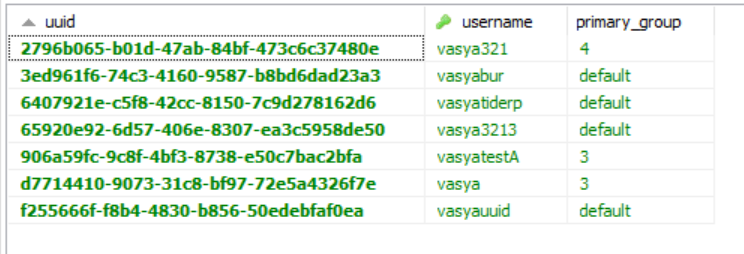

 strange wind
Is it possible to disable it?
strange wind
why?
elfin egret
because that table is used for name --> uuid lookups
strange wind
I thought this config was for it use-server-uuid-cache: false
hasty tree
i retract my statement 😅
strange wind
Then what exactly does it do?
elfin egret
yeah, you can enable the server uuid cache in addition to the LP one
elfin egret
the one the server maintains has an expiry, will sometimes result in lookup calls to the Mojang API, and only contains records from players who have joined that specific instance
the LP one has no expiry, and will contain records from players who have joined any instance with LP installed on it
it's required because if you want to run /lp user vasya permission ..... on minigame-server-7 (for example), but you've never joined that specific instance, then the command will fail
so LP maintains a global cache to fix that
strange wind
Somewhat. In fact we do not need that caches at all, because we have our own login system where we give different unique uuid to every player. But if the player is not registered yet and tries to enter on login/register server, then he receives different uuid every time on the same nick, which is saved to LP database. That bugged us.
elfin egret
hm
could you not just use a separate database on your login server
or, no database at all (just flatfile)
you could probably then just symlink the uuid lookups file to /dev/null
strange wind
Login is on bungee
elfin egret
mhm