#dusk-modding
1 messages · Page 31 of 1
 rapid crown
 honest stag
what happened
 lament ore
I tried to switch to ericw's tools because it has sunlight options
I'm HOPING that maybe the release candidate is just totally broken and going to the stable version will fix it
 hollow laurel
well, you vga now
lament ore
but perhaps WAD3 does not work with ericw tools? idk. I didn't think textures were taken into account for lightmap generation
hollow laurel
on a serious note, haven't seen anything like that using the pre-release version
hmm.... if you haven't changed _bouncecolorscale it shouldn't no
lament ore
I'm boutta fucking square up and build my own goddamn bsp compiler
hollow laurel
doesn't look like it, it's just under the worldspawn keys
lament ore
Yeah I think EricW just doesn't like WAD3
that would explain those weird fullbright issues I was getting with Ericw's tools before
honest stag
make a wad2 out of the wad3 textures like a big john
 gritty forge
I tried making a WAD3 from the textures in the dusk folder, but HLTextureTools and Wally both seem to lose the transparency when they do that
Actually HLTextureTools just made a corrupted mess when it tried
 fiery phoenix
I know this is possible but I never used TB before, how do I make double doors that don't connect as a single door ? 🤔
lament ore
what do you mean by connect?
fiery phoenix
When I put doors next to eachother they act as a single huge door in-game
hollow laurel
hmm, think it should work if you set the doors targetname values to different things
since doors that touch on compile will group with nearby doors if they don't have a targetname set
.... think it's called targetname, at work so can't check editor :p
fiery phoenix
Will try that, thanks!
lament ore
Are you sure the direction of the doors are set properly?
fiery phoenix
Oh you're right it looks like their direction is wrong
honest stag
oh so that's normal, good
lament ore

GitHub
Quake/Hexen 2 Map compiling tools - branch of http://disenchant.net/utils - ericwa/ericw-tools
I could do it....I could add WAD3 support.....
but should I.....
honest stag
you madman
fiery phoenix
So I need to add a spawnflags key, right ?
honest stag
there should be already - you just click it and there is a list below
i dunno if it'll work
it just kinda does and doesnt sometimes
fiery phoenix
My bad I didn't see the list, TB hid it pretty well!
lament ore
Do Quake BSPs support transparency at all?
honest stag
quake 1? probably not
lament ore
I'm going to shit my pants
honest stag
i dont know for sure lol
lament ore
god has forsaken me and split the tools I need between two incompatible toolsets
the path of least resistance here is to just try to use Dusk textures as much as possible so I'm gonna try that
honest stag
again
is it not possible to somehow make png files out of a wad3 and then use Zombie's makewad to make a wad2?
@lament ore
lament ore
Right but I'm using a transparent texture on a wall which I think Quake does not support
fiery phoenix
is there a way to prevent doors from closing themselves without setting "wait" to -1 ?
because doing so prevents me from closing it at all when interacting
 ancient depot
@gritty forge Textures in a wad don't have transparency
Transparency works as an in-engine thing by making the last palette index completely transparent
honest stag
only way i know is to just set the wait high enough so it doesnt matter
like 999 or something
lament ore
Seems as though models can't be lit by sunlight
At least not currently
I'm just gonna have to bin this outdoor map for now until we get better light tools into the sdk, there's no way I can reasonably do it atm
 still raptor
@lament ore yeah you probably dont want to use entities for those trees, they arent really set up for that , its got nothing to do with the lighting
those trees were baked in the base game
i dont think they take the same lighting info that regular entities too, ill check them out
still raptor
nah everything, but yes
candles, mortars, rivets, crossbow bolts, lamps, all have dynamic lights
hollow laurel
🕯️
still raptor
@lament ore , basically currently entities read the lightmap color right below them at the moment, im not sure if the trees do that right now, so theyll just be black
ancient depot
It should automatically do that to any prefab it spawns, maybe it's not doing that for them?
still raptor
its either that they dont, or they are clipped below the surface, and arent able to read the correct color
ancient depot
Oh good thought
still raptor
either way, trees are not a great use case, because you wouldnt really want a single color applied to something that large, youd likely be better off building your own trees so you can lightmap them
(and give them func breakable to be dusk authentic)
ancient depot
Or wait for fgd support so the lightmapper can lightmap them
because it'll have the .mdl versions
still raptor
yeah
ill check the tree prefab when i sit down at my pc
its either you have them clipped into the surface, or we messed up supporting the lightmap reading on that specific set of prefabs
 small gate
@ancient depot not to step on your toes or anything
what are the odds there's an off-by-one on the lightmap uv
ancient depot
The potential is definitely there
small gate
I was thinking it was prob. some issue with filtering, so I forced it off with a d3d11 hook but the issue is still visible
off-by-one or by half idk 🤷♂️
ancient depot
All of the BSP stuff is being redesigned anyways, so I'll try and cover any of these issues with that
What's in there currently is a fucked up version of what was in earlier builds, since we had to port everything to the main Dusk codebase in a rush
hollow laurel
oh yeah, you were doing some large rebuild for sdk + co-op + probably other stuff
small gate
yeah doesnt sound like a fun situation :/
hollow laurel
noooope
ancient depot
It's a lot more fun now that there's less pressure
because you guys actually have something you can use right now
still raptor
lmao
hollow laurel
yaay
still raptor
yeah its likely an off by half?
ancient depot
probably
still raptor
because >rounding
ancient depot
The calculations you have to do for Q1-era lightmaps are super fragile
The slightest mistake will majorly fuck it up
small gate
@rapid crown forgot to say thanks
lament ore
I noticed earlier the trees were clipping through the ground so it's almost certainly that
small gate
so yeah, thx
lament ore
well actually
it should shoot a ray from the origin no?
because the origin is place on the ground, but maybe I need to raise it up slightly
lament ore
In that case it should probably shoot the ray from ever-so-slightly above the origin
still raptor
i placed this one directly on the ground
lament ore
oh god what is happening
 keen bay
ascend
small gate
THEY HAVE ASCENDED
lament ore
am I just running a cursed version of Dusk SDK or something
keen bay
Cusk
still raptor
lemme try the other trees
lament ore
I ascended them to make sure they get lightmapping right but only that specific one worked lmao
what are the chances you happened to pick the one and only tree that works properly
small gate
that's peak "it works for me" bad luck situation
still raptor
im trying the others now
small gate
it happens every single time you're talking to the person that is reporting, while debugging at the same time
 turbid glade
Bruh
honest stag
lol you know i feel like this channel is at the state of panic, confusion, excitement and happiness all the time
i dont know how to explain it
small gate
welcome to development
turbid glade
Accurate
still raptor
so, that is "correct" behavior in a weird way
theyre reading the correct color from the lightmap if theyre white like that
and black was them being clipped
however that fullbright thing is just a bug that can happen with any entity as far as i know right now
this is directly on the ground
no like 1u offset
i guess thats a tree you havent used yet
ill have to try them all to make sure lol
lament ore
All those trees I placed earlier were placed on the ground by having the entity selected and clicking on the ground
i.e. their origin is exactly on the plane of whatever I clicked on
they should probably be shooting a ray from very slightly above the origin
still raptor
god which fucking trees did you use
this is pissing me off
ive tried 4 different trees
still raptor
also nah theres no need for a ray offset
lament ore
I'll send my .map in a sec
lament ore
I just got em from entities.txt :y
still raptor
yeah you just managed to somehow use every one i havent tested
lament ore
such is life as a forest dweller
honest stag
You play DUSK?
I prefer TREE
 night trail
Mighty Yggdrasil!!
lament ore
includes wads, bsp, map, and original JACK jmf
 tepid flint
Scott is angry
lament ore
good news: light_environment DOES in fact work with zhlt so I don't need to use ericw's tools
bad news: there are massive lightmap issues everywhere
honest stag
Man the fucking lightmaps are haunted aeent they
lament ore
I think it's me that's haunted
honest stag
Yeah at least it tyrned big problems into "can be worked around" probles for most
Turned*
fiery phoenix
To be fair since the patch I only had like 1 or 2 shadow artifacts
So it definitely is way better
And said artifacts disappear if I move lights around a little
lament ore
given I'm running hlrad with -fast but that should just give me lower quality lighting and not affect the format of the lightmap or anything
afaik
 graceful hinge
laying the land with 150 spotlights does the trick for now
definitely better light performance at least
lament ore
Are spotlights supported yet? Thought we only have point
honest stag
candles.
small gate
if -fast changes final lightmap resolution it might just be enough to fuck shit up good
graceful hinge
well no im just dropping lights with .5 wait
honest stag
Fake-ish dusk spotlights yeah
Streetlight/work light are the 2
graceful hinge
technically you could do a spotlight if you fine tuned the drop off right?
honest stag
Both are object_
graceful hinge
ya, useful. same with lamps
 onyx marten
i got a question regarding some object_trashbags. theyre just stuck in place and cant be picked up. do i need to add a certain property?
 crude cedar
yea
onyx marten
no i put one high up and its stuck in the air. which property would it be?
onyx marten
i dunno
honest stag
Yeah like
They are the same as spotlight for example
onyx marten
but theres no prop trashbag and they could be picked up in the original game right?
honest stag
Can be broken, aren't affected by physica
I... Dont think you could pick them up?
Not sure tbh
Maybe they just arent added yet
lament ore
@still raptor is gonna be real mad when I decide that the trees are ugly and I don't wanna use em anyway
onyx marten
ok maybe i'm wrong. imma just use barrels instead, thanks however!
lament ore
I actually made a brush tree earlier but it was too much for vis
honest stag
Isnt vis useless right now?
still raptor
yes
lament ore
o, I'll just skip it then lmao
crude cedar
Trash bags couldn't be picked up
still raptor
yeah
crude cedar
it needs a certain property to enable that
still raptor
bread can you just send me your .map
there ARE issues with the tree ents currently anyways
honest stag
I thought ge did in the archive?
still raptor
but the bahavior youre seeing is different
honest stag
Yeah look a bit up it's there
lament ore
unless I sent the wrong zip?
lament ore
no layout changes, just some decorating
honest stag
Ah alright
lament ore
dusk sdk be like "light it yourself with a candle if you're so fucking smart"
honest stag
Lol welcome to the "i light everything with fucking candles because they dont break shit and cause issues" gang
honest stag
collect all 8 lightmaps
ancient depot
we should do the raycast from the top of the object then maybe
still raptor
its not really necessary
honest stag
Bruh
still raptor
he just ACTUALLY clipped them into the ground
ancient depot
but that's a valid thing imo if you want to have variance among them
lament ore
if you click an entity on the ground that's how it places that
It puts the origin on the plane of what you clicked on
honest stag
It's better to place it too high and then adjust from my experience
lament ore
in JACK/VHE/Sledge anyway idk if you can click things onto the ground in TB
honest stag
Really? Sometimes stuff borked for me if i did
Like lightposts just stick out with the tip if i click them there
still raptor
some of the ents are incorrectly made
lament ore
keep in mind @still raptor those entities have the origin in the center, not the bottom
lament ore
well yeah but that just means the tree's origin is in the center of the tree for some reason lol
crude cedar
smelly david
still raptor
but yeah, my suggested fix is to not clip them into the ground, but rather place them on the ground
lament ore
hol up lemme take a video for you
This is how JACK/Hammer/Sledge places things on the ground
And like yeah I could move them up manually but it's gonna be super annoying if every object_ I place on the ground has to be moved up manually for lightmapping to work right
still raptor
thats how it places things with incorrect FGDs
notice how info_player_start doesnt do that
still raptor
but what @ancient depot said is probably what we'll do
because it SHOULD be valid to clip things into the ground if you want to
still raptor
yeah
ancient depot
which would make sense for say, a lamp
honest stag
...you cant?
still raptor
maybe we should have a property for light test offset
ancient depot
I mean lighting wouldn't work
still raptor
so the user can do what they want with it
honest stag
I slammed upside down lampposts there and they look fine
The ones that dont emit light
ancient depot
I'm talking about if we implemented the change suggested earlier
still raptor
the main thing is these arent supported as lightmapped entities right now because the sdk isnt far enough along for it yet
so this is only for runtime lit objects specifically
"lit"
still raptor
dont believe so
honest stag
aww
still raptor
i was just looking at that on trello like 5 minutes ago
small gate
how does quake do it, do ents just go totally black when they clip out?
still raptor
quake doesnt do this
small gate
oh
still raptor
lmao
tbh im not sure how quake decides lighting on dynamic entities
idk where the info comes from
 hard pollen
Eh I'm more curious about how the lighting in RAGE works.
honest stag
Just use rtx 4Head
hard pollen
Because a lot of RAGE's technical stuff is a mystery and it scares me. Someone explain it please.
 spiral nexus
I often forget RAGE exists
 tepid python
Just a general question but how hard is it to get started with map making, i have average experience with unity itself but haven't done much besides that
honest stag
(setting up can be a goddamn pain, but after that it's smooth sailing i'd say)
small gate
barrier of entry isn't particularly high, but there's a lot to master
tepid python
I'm mostly asking because i see lot of pinned messages so it seemed like a difficult thing to get started with
honest stag
No not really tbh
still raptor
its easy if you just follow some really simple steps
lament ore
it's not, but the sdk is in an incomplete state so don't expect things to work perfectly yet
still raptor
you need about 5 things to start
lament ore
if you want smooth sailing wait a while longer for the sdk to become stable. but yeah getting started is easy
still raptor
- a map editor, we suggest trenchbroom
- compiling tools, we suggest ericw's tools
3)if youre mapping for quake/trenchbroom, youll need a texture wad, we have one pinned, but you can use any wad you want
honest stag
For how to set up/use trenchbroom - check dumptruck_ds on youtube for anazing tutorials which are simple to understand
still raptor
- if youve used quake bsp, you need palette.lmp
lament ore
which btw @ancient depot idk if you missed it earlier but we discovered that both Trenchbroom and Ericw's compiling tools do not support WAD3, so looks like dusk.wad is probably gonna have to stay WAD2
ancient depot
That's very unfortunate
lament ore
yea
still raptor
and thats pretty much it
ancient depot
We might publish two versions then
lament ore
it would be nice if the SDK had a "quake" version and a "half-life" version of the included models and textures
ancient depot
I'll consider it
lament ore
@tepid python here's palette.lmp if you don't have Quake to rip it from https://quakewiki.org/wiki/Quake_palette#palette.lmp
ancient depot
The plan is for the creation of that stuff to be mostly automated
So it's not like it's infeasible
tepid python
Thanks for the explanation, will try it out
lament ore
nop
lament ore
what are they playing rn?
still raptor
just some random dos platformer
during his shoutouts he just went "shoutouts to some of my favorite developers, dave oshry and david szymanski"
crude cedar
Dave, The Developer
honest stag
lol
They are the big guys now
lament ore
Big John Developer Dave
still raptor
i got a shoutout during the AE run lmao
honest stag
That must feel kinda surreal lol
still raptor
its a weird one for sure
small gate
the fuck's a "Normy's Beach Babe-O-Rama"
small gate
oh god there's a p. good reason it's on the awful game's block
lament ore
@ancient depot @still raptor what do you think of having a light override property on objects_ that lets us just set whatever light value we want it to have rather than relying on it picking up the right value from the lightmap
ancient depot
I'd be fine with having something like that
lament ore
I could see some situations where I'd want an object to be brighter or darker than the lightmap says it should be anyhow
honest stag
Yeah i could see that being really useful actually
spiral nexus
I doubt it but might as well ask; is there any way to show text on screen while looking into certain direction in Quake or HL1, like how it shows OPEN when you look at some doors in Dusk?
still raptor
well
you can use message triggers
and im sure we can support the look messages dusk has
spiral nexus
Look messages would be really great if that could be implemented
honest stag
looking at a scarecrow
Message appears
use :)
ancient depot
Once we properly rewrite the AI code and stuff you could actually do that
as in, pressing use to activate the scarecrow
honest stag
Oh damn that's cool
lament ore
gotta clean up all of David's stinky code
spiral nexus
actually problem of look messages will be that 99.9% people will use it for F memes
honest stag
Implying they dont do that with button messages rn
 ivory otter
Ahhh, I'm trying to figure what exactly I wanna do with my maps
There's so many possibilities lol
small gate
push button, receive big john
tepid flint
That was erebus reactor
spiral nexus
ere🅱️us reactor
ivory otter
The Big John reactor
A Big John powered device designed to awaken Nyarlathotep once more
gritty forge
compiling on trenchbroom be like: haha gotta go download id software tools you fart nut
ngl i am apart of hammer editor gang
mastered it since i was 12
giant brain flex
 torpid agate
Hammer is ugly
torpid agate
Jk but I do like the way Trenchbroom looks better
gritty forge
trenchbroom does look better and feels better
i just have more experience with hammer
i used to make a lot of source maps
lament ore
Use JACK
torpid agate
I like jack more
lament ore
it's just Hammer except rewritten by a bunch of Russians to be more stable and some extra features
Sledge sadly ceased development
lament ore
don't buy steam version
gritty forge
how epic
lament ore
slightly older free version is more stable and, y'know, free

J.A.C.K. :: Official Website
J.A.C.K. - brand new cross-platform map editor for Half-Life, Quake, Quake II, Quake III and hereafter many other games. A combination of convenience of Worldcraft/Valve Hammer Editor and Radiant editors, extended tools, configuring flexibility, high-quality visualization of ...
torpid agate
Jack scales best on my computer
gritty forge
i used to use radiant a frick ton
lament ore
not that JACK has been updated in recent years but the latest free version is stable and feature-complete, whereas sledge ended development in beta. although sledge is still good too
gritty forge
radiant black edition for 2015 video game i no longer like
torpid agate
Is that for cod?
gritty forge
yeah
radiant black is actually pretty smooth tho
like really smooth
realtime lighting and everything
torpid agate
A dream of mine is to import/recreate Der Reise from Cod Zombies to Dusk endless mode.
gritty forge
the 3d viewport is actually rendered in-engine which is epic and saves time to compile and see how lighting is in-game
torpid agate
Oh shid that’s pretty sweet
gritty forge
there's this guy porting like every zombies map to Pavlov vr
and I've never seen someone port level geometry of so many maps to a game in such a short amount of time
torpid agate
I’ve managed to open the geometry for a tf2 map in dusk
But it’s a lot of work to get it going
gritty forge
ooh nice
to be honest i don't know much about goldsrc other than source engine is a better version of it, and that it's a heavily modified version of the id tech engine that quake uses
torpid agate
I think goldsrc is the cutest engine out of all three
gritty forge
very epic engine
i put half life on my phone
so that mobile gamers can never rise up to my level
but no worldcraft or hammer 3 so doodoo fart
but this channel about duscc modding so ima talk about that
someone beat me to the big john mod that i promised to make when the SDK came out and i'm angery
crude cedar
the trees have ascended
 modest imp
lament ore
modest imp
lament ore
please clap
spiral nexus
for a second I thought that tree was dabbing
hollow laurel
sits in vscode to regex replace stuff now that i have func_bread's fgd
also since the object_torch doesn't seem to emit light?
 sharp trail
bruh isn't that that one part from fortnite?
 scarlet fjord
someone stole all the trees but kept their shape in place
 lunar shale
just add an independent light source near the torch?
hollow laurel
what i did, just i didn't want to do it by hand
since had about 40 torches replaced to the dusk object
well... 102 even
hollow laurel
still more work than making a regexp and doing a find-replace in the .map file :p
also allowed me to add a comment by those lights in case the torch starts to emit light at some point, so they can be removed easily
and, well, since i know some regexp, i must use it :3
lament ore
here's a more up to date version btw
lament ore


@DUSKdev @DaveOshry #Dusk 👶🔧 log. Day 6.
Made a neat industrial yard, which plays much better with today's patch making enemy rotation consistent.
Learned to build a lil smarter, then made an absurd arcadey secret, just cz I haven't tried that yet. Yey~
🎵 is C...
 Twitter
which one of you lads is this
lament ore
o lol
graceful hinge
Hi
still raptor
cant wait to see that map with the new lightmap stuff
lament ore
hi hi
still raptor
whens day 7
graceful hinge
after sleep lol
lament ore
7 days to dusk
graceful hinge
nearly done, at least enough that im happy with what ive learned
more or less i understand how some people have done this for like 20 years lol
hollow laurel
23 even..... now i feel old <_<
lament ore
make an outdoors map and fight the SDK every step of the way like me coward
crude cedar
I like the part over the lava where you have to basically do csgo surf
graceful hinge
Ya I wanna try out more wacky stuff
Seeing as I speedrun Dusk
No doubt huge potential for puzzle maps with the Xbow, Riveter and Mortar
crude cedar
I might get into mapping
hollow laurel
oh, @lament ore, trenchbroom doesn't like your new fgd: Could not load builtin entity definition file 'dusk.fgd': At line 424, column 210: Expected '[', but got ':' (raw data: ':')
hollow laurel
fixed it by changing
@PointClass base(Targetname, Angles) iconsprite("sprites/light_environment.spr") flags(Light) = light_environment : "This entity makes a map's sky emit light. The only practical way of lighting outdoor maps." : "http://twhl.info/wiki.php?id=146"
to
@PointClass base(Targetname, Angles) iconsprite("sprites/light_environment.spr") flags(Light) = light_environment : "This entity makes a map's sky emit light. The only practical way of lighting outdoor maps. http://twhl.info/wiki.php?id=146"
suck it TrenchBroom
hollow laurel
i can up a fixed one :p
lament ore
o thx
hollow laurel
func_bread's dusk.fgd, fixed for trenchbroom which is pickier with it's .fgd syntax
graceful hinge
its a wondrous timesink if anything @crude cedar you learn a lot about what makes the campaign levels like Dusk's so solid.
lament ore
look at the last messages David sent where we talked about encounter design in dusk
hollow laurel
i accidentally the "light" value from the lights i added, so had to fix that since the torches were way too bright... gonna compile and chuck up some screenies now that it's lit
onyx marten
where do i have to put the .fgd file?
hollow laurel
well, anywhere i think, since you can then browse for it in the editors
well, at least trenchbroom
under entities there's a thing in the bottom
onyx marten
oh ok thx
still raptor
neat
hollow laurel
and, with eventual colour support for lights i can switch the torches over to something a bit more nicer looking for those
 sweet oasis
anyone made a rat map yet?
 tropic vapor
As in, you are a rat? Or you just fight tons of rats
 thorn nova
You have a birthday bash
 proven agate
Hey boys, which rad (light) compiler is the best? quake ones or hl?! 
 mortal narwhal
@honest stag I went to bed right as you were asking about buttons and stuff whoops
On a button, set wait to -1 to make it "stay pressed" and set speed to 0 so the button just doesn't move
WOW
lemme re format that
there
@honest stag and heres the map
 bleak reef
I believe @pale pendant posted a rat map earlier. Or screenshots
sweet oasis
oh, I'll scroll back
mortal narwhal
Oh thats just my test map to see if rats would die from props being dropped on them
 faint summit
crude cedar
faint summit
crude cedar
wait why the fuck is zag in #dusk-modding
 balmy thorn
@hollow laurel The fgd doesn't work.
hollow laurel
huh, any errors?
balmy thorn
Could not load external entity definition file 'D:\QuakeDev\dusk\dusk.fgd': At line 424, column 210: Expected '[', but got ':' (raw data: ':')
hollow laurel
did you download the one i linked, as in https://cdn.discordapp.com/attachments/586508960128040961/664881183292653579/dusk.fgd ?
just downloaded and checked, that line should be fixed in it
hollow laurel
yay 👍
balmy thorn
Thanks again
mortal narwhal
hmm, some textures get flipped in the new patch
still raptor
yeah this was reported, itll get looked into
mortal narwhal
right on
mortal narwhal
nice
 alpine depot
i love how my map is coming together, i think im going overkill on the detail though
mortal narwhal
that looks super nice
holy cow
are you doing a final pass of detail, or detail as you go?
alpine depot
detail as i go
i like to try and create the setting im going for as soon as possible so i know what i should work with
gonna basically recreate Power Up from HL lol
still raptor
wow thats looking cool man
alpine depot
if only i could figure out how to have a trigger break a func_breakable
unless that isnt supported yet
considering func_breakable isnt fully implemented yet
how do i add props to the map too? i want to shove some physics crates and stuff like that inside of my train
still raptor
i think theyre listed in entities.txt
alpine depot
ohh sweet
 vestal hare
If i wanna make a map what the go to software lawds?
vestal hare
Do any level editors read in files? I have made a tool which generators levels in a 2D array i wonder if i can use it with a level editor?

itch.io
Procedural Generation tool for creating FPS levels to build on top of in other engines.
An example
 summer dagger
guys do you have any idea why this might be happening
i should be able to add the wads into the texture collections in trenchbroom but i cant click the + button
still raptor
just drag and drop it on
still raptor
what does the console say
summer dagger
Could not load model progs\g_nail.mdl: File not found: 'progs\g_nail.mdl'
Could not load model progs\g_rock2.mdl: File not found: 'progs\g_rock2.mdl'
Could not load model progs\g_shot.mdl: File not found: 'progs\g_shot.mdl'
this sorta stuff but many more lines with different shit, not trynna spam
vestal hare
Is there a guide to set trenchbroom up to work with dusk?
summer dagger
it's weird tho by their names it doesn't sound like theyre from dusk but instead quake
dude i wish lmao
spiral nexus
@vestal hare TB doesn't need any extra setup
Dusk will read Quake BSPs from the get-go
vestal hare
So how do i get the wad to work? how do i get the entities to show up?
spiral nexus
You can add Dusk WAD which is pinned on this channel if you want to use Dusk textures in particular, Quake entities are changed to alternatives in Dusk
For using WADs in TB I'd recommend Googling, I am personally JACK user
summer dagger
could you actually set up JACK ? did it work?
im more experienced with jack tbh but as hard as i tried it was impossible to set it up
spiral nexus
JACK has quite straightforward installator on Windows so I sm not sure what are you talking about
still raptor
i might make a quick video on how to set up TB for use with dusk easily
summer dagger
that would be pretty cool dude
@spiral nexus i meant the whole wad thing, didn't really know how to configure the game profile
spiral nexus
If you mean Dusk compatibility, JACK works same as TB - HL1 BSPs are supported natively in Dusk so extra setup is unnecessary, there is official FGD worked on and unofficial FGD available for it somewhere on this channel though
sharp trail
@mortal narwhal keep the flipped switch it's fricking hilarious
spiral nexus
You can just use HL1 profile and WADs are added through settings @summer dagger
spiral nexus
Note that Quake WADs such as the Dusk WAD will be grayscale in the editor, they'll show up in-game just fine
alpine depot
i remember a level in quake where you push a button and the bridge spins to a different angle
spiral nexus
I assume so
still raptor
im making a video for tb now
spiral nexus
Dusk mapping is quite exciting despite being in such early state
summer dagger
that makes it more exciting for me at least tho
alpine depot
are the entities for those dead soldiers you see in E1M2 and E2M3 able to be used? i saw that the floating wendigos seen in the escher labs are usable so i wonder if the soldier corpses are
cant find any supported entity names that suggest that though
summer dagger
you get to be one of the first ones it's pretty cool
alpine depot
wtf is object_bad lol
hollow laurel
also monster_aqua, that's some really cool detailing you've done there
vestal hare
Where do i get pallete.lmp?
proven agate
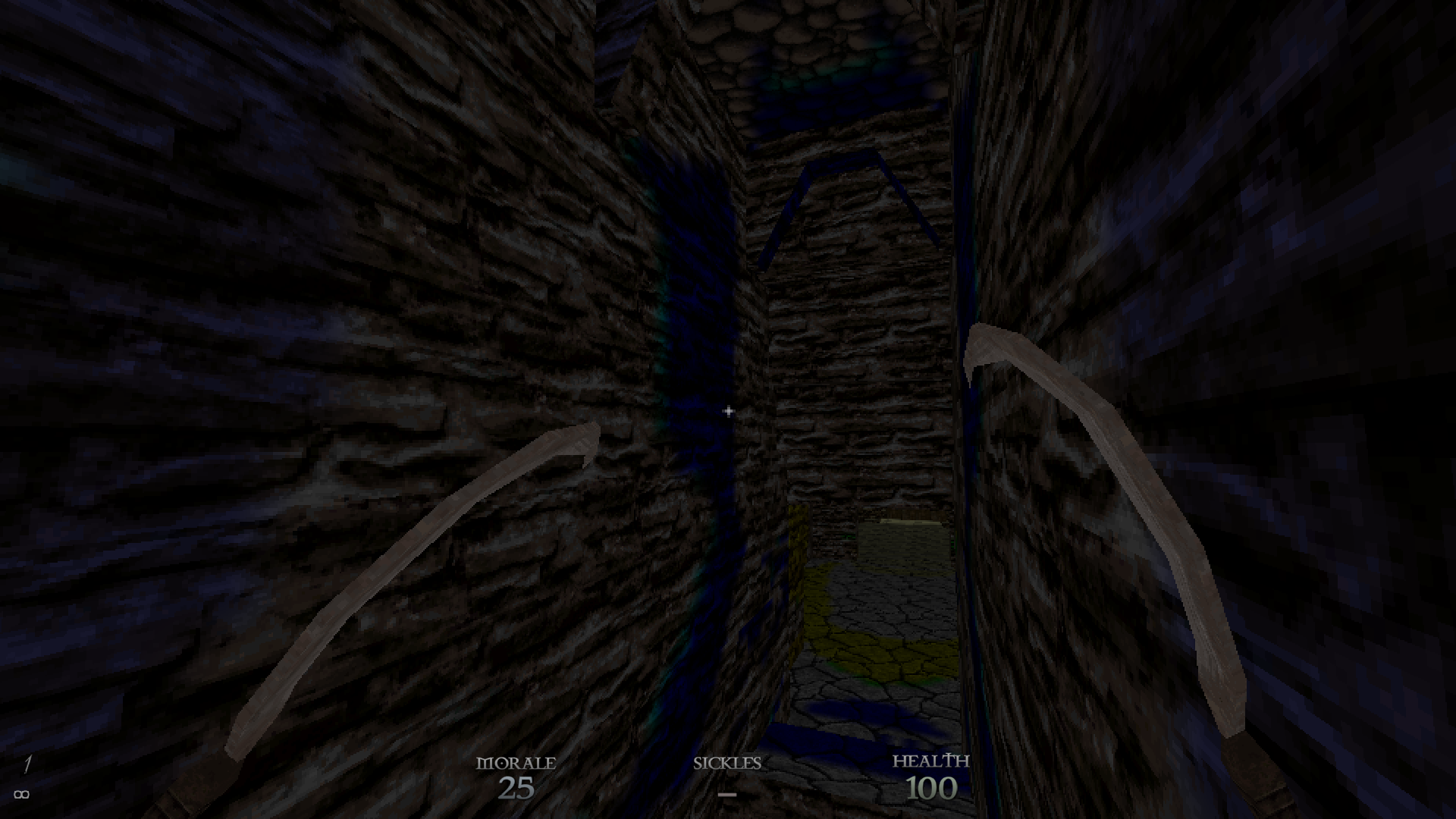
People help, there is some problem with light, wtf is hapenning i dunno. (im using zhlt compilers)
I have the light entity in the next room with reddish color, but somehow that something drop light everywhere where i don't needed. ((
Maybe someone met this problem...
https://imgur.com/saoSFca
 vestal hare
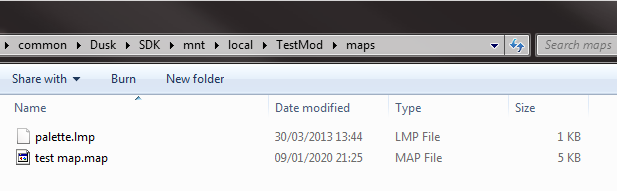
https://i.imgur.com/hjVbNaU.png my map ain't showing up in the level list under custom levels
 spiral nexus
Try putting palette file into your mod's root folder
 torpid sphinx
is there any way to make the messages show up on walls?
like 'THIS PLACE CONDEMNED' and whatnot
all I got is a black background with the words
mapping's kinda fun btw even if I only have a box
still raptor

Trenchbroom can be found here:
https://kristianduske.com/trenchbroom/
Tool to generate texture wads (there is a dusk.wad pinned in discord.gg/newblood):
https://github.com/NewBloodInteractive/MakeWad/releases
EricW Tools can be found here:
https://ericwa.github.io/ericw-too...
here you go kids
a literal 2 minute one take setup of dusk mapping
its very, very easy
 verbal peak
spiral nexus
verbal peak
spiral nexus
@torpid sphinx you will be able to do it using decals I assume, but transparency isn't supported yet
Best bet right now is probably to create new texture with the text and carve it out into a wall with a brush
vestal hare
I have pretty much done what you've done but after dragging the wad my textures look like this
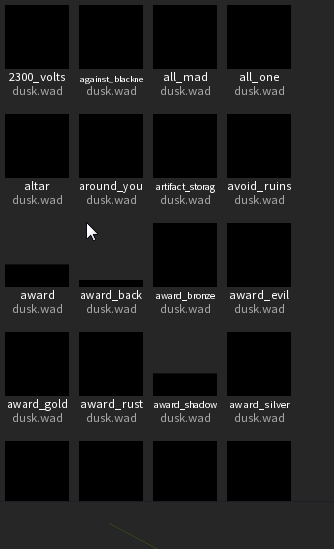 still raptor
do you have quake set up correctly in your preferences
vestal hare
probably not
still raptor
now obviously you dont have to use quake to use trenchbroom
thats just the "easiest" setup
you can be zero to playing your map in quite literally 2 minutes with it
vestal hare
Do i need the steam version or is there a certain one?
still raptor
any version of quake will work
specifically, trenchbroom is looking for the id1 folder
thats where it stores the data for the entities, textures, palette, etc
rapid crown
Nice wee vid @still raptor 👌
Didn't realise dusk just auto sets a sky box if you don't create a brush and set a sky box
Do the maps for Dusk not need to be 'sealed'? Or were you doing that just as a quick set up?
rapid crown
Okay. I'll probs just continue down that route for now
still raptor
but you map wont be visd if you leave the leaks
rapid crown
Handy for just getting a floor plan down though, gotta say
 terse salmon
is the folder to use in trenchbroom C:\Program Files (x86)\Steam\steamapps\common\Dusk\SDK\bin\win_x64? the video seems to only show in lofi for me
rapid crown
@terse salmon
https://youtu.be/gONePWocbqA

If you want to make maps for Quake, Quake 2 or Hexen 2, TrenchBroom is your best option. If you’re a total newb or returning to mapping after a long time away this is the tutorial you’re looking for!
PLEASE NOTE: TrenchBroom has an excellent manual. You can find it under...
still raptor
that folder i show at the beginning is the location of quake
that will be wherever you have quake installed
and yeah i recorded at 720p which was probably a mistake
terse salmon
ahh thanks
 iron needle
btw if anyone's finished maps that they shared here shoot them my way in dms. If like to check them out!
 tight fractal
Let David feel superior
iron needle
Naw I don't think that will happen lol
I just wanna see what people are managing to come up with
Will also help get a feel for what stuff is most important to support/fix
fiery phoenix
I've been trying to remake md_clue as my first ever map, so I'll definitely share it whenever I'm done with it
alpine depot
i'll definitely be posting my bootleg On A Rail/Power Up map here when it's done
onyx marten
i'll start uploading as soon as ive become rat lol
iron needle
lol
 vestal hare
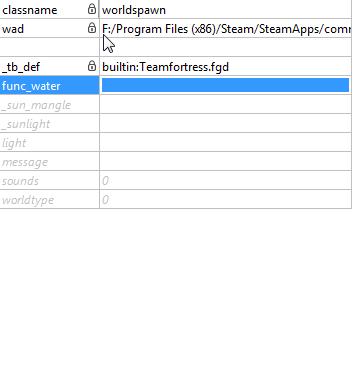
so do i get rid of classname worldspawn?
 half dust
I'd make it a func_detail then rename it.
vestal hare
So make the world spawn a func_detail and set water to class name?
mortal narwhal
right click the selected brush > create brush entity > func > func_detail @vestal hare
well, make it any brush entity, just rename it after
vestal hare
thanks man makes total sense its the same as cod waw pretty much
mortal narwhal
yup
iron needle
@half dust so how much did the scale change hurt your map?
half dust
It was a big improvement.
half dust
lol
mortal narwhal
speaking of which, are there going to be any changes to the scale in the forseeable future?
iron needle
unsure. I hope not but I can't promise anything. However, I'm fairly sure we're going to have it be a worldspawn parameter so you can adjust it, in the future
mortal narwhal
okay, nice
sweet oasis
would be neato
onyx marten
do colored lights work at the moment?
 fiery badge
How would I put down props, like cars for examples?
 vivid blaze
put down any entity and rename it to the desired prop
fiery badge
alright, ez
vivid blaze
from the entity list
sweet oasis
I'm seeing a debate whether to use quake or HL bsps while scrolling through here, anyone wanna give me the quick rundown?
summer dagger
@still raptor fckn thanks for that
 barren terrace
trenchbroom is better being easy to pick up whilst something like hammer and HL BSPS have more advanced features i think
 barren terrace
honestly i don't think it's worth the risk and as someone who has used hammer for a while trenchbroom is a much easier time
vivid blaze
on a related note, is ambient light not supported yet, or am I doing something wrong?
sweet oasis
I've done a fair bit of Hammer, it's my main background
onyx marten
@iron needle aight thx
iron needle
@vivid blaze It was @still raptor and @ancient depot together
who fixed the lightmaps
vivid blaze
@still raptor  @ancient depot
onyx marten
will the lightmaps stay like that now? is it worth spending much time on the lighting of a map atm?
still raptor
As long as you aren't using light styles heavily, as they're currently unsupported
There will still be some minor artifacts here and there, but they will be cleaned up
tight fractal
Vaporweeb but no vaporwave avi
Sads
There’s plenty of vaporwave sakuyas out there
onyx marten
ok thx
vivid blaze
fine fine i changed it
tight fractal
There you go
tropic vapor
Man something as simple as an arch seems so complicated
ivory otter
How do you add func_door into trenchbroom?
onyx marten
right click on the brush u want to be a door, create brush entity and make it anything
then rename it func_door
tropic vapor
Is it better to cut a doorway out of a brush? Or to make it with sides instead?
I cant figure out this clip tool, wont let me select more than three points
still raptor
ok so
3 points are how you define a plane
mathematically
because 3 dimensions
so imagine you are creating a plane to cut the brush in half
they cant be colinear
tropic vapor
Okay, I think I follow you so far. But if I have to make a door, I cant cut the brush in half vertically because then i'll have a half of the door on each side, right?
 I gotta watch more videos or something
gritty forge
big brain move right there
tropic vapor
Right, but what if I want the doorway to be more complex shaped? I cant select/clip that shape all at once right?
tropic vapor
Oh wait, I just realized I can click to create a vertex
tropic vapor
I think I got it!
tropic vapor
Yeah I had forgotten to learn about the brush tool, turns out you can make your own verticies 
 solid isle
trenchboomer
mortal narwhal
thats me
onyx marten
is it possible to use a brush to cut out another one? or basically to automatically align a brush to another one?
mortal narwhal
thats dumptruck_ds
solid isle
we should get DUSK modder ranks:
-JACKoff
-Trenchboomer
mortal narwhal
CSG subtract is what you're looking for @onyx marten
select a brush you want to make a void and ctrl+k
it'll cut out of all the other brushes
still raptor
subtractive brushes save you a LOT of pain
mortal narwhal
^
still raptor
ask @iron needle how he feels about subtractive brushes
tropic vapor
I noticed subtract creates smaller brushes out of the larger shape I cut out from
I should merge those back right?
 chrome wagon
Perhaps this was reported already, i'm gonna say it just in case.
I was playing e1m1 then opened a secret door. I stopped walking for a bit to appreciate the firetotem powerup, then the secret door closed over me.
I wasn't able to open the door or get out of the area (without using noclip, of course)
iron needle
Oh man subtractive brushes are life changing
mortal narwhal
damn
still raptor
which is horrifying
onyx marten
lol why
gritty forge
F
iron needle
Arguably without additive brushes too, since the PB workflow isn't really the same as using proper brushes
@mortal narwhal well, first I had to inset the face, then extrude, then merge vetices, then...
There's a reason there are so few proper windows in Dusk lol
And why I've now gone nuts with arches and other stuff in Rats for Breakfast
mortal narwhal
nice
 lapis hare
I've now gone nuts with arches
suddenly, rome.
chrome wagon
I've heard that on the dusk dev commentary.
Considering i've discovered substractive tool some days ago, i can relate to that nightmare (I didn't suffered that much though, considering i've just started quake mapping, but yeah, the few times i've tried to create a windows without using sustractive tools was a pain XD)
mortal narwhal
nice
honest stag
are you sure you compiled the light?
honest stag
tb?
fiery badge
And after i fixed that the compiler isnt working anymore
It just says there is no dusktest.bsp But im trying to use that to create a .bsp
honest stag
bsp. to create a bsp? you're supposed to create a bsp out of a .map file though?
so also
trenchbroom uses autosaves
try loading them
and compiling
ivory otter
Is there a bed prop? or would I need to make a model for the bed?
ivory otter
Yeah, was just checking, trying not to make any extra work for myself haha
Also I used, I think your idea for a different map, where you'd have to take a light source around with you
ivory otter
It's gonna be horror themed
summer dagger
dude i am actually having so much fun with this i appreciate yall
fiery badge
I was having fun till both programs kicked me in the nuts for no reason
fiery badge
its ok
honest stag
WARNING 01: No valid WAD filenames in worldmodel
could that be a problem?
is this a non-textured map?
also wehre is info_player_start?
ah found it
honest stag
wow dude i kinda have no fucking clue
there is just no bsp file in the end
never happened to any of my maps
fiery badge
guess im fucked
honest stag
there seems to be something wrong with it if the older one compiles
seems like you have a LOT of light entities
fiery badge
all these because of wanted to add a goddamn car
honest stag
also your worldspawn entity has a value of 300 wtf
let me try something
also hey
all your light sources lost their "light" value
it's not compiler's fault i think
you probably screwed up somewhere
fiery badge
yeah I realized that and fixed it
alpine depot
you think darker is better for the atmosphere?
fiery badge
because trenchbroom has a fetish for selecting stuff I didnt select
honest stag
probably, but a very dim light wouldnt hurt i think
and the map you linked me is the fixed one?
the first one
honest stag
alright we'll figure this out
so you actually readded the light value to all light sources?
can you drop the version with that?
fiery badge
I did, its in your messages
honest stag
there is no light there on light sources
you just added a light value to worldspawn
all the "light" entities should have a "light" value as well
for them to "know" how bright to shine
light on worldspawn just makes the entire map bright by that amount
and 300 is a fuckton
way too much i think
300 for a light source is ok though
fiery badge
alright
honest stag
also
i think you might have made the entire map 1 entity somehow
lemme try and fix that
honest stag
dude
instead of worldspawn your brushes are named "light"
lemme fix
also you linked me a verison which isnt compiling for you?
right?
because it compiled for me after i fixed the name issue
select everything and then right click
tap "move brushes to world"
that should fix it
@fiery badge
fiery badge
ok
honest stag
and btw still not all lights have a light value
that might break shit but dont quote me on that
fiery badge
whats a quick way to select everything
fiery badge
and where is the move brushes to world?
fiery badge
im not getting that for some reason
gritty forge
Y'all are making some atmospheric goodness
honest stag
are all brushes selected?
alright then
go to "edit"
and tap "select all"
ohhh wait a moment
double click any brush
it seems like when you select entites it wont work
sorry :P
fiery badge
nope still not showing up
fiery badge
ivory otter
I'm trying to make a rotating door when the player hits e
ivory otter
Oh
honest stag
:P
still raptor
honest stag
gotta wait
ivory otter
honest stag
are you making a map :O
gritty forge
Those look like Heretic or Hexen textures
still raptor
nah lol im playing old quake usermaps
fiery badge
Nope
honest stag
aw
fiery badge
Didnt work
honest stag
how tf...
still raptor
 sturdy tide
 summer dagger
do light_envs work?
honest stag
alright let me fuck around with it a bit more
fiery badge
The one door wasnt structure, I made it one and tried it but it didnt work
honest stag
also hold on
are you using the generic map setup?
not quake?
no no you use quake, sorry
hm
was that door there before it stopped compiling?
honest stag
what did you do?
fiery badge
maybe making the door structual actually worked but just showed the same error message?
honest stag
did you try to just delete it?
fiery badge
no
lament ore
@summer dagger @spiral nexus select the quake map format and then under the texture tab load quake.pal and then Quake models and textures won't be grayscale in JACK
even if you switch back to HL map format they won't be grayscale anymore
lament ore
@hollow laurel HLBSP supports colored lightmaps if you don't wanna wait for .lit support
summer dagger
i decided to stick with trenchbroom for now but thanks tho
alpine depot
time for the first big "showdown" room
lol i didnt even select those texture of the lava containers, weird
fiery badge
IT WORKS
WOO hoo
I gotta re add the door though
@honest stag Thank you SO much for helping me, your advice saved me
honest stag
np my man, you probably found and fixed the issue yourself lol
fiery badge
though
there is one small thing
when ever i create a new light source it doesnt have a light valve, how do i fix this?
honest stag
it should though
try dragging the light entity from the entity list
fiery badge
I know i can re add it
fiery badge
hmm
honest stag
or right click-point entity - light - light
fiery badge
yep its working
honest stag
good-o
honest stag
you think it would be a good idea to stream making a map?
or is that kinda boring
eh, i'll do it anyway, that may actually make me do shit instead of fucking about
i'll drop it into streamers-den when ready
lament ore
kewl, might watch if I'm bored at work and don't feel like working on my own map lol
I added all the objects and props to the fgd. There's no placeholder models for them but they have the offset properly set to make them quicker to place
still raptor
in jack*
iron needle
@honest stag that's actually a pretty common thing I think, people streaming map design
lament ore
some of em need additional adjustment but I'll fix em as I come across em
hmu if you see any
 fringe nymph
forest.jpg
lament ore
enter the jpeg forest
might actually just start plopping all of the objects and props into a map with a grid and guesstimate all of their sizes
tight fractal
It’s kinda cool tbh
lament ore
The jpeg forest?
tight fractal
Yeah the forest
alpine depot
much better
still raptor
i like the darker one a bit more
but looks great dude
i cannot WAIT to play that map
lament ore
@tight fractal http://scmapdb.com/wad:sunny-woods a gift for u....
@still raptor bulldozer no work
alpine depot
yeah I'll be tuning the lighting more, I really like the moody darker lighting though I'd like the player to actually see lol
still raptor
ill check the bulldozer
lament ore
also I think object_bad is intended to be object_bed lol
tight fractal
Bed is bad
tropic vapor
better bread than dead
lament ore
sleep is for the weak
honest stag
👀
 viscid sinew


 honest stag
yes the skull thing is brush-made and it still sucks ass
oh man i kinda hate showing my maps cuz the stuff people make here is so damn good
looking at you aqua
onyx marten
is there a way to smooth out stairs in trenchbroom?
honest stag
Smooth out?
Like what
onyx marten
that it behaves like a ramp but looks like stairs. i'm stuck on a set of stairs sometimes and remember doing this in hammer
honest stag
Oh you could do that with a transparent ramp i assume but those arei supported yet
Aren't*
sweet oasis
yeah that's how it's usually handled in hammer

can't load up official maps in editor and check how it's handled?
onyx marten
yeah i could try that. but weren't in hammer basically transparent ramps?
honest stag
Cant do that sadly
Also dusk stairs are jumpy with camera arent they
onyx marten
and if they're not supported yet..
onyx marten
yeah i think so, the jumpiness doesnt bother me its just that i seem to get stuck on the stairs
honest stag
Transparency isn't supported rn
If you get stuck make the gap/height smaller
You'll get it
sweet oasis
I'd use a regular ramp as placeholder for now
onyx marten
yeah if i dont get it i'll use a ramp but i think nobody here had trouble with stairs until now so maybe i messed up the height