#archive-rpc-help
21942 messages · Page 8 of 22
 coarse yacht
Thanks
 drowsy coral
how i add buttons to my rpc
 meager escarp
You need to get it approved.
 regal vine
drowsy coral
regal vine
drowsy coral
ah
why it say 00:00 elapsed right now
ah i fixed it
 craggy boughBOT
craggy boughBOT
craggy boughBOT
 thin fulcrum
I can't install discord-rpc or discord-rich-presence. Error:
C:\Users\AcarTR>npm i discord-rpc
npm ERR! code ENOGIT
npm ERR! No git binary found in $PATH
npm ERR!
npm ERR! Failed using git.
npm ERR! Please check if you have git installed and in your PATH.

npm ERR! A complete log of this run can be found in:
npm ERR!     C:\Users\AcarTR\AppData\Roaming\npm-cache\_logs\2018-06-22T09_50_24_498Z-debug.log
 oblique gorge
install git
it says it right there
Please check if you have git installed and in your PATH.
thin fulcrum
I can't insall sqlite if I install git I can install sqlite?
oblique gorge
wha
thin fulcrum
I can't install sqlite
If I install git
Can I install sqlite?
oblique gorge
Why would i know
Try it and find out
oblique gorge
does it say git?
thin fulcrum
yes
oblique gorge
Well then there's your answer
Can you atleast attempt to fix it on your own before asking for help
thin fulcrum
I install discord-rpc
but cannot find module?
I use git clone https://github.com/discordapp/discord-rpc
oblique gorge
..
 carmine mica
@=❯ AcarNH#8972 once you install git
ugh
 smoky scroll
ok
can someone explain rpc in like 5 minutes and how i can make a game integrated to the service
 fresh crag
Rpc sends thing to rpc serva wich then displays it on your profile
Game: Use libary
smoky scroll
can i do that through js?
fresh crag
Yeah
smoky scroll
ok
fresh crag
But idk there were some changes to it
@smoky scroll read channel description
smoky scroll
wait a second
drowsy coral
how to add buttons to rp
fresh crag
@drowsy coral you mean the ask to join and spectate buttons ??
drowsy coral
i figured it out, but yea
ok, but imma sound dumb for this one. how do i set the time to 1hr
like the remaining time
fresh crag
what do you use to set it
drowsy coral
endTimestamp: ms('1hr')
fresh crag
@drowsy coral prob Math.floor((new Date).getTime()/1000)+(1*60*60)
drowsy coral
owo
but how?
fresh crag
var endtime = Math.floor((new Date).getTime()/1000)+(1*60*60)
endTimestamp: endtime``` reef whale
if(test){
(message.content == 'XD');
message.channel.send('PRUEBAs');
}else{console.log("Channel not Found!")
}``` scarlet aspen
 I answered in
reef whale
I answered in
reef whale
i test here the commands
 thick sedge
Quick question, how do you clear the user's RPC status?
Just remove it as a whole after it's been set.
Without destroying the client as a whole.
 pastel tinsel
so im trying to display a end timestamp but when ever i do i get the same error
Uncaught (in promise) DiscordjsError: 4000 child "activity" fails because [child "timestamps" fails because [child "end" fails because ["end" must be a number]]]
yet the start timestamp is fine using the same method to set it
what I tried:
endDate is startDate + duration of audio clip in seconds
...
startTimestamp: startDate,
endTimestamp: endDate
...
this threw error
i next tried:
...
startTimestamp: endDate
...
which didnt throw anything, just didnt display the elapsed counter because of it being in the future
 hexed cave
What is startDate? @pastel tinsel
pastel tinsel
@hexed cave
var startDate = new Date();
You can't add a number to that
pastel tinsel
im adding it with enddate.setTime(startDate.getTime()+ duration)
@hexed cave
fresh crag
@pastel tinsel you know that endTimestamp and startTimestamp have to be in unix time
hexed cave
.getTime()
pastel tinsel
ohhhh right
craggy boughBOT
 proud spire
2018-06-28T16:48:58.369741+00:00 app[web.1]:     at Object._errnoException (util.js:992:11)
2018-06-28T16:48:58.369742+00:00 app[web.1]:     at _exceptionWithHostPort (util.js:1014:20)
2018-06-28T16:48:58.369744+00:00 app[web.1]:     at PipeConnectWrap.afterConnect [as oncomplete] (net.js:1186:14)
2018-06-28T16:48:58.369748+00:00 app[web.1]:   code: 'ENOENT',
2018-06-28T16:48:58.369749+00:00 app[web.1]:   errno: 'ENOENT',
2018-06-28T16:48:58.369751+00:00 app[web.1]:   syscall: 'connect',
2018-06-28T16:48:58.369752+00:00 app[web.1]:   address: '/tmp/discord-ipc-0' }```
wtf does that mean
fresh crag
what are you even trying to do
 covert zinc
Can't ipc-connections have scopes? It just says 5000 OAuth2 Error: invalid_request: Missing redirect URI.
carmine mica
@covert zinc you still have to pass a redirect url
covert zinc
Well, how?
carmine mica
options
covert zinc
there is no "redirect url" https://fortnite-needs.an-up.date/RDt78fb.png
 carmine mica
hmm
what scope are you requesting
covert zinc
messages.read or rpc.notifications.read
I don't know which one, or if I need both
carmine mica
what are you tryina do
covert zinc
Making so I log all my DMs
so if they violate the ToS I have IDs
carmine mica
just messages.read
also
covert zinc
ok, thanks
carmine mica
client.login(clientId, {
  scopes: ['rpc', 'rpc.api', 'rpc.notifications.read', 'messages.read'],
  clientSecret,
}).catch(console.error);
this worked for me
covert zinc
What's the client secret?
carmine mica
on your application page
covert zinc
🤦 ofc
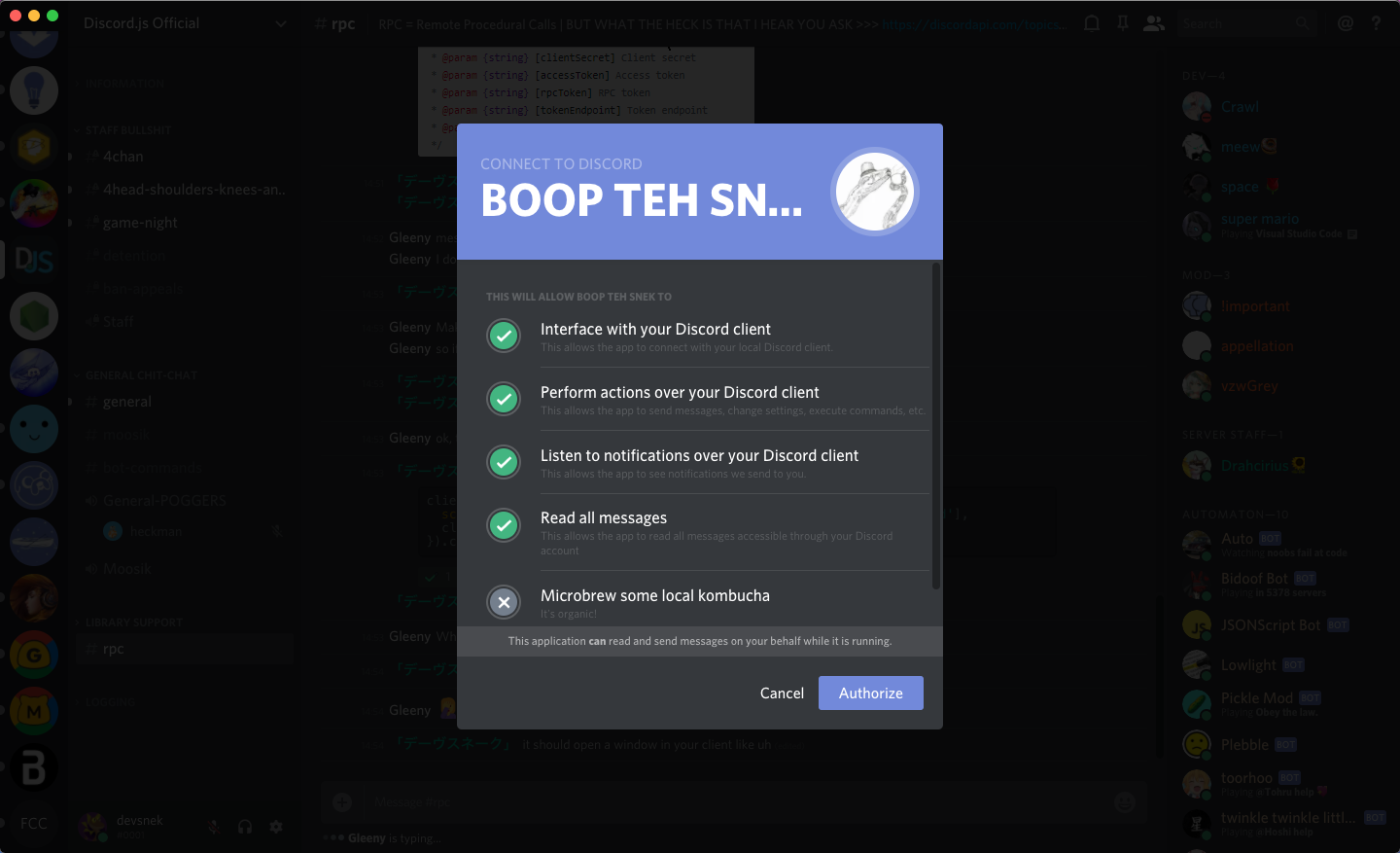 covert zinc
yeah it did, but after I clicked Authorize the error came
carmine mica
where's the error coming from
carmine mica
hmm ok one sec
i'm using ipc
cuz you said you were
covert zinc
hmm ok
carmine mica
you are using ipc right
covert zinc
yeah
carmine mica
cooleo
covert zinc
this is my .login currently https://get.veryhot.today/Y20FQPe.png
 carmine mica
if you just want to read messages
all you need is messages.read
covert zinc
ok, fixed. Error is the same
carmine mica
workin on it locally
sec
@covert zinc yeah i can't reproduce locally
covert zinc
hmm ok
carmine mica
wanna try uh
craggy boughBOT
carmine mica
installing from github
covert zinc
Could you give me the whole code?
uh sure
carmine mica
npm i discordjs/rpc
see if it works then
i've done a lot of rewriting since the last npm release
covert zinc
Oh, you're the coder for rpc? Cool
got a different error* this time
carmine mica
wow
thats nice and descriptive
craggy boughBOT
carmine mica
@covert zinc
covert zinc
well that's the error :P
oh ok
https://hastebin.com/izifazujiv.tex same error
Could you show the code you used that worked?
smoky scroll
all he did was improve the error message so he could see what was wrong
carmine mica
no they mean
about redirect uris
covert zinc
He didn't get the error when trying to recreate the problem
he/she, I don't know
carmine mica
@covert zinc ```js
'use strict';
const { Client } = require('../');
const { clientId, clientSecret } = require('./auth');
const client = new Client({ transport: 'ipc' });
client.on('ready', async () => {
console.log(client.user);
});
client.login(clientId, {
scopes: ['messages.read'],
clientSecret,
}).catch(console.error);
const DiscordRPC = require('discord-rpc');
const rpc = new DiscordRPC.Client({ transport: 'ipc' });```

this correct?/another way to do itlgtm
covert zinc
I ran a debug and it seems like reject(e); seems to send the error. I don't know if it helps or not but I thought I'd mention https://get.nitro.today/icFmuG1.png
 carmine mica
yeah i know
the message comes from discord
if an incoming message has evt === ERROR then discord sent back an error
covert zinc
hmm ok
hmm, wait
carmine mica
you have a redirect uri specified in the application settings right
it can be anything
example.com is safe
covert zinc
... no? Where can I put that then?
oh
carmine mica
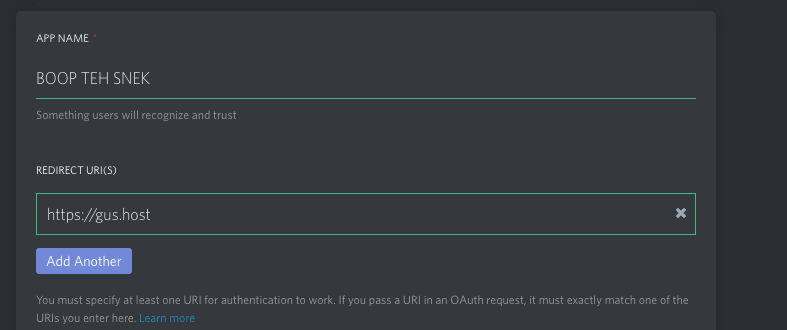 covert zinc
im so stupid
carmine mica
it won't be used
but you should have one
that might be the problem
carmine mica
use node 10
covert zinc
rebuilding
carmine mica
building?
just grab a binary
from the website
covert zinc
well, I fucked up
I'll deal with it tomorrow, thanks for your help @carmine mica!
carmine mica
np
craggy boughBOT
craggy boughBOT
craggy boughBOT
 orchid vector
for what is the insance
    rpc.setActivity({
      details: `Rich Presence for the UnderCards Client`,
      state: 'Searching',
      startTimestamp,
      largeImageKey: 'cards_logo',
      largeImageText: 'UnderCards',
      smallImageKey: 'maxie',
      smallImageText: 'Beta Testing stuff',
      instance: false,
    });
  }
what does it do when it's true i don't see any diffrence
craggy boughBOT
hexed cave
@orchid vector instance was deprecated I think
orchid vector
wut does that mean
hexed cave
Not used
orchid vector
o
kk
hexed cave
Dropped
orchid vector
thx
hexed cave
Np
fresh crag
Use the docs
 fresh mortar
@carmine mica There are issues in beta 12 regarding super calls in Client.js. The class no longer extends BaseClient.js so some of these methods don't exist. Main issue is with Client#destroy()
carmine mica
@fresh mortar thanks for letting me know
craggy boughBOT
fresh mortar
thanks 👍
 tribal copper
can i use discord rich presence on my vps
or i have to run on my pc
meager escarp
You have to run it on your PC
craggy boughBOT
fresh crag
'Something'
 south beacon
if (timestamps.start > 2147483647) {
        throw new RangeError('timestamps.start must fit into a unix timestamp');
    }
      if (timestamps.end > 2147483647) {
        throw new RangeError('timestamps.end must fit into a unix timestamp');
     }
@south beacon ?
south beacon
that's what the 'Something' was
smoky scroll
i just added discord rich presence to my electron app
the thing is that the timestamp doesnt work
like, the elapsed time keeps on 00:00
state: 'Coding a Plugin',
details: 'in the Editor',
startTimestamp: Date.now(),
largeImageKey: 'orbit',
smallImageKey: 'json',
instance: true,
});``` vagrant perch
Date.now will be 0000
save it somewhere else
then use that obj
i think
i havent done rpc yet but i suppose thats it
smoky scroll
ok
carmine mica
@smoky scroll use new Date() instead of Date.now()
rpc will automatically transform it into the proper numerical timestamp
in fact using Date.now is wrong
since discord wants the time in seconds
and Date.now is milliseconds
 fleet perch
Hey everyone, apologies for being stupid, but here: https://discordapp.com/developers/docs/rich-presence/getting-approved … it says: "..for majority of rich presence, we do not require any whitelisting.." but here https://discordapp.com/developers/docs/topics/rpc … it says RPC is in private beta and only approved apps can use it. I'm confused. How else can one set a rich presence status without touching RPC?
carmine mica
@fleet perch it's just confusing :)
you can use RPC
but only for rich presence
nothing else
fleet perch
Thank you!
regal vine
startTimestamp: Date.now() / 1000
^^Feik
meager escarp

fresh crag
@regal vine that would return a 1658.653 number
regal vine
It works for me whenever I want to start a timestamp from the exact same time I'm executing the code.
carmine mica
@regal vine @fresh crag use new Date()
passing a date object lets the library handle it internally
fresh crag
Good libary then
 fiery lichen
my issue is that i try this https://github.com/615283/roon-discord-rp/blob/master/roon-discord-rp.js#L88
and get {"code" : "4000", "message" : "invalid client id" }
that client id is that of my rpc application
it has had rp enabled
fiery lichen
anyone?
craggy boughBOT
fiery lichen
@carmine mica the client is is that of the RP application right?
carmine mica
@fiery lichen yes
fiery lichen
Hmm... strange
example\main.js:31
app.on('ready', createWindow);
    ^

TypeError: Cannot read property 'on' of undefined
    at Object.<anonymous> (C:\Users\james\Documents\example\main.js:31:5)
    at Module._compile (module.js:652:30)
    at Object.Module._extensions..js (module.js:663:10)
    at Module.load (module.js:565:32)
    at tryModuleLoad (module.js:505:12)
    at Function.Module._load (module.js:497:3)
    at Function.Module.runMain (module.js:693:10)
    at startup (bootstrap_node.js:188:16)
    at bootstrap_node.js:609:3
@carmine mica should i be getting that when trying to run the example? 
carmine mica
example runs in electron
npm run example
 fresh crag
npm install node-fetch ?
carmine mica
npm i
fresh crag
Yes true
 brittle panther
hey, i have some code that has this:
and my program works fine on my computer and my discord account
and for many others
but someone else tried running the code and they are getting error 4000 no client id
[code: 4000, message: "No Client ID specified"]
does anyone know why this might be happening?
last line bigly has client id
and DiscordRPC.register(ClientId); in the middle

client id number apparently doesn't even get passed?
const rpc = new DiscordRPC.Client({
  transport: 'ipc'
});```
rpc.on('ready', () => {
setActivity();
setInterval(() => {
setActivity();
}, 15e3);
});
rpc.login(ClientId).catch(console.error);
@fiery lichen hey, sorry for the ping, but i just backread and it looks like we're getting similar errors?
did you end up figuring out how to fix the error 4000?
brittle panther
why is discord.js not a dependency for discord-rpc on npm
😠
ok, fixed the issue. it was just the dependencies stuff not all installing properly.
fiery lichen
@brittle panther I didn't, what dependencies did you need?
fresh crag
@fiery lichen did u do
npm i
?
@fiery lichen yes no?
fiery lichen
yes
    "discord-rpc": "^3.0.0-beta.12",
    "electron": "^2.0.4",
    "node-roon-api": "github:roonlabs/node-roon-api",
    "node-roon-api-settings": "github:roonlabs/node-roon-api-settings",
    "node-roon-api-status": "github:roonlabs/node-roon-api-status",
    "node-roon-api-transport": "github:roonlabs/node-roon-api-transport",
    "node-fetch": "^2.1.2",
    "ws": "^5.2.1"
  }```
my dependencies
@fresh crag
fresh crag
..........
Did did your run npm i ?
fiery lichen
yes
@fresh crag
fiery lichen
@fresh crag ?
fiery lichen
anyone else know why i get that issue?
craggy boughBOT
 cyan quartz
How would I get a timestamp inside of the rpc??
fresh crag
@cyan quartz which timestamp
fiery lichen
how can i make a timer bar
like in spotify rp
fresh crag
you cant
unless you are spotify
fiery lichen
why not?
how did they do it?
fresh crag
idk
prob write a email to discord
and tell them to make a time bar or the will kill discord
fiery lichen
lol i guess ill try to make my thing work before doing that though
can i make the time like paused
@fresh crag do u know?
fresh crag
If i would i have said something
fiery lichen
ok
i mean like timer still btw
brittle panther
@fiery lichen discord.js is not a dependency of discord-rpc
so discord.js didn't actually get installed
discord-rpc is unable to connect with discord.js which it assumes is there, and just throws erro r400 im guessing
i did uh "discord.js":"^11.0.0" in my package.json
and it fixed it
smoky scroll
The latest stable of discord.js is 11.2.3
If I know corectly
fiery lichen
is there any way to have rich presence images without them being assets in the discord application?
...like how spotify just takes album covers
carmine mica
nope
 bitter bough
Does RPC work on Bot Users?
regal vine
no
 fathom dust
What's rpc
 pastel sphinx
?rpc
 pure onyxBOT
stands for rich presence client
fathom dust
And in English? 
pastel sphinx
Well, looks like this sentence is english
fathom dust
I mean.. what does that mean lol
It's jargon
pastel sphinx
Well, RPC is what you see sometimes on ide, or games or somethings like that
fathom dust
Oh...
pastel sphinx
You know, text, multiple images, sometimes timer
Spotify use RPC on discord
fathom dust
Oh that makes sense
This may not be on topic but I really wish I could know how Tatsumaki send images on images
Like tatsumaki profiles and dank memer pls floor
fathom dust
Lol thanks
 icy lantern
what the heck is RPC
xd
pastel sphinx
...

fathom dust
LOL
 visual mesa
Ok
fathom dust
Who pinged me?
orchid vector
i am getting unknow error
UnhandledPromiseRejectionWarning: Error: Unknown Error
smoky scroll
@carmine mica wasn't this clarified in a later release
carmine mica
@smoky scroll yes
 sturdy bobcat
with the "discord-rich-presence" npm package is it possible to instead of "ends in:" have it do "for"?
carmine mica
@sturdy bobcat don't give it an end time
sturdy bobcat
I did that but then it just says 00:00 elapsed @carmine mica
carmine mica
give it a start time
don't give it an end time
sturdy bobcat
I did
carmine mica
end of steps
sturdy bobcat
Thats exactly what i did
carmine mica
showcode
sturdy bobcat
I cant not on computer rn
carmine mica
when you're on your computer
show code
sturdy bobcat
i guess ill mess around with that when i am ¯_(ツ)_/¯
sturdy bobcat
client.updatePresence({
  state: 'Waiting',
  details: "I am bored so I'm waiting for entertainement",
  startTimestamp: Date.now(),
  largeImageKey: 'bored',
  smallImageKey: 'snek_small',
  instance: true,
});
@carmine mica
carmine mica
shrug
sturdy bobcat
lmao
ill try some more
oh hmmm
maybe it's jsut not supported in this npm
carmine mica
discord-rich-presence is my own package
sturdy bobcat
oh
cool
carmine mica
it's always possible there's a bug
I can check in about six hours
sturdy bobcat
okay
 near lynx
it should be a date not timestamp so new Date()
sturdy bobcat
oh ye you're right 🤦
fresh crag
@near lynx well it should be the seconds since some thingys but the lib converts new Date() internaly 
near lynx
So it has to be date so the library can convert it to timestamp
Wow
fresh crag
No But it will
near lynx
Then why passing just timestamp doesn't work?
fresh crag
U can also use seconds since epoch if you dont wanna use new Date
Idk he brok it
near lynx
I tired that to and only date works
It should be timestamp, look at discord docs, but library does something weird
Idk
fresh crag
Wait
auto, mdn date.now()
 night sequoiaBOT
fresh crag
night sequoiaBOT
fresh crag
@near lynx u see
near lynx
I know what a timestamp is...
fresh crag
Read it
MILLISECONDS
near lynx
Timestamp is number of ms!
fresh crag
It needs seconds
So it will be in the future so thats why its 0:00 elapsed
near lynx
Presence needs a timestamp too...
Uhh nvm, date works that's all we need to know
fresh crag
@near lynx
Date.now()
1531605224999
near lynx
Okay youre super right i'm sorry
Just stop
fresh crag
Ik
Well
U, me, bed, now! u arent sorry tho
near lynx
Stop mentioning me
fresh crag
@sturdy bobcat @carmine mica idk if u 2 saw it but Date.now() is in ms and thus rpc requiring seconds it was in the future
carmine mica
@fresh crag I've said that about 30 times in this channel
fresh crag
it's always possible there's a bug
( said when used Date.now()) ~ devsnek
 zealous ivy
Does rich presence only work for user accounts, or do they work for bots too?
near lynx
only for users
fiery lichen
rip
 fresh trench
is there any way to check if a user has RPC available? I noticed the oauth flow will return invalid_scope if you don't have discord open..
sturdy bobcat
using the discord api check presence? @fresh trench
fresh trench
@sturdy bobcat wouldn't presence just show if they're online or not? I can't find an API for checking presence of RPC
sturdy bobcat
Uhm rpc only works when a player is online right?
You can use the discord api, to create a “selfbot” that would activate the rich presence when the “selfbot” goes online
Or
You can just check the user account presence and then do whatever you want
@fresh trench ^^^
Tag me if i didnt get your intentions
fresh trench
but the user can use the discordapp.com app and it does not allow rpc
@sturdy bobcat
like if I try signing in with discordapp.com open, it'll give me invalid_scope
if I sign in with the Discord Desktop App open, it allows me to pull the permission
I'll try again with discordapp.com open real quick, I might've been closing that tab
yeah just tried again, still get invalid_scope:/
I might not be explaining this best: I'm trying to pull an OAuth access token for scopes identify, email, guilds.join, and rpc. But if Discord.app is not open, requesting rpc causes it to return invalid_scope to my callback. so my "solution" was to figure out if the RPC socket is available, but I haven't found anything in DJS
carmine mica
@fresh trench discordapp.com in a browser doesn't let you use rpc
also you're getting invalid scope from trying to use the rpc scope
you're not allowed to use it
fresh trench
I know
that's my point lol
I'm asking if there's a way to check if RPC is available
carmine mica
if rpc isn't available login will fail with a connection error
fresh trench
like RPC login with no accessToken?
carmine mica
normal rpc login
fresh trench
well I can't get RPC accessToken because it returns invalid_scope, so I wanted to see if RPC was available before requesting the OAuth flow
I was also just thinking of making them reauth.. but that's tedious for end users
like currently it requests all permissions and if it gets invalid_scope it'll remove the rpc scope
carmine mica
i dunno what you're doing but it sounds tedious anyway
fresh trench
deep service integration
carmine mica
buzzwords
fresh trench
ok
real helpful lmao
carmine mica
¯_(ツ)_/¯
sturdy bobcat
The thing is
Its only available through the actual client
fresh trench
yeah the question was being able to test if there's an RPC connection available, I think I might've figured it out, thank you @sturdy bobcat
sturdy bobcat
np i guess ¯_(ツ)_/¯
 native crypt
This is still limited to verified apps, right?
 limber wagon
Yes
fresh crag
@native crypt what part of it
craggy boughBOT
 foggy ermine
I have a problem with RPC,
    at Socket.onerror (C:\Users\Ootin\OneDrive\Desktop\New folder\node_modules\discord-rich-presence\node_modules\discord-rpc\src\transports\IPC.js:32:16)
    at Object.onceWrapper (events.js:273:13)
    at Socket.emit (events.js:182:13)
    at emitErrorNT (internal/streams/destroy.js:82:8)
    at emitErrorAndCloseNT (internal/streams/destroy.js:50:3)
at process._tickCallback (internal/process/next_tick.js:63:19)```@foggy ermine welp
U need discord client running when u use rpc
foggy ermine
how
fresh crag
Well
You start Discord
then start your rpc client
foggy ermine
so
i just start the discord script first
then the main?
fresh crag
wich discord script
You start your Discord APp
foggy ermine
ok
fresh crag
- When asking for help, make sure to provide as much detail as possible. Simply saying, "it's broke yo", or "how 2 make music bot" certainly won't get either of us anywhere.#
 tepid kite
sorry
one sec
when I run this I get { code: 4000, message: 'No Client ID Specified' } as an error
but I have a client id added
fresh crag
no you dont
tepid kite
?
on rpc.login({ ClientId });
fresh crag
no
wrong
tepid kite
const ClientId = '432578629461999636';
how so?
fresh crag
rpc.login({ clientId }); or rpc.login({ clientId: ClientId });
tepid kite
ah that makes more sence thanks man
 fresh shard
can anyone help me with this line of code?
process.on('unhandledRejection', err => console.error(Uncaught Promise Rejection: \n${err.stack}));
it doesnt seem to be doing anything
fresh crag
@fresh shard what do you expect it to do
pastel sphinx
This is more of an #archive-other-js-questions
Catching errors like promise rejection is not RPC related
 restive sky
hi
can someone help
i have done everything and only get this in console
info: Connected to Discord
is there a .js script im suppose to run?
help plz
what is the server for
"server": "irc.testbot.org",
 west gorge
any one know how to make ric pressence work?
Discord doesn't explain it that wel
well*
west gorge
@pure onyx help
pure onyxBOT
@west gorge, Sent you a DM with information.
west gorge
Hey guys, I keep getting this error : { code: 4000, message: 'No Client ID Specified' } ```js
const DiscordRPC = require("discord-rpc");
const ClientId = '470702588946415624';
DiscordRPC.register(ClientId);
const rpc = new DiscordRPC.Client({ transport: 'ipc' });
rpc.on('ready', () => {
console.log("ready");
rpc.setActivity({
details: Just a lonely kid, in a lonely world :(,
state: 'Playing Alone... ',
largeImageKey: 'watch',
largeImageText: 'Depressed',
smallImageKey: 'nosleep',
smallImageText: 'Numb',
// instance: false,
});
});
rpc.login(ClientId).catch(console.error);```
fresh crag
@west gorge u need to speciefy a clientId
west gorge
I did specify it
in the second line
fresh crag
No
rpc.login({ clientId }); or rpc.login({ clientId: ClientId });
west gorge
ok thanks 😄
west gorge
Ok, @fresh crag i did that but now im getting this error : { code: 4000, message: 'No Client ID Specified' }
(node:25532) UnhandledPromiseRejectionWarning: #<Object>
(node:25532) UnhandledPromiseRejectionWarning: Unhandled promise rejection. This error originated either by throwing inside of an async function without a catch block, or by rejecting a promise which was not handled with .catch(). (rejection id: 1)
(node:25532) [DEP0018] DeprecationWarning: Unhandled promise rejections are deprecated. In the future, promise rejections that are not handled will terminate the Node.js process with a non-zero exit code.
const ClientId = '470702588946415624';

DiscordRPC.register(ClientId);

const rpc = new DiscordRPC.Client({ transport: 'ipc' });

rpc.on('ready', () => {
  console.log("ready");
  rpc.setActivity({
    details: `Just a lonely kid, in a lonely world :(`,
    state: 'Playing Alone... ',
    largeImageKey: 'watch',
    largeImageText: 'Depressed',
    smallImageKey: 'nosleep',
    smallImageText: 'Numb',
    // instance: false,
  });
});
rpc.login({ ClientId });
rpc.login(ClientId).catch(console.error);
Lol
U do it wrong
rpc.login({ clientId }); or rpc.login({ clientId: ClientId });
C !== c
west gorge
I just noticed
thanks!
@fresh crag now that I got it up and working, how could I make it run in the background without having visual studio opening?
fresh crag
Pm2 @west gorge
west gorge
whats a pm2?
@fresh crag Wait what is a pm2??
fresh crag


Can u like not ping me and use google
west gorge
yeah, but I did google it and it started to bring up a pipe called a pm2.5
nvm, figured it out sorry for the pinging, ik im bothering you I'll stop have a nice day!
fresh crag
@west gorge
Just Google
pm2 node is then
 neon palm
hi guys I wanna make an application using my own discord ID and not a BOT id is it possible?
fresh crag
@neon palm can u Elaborate
neon palm
ppl alredy answered me, what I want to do is called "self-bot"
and seems it's forbiden
fresh crag
@neon palm selfbots are not #archive-rpc-help really
 arctic eagle
i think discord announced bans for self bots tho, js
fresh crag
@arctic eagle
and seems it's forbiden ~ LeechBR
neon palm
I play a discord game called discord dungeons its a bot that run this game and you use text based commands to play i just want to conver it to an a applications so insted of type comand I would like to click in the app and the app will send the text command. I just want give this text game some life and grapichs do you think it could result in a ban?
I wont use it to auto reply and those kind of bit things
fresh crag
U can ask the game/bot creator to let ur app use oauth or some api to Contract but rn its like a selfbot with a gui
smoky scroll
{ code: 4000, message: 'No Client ID Specified' }```


```js
const DiscordRPC = require("discord-rpc");

const ClientID = '386788825130860544';

const rpc = new DiscordRPC.Client({ transport: 'ipc'});

const startTimestamp = new Date();

rpc.on('ready', () => {
    console.log("Ready.");
    rpc.setActivity({

    details: `Eastern Colorado`, //вторая строчка

    startTimestamp, // таймер

    largeImageKey: `logo`, //сюда нужна вписать название картинки, которую ты залил(а) на сайте discordapp.com/developers, с типом БОЛЬШОЙ
    largeImageText: `The Last Of Us: Part II`, //сюда ты модешь написать что угодно, это будет отображаться при наведении на большую картинку

    smallImageKey: `mini`, //сюда нужна вписать название картинки, которую ты залил(а) на сайте discordapp.com/developers, с типом МАЛЕНЬКИЙ
    smallImageText: `Playing as Ellie`, //сюда ты модешь написать что угодно, это будет отображаться при наведении на маленькую картинку
    });
});

rpc.login(ClientID).catch(console.error);```

Am i stupid? I literally used every single client ID of every single application that I've createdyep
scroll up a bit
smoky scroll
I did
fresh crag
prob it might solve your problem
smoky scroll
(node:25532) UnhandledPromiseRejectionWarning: #<Object>
(node:25532) UnhandledPromiseRejectionWarning: Unhandled promise rejection. This error originated either by throwing inside of an async function without a catch block, or by rejecting a promise which was not handled with .catch(). (rejection id: 1)
(node:25532) [DEP0018] DeprecationWarning: Unhandled promise rejections are deprecated. In the future, promise rejections that are not handled will terminate the Node.js process with a non-zero exit code.
same
:/
fresh crag
@smoky scroll u certainly did not
smoky scroll
lol
Are you sure?
fresh crag
lol
stop joking please
smoky scroll
.-.
😂 😂 😂 😂
fresh crag
Read that lol
idk if you can read but he has the same error
smoky scroll
I said that I have same stuff
fixed it anyways
¯_(ツ)_/¯
craggy boughBOT
covert zinc
Any way of setting the client to be online or away etc.?
fresh crag
not with rich presence
you can prob with RPC / OAuth
smoky scroll
(node:12270) UnhandledPromiseRejectionWarning: Error: Could not connect
    at Socket.onerror (/home/usr/Рабочий стол/Development/node_modules/discord-rpc/src/transports/IPC.js:32:16)
    at Object.onceWrapper (events.js:315:30)
    at emitOne (events.js:116:13)
    at Socket.emit (events.js:211:7)
    at emitErrorNT (internal/streams/destroy.js:64:8)
    at _combinedTickCallback (internal/process/next_tick.js:138:11)
    at process._tickCallback (internal/process/next_tick.js:180:9)
(node:12270) UnhandledPromiseRejectionWarning: Unhandled promise rejection. This error originated either by throwing inside of an async function without a catch block, or by rejecting a promise which was not handled with .catch(). (rejection id: 1)
(node:12270) [DEP0018] DeprecationWarning: Unhandled promise rejections are deprecated. In the future, promise rejections that are not handled will terminate the Node.js process with a non-zero exit code.
Well. I just installed Ubuntu 18.03 and tried to use my DiscordRPC, but it's not working :(
(nodejs + npm + git installed)
 subtle comet
Are you even paying attention
does that look like a node / npm related error
that's your code's issue
smoky scroll
does ur discord client run on ubuntu
somehow

subtle comet
^ still not node / npm related
smoky scroll
I've installed Discord with everything needed
so ur active discord client is on the same system as what ur trying to run rpc on
fresh crag
@smoky scroll Simple: You did something wrong or you are not running discord desktop client on that machine
smoky scroll
okei
thank you!
UPD: I installed Discord using snap, thats why it was not wotking 😅
craggy boughBOT
 heavy wolf
I start today, the rpc and I have this error Object {code: 4000, message: "No Client ID Specified"}
Why ?
heavy wolf
it's good now
 lime zealot
Anyone can tell me if SET_ACTIVITY works while using WebSocket and how to make it work?
I'm going to try adding an authentication to it right now. I think I might have to add people to the whitelist too.
If the SET_ACTIVITY command doesn't work, let me know and I'll quit right now....
 outer mirage
is their a way to use the module without npm installing it? xD
lime zealot
You can clone the repo I guess
outer mirage
im looking around stack, and i saw someone say u could just take the main file
but idk if that would work
lime zealot
So I literally copied the example code from https://discord.js.org/#/docs/rpc/master/general/welcome, which is ```js
const { Client } = require('discord-rpc');
const clientID = '187406016902594560';
const scopes = ['rpc', 'rpc.api', 'messages.read'];
// This demonstrates discord's implicit oauth2 flow
// http://discordapi.com/topics/oauth2#implicit-grant
const params = new URLSearchParams(document.location.hash.slice(1));
const accessToken = params.has('access_token') ?
params.get('access_token') : localStorage.accessToken;
localStorage.accessToken = accessToken;
if (!accessToken) {
// Redirect to discord to get an access token
document.location.href = https://discordapp.com/oauth2/authorize?response_type=token&client_id=${clientID}&scope=${scopes.join(' ')};
}
const client = new Client({ transport: 'websocket' });
client.on('ready', () => {
console.log('Logged in as', client.application.name);
console.log('Authed for user', client.user.tag);
client.selectVoiceChannel('81384788862181376');
});
// Log in to RPC with client id and access token
client.login(clientID, { accessToken, scopes });```Edited a few parts so clientId would be inside the Object passed in the function.
Still getting Invalid Origin.
The origin I think is ws://, or, if Chrome is overriding it, I don't know.
I might try to make Chrome not override the origin, but to be honest I don't think it will work.
 plucky cargo
@heavy wolf May i ask how you fixed it? because if i update from ^3.0.0-beta.12 to the release it gives me the same issue
heavy wolf
i change my code
what is your code ?
plucky cargo
huh well that could take some time to give you the code....
heavy wolf
ok
plucky cargo
My presence might explain it
actually let me just push it to github
heavy wolf
mention me when it's ok
plucky cargo
It works fine with the beta but not the release
heavy wolf
it's my little code
this code work
to connect
plucky cargo
Hm, might only be because i am not using rpc.on('ready') 🤔
heavy wolf
you bot was already online ?
plucky cargo
?
i had the electron app running with the old version of rpc
heavy wolf
where is the line to login ?
ok wait
you don"t use discord-rpc
plucky cargo
i do
heavy wolf

Sorry I don't now because I have start rpc yesterday
plucky cargo
actually i think i found the error 🤔
heavy wolf
ok good
plucky cargo
lets see...
yep
now i only need to fix the timestaps because now they aren't unix timestamps 🤔
my problem was that i used rpc.login(CLIENTIDSTRING) instead of {clientId: "CLIENTID"}
heavy wolf
yes lol
plucky cargo
time to fix this: (node:15034) UnhandledPromiseRejectionWarning: Unhandled promise rejection (rejection id: 18): RangeError: timestamps.start must fit into a unix timestamp
heavy wolf
for me it's startTimestamp
plucky cargo
same for me but 1 of my timestamps is wrong
those are my 2 timestamps 1532963618079 1532963802 i only need to get them right
fresh crag
@plucky cargo unix time is in seconds
 north vortex
plucky cargo
north vortex
plucky cargo
already fixed that, thanks tho
pastel sphinx
{ code: 4000, message: 'No Client ID Specified' } i tried with multiple modules (discord-rich-presence from snek, and discord-rpc-constructor), but i know the id is good (copied pasted from the panel of discord) and this worked 2 hours ago, any idea why ?
fresh crag
Most likely
rpc.login({ clientId }); or rpc.login({ clientId: ClientId });
pastel sphinx
plucky cargo
i had to change my login() code to login({clientId: "ID"}) ^
A question from me, is there any way to make the rpc reconnect automatically when you close and open Discord again?
 shadow pollen
Is this about rich presence?
smoky scroll
How I can get details like text, big image link, small image link and others from a Rich Presence from a user?
 strong bolt
Hey, im having some issues
ill explain
Basically, im trying to log my RPC in, but its saying invalid client ID
const clientId = '474285624644468747';
const rpc = new DiscordRPC.Client({transport: 'ipc'});
  rpc.setActivity({
    details: `Now Playing:`,
    state: data[6],
    largeImageKey: 'Large_asset',
    largeImageText: 'Mustang Radio',
    SmallImageKey: 'Small_asset',
    instance: false,
  });
})
rpc.on('ready', () => {
  setActivity();
  setInterval(() => {
    setActivity();
  }, 15e3);
})
}
rpc.login(clientId).catch(console.error);```Don't you need the token
Don't you need the token
arctic eagle
I think you need the access token too
strong bolt
ive made one before, with the same code, so im wondering if maybe the new Discord UI has something to do with it, since u used to have to first enable the RPC and now u dont
arctic eagle
// Log in to RPC with client id and access token client.login(clientID, { accessToken, scopes });```Taken from the docs
strong bolt
This is not a web RPC
its from the d.js website
arctic eagle
Client id needs to be in an object
strong bolt
ive already tried that
Didnt work either
then it would just sit there doing nothing
arctic eagle
Look at the main.js on that link
strong bolt
i know
arctic eagle
It's correct, so your other code must not be.
fresh crag
rpc.login({ clientId }); or rpc.login({ clientId: ClientId });
heavy wolf
<@&222089067028807682> please create a command or ping a message to say here the answer of Plasma
Because 90% of the time, the problem is the same
So 90% of the time we must answer with that
 misty turret
heavy wolf
Sorry
😭
But it's for the community
fresh crag
@heavy wolf here ?
?no client id
pure onyxBOT
rpc.login({ clientId }); or rpc.login({ clientId: ClientId });
heavy wolf
Oh ok lol thx
But anybody know that
I will selfbot that
fresh crag
@heavy wolf there is this gud commsnd named ?tag-add that does not reauire u to ping all mods
heavy wolf
Thx
carmine mica
the heck
why did the <@&222089067028807682> ping me
and why right now
misty turret
No clue
fresh crag
@carmine mica screen shot or lie
 true dune
Hey all
Do I have to use RPC as the main client? Or do I have to make a new client for it?
misty turret
-warn @hallow socket Stop ghost pinging staff.
 misty cipherBOT
Warned Shot#0966
 hallow socket
that's not fair
u cheated
i hate logs
but that was for luis' question
misty turret
I don't have answer to the question. I don't know anything about rpc. Have yet to do anything with it.
hallow socket
that's so cool
do you know if bots can get them?
 blazing eagle
Rich presence is a user only thing.
hallow socket
well
blazing eagle
RPC (discord's rpc, that is) is used to interact with the local discord client, which does not apply to bots.
hallow socket
ahh
so there's no way to get it to work with a discord bot?
blazing eagle
No, there is not.
true dune
Thanks for answering space
hallow socket
ninja?!?!?!
oh you're luis
not ninja
pastel sphinx
Space do you think one day discord will allow RPC using api so d.js could use it for RPC ? 
blazing eagle
For bots? Unlikely, @pastel sphinx.
pastel sphinx
That's sad
We could make things so awesome (on profiles) with imagination for bots
arctic eagle
Yeah
I have a custom RPC program that I'm using right now, would be cool if I was able to add bot support.
 mortal wave
Hi.
So I downloaded:
https://www.npmjs.com/package/discord-rich-presence
And when I type node ., it gives this error.
(node:15864) UnhandledPromiseRejectionWarning: Error: Unhandled "error" event. ([object Object])
const client = require('discord-rich-presence')('468770484809629697');

client.updatePresence({
  state: 'slithering',
  details: '🐍',
  startTimestamp: Date.now(),
  endTimestamp: Date.now() + 1337,
  largeImageKey: 'snek_large',
  smallImageKey: 'snek_small',
  instance: true,
});```
That is my index.js
smoky scroll
add ```js
client.on('error', console.error)
{ code: 4000, message: 'Invalid Client ID' }
Is the client ID just my ID?
468770484809629697
Like that is my ID.
smoky scroll
client.login({ clientId: 'ID here'});
mortal wave
client.login is not a function.
 timber jasper
@mortal wave are you using discord-rpc or discord-rich-presence?
pastel sphinx
Go up
He sent the link of module he uses (made by snek)
He sent the link of module he uses (made by snek)
timber jasper
oh
@mortal wave at the moment to define client, in the function, put your ClientId, not your UserId, the ClientId you can get one in https://discordapp.com/developers/applications/, to add assets go to Rich Presence > Art Assets or Advanced
 wise escarp
can i ask things about how to make rich presence
pls
in here
 marble violet
is there anyway right now to have a link in place of a rich presence status?
right now i have a simple app that shows what you're listening to on soundcloud
i'd like the song name to link somewhere
plucky cargo
Any way to handle this error?
I get this error when i try to use
new DiscordRPC.Client({ transport: "ipc" });
When my discord is not open
    at Socket.onerror (PROJECTPATH/node_modules/discord-rpc/src/transports/IPC.js:32:16)
    at Object.onceWrapper (events.js:315:30)
    at emitOne (events.js:116:13)
    at Socket.emit (events.js:211:7)
    at emitErrorNT (internal/streams/destroy.js:64:8)
    at _combinedTickCallback (internal/process/next_tick.js:138:11)
    at process._tickCallback (internal/process/next_tick.js:180:9)```
@marble violet nope, not that i know of
fresh crag
@plucky cargo u don't have discord running lol
plucky cargo
well now i have of course
xD
fresh crag
Does it work now
plucky cargo
yes but i want to catch the error
fresh crag
Hmm try{}catch(){} prob or use the on process unhandled err event
plucky cargo
i tried try catch but no success
process unhandled event could work though 🤔
carmine mica
@plucky cargo the error comes through the login call
.catch it
smoky scroll
does anyone know how to run discord-rich-presence on one client
I have regular discord and canary running
smoky scroll
This isn't the place to question unrelated modules, just discord-rpc
So how could I do that on discord-rpc?
There's an example you can run in the channel topic
 smoky scroll
 pearl loom
that is rpc
xD
smoky scroll
discord-rpc !== discord-rich-presence
pearl loom
wat
smoky scroll
its a package name....
pearl loom
how do i get it?
smoky scroll
by installing the one we support
instead of the random one you picked
pearl loom
i installed it from the one in the channel topic actually
npm install discord-rich-presence
smoky scroll
oh, sigh, he uses an alias, good job devsnek
okay, example is on npm
quite literally
also here, the channel topic
pearl loom
ok thanks, sorry! i'm a big noob when it comes to this stuff. just starting out
smoky scroll
thats what these channels are for, after all
pearl loom
// don't change the client id if you want this example to work
const clientId = '180984871685062656';
so i can't add my own id?
smoky scroll
you can, but youd have to set up an application to get the images to work and stuff
pearl loom
ok
smoky scroll
he just says that for sake of the example, because he provides assets from his own application
pearl loom
ah yes
pearl loom
@smoky scroll sorry to bug you, i downloaded basically what i thought i was supposed to get
but got this
npm ERR! path C:\Users\David\package.json
npm ERR! code ENOENT
npm ERR! errno -4058
npm ERR! syscall open
npm ERR! enoent ENOENT: no such file or directory, open 'C:\Users\David\package.json'
npm ERR! enoent This is related to npm not being able to find a file.
npm ERR! enoent

npm ERR! A complete log of this run can be found in:
npm ERR!     C:\Users\David\AppData\Roaming\npm-cache\_logs\2018-08-09T00_18_07_724Z-debug.log

C:\Users\David>
did you try to do npm start or something?
it seems as if you tried to run a script but you have no package.json
 valid tundra
npm init then npm i @pearl loom
pearl loom
@arctic eagle idk how to get the package.json
@valid tundra wat
arctic eagle
@pearl loom you aren't in the right folder in that command window. You need to cd to it (cd path/to/project/folder)
Sorry for not seeing that the first time, but I just made the same mistake as you did myself and was like "hey! that was that person's solution!"
pearl loom
ok now what?
arctic eagle
now try what you did before
pearl loom
same error
npm ERR! discord-rpc@3.0.0 example: `electron example/main.js`
npm ERR! Exit status 1
npm ERR!
npm ERR! Failed at the discord-rpc@3.0.0 example script.
npm ERR! This is probably not a problem with npm. There is likely additional logging output above.
npm WARN Local package.json exists, but node_modules missing, did you mean to install?
you need to install the modules it needs.
npm i
smoky scroll
S N O R T
 delicate scaffold
what should I put there "require('../')" ?
smoky scroll
discord-rpc
delicate scaffold
do I have to create a file ?
smoky scroll
u have to install it
delicate scaffold
it's already done ^^'
smoky scroll
ok, then change it to the thing, then thats it
delicate scaffold
is there any tutorial videos ?
 winged wigeon
smoky scroll
winged wigeon
smoky scroll
clientId
lowercase d
winged wigeon
thanks
smoky scroll
no problem
smoky scroll
How do you terminate a rich presence without having to terminate the entire process?
craggy boughBOT
carmine mica
@smoky scroll client.destroy()
smoky scroll
@carmine mica Thanks bro
craggy boughBOT
fresh crag
Why name ur commits like dates
smoky scroll
Is there any way to have ClientIds in the same js file?
 quaint tusk
Hello im getting this error how can i fix?
arctic eagle
relevant code?
quaint tusk
@wanton spoke and now this error. What is happening?
 wanton spoke
how are you calling login()
quaint tusk
I think i found why
Happening again
@wanton spoke client.login(clientId);
wanton spoke
look at the pins of this channel
quaint tusk
Thx
Happening again and again.
wanton spoke
what happens when you visit http://127.0.0.1:6463
quaint tusk
gives error ERR_CONNECTION_REFUSED
wanton spoke
do you have discord installed or are you using it from the web?
arctic eagle
discord isn't open
quaint tusk
i have it installed
wanton spoke
and is it open like jason said
arctic eagle
try restarting it if it is.
quaint tusk
It is open but it is in my phine
wanton spoke
whew
quaint tusk
Phone*
arctic eagle
oh open it on the pc
wanton spoke
rpc is a server running on your computer by discord
quaint tusk
I'm coding in my phone
It is running in my phone
wanton spoke
phones dont have rpc
arctic eagle
mobile devices don't support rpc
quaint tusk
But if i open it with pc view it shows rpc
arctic eagle
rpc only works on computers
quaint tusk
Ok
arctic eagle
not mobile devices
quaint tusk
Thx
smoky scroll
hey, guys did Rich Presence break?
even when using this example: https://github.com/discordjs/RPC/tree/master/example I get an error in node
$ npm run example

> discord-rpc@3.0.0 example F:\rpc\RPC
> electron example/main.js


Error: Could not connect
    at Socket.onerror (F:\rpc\RPC\src\transports\IPC.js:32:16)
    at Object.onceWrapper (events.js:316:30)
    at emitOne (events.js:115:13)
    at Socket.emit (events.js:210:7)
    at emitErrorNT (internal/streams/destroy.js:64:8)
    at _combinedTickCallback (internal/process/next_tick.js:138:11)
    at process._tickCallback (internal/process/next_tick.js:180:9)
this is how it goes
 finite mist
👋 Hello, just wondering if I can get help with my discord rich presence?
I was just wondering how I'd go about getting information from an api / website and echoing it into my rich presence
for e.g say I wanted my rich presence detail to be whatever this says: http://i.joesinfo.org/movienight.html
 dusk lintel
?api
 turbid oliveBOT
Read about how to interact with data from all different kinds of sites through the use of APIs, using HTTP requests:
https://discordjs.guide/#/additional-info/rest-api
finite mist
is this just gonna be json decode?
anyway, ty 😄
finite mist
I'm getting error code 4000, no client id
const Discord = require("discord-rpc")
const snekfetch = require('snekfetch');
const settings = require("./settings.json")

const startTimestamp = new Date()

const ID = settings.ID
const dtls = snekfetch.get('https://i.joesinfo.org/movienight.html');
const ste = snekfetch.get('https://i.joesinfo.org/movienight.html');

console.log(`ID: ${ID}`)


Discord.register(ID)

const rpc = new Discord.Client({transport: "ipc"});

rpc.on("ready", () => {
    rpc.setActivity({
        details: dtls,
        state: ste,
        startTimestamp,
        largeImageKey: "LI",
        smallImageKey: "SI",
        largeImageText: "LT",
        smallImageText: "ST",
        instance: false
    })
});

rpc.login(ID).catch(console.error)```Check pins
finite mist
oof
sorry :d
does everything else in that look right?
because im running it now, and my rich presence isnt coming on :/
fresh crag
@smoky scroll because u dont have discord client running
smoky scroll
Well it was running
after rebooting & sfc /scannow, reinstalling node everything fixed
¯_(ツ)_/¯
 echo karma
Damn bruh, why isn't RPC working no more?
arctic eagle
Restart Discord
Sometimes it breaks
Discord's fault, not the lib's
carmine mica
discord-rpc 3.0.0 changed rpc.login(clientId, options) to rpc.login(options) where options has clientId.
check https://discord.js.org/#/docs/rpc/master/class/RPCClient for more info
arctic eagle
thought that was kinda already pinned, eh?
fresh crag
Same
craggy boughBOT
craggy boughBOT
 solemn shell
how do i update an rpc without losing startTimestamp progress
arctic eagle
by using the same startTimestamp as before
aka saving it to a variable whenever you set it the first time, and using the one every time you set it.
smoky scroll
How could i make a rpc?
The easy version pls
arctic eagle
?rule 4
turbid oliveBOT
When asking for help, make sure to provide as much detail as possible. Simply saying, "it's broke yo", or "how 2 make music bot" certainly won't get either of us anywhere.
arctic eagle
We aren't here to teach you how to make an entire project, we are here to help with little errors or questions you run into along the way.
smoky scroll
🤔 ok thx
smoky scroll
const DiscordRPC = require("discord-rpc");

const ClientId = 'ree';

DiscordRPC.register(options);

const rpc = new DiscordRPC.Client({ transport: 'ipc' });

rpc.on('ready', () => {
  console.log("ready");
  rpc.setActivity({
    details: `test`,
    state: 'test',
     largeImageKey: 'ree.',
     largeImageText: 'ree',
    // smallImageKey: 'test',
    // smallImageText: 'test',
    instance: false,
  });
});

rpc.login(options).catch(console.error);
what am i doing wrong?

fresh crag
@smoky scroll what is not right
smoky scroll
when i try to run it it gives me this
ReferenceError: options is not defined
    at Object.<anonymous> (C:\Users\Sera\Desktop\RPC\index.js:5:21)
    at Module._compile (module.js:635:30)
    at Object.Module._extensions..js (module.js:646:10)
    at Module.load (module.js:554:32)
    at tryModuleLoad (module.js:497:12)
    at Function.Module._load (module.js:489:3)
    at Function.Module.runMain (module.js:676:10)
    at startup (bootstrap_node.js:187:16)
    at bootstrap_node.js:608:3

fresh crag
I mean
U never defined options
smoky scroll
oh
smoky scroll
any ideas why i get ```js
PS D:\The420Concept-Bot> node rpc.js
{ code: 4000, message: 'No Client ID Specified' }
this is the code:
const DiscordRPC = require("discord-rpc");

const ClientID = ('477052068067147776'); // the one in field is from Discord Copy ID and From Site: 477052068067147776

const rpc = new DiscordRPC.Client({ transport: 'ipc'});

const startTimestamp = new Date();

rpc.on('ready', () => {
    console.log("Loading... RPC is ready");

    setInterval(() => {
            rpc.setActivity({

            details: `Scanning...`,

            startTimestamp,

            largeImageKey: `(large image key)`,
            largeImageText: `Testing`,
            });
        });
    }, 2000);


rpc.login(ClientID).catch(console.error);
it is rpc.login({ clientId: ClientID })
smoky scroll
 rpc.setActivity({

        details: `Visual Studio Code`,

        startTimestamp,

        largeImageKey: `420concept1_871966654079`,
        largeImageText: `Coding The420Concept`,
        smallImageKey: `gfx`,
        smallImageText: `Loving My Babygirl`,
        });

``` what am I doing wrong?Ok I have 2 questions,
First one being is this a Breach of ToS having Changing RPC?
Second one being if not then how come my Changing RPC doesnt work?
My code laid out below
const DiscordRPC = require("discord-rpc");

const ClientID = (' ');
var utils = require('bot-utils')
const rpc = new DiscordRPC.Client({ transport: 'ipc'});

const startTimestamp = new Date();

var presences = [

    `Test`,
    `Gae`,
    `Random`
]
    rpc.on('ready', () => {
        console.log("Loading... RPC is ready");
        setTimeout(() => {
            console.log(`[RPC Status]: Set to: ${utils.randItemFromArray(presences)}`)
        rpc.setActivity({
            state: `${utils.randItemFromArray(presences)}`,
            details: `The420Concept.js`,

            startTimestamp,

            largeImageKey: `420`,
            largeImageText: `Coding The420Concept`,
            smallImageKey: `gfx`,
            smallImageText: `Loving My Babygirl`,
            });
        }, 2000);
    }, 5000)


rpc.login({clientId: ClientID}).catch(console.error);```
it changes once but never again
smoky scroll
nvm figured it out
arctic eagle
No it is not a breach of tos.
smoky scroll
Ok good 😄
smoky scroll
is it possible to make my rpc.js into a exe?
fresh crag
Yes possible
smoky scroll
an question: i have maked my rpc but the only thing i need is the key for my large image
could someone tell me how i could find the key?
im 60% sure its just the name of the image, but someone feel free to correct me on this
fresh crag
@smoky scroll if u got the small img u should be able to get the large one too
smoky scroll
is the limit on rich presence update still 15 seconds?
arctic eagle
yes.
If you are setting it at an unknown interval, then I would have a top scope variable containing the last time it was set, and set that every time it is set, and check if that time is 15 seconds or more ago whenever you set it. and if not, wait however many seconds (setTimeout) and do it then
smoky scroll
@fresh crag any ideas how to make it an EXE?
also for anyone; how would i make the random presences/details change if ran from a config also how would I do it from said config so the bot runs the information from config?
arctic eagle
I use electron
fresh crag
@smoky scroll basic node js
For the exe google
smoky scroll
Changing the Game Play title?
is that the name: field?
arctic eagle
It is always the name of the application.
 zenith edge
@smoky scroll you can use the "pkg" module on npm to wrap your code and the node runtime into an .exe
smoky scroll
@zenith edge one problem they cant change the information to display on the RPC on discord :/
for some reason it cant require nor read the json
zenith edge
Example??
smoky scroll
if i change the ClientID in the config.json and reload the .exe it stays as the old C.ID
Example:
"ID":"480927399941242881",
    "largeimg":"gfx",
    "largetext":"My Beautiful Girl.",
    "smallimg":"420",
    "smalltext":"Playing Grand Theft Auto 5"
thats my current rpc
This is new config
this is after changing the Client ID to rerun the .exe
fresh crag
Code ? Also #archive-other-js-questions
zenith edge
You probably made a mistake and the config file is getting included in your exe so the data never changes
marble violet
I have a soundcloud listening app
n
and there's a problem when updating the endtimestamp
this is the code for it right now
which works although i noticed every 4 seconds the time left would drop down by 6 seconds
which is why i added + 6 to one of the parameters in the addTime function
that seems to work only once though, then it begins to drop by 6 seconds every 4 seconds again
this is the addTime function
does anyone know why this might be happening?
 clever dove
How i do it?
instead of this
 sudden glacier
it's an extension for vscode
smoky scroll
can someone help me making a changing rpc? for now mine just stays on a static state/details
would be grateful
const DiscordRPC = require("discord-rpc");

const ClientID = ('ID');

const rpc = new DiscordRPC.Client({ transport: 'ipc'});

const startTimestamp = new Date();

rpc.on('ready', () => {
    console.log("Loading... RPC is ready");
    setTimeout(() => {
        console.log(`Starting`)
    rpc.setActivity({
        state: `im tired`,
        details: `notice me`,

        startTimestamp,

        largeImageKey: `test`,
        largeImageText: `test`,
        });
    }, 2000);
}, 5000)

rpc.login({clientId: ClientID}).catch(console.error);
@smoky scroll it can only change every 15 seconds
you have it set to 5 seconds
 glass solstice
Hello, is it possible to set a rich presence for a nodejs bot ?
arctic eagle
No.
smoky scroll
I don't think so.
arctic eagle
I already answered them lmao
 cosmic spindle
I'm attempting to use this package with the messages.read and identify scope as seen here:
and I'm getting this error
What causes this/how do I solve this
@carmine mica sorry for the ping but I've been at this for an hour with no success, do you know anything?
carmine mica
@cosmic spindle you can't use those scopes
cosmic spindle
fun.
carmine mica
you'll need to be whitelisted by discord to use those scopes
 near forge
Could you help me: can I change user's rich presence remotely, from server application, not program on his PC?
 ebon sage
uhh why does it say Object {code: 4000, message: "No Client ID Specified"}
I'm calling it with js rpc.login("Application's Client ID As String").catch(console.error);
with the actual client ID
the number
 hushed tinsel
use discord-rich-presence
npm install discord-rich-presence
@ebon sage
pastel sphinx
Use {clientId: 'id'}
ebon sage
oh thanks @pastel sphinx
fresh crag
@carmine mica is there any reason why the typedefs are empty and unclickable like this one
craggy boughBOT
arctic eagle
Because nobody has added them
fresh crag
I mean they are in the code
I think the doc gen is borked
arctic eagle
/**
* @typedef {RPCClientOptions}
* @extends {ClientOptions}
* @prop {string} transport RPC transport. one of `ipc` or `websocket`
*/```
`ClientOptions` isn't imported/defined in it ancient anchor
To add a join button would I need to apply for game developer or can I just use that button automatically
pastel sphinx
Your app / game must be whitelisted by Discord for things like join and spec
craggy boughBOT
smoky scroll
If RPC connects by user id is it possible to make it connect from like glitch.com?
arctic eagle
No it needs to be running on that system I think
and I think it just connects via a local port
carmine mica
@smoky scroll if you're whitelisted by discord you can connect via websocket
otherwise you have to use ipc
smoky scroll
What's ipc
fresh crag
Basically 2 programms communicating
 latent tusk
how can i get rpc to my bot
pastel sphinx
you can't
latent tusk
fuck
 whole flame
how to make a rich presence?
(with bot)
smoky scroll
@whole flame. Les vots ne savent pas avoir la Rich Presence
whole flame
Ok
smoky scroll
@smoky scroll Comment a tu sais que @whole flame était français ??
whole flame
bah enfaite on sa connait @smoky scroll
smoky scroll
Ahh j'ai pas vu le [FR]
Not a general chat here go #archive-offtopic
Mais tu est anglais ou français toi ? @smoky scroll

 teal sail
What does RPC allow me to do? What does the acronym mean?
wanton spoke
remote procedure call
teal sail
What does it do?