#archive-rpc-help
21942 messages · Page 6 of 22
 ancient anchor
 warm bluff
Is there a way to stop rich presence if the user is idle, ive tried rpc.setActivity() but you end up with this:
 carmine mica
setActivity() then kill the process
warm bluff
as in rpc.destroy() or process.exit() because ive tried killing the rpc client but it still leaves the rich presence there. and I cant kill the node process
carmine mica
if its open it will continute to say its playing
warm bluff
👍 thanks!
 mint dew
is it possible to add more fields to the rich presence
ancient anchor
:^)
mint dew
@ancient anchor thats a very useful and relevant reply to my question
ancient anchor
i added a tonne of bird reactions
then someone removed them i guess
mint dew
thats also very useful to my question thanks very much!
 past laurel
How can i get my ClientID for make me a RichPresence?
 scarlet aspen
https://discordapp.com/developers/applications/me
Choose your app and you'll see the client id.
past laurel
But its not working
I do that
On the ready event the console log "ready" but dont add me the RichPresence
@scarlet aspen the name of the application have to be a specific name?
scarlet aspen
The Name of the application is that
past laurel
Si if i want "Playing Studio"
THe name of my application have to be "Studio"
?
scarlet aspen
Yes.
past laurel
OHH
xD
And the "Studio" have to be in "details" of the RichPresence?
@scarlet aspen Nothing change
const Discord = require("discord.js");
const DiscordRPC = require("discord-rpc")
const moment = require("moment")

const ClientId = '394198437001822220';

const rpc = new DiscordRPC.Client({ transport: 'ipc'});

rpc.on('ready', () => {
    console.log("Je suis ok !")
    rpc.setActivity({
        details: 'Application Name',
        state: 'xd',
        instance: true,
    });
});

rpc.login(ClientId)```
There is my code
@scarlet aspen What i do wrong?
ancient anchor
everything
mint dew
why is my node reading -0.1 as NEGATIVE_INFINITY
 wanton spoke

ancient anchor
what
lol
 smoky scroll
I like discord.py better don't ban me
 summer bridge
we won't ban you, we'll wonder why you're here and why you're saying that in this channel 
mint dew
 azure nova
isnt there server for discord py
 worthy ginkgo
How I can stop the rich presence?
wanton spoke
ctrl+c?
worthy ginkgo
No :/
instance: true, <<
wanton spoke
you may have an old node process running
run taskkill /f /im node.exe in your command prompt
 fresh mortar
hey, is there a way I could get a user's id through RPC?
fresh mortar
preferably without having to authenticate anything
ancient anchor
why dont you just use the discord client and right click them
 fresh mortar
because it will be in an application?
app starts on user's machine, needs the id of the currently logged in user
 plush pumice
you can’t
worthy ginkgo
How I can set a NodeJS process in the tray? (The icon in the main bar will be not showed)
 gleaming lindenBOT
@mint dew :: You can't star your own messages.
mint dew
what???
wtf msg did i try to star you retarded bot
i wasnt even looking at this ser er until you freaking ponged me
and why am i talking to a bot smh some server staff fix this bot bye
 paper folio
Jesus calm down lmao
ancient anchor
@mint dew get ponged
ok ill leave
mint dew
...
 vivid crag
Lol
 fathom crescent
...
ancient anchor
...
 noble pond
...
 flat herald
I want to have a nice rpc on my client
How do I start?
scarlet aspen
Look at the example.
 normal basin
It's simple as hell
Just a few lines of code
flat herald
...
normal basin
Just look at some open-source rpc applications
 tall wasp
if you dont get it, look at the done example
if you still dont get it, read discord docs
flat herald
@normal basin, a link?
tall wasp
look at the github of it

flat herald
normal basin
tall wasp
yes
and if you dont get it look at the discord docs of rich presence
flat herald
Now I get it
ancient anchor
Smh
smoky scroll
So rpc is for like music stuff
carmine mica
its for a lot of stuff
smoky scroll
what else can a bot do in a voice channel?
carmine mica
rpc has nothing to do with voice channels
smoky scroll
i mean like with a discord bot rpc would be used for muisc?
plush pumice
not playing music
carmine mica
no
bots can't use rpc
plush pumice
displaying what you're listening to etc
carmine mica
¯_(ツ)_/¯
plush pumice
like this
carmine mica
maybe
you could set up a server
between the bot
and your rpc app
but that seems annoying
smoky scroll
looks cool
plush pumice
or this ¯_(ツ)_/¯
carmine mica
thats uggo
mine looks good
smoky scroll
what is urs
carmine mica
better
plush pumice
yours doesn't have emojis
 tough moat
Without emojis it looks better imo
carmine mica
^
plush pumice

smoky scroll
someone knows how to put "elapsed" in an RPC?
mint dew
startTimestamp
smoky scroll
and where would i put that?
mint dew
inside the rpc
smoky scroll
rpc.on('ready', () => {
  console.log(rpc)
  console.log("ready");
  rpc.setActivity({
    details: `Editing: index.js`,
    state: 'Workspace: Discord Bot',
     largeImageKey: 'plaintext',
     largeImageText: 'plaintext',
     smallImageKey: 'visualstudiocode',
     smallImageText: 'Visual Studio Code',
     startTimestamp: 0,
    instance: true,
  });
});```
probably done this wrong
not familiar with rpc
wanton spoke
provide a startTimestamp with no endTimestamp
make the startTimestamp new Date()
smoky scroll
const startTimestamp = new Date()
like that?
wanton spoke
sure
smoky scroll
got it to work
thanks
ancient anchor
@smoky scroll are you making a separate rpc thing for each workspace to get a look like others?
It's literally a public add-on for VSCode
smoky scroll
i got one
thanks though
 regal reef
no prob
 jade python
How do I make a spotify rpc?
tall wasp
- learn javascript
- look at Discord Rich Presence Docs
- look at RPC docs
- ???
- Profit
mint dew
- Code it
carmine mica
all disgusting
wanton spoke
yeah, at least be a decent human being and use dims
wanton spoke
imma ban you for self advertising
plush pumice
wow :(
 sinful rose
Getting Error [RPC_CONNECTION_TIMEOUT], discord (canary) is open, added nodejs as a game then launched it and nothing
mint dew
nodejs isnt a game
 elder axle
How do I get my bot to message a specific user? Without them messaging it first.
ancient anchor
ur in the wrong channel
but client.users.get('id').send()
elder axle
Can I get their ID from their full username? Or is that what it is?
ancient anchor
elder axle
Doesn't really explain it
 steady sparrow
He's telling you this isn't where to ask for that type of support.
This channel is for supporting users of the discord-rpc library, not for bots
ancient anchor
mhm
carmine mica
@sinful rose your app and discord have to run with the same elevation
elder axle
So I can find the username through the newbie-lib?
sinful rose
forgot to say im on linux and both apps are running under the same user, i'll try running node w/ sudo to see if it helps
carmine mica
o
on linux it doesn't matter
i've just only seen that issue on windows
which has retarded elevation rules
sinful rose
okay lol
gotta go though
 remote elk
Hi guys, Its gonna be the first time I'll use RPC for the rich presence and I was wondering if it is possible to use both the RPC and the main library ? and if yes, how to do it ?
The aim would be to assign myself a rich presence
mint dew
you dont need the main lib to assign urself the rich presence
remote elk
yes, but I need it to use my selfbot commands etc :/
carmine mica
its separate
completely separate
as long as your selfbot doesn't send any presence stuff you're find
remote elk
Okay, so I've got to create a "true" app on the dev center that isn't a botuser right ?
carmine mica
it can have a bot user
just scroll down and click "enable rich presence"
remote elk
okay, thank you
mint dew
DID I HEAR SELFBOT
remote elk
then when I've setted up Rich Presence on the app / bot, do I have to make a fake App to hook it ?
@mint dew You "read" selfbot 😉
mint dew
still
selfbot
carmine mica
fake app?
mint dew
Gus why tf are you helping someone break the discord ToS 
remote elk
like do I have to use the C library they putted on their Git or ?
carmine mica
i'm helping them with rpc
not their selfbot
replace that id with the id of your application
then from there its pretty straight forward
remote elk
is that rich presence used with the RPC instance or the real one ?
I do not understand how it "know" that I'm playing that thing 🤔
carmine mica
you run it
put that code in a file and run it
remote elk
Hoooooo ok I understand
correct my if I'm wrong:
I run an RPC instance on my account (token etc) then at this moment, Discord already know I runned that app and I only need to update the settings using the discord-rich-presence ?
smoky scroll
rpc connects to your discord client.. the code you have on there will change your client's presence
mint dew
yeah no need to use your token at all
unless you wanna get banned for selfbotting
remote elk
Then I do not understand the structure:
const clientID = '187406016902594560'; does that refers to the "app" client ID or the user client ID (me) ?
mint dew
app client ID
remote elk
so how can it know its "me" playing that game ? '-'
smoky scroll
its where teh assets are coming from
carmine mica
client id
smoky scroll
it hooks into your discord client
carmine mica
user client id isn't a thing
client ids are just for applications
remote elk
ok 🤔
Ok I've got it (I think)
Because of the scopes, when I will authorize the app to access the RPC scope of my account, it will put the game up ?
smoky scroll
u run the code and have ur discord client running
ur game goes on
simple
mint dew
you no has to authroize it
remote elk
Yeah that's simple if I only have to run, but I want to understand how it makes the connection between us :/
smoky scroll
it hooks into your process, just like how discord finds out what game youre playing
its the same thing
it gives you a game to play, except you code what it sends
remote elk
Imagine, I'm running the RPC app on a server so it never stop working, how will discord know that its my Rich Presence they need to update, because they have to reference to me '-'
(Sorry if I'm bothering you guys, maybe my questions are stupid but... I want to understand it)
carmine mica
it doesn't run on a server
it runs on your pc
it connects to your discord client
smoky scroll
it was said like 3-4 times it goes with ur discord client
remote elk
yes, that's where I was lost, because I planned to run that all on my server :/
But its ok, I'll run it on my PC gonna be easier
remote elk
Mission accomplished, thank you guys 👌
 sturdy bobcat
Okay, im a newbie, just trying to get this work never used rcp yet. The example doesnt seem to work
const params = new URLSearchParams(document.location.hash.slice(1));
oh wait wrong library, but with the discord-rich-presence one what is the id?
(node:9206) UnhandledPromiseRejectionWarning: Error [ERR_UNHANDLED_ERROR]: Unhandled error. ([object Object])
    at RP.emit (events.js:140:19)
    at rpc.login.then.catch (/home/dries/node_modules/discord-rich-presence/index.js:54:28)
    at <anonymous>
    at process._tickCallback (internal/process/next_tick.js:160:7)
(node:9206) UnhandledPromiseRejectionWarning: Unhandled promise rejection. This error originated either by throwing inside of an async function without a catch block, or by rejecting a promise which was not handled with .catch(). (rejection id: 1)
(node:9206) [DEP0018] DeprecationWarning: Unhandled promise rejections are deprecated. In the future, promise rejections that are not handled will terminate the Node.js process with a non-zero exit code.
this is my error from the example
plush pumice
the id is your client id created on the applications page
sturdy bobcat
okay
so if i want it to show my playing game, how would that work?
like, use rich presence for myself
okay, i made it work, but how do you add a picture?
plush pumice
add an asset in your application
sturdy bobcat
didnt work
sturdy bobcat
@plush pumice what to do with the Asset?
 oblique gorge
Deliver the asset to the rendezvous point for extraction.
sturdy bobcat
what?
plush pumice
^, what?
are you using discord-rich-presence
or discord-rpc
sturdy bobcat
discord-rich-presence
plush pumice
then in updatePresence you have largeImageKey: 'snek_large', smallImageKey: 'snek_small',
sturdy bobcat
yes
i put my asset there
but it didnt work
plush pumice
are you sure you put the right format
like largeImageKey is a large image in the app
sturdy bobcat
i know
ookay now it works
forgot a capital
😃
rip
sturdy bobcat
Can you use Rich presence on a bot?
plush pumice
no
sturdy bobcat
Okay
plush pumice
4:20pm
wanton spoke
Wow haha very funny the weed number
plush pumice
ikr
shit wrong channel lol
smoky scroll
when i try node the example i get this error in console
module.js:472
    throw err;
    ^

Error: Cannot find module '../'
    at Function.Module._resolveFilename (module.js:470:15)
    at Function.Module._load (module.js:418:25)
    at Module.require (module.js:498:17)
    at require (internal/module.js:20:19)
    at Object.<anonymous> (C:\Users\Thifyan\Desktop\rpc\index.js:6:20)
    at Module._compile (module.js:571:32)
    at Object.Module._extensions..js (module.js:580:10)
    at Module.load (module.js:488:32)
    at tryModuleLoad (module.js:447:12)
    at Function.Module._load (module.js:439:3)
?rte
 smoky scroll
yes i have..
20 error File: C:\Users\Havoc\Desktop\rpc\package.json
21 error Failed to parse package.json data.
21 error package.json must be actual JSON, not just JavaScript.
21 error
21 error This is not a bug in npm.
21 error Tell the package author to fix their package.json file. JSON.parse
22 verbose exit [ 1, true ]
?rte
smoky scroll
again...
YES i have
it's a json file not js
plush pumice
look inside
smoky scroll
{
  "name": "rpc-test",
  "version": "1.0.0",
  "description": "test",
  "main": "index.js",
  "scripts": {
    "test": "echo \"Error: no test specified\" && exit 1"
  },
  "author": "havoc",
  "license": "ISC",
  "dependencies": {
    "discord-rpc": "^3.0.0-beta.8"
  }
}
i'm copying and pasting the example exactly and getting a error saying cannot find module when ive alr installed the modules i would appreciate it if you would try help or not say aything rather than spam ?rte when as i have stated twice i have
plush pumice
i told you to read the error for two different errors
send the code
smoky scroll
i used that
okay i just found this example off youtube. it gets past the error i was getting before
const DiscordRPC = require("discord-rpc");

const ClientId = '397809839008645132';

DiscordRPC.register(ClientId);

const rpc = new DiscordRPC.Client({ transport: 'ipc' });

rpc.on('ready', () => {
  console.log("ready");
  rpc.setActivity({
    details: `test`,
    state: 'test',
    largeImageKey: 'test',
    largeImageText: 'test',
    smallImageKey: 'test',
    smallImageText: 'test',
    instance: false,
  });
});

rpc.login(ClientId).catch(console.error);
hmmm, but i get this
(node:7836) UnhandledPromiseRejectionWarning: Unhandled promise rejection (rejection id: 1): TypeError: (Date.now(...) - EPOCH).toString(...).padStart is not a function
(node:7836) DeprecationWarning: Unhandled promise rejections are deprecated. In the future, promise rejections that are not handled will terminate the Node.js process with a non-zero exit code.
what node.js version are you using?
7.6+ is required
smoky scroll
v7.8.0
carmine mica
8.1+
don't listen to randos
tall wasp
oh?
dont know that you use the real new shit there Gus

smoky scroll
ah okay, i'll update my node and try it
tall wasp
tbh just stick with 8.9.3 the LTS atm
should be good
smoky scroll
ok will do
all working now, thanks :)
tall wasp

and Gus im not a rando

carmine mica
rando with money
tall wasp
rood 
plush pumice
damn
smoky scroll
when i upload the add the image and then upload my asset the image doesn't show up. any idea why?
i've tried different images. it's still not working
carmine mica
sometimes it takes a bit of time
smoky scroll
oh okay
smoky scroll
it's been around an hour and it's still like that
any suggestions on what i should try?
smoky scroll
ah i see, thanks for letting me know 👍
 glass crow
const DiscordRPC = require("discord-rpc");

const ClientId = 'my applications client id (rich presence is enabled)';

DiscordRPC.register(ClientId);

const rpc = new DiscordRPC.Client({ transport: 'ipc' });

rpc.on('ready', () => {
  console.log("ready");
  rpc.setActivity({
    details: `test`,
    state: 'test',
    largeImageKey: 'test',
    largeImageText: 'test',
    smallImageKey: 'test',
    smallImageText: 'test',
    instance: false,
  });
});

rpc.login(ClientId).catch(console.error);
it logged "ready", looked at it on other pc (diff. account) and the rich presence status wasn't there.
carmine mica
make sure you add the game
glass crow
 scarlet aspen
Had the same issue
glass crow
Oh
scarlet aspen
And adding the game fixed it
glass crow
Progress
now it pops up with the info
time to figure out how to configure it to my liking
 short bluff
I've got rich presence working, but I have no clue where to start with actually controlling the client
I have an rpc_token but I can't figure out how to get the lib to accept that
carmine mica
?
client.login(id, { rpcToken: whatever })
short bluff
Error [RPC_CLIENT_ERROR]: 4009 Token does not match current user ?
Oh
I see what I'm doing wrong
sturdy bobcat
try just this
const client = require('discord-rich-presence')('your app token');

client.updatePresence({
  state: 'test',
  details: 'test',
  startTimestamp: Date.now(),
  endTimestamp: Date.now() + 2900,
  largeImageKey: 'test',
  smallImageKey: 'test',
  instance: true,
});
oops
wow
my discord totally didnt show all the answers

 zenith edge
const client = require('discord-rich-presence')('180984871685062656');
function updatePresence() { client.updatePresence({ state: 'slithering', details: '🐍', largeImageKey: 'snek_large', smallImageKey: 'snek_small', instance: true, }); }
and i get this UnhandledPromiseRejectionWarning: Unhandled promise rejection (rejection id: 5): TypeError: (Date.now(...) - EPOCH).toString(...).padStart is not a function
and nothing happens
tall wasp
update node.js to latest LTS
zenith edge
i updated still nothing
carmine mica
@zenith edge what version are you on
zenith edge
8.9.4 lts
carmine mica
should be good then
zenith edge
I updated every dependency, electron, discord-rich-presence but still getting the same error in console
btw tried to put the code both in main and in the renderer process
zenith edge
What do I do??
 tranquil iris
is that largeImageKey the name of the image w/o file extension
tall wasp
@zenith edge could you run node -v in your console?
carmine mica
if you're running in electron its probably on like 7.x
check process.versions in the electron console
zenith edge
I did run node -v and it returned v8.9.4
carmine mica
if you're running in electron check the version of electron
zenith edge
Ill check process.version tomorow, thanks for help
carmine mica
electron bundles its own node
ancient anchor
what's node
brb gonna go neck because im in wrong channel
 warm geyser
Sorry for my noobie question, but how does one set Rich Presence from d.js?
plush pumice
read the example
auto npm discord-rich-presence
 night sequoiaBOT
warm geyser
plush pumice
night sequoiaBOT
warm geyser
plush pumice
you don't use discord.js to set rich presence
either discord-rich-presence or discord-rpc
warm geyser
Ok, welp, R.I.P. Thanks tho! I'll try it out
Okay, how does one get someone's token without logging in with a token?
plush pumice

 mild ruin
?token
 pure onyxBOT
Open the dev tools using Ctrl + Shift + I on Windows and Linux, or Cmd + Option + I on macOS.
Then https://a.safe.moe/p6xJ7.png
 mild ruin
you mean that?
warm geyser
Yeah
tall wasp
you would need to use a selfbot what is against ToS 
since bots cant use RPC
plush pumice
i don't think simply logging with a user account is against the TOS
just a user account responding to commands, from anyone or the user
tall wasp
it is
ancient anchor
if it annoys discord that bad why dont they somehow block people logging in to user accounts with bots ¯_(ツ)_/¯
plush pumice
oh :/
warm geyser
All I wont is my Atom package to set my rich presence to my workspace name and the currently file I am editing etc
plush pumice
then why do you need a token
ancient anchor
warm geyser
I said without a token
ancient anchor
1 google search
jfc
warm geyser
I tried atom-discord, it does not work for me
And I kind of want to create my own
warm geyser
Which does not work
For me at least
plush pumice
what doesn't work
warm geyser
Atom-Discord doesn't even set any richpresence to my account
not for me atleast
ancient anchor
did you actually add it as a game
as it says to do
warm geyser
I added Atom
which was as much as I understood
I am on a Mac, does that matter?
Got it working...
 nimble crane
lol
carmine mica
don't use atom-discord's code as an example
its pretty shit
sinful rose
https://i.ronthecookie.me/txgRA5H.png
RPC isn't working for me w/ this vscode ext and i'm pretty sure it isnt the ext since it does that on other exts that do the same thing, but with less error details.
Running Ubuntu 16.10 and Discord Canary
 zenith edge
For anyone using electron with discord-rpc you might get errors cause its running node v7 lts
 hasty river
Okay, so I seem to have a bit of a problem. I'm trying to install discord-rpc, and I'm getting this error:
Command failed: C:\Program Files\Git\cmd\git.EXE submodule update -q --init --recursive
warning: templates not found C:\Users\<Username>\AppData\Local\Temp\pacote-git-template-tmp\git-clone-34e74cca
fatal: unable to access 'https://github.com/zajrik/discord.js-typings/': SSL certificate problem: unable to get local issuer certificate
fatal: clone of 'https://github.com/zajrik/discord.js-typings' into submodule path 'C:/Users/<Username>/AppData/Roaming/npm-cache/_cacache/tmp/git-clone-46090232/typings' failed
Failed to clone 'typings'. Retry scheduled
warning: templates not found C:\Users\<Username>\AppData\Local\Temp\pacote-git-template-tmp\git-clone-34e74cca
fatal: unable to access 'https://github.com/zajrik/discord.js-typings/': SSL certificate problem: unable to get local issuer certificate
fatal: clone of 'https://github.com/zajrik/discord.js-typings' into submodule path 'C:/Users/<Username>/AppData/Roaming/npm-cache/_cacache/tmp/git-clone-46090232/typings' failed
Failed to clone 'typings' a second time, aborting
I don't get this error on my VPS though, only on my PC. Does anyone know what's up with that?
I've managed to get it working in the end by temporarily disabling SSL verification, but obviously that's not a proper solution...
carmine mica
that has nothing to do with my rpc
hasty river
Well, all other packages I've tried install normally, including discord.js.
I have no idea what the cause is, but the end result is that it kept me from installing discord-rpc. :/
nimble crane
?rte
nimble crane
fatal: unable to access 'https://github.com/zajrik/discord.js-typings/': SSL certificate problem: unable to get local issuer certificate
carmine mica
looks like your pc is fucked
¯_(ツ)_/¯
hasty river
Yes, I have tried reading the error. That's why I was able to get around it by temporarily disabling git's SSL verification...
I mean, what kinda question is that?
carmine mica
neet
smoky scroll
reinstall git
and use mono certs
unless that's not a hit error
git
hasty river
I'm not sure what you mean by "mono certs", tbh.
 uncut sapphire
Hey, stupid question, I am trying to use the RPC and it shows on my account but when I check an alt it doesn't show the RP on my account. No errors are given.
Does anyone know why this would happen?
https://hastebin.com/ulivukuyuq.js
My code^
Ahh I didn't even see my node was out of date. I will update and see
No luck. Any ideas as to why it would come up on my screen but not my alt's?
What I see
What my alt sees
carmine mica
your app can't be named spotify
here's one a friend and i made
uncut sapphire
Ahhh
Thanks Gus
I kinda wanted to make my own
Which is why I asked. I will rename it tho. Thanks for the info
Yay it works. Thx 
Also I met rose a while back in discord bots. They are really nice. Haven't seen them since tho
carmine mica
they
oh
i thought you were talking about multiple people
uncut sapphire
Nahh
I just don't know their gender and didn't want to be rude
carmine mica
rose is a she
uncut sapphire
Ahhh
Good to know
Also again, seriously great work on the rpc. It's really well done
 winged wolf
@carmine mica i dnt make shit 😄
dont be pushing ur shit code onto me
pmsl
(in all serious tho 99.9% was not me)
carmine mica
you made me
winged wolf
pmsl
 nimble helm

tranquil iris
in Snek's RPC, what does that require('something/otherthing') mean in the dep name
carmine mica
huh?
@tranquil iris
tranquil iris
like const discordrpc = require('discord-rpc/browser')
whats the / about
carmine mica
its a path
require('discord-rpc') resolves to node_modules/discord-rpc/src/index.js
require('discord-rpc/browser') resolves to node_modules/discord-rpc/browser.js
tranquil iris
Ah, I see. I'm trying to figure out how you did it. Package.json is a bit ambig. theres also no Browser.js in the root
carmine mica
its created at publish time
so its not in the repo
in fact its in the gitignore so that it can't be pushed to github
tranquil iris
Ah, the whole jsdelivr stuff. That's pretty neat
carmine mica
i also have snekfetch on jsdelivr
and unpkg
tranquil iris
Neato. Is Snekfetch like a cleaner version of Axios?
carmine mica
yes
smoky scroll
?rpc
pure onyxBOT
RPC = Rich Presence Client
BUT WHAT THE HECK IS THAT I HEAR YOU ASK
Example: https://github.com/devsnek/discord-rpc/tree/master/example
NPM: https://www.npmjs.com/package/discord-rpc
GitHub: https://github.com/devsnek/discord-rpc
carmine mica
?tagdel rpc
@raw holly can you delete this tag
it's literally just the channel topic
smoky scroll
?tagdel rpc
 feral ridge
:HEART:
steady sparrow
literally topic
says Rich Presence Client
Sure it is Gus.
uncut sapphire
So is 15 seconds the rate limit on updating the Activity?
tall wasp
yes
uncut sapphire
Mkay
Thx
Just being sure
👍
tall wasp
 clear flint
how could i fix invalid client ID?
do i have to register my id anywhere?
first time in RPC
/* eslint-disable no-console */

const DiscordRPC = require('discord-rpc');

const ClientId = '261805872332800001';

DiscordRPC.register(ClientId);

const rpc = new DiscordRPC.Client({ transport: 'ipc' });

async function setActivity() {
  if (!rpc)
    return;

  rpc.setActivity({
    details: `test`,
    state: 'test2',
    //largeImageKey: 'later',
    //largeImageText: 'later',
    //smallImageKey: 'later',
    //smallImageText: 'later',
    instance: false,
  });
}

rpc.on('ready', () => {
  setActivity();

  setInterval(() => {
    setActivity();
  }, 15e3);
});

rpc.login(ClientId).catch(console.error);
Thats my code 🏧 ... and the error is
{ code: 4000, message: 'Invalid Client ID' }
noble pond
the client id is the id of your application
not your user ID
clear flint
so i have to create a new application
and the name of it will be the "playing name" on discord rich presence?
@noble pond
noble pond
yes
clear flint
what scopes do i have to use for oauth
only rpc or also rpc.api?
or isnt this even necessary
noble pond
you don't need oauth
clear flint
ok
noble pond
the only thing you need to do is create a rich presence application, get the client ID of it and set assets
clear flint
ok
thank you very much
noble pond
np
clear flint
@noble pond
const client = require('discord-rich-presence')('401670249801449494');

client.updatePresence({
  state: 'testing',
  details: '🐍',
  startTimestamp: Date.now(),
  endTimestamp: Date.now() + 1337,
  largeImageKey: 'test_test1',
  largeImageText: 'test1'
  smallImageKey: 'test_test2',
  smallImageText: 'text2'
  instance: true,
});
Using another package of devsnek called discord-rich-presence
so i uploaded all assets with names:
for large i use test_test1
for small i use test_test2
but it just doesnt want to work
is there smth i am doing wrong?
i see
nvm
ok but now i get the error unexpected identifier for test_test2
but i uploaded it to discord-rich-presence assets...
hmm
noble pond
because you're missing commas
tranquil iris
tf? it doesn't look like that?
How do I access these settings 🤔
carmine mica
@raw holly
tranquil iris
found it, no idea what any do
 raw holly
? this has nothing to do with rpc
at least not the module here
tranquil iris
Not sure where else to ask. Point me in the righ direction 👍
carmine mica
github issue tracker
you even linked it yourself
tranquil iris
yeah ill just put a passive agressive "What the fuck you on it doesnt look like that?" on someone elses issue
tall wasp
well thats not really an issue anyway, if you want it an other way take Crawls source code and write it like you want

tranquil iris
how to be anal 101
carmine mica
how to be rude 101
tranquil iris
tbf i do feel pretty victimised
tall wasp
tbh just rewrite stuff instead writing in here now
Crawl wont do that anyway
carmine mica
get out of my channel
tranquil iris
didnt want it, was curious and didn't want to be that guy who shits on peoples issues
probabyl would've saved the tears by just posting in general lol
raw holly
[Request] Preference to display
[REQUEST]
im not going to say more
tranquil iris
¯_(ツ)_/¯
i have no idea what this convo is about at this point
 craggy boughBOT
wanton spoke
craggy boughBOT
wanton spoke
with a javascript guide 
if you mean with oauth, then you would get their profile with the identify scope i guess
discord.gg/discord-api would be your best bet
oh you said guide
i thought you said guild lol
the discordapp.com/developers documentation would suffice
just read through it
that cant be done with oauth
oauth has its limits
smoky scroll
this doesn't seem very rpc-related 
craggy boughBOT
uncut sapphire
Stupid question: You can't set an image key to be an image URL right?
Like you can only use discord's CDN for the image keys
wanton spoke
Yeah only discords cdn
uncut sapphire
Damn alright
wanton spoke
you can upload images with hidden endpoints
uncut sapphire
O
wanton spoke
But that's not very rpc related
uncut sapphire
Tru, still wanna look into it tho
wanton spoke
Or at least lib related
craggy boughBOT
plush pumice
 force push?
craggy boughBOT
craggy boughBOT
craggy boughBOT
craggy boughBOT
craggy boughBOT
craggy boughBOT
 golden totem
When using the discord.js RPC when you register a new app what are you supposed to set the uri redirect to?
uncut sapphire
You don't need a redirect uri for the RPC
golden totem
ah thanks the wording discord used made it sound like you needed one for any app @uncut sapphire
uncut sapphire
Ye
np
golden totem
ayyy it works
tough moat
I'm getting an error with discord-rpc, the error is:
Error: Cannot find module 'discord.js/src/errors'
    at Function.Module._resolveFilename (module.js:538:15)
    at Function.Module._load (module.js:468:25)
    at Module.require (module.js:587:17)
    at require (internal/module.js:11:18)
at Object.<anonymous> (/app/node_modules/discord-rpc/src/index.js:1:78)
    at Module._compile (module.js:643:30)
    at Object.Module._extensions..js (module.js:654:10)
    at Module.load (module.js:556:32)
    at tryModuleLoad (module.js:499:12)
at Function.Module._load (module.js:491:3)```?rte
tough moat
I just found out the problem, when rpc installed it didn't install discord.js like it was supposed to...
 urban sinew
is there anyway I can fix RPC_CONNECTION_TIMEOUT? im trying to run , im running windows 7 64-bit, latest discord canary, latest spotify
carmine mica
check that the rpc process and discord have the same elevation
 soft thistle
is this permitted to do with rpc
uncut sapphire
Yes
plush pumice
holy shit that's an amazing idea
 snow ocean
i should monitor my cpu temps with that
it'll always be above 50
:>
 verbal ravine
module.js:540
throw err;
^
Error: Cannot find module 'discord-rpc'
at Function.Module._resolveFilename (module.js:538:15)
at Function.Module._load (module.js:468:25)
at Module.require (module.js:587:17)
at require (internal/module.js:11:18)
at Object.<anonymous> (C:\Users\acer\index.js:1:82)
at Module._compile (module.js:643:30)
at Object.Module._extensions..js (module.js:654:10)
at Module.load (module.js:556:32)
at tryModuleLoad (module.js:499:12)
at Function.Module._load (module.js:491:3)
npm ERR! code ELIFECYCLE
npm ERR! errno 1
npm ERR! discord-spotify-rpc@1.1.0 start: node index.js
npm ERR! Exit status 1
npm ERR!
npm ERR! Failed at the discord-spotify-rpc@1.1.0 start script.
npm ERR! This is probably not a problem with npm. There is likely additional log
ging output above.
npm WARN Local package.json exists, but node_modules missing, did you mean to in
stall?
npm ERR! A complete log of this run can be found in:
npm ERR! C:\Users\acer\AppData\Roaming\npm-cache_logs\2018-01-25T16_26_28_1
98Z-debug.log
can someone help me
smoky scroll
Sounds like it's uhhh not installed
lol
verbal ravine
eh
what can i do
smoky scroll
Install it
verbal ravine
i did
smoky scroll
Everything in your error indicates otherwise
Also like this isn't Spotify rpc support 👀
plush pumice
what's the ratelimit for updating rpc again?
noble pond
15 seconds
 hallow dust
getting this, help?
https://hastebin.com/kikusimihu.tex
uncut sapphire
@TurboCheetah - ターボ#2665 it’s most likely your internet. Restart your PC and try again
carmine mica
@uncut sapphire get out
@hallow dust check that discord and your rpc are running at the same elevation
uncut sapphire
@carmine mica geez sorry
 balmy plover
Hi I'm using discord-rpc for an RichPresence application, now I want to run some code if an error occurs like connection timed out. How can I do this?
plush pumice
try catch
or process.on
or .catch
pure onyxBOT
try {
    it();
} catch (e) {
    comeBackIfItDoesntWork(e);
}
thanks
smoky scroll
largeImageKey: 'discord',
``` how can i make this any picture? (if thats even possble)by uploading an asset to your application
smoky scroll
uh...? how
smoky scroll
Read it lol
README.txt @smoky scroll
md*
I mean the process, where does it send things, sends what etc
smoky scroll
send things?
smoky scroll
What are some uses of rpc?
smoky scroll
?
plush pumice
doing what the spotify integration now does
like this https://github.com/olvrb/sRPotifyC
 slender token
can bots/userbots send rpc invites in a chat?
smoky scroll
(X) Doubt
vivid crag
do i need to make a rich presence app? I just made one now how 2 use it it my account?
Wait there's two npm packages? 
plush pumice
one is simple one is not
 floral wing
damn i was going to ask a question about rich presence in here cause i though that's what this channel was for
plush pumice
that's what it is for
hallow dust
my discord's built in rpc client won't connect and my custom one can't aswell
help?
smoky scroll
const { Client } = require('discord-rpc');

const clientID = '187406016902594560';
const scopes = ['rpc', 'rpc.api', 'messages.read'];

// This demonstrates discord's implicit oauth2 flow
// http://discordapi.com/topics/oauth2#implicit-grant

const params = new URLSearchParams(document.location.hash.slice(1));

const accessToken = params.has('access_token') ?
  params.get('access_token') : localStorage.accessToken;
localStorage.accessToken = accessToken;

if (!accessToken) {
  // Redirect to discord to get an access token
  document.location.href = `https://discordapp.com/oauth2/authorize?response_type=token&client_id=${clientID}&scope=${scopes.join(' ')}`;
}

const client = new Client({ transport: 'websocket' });

client.on('ready', () => {
  console.log('Logged in as', client.application.name);
  console.log('Authed for user', client.user.tag);

  client.selectVoiceChannel('81384788862181376');
});

// Log in to RPC with client id and access token
client.login(clientID, { accessToken, scopes });
how the fr*ck am I supposed to use this
paste it into electron or?
im so confuse
this includes node.js stuff like require() but also has DOM stuff like document.location
??????? help
 lofty plaza
Hey, so I'm aware you can get the 'listening to' while using RPC by using discord.js as a selfbot and setting up your acitvity type, which is what I tried to do but without success., it just shows the RPC as 'playing'.
Any example or guideline on how I can achieve this ? Thanks.
smoky scroll
what are the rpc ratelimits
just like, all of them
smoky scroll
You can't use things other than playing for rpc
Dunno about rate limits except one activity per 15 sec
i know but like
take osu for instance
my game
[picture]    osu!
             AFK
changing game rates,
changing picture rates,
and changing status rates(afk)
any call to rpc in terms of changing activity is 1 call per 15s
ok
but what about the others
what others
picture and game
thats the same as changing activity
oh
ok thanks bella 💜
np
smoky scroll
So I have this one issue with discord-rpc, mainly, in my Electron app I am calling rpc.setActivity (where rpc is a DiscordRPC.Client and DiscordRPC is the library).
So, I pass a new Date to the setActivity function, and when I run my Electron app, I get the following error:
[Unhandled Promise Error] TypeError: (Date.now(...) - EPOCH).toString(...).padStart is not a function
    at Function.generate (C:\Users\redacted\work\Dino\node_modules\discord-rpc\node_modules\discord.js\src\util\Snowflake.js:35:56)
    at Promise (C:\Users\redacted\work\Dino\node_modules\discord-rpc\src\Client.js:137:31)
    at RPCClient.request (C:\Users\redacted\work\Dino\node_modules\discord-rpc\src\Client.js:136:12)
    at RPCClient.setActivity (C:\Users\redacted\work\Dino\node_modules\discord-rpc\src\Client.js:476:17)
    at setActivity (C:\Users\redacted\work\Dino\index.js:53:7)
I tried removing the timestamp from setActivity but it still throws this error. Any help?
And from what I can tell, it seems to be this specific line causing the issue in the main Discord.js library, https://github.com/discordjs/discord.js/blob/master/src/util/Snowflake.js#L35
smoky scroll
Since it's been ~30 minutes now, I'll just go ahead and ping <@&222087754366844928>
woaahhh dino dev??
sorry
it seems like there are lots of people with questions about rpc, but almost no one who can answer them 🤔
only 1 person actively maintains rpc
is that you?
nop
o..
@obsidian ridge
shit
@obsidian ridge
??????
but this is a really desirable feature. you should maybe find more people who can help with support for it
ok i give up
cant force people to do it if they dont want to
o,
 glossy fulcrum
I nominate num for support
smoky scroll
oh.
can someone at least tell me how to use rpc first
still have no clue how to even run code that uses discord-rpc module
glossy fulcrum
there's one example
have you looked at that?
smoky scroll
yeah
don't know what context that block of code is supposed to be run in though
it has node.js require(), but also includes random DOM methods that don't make any sense outside of electron
so not sure how i'm supposed to use that
i know like basic support but i dont know about actual lib inconsistencies. @carmine mica error a bit above please, guy pinged helpers
can someone please just tell me where to paste the example code pls
do i run it in node or
clone repo, run npm i, then run npm run example
oh npm.
is there some way for me to make my own stuff though
yeah, u can edit the app file thats inside the example folder iirc
like without using npm run example every time
oh
pretty much just electron stuff, as far as the example goes
wait so you can use electron stuff in node??
uh, yeah, require electron
WHAT
this is off topic now
just look at the repo 👀
woah can I simulate a browser then too?
oh.
o7
carry on the discussion in general, literally stop posting here
carmine mica
what
glossy fulcrum
@smoky scroll is your version of electron up to date?
smoky scroll
gus, was to the guy that pinged helpers, not hard to see
I'm on 1.6.13
glossy fulcrum
then I'm confused
smoky scroll
not oudated node?
glossy fulcrum
oh
smoky scroll
My node.js is on 8.9.3
glossy fulcrum
electron is on node 7.9
lul
smoky scroll
well padStart is only available from certain node version and above so if it says you dont have it then the only thin gi can be lead to believe is that your node version isnt up to date, but, i guess i may be wrong
 obsidian ridge
@smoky scroll hint
Just copy paste gus's id
smoky scroll
yea i did later
obsidian ridge
Lul
smoky scroll
just shouldnt have happened to begin with
obsidian ridge
Ya but this is discord xD
It'll take them forever to fix this bug
Anyways def not rpc talk so peace
carmine mica
@Lewdcario#0448 no i meant like
fuck
@smoky scroll no i meant like what was going on
why was i pinged
something about outdated electron?
smoky scroll
the dude that pinged helpers
they were telling who develops the rpc thing./
he has an error message, you own the lib, im sure youd know how to fix it
carmine mica
isa you told someone they can require electron in node

smoky scroll
not the issue here
fix his issue
carmine mica
who
what
smoky scroll
THE DUDE THAT PINGED HELPERS

carmine mica
(Date.now(...) - EPOCH).toString(...).padStart is not a function
update to a version of node that has padStart
end of story
smoky scroll
oh okay so wasnt wrong in the node version thing
if I can't require electron, how do I use DOM stuff
carmine mica
you can require electron when your code runs in electron
smoky scroll
wonder what this means then
carmine mica
if you're just running in node you don't have a dom
isa
wtf are you smoking
smoky scroll
what??
?????
carmine mica
my example code runs in electron
smoky scroll
yea im aware
carmine mica
not node
smoky scroll
but @smoky scroll said that you just paste the code in node
wait
ok i was wrong
carmine mica
oof
smoky scroll
what?
so no one really knows how to even use rpc at all then
carmine mica
i wrote and maintain the rpc lib
i know how to use it
smoky scroll
omg thank you
i know how to use it, but i dont know shit about electron
carmine mica
require('electron') only works in electron
which uses a custom build of node
but i don't call that node
smoky scroll
ok please tell me lord snek
ok so node is relevant here
where do I paste the example
so i wasnt completely off the mark
dude
clone repo
npm i
npm run example
carmine mica
i need to make another example
@smoky scroll does the package discord-rich-presence fulfill your needs
smoky scroll
there has to be some way to interact with rpc module without npm run example
carmine mica
smoky scroll
umm-
carmine mica
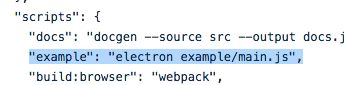
there's an example on the npm page
you can paste that into a js file
and run it with node
smoky scroll
ohhhh thank you thank you thank you
carmine mica
👍🏻
smoky scroll
do I need to npm install electron
then?
carmine mica
no
electron isn't needed
smoky scroll
oh.
carmine mica
the example just uses electron cuz rpc is generally intended to be used with games and shit
smoky scroll
wait how are you using DOM methods then??
oh.
well that's pretty unclear on a npm page
carmine mica
huh
smoky scroll
to use electron?
carmine mica
 smoky scroll
-- oh.
carmine mica
 smoky scroll
OH
so if I wanted to do my own thing, I would just run electron app.js
or something like that?
carmine mica
no
if you wanted to ship with electron
you would bundle it
into a proper app
smoky scroll
??? wh
carmine mica
just forget about electron
you aren't using it
just know that its basically chrome + node.js
smoky scroll
oh, okay
but when I tried running the example in electron, it said "require is not a function"
so does it not have all the node.js features or?
carmine mica
you ran it wrong then
smoky scroll
what happen
C:\Users\num\Documents\Visual Studio Code\Discord.js\rpc.js:9
const params = new URLSearchParams(document.location.hash.slice(1));
               ^

ReferenceError: URLSearchParams is not defined
    at Object.<anonymous> (C:\Users\num\Documents\Visual Studio Code\Discord.j
s\rpc.js:9:16)
    at Module._compile (module.js:612:30)
    at Object.Module._extensions..js (module.js:623:10)
    at Module.load (module.js:531:32)
    at tryModuleLoad (module.js:494:12)
    at Function.Module._load (module.js:486:3)
    at Function.Module.runMain (module.js:653:10)
    at startup (bootstrap_node.js:187:16)
    at bootstrap_node.js:608:3
@carmine mica yea I'm still not sure how to run this example from the docs
carmine mica
you can't run the "browser example" in node
smoky scroll
well, it didn't work in my browser. 🤔
carmine mica
oh Jesus christ
it's intended for webpack
smoky scroll
what??
wow, ok.
carmine mica
can't you just use the discord-rich-presence module
smoky scroll
umm, sure I guess
carmine mica
you cant use any of the other rpc features
smoky scroll
oh.
carmine mica
they're whitelisted
smoky scroll
o, ok understandable
alright so discord-rich-presence works, is there any documentation or anything for using it @carmine mica?
carmine mica
the example
that's all it does
smoky scroll
that's all the fields you can use?
kk, got it
and then I'd set up my own application and paste the ID in there if I want something custom
carmine mica
yea
smoky scroll
i assume
kk, thanks :D
 amber lion
Hi
how do i set up rpc
because i want to set the status so it is playing a twitter account and for the picture it has the twiter profiles pic
smoky scroll
look at the example
 rough thicket
"For now, RPC is in a private beta, which means that only apps that have signed up and been approved can access it."
Does this mean I can't create my own RPC applications or?
noble pond
you can create your own RPC applications
rough thicket
Okay phew 😅
thannks
noble pond
👍
rough thicket
Are there better docs for d.js RPC?
I don't see anything for RPCCleint.setActivity()
scarlet aspen
rough thicket
Those don't seem to have full documentation?
scarlet aspen
You could look at the example: https://github.com/discordjs/RPC/tree/master/example
I think https://discord.js.org/#/docs/rpc/master/general/welcome is the full documentation.
rough thicket
That's not documentation though
That's an example
scarlet aspen
The official documentation is https://discord.js.org/#/docs/rpc/master/general/welcome.
I gave you an example just to look at if you don't know how it works.
rough thicket
Taht documentation is missing parts. Ex RPCClient.setActivity()
It also doesn't provide what RPCClientOptions could be
rough thicket
14:51:43 - error: Error [RPC_CONNECTION_TIMEOUT]
Is there any reason why it just timeouts when logging in?
When I run my application under sudo it doesn't let me login my RPC client. Why is that 
carmine mica
could be permissions issue
@rough thicket are you possibly running wsl
rough thicket
Wsl? @obsidian ridge
@obsidian ridge
Rip
obsidian ridge
@carmine mica @rough thicket
@carmine mica sheesh change your name already lol
carmine mica
@rough thicket are you running on linux
obsidian ridge
people tryna ping you and you legit just sent a message not long ago
yet it's pinging me lol
carmine mica
change your username
ez
obsidian ridge
nah you
rough thicket
@obsidian ridge I’m on lcoalhost (mac)
And yeah your usernames are the name lmfao
obsidian ridge
fuking dodo @rough thicket
i said use @carmine mica @rough thicket
ya dodo @rough thicket
rough thicket
@obsidian ridge when I run RPC without using Sudo it works perfectly
But when I use sudo it times out logging jn
obsidian ridge
@rough thicket fucking dodo use @carmine mica to ping gus
@rough thicket you dodo
rough thicket
I’m on mobile sheesh
@carmine mica
obsidian ridge
idgaf it's called copy paste
rough thicket
it’s not my fault discord linked you guys together by fate
Haha
obsidian ridge
and it's not my fault you're a dodo brain @rough thicket
rough thicket
How did you both end up with the same Disc
That’s not supposed to happen
carmine mica
he's capital L
i'm lowercase
@rough thicket can we talk through the bug from the start
without all whatever the fuck this conversation was
rough thicket
Okay, so in the channel desc, there's an example.
If you run sudo npm run example the login of the RPC client times out
Figured it out
smoky scroll
it's because of elevation
the example runs as root while the client runs as the logged in user
same thing as on windows
hallow dust
The file needs to be ran on the account's machine? Like I wouldn't be able to run my rpc.js on my server?
wanton spoke
Yeah you would just have to port forward and connect to your pc remotely 
 hidden geode
can someone help me a bit with getting rpc auth from an electron app?
hidden geode
mention me pls if anyone can help. kthx
smoky scroll
Is it depressing that I dunno how to use electron?
hidden geode
nah
wanton spoke
make sure you have rich presence assets enabled and upload them from the bot page https://reee.ee/Gg7n4I.png
 smoky scroll
 agile plaza
Thank you
smoky scroll
😆
 hoary citrus
do I have to check for ratelimiting myself or is there a protection implemented in the library?
rough thicket
Personally I just did the same interval as in the RPC example, but RPC works off your clients local host RPC server iirc so no rate limits to worry about afaik
 modern coral
i need all models **npm i -S hydrabolt/discord.js
**
smoky scroll
whats this got to do with rpc
hoary citrus
ah I forgot to specify that I'm working with rich presence
so idk if there are rate limits about how often you're allowed to update the status
 main imp
Hello, how can I test Rich Presence with websocket connection? I've read this is a whitelisted feature, but I've expected this to work with my own app
I've imported discord-rpc from https://unpkg.com/discord-rpc@3.0.0-beta.8/browser.js
My code:
console.log(DiscordRPC);

const CLIENT_ID = '409446468651450368';

DiscordRPC.register(CLIENT_ID);

const rpc = new DiscordRPC.Client({ transport: 'websocket' });
const startTimestamp = new Date();

let times = 0;

rpc.login(CLIENT_ID).then(() => {
    rpc.setActivity({
        details: `booped ${times} times`,
        state: 'in slither party',
        startTimestamp,
        instance: false,
    });
});
hey I have the same problem rn
main imp
I wonder if it's a library bug (because it says 'invalid origin'), or it shouldn't actually work
I think I should try to build discord-rpc module myself to figure that out, but... 🤔
hoary citrus
I used webpack to build it and I'm also trying to use it in a chrome extension background script
it's in there but I didn't know OAuth2 was needed for that
my guess is, Rich Presence is only possible with IPC instead of WebSocket?
main imp
It should be available with ws without approval for testers from Discord, I guess
What do use to make chrome extension with Webpack? I found too hard way, I think
hoary citrus
the way Rich Presence is currently set is via IPC which is essentially a local TCP socket
and I don't think that will work in a Chrome Extension
so there would be the need for some kind of node.js daemon running communicating with the extension
main imp
I don't want to set up a daemon 🤔
hoary citrus
yeah I don't want to either
main imp
Maybe if I specify origin in discord-rpc's code, it will work
hoary citrus
nah that's not the problem
main imp
Error says 'Invalid Origin', so I think I should try to modify code
hoary citrus
for using the WebSocket it expects you to be authenticated via OAuth2
but I have no idea if there is any way for doing an authenciation process in a chrome extension
main imp
I think there is a way
hoary citrus
since it doesn't accept the chrome-extension:// Protocol as Origin
main imp
But I don't think that's necessary
You can intercept loading of a blank page I think
hoary citrus
the problem is that any website could just set your Rich Presence
if that would be allowed
using WebSocket without authentication for setting Rich Presence that is
main imp
But there are browser's cross-domain rules
I don't think they would allow connecting to ws://localhost
hoary citrus
Discord's WebSocket server probably sends CORS headers
cause otherwise it would be useless
since it's supposed to be used in web apps too
main imp
Oh, I should to set Origin header myself
And in app settings
hoary citrus
you can try it but I doubt it will change anything
https://discordapp.com/developers/docs/topics/rpc#commands-and-events-rpc-commands there's not even a command for the websocket to change the rich presence
I think IPC and WebSocket in discord-rpc are two completely different protocols for two different use cases
smoky scroll
rpc would be kinda bad if it allowed remote manipulation
hoary citrus
yeah that's what I'm saying, if rich presence is able to be changed via websocket, it needs authentication
but I don't even think it is able to change it
smoky scroll
well i guess remote manipulation is the point
but ye
main imp
@hoary citrus I think that's not full list
smoky scroll
not super familiar with rpc but to my knowledge you typically use it over ipc
main imp
Because I don't see that this list doesn't apply to IPC
And using IPC you can actually set rich presence
hoary citrus
ok seems like Rich Presence in the browser has to be whitelisted by Discord staff themselves
thus the Invalid Origin error
main imp
I found that one can specify origin when creating client
I'll try this now
main imp
It looks like it's indeed not possible to use this with current library version.. even if I specify origin as localhost that doesn't work. I don't even see where should I set expected origin in app settings on discord dev panel
Origin still unmodified
hoary citrus
pretty sure chrome overwrites the Origin header
maybe this could work
but according to the README of this (https://github.com/devsnek/discord-rich-presence) library which is officially linked on the discord repo it's not possible to use Rich Presence in the browser without being whitelisted by Discord staff themselves
but this might only be true for regular webpages and not extensions which have "superpowers"
main imp
I didn't try to make a request with modidied origin actually, just tried to help lib to do that
Actually that wasn't overwritten by chrome, just lib didn't pass that
hoary citrus
it would be overwritten anyway
main imp
Maybe if one tries to do separate XHR from background page, that would work?
I'll try something tommorow, I should go sleep I guess
Did you see any ipc proxies on github?
hoary citrus
all of this seems pretty complicated to me for a rather simple task
main imp
I'll write one I think
hoary citrus
webRequest API by Chrome might be possible to use
idk how it handles ws://
wanton spoke
its a websocket protocol why do i just come into conversations like this
main imp
I think it's not possible to use ws with that 🤔
Well, I think I'll leave now, prepare to sleep
Ping me if you find something out
hoary citrus
chrome.webRequest.onBeforeSendHeaders.addListener(
    function(details) {
      for (var i = 0; i < details.requestHeaders.length; ++i) {
        if (details.requestHeaders[i].name === 'Origin') {
          details.requestHeaders[i].content = "your origin" // idk if it's 'content'
          break;
        }
      }
      return {requestHeaders: details.requestHeaders};
    },
    {urls: ["<all_urls>"]},
    ["blocking", "requestHeaders"]
);```
kinda like this
copied from chrome extension docs
problem with OAuth2 Flow in Chrome Extension still stands tho