#Tech Lab forum - General Discussions!
1 messages · Page 21 of 1
 mossy gull
mossy gull
mossy gull
 jade scaffold
right
jade scaffold
right
Leave me with my weird set-up okay🙃
 cinder lagoon
Afaik DSC is NOT lossless lemme look that up
mossy gull
cinder lagoon
Afaik DSC is NOT lossless lemme look that up
It's said to be lossless, but these days you even have stuff like "Lossless MP3" which isnt lossless at all
cinder lagoon
This should clarify:
Where quality is not of primary importance
 mossy gull
cinder lagoon
This should clarify:
> Where quality is not of primary importance
mossy gull
cinder lagoon
This should clarify:
> Where quality is not of primary importance
So basically, me running my panel without DSC, means I have better picture quality?
cinder lagoon
Given that the visually indistinct image is defined as when all the observers fail to correctly identify the reference image more than 75% of the trials in the standart...
Yes.
And that not even by a small margin
mossy gull
So basically that means I did see a difference between DSC on and off and I didn't have an illusion in my mind
cinder lagoon
Absolutely necessary for mastering work, to turn off DSC
mossy gull
And people say it's impossible to see the difference, I know I wasn't crazy, I am crazy 🤣
cinder lagoon
Its basically a setting saying "good enough for those who don't actually care and just consume regardless of experience"
mossy gull
cinder lagoon
Its basically a setting saying "good enough for those who don't actually care an...
People said I need to go to a specialist because between DSC on and off is no difference.
Yet I already been to a specialist to find out why I can barely see during sunny days.
cinder lagoon
Everything too bright/dark or anomalies?
mossy gull
cinder lagoon
Everything too bright/dark or anomalies?
I can see in a part of the UV colour space.
So usually on a sunny day it appears very bright shifting colours.
On a more cloudy day I see more colours than most, and thanks to that some colours do appear different for me than others.
They say it's Aphakia, but could be tetrachromacy because my mom has it as well.
Thanks to this majority of LCDs always have a cold tone to them, more blueish.
Even when set to warm colours
cinder lagoon
mossy gull
I can see in a part of the UV colour space.
So usually on a sunny day it appears...
Wth lol
So you probably got UV blocking glasses, bet those are expensive
Thats actually kinda rad tho
mossy gull
cinder lagoon
So you probably got UV blocking glasses, bet those are expensive
They're cheap these days, they usually appear yellow, and so do mine😅.
Although mine were like 120.-.
It's like seeing colours many can't, so colours in the high purple ranges and everything above is basically normal for me, but most will see those colours as white, black or dark blue.
You know that funny "blacklight" stuff you see at nightclubs or discos?
For most it's like a fun shock when they see their shirt getting dark violet.
I see a lit up blurry area, UV spectrum light is very turbulent, and creatures who can see UV see during day not far, like I can see up to 50m on a very sunny day if I wear normal no UV blocking sunglasses.
cinder lagoon
Ohh didn't imagine low visibility during day, rather glowing people on beaches (from the sunscreen lol)
Anything useful about that ability tho?
Also: you're probably gonna like QD OLED because of it's pure spectrum peaks
mossy gull
cinder lagoon
Ohh didn't imagine low visibility during day, rather glowing people on beaches (...
People putting on sunscreen makes them indeed glow up, many don't know but sunscreen deflects UV light.
mossy gull
cinder lagoon
Also: you're probably gonna like QD OLED because of it's pure spectrum peaks
QD-OLED looks very "blue".
I prefer normal OLED or WOLED as people call it.
It's more balanced
AMOLED also looks great
cinder lagoon
mossy gull
QD-OLED looks very "blue".
I prefer normal OLED or WOLED as people call it.
Ohh what i've heard that they use very pure blue lights that get transformed into the other very pure colors
cinder lagoon
mossy gull
AMOLED also looks great
Was a big fan of my Galaxy S7 aswell ^^
mossy gull
cinder lagoon
Ohh what i've heard that they use very pure blue lights that get transformed int...
That's probably why it looks more blue for me 😅
mossy gull
cinder lagoon
Was a big fan of my Galaxy S7 aswell ^^
I currently am a fan of my Pixel 8 Pro, and HDR is great, and blinding 😃
QLED TVs for me are just near blue slabs😃
cinder lagoon
Pro tip for android usage in bed:
There's an accessibility feature "extra dim display" or something that about halfs display birghtness when you hold both volume buttons for a second
cinder lagoon
mossy gull
QLED TVs for me are just near blue slabs😃
Damnit, I believe they will be the best display tech for the next 5-10 years and you're kinda missing out ig
cinder lagoon
mossy gull
I currently am a fan of my Pixel 8 Pro, and HDR is great, and blinding 😃
Still sad about non-oled valve index (the display gets very hot and makes my eyes sweat)
mossy gull
cinder lagoon
Pro tip for android usage in bed:
There's an accessibility feature "extra dim di...
I have my screen black and white + night mode.
That way it's yellow and black😃
mossy gull
cinder lagoon
Still sad about non-oled valve index (the display gets very hot and makes my eye...
1 of the biggest reasons to avoid VR it seems
cinder lagoon
Oof kinda couldn't stand that default of the sleep mode... like every content I looked at was kinda just uninteresting and annoying
mossy gull
I don't mind, I like the function
cinder lagoon
Function? Absolutely! Default? Meh 🤷🏽♂️
Anyways... does anybody know of an assetto corsa competizione online community? Not really tech related but I can't find any on google and the discord search functions that are actually populated
mossy gull
cinder lagoon
Anyways... does anybody know of an assetto corsa competizione online community? ...
I think that's something very niche, but should be out there, try to check the hell called Reddit.
jade scaffold
cinder lagoon
This should clarify:
> Where quality is not of primary importance
huh vesas own website describes it as totally lossless
thats fucking illigal
cinder lagoon
jade scaffold
thats fucking illigal
Well, the standard specifies it exactly tho advertising it as something else is bad. Especially if they don't put an asterisk with "only <25% of people could see the difference"
jade scaffold
lossless means no data was lost in transmission which is totally possible with things as simple to compress as a display image
25% of people is ALOT of people
that is FAR from nearly lossless if more than a couple % can see the difference
cinder lagoon
My opinion as well haha
cinder lagoon
mossy gull
I think that's something very niche, but should be out there, try to check the h...
There was a thread but not really helpful...
Thought maybe the pro googlers had an idea :p
jade scaffold
to be considered nearly lossless it would have to be less than 1% imo at that point it then doesnt matter because then the people that can consistantly identify differences are anomaly's and not representative of what a normal person can actually see
also 10BPC turns out is a lie on 99% of monitors
any monitor that supports HDR can do "10BPC" even though its not actually 10BPC and is just 8BPC with some fancy HDR shit stuck to it meaning you get the same annoying as colour blocking and banding you'd get normally
apparently this monitor can do 12bpc with DSC turned off and locked at 120hz but honestly I'm not sure if thats even going to be proper 12 BPC
aparently its letting me do it at 240hz
but i can still very clearly see colour banding on discords gradient skin which is kinda anoying

unless what ever discord is using for the skin is just like a image that wasnt made with high colour displays in mind

This legitimately really annoys me
a lack of an actual AMOLED mode for desktop is infuriating
mossy gull
jade scaffold
any monitor that supports HDR can do "10BPC" even though its not actually 10BPC ...
The 45GR then shows very good 3440x1440 10-bit at 100Hz in SDR.
It's the highest setting for the monitor and AMD says it's a 10-bit panel.
jade scaffold
samsung says its a 12 bit pannel must just be discord doing somthing dumb like using aactual image for the background
mossy gull
jade scaffold
samsung says its a 12 bit pannel must just be discord doing somthing dumb like u...
I know with some games it can look weird, but this is because they're coded for 8-bit.
I think if it comes down to 12-bit, Mass Effect Andromeda did it very well with the colours, how much shit that game got, it still looks more gorgeous than Starfield.
Also Samsung are big liars if it comes down to their panels, their colours are mostly inaccurate and rarely, very rarely calibrated.
My brother has the Samsung Odyssey G85 OLED, and I have the 45GR, I absolutely hate mat displays but the colours look way better on the 45GR than on the G85.
Not to mention the 45GR has a piece of paper of its calibration, which the Samsung lacks.
I really want to create a "screen protector" to make a mat screen more glossy.
 cerulean helm
I'm using LG for my newest setup. So far I like them. UltraGear 27GP83B-B. Nothing super fancy.
jade scaffold
ive got the g9 oled
cinder lagoon
jade scaffold
Use BetterDiscord :P
cinder lagoon
jade scaffold
samsung says its a 12 bit pannel must just be discord doing somthing dumb like u...
The profile backgrounds are images yes, everywhere else they typically use gradients / SVGs
jade scaffold
cinder lagoon
Use BetterDiscord :P
yea i used to but i had to update it near enough every day because discord likes to update constantly to intentionally break it and i cant leave my main PC online 24/7 because it pulls 230-260W minimum at idle
cinder lagoon
mossy gull
I really want to create a "screen protector" to make a mat screen more glossy.
Plastics clear coat spray paint and then polish or apply a plastic foil while it's setting
cinder lagoon
jade scaffold
yea i used to but i had to update it near enough every day because discord likes...
True tho just having the installer pinned to start is doing the trick for me - already annoying enough you have to turn off pinging on every reply on stock, everything else is just handy
mossy gull
jade scaffold
ive got the g9 oled
I had so much problems with the 1st gen G9 LCD on a 2070 and 3070, that I avoided them all together, so that's why I got the 45GR over the G9 OLED 😅
mossy gull
cinder lagoon
Plastics clear coat spray paint and then polish or apply a plastic foil while it...
Wait, that's a thing?
I really want that
cinder lagoon
I mean - it's a diy solution but it's important to choose the right clear coat
Like many paints contain acetone and that just dissolves plastic, we don't want that
It's irreversible tho
mossy gull
cinder lagoon
Like many paints contain acetone and that just dissolves plastic, we don't want ...
So acetone free clear coat?
cinder lagoon
More research definitely needed but yes acetone free is a must. Try looking for something designated plastic safe
mossy gull
cinder lagoon
More research definitely needed but yes acetone free is a must. Try looking for ...
Now my idea of a screen protector sounds better 😅
mossy gull
I have an idea for a concept, but I need to see how to pull it off
 vestal stirrup
In an average gaming pc setup, what options am I losing when it comes to getting a itx board over a atx board?
 sacred seal
Future expansion for the most part
Not going to have as much PCI/NVME, and likely only two ram slots
vestal stirrup
What kind things could be used with the pci slots in an average gamer build?
Ram slots I understand, I have 2x16GB at the moment and that tends to supply all my needs
sacred seal
IO expansion, soundcards, Extra NVME, bigger GPUs
vestal stirrup
I am picturing a time when gpus require to be plugged into 2 pcie slots
sacred seal
Thats probably not going to happen because current GPUs barely saturate PCIe 3.0 x16, and we are already on PCIe 5.0 x16 which has 4x more bandwidth. Its more of an issue where you get a 3 or 4 slot card and now you can't install anything else because all your slots are covered
vestal stirrup
I am asking because I plan on upgrading soon and downsizing from my full atx build
 sonic meadow
an itx board is going to cost you more than a micro-atx or atx board, and is unnecessary extra cost if you arent using a mini-itx case (which also tend to cost substantially more, plus needing more expensive sff psus, etc)
vestal stirrup
That is a fair explanation, thank you
sacred seal
Completely forgot about SFF psus. I think those cap at 1000 watts, so going real small ITX could also affect future GPUs if Nvidia keeps cranking up the power budget
sonic meadow
It's pretty fair to want to downsize from a full sized ATX build though, those can get pretty sizey, especially if your case supports "EATX" boards
vestal stirrup
My case does support such eatx, it is a beast without beastly internals
sonic meadow
they can look pretty empty without things like massive GPUs or watercooling setups
jade scaffold
mossy gull
I had so much problems with the 1st gen G9 LCD on a 2070 and 3070, that I avoide...
The g9s are still janky
Even the new oled one
Really really nice monitor but it has its quirks
sonic meadow
my mum has a shitty walmart type PC that has a mini-itx board in a normal sized ATX case, and it looks so silly inside. Especially since it doesnt have an internal PSU, but an external 19v brick...
jade scaffold
sonic meadow
my mum has a shitty walmart type PC that has a mini-itx board in a normal sized ...
My server has an itx board in an atx case had to move it out of my main pc case into its own one because my PSU can't power it
Need to find it a mini itx case that's nice
sonic meadow
this was the kind of PC that struggles as a media player for a TV. thats how bad it is
jade scaffold
Rip I might use my new p100 to turn my server into a little cloud gaming machine for my friends who don't have their own pc
sonic meadow
some rubbish AMD low power thing stolen out of a netbook and shoved on to a desktop board
jade scaffold
As you do
sonic meadow
it was probably barely competent when it was a new product, and not when they got a hold of it
mossy gull
sonic meadow
my mum has a shitty walmart type PC that has a mini-itx board in a normal sized ...
My brother's 1st PC was an ATX-XL case with an ITX board pre-build
vestal stirrup
Any recomendations for mATX board for a amd 5800x? Was looking at ASUS TUF Gaming B550M-Plus, as it comes up as good for its price
jade scaffold
I have Aquired Peice of Super computer
 jade scaffold
vestal stirrup
Any recomendations for mATX board for a amd 5800x? Was looking at ASUS TUF Gami...
jade scaffold
vestal stirrup
Any recomendations for mATX board for a amd 5800x? Was looking at ASUS TUF Gami...
yea thats probably a fine board
cinder lagoon
vestal stirrup
Any recomendations for mATX board for a amd 5800x? Was looking at ASUS TUF Gami...
Anything on AM4 I can only recommend to buy used.
Just built a budget gaming PC with some Biostar B550MH board but I have an Asus Strix X470 with my 5800X3D (try get that one as you'll get vastly better gaming performance)
 opaque anchor
My father in law gave me his laptop to try and get figured out/replace the HDD since it doesn't detect it for booting. I can plug the HDD in fine to my PC with an adapter and get the contents of it. Is it more likely the HDD itself is bad or the connector on the laptop itself. Trying to troubleshoot without buying a new HDD/SDD first but I haven't had to deal with this sorta situation really.
 surreal moss
Does the laptop see the drive in bios at all?
opaque anchor
it sees the option but doesn't detect anything, changed the priority to USB and goes right into the windows USB I made
surreal moss
Sounds like something is corrupted with that window install then
opaque anchor
guess I'll back up the stuff and see if I can use the USB to reinstall it.
surreal moss
Since you can get to the data on the drive I would make a backup of it and then attempt to either repair or reinstall- yep
You’ve got a good head on you
opaque anchor
I work IT for my career but we aren't in a position where we have to deal with specific hardware pieces often so my skills in that department aren't as indepth
surreal moss
Heh, I just flipped to needing to do that more. Previously I was the admin for a datacenter. Now it’s for everything in a whole company. Thankfully the logic paths are pretty consistent
opaque anchor
yeaa, I've been working as the lead tech remotely for the last year so I haven't had hands on any equipment in that long.
 paper iron
You all seem tech savy.
Anyone know if it matters if you use 1 cable with 2 connectors on one end for a gpu with 2 pcie power slots?
Or is it better to use 2 separate cables in that case?
sacred seal
It depends on how your PSU is wired up but generally it is better to use two seperate cables. However you can often get away with just one
sonic meadow
All depends on variables we a: don't have and b: many of which just aren't available
paper iron
Figures, recently got a radeon 7800 xt, and had a 5700 before that.
The latter I had occasional random driver (I think) crashes with, and the software complaining about wattman something
And had a similar crash with the new one in helldivers 2 after the weekend.
But that might not be related to a lack of power.
oh and the psu is a corsair rm 850X v2
sonic meadow
The 7800xt has a tdp around 260w, assuming it pulls all of that through the cables (and none through the slot) then I would highly recommend using two cables
paper iron
Thanks.
Could the same could be said for any highend GPU?
sonic meadow
Yeah
paper iron
That makes me wonder how many issues/crashes with my old 5700 could have been caused by only having 1 cable over the years.
Yeah it has a lower tdp, but still
sonic meadow
The 5000 cards were notorious, at least at launch
paper iron
so I've heard, got mine about half a year after launch
and while it did get better over time, i still had some rare random wattman crashes last year
mossy gull
sonic meadow
The 7800xt has a tdp around 260w, assuming it pulls all of that through the cabl...
And that's without going into turbo
sonic meadow
maximum... overdrive!
mossy gull
I personally disable it, I see no use for turbo other it consuming 10 times the power for 5% speed gain
jade scaffold
Weird that's how amds turbo works NVidias turbo is much different you can actually get a decent amount extra performance out of NVidias gpus especially on pascal by basically just raising the thermal and power limits
sonic meadow
yeah, like... 7%, for 15x the power
jade scaffold
more like 500mhz on core clock for all of 15% more power
most of it comes from tha auto boost then you can usually get another 150mhz ofset from the boost on pascal
its why im really quite excited to get this P100 into a computer its in theory just a better binned 1080TI with more RAM and a massivly higher power limit
mossy gull
I still prefer without turbo, feels more stable that way
jade scaffold
yea thats fair
cinder lagoon
paper iron
Figures, recently got a radeon 7800 xt, and had a 5700 before that.
The latter I...
Wattmann (AMDs own over locking tool) resetting is normal after a driver crash but make sure you don't have any overclocking applied via afterburner!
surreal moss
Give me the DockerFile and requirements.txt and I’ll be hapoy
 timber barn
yeah, that helps a ton setting up a defined environment
IMHO it is almost a requirement
surreal moss
Especially after years of arguing with devs about environmental requirements
Learning it now has been full of “wtf did they do it the hard way?!?!”
timber barn
when I worked with Gitlab pipelines we we using Build containers as a default
going then to Github actions back felt like a step back in that regard
all of the sudden ppl where using host tools again
nevertheless you can still use buildcontainers in github actions
just feels they are not that common
surreal moss
Yeah, I haven’t done a whole lot with git. Last place was an svn house for the main stuff and the devs got the fancy git like toys for their stuff. I was barred from access to it which got real fun when they’d escalate to me if it broke
They got a whole lot o”golly that sucks. Good luck!”
timber barn
omg SVN... that won't die I guess
cerulean helm
Holy shit, no more forced log in.
https://www.youtube.com/watch?v=aiwuYbURWVI

Support us on Patreon: https://www.patreon.com/hardwareunboxed
Join us on Floatplane: https://www.floatplane.com/channel/HardwareUnboxed
Disclosure: As an Amazon Associate we earn from qualifying purchases. We may also earn a commission on some sales made through other store links
Buy relevant products from Amazon, Newegg and others below:
GeF...
cinder lagoon

In other news:
I finally shelled out for a proper domain name at cloudflare and now I'm neck deep into setting up a DynDNS script (bc cloudflare requires the auth key in an HTTP header, which can't be done inside the URL) alonside subdomains that forward to my host applications (I heard for some services that is achievable via the SRV entry?)
It seems I can't get around an nginx setup sooooo... tips for beginners??
sonic meadow
cerulean helm
Holy shit, no more forced log in.
https://www.youtube.com/watch?v=aiwuYbURWVI
I've never needed to log in the the Nvidia control panel. Geforce experience yes, (which I uninstalled and haven't touched again the moment they made that change) but never the control panel itself
And looking at the video thumbnail it looks more like AMDs thing, which is... harder to navigate (admittedly for someone who doesn't use it 😆)
cinder lagoon
AMDs panel has recently gotten more cluttered and restructured (which made it alot worse) but its pretty easy to work with as it has everything in one place
jade scaffold
cerulean helm
Holy shit, no more forced log in.
https://www.youtube.com/watch?v=aiwuYbURWVI
Took them long enough
Tbh I do like how easy NVidias control panel is to navigate it's super basic and not modern yea but it was completely functional I hope modernising it to look nicer doesn't make it harder to navigate
sonic meadow
it doesnt need to be "modern", whatever that means in any given week
jade scaffold
No it doesn't but people will complain
Also modern looking UI isn't really much of a changing concept
sonic meadow
its only changed what.. three times over the last decade? at least
a large chunk of this however is just me being resistant to change 😆
though I dont need let alone want the geforce Experience features to be wrapped in to the control panel stuff (though really its happening the other way around)
jade scaffold
Not really nice animations pretty much covers modern UI design
sonic meadow
it... doesnt even use itself to login. ffs, dont fucking open my fucking browser to do stuff you should be fucking doing yourself
 jade scaffold
Curved edges on things usually as well. Then minimalist too tho minimalist look is very much contentious some people love it some people hate it so can go either way with that and still be modern
jade scaffold
sonic meadow
it... doesnt even use itself to login. ffs, dont fucking open my fucking browser...
XD
Geforce experience is so pointless
Coulda just made it a little driver updater app but no it's a game launcher too I like the recording feature but why does it think anyone's gonna use it to launch a game
sonic meadow
it used to be required for shadowplay (back when nvidia first introduced it with the 600 series), but I use those features through OBS now.
sonic meadow
I remember years ago having a nvidia control panel plugin that let it be used for overclocking.. 😆
jade scaffold
Will still use afterburner tho it's got all my saved profiles on it
sonic meadow
probably back around the 8000/9000 series
jade scaffold
Though I exclusively use my undervolt and massive memory overclock now
11000+MHz memory clocks go still need to fill out all my CPUs ram slots so I can get that juicy 480GB/s of CPU memory bandwidth
jade scaffold
cerulean helm
Holy shit, no more forced log in.
https://www.youtube.com/watch?v=aiwuYbURWVI
Ooooo ai based HDR
It's better than windows HDR Elden ring ultrawide with the RTX HDR gonna be sensual

Er not having native ultrawide support is a crime all the cutscenes are rendered real time and like look at this it's gorgeous
mossy gull
jade scaffold
Er not having native ultrawide support is a crime all the cutscenes are rendered...
It's worse when it doesn't have 16:10 support
jade scaffold
Flawless widescrene is the program I use to make it work on my ultrawide properly I think it should also work with a 16:10 display
mossy gull
jade scaffold
Flawless widescrene is the program I use to make it work on my ultrawide properl...
It doesn't work for 16:10.
Also your picture indicates super-ultra-wide
jade scaffold
Yea my screens super ultrawide
But flawless wide screen applies for 21:9 too
Er only supports 16:9 and it's stupid because it's the kind of game that really does benefit from having more screen
mossy gull
jade scaffold
Er only supports 16:9 and it's stupid because it's the kind of game that really ...
1 of the only good Asian games with UW support is Monster Hunter World
cinder lagoon
sonic meadow
it... doesnt even use itself to login. ffs, dont fucking open my fucking browser...
Hot take: Apps should not bring their own browser to maintain just for the sake of logging in somewhere. Chances are, your credentials are stored in your main browser already anyway.
sonic meadow
Cold take: dont open my fucking browser just to login. you dont need a browser to login.
cinder lagoon
Well okay technically yes but then you still need to include a maintained webkit, where when you use the main browser the liability of security falls to the end user
Like for security reasons
I would argue that you just dont need to login, but thats a different convo ig
sonic meadow
you... dont need anything web browser
sacred seal
I had to deal with this when working on an app, apparently it is "best practice" to use a web browser to handle logins. Ended up with a browser running inside UE4 to handle the login
sonic meadow
like I get why they do it, I just hate it
cinder lagoon
Understandable

 surreal moss
A razor?
jade scaffold
Yo new Linus skin just dropped
jade scaffold
In fun news amds 5700xt massively underperforms in helldivers for some reason
Kinda feels like a CPU performance issue tho seeing 50% CPU usage on a 5800x while running the game but a 5800x should in no scenario be bottlenecking a 5700xt
cinder lagoon
jade scaffold
Kinda feels like a CPU performance issue tho seeing 50% CPU usage on a 5800x whi...
I've heard that helldiver for some reason struggles with high CPU clock speeds?
cinder lagoon
sonic meadow
Probably got sponsored by a razor company or something
Apparently dBrand it going to sponsor a recreation of this:
 jade scaffold
cinder lagoon
I've heard that helldiver for some reason struggles with high CPU clock speeds?
jade scaffold
cinder lagoon
I've heard that helldiver for some reason struggles with high CPU clock speeds?
Weird but the 5800x is hitting 4.85 GHz
cinder lagoon
I heard it works up until 4.2
jade scaffold
My CPU does 4.4ghz and is massively out performing it
That could be down to my CPU having a bunch more cache and higher IPC but I shouldnt be able to max out a 3090 which is a GPU 2.3x faster with a CPU that only has a 15% higher IPC on none cache intensive tasks
cinder lagoon
It's a helldivers problem specifically
jade scaffold
Yea the cpu is hitting the right clock speeds but the GPU isn't being fully utilised
cinder lagoon
No you don't understand
Apparently helldivers has a problem with CPU clock speeds above 4.2GHz
jade scaffold
Then I would have the same issue
cinder lagoon
Like its probably some scheduling thing
jade scaffold
Im on zen running at 4.4 another friends on a 5800x with a 2060 super and is massively outperforming the 5700xt guy
cinder lagoon
Idk I just read some comments about it online
jade scaffold
The 2060 should at no point ever be even comming close to the 5700xt it's a weird bug
cinder lagoon
Day 3 of "quickly hacking together a PowerShell DynDNS client for cloudflare":
 cerulean helm
Well, got the new Gskill "Wigidash", a touchscreen panel thats usb powered and requires no display cable. Busy setting it up right now. Will be nice to free up the hdmi port on the gpu and not be driving 3 monitors while gaming.
cinder lagoon
The wigidash is a really nice complete product for these usecases.
Before everyone would just try via open source projects that ended up not being actually cool xD
cerulean helm
I currently use whats called Infopanel on a 3rd mini display using HWinfo sensors. And that works great but it needs usb and hdmi.
So far, its interesting. Touch screen is nice. Weather app is nice. It has twitch chat integration to display chat. Spotify music which is kinda neat. Software needs some work, but overall is functionmal.
Annoyingly for whatever reason I cannot get the wigidash to display average Vcore from HWinfo correctly. Just says 1.000v, instead of the actual voltage. Not sure what thats about.
cinder lagoon
Wait does the software have plugin capability?
Have you confirmed HWInfo is sending the correct sensor
cerulean helm
It display any voltage in single digits. Weirdly displaying 1.000 or 2.000.
Select any individual core voltage and is just 1.000.
I'm wondering if the wigdash HWinfo plugin isn't all fleshed out yet,
Cause the same seneor selected in InfoPanel display the proper volate for instance.
Okay, the twitch chat integration is kinda cool
cinder lagoon
cerulean helm
It display any voltage in single digits. Weirdly displaying 1.000 or 2.000.
Sel...
Ohh so you mean it converts the floats to ints somewhere in the pipeline thats stupid xD
 robust walrus
Apologies if this is not the correct place to ask. Seem to have a faulty GPU so im currently planning on getting a new one, and since im already blowing money on my pc i figured id finally get around to getting a second monitor. Thing is, I can't decide if its better to get a ultrawide 1440p, or try to find another 1080p monitor. Ive heard that going multimonitor with different resolutions is not a great idea, so i'd either need to settle for 1080 or get two 1440's and just store my current monitor (which i would be doing anyway if i got the ultrawide).
Suggestions?
cinder lagoon
First of all - maybe we can get your GPU back up and running of you describe what's wrong.
Addressing the monitors:
There is absolutely no problem with having different resolution monitors.
The "Problem" (the mouse cursor "jumping" when going between the panels) stems from an "issue" that can be fixed with <an open source program I forgot the name of>.
However it can be mitigated entirely if you keep an eye on certain display parameters (I also need to google those)
I found the program again:
https://github.com/mgth/LittleBigMouse

GitHub
DPI Aware mouse move across screens. Contribute to mgth/LittleBigMouse development by creating an account on GitHub.
robust walrus
Having the exact same issue as Night did in their post "Monitor goes Black Screen during Gaming" about a month ago.
Ended up doing some chunky testing with OCCT on every part it could do, and once i ran the GPU test I got the exact same thing that occurs during gaming.
Seems like getting a replacement helped Night out just fine, and I can keep my current one as a backup since it only fucks up on newer games
 cinder lagoon
@jade scaffold hey, you got a 5700XT, any ideas?
https://y.yarn.co/cd1189ed-68d0-4988-85ea-5f063b378be8_text.gif

(the 5000 series is known to be a little clusterfuck sometimes)
You might want to give DDU a try before doing anything, if you haven't already

www.guru3d.com
Download Display Driver Uninstaller (DDU) - Remove AMD/NVIDIA/INTEL Graphics Drivers Cleanly - DDU is a driver removal utility that helps you completely uninstall AMD/NVIDIA graphics card drivers and packages from your system, leaving no leftovers behind, including registry keys, folders, files, and driver store.
robust walrus
yeah if i get another im going back to nvidea. never had any issues with my 1080
ill give it a shot
cinder lagoon
Found the post for reference:
https://discord.com/channels/222052888531173386/1167366539469672448
robust walrus
oh neat didnt know i could link it like that
cinder lagoon
If they're still active you can just use the # notation like normal channels, I got the link of it tho
cinder lagoon
robust walrus
yeah if i get another im going back to nvidea. never had any issues with my 1080
Given that AMD drivers have REALLY improved ALOT since then, I believe you should not keep something like a 7900/7600XT out of the picture
https://cdn.videocardz.com/1/2023/03/POWERCOLOR-RX7900XT-EXTREMEOC-RESULT.jpg
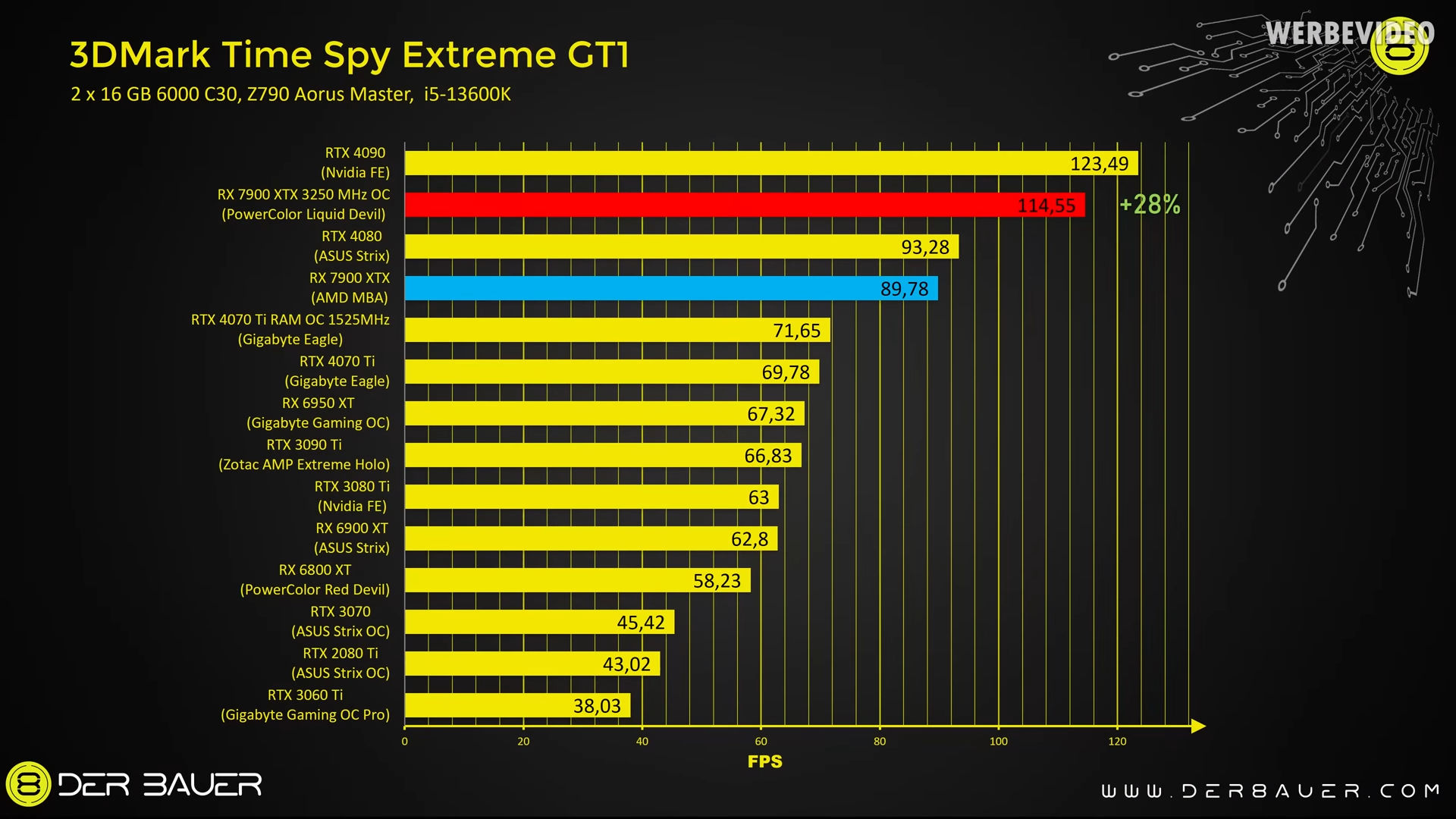
I have a 6800 and am very happy with it especially because it didn't cost as much as an nVidea card with the same performance
robust walrus
is the myth about intel cpu and amd gpu not liking eachother a myth?
cinder lagoon
Yes
robust walrus
wait are those your specs?
cinder lagoon
Nope that is a really reputable online source, he tests basically everything
robust walrus
just that i have the same cpu, found that funny
cinder lagoon
With an intel CPU you loose one single feature tho: "Smart Access Memory" but if reBar is turned on in BIOS it should not be of difference afaik
robust walrus
welp time to run BG3 and see if it shits itself again
cinder lagoon
Good luck!
A GPU "reseat" might also help
You can also try pressing Windows Key + Shift + Ctrl + B at the same time when it happens to reboot the graphics driver, it should make a beep via the speekers iirc
robust walrus
happened again, will relaunch and try the beep thing
jade scaffold
cinder lagoon
<@365943390984208394> hey, you got a 5700XT, any ideas?
https://y.yarn.co/cd1189...
My friend has one
If you are having driver issues that's the usual for 5700xt
robust walrus
well it has arbitrarily decided to chill out again. every now and then it just starts pulling this crap and i just have to deal with it till it stops. very aggravating when youre restarting your pc every two minutes
cinder lagoon
Not sure if driver, hence I called out
robust walrus
anyway, with that out of the way (for now) do you think multimonitor or one chonky boi is better?
cinder lagoon
OHH also do try your numlock and/or capslock key (whichever of yours has some indicator light), if they don't change its not actually your GPU thats going bad but your entire system xD
I mean while black screen
robust walrus
will remember, probably
cinder lagoon
robust walrus
anyway, with that out of the way (for now) do you think multimonitor or one chon...
Absolutely multi-monitor!
And 1440p is the perfect resolution for desk-usage at arms length
I bet someone here can recommend some good (fast and accurate!) monitors
I basically always have my laptop playing a video besides my game on the side and I don't want to change that setup because second monitor is always useful and it being a laptop I can always fiddle with something there without exiting a game or whatever
robust walrus
even if the chonky monitor is as wide as two 1440p's?
jade scaffold
robust walrus
well it has arbitrarily decided to chill out again. every now and then it just s...
Also extremely typical of the 5700XT
Incredibly powerful card especially for its price but amd refuse to support it like they should be doing
Multi monitor has the advantage of you can have a game and say discord opened at once
Something which isn't easy to do on ultrawides
robust walrus
couldnt you just have it windowed on one half of the screen?
sonic meadow
you can, but its more awkward. though there are tools to divide an ultrawide in to what are essentially multiple monitors
jade scaffold
You can buy some games are utterly stupid
Yea there are tools you can use tho honestly actually in ultrawide res is great
cinder lagoon
robust walrus
even if the chonky monitor is as wide as two 1440p's?
That just sounds like a TV (which is really not great at short distances and pixel response time)
jade scaffold
cinder lagoon
That just sounds like a TV (which is really not great at short distances and pix...
Or a g9
Or any of the many gaming TVs out these days
Or the 40" "monitors"
cinder lagoon
Well - choinky as in resolution, width or overall size??
robust walrus
cinder lagoon
That just sounds like a TV (which is really not great at short distances and pix...
currently considering a 144hz 34inch 3440x1440p curvy boi
cinder lagoon
So an ultra-wide 1440p
robust walrus
ye
cinder lagoon
Consider what you will do with the old monitor.
Do you sell it to factor into the price of the new one or..?
jade scaffold
34inch 3440x1440s are good for having 2 programs open at once splitting them in 2 is like the perfect size for having 2 programs open at once
But they aren't big enough to game on and keep a other program open at once
robust walrus
right
got a suggestion?
like whats a good size
if its not big enough to game and discord at once, i could just keep my old monitor as my discord/chrome boi
jade scaffold
If you really want multiple things open at once all the time you kinda want 2 monitors
Or like a super ultrawide but thoes are super expensive
surreal moss
It can be use case dependent but for gaming a dedicated primary screen for the game is typical
jade scaffold
Or you can do it with a TV sized monitor too
jade scaffold
surreal moss
It can be use case dependent but for gaming a dedicated primary screen for the g...
And the easiest to make work
robust walrus
i think my current monitor is either 21 or 24" if that helps
jade scaffold
splitting an ultrawide into multiple displays in such a way i can have a game in proper full screen and have a seperate program open is hell
cinder lagoon
Do you play alot of first person shooters?
robust walrus
not really
cinder lagoon
Okay then do you like immersive first person games?
surreal moss
Keeping the old one as a secondary isn’t a bad idea. I think that’s how most of us get into multiple displays
jade scaffold
robust walrus
i think my current monitor is either 21 or 24" if that helps
well you could buy an ultra wide and use your current monitor as your secondary display
Ultrawide gaming is so much fun
robust walrus
im thinkin about how wide the uw is, wouldnt that be an issue in and of itself? like how many games can even work that wide?
cinder lagoon
cinder lagoon
Okay then do you like immersive first person games?
If yes, an ultra-wide is a good consideration
jade scaffold
ultrawide is fine for shooters
surreal moss
robust walrus
im thinkin about how wide the uw is, wouldnt that be an issue in and of itself? ...
Depends on the game. Games are more often supporting ui for ultra wides
jade scaffold
like even comp shooters
robust walrus
surreal moss
Depends on the game. Games are more often supporting ui for ultra wides
good to know
surreal moss
What do you like to play?
cinder lagoon
robust walrus
im thinkin about how wide the uw is, wouldnt that be an issue in and of itself? ...
Today pretty much all of them but some games will put the HUD elements completely out of your vision, which is awful for first person shooters
jade scaffold
21:9 is typically very well supported i never really have had issues getting it to work properly without any kind of hud fuckery
robust walrus
right now its helldivers, bg3, world of warships, DRG and ES2
jade scaffold
cinder lagoon
Today pretty much all of them but some games will put the HUD elements completel...
honestly only an issue on 32:9
robust walrus
just checked and it is a 21:9 so at least i dont have to worry there
jade scaffold
yea 21:9 at 1440p is 3440x1440
32:9 at 1440p is 5120x1440
a 5700xt wouldnt be able to run that though it can manage 3440x1440 reasonably well
cinder lagoon
The 5700XT seems to be "dead" so probably upgrade time
Ohh great point: how much do you want to spend on both GPU + Monitor??
jade scaffold
they update the drivers but they just do a shit job at it
robust walrus
cinder lagoon
Ohh great point: how much do you want to spend on both GPU + Monitor??
dunno, i tend to spend more the more i have to i try not to check how much i have in the first place. either way ive not made any excessive purchases in a while so i can afford to be stupid here
cinder lagoon
How much is >stupid< in this case?
Like a ballpark, not maximum but general direction
robust walrus
i wouldnt mind getting something around the performance equivalent of a 4000 series because at least then i shouldnt have to worry about upgrades for a long time (barring more driver bullshit)
cinder lagoon
Thats still no dollar amount
robust walrus
fair
cinder lagoon
We need to sensibly split that amount between GPU and monitor
surreal moss
robust walrus
dunno, i tend to spend more the more i have to i try not to check how much i hav...
 cinder lagoon
Well, I need to atleast
robust walrus
well the monitor im looking at is 499 aud so theres that
surreal moss
Okay, is $1500 a lot to you?
cinder lagoon
Imma say $1500
jade scaffold
robust walrus
well the monitor im looking at is 499 aud so theres that
at AUD thats not terrible
robust walrus
its a lot, but i should have at least 8k saved last i checked and i dont have any big bills or anything unless i get ran over by a car tomorrow
besides it should be enough to get a pretty good one
jade scaffold
i think my old AOC ultrawide was £400 and that was years ago i bought that VA and IPS Pannels have gotten alot cheaper since
cinder lagoon
So is 1500 stupid enough? :P
robust walrus
fuggit we ball
cinder lagoon
1500 it is.
Hmm at 1500 a 4070 seems not enough but a 4070 SUPER is a whole 20% more expensive and leaves just about 500 for a display...
robust walrus
are we counting the monitor in the 1500?
cinder lagoon
Yes
https://au.pcpartpicker.com/list/qm2G6D
so what I could find really quick (and I know no facts about these displays' color accuracies) I would choose this LG Monitor alongside the 4070 because LG makes really good displays in general and it's a little bigger than the Asus
Part List - GeForce RTX 4070, GeForce RTX 4070 SUPER
That being said, both monitors I included are standart 16:9 (oops)
robust walrus
if it pleases thee, we can just not count the monitor. I checked and i have more than i expected so i dont mind.
mossy gull
cinder lagoon
https://au.pcpartpicker.com/list/qm2G6D
so what I could find *really quick* (and...
You have a higher chance to have a colour calibrated display from LG than Asus, but this counts primarily in the higher segment.
cinder lagoon
I gotta go sleep rn but I wanna tell yall: stay away from AOC monitors, the reason why they are always so cheap is that my 1080p curved display at least is considered non-faulty with up to 3 completely dead pixels from the factory
robust walrus
oof, i have an AOC and was considering getting another one
and it does have dead pixels funnily enough
cinder lagoon
Its a game of luck basically (I kinda lost, with 1 dead)
mossy gull
cinder lagoon
I gotta go sleep rn but I wanna tell yall: stay away from AOC monitors, the reas...
That is considered within range of normal operations for many panel manufacturers.
AOC however won't replace it on request and primarily buys panels from big manufacturers like LG and Samsung that didn't go through quality control.
cinder lagoon
mossy gull
That is considered within range of normal operations for many panel manufacturer...
I will not sleep well now (given that I wanted to get a new monitor somewhere near future). Tanks, I hate it
cerulean helm
Hmm, so still can't figure out what the Gskill Wigidash HWinfo plugin is doing to cause sensor data to not read the actual voltage. But, Aida64 seems to work and has better integration. I had thought that Aida64 wasn't compatible with Corsair Icue. But seems to be working fine.
mossy gull

VideoCardz.com
L-Shaped PSU for dual-chamber chassis Lian Li has just showcased its upcoming products at the 2024 Digital Expo. Among the new products is the Edge PSU series featuring a unique L-shaped design. The primary aim of this unique concept is to simplify access to power ports, particularly benefiting users with enough space for the power […]
jade scaffold
yea i saw that actually a very nifty idea
cerulean helm
Well, after a couple hours I built a custom sensor panel on the new Gskill Wigidash using Aida64 instead of HWinfo. Only thing is you have to fire up the Wigidash software before Aida64 for it to load the screen correctly. Otherwise you have to close it and restart.
cerulean helm
 cinder lagoon
And it works with floats?
cerulean helm
Using Aida64 and the Aida64 widget for the Wigidash everything looks to work fine.
Also just found out that GSkill put the SDK code up on Github to build your own widget, which is really cool.
mossy gull
jade scaffold
interesting
cinder lagoon
Anbody here experience with native IPv6? 🥴
cinder lagoon
Yeah I already ran into a problem with my own domain already, IPv6 doesn't use NAT so therefore I probably need to set the DNS to the IP adress of my router, not my server (or main computer, for that fact)...
Something something provides more IPs than grains of sand on earth
Accepting that, for some reason I can't reach shit via v6 while v4 and my previous dynDNS service work just fine
surreal moss
What’s interesting is that my printers are using v6 though the rest of the network is on v4
cinder lagoon
Btw I've been spending the last 7 hours trying to compile nginx with UDP support (because the open-source-plebs don't get a precompiled package with all modules enabled lol)
Open source is great and all but not everyone wants to setup a linux build environment on windows via msys and read inconcise documentation, which compilers you need
surreal moss
That’s what containers are for 😛
cinder lagoon
People need to start putting a "just give me an installer for my system" type on github
cinder lagoon
surreal moss
That’s what containers are for 😛
Apparently if you want to use nginx on windows you NEED to use msys
surreal moss
Tbf I can’t think of a use case where I would want nginx on windows
cinder lagoon
I carefully chose a reverse proxy, UDP capable solution that I can later just port over to linux
And given that nginx is apparently the fastest and safest and easily portable one -
 sonic meadow
cinder lagoon
Things are going downhill
sonic meadow
cinder lagoon
Things are going downhill
That's not a good sign.
Have you tried installing a different c compiler? ICC, GCC, etc
Iirc cc is a fairly bare bones c compiler
Best used for bootstrapping in to better tooling when you don't have internet to just download packages
cinder lagoon
Given that I now understand some parts of this so called documentation better, I've realized that I need to run the commands inside a visual studio 22 cmd terminal.
Surprise surprise, suddenly the nmake command is present
Don't know what exactly they mean with this tho
Ensure that paths to Perl, Mercurial and MSYS bin directories are added to PATH environment variable before you start build
Does bin apply to all three or just MSYS?
What executables should be visible from PATH?
sonic meadow
The ones for those three applications
So hg.exe, perl.exe, msys.exe (pretty sure I have all those correct)
cinder lagoon
Hmm okay...
sonic meadow
Mercurial (HG.exe) is a version control tool like git. Perl is a powerful scripting language. And msys is... compiler/build tooling stuff.
Fwiw I hate trying to build c/c++ applications
Especially on windows
cinder lagoon
..still not getting anywhere...
created all those directories from source code, obviously.
I ran vcvarsall.bat from the visual studio command prompt.
I start msys and navigate to the build path
I run configure with all my build options and modules -> it says it's using msvc -> Success. -> cl returns an error -> I am grinding my teeth
I try to run nmake from within msys -> doesn't exist.
I try to run nmake from within VS22 -> exists but errors because its obviously a bash/ linux tool


 cinder lagoon
sonic meadow
Especially on windows
cinder lagoon
sonic meadow
Especially on windows
Its such a pain honestly
Mercurial is optional, once you acquired the source code and extracted it
sonic meadow
Did you run nmake from the msys shell after doing configure?
cinder lagoon
Not found
I could try to run the windows path nmake?
Nop

Ahh wrong pcre version hang on
sonic meadow
It's a bit of a pain to compare on my phone, but is that same error?
cinder lagoon
Copyright (C) Microsoft Corporation.  All rights reserved.

        cd ../objs/lib/openssl-3.2.1
        perl Configure VC-WIN32 no-shared no-threads             --prefix="%cd%/openssl"                                 --openssldir="%cd%/openssl/ssl"
Configuring OpenSSL version 3.2.1 for target VC-WIN32
Using os-specific seed configuration

Failure!  build file wasn't produced.
Please read INSTALL.md and associated NOTES-* files.  You may also have to
look over your available compiler tool chain or change your configuration.

NASM not found - make sure it's installed and available on %PATH%
NMAKE : fatal error U1077: 'perl Configure VC-WIN32 no-shared no-threads                 --prefix="%cd%/openssl"                          --openssldir="%cd%/openssl/ssl"                          ' : return code '0x7f'
Stop.
NMAKE : fatal error U1077: '"C:\Program Files\Microsoft Visual Studio\2022\Community\VC\Tools\MSVC\14.39.33519\bin\Hostx64\x64\nmake.exe" -f auto/lib/openssl/makefile.msvc                                       OPENSSL="../objs/lib/openssl-3.2.1" OPENSSL_OPT=""               OPENSSL_TARGET="VC-WIN32"' : return code '0x2'
Stop.
NMAKE : fatal error U1077: '"C:\Program Files\Microsoft Visual Studio\2022\Community\VC\Tools\MSVC\14.39.33519\bin\Hostx64\x64\nmake.exe" -f objs/Makefile' : return code '0x2'
Stop.
New error
VC-WIN32 sounds wrong, I'm building amd64...
Okay, that's pretty clear:
$ perl configure

Failure!  build file wasn't produced.
Please read INSTALL.md and associated NOTES-* files.  You may also have to
look over your available compiler tool chain or change your configuration.

ERROR!
No C compiler found, please specify one with the environment variable CC,
or configure with an explicit configuration target.
Including the MSVC directory in the path seems to have helped, just gotta define CC as cl now and I should be good I think
cinder lagoon
OPENSSL_TARGET="VC-WIN64A" -> Progress 😎
I seem to need nasm to compile openssl...
cinder lagoon
💀 seemingly have to add everything manually to the PATH
 cinder lagoon
Running the build env variable .bat in msys also doesn't work
...PATH order mattered, building again...
cinder lagoon
... great now the source code is throwing invalid errors. Ngx_core.h is obviously included in the file with the error

Anyone know a community where I could get help with this?
cinder lagoon
The IRC channel seems to have been able to help me.
Removing the http/3 build option (which uses quic) has let the build run for at least an hour now.
And http3 seems to be a very silent internet control problem because apparently to host a http/3 service you HAVE to get permission form a third party corporation so people can actually visit
Like a lobbying problem where IETF let it thru the vetting process bc Google and Microsoft pushed enough
robust walrus
well, had to remove a fan to make room but just booted up my pc and new graphics card seems to be working.
of course, now to shut it down and reassemble my case and somehow fit my hdd next to the psu with all those chonk cords in the way. should be fun :D
little concerned about the clearance on some of those cords, might be bending things when the glass front goes back on, so i might need to get one of those more flexible cord-to-gpu-slot bits than you get by default
wish me luck, not that ill see it till im done because i cant access discord on anything other than my pc
robust walrus
god it feels so good having a huge monitor
cinder lagoon
Haha noice
cinder lagoon
robust walrus
well, had to remove a fan to make room but just booted up my pc and new graphics...
Might want to take a look at cablemods (or other companies) right angle PCIe power adapters.
What GPU did you end up getting? For RTX 4000 with those 12pin high power connectors you should stay with cablemod as they seem to have the best track-record of not catching fire. (Everyone hates nVideas connector, it is prone to not being fully seated which heats up the connector and has already cost several hundred thousand in damages)
jade scaffold
They released a new version that's a bit more reliable which is only found on their new super cards
Sense pins were also shortened in the new version iirc meaning it won't even let the GPU pull power unless it's fully seated
Still tho they coulda just used CPU EPS 2 EPS connectors can do 500w in spec at a minimum they can likely do alot more much like the normal pcie one can
mossy gull

SUPPORT US ON PATREON - https://bit.ly/36Hg7ZY
ALL SOCIALS - https://linktr.ee/vldl
TWITCH - https://www.twitch.tv/team/vldl
MERCH - https://vldl.shop
SONGS - https://bit.ly/2OBeB4O
SERIES PLAYLISTS
Epic NPC Man: http://bit.ly/NPCman
Bored: http://bit.ly/VLDLbored
PUBG Logic: http://bit.ly/PUBGlogic
FPS Logic: http://bit.ly/...
surreal moss
cries in dns I think
 hasty rose
My friends laptop has an "external" ssd and it's very slow. They're having long wait times downloading, launching, and playing games from it. Any idea where I could start to help them fix the issue? They said it wasn't like that in the beginning...
cinder lagoon
What is the model name?
The cable might be broken and now only USB 2.0 speed.
Also please send us a screenshot of Taskmanager in this tab with the appropriate drive selected:
 mossy gull
I have the feeling that Nvidia will be kicked in the ass in the near future.
Especially after Nvidia deliberately tries to stop companies to go for other AI chip manufacturers.
mossy gull
hasty rose
My friends laptop has an "external" ssd and it's very slow. They're having long ...
Get an internal SSD, external SSDs are fine for data, but tend to go hot and thermal throttle under sustained load.
 dim forge
should i be concerned bout my hard drive if it repeatedly doing this and freezing pc for like 10-20 sec every time. only have issues with it when downloading stuff
 cinder lagoon
dim forge
should i be concerned bout my hard drive if it repeatedly doing this and freezin...
cinder lagoon
dim forge
should i be concerned bout my hard drive if it repeatedly doing this and freezin...
It seems like you are sharing an HDD for your operating system and all other programs?
If it is making everything unresponsive for 20sec, that issue might stem from the fact that it's an hdd and they aren't very good with simultaneous tasks (Windows always does some stuff in the background).
If not even the mouse is moving that might be another problem entirely.
dim forge
The mouse does stop moving though not every time. and its a single SSD in my pc that makes any difference
dim forge
Just got Google chrome and steam open rn. And not sure how to check that
And I assume everything cause it my only drive
cinder lagoon
surreal moss
Or what is running from that drive?
It's a single SSD in this PC, there is only one possible answer to that :P
cinder lagoon
dim forge
And I assume everything cause it my only drive
Is it a laptop perchance?
Can you post a screnshot of taskmanager in this tab?

 cinder lagoon
dim forge
download finished so it working fine now
cinder lagoon
dim forge
download finished so it working fine now
Can you try to reproduce the issue by deleting something small from steam and redownloading?
Or like verifying file integrity?
dim forge

didnt freeze this time though
Though that game is less compressed than the other one 30gb download for 55gb space instead of 20gb for 70gb
If that could make a difference
cinder lagoon
That thing shows 100% usage, not great during a steam download where the network (even with 10G) or the CPU should be the bottleneck
Can you maybe use a tool like CrystalDiskInfo to find out what model that is and if it's completely run down?
And has it always been like thart?
 cinder lagoon
Hmm that is odd tho that's a no-name SSD if I've ever seen one...
I would certainly think about replacing it, if you tell us your laptop model we can find out how easy it would be to do so.
In the meantime - type defrag into your windows search and run the SSD optimization process for the SSD, it might also help!
Good replacements would be about anything from Samsung.
We can copy the entire contents of the old one to the new one and if the laptop permits, still use the old one for more storage.
I can also recommend crucial but if you can find a good deal on samsung, would rather choose them
dim forge
Not laptop so that should be easier
sacred seal
Its not no name, that seems to be a Adata model
dim forge
Thanks for the help btw. I'll replace that after I pay rent this month
cinder lagoon
sacred seal
Its not no name, that seems to be a Adata model
Where did you see that? Shouldn't it display in Crystal disk?
cinder lagoon
Ohhh I thought it was self-reported (since the BIOS can even figure the name out)
cerulean helm
Okay, this has my attention. An AIO with no pump. And it works, which is crazy.
https://www.youtube.com/watch?v=2S2BZlHChug
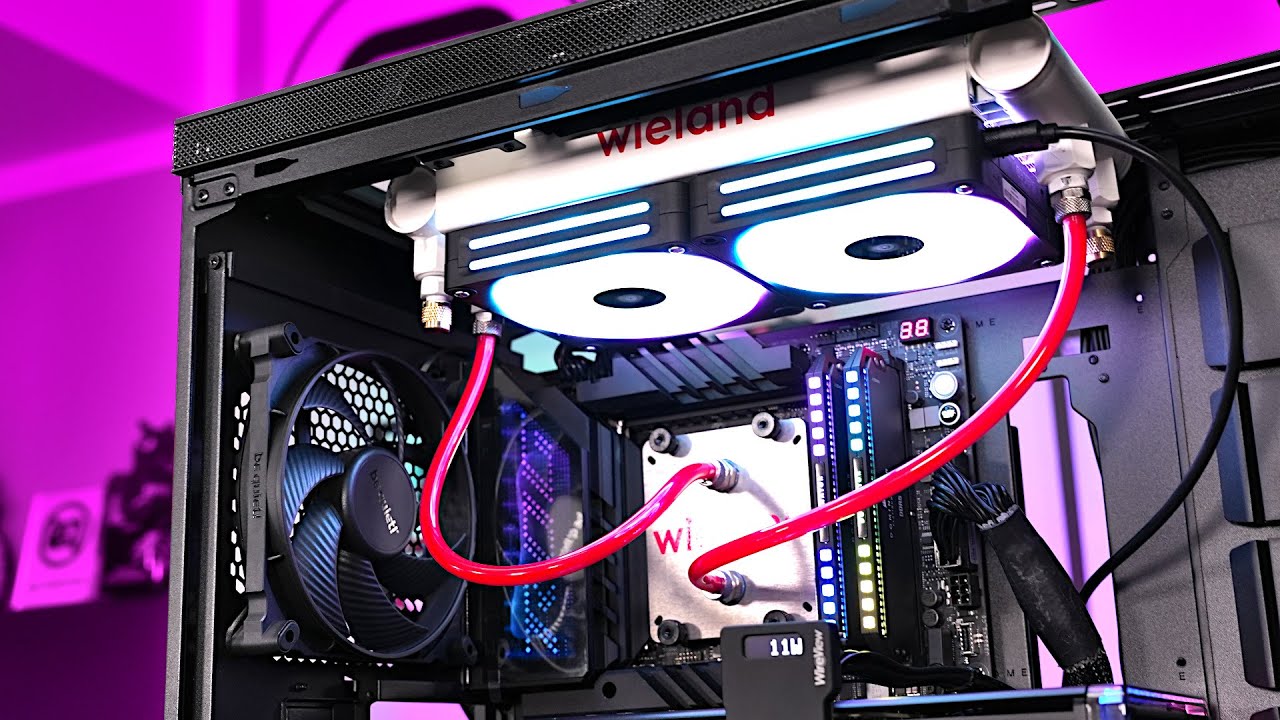
More Information about Hetzners AX52 Servers:
https://htznr.li/der8auer/AX162_en
IceGiant Cooler:
https://www.youtube.com/watch?v=BqeO9_8yGB4
Wieland AIO:
https://www.wieland.com/en/solutions/energy/electronics-cooling/cold-plate-gaming
Support me on Patreon:
https://www.patreon.com/d...
cinder lagoon
Fuck
 sacred seal
That is really not good
cinder lagoon
Especially given that that server holds all family images (I am missing the offsite-backup)
cinder lagoon
Given that I had just setup some cloudflare address and was messing around with reverse-proxy
....hmmm
sacred seal
Been quite awhile since I have heard of someone getting pwned remotely.
cinder lagoon
It must've happened over the course of a couple days, slowly in the background because I did not really see power spikes
The window activated at exactly 9:30, when they placed the "info" files on desktop and all drive-roots
Well they shotdown the server then at least
Actually my nginx log for my (it was not working) HA dns address had some accesses at 9pm yesterday
From two "Mozilla X11 Ubuntu" Systems
sacred seal
That seems suspect
 sacred seal
Looks like the US and france?
cinder lagoon
...I don't think I had ssh enabled on my server...
sacred seal
Suprised its still up, records seem to go back at least 6 months
Given these are "First world" countries, I would of expected them to kill the IP.
cinder lagoon
...how likely is it to find out a decryption key if I have multiple reference files unencrypted and ecrypted?
sacred seal
Not that likely, but its not impossible
NVM, it seems like it is impossible
The No More Ransom Project
To help us define the type of ransomware affecting your device, please fill in the form below. This will enable us to check whether there is a solution available. If there is, we will provide you with the link to download the decryption solution.
Might be worth a look

 sacred seal
Fingers crossed
cinder lagoon
Our go-to antivirus is malwarebytes, right?
sacred seal
Strictly speaking its not a AV, but yea, hit it with that
Do it until you get nothing found, then hit it with defender
Then hit it with MB again
 cinder lagoon
good point.
sacred seal
I swear there was one but I cant for the life of me find it
cinder lagoon
also: it completely removed any system tools from windows so no Defender, no disk management lol
sacred seal
Learn how to write the image of Kaspersky Rescue Disk 18 to a USB drive or CD/DVD.
This is bootable and will hopefully get you to a point where you can install MB
cinder lagoon
thx, my laptop is pretty slow rn since I'm doing virus scan
sacred seal
Yea, I would put MB on anything that was on the same network as that server
sacred seal
Yea, I am not entirely sure what you would do about that
cinder lagoon
remove printer from existance is probably the answer
sacred seal
Theroretically is a vector for future re infection, but given they used judge they are probably not that sophisicated
cinder lagoon
given that I got enfected by judge I'm probably not that sophisitcated :/
I even spelled sphisticated wrong ._.
again
sacred seal
Well no, some port probably got left open by accident. Some automated bot found it and did the attack of its own accord
cinder lagoon
sacred seal
Well no, some port probably got left open by accident. Some automated bot found ...
I had exposed host enabled for the server because I was debugging reverse-proxy forwarding
so yes, all the ports were left open
sacred seal
That would do it
cinder lagoon
i definitely need to reinstall on that machine, given that they removed ALL system tools...
sacred seal
Yea, the important bit is to get your pictures back
cinder lagoon
absolutely
sacred seal
Guess you could put them on a USB stick and decrypt them on a different machine
cinder lagoon
that would be about 2TB
cinder lagoon
yea xF don't have any spare hard drives flying aroung of that size
sacred seal
Though that does expose your new system to bieng infected
cinder lagoon
sacred seal
Take the drive out and put it in a caddy?
its a 3.5" drive, it pulls to much current for my USB adapter
cinder lagoon
sacred seal
Though that does expose your new system to bieng infected
removing everything first lol
sacred seal
Fair enough. I always keep a 3.5" drive reader for situations like this
cinder lagoon
wait I DO have a proper (USB) dock
... if I re-setup the thing anyways I'm gonna put some form of linux on it...
Cheeky...
 cinder lagoon
...whats that free NAS solution thats great for virtualization?
just asking in advance so I can start right-away once I've dealt with this
surreal moss
TrueNAS?
cinder lagoon
I think that's it, thanks
cinder lagoon
just filed a complaint with the authorities, curious what will come of it, since I could give them 4 IP addresses
hmm problem... the decryptor doesnt let me upload files
 cinder lagoon
i'm trying it on another PC with the copied files
cinder lagoon
always getting Bad Request
cinder lagoon
:/
cerulean helm
I swear Windows share and credentials are purposely obtuse and annoying. Trying to setup a separate system image backup on my TrueNas server. Created a folder for it, so I have access. A seperate backup is currently ongoing, so clearly I have access.
Yet the new system image network credentials keeps saying they are wrong...
surreal moss
New host is pointed to the right ad source?
cerulean helm
Its pointed at the same server. Just a different folder this time for separate windows images. I have a backup setup already. Just wanted redundancy.
Oh wtf. I just figured it out... The username has to be in a specific format of the pc name, followed by the account user. But ignore special characters.
Zero info on that, just trial and error...
On that note, I am now creating a 2TB system image and watching the transfer rate of 1.5- 2.2 Gbps. Not bad.
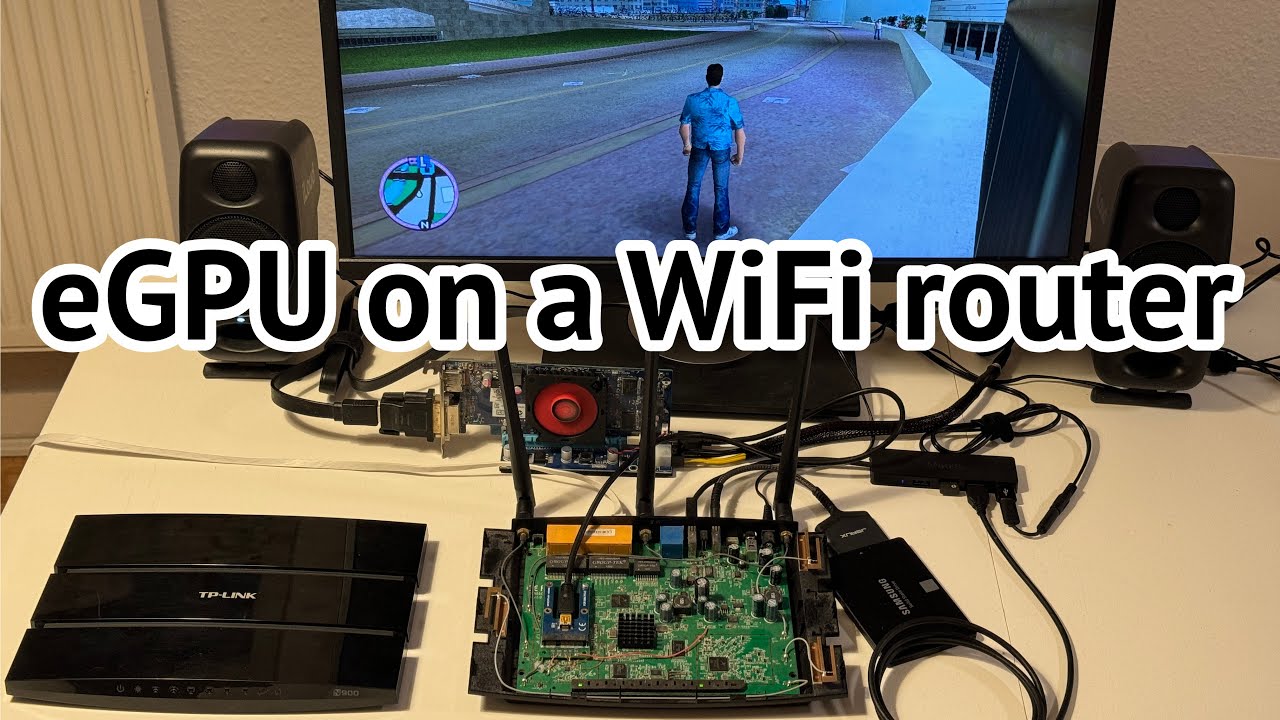 surreal moss
cerulean helm
Oh wtf. I just figured it out... The username has to be in a specific format of ...
surreal moss
cerulean helm
Oh wtf. I just figured it out... The username has to be in a specific format of ...
Oh yeah. It’s a real pain with the domain
cinder lagoon
mossy gull
https://youtu.be/bcjuoEZg8rI?si=ZKgfulPSfIheah_e
wth yo
mossy gull
cinder lagoon
wth yo
I don't know either.
cinder lagoon
cinder lagoon
Fuck
:/
 surreal moss
That sucks
cinder lagoon
Given that information I am currently negotiating with the ransom holder..
I seem to have convinced them that I am a student living in munich with two other guys and that I can barely afford rent with two other people.

They have made the mistake of using a service that logs IPs to share the 4 test files with me.
So I now have 2 probably connected IPs and one definite to share with authorities
cinder lagoon
I used an old alt-email for contact btw, my internet presence under that name is practically non-existant
cinder lagoon
Ransom holder has offered me the key for 1200 after much negotiating. Ouch. Don't think they'll go much lower...
They have already shared the decryption-program, tho it seems to use some private and public AES-256?
Even tho that is really secure I feel like I should have enough data by now to theoretically calculate the key?
Like given the extra code, known previous + after files - there can only be so many variables...
 sacred seal
Unfortunately no, modern encryptions are not possible to break with that kind of attack
cinder lagoon
:/
cinder lagoon
Wait did you know Dr Lisa Su and Jensen Huang are related??
Kinda crazy that the chokehold on consumer entertainment electronics comes from a shared family tree
https://www.igorslab.de/wp-content/uploads/2023/07/Lisa-Su-Jensen-Huang-Stammbaum-pcgh.webp
 mossy gull
Why do people think 150w is the hard limit for 8-pin power connector, and that you can't get past it?
sonic meadow
because thats what the spec says
And because that is what the spec says, that's all that can be guaranteed at any and every step of the power delivery chain. Not just the connctor
The connectors limits themselves are irrelevant. The fact that each pin is rated for ~8A, and thus over the three power delivery pairs the connector is rated for ~288w is again.. not relevant.
mossy gull
sonic meadow
And because that is what the spec says, that's all that can be guaranteed at any...
Corsair said a while back that a single 8-pin can deliver 288w.
But not sustained
sonic meadow
yes, the connector is rated for that. power delivery is more than just the connector
mossy gull
sonic meadow
yes, the *connector* is rated for that. power delivery is more than just the con...
I think 1 person even pulled 450w over a single 8-pin😅
sonic meadow
as the PCIe spec says 150w, psu manufacturers dont need to spec the cabling for more than 50w/pair.
as the PCIe spec says 150w, gpu manufacturers dont need to spec the traces coming from the connector for more than 50w per pair
molex themselves* say 8-9A depending on wire type and diameter used, and list a 30C temp rise over ambient.
So yes, you can definitely go over that. but you are running more in to thermal issues, quality of crimp and crimp fatigue, etc
*https://tools.molex.com/pdm_docs/ps/PS-5556-001-001.pdf page 8
mossy gull
sonic meadow
*molex themselves*\* say 8-9A depending on wire type and diameter used, and list...
Talking about Molex, I once found a reddit post about someone complaining and saying their 7900XTX PC kept crashing, and they showed they connected it with 2 Molex converted to 2 8-pin.
And called it a bad card.
sonic meadow
heh
mossy gull
But really, people need to stop listening to spec sheets, a 14900K also can pull almost 400w, but that isn't on the specsheet.
sonic meadow
oh, im sure thats on the actual spec/datasheet for that
the CPU manufacturers are notorious for the figure they provide using watts as a unit being... nebulous in meaning.
cerulean helm
Finally back up and running. Moved the entire setup to a new desk. Went from a 5 foot long under 2 foot deep desk to a 6 foot long, 2 foot deep desk. Still moving stuff around. Need to center my monitor to my pictures, I just noticed.
 jade scaffold
very nice
 frozen igloo
Anybody know how to fix the hinge on m40x, my left hinge broke. I have access to a 3d printer
sacred seal
There are a few files for that

Printables.com
Hinge replacement for the Audio-Technica ATH-M40X, both left and right version. | Download free 3D printable STL models
While I love the m40x, I am always hesitant to recomend them, the hinge fails way to often
Probably had it less then 2 years?
frozen igloo
It's been right around 2, It snapped because when I was going to class, it's been gradually getting worse though
frozen igloo
sacred seal
https://www.printables.com/model/167047-audio-technica-ath-m40x-hinge-left-right
Is there a guide on what I need to remove on the headset to access that portion without breaking a cable?
sacred seal
Not really. I tore mine down, you just have to be careful
frozen igloo
What are your thoughts on dt770? While i'm still fixing these I'm curious about contenders
cinder lagoon
frozen igloo
Is there a guide on what I need to remove on the headset to access that portion ...
Would start with the screws lol, would come apart on its own after that probably
frozen igloo
I’m going to be printing a new hinge and reinforcing parts I found, Im just looking at other headphones at around the same price point if I decide to get a new/another pair
jade scaffold
frozen igloo
What are your thoughts on dt770? While i'm still fixing these I'm curious about ...
Dt770s are really good
My friend has had a pair for like 5 years now and they are still intact and they sound pretty good too
frozen igloo
What ohm do they have? I'm looking at getting the 250ohm
mossy gull
frozen igloo
What ohm do they have? I'm looking at getting the 250ohm
Keep in mind, the higher the ohm the more powerful sound card you need
frozen igloo
I have a schiit fulla e, the m40x would be the pair I use without a dac/amp
mossy gull
frozen igloo
I have a schiit fulla e, the m40x would be the pair I use without a dac/amp
Well, that sounds Schiit😅
Well, that's good that you already have a DAC/AMP.
frozen igloo
I wish I had a different one though it should work with everything I plan on using until a big upgrade
 balmy flicker
does any one know what might cause repeet inputs and or no inputs on a key bord
surreal moss
Depends on a few things. What keyboard is it?
cinder lagoon
and is it specfific to single keys
cerulean helm
I'm sorry but the 14900KS can pull nearly 400 watts? MSI put an add out with a "one click overclock" to 6.4Ghz on P cores. On what cooler?
I think this will be the first consumer cpu that its required to delid for any overclocking.
I can't wait to see what the motherboards Vcore is on this "one click" OC.
 cinder lagoon
cerulean helm
I'm sorry but the 14900KS can pull nearly 400 watts? MSI put an add out with a ...
cinder lagoon
cerulean helm
I'm sorry but the 14900KS can pull nearly 400 watts? MSI put an add out with a ...
derBauer already put out a video comparing it.
6.2GHz on a regular AIO
4% faster than last gen and 30-40% more power draw
balmy flicker
surreal moss
Depends on a few things. What keyboard is it?
G910
primarily S and D but not limited to those keys
surreal moss
Hhmmm it could be age related. The lingest I’ve had anything with Romers is 3 years. Iirc the G910 is from 2018 or so?
balmy flicker
bord is only 2 years old
surreal moss
Could also just be dirty and need a cleaning
balmy flicker
that could be true it got better after tapping it upside down on the table
surreal moss
Huh, yeah. Only times I had multiple keystrokes with the romers is when I was being especially light on the press
balmy flicker
I did knotice that If I was exceedingly firm it did better and it does better when I am rant typeing
surreal moss
There you go. Just be angry all the time
Seriously though that sounds like it’s either dirty or excessively worn
balmy flicker
likely a bit of both
surreal moss
might be a power supply issue
I mean I’ve had mine for 3 years at a time-
Wait, I did five years with my first one
And afaik it’s still going strong
balmy flicker
hmm I think I need to invest in a detailing kit
on a similar note did you ever run into one ear going dead on a G935 headsset
surreal moss
I don’t think I’ve ever run a G935
balmy flicker
I have had 3 of them and one of its wired only twins
surreal moss
I switched to Man’O’Wars until this year when I picked up a logitech Pro X
balmy flicker
all of them have had a ear start to go dead and I got it replaced under warnty
surreal moss

balmy flicker
it is a nice head seat but there are wires used where a PCB should have been and they are like 40 gauge wires to boot
mossy gull
cinder lagoon
4% faster than last gen and 30-40% more power draw
This simply isn't worth it at all for people like me.
4% for 40% power increase.
It almost looks like Intel and Nvidia for that matter are fighting who has the highest power increase for the lowest performance increase.
jade scaffold
You always bring up Nvidia with the power increases but at current Nvidia have the most efficient GPUs
By a pretty wide margine too
mossy gull
jade scaffold
You always bring up Nvidia with the power increases but at current Nvidia have t...
Yet, their 4080 Super is barely any better, if at all, some even say it has worse performance, yet it uses the same amount of power.
jade scaffold
It is better though on average 5% better
And in actual use will only pull 300w Vs amds 355w for the same performance
Unless you are making super heavy use of both the RT and tensor cores NVidia GPUs don't even come close to pulling the amount of power their tdp rates then for
Where as AMDs tend to pull tdp regardless of if their matrix and RT cores are in use or not
There are genuinely some games where the 4090 only pulls as much power as the 7900xtx
And the 4090 is monumentally faster
mossy gull
More like 2% to 3% better, which is basically an overclock and not worth a whole new card.
mossy gull
jade scaffold
2-3% for 200 less
In many other countries outside the US, the 4080 and 4080 Super stayed the same price
jade scaffold
Doesn't make it any less superior efficiency wise to amd
It depends what model you get too
There are aib models which will still be 1300
mossy gull
Nope, both start at 1200.-
jade scaffold
That's the same with any card though you will always have cheap variants
jade scaffold
mossy gull
Nope, both start at 1200.-
That's because you live in tech Narnia
Also in the us sales price doesn't include tax
It's 1000usd +what ever tax a region has
I can get a 4080 super in the UK for sub 1000
mossy gull
jade scaffold
I can get a 4080 super in the UK for sub 1000
In France, Belgium, Luxembourg, Netherlands they both start around 1200.-.
With founders going for past 1600.-
7900XTX goes for around 950.- in this area.
jade scaffold
That's terrible pricing
mossy gull
I guess Nvidia is taxing us
jade scaffold
I can get a 7900xtx for sub 900
mossy gull
jade scaffold
I can get a 7900xtx for sub 900
Which is basically the same as you use weights and we use euros🙃
jade scaffold
A 7900xtx is going to be cheaper than a 4080 nomatter what there's more of them and they aren't useful outside of gaming and certain types of rendering
mossy gull
7900XTX and 4080 use to be around 1200.- here, but as soon the 4080 Super launched the 7900XTX got under 1K and the 4080 Super got the price from the 4080
mossy gull
jade scaffold
512 bit memory bus width possibly 32gb of ram
My brother said yesterday that the 5090 probably gets 24GB again.
jade scaffold
We only know that they've been experimenting with a 32gb config
The 512bit bus though is the exciting part
Gddr7 at 512bit it's no HBM 3e but that's insanely fast pushing 1.5tb/s fast
mossy gull
My brother came downstairs yesterday, pissed off that the 5090 gets 24GB again😅
That's how I remember it.
jade scaffold
Yea we don't know at the moment we just know 32gb was tested
32gb might eat into their quadro sales possibly so they might not do it but it is possible
mossy gull
jade scaffold
The 512bit bus though is the exciting part
The question is, can games utilise it.
My brother, who is a fanatic if it comes down to speeds, he said his VRAM rarely hits top speed.
He has a 4090, I recently got the 7900XTX.
Before you ask, he's a "I sit at home unable to work and get free money"
jade scaffold
Yea the 5090 will be more than fast enough to make use of such memory speeds
I can overclock my 3090 memory speeds by 1250mhz and I see a notable improvement in framerates especially minimums
mossy gull
For me it's purely VRAM capacity that I need, paying 2K more just to have a higher fps in games isn't worth it to me.
My monitors are capped at 100Hz anyways
jade scaffold
The 5090 will be in excess of 2.5x the speed of the 3090 so such high memory bandwidth might actually be needed especially at 4k
I'm guessing the 5090 might actually approach 3x the speed of the 3090
It's at a minimum 50% faster than the 4090 that much we know
mossy gull
Till it comes out I won't take those speeds at heart.
jade scaffold
Weird designation for it's die as well GB202
What we know for sure is that it'll have 6000-10000 more cores than the 4090 likely arround 8000 more if previous gens die overheads are anything to go by
IPC will be higher
It will use gddr7 at what most people agree will be 512 bit bus (24-32gb?)
And we know GB100 will likely be capable of pulling near KW levels of power
mossy gull
We haven't heard shite from Intel and AMD, I am curious what they come up with.
Only thing I remember from last year that AMD RX 8000 series only will be medium range GPUs, I don't know what that means, if AMD figured out how to combine 2 or more medium range GPUs they can come close if not beat Nvidia.
Intel is just being quiet
jade scaffold
I think AMD are gonna focus on making a 7900xtx tier GPU that's affordable
Imaging a 7900xtx for 600usd
Or maybe even less
I think they want to try completely take the mid range and low end market from Nvidia
Which I think they should definitely try do
mossy gull
jade scaffold
I think they want to try completely take the mid range and low end market from N...
They already got the very low end with their APUs.
The 8700G crushes my laptop that has a 1060.
mossy gull
jade scaffold
Imaging a 7900xtx for 600usd
That would crush the mid range like no tomorrow
jade scaffold
Exactly
The issue with amd isn't that their cards are bad value
It's that they just can't swipe the market from under Nvidia they need to focus on massively better value even more so than before and insane advertising
mossy gull
jade scaffold
It's that they just can't swipe the market from under Nvidia they need to focus ...
The problem is, even if they advertise, people keep blaming AMD for the FX and RX300 series
mossy gull
jade scaffold
And vega
Vega FE wasn't bad at all 😅
I still miss having 32GB VRAM
jade scaffold
Vega FEs launch was disastrous
mossy gull
jade scaffold
Vega FEs launch was disastrous
But the cards were great, especially because they allowed VRAM stacking
jade scaffold
It ran dangerously hot because of its limited fan speed was absolutely curb stomped in efficiency it's drivers were objectively ass though got better later
mossy gull
jade scaffold
It ran dangerously hot because of its limited fan speed was absolutely curb stom...
I had the liquid cooled variants and ran Studio drivers, not to mention I did do the Conductonaut trick on them
jade scaffold
The studio drivers were still ass
mossy gull
They were great🤣
jade scaffold
And their efficiency was still none existent
mossy gull
jade scaffold
And their efficiency was still none existent
Those were the days when power was still cheap......
jade scaffold
300w tdp and for what the ability to get out done by the 1080ti in everything because it was so much faster
Even in vram intensive applications the 1080ti wonne via brute force
mossy gull
jade scaffold
300w tdp and for what the ability to get out done by the 1080ti in everything be...
But 1080Ti had much less VRAM, something I need a lot of for my work.
Also the Vega FE back in the day was 1 of the fewer cards being able to run Resident Evil Remake on highest settings, it needed 14GB on 4K, and the 1080Ti didn't have enough
jade scaffold
The thing is with vram you can offset having less vram by vram being faster and having more GPU cache
The 1080ti had more cache and despite it's memory being slower the 1080ti would work through it's memory monumentally faster
Also the Vegas like GPU wise weren't fast enough to run RE remake without chugging on max settings that's what people mean when they say HBM was wasted on vega
Because the Vega GPU was so slow it pulled almost 1.5x the power it's competition did with only the FE which cost almost as much as the quadros at the time did having any actual advantage that being it's much higher vram capacity
mossy gull
jade scaffold
The thing is with vram you can offset having less vram by vram being faster and ...
And still in RE Remake the 1080Ti lost. Even though it's VRAM was faster.
jade scaffold
Wanna know something additionally really funny Vegas HBM wasn't even faster than the 1080tis GDDR5X
Despite being super expensive HBM
I love the idea of HBM GPUs but I hate Vega amds first decent launch since the R9 was Rx 6000 not including them re releasing Polaris 5 separate times
mossy gull
Sometimes having more is better than having faster VRAM.
Especially when render engines are pure poop.
jade scaffold
Vega in general was a disaster though FE launched with only 1 driver which didn't work properly
And for the varient of the FE that didn't burn itself up you could buy 2 1080tis
And if you didn't need the 32gb of vram you could get the 64 but why would you it lost to the bog standard 1080 in everything and was just as expensive and pulled over 1.3x the power
The best thing to come out of Vega was Nvidia panic releasing the 1070ti which was basically just a cheaper 1080
Go competition I guess
mossy gull
jade scaffold
Vega in general was a disaster though FE launched with only 1 driver which didn'...
Because gaming is just relaxation for me, and 32GB VRAM was better than 12GB.
My system was purely for work but I couldn't afford having 2 Titans.
I could get 2 Vega FE LC for like 1500.- together brand new.
jade scaffold
Yea you didn't experience launch drivers then
A bit after launch Vega was fine
Still comically inefficient
mossy gull
jade scaffold
Yea you didn't experience launch drivers then
Half year later yes😅
jade scaffold
But it wasn't none functional burning up and constantly crashing
Then amd made the Vega VII which not a soul bought because it was stupid and despite literally being node shrunk Vega had all new included driver issues then they made Rx 5000 which again launched totally unusable
Then they released rx6000 which had a perfect launch and actually competed with Nvidia even at the flagship level
Then 7000 was mostly fine bar the vapor chamber defect thing and them stopping updating rx6000s drivers so they could keep ontop of 7000s
Which lasted 6 months or so before they were able to get back to 6000
Rx5000s drivers have recently started to fall apart again my friend who bought one at launch is probably never getting an AMD GPU again because of that card which is unfortunate but it's exactly AMDs problem and why they are so outsold by Nvidia
Amd for the next like 2 or 3 launches need to launch flawless to re earn their reputation
 rancid plank
Man you know a lot about graphics cards
mossy gull
jade scaffold
Amd for the next like 2 or 3 launches need to launch flawless to re earn their r...
The problem is when Nvidia and Intel have a string of problems, nobody seems to care, when AMD has a single broken driver then they're the worst company in the known universe and they don't do anything right.
jade scaffold
That's because when amd have a broken driver it's hilariously broken
mossy gull
I believe the Vapor Chamber issue on the RX7000 series were caused by crypto miners that power washed the GPUs to make them look like new.
jade scaffold
When an Nvidia driver is broken which they almost never are it's something silly like the overlay gets stuck and you have to mash the overlay button to get rid of it not the driver timing out or flat out being incapable of loading an area in a game
Intel though people are plenty critical of
Though people are willing to be a little more lenient because they've never made an actual dedicated GPU till recently and their GPU team is so very tiny
mossy gull
I once had very broken Nvidia drivers😅
jade scaffold
Which was likely just a corrupt download
The worst I've had from Nvidia in the past 8 years is csgo crashing for like 3 days
mossy gull
jade scaffold
Which was likely just a corrupt download
Nope, the driver was very broken, my performance was shite and it kept crashing.
I did do a reinstall 3 times.
That was for my old GTX 960
jade scaffold
The worst I've had from amd is everything ran on the GPU maxing the GPU lagging to hell and crashing
My friend has a 5700xt recently he asked me if he could have his 1050ti back it's dreadful
mossy gull
And on a 2070 the driver caused the GPU to thermal throttle to 0.4 GHz and kept it there till you did a complete reboot
jade scaffold
The 5700xt launched with drivers so bad it was outperformed in some cases by a GT 1030
Then they fixed them 6 months or so later
mossy gull
5700XT was a shitty card.
jade scaffold
Then they've started breaking again
Hardware wise it's great
Good value too at the time
But amd refuses to support their drivers we are lucky Rx 6000 didn't have any major issues when amd literally abandoned them
mossy gull
RX6000 get new features everytime though
jade scaffold
They abandoned them for a time
6 months or so and 0 driver updates at one point
Which is unacceptable
mossy gull
I never noticed that funny enough 😅
Although AMD only updates mostly when new games are released, Studio drivers get more updates.
jade scaffold
Not one update for either driver for 6 months
Luckily there wasn't any major issues when they decided to dip out for a bit to make sure 7000 went smoothly
Then there was the anti lag bug which was pretty funny
mossy gull
jade scaffold
Then there was the anti lag bug which was pretty funny
More like EAC being a dumb fuck like always
mossy gull
I never have this anti-lag stuff on so I guess I never felt a thing
jade scaffold
It triggered pretty much every anti cheat around
And quickly pulled the feature to redevelop it not to piss off every half functional anti cheat
Recently got reintroduced
mossy gull
What Anti Cheat is fully functional 😅
jade scaffold
Well "recently"
Also the vapor chamber issue was an AMD issue or rather their supplier for the cooler
They did offer replacements and what's not so not honestly a huge deal imo
mossy gull
At least they acknowledged it
Nvidia's 12-pin is a disaster and Nvidia doesn't even acknowledge it.
jade scaffold
I'd rather have a physical issue that I can fix via rma in a week than software having never ending seizures for a month luckily their last 2 launches have been mostly positive just a little more AMD and people may start forgiving you
mossy gull
Nvidia needs to reintroduce the 45° 12-pin connector and stop complaining it's "too expensive" when they release a 3K costing card.
jade scaffold
Got a new 12 pin now
Seasonic straight up made their connector out of a ceramic that shit will not melt
Hopefully
I think the release cables are LL gonna be 94V-0 plastic
Which is flame retardant plastic good thanks fills me with confidence
Can't wait to plug a 500w+ GPU in with one wire that may or may not overheat
mossy gull
jade scaffold
Which is flame retardant plastic good thanks fills me with confidence
Flame retardant aka I meld slowly.
The problem still persist, if the connector ain't burning it's something else.
I hope we get the power pass through like some of those concepts like Aorus Project Stealth I think it was called
 old otter
Oh dear, that's scary
mossy gull
old otter
Oh dear, that's scary
Burn baby burn😅
If you follow the guidelines you should be okay, it's just the issues were so bad that AMD and Intel stopped using the 12-pin before the card's release.
frozen igloo
sacred seal
https://www.printables.com/model/167047-audio-technica-ath-m40x-hinge-left-right
Headset has been fixed, it was fairly easy to fix although removing the old hinge without breaking the cable was a pain
mossy gull
Fun fact: a Hard Drive full of data is lighter than 1 that's brand new.
cinder lagoon
mossy gull
Fun fact: a Hard Drive full of data is lighter than 1 that's brand new.
... I don't believe you, I think you are measuring dust xD
if you talk about spinning rust at least...
cerulean helm
Well, Igor's Lab just dropped a huge news story about water cooling radiators. Looks like some brands are using lead for soldering and using brass instead of the advertised copper.
Notable brands include EKWB, Corsair, Thermaltake.
cinder lagoon
Ouch, thats gonna be a PR hit at EKWB (who had perfect standings up until now to my knowledge)
cerulean helm

igor´sLAB
No, I’m not going to test the cooling performance of radiators for PC cooling today, but I am going to take a closer look at the first six manufacturers and their current models to see whether they…
And Part two.
https://www.igorslab.de/en/the-big-radiator-material-test-more-lead-a-popular-hiding-place-and-2-5-bright-spots-part-2/
igor´sLAB
Even though there are only four radiators today, I spent quite a lot of time finding the right places where some manufacturers still like to use unauthorized substances such as lead – always hoping…
cinder lagoon
Thx
old otter
Wow, good to know
cinder lagoon
Soo... uhhh.. don't drink your Watercooling loop water?
mossy gull
cinder lagoon
Soo... uhhh.. don't drink your Watercooling loop water?
I did last time, tasted like water
cinder lagoon
Then you must've drank chemicals lol
mossy gull
cinder lagoon
Then you must've drank chemicals lol
Just destilled water, I didn't taste any metals
I refresh it every month at least once
cinder lagoon
Ohh wtf. Why don't you use herbicides and leave it be for like a year?
mossy gull
cinder lagoon
Ohh wtf. Why don't you use herbicides and leave it be for like a year?
Because my PC also cools my room😅
cinder lagoon
confusion intensifies
surreal moss
If the system the water is in isn’t designed to be potable then don’t drink it!
mossy gull
I only done it once, don't worry guys, I was just curious
I feel like I am already dying so I do weird shite
cinder lagoon
Arent we all a little bit? :D
mossy gull
cinder lagoon
Arent we all a little bit? :D
I mean I have full body Hyperesthesia I think it's called, I slowly become allergic to more and more foods, I need these electric plates on my body to reduce the pain and I can't work full days anymore, and I am 29
old otter
Wow that's a lot to deal with, your a strong person but don't drink your calling water
mossy gull
old otter
Wow that's a lot to deal with, your a strong person but don't drink your calling...
Don't worry, it was a test to see what it would taste like😅
old otter
Just be careful, I don't want to lose more people
mossy gull
old otter
Just be careful, I don't want to lose more people
Gamers don't die, we just respawn
old otter
Hehe
jade scaffold
cerulean helm
Part One
https://www.igorslab.de/en/the-big-radiator-material-test-between-promi...
I wonder if this applies to any of their water blocks
Wanted to do a full custom loop to cool my thicc CPU and possibly the next gen GPU if it doesn't fit with it's air cooler
sonic meadow
blocks dont tend to be soldered, they are often milled from a single piece of metal
 sonic meadow
blocks dont tend to be soldered, they are often milled from a single piece of me...
sonic meadow
sonic meadow
blocks dont tend to be soldered, they are often milled from a single piece of me...
well... maybe a few pieces of metal then assembled with screws and o-rings. some blocks have a frame I guess you could call it, and then a skived fin array that is fastened to that.
and then of course the nickel/metal cover that is attached over it to... make it actually hold fluid 😆
cinder lagoon
Tho skived is not as good as milled because it changes the structure and greatly affects the heat transfer
jade scaffold

NVidia oh my god
B100 (Next gen) on the left H100 (current gen) on the right
look at the size of that thing
208 Billion Transistors vs the H100s 80 Billion all on TSMCs 3n Node
jade scaffold
another note about B100 its actually 2 GPUs
its not a singular Monolithic GPU its 2 of them stitched together
a multi GPU chip with 0 cache coherency issues which should excite @mossy gull because it'll be cool to see what AMD do next to compete or if they even try
mossy gull
jade scaffold
a multi GPU chip with 0 cache coherency issues which should excite <@29060844863...
I am still curious what AMD comes up with, I last heard a rumour they quadrupled their RT cores, but that still doesn't tell me much.
jade scaffold
yea which they need to do because their RT cores are a bit behind NVidias so brute force should hopefully help them catch ip

Jeesus christ
look at the power pins
look at all the PCIE ports just tacked onto it xD
mossy gull
jade scaffold
1st thing I think about when I see that


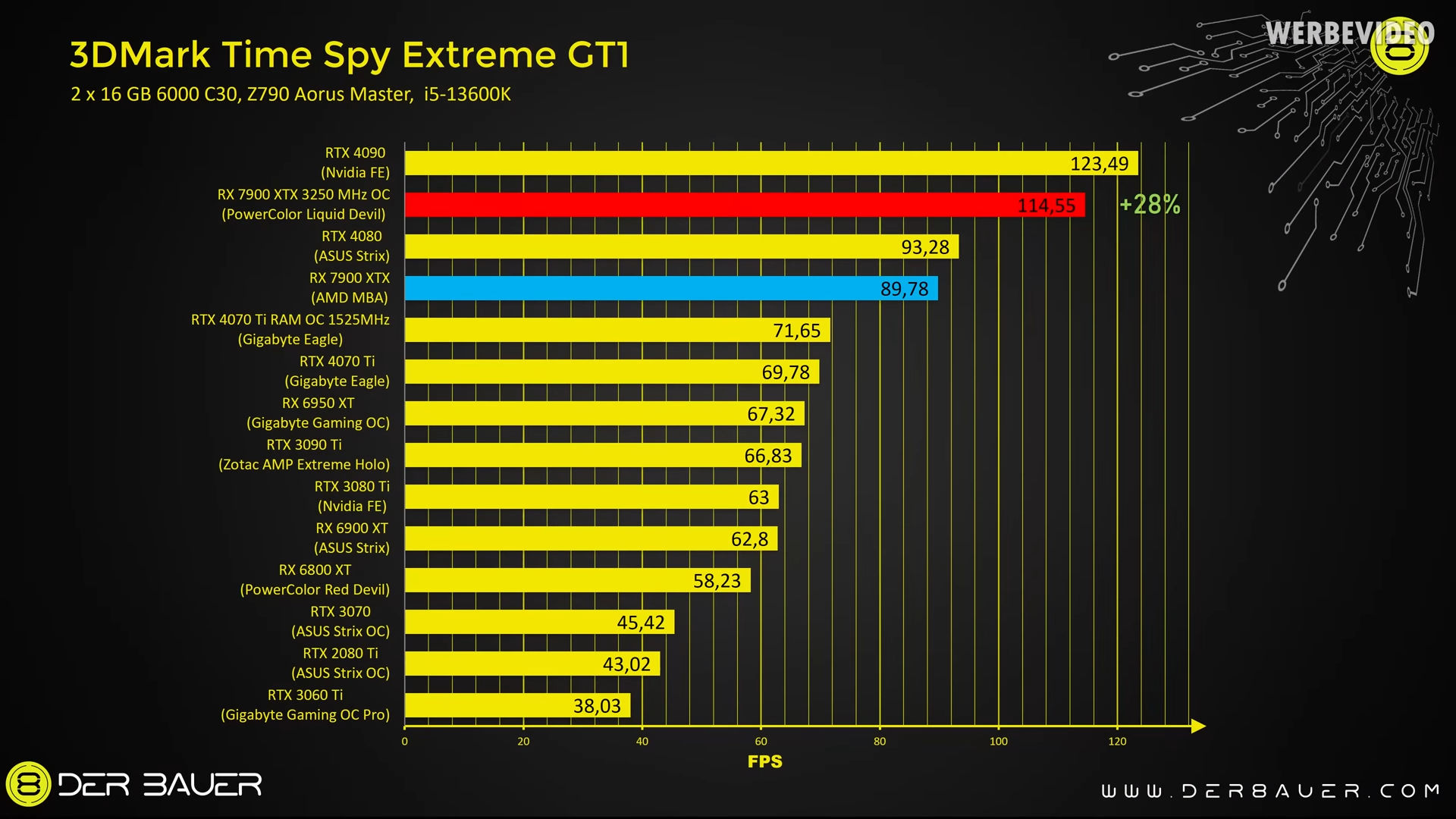
 sacred seal
Got more of a jolly rogers vibe IMO
jade scaffold
i wonder if the 5090 will be a 2 Chip design like the new blackwell chip
or if the 5090 will only be equivilent to half
mossy gull
jade scaffold
yea which they need to do because their RT cores are a bit behind NVidias so bru...
I wonder if AMD goes full on MCM, if it's that plus 4 times the RT cores, it could crush Nvidia, or even come very close to it.
jade scaffold
possibly
mossy gull
But hey, all we can do is hope
jade scaffold
though seeing B100 the sheer size of the 2 GPUs that make it up make me think its unlikely they can actually compete with a 5090
the 5090 will be interesting tho to see if its MCM or if its just a monolithic die
if its just monolithic then maybe amd can built a competitor
which would be interesting to see
sacred seal
I'd guess monolithic, they don't really need to go MCM to beat AMD and MCM for gaming is probably more complicated then for compute
jade scaffold
NVidias MCM chip acts as 1 chip it is just one chip in effect
the link they are using is so fast that all the L2 Cache on them is linked
sacred seal
Same with first gen ryzen. That had some big teething issues
jade scaffold
first gen ryzen cant share cache
infact only Epyc is capable of sharing cache
if you have a 7950x the 2 32mb CCDs do not pool their cache into 1 big 64MB chunk
sacred seal
Ah, my bad then, I thought l3 was shared for some reason.
jade scaffold
even on EPYC with its much faster link its only kinda Pooled
if you have a 4CCD EPYC Genoa then the Cache is pooled flawlessly
if you have more than 4 CCDs it Pools cache with a small latency penalty
sacred seal
Still, I can definitely see there being issues with a first gen CCD design when it comes to something like gaming where it would be less of an issue with raw compute
jade scaffold
Blackwell isnt actually the first gen MCM they have made
hopper has an MCM chip which uses a link thats not quite as fast
NVidia are saying to fix the issues they had with H100 they completely redesigned the link which is now capable of 10 Terrabytes Per second no memory locality issues no cache issues infact neither chip that make it up actually are aware of which side of the chip they are on
sacred seal
Did nvidia actually ship any MCM hopper chips?
Best I can tell the h100 (highest end) is not
There was a prototype made with MCM based on hopper, but I dont know if there is any actual shipped products with it
Granted information is spartan, I could be completely wrong here
jade scaffold
H200
H200 has been shipped and its just 2 H100s like hot glued to eachother
H200 is weird some companies i know have it but i cant find how they are buying it
sacred seal
Ok, so h200 is the "prototype" that I saw referenced then. Yea, other then an annoucement in november I cant find jack about it
jade scaffold
yea some companies do actually have them
but considering Blackwell isnt far away from launching
it must have had some kinda issues for them not to have released it more openly by now
also jeesus christ the AI Performance increases over time are starting to get silly

the big racks they are making this gen can consume upto 120KW
120,000W still far more efficient and dense than hopper tho
liquid cooled for obvious reasons water that comes in at about 25c water that leaves 45c at 2 litres per second good god
sacred seal
The size of the rads on that must be massive
jade scaffold
oh and a single rack because they've enhanced NVLink so much is also going to be able to act as what is effecivly a single GPU
1.4 TerraBytes per second of bandwidth both ways on NVLink now
They really are going to start putting nuclear power stations into datacentres soon arent they
 sacred seal
There is a crypto mining op "near" where I live that has a solar farm dedicated to it
jade scaffold
atleast blackwell is much more eiffient
though the blackwell server racks are much much more dense on the account that they are liquid cooled
 sacred seal
And that is with like asics
jade scaffold
this is aparently whats needed to train GPT MoE with 1.8 Trillion perametres in 90 Days
can do what can be done with Hopper with a quarter the GPUs and nearly a quarter the power drain with Blackwell
still gonna need some nuclear reactors tho soon if they keep scaling this stuff up
sacred seal
Power demands keep going up, yet we want to legislate electric cars and heat pumps, and no one is willing to build more reactors
Fortunately we seem to have fusion mostly figured out
jade scaffold
getting there
first actual commercial reactor is under production
the New GPUs are so powerful that they are starting to try to use them to predict the earths weather at high resolution and more accurately than current methods
last gen GPUs could only do it at a 25km scale if you will which lead to missing lots of important details about how for example a hurricain will interact with the land
managed to get that resolution down now to 2km which is actually pretty insane
cerulean helm
sacred seal
The size of the rads on that must be massive
Alphacool is launching a Coolant Distribution Unit for water cooled servers that can handle up to 8000W. Can handle 40 1U or 20 2U servers.


 jade scaffold
or 1 whole nvidia gpu server
each blackwell gpu pulls 1000w you can have 8 of them on one computer
surreal moss
sacred seal
Power demands keep going up, yet we want to legislate electric cars and heat pum...
I mean there’s a new reactor coming online next year iirc
jade scaffold
need more
surreal moss
Oh, it just connected this month
jade scaffold
more reactor more better
sacred seal
If all the "green" legislation came into effect we are more then doubling our power demands (at least in north amarica). Not counting the increase power for AI compute. One reactor is a not great
jade scaffold
takes like 5 years to build a full 4 reactor 2 building power plant so they better start building more soon
sacred seal
Better then nothing to be sure, but solar and wind are not going to cut it
cerulean helm
More so that a single decent size data server sucks up as much power as 30k-50k homes annually. Power grids in general are not going to be able to keep up.
sacred seal
And they keep retiring coal and natural gas plants
surreal moss
Coal and gas keep getting retired because they can’t maintain new standards in a cost effective manner
jade scaffold
they also just dont produce alot of power for the ammount of logistical work and their pure size
mini nuclear reactors are quick to build and you can kinda just prop them up anywhere you like
they should make more of thoes
surreal moss
Those are all under research though
jade scaffold
ehhhh
"under research" is just a fancy way of we CBA doing it the way we know works because its expensive
we have been able to make really rather compact nuclear reactors for a really really long time now
surreal moss
The modular ones I’m keen to see roll out
sacred seal
No, we had a bunch of coal plants retired a couple years back for purely political reasons. Not economic. (well more accurately they were supposed to be converted to natural gas but after bieng shut down aproval to convert was removed)
surreal moss
The economic reasons were political
Ultimately though it was the economics of political policy
sacred seal
SMRs are neat because in theory you can slot them into existing infastrucutre. Dont need a dedicated plant, can just take a coal or NG and convert it
Unfortuantely scale seems to be an issue, people keep backing out
And I heard (though I am not sure its true) that they need 100 units to be economical
surreal moss
They were only approved to build a test/proof of concept one in Idaho this year or next. It’s going to take a few years for that one to even come online.
A year or two after that and we should see more of them if it goes well
sacred seal
Canada has a couple projects on the go
cerulean helm
MI has the Palasades Plant being turned back on. Costing several billion dollars to bring it back online though.
mossy gull
Fun fact: Cloudflare uses lavalamps to generate random code
mossy gull

VideoCardz.com
Work Graphs on Radeon GPU, up to 39% faster rendering AMD demos the potential of fully GPU-driven rendering. Microsoft officially announced Work Graphs last week, but the formal introduction is taking place at GDC (Game Developer Conference). Attendees, primarily game developers, are shown the techniques and methods to utilize this new technolo...
cinder lagoon
Hmm intersting...
jade scaffold
ooh ive seen that its really cool
mossy gull
It is, and if like the demo we have 60% performance increase, then damn, that's a lot
jade scaffold
yea handing more work to the GPU is like really good for performance
someone re wrote java MCs renderer to use NVidias mesh renderer which allows the gpu to load as many chunks as it has memory capable of using which is actually an insane sight
also I reduced my idle power draw
yay im no longer pulling 130w on the CPU i have achived this by taking the CPU out of its "stable" mode meaning the infinity fabric clock can now drop lower when at idle and also boost even higher than before when under boost
mossy gull
jade scaffold
yea handing more work to the GPU is like really good for performance
And the GPU doesn't have to wait for new data, it can pull it by itself
cinder lagoon
jade scaffold
someone re wrote java MCs renderer to use NVidias mesh renderer which allows the...
Given that OpenGL is really horrible for performance thats quite an upgrade!
Tho it being proprietary to nVidea and incompatible with mods we'll have to be happy with pretty good workaraounds like "DistantHorizons" (together with "Farsight" if on Servers)
cinder lagoon
jade scaffold
yay im no longer pulling 130w on the CPU i have achived this by taking the CPU o...
Is it stable like that?
jade scaffold
Yea
All the less stable mode does is allow the Io to down clock like on a normal computer if you have something turbo latency sensitive it can have an effect if not it won't tho
jade scaffold
its new earpads and headband time for my LCD 2Cs
jade scaffold
MSI really trying to get rid of thoes exceedingly pricy prebuilts
1k for a pc with a 60 series card in it Christ all mighty
mossy gull
jade scaffold
MSI really trying to get rid of thoes exceedingly pricy prebuilts
Welcome to MSI
jade scaffold
Atleast the free monitor makes up for it on the discounted ones
Free 27 inch monitor keyboard mouse and 4060 pc for less than a grand that's atleast reasonable
A good monitor can be worth like 250+ on its own at 27 inch
hasty rose
If it's any Monitor for free...
https://us-store.msi.com/Monitors/Gaming-Monitors&filter=139
Nvm its a specific monitor...
mossy gull
hasty rose
https://us-store.msi.com/Monitors/BUSINESS-PRODUCTIVITY-Monitor/Pro-Series-Monit...
Good as a starter, but that's about it
jade scaffold
It's only that pro one on the pro desktops it's some other gaming one on the gaming desktops I believe
cerulean helm
I'm sorry its only $700?
https://www.newegg.com/p/3D4-000Y-00021
Sure its 1440p, but its W-OLED.
jade scaffold
Not dreadful pricing but I'd wait for a sale I got my g9 QD OLED for nothing on sale for it being dual 240hz 1440p monitors
cerulean helm
Thats a 49 inch curved, and a 32:9 aspect ratio monitor. Not exactly an exact trade off for a single or dual 16:9 non curved W-OLED.
jade scaffold
Yea I'm just saying I got a g9 OLED for like 1.2k which is very low for the amount of OLED monitor 700 is a decent base price but imagine if it goes on sale even 100 dollar off puts it on the same value as my g9 was
sacred seal
Is anyone else's youtube being wierd? I'm scrolling through shorts and I keep getting these same videos which are more like ads. However they dont have controls on the side like normal shorts do, unless I refresh the page. They also seem to ignore the "dont recommend this channel"
mossy gull
cerulean helm
Sure its 1440p, but its W-OLED.
WOLED currently has the advantage of being more developed and having already a rather low burn-in chance compared to QD-OLED.
My personal opinion, to me WOLED is still superior, the colour on QD-OLED for me are still too blue, but then my eyes are very sensitive to any kinda UV light.
cinder lagoon
Any of yall here know a bit about Rpi 4 (CM4) hardware or pcb rpair in general? I think I fried my IO board's I²C Fan controller and the whole I²C bus is now just garbage
jade scaffold
oh no
is it just the controler thats fried
if so it shouldnt be too hard to just replace
if the bus itself is dead its probably dead dead
cinder lagoon
Yeah so thats the thing I hope/suspect that the controller just spits random garbage onto the bus now.
jade scaffold
whats the controler look like is it BGA or is it just like a standard surface mount component looking thing
cinder lagoon
https://discord.com/channels/204621105720328193/1221184987131412590
I have a thread about it on the RPi discord if you're already on there but here a brief summary:
Hey I think I have fried a component on my RPi CM4 IO board.
It's been a while since I used my Pi and I vaguely remember what happened but I think I accidentally shorted some pins of either the FAN or PSU header while the board was live and it seems to have fried the chip U11 (Datasheet, page 12)I had already made a thread here, detailing the software-side errors this caused, mainly broken I²C but I didn't think that this was caused by a short in what seems to be the Fan controller.
I2C Bus Empty Except Full On 20…
Specifically when I slipped with my tweezers (while unplugging the fan) the U11 chip seemed to have started glowing and that one's obviously bust BUT Since I need I²C for my next project I wanted to know wether I can maybe fix the IO board by replacing the chip.If anybody has some insight into this if it may have also damaged the CM4 itself or just corrupted the I²C bus because still broken chip is connected to it I would be very grateful!
Thanks in advance!
Here are some pictures of the chip in question, as you can probably see there's some kind of dot on it. I think that's where I saw the glow
I do have pretty good soldering skills.I'm also wondering wether you know of any way to find retailers of SMDs that are closeby as I would pay 20€ for shipping of the replacement part on mouser
https://www.mouser.de/ProductDetail/886-EMC2301-1-ACZLTR


Linux shows following i2c buses in /dev/:
0 1 10 20 21 22
i2cdetect -y Xis completely empty, regardless of devices connected.
There is the exception of both 20 & 21, which are completely filled with seemingly gibberish.detailed i2cdetect output: https://pastebin.com/dtGYbWQm
dmesg output:
[seconds, truncated]
[   1 ] i2c_dev: i2c /dev entries driver
[   1 ] brcmstb-i2c fef04500.i2c: @97500hz registered in polling mode
[   1 ] brcmstb-i2c fef09500.i2c: @97500hz registered in polling mode
i2c i2c-22: Added multiplexed i2c bus 0
i2c i2c-22: Added multiplexed i2c bus 10
[   8 ] mcp251x spi0.0 can0: MCP2515 succesfully initialized
...
[  44 ] i2c-bcm2835 fe205000.i2c: i2c transfer timed out
[  45 ] i2c-bcm2835 fe205000.i2c: i2c transfer timed out
[  46 ] i2c-bcm2835 fe205000.i2c: i2c transfer timed out
...
[ 277 ] i2c-bcm2835 fe205000.i2c: i2c transfer timed out
Chip in question close-up

 jade scaffold
okey that should be pretty easy to replace
its not a BGA chip which can be alot harder to replace
cinder lagoon
Yea I figured (I've been watching Louis Rossman occasionally) and I've done my fair share of small soldering
BUT given that the chip with shipping costs 26€ from mouser and a new board is about 40€ I'm wondering wether to take the risk
I guess I can at least desolder the obviously broken one and see if the gibberish stops
sonic meadow
Might be worth checking ebay/china for reclaimed/cloned chips at that price. Buyer beware obviously
mossy gull
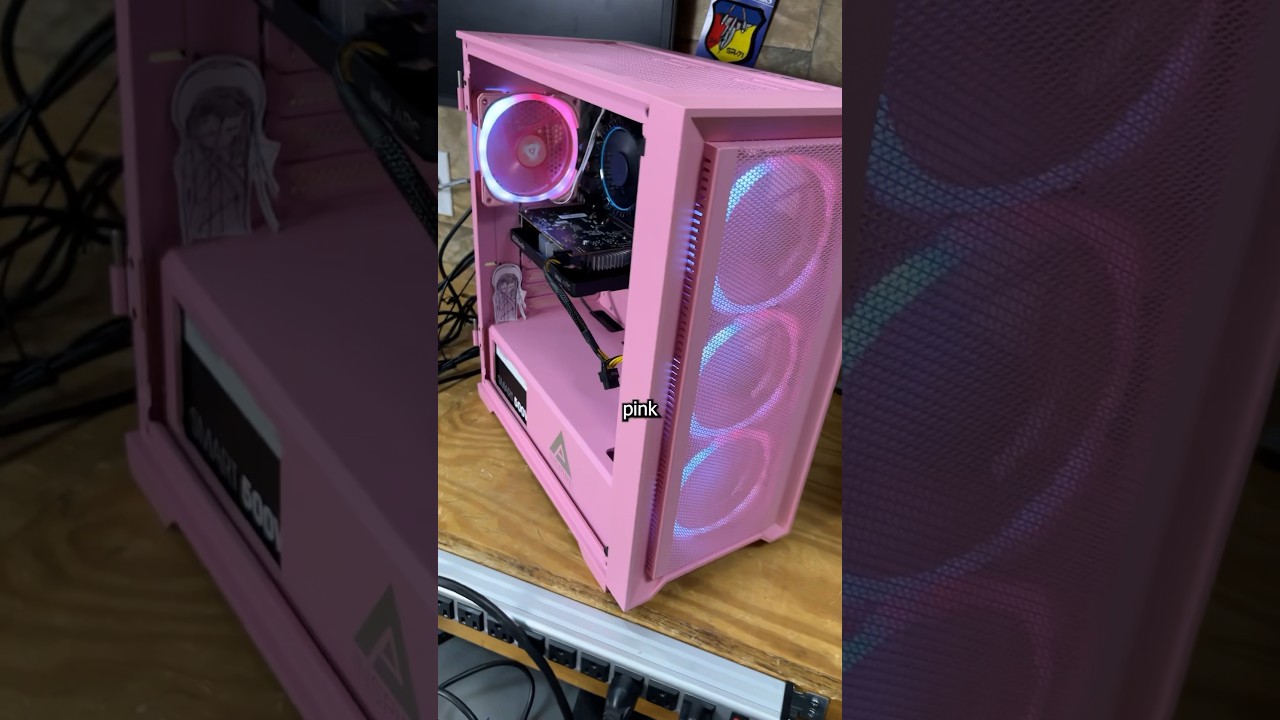
This budget Gaming PC is my customers very first computer build, and though I admire their courage and love seeing people build their own tech , this pink budget build had quite a few things wrong with it. You can still get good technology for cheap, but can I fix everything that went wrong?
mossy gull
 jade scaffold
Ah yes width
cinder lagoon
sonic meadow
Might be worth checking ebay/china for reclaimed/cloned chips at that price. Buy...
8:1 aspect ratio lol
mossy gull
cinder lagoon
8:1 aspect ratio lol
Nah 80:10🙃
cinder lagoon
Hehe copped myself 2 new Coasters 🔥
 mossy gull
I recently got my family's old Area-51m R1.
But the CMOS is dead.
Would it be an idea to hardwire the CMOS port to the battery?
Or is that incredibly dumb?
Like most laptops use the battery as the CMOS, so I was thinking to do the same with the Area-51m
cinder lagoon
Wait what exactly do you mean?
The CMOS chip is dead or the built-in battery?
And what port?
mossy gull
cinder lagoon
Wait what exactly do you mean?
The CMOS chip is dead or the built-in battery?
On older Dell laptops, the CMOS had its own "housing" with a cable to the motherboard.
The main battery is fine but the CMOS has died, for the 2nd time because the system isn't being used that often.
cinder lagoon
Hmmm the batteries are usually rechargable so if you give it power it should be fine after a while
If it doesn't even accept any power thats an incredibly stupid design
mossy gull
cinder lagoon
If it doesn't even accept any power thats an incredibly stupid design
CMOS rarely are rechargeable.
That's why I thought, why not take the main battery power, step it down to CMOS power and use the main battery as a CMOS, just like how new laptops do.
cinder lagoon
Button cells are litium-ion batteries, they are somewhat rechargable if you give em some voltage
mossy gull
cinder lagoon
Button cells are litium-ion batteries, they are somewhat rechargable if you give...
Then why have they died twice, even though the system is in wall power?
The Area-51m R1 isn't even that old
cinder lagoon
mossy gull
Then why have they died twice, even though the system is in wall power?
Hmm weird
mossy gull
cinder lagoon
Hmm weird
Exactly, that's why I actually want to hardwire the CMOS battery port to the main battery, then I don't have to worry about the CMOS anymore
This is the type of CMOS the Area-51m has
 sonic meadow
cinder lagoon
Button cells are litium-ion batteries, they are somewhat rechargable if you give...
sonic meadow
cinder lagoon
Button cells are litium-ion batteries, they are somewhat rechargable if you give...
Button cells are lithium-metal and not lithium-ion typically, and thus are usually primary cells (not rechargeable) not secondary cells (rechargeable)
cinder lagoon
sonic meadow
Button cells are lithium-metal and not lithium-ion typically, and thus are usual...
Ohh dang must've auto completed after reading lithium 😵
Thx for correcting me