

#Moving Save ⁄ Userdata Location to Another Drive
4 messages · Page 1 of 1 (latest)
 charred cedar
Here you can see that it's putting the temp worlds for servers in that location.
https://i.gyazo.com/fc8ac1e80344017f1983f01d43e7410a.png
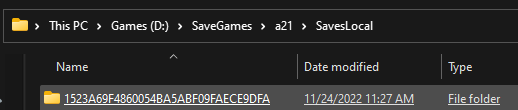

 faint nacelle
This is especially helpful when you are short of space on your C: drive, or wish to move your save data to a faster drive for better performance.
- Open the Steam Client
- Navigate to your Games Library
- Right-Click on 7 Days To Die in the left navigation bar.
- Click Properties
- Click on the Local Files Tab
- Click the "Browse Local Files" Button
-This will open a Windows Explorer Window. The next Steps Take Place in Windows Explorer - Copy serverconfig.xml and rename the copy to serverconfig.SP.xml (or any other name you'll remember).
- Open serverconfig.SP.xml in notepad and edit the path to where you want the 7DTD Gamesaves to be stored.
Note: Most of the serverconfig.xml properties are ignored when running the Client version of the game, but that property does carry over correctly. For saves, edit theSaveGameFolderproperty. For Userdata, edit theUserDataFolderproperty.
Here is an example from my file:
<property name="SaveGameFolder" value="D:\GameSaves\7DTD\Saves" />
<property name="UserDataFolder" value="D:\GameSaves\7DTD" /> - Save as serverconfig.SP.xml
- In the steam client.
- Right Click 7 Days To Die and select properties
- General Tab, Click Set Launch Options button.
- Place the following in the box:
-configfile=serverconfig.SP.xml(or the name of your new file, if different from that).
Now when you start the game it will use your path for the save and/or userdata files.
NOTE: You probably want to move your old save files from "%appdata%\Roaming\7 Days To Die\Saves" and/or userdata, such as generated worlds or mods from "%appdata%\Roaming\7 Days To Die" .
faint nacelle
Moving Save ⁄ Userdata Location to Another Drive