#🤝│community-troubleshooting
1 messages · Page 148 of 1
 rapid hedge
 celest panther
@rapid hedge this channel is for those who need help with PUBG. If you want to discuss that please use #💬│general-chat
rapid hedge
@celest panther oh, sorry. Thanks u
 chrome chasm
Hey....
Now i playing PUBG on Tencent Buddy Games
i was work well before the update
after i download PUBG with 0.12 update from apkpure
i go to the match and controls don't work
What the Fix Please
Thanks
 idle tree
We do not support PUBG Mobile, nor do we support the PUBG Mobile Emulator. If you want support for those versions, you will have to use the following link to locate the appropriate channels.
!pubgm
 regal vaporBOT
This is the Official PUBG Discord for PC, Xbox, and PlayStation 4, we do not provide support for PUBG Mobile.
If you have any questions or support requests regarding PUBG Mobile, please visit the page linked below.
https://support.playbattlegrounds.com/hc/en-us/articles/360002193033-PUBG-Mobile-questions-notices-and-more

PUBG Support
The mobile version of PUBG is being handled by Tencent and they will also be able to assist for any questions that you may have.
- The best option for support is through the in-game "Customer ...
idle tree
@chrome chasm ^
 frozen kernel
heloooooo poeple
 serene estuary
 formal osprey
How ca I say somethingnin this channel it tells i sont have the permission please help
 viral monolith
Change nickname to oOOPSo
 marble herald
how do i find private lobby i nsea?
 austere saddle
how do i measure distance accurately in replay?
 torpid marsh
Same way you do in game
idle tree
What kitten said
torpid marsh
Yes? @fast depot
 fast depot
@torpid marsh in pubg mobile my scarel skin which is give in elite pass.... When I select the skin all the the game says me item not found
regal vaporBOT
This is the Official PUBG Discord for PC, Xbox, and PlayStation 4, we do not provide support for PUBG Mobile.
If you have any questions or support requests regarding PUBG Mobile, please visit the page linked below.
https://support.playbattlegrounds.com/hc/en-us/articles/360002193033-PUBG-Mobile-questions-notices-and-more
PUBG Support
The mobile version of PUBG is being handled by Tencent and they will also be able to assist for any questions that you may have.
- The best option for support is through the in-game "Customer ...
 untold anvil
viral monolith
untold anvil
viral monolith
how do i get the pc role
torpid marsh
"Select your platform(s) using the reaction emoji below to receive @everyone news and announcements for the selected platform(s) only."
I just ruined everyones day didnt I?
@viral monolith it states in #📋│welcome-and-rules
viral monolith
thanks
 flint karma
@halcyon spruce Hi, would you know what the maximum character limit is for the name change coupon is? Thanks
 halcyon spruce
@flint karma It's 16 Characters
flint karma
@halcyon spruce Perfect, thank you.
 spark willow
@flint karma how do u chnage ur name on pubg or are u not allowed
flint karma
@spark willow You pay 9.99 Euros for a coupon in-game.
spark willow
@flint karma ok ty
flint karma
np
 sinful flower
hey help
 mossy flint
why is my game crahsing all the time
idle tree
Your guess is as good as ours.
maybe try some of the troubleshooting tips, though
!ts
regal vaporBOT
First Troubleshooting Steps
https://forums.pubg.com/topic/181292-read-me-first-troubleshooting-steps/
 frozen prawn
Since the last update, I've frequently had my game get stuck on the loading screen (Right before u get into a game). To get past it I have to restart the whole thing, and it acts as if I played the round... Whenever it happens the lobby music doesn't stop (as it should)
Is this fixable?
torpid marsh
Verify the game files @frozen prawn
 indigo tundra
 little holly
in car and out from its my problem
mossy flint
pls fix the crashes. The Troubleshooting didnt help... It's just so annoying
idle tree
Zero crashes here
 narrow shoal
@celest panther ^
 lilac grotto
do i report somebody who team killed me here?
 tidal latch
I’m new and have no idea what I’m doing.
tidal latch
I want to play with a squad that isn’t going to just goof off.
torpid marsh
All you can do is ask for squad members in #🔍│pc-na-lfg and hope that anyone responding will no "good around"
Sometimes you are lucky. Sometimes.. Not so much.
 agile silo
Does anyone else always get stuttering/frame drops during gunfights mainly? if so did you sort it out and what did you do?
torpid marsh
Lower your settings
agile silo
tried all different settings, atm its just view distance on ultra everything else is very low. iv got decent specs i play at high frames. i still get the issue 😦
im out of ideas withought spending money
agile silo
in my eyes 70 and less for pubg. average 100 ish. I get frame spikes down to 30 or 40 frames for a seccond then it will shoot back up.
torpid marsh
I will assume thats an i5 with.. what.. 1060?
agile silo
i7 4770k 1080ti, frames do sit around 120 but when have a lot of stuff going off it drops often. so thats why i said average 100. if i stand still i get 144
torpid marsh
i7 with 1080ti with avg of 100?
Stand still 144..
Are your frames locked to display?
agile silo
g sync 144hz yeah
torpid marsh
I'd take that off
And other than that.. Not much you can do on a PUBG POV.
I have way worse specs than you and I average your stats
So I would do this
Uninstall, reinstall.
Last time Iganed 30+ frams
This will however not help much with the "populated areas / firefights
agile silo
il reinstall and try withought gsync, and im gussing no vsync too? Plus do you play on 1080p?
torpid marsh
Try not to sync anythinhg
let the game and PC float together
I do yes'
With stats around low - medium
agile silo
i play 1440p thats why our stats are similar. Its just pubg which stutters, got 2.5k hours playing and id be a better player withough this problem lol. hopefully withough gsync that will sort it. Dont think iv tried that way before. Thanks, il let you know how it goes.
torpid marsh
Please do
 lament sigil
Hi, I need help. I'm not sure if it is because my windows or my wifi adapter or other. While i play PUBG my ping is not stable. Every 15s my ping will jump up to 35ms - 120ms. I have tried to reinstall steam and PUBG already, but it didn't work. Sorry my english is bad. Can someone one me suggestions?
 glad moon
torpid marsh
glad moon
torpid marsh
You counted?
viral monolith
What can i do with these eggs in pubg?
torpid marsh
What eggs @viral monolith
viral monolith
These easter eggs
torpid marsh
What about it
 fast oyster
i did a mistake yesterday
the owner of my new org wanted to give us the gift card to name changes "teamname_nIM" for example and i put "TEAMNAME_nIM" i tryed to changed it , so i bought a new name changer,,, when i tryed to change "teamname_nIM" to "TEAMNAME_nIM" it says the name is the same, but we need real the same name, i will not waist 20 euros changing 2 times as obv. so i wonder if u can refund me the 10 euros i wasted in a new name changer, because it did not pass 14 days since i did this ,was stupid mistake and i still cant change it anyway´
@torpid marsh
 weary warren
@fast oyster You need to contact customer support for a resolution to this issue.
No-one in this Discord will be able to assist you with this issue.
!support
regal vaporBOT
 celest panther
@fast oyster This channel is for those who issues with PUBG and is not a discussion channel
fast oyster
@celest panther if u cant see what i just write as an issue...
this is the biggest issue of pubg..
ask to any pro...
celest panther
It is not within the context of what this channel is for.
fast oyster
xD
weary warren
Please note that the person you were talking to is not a member of the PUBG team, but a community member who was looking to assist you.
Please show respect to all members of this Discord, regardless of their status as a Community Team member, Moderator, Contributor, or a standard member of the Discord.
celest panther
Specifically which stutter are you refering to @stoic grove ?
The more information you provide, the easier it is to help
viral monolith
im form Korea
torpid marsh
Welcome to the help channel.
celest panther
@stoic grove That is from a very early build of the game. Is is possible to get a video showing what you experience exactly on the current build?
Also, what are your system specs, windows version and driver version?
weary warren
@stoic grove Please remember to be polite and civil in this Discord.
 stoic grove
@weary warren i know but it really gets or my nerves
weary warren
It getting on your nerves does not mean the rules change.
stoic grove
im pretty much just dying to stutter then other players
weary warren
Okay.
One of our moderators, Takarii, has asked you some questions in an attempt to find the source of your issues.
From your message history you have not yet supplied basic information which is required to assist you.
stoic grove
ok
 flat cloud
game crashes, then cannot enter the game again, prompt comes up to reconnect to game, but i get "[25] client not responding" happens reallly frustrating
restarted pc and steam still can't get in game same error
torpid marsh
"This can happen if the server’s or your connection times out for quite a while or breaks up completely. A common solution is to update your modem/router’s firmware. Also, make sure that you aren’t running “Cucusoft Net Guard” which is incompatible with BE. Other than that, please ensure that there are no problems with your internet connection (you might want to contact your ISP)."
A person on the forums who had the same issue said "What did it for me was allowing BEService.exe through my windows firewall."
Might wanna try that.
celest panther
That would be battleye, the anticheat
flat cloud
ok did u read my error message above ?
error "[25] client not responding"
does the mighty Takarii know of a fix for it?
celest panther
Its related to battleye losing connection or being blocked, so id recommend doing what puppy suggested
Sometimes, however, it may require the game to be reinstalled
so if the firewall route fails, consider a clean reinstall by following the step at the end of the guide below
flat cloud
alright, there is 3 other .exe files in the same folder? add them as well?
celest panther
!ts
regal vaporBOT
First Troubleshooting Steps
https://forums.pubg.com/topic/181292-read-me-first-troubleshooting-steps/
celest panther
shouldn't need to do the others. if they were being blocked then you wouldn't have played in the beginning.
flat cloud
alright, thank you
flat cloud
step 9 and 10 done hope i don't have to resintall
mossy flint
the game was pretty good. But these annoying crashes... 3 in a row
in one single game
 vocal zephyr
realized something. i just watched wackyjacky do the mission where he got an ump kill and won the game
my mission may have bugged because the game may think i was completing a mission not available to me yet
despite the requirements for another mission being met
regarding ump challenge 1 being completed and not credited
if i try to grind for this again it also raises the question of do i need to do the same mission twice to be credited once
 supple vigil
You only need to complete the unlocked mission
So if it’s get to top 5 with an ump kill and you win it still counts
supple vigil
Ask your question and someone will be around to help you
 fickle trellis
@supple vigil ok
 latent prism
please add JUMP Scope-In
supple vigil
Um what?
fickle trellis
i have been bended i have committed a mistake in a pubg game rules
regal vaporBOT
If you feel you were incorrectly banned please submit an appeal on our support website:
supple vigil
We can’t discuss bans here - so that’s the most that can be done here
idle tree
bended
supple vigil
Well at least it’s not bended over
idle tree
Could have meant that, i mean, the language barrier is enough
latent prism
@supple vigil yes Scope in while jumping
idle tree
This ain't COD or Apex Legends
supple vigil
You’ve got no ground to stabilize on
idle tree
or Fortnite, for that mater
supple vigil
Recoil alone will make everything bad during the jump
Be lucky you don’t fall on your ass lol
latent prism
hmmm understood
latent prism
lol
fickle trellis
plz explain me how i get bake with pubg?
regal vaporBOT
If you feel you were incorrectly banned please submit an appeal on our support website:
idle tree
Submit a ticket and Support will review your case.
 uneven jetty
"Can you change my nickname on the server to explicit-content"
 mellow hawk
Am I the only one getting disconnected like a few seconds after landing?
Sometimes, I mean it happened like twice in 20 games
idle tree
Never had that personally
 raven hamlet
Is it normal that the air control pitch bindings are missing? I can't set them anymore. Is that a known bug? My old setting is still working but I wanted to remap that
 torpid agate
uhhh does anyone know how to fix this?
I dont have any movement keys and i cant assign them
 fiery tendon
are you in-game @torpid agate
@torpid agate If you are in-game hit ESC and you should see this:
https://cdn.discordapp.com/attachments/510655998189371402/570384177988501504/unknown.png
You can click to change the key bindings in SETTINGS
Key Guide is just a quick over-view
the KEY BINDINGS tab will have movement
torpid agate
in the key bindings there are no bindings for forward left right back
fiery tendon
make sure you hit apply
Click it and you can type a letter to assign
make sure to hit APPLY to save the changes before you close
fiery tendon
You are on PC?
fiery tendon
haha we'll fix this. Have you recently done any other changes to your game? Sometimes restarting helps.
torpid agate
i already tried to reinstall the game verify game files none if it has worked so far
i stopped play for one week and i come back to this game as broken as ever 
fiery tendon
tonight is a new patch
So maybeeee it'll fix
but it would be good to fix this for you before the server goes offline
silly questions, but if you open your key guide again - is SWIM also showing WASD as missing? @torpid agate
and is WASD missing from VEHICLE
fiery tendon
Ok trying something - 1 moment
If something is messed up, this would be your best bet
if you would like to wait until another DEV can confirm, I understand
I've never heard of WASD completely disappearing
and I did a ton of googling and cannot find another instance of someone reporting it
If you do this ^ I would recommend finishing before the maintenance tonight. The maintenance begins in 1 hour
lilac grotto
will the test servers be up during maintenance?
 stone heart
@lilac grotto They usually are if they are online before maintenance starts. I can't promise you that's the case now though.
torpid agate
@fiery tendon did not work
stone heart
@torpid agate There's an easy fix if you're willing to reset your settings.
Go to %localappdata%\TslGame\Saved\Config\WindowsNoEditor and delete or rename GameUserSettings.ini
I'd suggest renaming, in-case your issue is actually more indepth.
Or was that what supported told you on twitter? I can't open it to check
Another thing to test would be making a backup of all files in that folder, delete and then delete them all.
Verify integrity of PUBG again, then launching.
stone heart
Did you try deleting all the files in the particular folder?
And not just the one file
torpid agate
I actually did all of that before coming to this help page
stone heart
hmm
I have a theory, give me a sec to download & install the patch
nvm, that wasn't it.
fiery tendon
It's the same thing I suggested to her @stone heart
stone heart
@torpid agate Do you happen to have any other devices plugged in? They shouldn't be able to interfere like this, but, I have no idea what could be causing this otherwise since you already said you reinstalled & cleared your configs.
fiery tendon
^ Exactly
At this time she wont be able to test it anyway
not until the maintenance is over
torpid agate
i dont have anything plugged in
stone heart
Yes, she can. Pressing ESC during the disconnect message brings up the menu
stone heart
@torpid agate Have you tried getting a config from one of your friends to see if moving works?
torpid agate
no
fiery tendon
Modifing config files is against the code of conduct
othereise I would've suggested it first. At the very least she could probably open it to see if there's even anything there.
torpid marsh
Sorry bit.. Taking a working file and replacing it with a non working
Is not "modifying".
However.. If the replacing file work.. Then the original was modified with at an earlier time.
torpid agate
Well i didnt even know about these files till my friend told me to delete them to fix the problem i just came into
stone heart
How did the issue first appear?
torpid agate
well i was playing pubg last week perfectly fine but i didnt get on for a week because ive been playing world war z and i just came back today and everything about pubg was changed all my settings were changed my graphic settings were all ultra my key binds were back to default and my wasd controls were no longer in the game
torpid marsh
So.. Can you change them temporarily or are you unable to actually set a new key bind to selected input?
stone heart
She said they were missing in the keybindings list.
This is the image that was posted: https://cdn.discordapp.com/attachments/450432649748545551/570383088266510358/unknown.png
torpid marsh
Missing yes. Dosnt answer my question tho
Can she set new ones or is she unable to?
stone heart
... No, cause they are missing from the menu
The option to even bind Forward / Back / Left / Right isn't there.
torpid marsh
And that is caused by either a missing file or modification.
I'd retry to verify from steam
Now may be a weird time for it tho
torpid agate
i reverified before coming to this help page
fiery tendon
She's done all of these things already. You can scroll up.
torpid marsh
I did.
stone heart
Some part of the menus are stored remotely, not sure if all parts are. Which would mean that something else is interfering with the game & the connection to the server.
torpid marsh
Dosnt change the facts of what is causing things to be missing i'm afraid.
fiery tendon
Another option:
Deleting the battle-eye folder \steamapps\common\PUBG\TslGame\Binaries\Win64
Validating integrity of game cache afterward.
Relaunch game
@torpid agate do you have the Test Server installed and if so, is it missing there too?
The only thing close to this that I've found was someone missing their entire menu. And this was a fix.
stone heart
Didn't she say she tried a complete reinstall?
fiery tendon
Yes. But steam doesn't always remove all files during a reinstall. Especially if she has multiple drives with steam files.
Honestly. I've never heard of one small section like this missing
If nothing else worked, then what's another thing to try?
stone heart
@torpid agate I'd suggest you to make a support ticket and explain the issue thoroughly. I've never heard of this issue, and I've been here since the beta. It sounds like something is interfering with the game, or something is being cached wrong.
torpid marsh
Changing the install path might be a solution
That way it wont interfere with old files from prev. install.
torpid agate
@stone heart ive played this game since beta and i have never had this problem
im going to test the test servers and see if its working on there
nope test servers are the same exact thign
thing
stone heart
When you removed your config files, did your settings actually reset?
 magic hearth
are servers still down after update finishes?
torpid marsh
Yes.
fiery tendon
@magic hearth but Test is up
 tropic sandal
Looking for some help here :)
Don't know wich parameters i can change to resolve my problem.
Problem is , when i look at window at medium distance, it's only show black texture...
torpid marsh
Play around with the settings in game and see what changes it or you.
 sharp seal
torpid marsh
sharp seal
torpid marsh
When does that box show up?
 tropic eagle
anyone know if there is a developer community somewhere? (discord)
 compact pulsar
I don’t see any
tropic eagle
:/
 radiant wadi
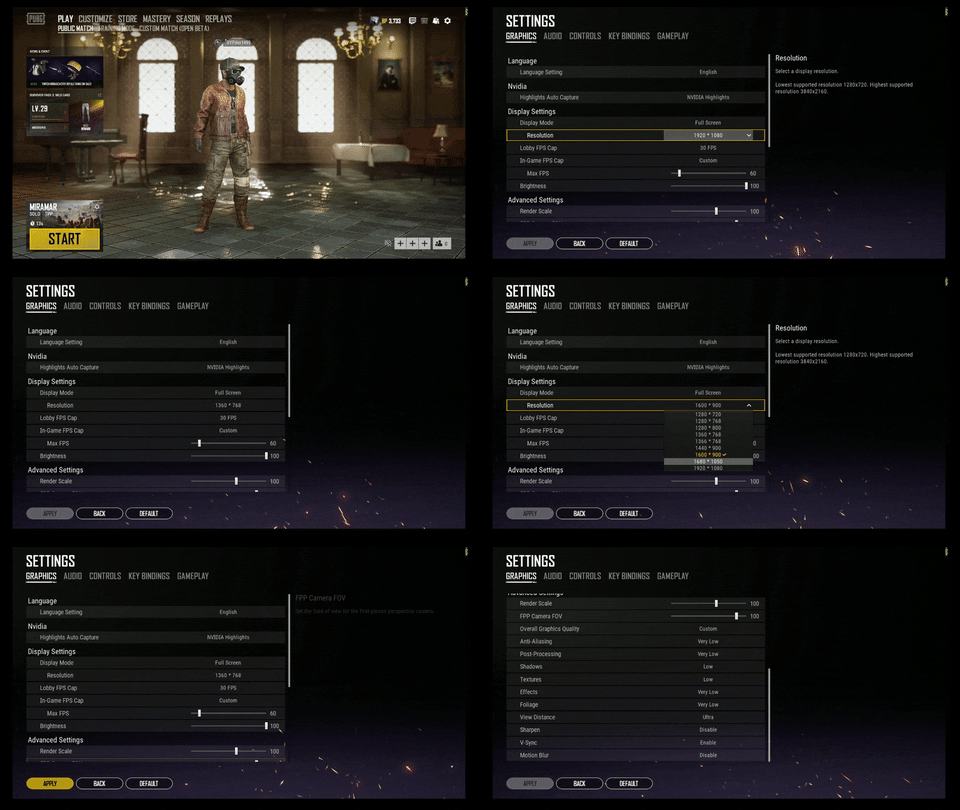
Hello guys. I have a problem with a resolutions.
I switch 1920x1080 to 1728x1080 and nothing is happening. wtf?.. stay in 1920x1080 when i changed any resolution.
raven hamlet
@torpid agate @fiery tendon @stone heart The key bindings are missing for me too. I mean.. they are assigned and working for me but I can't change them. One question above @torpid agate I asked for if it's normal that I can't set the keys for air control anymore... and that's basically the same problem 😉
Where could I (bug)report that behaviour? Or is it known already maybe?
 hexed moon
Hey, are there official mods here? Just a heads up to lock the official forums to Game Owners only on Steam so it doesnt get spammed by chinese bots.
viral monolith
sa
 calm sphinx
stone heart
calm sphinx
stone heart
@raven hamlet @torpid agate So it's not an isolated issue then, and more like a bug.
!bugreport
regal vaporBOT
To report PC bugs please report them here:
https://forums.pubg.com/forum/10-bug-reports-known-issues/
For Xbox bug reports please report them here:
https://forums.pubg.com/forum/180-bug-reports-troubleshooting/
For PS4 bug reports please report them here:
https://forums.pubg.com/forum/305-bug-reports-known-issues/
celest panther
@hexed moon we have safeguards in play that prevent the majority of spam. Steam isn't the only platform the game is distributed on, so you can't just use steam to "verify" users.
raven hamlet
@stone heart Done, ty ;)
https://forums.pubg.com/topic/333891-key-bindings-missing/
 proper kite
I FIND KOREA
 flint dome
i've got a problem with PUBG gui being displayed few centimeters lower than it should be
as in the bottom of the screen is cut off and there
there's big black bar on tom
all the buttons lit up and work when i hover over where they should be, but i can't reset gfx setting or change it to windowed mode
i already have reverified the files
torpid marsh
Are you using Nvidia @flint dome
 real fable
hey guys, first of all sorry for my bad english. My problem in pubg is that it sometimes happen a few days in a row, when i play pubg, that it has freeze frames in literally every round beginning and like everytime when i shoot. In other moments, also in red zone, i have like 120 fps or so... changing settings doesn't change anything...
googled it but all problem solve ideas doesn't change anything
(obv. playing on PC ^^)
16 gb ram, nvidia gtx 970m, intel i7-6700HQ 2.60 GHz
stone heart
@flint dome What resolution are you running at & do you have DPI Scaling turned up in windows?
flint dome
@torpid marsh yup
torpid marsh
Check nvidia settings
flint dome
@stone heart 1280x800, nothing turns up after typing DPI Scaling in control panel
@torpid marsh where, nvidia control panel?
torpid marsh
Yup
flint dome
OK it's good now
okay i take it back
game itself is ok
lobby is squished badly
and initializing screen is shifted downwards
i don't understan
 analog sparrow
i have a question
how do I enter the lobby in pubg
i'm joining squad rooms but cannot enter the lobby
lol newbie here
 soft kernel
i was using 1728 stretch reso in game but after the update it shifted to 1920 itself and when i try to do 1728 stretch its not working.. any help ? :/
 dull basalt
if I had banned in the steam, can I restore my account?
because I used ReShade
 night vine
!appeal
regal vaporBOT
If you feel you were incorrectly banned please submit an appeal on our support website:
night vine
@dull basalt try that link ^
analog sparrow
i have a question
how do I enter the lobby in pubg
i'm joining squad rooms but cannot enter the lobby
lol newbie here
torpid marsh
Ok I am tired of this..
Prolly not PUBG related.. But about once a day in game (ONLY IN GAME) I get stutter with the video at the same time as my sound starts to stutter an crack.
Been like this now for about 3 weeks.. once a day.
ANYONE have ANY idea here? Sound drivers are up. Video drivers are 2 hours old.
real fable
hey guys, first of all sorry for my bad english. My problem in pubg is that it sometimes happen a few days in a row, when i play pubg, that it has freeze frames in literally every round beginning and like everytime when i shoot. In other moments, also in red zone, i have like 120 fps or so... changing settings doesn't change anything...
googled it but all problem solve ideas doesn't change anything
(obv. playing on PC ^^)
16 gb ram, nvidia gtx 970m, intel i7-6700HQ 2.60 GHz
viral monolith
I need help
I have a GTX 1060, i7 7700HQ, 16GB, 256GB SSD where the game is installed, and I'm getting such low f ps on the lowest possible. I get like 20 fps while driving and 40-50 fps while just running around.
I played the game a few months ago and I was well over 100+
 still abyss
Can a mod please add [UK] to the end of my nickname please
viral monolith
after this recent update i had terrible fps. like 45 at times, normally well over 100
anyone else?
viral monolith
the one that dropped today
still abyss
hm, i thought it was faster after the new update when loading in
i think i just need some new ram (DDR4) and maybe a new graphics card
I have i7-7700 and a 1060 3gb
viral monolith
hey my game has no sound . please help
celest panther
Are you sure you haven't muted it by accident?
 supple elm
Every time I'm on the loading screen for a PUBG game I'll be thankful for the helpers
 still moat
Everytime I'm on the screen loading PUBG game crash game can someone help me how to fix the problem I'll be grateful for help
 patent nymph
Everytime i load into a game my game freezes and won't do anything after that. On duo it happens 1/5 matches and in Squad (with 3 people) i never got into a match without game freezing and me force quitting it. Im not sure if i had that happen to me in solos, its the only place where im safe from it.
viral monolith
Hii everyone !
I have little problem
When I finish match
I m back lobby late
Why ?
This problem started 2 days ago
 oblique kelp
türk varmı
stone heart
!lang @oblique kelp
regal vaporBOT
Please use English in this channel, thanks!
 tranquil aspen
hi
i have got the problem
my friend is banning 24 hours every day
in the custom games
i don't report him but its write "you have been reported"
@halcyon spruce
can you help me?
celest panther
@tranquil aspen we don't discuss bans on this discord. If your friend wants to appeal he can do so at the link below
!lang
regal vaporBOT
Please use English in this channel, thanks!
 zealous rain
why do i now here players in front of me/side to side in different places
 errant pike
my game crashed while i was watching a replay and now it opens up to the player unknowns battleground and it doesnt load past that
 nocturne veldt
how do you fix 100% gpu usage .... i have 1070 ti 8gb 32 gb ddr4 ram and intel core i7-8700k
supple vigil
Set your settings lower?
With that cpu it shouldn’t struggle to much long as you balance most of your settings
compact pulsar
100% isn’t bad unless it’s struggling to handle the game. If it can run it good frames then there’s nothing wrong with 100% usage
lilac grotto
myt resolution is messed up when i load the lobby, it is huge and stretched out,
nvm, i got it fixed just by restarting the game, but it still messes up sometimes
compact pulsar
PSA: check your monitor has the highest possible refresh rate. Don’t want to be playing 60hz on a 144hz monitor
 noble pier
Can´t hear or use voice chat. Mic works well, drivers updated, windows permissions, in-game config ok.
torpid marsh
Maybe it's your squad / dou parner(s) that has bad settings. Not you.
viral monolith
My game is messed up almost every time I try to play the whole game is in full screen but in the top left cornor like zoomed in had to restart the game almost 10 times to get it back to normal but it keeps coming back
torpid marsh
I'd like to see a printscreen of this
compact pulsar
@viral monolith try pressing alt + enter when that happens. Changing your fullscreen setting to windowed and back may also work.
viral monolith
@torpid marsh When it happens again i'll screenshot it
torpid marsh
yup
 upbeat siren
torpid marsh
upbeat siren
torpid marsh
@upbeat siren this is not Pubg Mobile
torpid marsh
Please dont post that here.. Or anywhere else
dull basalt
in which section of PUBG support I can write about that I consider myself innocent if I have been banned?
celest panther
!appeal
regal vaporBOT
If you feel you were incorrectly banned please submit an appeal on our support website:
dull basalt
yes, but where?
torpid marsh
dull basalt
thanks
 real frost
Hi guys, i have this recurring problem where my internet shuts off whenever i start pubg, sometimes when i get in a game, my internet gets disconnected during the queuing phase till the drop off phase. This happens every single time i queue for a game, i have been facing this problem for about 6 months. Please help me out
celest panther
I don't think thats an issue within the scope of this channel
There may be some issue with your system causing that because the game itself can't cause that behavior
You may need to talk to your ISP
real frost
I went to reddit and some people had the same problem with no fix yet
and it only happens with PUBG, a friend who is in the same country with the same ISP does not have this problem either
celest panther
The only thing I can suggest is doing a full reinstall of the game using step 14 in the guide below
!ts
regal vaporBOT
First Troubleshooting Steps
https://forums.pubg.com/topic/181292-read-me-first-troubleshooting-steps/
celest panther
The behavior you are experiencing doesn't suggest a game related issue that needs troubleshooting, but a system one
stoic grove
i have an idea for the stutter
it could work for some people cus it works for me
post processing ultra
im a genius
bet none of you thought of that
 leaden bolt
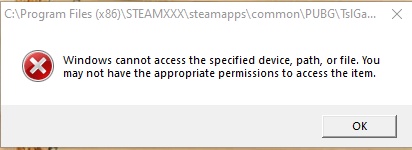
im trying to start the game but it says that it cant access the specified folder, path, or file or may not have the permissions to.. what do i do?
leaden bolt
i got the game running as i gave permissions to EVERYONE
BUT
as i jump into a game
it says BE Service Is Not Running Properly
weary warren
!ts
regal vaporBOT
First Troubleshooting Steps
https://forums.pubg.com/topic/181292-read-me-first-troubleshooting-steps/
weary warren
Please check the steps in here to ensure BE Service is running correctly.
 icy linden
ok
viral monolith
i like when my shots dont register fuck this game
idle tree
Shots always register here. Have you turned on the network statistics to ensure there's no packet loss etc.?
viral monolith
@idle tree yes 20 ping and no packet loss
torpid marsh
Next time it happens make sure to record it
Packet losses can come and go and if it comes during a second while you are in a firefight, it will affect the gameplay.
viral monolith
@torpid marsh i shot the dude i saw the blood but no damage
torpid marsh
Do you have replay / highlights on in game?
viral monolith
no
torpid marsh
Then how do you know he took no damage?
viral monolith
i looked the kill cam
torpid marsh
Did he kill you at that time?
viral monolith
no
torpid marsh
Ok
I'd suggest you use some sort of recording during gameplay just for this reason.
Having a recording of the impact of your shooting showing no damage was done to the player will be evidence enough towards a ban.
It's hard to deal with hackers, scammers, cheaters without this.
supple vigil
!appeal
regal vaporBOT
If you feel you were incorrectly banned please submit an appeal on our support website:
supple vigil
That is literally all we can do
supple vigil
You used a hack?
 subtle python
Yes
subtle python
IAM sorry pubg😭🤨
supple vigil
Support has the final say
subtle python
How can I send to support
supple vigil
W.e they sent you with the ban is the final word
You can’t appeal it as an inappropriate ban because you actually used hacks
subtle python
But I will not do it again
supple vigil
Don’t think that matters
subtle python
I swear
subtle python
10 years😭😭
supple vigil
Yup that’s final
subtle python
No,😭🤨
 🔥
subtle python
🔥
subtle python
Ok
 coarse junco
!appeal
regal vaporBOT
If you feel you were incorrectly banned please submit an appeal on our support website:
subtle python
Thanks
supple vigil
Support has the final say
coarse junco
but of you cheated, the chance to get unbanned is equal to zero
supple vigil
Np - gl with the new account and make sure not to use hacks @subtle python
 polar mauve
Hi guys i have a problem. I usually play on 1650 x 1080 but when i go back in lobby it resets to 1920 x 1080. Any solution for this bug?? And this drops the frame rates by huge numbers
torpid marsh
"When using full screen mode, the window mode will be changed to full screen (windowed) while in the lobby to prevent specific crashing caused by typing. In-game will remain full screen."
Could have anything to do with that
 clever hemlock
my game settings keep reverting too its only my canted sight switch button that keeps resetting any idea?
idle tree
I suggest the troubleshooting steps /s
 magic wagon
Pubg
 tough ether
replay system is bugging out/full on green screen any fixes?
its as if all the natural light in the game is neon green, renders every replay useless without a fix
celest panther
That sounds odd. Can you send me a screenshot?
tough ether
yeah check dms
celest panther
!ts
regal vaporBOT
First Troubleshooting Steps
https://forums.pubg.com/topic/181292-read-me-first-troubleshooting-steps/
fast oyster
need some help, bout that case of nickname change, they are telling me they cant help as pubg supports? u told to tlak with them, so with who need i to talk?
viral monolith
anyone else game sounding a bit weird?
everything is louder than it was when i played yesterday and the whole sound system sounds different
celest panther
A number of changes were made to some sounds in the game
Do you have a specific example of what you feel is different?
viral monolith
i wish i could explain it good
but i played yesterday and it all sounded good and as i usually hear in other games
now i feel all the sounds are louder and like sometimes i hear in 1 ear
viral monolith
is it me or the audio is fucked
 storm narwhal
is anyone on windows 1903 and playing?
fast oyster
thanks for help guys... leaving discord
 random perch
@storm narwhal i am
 glossy spoke
Hi, I have a question regarding the Overlay UI. I know that Overwolf and Steam In-game Overlay UI works fine for PUBG. I wonder if this was because the programs are on the white-list so that it won't blocked by PUBG's Anti-Cheat program. We are developing a Overlay UI and would like to know if we have submit our product to acquire some kind of permission? Thanks.
celest panther
Most likely.
It might be worth firing off a ticket to the support team to find out more.
 tame seal
I cant change my resolution after update 28! help pls 😭
celest panther
Are you trying to use a non native resolution?
ie, some sort of stretched version
tame seal
no just the regular 1920×1080
celest panther
Can you explain your situation to me?
tame seal
after the update my resolution is stuck to something not 1920×1080 and i can's change it back
celest panther
Can you send me a screenshot of the issue?
tame seal
celest panther
what is your desktop resolution?
tame seal
1920×1080
celest panther
What happens when you switch to windowed or windowed fullscreen?
tame seal
nothing happens
celest panther
I have a feeling this could be gpu driver related
something in the settings that is forcing a specific resolution perhaps
Have you tried the troubleshooting steps below yet? If not, please give them a go
!ts
regal vaporBOT
First Troubleshooting Steps
https://forums.pubg.com/topic/181292-read-me-first-troubleshooting-steps/
tame seal
yes i did all the troubleshooting steps
i think its the driver
because after every update it changes it
celest panther
what does it look like when you are actually ingame?
tame seal
i think i'll have to wait for the driver update
celest panther
can you change the resolution there?
When in the lobby, it now automatically defaults to borderless windowed mode
tame seal
still the same
celest panther
so you can't change the resolution when actually in the game playing?
tame seal
nope
torpid marsh
Sir, do you have Nvidia?
In the case you do, close down the program and set the settings in Nvidia Experience
Might help.
lilac grotto
i want to download a program called "Auto Hot key" so that i can use f13 - f24 function keys via the "G keys" on my logitech keyboard,
but i read somewhere online that if i enable these keys on my keyboard, they are essentially macros keys...
i'm just hesitant to download this program because i'm affraid to get falsely banned because of macros
i just want to be able to use the G keys on my logitech keyboard as F13 - F24
but i dont know if the pubg anti-cheat will detect that software as "cheat" software,
because i know that some people get falsely banned
 hidden dust
Doesn't logitechs software allow you to remap them? That would be much safer than AHK
lilac grotto
@hidden dust yes, but not to extra function keys
i just want to use the F13-f24 keys for my soundboard and i run out of space on my keyboard
@hidden dust logitech's soiftware only lets my rebind them to certain tasks such as media, shortcuts, hot keys, audio and such, but not to extra function buttons
torpid marsh
AH has nothing to do with the ingame settings at that point and is therefore not reason to be worried.
I have used applications such as AH and AC for other games (such as flash games online etc) and never ever would it have occured to me that it may be bannable by PUBG.
It's not untill you use the application in combination with the game that it should be red flags.
hidden dust
AHK is bannable in a lot of games.
hidden dust
Not necessarily
torpid marsh
If you can prove that you are not using an application in combination with pubg
They CANNOT have you banned.
hidden dust
And if they have proof that you have an illegal program running
They you CAN be banned.
torpid marsh
It would be like... An american owning a gun... but you are put in jail cause Swedish Gov wont allow that.
Its not an illegal program...
I am yet to be banned. Speaking openly in PUBG chatrooms about programs I use on my computer for other ends than PUBG itself.
Autoclicker I use for flash games where you have to click to get to goals etc 😄
lilac grotto
hell, i just wont download it because i dont want to risk getting banned just so i can use a hotkey for my stupid soundboard
lilac grotto
i know people who have been falsely banned and it sucks, pubg doesnt care they got too many other things to worry about, so i just wont bother with it
hidden dust
Wow your comparisons between things are quite out there.
hidden dust
They don't.
torpid marsh
Then by all means ban me.
hidden dust
Get falsely banned while having AHK running and I doubt it would make your unban easier.
torpid marsh
I spoke about that
Guess you missed it.
"If you can prove that you are not using an application in combination with pubg"
hidden dust
Lmao
torpid marsh
I am asking.
hidden dust
If you're not using macros. If you're not using cheats, you won't be banned. If you have a really good day where it tips the system off and you get false banned and you have a program open that cheaters use in this game to cheat, then gl.
Nothing you have done has been detectable as "usual gameplay patterns"
torpid marsh
I've questioned my own kills now and again...
"Oh I am so reported now lol"
Nothing
hidden dust
Because one report is going to ban you right?
torpid marsh
After what.. 2+ years (not a long time I know) I am yet to see the yellow text..
ONE
LMAO
Get out of here
hidden dust
You think you get reported multiple times a day? Lmao.
hidden dust
There's cheaters with 80% win rates after 100s of games with 10+ kd.
torpid marsh
Yup
hidden dust
Yup so it all depends on how you make the system aware of your actions.
And all I said is that having a program like AHK running if you get falsely banned, will not help your case.
torpid marsh
Dont think Mr Trustmeimlikeasmartperson will have a 10+ KDR any time soon.
No offence.
hidden dust
You can alert the system for any amount of reasons.
lilac grotto
i just wont download the program because i know for a fact that those who enforce permanent bans at PUBG corp are not perfect and it is unfortunately common for innocent players to be falsely banned. Again, i know people. I just wont download it.
torpid marsh
Like I said. The easiest way to know is to ask on their support site.
I'm afraid that facts will be more accurate there than here.
 rigid violet
idle tree
rigid violet
idle tree
@celest panther , hard N
 keen spear
Da hell
idle tree
Besides, what is your issue? @keen spear We cannot assist without you explaining what the issue is.
celest panther
@keen spear Unacceptable language buddy, please re-read #📋│welcome-and-rules
celest panther
That doesn't give you licence to break the rules.
viral monolith
Anyone having issue with left alt+right mouse not working? As i cannot ADS while peaking right as I have ALT set to peak right
started after the latest patch again. Had same issue after vikendi release
torpid marsh
Have you checked the keybindings since the patch?
Maybe something has overruled a manually set bind
viral monolith
@torpid marsh thanks, I have and all seems normal but ill have to go over it again
torpid marsh
Just check and see if anything is... missing there
weary warren
ALT+Right Click is the default binding for change canted sights, this is likely the reason why you are unable to ADS when peaking, as it is attempting to toggle the sight. @viral monolith
If you remap canted sights you should be able to use ADS as normal.
 fluid falcon
can the mods change the update announcements to ping only players applicable? i dont play PS4 or XBOX and its getting annoying getting them
celest panther
@fluid falcon Make sure to select your platform in #📋│welcome-and-rules so you only get pings from the relevant platforms
If you haven't selected one or more then you will get all notifications by default
viral monolith
@weary warren Awesome thanks, i missed that, never looked at the canted sights
fluid falcon
thanks @celest panther maybe make that a directed thing since idk about that feature
idle tree
I mean, it is one of the first things you're asked to do when you join the sever (and is under a large heading) - so, i mean, i'd say it's pretty directed already 😄
 supple nacelle
PS4 matchmaking is down guys, cant start any games. Still waiting after 10minutes on ''5s'' queues. Ive restarted the queue and game but its not helping. Literally cant play for some reason.
celest panther
Which region @supple nacelle ?
 thick wedge
Steam
Pubg Server is not running
celest panther
Steam appears to be having issues right now. Please allow them to resolve it.
thick wedge
@celest panther THX
idle tree
Usually doesn't take long for the steam server monkies to solve the issues, usually 5-10minutes
idle tree
How to solve stutter on your specific machine, yes
stoic grove
its stuttering i think because the game hasnt loaded in
so
post processor plus low graphics
fixed
im a genius
so if its low graphics
the game doesnt have that much to load in
plus the post processing which makes the loading faster
 sand silo
hello does the gun levels effect on the gun damage or fire rate ?
idle tree
Lol no
stoic grove
no
it effects the looks of your guns
silly
@idle tree you think my method will work?
for stuttering
 sly rover
guys when i land and try to pick up something after i land the game freezes and im sent back to the lobby
stoic grove
i know how to fix
idle tree
Like i said above, most probably a machine-specific fix. You've just probably offloaded some work to another part of your system.
stoic grove
@sly rover what are your graphics settings
sly rover
well its all ultra besides foilage and render distance
stoic grove
ok
supple vigil
Would recommend lowering your shadows
If your getting rid of foliage idk why you would keep ultra shadows
stoic grove
everything very low besides post processing at ultra, textures at low and anti analysing at low
sly rover
shadows were very low too i forgot about it
stoic grove
that will help i hope
supple vigil
There is currently an issue where this occurs - it’s happened to me twice so far
stoic grove
@sly rover try this everything very low besides post processing at ultra, textures at low and anti analysing at low
it helps
sly rover
is there a way to fix without making the game look like a patato
supple vigil
It’ll probably be fixed in a later patch
stoic grove
it wont look like a potato
supple vigil
Try landing less hot and see if it crashes then
 half scroll
Having a major problem after latest update; When I start the game it only says "running" for a second or two in steam, but then nothing and reverts back not running.. Reinstalled game twice, same with Battleeye, checked admin privs ++
Offline mode works
-Using the .exe directly, but no steam/lobby then
I'm at 100% loss
stoic grove
it will just be a little...... fine it will look like a potato but would you rather play the game normally but not at very good graphics or your game freeze every time you land until you get into a gun fight which will send you pc crazy @sly rover
stone heart
@half scroll What antivirus software are you using?
half scroll
Only windows defender, all .exe files are exluded, inc Battleeye folder. Battleeye service set to automatic (from Manual).
Got it working now, by doubleclicking the BEservicex64 bat, which I've already tried multiple times earlier...
This happened yesterday as well, the fix then was removing admin access to the .exe files.
Weird and insanely annoying problem
Takes me hours to troubleshoot :S
nvm, now I got error, fail to initialize steam
stone heart
@half scroll Okay, good. Another question, do you have fast internet? Cause the solution I'm going to suggest involves deleting files and redownloading them
stone heart
This is from steam community forums, which worked for another guy:
In there, delete all files which DO NOT start with "pakchunk"``` peak pawn
hi
half scroll
Ok
 golden apex
How can I change my nickname only on this server to make it the same as my pubg name
half scroll
Will do
stone heart
@half scroll and after that verify your game files in steam
peak pawn
what to do
stone heart
@golden apex Ask a moderator to change it for you
golden apex
Is it possible do change the nickname only in this server or it's not
Ok
Should I only dm him?
supple vigil
Tag one of them and ask politely
stone heart
@peak pawn What do you need help with?
golden apex
Ok thanks
peak pawn
i need help
supple vigil
Specify @peak pawn
sand silo
guys why i cant change my res it auto change itself to 1920
peak pawn
can you speak persin
stone heart
@sand silo The lobby automatically enters window borderless but should adjust itself back to fullscreen when you're in a game.
Meaning, while in the lobby your game is running at your desktop resolution.
peak pawn
oops
 tough harbor
scaling issue is known.
sand silo
aha thanks @stone heart
stone heart
@sand silo I can't guarantee that there isn't any issues with it though. Like iDamn said, there's a scaling issue apparently.
 frank loom
Алебандро#4590 trolling around squads too much noice!!!
stone heart
@frank loom If he doesn't stop, PM a moderator
viral monolith
My CPU usage goes to 100% and discord becomes completely unusable while playing PUBG can anyone help?
I have a 1050ti Graphics are very low CPU is an i5 7600 4.2 ghz
celest panther
Graphics on low makes the game use the CPU more
Try upping the graphics settings a little to offload some of the work onto the GPU
viral monolith
TY for the help, will try
anyone can help?
i noticed other people have the same problem but still
sometimes the shadows in my game are bugged
like when im inside a house everything is bright and i see peoples shadows from the upper floor
celest panther
Do you have a screenshot demonstrating this?
viral monolith
i can screenshot from shrouds stream
celest panther
Its usually driver related
viral monolith
Upping the graphics didn't seem to work :/ any other ways to offload CPU usage?
celest panther
some sort of strange issue with one of the versions
viral monolith
celest panther
@viral monolith Verify that its actually pubg sappingyour CPU
viral monolith
look at this
celest panther
Yes., thats a driver related issue
viral monolith
its kinda ugly too
what do i do then
If I look at task manager PUBG is using a majority of the CPU like 80%
celest panther
Update your drivers
celest panther
I've not actually seen this occur at all on my current driver version
though i know others have with different versions
 sand sentinel
Hey is there a PUBG Lite discord server ?
celest panther
!pclite
regal vaporBOT
For support related to PUBG Lite, see this website https://litesupport.pubg.com/hc/en-us
celest panther
Thats the best i can offer
celest panther
Yes, Im aware of the issue you described
viral monolith
k thanks for the help im currently updating
celest panther
Ok, in the most recent update there should have been something that addressed this.,
viral monolith
and the one from reddit is actually old its 6 months old
and in the comments someone also said that he has another problem that i had, something related to surround sound
everything is louder also voice chat
torpid marsh
Also driver related
celest panther
Be aware, that anything that old has likely been addressed
6 months is a long time
If you experience a specific issue with the current build of the client, let us know
Otherwise we risk trying to troubleshoot an issue that has already been resolved, if that makes sense?
viral monolith
@torpid marsh what driver?
are u sure sound is related to my nvidia drivers? doenst make sense to me
torpid marsh
I use nvidia for sound.
viral monolith
@celest panther its a returning problem, the one from shrouds clips is from today
supple vigil
Realtek audio driver?
viral monolith
@torpid marsh idk how but ok, i use HyperX
i use hyperx sound card for cloud 2
@supple vigil i think
yeah
celest panther
Again, as I already mentioned, it is driver related
PUBG devs are aware of the issue, but it comes down to a driver conflict as far as im aware
zealous rain
why dose my canted sigth keybind keep reseting?
idle tree
Doesn't seem to happen to everyone, though, so it's strange
supple vigil
Not a key I use
Canted sights are interesting - but several of us have adapted to the one long range and one close range gun
 modest cargo
coarse junco
modest cargo
coarse junco
!report
regal vaporBOT
If you wish to report a player please follow the instructions here: https://pubgsupport.zendesk.com/
coarse junco
please report him directly ingame or to the support as we can't handle ingame cases here
 tranquil tree
hi! i bought harley quinn makeup and hair, didnt play for a moment and i dont have the skins in the game its normal ?
 deft prairie
 tulip sonnet
not sure if you can, if you can it wont be in the store under items

 wise lintel
anyone help please
my pubg doesnt start up
the problem is battleye
its says "Failed to download battleye"
supple vigil
!ts
regal vaporBOT
First Troubleshooting Steps
https://forums.pubg.com/topic/181292-read-me-first-troubleshooting-steps/
wise lintel
oh and btw i dont have a gpu and only 8 gigs of ram
viral monolith
@turbid scroll Everyone mute and block this troll, joined our squad so we couldn't get a 4th and won't leave
 spice rose


 lilac grotto
i tried purchasing the choco taco beryl skin and it glitched out
torpid marsh
Glitched out how
lilac grotto
i still have the money in my steam account but i am unable to retry the purchase
torpid marsh
Have you restarted steam?
torpid marsh
Oki
torpid marsh
All well
 hoary dragon
Hi I Play PUBG Mobile & PUBG Steam.I Want Add #mobile-updates In Announcements And Thanks Community Team ✌
And Add #ar-Ifg Plz
regal vaporBOT
This is the Official PUBG Discord for PC, Xbox, and PlayStation 4, we do not provide support for PUBG Mobile.
If you have any questions or support requests regarding PUBG Mobile, please visit the Official PUBG Mobile Discord or support page.
https://support.pubg.com/hc/en-us/articles/360002193033-PUBG-Mobile-questions-notices-and-more
PUBG Support
The mobile version of PUBG is being handled by Tencent and they will also be able to assist for any questions that you may have.
- The best option for support is through the in-game "Customer ...
hoary dragon
👌 Thanks
viral monolith
Hello Boys
I need someone to help me with my Pubg Graphic settings, as I purchased a new Graphic card ( RTX 2070)
Please @ me if someone can help me with in game settings as well as Nvidia settings
celest panther
What help specifically are you looking for?
viral monolith
@viral monolith everything on ultra XD
@celest panther getting the best performance out of it
I tried to search videos on youtube
but still no one has done any videos related to rtx 2070 and pubg
celest panther
Its quite a system specific thing
You will need to play with the settings yourself as there is not "perfect" set
Every system is different, therefore everyone will need different settings depending on their setup to get the performance/quality balance
viral monolith
yeah thats what Im having a problem finding
celest panther
Jump into the training mode and just play with the graphics settings yourself.
viral monolith
any help?
reported someone for teamkilling through pubg website
i linked a video there
and they just said that i should wait 15 days and it was better if i would report in-game and now it seems like they closed the case and i got a mail asking how was the service
 cold torrent
Good day! I was banned in the week for the game situation. But there is not so simple, where can I appeal to the ban? I bought a game for myself and a friend, and I was banned for a week, it is hard to come up with a breakaway steeper!
coarse junco
!appeal
regal vaporBOT
If you feel you were incorrectly banned please submit an appeal on our support website:
coarse junco
no, i have no information on any support cases
viral monolith
That server as is for Mobile
coarse junco
!pubgm
regal vaporBOT
This is the Official PUBG Discord for PC, Xbox, and PlayStation 4, we do not provide support for PUBG Mobile.
If you have any questions or support requests regarding PUBG Mobile, please visit the Official PUBG Mobile Discord or support page.
https://support.pubg.com/hc/en-us/articles/360002193033-PUBG-Mobile-questions-notices-and-more
PUBG Support
The mobile version of PUBG is being handled by Tencent and they will also be able to assist for any questions that you may have.
- The best option for support is through the in-game "Customer ...
viral monolith
anyone else been getting weird key input lag?
and no it's not my keyboard nor mouse
it's almost as if I had network lag but I don't
torpid marsh
When does this feeling of input lag occur?
 fallow lance
Hey has anyone else reported the random massive fps drops? Me and most of my friends who play the game (PC), have had them since the new patch dropped. Normally had constant 125-144 and now we get random 10-15 Fps drops...
fallow lance
Intel Core i7 6700K, NVIDIA GeForce GTX 1080 with 16 Gt Ram
and never before any random drops
celest panther
Thats pretty much the same as me and I've not noticed anything
what resolution and ingame settings do you have?
fallow lance
Using the regular 1980x1080 and had most settings on ultra. But dropping them to high didn't stop the problem
(Render scale 120)
I have also gotten the "Shadow Bug" where shadows dissapear almost completely and you can see player shadows through buildings. Some can use this as an exploid
celest panther
The shadow bug is one the team are aware of. It appears to be driver related though
Unsure what could be causing your drops though. Try dropping the render scale back to 100
lilac grotto
there is a bug that i get every now and then,
when i leave a match, the game gets stuck on the loading screen and the lobby wont load,
it wont let me alt+f4 and it wont let me open up task manager
so i resort to restarting my PC
this bug is not from the most recent patch, it has been happening for like half a year now
supple vigil
That actually sounds like your computer freezing
lilac grotto
my computer isnt frozen when it happens, i am still able to move my mouse and communicate in discord, it's just pubg
just my screen is frozen on the pubg loading screen and i cannot get it off
viral monolith
@rotund leaf
lilac grotto
i was watching Liquid Ibiza's stream right now and the same exact thing happened to one of his squad mates
stone heart
@lilac grotto There's a way to close the game when that happens.
taskkill /f /im tslgame.exe in a command prompt, which you can open but not see. So you'll have to type blindly or create a bat file you can start.
lilac grotto
okay, i guess 
 craggy ether
ive got an issue on replays
the lights are blowed up like it were radioactive light
interiors are ok tho
i cant watch my lucky kills
https://steamcommunity.com/sharedfiles/filedetails/?id=1724622138
viral monolith
hey wtf
its night for me
my eyes are fucking dead now
i am used to night mode in every program so its even worse
tulip sonnet
😂
 glass moss
Hello i buy the pass and watched dress to kill miramar video and i cant find the s1897 toxic skin
supple vigil
!pubgm
regal vaporBOT
This is the Official PUBG Discord for PC, Xbox, and PlayStation 4, we do not provide support for PUBG Mobile.
If you have any questions or support requests regarding PUBG Mobile, please visit the Official PUBG Mobile Discord or support page.
https://support.pubg.com/hc/en-us/articles/360002193033-PUBG-Mobile-questions-notices-and-more
PUBG Support
The mobile version of PUBG is being handled by Tencent and they will also be able to assist for any questions that you may have.
- The best option for support is through the in-game "Customer ...
 hallow kestrel
😬
 abstract flint
Every time I start a match this error pop up (25 battleye corrupted memory #0), HELP ME!!
celest panther
@abstract flint Are you running an insider build of windows 10?
celest panther
The 3x as far as im aware can only be red or green
Just like the red dot and holo
note, that setting is crosshair colour, not red dot colour
lilac grotto
how do i report a tyeam killer?
regal vaporBOT
If you wish to report a player please follow the instructions here: https://pubgsupport.zendesk.com/
viral monolith
the support ticket isnt so helpful
they said they received 1 day later they said it will be checked in 15 days a bit later they just closed it and asked how was the service
celest panther
Support tickets require you to submit evidence along with the report. The ingame reporting system submits evidence along with it
lilac grotto
well the TKer is in my squad right now
viral monolith
i submitted
celest panther
If your ticket was closed, then it was actioned.
lilac grotto
in squad 3
viral monolith
i linked a video
lilac grotto
intentionally killed me without reason
celest panther
@lilac grotto Use the replay to report them or do so using the ingame report feature after the match ends
Please do not publicly name and shame
viral monolith
@celest panther can you help me?
lilac grotto
i know how to do that, but nothing will come of it
celest panther
That is a false statement
viral monolith
they didnt say the case was closed but it seems like that cuz they just sent me a mail asking how was the service
and now all the mails disappeared i cant find it
lilac grotto
this is stupid
he's in my squad right now
he intentially team killed me and no punishment will come of it
celest panther
@lilac grotto This is the second time im asking you not to name and shame
If you do not report them, they will not be punished
Make sure to report them ingame if you can
viral monolith
do you know why my mail chat with them disappeared? @celest panther
lilac grotto
sorry
celest panther
@viral monolith I don't work for support, so I can't answer that