#🤝│community-troubleshooting
1 messages · Page 135 of 1
 tulip sonnet
 harsh crypt
whens the streamer booster rating system going away? lots of friends stopped playing because there is no working mmr anymore
 sage helm
@celest panther hey bud, any chance you can change my nickname to TheRedneckRomeo thanks ❤
 midnight halo
my mic is not working can anyone help??
tulip sonnet
on ur end more than likely buddy @midnight halo
 restive sluice
Servers dying for anyone?
 gleaming vector
Jump into General
@midnight halo
I see how it is...
Ask for help and then ignore the mod
So rood bruh
 tacit glacier
Someone got any tips for beginners, dm me please
 celest panther
@misty hedge a zero is the point at which s bullet will land at the end of a ballistic trajectory
 misty hedge
Ahhh thank you very much
celest panther
Given bullets drop, a rifle that hasn't been zeroed will shoot lower than where you aim. Zeroing it means that you can set a fixed distance where you know it will hit the spot you aimed at
So with a 100m zero, a target at 100m will be in the middle of your crosshair. Closer and you would have to aim lower, Futher away and you have to aim higher
To help, each of the big squares on the map are 1000x1000, with the little ones being 100x100
 signal chasm
Why don't people hear me out when I speak in ALL
Wasn't that supposed to be fixed in thevery recent update?
 signal trail
it wont work before 1 min into the match in order to counter bots advertising accounts
misty hedge
@celest panther tysm
 vast plume
Hi, PUBG Team. I have a problem with my PUBG game. With Server Selection
 hidden dust
There is no sever selection anymore
vast plume
I know
i dont wanna play in RU server with russian guys. I wanna play in EU
I`m not live in Russia
Why i`m enter evrygame to RU server ?
I cant play with my friends in squad, when i`m in lobby with my friends all players in my squad going to RU server
hidden dust
And when you play with your friends they always get into a high ping server?
hidden dust
That's weird that it'll always give them a high ping server, I play with someone who lives across the world from me and 2 other Americans and we always get into NA and never his server
hidden dust
I always thought it aimed to give most people in the group better ping and not the other way around
vast plume
I think need add region select with 2+ more ppl in lobby
Or Just i dont know, remove from me RU server 😦
Have any developer or Comm team for correctly fix that problem ?
Or need send any mail for that problem ?
hidden dust
You might be able to find some help on the pubg forums, or I'm sure someone will see this later on and reply
 limber torrent
!invite
 regal vaporBOT
Invite URL for Discord: https://discord.gg/battlegrounds
 alpine sparrow
07:26:24: Starting BattlEye Service...
07:26:29: Launching game...
07:26:38: Note: File blocks can be ignored if they don't cause problems with the game.
07:26:38: [INFO] Blocked loading of file: "C:\Windows\System32\drivers\ElbyCDIO.sys".
07:26:39: [INFO] Blocked loading of file: "C:\Windows\System32\drivers\vmnetuserif.sys".
07:30:52: [INFO] Blocked loading of file with unsupported UNC network path: "\192.168.10.2\blizzard\world of warcraft\GFSDK_Aftermath_Lib.x64.dll".
Whats next , uninstall windows ?
hidden dust
Yeah
 viral monolith
does anyone have the problem? I can hear my mates on miles but not the opponents.
 weary warren
Sorry, I don't understand the question.
 tough harbor
being able to hear teammates' footsteps from distance but not the case when its the enemies. i guess.
viral monolith
right
celest panther
Everyone makea the same amount of noise as far as I'm aware.
alpine sparrow
Something else i need help with, i’ve been trying to get in contact with any1 from pubg about a tournament
Long story short , we’re running a country wide PUBG tournament , we need to extract stats and scores etc etc using PUBG API , the api has a special field for “ tournaments “ , to query all matches from a tournament
I cant find a way to create a tournament , nor get in contact with some1 from PUBG Who can help with that
Any help would be really appreciated 😃
celest panther
I believe that specific tournament field in the API is for official ones
 night vine
Why do you need it to be a tournament? Is there some data you cant get from a normal custom game?
weary warren
If you have questions regarding the API it is better ask in the API Discord or in the Forum section
alpine sparrow
I already spoke there
Well basically they told me its hopeless in a polite way
Pubg wont answer
@celest panther yes thats what im trying to do
@night vine i can get anything from the api , but its really hard
If i open a registration , and then track the players who registered , i wont be able to tell if those games are tournaments ones or not
Unless i follow a user , get the game id , and then fetch data from gameid but thats basically gonna be manual
night vine
Are you setting up the tournaments yourself?
alpine sparrow
My only current option is to make an account specifically for that tourmament
And have it join all the games and track it
Im the sole dev
So yeah ...
weary warren
@alpine sparrow "Pubg wont answer" Well I am PUBG, so...
night vine
yeah you can either do that or query a set list to check if the games contain the people on the list then it is probably a tournament game
alpine sparrow
I really dont get why wont pubg help , its not a small tournament its just impossible to get in contact with some1 who can help 😒
@weary warren i dont mean to disrespect u
Or pubg
night vine
how many players and whats the prize pool?
celest panther
@night vine Not relevant for this chat.
weary warren
Okay, lets try keep on task in here, please.
alpine sparrow
Maybe a little less or a little more
night vine
trying to get an idea of how big it is @celest panther
weary warren
@alpine sparrow You're not in the API discord and I can't see you asking questions in there.
alpine sparrow
If its impossible , then its impossible
alpine sparrow
Again , when i spoke inside the discord pubg api , users answered and said its hopeless . Thats why im asking here
weary warren
No-one here knows more than the staff in there.
Okay, so it seems from the answer you were given in there (now that discord is letting me search), that the tournament API is for official tournaments only.
Meaning they are support by, or run by, PUBG.
alpine sparrow
weary warren
I have just given you the answer to your question, above.
celest panther
@alpine sparrow You can track individual games so long as you know at least 1 player that participated and the game ID using the API. From that you can pull individual matches and all the data needed to track what went on
However as that is outside the scope of this channel, im happy to discuss it in private.
alpine sparrow
Ill pm you , thanks
 true umbra
I had an extremely weird "Network Lag" bug tonight.. No connection drops happened on my end.

Has anyone else ever enountered a weird clippy situation like this with @PUBG? I had solid connection, with zero drops on my side, which was confirmed post stream.
@poopieQueen @Hawkinz @PLAYERUNKNOWN #fixpubg
 Twitter
 coarse jay
did pubg get rid of oc servers? i am stuck on aisa servers and i live in oc
help pls i have 200 ping everygame
signal trail
How do i sue
 deft frost

signal trail
s u e g a b j u i c e
 celest cave
does pubg support controller ?
 obsidian geyser
It can, yes you need a controller that will work with a computer
There is other ways to do this but what I did was buy a controller that's ment for pc and plugs in through a USB
But there isn't much of a reason to use controllers you'll always die to pc players
 molten sorrel
Hey I was wondering is there any way I can see how many people are playing on oc servers or any servers
coarse jay
how do i change servers
viral monolith
You cant, it depends on your ping
hidden dust
Not enough people to make a oce server so it throws you into the next best server
 hexed stone
wrong section
viral monolith
first click https://i.hizliresim.com/NnbLaN.png warning !
Reset settings
whyy
pls
 near kayak
403 error on that image
though I doubt there's any screenshot that would help with a reset settings problem...
viral monolith
@near kayak https://imgur.com/a/CvEJRhb
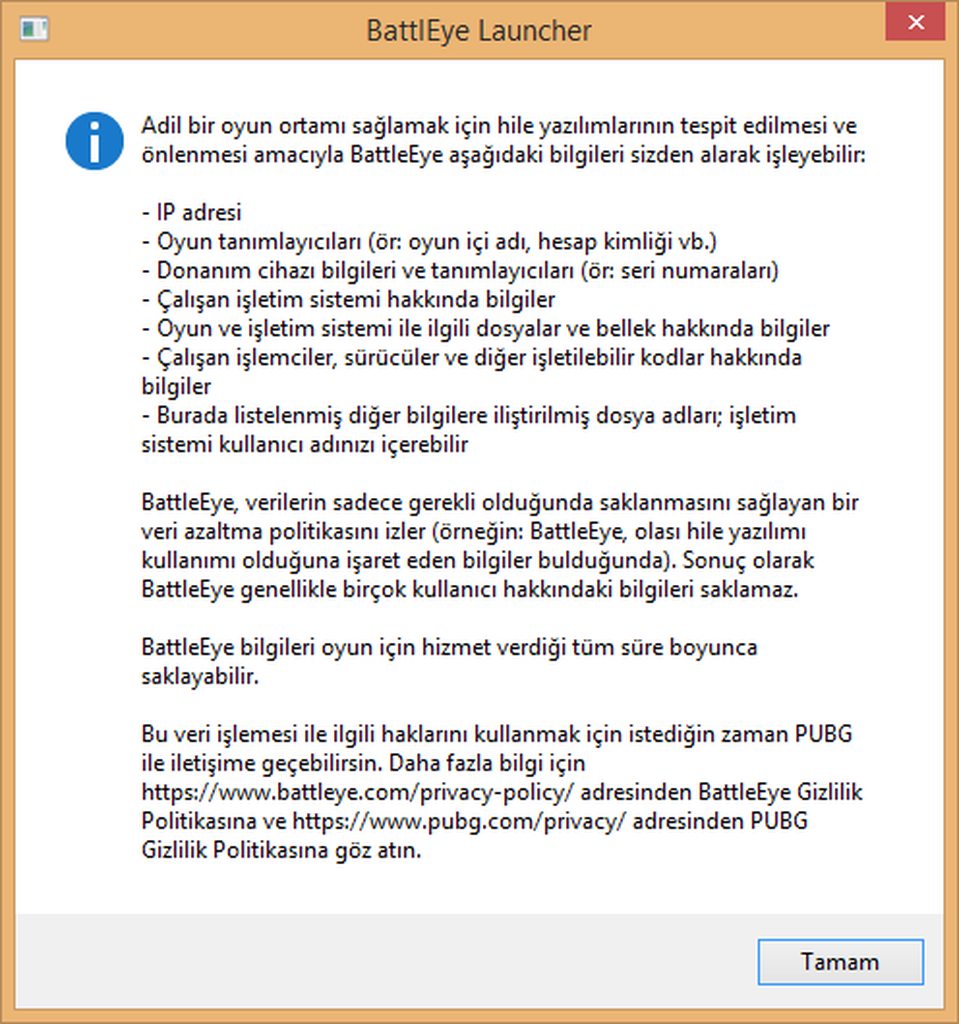
first click warning ! Reset settings
whyy
 fossil ether
hello i have 2 name changers in my inventory can i change my name twice now or only 1 time due to security maybe or some time frame??
tough harbor
it is not stated that there are limits of usage. you purchased it, youre free to use it. if im wrong, someone will correct me.
 cunning scaffold
I remember a long time ago PUBG devs said they would add a way to change name on PC. Anyone know if they ever did this? TY
tough harbor
you can buy name change right now in the in-game store. its been added to the game recently
signal trail
They did it during the Sanhok pass now they are selling it for 10 dollars
cunning scaffold
TY for the answer
 lament depot
fail authend exteral server @deft frost
night vine
try restarting steam and the game
lament depot
works now thanks
tacit glacier
Anyone got any good graphics settings for a 1050
tough harbor
medium AA and textures. all others very low
celest panther
I am unable to read that message, perhaps you could translate it for me
viral monolith
@celest panther
how do we do
celest panther
That looks like the normal battleye disclosure so it has nothing to do with your problem
What keyboard layout do you use?
viral monolith
Turkish Keyborad
celest panther
it is possible you used a key that isn't a supported language for PUBG
if you do that, then it loads default settings
weary warren
Only thing that will change, when switching between keyboard languages, is that the keybindings will change
Ensure that your keyboard input language is the same as when you assigned the keybindings.
 deep basin
Hi All - Anyone here to help?
 livid wren
Got a new issue with latest update. Somewhere during the game the network lag occuring, despite the network statics doesn't indicate any problems. After then, in order to reconnect, I'm killing the game twice: first time when network lag occured, and the second on the next launch because it's simply stuck on placeholder loading image
any elaboration on this one? is it known?
Only today it occured like 3 times, and on the last one I reconnecting like 5 minutes
celest panther
Please read what RoboDanjal posted.
celest panther
i'm not even certain that is the problem you are experiencing as you have provided very little information outside of "controls reset"
It may be worth posting on the forums so that you can communicate more easily with someone who speaks your language fluently as we are struggling a little here. https://forums.playbattlegrounds.com/forum/84-yardım-hata-raporları/
weary warren
Please do not spam.
If you continue to do so you will be restricted from accessing the Discord.
Also, please do not tag random members of staff on the Forums.
weary warren
Your post is in Turkish, and I don't read Turkish.
So I cannot assist you, sorry.
Last warning.
If you continue to tag random staff members you will be banned from the Discord.
weary warren
Sly does not work in support.
She will not assist you with this issue.
You will need to be patient and wait for a response to your thread on the forums.
viral monolith
I'm sorry
weary warren
Just so you are aware, having multiple Steam accounts does not effect your settings. They are stored in one file.
So regardless of which account you login with they should be the same.,
weary warren
I'm sorry, your English language skills aren't at a level where I am able to help you fully.
Unfortunately I'm not going to be able to continue to try an assist you.
viral monolith
Where can reset settings ?
weary warren
Please be patient and wait for a response to your thread.
viral monolith
😢 Okey
ım sorry 😦
pubg I want to play but there are problem
BattIEye Launcher
what ?
tough harbor
^
 boreal star
 tropic hemlock
hi
i have been banned from pubg pc by developers and battle eye
after i started the game after my steam account got hacked
deft frost
!appeal
regal vaporBOT
If you feel you were incorrectly banned please submit an appeal on our support website:
deft frost
@tropic hemlock
tropic hemlock
i already appeal there but there is no reply from them
weary warren
You must wait for a response.
tropic hemlock
its been 3 days
weary warren
It's been the weekend for two of those.
That is the only way to appeal a ban. You will not receive help here or on the forums for the ban
tropic hemlock
will i get unban?
weary warren
You will need to wait for a response from Customer Service, as I said; we cannot help you here.
tropic hemlock
hmmmm
 fiery blade
Hello,
Since the new #23 patch my PC sometimes freezes randomly. PUBG crashes and after a while (I can't close the program manually, because the freezed frame is in the way of my desktop.) it shows the BroCrashReporter.exe. I send and report my crash and restart the game. I try to continue my match, but it gets stuck in the loading screen so I have to restart PUBG AGAIN and now I can continue. There is no decline in FPS what so ever (60 fps maintained). For further information please comment or DM me on discord #3074. SPECS OF PC ARE AS FOLLOWS:
CPU: I5-8600K
GPU: MSI GTX 1060 6GB GAMING X (Slightly overclocked 100 mHz)
RAM: BALLISTIX 2400 mHz 16GB (2 sticks)
Motherboard: MSI Z370 A-PRO
PC is aircooled. Maintaining a constant 74 degrees celsius while on load.
PSU: 500W GOLD
 wraith condor
seems that 1060 have a lot of problems with this game
 idle tree
Lol no
wraith condor
i play this game more then a year with my 1060 and never had any problems with performance...but in a last month or two its disaster
idle tree
Works fine for me. 130+fps at 2560x1080.
Overclocked as far as it will go, so yeah.
Just don’t use newer Nvidia drivers. Use something like 388.71 or 391.05
night vine
Weird my 1060 played the game really well arguably better then my new gpu
 gentle radish
Can we not change our discord nickname in this server?
would work out better so people can see our in game names
celest panther
Mods can change it, but it was disabled for general access due to abuse
What would you like it changing to?
gentle radish
my in game name 'TouchedTheBooty' lol
 coarse junco
done @gentle radish
 cold marten
Anyone know why this game prevents me from hearing footsteps when the dude is 15 meters away at the very most?
gentle radish
Thanks @coarse junco
 buoyant oracle
Anyone know/seen this kind of issue before?Lag/stutter on map/inventory open
https://streamable.com/zftsy
 weary warren
I have seen this before, but there are multiple causes, most of them hardware.
tough harbor
any chance it being drivers issue?
weary warren
Could be, seems to be the stuttering is caused when the game uses extra resources
buoyant oracle
@weary warren didnt change hardware for over 6 months, never been an issue until most recently smooth as butter except when opening map/inventory
think it came after patch update 22 launched
weary warren
@buoyant oracle Have you checked temps, video drivers, etc?
buoyant oracle
I play bf V at ultra 100+ fps 1440p not any hardware issues sadly
celest panther
@buoyant oracle Do you get a similar issue when you shoot at someone with freezes?
weary warren
This isn't BFV, so that is not helpful in troubleshooting this issue.
buoyant oracle
nope this is only when im opening inventory or map
weary warren
This isn't a widely reported issue, and it seems to be quite individual.
buoyant oracle
nothing else game runs fine otherwise
im 100+ fps consistent pubg, except when map/inventory as u see in video
@celest panther nope it does never happen only at map/inventory
tough harbor
im just suspecting some drivers issue here. if you want to experiment in that area. reinstalling current driver or rolling back to older driver that worked fine for you
celest panther
Someone posted recently that when they had weird stutters like that that they found it related to the nvidia hd audio driver. Once they uninstalled it the freezes stopped too. While their situation was different in that it happened when shooting people, im curious if that could be related too
weary warren
Oh yeah, that's true.
May be worth doing a complete wipe of the drivers using DDU.
Have you monitored your system performance when you're opening and closing the inventory? It could help to locate the issue.
buoyant oracle
have to use the most recent drivers (BFV) playing with other friends, theres nothing out of the ordinary, its always on initial launch of map/inventory, if i keep it open its normal, like i can still drive with map open, except that initial sutter opon opening
weary warren
Have you monitored your system performance when you're opening and closing the inventory?
buoyant oracle
like any specifics you think of, temps and load are fine like, testin again right now running around in the edge of miramar
gpu load goes from 100 to 0 obviously right at the moment when opening map/inventory
was the blur effect added recently or has it always been there? (when map/inv) is open the ping information and sides get blurred
weary warren
That's been there for an extremely long time.
Hmmm, dropping to 0 , that's not a good sign.
But, it would point to a Driver issue, or Direct X issue.
buoyant oracle
like if i never open map or inventory, it will never occour...
weary warren
Okay, well as I said, it looked to be a direct X or driver issue.
buoyant oracle
its still fully playable, but id love to see it fixed whatever it can be
mostly annoying when hot dropping need fast looting
 vivid tartan
Hey can somebody help me with a bug ive been having for a while?
weary warren
@buoyant oracle I've made suggestions for you to try, but it's up to you to try them.
@vivid tartan if you list your issue with as much detail as possible someone will try and give you some assistance
weary warren
Please @viral monolith we have been over this multiple times now.
You have a discussion ongoing with Begmeritz, she will help you if she is able to.
viral monolith
@weary warren Thank you yes doing
I'm waiting for help
Begmeritz
server ? bussy ?
weary warren
Please, she will reply to your thread if she is further able to assist you. Support will not continue here.
Please bear in mind that she has office hours, and currently she is not in the office.
 rare pulsar
 obsidian bolt
tuesday steam Maintenance
buoyant oracle
hopefully the game i just won get registered...
2 days ago i lost a chicken dinner, nowhere to be found on pubg.opgg
 frail geyser
can i get ingame money without spending real money?
coarse junco
You can’t buy the ingame currency „BP“, you earn it by playing
regal vaporBOT
If you have any questions or support requests regarding PUBG Mobile, you will need to go through PUBG Mobile support. Please read the following article for more information: https://support.playbattlegrounds.com/hc/en-us/articles/360002193033-PUBG-Mobile-questions-notices-and-more

PUBG Support
The mobile version of PUBG is being handled by Tencent and they will also be able to assist for any questions that you may have.
- The best option for support is through the in-game ""Cus...
 spice parrot
I get a match however the game stuck on the loading screen and I have to close the game and find new match. Is there any solution for this?
gleaming vector
Go ahead... Tag me again
 sweet isle
just ask your questions, no need to wait for someone
gleaming vector
You just woke me up... So unless you need instructions on how to apply the tourniquet to your freshly severed femoral artery... I'm going back to sleep.
gleaming vector
Yup not even going to comment. Goodbye.
sweet isle
!pubgm
regal vaporBOT
If you have any questions or support requests regarding PUBG Mobile, you will need to go through PUBG Mobile support. Please read the following article for more information: https://support.playbattlegrounds.com/hc/en-us/articles/360002193033-PUBG-Mobile-questions-notices-and-more
PUBG Support
The mobile version of PUBG is being handled by Tencent and they will also be able to assist for any questions that you may have.
- The best option for support is through the in-game ""Cus...
 thorn jetty
@sweet isle Can u help meh
sweet isle
this server has nothing to do with pubgm. you'll have to go through their support, the link is above
weary warren
@thorn jetty This Discord doesn't support Mobile.
If you're going to be rude to our moderators, and incessantly tag them, you will be restricted from accessing the Discord.
 austere tide
Apparently the new regionfunktion does not work?
It´s only showing unknown for me.
And it looks like me cursor is once again misaligned whilst playing in 4k.....
weary warren
Could you please share a screenshot of this region display error, I am not able to reproduce currently. It seems the team is aware of this issue already, thanks for reporting.
Also, please could you explain further regarding your 4k issue.
austere tide
Thank you for the fast reply.
I encountered that 4k- issue befor:
basicly, when I open the inventory and move an item, whilst looting for example the courser is tracing behind the item.
It is quite confusing if your looting somebody. Or another example: If you´re moving an attachment from your weapon it will "teleport" away from your cursor as soon as you move it
the last time I had this was when the new anti-cheat was introduced and it vanished if I disabled it. This mornign it came back😅
austere tide
yes i do
weary warren
If you set that to 100% it should work correctly.
Is the issue on live or test servers?
austere tide
it´s on live servers
weary warren
Okay, thanks for the information. I'm going to make the team aware of the issue now.
austere tide
But why does it sometimes work and sometimes not?
I will try this an report back if it worked.
Thanks again
weary warren
There was an update overnight which seems to have caused this issue.
frail geyser
so.... can i get ingame cash (not BP) without spending real money?
weary warren
You can only get BP through playing the game.
austere tide
Setting the Scalling to 100% worked for now. I can´t read anything on my screen anymore but it will do for now😂
I now this is a minor inconvenience but it is really confusing in game
frail geyser
"(not BP)" the...
celest panther
@frail geyser Did you mean G-Coin?
weary warren
Yeah, really sorry about that. I tried to replicate on a 1080 but I haven't been able to. I will test on a 4k when I can, in the meantime the devs are aware of the issue.
frail geyser
screenshot
celest panther
That would be something to speak to the PUBG Mobile team about, however this server is for the PC, Xbox and PS4 versions of the game
See the link below for ways to contact them
regal vaporBOT
If you have any questions or support requests regarding PUBG Mobile, you will need to go through PUBG Mobile support. Please read the following article for more information: https://support.playbattlegrounds.com/hc/en-us/articles/360002193033-PUBG-Mobile-questions-notices-and-more
PUBG Support
The mobile version of PUBG is being handled by Tencent and they will also be able to assist for any questions that you may have.
- The best option for support is through the in-game ""Cus...
frail geyser
but do any1 here have knowledge about it?
celest panther
Im sure that someone does, and the methods in that link are the best way to find out.
frail geyser
tysm
celest panther

weary warren
!ts
regal vaporBOT
First Troubleshooting Steps
https://forums.playbattlegrounds.com/topic/181292-read-me-first-troubleshooting-steps/
weary warren
Please have a look at this thread for common solutions to issues.
 short wraith
ok
weary warren
Number 9 is pertinent in this case
short wraith
Blocked loading of file: "C:\Windows\SysWOW64\shell32.dll".
i load it up and it says this
like i try to launch pubg and in the battleye thing it says this
weary warren
I recommend running a virus scan and malware scan.
Often these files are infected or replaced
and cause this message from Battleye
weary warren

Malwarebytes
Malwarebytes protects you against malware, ransomware, malicious websites, and other advanced online threats that have made traditional antivirus obsolete and ineffective. Download Malwarebytes for free and secure your PC, Mac, Android, and iOS.
short wraith
welp i really hope i dont got anything bad
i ran adw cleaner and it picked up nothing
so hopefully this works
oh geez it found 2 threats so far
okay what do i do
it still says " Blocked loading of file: "C:\Windows\SysWOW64\shell32.dll".
even tho i got rid of the threats
@weary warren help me please nothing is working still
weary warren
I cannot assist you further, the file is being blocked because it is still compromised
Run the scan again, restart your computer
and try again.
short wraith
aw man okay
wait wait come back
i got in
but it says the BE service isnt working properly
weary warren
Please refer to the guide
If you continue to have issues you will need to contact battleye directly.
 final idol
I have a question
 twilit swan

 ebon aurora
During the jump from the plane (press F), the player is rapidly turned towards the flight of the plane, although it jumps at a specific point on the side of the flight path.
You lose a lot of time, you have to correct the flight.
BUg occurs more often when it jumps to the left.
BUG only occurs in FPP mode.
weary warren
We are aware of this bug, it will be resolved once the new parachuting mechanics are added to the game.
hexed stone
Just say it and someone will help
final idol
I was typing
👌🏻
Can I get help with a bargain Robo?
Like could you put the link somewhere or just ask people to add me
weary warren
No self promotion or economic activity is allowed on this discord.
If you wish to share video or any created content it can go here: #247459649798930453
If you wish to share your stream it can go here: #220456605630595072
viral monolith
is there any server crashes?
 inland copper
Are you asking if it can happen? Or if it is currently?
tropic hemlock
When chat text support will come in pubg pc
celest panther
I'm fairly sure thats not something being worked on.
celest panther
How far in do you get with the game?
is it before the lobby screen or is it when loading into a game?
short wraith
I think something is deleting one of my game files
Just one of them
Would that be my antivirus perhaps?
Anyways someone lmk what ya think
 supple vigil
My friend is unable to load into Miramar or Erangel now
Game just freezes up on him midway through loading those maps
Sanhok seems to work ok
tough harbor
storage slowly dying or getting corrupted?
supple vigil
not sure - so far hes done local verify and repair game folder on steam
I mean if RAM corrupted forget pubg his whole laptop would just show a black screen
I'll let him know to run chkdisk on it just in case
idle tree
If he had some bad ram it could cause that, especially if the game tried to access whatever bad addresses that the memory has.
supple vigil
True - usually corrupt ram causes bigger issues though
Well once he gets back and tries out at least the hard disk thing I’ll let him know to try that next
supple vigil
So he managed to get in after verifying local files - but it gives him a huge lag spike
Sanhok he loads in faster then I do
supple vigil
So can confirm it’s not his HDD - chkdisk came back without errors
viral monolith
Why can't we change our server region? I live in India and only speak English and Hindi but I always get Chinese players in my team and some of them can't even speak English. Please help me
If there's a way to change server region then please tell
hidden dust
It'd be the same even if you came over to NA 😃
viral monolith
What do you mean? @hidden dust
hidden dust
All Chinese and they barely speak any English
viral monolith
But I don't wanna play with them
PUBG Mobile has this feature which is a great help but didn't expected that PUBG PC will not have it
I bought this game around 3-4 days before
celest panther
The matchmaker puts you into the region that has the best ping for you, unless that region hasn't got enough players
that just happens to be the AS region for you
By playing outside your primary region, your latency can have a detrimental effect on other players in that same game
This is one of reasons(but certainly not the only reason) that the region less matchmaking system was implemented - to reduce the occurances of people purposefully playing out of region which resulted in latency related issues for players in their games.
night vine
i think the language choice option is coming to pc soon so that might help
 viral monolith
Its there already in PUBG Mobile
night vine
yeah but pubgm and pubg are made by different people
viral monolith
Everyone who's crashing in the loading screen or just before landing
- Lower your settings, especially AA, PP, Shadows and effects.
- Remove any and all OC of your ram.
 rough minnow
i have Intel i5-4460 3.2GHz, 8GB Ram, NVidia GT 710 2GB, will the game run smoothly or will it lag or not run
tough harbor
that GPU is too low below minimum requirements of the game
tough harbor
gtx 760 will work. but is that for laptop?
rough minnow
Desktop
tough harbor
then yes, it'll work fine.
rough minnow
so the 750M wont work?
tough harbor
750m is for laptops only. and 760 is far superior than the 750m
rough minnow
ah ok, do you recommend any cheap gpus that are good?
@tough harbor
my budget is $120
for gpus
tough harbor
im not the best guy to ask for that. im using 1050ti and its playable enough for me
rough minnow
how much is a 1050 ti
tough harbor
around $150 or lower. see if you can find a good deal. you can use r/buildapc to get deeper into this discussion
rough minnow
Alright Thanks!
Nvidia GeForce GTX 1050 by MSI, that is what you got or, do you have the 1050ti version
tough harbor
ti version for the 4gb vram
viral monolith
Hi my specs are:
i5-6600 3.30 Ghz
AMD Radeon R9M395 4GB
Windows 8.1
But my game lags
My pc is 5k
And I run on resolution 1k
Ram: 16gb
Storage: 2 TB
How can I fix my lag?
inland copper
Is it frame lag or internet lag?
What I mean is.. does your fps drop severely or your connection become unstable?
celest panther
~120-180 depending where you get it from
rough minnow
@tough harbor so the 1050 version would still preform well?
tough harbor
its enough, i'd say. maybe lower resolution if necessary
inland copper
Any over clocks @viral monolith?
viral monolith
I can't decrease more resolution than 1k
lament depot
witch one i pick im poor
inland copper
Do you have anything overclocked?
viral monolith
nope
inland copper
What ingame settings do you use?
And is is constant drops or only in certain situations?
inland copper
Low isnt always the best settings. Setting certain settings low or high switches the processing power from your gpu to your CPU and vice versa. Try putting AA on medium, pp on low. Maybe even shadows on medium. Draw distance very low.
inland copper
As far as gameplay? I'm not very good really. Just enjoy playing. Maybe try watching some of wacky's tutorials.
inland copper
I live in NA but sure maybe we can get together and get some games in. Just send me a message when u have a chance to play and we can see if I'm available.
viral monolith
What's your IGN?
inland copper
Same.
inland copper
Like I said. Try fiddling with your settings. You may find raising some from low may help with the drops.
Ok man.
viral monolith
ok thanks
inland copper
Your very welcome. Hope it helps
tough harbor
pubg mobile has its own discord server so if you have any difficulties with the game, we cant provide you support as its a different game
rough minnow
Can you dm the server link please
viral monolith
PUBG Experimental Server stuck at loading screen help
deft frost
The Experimental Server is offline.
viral monolith
It's the "PUBG Test Server" you want @viral monolith
Then how can we play it? @viral monolith
oh
I believe you got it in your librtary
Yeah I finished downloading it just now
And it got stucked at loading
deft frost
Okay, so PLAYERUNKNOWN'S BATTLEGROUNDS is the main game. PUBG Test Server is for testing out upcoming updates.
viral monolith
oh okay thanks
supple vigil
So my buddy still has issues loading into Erangel/Miramar
Verified his HDD
Reinstalled his graphics drivers to latest
Game just freezes up second he loads either of those
 hollow herald
Hi, I have a question: I’m considering the purchase of new monitor, 27” 1440p 60Hz display. I have i5-8600K and GTX 1060 6GB. Can anyone write me which settings are possible for decent frames, let’s say 50-60 fps? I’m especially interested in personal experience with 1060 6GB GPU, which is certainly not the strongest card out there, and 1440p 60Hz monitor... I’ve checked general benchmarks but not all of them are up-to-date and I think the game’s optimization might have improved. Thanks! (feel free to PM me)
night vine
yeah i had issues after patch 23.1 loading games on hdd it would freeze on the map loading screen but it worked fine on an ssd
@hollow herald This is what i used on a 1060 6gb and worked well for me with ~100fps Screen Scale: 107
Anti-Aliasing: High
Post-Processing: Very Low
Shadows: Very Low
Textures: High
Effects: Very Low
Foliage: Very Low
View Distance: Ultra
V-Sync: Off
Motion Blur: Off
Sharpen: On
viral monolith
@hollow herald Anti-A, Post and textures on medium, distance on high, rest very low - Enable sharpen, disable the rest. Put Screen scale to 100 and FoV 90-95.
And after that you follow this GGuide https://www.reddit.com/r/PUBATTLEGROUNDS/comments/71gzpi/greatly_improve_fps_new_method/

reddit
12,055 votes and 2,500 comments so far on Reddit
hollow herald
@night vine @viral monolith Thank you very much guys! 👍
 opaque dove
V sync is actually useful
celest panther
Only if your FPS exceed your refresh rate
otherwise its a drain on system resources for zero benefit
ideally an FPS cap along with adaptive sync is the better solution
viral monolith
I can't run pubg with hpet on
other games are working fine specially i use it for csgo competitive
anyone can shed some light on this?
celest panther
Ryzen chip?
celest panther
So what happens when you switch hpet on?
celest panther
Let me see if my system is running it.
supple vigil
Anyone got any suggestions for what to do when Miramar/Erangel cause the loading screen to run infinitely but Sanhok runs fine?
idle tree
I have hpet off too personally, systems far stabler with it off than on tbh
supple vigil
Hpet?
Nvm googled it
This only started a week ago
I don’t think he changed his bios himself lol
idle tree
Ah that wasn’t a reply to your query, it was a reply to the other conversation above. But has he tried running CrystalDiskMark to see if his HDD is actually performing as it should?
supple vigil
He ran chkdisk lol
Also it seems to only be affecting pubg
He’s playing his other games without issues that I know of
But pubg only Sanhok works Miramar/Erangel just load forever
I had him check HDD, RAM, and verify local files
Verifying local files let him into the bigger maps but his ping became 9000 when he got in - Sanhok he’s got like 20 ping
idle tree
chkdsk only verifies FS integrity tho? Have him run CrystalDiskMark or some other disk benchmarking tool. Find what HDD he has, then check the results he gets against results from the same drive online. The pings abit weird too, i mean if he had 9000+ ping or some other high amount then that would lead me to beliieve the issue isn’t even with his system, but the network. But why would it let him into one map and not the others? Sure is weord
supple vigil
Yeah I’m not quite sure what would cause that except for maybe one of the files isn’t reading normally and somehow causing a bottleneck
night vine
i noticed the same issue when using a hdd in the latest patch btw
supple vigil
Hmm I use an HDD for pubg and SSD for OS
Issue doesn’t occur for me
That would be an expensive fix though lol
I feel like if HDD is the cause there would be more people with this issue
tough harbor
true. so has he tried reinstalling the game completely? including removing the files from %localapldata%
supple vigil
Hmm he tried uninstall/reinstall - hasn’t manually removed files though
I’ll let him know to try that when he gets on
tacit glacier
Get me a chicken dinner
regal vaporBOT
WINNER WINNER CHICKEN DINNER
 rustic zephyr
Guys help
Ive been wrongfully banned
permanently
this is the second time in a week
first i was banned for 24 hourse
Im not breaking any rule I swear
I just opened my steam and got the message
anyone please help
deft frost
!appeal
regal vaporBOT
If you feel you were incorrectly banned please submit an appeal on our support website:
deft frost
@rustic zephyr @sacred turret
 sacred turret
Yes, I have already written an email this morning and some additional captures showing my legality. I am waiting for an answer
I simply wanted to communicate the error here as well as the partner. because it is not normal for me to just play 10 hours in the last 2 months, and a great career in my steam profile in my first 2 years as a player
celest panther
@rustic zephyr @sacred turret We don't discuss bans in any capacity here on discord
If you have already submitted a ticket, then you need to wait for a response.
hidden dust
I mean if its the second time in the past week maaaaaybe you're doing something wrong
rustic zephyr
I swear Im not doing anything wrong
Im a complete noob in this game
havent killed my squad nor anything like that
If camping is a reason for the ban
then Ill gladly deserve it
tacit glacier
Lol
hexed stone
As takarii said bans are not discussed here so just wait for someone to reply on your ticket
celest panther
@rustic zephyr Again, we do not discuss bans here. This is the last time I will repeat this.
rustic zephyr
Sorry
tacit glacier
is anyone having a problem that u get kicked unexpectedly
 potent totem
My friend is stuck on loading screen when joining a game until the end of the flight path when the game finally loads in
Help?
tacit glacier
i think its because of his pc
hexed stone
@potent totem that happens to me to and what I can suggest is play playing the same map over and over because the way I see it you don’t have to load as much
tacit glacier
Anyone know how to use steam booster packs for PUBG ?
 umbral beacon
Help! I have -14.148 BP. How do I fix this?
hexed stone
@umbral beacon you were given extra compensation for the bugs, so you were able to keep your items but lost the extra money so you went negative
umbral beacon
@hexed stone thank you! Is there not a way to get this fixed since it technically wasn't my fault?;
hexed stone
No sorry
coarse junco
@tacit glacier what booster packs do you mean?
there is nothing you can do against negative BP except playing to get them up again. You received the bonus BP multiple times due to an error. The excess BP were removed later on. If you spent them in the meantime, your end up with a negative balance. The team is sorry for that.
hidden dust
@tacit glacier PUBG doesnt have cards
tacit glacier
ah ok ty
coarse junco
what happens if you try to click the reaction?
 cloud finch
Does anyone else have an issue with their game sound being really low even at max volume? Every other game/program can get really loud but PUBG is low. Mixer is maxed and in-game is 100.
fiery blade
@cloud finch I have no clue how to fiz the issue. But what you could try is to verify PUBG and if that doesn't fix it. Try reinstalling PUBG. If that doesn't work try dm'ing me and I look more into the case
tacit glacier
@cloud finch go to settings and increase the vol etc I’m sure it will be in there
 warm elbow
Who have 1 FPS problem in lobby? 😃
 hollow widget
HOW CAN I INVITE MY FRIEND TO THE SEVER?
IM SENDING HIM THE LINK BUT HE CANT JOIN WHATS THE PRIOBLEM?
how can i invite my frind to the server?
fiery blade
@hollow widget Type !invite and copy the invite link. send it to him or her and voila all she or he needs to do is press join
@warm elbow WTF?
warm elbow
@fiery blade 1 FPS in lobby..in game still 120 FPS
 fiery relic
.
fiery blade
Ok....
 copper crag
Today has been a crappy day so far:
Get BSOD every time i launch PUBG with SYSTEM_THREAD_EXECPTION in BEDaisy.sys. Tried to reinstall & verify files. Any suggestions? There's no option to reinstall the BattleEye service any where i can find.
regal vaporBOT
First Troubleshooting Steps
https://forums.playbattlegrounds.com/topic/181292-read-me-first-troubleshooting-steps/
celest panther
Do step 14 in this guide exactly as it says
 halcyon socket
Does weapon/items spawn as soon I land or does it spawn before or during jump off the plane? - cos everytime I land .. i walk around trying to loot some but took about 5 second for it to appear .. is there's trick/tips i should know of? getting sick of people shooting at me everytime I land with no weapon to find! - i'm running on i7-7700k with 16gb ram and 1070gtx
tacit glacier
Hmmm what settigns do u have @halcyon socket
halcyon socket
lemme get it ..
halcyon socket
had Ultra on AA
celest panther
that won't be it
tacit glacier
oh
celest panther
it will depend partly on your connection, partly on your system
celest panther
if there are lots of players dropping in the same location, it may take a smidge longer to spawn items due to the traffic and processing from the server
halcyon socket
weird .. hmmm
celest panther
There are a ton of things happening all at the same time on the games start
most people dont experience issues, some people do
its a tough one to troubleshoot, but it has been improving
personally i see it happen very rarely
halcyon socket
i guess i have to land elsewhere .. cos example.. i want to land school's roof on erangel
weapon no where to be found for like 5-10 sec
celest panther
School is a perfect example of a high traffic zone. Lots of item spawns, lots of players all at once
halcyon socket
yes, but weapon don't re-spawn? .. when i stood there .. i can see it POPPED up and then I can pick it up
celest panther
i dont know exactly how the sever handles things, but at a guess i would expect it to prioritise player position accuracy over item spawns.
halcyon socket
by the time i reload .. i died
also, what's the "UNKNOWN" means? when you open map up .. on the bottom
celest panther
It should be displaying the region you are connected to (EU, NA, OCE etc)
halcyon socket
hmmm that might be it ..
celest panther
however it appears sometimes that it isn't showing correctly
the team is aware of it though
celest panther
thats also possible.
Turn the network diagnostics on and see what sort of ping you are getting
halcyon socket
hmmm .. lemme see
celest panther
you can find it under "gameplay"
tacit glacier
i never spawn in busy areas i normally spawn in quite places
halcyon socket
yea, it's on now .. how do i view it? in game? or?
tacit glacier
@celest panther ^^
celest panther
Yes.
tacit glacier
just notifying yo about colt
halcyon socket
i see it now ..
10-20ms ping
lemme do this 1 game .. brb
averaging 15-25ms ping .. its still low right?
0% pkt loss
however, this time .. it spawns fine .. it's just that around 30-40% of the time .. it doesn't spawn
hmm ok .. got on 1 server .. seems averaging 50-80ms ping .. weapon/ammo not spawned when I land .. but took around 2 sec for it to appears
i guess i'll have to live with that for the time being
cos i thought maybe something to do with my game settings
Resolution (1920 x 1200) ... FPP Camera FOV (103) ... Brightness (74) ... Lobby FPS Limit (60) ... In-Game FPS Limit (Custom) ... Max FPS Allowed (120) ... Overall Quality (Custom) ... Screen Scale (100) ... Anti-Aliasing (Ultra) ... Post-Processing (Low) ... Shadows (Low) ... Textures (High) ... Effects (Very Low) ... Foliage (Very Low) ... View Distance (Low) ... V-Sync (ON) ... Motion Blue (OFF) ... Sharpen (ON)
night vine
try changing your view distance to ultra @halcyon socket see if that makes a difference
halcyon socket
hmm ok i will try
viral monolith
Hello is there anyone that can help me?
I'm new to pubg and i have a problem that i can't hear people on the airplane and in lobbies but i can hear my teammates.
hidden dust
its supposed to be like that
viral monolith
what do you mean?
tough harbor
* Team voice chat still works as normal, from the start of the game.``` @viral monolith hot bear
@viral monolith you can change with ctrl + y ( and also ctrl +t to mute and unmute the voice )
hexed stone
^^^ctrl y changes voice channels
 sharp storm
regal vaporBOT
sharp storm
regal vaporBOT
If you have any questions or support requests regarding PUBG Mobile, you will need to go through PUBG Mobile support. Please read the following article for more information: https://support.playbattlegrounds.com/hc/en-us/articles/360002193033-PUBG-Mobile-questions-notices-and-more
PUBG Support
The mobile version of PUBG is being handled by Tencent and they will also be able to assist for any questions that you may have.
- The best option for support is through the in-game ""Cus...
hollow widget
!invite
regal vaporBOT
Invite URL for Discord: https://discord.gg/battlegrounds
 pale carbon
OK, after a few days of testing, I've found out that PubG autocloses MSI afterburner only on computers with AMD graphic cards. On Nvidia the problem is gone.
idle tree
I mean if it's only closing on AMD cards and not Nvidia cards, that would probably point towards an AMD issue more than anything. @pale carbon
pale carbon
Yep, it looks like it. But it's only on PubG.
 clever hemlock
why you say PUBG like PubG?
pale carbon
it's sexy 😄
 fierce stump
I need help guys
I have been dealing with this bug lately. Where and who do I speak to regarding this issue?
clever hemlock
Explain it here and maybe we could help
fierce stump
alright
like
since i updated to the new patch (around 2 weeks ago) i've been having this issue
everytime i take a game whether its solo or with my friends i cant seem to finish it
the reason is
whenever im in a game and 15-20 min passes
it disconnects me from the game i was playing and i cant seem to reconnect or do anything
besides leaving the match
i tried reinstalling
didnt do anything
i dunno if i can post this here, but thats pretty much what is says
bear with me as im texting quick, so i might have terrible spellings
hidden dust
Have you done what it says?
hidden dust
tried uninstalling and reinstalling battleye too?
hidden dust
anti-cheat
fierce stump
no I havent
where can i find it?
nvm
i just found it
lemme try
ty btw ❤
i just did
would u recommend me reinstalling the game?
hidden dust
If you uninstalled battleye and reinstalled it and its still telling you the same try verifying your files on steam and if that doesnt work I mean I guess you can try uninstalling and reinstalling again if you really dont mind it. If none of that works then I would have no clue and you'd have to wait for someone who might know
hidden dust
Np. looking on their forums or googling it might help aswell if none of that works
 raven fulcrum
not sure if i can ask this here but whenever ive started pubg up i get ads on the home screen and i cant click on anything at all, ive tried installing/uninstalling iv verified the game files but nothing works
tough harbor
try scanning for malwares and virus on your pc
 lime oak
Yeah exactly seems like ur system has adware..
 quick chasm
!ts
regal vaporBOT
First Troubleshooting Steps
https://forums.playbattlegrounds.com/topic/181292-read-me-first-troubleshooting-steps/
quick chasm
@raven fulcrum
Do step 14.
Important to clean the pubg folder after uninstall and clear steam download cache before reinstall
hot bear
Hello, i have a issue my computer wont wake up after sleep, are there any solutions if you guys help me that would be great ..
when i click widows icon and click sleep it is okay, it wakes up but when i am unavalaible for 20 minutes and it sleeps itself it wont wake up
viral monolith
2@hot bear Had the same issue, just disable the "sleep after 30 minutes afk" option
hot bear
@viral monolith hmm that is temporary solution, i want it to go sleep if i am away but i want it to wake up when i come 😃
 hazy crag
guys pls suggest a vpn that i can use to acess pubg since it wont work in school
hazy crag
i did try alot
i had been using a different connection but now they changed the connection
 latent prism
!invite
regal vaporBOT
Invite URL for Discord: https://discord.gg/battlegrounds
 lime bison
I don't suppose anyone is having trouble booting up PUBG? After I updated the game I press play on PUBG and it does nothing... I've tried double clicking it as well...
deft frost
!ts
regal vaporBOT
First Troubleshooting Steps
https://forums.playbattlegrounds.com/topic/181292-read-me-first-troubleshooting-steps/
lime bison
Sweet cheers
 static pine
Is anyone else having insanely high fps drops in the main menu-
idle tree
Nope @static pine . Give the guide a shot that @deft frost linked to above.
static pine
Thats something I've all tried myself before
I mean its not too big of a deal but going through the menu with 1-5FPS can be quite annoying sometimes
fierce stump
can anyone help
still having the problem i adresses earlier
cant seem to find anything about how to solve it
?

pretty much what is says
everytime i've been in a match for around 10 mins
quick chasm
!ts
regal vaporBOT
First Troubleshooting Steps
https://forums.playbattlegrounds.com/topic/181292-read-me-first-troubleshooting-steps/
quick chasm
@fierce stump ^ follow the step 14 to reinstall the game properly
quick chasm
No, gpu drivers have nothing to do with game files
fierce stump
alright
quick chasm
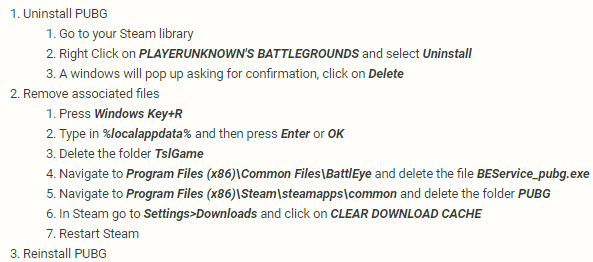
It's important to do all of the steps and not just uninstall + reinstall
that way you are not replacing all the game files or downloading fresh ones completely
fierce stump
i will follow the 14 steps for now
if nothing happens will do
ty btw
should i just go for the pic u sent me
and follow the 3 steps instead?
quick chasm
those are the 3 sub numbers of the number 14 in the guide
fierce stump
aight
halcyon socket
"Recorded game version is no longer supported and cannot be played." What's the point having that option to record if keeps coming up like that every week or so? - I want to be able to show to my friend some of the actions i've done. Any tips how i view them offline or something?
viral monolith
u guys didnt fix the dsync yet and its still horrible
hidden dust
@halcyon socket Dont think theres anyway to all to view them after they stop supporting the older one. Best thing to do is just record them and you wont have to worry about it
celest panther
@halcyon socket Sometimes changes are made to the game that renders replays unviewable due to how replay files are actually played back by the UE4 engine
Unfortunately, in cases like this it is unavoidable
halcyon socket
yea, but replay taken few days ago? 2nd Dec
celest panther
It could be from 5 minutes before the client is updated and it still render it unviewable
halcyon socket
😦
celest panther
the point is that the client version has changed, thus the old replay cannot be played
halcyon socket
ok no probs ..i guess i'll have to find something to record the game myself
 ocean shard
@fierce stump Did you try reinstalling the game from scratch?
oops i was scrolled up
halcyon socket
yea but should've been backward compactible or something
celest panther
To do that would require a copy of the same client that the replay was recorded in
fierce stump
I DID
celest panther
thats not a great way to deal with anything
celest panther
most of the time the replays are fine between updates, but sometimes changes are made that make older replay files unsuported
halcyon socket
fair enough .. but it's a shame to see it waste of option .. but thanks anyway .. time to delete all my replays then
celest panther
@halcyon socket its unfortunate, but often unavoidable.
You see similar things happen with save games between patches on games sometimes
 wicked basin
I want to invite friends to this server, how can I get the invite link?
supple vigil
!Invite
regal vaporBOT
Invite URL for Discord: https://discord.gg/battlegrounds
wicked basin
Thank you very much! 😘
static pine
Anyone here using the windows thing "Classic Shell"?
idle tree
Nope, howcome?
static pine
Oh I was wondering if there can be any issues with it and steam. Was going for a transparent taskbar and found a program that does exactly that
idle tree
Afaik, no issues
supple vigil
So my buddy reinstalled - deleted local files to, still can’t load in Miramar/Erangel
Anyone got any ideas as to what this is?
tough harbor
does he have anywhere else to install the game aside from his hard drive?
supple vigil
I think it’s his isp
We had him test a hotspot
Either that or Windows defender
It is his ISP lol
Makes no sense - WiFi is faster then hotspot
Yet hotspot loads in the big maps faster then me
 slim steppe
My game is stuck on the loading screen, what should I do? Recently bought the game
tough harbor
!ts
regal vaporBOT
First Troubleshooting Steps
https://forums.playbattlegrounds.com/topic/181292-read-me-first-troubleshooting-steps/
 desert raft
Is pubg Xbox FPP broken?
 naive kernel
@tribal flicker when is the event opening and how do i access it
on steam it says it should be open by now
tacit glacier
Hi I’m stuck in one position in the lobby and won’t let me play
I had bought the game 2 weeks ago and I have a 1060 ti core i7 16gb ram and PUBG is installed on my dad
Ssd*
celest panther
stuck in one position, like a T pose @tacit glacier ?
 flat cloud
how come i can't sell my non-locked crates on steam market??
only locked boxes show up on "sell items" tab
signal trail
not sure about this but isnt there like a 7 day thing where you have to wait to sell your items
like every other game
flat cloud
locked ones appear instantly, and one of the boxes i had for over a week
maybe im wrong ill wait a day or two
signal trail
maybe its unmarketable idk
hidden dust
You can buy unlocked crates on the market so you can sell them
In your steam inv click on it and see what it says
It should say when it's marketable. Most games do that
flat cloud
ah ok there is the thing
i have to wait till tomorrow on one and till 12/12 on the other
thanks ❤
 limpid wing
Hello, I am unsure if this is the right place, but I bought a name change card like 5 days ago and used it. It disappeared from my inventory, but didn't change my name. I contacted support, but they say they cannot find my account, and haven't responded in like 4 days to me. Any advice? 😦
hidden dust
@limpid wing on PC?
viral monolith
Lawsuit.
hidden dust
take a screenshot of your name in game and send it to them
viral monolith
Jk. Send in a second request if you can - bump them a note with both of the names (your current one and the one you tried to change it to) and see if they can find it.
limpid wing
Haha alright, I will do so, thank you for the advice! 😃
 storm narwhal
anyone getting this?
true umbra
Server Too Busy constantly?
idle tree
!ts
regal vaporBOT
First Troubleshooting Steps
https://forums.playbattlegrounds.com/topic/181292-read-me-first-troubleshooting-steps/
tacit glacier
@celest panther yes it was but it’s fixed now I reinstalled it and I got 3000 coins
 neat ruin
 fiery tendon
Slightly random, but these two highlighted lines about Stats Pages and On-Screen keyguides are hidden under the "Improved Store Feature" lines in the PATCH 24 notes. The formatting just needs to be fixed
https://cdn.discordapp.com/attachments/510655998189371402/520554918562627605/unknown.png

 thorny cradle
Is the test server having some stuttering for anyone else?
idle tree
Nope
tough harbor
probably. set it to 100% scaling if its not already
 plain smelt
it doesnt happen on the main build tho
plain smelt
but the graphics engine should be practically the same
tough harbor
youre not new here so you know anything is possible.
obsidian geyser
Wouldn't it be cool to have fire in here?
night vine
@obsidian geyser some of them do have fire i think
 cloud sandal
hexed stone
cloud sandal
hexed stone
Did you restart PUBG
 stone heart
@cloud sandal Did you solve it?
 heady drift
Why can't you choose a map in ps4
 midnight ridge
 fresh pike
@midnight ridge Nope, you'll want to Google the PUBG Mobile server and ask there. This server has nothing to do with it.
 deep ridge
Cross-platform soon?
Keyboard and mouse on PS4?
hexed stone
what causes your files to need to be validated
deep ridge
@signal trail yes, they are. I usually play fortnite with my m&k, because i suck at controller
deep ridge
Oh yeah i checked on pubg ps4 myself
signal trail
im p sure pubg cant be played on a m&k on console?
signal trail
ye
slim steppe
anyways can i play the game on the test server for pc?
coarse junco
yes, you have to download the game "PUBG: Test-Server" from steam
slim steppe
Thank you
 crude onyx
will pubg ever update their browser menu to an actual menu? the browser menu loads so painfully slow sometimes. does anyone know if pubg has any plans for a new UI?

 unique dock
hey guys, anyone know if you can choose a region or is it locked
viral monolith
im pretty sure the region is locked i remember you use to be able to change it but a update got rid off that feature
unique dock
ohh k, yeah im always lagging with the red symbol
dont know how to not get lag
very annoying
viral monolith
oh dw about the red symbol it always shows even if you have perfect ping
unique dock
ahh ok cool, some times it still feels clunky
i wonder if they will ever fix it haha
do the moderators/team respond in these chats?
viral monolith
i think they do every now and then
and i dont think they will fix it 😂 its been a problem since the region lock update 😂
 quartz coral
I am getting the same battleye corrupted data error code 3E8152, i have already tried re installing the game and uninstalling and re installing battleye
it only happens with the test server
 wise bear
PUBG test server. It will say running when I click it but then stop and not luanch.
celest panther
@viral monolith, @quartz coral Please follow the link below and follow step #14
regal vaporBOT
First Troubleshooting Steps
https://forums.playbattlegrounds.com/topic/181292-read-me-first-troubleshooting-steps/
celest panther
@unique dock Which region are you playing from?
tacit glacier
how do i change my region
 elder delta
help
elder delta
What is the Official Mobile Discord Address?
boreal star
training mode
 signal trail
ask google
 dire silo
If i own PUBG on my xbox will i be able to play it on my gaming pc
Or have to buy from steam
elder delta
mobile
dire silo
Address lmao


 celest panther
@elder delta If you want the address for the pubg mobile discord, you will need to search for it
elder delta
😐
celest panther
@dire silo They are separate games. You would need to purchase it again on PC
 lusty lava
Help help help