#🤝│community-troubleshooting
1 messages · Page 71 of 1
 naive ocean
 hollow prism
I run the game perfectly but when im parachuting in my tectures dont load in for 30 seconds and usually results in me dying
textures*
Im thinking about just factory resetting my pc or something
@hollow prism
 night belfry
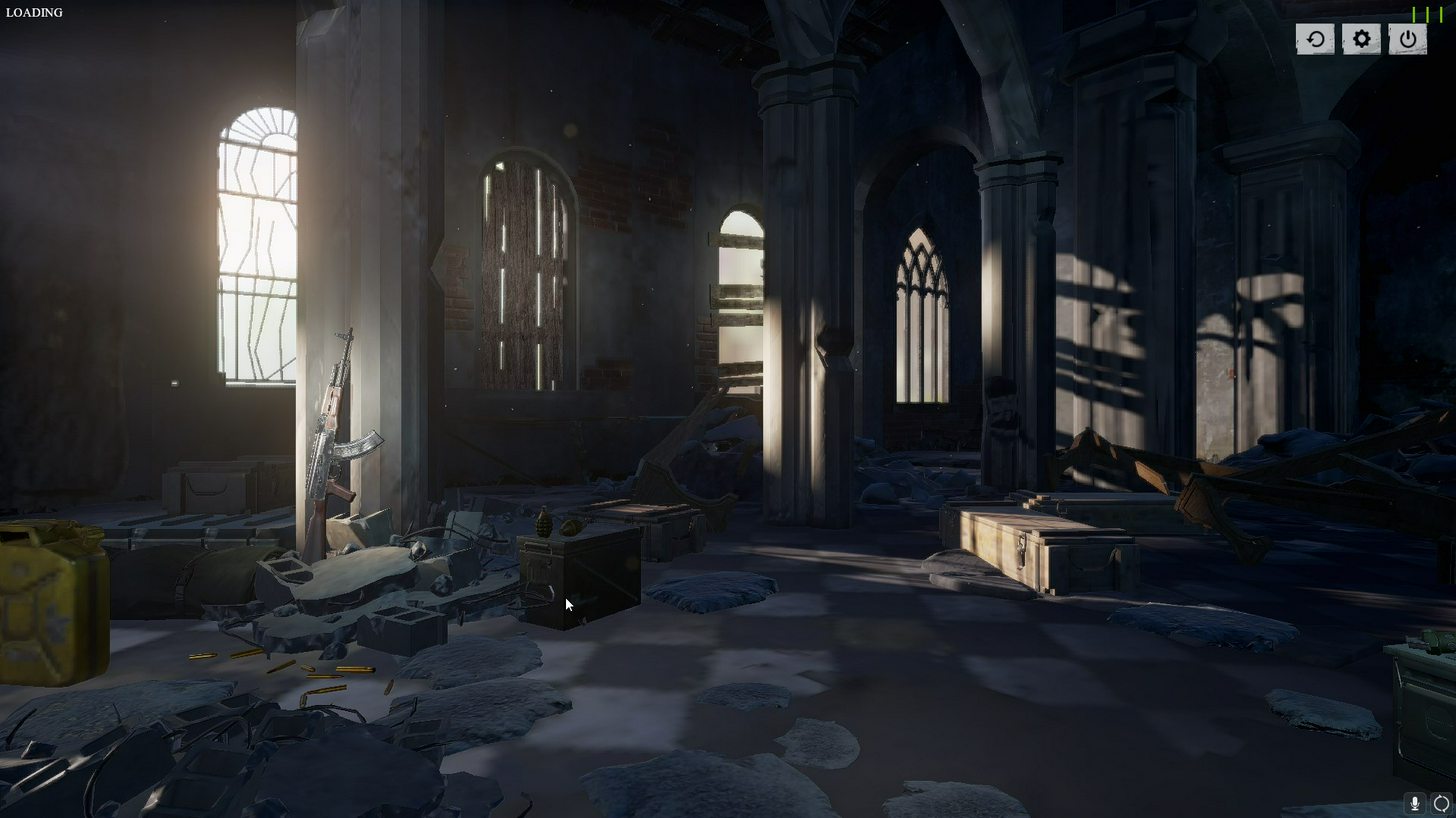
My game crashed in a boat, and now I can't log back in at all
it says "LOADING" top left corner
No character, just the lobby background and music
 coarse junco
try reloading/restarting the game
night belfry
Oh I have
Restarted PC as well
Gonna try some other kinks we'll see if it works, just was hoping you had a quick fix and I'm not special 😄
I think I've located the issue, but that's wierd....
@coarse junco Will PM you a description, maybe it'll help others in future
coarse junco
ok
 pseudo torrent
@night belfry Do you launch from steam library or from a shortcut
 austere gazelle
is it 100% confirmed to be okay to use a 3rd party tool to modify my game. called reshade
?
night belfry
@pseudo torrent I used shortcut with DPI compability, re-did the Steam shortcut and it worked
coarse junco
@austere gazelle reshade is fine
austere gazelle
Awesome thank you @coarse junco
 warped crane
Can someone please help me with how to fix the "DX11 feature level 10 is required to run the engine" problem. I've been going at it for days now
 next hazel
anyone else having trouble with rubber banding since the last patch? I get desync issues that used to only be in the first 30 seconds or so of the match all the time now
 next chasm
mod room 17
 north iron
@warped crane I would just Google it. I have you all solutions I know of trying to assist you for a few hours yesterday. I'm sorry
pseudo torrent
@Tengauge12#6583 I just went ahead and refunded the game until it's in a more final state. I tried the port forwarding thing you said and it didn't work as well as a couple other things, so I gave up.
 cinder portal
Hey does anyone know why my nvidia shadow play doesnt kick in?
it got disabled somehow
it wont show the screen anymore
 undone socket
Asking this for a friend, but my friend has been having issues in the main menu of the game, not being able to click anything on screen, including play buttons, and any buttons in the top right corner of the screen, and any tabs like 'statistics', 'rewards', etc. Anyone have any possible solutions? He's tried a full reinstall already
 cinder cloud
removing the folder "TSLGame" in %localappdata% @undone socket
@cinder portal Did you remove Geforce experience?
north iron
Oh, hey @cinder portal
@cinder portal Shadowplay has been having issues. You're currently just goin g to have to wait.. You can use OBS for recording, and Youtube for editing for now if you wish.
 candid marlin
so apparently when the leader changes the server it doesn't switch it for others who are already "team ready" on another server
let's say 2 people are playing together... player 1 and player 2 and the leader is player 1 who is playing on AS server
player 2 accepted the invite and pressed the play button immediately
but player 1 changed the server to NA
player 2 won't be able to press the play button again until they refresh UI
i tried to debug the issue and i found out that if player 1 changed the server again to AS... player 2 would still have the status "team ready" and if player 1 pressed play it will start matching the team into a game
 velvet cobalt
is crouch jump setting in ini files make bans ?
 craggy thunder
Just cant do the bind anymore.. dont really know why you need the bind anyway.. just hit the Crouch and jump sametime.. works 10/10
 hasty beacon
@viral monolith appreciate it if you please stop sending PM's to me and friends on this discord channel about selling game accounts
hasty beacon
It's a stolen account
so now your legit ?
""idiot 4runrun steal my account please report the player !can delete my t wo wings""
hasty beacon
i don't belive you for 1 second
 viral monolith
the giant wings and the 8 bit wings
hasty beacon
i don't give a hoot, stop sending me and others in this discord about selling accounts nobody cares
hasty beacon
get a job, $4 is nothing, it's a pittens money
hasty beacon
nah, i spend it on pubg crates that have a 0% of getting anything decent
craggy thunder
@silk sand Hey dude! u know anything bout the M4 stock thingy?
craggy thunder
I have heard from several people that the M4 would be better without the stock because of a bug of some sort
So i would just like to hear it from the staff if its true or not
 silk sand
I'm not actuall staff:) just helping people on discord
I think its best if you join custom server and try it 😃
This is description of M416 Stock
Makes recoil recovery faster and reduces weapon sway.
- 20.00% Recoil Pattern // + 15.00% Recoil Recovery // - 10.00% Animation Kick //- 10.00% Sway
@craggy thunder
craggy thunder
Thank you.
silk sand
No Problem boss:)
i would use stock , But its best if you test it on some wall 😃
craggy thunder
Yeah, just made me wonder because so many people are using it without the stock
north iron
Well... Player 778899100 is one of the craziest hackers I have sen by far, lol...
 pure oyster
Fatal error!
Unhandled Exception: EXCEPTION_ACCESS_VIOLATION reading address 0x5b970038
PhysX3_x64.dll
PhysX3_x64.dll
PhysX3_x64.dll
TslGame.exe
TslGame.exe
TslGame.exe
TslGame.exe
TslGame.exe
TslGame.exe
KERNEL32.DLL
ntdll.dll
ntdll.dll
Crash in runnable thread TaskGraphThreadNP 1
 viral monolith
Hello everyone,
First of all, excuse my grammar mistakes i'm not english native. So, since this morning i've some issues with my game.. I bought it yesterday, played like 6/7games without any issues, today i came back home, launched the game, and during the game completely froze my screen. All the details are completely messed up for me except the environment (link below) and also it makes me loss like 40-50 fps everywhere. I tried to download ReShade, it did nothing. I tried to change my graphic settings, also did nothing..
So i was wondering if any of you had the same issue or if anyone could help me.. Waiting room, no problem at all: https://image.noelshack.com/fichiers/2017/39/1/1506344438-20170925145616-1.jpg Before i even touch the floor: https://image.noelshack.com/fichiers/2017/39/1/1506344421-20170925145738-1.jpg (you can see that the little tower is already fucked up)
https://image.noelshack.com/fichiers/2017/39/1/1506344438-20170925145744-1.jpg
My specs even tho i'd no issues playing it yesterday: i7 6700 GTX950 DDR4 8G
Hoping to see you on the field soon..


 north iron
@digital marlin dxgi.dll is a .dll file for ReShade, and ReShade is currently being blocked by BattleEye, and until it's unblocked you will need to either uninstall it, rename the dxgi.dll file, or delete it, and you're game will run.
@viral monolith Try;
https://forums.playbattlegrounds.com/topic/36676-read-first-common-fixes-template-for-map-graphics-bug-report/
PLAYERUNKNOWN'S BATTLEGROUNDS Forums
Hi Players,
Please take a moment to read through this post and attempt all troubleshooting method so we can attempt to help solve your issues with the...
 pale plover
@viral monolith Is your game installed on HDD? Also do you have any other programs running in the back while playing? Chrome etc
 opaque thicket
my friends reshade started working after moving dxgi.dll to desktop and back but mine won't.. are you going to fix this or should I try to play with no colours?
viral monolith
@pale plover yes he is on HDD, the only thing left is chrome yep
north iron
@opaque thicket ReShade is currently blocked by BattleEye. Therefore, until it's unblocked you're going to have to suit yourself to normal PUBG coloration..
 digital marlin
thanks @north iron ❤
north iron
You're very much welcome, Shy! 😃
opaque thicket
but my friends reshade started working after he moved dxgi.dll to desktop and back, why is that?
 limber steppe
any link for invites
 oak venture
WHYARE THE FUCKING WEAPONS IN SINMGLE MODE WHEN YOU PICK THEM UP? WTF MAN!
PLEASE FIX THAT TOTAL BULLSHIT!
 feral jolt
@oak venture there's nothing to fix, weapons you pick up are on single fire by default
Always has been
oak venture
@feral jolt that's SHIT!
pale plover
@Mindre👑#1796 try turning off Chrome while playing. It can also be because of his HDD as some tend to have issues with textures loading, might want to try installing on SSD.
night belfry
Anyone who plays games without an SSD in todays world needs to fix that asap 😄
 kind iris
!invite
 regal vaporBOT
Invite URL for Discord: https://discord.gg/battlegrounds
 static drift
hey
 gleaming vector
YOu're probably a better resource for him anyways... I'm just here because I'm bored on vacation. ,-)
 violet hare
I'm bored at work 😛 I just want to get back to my new monitor
static drift
how well do you think i can run pubg on this setup:
Ryzen 5 1600
GTX 1080 8GB OC
16 GB RAM 3200mHz
1 TB Hard Drive
feral jolt
@static drift all these specs seem okay to me, you should consider installing the game on SSD instead of HDD tho
violet hare
More than well enough. Only recommendation would be getting an SSD to install PUBG on
^^
static drift
Yeah I might get an SSD later but not now
feral jolt
Trust me, it's really rewarding on the long term
static drift
How many Gbs do you think I will need
I will probably install my OS on the ssd + some games
I think 128gb can do
silk sand
@static drift I have 128gb i got few games,softwares and system
and i have 20-30gb left so fair enough for me
static drift
sounds good
silk sand
@tired condor Yeah your pc specs really needs upgrade,
Your problem sounds like huge fps drop, could be mouse too ,but if it happens only "in close range battle" it's fps drop
Your gpu is currently enough for low-med settings i would go with better cpu for sure
also what's your ram
 tired condor
silk sand
tired condor
silk sand
Yeah get cpu for now , also SSD if u have extra cash
Yeah there are really nice i5's
make sure u watch a lot benchmarks before purchase
feral jolt
@silk sand is 8gb RAM enough to play with decent FPS ?
silk sand
Ram don't give you fps if im not wrong haha
just help your game run well
and yes 8gb is enough
feral jolt
Alright, good to know
static drift
but 16 gb ram is recommended nowadays
@silk sand can i ask you a question
i have been wondering for so long, if im allowed to use razer cortex
silk sand
I don't see why wouldn't you be able to use it
but i hear there are a lot lag spikes and
a lot people say there is not big difference
viral monolith
@silk sand Gimmi Tutorial how to Big jump ;-; pleassss
silk sand
@viral monolith
W+C+Space in same time
If you already run "W" just hit C+Space in same time.
viral monolith
wait
My going forward Is Z
My Crouch is C
And my space is jump
So i just do Z + c + Jump
night belfry
@silk sand Is there a reason the game crashes/won't start if you use the DPI override?
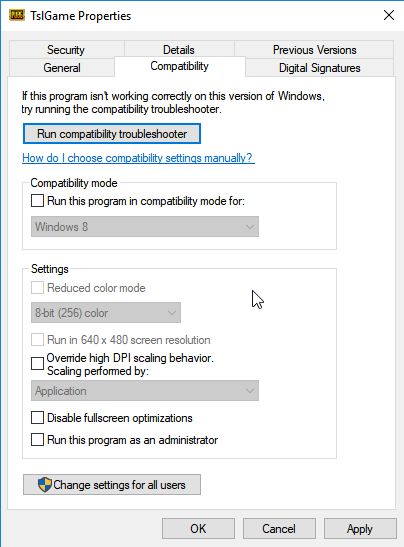
It gives me 20 more FPS when I play but usually gets stuck on loading page or crash mid game, if that was adressed I think a lot of people would be bale to play with higher FPS, and that, would be amazing.
silk sand
@night belfry Have you verify game files / update all drivers?
viral monolith
Can anyone point me to confirmation from the devs on the differences on the angled and vertical grips?
Want a solid confirmation please 😃
night belfry
On is straight one is angled.
viral monolith
^ truth
 untold elk
mi game stay on screen of "connecting" after this it go to "connection closed.". some tip?
coarse junco
do you have any firewalls/antivirus installed?
viral monolith
yes but i turned them off
coarse junco
what happens if you enter that url in your browser?
coarse junco
are you launching the game via steam or shortcut?
viral monolith
shortcut
coarse junco
try via steam
viral monolith
still the same thing
i just wanna play pub without a vpn if i use a vpn i cant be in discord
night belfry
@silk sand We'll see how this goes now then I guess!
Stuck on loading screen
Now the steam shortcut
No problem at all, just 20 less FPS
viral monolith
i love when someone is mid helping me and they just stop
worst $30 ever fucking spent
coarse junco
sorry, i was already ingame once i started helping you @viral monolith
you say you can play with a vpn?
viral monolith
yeah with an extremly high ping and no hit reg
regal vaporBOT
Invite URL for Discord: https://discord.gg/battlegrounds
coarse junco
can you try setps 1,3, 6,7,8,9,11 from that guide?
https://forums.playbattlegrounds.com/topic/4469-connectionsteamlaunch-issues-a-comprehensive-guide/
PLAYERUNKNOWN'S BATTLEGROUNDS Forums
Update: If you are having an issue connecting to the servers please note what type of connection you are accessing from. (Ie: Home, Work, Universit...
violet hare
@viral monolith You may need to open up some ports on your router for port forwarding. PUBG uses ports 80, 81, and 443
viral monolith
why tf does it use 81 thats such an irregular port
viral monolith
launched as admin and now it just says loading
in the top left screen
all done and still doesnt work
coarse junco
if it only works with your vpn your ISP might be blocking/filtering something
 lethal delta
coarse junco
lethal delta
coarse junco
can you file your bugreport on the forums?
Would help us much
https://forums.playbattlegrounds.com/forum/61-map-graphics-issues/
PLAYERUNKNOWN'S BATTLEGROUNDS Forums
Issues related to the map including stuck, item bugs, etc.
 bleak gate
How can I make custom matches?
coarse junco
to create custom matches you need to be a content creator and apply for a partnership
you can find more info here: https://www.playbattlegrounds.com/partners.pu
 grim pulsar
Can a mod message me please
 grave musk
!invite
regal vaporBOT
Invite URL for Discord: https://discord.gg/battlegrounds
 raw lodge
@grim pulsar you need help, but I don't understand about what?
 manic yacht
can you change your nick in this server
 twin basin
Any staff online atm?
@arctic stream EMO666 is avoiding bans hes come back even after being banned
 tardy egret
host close connection with 9 players alive 😦
 flat wolf
what is the link to this discord server
raw lodge
!invite
regal vaporBOT
Invite URL for Discord: https://discord.gg/battlegrounds
raw lodge
Here you go! 😃 @flat wolf
flat wolf
thanks
raw lodge
@manic yacht no one can change nick in-game, but you ask here? (discord)
@flat wolf you are welcome bro.
 junior mortar
whats the maximum limit for ingame coins?
raw lodge
@junior mortar no one knows, but I think maybe unlimited.
raw lodge
@flat wolf yes sure, you can go write: #360727070428626954 or https://forums.playbattlegrounds.com/forum/8-suggestions-feedback/
PLAYERUNKNOWN'S BATTLEGROUNDS Forums
Share your ideas to improve BATTLEGROUNDS
 strange onyx
So this is how PUBG is using my Ryzen (OC - 4.1Ghz) Threads after one game. Look at CPU#8 (93% - 89% average) and was sitting like that for all the time while in the battle. http://prntscr.com/gppamw

Still waiting for better optimization.
strange onyx
1700x
raw lodge
Hmm, 1700x.
Can you try to add steam launch options please? -USEALLAVAILABLECORES: This command forces PUBG to use all avaible cores of your procesor.
strange onyx
let's try, brb
raw lodge
Yeah please, maybe work.
And If you want, you can check with > coreparkingmanager: by that tool you unpark your cores.
strange onyx
nah. that's lame
I have Ryzen Power management as Power Option
nothing changed while on the spawn island
Same usage while having set the -USEALLAVAILABLECORES option
strange onyx
asrock x370 killer sli/ac / 32GB DDR4 @ 2133Mhz - 16-18-18-36
raw lodge
gg, good
strange onyx
In battlefield 1 I get stable 144fps all time
strange onyx
EA*
north iron
Hmm
night belfry
@coarse junco Any idea why the Override DPI scaling makes the game not go past initial load?
coarse junco
@BassMonsterRayne#8079 seems like there is missing a file, please try validating your files with steam
coarse junco
@viral monolith please use #287779430548635658 for that
 shadow isle
viral monolith
shadow isle
viral monolith
how to report people?
whole team TK'd me for going to bathroom then they report me????
coarse junco
@night belfry no, its a bug but i don't know any detail as I'm not part of the development team
north iron
Good morning!
 solar flint
Cant even get to lobby anymore without crashing
opaque thicket
Am I the only one whose inventory is still causing lag spike even after disabling the character render thing?
solar flint
I cant play the fucking game, this is so fucking annoying!
I cant play for 30 seconds without the game crashing
north iron
Do you get an error when it crashes?
viral monolith
HELP: Failed to initialize BattlEye Service: Driver Load Error (577).
if it was easy anticheat I would go to the installers and reinstall it
night belfry
@coarse junco Ok but atleast they know about it, means generally something is being done! Thanks!
viral monolith
I can't find that for this..
 buoyant bluff
can i turn of deep of field feature in .ini file ? I think the DOF make the game really hard so hard to play when against the enemy. I would like to ask first i dont wanna getting banned
solar flint
It just crashes, with a thing asking if i want to send info to devs, which takes 10 minutes
feral jolt
@buoyant bluff you can't modify .ini files anymore
buoyant bluff
@feral jolt arr thanks for the information. I guess i need to learn to bear with it xd
 north parrot
 weary warren
@viral monolith What GPU do you have?
@buoyant bluff That is considered giving yourself an unfair advantage
 misty torrent
any devs here
got a BE service error
bought game earlier today, played couple games with my mates, closed it, open PUBG, and now BE service earlier
weary warren
I am right here
misty torrent
and in BE launcher, says blocked loading files
weary warren
I was just talking to you in general
misty torrent
ya
weary warren
try starting the game without your Anit-virus/firewall on and let me know what happens
weary warren
I don't know, that depends on what anti-virus service you're using
Use google to find out.
hasty beacon
@misty torrent are you running the game from your desktop launcher ?
hasty beacon
if you launch from steam it should work
misty torrent
whats the difference
hasty beacon
i now have to launch from steam because of reshade being idiotic
weary warren
Oh wait, you're not launching the game from within Steam?
hasty beacon
reshade enhanced the graphics of the game, instead of the bloom you see it's like HDR gaming
misty torrent
what about when BE launcher is on, i see the blocked loading files
weary warren
Ignore reshade for now until you get your game running.
@misty torrent Are you launching PUBG from your steam library?
hasty beacon
Just @viral monolith should go over with the reshade steam about using reshade in foggy maps, if used right people can see slightly better through the fog which is unfair, mines setup up exactly like the game just me i see the fog the same as non-reshade users see the fog
i am a legit player, not a cheater
misty torrent
not sure, i think ive used both
weary warren
You should only ever launch from Steam
hasty beacon
^
misty torrent
what about windows defender
weary warren
I would try running the game now from Steam
misty torrent
reinstalling atm
hasty beacon
i wouldn't worry about the windows defender, if it's protecting your computer then it's doing it's job
misty torrent
ive never had this problem b4
hasty beacon
iv'e had the BE notice come up when i used to launch from the desktop, but now i launch from steam and that fixed it, also launching from the desktop gives you that "loading files or loading" error in the top left of your screen in pubg forcing you to ALT+F4 or task manager exit
hasty beacon
yeah had that too
misty torrent
coz i was in the squad game
spawned in the plane
5 seconds later
cuts to main menu with BE error
hasty beacon
make sure game is closed, restart steam, boot the game from steam and you should be good
reporting the error in the pubg forums helps with bug fixes
hasty beacon
or the crash report if it comes up
 supple whale
hello admin could you add Other language chat LTU- Lithuania thx you 😗
misty torrent
or just pubg in particular
hasty beacon
Right click steam > start pubg if it's in the list
misty torrent
what is visual c++
hasty beacon
you're computer needs it
north iron
Wwhats the BE error?
Not to mention ReShade is currently blocked by BE right noww. Therefore, you cannot run it and the game as of right noww.
 tepid mist
my reshade works, I sometimes get the blocked loading of file, I just reopen the game
 crystal shuttle
17:57:37: Starting BattlEye Service...
17:57:37: Failed to initialize BattlEye Service: Generic Error.
anyone help?
north iron
@crystal shuttle You can try This PC >> Program Files(x86) >> Steam >> steamapps >> common >> PUBG >> TSLGame >> Bianaries >> Win64 >> Batteye and deleting it, then verlidating your steam files for pubg udner properties for the game.
coarse junco
at the moment only if you are partnered and have access to custom games
 leaden rapids
When using the key "<" as sprint key. It stops running when clicking on "a" or "d". Does this happens for you as well, and how do I fix this problem?
leaden rapids
Please help me
feral jolt
@leaden rapids you stop running when strafing left or right ?
feral jolt
That's weird
viral monolith
should I get a better Graphics Card or more ram? Cuz I have an AMD A8 and idk how much GBs or ram
I am almost out that's for sure
feral jolt
Does it happen if you bind sprint to another key ?
leaden rapids
Nope
feral jolt
@viral monolith you can see your full specs with softwares like Speccy
viral monolith
Also my game always lags so badly whenever I start a match, after a while it isn't that laggy
feral jolt
Tell me what you got and I'll tell you if you have to upgrade
feral jolt
@leaden rapids maybe it's your key that is faulty
viral monolith
RN I am in school but when I get done I will check
feral jolt
@viral monolith Np 👍
leaden rapids
What do you mean?
feral jolt
I mean maybe your "<" key doesn't function correctly or interfer with other keys
leaden rapids
It works in other games
feral jolt
Do you use other softwares with PUBG ? @leaden rapids
leaden rapids
No
Could it be because that I use a Nordic keyboard layout, because the "<" is on the left on those?
leaden rapids
yeah
feral jolt
Try this : close the game, verify the game files in Steam, launch the game and rebind sprint to "<"
@leaden rapids did it work ?
leaden rapids
I will try it after this game
leaden rapids
I just found out that when I hold down the button i can not use a or d
feral jolt
@leaden rapids did you try what I told you ?
leaden rapids
Yeah, it did not fix the problem
feral jolt
@leaden rapids what's your keyboard ?
leaden rapids
Hyper X Alloy
feral jolt
@leaden rapids I would try to file a report on the forums to explain the issue you have
I'm afraid I won't be able to help you beyond that
 urban grove
is there something wrong with the asia squad leaderboards?
leaden rapids
what is this key called "<"?
feral jolt
@leaden rapids "less than" or "angle brackets"
leaden rapids
okay, so i just finded out that when using the key for moving forward, it just keeps walking untill i click on esc key. And the same thing happens to my friends...
Really weird
 silent olive
can i have an invite code
feral jolt
!invite
regal vaporBOT
Invite URL for Discord: https://discord.gg/battlegrounds
 lavish ermine
can someone help me?
viral monolith
?
lavish ermine
im having a hard time loading buildings, even when there are almost none the game take almost a minute to load them fully, me desktop is not that bad
feral jolt
@lavish ermine is your game on HDD or SSD ?
viral monolith
do you have nvidia geforce experience?
lavish ermine
yes
viral monolith
turn off nvidia share
and the buildings will load faster
the best option is to buy a SSD
and move the game on the SSD
lavish ermine
i have it off
 lavish ermine
just waiting for pay day, i have 8 ram already, 8 more?
viral monolith
buy the ssd first
viral monolith
i dont know where you live so i can't recommend something
lavish ermine
portugal
feral jolt
Don't bother buying it in a shop, buy it online
 plain stratus
I have Samsung and Crucial SSDs
feral jolt
You'll get cheaper prices most of the time
plain stratus
both of them are good
feral jolt
Samsung EVO is a solid brand/model
viral monolith
+1
hollow prism
+2
viral monolith
I CANT CLICK ANYTHING!!!! HELP!!!! i have verified the game files, tried changing to windowed and all that and still doesnt work
raw lodge
@viral monolith not need re-install, go restart your PC.
@viral monolith After if you want: Go Right-click on "PLAYERUNKNOWN'S BATTLEGROUNDS.exe" file, select Properties, and then click the Compatibility tab at the top of the Properties window. Check the Run this program as an administrator box in the Privilege Level section. Click Apply then OK.
I'm here to help, poke it. 😊
!invite
regal vaporBOT
Invite URL for Discord: https://discord.gg/battlegrounds
raw lodge
how long is this problem you're having? new or? @viral monolith
violet hare
Are you using multiple monitors?
viral monolith
yea it will load everything fine but cant click anything besides those three at the top right
violet hare
Try deleting %localappdata%\TslGame\Saved\Config\WindowsNoEditor\GameUserSettings.ini (or copying it to desktop to back it up), and then start up the game
@viral monolith
 loud siren
so uh, I'm currently using an i7 4790k and a GTX 1080, but I'm barely getting over 65fps in game, at most. I've tried using any and every tip I've been able to find on both youtube and reddit and all of them seem to just work for about a day and then completely stop working the next. Anyone have any tips/ideas as to what might be happening?
 brisk swallow
im not really for sure how to compare my specs to the min requirements so can i tell u guys them and tell me if i can run pubg on low settings?
coarse junco
If you tell us your specs we can try to do so
loud siren
^
brisk swallow
8GB DDR3 RAM, AMD FX(tm) 4300 QuadCore 3.8GHz, AMD Radeon R9 200 series
violet hare
@viral monolith Maybe try that again, but verify game files before starting up again. I don't have much time to help any further, so I'll just drop this here since it's probably an issue with connecting to the server: https://forums.playbattlegrounds.com/topic/4469-connectionsteamlaunch-issues-a-comprehensive-guide/
PLAYERUNKNOWN'S BATTLEGROUNDS Forums
Update: If you are having an issue connecting to the servers please note what type of connection you are accessing from. (Ie: Home, Work, Universit...
 nova kelp
Got a friend having this issue https://gfycat.com/ScrawnyAgitatedAnteater any one had this happen before?

thought his GPU was dying but it only happens in pubg
coarse junco
@brisk swallow your CPU does not meet the minimum requirements, your GPU would be fine if it is a R9 270 or better
brisk swallow
alright thanks buddy
loud siren
@nova kelp is his gpu overclocked?
coarse junco
@brisk swallow no problem
@nova kelp does this happen every game? If yes, it looks like the GPU is unstable. Is it overclocked?
nova kelp
its not overclocked no
loud siren
when was the last time he cleaned it, and is it overheating?
nova kelp
he already cleaned it out, temps look good around 75c
he said 1 in about 8 games
it happens
 tame knoll
@coarse junco is there someone i can talk to about obtaining a list of orgs or people who have custom servers?
 wary temple
Are the servers down?
raw lodge
@wary temple no, all good.
 cosmic quest
@viral monolith why is chat room 30 for squads only hold 3 ppl in
 tardy fiber
does anyone have any trickks or something to boost fps?
viral monolith
this is my specs
viral monolith
is this good?
 kind nimbus
see its not as good as the 49
r9*
he mentioned
but its a r7 and that dosent tell us exactly which model it is
north iron
@tardy fiber their working on the fps issues for the next update you'll just need to be patient
 gusty plover
This guy Best_XR IS causing problems in high rank games. He is a hacker, been reported numerous times... we just played against him this is crazy. 29.18KD ration
 split isle
guys i need help
i can hear my spotify my friday the thirteenth and my youtube and everything else but i cant hear people in discord and there is 0 sound in battlegrounds
Im using turtle beach 400 if that helps
i really need help tho
anyone i wanna play a little tonight
 late ivy
check default input and output devices in Discord
check your volume mixer for window when PUBG is open to see if its muted
and do you have 2 games open at once?
split isle
how do i check the volume mixer
no i dont have two open its just i did open it and i could hear
split isle
thx so much mr krabs i got volume back i owe u
 gritty garden
@ocean shard HEs BACk
loud siren
so uh, I'm currently using an i7 4790k and a GTX 1080, but I'm barely getting over 65fps in game, at most. I've tried using any and every tip I've been able to find on both youtube and reddit and all of them seem to just work for about a day and then completely stop working the next. Anyone have any tips/ideas as to what might be happening?
feral jolt
@loud siren can you be a little more specific as to what stops working ?
loud siren
I meant as in the effects of the tips I was given stop working. Eg I'll get good fps again for like like a day, but then the next day the game will be in slides how mode @feral jolt
feral jolt
@loud siren do you have another software open when you play ?
loud siren
Just discord and CAM, sometimes teamspeak @feral jolt
feral jolt
@loud siren did you try without both ? If not that might come from one of them
Also, could you try launching the game without all the options/tips you were given, to see if things improve or not ?
pale plover
@loud siren what's your RAM? Also are you on HDD?
loud siren
my ram is 16gb ddr3 and yes I'm on HDD
north iron
@loud siren have you tried closing CAM? I've seen CAM effect others.
 reef karma
 opaque crypt
solar flint
opaque crypt
solar flint
Servers down?
 misty lintel
Cant connect either...
solar flint
Maintenence ;-;
misty lintel
=(, also get the dxgi.dll error sometimes..
solar flint
No warning as well, which is always fun
solar flint
Only way to fix it is to disable reshade until its whitelisted by battleye again :/
 thorny valley
please and thanks
solar flint
How about dont advertise them here then lol
thorny valley
and all the others
solar flint
Remove your link before more people start using them?
thorny valley
lol yeayea
solar flint
Game cheats arent illegal
thorny valley
Sue them all jesus man its reddiculous
solar flint
U cant sue them
thorny valley
put it in terms of service then
solar flint
In the eyes of the law, they aint doing anything wrong
It still wont be illegal
It will just be against the games rules and regulations
thorny valley
i assume its already in the TOS?
solar flint
I assume so, its in the RoC
Still, video game cheating isnt and probably will never be illegal
 tribal gorge
@viral monolith the game is not working any reasons?
solar flint
Servers are down
tribal gorge
oh
thorny valley
where in the game are they writing the code that performs that hacking crap
 small laurel
@loud siren CAM is notorious for screwing up stuff, rather use hwinfo or something else
hasty beacon
alright to many lag switches
get a game with 12 people and 1 duo pair using lag switches
because the doors on the house open inwards when they are inside
o.O sus as hell
solar flint
lag switches? That wouldnt work in pubg
hasty beacon
they do work
solar flint
If u DC, u just continue moving as u were, and u get network lag detected
U cant control ur guy
hasty beacon
i didnt get network lag detected, i wasnt lagging im an aussie in OC servers, they preshoot and kill me as i land 1 bullet, they 1 guy takes us down in 1 second with an supressed Scar-L
solar flint
No, u wouldnt. the supposed lag switcher would get the message
Sometimes it feels like u get killed in 1 shot when its actually more, thats just the servers
hasty beacon
it's pretty obvis they were using a lag switch
viral monolith
Wait the servers are down?
viral monolith
Oh OK
hasty beacon
i know what im talking about dude, you may think it not possible, but they do have them there are tuts on YT
stop sticking up for them
hasty beacon
i film every time i play so i encounted hundreds of cheaters everyday
solar flint
Cheaters yeah, but i dont think lag switching is possible
Servers are pretty wacky at the moment, it may have just been that
hasty beacon
mate your a fruit loop, the stuff works, it's not lag, you're just incompetent about not agreeing that it works
solar flint
I know how the DC system is, as soon as the server stops receiving packets, it says network lag detected, therefore it isnt possible to lag switch (at least not anymore)
hasty beacon
they are fully capable of using a lag switch
solar flint
I'm 99.9% sure its no longer possible
hasty beacon
so why is there software and tutorials on youtube how to use the software and complete evidence of said program actully working with live evidence
hasty beacon
software designs find ways around these things, thus why hacks are still available for PUBG yet shouldn't be possible just watch all the crap show up in a google search
you're just blissfully ignorent
hasty beacon
can't send you those videos it goes under advetising 3rd party software, think im dumb ?
solar flint
PM??
hasty beacon
no, still counts as advertising, our msg's are proof
solar flint
U dont get banned for that tho
Ok then, tell me if u can actually find a lag switch video under 1 month old
viral monolith
fuck i just wanna play pubg
@viral monolith please help! cant click anything in game besides settings, refresh, and exit game. PLEASE HELP!
 languid sleet
Why is my ASIA Squad leaderboard statistics not showing at all? Its completely blank and shows null.
violet hare
You said you're playing with intel hd graphics 4000. They're not going to be able to "optimize" for that...
 red yarrow
fortnites minimum requirement are greater than pubg
and it works fine on low settings
stable fps
coarse junco
well, this is PUBG and not Fortnite
minimum required specs mayget lowered at some time ot they may stay. But they equal the specs needed to play the game in a enjoyable way
violet hare
^^ There's other things to add in about Fortnite, but I'd rather not discuss here
 raven bolt
is there any chance of a player will take a ban if they follow the steps in this guide?

Learn how to configure PUBG to optimize performance for competitive gameplay on PUBG.ME
coarse junco
@raven bolt have a look at the first pinned message in #207019048607678464
viral monolith
okay
so I doubt any of you will remmeber as TONNES of people come into this channel with their issues
but I came here with the issue of my PC restarting itself whilst playing PUBG
people said it could be faulty hardware etc etc.
but just now as I tried to play it again
it restarted whilst I was in the Main Menu
and not in game itself
I could really use some assistance on this problem now
I have had both no response on the forums as well as the most basic ass responses you could program an bot to respond with
weary warren
Unfortunately it seems like this is a hardware issue with your computer
PUBG is very resource heavy which can cause unstable hardware to show its faults.
violet hare
Robo's response was great 😆 But true. PUBG heavily utilizes the CPU and GPU at all times, so the reason for your PC restarting could be because your PSU cannot handle the load. I've seen this talked about before, as well, and the person no longer had any more issues after upgrading their PSU.
 soft pawn
In custom games, whats the max players for a server? Can it go past 100 players?
weary warren
Max is 100
violet hare
Dang it, he beat me to it
soft pawn
awesome thanks!
 somber citrus
First time on the discord pubg server and wanted to set up a squad. I don't know how to invite that squad to game. Do I invite them from steam or what?
coarse junco
you can search for them ingame, just click on "Steam Friends" in the bottom-left corner of the menu
then you can search for other players
somber citrus
TY
 full crescent
How do I show a video of me getting teamkilled ?
raven bolt
@coarse junco Thank you dude ❤
 flat zealot
why does voice chat not work
 twilit canyon
@frank moon can we get this guy kicked? he is harassing us, screaming into the mic and wont leave
he is showing as ... in room 25
he name is @muted seal
 frank moon
If you're PMing a moderator for help with the voice communication channels, please try to deal with situations yourself, at least initially. We receive at least a handful of messages about this daily.
We aren't able to help you resolve arguments on the internet, and we're not here to deal with childish squabbling.
We're here to deal with instances of people breaking the discord rules, such as people mic spamming or being racist. There must be evidence of this happening — such as an ongoing issue or a clear recording. Otherwise we're unlikely to be able to deal with it.
Tell us: who it is; what room; and what's happened, in your first PM. If it's not a current issue, such as if the user has stopped or is no longer online, please mention this in the PM. Providing this info in full saves a great deal of time for both of us.
If we come in your voice room, just carry on as normal. Drawing attention to a mod will only lessen the chances of us being able to observe bannable behavior.
Thanks!
 noble reef
Why does matchmaking default me to asia servers everytime I load the game?
 oak berry
hi guys ! i need help about the game who can help me out ?
@viral monolith hey im a streamer ! can u help me please?
 azure sigil
"scammed" what
 willow iris
i had all the PUGB preorder shit and i got scammed trying to sell it
azure sigil
they cant do anything about it
azure sigil
thats a rookie error that says scam all over it...
willow iris
thats like £1000 fucked
willow iris
report them though? i got links http://steamcommunity.com/id/OfficialAlliah

Main Account // One and Only

In the business world, the rearview mirror is always clearer than the windshield.
azure sigil
2 guys? 1 a middleman im guessing?
azure sigil
"2.5 hours past 2 weeks" he must have another account and he has only had the profile for a year and level 69 with only 2 games played
 shadow trout
how do i join custom matches
raw lodge
!invite
regal vaporBOT
Invite URL for Discord: https://discord.gg/battlegrounds
 agile copper
Does anyone elses' game default to Asia servers?
 placid oracle
MINE
 teal hamlet
game stuck on connecting
teal hamlet
yes
 teal sage
servers down?
viral monolith
any idea how long?
 lucid notch
should be done in about 30min if no issues arise
viral monolith
good
 dull pewter
acting like he knows what's going on
lucid notch
I'm just passing what I know on. I follow the twitter to see when the updates pop. and know from past patches that if theres an issue that will make it take longer they tweet it out.
dull pewter
i bet you ask people to call you "Doc" in real life
lucid notch
Oh I totally do.
split isle
r the servers down
lucid notch
I believe they are still under maitenance for the weekly patch. Started 50min ago so should be done in about 10min if they don't have any issues with the patch.
split isle
ok thx bro
 pure kayak
game is not connecting for me after update
split isle
dude do u not understand doc just said
lucid notch
I hope so too lol. I need to fullfill my addiction of the game
split isle
same
viral monolith
and I need to git gud
pure kayak
anyone else having connectign issue ?
placid oracle
there is maitenance
lucid notch
@pure kayak They are doing the weekly patch at the moment, so the servers are down for maitenance
pure kayak
oh ok
 halcyon epoch
its for 4 more minutes
pure kayak
ok thnakyou : )
viral monolith
i have a question
so my pubg wont install a error keeps popping up i know you get this alot so please help
tnx
lucid notch
Servers are back!
viral monolith
sooo
 full eagle
Anyone getting error "Matching Cancelled"
 mossy marten
Yup
I saw that issue before the last content patch with the Mini14 but since we didnt see it after release we thought it was fixed
full eagle
Any idea on how to fix dis shit
 flat shell
@full eagle Yes I'm getting "Matching Cancelled" for both NA/SOLO and NA/SQUAD
 queen pewter
any one else stuck at 60fps since this patch? im on an 11gb 1080 ti, sar at 144 solid till thispatch
 ornate crane
shadow trout
ornate crane
shadow trout
How do i join custom matches! 'fpp only room 17" or whatever how do i join that
i feel so stupid rn
coarse junco
@Ignerium#4754 if you hover over the "play" button in the top left corner of the menu, the menu to select the region/gamemode opens. In the bottom of that menu is a button with "custom matches". click that to get to the custom matches
coarse junco
@ChaseAE#4101 please use the #287779430548635658 or #360762869924757504 channel for that
 dull edge
why does my game keep crashing?
feral jolt
@weary warren can you be of any help for this fellow above please ?
weary warren
@dull edge Has this just started to happen?
weary warren
This week's update?
dull edge
yes
weary warren
Have you verified the game files?
dull edge
yes i have
weary warren
Are you getting any error messages?
dull edge
it opens up a crash reporter
We are very sorry that this crash occurred. Please help us track down and fix this crash by providing detailed information about this.
Thanks for your help in improving the Game.
weary warren
How far do you get before it crashes?
dull edge
its instant
weary warren
Do you have the test version installed?
dull edge
no
weary warren
What other steps have you tried so far?
dull edge
i've tried restarting my pc
i uninstalled and reinstalled the game
checked game files on steam
nothing helped
weary warren
Have you done anyything to your page file?
viral monolith
litteraly my exact build lol
weary warren
Do you have any launch commands?
dull edge
nope
weary warren
Oklay
So, please go to C:\Users\YOURPCUSERNAME\AppData\Local\TslGame\Saved\Config
Rename the folder WindowsNoEditor to WindowsNoEditorBACKUP
Then please verify the game files again and try launching
weary warren
Okay open up any folder and click on view at the top
then check the hidden items box
If that doesn't work try https://support.microsoft.com/en-nz/help/14201/windows-show-hidden-files
then try the link again
make sure that you're replacing "YOURPCUSERNAME" with your PC login name.
dull edge
i dont see a hidden items box...
weary warren
Then please follow the instructions in the link above
weary warren
Have you made sure your GPU drivers are up to date?
weary warren
You are starting the game from Steam, correct?
dull edge
i have tried from steam and from the desktop shortcut
cinder cloud
hey @weary warren a easier way to find that folder is press Windows key + R and type %localappdata%
%localappdata%\TslGame
can also do it like that
weary warren
I am aware
 tawny flume
So i'm having an issue with the nvidia highlight capture on the pubg side, i believe I have everything set right in the Geforce Experience but it's greyed out in PUBG
feral jolt
@tawny flume did you update the latest Nvidia drivers ?
tawny flume
yep
feral jolt
Found this on the forums : You might have to go into Nvidia Geforce Experience general settings and toggle on 'Enable experimental features' - which will then allow you to download updates and beta-drivers as they are released. then update the geforce experience and drivers and the patch-notes for the new version should announce this new feature . As soon as this is in place, restart the game and you should be able to change the setting from disabled to Shadowplay Highlights
tawny flume
already have that enabled
feral jolt
Look here, people seem to have found a solution : https://forums.playbattlegrounds.com/topic/55120-nvidia-highlights-not-working/
PLAYERUNKNOWN'S BATTLEGROUNDS Forums
Hi there everyone, hope all are getting chicken dinners and getting highlights.
I'm having a bit of an issue getting the highlights system to work...i...
got it to enable, thanks
feral jolt
Np 👍
 mellow ravine
Hey guys, maybe u can help me, I have a problem with Fps in Pubg, the issues accured since last patch , after playing for 20 min ca. i get random fps drops to 7 fps for a sec, after restarting or changing resolution it goes away for 2-3 minutes. So my normal fps are 45-75 fps depends on effets in the area around me . Maybe someone have same problems? I reinstalled change resolution multiple times, changed settings to low/high, update my drivers, but no change.
*occurred
 mild sierra
My ReShade doesn't work did they disable it or its my fault?
 desert pagoda
What does it say?
mild sierra
Can anyone answer
desert pagoda
@mild sierra What is happening
Do you get an error code while starting the game or just no ReShade Shaders running?
What about the UI?
Does it show in game?
It is not disabled AFAIK
dull edge
whats reshade
dull edge
hmmmmmmmmmm
opaque thicket
when are they going to fix battleye blocking reshade?
game looks so boring without reshade
gusty plover
it works
teal sage
Anyone else getting this issue with battle eye?
0:16:16: [INFO] Blocked loading of file: "D:\Program Files (x86)\Steam\steamapps\common\PUBG\TslGame\Binaries\Win64\dxgi.dll".
 vital anchor
Restart steam
gusty plover
yeah... it doesn't work... reshade seems to not work right after an update. sometimes i reinstall
teal sage
that's fine I can play without reshade

 honest hatch
if i get this error
i just quit steam
and start the game again
that works for me tho
loud siren
@Miguel#2338 delete and re-install reshade
coarse junco
regarding reshade @Miguel#2338 https://twitter.com/PUBG_help/status/913412743725817856

We're aware of the issue of BE blocking ReShade and other programs currently, this is related to our server status. We're working on it!
 Twitter
 shut pier
any you guys got a new link to wags pinned Trouble shooting steps?
coarse junco
you mean this: https://forums.playbattlegrounds.com/topic/4469-connectionsteamlaunch-issues-a-comprehensive-guide/
PLAYERUNKNOWN'S BATTLEGROUNDS Forums
Update: If you are having an issue connecting to the servers please note what type of connection you are accessing from. (Ie: Home, Work, Universit...
?
shut pier
no not that one
one of my clan mates is having a issue were his game loads up but its as if he is in a night map all background is black sky every thing is same then game just freezez

any help with this would be great
feral jolt
@shut pier did your friend try to verify game files in Steam ?
shut pier
yes done all that uninstalled it reinstalled it
feral jolt
When did it happen exactly ?
feral jolt
On all his games or just that one ?
solar flint
@shut pier Its an issue with his graphics drivers, i had the same issue the other day
feral jolt
Yeah but he mentioned it happened after yesterday's update so it might be something else
solar flint
I'm fairly confident its nothing to do with updates - when i had the issue my drivers weren't functioning properly, and after a driver reinstallation the issue was resolved
shut pier
its only happend sins update today on live server
feral jolt
Ah gotcha
solar flint
I had the issue 3-4 days ago
shut pier
hes allready tried to up date GPU drivers same issue
feral jolt
@shut pier does it do it for every game ?
solar flint
RAM? Is RAM usage normal?
feral jolt
@shut pier No I meant does it do that every time he logs into a PUBG round ?
feral jolt
Ok
shut pier
its cool ill just keep pluging away with hime try get it fixed thatks for the replys
THANKS*
feral jolt
No worries, try hitting up the official forums, there might be a thread about it
 lime garnet
Can someone help me with this problem? It only started happening after the update
I've restarted my laptop and it still didn't fix the problem
lime garnet
But how is this only happening after the update?
solar flint
Not sure, but I'm 99% sure that that crash is caused by RAM
lime garnet
Game not even started and I'm already running low on RAM by clicking launch
🤔
I know it happens when I'm playing, not when I'm trying to launch the game
feral jolt
@lime garnet could be a memory leak, how many RAM do you have ?
lime garnet
8gb
lime garnet
Just -high
solar flint
It might be worth considering upgrading pretty soon, whilst it may not be causing the problem, 8gb is sub-standard nowadays
feral jolt
You can play with 8gb, 6gb being the recommended requirement
viral monolith
is anyone else also getting some players with horrible latency and jumping around? none of my shots land but he seemed to headshot me so easy from 15 feet away :/
I'm so confused
and I had other players that didn't do it either so...
 errant heron
i keep on getting network lag detected. anybody know what may be causing it?
errant heron
my ping isnt high, its literally on any server i play on aswell. have no internet problems aswell
feral jolt
What region are you and what server do you play on ? @errant heron
errant heron
im EU, play on EU and NA and get the same issue on whatever server i play on
feral jolt
When did that happen ? After today's update or before that ?
errant heron
its been happening since 5-6 pm today so probably after the update
feral jolt
Did you try any tips like verifying integrity of game files, checking you have the right DNS, etc etc ?
errant heron
did all of the above
feral jolt
Then idk, it might be temporary or not, you should check the official forums for solutions
 upbeat field
i keep having this issue
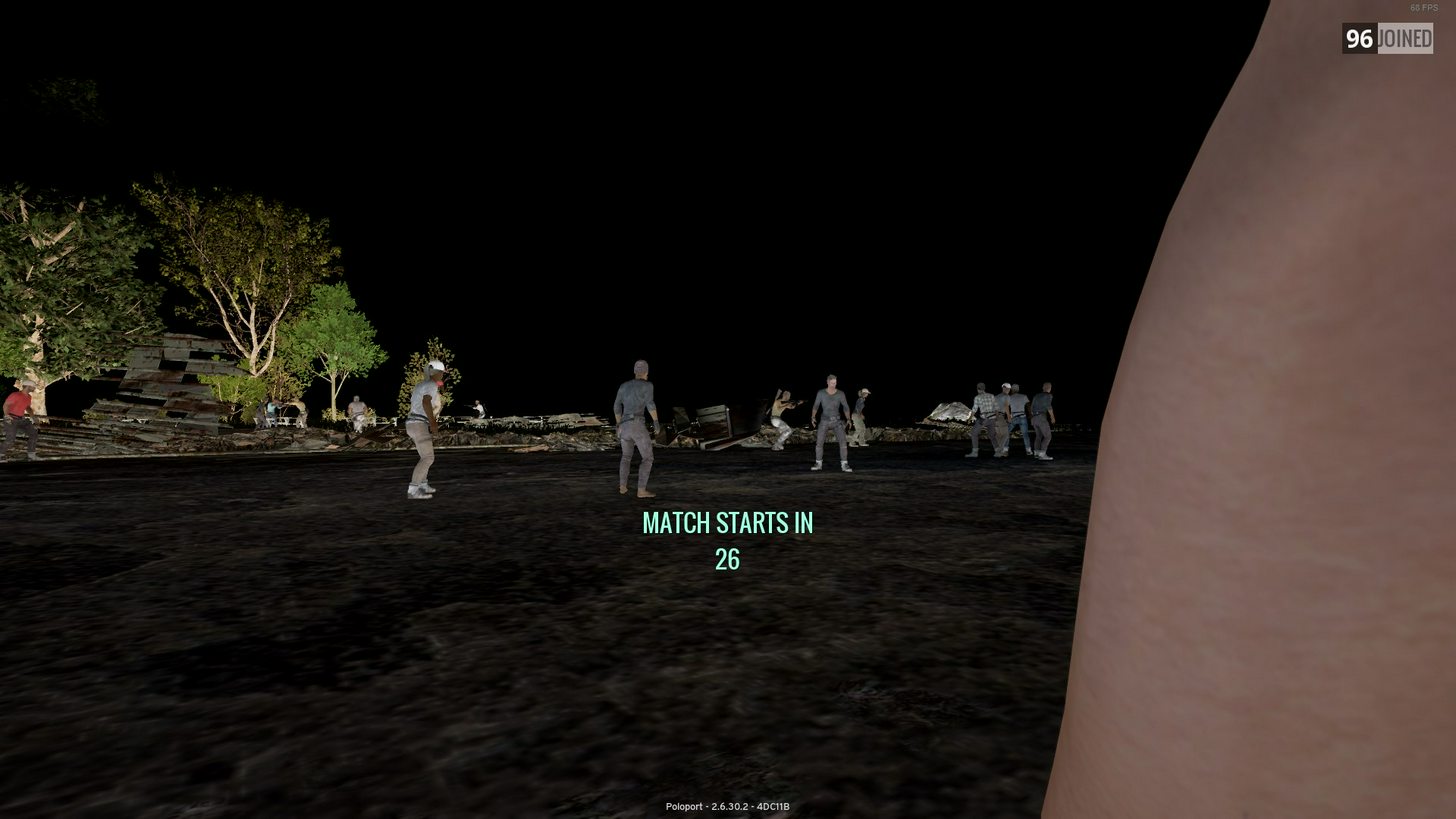
tried checking the integrity and its the same
reinstalled the game
and its the same
checked for driver upgrades and everything is up to date
my GPU is a AMD RX480
CPU is an i5 5500
i got 16GB of DDR4 Ram
does anyone have any ideas on how to fix?
it was fine yesterday
 arctic bison
Lag compensation
More than likely
And as for your graphics that's probably your cars
Take it out and clean the ports on it perhaps
Are you using msi afterburner?
arctic bison
you kinda want to install that asap
If you ar eplaying pubg, you want to get msi afterburner to setup a fan curve
If you are using stock fan control from the CC, then you can experience black outs because pubg uses so much of your cards resources
I had this issue xd
except mine was REALLY orange
upbeat field
alright ill give that a shot
upbeat field
usually its around 60
but with this glitch it shows around 110
i installed afterburner
and it didnt change anything
upbeat field
yes
arctic bison
place afterburner on the unused monitor
and then launch the game
On the left dial, you will see your MHz info
Top one is how much is currently used
bottom is how much you have stock
See how much is being used when youre in game
You should be looking around 1000+ used
upbeat field
in the home screen its around 1200
arctic bison
yeah thats average for homescreen
upbeat field
and remains about the same ingame
upbeat field
temperature is 77º
arctic bison
Have you tried launching another game?
upbeat field
yeah still black sky and frozen game
arctic bison
to see if it persists?
So its happening on other games also?
I think its either your card needs to be rehoused or you have issues with drivers/vram
upbeat field
wait
no i mean
it persists in pubg
other games work just fine
and pubg worked fine until last night
desert pagoda
Is there a channel here wher we can post screenshots?
For helping others?
Not Chicken Dinner Receipt
 silk storm
hey guys when i launch me game it says loading : front.battlegroundsgame.com/index.html at the top left of my screen. Anything i can do ?
already restarted my computer
oak venture
@fleet tinsel called me and crazywolf dirty niggers and joinned and left out channel multiple times.
#1187
 full adder
In what folder do I enable dxgi.dll again?
coarse junco
D:\Program Files (x86)\Steam\steamapps\common\PUBG\TslGame\Binaries\Win64\
full adder
thanks
coarse junco
adapt that path to your steam library
@errant heron is that the same for all regions?
errant heron
yes
coarse junco
are the issues random or at a fixed time? in most cases your problem refers to issues with your internet connection
are you connected via wifi?
coarse junco
are you connected via wifi?
twin basin
@coarse junco someone said EMO666 is back in the discord and his name is fuckoffmoderator. Not sure if its true but if you want to check
@gleaming vector ^^^^
 clear moss
ay yo @coarse junco yall ever gonna fix your lag switch system? as soon as i land i get network lag detected and i have to be still for like 3 mins for it to fix its self
coarse junco
@clear moss i'm not part of the dev team, so i don't have any informations on that. If you have problems with the "lag detected" please report it at the forums
clear moss
whuts up
 scarlet flume
Whenever I try and open PUBG
it opens for a split second then crashes
and when i try and send a crash report
that also crashes
scarlet flume
Thanks
clear moss
im not a mod so
coarse junco
your game crashes if afterburner is running with oc enabled?
twin basin
@coarse junco hes been avoiding bans hes EMO666 and hes been banned by gav already hes just coming back in with different names over and over.
twin basin
because you would know his voice and 2 other people said it was him
you can walk in and take a look and ask im not sure where he is now
coarse junco

twin basin
Did you not go in there and check and confirm?
Plus a person with the name FuckTheModerators isn't really good
coarse junco
i banned him for his name
twin basin
Welp thats solved
arctic bison
Anyone else experiencing this?
Basically my game iwll not load and I'm given this.

error started to occur today.
 hasty token
I was in a game and there were only 4 other players alive. I killed 2 of them and died in the bluezone as third, but in the ending screen it says #46/99. Here is the video of it:
https://streamable.com/8jyry
Here you can see a screenshot of my pubgtracker match history, where you can see, that i lost 12,5 points for that game: http://www.youscreen.de/jhmppqzek64.jpg


RIP Rank 2 in EU Solo TPP ...
arctic bison
FIXED - AMD USERS - AFTERBURNER
Anyone experiencing a crash on start up, please close MSI Afterburner and launch the game.
Once done, you can then OPEN MSI Afterburner for fan settings.
This will bypass the crashing errors which occur on launch.
BONUS
If this still persists, close RIVATUNER also and follow the steps above.
hope it helps.
 gloomy vector
Has anyone had this before? I got out a of game and this is all I get. It says 403 forbidden, and something about a url not being able to connect.
 fast hill
how do you remove people from your pubg messenger? deleting them on steam doesnt do it.