#🤝│community-troubleshooting
1 messages · Page 65 of 1
 tacit lotus
 hasty beacon
We need a chat we can upload random or strange things happening in the world of pubg, because i have alot of wtf moment screenshots
tacit lotus
I guess. My issue is with launching the game though.
Less crazy than what you're talking about.
 viral monolith
@tacit lotus well what are your launch options for PUBG?
they don't change upon reinstalling the game
viral monolith
are you sure?
 frail ravine
the game keeps auto connecting me to the asian servers when it should connect to american servers anyone got a problem simmilar to this
tacit lotus
Yes. I'm sure.
viral monolith
why didn't you upload a screenshot of your launch options
 ripe turtle
@tacit lotus Same issue after update
viral monolith
I have '-refresh 144 -maxMem=12000 -malloc=system -force-feature-level-11-0 -USEALLAVAILABLECORES -sm4' as launch options
tacit lotus
I was looking for config file but I didn't change anything.
What does any of that mean?
viral monolith
maybe just put in -refresh 60 and try again?
tacit lotus
Into launch options?
viral monolith
yeah as a test
tacit lotus
Ok.
viral monolith
-refresh 60 means you set the refresh rate to 60 Hz
tacit lotus
No change.
viral monolith
okay you can reset your launch options again to default
did you try to opt out of the Steam beta?
viral monolith
click on Steam > Settings > Account > under Beta participation: opt out of the beta by selecting 'None;
after doing that your steam should restart and update
viral monolith
well I found it on the PUBG forum
PLAYERUNKNOWN'S BATTLEGROUNDS Forums
After i updated my windows, i'm having this error when i try to start the game. I Tried the things that steam guided me but it turned out in to nothing. S...
viral monolith
@ripe turtle just opt out of the Steam beta to prompt a client update, fixed the issue for @tacit lotus
tacit lotus
Yes. Scroll up and read up.
ripe turtle
ok
tacit lotus
Much appreciated! Cheers!
 jolly quest
Anyone figured out a way to turn off Shadows and Post Processing yet? or just not gonna be possible?
tacit lotus
I don't know about that.
viral monolith
you're welcome Nomad, have fun playing the game 😃
tacit lotus
I will. Thanks to you.
 ebon ermine
d o w h at?
tacit lotus
click on Steam > Settings > Account > under Beta participation: opt out of the beta by selecting 'None;
after doing that your steam should restart and update
Credit to @viral monolith
tacit lotus
Fixed for me and another dude.
Say again?
Oh.
I was in beta.
Put it to beta and see what happens.
PLAYERUNKNOWN'S BATTLEGROUNDS Forums
After i updated my windows, i'm having this error when i try to start the game. I Tried the things that steam guided me but it turned out in to nothing. S...
 thorn lava
is there a server issue currently..? Been sitting at matching for fpp duos for nearly 5 minutes.. never taken this long to find a game
tacit lotus
Prolly.
thorn lava
it just put my duo partner into a lobby without me, and there is only three people in the lobby..
tacit lotus
Weird. I don't know. The Mods are afk.
So is Admin.
I'm ingame now with people. Servers might be up. Try it.
 vestal drift
@eager pebble i bet u were alt-tabbed, if you alt+tab the game and dont use fullscreen(Windowed) and the game starts (they in the plane) and you alt+tab back into game, you get that error
 minor pagoda
Why i can't setting like this ?
 unkempt meteor
Game keeps putting me in AS over OC even though I'm in Australia
 quick chasm
@unkempt meteor Hi, it has been reported the devs
tacit lotus
@minor pagoda Patched. I believe. Try googling it. I can't make it to work anymore.
 north iron
@ebon ermine Roe, their are other options for this issue if it is not the Beta. Check the thread here where I helped someone else;
https://forums.playbattlegrounds.com/topic/68193-cant-launch/
PLAYERUNKNOWN'S BATTLEGROUNDS Forums
After this recent patch I'm always encountering this error that says "An error has occured while updating Playerunknowns's Battlegrounds (unknown error)"....
 floral abyss
how i update pubg
 sharp torrent
pubg crashes from time to time

 cinder cloud
@ebon ermine Verify game files
 visual lagoon
anyone know how to skip windows?
 jolly oracle
cant launch the game at all, crash at bluehole intro
i restarted pc and it started showing this
 bold latch
Anyone geting massive lag in the game and low fps? more then befor that is
jolly oracle
i removed launch options and nothing changed, keep showing the steam error
guess i am not only one wit hthat problem T_T scrolled up and saw people reporting this
 azure junco
verify your game files via steam?
jolly oracle
did that.
trying now switching from steam beta to stable steam client
someone suggested that
that did the trick
 clever shale
Someone have a fix for the massive fps drop?
bold latch
@clever shale put AA and post processing to verylow it worked for me
clever shale
Tried that post processing seems forced for me
bold latch
forced?
clever shale
What ever value I change it too it stays the same
bold latch
idk i have shadows aa post proccesing and VD at low to very low seems to have fixed my fps problem everthing else on ultra
clever shale
I'll try reinstalling my game.. see if that fixes anything
bold latch
lol idk if that will help fps problems
clever shale
i'll try anything at this point
 trail meadow
help me
clever shale
its the first setting in gameplay options
bold latch
and yeah
 cunning cosmos
Quick question to those with the invalid launch options problem: Do you run the Steam beta client?
I just opted out of it and run on Steam's stable client and PUBG starts up now. I got the same error running the beta client.
 weary warren
@trail meadow Set your Anti aliasing higher
trail meadow
@weary warren Not Work
 fast sky
black box is caused by post processing
jolly oracle
game again crashing at intro T_T
 sour grove
I am having a problem opening PUBG it says An Error Occurred while updating Playerunknown's Battlegrounds (unknown error) : Invalid launch option I have gone to the Steam support site and done everything on there and nothing works at all I have reinstalled the game and that does not work
jolly oracle
opt out from steam beta client
sour grove
I dont use steam beta
 grave needle
So, any idea how to know who's shooting you where and how to stay alive long enough?
Also, any serious guides I could take a look at?
 opaque dew
reshade blocked again?
fast sky
can't hear footsteps at all until they're so close that they're loud and 5 meters away from me
even in spawn island
footstep sound goes from 0 -> 100
before update i could hear distant footsteps quietly now they just don't exist
really disappointing in solo fpp where sound is so important
 vernal spire
How do i fix the constant reset to AS server
 leaden heart
Can´t use Steam Beta to play pubg since today update, for now iam on normal steam to be able to play
 neat gull
trail meadow
neat gull
trail meadow


 worn parrot
delete dxgi.dll in your game and then repair game
if you dont know what i mean by repair game
right click
properties
and then search for "Search for idk what my steam is on german"
 steel edge
using reshade I guess? had the exact same problem a few days ago
vernal spire
How is the loot for you guys? I can't seem to find any scar's and m416's only m16a4
 tepid token
yes
steel edge
you might have to reinstall reshade then maybe
steel edge
3 8x? wow
vernal spire
Yes but no scar or m4
steel edge
watching a stream right now and he's finding scar-l all the time 😛
so it's just bad luck for you I guess
fast sky
i found 3-4 m416 in zharki and only explored half of the town
viral monolith
can you change this shit that insta picks me asia server when i am on eu?
new bug
loading screen stucks and i can hear the gameplay behind
pbugs
 hoary cloak
Hey guys. Is there any progress being made on the mouse offset bug when playing fullscreen with the taskbar at the top?
2. Run PUBG, mouse pointer will be offset vertically (roughly the pixel height of the taskbar).
3. Alt-Tab and move the taskbar to the bottom.
4. Return to PUBG, mouse pointer is accurate once again.

*Workaround: Play in Borderless Windowed at the cost of some performance.*``` spark flax
help
 jaunty niche
!help
help
when i click exit match option after winning or dying game gets frozen and you have to close the app and restart it again .is there anybody with this annoying problem
helppp
 grim pulsar
Go into squad 5 and talk to nvO kids hella toxic WOW
 gleaming vector
At work, can't monitor Voice channels.
Handle it like an adult, calmly and cooly as I did last night. or see if one of the other mods is available.
 grizzled kernel
where does one find patch notes of todays update
 coarse junco
Patchnotes are the one frome tuesday

PLAYERUNKNOWN'S BATTLEGROUNDS - PLAYERUNKNOWN'S BATTLEGROUNDS is a last-man-standing shooter being developed with community feedback. Starting with nothing, players must fight to locate weapons and supplies in a battle to be the lone survivor. This realistic, high tension game is set on a massive 8x8 km island with a level of detail that showcases Unreal Engine 4's capabilities. PLAYERUNKNOWN aka Brendan Greene, is a pioneer of the Battle Royale genre. As the creator of the Battle Royale game-mode found in the ARMA series and H1Z1 : King of the Kill, Greene is co-developing the game with veteran team at Bluehole to create the most diverse and robust Battle Royale experience to dateNot Just a Game. This is BATTLE ROYALE
grizzled kernel
ty
 rugged night
Hello you magneficent beasts.
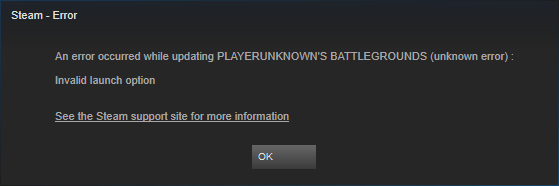
Any clue on fixing this? Was fine last night when I last played.
https://i.imgur.com/L4jb2zH.png
 quaint otter

If you're getting the "Invalid launch option" error please opt out of Steam beta client participation. Settings>Account>Beta participation

 Twitter
rugged night
Twitter
rugged night
That you so much you magneficent beast. I'm too tired to think clearly right now and my 10 minutes of quick searching didnt help.
Thanks anyway! Hope this works!
 crisp spoke
for some reasons it auto connects me to Asia servers (not a big deal but still annoing to have to change it all the time)
 feral jolt
@crisp spoke they tweeted about it, working on it
crisp spoke
@frozen granite0ps#4368 k thanks for the info
 pliant tusk
since the patch all my mouse sensitivity settings have been reset
 strange onyx
When are the DEVS planning to fix the fucking net code?
I am sick about how are the players teleporting in my face
Go ask EA Games for some net code programmers
gleaming vector
@strange onyx • We welcome constructive criticism but have zero tolerance for aggressive or entitled demands.
strange onyx
Yea, is constructive
I died 5 times already becaouse of poorly coded game
Much Fun, Very Apreciated.
140 million dollars and not able to hire good programmers
gleaming vector
Orrrr... It could be that the players you're playing against have poor internet and are desyncing... or maybe you are desyncing, or perhaps you are fiinding something to blame so that you don't have to feel like you aren't performing as well as youf eel you should ingame?
clever shale
@strange onyx Just go sleep and cool down lol
gleaming vector
Blaming the devs, and the coding, and the netcode isn't going to do much good... Unless you have a few lines of code you'd like to contribute that will magically solve all of the issues?
 pseudo epoch
strange onyx
pseudo epoch
strange onyx
@pseudo epoch that's another issue
I play BF 1 on 2k resolution with everything on ultra, I am getting stable 144fps
Ryzen 1700x @ 4.1 OC, 1080ti WC @ 2100Mhz
 safe lily
after the 5gb update whenever i try to get into a match my game crashes
strange onyx
so @gleaming vector why are those players with poor internet mission on Battlefield 1?
Missing*
gleaming vector
@safe lily Try repairing the game files?
Also, make sure you aren't on a beta channel of steam.
strange onyx
@gleaming vector arguments?
clever shale
@strange onyx I dont know what you are trying to get out of this by crying in the discord
gleaming vector
There's no argument to be had... There's me offering a logical counterpoint to your entitled whining on a subjective experience. I'm willing to drop it before you become more hostile and things get out of hand... are you?
strange onyx
@clever shale I am trying to make my point on fact that they are not working on important things.
Let's get more items in market, more maps, more bullshit
But keep the bad netcode
gleaming vector
@strange onyx so you've been in the Bluehole offices lately, been looking over their shoulders to see that they aren't working on what you want them to?
These things aren't an easy 1 click fix man.
clever shale
Why dont you go work at bluehole then if you know whats good
gleaming vector
Check the changelogs, and then check the performance ingame.
Things are improving.
clever shale
Then stop acting like you know everything
coarse junco
i for example have no problems with the netcode except if i'm downloading something while playing 🤔
gleaming vector
Sorry that it doesn't meet your gold standards for an Early Access game, but if you don't like it. Feel free to move along. Don't just come in here and flame on a team that works their asses off on a daily basis for you.
clever shale
Thats why i think its on his side
strange onyx
@gleaming vector I am playing since day 1 of Early Access, and the game it's getting bad over time
clever shale
Lol
gleaming vector
Then you should be thrilled to learn that Fortnite has just released a "Battle Royale" game mode... Have fun over there.
strange onyx
lol
gleaming vector
Drop the convo and move on. I'm done with it.
strange onyx
Yea, sure, take my money BlueHole, spend 1300hr playing the game
PUBG will be the new h1z1
or Day-Z
EZ money
gleaming vector
I tried to talk to you, I tried to diffuse your anger, I even warned you. Give over or take a timeout.
strange onyx
@gleaming vector you just have no real point. You did respond to a real question.
gleaming vector

gleaming vector
Try repairing the game files?
Also, make sure you aren't on a beta channel of steam.
 fresh radish
ty it works
gleaming vector
Awesome!
fresh radish
the problem was with the steam beta btw
gleaming vector
Thanks for letting me know! Now I can help others more clearly!
 cyan mortar
So i live in EU but everytime i start a game the default server is AS, this happened after the last patch, any idea how to fix it, cuz i am sick of changing the server after every single game.....
gleaming vector
That's a known issue @cyan mortar They are workign on it.
cyan mortar
yeah cool, i hoped there is a cheeky way to fix it tho
gleaming vector
Not so far as I've heard... Sorry bud
 tender ridge
Hello, since the last update, i am getting a black dot while scoping with red dot and holo, like constantly flashing. I know its a known issue for like 6 months. Problem is the only solution i ve found is set AA to medium or higher.
But i want to play with it on very low
clever shale
Changing the AA does not even work for me
tender ridge
All the people i know, apart from one have it.
So i guess its a new bug with the update?
 violet hare
It's more common with the update
tender ridge
I see, so i guess we expect hotfix on that or sth, since its consistency increased that dramatically
cyan mortar
I changed AA to high and don't have such a problem
 plush void
i had the fps drop in-game after patch, turns out it wasnt reshade, it was my screen scaling, it was maxed out
lowered it and back to 60fps
violet hare
I'm hoping for a hotfix for some of things that the update introduced, and not a hotfix that's a month down the road
tender ridge
I feel like the dot problem is kind of game-breaking, since u cant really see where u aim
clever shale
kind off
violet hare
Eh, discount red dot. Can't afford a circle, so use a square. Can't afford red, so use black 😛
violet hare
lol
 keen marsh
tender ridge
keen marsh
tender ridge
same for me in EU
fast sky

wtf is this
my only explanation is that he was actually behind the tree when i saw him peeking
i missed half of those shots but the last one should've been a headshot
by missing i mean i admit i wasn't aiming at him at all
but the last one was just below his head
0 hits of dmg done
 left urchin
ist really annoying :/
violet hare
After the update, has anyone tried deleting their backup ini files in the appdata folder? I've heard that should fix some fps issues, but keep in mind it will also clear away your bindings and they'll be set to default bindings (unless if you made a backup and copied over afterwards)
clever shale
@violet hare I did that..made sure I saved my jump + crouch bindings.. but not sure about the fps I have not tested it yet
plush void
it takes 2 seconds to change from AS to EU/NA 🤷
violet hare
@clever shale I'm curious about the fps. Seems like a strange fix, but I might try it when I get a chance to tonight
I'll try to remember to post an update if I get an attempt at the fix
plush void
@violet hare how many frames did you drop?
i lost 20ish
then changed my screen scaling and fixed it
it was maxed out

changed it to 90
probably doesnt need to go that low XD
 glacial flare
oh no my game is still slow even if i put screen scaling on minimum lol
feelsbadman
violet hare
@plush void I've lost probably 30-40. Messing with any of the graphics settings didn't do anything for my fps, so I just went back to ultra on some things
glacial flare
ima just give up till it guts a fix if not guess ill have to wait till my birthday and chirstmas for my 1080 ti lol
 potent stump
is anyone having a problem where the defaut server isn't your own? Like it keeps defaulting to asia for me when i'm in NA
violet hare
I believe everyone is. The bug's probably been reported many times by now
potent stump
okay, thank you
violet hare
By the way, get your empty array out of my JSON!
 rustic dew
has this bug been reported yet?

you can see the aimpunch going all weird while he is leaning
violet hare
Oh, that's painful to watch. I haven't seen that, and I'm not sure if anyone else has been experiencing it
 calm nova
hmm that grenade that crashes the game 
violet hare
Nope, not at this time
 summer spear
alright thanks
gleaming vector
Known bug, they're working on it.
 proud stone
Does anyone have a fix for that potato textures for the buildings at the beginning, i've seen a few people with this "bug"
gleaming vector
Install it on an SSD? That's the most common solution I think... it's just a loading speed issue.
proud stone
did that already but seems like it didnt work for me idk its just frustating
gleaming vector
Not sure.. I don't know of other solutions, but you're welcome to peruse the forums for others who have had the same issue..
 pastel berry
My voice chat in game still isn't working after verifying integrity, un muting and muted chat a billion times, and changing chat settings in ini, any other suggestions?
violet hare
Check your Windows playback/recording devices
As well as which device Steam is using for recording
pastel berry
I have defaults in windows set up properly for both mic and headset, and steam is receiving input from the right mic
violet hare
I would do a mic test in Steam and make sure everything sounds good
¯_(ツ)_/¯
Chat has been buggy lately after the patch, too
glacial flare
does anyone know or have a guess when the games fps will fix after the update im triggered over it lol i have ot run the game on very low anyway then all of a sudden the update comes and my frames drop and its so triggering
gleaming vector
What kind of rig are you running?
gleaming vector
Low across the board isn't always a very good option.
Especially for games that aren't fully optimized.
 hybrid rapids
Why can't i change my nick at this discord...
gleaming vector
because we don't want people to troll... what would you like your nick to be @hybrid rapids
glacial flare
yeah im looking to upgrade just my game was running smoothly last patch when i was on low settings now it its dropped i can play it still but will not be enjoyable
violet hare
"Don't want people to troll" - that's tough
hybrid rapids
Nathaniel_Iten so i can just write 'pubg name same as here', please.
gleaming vector
I gotchu bb  @hybrid rapids
hybrid rapids
Thanks.
gleaming vector
@glacial flare Try setting all of your settings to something like Medium and see what happens.
glacial flare
@gleaming vector made it worse :/
gleaming vector
well pewp. Sorry mang... .-(
glacial flare
yeah ill just have to wait a bit i guess cuz it just feels so sloppy since the new patch im hoping something fixes if not ill just have to deal with it till i get my upgrade
gleaming vector
Sometimes a clean install has helped guys recover some performance.
violet hare
@glacial flare You could try to delete the ini files in appdata and then verify the game's files via Steam (or start up the game - it might just recreate the files). I've heard that solved fps issues for people, but it also sets your settings back to default
I haven't tried it, yet, so I'm curious if it works
glacial flare
how do u verify the games files via steam ?
and by ini files do u mean just the tslgame folder ?
violet hare
Right click on the game, select properties, select local files, and then click the "Verify integrity of game files..." button
I can't say which exact folder right now. I should be able to later tonight
glacial flare
ill try it ill say if it works or not
violet hare
Another thing that's out of PUBG's control is Windows 10 updates
glacial flare
it didnt help so maybe it is windows 10 update is there a way to fix that ?
rustic dew
@violet hare I think you pinged the wrong guy 😄
violet hare
@rustic dew Haha, sorry about that. I have no idea how I pinged you 😛
 sterile crypt
how do i invite someone to my room?
violet hare
Room in Discord? Or your group in PUBG?
glacial flare
urrm
i think it was my comp fault
i just changed my settings so it only displays one monitor
and my game is running smooth again
gleaming vector
heh... weird.
 marble coral
Hey guys, does anyone know how to set the crouch jump? I wanted to edit it from shift +V to shift + Space, but it doesn't bind the second one
coarse junco
you can't bind it anymore
marble coral
why? o.o
clever shale
Reshade problems fixed yet?
marble coral
@coarse junco You can bind it by editing the GameUserSettings ^^
viral monolith
Not pubg related but can anyone tell me why my liquid in my cpu cooler is at high temps while idle with fans at 100%?
gleaming vector
Faulty Thermal compound?
gleaming vector
Are you on a Steam Beta channel?
 clear relic
no i checked
viral monolith
I mean its been doing fine the past 3 months just started happening
gleaming vector
Fresh install?
clear relic
idk i have a bad internet tho
gleaming vector
Could be that your thermal compound has dried out, or there wasn't enough of it... could be anything like that... first thing I would check would be that... after that it would be the water pump isn't working.
@clear relic I know it sux, but a fresh install might fix that.
clear relic
ok thx
viral monolith
Well i guess ima order some new compound right now then
viral monolith
Yea i was planning on getting arctic silver when i got my new cpu anyways
coarse junco
@marble coral not sure if you still can do that
 ashen maple
is targeting when you hold down the crosshair or when you scope in
hasty beacon
@gleaming vector is thier a possibility of a chat being added where we can upload random and with moments happening in the world of pubg like bugged out gun, loot crates imposible to reach say oh like in the middle of the sky can only see it with a 4x or 8x scope
gleaming vector
THat's a little fuddled... Do you mean a Discord channel?
hasty beacon
I mean like a chat we're talking in now, so we can upload pictures to and people can react to them and reply to them
PUBG related pictures
gleaming vector
gleaming vector
Upload to Imgur and link them
This server doesn't allow uploads... 30k people is too much to allow them.
 coarse junco
it's a bug, they are working on it
 lavish hazel
@coarse junco my thing or @open crag
viral monolith
i think it was a bug its running a bit lower c on idle now but still pretty high
lavish hazel
no
 open crag
@coarse junco i do
 rotund rose
Any comment anywhere about the leaderboards/stats not updating for a 10 hour period last night?
I can't see a tweet even mentioning it
coarse junco
@open crag your problem has nothing to do with the gamepad, the region change is being worked on.
open crag
but why do they test patch over 2 days only
coarse junco
@lavish hazel pressing enter doesn't help?
open crag
who does that
coarse junco
That bug occurred once they moved the update to the real servers afaik
@rotund rose stats should work, are you sure you are looking on the right region/gamemode? There is currently bug which switches up the regions in the menu
rotund rose
I have about 10 games from last night that haven't appeared
Using the live tracker at pubgtracker.com
 swift vault
Friend is unable to launch the game he says it opens then closes itself soon after. He verified files, is not opted into beta, and did a clean install
 hard wing
any1 getting drop fps after this update ?
espacilly when driving a car
im playing on very low settings
before update everything was working perfect , after this 5 gb im getting drop fps every 4-5 seconds
cinder cloud
@swift vault What AV is he using,?
swift vault
for a non tech person, what is AV
also, this just started happening after the new update, he was playing fine yesterday
fast sky
antivirus maybe
swift vault
yeah that popped into my head, i just find it weird that he was fine all the times we play, but after the update his game wont launch
 mild thunder
hello hello
i really need some assistance :(
about three weeks ago, maybe four, i switched from full screen windowed to something else
and ever since then PUBG won't run at over 15 fps
that literally 100% did something
changing it back was a nightmare
i uninstalled to try and fix it, no luck
 torn hornet
it was top 4 left, i was fully kitted and host closed connection. wow.
 tidal mountain
every time a game is over, it shows Asia servers as the default... it used to have NA servers as default... and i accidently keep starting up the asia servers. can i fix it or am i screwed?
cinder cloud
@mild thunder Press Win key + R type "%localappdata%" without the quotes
and remove the TSLgame folder
that removes all setting files of pubg
@swift vault i ment Antivirus yeah
mild thunder
after i uninstall the game, @cinder cloud ?
mild thunder
so remove the game, then remove those files, then reinstall?
mild thunder
opened steam
it's just started a 5gb pubg update
i guess i'll let that do that first
mild thunder
uhhh
GTX 965M
i've got like 40 hours on the game
was playing fine
decided to change that one thing
and it just instantly fucked up
cinder cloud
Well the 965m is a very low end chip
mild thunder
haven't been able to play since :(
yeah but i've been getting over 70fps for so long :(
mild thunder
nope
rotund rose
nothing about leaderboards not reporting last night?
cinder cloud
@karmic condor its a known bug they are working on it
 karmic condor
@cinder cloud thanks! i appreciate it
 mighty lynx
Yea I noticed that
When I start searching on AS servers, it doesnt let me cancel either
weary warren
@tidal mountain It's a known issue right now.
tidal mountain
AV means audio/ video too
violet hare
I'm starting to wonder if this Discord should have a channel dedicated to keeping updates of common bugs (and maybe fixes), so the same question about the same bug isn't asked and answered many times each day. Or possibly a bot?
 blissful nymph
yo @ devs i need help. my friend has an issue with loading the game up. he gets stuck on the church screen and it says loading on the top left.
@weary warren pls help. he tried the cmd thing, tried reinstalling it multiple times.
 bleak imp
Oui! I've played with my usual group of 8.. we rotate throughout.. and we're all experiencing a high delay in loading the intro-lobby, from leaving the game to refreshing, it takes 5x as long to complete the handshake.
violet hare
@blissful nymph Check out this post on the forum. There might be something in there that could help you out: https://forums.playbattlegrounds.com/topic/4469-connectionsteamlaunch-issues-a-comprehensive-guide/
PLAYERUNKNOWN'S BATTLEGROUNDS Forums
Update: If you are having an issue connecting to the servers please note what type of connection you are accessing from. (Ie: Home, Work, Universit...
blissful nymph
am i allowed to post pics here?
its not a connection issue, at least what i know of
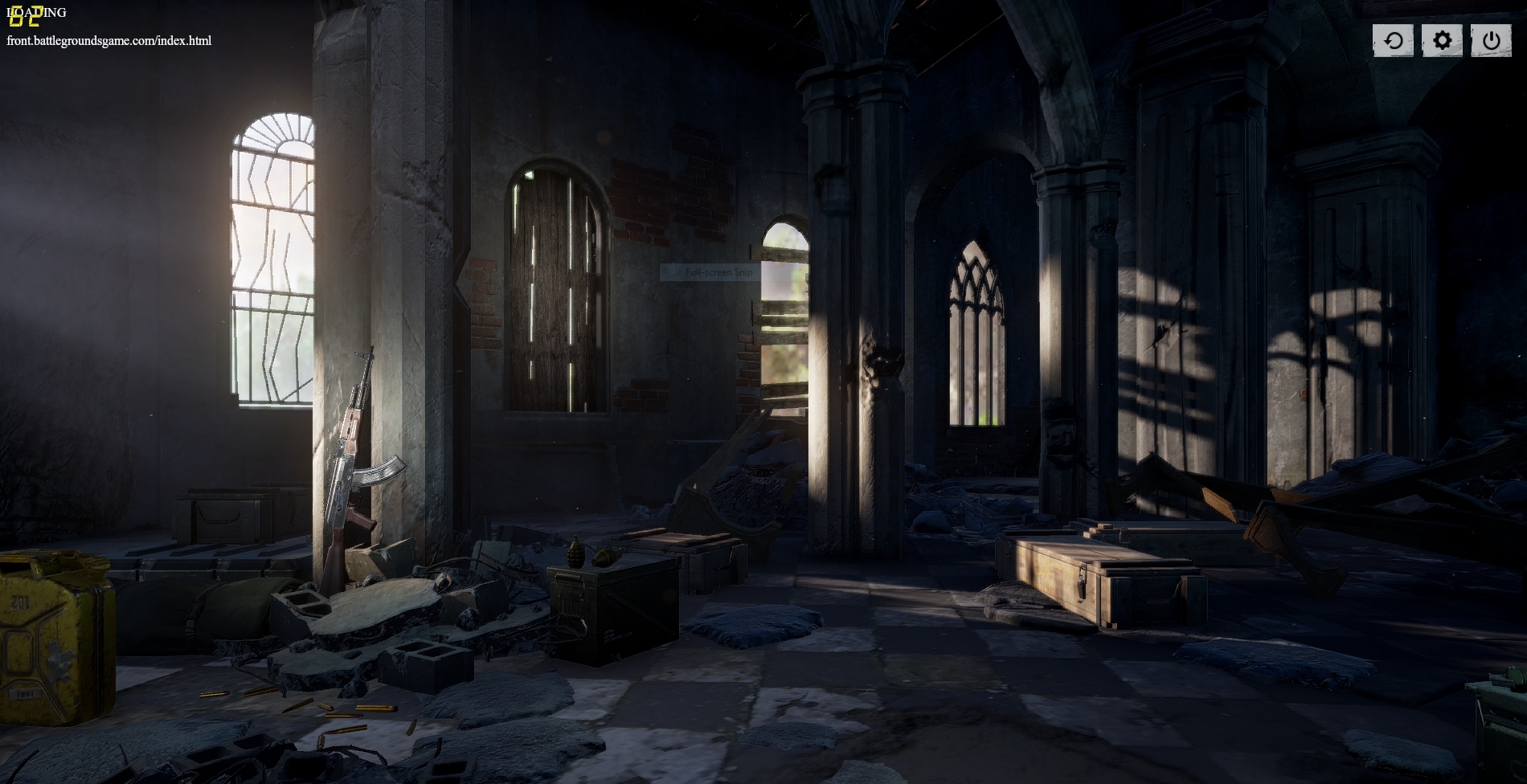
thats pretty much his screen
he tried restarting steam, uninstalling and reinstalling, verifying files, flushing dns and the netsh winsock reset method on cmd.
weary warren
@violet hare is right to suggest that thread @blissful nymph
blissful nymph
okay ill show him
uh
what step am i telling him he should follow?
this page is clustered with stuff
viral monolith
anybody getting bad fps drops since the update
down from 140 to 50sometimes
i7 7700k gtx 1080ti medium and very low
violet hare
@blissful nymph I might recommend looking into the first paragraph (tethering to a phone for network), checking antivirus/antimalware, and checking out the firewall section
Something's blocking his connection, and you've already followed some of the tips listed in the thread. Hopefully you guys can narrow it down somehow, because that can be caused by a lot of different things
 candid marlin
 oak surge
Hey I need some help
Wondering why I can't find a random partner for duos?!
Tried 9 times, never been matched with someone random..
 leaden oriole

Could not interact with anything after the first 5 seconds of the game @PLAYERUNKNOWN @PUBG_help https://t.co/YKcRBdVnWo
Twitter
No interaction bug at the start of a game (not sure how it happened)
 subtle lava
it's a bug in the current patch
 pliant fog
hmm ok thx
 bronze vortex
@neat scaffold can i get a inv to this discord for my friend
 candid breach
!invite
 regal vaporBOT
Invite URL for Discord: https://discord.gg/battlegrounds
candid breach
^^
 brisk plaza
Hello, I'm here to report a bug.
There are certain locations where if you run up to an object, you get stuck permanently unless you get killed or shot by a teammate. I found one of them near the school, and recorded a video of it.

to be more specific, the location of this stuck spot is right here. https://prnt.sc/gldqgt

This was really frustrating, as I couldn't do anything, and I got pushed and eventually killed.
 dawn cobalt
I've just installed the game through Steam. There the menu doesn't function properly at all, I can't create my username and the UI barely allows me to click on any buttons
is that normal?
feral jolt
@dawn cobalt did you try verifying cache integrity ?
dawn cobalt
@feral jolt So I think I have resolved this. the PlayerUnknown.exe wasnt functioning but the 'Test Server' executable is. Is this because PUBS is an early access game?
feral jolt
That's weird to be honest. That might have to do with firewall blocking the .exe but not sure about that.
Issues with the game are really complex. You might want to hit the official forums if your problem persists @dawn cobalt
dawn cobalt
@feral jolt So is there any fundamental difference with the game .exe and test servers .exe?
 clear jacinth
help na
feral jolt
@dawn cobalt They're basically 2 different games, one is to host regular servers, the other for the test servers
 west sleet
Hello, I would like to report a bug.
When you play on windows 7 with the taskbar on top, you get an off centered mouse in the menu (the click is higher than the cursor). This problem disappears if I hide the taskbar
 idle goblet
it keeps sayinf that i have 0/0 friends
even though i have more
i also checked that my steam was online
and i also refreshed the UI
pls help
pls help @weary warren
 stone heart
Click "Refresh" in the friends list and they'll pop up.
 pure yoke
I got some graphical glitch in the latest update, whenever I scoped in using rds/holo sometime there will be a black box glitching out near the dot is.
2x also
is that because of the forced pp?
hasty beacon
@oak surge forever alone
pure yoke
am running rx580 and ryzen 5 1600 if that matters
idle goblet
@pure yoke same thing happens to me idk why it happens 😦
have you found a fic yet?
fix*
pure yoke
some people on reddit said to change AA to Medium/High
idle goblet
ok
pure yoke
@idle goblet I havent tried it yet
idle goblet
oh
i cant be bothered to get into a game get = an AR or a good gun and find liike a red dot or a 2x
xP
pure yoke
Just on lunchtime so can browse some reddit/discord to play later on hahaha
idle goblet
are you AU?
pure yoke
EU
viral monolith
DOES PUBG STILL LET YOU DISABLE MOUSE SMOOTHING?
clever shale
@viral monolith Its not enabled by default
Is reshade still giving problems with pubg? I want to try reshade again
grizzled kernel
just buff up digital vibrance from nvidia control panel
clever shale
@grizzled kernel Its already on 100% but it still looks to dull
cinder cloud
Reshade is working fine
clever shale
Did you used to get the battleye error message?
 fathom sierra
someone can tell me why my friends ( xbl4ck ) winratio is higher than mine ? we played all games together and his is higher...
cinder cloud
prob more stats involved then just the number of games.
fathom sierra
well im better in every single stat which is listed on this statistic stuff ingame ^^
fathom sierra
i looked at all stays in pubgtracker and at non stat he is better ...
 coral kettle
this bug is in the game for some reason :v
coral kettle
i just landed in the building and got stuck like that
 tribal gorge
Lmao
 foggy jay
Im new to this game starting today so IDK
tribal gorge
its because you didnt boot the floor in time/houses.
and it basiclly said there is nothing (for you)but for other people there is so it makes yu fly in ur place
its what heppend to me once and friends told me that
 night whale
It looks like you got through the floor but someting on your belt has collision and got stuck.
So you are stuck in the air and therefor cannot move
It should't happen. But it can happen in any game with physics.
viral monolith
Hey guys. I'm really into PUBG but I don't have a gamer PC. I have the top spec Macbook Pro 2017. Is there anybody with experience playing PUBG on this with bootcamp windows? Thanks for the help!
clever shale
@viral monolith You should probably make a thread on the subreddit about that.
 frank moon
Highly doubt it @viral monolith (speaking with no technical experience, fyi, in case you think as a moderator I might know more than most). My macbook barely runs CSGO - it's 2015/6 top spec but can't be much different.
Looks as though it's the graphics that will be its downfall, rather than the processor.
Gotta love Macbook Pros tho - best thing I've ever bought.
 silver delta
PLEASE >>> http://prntscr.com/glhhp1
 cinder cloud
Wasn't that the guy that punched people when they were still parachuting
think i saw a clip of that
silver delta
so many days hacking & anticheat is sleeping
cinder cloud
@silver delta not really yesterday 150.000 players were banned
and 8k in the last 24 hours
Its just that BattlEye bans in waves
silver delta
but this guy still hacking?
cinder cloud
He'll likely get banned soon
silver delta
we got hacked 2x by this guy last night fpp
cinder cloud
So lets say you shoot in the same pattern multiple times
they can then track that pattern across multiple players
and instantly ban everyone thats using the same cheat
Thats usually how it happens
 wintry geode
Why does my matching automaticly reset to Asia server after every game i play on EU?
 rustic halo
connection closed :=(
viral monolith
same
rustic halo
@Moderator @Admin @Community Manager servers are closed ?_?
vestal drift
!invite
regal vaporBOT
Invite URL for Discord: https://discord.gg/battlegrounds
 grizzled oxide
DOWN
viral monolith
yes this
 safe gazelle
what do i do when this happens? it's really annoying and will not open the game
grizzled oxide
@safe gazelle delet the reshade files
safe gazelle
@grizzled oxide is reshade blocked in pubg now?
safe gazelle
so i just have to go into the file that it says is blocked and then delete it? @grizzled oxide
rustic halo
@safe gazelle"fuck_me.png" monkaS
safe gazelle
yeah nice name right?
 plain ibex
this fucking reshade blocking happens almost every f*****g day
 slow vale
closed for yall right?
plain ibex
its almost as if its on purpose
grizzled oxide
delet:
Reshade-shaders
Both .ini files
All dxgi files
rustic halo
reshade is junk. use monitor color settings
grizzled oxide
in Steam\steamapps\common\PUBG\TslGame\Binaries\Win64
safe gazelle
what is the files ini & dxgi? what do they do? @grizzled oxide are they also for reshade
grizzled oxide
they are all from reshade
 small laurel
@rustic halo color settings does nothing for sharpness though
viral monolith
when it gona be up?
 peak owl
i really doubt reshade is being completely blocked.. this happens all the time.. Servers are up and down, reshade is throwing a tantrum.. community UPROAR
 chilly plover
are the servers still down?
peak owl
according to my discord, yes.. everyone is in full panic.. lol
 mental hare
regal vaporBOT
mental hare
regal vaporBOT
Invite URL for Discord: https://discord.gg/battlegrounds
chilly plover
@peak owl quick question, is there a way to change the default server pick? when im starting the game its set to asian servers by default even though i live in denmark (EU)
 hushed magnet
it's a bug since last patch, they are aware of it
peak owl
^
hasty beacon
connection closed, connection closed, connection closed, connection closed, 😡
 spiral current
Can someone help me? As of today I keep getting this message pop up after attempting to lauch PUBG.
small laurel
it's reshade being blocked again
spiral current
Is there anyway to get around it?
small laurel
delete files or wait til they fix it
peak owl
if you like reshade, patience is a virtue
hasty beacon
run the game from steam not on the desktop should work then but the connection is closed so no point
 limber umbra
@hasty beacon ive been opening it from steam.. but I get the problem, so what now?
 minor prawn
what's going on with the game
 stiff yarrow
Reshade: When you launch PUBG battleEye checks any dll's assosiated with it. It then checks online if the unknown dll is allowed or not.
When the servers are unstable battleEye doesn't get a reply back, so it says it's blocked since it can't verify it. -Vakuum 2017
minor prawn
connection closed as fuck
night whale
You beat me to it 😃
I always get reshade errors when the servers are unstable. It has always been like that, and it will probably always be like that. It's how battleEye works.
stiff yarrow
I am too lazy to write the same explination xD They should just auto post it every 10 seconds
coral kettle
good thing its not vac
 devout wolf
anyone have this problem?
night whale
lol
devout wolf
I did not change anything in the game nor did I change any settings, just shut down my PC yesterday and turn on today to play PUBG.
night whale
read 5 lines up
devout wolf
lul
 dense yoke
guys, why does my PUBG always defaul to AS servers although i live in EU and i play only in EU? its getting rather annoying :(
night whale
bug in latest patch
night whale
yes
night whale
It's what injects reshade into the dx pipeline
just rename it to dxgi.bak for example
and rename it back later
 bronze walrus
all servers atm
 ancient kraken
ok cheers. takes about 15 reconnects to get in
 hard plover
Anyone else getting a very faint buzzing sound in the right speaker/earphone, while playing?
 burnt orbit
hard plover
burnt orbit
hard plover
did it start to happen with this new patch for you?
 digital ginkgo
Guys, what is that about the Rooms? When lookin for a player everybody says: Looking for a player server xx room xx
violet hare
Scroll down in the channel list to the voice channels. There's voice channels name "Squad Room X", "Duo Room X", etc. that you can join
 buoyant bluff
viral monolith
buoyant bluff
viral monolith
Well figured out my pump died in my cpu cooler its only 6 months old do i contact newegg or nzxt themself?
coarse junco
try contacting newegg @viral monolith
dense yoke
contact newegg and if they say that its out of their controll and you have to RMA to NZXT, then contact them
coarse junco
^
gleaming vector
👆
I had the same thing happen on my Corsair unit... Corsair RMA'd my cooler and gave me a new one.
violet hare
That's typically the way you should handle stuff like that. Go to whom you bought the unit from, and they should be able to direct you to the next steps, which may be having to reach out to the manufacturer
minor pagoda
If I change code control this file I will have banned?
I change for like below photo
violet hare
One of the reasons for the patch was to prevent being able to do this in game. It's possible to be banned for editing the ini files, especially if you're trying to bypass what they're trying to prevent.
minor pagoda
ok I will to default setting
If I will to default setting In have not to banned?
I fear to do this TT
I have to default setting
Sorry to disturb this channal
violet hare
lol, not disturbed at all
 mystic mauve
anyone elses client defaulting to AS server? even when i switch to NA for my game when i go back to main screen it goes back to AS
mystic mauve
okay thank you
violet hare
👍
 static snow
can you shoot through crates now?
violet hare
You can shoot people. That's about it
static snow
ok because this guy just shot me through a crate, and also my duo partner
he was on the other side of it
and I could see the bullets coming through
violet hare
Did you recently run behind it? Could have been desync
static snow
nope
violet hare
Did someone else shoot you from behind? 😛
static snow
no it was only 1 guy
violet hare
¯_(ツ)_/¯
I'd imagine it were desync in some way. I don't think anyone's using hacks, yet, that allow you to shoot through objects. At least I haven't heard of that - just speed hacks, recoil macros, and aimbots
safe gazelle
does anyone have any good reshade settings that will not make this message pop up?
coarse junco
@safe gazelle reshade is currently being blocked by BattlEye, you need to remove reshade from the game for that time, changeing setting doesn't help atm
coarse junco
You can enable digital vibrance in your graphics card settings
 eternal needle
After every solo match I play (Usually FPP, NA) my match settings change to AS Servers Solo (3PP). I understand that most people are placed into 3PP after a match, but why are AS servers defaulted for me? I live in east coast US.
eternal needle
Oh okay, thanks
 wise turtle
Its stuck on this
For like 2 days
Even after update i am still facing this issue
@coarse junco
minor pagoda
@coarse junco
If I have to default setting In have not to banned?
I fear to do this TT
I have to default setting
In my post
coarse junco
@minor pagoda if you use the default bind you won't get banned
minor pagoda
Thank you for answer
coarse junco
@wise turtle are you using a firewall or something like that?
wise turtle
I saw like a youtube tutorial
He said something bout
Adding firewall inbound outbound rules
Something like that
I did that
Game was running fine till 13 September
After that i got stuck on that main menu
@coarse junco
 stray moat
how do i report team killers as im getting fed up with going into squads and getting killed by teammates
coarse junco
@stray moat For reporting players please follow these instructions:
http://forums.playbattlegrounds.com/forum/35-report-a-player/
PLAYERUNKNOWN'S BATTLEGROUNDS Forums
If you wish to report a player or appeal a ban please read the instructions inside.
@wise turtle try verifiying your gamefiles
wise turtle
Tried
Mate
Its not getting past the main menu screen for like 30 minutes ... my game used to run smoothly before
No issues
coarse junco
have you tried the stops there https://forums.playbattlegrounds.com/topic/4469-connectionsteamlaunch-issues-a-comprehensive-guide/?tab=comments#comment-19309
PLAYERUNKNOWN'S BATTLEGROUNDS Forums
Update: If you are having an issue connecting to the servers please note what type of connection you are accessing from. (Ie: Home, Work, Universit...
?
or tried rebooting your pc?
coarse junco
try steps 8 and 11
wise turtle
Okay
Imma do that
Doing step@8
And then 11
I'll revert back to you as soon as i get to a result
violet hare
It's a known bug introduced with the latest patch. It's being looked into. There's currently no way to set a default region.
coarse junco
^
 teal sage
Thanks
violet hare
No problem!
teal sage
Just making sure I didn't do anything silly
 amber patrol
This ain't the correct spot but I can't find it.
An AFK room should be addead and people that are in the voice channels afk'ing for longer than 25-30m should be moved there.
It get ridiculous the amount of guys occupying the squad and duo rooms while being afk
 quaint charm
HOW THE Actual living fuck do I download Battleye
Rainbow, Ark, 7 days to die, Pubg nothing is working
quaint charm
@coarse junco I have to for some unknown reason
 rancid trellis
any idea why everytime i want to click play the settings jump back to asian server?
 agile comet
@gloomy brook can you change my nickname to 10SladeGV please? It would make it easier for people to fine me 😄
coarse junco
@quaint charm why do you think that?
quaint charm
No idea. Just everytime I try and play the game it says "Failed to install battleye" i've unistalled and reinstalled battleye NUMEROUS times
@coarse junco
quaint charm
ill try thanks
violet hare
@viral monolith Go to #287779430548635658. This channel is the completely wrong channel for that
lol
@viral monolith Just for that, here ya go
😛
 mighty osprey
i get 60-100 fps but in fpp it feels super soggy and sticky compared to 3rd person. Alot of screen tear too. I know a few others who say the same. Is this a common issue that people just try to ignore or is it only to a few?
 crisp vector
Can anyone please help me. Prior to the update my game would become unplayable about 2 days before a patch was released (Constant network lag and FPS dropping from normally 60+ to 1 and staying there, then causing my PC to freeze.) Now since the update my FPS jumps from 60+ to 1 for a few secs then jumps all around anywhere between 1 to 54 frames. Once I jump out of the plane in game 1 of 2 things will happen. My game will just freeze entirely or ill land on the ground and it will take about 5 to 10 minutes for the building just to appear all while my frames are jumping all around. The red zone will also drop my frames really low or crash my computer. I've tried reinstalling the game and verifying the game files integrity both of which havent fixed the problem. I've updated my drivers as well. I dont think its a PC issue since this is the only game I have problems with. If anyone has any ideas or solutions please help me.
 junior mortar
whenever i pull out my parachute my game lags for 10-20 seconds doesnt load the texture very well is it because of my internet connection, my system or there is an issue with that?
coarse junco
do you have the game on a ssd?
 rapid hemlock
Every time I open the game it puts me on Asian server. I always have to change to EU. Can we get a setting for default server ?
coarse junco
you can't set a default server
the thing with the AS server is a bug
We're aware of an issue causing AS servers to be set as default after leaving a match. We're working to rectify this.
Likes
396
Twitter
rapid hemlock
kk ty, guess i'll have to bear with it for now
potent stump
anyone having the offline issue right now?
coarse junco
try leaving your team and create a new one
potent stump
worked, thanks
 stable meadow
Why do I keep getting error codes when I try to start the game? It legitimately worked fine like 4 hours ago
coarse junco
define error code
stable meadow
ill restart and see if I can give the exact numbers
.> well now it started up after about 6 times and then me posting in here
it was one of those "error at process 0x0000" kind of ones
coarse junco
can you screenshot it?
stable meadow
not anymore like I said the game started up just fine after it wouldn't like 5 minutes ago, when I decided I post in here to ask about it
😐
Tech always misbehaves
it's like you asking for clarity was what the game needed to boot up with no errors
coarse junco
ok, if you get that problem again, try to get the exact error or a screenshot
stable meadow
will do
junior mortar
@coarse junco no its on hdd i dont have a ssd
coarse junco
try setting the textures to the lowes setting
junior mortar
i already did
it only lags 10 15 seconds after i pull my parachute then everything goes back to normal
coarse junco
how much RAM do you have?
junior mortar
8 gigs
coarse junco
do you have any other programms open that could cause lags?
junior mortar
no but i know for sure that my internet connection is not good these days
can it be the cause?
coarse junco
could be possible
viral monolith
when will the god damn forced post processing will be removed
scoping with scopes produces fps drops cause of that shit now
junior mortar
there is also another detail that when i lauch the game for the first time the lagging doesnt happen
if i reboot the game after each match there is no problem
is it because the game still has a memory leak?
 celest lance
everytime i go to the lobby, it puts me on the queue for the AS server, even tho im located in the middel of europe....anyone know a fix?
 gray kite
I believe its a known bug and they'll fix it soon
 kindred mirage

 viral monolith
lol
 graceful quiver
when i log onto game cannot see my character nor the play tab
 cedar wolf
^^same
violet hare
Does it just say loading? If you have Comcast, that would be what's causing connection issues right now
wise turtle
Okay @coarse junco ive tried the 8 & 11 step that u told me to do
I am still stuck on that main menu
Been waiting for 5 minutes
Please help bud
wise turtle
Can anyone help me?
I am stuck on the main menu
Happenin since 3 days
Stuck there
amber patrol
@wise turtle whats wrontg
wise turtle
I am stuck on main menu
I start the game
So @coarse junco gave me a link to the forums
And there were some steps for the issues i am facing
Now its like i am almost cant even play
Its stuck on the photo ive sent above
Ive searched the web
Tried playing other games just to see if its my net .. played csgo .. no issues
@amber patrol
violet hare
@wise turtle Do you have Comcast?
wise turtle
Nah
Whats that?
I have given 500 hours to this game now its like i cant even get on
violet hare
Internet service provider
wise turtle
Nah mate
violet hare
Well that rules that out 😛 It's been a big issue today
 desert haven
try flushing your pc
wise turtle
Giving direct access of tslgame.exe and BEservice.exe to firewall.. set firewall to off.. just to see if game runs..
Now whom do i contact?
violet hare
Have you tried resetting your modem?
wise turtle
Yes
Restarted it
Even pc
Verified game cace
Installed windows updates
But still
Same fricking issue
violet hare
Are you able to set up a hotspot on your phone and connect through that for a bit?
You shouldn't really have to do that if you're on a home network
viral monolith
i'm having the same issue, it was fine yesterday and now all i get is the lobby but just the background
i verified files, uninstalled/reinstalled and same thing
violet hare
@viral monolith I'll ask you, too, just in case. Do you have Comcast?
violet hare
That'll be your problem. I would recommend checking out the conversation in #207019048607678464
viral monolith
k
violet hare
@wise turtle If you have antivirus/antimalware installed, maybe try disabling those and see if you can get in?
wise turtle
Even disabled window defender
 glad radish
@wise turtle same thjing is happening to me dude
wise turtle
But its in silent mode
glad radish
just started today
wise turtle
So what do we do @glad radish ? 😦
glad radish
idk
wise turtle
Shall we call @viral monolith ?
glad radish
Ive got comcast tho
wise turtle
@violet hare what do i do mate
glad radish
i dunno whats happening
violet hare
@glad radish Yep, Comcast is the issue. Check out #207019048607678464. There's quite a length conversation going on in there
wise turtle
Access to pubg is given through firewall
It never happened
Just happening now 3 days back game was smooth and running safe and sound
violet hare
@wise turtle Check your firewall settings. I wonder if there's multiple tslgame rules?
violet hare
Hm hm hm
violet hare
There's 2. That's not a lot, but I wonder if that's confusing it
violet hare
On that one giant thread with a bunch of possible fixes, there was one where someone had 4 TslGame rules. They used CCleaner, and that apparently fixed it for them
violet hare
Maybe try downloading CCleaner and give it go. Won't necessarily hurt, but it may take a bit of time
wise turtle
I have it
What should i do in it?
I guess i should uninstall the game and say byebye to it
😂
graceful quiver
Hot 93.7 Tell em why u mad
wise turtle
Restarted pc and router again
violet hare
Tools > Duplicate Finder > click Search
Default settings in Duplicate Finder should be good
Here's the example image from the forum thread: https://content.invisioncic.com/r273030/monthly_2017_03/CCleaner.png.5f9204057f1b829658b46c0acf178ffd.png


"I forgot to mention that before i ran ccleaner i uninstalledPUBG thru steam client did a restart then ran ccleaner another restart thenre-installed the anther restart and game connected"
That was also noted
wise turtle
Jesus
violet hare
Might be a somewhat lengthy process 😛
wise turtle
I have a shitty speed
violet hare
If you want to try something out quicker and a bit stranger
wise turtle
If i uninstall my game mow
violet hare
"Set your main monitor to 800x600 resolution and try starting the game. I don't know why this worked but it did. Afterwards I could tab out and set my monitor back to native and then make the game fullscreen at the native resolution."
wise turtle
Now*
violet hare
meow*
wise turtle
I have 1600x900
U want me to go 800x600
Then how would i even open steam and launch the game
violet hare
Lol, you should be able to
wise turtle
It might just cause my monitor or pc to crash xd
Wait how much gb is the game?
If i uninstall?
viral monolith
7.5
wise turtle
Holy fak
 tame knoll
am i losing frames because of the forced shadows, before i had shadows on low and was getting 120+fps now im getting barely 60
violet hare
Yea, about 7GB
viral monolith
i uninstalled and reinstalled, took me 6min
still doesn't work because of that comcast crap
😡
violet hare
Bow to the ISP gods