#🤝│community-troubleshooting
1 messages · Page 54 of 1
 quick chasm
 errant torrent
yeah doenst work 😃
 novel igloo
yup
 lime garnet
The day I want to play PUBG, the day I get the server too busy bs
quick chasm
Well then theres nothing we as users can do. Something happened with the servers when they aren't granting the connection
 tropic palm
hey, any way to report bugs aside from posting on the forums?
quick chasm
Went through basic troubleshooting?
Steam restart, verifying game files, pc restart?
@tropic palm forums are the most effective way as each report gets reviewed by a staff member
quick chasm
You could forward the bugs directly to community managers if it is a serious exploit that shouldnt be posted online infront of mass of people, but don't quote me on that.
If you have such thing to report and don't want to spam them all, i can forward it to the right person for you
 fossil sorrel
How 2 show the helm and armor on FFP?
quick chasm
You can toggle hud options for weapons and armor in settings @fossil sorrel
fossil sorrel
Hmm dident finde it try again
quick chasm
They show up on your screen while playing. Im not on my pc to show you the screenshot where it is but its pretty easy to find.
 viral monolith
@frank moon @gleaming vector , @low crater and i were just trolled by @sick laurel who just started shooting at our backs and being really annoying in voice
 snow jay
Hey guys, I've been having issues with BattlEye for a while, wondering if anyone could help fix it because I've tried a lot of different things to no avail https://www.reddit.com/r/PUBATTLEGROUNDS/comments/6rsgxy/can_anyone_help_me_figure_out_what_is_wrong_with/

reddit
9/10 times I go to launch the game BattleEye blocks files that are required by the game itself. I reinstalled multiple times and it doesn't help,...
 edgy charm
My game after about 10 mins into a game says Network Lag, I cant move or do anything then it kicks me from the game. This has happened 6 games in a row now and I cant even finish a game. This only started happening after the new update
 vernal heath
Okey so i just started to play PUBG and so far it's OK.
got a few problems that i want to fix, but it's pretty hard cuz i simply don't know how yet.
i googled some settings and basically did copy it and those are realy good i like them. but then again i still get an annoying message: Network lag.
What does this mean? like i have checked my internett which is 150/150 and never gotten any lag elsewhere. my pc is up to date with the graphics and stuff. at least i think so ^^
so how do i fix this? asked a few friends aswell but all they said that it might be an update they are doing on the servers. help plz!!!
 chilly bear
The network lag probably isn't caused by your internet. It is most likely on the server side, nothing you can really do about it, just wait for it to go away
 late solar
so annoying getting stuck..
btw, i think the lag comes from the servers, i had the message "too many players, try again alter" or something like that.
vernal heath
yeah i had that message first but went in and out of the game and then that was fixed. but okey i'll give it a few days and see what happens. but is it anything i need to check first?
like settings, update of drivers in the pc, evne tho i know they are since i did it 3 days ago. contact my internet support company
 blissful sparrow
I wish there was a way to get in touch with the Esports Division becuase they don't seem to have been seeing my emails ( I assume the email is clogged with late applications or something.). I just have a few statistical questions that would be cool to have answered.
 outer ember
How do I buy keys for Gamescom crates?
 shrewd thunder
buy crate, click on crate ingame and buy keys is on the left hand side, steam window pops up with purchase details.
 desert pagoda
It the shadow tone/colour difference between the detail settings intentional or an artifact of UE?
 languid flume
Is there any fix for buildings not rendering at the start of a game? Its happening to me every game
shrewd thunder
invisible or potato buildings?
languid flume
potato
shrewd thunder
most likely fix is unfortunately getting more than 8gb ram or using an ssd
if you dont have already
shrewd thunder
game still early acces might improve in time without upgrading
languid flume
yeah, thanks 😃
 latent niche
Every time I launch the game or have to return to lobby it fails to connect and I have to hit cancel and reconnect for a random number of times before actually connecting
Anybody else got this issue or know how to fix it? Have had it since the the patch prior to the big monthly update
 brave talon
are you alt tabbing smithy
latent niche
Yeah, but ive done that many times before this
brave talon
dont do it when you're queing
latent niche
And when I load the game up for the first time I dont alt tab and still get this issue
huh
brave talon
Don't alt tab when you're loading the pubg game up
latent niche
Its when I want to return to the lobby
brave talon
or before you queue into a game
latent niche
This isnt the place to beg for the game @viral monolith
brave talon
@latent niche what does your screen say exactly when you return to lobby
latent niche
The connecting screen
Im pretty sure tabbing out has nothing to do with tbh
''Connecting, waiting for server response''
brave talon
@latent niche maybe but tabbing out during games and such causes problems for me so
latent niche
Not for me though, and I dont wanna not tab out cos the devs caused an issue. I wanna look at stuff between games \ 😄 /
brave talon
@latent niche ur fine for that but when your game loads and you alt tab it crashes it
at least for me
what servers u play on?
and by game load i mean joining a game
latent niche
Yea but its not connecting to the lobbies, its connecting the main menu
brave talon
this only happens when u reconnect to a old game or try to play new game or both
latent niche
atm you cant reconnect to a game
But its every time I launch the game and connect to the main menu and every time a game ends and trys to reconnect to the main menu
You cant really expect to join anywhere and just say ''hey, someone buy me this $30 game''
Nobody will know you or want to
If you arent old enough to get a job ask your parents mate
Thats all I would say
No
 rancid oak
ive been having the same issue as @latent niche for the past 2 weeks, and nobody has managed to find a solution.... starting to get irritating having to restart my game 15x just to load to the menu especially when im playing with other people. i spend more time trying to load to the menu than actually playing per day it feels like
latent niche
Yeah Keith
Nobody seems to care about it and the devs havent adknowledged it as far as I can tell
rancid oak
yup @latent niche
i dont understand why they havent either, over half of my friends have this issue and im sure there are many more along with it
latent niche
Yea :C
 plain ibex
Same issue and it has become way worse today. Just refreshed game for 5 minutes to get into the menu. And my friend is still refreshing it...
 red surge
buildings either won't load or not loaded properly in fpp server
 shut pier
@past mantleth Stark#9771 @latent niche im also getting this issue for the past 2 weeks keep your chin up it will be fixed
latent niche
One day 😢
 stuck anchor
I can't hear behind me in first person
 swift fiber

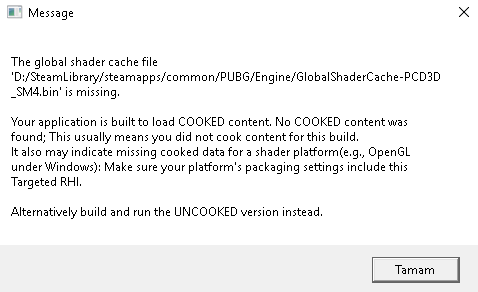
anyone can help my friend
he bought pubg
and its showing this thing
and tried to verify the files
and still showing this thing
stuck anchor
@swift fiber Has he tried to reinstall?
 vestal cloak
Did he remove the entire PUBG folder from his steam folder or just uninstall on steam?
stuck anchor
@red surge @shut pier Do y'all have the game on a SSD
tropic palm
hey, do fpp game mode stats count towards general stats?
shut pier
yeah @stuck anchor
swift fiber
😦
vestal cloak
@swift fiber have him try putting that in the launch options > Right click PUBG on steam > Properties > set launch options
-force-feature-level-11-0
swift fiber
ok
shut pier
its server side so ill just wait for the fix @stuck anchor
vestal cloak
What graphics card does he have?
stuck anchor
Is anyones sound only front facing? I can't hear anything if I turn my back to it
vestal cloak
Need exact name on the card
swift fiber
ok wait a minute
shrewd thunder
winkey > run > dxdiag > 2nd tab will tell you
vestal cloak
Ok that doesn't support dx 11
swift fiber
so?
vestal cloak
Which is what the game runs on
swift fiber
pubg
vestal cloak
Maybe, just have him do dxdiag
vestal cloak
Winkey > dxdiag
vestal cloak
type dxdiag
vestal cloak
What does the DirectX Version say under system tab?
swift fiber
11.1
swift fiber
but please help me
vestal cloak
I'm looking
swift fiber
 vestal cloak
https://forums.playbattlegrounds.com/topic/44885-cant-load-game-global-shader-cache-missing/ this is the only thing I can find currently which was posted on Thursday, it could be an issue with the game atm or the card and would have to wait until it's fixed "if possible", but honestly that card isn't really fit for the game imo and should upgrade to something else
PLAYERUNKNOWN'S BATTLEGROUNDS Forums
I admit i'm, pretty helpless when it comes to tech/setup related things, and english is not my first language. so if i leave any vital information out pl...
That's as much help as I can provide right now, sorry.
 ripe sequoia
Potato buildings are back
FFFFFFFFFFFFFFFFFFFFFFFFFFuck
literally my fps goes down to 1-3
for 5minute
high CPU usage
but everything works fine when it all loads
 tribal stone
6700m supports dx11. not dx12
 worldly kernel
what's the discord server link?
 dense sandal
!invite
 regal vaporBOT
Invite URL for Discord: https://discord.gg/battlegrounds
dense sandal
@worldly kernel
 cosmic hamlet
When will the weekly crates reset?
 sweet willow
if im global BE banned, i can't play BE games on this PC?
 severe ocean
i cannot hear anyone anymore in voice. I can hear teamates but not enemies.
severe ocean
wouldnt i get a notification or something if i was banned
also is there a way i can check if i am banned?
 delicate flower
 topaz bone
[/script/engine.player] ConfiguredInternetSpeed=50000 ConfiguredLanSpeed=50000 [/script/onlinesubsystemutils.ipnetdriver] MaxClientRate=50000 MaxInternetClientRate=50000
that do anything for hitreg?
im skeptical of pmuch all engini.ini commands
 normal jungle
AutoHotkey viable workaround for bug preventing lefties from playing game (can't move forward with "i"...)? Do not want to be banned. Also, does not seem bug has been acknowledged :/
viral monolith
@severe ocean Yeah I have only heard like 3 non team members since the hotfix. Don't think this is a ban unless they unjustly ban people for only talking lol. I am done with the game cause the people I met in the lobbies became friends and it's like 90% of the fun
severe ocean
@viral monolith yeah I have no idea why this is happening. My brother has the problem as well and he hasn't said anything really in voice chat. I just miss screaming at random people that I am in a 1v1 with as a scare tactic
 craggy bay
hey question how do you report p[eoplee in discord for saying uncalled for things?
severe ocean
Maybe message an admin, mod, or someone part of the community team @craggy bay
craggy bay
it wont let me
 gusty plover
Team room 16 has a max of 3 players and i think it should b 4...
 nimble wadi
are they ever going add the ability to turn off teh character render in the ivnentory screen?
the lack of this feature is ruining my gameplay experience
viral monolith
WHen will the reconect button be added back in?
 solar crown
@severe ocean I takes resources to render it and could possibly lag someone a little i guess
nimble wadi
@severe ocean the render of your character in the ivnentory screen
it makes some peopels games freeze when they open inventory
@solar crown mine isnt a little lag
its a fll 5 second freeze
or more
ive gotten 15 seconds
nimble wadi
it shouldnt be that hard to have an option to turn it off
ive been complaining about it in here for weeks
i wish i could talk to one of the actual devs
it seems like a reasonable suggestion
solar crown
Well from what I imagined, it shouldn't been too hard to make first person servers, only real difficult thing would be to host more servers, but I don't make games, so I don't know fully
The no team UI bug was super weird to me. I had no idea how that came about
At least directly from FPP
 snow pecan
in game mic will not work
 sonic herald
My game keeps getting stuck on "Connected. Waiting for response..." It takes 2 minutes almost exactly every time to get into the main screen..
I've reinstalled, verified game, reloaded ui and it still gets stuck
Makes it hard to play with squads when it takes that long after every round
Sometimes it even loads in instantly..
 thorny bloom
have you tried changing and flushing your dns?
 woeful bluff
no fkin stats are recoreding
i havew 4 wins yesterday
and not one is showing
wtf is going on.
thorny bloom
they probably didn't enable scoreboard yet again too busy fixing the game breaking bugs instead
 versed wigeon
Hey all! Not sure if this is the right place to ask but here goes 😃 I got the pleated mini-skirt from Gamescon crate and I would like to sell it. Steams market says: "Tradable & Marketable After: 12.8.2017 klo 3.00.00" Why is there such restriction? I've seen ppl already sell those items. Is there something I can do?
 dapper kindle
can some1 please fix this freezing bug its so annoying, once it stops freezing i cant shoot or reload
 fringe warren
not sure if here's the right place to ask for help. but theres a bug where im currently having -49999 BP. everytime i win a game it jsut slowly reduces bit by bit.
 crisp dawn
@versed wigeon there's always a 7 day restriction for items from key crates
@thorny bloom could you elaborate on changing/flushing dns I'm getting the same problem as Hiry
thorny bloom
@crisp dawn sure lemme get a link
https://documentation.cpanel.net/display/CKB/How+To+Clear+Your+DNS+Cache
https://developers.google.com/speed/public-dns/docs/using
So do the first one and then change it to Google after
Google Developers
It may work then
@sonic herald
 raven field
I am experiencing this issue like 3 days already, I keep on hanging at the connected, waiting for response thing. Haven't been able to play since then.
 grand bolt
same
 silk sand
@crisp dawn @thorny bloom
The game still doesn't have official ports for routers
I think that would fix network lag. Im sure devs are workin on it.
@thorny bloom me and wags tired a lot of things like 2 days of trying to fix network lag problem still nothing. But we believe ports would fix
silk sand
Good morning btw 😃
@spark parrot Please do not spoil bugs that give advantage. Report them to Pubg Forum
https://forums.playbattlegrounds.com/forum/10-bug-reports/
PLAYERUNKNOWN'S BATTLEGROUNDS Forums
Encountered a bug or issue? Here's your spot. Remember to include whatever details you can
 spark parrot
silk sand
spark parrot
silk sand
❤
 mystic cloak
is "waiting for response" screen, that's going on after recent monthly update, is a known issue? It takes about 10 minutes to get into the game.
silk sand
@mystic cloak Refresh UI/Restart Game
 pastel anvil
need to add some feature like "remember what gamemode i played last game..."
going from solo fpp to solo after a game...
or duo fpp to duo
 modern prism
Anyone getting that bug where it doesn't render (or SHOW at all) anyone buildings ?
 lost river
the hell it's supposed to be? my friend's screenshot, nothing would load for the rest of the game
 red nacelle
that usually takes 10-20 sec with me to load
 hollow python
@glossy burrow i got this guy named shorty bugging me and buddies talking ab blowing up my country
@eternal lake @acoustic nexus unsure how to go about reporting people in the discord
He is named Shorty, coming into our chat and sexually harassing this girl
quick chasm
@lost river Does your friend have the game installed on an HDD? If so, he should move it to an SSD if he has one. If not, then press tab when you land to force load the textures, it will freeze your game for a couple of seconds to load them
@modern prism same procedure like above ^ (:
modern prism
Thanks
lost river
kk thanks
 upbeat dome
quick question. What times do crates reset? Is it tonight or is it on Thursday's now because thats when these new crates got released
quick chasm
Mondays or Sundays depending on the Timezone you are in @upbeat dome
upbeat dome
ok thank you!
quick chasm
🍻
snow jay
posting this again today because unfortunately no one replied to me yesterday https://forums.playbattlegrounds.com/topic/46025-can-anyone-help-me-figure-out-what-is-wrong-with-my-battleeye/
PLAYERUNKNOWN'S BATTLEGROUNDS Forums
9/10 times I go to launch the game BattleEye blocks files that are required by the game itself. I reinstalled multiple times and it doesn't help, running ...
fringe warren
hey i need help for my pubg. have an issue with the BP bug where im having negative values. https://forums.playbattlegrounds.com/topic/44803-negative-bp/?tab=comments#comment-163758
PLAYERUNKNOWN'S BATTLEGROUNDS Forums
Went to buy a chest today and the game hanged. After waiting for 5 mins, decided to continue spam clicking on the purchase button. It finally jumped out bu...
viral monolith
Where do I go to upload video of a guy teamkilling me
quick chasm
PLAYERUNKNOWN'S BATTLEGROUNDS Forums
ALL REPORTS SUBMITTED WILL ONLY BE VISIBLE BY FORUM ADMINISTRATORS
Please login or register an account to gain permission to submit a report.


If y...
 cinder cloud
@snow jay have you reinstalled the game?
 raven bolt
i'ts legal to use the program "reshade"?
raven bolt
@silk sand thank you 😄
 tough basalt
@eternal lake hello, i have a problem... i got a virus and my pc went wild... i did a full windows reinstallation but when i entered the game after the reinstall i saw that i am banned. i bought the game again on a new account but i don't wanna get ban again, i have the same ip address and mac. can you help me not to get ban again by doing nothing!!!
 snow pewter
After the new update,my textures aren't loading fast for some reason. Any fix for it?
snow jay
@cinder cloud as it says in the forum link, yes.
raven bolt
what? whay this happen?
 austere wedge
I can't play in borderless windowed at all, it literally gets stuck on one frame until I press alt+tab then it shows me the next frame. fullscreen is fine
i'm using rx 480 I tried turning off freesync
shrewd thunder
last guy who had a problem like that was using some multi monitor program that was causing it
he just removed startup programs till it narrowed it down to that
 north iron
Anyone here that can provide assistance?
 blazing linden
@digital glen I'll be home in around 30-45 minutes. I can get the footage for you then. Not entirely sure if it's only in fpp or both servers.
 cunning cosmos
Edberg and Cyanide just confirmed that the game crashes if you press CTRL-M (mute all sound) during loading into a game.
 coarse junco
@north iron just write your problem here, you will get the answers as soon as they see it
 clear tendon
Changing from fullscreen to fullscreen (windowed) while in game caused game to freeze, had to force close
north iron
Every single game I playe. I freeze for 10secs after about 30secs-1min
 worldly blade
viral monolith
worldly blade
viral monolith
@quick chasm Thanks
cinder cloud
@north iron Whats your specs
 opaque thicket
anyone else having problem with reddot disappearing when aiming towards sky?
blazing linden

Red reticle stays from pre-game to in-game until a weapon is picked up.
 molten frigate
"Connected. Waiting for response" I've been getting that for the past week, it'll likely fix after awhile - but its been happening a lot. Any fix? @viral monolith
@coarse junco any idea if the servers are down or if its just a me thing?
cinder cloud
@molten frigate i have that aswell keep trying to reload ui eventually it works
 ashen ether
Alright, this is driving me absolutaly nuts. I can't seem to get the game to properly play in full screen windowed mode. There's three screen options: "Windowed, Windowed (Fullscreen), and Fullscreen." I've tried using fullscreen but the mouse doen't sinc with anything on the menu. So I then tried "Windowed (Fullscreen)". I'm assuming it's suppose to be a borderless window, but that doesn't seem to be the case. My task bar pushes the image down off the screen so all of it isn't visible. There's no other options in game that I can use that might fix this. I'm at a total loss and I thought maybe someone here would be able to help me.
 kind pewter
invitational crate shows up in game but not in my steam inventory
i also bought a key but can't open it
 tame dagger
if we leave with kills at the end but not get killed do we still get our xp?
i mean bp
blazing linden
@Ham Porker#7692 Maybe the issue is with your taskbar?>
Also, try restarting your pc
ashen ether
I've tried moving it to the bottom, the side, locking it, and unlocking it. What else might I be able to do?
blazing linden
Have you tried restarting your pc?
 timid anchor
by lock do you mean hide or actually lock?
ashen ether
Already restarted it 3 times.
blazing linden
oh okay
timid anchor
hiding works, but not locking
ashen ether
Oh, I did also try hiding it too.
timid anchor
Oh wait sorry
ashen ether
But it just showed my desktop instead of the taskbar.
timid anchor
thats the wrong solution
blazing linden
Try going into the taskbar settings.
timid anchor
end the explorer task
 mighty zodiac
anyone elses option when searching keep resetting to solo third person even though your last search was for FFP? id rather it staye don the option of FFP instead of me having to slect it ever y time
blazing linden
Yeah that happens to me as well.
mighty zodiac
keep hitting search and forgetting it goes to default again and the cancel search button never works 😛
timid anchor
@ashen ether close this task: http://i.imgur.com/U3DyW3Q.png

or restart I should say
molten frigate
@coarse junco @cinder cloud yeah, it seems to work after I refresh the UI a couple of times or I restart steam. But its been happening for the past week, is there going to be a fix for it or should I just redownload the game?
ashen ether
Uh, yeah I ended it and kinda got scared for a second but I found out how to get it running again.
timid anchor
well an easy way to open it again is to use the "run new task" feature in task manager
and just open "explorer"
cinder cloud
@molten frigate im not a dev so i can't answer that :p
timid anchor
@molten frigate not a dev, thats a bug, and yes it will be fixed
blazing linden
@molten frigate Have you verified the integrity of your files?
timid anchor
if you mean check your integrity, don't
molten frigate
ye verified and everything @blazing linden
timid anchor
thats not gonna do anything for you
@ashen ether change the setting from borderless to fullscreen
ashen ether
Fullscreens mouse doesn't sinc with the menu.
timid anchor
yes then switch it back
after you restarted explorer that should fix it, if not switching from borderless to fullscreen to borderless probably will
@ashen ether
timid anchor
@ashen ether the issue is that the game isn't getting the highest priority for focus
I have a triple monitor setup don't worry, I've had this issue before
blazing linden
Oh yeah, I've had that issue with games before when I use to have a duel monitor setup.
ashen ether
Would it just be easier to try and just use Fullscrean and figure out why the mouse pointer is offset?
blazing linden
lol
Yeah maybe try that instead. I think it has more to do with your setup than it has to do with the game.
 bright steppe
Anyone know if steam offline mode is reflected in the in-game friends list? or are you shown regardless?
ashen ether
Well, other games work fine with my setup, so I think it is the game.
timid anchor
The issue with fullscreen is something to do with the resolution setup
The issue with borderless is that there's something else running taking priority of the focus
ashen ether
So maybe I just need to close all my windows but the game?
coarse junco
If you have your Task Bar not at the bottom of your screen it might cause problems
ashen ether
I've tried putting it on the bottom.
timid anchor
No that's definetly not the issue
download this

Find out what files, registry keys and other objects processes have open, which DLLs they have loaded, and more.
It'll help you find the process stealing the focus
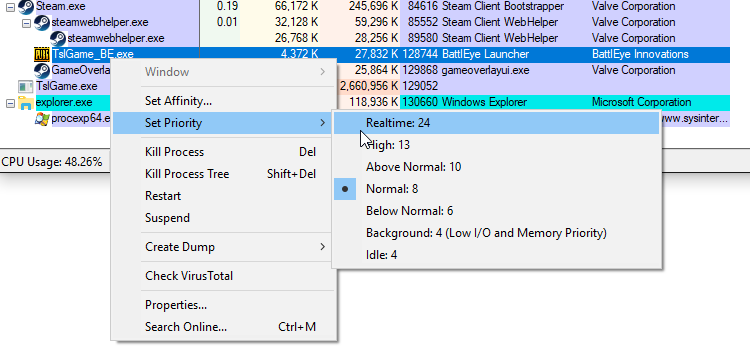
In fact with this explorer you can set the game's priority to max
@ashen ether
ashen ether
Well, I think I found out what was causing the mouse offset.
I put my task bar on the bottom, and the offset is gone.
timid anchor
Again thats weird and shouldn't be the issue
borderless windowed mode is life saver for more than one monitor, so I reccomened you fix the priority issues
desert pagoda
the mouse effect has been there since the beginning and is described in multiple posts on the forums and still has not been resolved. quite a pity that UE has this
borderless window mode will lose you some fps right?
putting your taskbar on the bottom makes this game playable. anywhere else and it's bugged
ashen ether
So, what am I trying to do with this software? Am I trying to put it's priority at Realtime 24?
timid anchor
yes
coarse junco
i wouldn't suggest that unless you have a realy good reason to do so
ashen ether
Everytime I try and do that it goes to 4 Low
timid anchor
it should be on 8 by default
ashen ether
Background
coarse junco
i wouldn't set it to more than 10
timid anchor
try setting it to 10 or 8
ashen ether
Hah, I think It worked.
ashen ether
Exactly as you said.
But I had to restart the game in order for it to work.
Yup restarted the game again and it still works.
blazing linden
Awesome, glad you were able to fix the issue.
timid anchor
np
 wild latch
I keep getting stuck on the "Connected. Waiting on response" screen. any fix for it?
 unreal barn
would it be acceptable for me to use autohotkey for keybinding ? (please understand im not trying to create an advantage like auto fire semi-auto guns i just need to bind keys to other keys)
timid anchor
@wild latch reload lobby
@unreal barn use common sense with autohotkey, will it give you a clear advantage? if no then its cool
Because how would they know you are using macros unless its evident you are cheating
unreal barn
its just to press two keys with one click because im left handed using a right handed config
timid anchor
@unreal barn like i said, how would they know you are using macros
 analog forum
Hi I am having the same problem as @wild latch . I have try disconnecting and recconecting as well as verifying the game cache. No joy with that. Has only started happening to me since the latest monthly patch.
timid anchor
the only way they would find out is if it was obvious (autofire etc etc.)
unreal barn
ok thanks for the help
timid anchor
@analog forum did you try reloading the lobby?
 harsh coyote
After this patch house loud realy long. 😦
analog forum
Do you mean as in cancelling and reconnecting on the waiting screen? I have tried that and it does not work. It will eventually connect me to the main menu but it usually takes at least 5 mins. this happens when starting the game up and after every game I play.
timid anchor
@analog forum have you tried clicking this? http://i.imgur.com/zlNxP1e.png
 analog forum
Oh yeah I have tried that and same problem still. Any other suggestions?
timid anchor
no im out
analog forum
No worries cheers for the help anyway
desert pagoda
how do I force pubg to accept chromium as my browser?
it is always blocked by the stupid anticheat.
I will not revert to edge or IE as standard browser for pubg.
blazing linden
Memory leak just crashed my game, I was in the top 30 with some good gear. This is really frustrating.
 shrewd summit
top 30 is minor
wild latch
@timid anchor refreshing lobby works like, 1% of the time
wild latch
every now and then I can manage to cancel the connection then reload it and it works
 grand saddle
Just been in a game
and i was able to run through walls
and see people through walls
got screenshots
 polar gazelle
I need help with a crash that has been happening for a while
My friend bought me the game maybe 3 or 4 days ago and just about 2/3 games crash either right before i enter the game in the loading screen, or when im in on the island with the countdown timer, the ground is like all black and the sky is too. I love this game and i dont want to not be able to play it.
Processor: Intel(R) Core(TM) i7 CPU 920 @ 2.67GHz
Memory (RAM): 24.0 GB
Graphics: Duel NVIDIA GeForce GTX 560 Ti
Gaming Graphics: 4096 MB Total available graphics memory
Primary hard disk: 83GB Free (466GB Total)
blazing linden
@shrewd summit Right but I had the potential to win the game. Regardless of the position I was the crash still happened so it was annoying regardless.
grand saddle
oh... and why the fk is my gpu running at 100% constantly
even on main menu
its crashing my pc because of it
shrewd summit
I'll go back to playing the switch for a while. Seems pubg is getting stuck on connected waiting for response which just make every reload take 5mins
grand saddle
brilliant
my desktop is now jumping all over the place
thanks to my GPU being so overly hot thanks to PUBG
 naive ocean
not being able to see my score at the end of a match is really fucking annoying
 feral tree
anyone not being able to load their clothes in the game right now?
my inventory for pubg is not loading either
viral monolith
Yep and can't even click ready up and/or game keeps making us hit the refresh button
Right now all of us are stuck readying up 😦
 cosmic coyote
 glad magnet
^^^
shrewd summit
https://forums.playbattlegrounds.com/topic/45447-connected-waiting-for-response/?page=7 post here to make devs aware @viral monolith @feral tree if it's related. I have had these problems tonight
PLAYERUNKNOWN'S BATTLEGROUNDS Forums
23 hours ago, Lixxon said:
		Go into CMD and type ipconfig /flushdns. This fixes the problem my mate was having.


I have tried this an...
More people who post more attention it gets
 glad linden
can anyone help me, i cant put on clothes cause my inventory wont show up and neither does my BP
 hushed magnet
how often do flashy colours fix a dead pixel?
 sand roost
has the loot rate changed since last couple of updates?
quick chasm
@sand roost i think they have had info about that in their last monthly update
well the one before this one
quick chasm
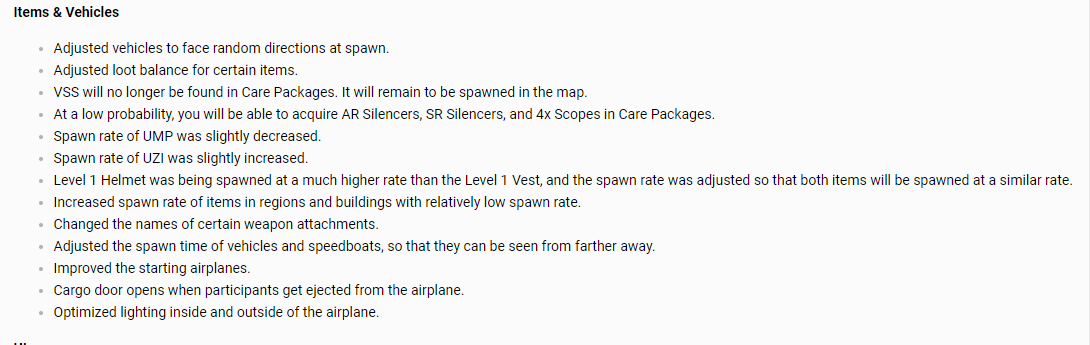
this is from the previous monthly regarding some items
@hushed magnet i dont think different colors can fix a dead pixel
sand roost
thanks @quick chasm
 little oar
 Hey, my friend has no clothes and all his BP is gone -- he's too shy to start the convo himself, but anyone know this issue? Reloaded the UI, restared the game etc but nothing happened. @dusky hemlock
shrewd summit
@little oar been getting same problems.. seems to be server issue
swift fiber
PLAYERUNKNOWN'S BATTLEGROUNDS Forums
I admit i'm, pretty helpless when it comes to tech/setup related things, and english is not my first language. so if i leave any vital information out pl...
guys my friend has the same problem
what should he do
little oar
Ah ok @shrewd summit he fixed it, needed to go one game solo and it loaded
No wait
Apparently it only work for him to match up solo, and very rarely in duo. So odd.
 dusky hemlock
blazing linden
dusky hemlock
blazing linden
With?
swift fiber
PLAYERUNKNOWN'S BATTLEGROUNDS Forums
I admit i'm, pretty helpless when it comes to tech/setup related things, and english is not my first language. so if i leave any vital information out pl...
this prolem
blazing linden
Do you have reshade installed?
 old elk
i see this every single time i open the game or go to lobby
swift fiber
please\
shrewd summit
@old elk please post in the thread on the forum. More devs that see the issue more likely they will do something. It's been happening to me since last patch, makes me not want to play
worldly kernel
what happened to all my cosmetics?
they all just dissapeaered
what the heck
wot in tarnation
nevermind hecklin 🅱roken game I got my stuff back
 rose snow
Since the new monthly update which included the new crates, clothing, etc., my game has had an odd render issue. It's not the usual issue that people have been having of buildings not rendering in and not being able to do anything but my grass isn't rendering properly, buildings aren't fully rendered, only partialy, slim textures (parachute strings, fence wires, wheat, bars, bridge cables) are near transparent unless right up close. What can I do to fix this? I have tried reinstalling, verifying cache, and changing my in-game settings but nothing has solved it.
Posted on reddit and steam, no response to either.
If anyone here knows what I can do to fix it, please do tell.
viral monolith
@worldly kernel got exactly the same problem got a fix?
shrewd summit
Fresh install sevaglion
Desert just try join a game. Seems to be servers going haywire
timid anchor
@rose snow Either not enough ram, or too slow of a GPU
rose snow
I don't see how that would be an issue when it wasn't before the new update.
swift fiber
wfym by fresh install
rose snow
8GB of ram and a 1060.
swift fiber
wdym*
viral monolith
was fixed after game same issue
timid anchor
when I have pubg open it uses ~9gb
rose snow
Friend with 8GB doesn't have this issue though.
Which is odd.
If it was my PC not performing properly, I believe it would have been an issue before the new update, not just after.
timid anchor
gpu then
like I said, friend has the same issues and has a 1060
I don't have those issues and I have a 970
different friend just recently started having the same issues; 750ti
 digital glen
@swift fiber What gpu do you have?
timid anchor
thats way too weak
digital glen
On board gpu from a laptop I assume?
digital glen
Yes
digital glen
Usually the m represents mobile
swift fiber
cause its 2gb vram
digital glen
That's your issue.
timid anchor
even if its not M series, HD 6700 is way too weak
digital glen
Your gpu can't run the game it looks like
timid anchor
are you on a laptop or a desktop computer?
rose snow
Comparing this game to GTA V is near impossible.
swift fiber
on40 fps
timid anchor
@swift fiber are you on a laptop?
 karmic parcel
Hey all, I have a problem 🍆 So i got the game today, and i cannot look around. I can only move left and right x-x Could anyone help me ?
I cant move the camera vertically
to look for loot etc
rose snow
@karmic parcel press ALT twice.
karmic parcel
I'll try that
digital glen
@karmic parcel Sometimes it's a bug from alt looking around the plane and while you parachute down. When you get on the ground it sticks. Restarting the round/game fixes it. Make sure your free look key isn't bound to another key etc.
timid anchor
never experienced that bug, and I always hold down alt while going into the plane
digital glen
I've had it twice. My teammates used me as a meat shield lol
 grand mango
My wifes PC won't run it, all the buildings look melted and it runs about 5FPS
digital glen
Specs?
grand mango
its my old PC, I just put a r9 290 in it today... can't rem the processor, i think its an E6600
i just reinstalled windows and stuck a faster HD in..... which made it run... just
digital glen
Usually those melted buildings etc is from lower than required system specs. If it does meet the min, people still have that issue, some don't. 99.9% of the time when a user puts the game on ssd vs hdd and has 16gb of ram instead of 8gb those problems go away. Game is not fully optimized yet, is why
Older processor prob the issue now
grand mango
it needs more ram yeah, but its too expensive for that old PC now... I will just wait till its better optomised
digital glen
Yeah exactly. No use throwing money at it.
grand mango
it runs lovely on mine! I tried all the tweaks etc.. i have given up now
digital glen
I've got an old boat anchor pc I've converted into a music machine lol. About all it can do. Well that and my son plays Minecraft on it lol
Your wife is going to be wanting you to build her a new pc soon!
grand mango
SSD and more ram will do it, but it can wait
 ionic helm
Alright y'all I need some help whit my pubg. I really love pubg as a game but every time I run it I run into hight disk and memory (90-100%) resulting in my computer slowing down or even sometimes crashing. On the off chance that I load into the lobby and game the textures don't load in fully and take several minutes to load in and most the time I die before I can play. Here is what It looks like for me https://gyazo.com/c52f276999df6a638177e1ea378f5827. I play on the lowest settings for everything to try to help these issues. I have a GTX 960 for my graphics card and a i5- 4690k CPU @ 3.5 GHz. If there is anything you guys could help me with that would be fantastic.
grand mango
it does that on my wifes too
timid anchor
How much RAM?
grand mango
how muchram do you have? its either your HD is too slow or not enough ram
digital glen
@ionic helm When pubg is running go into task manager, details tab, priority, choose above normal or high. Make sure you close down any applications you aren't using while playing. If you use discord while playing, turn off hardware acceleration, and same for chrome. Up some of your settings like post proc, AA, effects...making your gpu takethe load off your cpu
ionic helm
16
timid anchor
I would overclock your cpu maybe
digital glen
I'm on mobile and don't have the links handy, but there are a few good sites that have recommended settings to change in the nvidia control panel options as well. A trusty Google search will show you :)
 thick oasis
Servers down?
digital glen
@thick oasis If you show offline, leave your group and re join it, that fixes it usually
grand mango

144Hz Monitors
Do you wonder what the best settings for PUBG (PlayerUnknown's Battlegrounds) are? Check out our easy to follow guide which includes the best launch options for PUBG as well.
digital glen
👍
Most launch commands are invalid now. Useallavailablecores etc
Got to run, good night all, and good luck getting those chicken dinners!

timid anchor
My cpu is overclocked to 3.8ghz, and my gpu is overclocked to +0.3ghz on the memory. But I've put my GPU through some torture, I've mined on it on +10% power, +22% core, +16% mem; which when running games and benchmarks, causes massive tearing and blue screens.
So it really confuses me how I'm getting better performance than a 4.5ghz proccessor with a 1080ti
tame dagger
so i unboxed a tracksuit pants but its not on the market does anyone know the price of it?
nvm
its fine
timid anchor
Price isn't determined yet since nobody can sell them
 sour quartz
anyone elses servers offline?
digital glen
@sour quartz if you are in a group, leave it and rejoin, will fix it
 south rampart
Hey my steam overlay is broke I cant buy a key HELP I CANT GIVE YOU MONEY
digital glen
@south rampart Try copy pasting the url in a browser. Workaround should do it. For the Steam browser, make sure programs like FRAPS, Origin, UPlay, Razer Synapse are disabled. They run in the background and conflict with it. Try closing those out if you have them.
south rampart
I dont have a url
digital glen
Google will tell you more of what conflicts it as well. I'm on mobile
So it doesn't try to open the Steam overlay?
south rampart
I does not I just click the buy keys and nothing happens
digital glen
Make sure you have funds in your account
That's 1 step
Next verify that the overlay isn't turned off
If/when it's on, you might have to log out and back into Steam
south rampart
done and done still not working. Only not working in pubg
 heady hornet
Is anyone getting BP N/A and it's not letting you get into a game?
digital glen
@south rampart Hmmm interesting. Usually those tips work. Odd that it's only Pubg...maybe give it a bit and try again? Something could be going on with Steam and or the system in place to purchase them. If it doesn't work tomo or so, make a report on the forums with the steps you tried. I'm at work atm and on mobile or would try myself.
@heady hornet I've seen that issue on the test server, but not since the build went to the main servers, maybe restarting the game? Could just be a temporary issue. I'll check when I get home
heady hornet
Been happening for the past 3 or so hours. There's a couple posts on it on Reddit too but they haven't gotten any traction.
digital glen
I would make a post on the forums. Its 11:13 am Monday morning in Korea now, so the team/devs should see it
heady hornet
Okay.
 waxen fulcrum
Hi guys I need help, When I load up the game it will say "connected, waiting for server" for an abnormally long time(about 15-20 seconds) after the menu opens my character is naked(and if i try customise it says I have nothing), my bp is "N/A" and I am unable to join games as when I click to ready with my party and the rest of the party clicks ready the button switches back to "play" and we dont go into matchmaking.
Not in any rush but need help things i have tried
- Reload UI
- Restart game, multiple times
- Restarted computer
digital glen
@waxen fulcrum Dcoy above and others are reporting this a lot now. Please make a forum post to escalate this. Include your troubleshooting steps
heady hornet
https://forums.playbattlegrounds.com/topic/46818-bp-na-and-unable-to-connect-to-server/
Made one here.
PLAYERUNKNOWN'S BATTLEGROUNDS Forums
I've been having this problem for the past 3-4 hours where I can't join a game (I click play and it says matchmaking failed) and I'm unable to see my BP an...
waxen fulcrum
Ok thanks, sorry for not paying attention
digital glen
@waxen fulcrum No problem man. It's starting to escalate quick. The more people post the faster we can get it resolved. I'm pushing it forward as well
 robust shuttle
heady hornet
robust shuttle
heady hornet
A lot of people are having it, apparently.
digital glen
@waxen fulcrum @heady hornet @robust shuttle The dev team is looking into it now
waxen fulcrum
Thanks for the quick update!
heady hornet
^
digital glen

viral monolith

Steam Community: PLAYERUNKNOWN'S BATTLEGROUNDS.
No buildings loaded in
No bridge
only terrain
and trees and foliage
i set my view distance lower and the buildings spawned in and the game then crashed
rancid oak
Connected. waiting for response..... been having this issue for 2 weeks now but i can usually get it to load after restarting like 6 times. BUT TODAY. ive restarted over 40 times and still nothing i know this is an early access game but this is getting rediculous.
 tawny flume
servers are too busy?
 blissful solstice
yeah whats the issue on servers
 fallow crater
We've reported it. It's their Monday morning so I am sure they will be looking into it!
 gilded kiln
In the main menu, I can't see my BP or any of my clothes/rewards/crates etc. Still seems like it lets me join games tho, so I dnno what's happening. (tried restarting many times)
waxen fulcrum
@gilded kiln Look a few messages up m8
heady hornet
Fixed for me now, seems to be working for all my friends too!
 tough laurel
Seems all chat doesn't work for me. It is set to ALL, my friends are talking to people and here other players, just I can't hear them. Volume is 100%, not muted, set to ALL.
 manic anchor
does anyone elses game freeze for a few seconds when entering inventory
 craggy drift
Reshade is still allowed right? I remeber PU tweeting it out but want to confirm once more
waxen fulcrum
Everyone in my friends list now has the problem after it has been fine for a few games
 cinder portal
TSLGAME_BE Is incompatible and the game will not start anything up at all
any fixes to this?
23:27:42: Starting BattlEye Service...
23:27:44: Launching game...
23:27:44: Failed to launch game.
viral monolith
my bp is negative
 nova smelt
is reshade allowed? ive got huge FPS problems on a good pc so need to test
also wondering if there's a way to disable blood, to test FPS
quick chasm
@nova smelt Reshade is allowed and no, blood can't be removed
@viral monolith read the #📯│general-announcements (:
nova smelt
ok thanks @quick chasm
craggy drift
Thanks tons. I knew they had issues with battleye earlier about it.
quick chasm
Yeah it was going on and off being blocked by the eye a couple of times for a short amount of time
 red parrot
Hey, guys! Are BP rewards glitched? I'm getting many less than last patch.
quick chasm
Check the #📯│general-announcements @red parrot
viral monolith
if you have low health, but still have an undamaged lvl 3 helmet... can you get headshot by a kar98?
like headshot dead in solo
red parrot
Thanks @quick chasm
quick chasm
@viral monolith yes, helmets and armor offer resistance
I.e. reduced dmg
You still receive dmg and can die from it
shrewd thunder
Does 66 dmg to lvl 3 helm iirc
shrewd thunder
Actually I think it's somewhere in the 90's @viral monolith, there's loads of data sheets that contradict each other on dmg to a lvl3 but a headshot will certainly kill you on low health regardless.
viral monolith
just making sure, because it seemed sketchy... but maybe not with 25% or so hp
viral monolith
well on the "marketplace", it's like $400+... but I don't think those are player listed yet
why are fps so drastic now
 unreal zinc
not listed yet
viral monolith
I went from having 80 fps to 0 while driving and moving fast
unreal zinc
so 800 ?
if i am litterly the first one to get it
i can set w/e price i want right ?
 bronze basin
@viral monolith i've had that issue before too, was in a car with my friend and fps dropped down to 1-5 before the game decided to crash after a few min
quick chasm
@unreal zinc yes
 tepid fox
I noticed some rendering problems off in the distance through my 8x.
A building looked like a collapsed cake or something.
shrewd thunder
That's lod models that haven't loaded high quality versions. I think the quality of model is decided by distance from player in this game even when scoping so they will always be low quality @tepid fox
 lapis dagger
anyone else getting huge freezes and "network lag detected" messages
viral monolith
sometimes yes
tawny flume
any way to fix in game voice chat?, people can seem to hear me but I can never hear anyone else
tepid fox
Alright they looked really doughy.
shrewd thunder
Imagine what people with slow hdd's and or low memory feel like @tepid fox that's the models they see even when standing right next to them
 dry narwhal
i think something's off here. can't quite put my finger on it.
 stiff elbow
Anyone else on oceanic just get connection time out?
 mental orbit
Anyone able to help ?
viral monolith
https://puu.sh/x3RSa/27ecb689e7.png https://puu.sh/x3RTA/23bedcfcca.png servers got problems atm ?


is there a safe way to jump off of prison roof or no?
 stray seal
Hello I would need help since today I bought pubg, but unable to play, played my brother in his stem in family account. Now when I start pubg in my steam account i have his character.
is there anything I can do? How can I change it?
viral monolith
can you unlink it?
stray seal
how can I unlink ?
mental orbit
Game doesn't load. Says Loading : http://front.battlegroundsgame.com/index.html
Anyone ?
silk sand
@mental orbit Refresh UI or restart game
mental orbit
@silk sand Refreshed UI , restarted game ,restarted pc , flushed DNS , restarted modem , checked file integrity ...
quick chasm
@stray seal have you tried turning off the familly share from his steam acc to yours then starting the game?
Since you have installed the game from the familly share function, maybe uninstalling it as well as disabling familly share, then installing the game from your library and starting it could solve your problem
mental orbit
@silk sand Anything else ?
quick chasm
Not much more you can do, if its a server side problem and your ui does not load..try verifying integrity of files
stray seal
@quick chasm ok thx now i try but i do unistalling the game or it's enough to remove family?
quick chasm
@stray seal not sure but to play safe tell him to turn off family share
Until you uninstall and install from your library
When you get in game and make your character..he can re enable familly share, that is not a problem
stray seal
@quick chasm ok thx 😃
quick chasm
🍻
tepid fox
@viral monolith I've seen someone do so onto the roof of the warehouse.
Does that count?
mental orbit
Can anyone help me with my issue ? Game stuck on loading : http://front.battlegroundsgame.com/index.html
 rustic halo
Verify Integrity Files @mental orbit
mental orbit
Already done .
rustic halo
And, if %appdata% files is read-only, untick read-only
mental orbit
Will try
stray seal
@quick chasm There is still my brother's account also doing as you told me
cinder cloud
Remove the userdata folder that contains his account
@Cirus94#3528
Also remove the game and when you install it make sure its from your library and not the shared one
 peak estuary
Can anyone help my issue of not being able to hear others mics ingame even when on All.
quick chasm
It is a known issue and being worked on afaik @peak estuary
I might be wrong but i havent heard about a fix for it yet
shrewd thunder
Linking is disabled because twitch promotion is over I think
silk sand
@peak estuary
CTRL + T u change mute/unmute
on CTRL+Y u change mode All/Team/Mute
 south tundra
Any work arounds for textures not loading?
peak estuary
I too had buildings not loading in at the start of agame
shrewd thunder
If it looks like play dough faster hdd and or more ram
peak estuary
getting more ram fixed it for me
south tundra
im talking like chaning something in settings then back and it fixes
not "Get a better PC"
ive got 16gb so im fine with that
peak estuary
im afraid that really isn't an option
shrewd thunder
Wait till game is optimised
peak estuary
maybe hdd is not up to scratch or is on its way out
south tundra
this happens rarely, its just if it does
peak estuary
when i had that problem pressing tab to open inv fixed it quicker
south tundra
sweet, thanks
blazing linden
Yeah it's generally faster that way anyways
blazing linden
As soon as I got an ssd I haven't had any issues with rendering
 wide delta
http://prntscr.com/g5hbft My clothes come up as just blank, is there any fix for this?

 ivory warren
please fix the not loading bug where no buildings load
 pale plover
@wide delta Did you refresh UI?
@ivory warren what you mean? Are they like clay so you don't see the buildings at all?
ivory warren
@pale plover no buildings at all the players and loot loaded but no buildings
wide delta
ya :( @pale plover
 vapid forge
not necessarily help but i was wondering if my pubg rank gets affected if i leave when everyone is at the spawn island
 strange onyx
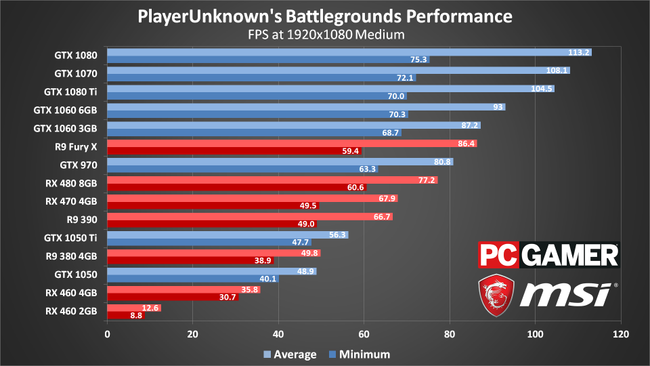
@mods why are ppl with GTX 1080 getting more FPS than ppl with 1080ti ? FeelsBadMan
pale plover
@ivory warren can you please post your specs on the forums with the issue. Mod team should be able to better help you with your issue.
!forums
regal vaporBOT
Link to the forums: http://forums.playbattlegrounds.com
PLAYERUNKNOWN'S BATTLEGROUNDS Forums
pale plover
@wide delta even restarting didn't fix? Try validating game files.
vapid forge
ok i was wondering if when i leave a solo game at the spawn island, does my rank get affected?
 pale plover
@strange onyx because the game is CPU intensive not GPU.
pale plover
Have you ever messed with the ini files before the changes for FPS?
strange onyx
Nope. Everything is untouched
pale plover
What FPS are you getting?
strange onyx
Average is 120 on 1440p but if I land at Yasnaya Polyana with 4-5 more ppl I am getting like 45-60fps
pale plover
Yeah I mean the cities are always an issue as the game is not fully optimized and there are soo many textures to load
My CPU is quite old so I get down to 30-40fps when in cities and 80-100 on open areas
pale plover
No problem. Sorry I couldn't be more help :/
 wintry glade
@vapid forge Yes. as you are leaving a joined game.
vapid forge
i get like 38-42 fps everywhere
i5 4460 gtx 960
my 960 is more of the issue in this case tbh
 idle kite
I just tried to install reshade on pubg but it causes the client to crash during launch (I suspect it has to do with the fact that I am playing at 1600x900 on a 4k screen)
anyone have a similar issue?
strange onyx
@idle kite don't you have monitors settings for colours on a 4k monitor ? I also tried reshade and it's just making me cry
monitor*
silk sand
@Agent#4150 Friend has 960 with no issues at all.
Have u optimized it littlebit in nvidia's control panel?
Also your in-game settings?
 cobalt heron
Have you also long loading times?
 stone heart
So, two of my friends can't play cause their menus are loading without icons. They've tried restarting & verifying cache and they still have it.
Suggestions?
silk sand
@stone heart
Go to *\Program Files (x86)\Steam\steamapps\common\PUBG\TslGame\Binaries\Win64\BattlEye*
Run Uninstall_BattlEye.bat
Run cmd prompt as admin and type: sc delete BEService
Go to \Program Files (x86)\Common Files\ and delete folder "BattlEye"
Than Restart PC
When your PC Boots up verify integrity of game files before launching the game.
That may help.
@mental orbit also you try this u had same report.
Also your firewall can block the game , so unlock it
shut pier
cant seem to buy any crate keys when i click it it dose nothing any help would be great
vapid forge
no im using reshade
with settings that allow me to see much better in darker areas with antialiasing on high
cinder cloud
i dont reocmmend AA on high
with a 960
@vapid forge what Reshade filters do u use
vapid forge
hmm
clarity colourfulness vibrance and luma sharpen i think
not 100% sure
but it definitely is playable from like 38-60+ fps
 modern dust
Everything Very Low Apart from AA, which is High
cinder cloud
Resolution?
modern dust
1366x768
modern dust
AMD Athalon x4 860k at 3.7ghz
GTX 1060n Strix OC
Sata 1tb HDD
cinder cloud
What model of HDD do u have?
cinder cloud
Well
your processor is kinda weak for this game
and the game doesn't run well on normal hard drives
so its likely your GPU is being bottlenecked by your CPU
cinder cloud
It might be enough after EA
 bleak imp
16:21:57: Note: File blocks can be ignored if they don't cause problems with the game.
16:21:57: [INFO] Blocked loading of file: "E:\Games\steamapps\common\PUBG\TslGame\Binaries\Win64\dxgi.dll".
closed it and tried opening again.. no problem.. but just sayin'
cinder cloud
dxgi is reshade
shrewd thunder
BE does that every so often after an update
 ripe pendant
Hello are their any PUBG admins available that can help me with an issue?
I purchased 4 keys but they are not showing up in game it still says i have 0. The purchase shows up in my steam inventory and in my recent transactions but wont convert over to the game. I have tried restarting both the game itself and my PC.
polar gazelle
I FIGURED OUT HOW TO GET THE CRASH REPORT
WHEN YOU CRASH AND IT SAYS "send and close" or "close without sending" CLICK SEND AND CLOSE THEN GO TO LIKE NOTEPAD OR DOCS AND CLICK Ctrl + V and boom crash report!
i got this "LowLevelFatalError [File:D:\tsl\tsl-client-branch\build\UnrealEngine\Engine\Source\Runtime\RenderCore\Private\RenderingThread.cpp] [Line: 791]
Rendering thread exception:
LowLevelFatalError [File:D:\tsl\tsl-client-branch\build\UnrealEngine\Engine\Source\Runtime\Windows\D3D11RHI\Private\D3D11Util.cpp] [Line: 176]
Unreal Engine is exiting due to D3D device being lost. (Error: 0x887A0006 - 'HUNG')
KERNELBASE.dll
TslGame.exe
TslGame.exe
TslGame.exe
TslGame.exe
TslGame.exe
TslGame.exe
TslGame.exe
TslGame.exe
TslGame.exe
TslGame.exe
TslGame.exe
TslGame.exe
TslGame.exe
TslGame.exe
kernel32.dll
ntdll.dll
ntdll.dll"
 honest mica
this is my crash error
LowLevelFatalError [File:D:\tsl\tsl-client-branch\build\UnrealEngine\Engine\Source\Runtime\RenderCore\Private\RenderingThread.cpp] [Line: 791]
Rendering thread exception:
LowLevelFatalError [File:D:\tsl\tsl-client-branch\build\UnrealEngine\Engine\Source\Runtime\Windows\D3D11RHI\Private\D3D11Util.cpp] [Line: 176]
Unreal Engine is exiting due to D3D device being lost. (Error: 0x887A0006 - 'HUNG')
KERNELBASE.dll
TslGame.exe
TslGame.exe
TslGame.exe
TslGame.exe
TslGame.exe
TslGame.exe
TslGame.exe
TslGame.exe
TslGame.exe
TslGame.exe
RenoirCore.WindowsDesktop.dll
RenoirCore.WindowsDesktop.dll
RenoirCore.WindowsDesktop.dll
RenoirCore.WindowsDesktop.dll
RenoirCore.WindowsDesktop.dll
RenoirCore.WindowsDesktop.dll
RenoirCore.WindowsDesktop.dll
RenoirCore.WindowsDesktop.dll
RenoirCore.WindowsDesktop.dll
RenoirCore.WindowsDesktop.dll
RenoirCore.WindowsDesktop.dll
CoherentUIGT.dll
CoherentUIGT.dll
TslGame.exe
TslGame.exe
TslGame.exe
TslGame.exe
TslGame.exe
TslGame.exe
TslGame.exe
TslGame.exe
KERNEL32.DLL
ntdll.dll
ntdll.dll
 remote pelican
What now?
shrewd thunder
if you have overclocked your gfx card stick it back to stock
@polar gazelle C:\Users\%username%\AppData\Local\TslGame\Saved\Logs is where all your crash logs are
1 folder per crash open xml file for what you just pasted
polar gazelle
they are 560 TIs OC out of the box, ill have to get into bios to clock them lower, MSI wont let me set clock lower than 1050
shrewd thunder
should be able to lower with msi afterburner
it's not 100% the oc thats causing the d3d device lost error but it's the most likely
polar gazelle
trying to take screen shot... but i forgot how lol
shrewd thunder
of game or desktop?
polar gazelle
desktop
shrewd thunder
print screen then paste into paint or w/e will work
polar gazelle
MSI all way down
about to do a clean install of the driver, but ill have to rehook up SLI, as u figure this isnt connor its his dad lol
oh this is a help forum lol
shrewd thunder
how long you had afterburner installed btw? not seen that ui in years I dont think 😛
polar gazelle
LONG time its my favorite
 fiery quail
Has anyone else opened a case and not recieved an item?
shrewd thunder
looks much diff now
polar gazelle
maybe i should update hjaha I can OC the cards stably but they are packed in there an fans do not align so heat becomes a issue
shrewd thunder
theres issues with servers/inventory atm @fiery quail you should get the item when they arent playing up
or if you see your inventory fine maybe you got a dupe
fiery quail
I looked through my steam inventory and the item isn't there either
shrewd thunder
will be the server issue then https://twitter.com/PUBATTLEGROUNDS/status/894450559297527808

A few players may experience inventory load failure, but it will not affect your items or BP. https://t.co/f8ocJSLC9p
Likes
467
 Twitter
fiery quail
Twitter
fiery quail
They stated on twitter that there shouldn't be any problems with items or bp even though the inventory isn't loading
shrewd thunder
only forums, but they should just turn up when servers are fixed so might as well wait
fiery quail
Okay thanks
latent niche
Is the reconnect feature in the game right now?
Got a bugged 30fps locked rain game again
shrewd thunder
Is disabled atm @latent niche
latent niche
I had a friend say he did it earlier today but Im worried to try it
shrewd thunder
If they re enabled it they didn't announce anything
latent niche
hmm 🤔
shrewd thunder
Play fpp duo and disconnect, don't lose anything by trying
 chrome shale
Why is PUBG eating more and more and more RAM over time? and I'm speaking about days and weeks. I've reinstalled win10 on my PC, formatted the HDD, like a fresh new PC, and PUBG used something like 5.5 GB RAM on first run, it loaded whole pochinki before I even opened parachute.
and its slowly climbing up. after 1.5 week, I cant even load school on first start because it's alredy at 7.7 Gb used RAM, only by PUBG
Literally all softwares I have installed: Steam, chrome, CCleaner, teamspeak, discord. And yes, I do use CCleaner daily.
Any guesses how to stop that or what causes it in the first place?
viral monolith
Anyone getting a "Can't connect" message today? haven't been able to get on all day
digital glen
@chrome shale A lot has to do with being an EA game. I'm not trying to sugarcoat it by saying EA, but that's what it is. Not fully optimized yet etc. It uses the same amount of ram for me. Best case scenario is to have PUBG installed on an SSD drive for building rendering issues. That's not possible for some people, so I suggest them googling "best nvidia control panel settings" and looking at some YouTube videos of current PUBG fps increases to try. Also there are great videos on optimising your pc for fps games, Windows 10 and Win 10 content creator. Applying those techniques can help until further optimisation is reached.
I would send you the 3 links I have, but I'm on mobile and don't have access to them.
@viral monolith Try refreshing the ui
@chrome shale Also closing down everything you don't run, albeit not much since you clean installed can help. Turn off hardware acceleration in Discord and Chrome
viral monolith
Haha sorry! 😦
digital glen
Np, that literally made me lol
@chrome shale Also when PUBG is loaded, go into task manager, click details tab, scroll to Tslgame, right click, set priority to either above normal or high.
chrome shale
Thanks for the tips, will try
digital glen
tepid fox
I'm not sure if this glitch is still around. There was a glitch a few patches ago where if someone was close to a wall a long gun on their back would poke through a wall and maybe their barrel if they were crouched as well.
I know I had it recently, within a few weeks where I was in a crate and noticed that when I turned my Kar was pointing out, so I readjusted my guns and my positioning to be away from the wall.
with a long gun
 vale night
How do I change my right click to just go into ADS even when I hold it down?
digital glen
PLAYERUNKNOWN'S BATTLEGROUNDS Forums
Encountered a bug or issue? Here's your spot. Remember to include whatever details you can
If you would like to add what you are experiencing
 manic frost
keep having a message saying i have the wrong version yet there is no new download
digital glen
@vale night Not at my pc atm, look into the controls option in game, maybe a keybind there? Not sure
@manic frost Force steam to download it by verifying your files
Make sure you aren't loading the test server lol, it happens
manic frost
yeah just did the verifying, gonna check again
digital glen
@manic frost So did it work?
tepid fox
Is the problem with keys for gamescom crates a known problem at the moment? I see quite a few people bringing it up.
Apparently people are unable to buy keys but can purchase the crates.
digital glen
@tepid fox Yes it is. They are looking into a fix
digital glen
Welcome
vale night
@digital glen Thanks for the suggestion, but I couldn't find an option for it. Is it something they overlooked or is this the way it will always be?
digital glen
@vale night So you currently just right click to go ads and hold right click to aim "over the shoulder"
That's how it is currently, I might be missing what you are saying
vale night
You are right. What I'd like is to be able to hold right click to go into ADS and just skip "over the shoulder".
Every other shooter that I've played except Arma behaves that way.
digital glen
Hmmm I'm at work atm and on mobile, when I get home in few hrs I can look into it further. Can't remember the keybinds off the top of my head. Did you look there to see if you can change it?
vale night
Yeah, it looks like there is no distinction between ADS and over-the-shoulder in terms of what keys you can set.
digital glen
Ok I'll have a look later. Gonna say if there was you could just unbind the over the shoulder....
vale night
Yeah, I can't find it. Thanks for the help.
digital glen
@vale night welcome. I'm asking around also, if I find a workaround I'll let you know
vale night
I appreciate it. I know a lot of other players want to be able to change this also.
digital glen
Just found out there isn't a workaround, but has been suggested. Maybe look at the forums for it and add that you would like it also.
If you search for it and can't find it, feel free to make a new topic on it
PLAYERUNKNOWN'S BATTLEGROUNDS Forums
Share your ideas to improve BATTLEGROUNDS
@vale night
vale night
I will do that. Thanks.
digital glen
@obtuse riverhttps://forums.playbattlegrounds.com/topic/14224-known-work-arounds-general-bugs/
PLAYERUNKNOWN'S BATTLEGROUNDS Forums
Hello Players,
Here is a list of known work arounds for common bugs that are found in game, sourced by the community. These are temporary until the te...
@obtuse river Look in here. Also can try setting your effects to medium or high to help
vale night
@digital glen Lot of threads about this already. Looks like it is a highly requested feature.
PLAYERUNKNOWN'S BATTLEGROUNDS Forums
So you added many new options to chose from toggle or hold but the one true thing it's missing is hold for aim, could you add that please? :3
PLAYERUNKNOWN'S BATTLEGROUNDS Forums
Hello,
why i cant choice the way to ADS? i dont want to click to ADS, i want to hold the key!


also why is there mulitple ways to ADS? which other ...
 obtuse river
thank you guys
digital glen
@vale night Yes ok. Nice, I would add to it also, the more the merrier!
@obtuse river Could also try googling "inventory lag fix battlegrounds" ive seen a ton of suggestions of different sorts. Using ssd for the game helps tremendously if you have one, if not, some of those tips might help
obtuse river
thanks mate, completely forgot about moving the game to my ssd - that might fix it
digital glen
@obtuse river That's gonna help a ton
ripe pendant
anybody have issues with keys not showing up after you buy them? I have a email reciept from steam and it shows up in my steam inventory but not in game for me to use
 steady wolf
Is there any way to check the server status? Keep getting 'Connection closed' every time I try to get on the test server. Not sure if it's just me.
digital glen
@jonesy2488#8257 https://forums.playbattlegrounds.com/topic/47336-gamescom-crate-and-key-system-issues/
PLAYERUNKNOWN'S BATTLEGROUNDS Forums
Hello Players,
If you are having any issues with the Gamescom crate and key system please post a detailed description of what the issue is below using...
@steady wolf Test server is only open for 1 day before the patch goes to the main servers
steady wolf
this i did not know. thought i could only get FPP on test. thanks.
digital glen
Welcome
 jagged leaf
so i got a gamescom crate, and now my ui in the start menu is really fucked
cant see any clothing item icons, it says i dont have BP
its weird
also i cant buy a key for the crate, whenever the window appears
 tacit parrot
Got the same issue. I have the crates, but I can't see it ingame.
tacit parrot
Can't see the crates. I have them in my steam inventory, but nothing shows up ingame. Not even the stuff in the wardrobe
Both
jagged leaf
and i just wanted to open a gamescom because i had made good money selling free crates lmao
tacit parrot
Hah, same here bud
Bought the crates, but when I got in the game, everything is blank 😛
jagged leaf
i didnt even reset the game, bought the crate with bp and suddently its broken
tacit parrot
Oh wow
jagged leaf
i guess its a sign that the game wants me to sell more crates
tacit parrot
I see they tweeted this: "A few players may experience inventory load failure, but it will not affect your items or BP"
jagged leaf
inventory glitches dont usually affect BP, but its kinda annoying
 deft glacier
Inventory not loading?
pale plover
#📯│general-announcements @deft glacier
tepid fox
I was just coming to comment about the inventory load failure actually
I saw a streamer having the same problem
manic frost
sorry yes @merry hollows it worked
 serene pewter
The game crashed, and i got a dialog box, that asked to provide details... but no place to add details
known bug?
 acoustic nexus
@serene pewter You don't have to provide the details yourself. The bugsplash dialog just asks you to confirm that it is allowed to send the log files from the game towards the dev teams for investigation 😉
honest mica
0x887A0006 - 'HUNG' hey guys I got this message in the crash, my gpu was overclocking and I turend it down and now my game loads fine! took forever to figure this one out, hope it helps anyone
viral monolith
why is it that some pubg videos or streams like Dr Disrespect look suuuuper smooth? is it just that he has 2x 1080, or is there more to it like how he probably plays in 1440p+ or certain visual settings? ... I have a 1060, and it never looks that good I think
tepid fox
This game isn't optimized for 1440 if I recall correctly.
viral monolith
well I play in 60hz but I'm just wondering why some streams/videos look so much better
dense sandal
Why my wardrobe is showing nothing ?
viral monolith
try refreshing your UI @dense sandal
tepid fox
It's a known problem that I believe they're looking into at the moment.
quick chasm
Yup
dense sandal
now i cant open crates GG
 slender hawk
Hiya, Can anyone help. Since the update last week I cant LEAN/Peek right. I use " L" to lean right. it was working before the update. If i bind lean right to something else it also works. I have tried reinstalling the game and verifying cache
Have also tried deleting GameUserSettings and re binding all my keys
shrewd thunder
There is currently a known issue with binding i and L keys @slender hawk
Need to wait on a patch to fix it
slender hawk
OK no problem. thanks for your help!
quick chasm
@dense sandal you can, click on buy crate, go on "home" then go to character and click on crate down there to open it, then click on "rewards" - crate window will open and you will be able to open it
And after opening..either go on "home" again and refresh UI, then character to see the new item..or refresh your steam inventory and see it there (:
A little work around to open crates while your inventory appears empty
quick chasm
Do they appear in your inventory on steam when you buy them? @buoyant quartz
If so it will say there whether they are tradable or not
 buoyant quartz
Bought one. Wasn't tradeable
Just going to give away the cases on stream lol
was gonna package with the key
Actually opened one case and got a School Jacket which is pretty rare I guess
 timber silo
@eternal lake @acoustic nexus How do I report someone for following us into chats and talking shit to us and not leaving us alone
 eternal lake
Already talking to your friend about it, @timber silo
 hidden pewter
@steel quiver is going around trolling in voice chat
 steel quiver


 viral monolith
anyone know why windows says it needs to close pubg when i open my browser next to it ? pubg is using 4k ram but somehow windows says not enough ram, but i have 16k ram :S