#🤝│community-troubleshooting
1 messages · Page 50 of 1
 tepid fox
 boreal ivy
So did that regular channel & role ever get considered or passed along?
tepid fox
Pingu, same with me. to fix the lag spikes. No idea what I'm doing wrong.
 digital glen
@viral monolith I had to possible fixes for you. Im at work and remember this one, but wrote the other down. At least try this, remeber yesterday when you deleted gameusersettings file? Go back to the CONFIG folder and delete that whole folder then reverify
 hasty snow
We're trying some things in pms Wags, I guess we can come back here and all review his situation. I advised him to try and disconnect his 2nd monitor just to see if that has any effect
he's currently playing though and I'm letting him finish his game 😄
digital glen
@hasty snow Cool thanks man! I'm at work so that helps 🖖
hasty snow
@viral monolith have you tried to change your resolution to a lower one for example
 viral monolith
Yeah
hasty snow
have you tried to launch the game on your secondary monitor?
hasty snow
this needs to have something to do with monitors, resolution, etc for me
 pliant dune
BattleEye is blocking reshade once again, when it will be fixed?
 shrewd thunder
You running anything that has overlays @viral monolith origin ubi launcher etc
Also try disable steam one
viral monolith
How?
digital glen
@viral monolith Disable Origin...bet it fixes your problem
Close it out completely, make sure not running in background
viral monolith
I'm gonna uninstall for now
shrewd thunder
I'm on train ATM can tell you how when I get home if no one else does by then
digital glen
Uninstall uplay and origin
@viral monolith
Betting it will fix it!
That's what I wrote down at hone that I couldn't remember
But just did 
 tacit lantern
hello guys, got super stupid question, anyone know how to fix battleye error not letting run the game, first time happens to me
boreal ivy
@tacit lantern What's the error message?
tacit lantern
Failed to initialize BattlEye Service: Windows Test-Signing Mode not supported.
I googled tried all what I found still got problem
boreal ivy
Weird. That mode shouldn't be on normally.
viral monolith
@digital glen and @hasty snow That didn't fix my problem
I uninstalled other programs which have overlays
And it didnt fix it
digital glen
@tacit lantern #13
PLAYERUNKNOWN'S BATTLEGROUNDS Forums
Update: If you are having an issue connecting to the servers please note what type of connection you are accessing from. (Ie: Home, Work, Universit...
@viral monolith Damn thought for sure it would.
boreal ivy
@tacit lantern https://www.battleye.com/support/faq/ and the bit with When launching the game I get a “Failed to initialize BattlEye Service: Windows Test-Signing Mode not supported.” error. How can I solve this?
tacit lantern
@digital glen will try now
digital glen
@tacit lantern Also try what Penoxi said above if that doesnt work
@viral monolith Did you completely unhook your other monitor and restart pc?
hasty snow
Pingu, can you run a test for me... right after the loading screen, spam click the Play button location... in the menu
see if that triggers matchmaking
viral monolith
Oh yeah I heard of people doing that
hasty snow
I just want to pinpoint the issue, I know that's not an ideal solution
hasty snow
also, try to alt + tab, when that happens and tell me if it works
so I think it could be... Steam overlay, do you have that on?
hasty snow
try to disable the steam overlay in the steam settings and check if that goes away
tacit lantern
@digital glen running battleeye manualy didnt helped
viral monolith
Disabling steam overlay did not work
hasty snow
well I actually cannot use steam overlay at all in PUBG hm.
viral monolith
I see that it only works when the top left corner says Loading and I click it
That's the only time I get into a game
digital glen
@tacit lantern Scroll up to what Penoxi said and gave you that link, try that
 gleaming vector
Try running Steam as Administrator... Then find the PUBG .exe file and run it as administrator as well.
hasty snow
Pingu, you mentioned you have a firewall, can you add all the game's .exe files to the exception list?
boreal ivy
@tacit lantern Here's the link again. https://www.battleye.com/support/faq/ CTRL+F for "Windows Test-Signing Mode "
tacit lantern
@digital glen @boreal ivy Bcdedit.exe -set TESTSIGNING OFF already off, when I go to cmd and writing command - bcdedit it shows that - testsigning - NO
boreal ivy
Did you reboot?
tacit lantern
@boreal ivy like ye I wrote this commande yesterday, so just checked again tooday by writing bcdedit to see is it yes or no
viral monolith
boreal ivy
@tacit lantern Let's do it again just in case. Start your command prompt as an admin
viral monolith
It says it's already in the list of exceptions
tacit lantern
@boreal ivy going on restart now
boreal ivy
kk
hasty snow
@viral monolith I am going to report this to the dev team as I can't find any other way to fix your issue right now. You're not alone, some other people are having this problem.
viral monolith
Oh ok
hasty snow
Last question, you do have all your window updates done right?
hasty snow
can you try to install this update, choosing the right version for you? https://support.microsoft.com/en-us/help/2999226/update-for-universal-c-runtime-in-windows
tacit lantern
18:37:02: Failed to initialize BattlEye Service: Windows Test-Signing Mode not supported.
poof
viral monolith
I can't no because I am running Windows 1
Windows 10*
I don't see any to be for Windows 10
hasty snow
try 8.1 in your case, your right version, 32 or 64
hasty snow
do you know which version you're running? check your win version
viral monolith
Windows 10 64-bit
hasty snow
yea, x64 then
viral monolith
boreal ivy
@tacit lantern Have you tried writing the
bcdedit.exe -set TESTSIGNING OFF``` commands? Just asking to make sure before I look deeper...@boreal ivy wrote them again / restart
@boreal ivy yes still got 18:47:43: Starting BattlEye Service...
18:47:43: Failed to initialize BattlEye Service: Windows Test-Signing Mode not supported.
boreal ivy
@tacit lantern Have you ran the Fixit kit by Microsoft? You can find it in the battleye FAQ link
tacit lantern
@boreal ivy looking for it there any links ?;p
 tardy pike
those are push to talk
boreal ivy
@tacit lantern Looks like the Fixit kit is out of date, apologies. Are you on Windows 7, 8 or 10?
tacit lantern
@boreal ivy 10
 shut sundial
Can you add Hebrew chat please?
boreal ivy
@tacit lantern Hmh. I'm running out of options. I could remote desktop and check a few things myself but to be honest that's a very stupid idea considering I'm just a random guy on the internet.
If you can't find a fix at a reasonable timeframe I'd consider backing up all your data and doing a reinstall. That oughta fix it...
digital glen
@tacit lantern I'm at work and on mobile, so I'm not around a lot right now, have you tried navigating to your Battleye folder, deleting it, and verifying your game files via Steam?
boreal ivy
Just as a note for the future. Don't disable driver signature checks. There are only very specific use case scenarios and a normal PC user should never disable it as it opens new avenues for certain nasty things
tacit lantern
@boreal ivy this thing can connected with my audiop interface Edirol ua-25, to instal drivers for UA-25 you have to disable that driver testing and instal 8.1 / wista drivers in safe mode. - So if I delete this drivers maybe game will work but then I wont get sound
boreal ivy
Oh, audio
tacit lantern
@digital glen yes deleted it yesterday - some advice from google what I found
boreal ivy
Sorry, should've asked about that 😛
Unfortunately there are no easy ways of running unsigned drivers while having driver signature checks enabled. :/
I'm unfamiliar with the actual device and drivers. Are the Win8.1 drivers not working on Windows 10?
tacit lantern
@boreal ivy well from start windows instaled ""some kind of drivers "" for that device but after couple of updates windows disconnected this device and not running anymore so I had to do this magic thing and instal drivers under this all drivers dissable features
digital glen
@tacit lantern From the first link I provided you, you might want to follow the guide on making sure Battleye is allowed in your firewall properly
tacit lantern
@digital glen will try
boreal ivy
@tacit lantern http://forum.cakewalk.com/The-ultimate-guide-to-get-your-RolandEdirol-devices-to-work-with-Windows-10-Updated-m3267234-p3.aspx You can try those Audio drivers, remember to uninstall the unsigned drivers first. Do it at your own risk, bla bla and all that 😛
tacit lantern
@boreal ivy ye I done it from page 1 from this post
boreal ivy
Hmh... Well.. the issue here basically are the unsigned/unofficial drivers for your hardware. BE prevents the users from using test-mode because there are some magic tricks you can do that way that may harm the games BE is used on
Good luck, hope you'll find a way to fix it somehow ^^
tacit lantern
@boreal ivy btw how to turn back on this driver signing
boreal ivy
Basically delete the driver and do the bcdedit.exe steps
Should fix it after reboot. It will break your audio tho
digital glen
Sounds like you need to save your pics, bookmarks, anything else you want and do a fresh clean install of Windows
boreal ivy
Mmh. Idk if that would help. He would have to run a system with native driver support, Win8.1 or Win7. Or buy a new mixer with updated Win10 drivers :/
tacit lantern
@boreal ivy this audio interface cost like 200+ euros back in the days (((
boreal ivy
Yeah I know :/ It's a nice mixer
digital glen
Yeah forgot about audio issues
boreal ivy
Meanwhile I'm rocking my nuforce USB interface with a single 3.5 output 
a pleb interface compared to ua25
tacit lantern
previous version of Windows 10 bassicly supported basic drivers for that audio interface ;/ after some updates stopped working
maybe old version of windows 10 + stop auto update
boreal ivy
Mmh, do it at your own risk. Win10 has received some hefty updates in the past few months
Does UA25 have the advanced mode switch in the back? Read some stuff about flipping that off to fix driver issues..?
tacit lantern
@boreal ivy ok drivers deleted from edirol
game is working 😄 but damn laging like hell i7-6700k r9-380 4gb
boreal ivy
^^
 quick chasm
What do you have your settings set on sofy?
tacit lantern
@quick chasm by default, thing that there is slide show and how to set something 😄
quick chasm
i mean, ingame settings, what kind of slide show are you talking about exactly ? 😄
you could have some of the settings set to to low or to high causing your game to lag, or you could have cought a higher ping server
tacit lantern
@quick chasm ohhh like by default didnt change something ;D really this game destroying my pc
quick chasm
Oh then change the settings please to the following:
Anti Aliasing: medium or high
Textures: Medium
View Distance: High
Every other setting: Very Low
That way you will have less impact on your cpu and your gpu will take some load off with increased textures/AA etc
You want that esp when streaming
 mild vortex
 meager wind
fix this plz
 hearty hinge
The doublebarrel? xD
 dawn umbra
 sage cobalt
are the server down
with this name and this pic ahahah
in germany you have to go in jail
or pay money
 cyan zinc
 cobalt vale
 harsh coyote
viral monolith
harsh coyote
viral monolith
Hi, I want to link the game with my twitch prime account to get the loot chest
but when i click the webpage doesn't load
and after a while I get a 504 error
ok
shrewd thunder
twitch prime loot offer expired
 fading wedge
Does anyone else experience this glitch?
Item is not obtainable no matter where you stand
Happens to me every time something spawns on those control panels
viral monolith
just was in a squad game where 3 of us crashed within a minute of each other
 silk sand
Heyy i'm back!
 languid sluice
Whenever I press ready, even when I'm in a group, it instantly says "matching" and all that, even though my friends aren't ready yet. And when they change queue setting while I'm "matching"/ready it makes me not ready but it still says matching and I'm unable to ready up again without reloading the UI.
 abstract patrol
Yeah I've been getting the same issue @languid sluice
Generally just restart the game and it stops
silk sand
@languid sluice Exacly what @abstract patrol said
Mostly all tiny problems are solved with game restart.
If doesn't help pm here again
languid sluice
I've had it for almost a week now though..
There was no event I can recall that happened at that time, but it's persisted this whole time
abstract patrol
My game has been getting stuck when launching. It's just a blank lobby scene with LOADING in the top left
silk sand
@abstract patrol Refresh UI or restart game sir
abstract patrol
Refresh UI button doesn't work. Restarted several times to no avail
Trying some windows updates + restart computer now
silk sand
@abstract patrol From where do you launch games?
Desktop/taskbar or steam?
abstract patrol
I flip back and forth between the 2 honestly. Restarting the computer seems to have worked though. Steam had an update as well
 rose jetty
how do i fix inventory lag when i open
rose jetty
gtx 1050 i7 6700 16 gigs ram
 vestal cloak
HDD/SSD?
rose jetty
1 tb hdd 256 ssd
vestal cloak
Game installed on ssd?
rose jetty
yes
vestal cloak
When was the last time you updated your nvidia drivers?
rose jetty
like two days ago
vestal cloak
So you're on 384.94 correct?
rose jetty
what does that mean
vestal cloak
Is that the driver version for your graphics card
If it is, have you went to nvidia control panel and turned power management mode to prefer maximum performance?
vestal cloak
Do you have nvidia geforce experience installed?
vestal cloak
Click drivers
Top left beside home
Will tell you the version at the top and if you have the latest version or not
vestal cloak
If it is, try the nvidia control panel thing + edit power plan for pc and turn off PCI Express Link State Power Management (not sure if that's still a valid thing or not)


You can try dropping the textures to be lower in game as well
rose jetty
then where
vestal cloak
 vestal cloak
You could try changing the optimize computer performance as well but I use that for farming ether
So idk if that will do anything for your issue
Can try lowering textures too, if not then only thing I can say is to google it some more, I've never had the issue myself
viral monolith
connection closed ? help
 ivory warren
is anyone elses menu not loading
silk sand
@ivory warren @viral monolith Try to restart game or pc
 naive ocean
Is there any plan on fixing the absolutely horrendous vehicle physics?
 stone ravine
anybody have a fix for having all animations being half speed?
https://www.reddit.com/r/PUBATTLEGROUNDS/comments/6q7e3u/help_having_an_issue_where_only_my_character_is/ here's an example

reddit
Anybody else had this problem before? Any fixes? Tried reinstalling and verifying game cash too. It isn't my internet because every other game...
everybody else is totally fine
i reinstalled and verified game cache too
 clear tendon
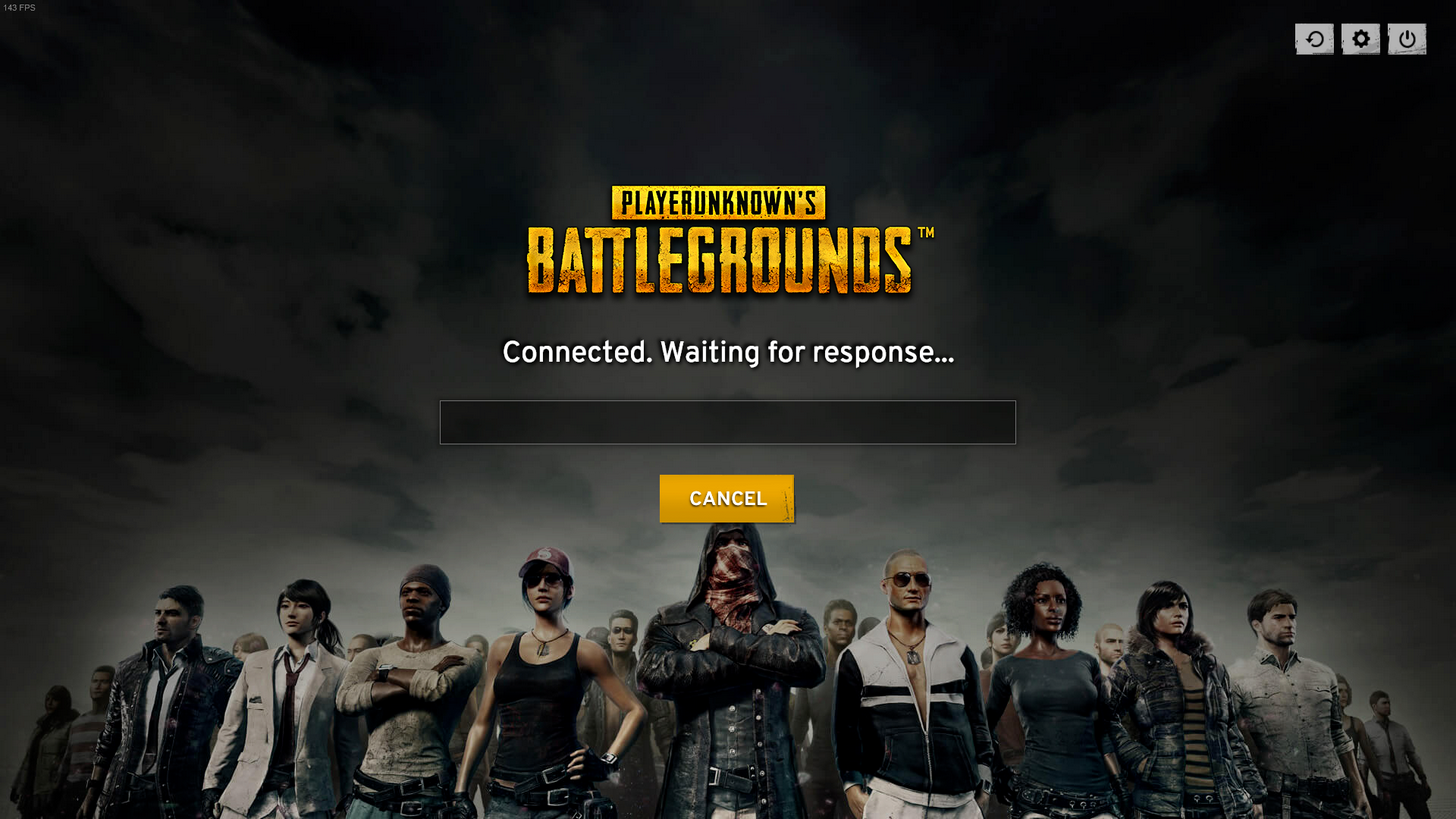
The "Connected. Waiting for response..." bug seems to have gotten worse after the latest patch
 thorny bloom
So when I load into the lobby it will say matching regardless of if I have pressed the button or not then doesn't let me cancel it either
 bronze walrus
where do I report TKs again?
digital glen
@bronze walrushttp://forums.playbattlegrounds.com/forum/70-reports/
PLAYERUNKNOWN'S BATTLEGROUNDS Forums
ALL REPORTS SUBMITTED WILL ONLY BE VISIBLE BY FORUM ADMINISTRATORS


Please login or register an account to gain permission to submit a report.


If y...
2nd link is the template to use
bronze walrus
cheers
has it always been that way that you can get placed in a duo match when you autofill squads?
digital glen
Shouldn't be. If choosing squad, and you have auto matchmaking ticked, it should fill however many slots are open. I have had it bug before and only add 1 person
bronze walrus
I queued solo and got into a duo match with somebody else. Once I got matched with 1 other guy into a squads match
digital glen
So if I understand correctly, you are attempting to play a squad match, but are not getting matched with 3 others for a full squad of 4?
bronze walrus
I always queue solo in squad matches with auto-fill on. So I should get into a group with 3 others. Last match I got into a duo with another guys. Definitely had squads ticked.
Just happened again
digital glen
Interesting. First I've heard of that. I need to look at latest patch reports too see if anyone else has reported that. Try making sure you have selected squads and auto fill. I could have sworn I have pressed duos in the past, and ended up in singles
Really.
Hmmm
What region?
bronze walrus
EU
digital glen
I'll be at pc in 30 mins, I'll try it out.
bronze walrus
In the end I have to play those matches solo either way 😛
digital glen
Lol
I'll look around for reports on it and test it also.
@stone ravine I can't find any info on that issue. Is it still doing it?
@thorny bloom Known bug on the not being able to cancel the match after last patch. As for the already matched bug, use the refresh ui button top right and see if that fixes it. If not, leave your group and rejoin
thorny bloom
I tried that and it didn't work
Btw It also put me in a duo just when I was queued for squad
It somehow split my premade squad tho which confused all 4 of us
Literally put us in the same game as two duos not a squad
bronze walrus
lel. we once had that. one got autofilled into another squad and we got a 4th random
digital glen
Ok thanks for the report. I'm passing that info from both you guys to the team right now.
bronze walrus
Found another bug: Whenever I find a squad to auto-fill the avg. KDA in that squad is below 0.3 
thorny bloom
I swear people in the lobby are really racist though
Some guy was running around playing moon man during the waiting thing
digital glen
Ok I've thrown all this info upstairs to be looked into.
Yes, it's unfortunate some are like that in the lobby. In the future there will be tools to be able to report those users more properly
thorny bloom
Yeah it would be nice I guess but I can wait for now
 abstract pilot
Just wanted to let you guys know that after the last update it broke the Spectating mode on my friends game, he just watched his own body the whole time
bronze walrus
Every match or just once?
bronze walrus
has he checked the game files via steam?
 neat tinsel
@moderator @admin Squad rooms 13-20 are set to push-to-talk only. Any way that can be changed?
abstract pilot
he is streaming so I will tell him to do it
bronze walrus
my random team mates teamed up with an enemy team.. what is this
bronze walrus
ofc it is
tepid fox
I have a kind of stupid question and I'm sorry if it's stupid but I can't get it to work. I want to remap my zeroing to middle mouse scroll wheel but every time I click to remap it just scrolls the window.
 river quiver
oh there's a help channel. should I ask in here about twich linking lol
 old crag
i hope not
 molten frigate
opened the game, says connected . waiting for response
reset steam, and the game three times
still nothing
thorny bloom
@viral monolith Do not cheat: do not use third party programs, macros, client-side hacks, edited game files or anything else that may give you an unfair advantage in the game. This includes promoting or posting links to websites that provide or promote cheats or hacks.
Its in the tos
viral monolith
Tyty
 obsidian tangle
@arctic stream @eager timber this guy keep popping into channels and blasting music. He doesn't play the game
 smoky venture
so how do I find out why I'm banned, I've been banned for three days and no one has been able to tell me why just that "they'll check on my appeal soon".
 fair ermine
so i use a controller is there anyway to spectate with it? only lets me exit to title
 bronze remnant
i lost all rewards including default item. help plz how to fix.
bronze remnant
ty ill wait
 lyric silo
I would like to report another instance of the symptoms @bronze remnant experienced, my friend lost everything as well
 covert heath
Is it a bug that we are not able to cancel being ready in lobby anymore? I have to refresh the UI in order to get out of matching
viral monolith
is anyone here to help me
quick chasm
@viral monolith Hey, hhow can i help?
viral monolith
first time playing tonight with team, my team mate comes up in car and I think he is a enemy and I shot him, he said I might get banned?
im new to game
will i be banned?
i tried to reheal him, but two enemies came
quick chasm
Well, unless he reports you, you wont
If it was your friend who you know, and not intentional, he has no reason to report you
viral monolith
well we met tonight, he didnt seem angry about it, I apologized and stuff
he knows im new
maybe I should just stay out of team and go solo
quick chasm
There is no automated system for TK-ing.. yet (: So unless he is mad about it and records it, reports you
you will be fine (:
viral monolith
ok thank you for help
quick chasm
cheers
@covert heath sometimes the MM is instant so there is no time to cancel it really
It works fine for me when the MM takes few seconds
covert heath
It does that in squads and duos tho even if the other people aren't readied up yet. Won't let me cancel
quick chasm
So it searches for a game when you have members that are not ready and still puts you in the game ?
Ah well that is indeed something worth reporting.
 rancid trellis
At the moment i only have controller options in game, even though my controller is not attached to my pc... any way of solving this? for some reason i can not spectate because of this
 fallow crater
It's a known bug, most people have been restarting the game. It's been reported to the devs
rancid trellis
okay thanks, restarting doesnt help though...
 crisp steppe
hello guys, i am stuck in the connected. waiting for response page. may i ask what has happened??
it takes quite a while before i actually can see my character
 red nacelle
crisp steppe
red nacelle
crisp steppe
i refresh it like 5 times already and it still like get me stuck at that page
and i have to wait like quite long
 dense sandal
how can i apply for a custom server to host a tournament ?
boreal ivy
@dense sandal I think you should contact a moderator here and talk with them about it. They will help you with all the details and tell you who to contact
dense sandal
@fallow crater
fallow crater
I'm at the movies, but in forums under news and announcements there is a post by Amir.
It outlines how to apply. You have 2 days before the deadline
It's called Custom Games Applications I think
 surreal crane
okay so I have a problem wityh PUBG since the last update. I have tried everything now from reinstalling, trying out several launch options, verified files, different windows options, disabling all sort of programs. etc, but nothing works. Whenever I play the game and land after jumping out of the plane, the 2nd. or 3rd. time I press tab for inventory I get 2 fps and my whole pc just goes complet retard mode until I Alt F4 the game. Does anyone know what this could be?
digital glen
@surreal crane You running on SSD or HDD
it's been a bug that has been improved upon with game patches but some still get it
surreal crane
I had it on HDD first and then tried to install it on my SSD, same problem
digital glen
Hmmm Usually the SSD is immediate fix. What are your effects in game set to graphics wise?
surreal crane
I usually run everything on very low with view distance on medium and graphic on High
pc spec: gtx970, i7 4790k, 16gb ram
but I have tried different setting to today
digital glen
ok...actually increasing things like AA, Effects, etc put more load on the gpu instead of the cpu doing all the work and bottlenecking...I have a 1060 let me ss my settings and Ill have you try those...but real quick, could you try effects settings to high and see what happens?
surreal crane
sure
let me hop into a game and try, because the funny thing is it doesn't do anything on the starter island it's only when the game has started
viral monolith
I have a similar situation, my game runs a lot better on high than it does on low
problem is that spotting people is insanely difficult on high settings, whereas spotting people on low is much easier
surreal crane
oh wait I just uninstalled the shit again...ffs
digital glen
lol
surreal crane
oh well. give me like 5min to download it
digital glen
I have the built in Steam fps counter running, and I will jump into a desolate area in the game and change/tweak my settings. You can actually watch your fps rise by raising some settings because you are not bottlnecking the cpu anymore.
@surreal crane Also, open task manager when the game is running, details tab, scroll down to TslGame, right click, set priority, high.
That will make the system give the most resources to the game instead of background tasks etc
surreal crane
already did that...
digital glen
k
Here are my settings, try these for the heck of it after you try setting your effects to high and if it doesnt work
surreal crane
okay cool thanks I will try, Thanks for taking your time for this! Much appreciated @digital glen
surreal crane
thanks!
digital glen

0:27 - Performance Graph & Settings 2:33 - Change Game Priority in Windows 3:15 - Game Booster Software - (Yes it works...better on older systems, but it sti...

Tom's Hardware
Could any expert tell me what settings should i set for best fps-performance on nvidia control panel!
surreal crane
but the thing is, it's not only the game that messes up when it happens it,s my entire pc. Like when I'm in a voicechat on discord it completely fucks up with robot voices etc and I can't move my mouse like if I had 2 fpos on my desktop
digital glen
ahhhh so that is the underlying issue here
surreal crane
yep
surreal crane
and Pubg is the only game that does it
yep ccleaner already done, antivirus also etc
river quiver
anyone look into this whole twitch linking business yet? I noticed on the forums there's a few people with the same issue
digital glen
When was the last time you refreshed Windows and or did a clean install?
surreal crane
like I've litterly tried everything that I know could help
digital glen
@river quiver What is the issue?
surreal crane
Like 2 months ago
river quiver
PLAYERUNKNOWN'S BATTLEGROUNDS Forums
Every time I click the twitch button and try to link my account to twitch I would just get a blank screen and then a server error on the web browser. I've ...
PLAYERUNKNOWN'S BATTLEGROUNDS Forums
I claimed the twitch crate some time ago and I would really like to cash in on that sweet, sweet, steam money. Thanks in advanced!
but it's since the newest Pubg update and Pubg is thge only game doing it
digital glen
@surreal crane Turn off harware acceleration in Discord...that will help, but won't solve your problem most likely...same with Google Chrome
surreal crane
maybe I will just try and wait for the next update her next week and see if that fixes it, because it seems nothing works.. :/
surreal crane
I said 16 but I acctually have 24, forgot I also have a 2x4gb kit in
river quiver
thanks @digital glen
digital glen
What is your isp connection? Not playing through a hotspot or wireless right?
 summer idol
hmm for some reason everytime i start my PUBG it gets a crash report?
i checked integrity of files and i reinstalled my reshade
digital glen
@river quiver Definetly broken right now. I am already linked, but I loaded up the game and tried it myself and I am getting the same exact error. I will pass this up the food chain right now. Thanks for bringing it to my attention. If I hear something I will ping you here.
river quiver
thanks 😃
digital glen
@summer idol I would uninstall reshade and try it. Although resahde is allowed for PUBG we do not troubleshoot it or provide tech help with it
digital glen
No worries man! Best of luck
smoky venture
Are the forums messed up for anyone else?
 idle kite
Will there ever be historical positional data or replays available via the API?
I wanted to perform some statistical analysis of player movement relative to the circle
digital glen
@smoky venture Yes the forums are borked right now...the team is aware and looking into it, thanks for reporting
@idle kite Replay ability is being worked on and will eventually be implemented
idle kite
@digital glen will there be API support for replay data like kill locations, circles, player positions etc?
digital glen
@idle kite Let me ask for you...I'm not sure myself. Gimme a min
idle kite
ty ❤
digital glen
@idle kite The team doesn't have any info on that as of now. The dev team is on weekend break, so no one to ask there. Smookie dev streams quite frequently and answers a lot of questions people ask in his stream, you might try that avenue
idle kite
@digital glen thank you for trying though, it's appreciated 😃
digital glen
More than welcome
river quiver
lol I think the forums certificate expired or something
it's rendering all messed up content now
digital glen
The team that handles the forums is looking into right now...totally wonky
 pliant beacon
Regarding the recent bans/discussions about Streamsniping. Is the sniping bannable itself or just doing it to harm the player? I've been Streamsniping several times with a few Streamers that are fully aware of my presence. I do not harm anyone just do Bike stunts in their vision. Is that bannable or not? It's always fun for me and the streamers.
 regal vaporBOT
The Rules of Conduct for PLAYERUNKNOWN'S BATTLEGROUNDS: http://playbattlegrounds.com/rulesOfConduct.pu
 strange onyx
hey guys. is the VSS is bugget? just played a custom game and it seems that is shooting far right side.
jesus
Is the VSS bugged?*
 brittle bear
Ever since the new update I've been stuck on the main menu screen with the message "Connected. Waiting for response...". Happens about everytime I load the game, any ideas on a fix?
viral monolith
it didn't seem bugged yesterday @strange onyx but I guess something could've changed
strange onyx
in Custom Games its bugged
its shooting more to right
like 2cm on a 27'' at 50-70m distance
 undone delta
why is the forums fucked?
boreal ivy
PUBG stuck at endless "LOADING" for anyone else?
silk sand
@boreal ivy Restart game if doesn't help pm again
boreal ivy
Fixed already by sacrificing a newborn baby
Restarting the game does nothing btw in that situation
silk sand
@ando#0150
Click cancel and press reconnect try maybe helps
 versed raft
Is the mk14 only gonna be in drops?
boreal ivy
Yep. It was confirmed earlier by PU in Twitch chat
versed raft
Ok ty
 finite tusk
why does it say the forums are not secure on m,y browser?
boreal ivy
The forums are "a bit" broken at the moment @finite tusk . The team should fixed them next week, or sooner
finite tusk
thanks, but really how am I meant to submitt a report now?
boreal ivy
If it's urgent you can try PM'ing it to RoboDanjal here in Discord.
Otherwise I would wait with the report until someone says otherwise
smoky venture
So if it's gonna take a week does that mean I have to wait even longer for my appeal to be looked at?
finite tusk
Ah fuck it, I don't have any evidence of cheating anyway, I was just wondering if they could view this kid POV to check if he was
boreal ivy
@hasty snow You might be able to confirm that ^
finite tusk
My mate got killed by "an automatic kar98""
hasty snow
You're going to need video evidence to file a report.
finite tusk
fair enough fam
boreal ivy
Ah, he slid a message in between 😛
finite tusk
I still wouldnt be able to get evidence anyway because I don't have his POV, much like you cant ban a stream sniper cos you don't have his POV 😂
jk
anyway thanks for the help @boreal ivy
boreal ivy
npnp
 velvet cedar
@hasty snow Must it be a video for a team kill? I took a screenshot when he killed me.
hasty snow
@velvet cedar a screenshot can easily be forged, we would require a video yes, to be absolutely sure of the incident.
velvet cedar
@hasty snow Oh okay, that is disapointing but understandable. Thanks for the help. Cheers. 👍
 sinful veldt
Hi, do you get a loss (rating wise) for leaving a game in the pre-game lobby?
 slim bramble
can someone help me? im always playing pubg with keyboard but now pubg detect im playing with controller. the problem is when i click esc, i only have one choice. i cant setting when in game and can watch friend when im die
 forest wyvern
I had that too, but when I had my controller still plugged in 😛
slim bramble
No, my controller is unplugged☹
forest wyvern
Is there something else maybe plugged in that could trigger it?
I have no clue what other stuf it could be.
 indigo moon
Forum is just a white page with text
slim bramble
No sir, that's make me confused
velvet cedar
@indigo moon
Penoxi - Today at 4:10 PM
The forums are "a bit" broken at the moment @finite tusk . The team should fixed them next week, or sooner
indigo moon
How do I report a player?
forest wyvern
go to the tab under help if you see the pinned comments it will tell you
velvet cedar
@indigo moon You will need video evidence and you will have to talk to @hasty snow
indigo moon
I can't log in... the forums are broken
regal vaporBOT
If you wish to report a player please follow the instructions here: http://forums.playbattlegrounds.com/forum/35-report-a-player/
PLAYERUNKNOWN'S BATTLEGROUNDS Forums
If you wish to report a player or appeal a ban please read the instructions inside.
oh sorry >.<
indigo moon
Lol, but mr bot-san the forum is broke
hasty snow
just follow those instructions, even though forum is a bit wonky atm, we're getting it fixed
indigo moon
I can't register an account because of the issues so I can't follow the instructions
Can anyone report on my behalf who already registered?
hasty snow
@indigo moon it's going to be difficult to do that, even with registration done the forum is acting up. It's just best to wait one or two days for it to come back to normal.
 sage epoch
@digital glen well nothing working at all man. Just wanted to send u a message. Only if i rescale game to 70 its kinda work smooth but still cant see S**t
shrewd thunder
it's been invalid for months
gleaming vector
Wait a second... someone is impersonating me!!
 wild latch
does anyone know how to fix the issue where PUBG shows controller bindings even though I've unplugged my controller and restarted pubg numerous times? yes I've verified for integrity
can't even spectate teammates, nor change settings when I press ESC
silk sand
@wild latch
Device/Connected Devices/ ... Where are mouse/keyboard
Make sure u disable/remove Controller
It may help
wild latch
@silk sand in pubg settings?
silk sand
Not sure for win10 , but in task bar u should have some settings button?
find device/connected devices
or device menager could be too

Could be this for win10
if u dont find any controller thing here, go to device menager
wild latch
gives me the remove device option, but think that's for drivers
might do a fresh install of pubg instead
shrewd thunder
that bug has been reported quite alot since last patch and afaik noone has been able to fix it
wild latch
it's a pain to get the ps controllers to work.. else I would lol
silk sand
Well there is one fix i'm telling right now , few did fix like that
Removed controller from connected devices
shrewd thunder
I cant repro the bug tho I get the controller icons on screen when I have controller plugged in but if I unplug it it goes back to normal
shrewd thunder
wonder if it's related to type of controller dont think anyone mentioned that
silk sand
@wild latch Oh do that ofc
Mostly all tiny problems are solved with game or pc restart
@shrewd thunder I think its about windows cache
shrewd thunder
people have reinstalled windows and it didnt fix it
silk sand
Lol
Removing controller from connected devices sounds a lot easier and can't hurt anything
shrewd thunder
it's obviously a bug relating to the half implemented controller support, but as to why it effects only some when the controller is disconnected who knows
slim bramble
@silk sand the problem is when i unplugged or remove controller its still same. its gonna be solved when you restart pc and dont plugged your controller when you want to play pubg because you must restart pc to solved the problem☹
 fallow crater
try this for controllers:
- Device Manager
- Xbox Controller
- Uninstall or Disable.
silk sand
^ yes , told that already , that should fix problem i guess !
wild latch
doesn't give me the disable option, and uninstalling/reinstalling is a royal pain. So I'll just have to restart PC every time I wanna play some pubg if I had decided to leave my controller plugged in when I booted it up
Thanks for the help though, connn!
silk sand
No probs boss
 manic frost
any issues with friendslists and connecting to servers?
silk sand
@manic frost Just got kicked out of game , host closed connecton. Don't know atm , we'r waiting for announcement
digital glen
@manic frost Make sure everyone is signed into Steam and they don't have "offline" chose etc...then use the refresh button ingame under friends list. You currently won't "see" them in game if they are in a match. You can only see them if they are in the lobby etc
manic frost
we are, its just been weird we did get things back to work but its been pretty bad since the update
 hidden blade
Has anyone ever had it where the end game menu shows up with XBOX buttons for the menu items and dosen't let you spectate? For me i only have "A" to exit to title screen with no option to specate my teammates. I do not have a controller plugged in.
wild latch
yes, had that issue earlier
what I did (as a temp fix) was restart computer with controller unplugged @hidden blade
fallow crater
@sage cobalt answered you in #💬│general-chat
 keen marten
glitched where i couldnt heal in match
digital glen
@keen marten Yeah, known bug atm...drop your weapon and pick back up will fix it so you can, or fire your weapon once and it will work
keen marten
tried both and even dropped my vest and it didnt work
digital glen
That happens as well...usually works though...it's on the mega list to fix
fallow crater
Someone had to get naked and then it worked. It's definitely being worked on though!
 honest shell
weird one for ya. Went through the optimization guide and everything running much smoother than it was. However it often takes 60-90 seconds for the buildings to fully pop in. trees and bushes and grass show up right away but it takes a long time for the building render and I can actually walk in. any ideas?
fallow crater
Are you running it on an SSD?
honest shell
HDD
 lone monolith
hey guys my gaems stuck on loading
has the yellow icon up top left
I've restarted the game several times
fallow crater
Are you in a squad?
@honest shell it's because you're running it on HDD, if you run on SDD, you'll load
honest shell
I've got a laptop with only HDDs. so there's no fixing it without buying an SDD?
lone monolith
HALP
is their no fix
4790k 1080 16GB RAM 422 hours gametime and suddenly i just have loading top left of the menu
says client version is wrong bottom left even though i was playing this morning
and steam doesn't update
hidden blade
@wild latch That fixed my issue thanks
 shrewd copper
@lone monolith Won't update (as in it shows an update but won't download) or doesn't show an update available?
Right-click game in Steam, hit 'Properties' and 'Verify Integrity of Game Files..." - will check curent files against server and update as needed.
lone monolith
it found nothing and presents same issue
ive restarted several times, even the pc
if i wait long enough im lucky to get through
usually after few restarts i get in but to go through the issue again
shrewd copper
Sounds like you might need to "uninstall" the game and re-install, if it won't update.
 pearl salmon
Hello, I just installed the game and just wanted to see how it would run as my computer is a bit on the older side.
When I try to run the game in fullscreen my monitor switches the game to 1920x1080/24p. I tried searching the internet and I've seen some people have the same issue but couldn't find any solutions.
Help would be appreciated. Thanks.
Running Windows 10, Nvidia GTX 555M
Also when fullscreened the colors are washed out and the screen is cut off on all sides like the screen is slightly zoomed in
Just noticed when I reset the game, it's normal for a few seconds then switches to the 24hz mode
 plush spade
the GTX555m might not be good enough to run it on higher resolutions, im not sure
the colours being washed out is kinda normal, most people use reshade to make the game look better anyway
dense sandal
@pearl salmon try putting "-nogammaramp" in set launch option without quotes
plush spade
screenshots would be helpful to see how the screen actually looks
pearl salmon
I actually figured out something in my nvidia settings
set it to overrate refresh rate set by game
i'll just try reproducing the problem for science and see if that nogammaramp also works
dense sandal
sure
plush spade
yea
pearl salmon
This is the screen in fullscreen windowed before
Well apparently it won't go back to the wonky way it was before
dense sandal
basically "-nogammaramp" will force game to use color setting which are used in genral
pearl salmon
Gotcha, I'll keep that in mind if anything pops up again
Thanks for the help.
I'll report back if I can reproduce the problem too
dense sandal
your welcome 😃
 lyric turret
anyone here rocking an evga 980 ti sc+ acx 2.0?
viral monolith
Last night I was having a lot of trouble with "Connected. Waiting for response..."
Tonight I can't even get into the lobby at all, I just keep refreshing it and it's stuck on "Connected. Waiting for response..."
dense sandal
if i change view distance to very low then i wont be able to spot player's ?
 spring ledge
I usually just hit Cancel and reconnect again. It fixes the lobby bug. @viral monolith
quick chasm
No, view distance has no correlation to players, only objects in game
 snow pewter
Anyone know how to fix this?
slim bramble
unplugged your controller, and restart your pc @snow pewter
snow pewter
Yeah ive had this since I started playing a week ago. And I've tried that
 summer jacinth
@pearl salmon if your screen is a TV you may also want to double check that this does not default to "Limited" color range (under "Change resolution"):
 graceful axle
Hi. Is there any way I can check my ping while playing pubg? Every game I play my game freezes for ~10 secs. After it is done it says "Network lag detected". Before the last patch it happened everytime in the plane and then it won't happen again in the match. Now it happens after around 3 minutes into the game. It only happens once every match. Not more, not less. I am not sure if it is my network's fault or something else.
silk sand
@graceful axle
Common error , pretty sure devs are working on it , i have it myself.
Pubg doesn't have ports yet so yeah that could fix problem i guess
 torn hornet
Everytime I boot up the game it says "Connected. Waiting for response" and never loads me into it, I have the same ISP as my friends and theirs works fine, what is wrong with it? Everyone else but me is capable of getting on the servers right now.
silk sand
@torn hornet Restart PC and router should fix the problem
or try to click cancel and then reconnect
torn hornet
I restarted the game a few times and it eventually started working, thank you for the assistance though, will keep it in mind for future troubles 😃
silk sand
@torn hornet Hf n' get some chicken dinners 
viral monolith
Im having to click cancel/reconnect/reload ui a thousand times before i can load in to the main menu and that happens every time a game finishes
lone monolith
@viral monolith Just came here to say same thing
takes two minutes to get to a scrren that says connected, waiting for response. Does nothing until i click cancel and reconnect
It's literally a 3-4 minute process I have to get threw to get back to main menu
 idle pond
@viral monolith I read that you will be allowing mods to PUBG, and I have a great idea for a mod. Will it be easy to mod? will it need coding experience? If so what language should I start to learn to help me make this mod?
boreal ivy
Familiarity with https://www.unrealengine.com/what-is-unreal-engine-4 will help
 heavy remnant
Could anyone help my friend his game is he starts up his game it says connection closed
He already reinstalled the game.
idle pond
@boreal ivy I would only want to make a gamemode, maybe PU would create some sort of Dev Tools
 cosmic bone
After matching and finding a game, while its loading up the lobby, about 1 in 5 times it will actually load in the rest of the time it will sit there "loading" for about 90 seconds then i get timed out
fallow crater
We've reported it to the developers
cosmic bone
Yeah if it helps, on the times when it doesnt work I get ICMP packets returned with "Destination unreachable (Communication administratively filtered)"
thorny bloom
So I'm getting this bug again
@fallow crater whenever I queue with a premade team it splits us and puts us with either a random team or two duos
 quasi crypt
im getting a bug where i cant see the drop (doesnt show on my screen) pls help i see the plane go by but i dont see drop anywhere
thorny bloom
Maybe it's not dropping near you?
Changing your view distance might help though
I have mine set to high and I can see pretty much everything that drops
 balmy cedar
Hello everyone, I have encountered a lot of people complaining of the starting circle how far it is
thorny bloom
doesn't It spawn where the most people are usually?
viral monolith
I'm pretty sure its random
recently they reworked it so that the circles were less in the middle all of the time
thorny bloom
yeah it adds an element of enjoyment anyway having to reach the circle if it's really far away
especially in squads
 strange lintel
I've been having a really odd series of issues running this game, haven't been able to get any feedback on it. Really hoping that someone here might be able to offer insight
PLAYERUNKNOWN'S BATTLEGROUNDS Forums
So quick stats:
MOBO: Asus M5A97 r2.0
CPU: AMD 8-Core FX 8350
MEM: GSKILL F3 (4gb x 2)
GPU: Geforce GTX 1080ti
Run down of events:


	Get the game,...
I have camera bugged when I landed. It is like camera 3rd person is steady and only the head is turning around without the camera
strange lintel
^had that happen a few times, usually just leave and rejoin a game
viral monolith
press alt
 stoic cliff
Having a lot of problems connecting to the lobby since the last two patches
Last one made it worse
Stays stuck on: Connected. Waiting for response...
Only after reconnecting and refreshing a lot of times I eventually get it
viral monolith
tried restarting your router?
stoic cliff
But sometimes takes rather long before it works
Yes
Pretty sure it's not my internet
river quiver
hmm any updates on the twitch link situation?
 zealous gyro
im stream sniping
river quiver
not the sniping. the linking from in game to twitch isn't working lol
shrewd thunder
It doesnt do anything atm anyway @river quiver the twitch prime offer expired
river quiver
eh I want to get it linked up so I don't miss it
shrewd thunder
you already missed it?
shrewd thunder
I would with the paid cosmetics comming
river quiver
I'm sure stream drops are gonna be coming
old crag
waht
 wary hound
Is there a fix yet for not being able to exit after a match? You would think with all the updates something as mundane as that would be fixed by now
strange lintel
There seem to be a lot of different problems people experience
When my game is running well I've never had a problem leaving the match
If I'm not mistaken, it's not something you can just "fix" so simply. part of optimizing is making sure different combinations of hardware don't have specific quirks that cause issues
I know for a lot of people it can exit very slowly, or lock up when you try
 brisk plaza
uhh for some reason PUBG shows me Xbox controls even though I took off my controller
??
silk sand
@brisk plaza Try to unplug your controller and restart pc
If doesnt help
Remove Controller from device manager
thorny bloom
Hehe menager
quasi crypt
@viral monolith help pls when i die i usually prone but i still die from bullets even after i prone behind cover
its like the person killing me has a delay from where i prone to where he sees that i prone
silk sand
@thorny bloom Sorry,i'll fix it, not main language 😄
strange lintel
@quasi crypt chances are you're not as hidden as you think you are.
 honest bay
Can anyone unban me from the Steam discussions.
 radiant rover
starting pubg crashes steam, intel i5-4690k, gtx 960 4gb, 16 gb of ram i have verified game files and launched 3 other games without issue. @snow veldt
game doesnt launch, but it's in task manager
radiant rover
do i reinstall it then, because it said the game files were fine
 snow veldt
By right clicking on the game
radiant rover
i said in my message that i have verified them
snow veldt
Ah
radiant rover
lol
snow veldt
Yeah
Then reinstall
Sometimes the solution comes down to nuking your px
Pc*
By that I mean data wipe
It used to be the same issue for me
For league of legends or csgo
strange lintel
That's basically how I solved my issues but they keep coming back
strange lintel
Yeah
strange lintel
Deleting/reinstalling graphics drivers worked the first time
Played for a whole day just fine
By my pc, you mean compatibility between my pc and the game?
Runs most every other game I've tried without any issues
When I get it working with pubg it'll run smoothly on ultra
Until the next day
Second time the problem got fixed on my 3rd reinstall of the game. I'm assuming they're not related events but that's the only thing that changed between a shitty 3 minute load where I'm already on the ground and near instantaneous load where I join the staging area before the game timer
Either way I've got a new mobo, 16 gigs of ddr4, and an I7-7700k on the way
silk sand
@viral monolith What's price of it
viral monolith
I got mine for ~360 euros
radiant rover
not worth data wiping to play the game lol nty
 silk pebble
i got help from a mod but tnx anyway
brittle bear
http://prntscr.com/g2bd7d
I get this pretty much every single time I have to load into the game. Takes at least 2 mins+ of canceling, and then manually reconnecting repeatedly to get in. Any ideas?

 unreal nymph
Hey hey, is there any of the Comm team around to answer me a question or 2?
silk sand
@unreal nymph What's your question boss ,they'll try to answer always
digital glen
@brittle bear Try having a look through these 2 links to troubleshoot your issue. You are not trying to play over a hotspot or wifi connection are you?
PLAYERUNKNOWN'S BATTLEGROUNDS Forums
Hello Players,


Here is a list of known work arounds for common bugs that are found in game, sourced by the community. These are temporary until the te...
PLAYERUNKNOWN'S BATTLEGROUNDS Forums
Update: If you are having an issue connecting to the servers please note what type of connection you are accessing from. (Ie: Home, Work, Universit...
2nd link sounds more helpful to your specific issue, but the other is a good look through also.
brittle bear
@digital glen I'll check it out, thank you!
digital glen
@brittle bear More than welcome sir, also checked the pinned message on this channel and download the quick and short text document with helpful links in it and things to try
tepid fox
I have a problem that's been occuring intermittently since the most recent patch and it was happening a few patches before that. My character refuses to move in the direction I'm trying to move, usually while strafing -- she will refuse to move right I think it is.
digital glen
@tepid fox That bug actually showed up 2 patches ago iirc. It happens to me/others when you are freelooking around while parachuting. Holding the left alt key and looking etc. When you land your character gets borked, only restarting seems to fix it....if you land ok, and then it happens when you free look on the ground, try double tapping the alt key, that should fix it, if it's the latter problem
tepid fox
Alright thank you.
Yeah, that seems about right, 2 patches ago and then it seemed fine and then it showed up again.
digital glen
Yep...we've pushed it pretty hard to get fixed...hoping big patch Aug 3rd fixes it
tepid fox
I can't wait for that patch but not just because of that.
digital glen
going to be great!
tepid fox
I'm really looking forward to getting rekt on the first person servers. Yeah, sounds like it.
digital glen
1pp with fov slider...yes!
tepid fox
Yes!
Oh, speaking of first person and FOV slider do you know if it fixed the problem with swimming? I tried to play a couple of games first person with the current setup and swimming was very messed up. You like couldn't look above the waterline.
When swimming on the water it was looking down to the water below and you couldn't raise your head.
digital glen
It should. They are moving the camera for 1pp for looting, swimming should be effected as well
tepid fox
Nice.
digital glen
@twin nexus Stop spamming the channels with your Discord link. It's against the rules.
• Do not advertise other discord servers or third party websites.
#📋│welcome-and-rules For the complete rules list
!roc
regal vaporBOT
The Rules of Conduct for PLAYERUNKNOWN'S BATTLEGROUNDS: http://playbattlegrounds.com/rulesOfConduct.pu
 delicate bluff
Is there still going to be behind the scenes match making until the reset or what
 sour frigate
i was wondering if it would be ok to request a rename of the push to talk channels to help people discern which are which, for example, "PTT Squad Room 16" or something that helps, just a thought. (if not, thats ok, figured id ask)
digital glen
@sour frigate I will pass your idea along to the team and see what they think
sour frigate
ok, thank you
 balmy steppe
The warehouse north of bunkers (FL) you still can't see inside from long distances. Is there any guess as to when that will be fixed?
dense sandal
Hello,
Will Pubg get a dx12 support later ? Im just curious because i have rx 480 and i have seen much better performance in bf1 and doom compared to gtx 1080's and ti's
@fallow crater
digital glen
@dense sandal I have not heard anything on that
lone monolith
@warped elbow yo they help you with your issue
where it takes two minutes to load to main menu?
digital glen
@sour frigate Getting back with you on the renaming of the channels, I will know more Wednesday on the issue, the team is deciding how we want to work it. Thanks for bringing it up. Have a great night.
 warped elbow
@lone monolith @viral monolith Is the one you're looking for.
lone monolith
Says your client version is . Please restart and update to #####blah blah. If i wait long enought it lets me in
sour frigate
you too @digital glen
lone monolith
I've validated my files and restarted the system several times. I'm hoping when the new client version updates it'll just fix on its own
Would reinstall but 400kb/s aus net makes it not an option Haha 🤣
 winged dagger
@digital glen don't know if you remember me, i was the one having radeon driver update troubles a couple days ago. I fixed the problem by doing a system restoration from 7 days ago and Bam, it works. Just heads up for future peeps 😃
 cloud finch
Can anyone help me out? I'm having excessively long loading times, I have a good computer and my internet is really good. Verified game files all is good. http://i.imgur.com/p7S0cnO.png
 gray lake
tepid fox
gray lake
tepid fox
When my game isn't loading right I open task manager, kill the process and restart, or I restart in game to see if that will work first.
 rare patrol
Quick question. If someone has been banned, is there anywhere they can go to find out why they have? (Not me, but my friend has been and is a bit confused as to why)
quick chasm
@rare patrol there should be a place on the forums where you can appeal for that
!links
regal vaporBOT
PLAYERUNKNOWN Creative Director: https://twitter.com/BattleRoyaleMod
Twitter https://twitter.com/PUBATTLEGROUNDS
Facebook https://www.facebook.com/playbattlegrounds
Twitch https://www.twitch.tv/playbattlegrounds
Forums http://forums.playbattlegrounds.com/
Website http://www.playbattlegrounds.com/
Steam http://store.steampowered.com/app/578080/
**PLAYERUKNOWN'S BATTLEGROUNDS
#ThisIsBattleRoyale**

PLAYERUNKNOWN'S BATTLEGROUNDS is a last-man-standing shooter being developed with community feedback. Starting with nothing, players must fight to locate weapons and supplies in a battle to be the lone survivor. This realistic, high tension game ...
Price
$29.99
Recommendations
105293
rare patrol
i'll have to find the place for him to post on
quick chasm
@cloud finch @gray lake when that happens i just click cancel and reconnect and i get in the game
hasty snow
@rare patrol your friend can appeal and find out why, here: http://forums.playbattlegrounds.com/topic/35993-process-to-appeal-a-ban/
PLAYERUNKNOWN'S BATTLEGROUNDS Forums
ALL APPEALS SUBMITTED WILL ONLY BE VISIBLE BY FORUM ADMINISTRATORS


Please login or register an account to gain permission to submit an appeal.


If ...
I have a quick question is the game going to be better optimized than h1z1 kotk?
rare patrol
thank you @hasty snow , i was having problems finding that page
hasty snow
@versed raft PUBG will be better optimized at launch.
versed raft
When was the launch again?
quick chasm
I do not think it was announced @versed raft
hasty snow
@versed raft it's planned for 2017 with no ETA.
versed raft
Oh okai
hasty snow

PLAYERUNKNOWN'S BATTLEGROUNDS - PLAYERUNKNOWN'S BATTLEGROUNDS is a last-man-standing shooter being developed with community feedback. Starting with nothing, players must fight to locate weapons and supplies in a battle to be the lone survivor. This realistic, high tension game is set on a massive 8x8 km island with a level of detail that showcases Unreal Engine 4's capabilities. PLAYERUNKNOWN aka Brendan Greene, is a pioneer of the Battle Royale genre. As the creator of the Battle Royale game-mode found in the ARMA series and H1Z1 : King of the Kill, Greene is co-developing the game with veteran team at Bluehole to create the most diverse and robust Battle Royale experience to dateNot Just a Game. This is BATTLE ROYALE
 austere gate
TLDR: So, we have decided that we are going push the full launch back a bit from the initial six-month timeframe, but want to assure you that we are still planning a full release before the end of Q4 2017.
versed raft
Thanks for answer
viral monolith
After last update my computer resets ingame early stage
Whenever i land
I get reset
quick chasm
Have you reported the bug on the forums, and do you receive a crash report when it happens? @viral monolith
viral monolith
My computer getting reset how can i get crash report...
it can be about my GFX card but i never had that issue before
quick chasm
Oh your computer. I thought your game.
Well there are some things you can check
Is your cpu and gpu temperature okay?
viral monolith
yes they are okay
quick chasm
How much Ram do you have, do you use chrome alongside pubg, that can eat through ram easily
quick chasm
Which cpu+gpu do you have and what are your ingame settings ?
quick chasm
Might be something in the settings, have you modified any of the .ini files in the %localappdata% folder maybe ?
viral monolith
X6 1100T
quick chasm
That gpu comes with 2gb or 3gb of vram?
viral monolith
Asus R9 280X DirectCU II TOP 3GB GDDR5 384Bit
quick chasm
You can try out putting every setting on very low, your textures on medium, your view distance on medium, and your anti aliasing to low or medium
Everything else on very low
viral monolith
.................
Are u robot ?
I have been playing this game over months no issues
after patch
i got this problem
didnt change anything
quick chasm
Your gpu can handle higher textures than low.
 jolly geyser
Hi I got a problem when I lunch the game it got some problem with dsound.dll
quick chasm
If your .dll file is corrupted, you can search for the exact same dll on google, download it and replace it @jolly geyser
hasty snow
I would rather delete it and verify the integrity of the files so you download the file from the oficial source.
stoic cliff
Having a lot of problems connecting to the lobby since the last two patches
Last one made it worse
Stays stuck on: Connected. Waiting for response...
Only after reconnecting and refreshing a lot of times I eventually get it
Can take rather long before I get in sometimes
Is this a known issue? or are there any solutions to it
silk sand
@stoic cliff
A lot reports, pretty sure devs are working on it.
You currently fix it by restarting game or pc
stoic cliff
@silk sand that however, does not fix it for me. I'm always having it wether I jusy started pc or not
silk sand
@stoic cliff Could you try to restart router ?
stoic cliff
Have done that as well
But as long as it's on the devs radar I'm happy
I can still get in the lobby, sometimes it just takes a few minutes
silk sand
It is sir,
Network lag detected and Connected. Waiting for response... Are most common reports this week
Maybe it's too much job to fix those in weekly updates, but for sure some will be fixed in monthly ones @stoic cliff
quick chasm
Hmm i never had a reason to complain about it, i have the same issue but clicking "cancel" in the connecting screen as soon as it show up and then clicking the "reconnect" button always brought me in game instantly
stoic cliff
No luck either, that used to do the trick before last patch
stoic cliff
No problem
 clever osprey
When I change foliage to very low it stays at ultra (previous settings)
@stoic cliff @quick chasm
quick chasm
You have probably changed some settings in tge .ini files @clever osprey and made them read only
quick chasm
Okay that is strange. Then head to %localappdata% and find pubg folder called tslgame
quick chasm
And move user settings.ini file to your desktop and do verify integrity of game cache
clever osprey
But yeah, I have foliage on very low and it's identical to ultra if not the same
quick chasm
Strange..i always had it on very low though so i cannot relate
quick chasm
No, its just settings most likely
clever osprey
Okay
quick chasm
After you move out the settings.ini file and verify cache, it will download new files
clever osprey
How do you verify it
quick chasm
In steam library
clever osprey
Okay
quick chasm
Right click on pubg - properties - local files - verify
clever osprey
Yeee thank you man
quick chasm
🍻
clever osprey
Cold one
quick chasm
Cant wait to get one after work
silk sand
@clever osprey
Hit Win+R and type
%localappdata%\TslGame\Saved\Config\WindowsNoEditor
Make sure your GameUserSettings.ini is not Read-Only
clever osprey
Thank you 😃
silk sand
If it's not read-only ,delete that file , join game again , and put again all your settings and make sure u don't have any red box left
clever osprey
😳 okay will do 😃
silk sand
gl
clever osprey
Danke
silk sand
@clever osprey pm here if it helps so i know for later
clever osprey
Thank you :)))
silk sand
@viral monolith Looks like RAM problem , how much ram u got
viral monolith
my pal has 16
@silk sand
could also be a harddisk problem
I solved this issue by getting an SSD
boreal ivy
Could be anything from harddrive not being able to keep up with the loading, vram dumping or the game just randomly spasming out
viral monolith
if you have an old/slow/cheap HDD it may cause this issue
boreal ivy
Most users fix that same issue by getting a better HDD or an SSD
spring ledge
Yep. Had the issue. Got an SSD. Issue is no more.
 reef thunder
my pugb has ben crash: SSD intel, 32gb RAM, gtx 590 3gb, core i7 2gr
 slender juniper
quick chasm
slender juniper
quick chasm
@reef thunder Is it crashing frequently?
dense sandal
how this game gets ppl so friendly that they make solo sessoin as duo
fallow crater
You mean teaming? You would need to submit a report on that if you would like.
dense sandal
but how can i proof that they were teaming one guys shows and other guy just shows when im dead
btw leave i cant record while i play as it will eventually crash the game as i tried earlier
fallow crater
That's probably a question for @weary warren and @ocean shard
 weary warren
@dense sandal All reports for teaming need to have video evidence or we cannot do anything to ban them.
clever osprey
@quick chasm will it delete all my key bindings as well because they are complex and I won't be able to remember them
@silk sand
quick chasm
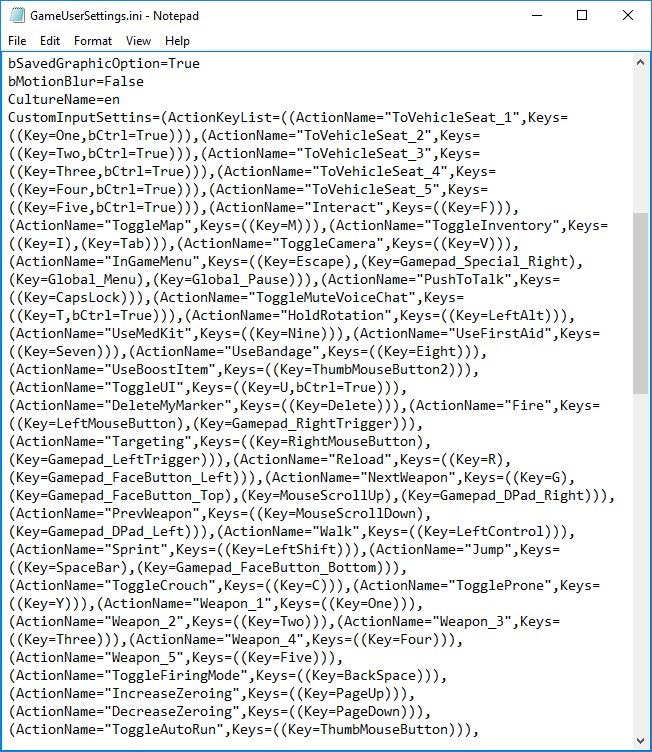
@clever osprey before you move out your file you can open it and see which settings are in there
 astral vault
is anyone else getting stuck on "Connected. Waiting for response..." ? No matter how many times I reload game or refresh UI. My friends are all playing so I know its not server or location.
clever osprey
Thanks man
 silk sand
@quick chasm get notepad++ much easier to read
quick chasm
eh, i dont change stuff around there, but im used to the mess 😄
shrewd thunder
used to use that all the time when I was writing lua @silk sand
strange lintel
Just a fair warning to those considering upgrading ram/hdd to solve issues, it may or may not work
People with SSDs and 16gb ram still can have texture loading issues
An upgrade is an upgrade, so it's not like it's wasted either way, but if you're doing it solely for the fix, maybe just think on it for a little
The game when finished will probably run on 8gb and an HDD just fine
 fair jewel
hi everybody ! can someone help me ? i can't do anything when i press escape i only can do that.... and when i'm dead... it's the same.. i don't have spec mod..... useless update.... (and i don't use any gamepad)
silk sand
@fair jewel remove controller from pc and restart pc
Or remove controller from device manager
viral monolith
Hey, could i have help with a ban?
 pale plover
@viral monolith you need to go to the forums rearding bans
PLAYERUNKNOWN'S BATTLEGROUNDS Forums
If you wish to report a player or appeal a ban please read the instructions inside.
OK. You need to appeal on the forums. We can't help you from here.
pale plover
You too 😃
 errant grotto
Boys boys boys.. Ok, I got this game about 2 weeks ago and have been struggling to play it sense.. 1 in 30 games I'd say doesnt crash.. I've tried everything. I have a gtx960, 8GB of RAM and i3-6100. I put PUBG onto a 1TB external hardrive all by itself and am still getting crashes. I get both the memory and the reporter ones. Can anyone please help and fix this?
 iron zealot
Hmm, so its on an external hdd right? How new is that and what is the model etc? If you can find the exact model on amazon or newegg to link that would be the best possible thing
errant grotto
External HDD, gimmie two secs and i'll try get a link
 arctic stream
@errant grotto there is a list of steps of things to try pinned to this channel if @iron zealot cant help.
iron zealot
I was instantly going after the external HDD as if its a slow read the game might very well crash upon trying to load something for to long
iron zealot
But yes, do try the pinned stuff FIRST
errant grotto
Where's the pined stuff? I'll see if there's anythign I havent done
iron zealot
Top of the window, to the right it has a thumbtack icon, check those
errant grotto
got em
iron zealot
HDD is at 5400 RPM so it MIGHT be a bit slow, but im glad its not a flash version as some of those read under 100mbs which is just SLOW
Good search result "7200 RPM Hard Drive. A 7200RPM hard drive is an improvement over the 5400RPM, but it is not considerably faster. In general, you can expect a read speed of about 128MB/s and a write speed of 120MB/s.Oct 21, 2015"
Google*
@errant grotto If those steps don't work, get back to me or someone else, gonna step into the shower as I just stepped in the door after work
errant grotto
Ok, I'm looking througth them atm thanks!
what should I underclock my GPU and memory clock to?
iron zealot
Why would you underclock them? Think its a power issue?
errant grotto
IT's one of the pinned things
iron zealot
Factory default, your on a 960 right?


 iron zealot
This is nvidia default settings for 960, anything else is set by the resellers, IE gigabye etc might overclock it a tiny bit https://www.geforce.com/hardware/desktop-gpus/geforce-gtx-960/specifications
Experience next-generation gaming with GeForce® GTX 960—the perfect upgrade to the advanced game performance, power efficiency, and realistic gameplay only NVIDIA Maxwell™ architecture can offer.
Your right at default
drop the gpu clock by -100 as the test thing suggests
errant grotto
Core clock?
iron zealot
Same for the memory clock just do -100 from what its at now
1126 should be 1026
3505 set to 3405
errant grotto
core clock can only go -90
errant grotto
Yup
strange lintel
Might want to try a fresh install on the drivers
 pastel vigil
SSD would help tremendously. Also the i3 is gonna struggle to run this game since it is heavily CPU-intensive
My i5 4670k OCed to 4.4GHz gets 90-95% usage while in game
errant grotto
Mines always at about the 90 mark
iron zealot
His game is crashing, it's not truly an fps only issue
shrewd thunder
It's most likely only GPU clocks if you are getting d3d device errors in crash logs here @errant grotto C:\Users%username%\AppData\Local\TslGame\Saved\Logs
strange lintel
i3 is preeeetty low end
pastel vigil
He's attempting to play the game below the recommended system requirements. Also playing from an external hard drive isn't recommended
USB cannot drive data the way SATA can and will
tepid fox
Are they doing anything about the field of view in 3rd person? Like how in doorways if you use targeting you can't see your target?
shrewd thunder
Seems like he tried internal too