#🤝│community-troubleshooting
1 messages · Page 46 of 1
 north wolf
 weak mountain
can anyone conenct?
 viral monolith
nope
 rough sundial
Team invites takes 2min to get out atm
 shut pier
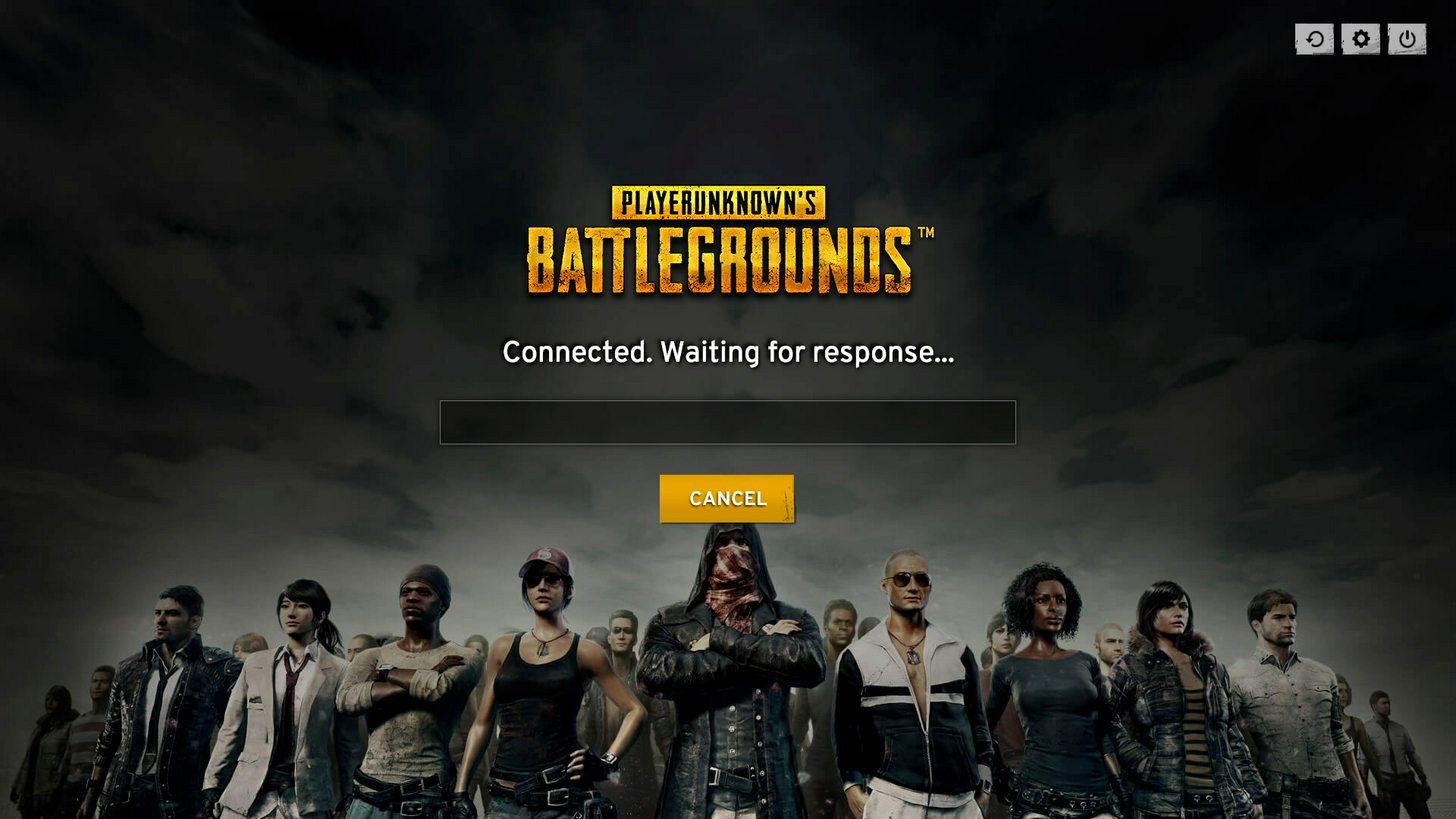
I'm having same issue connected. Waiting for response.... then gose in then play in lobby is unresponsive. EU
seam's delayed.
rough sundial
Play button is very delayed aswell.. takes 2min when you press it to its queing 😛
shut pier
yes im having same issue. im sure the team are aware of this and on it .
viral monolith
I'm having a similar problem. pressing play seemingly does nothing
servers down?
cant even get in
 keen cedar
cant get in as well
 versed pike
I got into a lobby of 35 ppl after waiting a crazy long time
 white imp
[INFO] Blocked loading of file: "S:\SteamLibrary\steamapps\common\PUBG\TslGame\Binaries\Win64\dxgi.dll".
battleeye launcher
 soft lantern
yea everyone has issues atm
this specific error has to do with reshade though
me and my brother had that as well, was fine for at least 5 or 6 games after the update but then this shit happened and we cant even start the game after restarting the pc, steam and everything else we tried
fixed it after rebooting steam and the server fix now 😃
 forest wolf
Hey all! For some reason my game crashes only when playing duo or squad, when playing solo everything's fine. Anyone have the same issue that knows a fix? Re-installing it didn't help
 weary warren
@grand portal Better to have this converstion in here
Please try restarting your computer and trying again
 grand portal
alright
weary warren
Failing that please disable any anti-virus and firewalls
 trail falcon
grand portal
trail falcon
grand portal
same thing @weary warren
weary warren
Did you try disabling firewall/anti-virus?
grand portal
well, I have the kind of an antivirus that can't be easily disabled
but I don't see anything in recent history related to PUBG
 lone ravine
Hello everyone. For some reason I cannot hear my squad teammates in game. They can hear me. I've tried closing the game, restarting the pc etc. Kind of strange as I have all sounds up and working
grand portal
might be related to Steam API not being initialized, I've tried launching another game and it told me that Steam API wasn't initialized @weary warren
and I've had to restart Steam, now it works
thanks
grand portal
I've had this steam API issue for a while
 digital glen
Totally unrelated, but whenever I get the network lag detected in game on my region NA or have these similar issues with Steam, I unplug my router and modem, wait for at least 1 min, then reboot both and computer, relog into Steam...and everything is good then. Never hurts to reboot and refresh. Not saying by any means that will fix it, but it might help.
 severe sandal
@digital glen I have done all of the pagefiles and all of the things from the pinned message yet with difference to any of them what so ever.
I've got no increase nor decrease of FPS and I still have the issue where buildings as well as items come either ungenerated or are badly generated that I cannot pick up items or see the door to enter the house let alone open them.
So I think I'll just have to wait for future updates that will (hopefully) fix this issue.
digital glen
@severe sandal ok man...I'll continue to think on other workarounds for you. Sorry nothing worked, I know it's frustrating. Have you defragged your HDD yet?
 unborn cairn
Just bought the game yesterday. When I went to register my nickname, it said it was taken which seemed odd. Then I read online that there's been an issue with the names system? Is it possible i could still claim my original username?
digital glen
@unborn cairn If the name has been taken then you will need to mix it up a little and see if that has been taken e.g. RotazFTW etc...
unborn cairn
yea, I ended up adding characters. Was just hoping I wouldn't have to. Thanks!
 wise estuary
@digital glen sorry I have the chat muted so I keep forgetting to check back but ya I'm aroun
around*
digital glen
@wise estuary Gimme a bit and I'll get with you...busy atm
wise estuary
that's fine
 radiant sedge
servers down?
versed pike
^^
 grim nova
Any news for the dxgi.dll issue at start? Restarting steam worked earlier in the day, not anymore
 tame raptor
servers in maintenance error?
radiant sedge
yes
grim nova
No idea, can't launch the game
tame raptor
dxgi has come and gone for me - right now fine w/ reshade
back in game
working now
tame raptor
it shouldnt be
grim nova
Nah, doubt it
tame raptor
im using it rn
grim nova
PU himself said he doesnt mind it
 vivid flax
Usually when i get this i can just click it away.
grim nova
I doubt he'll 180 on it
tame raptor
makes the game so much prettier
vivid flax
now it keeps on happening
 cyan lodge
im getting that but it says teamviewer instead
grim nova
Yeah when I X it now it just closes the game
tame raptor
or verigy game files?
vivid flax
yea i wil ltry
i cant go back to the normal game also :p
its so ugly and washed out
 pliant tusk
anyone else gett 'trylatterhttpexceptions'?
vivid flax
verfying and reinstall didnt help
radiant sedge
i dont think the servers are up?
digital glen
Servers are having issues at the moment, the team is looking into it
pliant tusk
just had a game with 20 people
the other guy was invisible on the way down
drops into same warehouse and kills me
#unistalling.
digital glen
@severe sandal @wise estuary I have some business to take care of, but will return in a few hours and maybe we can further sort your issues out, and anyone else that is having trouble with things
 clever shale
I keep getting this for the last hour.. why does it keep blocking the file now but not yesterday?
grim nova
Getting that as well
clever shale
Sucks..I dont really want to remove Reshade cause I kinda like it
 molten hornet
I'm using ReShade, not seeing any issues atm
 errant sinew
[21:46] nab: reshade blocked again ?
[21:46] nab: can't start the game
[21:47] nab: 20 fucking try
viral monolith
Not sure if anyone has this issue but since the update I have had a massive fps drop
 tribal stone
any solution to pubg not logging in when launched through steam? Like is there any chance the account itself is broken?
 azure junco
@clever shale @errant sinew i read re-installing reshade helped them
top right is search function go for it...
 keen sundial
guys bit of a idiot here whats the better things to use in reshade?
 deft holly
hey guys i need some help
when the game first released i did some file changes and now its perm, i have to always change my game settings
https://www.primagames.com/games/playerunknowns-battlegrounds/tips/how-increase-fps-playerunknowns-battlegrounds used this, if i delete the file i made would my settings go back to default?
molten hornet
Aight I have the same issue now, battleeye is blocking reshade
its a fresh install too
it ran once, and then next time i tried starting it. it got blocked
keen sundial
well im still stuck in that place 47 left and im nex zone wonder if i can win this XD
digital glen
@severe sandal @wise estuary Both of you should try this program and then the following link I will provide. Might solve your issue Daniel with the sound and might solve your issue Gamer with the wonky building textures. If you are hard pagefaulting, you can track the culprit, which MINE was Windows User Improvement Program. Once I disabled that, and opted out. My sound issues went away. Also if your cpu isn't constantly bottlenecked by hard page faults, it might load your textures better. Give it a go. http://resplendence.com/main
Latency Mon is the program

Windows Report - Windows 10 and Microsoft News, How-to Tips
Windows 10 collects information about its users and sends it back to Microsoft so that developers can improve future versions of Windows. Many users are concerned about their privacy, therefore today we’re going to show you how to opt out of Microsoft Customer Experience on Windows 10. What is Microsoft Customer Experience and how to …
^ Is a tutorial on how to opt out of the Customer Experience Program. Also opting out for MS Word if you have it, and MS Media Player. Make sure on the tutorital you highlight the 3 items like it shows then righ click and choose disable. Re-boot your computer and walla. Can also run the Latency Mon program again (which will normally show you hard pagefaults from the program itself) etc, etc, etc...
@molten hornet It's a known issue right now. The team is working on it.
PLAYERUNKNOWN'S BATTLEGROUNDS Forums
This thread is for posting any map specific bugs, like being able to walk through a particular wall that should be solid, a place that you got stuck and o...
 digital glen
@Tien#3312 Delete your user settings file and re verify on Steam. I would take screenshots of your keybinds and your in game settings to quickly reference and set them back appropriately
 naive ocean
is this a known issue ?
digital glen
@naive ocean First time I've seen it. I will pass it along to the team right now.
naive ocean
PLAYERUNKNOWN'S BATTLEGROUNDS Forums
Sometimes when I launch the game, the score screen does not display when I die (or when my remaining teammate(s) die). Usually restarting the game fixes t...
someone else posted it on the forum so im not the only one :/
digital glen
Let me do some investigating...
digital glen
@naive ocean Well the op didn't get responded to because he/she didn't follow the proper posting procedure on bug reporting
naive ocean
Yeah
digital glen
There is a reason they ask for that. And it really isn't just to make you do more work lol. They need to look at hardware specs, DirectX settings etc etc. It helps them track the issue
@naive ocean I have a message into the team, when I get a response I will ping you.
naive ocean
Sounds good, appreciate it 😛
digital glen
@naive ocean Unfortunately, it is a known issue, but no fix yet 😦 Personally, I would fill out a proper report, so it generates levity. Sorry I couldn't help you further.
naive ocean
All good
 abstract patrol
Hey not sure if this is a good channel to ask, but looking for some official word on whether a crosshair overlay program would be a bannable offense?
Cross hair overlay program being a program that draws a static image in the center of my screen overtop of the game.
naive ocean
put a piece of tape on ur screen and draw an x w a sharpie lol
abstract patrol
Yeah, have heard the suggestions. Just want to know if I decided to go a software route instead of that, would I be banned for it?
Before I try it and possibly get banned
naive ocean
no clue
digital glen
@abstract patrol Maybe another mod could give you a definite answer, but If I had a choice between risking it and not, I wouldn't risk it until I had clear and concise permission. No one wants their day ruined with the ban hammer. Sorry I couldn't be of more help.
abstract patrol
That's okay, thanks for taking the time to answer. Any idea where I could ask another mod? I thought we weren't supposed to @ them.
digital glen
In my opinon though, anything that gives you an advantage over another player that's not in the the game settings wouldn't be allowed. Mods are available to @ it's really the Creative Director and Community team and admins that are busy working non stop. Maybe give Caesar, Cease, or Robo a ping. Not constatnly mind you lol
abstract patrol
I would agree, but the fact that monitors have this built in at a hardware level makes me feel it's somewhat unfair to just ban the software implementation. Definitely seems like a gray area that I don't wanna be on the wrong side of. Should I just ping them here or in a DM?
digital glen
Yeah I agree on the grey area. Especially since monitors come with them hardcoded sometimes! Give me a sec and I'll reach out for you.
abstract patrol
Thank you! 😃
digital glen
@molten hornet From what PU has said, usually when reshade acts up, it's because the client pc cannot connect to the Battleye servers properly
naive ocean
is there any future feature planned to change what mode your weapons are on when you pick them up?
digital glen
@naive ocean I've heard people discuss that and bring it up. I have not heard anything official about it yet though.
naive ocean
ah
 radiant moon
Game was working nicely prior to last patch, now I'm getting the issue were textures are not loading + freezes on plane :/
digital glen
@radiant moon It's been brought up to the team for sure. Seeing a lot of reports about different issues
molten hornet
@digital glen That sounds odd, its blocked because its not on the whitelist, right?
I doubt it had a connection problem 5 times in a row
radiant moon
Gotcha, good too know. Performance was quite solid on last patch only issue was some lag on opening inventory sometimes, that's fixed now but the rest got worse sadly 😦
digital glen
@molten hornet Every patch there seems to be issues with it. BE flags it, for some reason it's not getting approved until the team can reach out and approve it.
I'm sure I/we will hear more about it soon
@abstract patrol The answers I'm getting right now are no it's not recommended to use a program like that. To be on the safe side. There is not an "official" word such as you will be banned for using xyz program, but I personally wouldn't take any chances. Use at your own risk type of thing
And I know some monitors have it built into the firmware and you don't even need software to run it, but people have got banned using mouse macros, so back to the I wouldn't take any chances theory
ATTENTION RESHADE USERS: Check the recent post by user Zultra in #207019048607678464 He got reshade to work. I don't use it, so I can't confirm if it will work for you or not
@molten hornet
 tidal drift
SA leaderboard machine broke
digital glen
@tidal drift Yeah, that has been giving us trouble for a bit now...the team is aware and looking into it. Thanks
 opaque thicket
 mild abyss
Battle eye is blocking launching
tidal drift
South of mylta power you are able to get stuck in a crevice here on the rocks
Had to back a buggy up ontop of him to get him out.
 wintry stump
When are the Blue Hi-Tops gonna be put in a crate
 fringe sorrel
To make Reshade work again:
I went to G:\SteamLibrary2\SteamApps\common\PUBG\TslGame\Binaries\Win64\BattlEye
Double clicked "Uninstall_BattlEye.bat"
Then deleted the folder "BattlEye"
Did file check on Steam and it redownloaded missing files. Worked after that
abstract patrol
where would I report a part of the map a player can hide inside of? There's a house where you can lie down inside the cement porch and shoot out.
Ah nevermind, just went and checked today and it looks like it may have been fixed
 worn maple
when firing the vector with a full inventory, i wasn't able to fire
it said "not enough space in your inventory" or whatever the usual notif is
any time i clicked to fire the weapon
 quiet grove
!links
 regal vaporBOT
PLAYERUNKNOWN Creative Director: https://twitter.com/BattleRoyaleMod
Twitter https://twitter.com/PUBATTLEGROUNDS
Facebook https://www.facebook.com/playbattlegrounds
Twitch https://www.twitch.tv/playbattlegrounds
Forums http://forums.playbattlegrounds.com/
Website http://www.playbattlegrounds.com/
Steam http://store.steampowered.com/app/578080/
**PLAYERUKNOWN'S BATTLEGROUNDS
#ThisIsBattleRoyale**

PLAYERUNKNOWN'S BATTLEGROUNDS is a last-man-standing shooter being developed with community feedback. Starting with nothing, players must fight to locate weapons and supplies in a battle to be the lone survivor. This realistic, high tension game i...
Price
$29.99
Recommendations
81388
viral monolith
WHY DOES WINDOWS KEEP SAYING ITS LOW ON MEMORY WHEN I PLAY THIS GAME
 wheat locust
When I play in fullscreen (Not FS windowed) my mouse cursor doesn't line up where the game says it is. I have to aim below the thing I want to click. However, if I go into windowed fullscreen, it's sport on.
digital glen
@wheat locust Move your taskbar to the bottom of your screen and try it
 meager spire
how do i force steam to update the game? restarted steam 5 times now
digital glen
@wheat locust Lol...just for this game...You could also try this and see if it works and leave your taskbar wherever you put it...but the taskbar trick works for sure http://forums.playbattlegrounds.com/topic/5000-cursor-bug/#comment-23455
PLAYERUNKNOWN'S BATTLEGROUNDS Forums
i cant reach settings in the home screen. my mouse is indifferent with the cursor of the game. i cant change anything ingame.
@meager spire Verify the files in Steam
meager spire
ah yes, i forgot about that option, thanks!
severe sandal
@digital glen I'll run what you recommended overnight but I've tried opting out of the Windows 10 Microsoft Customer Experience thing but with still no changes.
digital glen
@severe sandal ok..that might give us some more insight. Have you priced another 8GB of ram?
keen sundial
you should buy a 2nd stick
digital glen
I meant have you looked into purchasing another?
severe sandal
I can try to.
digital glen
I personally think it would fix your issue, and it's would be a great addition to your system. You have to make sure to put it in the right spot on the mobo. The manual will show you where. or you can look the manual up if need to.
Mobo's require 2 sticks and 1 stick to be in certain locations
severe sandal
I'll see if I'd be able to buy it.
digital glen
pcpartpicker is a good spot to look that stuff up
also running memtest86 from a usb stick overnight to check for memory errors is helpful too. I've seen brand new sticks of quality ram like you have be bad right from the start.
digital glen
super small file. I believe I included the link in that text document that is pinned here
Think I have a site that explains how to install it also...Google it if I don't...really simple...I run it on every pc of ram I put in peoples system. Used or new.
Ebay might have a used stick as well?
severe sandal
Sure thing.
Well I'll hop off for now since it's almost 5am here lol
I'll try it out when I wake up.
digital glen
ok man. Best of luck. I'm seeing $68.99 new...prob cheaper...just need to shop around...goodnight
severe sandal
Night.
 dim ingot
can we get this fixed pls scar with no ammo is worthless
 violet sparrow
yeah we need to have lots of loot right next to backpacks too
otherwise the backpack is really useless
pls fix,,,
keen sundial
did you read what he said
dim ingot
well thats besides the point theres a problem with loot clipping into items and spawning into areas where you can see them but not reach them
and loot spawning in the ground where you cant see it at all
 sinful nimbus
@viral monolith When installing drivers I usually use DDU, unzip and do a Minimalistic install with the clean install option selected. I don't need the Nvidida Telemetry, Audio, Gerforce exp, 3Dvision stuff.
viral monolith
update: installed the driver after uninstall, pubg loading screen was on for a few seconds then stopped responding, which is progress, didnt get the nvidia display error though it just stopped responding
sinful nimbus
do you have reshade or anything that could be conflicting?
viral monolith
idk what that is so
sinful nimbus
I have no idea what it could be then sorry. Could be AV software blocking the game
viral monolith
yeah i just got the nvidia driver error again lol... holy shit
never have this problem ever
sinful nimbus
which driver were you using when the game was working fine?
 tropic cape
Hello anyone from the community team avaliable?
I would like to report a issue with the game after the last update.
sinful nimbus
Report it on the forum if it's a bug
tropic cape
You know if this has already been reported?
after the update i'm stuck in this loading
But if i use a VPN i am able to load just fine
(i need the vpn just to get past this first loading)
sinful nimbus
It may have been reported but then on the forum there is a template to fill out so that the QA team can do their best to replicate and find out what is causing the problem
^^ Like that, you'll be asked to fill out the template
tropic cape
thanks.
viral monolith
the game never worked fine btw
i just downloaded it today
downloaded that hotfixed driver and it still failed
i have all the windows updates
 eager kiln
Anyone know who to contact if you want to change your name?
Got a kinda racist name which my friend jokingly made for me, and I really want to change it even if it means all my points/stuff gets deleted
Heard from a streamer dude that he knows some guys who already got to change their names
sinful nimbus
`How can I change my ingame name?
Currently there is no way to change your in-game name but we are working on a solution.`
I'd ask the streamer how other people got to change their IGN
eager kiln
Idunno dude, just heard from this guy: https://www.twitch.tv/twosixnine that he knows some dudes who got their names changed

yeah just wrote to the guy, if he could point me in the right direction 😃
sinful nimbus
Yeah I'd like to know who he contacted to and how they got their names changed.
eager kiln
yeaah, maybe some of the backend server dudes
sinful nimbus

So looks like it wasn't changed 😛
 serene sapphire
i dont have sounds of the vehicles only when i look towards them all other sounds i hear nothing 😦
tropic cape
Anyone from the community team online?
 pale plover
What do you need?
tropic cape
@pale plover Help with this http://forums.playbattlegrounds.com/topic/33917-got-stucked-on-loading-menu-after-the-update/
PLAYERUNKNOWN'S BATTLEGROUNDS Forums
Last update is so smooth the only problem is rendered and thats all and now? i got only LOADING on menu for 1000 years please send help huhuh.
Can a dev look into this? I added a lot of info about this bug.
Should be pretty simple to fixl
pale plover
Everyhting that's on the forums are seen by the devs.
You don't need to let us know here also
😃
tropic cape
I am just hoping i can get some feedback from you guys since i can't play the game.
pale plover
As far as tech stuff goes @quiet grove will be best able to help.
tropic cape
Ok, thanks @pale plover
pale plover
NP 😃
 celest void
how do I get the twitch prime promotion as the latest tweet??
wheat locust
Can we use reshaders or nah?
pale plover
Connect your Twitch w/ your game in game, then Claim Offer from drop down menu on Twitch
Reshade is allowed
 winged dagger
I have a problem ingame where I can't hear other people/speak ingame. I think you addressed this issue earlier but do you have any ETA on when this will be fixed/know any hotfixes?
 next gazelle
i have stats problem where it will not increment my stats after a match. I have played about 15 but it says only 10 and i dont think I get BP all the time when this happens
 proud topaz
hello
I was directed here by the reddit PUBG group/
It seems my account is kinda messed up
im unable to load my regular profile and keeps asking me to create a brand new nickname and character instead
is there anything i could do to load up my regular profile?
next gazelle
@quiet grove ty hadnt found any kinda response about it
 little kiln
so im trying to play wiht my freind but it tells me that i have the wrong version and i have to update on steam? but it doesnt auto update can i force it to update ? if so how
digital glen
@little kiln Make sure you aren't trying to load the test server. If not and to force an update, verify the files through Steam.
That will update anything it needs
digital glen
Welcome 😃
@proud topaz Possibly a family share issue with Steam? Not sure exactly. Look into that first. If not, please make a forum post using the appropriate template format and the team can look into it further.
winged dagger
@quiet grove about the ingame voice issue, is there any ETA on the fix?
quiet grove
@winged dagger nothing that I can give you a definitive answer on.
proud topaz
@digital glen i was playign on our family sharing library at 1st then proceed to purchase the game today. Is there a way to fix that issue?
digital glen
@proud topaz Lemme check
@proud topaz Unfortunately you will just have to start over with a fresh character. Steam changed there family sharing rules awhile back.
digital glen
Each name is tied to each account.
It's not something that's particlar with PUBG. I had the same instance happen to me with H1Z1 awhile ago. My son and I were playing it on family share, but couldn't duo, so I had to purchase the game seperate, and he had to choose his name on the new account
If you Google Family Sharing on Steam, you will come across their new policy and guidlines and such.
 gusty compass
Has the Twitch Prime Loot offer expired for the US already?
digital glen
@gusty compass This limited edition promotion will expire on July 8th at 9AM UTC / 2AM PST / 6PM KST
 frosty oar
WOW
just had an akm disappear out of my hands
lol, must've dropped it when i got shot 😄
 twilit bluff
my game wont allow me to change my resolution. Is there something I can do to change it? Im getting like 0 frames because it's automatically in 4k
weary warren
@twilit bluff
- Set your game launch options with -windowed
- If all works in game now set your resolution and window settings in the options
- Close the game
- Remove -windowed from launch options
- Start game
If this doesn't work try this
- Go to C:\Users<yourusername>\AppData\Local\TslGame\Saved\Config\WindowsNoEditor
If you can't see the folder AppData make sure you have checked the "view hidden items" button in the View tab in windows explorer - Delete the file GameUserSettings.ini
- Start the game
twilit bluff
@weary warren for some reason the only option that will show for me is 4k https://gyazo.com/2d55522b437c69608ef2aef725f3a736
 weary warren
Did you do as I instructed?
twilit bluff
yes that was what I got when I launched the game with -windowed
weary warren
Did you do the second one?
twilit bluff
yes and I still wasn't able to adjust the actual resolution. I dont know what's wrong
weary warren
C:\Users\<yourusername>\AppData\Local\TslGame\Saved\Config\WindowsNoEditor Delete this whole folder and verify your game files
Make sure you have no start up options
twilit bluff
alright
now my res is just blank but if I click to change it 4k is still my only option https://gyazo.com/02b2aa205cfef44b24ad11a006e76fab
 weary warren
okay, try running the game with -windowed and see if you can change the resolution
if not go to your gameusesettings.ini and find the following lines and change them to match this, be sure to take off -windowed from your launch settings first though:
ResolutionSizeY=1080
LastUserConfirmedResolutionSizeX=1920
LastUserConfirmedResolutionSizeY=1080
WindowPosX=-1
WindowPosY=-1
FullscreenMode=1
LastConfirmedFullscreenMode=1
PreferredFullscreenMode=1```well with windowed I still only get the one option https://gyazo.com/51c433b836f24a6045a8669c0f67cf89
and I put in those lines and it puts my game in fullscreen windowed for some reason and and I cant mess with the res
 weary warren
Yes, because I enabled full-screen windowed with the text
Is it at 1920 now though?
Did you remember to remove the -windowed launch option before starting the game again?
twilit bluff
Yes I removed the -windowed, and in full-screened windowned my res is still blank so idk if it is in 1080p
weary warren
This isn't making much sense. If you had deleted that entire folder, including the folder itself, and restarted the game after that, it should reset your graphical settings
Have you tried setting your monitor to 1080 instead of 4k when starting the game?
Because those options I asked you to input should force it into 1080
twilit bluff
my monitor is already set to 1080p
I mean maybe the game is actually in 1080p now, but idk because the slot that showed what res i am in is blank
weary warren
You haven't changed any other settings elsewhere on your computer for the game , say geforce experience or NVIDIA control panel?
twilit bluff
I havent
weary warren
I'm not sure what else I can suggest I'm afraid.
Deleting that folder should have solved the issue
and it has with the dozens of other people I have helped with this issue
twilit bluff
Well I do thank you for helping though. Im sorry
weary warren
No, I'm sorry that I was unable to help you.
I think if you try shutting down steam, deleting that folder and restarting your computer, you may have some luck
but it shouldn't require all of that
 oak tiger
hello im the one who's having the problem
i think its becuase my gpu and cpu is overheating
but im not sure
please suggest anymore tips 😄
weary warren
Look at your temp stats and go from there
viral monolith
Hey guys, does anybody know why they put bars on like everyhouse? You know the indestructable bars that can get shot 100 times and be just fine
 weary oasis
Will you add sometime a middle east server ?
digital glen
@weary oasis You are more than welcome to suggest that here http://forums.playbattlegrounds.com/topic/4890-new-server-locations/
PLAYERUNKNOWN'S BATTLEGROUNDS Forums
Hi everyone,


PLAYERUNKNOWN'S BATTLEGROUNDS team is committed to rolling out servers to every region where there is a big enough player base to warrant...
 sharp halo
@weary warren i just started my twitch prime but cant receive the goods
weary warren
I'm pretty sure the promotion is over
sharp halo
😐
sharp halo
yes it was there i clicked then page reloaded and disappered
if i missed it with 1milisecond
weary warren
Yeah, if it's not there for you now you missed it
sharp halo
can you provide a code if i show you my twitch prime start mail
weary warren
Afraid not buddy
The promotion has been on for the best part of a month.
If you missed it you missed it.
2AM PST
I see you have realised.
sharp halo
yea
 lavish tree
how can i invite a friend to this discord
 wispy gull
I see that some people dont have the ''Red dot'' in the middle of the 8X, but i do. How do i remove it?
 coarse junco
@lavish tree see the pinned message in #📯│general-announcements
weary warren
!invite
regal vaporBOT
Invite URL for Discord: https://discord.gg/battlegrounds
 stone sun
 viral monolith
@balmy ingot https://discordapp.com/invite/battlegrounds
naive ocean
Fatal error!
Unhandled Exception: EXCEPTION_ACCESS_VIOLATION 0xd9b22900
PhysX3_x64.dll
PhysX3_x64.dll
PhysX3_x64.dll
PhysX3_x64.dll
PhysX3_x64.dll
TslGame.exe
TslGame.exe
TslGame.exe
TslGame.exe
TslGame.exe
TslGame.exe
KERNEL32.DLL
ntdll.dll
ntdll.dll
Crash in runnable thread TaskGraphThreadNP 0
rest in peace
 gentle glade
hey just wondering, how come punches do tremendous damage?
coarse junco
punching the head is onehit
 narrow meadow
Hey guys, my right mouse button is acting up since I spilled juice over it :x
Trying to put my thumb buttons as the Targeting button but it doesn't work in the settings. I read that others have edited their GameUserSettings.cfg to put stuff on the Thumb buttons but I don't know what the code is for the Mouse button is. Any ideas ? Other games often use something like MouseButton4 or Mouse4 but idk what PUBG calls it.
oak tiger
Hey
My game runs at 60+fps but its always freezing
What should i do?
 bleak dagger
Is there any developer or admin i could speak to in pm possibly?
viral monolith
my PUBG isnt updating
 hard sky
can any one gave me link this server
 prime basin
is there a way to find out who i just played with?
he was good would like to add him as friend
hard sky
!link
hard sky
ty
oak tiger
@weary warren still no idea why it happens?
weary warren
You haven't given us any more information
bleak dagger
@weary warren I sent you a pm
oak tiger
what info?
cpu : i5 - 3470 @ 3.2Ghz
gpu : r7 250x 1GB
8GB RAM
windows 10 pro 64-BIT
oak tiger
but i have 60fps + all the time 😦
weary warren
You're running a graphics card that has only 1GB vram, minimum requirement is 2GB
oak tiger
ah
thats why
well i hope in the future they will make a better engine
thanks!
anymore ideas why its heppning?
weary warren
Best bet is that you don't meet minimum requirements, as I said.
 nimble wadi
is there anyway to stop my game from freezing when i open my inventory?
i already put every setting on the lowest possible and screenscaling on 80 even though i have no issues with fps outside the usual frame drops
is there like a way to disable the character render in the inventory
 old token
@shut pier So yea, a few days back I mentioned a sound issue with hard ddrive making noises... you were right my HD is going bad 😦
shut pier
@old token hey I'm glad you got to the bottom of your issue .also thank you for leting me know happy gaming 👍
old token
@shut pier
shut pier
@old token yeah time to get a new HDD or a SSD
shut pier
sweet and no issue ?
shut pier
ah ok great roll on monday
shut pier
yeah sure has been.
old token
and heck, ill still use it
just more as like
dont store stuff here i care about lol
2TB SSD is expensive as fuck tho
and I guess they have this SAS shit insted of SATA
which is like 12GB/s
jesus christ
back in my day
we were happy with 400mb/s
shut pier
lol ok hope all gose well on monday
old token
LOL SORRY IM DRUNK
TMI ON THE HD
I GET IT
@shut pier Now I'm gonna take pictures of the REBUILD
and post them here
HERE I AM SWTICHING MY OLD DRIVE TO SECONDARY
HERE I AM INSTALLING THE NEW DRIVE
shut pier
not here you can DM me mate keep it off here @old token
 thorn breach
can i get help`? my houses arent rendered and look like play doh what should i do??
IT NEVER WORKS
;-;
first blackscreen now this
i want to die
why me
digital glen
@thorn breach How much RAM does your sytem have?
Also can take a look here. http://forums.playbattlegrounds.com/topic/4041-missing-texture-of-buildings-can-go-through-walls-and-more/
PLAYERUNKNOWN'S BATTLEGROUNDS Forums
Date Seen:
18/03/2017


Information:
played one game before, no problem. after this game restarted game and bug was fixedBug Description:
Could see t...
isn't the building rendering problem more about hdd and ssd?
I had the rendering issue, and after I put the game on an SSD I had no issues
same rig and everything
digital glen
@viral monolith Definetly helps
But for those that don't have an ssd or can't affor one and if they have only 8GB of ram an additonal stick of ram is a cheaper upgrade that will help as well
I know the game requirements are met, but semantics I guess
viral monolith
well the steam requirements say 6gb of ram
but then again the steam requirements for this game seem extremely optimistic. I have friends with better rigs than the recommended one, and they struggle to run at low resolutions. I really think an SSD is the way forward for lower end builds with this game.
but then again I'm just a user, and all my experience is anecdotal 😄
digital glen
An ssd is the way to go in general. The game will continuously be more optimized and updated to run better. Just takes time.
digital glen
@tacit dove Moving your help question over here. What program are you using to determine the bus speed? The reason I ask is some don't report correctly.
 plush viper
How would i get ahold of a PUBG dev because i have some ideas for the game
not crazy ideas just basic ideas
digital glen
PLAYERUNKNOWN'S BATTLEGROUNDS Forums
Share your ideas to improve BATTLEGROUNDS
darn i hate these ;-;
digital glen
Devs occasionally pop in the Discord, but most of the time they are busy working. But they do look at the forums daily for things just like this.
plush viper
if you see a dev in here can you ask them if i can talk to them?
because that is the best way for me
digital glen
I copied your name, I'm about ready to sleep, but if I see one tomo, I will ask them to dm you
plush viper
ok thank you
digital glen
Do you use Twitter at all?
 compact pawn
regal vaporBOT
compact pawn
regal vaporBOT
PLAYERUNKNOWN Creative Director: https://twitter.com/BattleRoyaleMod
Twitter https://twitter.com/PUBATTLEGROUNDS
Facebook https://www.facebook.com/playbattlegrounds
Twitch https://www.twitch.tv/playbattlegrounds
Forums http://forums.playbattlegrounds.com/
Website http://www.playbattlegrounds.com/
Steam http://store.steampowered.com/app/578080/
**PLAYERUKNOWN'S BATTLEGROUNDS
#ThisIsBattleRoyale**

PLAYERUNKNOWN'S BATTLEGROUNDS is a last-man-standing shooter being developed with community feedback. Starting with nothing, players must fight to locate weapons and supplies in a battle to be the lone survivor. This realistic, high tension game i...
Price
$29.99
Recommendations
84304
shut pier
PLAYERUNKNOWN'S BATTLEGROUNDS Forums
Encountered a bug or issue? Here's your spot. Remember to include whatever details you can
 strong sparrow
Has anyone tried playing in 1440p with fullscreen mode? Won't stay tabbed in so have been using fullscreen windowed instead
viral monolith
So my friend got banned from the game for no reason. He doesn't cheat/hack games. But got a permanent ban from pubg. Can yall fix this? his name is Blitzxion
weary warren
@viral monolith
If when entering the game they are seeing a "Global Ban" message that means that you have been banned by Battleye and need to get in contact with them:
https://www.battleye.com/support/
Otherwise please get them to send a message to FWG on our Official forums and the case will be reviewed:
viral monolith
After the latest patch my buddy is having a problem dropping out of a plane. He receives the "Network Lag Detected" and shortly disconnects from the game. About 1/10 games he's actually able to drop out of the plane. Any ideas I could give him on how to fix this?
thanks
weary warren
@viral monolith Have you seen this thread? http://forums.playbattlegrounds.com/topic/32482-plane-glitch-rebinding-f-key/
PLAYERUNKNOWN'S BATTLEGROUNDS Forums
Some games and not all, I keep getting a bug where I am unable to eject from the plane. I have tried rebinding the key and that hasn't worked. I have also...
@weary warren I have not. I'll take a look! Thanks 😃
viral monolith
Good to know. I sent him the link and hopefully he can find a fix
 slender juniper
@weary warren can we have suggestion text channel plz?
weary warren
Suggestions live on the forum: http://forums.playbattlegrounds.com/forum/8-suggestions-feedback/
PLAYERUNKNOWN'S BATTLEGROUNDS Forums
Share your ideas to improve BATTLEGROUNDS
 tame pelican
anyone able to get ingame audio working on EU Duos? seems to work fine for me on squads but not duos?
tame pelican
yeh thanks its completely stopped working for me, works normally; did do throughout alpha
mic is obviously working as im using atm in discord but even with voice enabled in game no one hears me, adn even with all voices enabled I dont hear any lobby spam
 no idea whats gone wrong/changed
weary warren
Try pressing CTRL+T, just to make sure
plush viper
@digital glen do i use twitter?
digital glen
@plush viper Yeah, I was going to mention to you that if you did, you could follow Tooner and Smookie 2 devs on the PUBG team if you wanted to tweet at them
plush viper
i use facebook XD
digital glen
Cool, I'm not a Facebooker myself, I like 140 characters or less lol 
tame pelican
for anyone with the sound bug, resetting the settings for your audio in steam was the way to go to fix it for me. thanks to Sandra_Mad 
 wintry glade
weird sound bug - https://clips.twitch.tv/AmazingPopularHamsterArgieB8 Happened to anyone else?
 tame pelican
think that was when you hear sound from elsewhere and I cant remember the cause of it 
with my voip sound stopping working, fixed by reselecting in steam my devices. I just had it go mid round, and it seemed to be because I lost connection for 2-3 seconds. didn't have voip for the rest of the round. what section of the forum bug bit should I add this feedback there are so many threads on voip
keen sundial
will this game work on a macbook pro?
digital glen
@Effy#1770 I'm hearing that PUBG is crashing a lot on them....also hearing reports of a lot of issues with DirectX on Macbooks with bootcamp installed...
 spice pumice
Not a huge complaint but it does suck that my son can't log into his own user account on my PC, with his own steam account, with family sharing enabled and not have his own character, character name, and look. His own stats. I get the reasoning. Cheaters. I just know he'd like to stop being called Surge all the time lol
 dawn epoch
When can we expect the pump shotty not pumping to put a shell in the chamber, after a fully unintrupted reload?
to be fixed^
 frigid flame
Anyone else getting stuck at the Bluehole splash screen?
wintry stump
my game hardlocked while I was in the community server lobby
clicked on "unassigned", the thing faded, and my game froze
 sharp oar
Does anyone know how to set PUBG to a different audio source?
I have my Main audio source going through my TV with a movie playing, and Id like to set PUBG to my headhphones
@weary warren Any thoughts?
@ocean shard ^ 😄
 ocean shard
I believe PUBG uses the default sound device and I'm not aware of any way to change that. So if you can change which device you output to your TV, you should be able to do it?
weary warren
well two
ocean shard
@weary warren is the audio man
weary warren
First one, if you're using VLC to play your movies you can set the audio output in there to be your TV and set your default audio to be your headphones
that way PUBG will output through your headphones
sharp oar
Its on chrome
weary warren
The other is to use a little program I like called chevolume
which you can use to set things like Chrome to output to a different audio source
sharp oar
So Can I change the Audio source on Chrome then. Ive actually never done that lol
Chevolume
Alright.
weary warren
Unfortunately not, Chrome only output to the default audio source
sharp oar
Lol
Dam-son.jpg
Lemme look up what chevolume does exactly
Right now I am using Audio switch
But It just makes it easier to swtich between my sources
Chev looks badass
Thanks for that bit of information even if it doesnt solve my issue.
weary warren
Sorry dude
wintry stump
why can't we honk
weary warren
No horn
 shut sundial
Error: out of video memory trying to allocate a texture. It happened to my friend and someone from here helped him to fix it
Is it a good fix? https://www.youtube.com/watch?v=9ndwDlYb04A

My Specs: i5 6600k Gtx 960 4gb Msi Z170 Gaming M3 Kingston HyperX FURY Black 8GB 2133Mhz Please Subcribe & Like the video
weary warren
If it works for you then it's a good fix. 😃
 jolly oracle
not sure what caused this graphical bug, only happened in one spot
weary warren
has It happened to you more than one in the same place?
jolly oracle
@weary warren nope this is first time seeing it, lens flare was very big when looking at it
not using reshade or anything like that
just thought some of you devs might find it midly interesting as a bug lol
weary warren
Is your card overclocked?
jolly oracle
no, only CPU is overclocked.
might be something wrong with my PC though, as I just got a BSOD for FAULTY_HARDWARE_CORRUPTED_PAGE just now 😒
jolly oracle
hopefully not 🤞 though outdated drivers might be a problem too since i disabled automatic driver installing because W10 would just keep installing wrong version for Radeon drivers every time after reboot NotLikeThis
weary warren
Ahh, yeah I would check that too
 green hemlock
 ripe sequoia
I fixed my buildings not rendering fast enough early game, I hope the next patch doesn't break my game again. -crosses fingers
digital glen
@ripe sequoia What ended up fixing your issue?
 storm peak
whats with sights not rendering when firign from a car?
very annoying as it makes defending my squad from a car a lot harder
ripe sequoia
@digital glen I used these settings in my Nvidia Control Pancel http://www.tomshardware.co.uk/answers/id-3018735/nvidia-panel-performance-settings.html

Tom's Hardware
Could any expert tell me what settings should i set for best fps-performance on nvidia control panel!
digital glen
@ripe sequoia ok thank you! I'll pass this info along so it maybe can help others. Appreciate it 
 boreal wren
Any idea why my game randomly freezes while loading graphics but then fixes itself in a couple seconds (in the match lobby) But will randomly crash when in the plane/jumping out of the plane.
Never had a problem before the latest update.
I don't ever get a crash reporter thing though, it just freezes and stops using CPU, but it's still "responsive".
 hybrid widget
@weary warren If you remeber me still about this problem, \http://forums.playbattlegrounds.com/topic/29419-auto-match-making-option-for-duos/#comment-117677
PLAYERUNKNOWN'S BATTLEGROUNDS Forums
The option to find a player for Duos is mission, i.e. When you Click on Duos, the tab to select auto matching is not present. When I continue into the Duo...
hey guys, right now I have a gtx 680 (2GB VRAM), i7 3930k, and DDR3 memory... wondering which GFX card to get to upgrade for pubg. I sometimes drop down to 7fps when looting, and sometimes 30-40fps when in firefights
I guess I can wait til cards drop from people not mining anymore, since they're overpriced rn
weary warren
@hybrid widget I have asked for it to be looked into, just so you're aware there isn't a tab for automatchmaking for duo
It's always enabled by default
weary warren
@hybrid widget I would be extremely helpful if you could record a video starting with you at the game menu and entering into a game.
jolly oracle
@weary warren the graphical glitch I talked about to you yesterday, did a memtest86 and the RAM is faulty, so there's that.
weary warren
Ahh, well there's your answer!
jolly oracle
not what i wanted 😒
and the shop i bought the parts from no longer exists (bankruptcy), so that's an extra ripperoni
weary warren
Check with the manufacturer.
jolly oracle
yeah it's Kingston, and most manufacturers provide lifetime warranty for DRAM, so I guess I will be OK regardless. 😃
weary warren
Kingston are a great company to deal with for warranty issues.
I've had nothing but good experiences with them.
wintry glade
Im experiencing drops of 20fps when hitting tab on test server, any way to counter that?
weary warren
Are you not experiencing it on the live server?
 marble crest
I need help with the Fire Mode issue
Around 40-60% of the time when I try to shoot someone with an automatic gun set to Full Auto the gun just stutters and stops shooting
Neither of my friends have the issue but a lot of people reported it so I know I am not alone
marble crest
Crap
It really makes me stop playing the game for days at a time
It only occurs with other players in proximity
works flawlesly when I just want to shoot a tree
wintry glade
@weary warren yeah getting it on live, but not as bad. only drops 5-10fps on there. test server just worse for me. unsure if there is anything I can change in game? or if it is a bug reported
weary warren
The FPS drop is a reported bug for live servers
I would try some different, perhaps higher, settings.
Seems counter-intuitive but sometimes it does work due to shifting the CPU/GPU load balance
 astral night
^Actually works. I get better FPS on Low settings vrs Very Low
wintry glade
I'll try it. I run the game on very low except textures and view distance on medium. But i'll pop it up a little and try later 😃 Thanks @weary warren
weary warren
No problem, hope it works out for you.
wintry glade
Thanks 😃
 robust remnant
i get insane fps drops when a flash bang / stun granate explodes
is this just for me or a general issue?
like it goes from stable 60 fps to 1-5
digital glen
@robust remnant This issue was fixed in a previous patch. If it has been re-introduced, I will watch for more reports and pass this info along to the team.
weary warren
Turn your effects setting to very low and see if it continues
hybrid widget
@weary warren Okay, Break Through, i got a duo partner, but the only problem is not seeing that "automatching" phrase next to Duos
weary warren
You will never see it
it is on by default and cannot turn it off
So the phrase will not appear
robust remnant
happened to me yesterday with low settings in general
errant sinew
!invite
regal vaporBOT
Invite URL for Discord: https://discord.gg/battlegrounds
keen sundial
@weary warren can you help me sorry for mentioning you
weary warren
I can try, what's up?
keen sundial
it is a mix of two things so im getting really high disk usage like 98% so pubg is unplayable my issue is that my windows update is stuck has been for ages, do you know anything about this kind of thing? ive seen you help others similar to this
weary warren
Do you have a standard HDD or is it an SSD?
keen sundial
hdd
2tb
it gets stuck every time on this
• 2017-07 Cumulative Update for Windows 10 Version 1607 for x64-based Systems (KB4025339).
weary warren
Press windows key and then press and hold shift, then select the shutdown button and press on restart. This will boot you to an option menu, go into advanced boot options and go through the options until you can select safe mode with networking, try to update whilst in that mode
For disk usage can you see what is using the largest percent?
keen sundial
ok will try that btw it always gets stuck at 90% complete 😦 XD
one sec
hmm wel right now it is really low again but when it peaks it is service host local system
weary warren
I've seen this before but I can't quite remember what the cause was
keen sundial
hmm this is what is in it

it keeps diping and then spiking back up every min or so ill try the safe mode
weary warren
Actually, it could be windows update.
keen sundial
https://gyazo.com/7aa2cf2a3c7a6fa8ff30583fee1679dd
thats all info i can give you really i think XD so should i try safe mode or just wait?
it did get stuck like this for 4 hours before
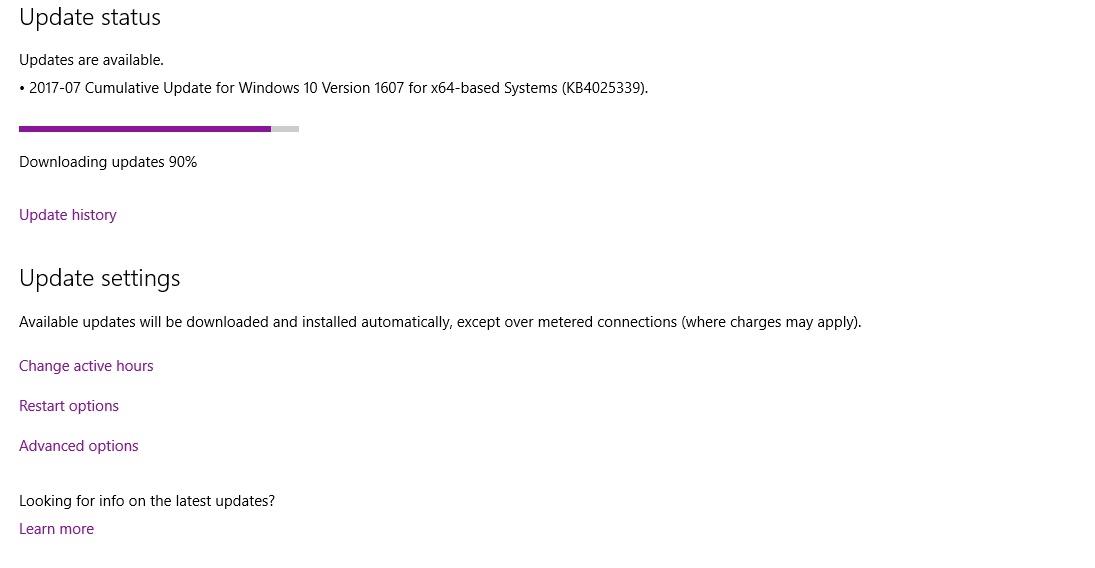 weary warren

If your Windows Update is stuck checking or downloading updates at 0 or any other figure in Windows 10/8/7, then this post will help you fix the issue
Follow these instructions and try again.
keen sundial
ok ty
weary warren
Np
keen sundial
and now we wait
 scarlet sky
hm, my pubg isn´t starting anymore. process active for a few seconds, then it closes...
keen sundial
@weary warren well now it gets stuck at 9% "sigh"
weary warren
have you got any third party anti-virus?
keen sundial
nope
weary warren
@scarlet sky http://forums.playbattlegrounds.com/topic/1750-game-crashingfreezing-stuck-on-loading-mega-thread/ Take a look here
PLAYERUNKNOWN'S BATTLEGROUNDS Forums
Please Post All Issues with Mid Game UI/Inventory/Crashing Here. Also, please Use the Bug Reporting Format and any work arounds/fixes that you have tried ...
will check, thx Robo
weary warren
@Effy#1770 So you did the net start commands?
keen sundial
yeh
weary warren
and deleted the files and folders?
keen sundial
bot net stop wuauserv and start and ones for bits
yeh
was able to delete all files
weary warren
did you try restarting in safe mode with networking?
weary warren
safe mode with network
weary warren
means you'll be able to download the updates
keen sundial
opps
weary warren
as it'll allow an internet connection.
scarlet sky
hm, where can i find the log to have a closer look?
keen sundial
oh um maybe my pc is being sluggish or something but it is now at 24%
after sitting at 9%
scarlet sky
C:\Users<user>\AppData\Local\TslGame\Saved\Logs <- TslGame isn´t even there since i reinstalled and it hasn´t launched properly since then
weary warren
Well the game isn't located there
scarlet sky
Oo forum says logs are there, will try the steam folder for it, one sec
weary warren
Yeah, the game logs will be, not the EXE
Also, you need to run the game from Steam
not from the executable
scarlet sky
well, it is a crash in my definition, since it runs for about 3-4 seconds. at least the process is running
then: nothing
weary warren
You misunderstand, the crash needs to be one which would want to send an error log
the error log is stored in that folder
if you're not getting the crash manager then it isn't one which would creat a log.
scarlet sky
but since i just reinstalled 7, i´m probably missing some update. downloading everything right now and check back later
weary warren
Oh, yes, windows 7 does give some issues
scarlet sky
oh okay. well then finders crossed
still better than 10. had it for 2 weeks and went back to 7 now
just had issues all over the place
scarlet sky
not with pubg, generally
weary warren
I'm having a lovely time with 10
 hushed magnet
yeah same
weary warren
If you updated to 10 there will be issues
scarlet sky
doing funny things, useless things, strange things...
weary warren
but if you do a fresh install its great
scarlet sky
did a fresh one
scarlet sky
it´s nice overall, yes. but if it ain´t working with everything, it´s simply not worth it for me
hushed magnet
like i said, it varies from hardware to hardware
scarlet sky
indeed
weary warren
It's likely the reason your game wont launch is to do with Microsoft Visual C++ updates
scarlet sky
happens 🤷
scarlet sky
yep, read that as well. some c++ 2015 error i found in the forums
hushed magnet
anyway, this is derailing your issue
weary warren

Microsoft Download Center
Install this update to resolve issues in Windows.
Try this one
scarlet sky
Install this update to resolve issues in Windows. ... well thanks MS for this splendid description ^^
anyway, installing. as well as 130 other updates XD
hm, didn´t install. guess i already have it
weary warren
What did the update say?
scarlet sky
did not install update kb blahblah ^^
maybe admin mode, one sec
nope
19 updates to go, then restart and i will see if that helped
keen sundial
@weary warren https://gyazo.com/2774488ab74439fbc97adb73867388fa
thank you it did work was just slow but alot quicker than it freezing
 weary warren
whoop whoop!
scarlet sky
okay cool, one of those 130 updates made pubg run again ;)
thanks for the help tho, @weary warren

 scarlet sky
me too. and ofc i forgot to install reshade -.- yeah well ^^
keen sundial
what are your specs?
viral monolith
no it used to be able to record pubg
now it doesnt
do i need to verify game cache
viral monolith
nah
 long hedge
Can you record other games with the same software?
viral monolith
ye
long hedge
Are the crashes happening at a regular point in the game?
viral monolith
wait malt
so i tried again
about 3 mins ago
and the buildings arent loading
when i recorded it
i think it saved
long hedge
what software are you using?
viral monolith
obs
long hedge
is the recording getting saved to the same drive as PUBG is installed?
long hedge
my recco -
Clean, defrag, restart, see if it persists
long hedge
Not really, it's pretty low-end
viral monolith
tbh i can overclock it
long hedge
but run disk cleanup, and defrag the drive
long hedge
Yeah dude, disk cleanup, defrag, and now, error check
 shrewd sparrow
this is what he means about building not loading
and my pc isnt that bad i run on high
long hedge
Yeah, I'm aware, but a progressively worsening problem like that sounds like a potential hard drive issue, especially if his recordings are getting corrupted.
 sly perch
When opening the inventory, I get flashing lights on my screen. Happens every game. Examples: https://gfycat.com/LightDishonestCentipede https://gfycat.com/HotChiefBighornedsheep

 wintry glade
Its a real party with you dude 😄
 stoic crow
Anyone with a similar setup to mine can tell me if my system performance is ok?
i7-7700k + 8GB RAM (16 on the way) + 1080TI. I can't seem to get stable fps
viral monolith
I've heard there's a way to lock your fps, but I'm not sure what the consequences of doing that are
I saw something recently on PUBG Reddit where someone who also had a 1080TI said they had stuttering issues, but maybe someone with more knowledge can comment
viral monolith
Hey guys. does anyone knows why Multi-Display/Mixed-GPU acceleration disappeared in my nvidia control panel ? it was set to Single-Display Performance mode before. when its gone i got lots of fps drops ingame even on very low settings
 toxic path
what is the best options Reshade?
violet sparrow
the best reshade options are the ones you prefer
viral monolith
@burnt gale do you have a controller currently plugged into your PC?
 burnt gale
yep
 candid bramble
i need help to "initializa battleye
 shrewd fractal
Does anyone have issues downloading the update? I get disk read error everytime, and now I get it even when I'm redownloading it
*disk write error
Hm. My newest SSD didn't want to install. My old as stonehenge HDD would install the game however... this is not good.
weary warren
@Zeruel#1169 Try removing any OC you have on your GPU, or try underclocking it.
@viral monolith You can lock your FPS to your framerate by going into GameUserSettings.ini and finding the line bUseVSync=False and changing it to bUseVSync=True
 tiny jasper
@viral monolith here is one for ya - I have been asked this over and over on the stream - Whats is the point of the in game currency after you have everything like me - will more be added - diffrent tiers of boxes - rare boxes as many of us players now have over 200k and everything.
weary warren
There will be more cosmetic items and crates added to the game.
tiny jasper
cool
just trying to keep people intrested - as none i play with care for Leaderboards anymore or iin game loot as its dull what about adding sumthing else we could use that currency on like a mini game or sumthing
weary warren
I don't see that happening
 mossy crow
Anyone know what the max fov is going to be in the new FPP servers?
weary warren
No word on that at the moment.
viral monolith
Hello, I played a duo game with a guy, but when we wanted to tell the Steam ID to eachother the game kicked me for inactivity (we won that game) how can I find that player?
Does anyone have idea how can I find that player?
Hey my girlfriend just got PUBG and she is having some sound stuttering issue
PLAYERUNKNOWN'S BATTLEGROUNDS Forums
Since there is a high amount of reports of Sound Issues, please follow the bug format and be as descriptive as possible. Some of the issues may be with dr...
this looks to be the issue here
 left kraken
Curious if anyone else has issues with remapping the F key? I changed it to peek right yet it still only works as the interaction button. I mapped E for interaction and it works for it as well.
Also in fullscreen my mouse seems to not be calibrated so I've been forced to play in windowed mode to avoid frustration
weary warren
@viral monolith If you remember their in game name you can search them from the friends list on the bottom right and add them to a game
then have a conversation over VOIP and get their steam ID
@left kraken This is a known issue at the moment
left kraken
Ah okay
 misty jolt
Seems like it's not possible to bind stuff to scroll up/down,maybe somebody knows a way ?
 shrewd thunder
@misty jolt you can bind them in the cfg file. you need to change quite a bit of text tho best google it to find out what to change
misty jolt
I see,thanks
keen sundial
have you trted recent players in steam? dunno if that works but worth a try
long hedge
Anyone figured out how to turn off the controller prompts?
weary warren
I've been trying but I've not been able to find a way
 severe cradle
Anyone knows how can I fix the inventory clipping out? My resolution is 1280x1024, which is 5:4, so it wasn't fixed with the recent update. Before I set it to fullscreen with a 1280x800 resolution, which used to work atleast, but now somehow this stretches out the game. The only solution I know now is to play in windowed, which I would love to avoid for obvious reasons.
Its a bit annoying that since, I dunno, around april-may, one patch just messed up the inventory/fov of my resolution and since I had to stick to alternatives
long hedge
@weary warren I've found disabling or uninstalling the controller will remove the promps. Obviously not ideal, but it's a fix til it can get hotfixed
 blissful jay
@long hedge was messing with it and (what i did, dunno if you need to do it all) i disable the xbox 360 peripherals on the device manager and tried like that but it didn't work, when i tried enabling it again it needed to restart my computer so i left my controller disconnected and when i logged in, i checked again the device manager and there the xbox device i had just enable before was "hidden" and when i entered a game of pubg it didn't show the xbox icons.
Now i connected my controller and it seems it activated the xbox device and even with if you deconnect the controller again the device stays there and the icons show in game
Something like this yeah
 lean salmon
hmm, if i disconnect the controler the icons change to keyboard right away
blissful jay
oh, tried that actually for me didn't work, might be because i use a second program for the controller (ps3), who knows
 harsh river
sly perch
harsh river
sly perch
@harsh river I am not using Reshade @weary warren I don't overclock, how do I underclock? I have a GTX 1070 FTW2 & I5-6500 CPU
 sinful smelt
Hi, I'm partially blind, and I've got a tough time making out the kill feed in the bottom left. Is there a way i can increase the opacity of the black "bar" behind the text to make the white text on top pop more?
digital glen
@sly perch Download MSI Afterburner (free program) and move the slider for base clock, and memory clock to -100 (minus) if that works, you could try backing that value down to find a balance.
@sinful smelt Currently not a "game setting" option, but maybe you could reach out to the re shade users and see if they had any ideas on if it would help you. I don't use it, so I'm no help. Also maybe look into your monitor settings for game, color, contrast etc, or pre defined settings like movie, game, etc To see if that helps you. You could also look for a color profile you could download for your specific monitor that helps make the blues and blacks more true to their colors
 earnest hawk
i am =having an ssue streaming pubg on obs
a darker screen is apperaing when i go in game
but my mainscreen is fine
sinful smelt
Thanks @digital glen, I'll look into it
 worn sinew
I just had an issue in game where in 3rd person I couldn't look up or down, but I could turn left and right.
Then when switching to 1st person everything workedfine
Is this a known issue, or is there a fix for it?
viral monolith
Why does it say my game is out of date?
digital glen
@earnest hawk I don't stream, so I'm not able to help much...only thing I could suggest is the ever faithful Google search
worn sinew
Patrick did you get the newest update?
digital glen
@worn sinew There is a known issue for the camera to be of center while holding free look while parachuting, but I've not heard that one yet.
@viral monolith Force steam to download the latest update by verifying your game files
@sinful smelt Welcome sir
viral monolith
@digital glen Is there anyway to refund the game without contacting steam? my friend got the game but couldn't run it, steam won't refund it because hes played more than two hours
digital glen
To my knowledge, no. Currently that is the only way. That sucks, but each patch brings more optimisation, so possibly he could run it in the future? Did his system not meet the min requirements? If it did, there is a ton of helpful threads and suggestions on the forums That might work for him
viral monolith
As fair as I know hes PC is more than capable of running the game, but it just wouldn't run without stuttering, crashing and black screens, we tried nearly everything hence why the game hours went above two. :/
worn sinew
Might be a RAM issue? I had issue with that until I got my new RAM in. Do you know how much he has?
viral monolith
16GB of DDR4
worn sinew
That's definitely plenty
digital glen
Look at the pinned messages in the channel, I typed a quick text guide of some things he can try. Memtest 86 is essential for testing ram. Even though it might work fine in other games, PUBG could be using different memory allocations etc and the ram could be faulty in that specific area. Also other good tricks to try on that document
To help troubleshoot.
Make sure his Windows is COMPLETELY up to date, force it to check for updates etc. Divers up to date, follow that guide
For starters.
 bitter shoal
Can someone kick or ban @...#6620? He's joining voice chat rooms and trolling people mid game.
 wise prawn
My game doesn't load the main menu it just shows this indefinitely.
bitter shoal
@wise prawn Are you trying to run it through family share?
wise prawn
nope
I've updated my graphics card,verified the game cache, edited my firewall settings, ran as an administrator, and reinstalled the game and it still doesn't work
 chilly knoll
How can i report a bug?
weary warren
If you check the official forums bugs section you can see if it has already been reported.
!Links
regal vaporBOT
PLAYERUNKNOWN Creative Director: https://twitter.com/BattleRoyaleMod
Twitter https://twitter.com/PUBATTLEGROUNDS
Facebook https://www.facebook.com/playbattlegrounds
Twitch https://www.twitch.tv/playbattlegrounds
Forums http://forums.playbattlegrounds.com/
Website http://www.playbattlegrounds.com/
Steam http://store.steampowered.com/app/578080/
**PLAYERUKNOWN'S BATTLEGROUNDS
#ThisIsBattleRoyale**
PLAYERUNKNOWN'S BATTLEGROUNDS is a last-man-standing shooter being developed with community feedback. Starting with nothing, players must fight to locate weapons and supplies in a battle to be the lone survivor. This realistic, high tension game ...
Price
$29.99
Recommendations
87742
violet sparrow
im sure this has been asked a thousand times but hasnt caught my eye - is there any way to change your in-game name and/or is there going to be a way to do that in the future?
also how come PUBG does not use the steam profile name?
weary warren
There is currently no way to change your name.
 feral jungle
hey my friend is in - coins lol http://steamcommunity.com/sharedfiles/filedetails/?id=975639908

Steam Community: PLAYERUNKNOWN'S BATTLEGROUNDS. wdf how do i have negative points lol
and way to fix it
 vast dust
Where can I find a english room 😭
 plain stratus
http://i.imgur.com/ifGnjnF.jpg = my nightmare after last patch... "-

 shrewd sparrow
just cancel and rejoin
 plain wharf
Hi, my name is BoB, i'm a twitch streamer, is there a @community team member that could send me a private chat?
vast dust
???
plain stratus
@shrewd sparrow it doesn't help :/
shrewd sparrow
i just cancel and select the button on the left
sly perch
@digital glen I did as suggested, -100 on memory and base clock and these issues still happened
digital glen
@sly perch Have you tried all of the steps outlined in the troubleshooting thread on the forums?
 eternal sentinel
is it a known bug that two players can get each other stuck in a doorway
I have a video of it happening but it's a hassle to upload
digital glen
@eternal sentinel Happened to me today as well. I will have to check the bug reports to see if someone already reported, if not, I will
 abstract pilot
oh crapy I jus tposted for help in the wrong channel!
can someone helps me with keybindings?
I resinstalled windows last night so when I reinstalled pubg all my keybindings were default
now no matter what I do F is interact
even though I changed the binding to strafe right
eternal sentinel
cool
 fierce crest
Hey I have a problem where when I try to launch my game nothing happens. Like I hit play and nothing was working fine up till like 2 days ago where it's stopped working. I've uninstalled and reinstalled the game and steam I uninstalled and reinstalled the Visual C++ Redistributables ive verified the integrity of game files i've restarted alot ive uninstalled and reinstalled geforce experience
i've tried so many things and no luck, anyone have any idea?
abstract pilot
Seems like no matter what I do it won't let me use F for strafe, it just keeps using it for interact
digital glen
@abstract pilot Take a look here and scroll down to where Hawkinz replies with his fix and instructions
digital glen
PLAYERUNKNOWN'S BATTLEGROUNDS Forums
Hi,


Just started playing the game and I'm having a blast, but I would like to use my controller rather than my keyboard. I've tried with the def...
ahhhh, thanks
digital glen
Forgot to link lmfao
abstract pilot
crazy that it worked last night
I reinstall windows , then the game and no go
Why only THAT key I don't know either
@digital glen I already tried that , it didn't work
I tried that before coming to this channel
I even pored through the .ini file and it has the key tha tI chose to the correct binding but still doesnt work
digital glen
@abstract pilot I just seen a post about the same issue. Let me ask upstairs and see what I can find
digital glen
@fierce crest Have you looked here yet? http://forums.playbattlegrounds.com/topic/35998-loading-game-lobby-freeze-unable-to-load-up-game-properly/
PLAYERUNKNOWN'S BATTLEGROUNDS Forums
Hello PUBG Community,
I am experiencing a problem where occasionally (about 1 out of 3-4 games) my game will not allow me to load into the game lobby co...
fierce crest
thats not the issue i'm having 😦
Like the game doesnt even launch
like I hit play in the steam library
doesnt do anything
digital glen
@abstract pilot Keybinds have been pushed forward for a fix. The team is aware of that issue specifically and other keybind issues. Unfortunately that's all the info I have for you right now 
@fierce crest Is your Windows fully up to date? Try running Steam as admin?
digital glen
I'm thinking....I'm on mobile and at work right now, AND 3% battery. I'll plug in and keep looking
abstract pilot
crazy that it worked last night even after the latest patch
digital glen
Yeah that is odd...maybe delete user.ini re verify amd try again ? Screen shot any settings so you can easily re apply if you try that
abstract pilot
did that
I delete the user file, then my buddy told me to verify, then he sent me the first link you sent, nothing works, lol
gonna get sharp keys to rebind for nwo
now*
ok @digital glen I just hacked the registry to make my key that I want to work work as something else
I am good now
it is sorta entertaining trying to type without using that letter!
ABCDE"GHIJKLMNOPQRSTUVWXYZ
lol
burnt gale
I'm having a problem with the UI
the mouse cursor is like... off by an inch or two
I'm not sure how to describe it
like, in order to hover over a button, and have that button show as active, my mouse has to be like 1 or 2 inches to the left of the button
I've tried resetting the UI, restarting my PC, resetting graphics to defaults
guess I'll have to re-install the game
digital glen
@burnt gale If your taskbar on your desktop isn't at the bottom, move it there. Will fix it
@abstract pilot lol ok sorry my phone had died on me didn't get to respond
burnt gale
yeah, it's set to display at the bottom of the screen
I remember changing the screen scale or something like that
just before it went wonky
digital glen
@fierce crest http://forums.playbattlegrounds.com/topic/4957-new-game-not-opening-bug/ seen this yet?
PLAYERUNKNOWN'S BATTLEGROUNDS Forums
	Bug Description:
	So Ive had a plethora of errors since release of the game, the main issue being, the game will not open. The bug I seem to have is th...
@burnt gale hmm I would make sure your native monitor resolution is set the same I'm the game and screen scale at default value
burnt gale
last I checked I don't think the game was giving me an option to set screen resolution
but I'll look when it's done re-installing
digital glen
Ok it is in there, right above your graphics settings
abstract pilot
yeah wags I cant type the letter '
comes a'ter e and be'ore g
hacked the damn registry
abstract pilot
nope
i' I do it types an '
digital glen
@burnt gale
@abstract pilot I would say your keyboard has a bad f key then. Have an extra to try out? Spill anything on it? Maybe a crumb is lodged in it lol
abstract pilot
no I can type the letter outside o' pubg
I changed the registry so I could make it type something else so I could play with my pre'erred bindings
digital glen
Ahhh got it. Weird for sure. Fingers crossed they will address keybinds soon. A lot of people have been requesting it.
abstract pilot
What gets me is that it was 'ine last night, then I reinstalled windows and the game and NO DICE
burnt gale
huzzah 😄
my CPU usage was spiking
but I got it down below 50%
nvm it's spiking again
haha
but less laggy at least
 sand bison
Are the servers down rn?
digital glen
@sand bison If you are in a group, leave it and rejoin, will fix it
digital glen
👍
weary warren
Just checked permissions and everything is correct on our side
keen sundial
hmm i think i realised it has to be a link
nm
like a imigur or gyazo :/
question why are you blue today and not orange? or am i mistaken
 real apex
Hello is there currently anyway to change the color of the compass in inis? I have a stigmatism and it's almost impossible to see without looking down. @fallow crater
 fickle tundra
eugh... cmon guys... I got the 'network lag detected' message for the 2nd time in 24h now... my internet connection is very good and has nearly no lag my ping on nearly all servers(in different games) is always fine and is arround 8ms... so why do I keep getting this stupid message(and getting kicked after a few seconds of course)?
Please help me 😃
 maiden nebula
@real apex no, unfortunately there is no way to change compass color
real apex
D: thanks for letting me know, do you know if there will be in a future update? @maiden nebula
maiden nebula
@real apex no, I don't have this information right now. But you are welcome to join our official forums and suggest this idea. 😃