#🤝│community-troubleshooting
1 messages · Page 45 of 1
 grand ocean
 lusty tree
Yea I don't think you're alone. If you go back 1 page from the post I mentioned above seems that is the case for some.
grand ocean
It's such an addictive game.
I'm genuinely upset I cannot play.
I'd upgrade my PC, but I don't know where the bottleneck is
lusty tree
I have 198 hours I can't even get into a game. i feel your pain. It's been 2 weeks w/o me being able to even load in.
 digital glen
@lusty tree Man, other than trying the troubleshooting guides on the forums and my pinned guide in this channel, I guess we are stuck until the team fixes it. But don't give up, maybe try some things mentioned and it could provide you with a work around.
grand ocean
I feel a GTX 770 and 4770K is on the lower end (the graphics specifically).
lusty tree
I don't think the issue is with your system. Every update breaks something. That's how things are. You fix fix fix, but something breaks somewhere. It's an endless cycle.
Best thing you can do is provide them with details etc so they can help fix it faster.
grand ocean
But I'd expect it to launch and run > 7FPS
lusty tree
@digital glen Thanks Wags :] I'll keep lookin around. Ty for the help.
lusty tree
Yes, the patch was this morning.
digital glen
PLAYERUNKNOWN'S BATTLEGROUNDS Forums
Hello Players,


Here is a list of known work arounds for common bugs that are found in game, sourced by the community. These are temporary until the te...
Nothing from my end.
 keen sundial
ok and also is -d3d10 still a valid launch option
digital glen
@keen sundial Removed to prevent abuse for shadow removal
keen sundial
ok so i should get rid of that then from launch options
lusty tree
That was a fast reinstall. Didn't fix my issue though, mine is completely different.
keen sundial
-USEALLAVAILABLECORES -malloc=system -lowmemory is this a valid lauch option? i
grand ocean
So I get 9FPS in a town
on Very Low
GTX770
Is there anyway of telling @digital glen where the bottleneck is
If any
keen sundial
well i have 12gb ram but seems to run badly with out it
digital glen
@grand ocean scroll up to my post with the pic of my settings and try that...offloads the work onto the gpu from cpu...will be afk for a bit
keen sundial
anylaunch options worth using?
 inland oasis
I'm not using any. I would but haven't seen any concrete evidence they enhance the game.
 modest turtle
are the game servers 'offline' for everyone right now?
 formal beacon
@terse grailjcscott#7613 By chance have you looked into your nvdia settings? Pm what the settings are.
@grand ocean
 rancid stone
@pale plover Servers Offline? I don't see maint announced.
 pale plover
Leave team bottom left?
 calm pawn
please fix the UI
it renders only at every second frame
sometimes it just dissapears.. like wtf
pale plover
@gilded storm you have proof of this?
pale plover
Thank you 😃
 gilded storm
I can upload a video and if you look at the threads from when the SLI profile was added you'll see mentions of it
It only happens when you have SLI enabled
pale plover
Oh interesting
digital glen
wasnt it just last nvidia driver update that added sli for pubg?
gilded storm
Yeah
pale plover
It was
digital glen
Yeah...wonky I've heard
pale plover
But I feel like I had it before that :/
gilded storm
Yeah the support isn't amazing but it's AFR
Well it worked before the latest profile if you forced it on
the profile just forces AFR1
 pale plover
Yeah it does.
gilded storm
Yeah this is an SLI bug
pale plover
Been driving me insane
 quiet grove
bingo
pale plover
Hm. I feel like i did that and still kinda did it but maybe the setting didn't take
gilded storm
Also another thing. That random alt-tab that sometimes happens after you launch the game also seems to be related to SLI
pale plover
@quiet grove ^ take notes :p
gilded storm
If you get that little quirk as well
quiet grove
i'm reading
pale plover
lol
gilded storm
Also one other SLI specific bug is that randomly you'll get like one frame during gameplay where it stutters a bit and half the world renders partially transparent. I don't remember seeing that prior to the SLI profile
I may have footage of that one as well
Not sure which of these bugs are already being tracked by you guys
pale plover
Well it's only the ones that get reported.
gilded storm
Do you have a way to effectively report them?
pale plover
The flickering issue I had ever since I got back from E3 but no one really reported it so I just thought it was only me
pale plover
Everything that gets posted on the forums is shared w/ the devs
gilded storm
all right I'll make an account
quiet grove
makes sense since you are the only one of us that runs SLI
pale plover
FeelsBadMan
gilded storm
The SLI support is still pretty wonky.
pale plover
But yeah forcing single GPU fixed it
gilded storm
I mean it works but I've had a lot of little issues
Want me to make a thread for that bug or do you have it handled?
pale plover
Nah we got it 😃
Now that we know
Did you ever use the profile that was posted before SLI support came w/ Nvidia?
 viral monolith
Try running windowed fullscreen?
gilded storm
can't use SLI in anything but exclusive fullscreen
IIRC
Unless that's changed over the years
I'm assuming you only want bugs directly related to the game? I have a 100% reproducable crash but it's due to external stuff causing conflictions
Granted it's one that may also be plaguing your crash dumps
If you use re-shade and RTSS's OSD at the same time it'll crash the game at launch
quiet grove
OSD?
 quiet grove
RTSS? I got to make sure it is 100% spelled out for everyone. 😃
quiet grove
Oh yeah, that is known
gilded storm
all right
quiet grove
😃
gilded storm
One bug that's still annoying me but I can't for the life of me repro is sometimes if I alt-tab, then tab back in, the game will come back on my second monitor
It seems completely random
quiet grove
yeah, I get that some times too. How many monitors do you have?
quiet grove
yeah it is more annoying than anything
gilded storm
Apparently SLI does work to an extent in windowed mode. It's just crossfire that doesn't. It just doesn't work very well compared to when using it in exclusive fullscreen but DWM allows for it to work
quiet grove
DWM?
quiet grove
ahh kk
gilded storm
vista onwards stuff that changed the way windows renders stuff inside the desktop environment
It's the reason why windowed has additional input latency and forced v-sync 😦
quiet grove
good to know.
 sleek chasm
 cloud shard
yay
 halcyon dune
Anyone have any lunch options that work?
I have this issue basically: https://issues.unrealengine.com/issue/UE-40807
I've reinsalled my drivers reinstalled the game... not sure what to do
does anyone know if the devs have frozen the engine or will they be updating the engine?
 primal cloak
are there supposed to be really low rewards for squads or is something wrong with my game
 raven rune
Hi. I'm back with my 100% CPU usage bug again, that is now worst with the last update. It was all fine in solo games and just happened in squad games, but now it's in solo mod too and more often since last game. (Did a ticket about his a minute ago fyi). Does anyone any advice, this makes the game now unplayable at all. Lost 2 games in a row diying cause of this (died cause 100% CPU and couldn't react to attack).
And yes, everything is fine with other games/apps, so it's specific to this game.
 strange kestrel
Why I still getting this Error? What can be reason?
raven rune
yeah should definitly be good
strange kestrel
but game take max 5Gbs
raven rune
could be memory leak, issue with your ram (you can test it with memtest) or somehting else interfering with the game, or a bug ^^
viral monolith
memory leak , had it also 2 days ago
 lofty island
Any body got any info on possible fixes for crashes on pubg, ive been playing and streaming the game since launch but since two days ago i cannot play the game i just get a game crash after a couple of minutes of play. no crash reports or errors. i have been having the cpu spike issue to the last two days.
Is this one of those issues that is gonna need a patch to solve?
viral monolith
try first memtest to verify you dont have errors on the memory stick itself
run it for few hours
if everything is clear it's a bug ingame or something
maybe reinstall
but first clear your hardware from suspected
 cerulean forum
 pale plover
@cerulean forum Try increasing your page file see if that helps
inland oasis
Hi... is playbattlegrounds.us legit?
 weary warren
It's not official, no.
digital glen
@cerulean forum hey if it helps anyone else later, I totally fixed my stuttering/hitching problems by turning off auto pagefile management in windows and setting a fixed size on my ssd
Sent to me from another user that fixed their issue
inland oasis
thanks @weary warren
 buoyant tide
 sudden radish
finished the update +/- 3 hours ago. Haven't been able to play for longer than 2 minutes.
Any ideas ?
 sweet compass
is there a link for the discord so my friend can join?
weary warren
!invite
 regal vaporBOT
Invite URL for Discord: https://discord.gg/battlegrounds
sweet compass
thanks
viral monolith
Anybody else having issues with OFFLINE?
viral monolith
@pale plover Would it be possible to add a timer for when you enter the vehicle, often I've double clicked it thinking I missed it yet it was lag and I'll get kicked out of the vehicle
halcyon dune
any devs hang out here? Anyone know if they are going to upgrade the unreal engine past 4.13? or is it frozen?
lusty tree
@quiet grove @digital glen PSA: Uninstalling Bitdefender seems to fix the issue I was reporting earlier. See if you can pass the message along to those who also have the same issue. Maybe it'll fix ?
Edit: Full uninstall then restart. Turning it off isn't good enough.
digital glen
@lusty tree Thank you very much for reporting back. Glad you solved the issue! I will forward this to the dev/community team to be further reviewed. Thanks again for making PUBG great again! (lol couldn't resist a trump reference, sorry)
lusty tree
Anytime and guess what!!! Check out the chicken dinner receipt AHHH FEELS SOO GOOD TO BE BACK!!!! Let me know if I can be of anymore help!
Edit: Nvm 😛 Can't paste but feels good, first game back and win in solos haha
Edit#2: Also side note, removing bitdefender fixes issues with Nvidia Geforce experience.
 idle valley
Anyone else having trouble with your character??? no items in inventory and no clothes on??? tried 2 reset steam / pc without result
lofty island
I literally can't play the game anymore after one or two minutes in the game just freezes then after about three or four minutes i get booted back to menu. with a timeout error 2.3.34 -dec9ed it happens everytime i try to play. and my hardware is all good no other games and ive been playing since launch any ideas for a fix. its really stopping me from streaming it as its one of the main games on my channel now.
lofty island
So i took the advice of uninstalling bitdefender to and so far that seems to have fixed the problem. i'll report back if not
 simple garnet
I'm having some issues with the Twitch Prime crate, I've redeemed it and linked it to my account which then a message popped up saying "It's in your inventory now blah blah" and then it's not there at all, Tried getting into a match and booting the game up again 3 times to see if it'll show up but it hasn't yet, is there any workaround or a fix for this yet?
 wooden root
@simple garnet Mine didn't show up til 1-2 days later
digital glen
@simple garnet I've heard some people having this issue, and the team is looking into it. I personally just clicked on the Twitch icon in game, took me to the website, signed in, went back to game and the crate was there for opening. Some have had to restart the game for it to show up. Obviously you have done that. I will check around to see if any progress has been made on this issue.
simple garnet
Alrighty, thanks guys. I'll just sit tight and wait.
 delicate oak
adress to this discord ? 😃
regal vaporBOT
Invite URL for Discord: https://discord.gg/battlegrounds
delicate oak
ty ❤
viral monolith
i just submitted a support ticket on EnMasse how long will they take to respond?
@community team
@maiden nebula
@slim plank
 slim plank
Depends how busy they are, i haven't sent a report in a while but usually 1-3 days for me
viral monolith
ah 0k thanks
 soft lantern
 lost quarry
when i play pubg, i frequently experience a bug where building textures will load in really grainy and weird, but not their collision boxes or doors, which means i can't go into the building or loot anything
i can make the buildings fully load by pressing tab, but it takes 2-5 minutes, during which i can't do anything
do any of you guys know of a fix or a work around for this bug?
viral monolith
they look like clay, right? @lost quarry
lost quarry
exactly @viral monolith
viral monolith
what's your pc specs?
 torpid flame
Either get an SSD or hit tab, it'll lag and then load everything
viral monolith
or it'll crash the game
lost quarry
CPU: intel 17-4720, up to 3.6 GHz
GPU: geforce 950M
RAM: 8 GB
viral monolith
yeah in my experience that's kinda scraping the bottom of what can actually run this game
if you haven't already, lower your settings
graphics, resolution ect.
should help
 worn fjord
whats the password to the server?
 glossy tinsel
Im having an issue where the game just freezes just before I enter the plane
and doesnt unfreeze
viral monolith
hey guys is it possible to change pubgs settings outside the game threw files? @arctic stream @quiet grove
quiet grove
you can change some .ini files. What are you referring to specifically?
viral monolith
change the full screen to windowed
thats my aim
because my game is stuck at this
this screen and this screen only
ever since i got the game
i made it full screen then i cant hit anything
i already sent a ticket
so yh i just need the ini files location
quiet grove
my friend, there are a few things happening right now. do you have your dm's open? we can work through this.
viral monolith
yes
 fast nymph
Is the full auto bug being fixed next patch?
viral monolith
full auto bug?
fast nymph
The "You're on full auto but you only shoot once" bug
viral monolith
oh that sucks
fast nymph
Yeah, just died to it
It's been around a while, I just don't remember if they mentioned fixing it any time soon
regal vaporBOT
For reporting players, please follow these instructions: http://forums.playbattlegrounds.com/topic/3962-reporting-a-player-step-by-step/
PLAYERUNKNOWN'S BATTLEGROUNDS Forums
Evening All,
There is now a quicker way to report players. Please follow the link and steps below. http://support.enmasse.com/playerunknown-s-battlegroun...
!report
viral monolith
um guys wher exactly are the ini files for the settings in PUBG?
@tidal grove
@community team
@weary warren
weary warren
C:\Users\<yourusername>\AppData\Local\TslGame\Saved\Config\WindowsNoEditor
If you can't see the folder AppData make sure you have checked the "view hidden items" button in the View tab in windows explorer
viral monolith
thanks!
but im kinda lost i wanna change the resolution
ResolutionSizeX=1536
ResolutionSizeY=864
LastUserConfirmedResolutionSizeX=1536
LastUserConfirmedResolutionSizeY=864
WindowPosX=-1
WindowPosY=-1
FullscreenMode=0
LastConfirmedFullscreenMode=0
PreferredFullscreenMode=0
and i saw these
witch one exactly can make it to windowed
@weary warren
viral monolith
im so sure
because my problem is that its frozen form me
for*
like i can only use the settings in like anything thats not fullscreen
And its Windowed fullscreen
weary warren
Delete your gameusesettings.ini file and verify the game files
it will remove your custom binds
but it will reset your display options.
weary warren
Any time!
viral monolith
@weary warren um robo sorry to bother u but thanks for the ini help but there is 1 issue thats taken me about a day and half while ive been trying to fix my steam time is 77 minuts and not 1 second is gameplay im stuck at this screen
ive followed a complete walkthorugh about firewalls and connections
weary warren
Do you have bitdefender installed?
viral monolith
i disabled windows firewall + my own av
no
i even allowed it in my firewall
i used this guide
PLAYERUNKNOWN'S BATTLEGROUNDS Forums
Update: If you are having an issue connecting to the servers please note what type of connection you are accessing from. (Ie: Home, Work, Universit...
i went threw it all
and still
weary warren
And you did absolutely everything in that list?
viral monolith
everything
i went to registry
i lauched as admin
i turned off my wall
i uninstalled
reinstalled
i changed the res
weary warren
Did you do number 15?
weary warren
Please make sure you try everything in that list
viral monolith
IT WORKED OMFG @weary warren UR ARE THE BEST THANK YOU!
weary warren
👍
 tame meadow
does anyone else get terrible FPS drops (1 frame every several seconds) when flashbangs are used? I'm playing with an AMD card, all settings around "high" or "very high"
I flashed myself to see the effect once and didn't get a new frame for about 20 seconds. A day later, someone threw one inside a building, I barely got flashed, and i dropped to about 1 FPS for about 5 seconds while the effect faded.
 shut umbra
So i havent been able to play for about a week now. This is because my game freezes when i get into the plane. At first I thought thats all there was too it. But then after not restarting my pc right away i got this error. https://gyazo.com/887792838418960bb7d0ecc40d79c291 Just posting here to see if anyone knows of the fix 😄

 pastel anvil
Does anyone have problem with items sometimes not working?
Can't use bandages sometimes etc
cant click, cant use buttons to heal, takes like 20-30 seconds to reset, extremely frustating in combat situations...
 stoic hound
Your version is . Please restart the game to update to 2.3.34
Servers offline?
Update: our lobby was bugged, we left the team
 rapid elk
@pastel anvil the only time I've had an item not work was a couple of days ago when my AKM wouldn't fire. Switched weapons, tried to reload, switched to single/auto, it just wouldn't work.
 misty wind
So are any steam launch options still beneficial(if so which ones) or are they all basically useless after the last few patches?
 bitter sorrel
servers offline?
digital glen
@misty wind basically useless. Allavailable cores built into PUBG. The rest been patched in and or removed to prevent abuse. Clear those command lines.
@fallen tide Just not working for you, or actually banned?? Like in game voice chat?
 fallen tide
banned @digital glen
digital glen
@fallen tide Let me do some research, and I'll get back with you.
digital glen
@fallen tide I don't think it's banned, just not working properly the whole time? look at this thread http://forums.playbattlegrounds.com/topic/27371-battlegrounds-voice-chat-not-working/#comment-110874
PLAYERUNKNOWN'S BATTLEGROUNDS Forums
hello,


as the title says, the voice chat is not working , it just works randomly once every 9 rounds or so.


I spent this day searching for a solut...
it never worked tho
see
UAE (United Arab Emirates, Abu Dhabi, Dubai)
banned baby
digital glen
@fallen tide Ill pass it along, thanks
digital glen
@fallen tide Nothing can be done about the voip because of your region sir. Sorry about that, but just the way it is with the laws etc
 rose nacelle
Anyone experienced an issue with their amd graphics card constantly crashing and kicking them out of the game?
keen sundial
@rose nacelle yeh unfortunatly i had to do a full pc reset to fix tried everything suggested was the only thing that worked :/ might be something else now tho
viral monolith
@rose nacelle Mine was, but I installed msi afterburner and it fixed it
rose nacelle
@viral monolith Did you underclock or overclock?
viral monolith
I'm a bit unfamiliar with those terms. I just turned the power limit to about -35 and it fixed all my issues
so I guess that's underclocking?
rose nacelle
Undervolting I believe, I will give that a shot. Thank you!
 stone steeple
my key binds keep resetting themselves for some odd reason, all i want to do is change "interact" to my E key but it doesn't allow me to apply changes. How do i fix this?
 vestal drift
hello
stone steeple
hi
 sand roost
hope the network lag can be fixed soon, iv got low ping & fast download speed, but since last couple updates the lags worse than ever at the start of matches
 compact meteor
Since update I can't play anymore my game freezes in the plane, anyone else have these issues?
I tried to uninstall, reinstall on my other hard drive, still does the same thing
 full sun
@everyone if you can't use a med kit, drink, ect try disarming yourself (ie drag drop gun out of inventory) and then use worked for friends last night
 sharp oar
@viral monolith Notice me senpai.
Id love to hear your thoughts on my suggestion for zombies I posted on the pubg forums
pastel anvil
any eta on when parachute bug will be fixed? aka parachute early gives u weird camera angle
 buoyant bone
Any idea why PUBG keeps uninstalling? This is the second time it has done it.
viral monolith
guys i need help
i laucnhed the game like normal and it was connecting
it said steam authentication failed
i closed it
then i laucnhed as administraitor
and it just has the word loading the top right corner
and nothing is happening
its been there for a while
and im having a **** ton of connectiom issues
like
ive allowed it threw my firewall
publicly and privatly
turned it off
completly
i followed a lot of steps
support told me to go on cmd and flush my dns and a couple more commands i did
Please make sure there are exceptions for BATTLEGROUNDS in any antivirus and firewall software installed on your PC.
Run the game as Administrator.
Verify the game's files through Steam in case there is an issue with file corruption.
those things
i did them all
nothing worked
@weary warren
they also gave me this link witch i followed EVERY step
http://support.enmasse.com/tera/resolving-connectivity-issues-with-tera
http://forums.playbattlegrounds.com/topic/4469-connectionsteamlaunch-issues-a-comprehensive-guide/
PLAYERUNKNOWN'S BATTLEGROUNDS Forums this one too
PLAYERUNKNOWN'S BATTLEGROUNDS Forums
Update: If you are having an issue connecting to the servers please note what type of connection you are accessing from. (Ie: Home, Work, Universit...
http://forums.playbattlegrounds.com/topic/4469-connectionsteamlaunch-issues-a-comprehensive-guide/PLAYERUNKNOWN'S BATTLEGROUNDS Forums
PLAYERUNKNOWN'S BATTLEGROUNDS Forums
Update: If you are having an issue connecting to the servers please note what type of connection you are accessing from. (Ie: Home, Work, Universit...
so i did it all except 14 and 15 because its unrelated to my problem
i dont get that error
and 16 to 19 i dont have those problems
or cc cleaner
and all under 15 ive done
and from 20 till the last are also unrelated
and ive already done the one where all my games are on a single drive
so i have no idea what im missing
i can ONLY connect if i use a vpn and open the game
and wiat
it will then connect me
and then i have to turn it off
and it disconnects me
and then i reconnct
and i can play a game
when im playing and finish it again
it wont reconnect gotta close and redo it all
but its dumb why would i need a vpn for a game that works just fine
weary warren
Hello @viral monolith, I'm sorry that you're having issues.
Number 26 in that list is relevant
You should take a look at it
viral monolith
im currently doing 30 and 26
and how long will it take the devs to remove bugs as such?
weary warren
It's not as simple as just "removing bugs"
The game is in Early Access and as such there will be some issued as the development continues.
viral monolith
true
weary warren
It was working the other day for you so I'm not sure what has changed.
buoyant bone
why
 tame raptor
@viral monolith make sure u launch through steam games list and not the shortcut .exe
@viral monolith if i dont i get steam authentication issue and atuck on loading issue
viral monolith
hello everybody! i have a new build ryzen 5 1600, samsung evo 850, 1080, 16 gigs of ram but pubg just does not want to run at all. i am at my wits end here. the game starts and then crashes my entire system at the splash screen. i have to hold down the power button to reboot my pc. i tried running dishonered 2, firewatch, super hot, and hyper light drifter afterwards and they all ran flawlessly. could i just be missing something super simple? i would really appreciate any help! thanks in advance
 rotund meadow
My friend has a strange problem. At the end of each match he gets Network Lag Detected and it will not let go until he is killed. Never any problems otherwise! Any Suggestions?
 tall relic
anyone else having client not responding error every game?
 tawny phoenix
hello
I also have a question, why does the Romanian community have no separate channel? We have fb = 1000 members, we have, and 300 on discord.
?
 empty knoll
is anyone here having problems with loading the game?
stuck on this
usually when this text is in this form "Loading..." it works..
any ideas?
ok I found the problem
If I start the game thru steam with "PLAY" button it works
If I try to start the game from pinned icon in the task bar
its not working
interesting
tall relic
no i get in game and it crashes with that error
empty knoll
try verifing the integrity of the game files thru steam
empty knoll
weird
weary warren
@viral monolith Make sure all your drivers are up to date as well as ensuring that you have a large enough PSU for your hardware
viral monolith
@weary warren i have a 600 watt psu
tall relic
@weary warren any ideas for my problem?
weary warren
@viral monolith Is your card OCd?
viral monolith
viral monolith
@weary warren im sorry but what piece of software would i use?
weary warren
It will be the software for your card
viral monolith
hmm i only have the nvidia suite. so, i need something from PNY?
weary warren
Usually manufacturers have their own software for clocking their cards
MSI uses Afterburner, EVGA uses Precision X
Not sure about PNY
@tall relic Have you looked through the forums for potential fixes?
tall relic
yea nothing is really coming up, it's all from the issue pubg servers had on june 18th
 molten basin
Hey guys
Adjusted kill count system in Duo and Squad modes. A person knocking an opponent out will receive a kill count regardless of the actual killer.
Do you interpret this to mean that both the player that downs the enemy and the player that finishes the kill gets kill points?
Or is it just the player that downs the enemy?
tall relic
i've done everything, reinstalled pubg twice, verified game integrity
@weary warren i get in game, sometimes it's before the match starts sometimes it's when i eject and am parachuting. Crashes and gives me "client not responding 2.3.34" and different letters and numbers each time
havent had this issue at all, have 120hrs played. this morning it started. nothing changed with my computer or anything at all
weary warren
@tall relic Well there's the odd thing, the game hasn't updated at all, so something must have changed somewhere
tall relic
yea i have no idea.. i can't figure it out
weary warren
PLAYERUNKNOWN'S BATTLEGROUNDS Forums
Update: If you are having an issue connecting to the servers please note what type of connection you are accessing from. (Ie: Home, Work, Universit...
Please take a look in this thread
viral monolith
@weary warren seems like i can use one of those progs you mentioned. i will try out your rec tonight when i get home from work. thanks a lot
weary warren
No problem, if that doesn't solve your issue I'm sure we can keep working on it
viral monolith
i appreciate that. i will let you know if it solves the problem
tall relic
@weary warren everything on that list i pretty much have done/taken care of
shut umbra
@tall relic i have the same problem
havent been able to play for weeks
not a single game
tall relic
@shut umbra really? have you spoken to anyone?
viral monolith
hey guys this is like a minor problem but when the game starts for me and im landing (this happens in the rare times when my games works) the buildings dont load fast is that my pc or internet?
molten basin
Hey guys
Adjusted kill count system in Duo and Squad modes. A person knocking an opponent out will receive a kill count regardless of the actual killer.
Do you interpret this to mean that both the player that downs the enemy and the player that finishes the kill gets kill points?
Or is it just the player that downs the enemy?
full sun
the person that knocks them down gets the kill
the one that kills the knocked down gets an assist
 shut pier
@TheUndeadReaper the issue your having is down to game running off a HDD some times gives this issue.
@Jake#8935 the player that brings down the opponent gets hit points and the player that kills them gets the kill as i see it. @Jake#8935
shut umbra
@tall relic not sure who to talk to. Ive seen a few threads on reddit about this with only a few people commenting about it. Also seen it reported in the official formus that peple are having this problem. However it doesnt seem to be a big % of the playerbase which concerns me because it makes me believe it may not be fixed. I didnt see anything in the patchnotes about a fix and havent seen any tweets from them saying they are aware of this problem. -_-
tall relic
@shut umbra yea i just did a completely fresh install of windows and everything, i am still having the same shit
 sick kiln
Hi guys, someone can help me please ? I have the "The service BE has stopped working" at the launch .. Someone know this ? Thanks
full sun
it's the anti cheat program used in battlegrounds. A friend had to uninstall and reinstall to fix.
 waxen slate
see if antivirus or somth is messing with it
tall relic
still getting client not responding...allllllll day now are there any mods here??
 keen fractal
@quiet grove hey man, any idea whats going on here? Like a week ago my game used to use my GPU at like 90-100% constantly. With the exact same settings now my GPU is using only like 60-70% and im getting crap FPS now. I didnt change ANYTHING at all.
buoyant bone
Serious question, any idea why my game sometimes uninstalls itself by itself? It has happened twice now and PUBG is the only game that does it?
 fierce estuary
can anyone tell me why after i logged into discord all of the rooms disappeared?
there was 100. now it shows me 5 and 10 duo rooms
 sharp ice
I keep getting crashing issues with this game. The game will hang right before the load into the airplane, which is kind of weird since everyone keeps running and I lose the ability to look around. Either that happens or the game freezes right as the plane loads and im left with a screen of a plane sitting in the air going nowhere.
I've updated my drivers and verified integrity in steam
tall relic
Do any mods post here?
quiet grove
It is easier to diagnose and solve a problem by posting on the forum where the information can stay in one place. Please make new report here. http://forums.playbattlegrounds.com/forum/10-bug-reports/ @tall relic
PLAYERUNKNOWN'S BATTLEGROUNDS Forums
Encountered a bug or issue? Here's your spot. Remember to include whatever details you can
PUBG is the only game that I've ever seen it uninstall itself 🤔
digital glen
@buoyant bone Ive never heard of any game uninstalling itself.
buoyant bone
Neither had i
digital glen
I would venture to believe something else like malware or virus etc is doing something erroneous on your system.
 frank fog
i just finished a game, can no longer connect to the server unless i use a VPN
help? )
buoyant bone
Ruh roh
 cerulean kite
can anyone verify if leaderboards are frozen or not working
 formal parrot
I'd like to post a link to a Dev's Twitch stream; but don't want to violate the 3rd party rule. Could a moderator clarify or allow me to PM my intended link?
digital glen
@formal parrot PUBG dev?
formal parrot
Yes, a developer for PUBG
digital glen
@formal parrot Sure, post it in the #220456605630595072 channel please. Thank you.
formal parrot
Cool, thx 😃
digital glen
@formal parrot Thank you for asking. Its much appreciated.
viral monolith
Will there ever be separate post processing options? Having to turn it to very low in order to not have depth of field effects kinda sucks.
digital glen
@viral monolith Hard to say since its EA and continually being updated, but you could always suggest what type of things you would like to see in the suggestions part of the forums. Devs look at the forums all the time for suggestions/bugs etc
 junior crag
so in team games
the person knocking down gets the kill, confirmed, but what about the "actual killer"
if it's "actual killer" i assume that also grant kill like it did before?
misty wind
So I saw this brought up when then game first hit early access but I wanted to ask if anything has changed since then before I install: Is RESHADE still allowed and non bannable?
digital glen
@misty wind CURRENTLY yes Reshade is allowed at the time of this answer. However the PUBG team does not offer any kind of troubleshooting/support for it.
misty wind
Ok cool. Thanks for the quick response!
 alpine mural
hi, how can a friend of mine get an invitation to this server?
 lean salmon
!invite
regal vaporBOT
Invite URL for Discord: https://discord.gg/battlegrounds
lean salmon
@alpine mural
alpine mural
@lean salmon thanks!
 rough geode
Hey guys, im having this problem where everytime i open my bag i get Split second freeze, any ideas?!
digital glen
@rough geode What is your setting on effects in game?
digital glen
@rough geode Set it to high and try it. Should improve/fix it. If it does, could try moving down to medium, etc. High worked for me
rough geode
@digital glen cool, gona try it now and let you know!
rough geode
@digital glen effects settings did not change anything
@digital glen my AA was on ultra, gona change it now
sharp ice
I keep getting crashing issues with this game. The game will hang right before the load into the airplane, which is kind of weird since everyone keeps running and I lose the ability to look around. Either that happens or the game freezes right as the plane loads and im left with a screen of a plane sitting in the air going nowhere.
I've updated my drivers and verified integrity in steam
digital glen
@sharp ice By chance do you have Bitdefender installed as antivirus?
sharp ice
no, that's the other thing that people on the reddit were saying, only av i have is windows defender
digital glen
I'm at work right now and on mobile. Hard for me to go into lengthy detail, but I know users with the same issues have posted on forums. Might check that. Sorry, if I was at home on desktop I would gladly try to help you troubleshoot further
sharp ice
the only thing I've been able to do to workaround the issue is using a batch file to throttle the cpu core utilization to 1 during teleport to the plane and then using another batch file to allow all 8 of my cores to be used once the game properly loads, this only works about 75% of the time though
ill check back later, maybe others have an idea of what to do.
rough geode
@digital glen AA change didnt fix that either
digital glen
Argh, well check the forums as I know others have posted on same issue. Read above on my explanation. Work here.
If neither of you guys can get it sorted I'll be around tomo morning to help further
@rough geode @sharp ice What gpu you running?
sharp ice
1080
digital glen
Nice...cpu?
sharp ice
6700k
digital glen
Hold that thought
@sharp ice check this out and see if it helps
https://www.digitaltrends.com/computing/intel-hyperthreading-bug-kaby-skylake/amp/

Digital Trends
A bug has been discovered in most processors from the sixth and seventh generations of Intel CPUs that manifests with hyperthreading enabled.
sharp ice
ok, gonna turn off hyperthreading and report back
 weak mountain
does anyone have a fix for the freeze u get when you TAB?
sharp ice
turning off hyperthreading doesnt help, still got a freeze when i teleported to the plane
 abstract patrol
Hello there, my brother is unable to use his mic in game at all. It is detected by Windows and set as the default recording device. It is also recognized by other games. In game, his chat is set to "Push To Talk" but when he presses T, his voice is not picked up and no mic icon is shown by his name. We have also tried switching his chat to "Always On" but that doesn't make a difference, and we tried switching the channel between team and all, but again no change.
The microphone he is using is ran through a USB Audio Interface if that makes any difference and it is a Rode NT1-A
digital glen
@sharp ice ugh. For now check the forums since I'm working. Ill dig around my archaic brain for awhile on it
sharp ice
ill look again but it's mostly people going "LOL THX UNINSTALLING BITDEFENDER WORKED XD"
digital glen
@rough geode hmm ok there's a list of things to try on the forums. Literally numbered. Have a look there.
rough geode
will do, thanks man!
digital glen
@weak mountain Try running windowed borderless
@abstract patrol I'm not an audio guy, especially mics like that. @weary warren is a pro he might be able to help
weary warren
@abstract patrol make sure it is set up as the default mic in steam audio settings as well.
abstract patrol
@weary warren thanks, we'll give it a shot tonight
viral monolith
@abstract patrol did he disable ingame chat? toggle it with ctrl+t
abstract patrol
No, we don't have chat muted
 hexed wolf
!report
regal vaporBOT
For reporting players, please follow these instructions: http://forums.playbattlegrounds.com/topic/3962-reporting-a-player-step-by-step/
PLAYERUNKNOWN'S BATTLEGROUNDS Forums
Evening All,
There is now a quicker way to report players. Please follow the link and steps below. http://support.enmasse.com/playerunknown-s-battlegroun...
Why aren't stats updating? 😦
 slate arch
In test build (And normal build) I get these little spikes of network lag detected for about a second to a second and a half, and each is one is accompanied by a small spike of internet usage. It's extremely annoying, what can I do to fix it?
 clever shale
@slate arch It is probably your internet..more specific your ping to the server
slate arch
I mean it's stable except for these one off giant spikes, and they don't occur late game at all which leads me to believe its not my internet.
 pallid cobalt
My friend keeps crashing randomly i has a fx 8000 not sure which one and a 970 any reason why this happens?
 long hedge
is there a delay in being able to shoot after changing fire modes?
rough geode
Hey guys, Does launch options still work ?
 patent yacht
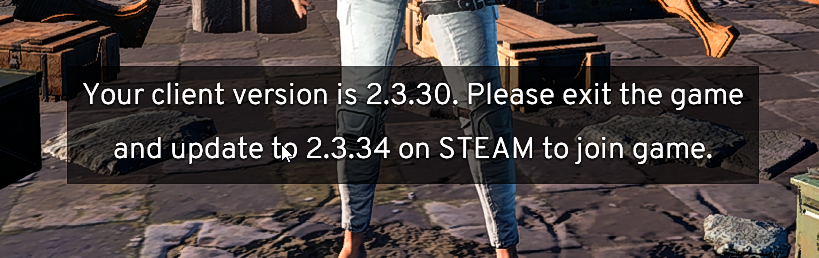 long hedge
Exit game, restart steam
rough geode
is it normal to have 30-40% CPU usage when playing the game ? should i have more?
sharp ice
anyone have a fix for the plane teleport freeze? So far all I've got is a couple batch files that work around a cpu core utilization bug that happens at that instance.
viral monolith
is 900p good for gaming
 uncut wyvern
Anyone else having game issues?
like connection issues?
@wide cypress are the servers currently updatign...my friends and I are having issues connecting
 tired apex
I am stuck on the "Connected. Waiting for response...."
uncut wyvern
@silk nest are the servers currently updatign...my friends and I are having issues connecting
weary warren
@uncut wyvern Yes, please check #📯│general-announcements for news on updates.
Also, please dont @ the Community Team.
weary warren
!invite
regal vaporBOT
Invite URL for Discord: https://discord.gg/battlegrounds
fast nymph
I'm stuck with this "Network Lag Detected" thing over my screen
it's been like 2 minutes
aaand connection timed out
great.
 open surge
what barrel attachments does the groza take? tried putting AR flash hider on but it wouldnt take it wondering if it was just a bug or what
 pseudo epoch
Hello there!
Just wanted to say that there's a lot of mistakes in russian localization of PUBG, and I know there's localization files, but if I want to change them, I need to change whole "TslGame-WindowsNoEditor_etc.pak". I'm afraid, anti-cheat system won't allow me to do that, am I right?
digital glen
@pseudo epoch I have brought up your issue with @maiden nebula Please contact her for further information on this issue. Thank you very much, and best of luck!
 brave bone
Hi why is the <ErrorMessage>LowLevelFatalError [File:D:\tsl\tsl-client-branch\build\UnrealEngine\Engine\Source\Runtime\Windows\D3D11RHI\Private\D3D11Util.cpp] [Line: 176] &nl;Unreal Engine is exiting due to D3D device being lost. (Error: 0x887A0006 - 'HUNG')&nl;</ErrorMessage> Error still a thing, I have done the workaround from the forums and I still get the same problem. I havent been able to play a single game today because it keeps crashing.
 hasty mortar
what are the best settings for this game
wooden root
Depends on your system and the visual fidelity you like
viral monolith
in the settings whats the BGM sound? is that the music?
viral monolith
also is there a way to reduce the vol of the plane?
 stable badger
RGB dream
 restive kelp
Love the new coloring! 😛
 tender ridge
I am having a strange problem. Almost every game i am recieving network lag detected and stays like this forever.
Up to the point that i get kicked from the server
From ping testing that i did i didnt notice any spikes or packet loss
Also i tried to test with other games like csgo and i didnt notice any ping spike at any point.
Last time i talked to a moderator in this channel i was told that there is nothing you can do about as of now. I called my provider we checked the line there was no problem
So basically i am confused, is there anything else i can try to fix this ?
wooden root
@tender ridge What type of pings do you get from: http://www.cloudping.info/ (Mainly the nearest couple to you)
wooden root
Only thing I can think of is some node issue somewhere between you and the servers then.
tender ridge
yes its definetely something i can not adjust
because it started happening after couple of updates
that they did
never had a history of network problems with this game
wooden root
I have a buddy that gets it now and then, and it's really only him. But not too often. But he lives further away then the rest of us so has more "distance/nodes" to travel through
tender ridge
i used to very rarely recieve it
and it was going away after like 5-10 sec
but now it stays like this forever
and its 90% of the games
wooden root
Yea, when he gets it now, it basically stays until the game boots him. But he gets it maybe 1-2 times a week at most
 wooden root
Most likely, unless you can do some more in depth network analysis (Wireshark or something) while you play and experience the issue.
tender ridge
i ll try to post on forum as he said, truth is i do not noticed anything weird at all
it just happens, the performance feels very good
and just happens, its not like i notice rubbanding or delay or sth before it happens
tender ridge
@wooden root I made a post on forum, but from the looks of it, it is a common problem, found many posts with that exact problem.
 gray harbor
In-game all friends appear as offline, but they are actually not
Is there any fix for this?
 sharp terrace
Can anyone help me with my audio with the game? It stutters heavily every game. Wasn't happening at the beginning.
tall relic
@quiet grove i did that too :\
 pure yoke
am stuck in the loading screen after matching
after this patch
anyone got the same prob?
nevermind i restarted the game and it works again, just some weird bug i guess
 lofty delta
i have a very big problem when i load into games all of the buildings in the game are just polygons and they dont load and it last for the entire match i cant find a way to fix it, pls help :/
 dense spoke
Any way to disable gamepad in game? Im getting sick about vibration when i die. Plugging gamepad off is not an option i use it for other games
 golden minnow
Curious if anyone has a build similar to a amd 4gb vram card with a i5 CPU and 8gb ram and no ssd. Trying to figure out how to combat the long building texture loading once landing
 karmic valley
my game is crashing before i can even land on the ground, sometimes before i even get on the plane. It says something about a memory leak, but i've never had that before the update, and now i can't even begin to play a single game. I've reinstalled , changed everything to very low, tried different launch options, still nothing. anyone with the same problem?
sharp ice
still getting the freeze/crash when you're supposed to teleport to the plane and everyone just runs around, or when you teleport to the plane and the plane freezes in air. Even after the update.
 wicked pulsar
Can anyone help me get the discord overlay on pubg? mine simply will not show, even with overlay enabled and pubg overlay "on" under the games tab in settings
If anyone knows how to resolve that particular issue send me a message
 frail heron
⛈ ⛈
 wary fiber
H E L P M E
frail heron
🌧 🌧 🌧
wary fiber
🤔
golden minnow
Hmm I haven't played the update yet on the regular version, only on the test server when it came out. Hopefully no crash issue for me, I just ordered another set of 8gb ram so hopefully my issue goes away
misty wind
Is mouse smoothing disabled by default or do we have to go into a .ini to turn it off?
Also does "very low" completely disable AA?
viral monolith
are the test server down? can not connect with the test server client
keen sundial
the new update was out for normal servers should the test servers even be online @viral monolith
quiet grove
Test servers are only up for a day or so before the patch goes to live servers. @viral monolith @keen sundial
keen sundial
yeh i know didnt really word my message well but was trying to imply that they shouldnt be live any way XD thanks tho @quiet grove
viral monolith
Hi I need help
My game is like in a black screen
when i start the game
i hear the music in the background
but my screen is black
I want to play ...
 rough sundial
Anywere you can post bugs/exploits without whole community being able to see it? - Dont want more people to start abusing it.
shut pier
http://forums.playbattlegrounds.com/forum/10-bug-reports/ @rough sundial
PLAYERUNKNOWN'S BATTLEGROUNDS Forums
Encountered a bug or issue? Here's your spot. Remember to include whatever details you can
Yeah, every1 can see the things you post in there 😛
rough sundial
But its sorted by a mod that contacted me
viral monolith
im just piss i cant play with my friend :/
shut pier
sorry just dawned on me what you were asking my bad just DM of the @viral monolith
viral monolith
PLAYERUNKNOWN'S BATTLEGROUNDS Forums
---Bug Description:
Bought the game yesterday, and to my dismay, couldn't start it (a common problem for me, but usually I can get around it on my own). ...
im fucking mad
no solution yet
shut pier
@viral monolith if you go to pinned messages at top of discord you will see the WAGS troubleshooter post it should help with that
keen sundial
optimized character models............ now all other players stutter for me at range yay
viral monolith
hello, my friend is having problems with frag grenade explosions shutting his computer down, any1 heard abt this?
tested 3 times and the crash occurs as the frag explodes :- D
keen sundial
how am i supposed to play when the other players move what could be assumed at 3 fps when im running at 40-60
imposible to track someone if they are skipping anyone else have the problem? was fine b4 the new update
😦
keen sundial
any one? i cant be the only person to have this issue
 frail sierra
i just joined this discord and saw you where like the only one having same problem i am sense new patch, have you found a fix or work around.. its like once a player goes far enough they start skipping frames, it makes it impossable to have a firefight at long and even medium range. it just shows like 1 frame of the guy skipping 3-5 feet
i myself do not skip only other players
i see noone else seems to be posting about this
keen sundial
yeh sounds the exact same i was like 25-50 meters away from someone and they were stuttering while im still running at 40-60fps
keen sundial
i saw one post on the forums but they dont give much info
frail sierra
this is every player i come across
sharp ice
Still getting the plane teleport crash and the lobby crash before the plane. Any fix for this?
frail sierra
so its not them lagging
keen sundial
yeh i get for everyone even my team in duo stutters for me and when i tell them they say that its all fine for them :/
frail sierra
same
keen sundial
PLAYERUNKNOWN'S BATTLEGROUNDS Forums
When i played pubg with the new update, everytime I saw a player running about 50-100 meters away, they were slowly teleporting instead of a clean constant...
help me exsplain to them
its pretty game braking if you ask me i might as well walk up to them and go "you might aswell just kill me i could have shot you ages ago but your stuttering so ill just give you the kill"
frail sierra
ive managed to kill a few like this.. just guessing where they're gonna skip to next lol
its horrible, lifes over!
keen sundial
well looks like i cant play till the next update possibly
maybe even the next monthly
its way too harsh to play i dont want to have to learn to counter the stutter
frail sierra
same, sucks!
keen sundial
what are your graphic settings at?
frail sierra
even at very low and scaled to 90 this still happens
i tried on low and medium as well
keen sundial
hm i might do some testing of this tonight and post a detailed conclusion ill uninstall then reinstall and try it then see if it is a issue with how the update was recived i dunno but worth a try i guess seing as know one else knows or is willing to help
frail sierra
ive thought about reinstalling, but my speeds are kinda slow, so ill have to do it over the night while i sleep.. but to reinsure i never had this problem before new update
keen sundial
my speeds are ..... ok will be like 1hour but yeh no issues like this b4 the update
keen sundial
@frail sierra QUESTION ARE YOU USING ANYLAUNCH OPTIONS STILL?
omg the caps are real
 clear tendon
was down to the last 20 and everything stopped, thought I crashed and then got this, EU solos
keen sundial
yeh anoying happend to me aswell top 10 moment
heads up to those having fps issue since new update try uninstall and reinstalling worked for me fps wise but still need to test how other players stutter or not will update after i have played a few games
frail sierra
no launch options here
you can test it right in the lobby
the game runs smoother then ever for me, except for the distant players jitter and skip everywhere even in lobby and any server in any type of match
keen sundial
you mean the pre lobbyu on the island?
frail sierra
yes
keen sundial
thats isnt a fair test imo as there is 99 people there XD
alot for your screen to render
frail sierra
but the cluster circle of people run smooth, but if one runs away it does it
keen sundial
and tbh no one stutters in lobby for me till game starts
tho since i reinstalled i havnt had any issues yet with stuttering peole
frail sierra
nice
keen sundial
i suggest you try it
frail sierra
for sure, thanks m8
keen sundial
i think seeing as the update was 5gb and the game is only 7gb there is stuff being left behind and causing issues with fps and in our case client side stutter
np 😄
frail sierra
ill report back after reinstalled
keen sundial
ok thanks be tomorow if i remeber right
frail sierra
lol ya
frail sierra
thanks
 bold igloo
Is there any place to find the 'hidden' changes each patch? Primary example being the complete rework of custom observer controls. Was kinda thrown off a bit when I went to host and stream last night only to find multiple controls (elevation change, view select, etc.) completely different outta nowhere haha.
Or did I maybe just miss that in the patch notes?
sharp ice
do devs even come in here to help with troubleshooting or is it a pointless endeavor hoping to get actual help from this discord?
 round palm
Hey i got a new computer, launched battle grounds and its asking me for a new nickname, how do i use my old one?
weary warren
@Xmortus#2085 The changes to the tools aren't made public as so few people have access, I'll send you the list of new controls.
@round palm Should be linked to your steam account.
Are you using the same one?
 mild otter
So is there any way that @viral monolith or one of the Bluehole guys could change my screen name. I'm not trying to get it changed because I was cheating or anything like that. I just really want to start streaming and whatnot and would love it if my in game name could match my youtube channel name without having to make a new account for either one. I understand why they don't generally do that, but that would be something I would greatly appreciate.
weary warren
Names cannot be changed at this time.
mild otter
@weary warren Is that something that will be available in the future?
weary warren
I can't say for certain at this time
keen sundial
could i get that list aswell @weary warren
pseudo epoch
Well, I have an issue, that happens very often
When I aproach the guy, the game just freezes for a second
And I'm already dead
!links
regal vaporBOT
PLAYERUNKNOWN Creative Director: https://twitter.com/BattleRoyaleMod
Twitter https://twitter.com/PUBATTLEGROUNDS
Facebook https://www.facebook.com/playbattlegrounds
Twitch https://www.twitch.tv/playbattlegrounds
Forums http://forums.playbattlegrounds.com/
Website http://www.playbattlegrounds.com/
Steam http://store.steampowered.com/app/578080/
**PLAYERUKNOWN'S BATTLEGROUNDS
#ThisIsBattleRoyale**

PLAYERUNKNOWN'S BATTLEGROUNDS is a last-man-standing shooter being developed with community feedback. Starting with nothing, players must fight to locate weapons and supplies in a battle to be the lone survivor. This realistic, high tension game i...
Price
$29.99
Recommendations
74548
 thorn breach
do some1 know how to bug at the loading screen entering a game? The bug happens for me every game, what happens is that i hear audio in the background but cant see anything. IF some1 can help, please send a pm or something with an answer
viral monolith
0x00007FF61EAC223D referenced memory at 0x000000000000000 The Memory could not be read
i need help what do i do when i get this msg
@frail escarp
 frail escarp

viral monolith
xD
frail escarp
viral monolith
ty
 hexed hedge
Hey i'm having an issue after the patch. I explained it in depth in this reddit post I made about 2 hours ago. Any help or suggestion would really be appreciated https://www.reddit.com/r/PUBATTLEGROUNDS/comments/6ko6pc/fps_drops_perfect_before_now_unplayable/

reddit
I'm sure many of you have seen this kind of post here before. I downloaded the game a week ago and had no problems. Yes, the minor stuttering...
 mighty hamlet
Same issue
 fickle epoch
Quesiton, would having a program that draws a crosshair on an invisable window be classed as a bannable offence? Example: http://puu.sh/wyHrB/b05cc04889.jpg

 bronze jay
why does the area around the middle of my screen get blurry when I have a gun and hold right click?
keen sundial
depth of field
keen sundial
any ideas of when the replay ft could be added?
lean salmon
you can disable it by switching post process to very low @bronze jay
hasty mortar
Has anyone have had a problem with not being able to open with windows start up menu after playing pubg?
 muted river
where to report bugs?
keen sundial
!LINKS
regal vaporBOT
PLAYERUNKNOWN Creative Director: https://twitter.com/BattleRoyaleMod
Twitter https://twitter.com/PUBATTLEGROUNDS
Facebook https://www.facebook.com/playbattlegrounds
Twitch https://www.twitch.tv/playbattlegrounds
Forums http://forums.playbattlegrounds.com/
Website http://www.playbattlegrounds.com/
Steam http://store.steampowered.com/app/578080/
**PLAYERUKNOWN'S BATTLEGROUNDS
#ThisIsBattleRoyale**
PLAYERUNKNOWN'S BATTLEGROUNDS is a last-man-standing shooter being developed with community feedback. Starting with nothing, players must fight to locate weapons and supplies in a battle to be the lone survivor. This realistic, high tension game i...
Price
$29.99
Recommendations
76250
keen sundial
use the forums
frail sierra
Ya my Internet has been poor, been dealing with that isp, but even so seems to have worked enough
keen sundial
nice i get it still abit but not as intense
i did manage to get a 150m xbow kill with a 4x while it was happening tho 😄
frail sierra
Ha didn't realize I was on edit. Well it worked anywhos. Thanks again, I'll do some testing and see how often if at all and when it happens
keen sundial
np and sure let me know, they have started replying on the forum i posted in here the otherday that might be able to help even more if it isnt completely fixed
tawny phoenix
i wana to speak with an ADMIN !
 zinc echo
http://prntscr.com/fqv61v
So if you get stuck here, you're helpless. Can't move, med or do anything.
Would put it in a bug/issue report channel but can't see one

It's on the bridge leaving Georgepol
Heading south
 ocean shard
@tawny phoenix What do you need help with?
 thorn cedar
has anyone had any issues with battle eye today detecting incorrect things?
it's detecting my AMD hydravision like it was a few weeks ago when they had problems with BE
i had to rename the files to stop it from detecting and decreasing my frames to like 15-20
 south rampart
Hi admins I am having frequent crashes since the new update and as far as I can tell im alone in this. Its halting my leaderboard climb. Any help is appreciated
frail sierra
@keen sundial it's not gone, but it does help to turn screen scale down I noticed
 green hemlock
I assume DMing PU himself to ask a question would get ignored since he must be getting loads of them right?
 primal tusk
I keep crashing on the plane when I look at my map
viral monolith
Ever since the latest patch ive been having a few problems with elements of the map not loading
ex buildings, grass, trees
and its been a constant problem but didnt appear in all games
zinc echo
Which channel do we put suggestions in?
viral monolith
but now I got banned so I think it might of been linked to that
so im not sure what to do
I messaged the person it told me to on the forums
do I just wait now?
weary warren
@viral monolith yep, you just wait for a response.
viral monolith
Thanks!
 radiant cove
Hi, anyone can help me with some graphics? My game runs stabil 60 fps with ~ medium settings, cpu ~40% gpu ~70% usage, and even though it is 60 fps it still feels like if it was 15-20 fps, the whole game feels choppy most of time, what could cause this problem?
keen sundial
best option post on forums with a video showing what you mean and your specs
 tidal drift
Are the leaderboards and statistics not updating for anyone else?
I've gotten a win and 5 top 10 games in the past 7 and it's stuck as 2500 in my duos. Any help?
south rampart
Hey update for the admins, still crashing only on plane~
tall relic
Everytime I am in windowed mode and switch off to another window (i.e. teamspeak, or chrome) when i click on the PUBG window the window expands and takes up a weird aspect ratio...anyone have this issue
 inland shuttle
Hello, I need help
Hello, first off, congratulations for the success on the game, you guys really deserve it. I have a problem with the player stats, Player ID: GoTo3-UY. I been playing a lot these past 3 days and the stats are not being changed. Server SA and Duos games. I want to know if there is a problem with my account.
 fiery sun
@inland shuttle Do you run the live tracker?
digital glen
@inland shuttle Seeing some reports on the stats/leaderboard issues. Especially with SA region. It has been passed on to the team for review. Thanks for mentioning.
 sacred sleet
Seeiing a lot of people stuck on loading screen today with the http://front.battlegroundsgame.com/, dunno if its an issue on server end or maybe they all use the same firewall/AV etc that's causing it,
Looks like it's a DNS issue
 fallow crater
@inland shuttle You have asked every single Community Team person and Mods in private messages and you are now asking here. We've answered you already and even referred you to forums if you'd like to make a report there as well.
sacred sleet
Switching to Google's public DNS seems to have resolved the loading screen issue for people https://developers.google.com/speed/public-dns/docs/using
Google Developers
quiet grove
I'm not sure I follow. @viral monolith what do you mean won't launch? Does it start then stop? Does it not even open up? Has it worked before?
fickle epoch
if im banned in dayz or any arma can i still play PUBG ?
south rampart
Could someone please respond to me @admin @community team
My game is still crashing in the plane since the june update and I have recieved no help
quiet grove
The best way to trouble shoot a problem is a forum post. Have you started one yet? @south rampart
south rampart
I have purused the forums but haven't found a bug like mine, also it doesn't seem like many people are offering fixes in the threads so I came here @quiet grove
quiet grove
if you want to DM me your thread link I can look into it!
south rampart
I will make an individual thread 😃
viral monolith
looking for a squad or duo
happy independence day world praise george bush
oh sorry just realized its wrong channel
buoyant bone
tidal drift
@inland shuttle SA leaderboards are broke right now I think. Same thing is happening to me
 errant slate

 dark moat
hey where do we report bugs to?
 ripe sequoia
Im getting that that issue a lot since the past 2 patches @errant slate
usually takes a good 2minutes to load everything, but while im loading everything is horrendously choppy like 3fps type
I heard that pressing tab next to an unrendered building should speed it up, testing it now
digital glen
Sorry for the delayed response. I'm on vacation right now and checking Discord periodically. 
Also, if you run into bugs tomo on the test server, there is an additional bug section for that server as well. 
ripe sequoia
Pressing tab does help speed up the loading process
it will momentarily freeze everything for a good 30seconds and come back once the buidlings have loaded
digital glen
@ripe sequoia Maybe this link can help? http://forums.playbattlegrounds.com/topic/4041-missing-texture-of-buildings-can-go-through-walls-and-more/
PLAYERUNKNOWN'S BATTLEGROUNDS Forums
Date Seen:
18/03/2017


Information:
played one game before, no problem. after this game restarted game and bug was fixedBug Description:
Could see t...
Have a look here as well. http://forums.playbattlegrounds.com/topic/4445-low-frame-rate-issues-and-game-optimization/
Best of luck. Sorry I'm not around to help you guys more. On vacation atm
ripe sequoia
its all good
digital glen
I ended up using 120 for screen scale and I believe high on post processing, that really sharpened the game up for me. I just landed in a remote area and changed settings while watching my fps counter and came up with a great compromise with frames and my system etc. Just need to tweak it individually. Best of luck, Happy 4th of July if in the US 
Effects on high (for me) also reduced my inventory lag
 wise estuary
Does anyone know how to fix the game sounds? been months and I STILL can't talk to or hear teammates
it's driving me nuts especially when I play squad and we get a random who I can't communicate with
digital glen
@wise estuary Have you tried verifying that your Mic is chosen in your Steam settings?
 tawny flume
has anyone else been stuttering really badly the past couple of days especially while streaming?, I can stream literally anything else maxed out, PUBG is nearly unplayable on very low due to the stuttering issue and network lag errors
viral monolith
Why do the servers keep crashing
It says the Host has closed the connection
Any explanation? It hasn't happend to me once until last night, and it happend twice tonight
 blazing linden
Is anyone else having an issue with a black box in your crosshairs when using a scope?
 azure junco
omg that exists still? There was a bug where you aimed around you with scope and those black boxes apeared when you hovered over an enemy ......
even if he was covered
blazing linden
I get the black box 10/10 times when using a scope.
azure junco
constant or random?
blazing linden
It goes away and comes back rapidly when scoped in
azure junco
i hope its not the bug i described. i dont like build in esp
blazing linden
I've had the bug for as long as I can remember.
azure junco
i guess you changed your graphic settings and ofc restart game and pc if you had it since ever
and that didnt fix it
and your not using reshade or sth
weary warren
VaV, are you using an SLI setup?
digital glen
@blazing linden If your AA setting is very low or low, try medium or high and see if that works.
digital glen
Awesome. Happy hunting!
 misty jolt
Anybody else having issues launching the game w/Reshade today?
16:33:47: [INFO] Blocked loading of file: "C:\Program Files (x86)\Steam\steamapps\common\PUBG\TslGame\Binaries\Win64\dxgi.dll".
digital glen
Getting that while trying to connect to the test server?
On new patches, it usually is blocked until the team can have Battleye allow it.
@misty jolt
digital glen
Thank you, passed on to the team
misty jolt
Appreciate the help
digital glen
@misty jolt You are welcome, the team is working on it atm. Should be straightened away 


 jade iron
I don't know if it's me or PUBG, but I've been getting network lag detected, but instead of going away in a couple of seconds, it stays up for about a minute or 2 and then it kicks me off the server
It's happened almost every game I've played, and it ruins good games
tidal drift
@wise estuary What I've found works, since mine seemed to be permanently muted was set my game to all chat, then muting it and unmuting. ctrl+T to toggle it
south rampart
Hi, my issue is persisting with little forum help. I have provided additional information, as well as uploading all crash reports to you guys. I really want to be able to climb on leaderboards and play with friends so any help is appreciated!
Edit: Here is the post http://forums.playbattlegrounds.com/topic/33318-crashing-in-plane/#comment-130153
PLAYERUNKNOWN'S BATTLEGROUNDS Forums
Bug Description:
When loading into the game, after the lobby and before landing, my game will crash. Either in the plane or while parachuting. There is n...
 old token
So, every now and again in PUBG my hard drive makes a funny noise and I lose sound
Is this the sound bug I hear about so much?
And is there anyway to resolve it? Seems to be happening more often than note now
*not
shut pier
@old token thats more a hardware issue than in game bug
 lament sequoia
Hey i been having a issues trying to revive teammates. It keeps clutching from 9.0 to 10. Seconds
shut pier
@lament sequoia have you checked forums to see if any one else has posted with the same issue.
lament sequoia
I'm about to
shut pier
!links
regal vaporBOT
PLAYERUNKNOWN Creative Director: https://twitter.com/BattleRoyaleMod
Twitter https://twitter.com/PUBATTLEGROUNDS
Facebook https://www.facebook.com/playbattlegrounds
Twitch https://www.twitch.tv/playbattlegrounds
Forums http://forums.playbattlegrounds.com/
Website http://www.playbattlegrounds.com/
Steam http://store.steampowered.com/app/578080/
**PLAYERUKNOWN'S BATTLEGROUNDS
#ThisIsBattleRoyale**

PLAYERUNKNOWN'S BATTLEGROUNDS is a last-man-standing shooter being developed with community feedback. Starting with nothing, players must fight to locate weapons and supplies in a battle to be the lone survivor. This realistic, high tension game i...
Price
$29.99
Recommendations
80297
 viral ore
idk if this is the right channel to report a bug
but me and my friend were both running outside of the playzone we were in the blue, trying to get to the white
and we got down to around half life then all of the sudden we were both knocked down and crawling and the game ended right away
game breaking glitch, we were gonna make it into the circle
wise estuary
@tidal drift Obviously tried this 1000 times. Same with changing the settings back and forth. @digital glen It's always been my default mic but I just double checked and it's still there so that shouldn't be the issue. Also the mic used to work when I just got the game (right around release on steam) but hasn't been working for months. No fix
digital glen
@wise estuary ok...did you go through the troubleshooting steps on the forums for sound issues?
viral monolith
in mylta power, the lone factory building before the power plant, you can get stuck on the stairs and cannot move even trying to crouch jump out. pls fix
digital glen
@viral monolith A screenshot and a post here will get it fixed a lot quicker than just the description http://forums.playbattlegrounds.com/topic/6478-stuck-general-map-bugs-post-here/
PLAYERUNKNOWN'S BATTLEGROUNDS Forums
This thread is for posting any map specific bugs, like being able to walk through a particular wall that should be solid, a place that you got stuck and o...
@wise estuary You around?
 wispy gull
My friend is experiencing this for 5 mins every single game. He also has trouble loading in, he usually never even get into the warmup. His rig is pretty decent with a GTX 1060 and an I5
He has also reinstalled the game many times. Nothing works.
 twin rain
@wispy gull If possible, move the game to an SSD. Friends had the same issue, cleared up once they had game installed on a faster drive
wispy gull
He doesnt have a ssd...
digital glen
@wispy gull Have him raise his effects settings in game and see if that helps
 severe sandal
@digital glen I'm the person Petter is talking about.
I'll try that but everything that I do doesn't work.
It has been a constant issue since I bought the game.
I've tried many community guides on "Increasing FPS" hoping this will work from putting stuff in my launch options to editing in game files.
I can PM my full rig to you if you'd want.
This issue is also with this game only. No other game on my list has any FPS issues but this.
digital glen
I would start by removing any lauch parameters if you still have them. Also, reverting back to a "fresh" copy of the game to start with.
severe sandal
I've done this previously but go on...
digital glen
Understand the fps issue. Bear in mind that it is in EA still. I am not trying to downplay your issues at all, but the game is still a wip. How much Ram you have? No ssd right?
severe sandal
I understand this is in Early Access which is why I haven't refunded the game or done a bad game review or whatnot. I'm being patient knowing that (hopefully) this will eventually get fixed.
I have 8GB ram (1 stick) with no SSD.
And I'll have no option to get an SSD.
digital glen
ok. Obviously an ssd "shouldn't be required" to run the game, but from experience, it helps solve the EA issues some are facing like this one. So, ssd is off the table. Once again, you "meet" the requirement for ram, BUT, from experience 8 GB users seems to be having the most issue right now until further optimization of the game has taken place. There are some things to try though, "workarounds" if you will. Have you looked into changing your pagefile at all?
severe sandal
Petter is currently running on 8GB with no issues at all so it seems wierd but I understand this is in early access.
I also don't know what a "pagefile" is.
digital glen
ok. So since there are a lot of variations of systems etc, he might have a faster cpu or gpu than you, etc etc...really can depend on a lot of things. What processes are running in the background on his computer vs yours etc. (copy pasta incoming) In storage, a pagefile is a reserved portion of a hard disk that is used as an extension of random access memory (RAM) for data in RAM that hasn't been used recently. A pagefile can be read from the hard disk as one contiguous chunk of data and thus faster than re-reading data from many different original locations.
severe sandal
How would I change this?
digital glen
So some users have had luck managing their own pagefile versus windows doing it for them
wispy gull
My lappy is running 8 gb and a 860m with i7 4710hq. Totally fine
My main running 16 gb, 980 ti and i5 4670k. No problems there either
So the 8gb doesnt seem to be any issue on my lappy
As said, hes running newer parts, not necessary better, but newer..
digital glen
The min is 6 GB but some have issues with 8 GB...some upgraded to 16GB and fixed their issue. Obvisously on your system everything is cool. So MANY different configs and whatnots on each users system makes it a hard way to go troubleshooting wise. You could have the latest and greatest beast system in the world, but if it's full of spyware and viruses, it won't get out of it's own way lol...
Back to topic
Pagefile
severe sandal
So, how would I be able to manage my own pagefile.
digital glen
PLAYERUNKNOWN'S BATTLEGROUNDS Forums
After almost two weeks of trying just about everything manageable to stop having issues with desyc I may have finally found a solution. Please keep in min...
ok so this link will show you how to disable it. You can test the game and see if that works. Some say it's worse. Some say it's better. We are just trying to figure out what works for your system.
severe sandal
Sure thing.
digital glen
Others have increased the file and it has worked. With 8 GB of ram though, I think it would hurt more than help to increase it. Make sure to reboot and try the game then after changing it. If it doesn't work, just enable it again, letting Windows control it
Then we can try other things.
severe sandal
Sure thing.
Well I am currently reinstalling PUBG right now to have the "freshest" files.
Says it will take around 10 mins.
digital glen
See the pin at the top of Discord? That has a text file you can download, that I quickly compiled with some useful links in it. Things like making sure Windows is up to date. Latest Graphic card drivers. Running CCleaner. Give it a download and look over it. Might help as well
severe sandal
I'll firstly wait for PUBG to reinstall.
digital glen
Yes
severe sandal
I'll try the pagefile thing first.
Then follow the instructions of the pinned message
digital glen
Sounds good. I am just getting back from vacation, and I'm whipped. Ill be around for a little bit yet though. Ping me here when you try the game and see what happens. It's just one step of many lol so don't give up if it doesn't work. I will be around tomo to help in this channel as well. I have some catching up to do lol
severe sandal
lol sure thing
I think I'll just PM you directly to not clutter the chat which everything.
digital glen
Would rather keep it here, that way others can maybe find answers as well 😃 If someone needs in they can just post and I'll work with them as well. More so tomo though
digital glen
yep yep
severe sandal
What would I do from this point? http://prntscr.com/fs72v2
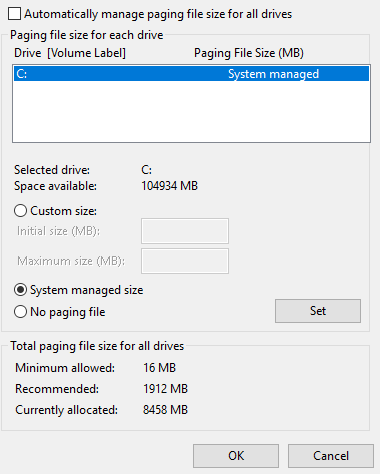 severe sandal
Sure thing.
severe sandal
Yes.
I done all what it said to do so I'll launch the game now and see if it works.
Since it is now installed.
I'll hop into some solos and quit regardless if it works or not and update my result here.
What settings would you recommend for pushing my GPU?
digital glen
ok...if that doesn't work you can try setting custom size initial to 16 and Max to 1912 ok then reboot and try...btw...are you using Shadowplay?
digital glen
ok. Try the above I mentioned if disabling doesn't help and download the pinned guide. I'm crashing for the night. Post results, we will go from there
severe sandal
Sure thing. Good night!
digital glen

severe sandal
These will be my settings I will be using throughout this: Resolution: 1920x1080, Fullscreen, Brightness: 100, Screen scale: 100, Anti-Aliasing: Ultra, Post Processing: Low, Shadows: Very Low, Textures: Medium, Effects: Very Low, Foliage: Very Low, View Distance: Low, Motion Blur: Off
digital glen
Try Post Proc at High Textures High/Ultra Effects Medium View Dis Ultra
@severe sandal With and without the pagefile setting(s) Remember when you switch it back to just choose auto or let windows manage it...reboot...im off
 radiant cove
So I have to update to a lower version? What?
 jolly kayak
I have the same issue
radiant cove
maybe it's maintenance? I saw some message about maintenance when I logged in first
I managed to play a match then this happened
 foggy bay


 white imp
anyone knows what could cause me having average of 50 fps but sometimes i have drops to 8 fps for 10-20 seconds ?
happens outside houses and inside houses doesnt happen right at the start but midgame. i restart my game after every game i have no launch options but i try malloc=system and useallavailablecores atm to test if it helps
 noble maple
specs needed to say anything
 balmy cedar
my game says connected, but waiting for response...
yeah it happen the fps drop to 1 even though i have computer 1 year old only
thorn breach
guys any1 know how to fix an bug that says in game that i get bp but when i exit the match it hasnt added any more bp¨