#🤝│community-troubleshooting
1 messages · Page 44 of 1
 covert vine
 eternal sentinel
murphy cao is the guy who posted them
everything in the screenshots is in chinese
except numbers
covert vine
can you dm me the screenshots
 quiet grove
you can send it over to me @eternal sentinel via dm and I will forward. 😃
 gusty compass
Can you enable an FPS counter via PUBG instead of through the Steam overlay?
covert vine
no
 shut pier
@gusty compass no only steam or fraps
 fringe sorrel
Or NVIDIA shadowplay or Riva Tuner
 silent pilot
Any fix for game freezing during exit to lobby after a match?
 wooden pilot
Hi I have a question about keybindings @Moderators
wooden pilot
Rather not raise awareness of my question, I'd rather PM a mod
 weary warren
@wooden pilot DM me
 coarse shell
Why everytime in the last circle am i not able to use any of my healing items?
 raven rune
Hi there. Anyone have a workaround the the 100% CPU usage bug showing mid-late game ? kinda really annoying...
enabled vsync via config file (as this could be the issue, had that in another game) but not solving the issue in this case. it goes 100% cpu usage for ~1-2 min then comes back to normal
ofc can't play when it's like that, drops to 1-5 fps during that time
 tender ridge
@weary warren any idea what just happened here ? http://prntscr.com/fijgmb

discord was all fine i never dced, no loss or anything and i stayed like this for like 1 min then it said i got timed out from the server
weary warren
You connection to the server dropped
tender ridge
yes i understand this
but why?
i dont want this to happen again
how can i avoid it?
first time i encounter it
weary warren
Nothing you can do for it really, the way the "network lag detected" works is that it checks to make sure you are reliably sending packets of data to the server you are playing on
If the server doesn't receive any from you for a certain amount of time you will get this message.
tender ridge
ok so it was server side problem ? or mine?
because if this happen again i ll go mad 😄
weary warren
Looks to be yours if you got the network lag detected message
weary warren
And how do you know that?
tender ridge
cause i can check it
weary warren
To the specific server you were on that is.
tender ridge
i mean when some1 has packet loss and recieve that message in game
he has like 20% loss on discord as well

 viral monolith
wtf
 soft lantern
happened 3 matches now
weary warren
Does it only happen when you fire? @soft lantern
@tender ridge Discord doesn't work in the same way that the game does regarding connection, you cannot compare the two and expect the results to be the same.
tender ridge
shouldnt be reconnecting me ?
i mean the server
cause i stayed like this for like 1 min
there is no way it was detecting network lag for more than 1 min
my ping/loss values were absolutely fine
btw i dont know if that helps but everything was fine and then suddenly the plane passed on top of me and the server started lagging
for everyone
weary warren
Okay, well there isn't anything to be done about it at this point.
If it continues to happen to you then make a post on the forum about it
!links
 regal vaporBOT
PLAYERUNKNOWN Creative Director: https://twitter.com/BattleRoyaleMod
Twitter https://twitter.com/PUBATTLEGROUNDS
Facebook https://www.facebook.com/playbattlegrounds
Twitch https://www.twitch.tv/playbattlegrounds
Forums http://forums.playbattlegrounds.com/
Website http://www.playbattlegrounds.com/
Steam http://store.steampowered.com/app/578080/
**PLAYERUKNOWN'S BATTLEGROUNDS
#ThisIsBattleRoyale**

PLAYERUNKNOWN'S BATTLEGROUNDS is a last-man-standing shooter being developed with community feedback. Starting with nothing, players must fight to locate weapons and supplies in a battle to be the lone survivor. This realistic, high tension game i...
Price
$29.99
Recommendations
57309
soft lantern
@weary warren yea only happened when ADS or 3th person shooting
fiddled a bit with my Afterburner settings since it looks like artifacts but now it doesnt happen anymore last 3 games. Still never had any problems up till today and didnt change my Afterburner settings for quite some time. 2 Weeks since i last changed m
weary warren
Yeah, looks to be an issue with the effects
raven rune
No idea about the 100% CPU usage ?
 brazen mauve
"Failed to Initialize Steam" ...?
 keen sundial
ive done nothing to my pc not installed any updates or any new programs but suddenly i dont get more than 7 fps -10fps and using 4199mb of memory from 3000 memory any ideas what happned?
only happned since yesterday
weary warren
@raven rune Well we would need more information to say about your CPU usage
As well as your PC specs
@brazen mauve Restart steam .
raven rune
@weary warren AMD fx-6300 16gb ram gtx970, game installed on SSD
strange thing, 2 days ago in solo, no issue at all, since 2 days in squad, happends pretty much once per game
weary warren
So it didn't happen right after the patch, but a day or two after?
raven rune
yeah
really strange
and today, it even froze the whole PC xD
after a system reboot...
but ok, happened only once
so maybe not related
could it be related to the battle eye issue ?
as for example, 2 days ago (when solo playing) AV firewall went down while playing
(and saw some posts it could be related to battle eye)
but it may be 2 diff. things
like I said, tried activating vsync in config file, but dunno if it's working or not. It solved an issue in RinbowSixSiege. It was pretty much the same and solution was to activate vsynch (for unknown reason). but hear look slike it's not helping (and was working fine in solo)
don't know if I can help you with any logs or anything ?
keen sundial
for me solo is fine but i only really play duo or squads and then the game is unplayble
raven rune
hmm. so would be related to squad. that was my thought too
keen sundial
yeah im playing solo right now sitting ok at 32 fps but in squad and duo i cant get more than 10
raven rune
I don't have really drop while playing in squad, it's just the CPU going crazy 100% that makes it unplayable for 1-2 min.
viral monolith
hi
how come im only using 40% of my cpu and 60% of my gpu
and im only getting 60 fps
shut pier
@raven rune can you give me your specs what cpu and gpu you have
raven rune
amd fx-6300 and gtx 970
shut pier
@keen sundial what gpu are you useing and DM me a screenshot of your in game graphics settings
viral monolith
Why am I getting low fps, and my cpu/gpu is only using half of there resources.
shut pier
can you send me a sreenshot of your in game graphics setting also @raven rune
raven rune
if you want, nothing special in there
btw, tried full screen and windowed full screen, no diff
shut pier
yeah its just more how you have done your graphics settings
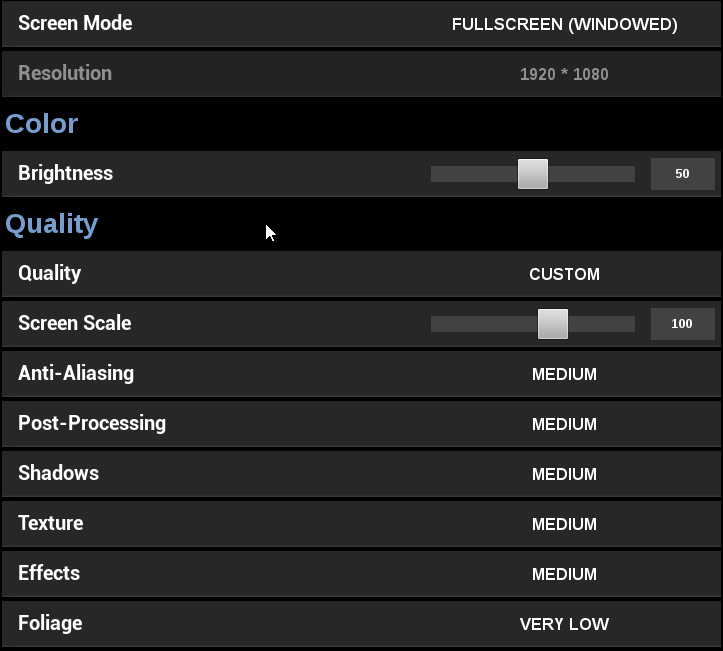
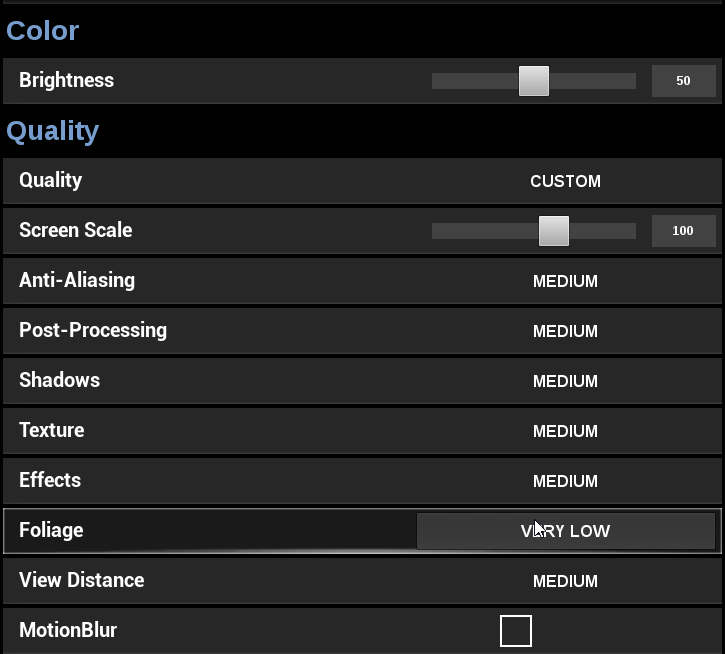 shut pier
ok change all to verylow appart from texture and anti-aliasing should help let me know also keep view distance at MED @raven rune
keen sundial
um well
raven rune
gonna try in next game in squad
keen sundial
i actually dont have a gpu XD i have a apu (crap pc i know) but even tho i have a apu i have run at 30 fps no problem till today
like right now im getting this in gameand this is in solo

lul the still is at 15 had fps drop there but if you watch it youll see what i get when there isnt a drop
playing 1920 / 1080
 keen sundial
um not since i first got the game (b4 it was playable for me
how will that effect me?
shut pier
up text to MED and also anti-aliasing
keen sundial
wont uping them make it less fps?
keen sundial
ok so done that and put screen scale to 100
shut pier
and is it still the same @keen sundial
keen sundial
will just load into a game
shut pier
ok gdluck
keen sundial
ty
raven rune
in squad game right now, will let you know how it goes
keen sundial
ok so solo feels better will try a duo now
keen sundial
XD just sorta killed my self on the red tower at military hahah
shut pier

brazen mauve
Why are the servers so laggy in particular today?
shut pier
ok for both @raven rune& @raven rune its just finding whats the right setting are for eatch system so tweak away and find whats right for you.
brazen mauve
Its been so good up until today, and now I have 1.5 second delays on opening doors
shut pier
@brazen mauve did you get the server ID
brazen mauve
Where do I see that?
shut pier
att the bottom of the screen next to the game patch verson.
brazen mauve
87F9D1
shut pier
ingame]
keen sundial
ok seems better thanks
viral monolith
Why am I getting low fps, and my cpu/gpu is only using half of there resources.
keen sundial
will be back if it drops again XD
brazen mauve
I got a three tap on a dude, point blank, with an S12K. Server was like, "Nah bro, you only shot once, this guy got you with two pump shotgun blasts, rapid fire."
shut pier
@brazen mauve not sure about that one just one of them wtf moments we all get. but on the server lag you can put up a post in server-lag-reports on Discord with the server ID and im sure it will be looked into.
@viral monolith what cpu & gpu you got?
shut pier
what third party software you running for your Gpu @viral monolith
raven rune
@shut pier so far so good, but was only one "quick" game, gonna go for an other and see
viral monolith
hm?
shut pier
@raven rune like i says keep tweaking the settings till its right and im sure you will find a sweetspot. also with every patch you will have to do the same. happy gaming
raven rune
yeah, will do, guess it may be related to effects
shut pier
@viral monolith so you dont run affterburner or any thing like that
@viral monolith what sort of fps you getting in game and whats your in game settings.
shut pier
DM me your settings @viral monolith
viral monolith
my ingame settings?
 full harness
is there a best configuration for max performance?
cause its basically unplayable at all very low for me
maybe i just have a bad computer
viral monolith
whats your specs
raven rune
@shut pier no crash in 4 games so far, so at least it's working. I guess it's the post processing or the effects that are messing up, gonna try to play with it tomorrow to report to dev if I find something interesting
thx again 😉
shut pier
@raven rune thats great to hear & your welcome 👍
@viral monolith yes your ingame settings
 coarse coral
So I was part of the firts close test for Battle Grounds. I was wondering if there will be another closed test vertion for the Xbox one. As I am primarily a Xbox streamer. And I know my audience would love to get there eyes on the game ASAP
 hushed willow
fucking explain to me why my game crashes every time i press exit match
it's fucking annoying and makes the game complete annoying
ty for the urgent help kappa
 waxen slate
its a feature
hushed willow
great future, i did not have this bug in the closed beta
shut pier
@hushed willow what have you tried to resolve this?
hushed willow
i can't see how i could solve this with anything?
im running the launcher in adminstration and that i have to do
shut pier
ok so you have not tried any steps like verifying your game files in steam or a quick reinstall to see if it resolves this for you @hushed willow
hushed willow
i have done that
hushed willow
the screen freezes
shut pier
@hushed willow have you checked the forums to see if anyone else is having the same issue
waxen slate
try runing the game in windowed mode
windowed fullscreen i get it now alot when fullscreen mode
but it will happen
time to time
because alpher
shut pier
@hushed willow you can even report it as a bug here if you have the time @http://forums.playbattlegrounds.com/forum/10-bug-reports@Znx#8962
PLAYERUNKNOWN'S BATTLEGROUNDS Forums
Encountered a bug or issue? Here's your spot. Remember to include whatever details you can
nop
 steep wolf
He PM'd me yesterday from here. I was out at the time.
 empty spear
are servers having problems or is just my isp. because the lag is real
 novel igloo
is there a possible for this bugged camera angles
its freaking annoying
possible fix*
 crimson cedar
i crash in the lobby so much lately... could it be RAM issues since i only have 8gb? or are a lot of people experiencing this?
 coral field
8GB is fine
 normal adder
Have you guys crashed more recently? I had maybe one crash since release. But the past 2 days I've had 3 crashes. Not sure what happened
2 out of the 3 crashes I didn't even get a crash report. Game just shut down (without a crash report) The other it just froze up when parashuting down. All my numbers were fine, nothing different than normal. :/
viral monolith
PC specs? @normal adder
normal adder
I5-6500, 1060 GTX 6gb, 16gb Ram
Yeah, never crashed, but once since release over 500 hours in the game. Just started yesterday.
CPU, memory all is the same. Nothing different
Not sure what the cause would be. @viral monolith
normal adder
Nope. One I was parachuting down. Other I was looting. The other can't remember
viral monolith
:/
sounds shit
unfortunately there's probably not much to do. try reinstalling it maybe?
viral monolith
if theres still nothing in the event logs, try verifiying the game files. i'm not sure if pubg is making entrys in the eventlog anyway
normal adder
k
viral monolith
buildings are loading slow for me i have and i know that ssd would help but have non at a moment is there a possible patch in the future?
 cosmic crypt
so the buil;dings have been spawning like putty for me and sound keeps cutting in and out
 wheat tusk
I reported someone through the EN MASSE website
How do I know if the player wsa banned?
viral monolith
u dont
i guess
but they ll do it hopefully. did it 2 times and never had feedback
 blazing linden
Hey so I'm having an issue with the game using 80% of my memory. I only have 8gb of ram, would upgrading that fix this issue? The game is pretty choppy for me and I'm running on minimal settings
viral monolith
i would upgrade in your case, running with 32gb, and it takes like 6-8gb sometimes
shut pier
@blazing linden whats your pc specs gpu cpu
viral monolith
yea ive no idea if they fixxed it already. im running on i7 7770k overclocked to 5GHz and 32GB DDR4 3200 MhZ and 1080 Zotac AMP Extreme graphics
and there are no problems at all
using the pc for streaming and playing during the stream with stable 80 fps ++
blazing linden
MSI R9 390 GAMING 8G
shut pier
@blazing linden great card DM me your in game settings
viral monolith
😄 dude thats a personal url
u need to be logged in
maybe you can take a screenshot
dont post ur login details here please
blazing linden
Lol oops
ASRock H97M Pro4 LGA 1150 Intel H97 HDMI SATA 6Gb/s USB 3.0 Micro ATX Intel Motherboard
And I have an i5 of some sort I don't have my pc in front of me I'm on mobile
And then yeah 8gb ram
Ingame everything is low
shut pier
@blazing linden I sent you a DM
@blazing linden there are lots playing with 8gb of ram is it DDR4 or DDR3 ?
blazing linden
Ddr3
viral monolith
then its an older i5 as well
but i guess the graphics card is not the best one as well
shut pier
@viral monolith im running the i5 4690k on 16gb DDR3 with same Gpu Msi R9 390 8gb with out any issue
blazing linden
Interesting
shut pier
getting 50/60 fps
viral monolith
then try getting 8gb more ram @blazing linden
shut pier
@blazing linden just try the settings i suggested you will see a big diffrence
blazing linden
I'll get back to you guys later about it when I'm home in about 5hrs
shut pier
ok great 👍 @blazing linden
keen sundial
@shut pier needs a role or something most helpfull member i have seen
shut pier
hi thank you Effy how did you get on in game ?
keen sundial
good got 2nd only because i died to the redzone that decided it was perfect to apear in the final circle
shut pier
ah Great to hear well here's hoping i meet you in the last 10 one day
shut pier
@keen sundial give me a shout some time we will get a Duo
@keen sundial not sure but i think week 12 patch will Roll this week but not sure on that one
keen sundial
sure thing and ok well here is hoping this week
regal vaporBOT
PLAYERUNKNOWN Creative Director: https://twitter.com/BattleRoyaleMod
Twitter https://twitter.com/PUBATTLEGROUNDS
Facebook https://www.facebook.com/playbattlegrounds
Twitch https://www.twitch.tv/playbattlegrounds
Forums http://forums.playbattlegrounds.com/
Website http://www.playbattlegrounds.com/
Steam http://store.steampowered.com/app/578080/
**PLAYERUKNOWN'S BATTLEGROUNDS
#ThisIsBattleRoyale**
PLAYERUNKNOWN'S BATTLEGROUNDS is a last-man-standing shooter being developed with community feedback. Starting with nothing, players must fight to locate weapons and supplies in a battle to be the lone survivor. This realistic, high tension game i...
Price
$29.99
Recommendations
57767
 hasty cloak
I think it ate one of my reward crates. I opened two and only got one item
is this a thing that happens?
shut pier
@hasty cloak yes it has been known to happen only do one at a time ✌
did you see anything flash on the left side as some times it will giv the same item
 digital glen
Double check to make sure you didn't receive a duplicate item
hasty cloak
proving rather difficult to even see the clothing menu since the latest update
stuff like this started happening
like uhhhhh
shut pier
@hasty cloak drop shadow setting down to verylow should solve that
 eager kiln
🙌 Who should I contact if I want to change my name? I made support ticket on ENmasse entertainment but haven't heard anything in 2-3 weeks
It's just that my friend jokingly made a racist name for me, and I really want to change it. Don't even mind paying for it
viral monolith
you can pay me but unfortunately i cant change it
btw. i reported 3 players cheating/teaming at EnMasse. Never got any feedback at all
tickets are still open for 2 month now?!
eager kiln
ohh rippss dude
weary warren
@viral monolith You won't get feedback on bans
@eager kiln You cannot change your name at this time
 coarse junco
it isn't confirmed yet but i think that there will be a way in the future
eager kiln
guess I gotta get another copy of PUBG then xD
viral monolith
you have to pay 500k of those ingame coins then 😄
eager kiln
ez
 wispy dawn
This was a fun texture trap I stumbled upon this morning. Really sad way to die. :(
https://www.youtube.com/watch?v=puRJbY0Ytq8&feature=youtu.be

figured I would post it here so maybe the devs can fix it
 gleaming vector
Can you post that on the forums @wispy dawn? That's the best place for reporting bugs like this.
wispy dawn
Ok, do you have a link by chance?
gleaming vector
!forums
wispy dawn
never been to them yet
wispy dawn
lol
wispy dawn
makes me think of Bee Movie when he is trying to get through the glass... "this time.. this time..."
gleaming vector
bahaha
wispy dawn
thanks!
gleaming vector
Yep, enjoy!
wispy dawn
PLAYERUNKNOWN'S BATTLEGROUNDS Forums
Was a sad way to die. Would be cool if there was a console command we could perform like `/stuck` that would just move our character above the ground and ...
Excellent! Thanks!
blazing linden
@shut pier @'sup#3505 Processor Intel(R) Core(TM) i5-4670 CPU @ 3.40GHz, 3401 Mhz, 4 Core(s), 4 Logical Processor(s)
shut pier
@blazing linden ok thank you just try the settings i suggested
blazing linden
Yeah I did. I'm still getting bad choppyness
I can hear it in the audio of the game too even after landing from the plane
shut pier
ok what GPU drivers you got in at the moment
 tender moat
viral monolith
tender moat
viral monolith
what are community games?
viral monolith
I'm a twitch prime member and I have linked and unlinked my account multiple times. Why haven't I received the skins?
viral monolith
No how do I do that?
weary warren
@viral monolith They're weekly custom games with the Community Team and Moderators
@viral monolith Go to the Twitch website
Click on the crown in the top right corner
Find the PUBG loot from the dropdown and select "Claim offer"
viral monolith
gotcha i'm an idiot
weary warren
👍 No worries!
 iron zealot
@viral monolith Family share does not work for PUBG at this time due to people abusing it, youd have to rebuy it
... rude much?
I only answered your question to help you
 last snow
server crash?
 quick chasm
@last snow hi, what is your issue
There are more than 1 servers in this game, you gotta be a bit more specific with your question
 rugged night
I'm seemingly not able to connect to the game servers (none spesific)
I'm just getting connection closed when attempting to launch the game.
Friends are able to play and connect, but I'm not able to despite restarting modem/router, pc, even attempted to connect using 4G (mobile data).
Any clues on what I can do?
http://i.imgur.com/eYTvLbE.png
All I'm getting though I doubt it really will change anything.
Though, I cant really make out what it says bellow the right reconnect button.
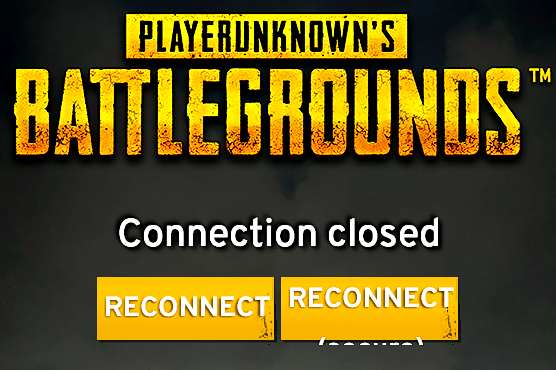 shut pier
@rugged night Hello all you need to do is restart your steam should help with that.
rugged night
I attempted that, along with restarting router, pc and everything. Had to reinstall the game for it to work sadly.
shut pier
@rugged night sorry to hear that any time its happend to me i just needed to restart steam but your all good now so happy gaming ✌
rugged night
Thanks for the help anyway! Won the game I played after fixing it so works great now§!
viral monolith
you're getting the same error when u play 2 games in steam at the same time
like when i play csgo and start pubg then, its doing "no steam connection or connection closed"
 lunar zenith
does reducing the resolution improve framerates?
my comp is 1600x900 which is what i put my setting at
would i see a boost by reducing it
halp
 fathom bobcat
getting a "bad service version" error when starting a game. Don't see any updates.
quick chasm
@lunar zenith no you wont
 vast veldt
anyone else getting a giant red circle in your face when trying to throw a nade?
 analog sphinx
New player here transplant from the culling. Is there a guide or tutorial i should look into. I couldn't find a tutorial in the game
 pearl breach
where can I report hackers?
 shell burrow
PLAYERUNKNOWN'S BATTLEGROUNDS Forums
Evening All,
There is now a quicker way to report players. Please follow the link and steps below. http://support.enmasse.com/playerunknown-s-battlegroun...
 cerulean kernel
Hey there, can I use this channel for tech support? I got this game for my friend as a gift, and he's telling me that it crashes
It seems to just crash at random, from what I'm hearing
viral monolith
PC specs?
cerulean kernel
https://cdn.discordapp.com/attachments/102986754721595392/324403104340508673/unknown.png https://cdn.discordapp.com/attachments/102986754721595392/324403252915339266/unknown.png


As you can see, he's running Windows 7 with the classic theme
And this is what comes up when it crashes https://cdn.discordapp.com/attachments/102986754721595392/324407242755538944/unknown.png

He told me that the "Send and Close" option doesn't really have any info on the crash itself
viral monolith
whats the performance like when he is playing the game? did u check memory usage and cpu usage?
any errors in the application eventlog of the system ?
 austere token
quiet grove
austere token
quiet grove
@ moderator doesn't work.... partnerships will be opening soon. Watch twitter for an official opening of applications
 stoic cliff
Since the last patch I've been getting random crashes which I've never had before. This is what comes up sometimes
viral monolith
how much memory do u have?
viral monolith
yea i guess thats the thing
stoic cliff
I know it's not a lot
viral monolith
its fine til they add features and stuff like they do currently
try verifiying the game files
but i suggest to upgrade to atleast 8
or 16 would be recommended
its using like 6-8 like for me
stoic cliff
Yeah I was thinking of upgrading for sure
cerulean kernel
Sorry for the delay @viral monolith, as far as performance I'm assuming it plays done, and I'll have to ask later about memory and cpu usage, as well as the eventlog (however you get to that)
viral monolith
It's fine mate. Just check Google for Event log Application log. There are a lot of tutorials
 sturdy meadow
already reported him through the system but LOL be more obvious https://pubg.me/player/643426475QQ-QUN

View the PlayerUnknown's Battlegrounds statistics for 643426475QQ-QUN on PUBG.ME
 magic lantern
Can someone with PC knowledge DM me why cant i run plays/shadowplay without dropping to 10fps?
viral monolith
I can't see through the red dot, it isn't much of a problem, but how can I fix it? https://i.gyazo.com/8d94f187c96fa4663663ecd957565d5a.jpg
 sturdy meadow
Same when ADS?
I've had this happen after being shot at so I think the sights can be damaged
viral monolith
ADS?
sturdy meadow
Aim down sight
sturdy meadow
So it's not affecting your aim?
 hushed nebula
Is disabling shadows considered cheating. To the devs?
 pastel anvil
sigh, my game just froze from nowhere, first time ever, wasnt able to get any error/crash report
sucks :/
"load" on memory was about 3,9gb ram usage
cerulean kernel
@viral monolith finally got info, there aren't any relevant errors in the eventlog
 round shard
anyone know anything about the camera moving on its own?
lul nvm my friend is stupid, it was his controller
cerulean kernel
Well, game crashed again
 willow iris
offline?
 harsh river
 rough swallow
Hey. Was just wondering what settings I should change when I get weirdly in completed house textures for like a minute? It happens every so often, usually during the first couple of game sessions where I parachute in and have to wait for the textures to load before I can interact with doors...
 crisp cove
Hey everyone, I'm wondering if someone might be able to help me with an issue. Right now my entire game is broken. I've reinstalled multiple times, verified files, updated all my video drivers, exhausted windows update, reinstalled my Visual C++ packages, tried running as administrator, disabled my firewall, disabled and reinabled steam overlay, nothing works. The game won't go any further than this.
The test server client seems to load just fine, other than it gives me the "reconnect" button screen instead of loading into the lobby.
viral monolith
seems that the game can not load your server data, like ur account and model and stuff
so maybe its a connection problem
or routing problem
did you have tried on another device in your network?
@viral monolith Nightfury same issue for me yesterday the firsttime. have to do further checks
@cerulean kernel
crisp cove
You mean try and log in on another computer? I only have the one. I've tried two separate routers and different network settings including DMZing my host connection
It is %100 a connection issue, however. For some reason the client is not loading the host server.
 twilit oriole
crisp cove
twilit oriole
crisp cove
Try this list http://forums.playbattlegrounds.com/topic/4469-connectionsteamlaunch-issues-a-comprehensive-guide/
PLAYERUNKNOWN'S BATTLEGROUNDS Forums
Update: If you are having an issue connecting to the servers please note what type of connection you are accessing from. (Ie: Home, Work, Universit...
@crisp cove try wireshark to analyse where the connections are going to, try to ping the host and ask your provider for blocking issues maybe
maybe tracert is an option too
quiet grove
watch your language @hushed willow
shut pier
👍 @quiet grove
viral monolith
@quiet grove i wrote you back in the forums, but i guess it seems to be a "global" bug, not just for me
quiet grove
Nice! Yeah I didn't get there yet. 😃
viral monolith
np, just saying cause i dont think it has anything to do with my pc or specs 😄
 remote pelican
Okay not sure if this belongs here but I'm gonna ask it anyway:
If you were to play a drinking game where the one who DIES first in a match has to drink a shot. Who would have to drink if the squad were all downed and died because of being all down... Would the guy who was downed first take a shot or no one cause you all died at the same time?
 hushed magnet
if squap wipes at the same time, everyone takes a shot
crisp cove
Yeah neither of those are going to help. The game isn't making requests
crisp cove
Can you walk me through how I'd use them?
crimson cedar
this game crashes so much its ridiculous... is it because i only have 8gb of ram? ive ordered more and will be at 16gb, will that help?
 scarlet sky
never experienced a single crash so far. a few freezes now and then but that´s it
crimson cedar
you must not have played much yet then
i have crashed multiple times... with it being worse since the last monthly patch
scarlet sky
not that much but 14 hours should´ve gotten me a crash if it´s often ^^
crimson cedar
im really hoping on friday when i get my new ram it will help a ton
scarlet sky
have you ever watched if your ram was full at the moment of the crash?
crimson cedar
no i havent.. ive got memory crashes, and just random shutdowns of the game with no info as to why
it hasnt been just consistently one error
scarlet sky
interesting. i had a few times no loading error and needed to restart, then the said rubberbanding on EU servers and that´s it
hope my change to 10 64bit won´t change the good behaviour
anyway, i´ve got a question myself: how to team up? my friends always show up offline
shut pier
if there showing off line means there in game or invisible on steam. @scarlet sky
also if your friend's are also seeing the offline at the top left had corner just leave group and reinvite.
 sacred cloud
LF Suggestion tab or Trello link.
quiet grove
PLAYERUNKNOWN'S BATTLEGROUNDS Forums
Share your ideas to improve BATTLEGROUNDS
!links
regal vaporBOT
PLAYERUNKNOWN Creative Director: https://twitter.com/BattleRoyaleMod
Twitter https://twitter.com/PUBATTLEGROUNDS
Facebook https://www.facebook.com/playbattlegrounds
Twitch https://www.twitch.tv/playbattlegrounds
Forums http://forums.playbattlegrounds.com/
Website http://www.playbattlegrounds.com/
Steam http://store.steampowered.com/app/578080/
**PLAYERUKNOWN'S BATTLEGROUNDS
#ThisIsBattleRoyale**
PLAYERUNKNOWN'S BATTLEGROUNDS is a last-man-standing shooter being developed with community feedback. Starting with nothing, players must fight to locate weapons and supplies in a battle to be the lone survivor. This realistic, high tension game i...
Price
$29.99
Recommendations
59415
scarlet sky
sry for the late response - had to watch frozen ^^ Thanks @shut pier . So i can only see them online if they are on the main screen, is that right?
shut pier
@scarlet sky yes or in lobby i think at some point it dose say the player is in game as well but not! all the time.
 novel halo
Unable to join games now.
 gaunt hull
anyone found a quickfix for lowering the cpu usage of the game? depends on the patch for me but i almost always have pretty high usage
 inland oasis
Is there a way to bind a key to toggle voicechat all and team?
pastel anvil
is there any known reason why some players get kicked and replaced by other people on custom made games (where there are squads/teams), happens randomly and not always...
inland oasis
or bind a serpate key to be team and one to be all chat?
 tacit parrot
I keep getting a bug with my camera that makes the camera float up higher than normal and puts my character in the bottom middle of my screen
When I'm in buildings, I can't even see my character, and moving around gets hard as I don't really know where I'm at. Anyone had this issue, and got any ideas on what I can do to fix it?
 unreal crown
I've had kinda the same bug, holding right click puts my character on top of my crosshair.
While holding right click, Q goes further to the left than usual, and E does nothing.
That was only for one round though.
crisp cove
Cool, looks like I'll be refunding this...
crimson cedar
motorbikes are so broken....just died from flipping over while going down a not very steep hill.... and not even full speed... insta dead.. so dumb
inland oasis
calm boys...game is in alpha...you knew that when ya bought it
 gloomy gate
can anyone help would i notice a difference from going to a gtx 670 to this http://www.ncix.com/detail/msi-geforce-gtx-1050-ti-7a-137208.htm OR this http://www.ncix.com/detail/evga-geforce-gtx-1060-sc-b9-134742.htm like a difference worth the $170ish

Sku: 137208 | Part#:GTX 1050 Ti GAMING X 4G

Sku: 134742 | Part#:03G-P4-6162-KR
 dry arrow
crimson cedar
dry arrow
crimson cedar
@inland oasis of course we all know its alpha... but we are allowed to express our frustrations with things. Thats how things get looked at and potentially altered/balanced...
inland oasis
PLAYERUNKNOWN'S BATTLEGROUNDS Forums
Encountered a bug or issue? Here's your spot. Remember to include whatever details you can
that is.
I get it.. but saying your gonna refund the game because of the bikes not working
crimson cedar
forums are overfilled with random shit
inland oasis
that is clearly not their intension and will fix it when they can.
crimson cedar
and who said im gonna refund the game??? i have over 200 hours in the game and love it
crimson cedar
im allowed to voice my opinion in any way i like
inland oasis
lol same
crimson cedar
and so is everyone else.. in a civil manner
crisp cove
I'm refunding the game after 24 hours of play time because it stopped working and 3 days of attempting to fix it has had no results. I don't care if it's early access, I did not buy a $30 wallpaper.
inland oasis
@crisp cove do what ya gotta do...but its your problem. everyone else can play. 😃
uninstall, reinstall, update
clean system
its your computers problem...not the game
n00b
crisp cove
My computer runs other games
inland oasis
oh
crisp cove
Soooo
inland oasis
well then
crisp cove
My computer runs the test server
crisp cove
Only an idiot would claim that's user error
viral monolith
guys since last week mine game is lagging hard what is best way to find out where is a choke point?
rugged night
Anyone else having issues with the game freezing all up?
Me and my 2 friends have all been experienced it the past 30 min. Especially just after jumping out of plane...
cerulean kernel
Hey, guys, can someone help my friend out with the game randomly crashing?
 bright fossil
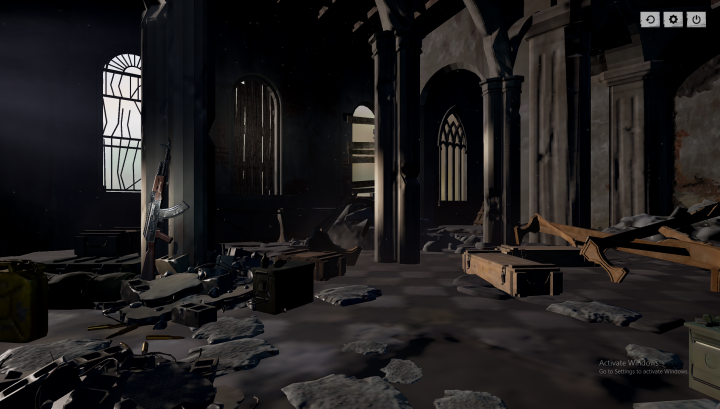
Anyone having this issue and know a fix?
Nothing showing on lobby, friends are playing.
 upper heath
Anybody have this issue where they land and all the buildings and objects near them are loaded, but their textured are smudged. Is there a fix to this?
 neon pawn
i usually just sit there till it fully loads
upper heath
That takes about 5 minutes for me :/
upper heath
yea, it can also be really annoying for my teammates
neon pawn
My friend has a issue where when he starts the game via steam it performs a first time setup then once finished it just doesnt start up
Is there a known fix for this problem?
viral monolith
@upper heath move the game to a ssd. Then it will work
upper heath
I dont have an SSD
 dawn epoch
I been getting increased crashes today. First time crashing ever
 glass sphinx
Are there any .ini configs that actually work on improving game's performance?
 woven kiln
@upper heath It might be that your CPU is to slow which causes the textures to not load as fast as it should
 formal beacon
@HipHopLegend#4084 By chance when you go to start pubg does nothing happen. Or it says running in steam but game doesn't actually load up?
@HipHopLegend
Guess he isn't here anymore lol
 silent spoke
Went for an Airdrop, no crate texure... went to drop location and pressed tab... saw the loot and at the same moment the game crashed
viral monolith
Thats a Feature doomish
It's when u get m249 the game crashss cuz you cant win with that gun anyway
stoic cliff
M249 is not that bad though, especially in squads it's more useful
You can blow up cars in just a matter of seconds
stoic cliff
Hmm just had a memory crash in my first game today while parachuting even though I have 14gb ram
inland oasis
fyi you are probably slowing your ram down to whatever the 2GB speed is
you might want to compare performance with it removed
assuming all the other 4GB sticks are the same
stoic cliff
Actually checked and they all have the same speed
 sharp oar
14gb of ram is such an weird amount of ram
 empty garnet
I can't launch the game, checked integrity on steam already, windows 10 64 bit, i7 4790k 16GB RAM, GTX 1080, game installed on a SSD, I get this window popping up and the game says it failed to reach steam
inland oasis
I get this....rebooted fixed it
viral monolith
is the animation supposed to look like this or should i report it as a bug ? https://puu.sh/wm0GR/4272e43123.mp4
inland oasis
id bet no..not supposed to look like that
shut pier
@half hound its known all ready.
 half hound
kk thnx
 long hedge
anyone got a handy link to a PUBG optimization settings page or thread?
viral monolith
Still looking for a fix for this. Someone please message me if you know how to fix
I have a GTX 970 and I5 4690
Do any of the devs know when this will be fixed? 😦 It's been like this ever since the first major update.
inland oasis
uninstall videocard drivers, reboot, run ccleaner, reboot, install videocard drivers, reboot
@viral monolith
that is 100% your videocard. its overheating or you got shit installed.
viral monolith
aight
inland oasis
uninstall all nvidia stuff
viral monolith
I think i have tried that
inland oasis
get the free version of ccleaner
viral monolith
But ill do it again to make sure
inland oasis
run that on registery and apps
reboot after every step
if you wanna go the extra mile...blow out all the dust..clean it out
could be heat
inland oasis
or check your temps using http://www.almico.com/speedfan.php
viral monolith
I mean might as well right, i have close to 600 hours in the game and everygame i have to wait for buildings to load in
viral monolith
so i could just be fucked?
viral monolith
I have before
inland oasis
i think its just drivers
stoic cliff
For me it was gone after upgrading ram, before that I had it all lot. Especially after playing a few games
 lost juniper
Have yet to finish a game today, game keeps crashing at random interavals. Anyone else?
 craggy thunder
Hello! I cant make new topic on battlegrounds forums on Community > Live on Twitch. Is there a specific reason for that?
Would really love to promote my new channel
weary warren
Is it a new account
 wispy frigate
Very frustrating issue - as far as i'm aware, PUBG didn't update yesturday and out of the blue it started locking my pc to the point of having to restart every game when I get put in the plane.
craggy thunder
@weary warren Yes it is.
weary warren
You need a minimum post amount before you can post in certain subs
craggy thunder
Was thinking about that. So now i just need to spam the forums to promote my twitch channel there? 😄
 craggy thunder
Also, what is required to be able to host custom games? I think theres like noone in Finland who is able to do that
weary warren
You need to be PUBG partner or run a community which has been granted access.
http://forums.playbattlegrounds.com/topic/20014-community-event-custom-game-application-information/
PLAYERUNKNOWN'S BATTLEGROUNDS Forums
We are happy to announce that we are now ready to share with you our plans for opening up the next wave of Custom Game access. We want to continue the cre...
Well, thats something i can work towards to. Would really love to host games for Finnish community and some EU events too but i need to get my viewers / followers count up a notch 😄
 proud shore
game is unplayable on europe server becaue of lag, any chance this will be fixed or we move on a different game ?
craggy thunder
Mine's working fine 😃
 lethal crane

reddit
53 points and 26 comments so far on reddit
everyone thats havingg the isue
issue*
UNINSTALL BIT DEFENDER
or try and deactivate it
100% fixed
(the freeze in place problem)
 wide osprey
0 of my EU DUO games are recordinh
hushed willow
i need help, i need to force close my game from the job list cause everytime i die or win and i press exit it freezes, what to do
viral monolith
after instaling game on second hdd building keep loadiing fine
viral monolith
is it possible to rebind mouse scroll up and down?
 feral solar
So I'm getting this weird problem where my game will just straight up freeze once I get into the plane, and then it'll either clear up in 45ish seconds or crash/disconnect/have network lag
It wasn't doing this to me before and it's disconnecting me reliably, happens every game I try to play
I'm also not using BitDefender like some people were having issues with. I use Avast/MalwareBytes
Tried disabling my Avast shields and that didn't do anything
Reinstalling didn't do anything
 cloud wyvern
can u chage my name to madman40011
lost juniper
My game is crashing at random time intervals within a game, every game. Started Friday and have not been able to pinpoint the cause. Anyone else?
 ember hearth
Hey, I have an issue. When I am parachuting at the beginning the game is freezing or crashing. Happens every 3rd, 4th game...
 signal wagon
all my clothes and money vanished ^-^
anyone know a fix?
nvm, it's all back - did the servers go down or something?
 vocal ravine
Hio, how do I cahnge my nick on this server?
pastel anvil
how to get an inv link to this discord?
 eternal lake
!invite
regal vaporBOT
Invite URL for Discord: https://discord.gg/battlegrounds
 pure fiber
My character is also fully nude, with no BP or items in my inventory. Still have my items in my Steam inventory.
stoic cliff
@pure fiber restart your game
pure fiber
Didn't work, however restarting steam fixed it. Thanks for trying though!
 harsh coyote
stoic cliff
harsh coyote
stoic cliff
@harsh coyote You can give this a try http://steamcommunity.com/sharedfiles/filedetails/?id=946904335

As you visit here you are probably struggling about opening your inventory. When you press TAB your game stops for 5-10 seconds or so. SO here is the solution that really works:
1)Go to your steam
I think for me only using -d3d10 already did the job but you have to see what works for you
fathom bobcat
cannot seem to connect right now. Server issues?
soft lantern
had that shortly as well, rebooting did the trick for me
 royal laurel
Can anyone tell me the point earnings break down?
 smoky ingot
@gleaming vector Hey sorry if im not supposed to ping mods, not sure if thats a thing or not. Having a major issue right now though, was hoping for a quick response.
I took a break from playing for 2 days, then came back yesterday and tried 5 matches. Every single time, when I was in the plane, as soon as it gave me the option to press F and eject the game would freeze, to the point where i'd have to go to the task manager to close it. Same thing today. Tried restarting my computer, that didn't help. any suggestions? is this a known issue?
gleaming vector
Have you tried Verifying the game files in Steam @smoky ingot
smoky ingot
ill try that, 1 sec
gleaming vector
Mods are here to help, Ping us when you need us. If we're not available, we'll ignore you like a redheaded stepchild.

smoky ingot
but i am a redheaded stepchild
well, not really a child lol, but still
alright ill try it out one more time, just finished validating steam files
same thing, just froze as it hit the point where i can jump out
@gleaming vector
gleaming vector
Hrm... Next thing I woul dtry is a complete re-install of the game.
And... not sure what kind of internet you have, but I would try restarting your router and modem, it could be a communications issue.
smoky ingot
ok ill do the router and modem first, since that's faster than a reinstall. ill update as things go on
gleaming vector
Aight
smoky ingot
damn, i almost thought that worked, restarting the modem. I made it farther than before, was able to eject out of the plane. fell for about 3 seconds, and then boom it froze 😦
 muted hamlet
sad
sacred cloud
just got a query time out and it booted me from the game
as well as the rest of my team
 little kiln
same
craggy thunder
Yeah got disconnected aswell
 shadow compass
fringe sorrel
shadow compass
fringe sorrel
2 times in a row after having looted 😦
smoky ingot
@gleaming vector Alright so I tried reinstalling it, got this error? no clue what that means 😦
content file locked?
smoky ingot
scratch that, restarted computer again and that fixed the content file lock
welp, still no luck. once again it seemed to give me more progress though. I made it out of the plane, and was almost to the ground when it froze and stopped responding
viral monolith
I just gifted my friend this game but he has some serious issues with the game
He is playing with an i5 2500k or so , 8gb of ram and a gtx 760
however he gets this blurry buildings bug where the buildings arount you don't render properly so that you can'T go inside them
Is there a possible fix?
smoky ingot
is that a consistent issue Silvor? I sometimes get that on the first game of the day, but they seem to fix themselves after a few minutes and it almost never lasts into the second game
smoky ingot
hmm, not sure then tbh. maybe a mod/admin will know more, sry i wasnt any help
quiet grove
That is a known issue at the moment and being worked on. @viral monolith
viral monolith
so there is no known fix?
quiet grove
nothing immediatley besides trying to move the game onto an ssd
 winter linden
 hardy bone
yup. restart client
 warm jetty
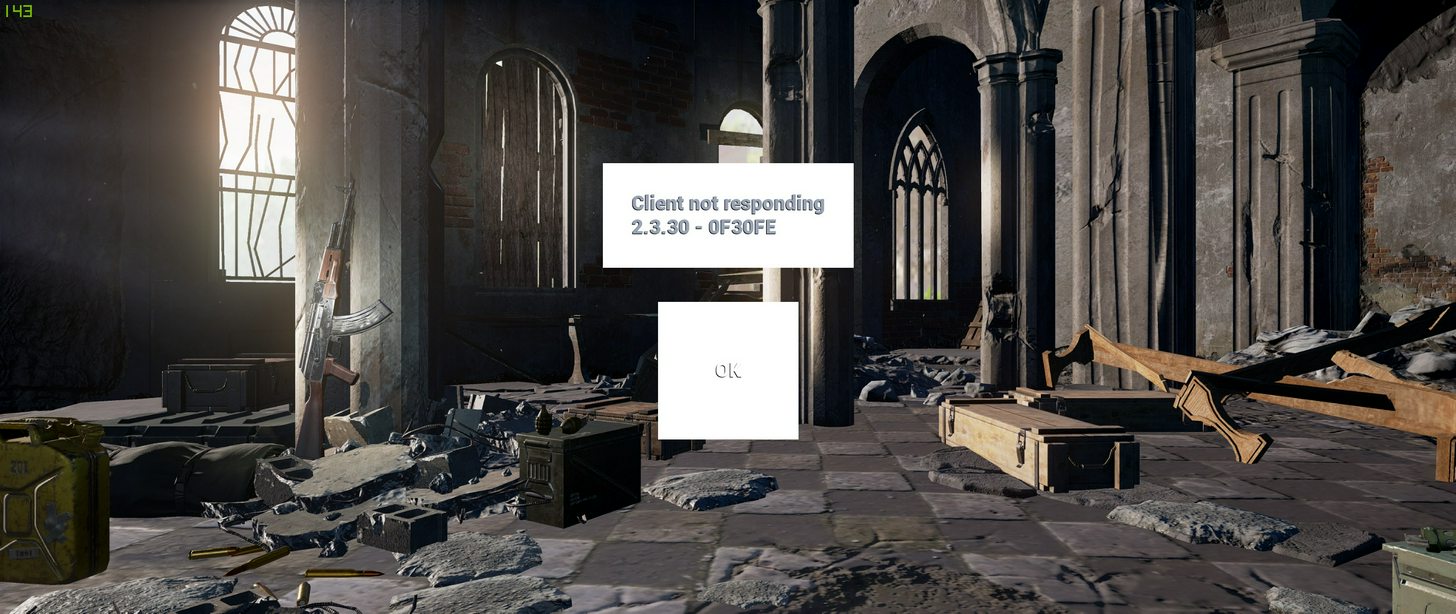
client not responding error 😦
 vague needle
servers down?
 lusty tree
Everytime I try to get into a game, after I'm in the plane for a few seconds. My game freezes.
I've had an instance where this happened when I had PTT pushed, and everyone on my team could still hear me.
Attempting to end task the game doesn't seem to work. The first instance of end task supposedly goes through but the game remains running. The second end task tells me access denied. I've had this happen to me about 3-4 times in a row. Have to restart / sign out back in to access my machine. Known bug or should I be heading to the forums? (Lobby is perfectly fine, can run around shoot etc, it's just when it flips to the plane that this happens)
Update: Now for the first time, the game responded again but i got a connection time out. Don't seem to be having connection issues atm though, as I'm able to surf and voip as I'm trying to play.
Nother update: Same issue again. (Connection Timeout. 2.3.30 - 6BA15A)
Please @ me when you're responding to me so I get notified tyvm.
 sleek chasm
srsly. fix your fuckin shit. Do TDD with automated CI/CD, handle your exceptions properly... Like, this is rudimentary shit. I don't care if it's early access. Work on performance, not features. Fix bugs, not add new guns. https://en.wikipedia.org/wiki/Technical_debt have you heard of it? It's painfully obvious in this game.
Technical debt (also known as design debt or code debt) is "a concept in programming that reflects the extra development work that arises when code that is easy to implement in the short run is used instead of applying the best overall solution".
...
 cyan needle
host fail ?
sleek chasm
I can confirm that at least NA servers are failing.
 placid pine
yeah 4 of us getting this as well, im sure they are aware
 cloud estuary
Servers are failing for everyone
EU too
Streamers are experiencing the same issues
 shrewd comet
My whole squad has been getting "BAD IMAGE" errors while on spawn island. Then getting client disconnected errors.
 wild wedge
^^^ This is happening with me as well. Just to confirm and it happened both in NA and EU servers. seams to be a client side issue.
 silver dove
http://imgur.com/a/Y8isI just had 2 in a row do this
 sleek chasm
shrewd comet
sleek chasm
shrewd comet
^^^
wild wedge
^^^ can confirm^^^
fathom bobcat
yeah what's goin on?
sleek chasm
Their backend servers are fucked
 covert bay
Things are bugging out
sleek chasm
Someone deployed a release and shit broke.
 green radish
@sleek chasm You mean more than normal?
sleek chasm
They're probably reverting right now.
 crystal wave
** CRASH CITY BITCH CRASH CRASH CITY BITCH** this game would be great with optimization just saying 🤔
sleek chasm
@green radish yes more than normal.
wild wedge
been saying that for ever man. they have been doing a lot of fixes that have made the game better. but nothing can be perfect within minutes @crystal wave
crystal wave
i know im just having a good laugh at the fact i spent money on a brokenn game, and before you say anything i know its early access just laughing at myself
 weak mountain
green radish
weak mountain
green radish

We are still investigating the server issues. Apologies for any frustration caused while we get this resolved.
 Twitter
green radish
Twitter
green radish
Server side patches can be performed without client side patches
sleek chasm
^ This.
green radish
Maybe a small tweak to test something, no need to notify everyone
 last basalt
Why does my game keep crashing i have 539hrs played and now im crashing all the time
dawn epoch
@last basalt read ^
dawn epoch
all good , just no need to keep repeating
 stoic hound
Servers have been dumping weird errors. We just tried a custom game w/ 100 players and it didn't work either. Same crash
Bad Image
 vagrant ocean
keeps crashing???? why
 cursive veldt
Confirmed same "Bad image exception" shortly followed by "Client not responding" issue 3 games in a row
green radish
We are still investigating the server issues. Apologies for any frustration caused while we get this resolved.
Retweets
114
Likes
427
Twitter
 delicate abyss
i have audio problem with this game. i can hear sounds that are on my screen but everything else is very silent. people can literally walk over me and i can`t hear them at all.. i use optical input with my dac. problem goes away if i plug headphones directly into pc but there is something wrong with that anyway. this is only game that have this issue...
does anyone have fix for this?
 warm monolith
anyone know what this is about? im guessing its connected to the server issues earlier in the day even though it's "host closed the connection" instead of a crash? or idk
i couldn't click "ok" and had to use task manager to close down the game, fwiw
 sleek zephyr
@warm monolith if it happens again hitting "esc" will return you to the main menu
 tall cove
http://puu.sh/woqLZ/d673083093.jpg what does this mean when I or the man I killed didnt throw a grenade and there is no name? https://clips.twitch.tv/CleanCallousJayTBTacoRight


Twitch
#MorningBrew w/Jon - Raised Expectations, Higher Standards. - Clipped by Gehrig44
gleaming vector
@tall cove If you play that clip back at .25 speed, you'll see that he starts to put his rifle away, I'm guessing on his screen he switched to grenade and had at least clicked... so it dropped like martyrdom.... certainly took its time going off though. No name is probably because he was dead/disconnected when you were killed.
tall cove
did the timing for a grenade work out tho? (so you're telling me WORST LUCK EVER 😄 ) @gleaming vector
gleaming vector
By rough count from the time I see his rifle go to his back, it's right close to 5s... so yeah... worst luck I've seen in a while. Sorry man. .-(
smoky ingot
@gleaming vector hey man do you remember how i was having the issue yesterday with freezing while in the plane? was looking around on the forums, and it seems that Bitdefender antivirus is causing issues with the game. People recommend uninstalling it, which really sucks so im not sure if i wanna do that or wait til next patch hoping it gets resolved then. I'll try just ending the bitdefender program while i play the game and see if it solves the issue, but thats gonna be such an annoyance having to close and reopen it every time i wanna play pubg :/
gleaming vector
I've heard of BitDefender causing all sorts of issues for a bunch of games.
smoky ingot
first time ive had an issue since i got it 6 months ago with 100 hours on pubg and plenty of other games played too, but if its gonna be an issue for multiple games its definitely getting the boot
if its an issue with multiple games, ill assume it's on bitdefenders end and not the developers end?
gleaming vector
My guess would be a combination of over-strict protection from bitdefender and code from the game not being completel "tidy" and so getting caught by the active protection.
smoky ingot
yeah i gotcha. im switching over to Avast currently, we'll see how that fares
 fringe coral
Pls help, how can I see past room #11?
gleaming vector
uhhh... You mean over there?
👈
gleaming vector
Duo room 11 is the last room.....
weary warren
@fringe coral You're looking at the wrong Discord
gleaming vector
Either that or his friends are trolling him...
smoky ingot
Cease, good news! bitdefender was the problem, no more crashing (and just got 15 in my first match back haha)
 tribal laurel
Best place for game suggestions here?
shut pier
PLAYERUNKNOWN'S BATTLEGROUNDS Forums
Found a bug or you've got a suggestion that will improve BATTLEGROUNDS? Drop them here!
Thanks!
 upper sinew
Can someone tell me what "network lag detected" is and why it happends? When it happens my internett is fine.
stoic cliff
Can also happen whe you lagg out in terms of a big fps drop
That's what caused it for me mostly, when I had 1 fps etc
upper sinew
I'm never below 40fps do you still think it could be that?
 vestal drift
https://pubg.me/player/GodWuBai/duo?season=2017-pre2®ion=oc cool guy "32
MOST KILLS IN MATCH"

View the PlayerUnknown's Battlegrounds statistics for GodWuBai on PUBG.ME

No information given.
ayy looks like his been banned before
4 days ago
raven rune
Hi there! So, I have the 100% CPU bug again. nothing changed on my side, and was fixed up to 2 days ago when I last played. Solution was to lower post-processing and effects in graphics settings to low. Now, it's happneing again with no reason. Any idea where it comes from or what I can give devs to help ? really anoying bug in squad with 2 min lock down while the cpu goes crazy were you can't do anything.
again, thios issue was on R6S too, and enabling v-synch solved, but here doesn't seems to work.
gleaming vector
A few things @raven rune...
- What CPU do you have
- What does your CPU sit at with nothing running. Close all programs and then open Task manager and look at usage.
- Verify that your video drivers are up to date (I know this is CPU related, but it's worth checking
- Verify that your windows update are current and that you are running latest version.
- Verify integrity of local files through Steam.
raven rune
- AMD FX-6300
- ~5%
- Up-to-date
- All up to date
- Did it already
- All is fine woth other games / apps. Only isssue similar was on R6S, and it's a known bug related to somehow V-Sync.
gleaming vector
That's the six core cpu, right?
raven rune
- With the game running, CPU is between 45-55% usage all the time, except when the CPU goes crazy 100% for 2 min and goes back to normal (no crash or freez, just fps drop to 2-3 fps cause of 100% cpu)
yes
gleaming vector
Hmmm. It's not a high end cpu, but it definitely shouldn't be doing that...
raven rune
yep
strange enough is: in solo never had issue
in squad, had to turn down post-processing and effects down to solve it
but since today it's coming back for now reason
(no update, or whatever since it worked)
gleaming vector
That's bizarre... I'm not sure what to tell you
It's beyond my troubleshooting whiel I'm at work.
raven rune
yeah, and no one has any idea about it...
gleaming vector
Sorry!
raven rune
np 😉 thx for trying anyway
viral monolith
Updated my AMD Radeon R9 370 drivers and can once again run all games at Ultra setting. But now I can't play PUBG whatsoever. Says I'm getting 45-55 FPS at main menu but.. it's completely frozen everytime like it can't render anything.
fringe sorrel
Never seen this before, just reporting it
 ivory epoch
Does anyone have a guide to the newest performance settings please? Thanks in advance
sleek chasm
seems like yesterday's server issues still persist to today.
stoic hound
damn glad I couldn't play tonight or that would be two nights in a row dispapointeded
 shut umbra
still freezing and forcing a rs of my pc before leaving the plane. 😦
 hybrid widget
Has anyone figured out how to enable auto matching into duos? i reinstalled this game so many times and it just wont reappear when i select Duo's, but in Squad; it's running fine and shows the option to be able to look for players for squads. I can invite only firends into duos, but i can not look for random players for duos.
I've talked to @weary warren before about this and he hasn't seen a case like this before. Just wondering a month later if it's still just me that has the problem
 wind berry
stoic cliff
wind berry
stoic cliff
@hybrid widget hmm that's weird, for me it's the other way around. I can't turn auto matchmaking off for duo's so I will always get a random whether I'd want it or not (unless ofc I play with a friend) but I thought this was just a feature
 knotty pelican
Hi there! I'm contacting you via discord because you partner program is currently suspended. As a content creator and community builder in my country (Croatia), I'm extremly interested to became PUBG partner. Can you send me e-mail or some kind of contact to send required data as in your form to start a new beatiful partnership between PUBG and speed growing Croatia PUBG community. We really need option for custom server to start hosting regional PUBG events on our language. Hope to hear from you soon with some positive feedback. Until then, some nice greetings from Croatia!
 gray harbor
My game just finished downloading. I created a character, changed some graphical settings and jumped into a game. The lag wasn't too bad but as fast as i landed the game crashed. Could anyone help me?
long hedge
See if the problem is repeatable or just a one-time error
gray harbor
It worked this time, thanks.
weary warren
@hybrid widget So when you try loading a duo game you aren't paired with anyone? Because you can only play duo as a duo, you can play it as an individual, that will be why you cannot see the "auto matchmaking" option
@knotty pelican Hello, unfortunatey as you have seen from the website we're not currently taking applications for new partners. Keep your eye out on the Twitter accounts for announcements in the future.
knotty pelican
@RoboDanjal thanks for fast reply... 90% of our Battlefield and CSGO community switch on PUBG last month's... and more is coming... we would really like to have weekend events like a Auzom and PUBGonline cups but for our language cover(and more chance to get in one ). . . I known that we are small community but we are very active and I got eyes on all PUBG social networks for good news :-)


hushed willow
Why does my game freeze upon pressing exit? i have to force close every time
gleaming vector
Have you checked the forums for others having the same issues? I haven't seen that one personally.
hushed willow
it's like, i tried playing in fullscreen, then when i popped the task manager, the game was in the lobby, but frozen, so like i dunno wtf happens
 small cliff
I play games on fullscreen. When i alt + tab my computer shows my desktop but the mouse is stuck/freeze for a few seconds. To prevent this i can run (bordeless) windowed. I know the GPU does flush the vram when alt + tabbing. But i didn't had (noticed) this mouse freeze before with my GTX 780.
Soo is it normal with a GTX 1070?
@gleaming vector can you help?
gleaming vector
I haven't had mouse freezes, I have had it where I can't see my mouse, but all I have to do it right-click and it shows up just fine.
small cliff
It freezes for like 2sec
gleaming vector
upon doing a quick google search@small cliff
- Make sure you have all windows updates installed
- Disable Windows Gamebar
- Disable Windows GameDVR
- Disable Windows Game Mode
- Check power settings, make sure you aren't on a "Balanced" power scheme. You need to be on "Performance" and have all of the power saving features on your 1070 off in the nvidia control panel.
small cliff
Thanks, will do this and report back to you.
gleaming vector
If it works, I accept payment in cookies, and fresh milk.
small cliff
😄 😋
Meh i did all but it's still doing it sadly.
it's like it freezes and catches up after it.
@gleaming vector
digital glen
This is a list I've compiled to try to help people, feel free to pass it around
@small cliff
hybrid widget
@weary warren I can load up duos and play duos as a Solo playey where it wont pair kme up with anyone. I can play with friends that are invited , but i can not get paired with another player that is also seeaking a partner in duos.
digital glen
@small cliff What was it?
upper sinew
Can someone please tell me why network lag detected just puts you out of the game forever?
small cliff
@digital glen it was the MSI Gaming App
digital glen
Awesome.
small cliff
Yes, now i can lightning fast ALT + TAB again in Fullscreen 😄
shut umbra
Is anyones game freezing which then forces you to restart your PC? This has happened to me in 6/6 attempts over 2 days.
weary warren
@hybrid widget That's just extremely odd, I have absolutely no idea why that would be happening on duos and not on Squads.
gleaming vector
Aweseome @small cliff! I'm glad you were able to find the cause of your troubles!
Thanks @digital glen for dropping the knowledge.
 signal crown
so is the monthly patch coming out in 5 days on the 25th?
lusty tree
Hey @digital glen see/hear anything about the instant freeze issue taht's going on?
 dull linden
Hey there guys
I have a r9 295x2 and I can reach high fps, but there is this constant lag hang that keeps happening
Like every 3 seconds the frame will get stuck then go back to smooth, then get stuck and so on
Whats going on?
digital glen
@lusty tree I haven't sir, but I've been AFK from gaming for awhile...just getting back in the swing today
wind berry
hey there, i just wanted to know how to apply for custom matches partnership?
does anybody know?
wind berry
@digital glen thank you, i already found it 😃
hybrid widget
@weary warren Can you check with some developers that might know why it might happpen, or can you guys see if it may be a ban issue because i remeber leaving the game alot because there are alot of toxic people who just try to kill you on the spot. I have reinstalled this game 4 times now, and it's still the same issue.
weary warren
@hybrid widget yeah I will do, it's very odd that you're being stopped matchmaking on just duo.
Bans are for the game outright, not just single game modes.
So it won't be that.
hybrid widget
@weary warren do you want me to send you my files? or how can i so you guys can see whats in my files that might be the problem?
weary warren
@hybrid widget I don't think anything in your configuration files would be able to cause this. Did you make a post on the forums about this?
 rapid elk
So does setting textures to High really improve performance or is that just a myth? Trying to nail down the cause of my hitching/stutter issue
gleaming vector
Sometimes it can, because it makes your GPU work harder and takes some of the load off of the CPU
 north jackal
So i have a 7870 with only 2 gigs vram. I've noticed that even on low settibgs my vram is almost being completely used. I know i need an upgrade just wanted to know if the 2 gigs is a bottleneck in itself]
 calm pawn
just tried starting the game with launch option "-console", i can't even go into the game window xDD my screen just goes black
no im not asking for help xD
north jackal
@rapid elk do you have more than 8gb of ram? I have 8 and it stutters unless i get another stick.
rapid elk
Yeah I have 16. I actually think I may have solved it by turning off page file auto management and setting it to 4gb on the ssd
ive only played one game after the change though and didn't get a vehicle but I didn't have any stuttering
small cliff
8 doesn't stutter for me
 echo stone
rapid elk
echo stone
rapid elk
Did you check to make sure you have the correct mic selected as your comm device in windows sound settings before starting the game? that gets me sometimes
shut umbra
Please, does anyone know a fix for the constant crashing?
digital glen
PLAYERUNKNOWN'S BATTLEGROUNDS Forums
Update: If you are having an issue connecting to the servers please note what type of connection you are accessing from. (Ie: Home, Work, Universit...
And look in the forums for the other guides. Also check the pinned messages this channel. Way to many possibilites, to go one by one, etc
@shut umbra http://forums.playbattlegrounds.com/topic/1750-mid-game-crashingfreezing-stuck-on-loading-mega-thread/
PLAYERUNKNOWN'S BATTLEGROUNDS Forums
Please Post All Issues with Mid Game UI/Inventory/Crashing Here. Also, please Use the Bug Reporting Format and any work arounds/fixes that you have tried ...
Well i have a windows update maybe that wil help. Looking at the 2nd megathread it seems others are having the same problems as me so at least im not the only one. Thanks
Thank you @digital glen
digital glen
@shut umbra Welcome sir
 jade idol
keen sundial
jade idol
keen sundial
hey so game has been runing and launching fine then suddenly i launch the game and it just shows black screen cant alt tab out cant use that monitor at all can only use my 2nd monitor (luckly discord was here
cant acces task manager also
stoic cliff
@jade idol just mute voice or set it to team only
sleek chasm
"Partially fixed a bug that caused the camera to pass through some objects." does that mean no more long-jump glitch?
 tall trench
How do I get permission to post in the looking for channels?
stoic cliff
@tall trench You've been in for more than 10 minutes? this states in the #📋│welcome-and-rules channel "Please familiarize yourself with the server rules, roles, and chat channels while you wait for 10 minutes to get access to all channels."
 halcyon dune
hello
anyone know where somone would go for help for the game crashing?
so far I've crashed over 70 times....
Unreal Engine is exiting due to D3D device being lost. (Error: 0x887A0006 - HUNG) is the error
digital glen

Fix for DBD but should apply for all graphics cards with this issue etc
@halcyon dune Also scroll down to the middle/bottom of this page where there are users that have fixed the exact issue. Could also underclock your gpu core and memory quick to see if that fixes it https://answers.unrealengine.com/questions/545292/unreal-engine-is-exiting-due-to-d3d-device-being-l-3.html
And last but not least check the pinned message in this channel for a short text guide you can download to troubleshoot the problem and or look at the forums for fixes as well. Good luck.
north jackal
so the normal game gets to the black message screen then crashes. but the test server works perfectly fine. I already validated files but nothing works
digital glen
@north jackal http://forums.playbattlegrounds.com/topic/1750-mid-game-crashingfreezing-stuck-on-loading-mega-thread/ Start here and have a look around
PLAYERUNKNOWN'S BATTLEGROUNDS Forums
Please Post All Issues with Mid Game UI/Inventory/Crashing Here. Also, please Use the Bug Reporting Format and any work arounds/fixes that you have tried ...
I found the issue by deleting the reshade files. so for whatever reason reshade is borked on my pc
halcyon dune
@digital glen not sure that helped 😦
 past elbow
every 10 rounds or so, my unlocks will go back to the first chest
anyone else have that issue?
hybrid widget
@weary warren I have posted on the forums about this ongonig issue
 tawny flume
when you do a send crash report is a crashlog created locally somewhere i can look at?
weary warren
@tawny flume C:\Users\<user>\AppData\Local\TslGame\Saved\Logs
tawny flume
ty
sharp oar
There is a guy on the steam forum that says Steam has not pushed the update to him
He already tried restarting steam
any ideas?
weary warren
Restart the computer
I bet they haven't actually reset Steam correctly
Easier to tell them to restart their computer to solve it.
 rocky steeple
It's probably worth trying if that doesn't help to verify the game files. 🙂
viral monolith
i love the devs , couldnt even get 40 fps on all low pre patch, get 60 fps solid on all high now , and im even on amd system
 torpid flame
@viral monolith Hey PlayerUnknown, I had a question in regards to a program I was going to develop for your game and whether or not it would be a bannable offense. If you could shoot me a DM I would appreciate it.
 celest forge
Does "Query Timeout" indicate a server-side issue, or client-side?
torpid flame
I believe server
celest forge
Worth reporting to someone?
torpid flame
eh, it'll probably resolve itself relatively soon / they're probably aware of it, wouldn't hurt
pastel anvil


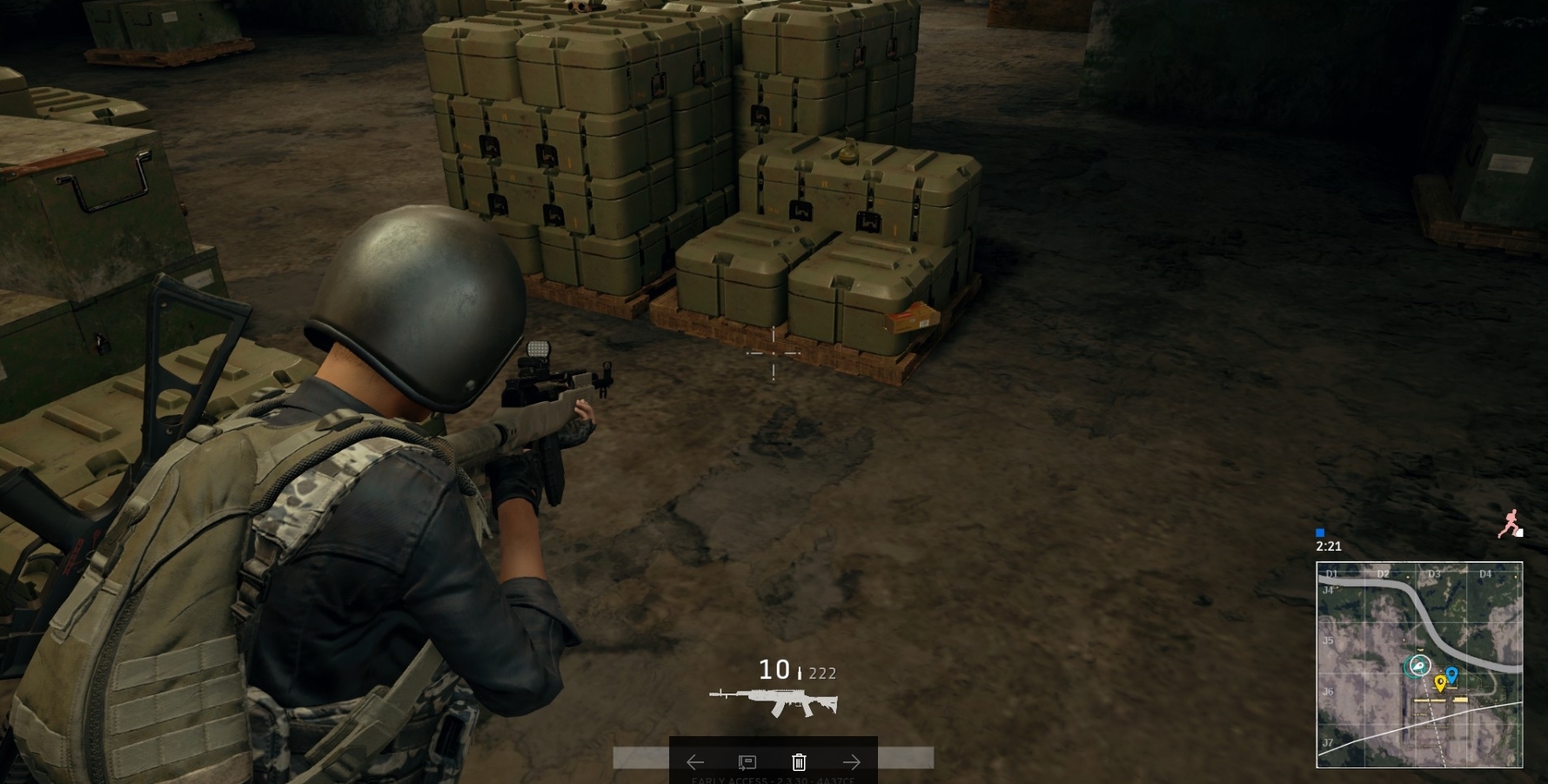

i just got this card today
everything should be updated
tried to download new drivers etc...
its asus 1060 btw
torpid flame
you go to the nvidia geforce experience panel and say check for updates?
pastel anvil
@torpid flame Thanks, worked, didnt install geforce experience yet lul
torpid flame
@pastel anvil np! glad you're up and running, good luck!
pastel anvil
ultra, 60 fps, i can live with this, my other gpu i had very low and 40 fps
hahah 😄
 bright spire
please tell me youre working on motorcycle physics and that youre close to them being better!
they shouldnt just roll forward for no reason. it happens waaaaaaaaaaay too often to be a low on your list of things to do
gleaming vector
Go jump on a dirtbike and take a jump IRL. Tell me what the bike does when you wake up.
formal beacon
^ I can vouch for this. 40 km jumped irrigation ditch. Landed upside down broken ribs , collar bone and rank bruising lol.
Flipped forward like sob
stoic cliff
I do think that irl when you jump with a dirt bike you are not supposed to land on your front wheel though, in game it is actually help better to habe the front wheel hit the ground just a bit earlier
I'm no expert in motorbikes at all however
With the recent update I am once again having lags when opening inventory, doesn't happen always but it happens rather often, maybe because if the removal of sm4? However, i did not had it last patch anymore after having it earlier as well
Any tips?
 past saffron
can anyone provide me with some help fixing FPS drops?
digital glen
PLAYERUNKNOWN'S BATTLEGROUNDS Forums
Hello Players,


     There have been reports of FPS drops with the latest patch. Please post your system specs below if you are having this issue.
...
PLAYERUNKNOWN'S BATTLEGROUNDS Forums
Hi everyone,


If you're having problems with low FPS, please use this thread to discuss it.


Please bear in mind that PLAYERUNKNOWN's BATTLEGROUNDS ...
Multiple examples to try if you look around the fourms. Also look at the pinned message in this channel, I made a small guide you can download and try to troubleshoot things. Really could be a plethora of issues causing it etc. Just have to start troubleshooting the issue until you find it. Next week's monthly patch might help as well, and this week's patch.
digital glen
ok yeah can just download it...text document
PLAYERUNKNOWN'S BATTLEGROUNDS Forums
Encountered a bug or issue? Here's your spot. Remember to include whatever details you can
Another area to check. It's just tough to pinpoint something exactly because everyone has different computers/hardware etc. Ton of stuff that could be going on, or a really simple fix. Better to give you the knowledge so you have it in the future as well. 😃
past saffron
exactly
lusty tree
Still can't play the game. After loading in from the "Lobby" screen. I'm in the plane for aprox 20 seconds. Then hardfreeze. sound continues to play etc, but can't do anything.
After a while game resumes, still in the same spot in the middle of the air but the plane rotors are now actually spinning. A few seconds after that Disconnected.
Connection timeout. 2.3.34 - 7B3E27
Attempted to reinstall game etc, restart. no launch params.
Deleteing Config folder in local --> Freezes in lobby this time, at 4 seconds-ish
Connection timeout. 2.3.34 - AA4D28
Restart attempt test again --> Freezes in plane
Connection timeout. 2.3.34 - 7ADDE8
digital glen
@lusty tree It's a known issue, and has been reported to the team for a fix. A lot of users are experiencing it
lusty tree
Thanks @digital glen
digital glen
@lusty tree Welcome sir, best of luck.
lusty tree
No ETA or work arounds for now yea?
digital glen
afaik no...but might try some troubleshooting...what gfx card you have?
lusty tree
GTX 1070. game ran fine when I could play. I would usually very low on most settings and medium on a few.
I have 198~-ish hours on the game so it's nothing that was changed from my end to cause it. No new hardware etc.
digital glen
Have you experimented with turning your settings to high? to force the gpu to offload work from the cpu?
lusty tree
So the last couple of tests mentioned above were done on everything set to Ultra
lusty tree
Will give it a go rn - all i wana do is play 😭
digital glen
k
digital glen
Have you tried underclocking your core gpu and memory -100 on each?
lusty tree
Have not, instructions?
digital glen
Who is manufacturer of your card
digital glen
Download MSI Afterburner and use the slider or manually type in -100 on each and hit apply and then retry
not a fix but a workaround until it's fixed if it works
has for some
lusty tree
Yeah I'll give it a quick test. See what's up.
digital glen
Some have also reported a gaming app of sorts with msi cards that uninstalling fixes, not sure of the name though, I can try to find out
I have an MSI card
lusty tree
As far as I know, Steam - BattleNet, AntiVirus / Spyware, Gaming hardware (Logitech, Steelseries etc), Nvidia GeForce Experience but I closed that.
digital glen
Try disabling your antivirus and trying also, actually first. If that works you can make an exception for PUBG in it
lusty tree
@digital glen So Tried antivirus / spyware / firewall off. Connection time out 2.3.34 - 43cf7a
TL:DR -> Same issue, gana try the Afterburner now. It's installed just gotta find the settings i need to tweak.
lusty tree
with the exception of windows 10 creator update or whatever the hell.
digital glen
Yeah ok good, that's another beast to tame later lol
lusty tree
lol. So you said Memory clock and core clock - 100 yea?
digital glen
yeah try that
lusty tree
So, changed the settings etc. Seemed to be working for the most part, I was actually able to see the "F" Eject prompt show up.
I alt tabbed to change audio settings and... spoke too soon. Freeze.
Connection Timeout. 2.3.34 - EA52E6
@digital glen I'll try once more w/o alt tabbing this time.
 grand ocean
Hey there. I run a GTX 770 and a 4770K Haswell CPU.
lusty tree
Nope same issue still.
2.3.34 - C0C5E9
grand ocean
I'm getting some weird lag issues (it was reasonable the other day, just choppy in some places)
But my 3rd day playing, it's impossible.
5-10 FPS in the loading area.
Any thoughts
lusty tree
Check the pinned messages
I think there are quite a few people who have had the FPS drop issues
PLAYERUNKNOWN'S BATTLEGROUNDS Forums
Hello Players,


     There have been reports of FPS drops with the latest patch. Please post your system specs below if you are having this issue.
...
grand ocean
i.e. after a few days?
lusty tree
Oh u said past 3 days.