#technical-chat
4 messages · Page 17 of 1
 hardy forge
I can't hear anyone on voice
hardy forge
Desktop, Windows
hardy forge
Yes
 hardy forge
WHere is "privacy"
 frank zealot
@hardy forge Use the search option of the windows 10, hover to bottom left and search "Microphone Privacy Settings"
 uneven perch
I'm having the VOIP chat glitch where I can neither transmit nor hear other people transmitting/talking. Tried restarting both my steam voice chat and in game voice chat, and it doesn't work. This is only after the newest patch, as it was working yesterday. Any advice would be appreciated.
frank zealot
@uneven perch Laptop or desktop and which operating system?
uneven perch
Laptop Windows 10
frank zealot
Which error code are you getting in the chat?
uneven perch
@frank zealot [8] 6-0
frank zealot
Alright, try this one https://steamcommunity.com/app/505460/discussions/1/2590022385656048864/
If it doesn't work, please let me know
 terse flume
hey everyone
i am having this issue too
i found a temporary fix you guys might like to try
i switch my output device to my speakers
rather than my headset
it fixes both the lack of mic transmit and output coming in
of course i want it back on my headset asap though
frank zealot
@terse flume Was your problem an indifference in volume or were you having [8] 6-0 error aswell?
uneven perch
@frank zealot yeah the fix didn't work for me.
terse flume
just not VOIP
frank zealot
I see, it seems like a problem with sound devices, not vivox errors but I will keep that in mind. Thank you @terse flume !
terse flume
well its foxhole because it works literally everywhere else
frank zealot
@uneven perch Alright, try this:
Fixing issues with SIP ALG
What is SIP ALG?
SIP ALG is a protocol used by routers to modify packet headers to send traffic to Public Branch Exchanges (PBX systems) for VoIP traffic. PBXs are used to make calls and to route calls.
Why would this create an issue?
SIP ALG will change the location the VoIP or SIP traffic ends up. Causing dropped packets and possible issues with connecting to VoIP servers. VoIP needs a direct path to the servers without any translations or modification.
Solution:
One way to check if you have SIP ALG turned on is by running this tool:
https://support.ringlogix.com/index.php?/Knowledgebase/Article/View/167/38/sip-alg-detector
This tool is not guaranteed to find if you are having SIP ALG issues but it could make for an easier diagnostic. Another thing worth checking is if your router has it turned on (Usually found in the firewall or Application Layer Gateway (ALG) settings)
If the results = False then a SIP ALG was not detected by the client.
If the results = True then a SIP ALG is active and must be turned off.
 gritty token
SIP ALG is turned off from the router on your network
Each router is different, i may be able to advise where if you tell me the brand of rotuer
I feel like SIP ALG being the issue is slim but worth fixing.
terse flume
what do i do if the test result is true?
gritty token
Can you post a screenshot of what it came back with ?
terse flume
frank zealot
@terse flume If you're not encountering any voice errors ingame it shouldn't be a problem for you, it does become a problem for some people though
terse flume
ok
terse flume
i forgot my router login info tbh
gritty token
Ah well then not much we can do D:
terse flume
yea 😛
gritty token
But, SIP ALG is pointless to anyone that isn't using VoIP phones and has the equipment for it in house
So, turning it off with only help instead of hinder
terse flume
im gonna try to log in, maybe it will fix my issue
gritty token
What is the brand?
terse flume
netgear
gritty token
I am going to go off memeory
Ooo
I may know one second.
Go to WAN setup
Under NAT Filtering, click Disable SIP ALG
terse flume
will look for wan setup
frank zealot
gritty token
Depends on the model @frank zealot
terse flume
found it!
terse flume
disabled & applied
gritty token
It may reset your router fyi
too late to say that now though lol
But, I will brb, i am going on break from work outside.
terse flume
nada 😦
gritty token
Man...
uneven perch
@frank zealot fixed. Was a VPN routing conflict XD
gritty token
Okay brosefst, ill brb then i can help
frank zealot
Thanks for the info mate, will update the codes with fixes
terse flume
thanks
gritty token
@terse flume Hey man, I had somethings come up at work, when i get home tonight i will help you. I can't right now.
terse flume
dude no worries
gritty token
This is almost my second job haha so i feel bad when i am not on, but once i get home i will @ you.
terse flume
😃
terse flume
my game launches to a black screen and fails to respond
anyone else have this issue?
nvm it resolved itself
 hollow sun
@gritty token so Maybar told me to contact you
apparently uninstalling Vivox method to fix voice chat doesnt work
not only that, my game FPS now drops to 12 fps
gritty token
Alright, did you check the pinned messages @hollow sun ?
@terse flume Did it work out or is it still broke?
 sly mortar
@hollow sun Make sure your voice devices in general (windows settings) are correct, and verify your files through steam
hollow sun
they all are correct
Files verified, resetted computer
and now bug is still there, and FPS is down to 12
frank zealot
@hollow sun press f11, sometimes it causes that.
Also make sure if you're using vpn or something it might case issued aswell
 polar linden
 steep canopy
my game is crashing when i start, black screen show up and nothing happend :/ i patched up the game
i5-2500
8 gb ram
gtx 1050 ti
 wary tundra
sly mortar
wary tundra
sly mortar
@steep canopy
Black Screen on Startup
If this is happening to you, there is currently one known solution, if that doesn't work, ask for more help.
- Go to
C:\Users\YOURUSERNAME\AppData\Local\Foxhole\Saved\Config\WindowsNoEditor - Open
GameUserSettings.ini - Set
PreferredFullscreenMode=0from whatever it is currently at - Save the file
- Restart the game
steep canopy
its working, thanks 😄
 vital blaze
Game still running in the background, how to fix that?
 vivid pulsar
@vital blaze Might just have to force close through task manager. CTRL+ALT+DEL and then end the running instance of Foxhole.
vital blaze
is it a known issue to the Devs?
vivid pulsar
I believe so. It's only happened to me once or twice but it hasn't really negatively affected anything for me.
vital blaze
ok thanks
vital blaze
updated Nvidia driver to the latest, fixed the problem 😃
 cobalt phoenix
guys is 0.20.17.12 the newest game version?
i still got the persistent war is unavailable problem
 dim salmon
@cobalt phoenix yes it is
well
- Relaunch game
- Reboot PC
- Reboot Router
@cobalt phoenix pick one
gritty token
Wait, @cobalt phoenix Do you have an anti-virus?
 wheat trail
so, its fairly common that voice chat isnt working, correct?
dim salmon
@wheat trail
Fixing Voice Chat
- Close Steam
- Go to
C:\Program Files(x86)\Steam\steamapps\common\Foxhole\War\Plugins\VivoxCoreUE4Plugin\Source\ThirdParty - Delete VivoxCoreLibrary
- Reopen Steam, verify the game files by going to Steam Library >> Right Click Foxhole >> Properties >> Local Files >> Verify Integrity of Game Files
- Restart your PC
wheat trail
k, lemme try that, thank you
dim salmon
@wheat trail Firstly just relaunch your game and try to talk again
wheat trail
it hasnt worked since i installed the game a couple days ago..
nope, deleting the vivoxcorelibrary folder didnt work
dim salmon
you can poke @ techwizard maybe some of them can help ya
wheat trail
well, i see in the pinned messages, something about SIP ALG.. thats not evidently enabled on our router
im on a work computer actually, and work network.. so if its going to require some special router or firewall rules.. i'll probably just deal with it and just have voice comm at home only
gritty token
Well at work it could be they are blocking certain traffic in and out
cobalt phoenix
@gritty token ofc i don't
@dim salmon fam but by relaunch game, you mean reinstall right?
gritty token
ok...
Well let me ask this then >_>
Do you see the Live Shard in the top left of the screen for when you choose join war or browse events?
cobalt phoenix
nope
gritty token
and have you read the pinned messages
frank zealot
@cobalt phoenix your voice error was [8] 6-0 right?
gritty token
He is having issues with war showing unavailable
@cobalt phoenix, looks like connection to Foxhole is being blocked. If there is no live shard or news, something isn't getting sent to your computer or vice versa. Did you see the pin about opening ports?
Also want operating system do you have and are you in a dorm?
gritty token
Do you live in like a house where you have your own internet or is it supplied to you?
cobalt phoenix
my own internet, house in Norway. By Telenor
gritty token
Okay.
It is Network related, no doubt about that. I hate to say it, but the best thing I could reccomend is trying to see if you are able to connect else where, because it may be something in the router settings blocking traffic to the game.
The best way to check is by seeing if you are able to play some where off your house network.
cobalt phoenix
Let me connect to my neighbor lol
wheat trail
i mean, nothing else has problems , and its nothing more than a home type router and a cable modem holding the connection.. i say work.. but we're a company of 8.. nothing fancy here lol
gritty token
@cobalt phoenix Tell me how that goes XD
cobalt phoenix
aight
gritty token
Hmmmm Sugar, what operating system do you have?
gritty token

You may need to set perms in privacy for your audio for foxhole
The most recent Win 10 update needs it for some reason
Also worth checking to make sure you computer is up to date.
wheat trail
you know, i have that stuff turned off, so that might be it.. lemme check
gritty token
Yes please do 😄
gritty token
Damn
Well, Kefir, it is a network related issue. I do not doubt you follow the pins, the best course of action is seeing if you are able to: 1: not have any issues with other games and 2: see if it works at a different network
cobalt phoenix
i don't have any issues with other games
i've been downloading some cracks maybe thats why
gritty token
And @wheat trail , can you please send the Error code recieved with the voice chat
frank zealot
@cobalt phoenix Why not ayran though
wheat trail
there was no error.. just silence
gritty token
@cobalt phoenix do you have a VPN?
cobalt phoenix
what is ayran
gritty token
Ayreon?? 😄
 cobalt phoenix
nah i am torrenting too but i do cracks from network like photoshop and more
frank zealot
Do you use malwarebytes? @cobalt phoenix
gritty token
ohhhhhhhhhhhh
wheat trail
@gritty token that was it, i had to enable "let apps have access to my mic" option in win10 settings > privacy > microphone
thanks so much
cobalt phoenix
and some crack wanted to access my cmd wich is weird
gritty token
Awesome, glad it worked @wheat trail 😄
wheat trail
duh on my part 😄
gritty token
Yeah the Cracks that you have could be a virus and could be stopping you from accessing this game
Possibly
frank zealot
@wheat trail What was your error code btw?
gritty token
He didn't have one :/
cobalt phoenix
wym @gritty token ?
wheat trail
no error code..
gritty token
@cobalt phoenix By cracks do you mean pirated or hacked versions of software?
cobalt phoenix
yeah
gritty token
Yeah, that could be a problem.
cobalt phoenix
i am i bastard ik
gritty token
You never know what someone put in their software to stop people like you xD
cobalt phoenix
a*
gritty token
No i know how that all works lol
frank zealot
No error code - Device problems @gritty token
gritty token
Saving ^
cobalt phoenix
yeah im gonna download NordVPN
could switching my game from C to D drive be the issue
just did that recently
frank zealot
@cobalt phoenix can you do (windows button+r) and type in %appdata% and then head to C:\Users(PC Name)\AppData\Local\Foxhole\Saved\Config\WindowsNoEditor and send me a screenshot of ingredients of Engine.ini file?
cobalt phoenix
lol
frank zealot
Go with patry
cobalt phoenix
sup Aydın
frank zealot
oi
cobalt phoenix
i have no appdata
cobalt phoenix
nothing still no appdata
gritty token
hmmm well that may be the issue
frank zealot
yes
cobalt phoenix
did that and nothing
frank zealot
That's weird
You sure you made it like this?:
https://www.techwalla.com/articles/how-to-access-the-application-data-folder
frank zealot
AppData\Local\Foxhole\Saved\Config\WindowsNoEditor
Make sure you're back at the appdata folder
not roaming
or just type the above in your browser bar
frank zealot
Alright
@cobalt phoenix There seems to be some people having this issue, I'll try to contact devs and see if they have any say on this
frank zealot
@cobalt phoenix have you actually tried using malwarebytes?
cobalt phoenix
idk how
frank zealot
one sec

Malwarebytes
Malwarebytes protects you against malware, ransomware, malicious websites, and other advanced online threats that have made traditional antivirus obsolete and ineffective. Download Malwarebytes for free and secure your PC, Mac, Android, and iOS.
Just download it and run a scan
Might be an infection too
At this point we really tried out everything, I'm just trying to see what else we can do
 nocturne pasture
I can’t hear anyone when they speak
dim salmon
@nocturne pasture poke @ techwizards
gritty token
@nocturne pasture What Operating System do you have on your computer and do you have anti-virus?
Also, do you recieve an error code when trying to talk?
sly mortar
Fixing Voice Chat
- Close Steam
- Go to
C:\Program Files(x86)\Steam\steamapps\common\Foxhole\War\Plugins\VivoxCoreUE4Plugin\Source\ThirdParty Delete VivoxCoreLibrary- Reopen Steam, verify the game files by going to Steam Library >> Right Click Foxhole >> Properties >> Local Files >> Verify Integrity of Game Files
- Restart your PC
@nocturne pasture
gritty token
Icanari, just so you know, we are trying to save the error codes and what fixes them to see if we can get faster issue resolution
Ill send you an invite to where I am saving them right now
sly mortar
K, I was trying, but after counting 20+ I gave up
I also reformated the SIP ALG in the doc
sly mortar
Fixing Voice Chat
- Close Steam
- Go to
C:\Program Files(x86)\Steam\steamapps\common\Foxhole\War\Plugins\VivoxCoreUE4Plugin\Source\ThirdParty Delete VivoxCoreLibrary- Reopen Steam, verify the game files by going to Steam Library >> Right Click Foxhole >> Properties >> Local Files >> Verify Integrity of Game Files
- Restart your PC
@median needle
 odd locust
uh...ive had at least 10 people today that were having trouble getting their chat to work, 100% of them were doing something wrong......thats quite the 'fix' you listed there...lol
sly mortar
@odd locust Hmm mhm, this is the one fix that has the best chance of working
Sadly the Vivox integration is on the far side of horseshit in functionality
odd locust
the one that has the best chance of working, is him figuring out what hes doing wrong, not deleting files and verifying the game...lol
not trying to be a dick, just saying im SURE the problem is just something hes doing wrong and thats not his fix
odd locust
the main fix is just figuring out what your doing wrong.....seriously
sly mortar
No. He isn't doing anything wrong
odd locust
i wont argue
sly mortar
The integration fucked up
odd locust
out of all the HUNDERDS of ppl ive helped get their local chat working, not once has that been the fix....its always been a 'oh duh' moment
just saying...
sly mortar
If they're coming to this channel then they've most likely already exhausted all those options
 median needle
@sly mortar I verified be back with you in a sec
sly mortar
K
median needle
didnt work when I verified files it said that two files where messed up and being brought back
sly mortar
Yes, that's what it was supposed to say after the deletion
median needle
and the file I deleted was put back and still issues
sly mortar
Alright then, other fixes
median needle
sorry for the trouble and appreciate the help
sly mortar
Please make sure that Foxhole and Steam have permission to use the Microphone
median needle
how
median needle
8 I think
median needle
I dont see settings
median needle
yeah when I search it it just opens account control settings
sly mortar
fucking windows 8
Alright, go to your search bar on the right hand side of the screen, and change what it is searching to settings. In that section search privacy
median needle
What sea h bar?
sly mortar
Actually, no, let's figure out what version of windows you're on
median needle
Okay
sly mortar
Go to whatever you are searching in, and type dxdiag
median needle
No search results came up
median needle
System information
sly mortar
Yep, open it
median needle
Ok
median needle
Windows 7 lol
median needle
Hahaha oh my god
sly mortar
Do you have privacy settings somewhere?
sly mortar
So no, alright, let's try something else since I'm not sure Win7 actually allows privacy changes
Right click on the sound menu in your desktop, and select sounds
Go to recording and find your microphone, then at the bottom of the tab select set as default
median needle
I don’t have sounds I have Realtek audio manager?
Also my mic works on other games like arma 3
sly mortar
Still something to check
Different way to get to it
Go to your control panel, then go to Hardware and Sound, and then sound
sly mortar
Find your microphone, and make sure it is set as default
median needle
Okay it all looks right
sly mortar
Then try running the game again
And make sure that the "Voice settings" have the correct audio devices and the levels are high enough to be heard
You may also want to turn up microphone voice gain
In the settings panel
median needle
Okay It all looks fine
sly mortar
Are people able to hear you?
 dim pivot
hi guys
so i'm trying launch the game, but i'm running into this error
i am sure that I have the minimum requirements for the game, but i would like to know if there is any way to fix this, or modify a game file to launch the game at a lower resolution (considering that I can not access anything in the game)
ty for listening, have a good day
sly mortar
Alright, @dim pivot could you search dxdiag and run it? Then please post the Display 1 tab here
dim pivot
here @sly mortar, but i'm brazilin, does that compromise your understanding? i can send the dxdiag.txt, in english, if you prefer
sly mortar
@dim pivot nope, it’s fine, could you send the one about your graphics card?
dim pivot
sly mortar
Yeah, you’re running out of graphics ram
Try lowering the resolution if you can
There is a guide to access the file in which you can do that in the pinned messages, but I need to sleep, so pinging @gritty token
If he doesn’t respond soon ping in tech wizards role
frank zealot
@dim pivot Fixing Resolution Settings if the Game cannot be opened
Go to
C:\Users[USERNAME]\AppData\Local\Foxhole\Saved\Config\WindowsNoEditor\GameUserSettings
Open GameUserSettings with notepad, and change the top 10 lines to look like this, however, if you have a smaller monitor, change the resolution to your monitor's size.
[/Script/War.WarGameUserSettings]
ResolutionSizeX=1920
ResolutionSizeY=1080
LastUserConfirmedResolutionSizeX=1920
LastUserConfirmedResolutionSizeY=1080
PreferredFullscreenMode=0
AudioQualityLevel=0
FrameRateLimit=0.000000
DesiredScreenWidth=1920
DesiredScreenHeight=1080
You can use this to reduce resolution
 weak dove
I cannot hear the people speaking, you know why?
frank zealot
@weak dove does the game give you an error code while you're trying to speak?
weak dove
@frank zealot Well, im just listening no speaking, but no errors, just that I see the icon of the people speaking, but I only hear the sfx of the game
frank zealot
Alright one sec
@weak dove try this
https://www.vivox.com/gamers/help/21

The voice & text chat platform that's trusted by the world's biggest gaming brands - now available for free.
You can start with enabling "let apps have access to my mic" option in win10 settings > privacy > microphone. If that doesn't fix it do the rest please @weak dove
dim salmon
@ebon summit Do you have any other troubles with sounds on your PC or only ingame?
gritty token
Im pretty sure there is an option in the sound settings to refresh or reconnect your sound, I would try that.
 ebon summit
I do not have any other sound problems no. @dim salmon
dim salmon
@ebon summit Try to check in playback devices if it can see foxhole
ebon summit
It's not a problem with the sound effects but I'll try it.
gritty token
Also, can they hear you but you can't hear them?
frank zealot
@ebon summit What was your problem exactly?
 tall pendant
hey weird 'bug' where i have different haziness graphics depending if i am on foot or truck
truck
foot
u can see the different foggy/haziness
 hushed tinsel
oh yeah
I’ve noticed that too
one of them is probably unintended
gritty token
Yeah i have noticed it to, I would post in bug report if you haven't already, use the template.
tall pendant
also while switching from driver to passenger seat
 marsh onyx
New to the game and cant join server 😛
sly mortar
@marsh onyx Alright, what error are you getting?
And please make sure you are clicking Join the War and not the Server Browser
marsh onyx
@sly mortar "cant connect to server. Please try again later'
new to the game so no idea :/
sly mortar
Try restarting steam
 copper lintel
@community
sly mortar
What do you need @copper lintel?
copper lintel
Hi I was wondering if there was some way to change my faction in the game?
copper lintel
I played months ago, and friends said they where coming back so I login in the other day and played for like 1 hr on the wrong faction 😦
marsh onyx
i cant connect to it
sly mortar
@marsh onyx Try restarting your PC, if that doesn't work please check the pinned message titled Troubleshooting Network-Related Issues
@copper lintel There is, I'm going to tag you in #344873396850655235 about it so it doesn't clutter this channel
marsh onyx
nvm Steam is Down for the count
sly mortar
BS
marsh onyx
it is lol
sly mortar
Check the Troubleshooting Network-Related Issues pin
marsh onyx

Steam Status
Displays status of Steam client, Steam store, Steam community, Dota 2, TF2 and CSGO
sly mortar
Everything is online
technically
But if you are sure it is steam, then all you can do is wait
marsh onyx
finally its sorta online
 copper magnet
what are the "Happy Holidays" roles made for ?
terse flume
@copper magnet Not sure a correct place to talk about it here. #general-discussion please.
 surreal vector
I have a Voice Error.
 humble finch
@community Hi I have a problem, when I start the game , it launches there is black screend and then " Foxhole4.20.3: 23967 has stopped working"
humble finch
any1?
 inner basin
@humble finch Hey there. Can you provide me a screenshot of the error message?
Fixing Resolution Settings if the Game cannot be opened
Go to
C:\Users\[USERNAME]\AppData\Local\Foxhole\Saved\Config\WindowsNoEditor\GameUserSettings
Open GameUserSettings with notepad, and change the top 10 lines to look like this, however, if you have a smaller monitor, change the resolution to your monitor's size.
[/Script/War.WarGameUserSettings]
ResolutionSizeX=1920
ResolutionSizeY=1080
LastUserConfirmedResolutionSizeX=1920
LastUserConfirmedResolutionSizeY=1080
PreferredFullscreenMode=0
AudioQualityLevel=0
FrameRateLimit=0.000000
DesiredScreenWidth=1920
DesiredScreenHeight=1080
just this I tried with that solution it didnt work
is it maybe that i miss something on my pc
cause on other pc it works perfect
humble finch
might be a problem cause of unreal engine
gritty token
@surreal vector , what is your error code?
gritty token
@humble finch, when you launch foxhole, is your RAM or CPU maxed out?
Black Screen on Startup
If this is happening to you, there is currently one known solution, if that doesn't work, ask for more help.
- Go to C:\Users\YOURUSERNAME\AppData\Local\Foxhole\Saved\Config\WindowsNoEditor
- Open GameUserSettings.ini
- Set PreferredFullscreenMode=0 from whatever it is currently at
- Save the file
- Restart the game
Also try this
gritty token
Is your other PC faster than this one?
humble finch
this is laptop not really a good one but solid
other one is a desktop a lot better than this laptop
 dusky saddle
hi all, just got this game a few days ago, and before i was using my speakers. Now bought a new headset but i can hear the game through it but unable to hear any voice chat. I know there are people talking as the little speaker/voice icon is shown above them. Any idea's? Headset is a Corsair HS50 if that helps
 misty jetty
@dusky saddle look at voice in settings. There should be audio devices you are using. Headset might not be the chosen one. I hope this will help. (putting this here, not sure did you read it in discussion)
dusky saddle
@misty jetty Had a look at that already i'm afraid! shows headphones and mic selected
dusky saddle
there isn't a "mute all" button or something that i might have pressed?
sly mortar
@dusky saddle Nope, however, try making sure that the headset is your default audio device in windows, if that doesn't work ping me
dusky saddle
@sly mortar ok, after a driver install seem, looks like tis working now!
sly mortar
Alright
dusky saddle
just incase any one has the same issue: If they are on windows 10, disable automatic driver updates, update the driver manually, then reboot.
 outer jacinth
Any way to play this on a 32bit machine?
Asking for one of my friends what I talked into getting this
sly mortar
I think it will run on 32 bit
Not totally sure though, because it's been 5 years since I ran 32 bit
sly mortar
Then yeah, not gonna happen
outer jacinth
:/
 violet schooner
so
only my discord sound is working
youtube, games etc, say they are playing in the volume mixer but no sound
I know restarting fixes it but its not the first time I have been getting this issue
oh got it
half of my sound was playing through my TV wich is turned off
second screen
gritty token
check your playbackdevices @violet schooner
 hybrid marten
I keep getting
voice chat error [7] 6-0
Followed by
Voicechat connection lost reconncecting....
Followed by
Voice chat error [2] 2-5008
And I cannot hear the voicechat or say anything
 light mesa
@hybrid marten look at KrazyFlyinChicken’s pinned message
 winter scroll
Hey any staff around by chance? Not a game or in-game question
Maybe if I can speak with a dev for a sec
sly mortar
@winter scroll What's the problem?
winter scroll
Not a problem. Something I wanted to speak with a dev about not related directly to the game.
Preferably in private. I can tell you in private.
sly mortar
Then go Direct Message @hot oak
winter scroll
Ok
 thorny rapids
<@&521124241395941396> well, I got a real potato 1.1 Ghz Processor, and when I start the game, the screen goes black for about 2 minuets, and then the game just crashes to desktop.
 mental raft
JESUS
thorny rapids
I got one error message saying that the game couldn't update because the game was running, but only once.
sly mortar
Let's see
mental raft
tHaTs AlOt Of DaMaDgE
thorny rapids
this thing is getting fuckin hot

 versed dew
@thorny rapids Right
So you said you can't get in game, correct,
It wouldn't even start?
sly mortar
Read the ping
thorny rapids
I think it's trying to start
versed dew
I used to play foxhole on a 1.6 ghz processor, I'm sure there's some way we can get it to boot up
thorny rapids
I'm gonna check Icanari's thing about fixing the resolution, then I'll check back with ya
versed dew
Yeah man take a swing at It
sly mortar
ResolutionSizeX=1280
ResolutionSizeY=1024
LastUserConfirmedResolutionSizeX=1024
LastUserConfirmedResolutionSizeY=786
PreferredFullscreenMode=1
AudioQualityLevel=0
FrameRateLimit=0.000000
DesiredScreenWidth=1280
DesiredScreenHeight=1024
LastRecommendedScreenWidth=-1.000000
LastRecommendedScreenHeight=-1.000000
LastCPUBenchmarkResult=-1.000000
LastGPUBenchmarkResult=-1.000000
LastGPUBenchmarkMultiplier=1.000000
bUseHDRDisplayOutput=False
HDRDisplayOutputNits=1000
bUseDynamicResolution=False
LastUserConfirmedDesiredScreenWidth=1024
LastUserConfirmedDesiredScreenHeight=786
FullscreenMode=2
LastConfirmedFullscreenMode=2

[ScalabilityGroups]
sg.ViewDistanceQuality=0
sg.AntiAliasingQuality=0
sg.ShadowQuality=0
sg.PostProcessQuality=0
sg.TextureQuality=0
sg.EffectsQuality=0
sg.FoliageQuality=0

[/Script/Engine.GameUserSettings]
bUseDesiredScreenHeight=False

[ShaderPipelineCache.CacheFile]
LastOpened=War```Go to C:\Users\USER\AppData\Local\Foxhole\Saved\Config\WindowsNoEditor\GameUserSettings
And replace everything there with what I just blocked @thorny rapids
thorny rapids
ok
sly mortar
If that doesn't work ping me
thorny rapids
@sly mortar well, pretty much the exact same thing happened, but with the game windowed
i think we reached the limit that this game can run
I could try closing as many apps as I can and do every conceivable thing to increase the power output on this hunk of junk
sly mortar
I would do that
What I just did was literally put you on the lowest possible settings @thorny rapids
thorny rapids
here's a crash report
bHideLogFilesOption=false
bIsAllowedToCloseWithoutSending=true
CrashConfigPurgeDays=2```I closed every nonessential app and it crashed after 45 seconds
sly mortar
Then I don't know if you can do anything
 dim sonnet
sly mortar
dim sonnet
sly mortar
Yes, you subscribed to the role in #information
 willow kettle
lost connection to server
 mortal rover
that's likely a client-side issue
willow kettle
great
sly mortar
@willow kettle What error message is it sending?
willow kettle
its ok, i got it working
it was some program i was running was making me not connect
 marble frigate
 snow carbon
i mean i can run it on a laptop built soley for office, but 1.1 ghz? just dont try sad to say
sly mortar
@dense badger Are you using a VPN?
 dense badger
No
sly mortar
Alright, then please go to Control Panel > Network and Internet > Network and Sharing Center > Change Adapter Settings
Then select Internet Protocol Version 4(TCP/IPv4) and click Properties
Then click Use the following DNS server addresses:
And set Preferred DNS server: to 8 8 8 8
And set Alternate DNS server: to 8 8 4 4
@dense badger
terse flume
So for some reason, when I am in Westgate, I can't hear audio in-game.
Though I can hear chatter from the discord call I'm in
Any advice?
sly mortar
Verify files through steam
sly mortar
Mhm
terse flume
Also whenever I hit "Reconnect" in voice settings in-game, the discord audio stops until I exit and rejoin discord voice chat.
Not sure if relevant.
terse flume
Guys anyone know this error solve
After this error i rebooted my pc but it isnt changed
light mesa
@terse flume looks like your computer just isn’t powerful enough...
Open Task Manager and click “more details” and watch the “Memory” column to see if you’re actually running out of memory
light mesa
Did you have any other applications open at the time?
 sharp elm
So whenever I try to pick a faction, it loads for a minute, then says lost connection to server, please try again. It doesn't seem to be a firewall issue, Ive disabled that. I also cant see any information on my profile, it all just says N/A. But idk if that's normal since I haven't entered the game yet.
sharp elm
Looks like I solved it by restarting steam, who knew. Oof
inner basin
@sharp elm Profiles are broken. Don't worry
 tight ermine
So im getting a weird glitch where I cant hear other people talk and im pretty sure they cant hear me talk either. Ive looked for fixes on reddit and the steam game page but nothing suggested there has worked.
inner basin
What have you done then? @tight ermine
If you are having issues with Vivox, try to delete the following folder, which contains two vivox .dll's.
Close Steam
C:\Program Files (x86)\Steam\steamapps\common\Foxhole\War\Plugins\VivoxCoreUE4Plugin\Source\ThirdParty\VivoxCoreLibrary
Then reopen steam, and verify the steam cache by going to your steam library > right click Foxhole > Properties > Local > Verify Steam Cache Integrity
tight ermine
ok so I've restarted the game, reinstalled the game from my D drive to the C drive in case there was some error connecting with steam, verified integrity of game files, checked steam voice was turned on and working properly, oh and of course checked I had voice turned on in the game settings
but ill try that and see if it works
inner basin
Not hearing other people talk is indicative of a network issue
tight ermine
hmm other games are working fine along with discord and teamspeak
inner basin
yes but Vivox the voice engine is a special lil boy
inner basin
👍
sly mortar
Did you delete the file he told you to?
That fix isn’t the end all be all, but it’s pretty reliable
tight ermine
yea of course
Ill try it again and see if it magically works
yea still not working
gritty token
@tight ermine what operating system
 eternal parcel
Do you think with the influx of players over the last week that there will be some updates soon and possible combat mechanic tweaks? I myself am really enjoying this game. im starting to like it the more i play it and would like to see Development processes things like patchnotes being included in the launcher.
sly mortar
They normally are in the launcher, but because the amount of news they got pushed out of the list it seems
tall pendant
is it possible to put VSync on? seems like is off by default and doest allow changing
 gray prism
so my friend is trying to get on and it keeps giving him Lost Connection
gritty token
@gray prism What type of error and what screen does it happen
tight ermine
Windows 10 @gritty token
gritty token
Check the pins, there are two windows 10 related pins that may help
terse flume
hey
is anyone else experiencing an issue in which the game is offline?
i can't seem to connect
it says something about the persistent war being offline
but when i go to join an event, there's nothing there either
help
 oblique wigeon
I get that if I lose internet while playing. Just gotta restart the game
sly mortar
@terse flume restarting steam will fix that
terse flume
i just uninstalled and reinstalled and it fixed it
but i probably shouldve just done that
sly mortar

terse flume
hi i have a problem bcuz when im trying to run a foxhole some kind of message is jumping out it says:"the following component(s) are required to run this program: micrisift visual c++ 2015 runtime would you like to instal them now?" and when im installing it it still doin the same thing
so i need help
btw i was reinstallin everything even steam
i have win 7 pro
 fringe apex
did you install this runtime https://www.microsoft.com/en-us/download/details.aspx?id=48145 ?

Microsoft Download Center
The Visual C++ Redistributable Packages install run-time components that are required to run C++ applications built using Visual Studio 2015.
 slim drum
@terse flume maybe your computer uses the built in video card instead of the nvidia/whatever graphix card you have installed.

After watching this video you can configure your intel and dedicated AMD or Nvidia graghics card to play games smoothly. Tune up your windows for better perf...
This guy explains what i mean, albeit extensively 😃
terse flume
§Hi there, i have the issue of the game "failed to download shard info" i followed the support page stuff, basically i cannot play the war game. skirmish are working fine. on top left menu next to shard word the option button list is empty
sly mortar
@terse flume set the shard to Live, and try then, if that is possible
 placid flame
oof
ground under tree visual bug, how to fix?
 distant gust
Nevermind, fixed
 tight heart
need and spanish channel
hollow sun
I kept getting this connection lost thing it's really annoying. is there any way to fix?
my internet is completely fine btw. it just takes ages for my computer to load a map and usually this is what I get
 frail coyote
 ashen solstice
Haven't been able to log in at all today
When I exit the game steam continues to show "running"
 low idol
I'm getting this startup problem, any ideas on how to fix this? I've already restarted my computer to see if it was an error and did scans, but nothing worked.
okay apparently I'm missing the file and it got deleted somehow
cobalt phoenix
why is it so many technical-failures rn?
distant gust
Probably too many players
 somber hull
So
"Lost connection to Server. Please try again"
getting that when trying to join the side
when i try refreshing it says "Failed to download shard info"
:v
 flat snow
hey guys i just got my friend foxhole he says he hits the wardens button and it says "lost connection please try again"
pls @ me if you know how to fix it
 wheat solar
Tell him to check his connection 👍
light mesa
@flat snow tell your friend to restart Steam
low idol
it works but connection to servers can be overloaded so he can keep trying to enter the side
 craggy torrent
hey I cant hear any sound at all in game
I have reconnected my voice input and restart the game with no avail
please ping me if you can help
craggy torrent
deleting viox files did not seem to help
My problem was solved... tried everything except restarting my computer
terse flume
cannot hear anything on voice chat
gritty token
Alright sorry I was asleep when pinged, someone ring the 27thNERDS?
Everyone who is having issues with anything please tell me two things: Laptop or PC, and what version of windows
cobalt phoenix
pc windows 10
i think i got some sort of program or malware that pings the steam ports and opening them does not help
 vivid geode
gritty token
vivid geode
gritty token
Give me a minute and I will help! Busy day. I'll be home in 30
In the mean time check pinned @vivid geode Tony and @cobalt phoenix I know you been here before so I'll have to test things when I get back
terse flume
this will probably sound dumb but can you run this game if your pc uses directx12 and not directx11
ashen solstice
Still having the same error about "failed to download shart info"...multiple reboots. I've mostly lost interest. Adjusted timing as per the support page to 500. I can play other steam games and other MP games so I don't think ports are the issue. If there is a port scanner people use to test I'll happily run it.
gritty token
Yeah regardless of it working else where, it's worth trying. But yeah guys I am still with family, haven't had time to sit down and help yet, let me ping @sly mortar but he is most likely in the same boat
sly mortar
Yep, for the next while as well
terse flume
A few people (me aswell) still have a problem with hearing VC
 crisp violet
Having an issue with talking or hearing vc
Keep getting an error message and I’ve tried reconnecting but no luck
sly mortar
PINNED
crisp violet
I don’t see it
sly mortar
Alright, on PC now
Error [8{ 6-0... hmm
Are you running a VPN?
@ashen solstice Yeah, we don't really have anything for that bug, as we have no idea what is causing it
@terse flume Yes. You will be able to, as if your computer can run DX12 it can run DX11
@vivid geode Were you able to fix it?
gritty token
I am finally home
sly mortar
@crisp violet Are you running a VPN?
gritty token
Well, if they come back with no, if we find the fix, need to add that to the possible fixes as well lol
ashen solstice
@sly mortar the only thing I can think of is I changed DNS providers.
ashen solstice
Will happily return diagnostics or logs if you tell me how to turn them on. I used to be a developer...in management now
sly mortar
So you know how to set your DNS address?
ashen solstice
On the router...forgot what it changed to...also have family can look it up a bit later
sly mortar
Alright, on your PC can you change it?
ashen solstice
should there be a host that is pingable? I can try that real quick...no I'd have to do it on the router
 random hollow
i'm having some strange voice chat errors. not the usual stuff. My voice chat only works in the home region. I get the Voice chat connection lost error after 10 seconds in the world regions.
 Which error
random hollow
Which error
random hollow
the simple voice chat connection lost. reconnecting.... error
random hollow
Yes
I get this error like... once in a week, but i fix it by simply restarting the game
random hollow
K i'll try it
sly mortar
Maybe not permanently, but it should do something
terse flume
your computer has feelings
sly mortar
@jovial birch Stop being mean to your PC, and that isn't your PC. Verify the files on steam and tell me if that fixes it
 jovial birch
how i verify the files? @sly mortar
sly mortar
Go to steam, right click on the game, select properties, then go to local files and select verify local game files @jovial birch
sly mortar
@robust bane Try running steam as administrator
 robust bane
nope
crisp violet
@sly mortar sorry I fell asleep but no vpn, windows 10, happened after having lag issues and connection issues, connection stabilised but voice chat no longer worked couldn’t hear or talk
Tried to reconnect twice to chat and I reconnected both times but still had the error
I’ll get more info to you when I’m by my pc
gritty token
Did you see the pin about giving foxhole mic permissions for windows 10?
terse flume
hey guys, can someone give me hint how to hear the voice chat in foxhole?
gritty token
Check the pinned messages, if they do not work, please ping me
 thin crypt
Hi guys, I'm trying to use my microphone in foxhole but it's not quite working out. It's a RODE NT1 hooked up to an audio interface named audiobox usb. When setting up the sound devices in the settings i get "Line - Audiobox USB" but other people cannot hear me. Does this game only support usb mic headsets?
gritty token
No it supports standard audio cable, i would check to make sure it is your defualt device, if it wasn't I would set it then restart foxhole
 snow meteor
@thin crypt this bug seems to happen randoml and fixes itself randomly
 west cape
hey guys i just buy the game on steam and i cant connect to persistent war its says servers connection lost
terse flume
@gritty token nope didn't work
nether discord, steam or foxhole are showing up in my privacy settings
ashen solstice
For the no shard issue tried switching back DNS didn't see any change yesterday. Again if there is some logging I can turn on I'll do so
gritty token
Owen, does where you live have a firewall?
Also @terse flume what operating system do you have?
@ashen solstice
thin crypt
@snow meteor Is there nothing I can do? I've re started foxhole many times.
snow meteor
@thin crypt try restarting steam, if that doesnt work go through pinned messages
also check connected audio devices in options
(in game options)
thin crypt
pinned in this channel?
 zealous shale
Is there a way of making the game run faster without having to change resolution and graphics?
sly mortar
@zealous shale no
zealous shale
F
 jovial frost
Hey, what is the pourpouse of the value when you put something in stockpile?
gritty token
Not a technical chat question but it shows the worth of what you submitted in there.
terse flume
Anyone having Vc-redist issues?
jovial frost
sryy
terse flume
@terse flume windows 10 😭
jovial birch
<@&521124241395941396>
My problem persists
Now every time i try to enter in some map, i still can enter in Home Island
but not more on the Maps
@snow meteor
In some updates backwards , and i still try to use the game in Window mode.
because wen you reduce the area of the window, your FPS gets better.
snow carbon
Unistall and reinstall?
gritty token
I would say it is an issue with handling the game
snow carbon
If it is a missing file might be a download issue at first
jovial birch
i always use to travell maps and enter in maps, but now, evry time i load a map or travel, the game return to the normal window size
i need some help
gritty token
The timeout is the report that something took too long to render or too long to find
@jovial birch That does sound like a bug to me, but i would try to reinstall and see if that fixes it
May be stuck settings somewhere that can't be unstuck
jovial birch
I tried to see the files of the game, but said it's normal...
no error in files...
I will try to reeinstall
gritty token
Try reinstall.
sly mortar
What graphics card do you have?
jovial birch
My Computer is a trash man.
snow meteor
@jovial birch if its a missing file verify files in steam
jovial birch
I tried, nothing found
gritty token
It could be your GPU defaulting to windowed mode, I would check presets in GPU controller
for either global or foxhole
jovial birch
My PC: Processor Intel(R) Core(TM) i3-3217U CPU @ 1.80GHz
RAM: 4 GB
Well, i reduced the window size, to make easyer to render the map, Worked on the first times
but with the updates, now, every time i reduce the Window size, he go back to normal when the map loads.
then the game crash
gritty token
The update made the game more GPU intensive
gritty token
I hate to say it, that may be the option, what are your specs?
 gritty token
Wait
When you are running the game, does your RAM max out?
That may be why
4gb isn't a whole lot on windows 10
jovial birch
Yeah, that happens, but i never get problems with that, until now...
gritty token
cause windows 10
RAM max can cause that error
When you are running foxhole, open up task manager and see if it maxes or is at 85% or higher
jovial birch
its 100%
but when i was said, never get problems
i play other games very good.
like War thunder
gritty token
Yeah but that doesn't matter in this case, if your ram maxes out, it is a limitation of your computer to play foxhole
It isn't a foxhole problem unfortunately.
I would upgrade your ram, it isn't too expensive, may fix the issue
Other games may not need as much ram
jovial birch
I tried to reduce the resolution scale
 frail schooner
hello. Im getting random black screen whole playing the game. you can still hear system and other sounds. It requires a reboot to get back picture on my monitor.
Thanks for yalls help
jovial birch
BUT EVRY TIME I ENTER IN A MAP THE RESOLUTION GOED UP
gritty token
you may be able to set a default resolution
hold on
and @frail schooner I will help in a minute!
Fixing Resolution Settings if the Game cannot be opened
Go to
C:\Users[USERNAME]\AppData\Local\Foxhole\Saved\Config\WindowsNoEditor\GameUserSettings
Open GameUserSettings with notepad, and change the top 10 lines to look like this, however, if you have a smaller monitor, change the resolution to your monitor's size.
[/Script/War.WarGameUserSettings]
ResolutionSizeX=1920
ResolutionSizeY=1080
LastUserConfirmedResolutionSizeX=1920
LastUserConfirmedResolutionSizeY=1080
PreferredFullscreenMode=0
AudioQualityLevel=0
FrameRateLimit=0.000000
DesiredScreenWidth=1920
DesiredScreenHeight=1080
@jovial birch
Adjust the 1920 and 1080 to the desired resolution
See if that works
THANK GOD FOR DOCUMENTATION
jovial birch
And the Renderesisation?
every time i put a low render, the game change to a big one
Every time, i put down, and i enter in a new map, then goes to maximum
i can change this?
@gritty token
gritty token
Not sure, i would try what i sent
violet schooner
ya'll I am looking to buy a 1060 upgrading from a 960 but need to upgrade my CPU. I got an okayish AMD with an FM2 socket and need to upgrade that. I am not really interested in upgrading my motherboard too. if there is no better CPU. some random better videocard works too xD
gritty token
Wait, are you selling me something or are you asking for advise? xD @violet schooner
violet schooner
advice xD
sorry xD
I am not really interested in upgrading my entire PC. I just really want to have something to keep up with this year. and then upgrade my pc late 2019
because I can afford a monster PC by then
 sand cosmos
what motherboard do you have
sand cosmos

Well I would wait and get a new mobo with a AM4 socket and just buy one of the Ryzens
violet schooner
I knew how to look it up in windows, but windows is hiding it from me 
gritty token
I am not too knowledgable on AMD sockets or processors, but Ryzen from what i know is amazing, few coworkers talk about it all the time. I am more of a Intel guy >:D
gritty token
If you do upgrade your MOBO though, do you have DDR3 or DDR4?
I have LGA 1150 socket lol
violet schooner
and I dont really want to do that because that would mean upgrading my entire PC with it
gritty token
Not entirely but youd have to upgrade your CPU and RAM
sand cosmos
I got a Ryzen 5 2600 and a 1070ti few days ago and it's great
violet schooner
I know
gritty token
If you have DDR3 now then im assuming the ryzen socket takes DDR4
violet schooner
but I am not looking for that. Ireally just want a boost so I can play current gen untill like late 2019 🙈
and then upgrade to a monster PC because I will have money for it
gritty token
Yeah then i'd try to find a better AMD cpu for your socket
It is what i did for mine
I got myself a i7-4790k, my i5 (suprisingly enough) was my bottleneck
the i7 i mentioned is the "best" cpu you can get unless you are trying to get server quality processing lol
violet schooner
alternatively, if any combo of a mobo and new processor will give a good boost and I can keep it if I want to upgrade later for like 350 bucks, that works too
gritty token
If you do the mobo though, you will need new ram most likely
violet schooner
but I got 8 gigs of ddr3 now 😦
gritty token
It is why i am still on DDR3 D:
I have 12 lol
wait
24 nvm
one of my DIMM slots died
Here is my current build https://pcpartpicker.com/user/coolred1/saved/#view=VkgsYJ
3-4 years in the making
sand cosmos
Dunno what amd you have currently but you could check out amd athlon x4 870k
violet schooner
its telling me I have MSI
I have a 860k amd athlon quad core right now
when you just want to play kc:d without the textures loading literally infront of you but your friends keep telling you to buy a new computer 
 lament dagger
Trying to play the game. The default screen settings were very odd (isn't 1920x1080 a fairly decent default these days?) so I changed it to 1920x1080 and then for some reason it decided to set it to 1024 instead and it didn't ask me to confirm and now I cant try to correct it because the button to set it is off the screen. How do I fix this?
gritty token
@lament dagger Follow this:
Fixing Resolution Settings if the Game cannot be opened
Go to
C:\Users[USERNAME]\AppData\Local\Foxhole\Saved\Config\WindowsNoEditor\GameUserSettings
Open GameUserSettings with notepad, and change the top 10 lines to look like this, however, if you have a smaller monitor, change the resolution to your monitor's size.
[/Script/War.WarGameUserSettings]
ResolutionSizeX=1920
ResolutionSizeY=1080
LastUserConfirmedResolutionSizeX=1920
LastUserConfirmedResolutionSizeY=1080
PreferredFullscreenMode=0
AudioQualityLevel=0
FrameRateLimit=0.000000
DesiredScreenWidth=1920
DesiredScreenHeight=1080
lament dagger
okay thanks I'll do that
gritty token
Tell me how that goes
lament dagger
FullscreenMode, LastConfirmedFullscreenMode, PreferredFullscreenMode: apparently this needs to be stated multiple times too. Which one will give me windowed so that I can drag it over to my 2nd monitor? Is that mode 2?
Still stuck in 1024 :/ And... it changed the settings in the GameUserSettings.ini file
gritty token
Hmm........ Re-install the game, that will most likely fix it
Should revert settings.
lament dagger
I tried it a 2nd time and worked. However the windowed mode apparently does nothing.
gritty token
Yeah it isn't TRUELY windowed where you can drag it
lament dagger
This may render it unplayable for me as I need the larger monitor.
lament dagger
As in why does FH want to change it to 1024 instead of my preferred 1920x1080? No idea why. Or why there is a windowed option that is not actually windowed. Or why alt-tab shrinks the game window size.
Both monitors are 1920x1080 and 60hz, but one is larger than the other.
lament dagger
Weird, one of the 3 window sizes is now set to 1280x720. This is just a GTX 1060 gpu, nothing out of the ordinary.
gritty token
Yeah GPU isn't the issue
It is trying to resize automatically to fit your monitor.
Do you have the name and model of your monitor?
lament dagger
This is a 17R alienware laptop so it's a Generic PnP Monitor. The monitor I want it on is my 24" Samsung C24F390.
gritty token
Hm, check the display settings for the display adapter
lament dagger
At this point, it looks okay. But I've not been able to get over to the 24".
gritty token
You can set which monitor is the defualt monitor, that will force it to the other screen
lament dagger
Yes but that will mess with everything else I do on the pc. I can't change my default monitor for one game and then be switching back and forthe.
gritty token
Let me look into this for you, a quick google search may find resolution to this issue. I do reccomend looking into it yourself but I will also. There has to be a way to open it on the second monitor. What operating system do you have?
Windows 10?
lament dagger
Yeah Win 10, I'm looking too, also to see if there is an optional .ini line to indicate a 2nd monitor...
gritty token
May be worth seeing what you can do, if you break the game, delete it and re-install
Ill try to find something later but can't really look into it now because i am at work.
lament dagger
Wow. if I reduce the window size in options and choose windowed, then I actually get a window. Then I can move it to the 2nd monitor. But when I set the size back to 1920x1080, it goes to a much smaller resolution and.... offsets the mouse pointer. And when I go back into the .ini file to correct then relaunch, it brings it back over to the default monitor.
gritty token
Could you possibly video tape this happening? I may send it up
Which i have yet to do, so this would be the first one
If you don't want to video tape, I understand, i will probably write up a report
lament dagger
I could, but it would not capture the issue with both monitors, it will only show the issue I'm having with resolution. I can for example, double click the smaller windowed mode on the 2nd monitor to go full screen windowed, but that changes the resolution to 1024x768.
actually, maybe I can record both screens at once....
gritty token
Use Screencast
You can select the desired recording space
I use it at work.
Just upload it and send me a link in my DMs
 hidden steppe
my mouse keeps going off to my secondary screen any fixes for this?
lament dagger
Yeah, now Foxhole is doing even stranger stuff with my recorder running.
 sullen forge
Hello, I will start ahead of time by stating what I am looking for and why, and then some context around that. Thanks for any consideration of it.
I having an issue with foxhole seemingly not respecting my sound settings, leaving all SFX and ambience very loud and voice comms not so loud(probably due to directional sound being totally broken in the first place). Would it be possible to place a config file somewhere in the game's directory to 'hardcode' the settings and see if that fixes it?
For further context, I'm running foxhole though steamplay's proton compatibility layer on linux. I understand that this is comepletely unsupported and likely the root of most of my problems.
lament dagger
So I started recording a video. And in the course of recording it, it randomly started to work in 1920x1080 on 2nd monitor. I guess if anyone else has similar issues, doing everything 2 or 3 times will eventually fix it.
terse flume
Can anyone help with this issue?
 arctic siren
k\
terse flume
<@&521124241395941396>
light mesa
No clue m8
sly mortar
<@&374193809174822912>
 plain karma
lol
sly mortar
Take care of this please?
sly mortar
The problem is between the keyboard and the chair
sly mortar
Say yes
terse flume
Can anyone help? Already went as far as to reinstall my OS.
Already did multiple times lol
It just keeps popping up
never starts.
sly mortar
Please check the pinned message for “missing C++ executable” or something like that, on mobile do I can’t see it
terse flume
Ever since i moved to 8.1 haven't been able to play Foxhole
It used to work for me on Windows 7
sly mortar
Do it
Better for your mental health as well
And it’s not foxhole, C++ has problems with 8.1
terse flume
I see.
Now that makes sense
I spent almost 3 hours already
reinstalling OS and all the C++ shit.
terse flume
I had a feeling it was 8.1
robust bane
Anyone have a solution for content file locked?
 signal comet
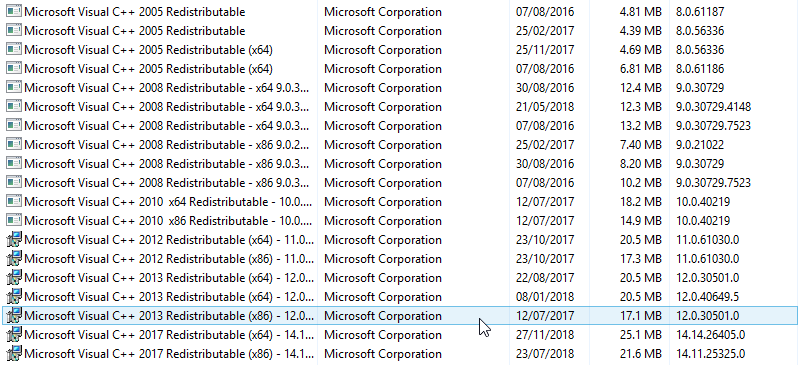
Can confirm foxhole works on 8.1
As far as redists go I went with the shotgun approach considering each program whines for its own : https://i.imgur.com/sFwbpG5.png
 terse flume
hello
keep getting this. Got game today, got the error once but now i keep getting it constantly every 6 mins
terse flume
now it just crashed my computer too... not even a bluescreen
ashen solstice
So played with my router some more @sly mortar I'm guessing the problem is related to you acting as or utilizing a proxy or vpn like service. That sound familiar to you at all?
possibly (though I am not sure yet) related to this domain gabielstechnology.com
gritty token
@terse flume Usually that issue occurs when the computer cannot handle the game (of course there are other possibilities too) what are your specs?
And @ashen solstice is that url showing up when you check where your internet is going through?
I do not think that Clapfoot owns that URL.
@signal comet Interesting, please explain what you did to get it to work, or did it just work for you with no issues?
 primal arrow
Hey, is there a way to select which monitor the game will run? Fullscreen always goes to the wrong one
gritty token
Yeah guy above was having the same issue, the best thing i can think of is changing your main screen to whatever one you want. I would look above and see what he did because it is a pain switching monitors.
terse flume
@gritty token Lowered the graphics, it hasnt bothered me no more