#technical-chat
4 messages · Page 11 of 1
 steel hearth
 late mulch
@inner basin you around for this stuff? I haven’t played enough since i got back to know anything here.
 inner basin
@steel hearth It's a bug, I've experienced it all too much. Restarting Foxhole should fix it
hmmm @glossy trellis I have no idea what would cause that. IF you've tried the steps in the pinned messages here, try resetting your IP by entering these one at a time in command prompt:
ipconfig /release
ipconfig /renew
ipconfig /flushdns
 glossy trellis
It looks like people in bugreport are having this same issue:
As a result, I don't think this is a symptom of my connection problem.
My first worry is that News and Highlights does not even load:
 sacred crown
@primal ember Check if the War.exe in the games folders has the same name.
The parameter seems to have a space between the quotes
Also, try launching directly from war.exe
Another thing to do is delete war.exe and then verify integrity of files
 austere galleon
my amigo cant hear people talk ingame
and he was able to before + he checked settings any suggestions
 terse flume
See if switching his voice key to another key and logging out of settings pressing it a few times and than logging back into settings reverting it to default will work, I did it for mine @austere galleon
 wary tundra
should be the ingame voice chat
 sly mortar
It's a known audio bug, something to do with the voice engine, vivox... not sure what the fix is
 flat snow
so what do i do
sly mortar
Um
wary tundra
blade is online, good.
sly mortar
Try restarting the game and steam
wary tundra
@inner basin
flat snow
wait who is blade
sly mortar
Someone who knows tech shit, but this isn't tech shit
It's either networking or a game bug
So try restarting your game and steam
wary tundra
eh, isn't blade the most helpful guy here?
flat snow
ok like X it out
sly mortar
Yes
flat snow
just that?
sly mortar
And then go to task manager and kill steam
flat snow
ok
sly mortar
Main one will be Steam Client Bootstrapper, and Steam Client WebHandler
sly mortar
Lol
 primal ember
@sacred crown i have managed to fix it by reinstalling the game
terse flume
Hi, I need some help?
My game will not let me edit my profile.
It says "Could not retrieve profile."
Oh sorry! Wrong chat.
inner basin
Well, this isn't actually the wrong chat for that
 serene ice
anyone else stuck with no sound from voice at all now???
inner basin
Yeah you gotta restart Foxhole @serene ice
serene ice
Yea have tried a few times, and running steam as admin
 agile spoke
so, my audio goes to my headset, except ppl talking comes out my monitor/speakers
any idea whats going on
 coral cosmos
need help i cant talk in game
i already try to restard
i try run it as admin
i try putting voice chat on/off
i try whit other mic
i try whitout discord open
agile spoke
is your input settings set to the mic?
coral cosmos
Yes
terse flume
I still need help with this "Could not retrieve Profile" bug
sly mortar
@inner basin It's something with Clapfoot's servers according to sir
 cyan depot
@stray copper I assume it's your CPU?
 stray copper
Well, this PC used to have relatively huge issues even running for like an hour
but I got this monster fan for it
and now it runs pretty reasonably, it just gets hot.
I touched the heat sink earlier and I could just about cook an egg on the damn thing
cyan depot
Do you not monitor what is actually causing it to get so hot?
 swift canopy
Its probably a third party prog
swift canopy
that uses a whole lot of ram
stray copper
feeling the side of it now, its not as warm.
cyan depot
I mean I'll ask again, what part is getting hot? GPU or CPU
if it's the CPU we're talking about, re-apply thermal paste and make sure the fan is clean.
stray copper
Everything inside gets a bit warm, but the heat sink (naturally) gets the hottest
cyan depot
The heatsink for what part 
stray copper
what do you mean what part lol
cyan depot
GPUs have heatsinks as well as the heatsink you put on your CPU
cyan depot
Right, and that sits on top of the CPU right?
cyan depot
Did you put the fan and heat sink in yourself?
stray copper
Yeah
cyan depot
and you did put in thermal paste?
stray copper
Yep.
cyan depot
How long ago.
cyan depot
Yeah, I mean it's fine to leave it for a few years, but I personally change it out every year or so
Just for peace of mind.
stray copper
I took a entire class on constructing computers, so.
Its not like I'm totally unaware of what to do
cyan depot
I'd try reapplying thermal paste.
stray copper
I recently had to stop the fan from sounding like a jet engine about to take off too
The fan kept grinding against the heat sink because they were too close
cyan depot
What kinda fan do you have?
stray copper
I forget what the box said
But its the biggest one they had at the store at the time
My shit was over-heating and I wasn't gonna fuck around
stray copper
The way they designed this desk was so stupid
Lets put a big wooden board to block any kind of air coming out of the top of your PC
cyan depot
stray copper
for maximum overheating
cyan depot
cyan depot
That's good.
 lavish wren
 versed gull
Make a op
terse flume
It’s not a problem with my pc this fucker is a beast lmao
It was storming and fucked with the internet I assume that’s what was going on
 torn hemlock
is anyone else getting where it says "No Home Region Found"
inner basin
Try the steps in the pinned messages of this channel @torn hemlock
terse flume
i cant hear anyone talking
 oak isle
HELOO I NEED HELP
when i go to events it keeps saying " make sure you have the latest version of the game/ restart steam witch i did restart steam and also i just downloaded😢 the game
 vale aurora
@oak isle You don't go to events. You go to Join War instead.
oak isle
k
serene ice
same problem for me as @terse flume anyone found a solution?? have met loads of ppl ingame with same issue
serene ice
reeeeee
god damn, I fixed it
I bet you are using windows 10, go to privacy -> Microphone -> allow apps to use your microphone. For whatever reason this never affected me before but there must have been a windows update around the time of the last build launch
confirmed in game god damn windows is going to make me become autistic
terse flume
@serene ice thank you
 swift fossil
Hi, I've got the "No home region" issue, but I restarded steam, I restarded the game, I downloaded the update, and it's still doesn't work :/
serene ice
np bud @terse flume did it work for you all good?
terse flume
yea man
inner basin
@swift fossil Hey there. Try the steps listed in our pinned messages of this channel
terse flume
I'm getting then "No home regions found" thing. None of the pinned comments work. Can't even refund the game.
What a waste of 19,99€
Ahem. try restarting the game. It has happened to me unacceptable amount of times too.
If restarting doesn't work restart steam.
I did
didn't work?
I told you. None of the pinned comments work.
Now thats a lotta damage.
I used to love this game.
Try pinging the community helpers?
as I know BladeRikWir was looking at this channel
 thorn rover
<@&282920218462912512>
terse flume
Uhh i'm getting the no home region found thingy. I tried everything listed in the pinned comments of this channel.
Nothing's working.
thorn rover
Hey friend, you've restarted Steam?
thorn rover
If not, I think uninstalling and reinstalling works
terse flume
Tried that aswell.
thorn rover
Verified game cache?
 dim salmon
Are you sure that your IP isn't blocked?
terse flume
yeah i am.
thorn rover
If that doesn't work, might be an anti-virus thing, Foxhole tends to set off some false alarms
terse flume
I turned COMODO off. Still doesn't work.
terse flume
yes.
dim salmon
I think, you tried to run game as admin, right?
 upper crag
Have you tried launching the game from the folder itself with admin power?
terse flume
I'm not the administrator of this PC. So i can't.
I need the password. But my friend is sleeping.
Don't want to wake her up
thorn rover
That might be the problem frankly
upper crag
Might have possibly found the issue 😄
dim salmon
Ofc
thorn rover
Cool beans
upper crag
We are around.
dim salmon
C ya
terse flume
Bye
inner basin
dang it I'm late to the party
 lament flume
I cant hear local voice chat. does anybody have an idea to fix it?
inner basin
Restart Foxhole first to see if that fixes it @lament flume
serene ice
using windows 10, go to privacy -> Microphone -> allow apps to use your microphone. For whatever reason this never affected me before but there must have been a windows update around the time of the last build launch @lament flume
serene ice
exit steam completely - then right click steam icon and "run as admin"
then relaunch foxhole and check voice settings in options
coral cosmos
same problem as itswhateverhere but i cant talk in game too and none of the solution worked for me
 past furnace
I just lost all of my audio in-game. I Tried restarting and even re--installing the game, but nothing helped. Can anyone help me?
 rugged narwhal
How do I know if my microphone is shitty because people have different tolerance for my consistently shitty mic, or if something is making my mic change quality in foxhole without me knowing?
coral cosmos
@past furnace try to start ur game whitout discord open
 opaque oyster
At the risk of sounding like a complete noob, How do I change my Profile around ingame? I go and click on the profile button, and then edit but it says it cannot retrieve it? I am using it through steam if it helps.
Any help is much appreciated
sly mortar
@opaque oyster The profile system is currently broken sadly, it was never fully implemented in the first place
opaque oyster
Ah ok, Thanks for the info!
agile spoke
but my medal 😢
 prisma kayak
Is there a reason 100% of the fights happen offscreen
I have not had a good gunfight yet because view is a HUGE issue
How am I suppose to learn when I get engaged off screen by NPC structures n stuff?
Good chat thnx
 sharp oasis
You see more in corner, when you move cursor your camera moves too, lastly there are weapons and tools you can aim to expand camera range.
terse flume
I'm not sure if this counts as a bug, but I played the game for a few hours before and now decided to play more and more seriously. But when I navigate to my profile this is what I see. I can't edit or anything. It does not effect the gameplay however....I can join and play games without problems. But this is simply annoying me. I've tried re-installing but it had no effect. Any suggestions?
vale aurora
@terse flume Don't worry. It's not just you. This update seems to have broken profiles. So they won't be any use currently.
terse flume
I've tried looking around the steam forums but I haven't found any info about this. But honestly this is exactly what I suspected. Thank you! 😄
 bold cliff
tbh profiles are kinda useless.
terse flume
Well yeah, they are. Honestly I just wanted to find out what’s causing the problem but apparently it’s nothing serious. Hopefully they’ll update profiles in the future including some kind of progression or statistics.
dim salmon
Most recent bugs may fixed in patch after next one Imho
 frank needle
I try reinstalling my game to fix my buildin issue but it is still happen i can't build in foxhole anymore this upadte has made it impossible to build
like ican only put in 2 or 1 hits then ican't build
 sly otter
every 20 minutes the voice chat keeps getting bugged and i cant talk and hear until i log out and log in again
sly otter
is there any fix for this?
 proud dagger
@sly otter currently no other than logging in and out
This is due to the recent change of the voice system to VIVOX
it should be fixed hopefully by next update
proud dagger
Mhm
No worries , the devs are aware of this
If not this community will start screeching again
 twilit depot
how do i fix "Voice Chat Error 6--1"?
cant chat
the microphone works everyone else
inner basin
@twilit depot That error occurs naturally (somehow). When I see it pop up, nothing bad happens to me.
Im gonna assume you can't talk to other people right?
If you are running Windows 10, try this - courtesy of @serene ice
nope, thats not it. Just cant find the reason
twilit depot
it works in all games but this
sly mortar
@twilit depot I would still check it, seems to be happened A LOT around that bug
twilit depot
I checked what you sadi at the moment, but foxhole does not even appears as an app. Nevertheless y tried it in other games and it works fine.
serene ice
That fix helped me, steam and lots of other apps don't appear in that list, so trying "allow all apps" then disabling all in the list still worked for me. tried running as admin?
saying that I think my error code was 7-0 or 7-1 something like that
 rotund flint
has anyone noticed latency issues with the SMG since the last update?
A guy will spray at me and most of his shots will miss, then suddenly it's like the game registers all those misses hitting me at once and I got from 100 to 0 instantly
wary tundra
Tracers =/= bullets in this game
rotund flint
it's not so much the tracers that ive noticed as the rapid nature of the damage
it's not gradual anymore
I go down so fast after being fine for a good couple seconds
terse flume
The same here like @twilit depot. Mic working everywhere except foxhole. error 6--1.
 grand silo
@pulsar tangle we can talk here.
 pulsar tangle
game assets?
grand silo
Yeah, through steam
What you do is right click in Foxhole in your library. Click on properties
pulsar tangle
ok im in properties then what
grand silo
From properties, there is verify game assets
 rustic trail
few someone is helping
grand silo
Oh, it's verify game integrity
@rustic trail you can take over. The game verification is the only thing I know
pulsar tangle
ok I did the local files game verification, I can try to go back into game to see if screen keeps bouncing around
grand silo
Alright
rustic trail
🤞
pulsar tangle
no good, still have a moving screen, just rocks back and forth when I join the world and are at the base camp
if I go to the map its still but in regular screen it is bouncing
pulsar tangle
no, I have tried to leave the mouse alone for 1 minute and still is moving
grand silo
Hmmm
rustic trail
hmm so youve done a restart correct
pulsar tangle
yes
pulsar tangle
restarted whole computer
rustic trail
and you verified your local game files?
pulsar tangle
yes
rustic trail
<@&213133977681264640> <@&374193809174822912> <@&282920218462912512> anyone got any ideas on this?
thorn rover
Only need to tag one mate, and no I haven’t heard of this issue
thorn rover
Change your resolution or to fullscreenwindow see if that works
pulsar tangle
ok I lowered my resolution, changed to full screen, and lowered details to medium, it has stopped shaking unless I move my player around
inner basin
What's the problem we have here?
pulsar tangle
i seem to be having weak connection to the server. just walking through the snow is laggish
i play other online games all the time without issue
i have gotten kicked out saying my connection to the host was lost
 valid schooner
What are the specs of your machine?
pulsar tangle
Dell laptop, 2.5 ghz processor, 8 gb ram, windows 10, 64 bit operating system
valid schooner
What processor is it, and what kind of graphics chip/card do you have?
pulsar tangle
intel core i5
valid schooner
What's the number after i5?
pulsar tangle
2450M
valid schooner
Also it's worth looking into what kind of video hardware you have. Many issues have been remedied by updating drivers for their computer, especially graphical/video ones. Some really weird stuff can happen in the game that can be fixed by doing so. This is not an easy nor hard game to run, but it's always good to make sure everything is in order before ruling it out as an option. I would look into your model of computer, gather what you know about the video card in that bad boy, and Google the drivers for that video card. What year is this computer?
pulsar tangle
last update was 5/30/2018
valid schooner
On your video drivers?
pulsar tangle
ill do a search
i have played starcraft 2, Minecraft, and alpha wars recently with no problems
valid schooner
Games all have their own stipulations and tendencies. Always good to make sure all drivers and everything is up date before moving forward with other trouble shooting.
I'm quite interested to find out what video card or GPU that has, that would explain more what might be going on and how to handle it.
pulsar tangle
display adapter is intel(R) HD Graphics 3000 and says its up to date
inner basin
hmph
Y'know...
I think your computer may not be able to run Foxhole effectively
@pulsar tangle
valid schooner
It may be that your graphics chip is having a hard time playing the game. When adjusting the setting to the lowest possible, do you still experience issues? The issue enlies with the game's minimum requirements, which is asking for at least 1gb of dedicated video memory which that video card does not offer.
pulsar tangle
the issues are minimized at the low setting for details, so yes i feel like its not able to handle it. but gotta say this computer isnt that old and runs a lot of programs with graphics
 marble rivet
Your video driver is equivelent to what was a desktop Nividia Geforce 510 Card.
pulsar tangle
is that good or bad @marble rivet
marble rivet
it's equivalent to a graphics card released in 2010
the max that cards ran then was 1-2gb of dedicated vram
So in the simple form, You're current graphics driver at peak barely scratches the minimum unfortunately
pulsar tangle
ok ill try the game on a computer i bought last year to compare
thanks for the help, ill let yall know if it works better
rotund flint
anyone had a problem where you are firing tank shells, but it doesnt show the explosion or make the firing sound even though it uses the shell and you have to reload?
I had it happen 5 times in a row and I lost the fight because of it
 plucky bluff
new, improved netcode 
 ripe sluice
Has anyone else had the issue of high core speed required? I'm running a I5-6300HQ and Foxhole is quite fond of running a little stuttery if I don't have fans blowing at max.
I could understand if a high clockspeed is required, but Foxhole seems a rather lightweight game to need fans at max....I think....
Once I do use fans, performance seems more internet dependant.
 twin heron
<@&282920218462912512> <@&374193809174822912> I am unable to use in game voice chat for some reason anymore. It was still working on community FCL few days ago.
thorn rover
Aw gee
twin heron
Everytime I use push to talk button in game I get this error
proud dagger
@twin heron suggestion unfortunately is restart the game entirely
it is an issue with VIVOX
twin heron
I actually did it already
proud dagger
really?
thorn rover
This was happening yesterday, one second
proud dagger
try exiting steam
twin heron
I even restarted steam now nothing changed.
oh
lmao ok so after like 15 seconds in game it started to work ^^
serene ice
run steam as admin?
valid schooner
@ripe sluice You must remember that although the game may look lightweight, the game is still under development and alike any game in that same category, it is not 110% polished and optimized for "everyone" at this time. It's the same case with a lot of titles that you may meet/exceed the minimum requirements on, but if the game isn't polished, will run like absolute poop no matter what machine and power you have. Also it actually has more flash and spectical then one would think (turning down the graphics all the way down shows this), and isn't as lightweight as you would think. Apply new thermal paste! ❤
inner basin
@ripe sluice Is your computer dusty? Make sure there is adequate airflow throughout your computer so that components can function properly
 leaden lantern
While I was playing everything kinda froze and then I got DCed and when I try to rejoin it says the war is currently unavailable
 pseudo grail
I am getting "Lost Connection to server" multiple times. My internet is working fine for everything else. Thoughts?
 random orbit
what is this ?
valid schooner
@random orbit d_it is saying your video/graphics cannot handle it for some reason.
Try updating your video/graphic drivers
random orbit
@valid schooner thx m8
 vocal heron
Mic confirmed working elsewhere, restarted game, restarted steam, restarted computer. <@&282920218462912512>
inner basin
Unfortunately, this may be caused by the new voice engine, VIVOX. Nothing you can do on your end about it
It may come and go as others have reported
 normal bane
Yo, serber down, wat do
bold cliff
okay so here I am back in technical chat
@inner basin whenever you have a moment, i have a question about steam.
inner basin
@bold cliff 👋
bold cliff
okay so, my steam will NOT FOR THE LIFE OF ME connect to the internet
I can play games on the internet through steam but thats it
 formal canyon
.
bold cliff
I can't access the store, friends list, workshop, or profile
through firefox I can, in fact thats the only work around I have
which isnt a big deal becaues like steam will still download it
do updates, etc
but its just a pain
bold cliff
oh right so these are all the things ive tried
Reinstalling steam
deleting HTMLcache in steamapps (after using run %appdata%)
reinstalling steam and above
restarting computer
updating drivers
bold cliff
it launches fine. I launch it, and it says verifying steam, then opens like normal HOWEVER steam will also show me like the news or whatever (where it shows like 10 games that are on sale this week or whatever) but they are all blacked out. I can click through 10 black pages essentially. From there my games will update if I was offline. Steam also says I am online when all this is happening
vale aurora
Might just be steam having an off moment for you. I have odd stuff like that happen to me sometimes. If exiting it doesn't fix it, I just ignore it and eventually everything goes back to normal. Steams just weird sometimes
inner basin
@bold cliff You might want to do some googling first. I'll help you tomorrow after school
I'm off to sleep
 raw widget
Have you updated your flash player?
 dusty maple
what spec pc do you guys have
inner basin
Do you think your computer is not capable of running Foxhole? @dusty maple
dusty maple
Oh mine does just curious what other people’s specs are
I’d like to try it out on my laptop tonight
 thorny plaza
Hello everyone. I could not find a channel dedicated to the Fortified, but it would be nice if the developers fixed the broken Steam achievments for Survival Mode. Thanks.
inner basin
adfasfas asf
proud dagger
@thorny plaza thanks for telling us that , I’ll forward this to the devs again
 hot oak
@thorny plaza Hey Wishmaster, sorry, we looked into this a while back and unfortunately there isn't any plan to return to work on Fortified in the near future. The game suffered from a host of problems (the achievements being one of them) and at this stage its a matter of pulling developer time away from Foxhole to resolve it. We may find time for that some time in the distant future, but not right now
 gusty jasper
<@&282920218462912512>, @warm hawk is having problems connecting to the game. He has the 'No Home Regions Found' network error and has tried all the steps in the pinned message. Got anything that may help?
@proud schooner You too ^
bold cliff
has he tried connecting to other games that require internet?
@warm hawk did you?
isolate the issue, see if its ALL games or just foxhole
 warm hawk
hey crimson yes it is only foxhole
bold cliff
I might try verifying my game files on steam, and if that doesn't work do a complete reinstall
warm hawk
already done both
bold cliff
hm.
warm hawk
also done steam and computer restarts post doing the reinstall
bold cliff
have you updated all your drivers? it could be an issue with steam. I had to update my drivers to be able to even use steam, and I had no idea. Steam has been having issues recently since the new update came out.
warm hawk
nah all drivers are up to date and all other steam games are running without issues
gusty jasper
Checked those ports required are open?
warm hawk
yeah spent a bit over half an hour making sure they were all done individually earlier on
27000-27030 and 80 and 443 all open zz
bold cliff
@inner basin is much better at this than I am.
if you've tried everything in the pins, another option is just giving it time.
sometimes foxhole is just dumb. try another couple of times, then if it still isnt working give it some time.
warm hawk
kk well i gotta do a couple of things now anyway but will be back a bit later, will try asking blade as well later on
warm hawk
yeah been trying it on and off all day in case it was something temporary but seems deeper
cheers ty for trying to help
bold cliff
^-^
inner basin
@warm hawk Hiya there
Sometimes network issues fix themselves given time. I know that sounds really stupid but it has worked for some people who needed help here
You may want to try renewing your IP address. Open a command prompt as administrator and do the following:
ipconfig /release
ipconfig /renew
ipconfig /flushdns```@cerulean tusk Try resetting your router
 void shuttle
aye, anyone know how to code a bot to be able to use external sites?
 trim flower
I cannot year or speak in local chat anymore since the most recent patch I keep getting error code 7-0 help!
trim flower
I have not I’ll try that
 strong roost
Hello
I have a issue where my game keep getting voice chat errors 7-0 and 6-1
Also having a eu4 error too
 atomic cipher
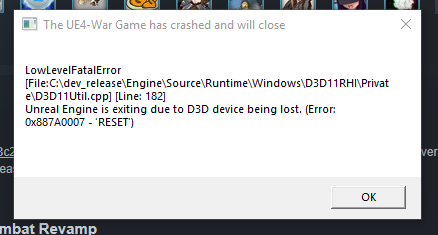
Anyone know anything about the Unreal Engine exiting due to D3D device being lost (Error 0x887a0006 - 'HUNG')
<@&282920218462912512>
 upper creek
@floral linden ffs
 floral linden
Hey, atleast I'm not useless.
atomic cipher
Drivers up to date clean install on drivers also fresh install on foxhole
still get crashes frequently around startup
dim salmon
I can't help you with this question
 restive isle
@atomic cipher
Try updating dx.
 vale elbow
Deadlands just vanished
inner basin
@atomic cipher heyooo
Try rolling back your video card drivers
If not, try running foxhole using -dx12 as a parameter.
 hushed tinsel
hi hello
i cannot join home region
currently tried : restarting the game (3 times), restarting steam (once)
it gives the uh
"No Home Regions Found" thing
inner basin
@hushed tinsel That's funny, because in this latest DevBranch, they improved their network so that people will supposedly get the "No Home Regions Found" error less often
hushed tinsel
nice
hushed tinsel
that is really undesirable
inner basin
Eh, ok
hushed tinsel
as i will have to redo all my ports
inner basin
👍 lol that's a fkin pain
hushed tinsel
im gonna see if verifying game cache will do anything
doubt it will but that seems to fix steam games a lot for me lol
inner basin
Reset router, disconnect from your connection then reconnect...
erm, restart computer
hushed tinsel
huh
that
worked
verfiying game cache
lmao
maybe it was just a lucky connection idk
valid schooner
@inner basin I challenge you to Junk Yard Wars.
inner basin

 severe thistle
Hey <@&374193809174822912> can you help me out?
im in dev branch comms room
or <@&282920218462912512> need help too
severe thistle
im in the voice chat
wait
technical chat actually
i need some help settin up emotes
 proud schooner
go to #information at the bottom and click the colonial logo
 hard ore
Any idea how to fix voice chat error 7-0?
 near narwhal
Having some very bad disconnection issues, I will reload foxhole, but if this doesn't work I will post again.
grand silo
<@&282920218462912512> this guy needs help
late mulch
hewwo
terse flume
I cant join the war it says war not available
terse flume
<@&282920218462912512> please someone dm me
dim salmon
@terse flume Try to ping Sir or KFC. They should help you with this problem
terse flume
@proud schooner
 wooden basalt
@inner basin is a useful guy for these type of issues when hes around
Im not sure how to help apart from the list in pinned messages
Try verifying on steam or a reinstalling if after doing all of these there are no changes
wooden basalt
Then you shall have to wait until someone gets back to you. For most issues like this they are resolved through the pinned messages or from network issues on the players side.
inner basin
@terse flume a little late, but if you STILL need help ping me again!
Being DMd by him now 👍
terse flume
if someone knows a fix on the persistent war is currently unavailable. please try a event dm me
 idle scarab
Hey, not sure if this is the right channel, but I am not locked to a single faction for the whole war. Every time I log out, I have to rejoin my faction of choice. Editting my profile gets a "cannot retrieve profile" error. Any solution/is this a common problem?
 vivid pulsar
@idle scarab Everyone always has to choose their faction when they login. Your faction is saved, you just have to select it each and every time. Profiles are also bugged this World Conquest and should be fixed next update.
idle scarab
Okay, thanks very much
vivid pulsar
👌
 dapper patrol
hey guys i cant play the game, each time i press play it says “fatal error” how to fix
ok nvm
valid schooner
How'd you remedy your problem?
sacred crown
@dapper patrol ^ howd you fix it? Might help other people.
 young leaf
Hi Guys. I have the problem that the Profile cant be edited. For this reason i can't play on any servers. Does anybody kknow how to fix it?
inner basin
@young leaf Viewing your profile is not in any way related to your ability to join a server.
Profiles are currently bugged for everyone, until the devs fix it that's how it's going to be.
austere galleon
can the colonials surrender on great march, bc no one is tech farming and yeah........ i dont wanna wait in queue and im sitting here counting the hours for work tomorrow 😛
 slender heron
Hello, Well just a little question, it's written "Could not retrieve profile" when I'm ingame looking to edit my informations. Is anyone able to tell me why please ?
dim salmon
@slender heron Profiles are currently bugged for everyone, until the devs fix it that's how it's going to be
dim salmon
@slender heron It's directly tied to your actual steam name.
Btw, when profiles will be fixed, after changing steam name it will erase all info there
 jagged dirge
@hot oak is the war going to be delayed an hour before the war like last time give us a heads up bruh
 maiden bough
Can someone tell me how to play music through voice chat? What programs do you use? I've already tried something, but it didn't go very well
dim salmon
@maiden bough
recording devices
Stereo mixer
Open any music file and press voice chat button
maiden bough
Will the mic work too?
dim salmon
But you won't be able to talk through mic
dim salmon
@maiden bough there must be any programs that let you use mic and play music in one time
maiden bough
I was looking into it, but find just one paid and some other, which seemed too comlicated xd
dim salmon
@maiden bough
-No one denied torrents
pirate laugh
maiden bough
I didn't find any torrent, just one fishy download from cloud. And it seems the original paid software wasn't uninstalled properly, so I can't install the cracked one
maiden bough
It seems I have figured it out withut paying nor pirating. One virtual cable and an audio routing software. Ideally I'd need a second virtual cable. Any ideas?
vale elbow
The game had just a Fatal Crash
hushed tinsel
rip
 lavish mango
Game froze and crashed and this happened https://i.gyazo.com/f1111688dfb051fc787f329e7e1c4084.png
 inner basin
as long as that doesn't happen constantly
 rocky temple
so since the last patch when I go to run foxhole steam shows the program is running for about a minute, and then nothing.
two other games have had this problem, and it has turned out to be a corrupted save file that had to be deleted.
any idea what the file and path of a similar file might be in foxhole
sly mortar
@rocky temple The first thing I would try would be to right click the game in your steam game's tab, go to properties, local files, and then click "verify integrity of game files"
rocky temple
didn't help
sly mortar
@hot oak Since you may know more than I do about game files, anything you might be able to do about someone with a seeminly corrupted file?
let me just call the community manager
hot oak
Ohsnap
The local file... the one in your appdata
Damnit i dont have the path on me
But its in appdata. just delete and reopen ( or reinstall to be safe)
rocky temple
ok, I will hunt for it
rocky temple
sadly that didn't fix the problem, I am reinstalling again to see if that makes a difference
austere galleon
Hey developers has greenfield orchard scrap been fixed yet
Or will this be another war with a useless scrap node #40 scrap if you’re lucky
hot oak
Hello player, no i dont believe we fixed that one yet
rocky temple
well reinstall with appdata/ foxhole deleted didn't fix the problem.
 desert river
is the game down or is it just me?
I don't hear enough whining for the game to be down for others
desert river
I reported it as a bug, but has anybody found a workaround for failing to start the game due to GameThread timed out waiting for RenderThread after 30.45 secs yet?
It crashes very quickly, not even close to 30s
I deleted %LOCALAPPDATA%\Foxhole\Saved but it did not resolve the issue
I also reinstalled the game from steam
I also restarted
I am so sad
sly mortar
@desert river Try updating your graphics drivers
desert river
nope, still crashes with the same timeout error
interesting, it launched once after I deleted the Saved folder
but only once
hot oak
@desert river Delete the whole foxhole folder in appdata
desert river
I changed my steam name, as it was an emoji before, but still can't launch it
Hang on, the computer says "FUck YoU" when I try...
desert river
god fucking damnit, its that win10 bug
sly mortar
oh?
sly mortar
<@&282920218462912512> When you start the game it recreates it
grand silo
❔
upper creek
what
upper creek
ffs ican
sly mortar
Want me to do it again?
upper creek

sly mortar
Alright, I'm starting my sentence with the largest amount of CH pings I can manage
One second

desert river
amazing
anyhow, no, its a win10 issue, im back
@sly mortar @hot oak @dim sequoia Nope, no good
 sly mortar
Nah, it's fine
desert river
any other ideas?
sly mortar
Ummm
rustic trail
Oof
rustic trail
What's going on chaps
sly mortar
That would uh
desert river
maybe its a problem that I am in the year 2018
sly mortar
That would help
desert river
and I need to transport myself in my time machine to 2015 back when the world was simple
rustic trail
Uninstall the current game and reinstall
desert river
again? okay...
sly mortar
Steam should install C++ 2015 for it
desert river
I'm doing it again just for you.
rustic trail
Ok 😃
sly mortar
It's foxhole
rustic trail
Is there any files left once uninstalled ?
sly mortar
No, foxhole doesn't leave any behind
desert river
in my steam library?
rustic trail
No in the files themselves
sly mortar
Foxhole cleans itself up
desert river
well its already re-installed
rustic trail
Ok try it now
desert river
computer says: no
inner basin
what in bloody hell
sly mortar
Yeah
rustic trail
Ok verify integrity of game files through steam
inner basin
not the C++ bug again
desert river
i reinstalled, but ... verify should be redundant
sly mortar
Yeah... C++ has a bunch of them, though I think this is steam fucking up it's install and C++ 15 fucking itself up
Not gonna touch that
Can you copy / paste it
inner basin
Yes, it is listed on the Foxhole website FAQ section @rustic trail
desert river
Its too big for text
inner basin
Do me a favor, please look into your Programs and Features
desert river
well i already have the C++ redist
I have newer ones...
which prevents me from installing older ones aparentky
inner basin
Look for Microsoft C++ Distributable installs...
 tranquil forge
@desert river where did you see
GameThread timed out waiting for RenderThread after 30.45 secs yet?
?
inner basin
Does that message mean that it's waiting on the GPU?
sly mortar
I think so
inner basin
hmm
sly mortar
I think it might be GPU drivers
desert river
but its instant
tranquil forge
@desert river Ok dev team can investigate further tomorrow. Wrt to installing VisualC++ runtime.. try reading the related question here http://www.foxholegame.com/support
can you DM me your dxdiag file?
desert river
let me reboot the system again, if its having trouble getting at the device, brb
sly mortar
Not getting at the device hardware side, but the software for your GPU is (I'm guessing) out of date
desert river
no, i just updated
inner basin
@desert river If you were able to play Foxhole some time before, may I suggest a rollback of the graphic card drivers?
desert river
no good after a reboot 😦
sly mortar
You can always roll back graphics drivers
desert river
@inner basin the correct thing to rollback in that case is foxhole 0.17 :trollface:
sly mortar
Just takes some bullshitting
desert river
well not sure what I had previously to roll back to
desert river
i just updated 10 mins ago is what I mean
sly mortar
And
sly mortar
So roll it back
inner basin
dde
desert river
to... ?
inner basin
dude
sly mortar
The last one
sly mortar
Yesterday apprently
desert river
yesterday
sly mortar
Drivers
inner basin
Any potential system modifications / installations you may have done yesterday?
desert river
literally none
sly mortar
Alright
Here are the 2 latest version numbers for drivers
411.63 - Released Sep 19
399.24 - Released Sep 10```411.63
sly mortar
Is that from checking the settings?
Here's the link to 399.24
https://www.geforce.com/drivers/results/137727
sly mortar
Alright, there's 399, try installing that and seeing what it does
desert river
FYI: looks like a lot of people are running into this
looking at the steam forums, but nobody seems to have any clues
399.24 is no good
we must go deeper!
desert river
going to try a much older one, just for funsies
sly mortar
Download the latest GeForce drivers to enhance your pc gaming experience and run apps faster. Automatically scan your PC or search the driver database for compatible GPU drivers.
Go find the 970 on there
 blissful sequoia
ditto everything space debris says, except geforce 670

 desert river
nope, sorry, im searching all over the internets too
inner basin
aw snap
desert river
im installing the ancient driver now...
inner basin
ill come out of lurking when i finish this hw
blissful sequoia
it shouldnt need an old driver
desert river
it shouldnt, but maybe it does, trying things....
blissful sequoia
Nah it's not a driver thing. Like I said in the other channel, I can get the game to load if I try enough times, but it will not connect to a server
If it were a driver bug it would consistently not work, 100% of the time
desert river
i wouldn't be my life on that, but my heuristics agree with you
I have been around enough to know that assumptions cause more problems than the solve though, so I'm giving it the 5 minutes to try it :p
blissful sequoia
Do you have the same effect? Can you start it like after 3 tries?
desert river
i have success maybe 1/10 times
nothing seems correlated to it
I have even changed my steam name, and can't find a correlation
blissful sequoia
And when you do, are you able to join the game? Can it connect to a server? Also alt-tab will kill it if you get it working
desert river
No, I can't connect
blissful sequoia
Maybe we have old files from trying the beta versions. Did you try the beta?
blissful sequoia
Cool I won't bother wasting time with that then...
So the alt-tab thing - where it will die if you alt-tab the 1/10 times you get it working ... wonder if it's possibly a directx thing
blissful sequoia
I guess that could be drivers, too...
desert river
I disabled steam overlay and also closed discord (it has some overlay bullshit) but no good...
blissful sequoia
Well you tried everything I was going to... guess it's their prob
sly mortar
Um, never had it die when alt-tabbing
But, try putting it in windowed fullscreen mode for that
desert river
Yeah, this is just me trying to start the game. I never had an issue with alt-tab, window, full screen, or anything like that.
blissful sequoia
If you get it started you will have a problem with it
desert river
do you have anything out of the ordinary?
maybe we have something in common
I have a bunch of dev tools installed on my system
blissful sequoia
no but I've had a huge bug kill me on .14
desert river
I have a external USB audio device, focusrite
I am using synergy (I don't recommend it)
2560x1440 resolution
sly mortar
Hmm, that isn't rendering though
desert river
yeah but it isn't a timeout either
errors are made by humans and humans are filthy liars
fite me
blissful sequoia
dunno maybe it's a new colonial weapon
rustic trail
XD
blissful sequoia
I don't think we are going to be playing today, sans finding another computer
desert river
@blissful sequoia are you colon ial too?
blissful sequoia
clearly i'm not
desert river
what if it only impacts one faction 🤔
blissful sequoia
nah cant join either side
i wonder if it's network related. suppose the initial bug is a timeout related to steam? and the server is also?
desert river
it knows your past... strap your tinfoil hat on
do you use any VPNs?
okay, interesting
blissful sequoia
ive got some ipsec peer-2-peer but not to this game
desert river
so: it seemed I had more luck after restarting steam
i have some work VPN and a personal VPN, but not peer to peer
blissful sequoia
we're probably overthinking it. they probably changed something and broke it - and the beta is rarely up long enough for me to check it and report back
I came on discord to check if anyone else was having the problem and immediately saw someone, so I bet this is very common
I've got another computer, I bet it starts fine. I can rule out your steam theories if I try it
desert river
I think it is
inner basin
we get periodic visitors here @blissful sequoia
You just happened to come across a lucky soul who happened to have the same problem as you
 spark void
Everytime I try to join the war, I get this message:
desert river
yeah, we get that too
spark void
I've restarted steam, reinstalled the game, rebooted the PC...
desert river
when we can get that far :p
inner basin
oof
blissful sequoia
@inner basin are you suggesting it's likely a bug specific to just us?
desert river
there is something about us that makes it impact us
inner basin
well now that you mention it, this new update might have caused some more bugs
desert river
just no idea what it is
inner basin
so...
spark void
Foxhole has always worked for me until this new update. I was playing just last night
inner basin
wait you guys get that??
blissful sequoia
ok then great, I agree with me
spark void
I havent changed anything with my OS settings
inner basin
I thought you two were focusing on the RenderThread problem?
well if it is that problem, then it will be network related
which opens up a whole 'nother can of worms...
desert river
they could be 2 distinct problems
they could be related 🤷
@blissful sequoia @techfriends I was able to start the old 0.16 version of the game. So this is not driver related for sure (pretty sure :p )
blissful sequoia
I launched it on my other computer, so that rules out steam account/steam name and my network
desert river
maybe :p
sly mortar
It very well could be still
desert river
they will look into it
i handed off some details
im going to go back to work I guess
all work no games makes me something something
blissful sequoia
so far the only thing we have in common is GeForce x7x and Windows
blissful sequoia
amd, win10
and my system that works is probably a newer shader model on the video card
desert river
could be something we don't have 🤔
blissful sequoia
Your video card has a new shader model tho so .. probably not
I dunno, maybe some of the dev tools? visual studio? i really have no idea what I have installed
Just wondering if we have a debug version of something
desert river
maybe...
but some of the people reporting this issue seem real computer dumb so I dunno
I have quite a few tools, all from the MSFT ecosystem on this machine
spark void
Shit, I guess I'll just wait until more people report the Lost connection to Server error
I know its not me.
desert river
nope, its us now, you have found your tribe, rejoice
blissful sequoia
my other computer works tho, sorry 
desert river
@blissful sequoia do you have gsync?
blissful sequoia
what is it?
spark void
Derp, so you have 1 computer having the problem and the other works?
blissful sequoia
Yea, so I doubt it's actually a network problem
desert river
gsync is a thing that makes your monitor go zoom zoom and talk to your GPU so it does not need to wait for vsync
it costs about $300 and looks invisible
blissful sequoia
well, my monitor is 4k... but no ive got a monitor with freesync i think so it doesnt work with mine
Are we all 4k people? maybe thats why
desert river
im 2k
blissful sequoia
I'm reaching here, because we can run it every once in a while lol
desert river
but when it first crashed I was in window mode actually at like 19something x 1200
holyshit it launched
blissful sequoia
yea but it doesnt join the server, right?
desert river
i set the resolution to 1024x768 just to be safe :p
no home regio.... oh shit, I forgot to set it back to 0.17 🤦
I was on 0.16 before to test it
blissful sequoia
Nah I tried the resolution stuff, not related
spark void
Yes
desert river
okay, i dont
spark void
blissful sequoia
Not sure, I think so yea
desert river
restarting steam allows me to launch it again... so weird
blissful sequoia
Well I suspect this isn't something I can fix, I surrender
desert river
oh, so you're a warden then?
desert river
i don't get that
spark void
restart steam
desert river
many a time
 steep nexus
Game crashing
blissful sequoia
Take heart, you're not alone
 iron hare
So, I can use "Join the War" to get into a game, but when I "Browse Events" it can't find any
I get "Failed to find servers. Please restart steam and verify you have the larest version of the game." but I have already done everything t hat was recommended in the pinned message
dim salmon
@iron hare you don't need to use "Browser events" if there's no any ordered through devs server there.
spark void
Is there not any technical support we can get for the error I'm getting??? I can't join a war, all I get is this error. Are there any log files I can review??
sly mortar
@spark void Try the top pinned message, if that doesn't work then I don't know what to say. This update has apparently fucked people's connections
spark void
A lot of the things in those pinned messages don't apply to me, but I did try restarting my modem/router and disabling firewall altogether without success. @sly mortar
sly mortar
I would still try them
dim salmon
@spark void If you've got lost connection, I think that it's internet issues. I'm not really good at technical questions. Anyway, if nothing works, poke KFC.
sly mortar
KFC has no fucking idea
spark void
I'm confident I don't have internet issues as I can play other heavy games. I can play most other steam games while browsing/watching netflix
I'm building up a comprehensive post on reddit about what I'm seeing
spark void
https://www.reddit.com/r/foxholegame/comments/9j8z4h/lost_connection_to_server_please_try_again/
@hot oak
reddit
1 vote and 0 comments so far on Reddit
 noble herald
hey i got update 0.17 but the game dont start but if i go back to 0.16 the game start but can join a game any help?
 hollow heron
I have alot of crashes ue4 war game crash
ever sinds update alot of crashes for alot of fellow players aswel
inner basin
damn, this update really causing a lot of crashes
sharp oasis
#blameUI
noble herald
lol i cant even start the game
spark void
I hope I get a solution from someone before the weekend. I want to play this weekend
 primal void
I get "Lost connection to server, please try again later" when I try to join the war, and nothing in browse events, something wrong with the servers or on my end?
spark void
I’m getting it too, look at my reddit post
Nobody has a solution
https://www.reddit.com/r/foxholegame/comments/9j8z4h/lost_connection_to_server_please_try_again/
@hot oak
reddit
2 votes and 1 comment so far on Reddit
@primal void
primal void
Thanks 😦
noble herald
after update 0.17 i cant start the game but if i get update 0.16 i can start the game any help?
dim salmon
@noble herald Have you tried to verificate game's files?
desert river
heya, if its the same issue, that aint gonna help!
spark void
Any updates to the crashing issues Devs??
desert river
Im sending my dump (💩) to the devs right now
spark void
Been waiting a long time for dev response
vale aurora
Go look at marks announcement in #announcements
spark void
That’s nice. Doesn’t help, but I guess I’ll copy and paste the information from my reddit/discord posts to steam forums now
The emails I sent should be valid, hopefully
I’ll need to get a dump file when I get home later in the day
 unkempt bramble
Boy Oh boy I'm so glad for this endless crashing bug
desert river
@spark void I am working with them on it, they are aware and looking into it
I gook a nice 2.5gb 💩 and sent it to them, hopefully they can find something in there


If anybody else has crash dumps, send them in
The more dumps they can dig into, the more berries they can find
slender heron
2nd time in a row I expect a crash bug from the game
instantly without any message, anyone knows why ?
It happened yesterday evening and today just now
desert river
👆
slender heron
@hot oak
hot oak
@slender heron Check the #announcements
slender heron
ok
but I can't do what is asked
I don't have the foxhole process when it crashes on my task manager
I can't create a dump file
desert river
their directions are bad
I'll send them new directions
there there are 2 processes
one is called WAR
the other is called War-Win64-Shipping
you need to dump them both, zip them up, then upload them to the form
spark void
Don’t you guys know you need to install and configure windbg to catch process crashes and generate a dump! Come on and be power users!!
desert river
@spark void do you also have dev tools on your machine?
Starting to think this is the commonality we have
but then ... the game devs also have dev tools on their machine, so you would hope they would have caught this already 🤔
noble herald
Yeah just to clarify once more as i dont think you guys get it as you are asking forthat isnt happening. the game doesnt launch at all, no process is started nothing clicking start game does nothing but flash my steam name green for a second and then nothing same bug i got
desert river
you have a different issue then
noble herald
nope cant start the game
desert river
@noble herald see if there is any crash data in %localappdata%\foxhole\saved
noble herald
the no crash it try to start 2sec then nothing
desert river
that sounds lovely, but can you go to %localappdata%\foxhole\saved and see if anything useful is in there?
if not, you only have one option remaining unless you can gather more information: despair
noble herald
is that under foxhole folder?
desert river
if you paste what I sent you in chat into windows explorer's address bar
it will take you to the place where foxhole saves tidbits of information that may be helpful
it is not the same as the folder that steam creates for the game
spark void
@desert river I believe I have visual studio code installed at home (I’m at work right now)
spark void
Vscode is pretty lightweight though
desert river
could be a correlation! or even a causation!
spark void
What dev tool you have installed?
desert river
vscode is yes, but if you install tools with it, not so much
i have loads installed
for example, if you have the microsoft C++ toolchain installed, that could be relevant
spark void
I think I had some nodejs extensions with it
That, I’ll have to look
I will get a picture of the programs and features I have
desert river
its a theory for now
spark void
I really don’t want my weekend to be foxhole-free 😦
unkempt bramble
^
desert river
I sent them my crash dumps, hope that helps us
and I'm experiencing 2 (maybe 3) of those issues :p
I can't run the game long enough to experience the random crashes :p
 worthy sable
Fighters, Hello!
Faced such a problem today: I push the incentive to run the game and the game does not even try to start.
I checked the integrity of the cache, cut off the antivirus and the firewall. Even reinstalled. Does not help. Does not try to start. If there are ideas how to fix it, I will be grateful!
ripe sluice
Is there any possibility that some of these crashes are GPU related? I'm running an i5 and a GTX 950m and I haven't had any issues on 0.17.
worthy sable
I have a GT 730, but I never had lags in Foxhole. I think the problem is in something else
blissful sequoia
I suspect we all have nvidia cards, probably gpu related yea, its not network related