#technical-chat
4 messages · Page 6 of 1
 lime hatch
I cant join wardens but we still have regions
 royal sinew
Hi, is there a way to have the game play in windowed mode? I've tried through the in-game options and the steam game property options, but it's still stuck in fullscreen.
 terse flume

 inland verge
Yeah I've the no home found issue too, like 2 out of 3 clicks I can jump in. And for skirmish the issue is worse, I have lost connection like 4 out of 5 times. I'm on 4G though so (the other connection is too unstable/too used to be usable for video games, and 4G I'm using works well on games even on mp games)... Tried all the steps I could in pin message. At least I can play but ugh
 lavish crow
Hey guys. I've been having issues getting my microphone to get recognized in game.
I have a bit of an unorthodox setup, so I know this is the cause.
But considering other games have been able to work fine (with some tinkering), I'm confidant we can get it working in this wonderful game too!
 obtuse nacelle
yeah, the microphone setting this game uses are actually steam mic settings. Check those
 torpid stag
@inland verge Same
 dim salmon
Remind me pls, how to fix discord overlay to make it appear? Also, i can't change my game resolution. There is no any numbers 🤷
<@&213133977681264640>
 round sentinel
I need assitance anyone on?
Yet I can see my name in browse events
Unable to connect to your ingame servers
 limpid finch
so is home region found thing a connection problem on my end or a bug
 charred raptor
@limpid finch a bug
 shrewd kettle
One of my friends has expirienced a "no home regions found" bug too, any ideas yet?
 proud dagger
@shrewd kettle ah yes that has been a recurring issue
my suggestion is to check pinned messages
there is some solutions that you may try out
if none works come back here again
shrewd kettle
Oh yeah, sorry for that. Didnt figure to check pinned messages of technical chat myself :^)
proud dagger
iz okay
shrewd kettle
I'll be there if nothing helps
proud dagger
alrighty
 polar dirge
tried joining reaching trails event devbranch server, got fatal error
limpid finch
@shrewd kettle i found that turning onedrive off helps. If you have onedrive tho. Onedrive was updating like every file on my computer at once and it was sucking up all of my bandwith
shrewd kettle
Is that a windows 10 feature? If so, it might be a useful advice
limpid finch
it is
shrewd kettle
Although we fixed it with numerous router turn-off turn-ons somehow
I'll tell him to investigate onedrive it might have influenced our case too
he has windows 10
limpid finch
it'll be on the toolbar in the bottom right if it's currently active
 old lion
any reliable fix for the 'no home regions found' bug yet?
limpid finch
@old lion try my above message
old lion
onedrive isnt running
limpid finch
anything similar to it?
other devices on your network, etc
try resetting your router
proud dagger
@winter valeenmannetje#9401 you can also check pinned messages
@shrewd kettle at the same time try to make sure all your graphic cards are up to date
 quaint anvil
a
 tropic blade
Can't join any maps. Keep getting 'Lost connection to Server. Please try again'. Have logged out of steam, restarted machine, no difference. Probably been going for hours.
 tired gulch
@tropic blade
Have you rebooted the Internet?
tropic blade
No but I turned the internet off an then on again. No fix.
proud dagger
@tropic blade my suggestion is if uninstalling also does not work, i want you to check pinned messages
@tired gulch next time direct them to also check the pinned messages and it's also best if you read further on it too
tired gulch
@proud dagger
Yes sir!
proud dagger
yes
 tacit cedar
Can someone help me out? I can't seem to run the game in fullscreen with sound. Sounds only works if I run the game in windowed mode
 plucky bluff
Windowed borderless is an option.
 hollow heron
Cant join Sledge or Halftrack on colonial skirmishes, keep gets the connection lost message pop up
 proud schooner

terse flume
français française venez disscord
plucky bluff
@terse flume #295720621533298690
 hot rampart
lol my refund has been pending for 23 hours now
old lion
is there any way to switch sound to headphones while ingame?
old lion
no it aint
hot rampart
ohhhhhhhhhhhhhhhhhhhhhhhhhhhhhhhhhhhh im on the wrong
wow im dumb
i never left tech chat
 delicate panther

 crimson gulch
4 ram is good for the game ?
 minor junco
Yes
crimson gulch
Noice
 feral sandal
It seems that 4G personal hotspot does not work well with Foxhole, i have 90% chances to have a "no home region found" when i join a faction..
proud dagger
@feral sandal check pinned messages
feral sandal
I know, i just add more infos to the pinned messages
 dull atlas
Hellow everyone, I keep encountering 'lowlevelfatalerror' and BSOD everytime i start foxhole with 'video_TDR_failure' error code. What can I do to solve this?
proud dagger
@LuxiouS#8282 hello do u still have the issue after the simple restarting or installing again ?
Ah fudge he left
terse flume
I changed my resolution from the default one to 1920x1080, it lowered my fps, so I’d like to go back, but for some reason the game won’t change my resolution no matter what I select
inland verge
yeah I have the same @feral sandal , that's the first game ever that has an issue due to that 4G network(not being able to connect). The fun part is that it doesn't work all the time, but after a few clicks you won't get the "no home region found" issue. Just keep doing it until it works. And I have same issue connecting to maps or world conquests too. But once I'm in and playing, I have no issue.
torpid stag
For me it never works
 analog sphinx
@kind pilot I verified the game files from Steam and restarted, but the server section is still empty
 kind pilot
@analog sphinx when you first open the game, before you hit PLAY, what is the number the shows in the bottom right corner?
kind pilot
@analog sphinx thanks.
Please double check that none of your firewalls and anti-virus re-blocked the game after the update. (if possible, please try to disable them temporarily, just as a check. They are the usual culprits)
analog sphinx
Antivirus is fine, just checked it
feral sandal
It seams to be better since the update, 2 launch without a "NHRF"
 ornate frigate
having this problem of "No Home Regions Found" message when trying to join the war after the last update
 bright mountain
can we get some Callahans passage love?
feral sandal
Forget what i said, the problem reappears with no reasons... Can we set a home region manually maybe ?
 leaden heron
Kept telling me "Lost connection to Server. Please try again." when I tried joining a faction, restarted the game and got the same result. Version # says 0.10.16.5, I assume I need to update but idk where/how to do so.
proud dagger
@leaden heron try to restart steam
Were u able to play last time ?
Try simple uninstalling
 novel surge
<@&282920218462912512> Is there a way to fix this?
I've tried reinstalling the game
 thorn rover
No /s
proud dagger
Pinned messages @novel surge
thorn rover
Did ya check the pins
proud dagger
Try to check there
novel surge
ok thanks
 small steeple
@novel surge are u still in dev branch?
small steeple
i dont think you are then but rightclick on foxhole on steam go to Properties then on the betas tabs make shure that it says none
novel surge
It's says none. I'll try resetting my computer. Let's see if that works
small steeple
o7 good luck
small steeple
@novel surge cool i will suggest that to people if i see that again
novel surge
the old "have you tried turning it off and on?"
 humble crow
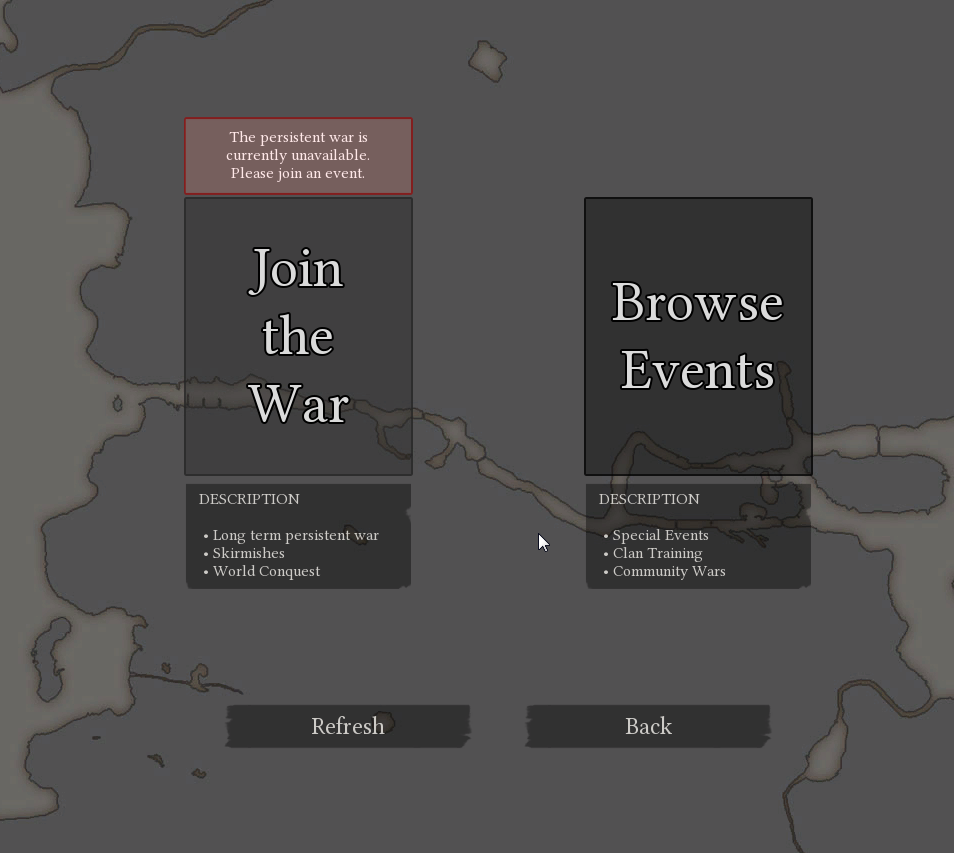
hey guys, what should i do when this happens? I've tried rebooting steam and foxhole both multiple times
 plucky bluff
@humble crow check if anything blocks the connection
This being firewalls and antiviruses.
humble crow
firewall's down and a/v down, same thing
the thing is, i was playing half an hour ago and was disconnected from the server
didn't screenshot that message, though
it seems that somehow this problems sorted itself out
thanks, dude
plucky bluff
Yeah foxhole sometimes have a problem with itself, i had simliar thing 2 times arleady
 sand eagle
Since the last update, the game doesn’t seem to be running that smooth. Some other people has experienced this as well. There is always some micro-freezes, especially while firing.
thorn rover
Imma blame that on the servers, but you can always fiddle with your graphics if needed
minor junco
Everytime I try to join a server the game lags out and says “Connection to server timed out”
Not a firewall, other games run fine, verified game files
inland verge
Yeah, the joy of foxhole... the no home region found and connection to server timed out issue. Usually when I have these issues, most of the time, I just try multiple times until it works.
terse flume
why can't i join get this every time
proud dagger
@terse flume are u still unable to connect?
 thin iron
 night dock
neeeed helps the cant find any server check fire wall in windows cant find any info on ports to forward and when i get to the same screen as wolfpack posted persistent war if unavalibal and shard is emty
plus the game closes but keeps running in the background as ist war 64 process wont close even with the task maniger
proud dagger
@thin iron what help do u need
@SWEDEN#3968 try to check pinned messages
@night dock
there is some options u can try
Also check if your graphic card is up to date
 merry tangle
Other keys didn't work either?
 fickle kayak
Hey, just saw you guys at PAX and picked the game up. Great concept. One request though, could we get an aspect ratio setting? My monitor is 32:9 (3840x1080) and it basically zooms in when I try to play like that. Works fine if I play in windowed mode but I get serious zoom when I play full screen. Will send pics in a sec
 slim girder
hey there ruba dotn forget to tag a <@&282920218462912512> as someof them may know how to fix this or check the pins in the top right corner as it might have something there to help
fickle kayak
Thanks for the tip
slim girder
yep
 mellow oriole
XD this game is literally using 100% of my gpu why tf would it need that?
constant 97-100
<@&282920218462912512> is it supposed to be doing that?
oh yea also im getting 1 fps which is stupid cuz its on medium settings and this has never happened
novel surge
try the old 'turn the computer on and off'
if that doesn't work try reinstalling the game
 silent moth
I was seeing shadow guys pop in and around my area of fighting.... was this a dev or hacker?
sure seemed like the wardens (low down scum) where seeing our positions and used howitzer to push us back.....
minor junco
#foxhole-discussion or #344873396850655235 if it continues to be an issue
mellow oriole
<@&282920218462912512> I don't know if this is just me or not, but this game has quite noticeable mouse delay that a lot of other games do not have. Is there any way I can fix this?
proud schooner
You seem to have a lot of performance issues.
@mellow oriole mind giving a readout of your system information?
 languid thistleBOT
Your System's Info
Within the Steam client: Help > System Information
Right-click and select "Copy all text to clipboard" and paste it wherever you need to share it. This is likely greater than 2,000 characters, so you may need to break it up into two or three messages for Discord.
You can also select specifically what you would like to share and right-click, select "Copy" to get only a small piece of information.
 mellow oriole
@proud schooner u want me to put all that down here or in the dm's?
mellow oriole
Actually I just found the solution it was something to do with Radeon Relive
Thank you for taking concern in my issues, however
proud schooner
Ah nice. Glad you got it figured out!
 steep nexus
So, The Reaching Trail has garrison outhouses correct? Why does it not have a tech that can unlock it?
 exotic prairie
im having trouble with discord voice chat when i try and connect to voice chat in the game it brings up a discord screen and says ive been invited to join foxhole i click yes and it says i have joined if i click continue to discord it brings me here either way no one can hear me in the game and my computer says my mic is working properly am i doing something wrong i havent used my mic in a while but the drivers are up to date
 wise oasis
@exotic prairie so the voice channels here are entirely separate from in game voice. to talk to people in game near you just hold T and speak. To talk in discord you need to join a voice channel here and you can speak to whomever joins that channel.
 restive spire
guys
i can t play
the game says that it doesn't find any home region spawn
do you know something about that?
languid thistleBOT
George Orwell is AFK: Zzzzzzz.... for in-game or Discord assistance, see #344873396850655235 - 17 hours ago
restive spire
ok sorry
 valid schooner
reading
@restive spire Checked the pinned messages on this channel first and foremost!
 sacred crown
Might want to include @valid schooner 's videocard driver update fix specifically into the pinned messages. @proud schooner
 twilit wigeon
is there a way to get server addresses? or are they guarded? i'm just trying to ping server directly
proud schooner
There are ways to get them, but not all servers are pingable anyways.
Where on the planet are you located?
 woeful idol
bit of a problem lads, more technical than anything i've just had to deal with
I was mid game and had a pretty nasty powercut
after that, the client took about 10+ minutes to load up to the main menu
is that more my shitty hardware than a bug with the client?
my hardware is about to hit its 5th birthday this year so
proud schooner
@woeful idol I'd make sure to give your computer a restart a couple times just for the sake of saying you did. It may be experiencing issues with pagefiles and such not getting cleared/reused correctly after a loss of power, which theoretically could affect performance.
Also, was this the result of a storm or just a general power outage?
 wild pine
hey guys could I have some help here. I tryed to see my ping or latency on servers but I can't find good program to check it. I was wondering there is web internet test to check conection and latency, so only problem here is where are suited Foxhole severs ?
 livid hinge
с оверлеем стима или дискорда?
dim salmon
Диска
livid hinge
не отображается?
dim salmon
Я могу описать проблему подробнее в ЛС
 minor plume
SO is the war gona start or do we have to wait 6 days
 dull patio
Yo, can someone help me with downloading foxhole? i try and download it and it tells me to download Microsoft Visual C++ 2015 Runtime but i already have it. i try and download it then it tells me to uninstall it again.
 late mulch
@dull patio what type of computer?
dull patio
@late mulch Windows 8.1 Asus i5 Nvidia GTX 980 and i tried downloading the packages from the website and it still wont go through.
 mellow lodge
Hello, I got a loading Error after Waiting in the Queue for WC in Warden Home Region, ity leads me back to the main menu
Icleared the log and restarted both games and computer
still happening
it worked correctly few hours ago
late mulch
@dull patio sorry for the late response. That’s a bit out of what i know. I’m not sure if a <@&282920218462912512> may know...
@mellow lodge not sure. Again, one of the Community Helpers may know.
 static shadow
@mellow lodge check the pinned messages first i think that bug may be there
 upper creek
Tech help isnt my forte
mellow lodge
I have checked
static shadow
@late mulch please only tag CH once they will see it
mellow lodge
I finally uninstalled then reinstalled the game, Started a CCleaner, antivirus too then restarted all the computer
static shadow
try verifying game cache
mellow lodge
and for moment it seems ot be solved
late mulch
@static shadow yep sorry about that.
static shadow
ok
mellow lodge
thanks for your help anyway
static shadow
np
 stoic abyss
Any solution for no home regions found?
minor junco
Pinned messages
stoic abyss
yeah just noticed it sorry
terse flume
Hello there iv got a question. When i play first time i join to the skirmishes, i choose first and just play. Now when i try to join again its not working. I hear sound for few secondos then i just kick out to the menu 😦
terse flume
any suggestions?
Dont worry, someone will come to help u. I would recommebd to checj the pin messages in here though, they helped some ppl in the past
 subtle narwhal
Hi all! I am having quite a massive issue with Foxhole lately. I cannot remember the exact time the issue started however weather I am streaming or not, while playing Foxhole at certain times the "STEAM.EXE" in my resource manager will duplicate itself multiple times (up to 50 times) and never drop which results in massive lag and frame rate drops if I am streaming. After extensive testing of games both in Steam and other Platforms, I have found that it is only Foxhole that is doing it.
I have asked others about this issue, more specifically PFC_Bannon whom I stream with and he does not encounter this issue, again weather streaming or just playing.
Does anyone know of a Fix for this as I am all out of ideas at this point. I really do want to continue to stream and support the game but at this point I can do nothing more without some serious knowledge thrown at me
proud schooner
@subtle narwhal are you streaming via steam or twitch? Which program are you using to stream (OBS, etc)
subtle narwhal
@proud schooner I am using Slobs and have also Tried Obs. Streaming Via Twitch. I have done various tests and have found that the issue arises when I enter a map that is quite populated and join the frontline. I have a suspicion it may be the Voice Chat in game that causes the Steam.exe duplication. And or the amount of people around me and and effects also. I have tried Multiple tests and all come to the same ending that I have massive Dropped Frames while being in a active screen or area
proud schooner
It's strange that it would do that. Try making sure literally all other applications are shut down completely and having only Foxhole and Steam open, nothing else (not even Discord). If you use any virtual audio cables, I recommend disabling them as well just to eliminate driver issues relating to those, and using only your headset/speakers.
I'd also make sure literally all drivers, including graphics drivers are up to date. If you have an NVIDIA graphics card, make sure to disable the screen recording portion in GeForce Experience (the one that automatically records for replays especially).
 hazy pine
How do i get the warden tag on this discord?
minor junco
?warden
hazy pine
Thanks
subtle narwhal
@proud schooner Right iv just done a fresh install of the game, disabled all connected devices except my headset and all other applications are closed, only steam and foxhole are open. Upon logging in to the Map, Mooring in this case I have no duplications, as soon as I hit the front line where there are multiple friendlies and enemies in a firefight I start to receive the Steam.exe cloning. I am literally out of ideas haha
 slender hawk
hello, so i decided to play foxhole today for the 1st time in about 6 months, and i joined a server successfully for a couple of mins. then i hit exit game thinking it would take me out of the server and not the whole game. when i got back in, i couldn't connect to any war servers, and there were no servers in the browse section. i've restarted steam, my computer and my internet, but i'm still having the problem.any help will be appreciated, thank you.
 open bluff
ребят как сменить фракцию?
пол года не играл и случайно зажел за колонистов
а друзья играют за варденов
open bluff
how to change a faction?
I did not play for half a year and casually caught up with the Colonists, and my friends play for the Wardens
late mulch
@open bluff ping a mod in the #344873396850655235
polar dirge
My internet is not really good from the provider and I'm not in US or Europe where the network is very stable.
Is there anything I can do or install, to get my network best optimized to play Foxhole? Any softwares or tweaks to the Windows?11
 vivid pulsar
@polar dirge The easiest way is simply connecting to the internet via ethernet cable as opposed to wirelessly. Cat5e and even Cat6 LAN cables are the bee's knees. If you're playing wirelessly through a laptop, make sure you're fairly close to your router or modem. Microwaves and other devices that emit electromagnetic waves interfere with wireless signals, so stay clear of those when connected to the internet.
polar dirge
Thanks
 ivory python
Any of you know a way to still have sound whilst tabbed out of the game?
 unique grotto
How do you make discord overlay work with foxhole? Isn't working for like a couple of months. No, window mode and no steam overlay didn't work
 zealous zealot
It's been like this for a while, I even tried restarting the computer
vivid pulsar
@unique grotto Honestly, I have no clue. I've been trying to get the overlay to work for weeks as well.
inland verge
Tbh if you have connection issue ( no home or failed to co), one solution is to use a vpn... That is sad but at least it works and fix these issues
If you already did the pinned solutions and didnt solve the issue
 gritty estuary
How can i have been lock to a faction when i havent played today at all and the war just started today? is it a bug or something?
gritty estuary
nah no skirmish today and my friend played with me yesterday together and he didnt get locked lol
 sly mortar
the fact that he didnt get locked then is the bug
gritty estuary
how is it possible since the war wasnt started yesterday evening?
sly mortar
the skirmishes before the war lock you for the current war
gritty estuary
oh well lol thats some wierd stuff but thanks for the answer
terse flume
have you ever had that problem that you couldnt use push-to-talk discord vc while playing foxhole?
i have to alt-tab to discord in order to say something
 wicked rampart
@terse flume Try running discord as admin
terse flume
@wicked rampart yea ty
 dense aspen
@here yo why do i not have access to type in clan recruitment so i can recruit for my b o y s
??
minor junco
Clan-Recruitment Has been wiped. Please contact a <@&374193809174822912> or one of the <@&213133977681264640> if you would like your clan to be advertised!
Guidelines
• Only one Contact per listing
• Actual clans only
• Description must be appropriate and adhere to #information
wise oasis
Yep, you have to have a Discord mod or mod ensure your post is in the right criteria then they post it for you @dense aspen
@minor junco btw you can create code blocks by putting three of these ` on both sides of what you're quoting so you don't tag all the mod staff next time 
minor junco
dense aspen
''' what?
minor junco
Guidelines
• Only one Contact per listing
• Actual clans only
• Description must be appropriate and adhere to #welcome-rules
-```
thers your p a y m e n t
so what do i do
where do i post
do i send it to a mod for them to post it??
minor junco
no
wise oasis
hi yes, how may I help you today?
dense aspen
i would like to buy some c o m m e n d s p l e a s e
ill pay real money for ingame c o m m e n d s
wise oasis
sorry, no commend market after the daily commend limit was put in place
anything else?
dense aspen
dag n a b b i t
can i p o s t
a clan rec r u i tment
through your a bi ll it ie s
im just gonna do it
so
p r e p a r e .
wise oasis
yes, prepare one then DM it to me
dense aspen
🔛 ℹ 🇹
 half dove
When I delivered supplies to TH or outposts, I don't see the message in text chat that I made a delivery like others do.
dense aspen
ye why dont it come up
 glass otter
Devs for some reason my in game mic doesnt work. My mic works on discord and other applications fine, but not for foxhole 😦
plucky bluff
@glass otter check steam voice settings
 white lintel
HELP!!!!!!!!!!!!!!!!!!!!!!!!!!!!!!!!!
proud dagger
@white lintel try restarting foxhole or steam
or the PC
or refresh
if not uninstall and reinstall again
and check pinned messages
if all else fails
white lintel
@proud dagger restarting the PC removed the game was updated at the nothing helps
proud dagger
@white lintel have u tried all the things in pinned messages?
white lintel
@proud dagger yes
livid hinge
no he is an old time player
twilit wigeon
can't access foxhole discussion or suggestions
sly mortar
or lore-discussion
@twilit wigeon maybe ping a mod
because that is permissions stuff most likely
 twilit wigeon
i did
 sand cosmos
Ripperoni then
twilit wigeon
Ah, nah I got it. Must've hit hide muted channels when in server setting
 river sierra
hello, im having issues with joining the war. Profile does'nt show, button "Join the War" locked and Shard is empty
any help?
 plain karma
its also worth noting that your firewall / anti-virus might be blocking it
and make sure that you try going through Sir's post in the pinned messages too
is this the first time?
were you able to play the game before?
river sierra
no firewall, no anti-virus
i've played a lot, and today earlier
this is first time when i got this problem
 quick laurel
Anyone have problems when they are in the inv. and as you tab out you start auto walking/sprinting for a bit in a direction? Any idea why this happens and to stop it?
 sharp oasis
@glass otter Does your mic work now?
If not, try to plug in your mic after you entered the Home Region. That's the only way I can get my mic to work ingame.
 tepid aspen
hi, rule the skies i read your descriptions of your goal. sound pretty cool i like to join.
 marble crow

 craggy yarrow
anyone have any issues with this game on an overclocked PC?
once I load into a game it crashes, I had just overclocked and before hand nothing was wrong
 burnt idol
It could be that you made your computer unstable by overclocking it to much
glass otter
@sharp oasis Yeah had to fiddle around with the steam voice settings and realtek hd audio
got it working now thanks 😃
@plucky bluff got it working now thanks 😃
white lintel
Почените фох для русских!!!
 frosty kestrel
is the GTX 1080 (not TI) going to work perfectly with Intel Core i3-3240
Trying to buy it. If someone knows pls DM me
Or just mention
 elder python
It will bottleneck a lot, there will be no difference in fps between a gtx 1060 and a 1080
frosty kestrel
tnx @elder python
plucky bluff
@elder python @frosty kestrel unless you use the steam guide in pinned messages(fps one,)
frosty kestrel
does that really work @plucky bluff
plucky bluff
It should
frosty kestrel
0k
elder python
what I'm saying is that the i3 will limits the 1080 so much that it will have a performance of a previous card
that's my case, even with a i5 6600k I feel my 1080 limited
I recommend a 1050ti or a 1060
 nimble shell
I'm from Russia (sry for english btw), and I am suspicious that my problem comes from bans of Telegram, but when I simply launch the game - I can't access news, profile and, well, persistent war
yesterday though I was able to launch the game without any problems, but today it happened again
so I tried to launch the game from the folder - Steam said something like "you will launch with parameter " War ", k?", I launched with this parameter - and was able to access the news and game, BUT I was 0lvl and I still can't access my profile
when I launched game from Steam with this parameter it worked the same way
any suggestions? I want to check my nickname when launching with this parameter when I will play with friend, and welp if it even works in Russia, cause this is strange
UPD: I joined without parameter but I still can't access my profile BUT I'm my lvl
but I'm pretty sure tomorrow it will be broke again
it's broken again
it's back again but I'm 0lvl again
nimble shell
tried vpn - doesn't work for me
terse flume
did u check the pin message in here ?
nimble shell
yep
terse flume
heh, only thing i have to say is to wait, ppl skilled with computers and all that shit often come here
nimble shell
k
dim salmon
@HoverJet2045#9746 we have #267344469341241354 channel and two mods. It's local problem, only in Russia.
 lavish basin
5:4 (1280x1024) screen ratio is bugged in travel map, skirmishes are outside my screen.
 tough mason
Hello,
I bought foxhole a few days ago, but I've been only been
able to join a server once because of an issue that gives me the
"No Home Regions Found" Error. I was somehow able to join a server
at a single occasion, but even though I tried hundreds of time I still can't join
a server. I also tried everything in the FAQ and reinstalled my game a few times along with the appdata
folder and everything.
Thanks for reading, I hope someone here can help me.
plain karma
@proud schooner <@&282920218462912512> ^
tough mason
oh I forgot those, thanks for that 😃
plain karma
no worries 👍
 rustic mica
Restarting router helped with this No home regions found deal. 👌
 gaunt tree
Ok
 tawny patrol
Yo my game keeps going chinese (i live in china) and it's annoying af how do i fix this?
tawny patrol
aight np
terse flume
:(
 fiery zealot
Anyone have problem with the sound of the game? Since yesterdayI can't here anything....
 lofty hare
я делал рестарт стим
thorn rover
@livid hinge Help
livid hinge
значит ркн
livid hinge
роскомнадзор
lofty hare
как быть
livid hinge
впн ставить
 gritty geyser
лол, но перезапуск ролтера помог
dim salmon
@gritty geyser значит, что IP поменялся
gritty geyser
не, у меня статика
dim salmon
🤷
 polar pivot
hello i have problem because i take wrong fraction
can u help me switch this?
terse flume
@polar pivot post that in #344873396850655235 and read the pinned message in there to see how to do it
tough mason
@plain karma @rustic mica Restarting my router instantly fixed all the issues. Thanks a lot! Never thought it'd be this simple.
sly mortar
Yeah, the "No home regions found" is normally something to do with the connection between steam and the server @tough mason
plain karma
No problem. @tough mason glad to be of help 😄
dim salmon
@gleaming thistle Воздержись от сквернословия. Это тебя не красит. Это во-первых. Во-вторых, этот канал не для обсуждений. Если есть вопросы - обратись в канал #386353469776330762 или опиши свою проблему здесь. Лишний спам не нужен!
 gleaming thistle
Я не могу передать всю гамму эмоций, бурлящих во мне в данную минуту, литературным языком сударъ.
@dim salmon хех
humble crow
hey devs, i have a question regarding your server's host
the thing is, my russian friend cannot see any shards, we suspect the reason is the russian government imposed a state-wide ip range blockage
humble crow
ну в общем, чел не видит шарды в главном меню
я никак не могу это протестировать, поскольку не живу в россии
dim salmon
@humble crow Его проблема крайне популярна в России.
Попробуйте перезапустить роутер/ игру/подключение к интернету. Можно так же просто посидеть в главном меню и немного подождать, а потом попробовать зайти.
погоди, шарды?
dim salmon
@humble crow Пусть воспользуется тем, что я предложил. На крайний случай - пусть воспользуется впн
Другого выхода пока нет 🤷
humble crow
🇷🇺
 lapis vector
Я тот самый чувак, который не видел шарды. Это Роскомпозор, посоны.
dim salmon
@lapis vector Use English in common chats or use #267344469341241354 channel
 sudden hawk
Horosho
dim salmon
@sudden hawk idi na hui
tired gulch
Come on, this is not general chat
 pulsar basalt
I can't find any servers... I did everything it said to do online but still nothing
sly mortar
Did you use the "join war" button?
pulsar basalt
Yea i can join a war but it just says war is over join Skirmish but idk how to do that
sly mortar
@pulsar basalt Click the "Join Skirmish" button at the bottom of the screen and choose a server from that browser which had people on it
sly mortar
What
If that is the case, then click on one of the circular icons that look like rifles on top of rifle ammo
Find one of those that has players
pulsar basalt
sly mortar
Oh
You are at the wrong tent
You need to be at a tent with crossed swords on banners next to it
It looks like this
But may be a different color depending on what team you are on
pulsar basalt
Nvm i figured it out i had to go to the tent not the world map
 lilac nebula
i have this problem
 wooden basalt
@lilac nebula did you fix your issue?
wooden basalt
@sand eagle is this due to the Russian IP problem?
Russian Connection Issues and Solutions
So it has been brought up our attention that our RU friends have been having unfortunate connection issues to our “Foxhole servers”. @[82WK] Prone and shoot has provided some possible work arounds/fixes to inform them if they ever encounter such problems
- Try to reboot your router/connection to the Internet
- Restart your game/steam
- Wait a bit and keep trying to connect to “Join War” from the main menu
- Download a VPN (Be in mind this sacrifices connection speed
Soz for ping
 flint warren
vpn eating free traffic and you will have VERY bad ping
if you need help with this issue-write me
ive decided it
wooden basalt
Depends on the vpn and what country you are connecting to, but yeah you will have slow down on a VPN
sand eagle
@wooden basalt I'm no russian
wooden basalt
@sand eagle okay. Try restarting Steam, thats how i solved the issue of finding no home region.
small steeple
it seems that FOD has voice problems is it the server? lots of people are having trouble talking in voice
sand eagle
@wooden basalt I did Alt+F4 and worked
wooden basalt
Fair play! 😂
 cursive rivet
hello
im looking to upload a vid to discord but it only let 8mb in my file is 1.5mb is their anyway to send it
lilac nebula
@wooden basalt still same
wooden basalt
@lilac nebula have you tried the steps listed in the Pinned Messages?
@cursive rivet best bet would be to upload it to youtube and post from there.
 atomic obsidian
give some ways to fix it?
oh we have RussiaRegional now 😦
yay, ghetto
restarting helped, RussianRegion at 6am is obviously empty
but still
sly mortar
Restarting steam will normally fix that
gleaming thistle
@sly mortar its not help)
gleaming thistle
@sly mortar nope i have static ip)
sly mortar
It isn't the IP
gleaming thistle
@sly mortar oup gouverment is block foxholes ip
sly mortar
oh
gleaming thistle
Like telegram
sly mortar
You are going to need to use a VPN then
gleaming thistle
@sly mortar high ping with them
plucky bluff
@gleaming thistle Внимание всем!
Был запущен сервер для теста специально для игроков из России во вкладке "Browse events"! Просим вас попытаться зайти на него, не используя VPN и пр. ПО для обхода блокировок. Ваши отзывы оставляйте здесь. После отзыва не забудьте позвать Community Helpers. Нам очень важна ваша помощь!
Спасибо!
From #267344469341241354
sly mortar
has no idea what was just said
plucky bluff
@sly mortar it's referring to russianregional server i guess
sly mortar
ah
gleaming thistle
@plucky bluff я ему объясняю сам знаю)
plucky bluff
i'm not russian
sly mortar
I don't think trap knows russian...
plucky bluff
go to #267344469341241354 and ask there
sly mortar
opens google translate
glass otter
Same problem here No home region found
Tried restarting game
restarting steam
restarting router
no luck
wooden basalt
@glass otter are you in russia?
dim salmon
@glass otter Where are you from?
glass otter
Philippines
 hot wadi
Something needs to be done about queue times in skirmishes. None of us can get into a game
lilac nebula
@wooden basalt i tried
wooden basalt
@lilac nebula hmmm if you tried all the help in pinned messages then im not sure how to help you. Those steps usually fix the issue. Have you tried reinstalling Foxhole?
 fossil hull
Samedi problème for me... I'm french....
wooden basalt
@fossil hull restarted steam, verified file integrity of foxhole?
 light rock
<@&282920218462912512> I just randomly pressed something and now the gui for like the chat and stuff i don't see

looks like this
when I build
upper creek
F8
upper creek

dim salmon
read keyboard binds
reeeee
light rock
my keyboard has no keypad
vivid pulsar
Anybody know how to get the Discord Overlay to work with Foxhole? I've got the overlay on, as well as being on specifically for Foxhole and it still hasn't worked for me. Please @me if you're responding to this question. Thanks! 😄
wooden basalt
@vivid pulsar you have to first allow foxhole to be used for overlay in discord settings, then turning the overlay off and on will start it up
Its been a while since i set mine up but i think it works like that.
vivid pulsar
Yeah, that hasn't worked for me yet.
late mulch
@vivid pulsar once you do that, something should come up in game about an overlay. I belive it is ctrl’ or something like that, i don’t remember exact, and it will pull up a box with discord’s and voice channels, along with a gear for the settings. Click on the gear and it will give you 2 overlay options. Hope that helps, otherwise i can try to get screenshots for you.
sharp oasis
@vivid pulsar I believe it is "shift + ~"
late mulch
Thanks @sharp oasis
terse flume
what happen to server? it said connection to the host has been loss, even though my internet still working just fine
 livid crescent
seems the servers are offline !
 elder geyser
I seem to have some graphical problems with the game, that being the screen flashing green rapidly with somewhat visiblility of the game itself. I don't usually have problems like that with other games
Could be either cuz of my graphic card or monitor
NVM I just found the fix
Well not really a fix but still, had to turn down the resolution
From 1,920 x 1,080 to 1,680 x 1,050
thorn rover
<@&282920218462912512>
 oak drum
why i cant find servers ?
 floral linden
I'm not the tech savy community helper, but let me check the servers myself.
floral linden
Have you tried re-launching steam?
floral linden
If you're willing, disabling anti-virus or firewall might work.
oak drum
yep i disabled
floral linden
Any unrelated applications open that may be absorbing bandwidth?
oak drum
nop
wooden basalt
Are you on the home region trying to get into a skirmish or world conquest?
floral linden
'on home' as in you're in the home region or you can't find the home region?
oak drum
i will try now i disabled other firewall
wooden basalt
So you click play game, then select join war and you are in the home region? Then you went to the tent and pressed 'e'
From that window you can join a map on world conquest, if above level 5, or you can click 'enter skirmish' and a server browser will appear showing you the servers to join
oak drum
can i pass images ?
wooden basalt
Sure
floral linden
From that screen, in the top left does it say 'live' or does it say 'dev branch'?
wooden basalt
You have tried to close the game and restart steam yes?
floral linden
He did
wooden basalt
Try verifying the game on steam and restarting pc. You have downloaded the hotfix from a day or so ago?
No it shouldnt be an issue related to spain
floral linden
^ possible version mismatch.
floral linden
Right click foxhole in steam
local files tab
Verify integrity of game files button
wooden basalt
^ right click and select properties i believe
oak drum
im doing
wooden basalt
Then as he said
oak drum
i hope it works
wooden basalt
Try restarting pc after and launching the game
wooden basalt
Let us know if you have an issue still
oak drum
ok thx
floral linden
and if all this fails, restart modem/router and restart pc again.
floral linden
Have you verified all your drivers are up to date?
floral linden
In steam, click steam (top left), settings, in game, set in game max ping to 500
relaunch steam after changing that.
floral linden
Right click foxhole, properties, betas, double check that it's 'opt out' inside foxhole, check that it's set to 'live' and not 'dev-branch'
Are you using wi-fi?
Are your ports open?
oak drum
nop im not in wifi
im not in beta
and im in live
someone said it a old version how i can change to new version ?
floral linden
It should be the newest version by default, but if you want to play safe, reinstalling foxhole might solve that if it is the case.
oak drum
i reinstalling but i didnt work
floral linden
To be honest I'm running out of ideas. There were server issues with others a while ago, hopefully it clears itself and it may be a problem on our end.
oak drum
im try to ask if someone can invite me a game
maybe i can acces and the server register
sacred crown
Do you have a Geforce video card?
There were some older bugs that happened when the videocard drivers werent up to date.
@oak drum
oak drum
nvidia
floral linden
Correct, nvidia is geforce.
sacred crown
eg. geforce gtx 1080
oak drum
960
sacred crown
if there is nvidia graphics software, try to update the graphics driver
or check their website and see if there are newer drivers. There was a wierd bug some time ago were players couldn't connect/didn't find servers when the geforce driver wasn't up to date
sacred crown
okay, find if there are any new drivers for it.
sacred crown
Okay, once install is done, restart pc and try again. Lets see if it works.
oak drum
okay pls i hope this is the right
sacred crown
@oak drum while we are waiting. Open the game and switch it to windowed mode and then try joining the game.
oak drum
ok
sacred crown
Want to check something.
oak drum
nope it dosent work
sacred crown
okay, is install done?
oak drum
yes
sacred crown
ok and version matches this?:
oak drum
yes
sly mortar
There aren't any public events right now Tau, just an FYI
sacred crown
@oak drum okay, lets just wait for the install.
oak drum
so there are no servers now ?
sly mortar
World conquest is up, but there aren't event servers
sacred crown
@oak drum servers are there for the War. None for events. they are two different things.
sacred crown
yes.
sacred crown
ok
oak drum
it dosent work
thorn rover
May you show a screenshot
thorn rover
No the pinned messages my man
oak drum
nop
sacred crown
He means in this channel.
thorn rover
Check those and report back
oak drum
i dont understand you
thorn rover
Oh there is none
@hot oak Do you know whats going with this man
Wait there is pins
Click this thing my man
oak drum
well the game when i install the first time ask me public network or domestic
thorn rover
oh, did you let the game past your firewall
oak drum
yes
thorn rover
Alright
oak drum
i selected public network
oak drum
no all disabled
sacred crown
You're not any VPN right?
oak drum
nop
well the only solution that can fix it is if its possible someone invite me to her game
its that possible maybe after that the server register
sacred crown
@oak drum send me your steam name or add me as a friend on steam. I'll try
sly mortar
Sometimes restarting your router will fix that glitch
 wooden lark
I've tried to run Foxhole on a virtual machine, using the Parallels Desktop software. The game works fine, except for a problem with the terrain textures, as shown in the image below. The main issue with it is that, as you can see, some roads are pretty much invisible, making it hard to run logistics (especially on snow biomes, where u don't have vegetation guiding you).
If I run foxhole without the VM, by installing windows on one of the partitions, the problem doesn't show up.
I've ran other games on it without problems.
Any clue what it could be and how to solve it?
 cosmic mortar
Yeah, I think I remember Sir talking about this. It's an issue with DX11 or 12 working in a VM.

DirectX and Parallels Desktop 13 work together to provide support for popular applications and gaming. Supporting DirectX within Parallels Desktop details:
Foxhole requires DX11 to run. If you're running on Parallels Desktop, it only supports up to DX10 - Copy pasting off the blog -
Why isn’t DirectX 11 supported in Parallels Desktop?

One of the mandatory DX11 features is called “compute shaders.” The name “shaders” usually refers to graphical functions that calculate the appropriate color and brightness for an image, but “compute shaders” are quite different. Compute shaders help the programmer to more easily take full advantage of the many processors on today’s graphics cards, primarily by broadening shader capabilities beyond pure graphics to more general calculations, which can be done on a graphics chip.

Parallels implements DirectX emulation by translating it to the equivalent OpenGL function, since OpenGL is implemented in the macOS®. Unfortunately, the version of OpenGL in the macOS does not have compute shaders. There is nothing for Parallels Desktop to map DirectX shaders to in the OpenGL framework in the macOS.

The macOS does support another style of compute shaders in the OpenCL framework. (Don’t let the similarity in the names “OpenGL” and “OpenCL” make you think they’re similar. They aren’t. In fact, they are competing “standards.”) Unfortunately, however, OpenCL on Mac isn’t as robust and doesn’t cooperate well with OpenGL.
There should've been an error message when you started up Foxhole though, like in the previous case that was reported.
wooden lark
I see, so Parallels VM doesn't support DX11, which is the one foxhole uses
Hmm i get no error message
Well at least I know there is nothing I can do about it. Either run it on partition, or stick with invisible roads. Thanks for the help
 worldly plank
Hey, I'm running into this bug since yesterday. I have been setting my spawn point into camps. However, when I die it doesn't even tell me the name of the camp that I set my spawn on. And when i check this camps do have S.suplies.
worldly plank
I also receive this error when I try to enter the war after I restart my pc. As well when i open the game after restarting and try to join the war it gives me a blue screen of death.
silent moth
So I am stuck,,, it is like when you die and can see from a forward view....... I died and must of hit something on my screen... I can't seem to get back to normal view...
I can see my action bar and a empty square
I can hit esc and hit resume but it doesn't do anything
I hit return to home.... that blows
Wait it put me back to my spawn point so that is good
cosmic mortar
@worldly plank
worldly plank
ty
frosty kestrel
i have Intel HD and it works.
 naive pewter
Hey. Can anyone suggest how to make good quality screenshots? Steam makes shit, GeForce experience does not take it for unknown reason. Suggestions? (Especially for chat screenshots)
plucky bluff
@naive pewter there's a button for HD screenshots in-game by pressing P. Not sure if it includes UI tho.
Personally i use windows screenshot tool or a screenshot tool from some 3rd party game launcher.
naive pewter
@plucky bluff and where is the ingame shots saved? By pressing P I mean.
plucky bluff
Pinned messages in #386353469776330762
Oh not
Oh here
Pinned message in this channel acually
 rough acorn
I have tried the pinned suggestions and nothing.. sometimes it works and sometimes just dont
90% of the time doesnt work
naive pewter
Thx, i take a look
 desert verge
i just bhougt the game and when i want to choose a faction the game says no home regions found i also tried restarting reinstalling and to restart my computer but nothing works
dim salmon
@desert verge Sry for that question. But where are you from?
desert verge
austria
dim salmon
Oh, kk. Did you reboot ur router?
desert verge
yes
desert verge
ok
 winged cypress
@desert verge keep spamming it, its annoying cause it happens to me like 5 times before it finally lets me in
desert verge
i also tried this more than 5 time i diddnt count i t but io tried
sorry for grammar
dim salmon
@desert verge Have you tried to choose other maps?
dim salmon
I mean regions.
dim salmon
@desert verge Try to use VPN to just connect to the war and then off it. Sure, if VPN in your country is legal
desert verge
its legal but sorry for asking how do i use it
dim salmon
I have never use it before, so i can't tell you. I will try to help you as i can.
@desert verge Also, you can ask guys in #foxhole-discussion or #general-discussion and then transfer your discussion here 😄
desert verge
ok
dim salmon
@dapper cliff Stop spamming your video in each channel please
 serene swift
When in bordlerless window, game is choppy like hell.. shows 60 fps but it might be something like 10... i have a gtx 1080ti and a 7700k i always played like this and it started a few days ago
 pastel veldt
game crash everytime i tried to rotate my screen -> Connection to server timed out" ->then this
sly mortar
@pastel veldt Try updating your graphics drivers
 sterile hornet
@pastel veldt I had the same issue I had to re-download my game and it seemed to work then again I got a time out there where would say missing line 945 game will no close
desert verge
@dim salmon and i also only get this
terse flume
did u check the pinned message ?
terse flume
yes, either the one named solutions to common technical issues or the most recent one. if u already did, just wait,more experienced ppl will come and help u in a moment. sorry, i dont know anything about computers
desert verge
ok thanks
 prime quarry
terse flume
prime quarry
terse flume
aah wtf ? @prime quarry u should have a clear field of vision around ur character yes
 violet schooner
@desert verge
desert verge
thx i try it
desert verge
sry doesnt work
desert verge
other things i can do
sterile hornet
Remove The server connection timer I have slow internet sometimes it takes 15 or more minutes for me to join this does not mean I lost connection or I’m timing out it would be better if there’s a little button on the side that said disconnect and I decide to stop connecting
It also lags a bit when I join that’s ok with me
rough acorn
I'm from Argentina and I have similar problems
sterile hornet
The game makes mistake of thinking I lost connection
sterile hornet
When I join I lag in the game thinks my Internet went out because it stops getting information
I think the game has a differentiating between lag spikes and lost connection
rough acorn
I hope the devs fix this cause I really LOVE the game! I'm gonna keep trying in the meanwhile
sterile hornet
Well I know the problem since it’s early access files get corrupted a lot and that makes the game really buggy The only thing you can do is reinstall
 silent fulcrum
Yoooo,so i tried to open up the game,but i got this messege,
What do i do? Do i gotta reinstall or..?
cosmic mortar
@silent fulcrum I believe in previous cases updating video drivers seems to have worked
silent fulcrum
Looks like im fucked if i gotta buy shit or pay shit lol. Ill have a look still into it. Cheers mate. @cosmic mortar
silent fulcrum
I dont know much about computers lol sorry
silent fulcrum
Ohh ok. Thank you very much sir!
 plucky bluff
@desert verge google: windows defender firewall, <your antivirus/firewall name> blocking ports
plucky bluff
they're in the link attached to point 5.
desert verge
Oh ok
plucky bluff
and the link is from steam itself so it's verified
you're looking for ingame server ports
desert verge
Ok
desert verge
This list didnt work 2nd time
rough acorn
Yesterday I've played just fine, almost perfect as a matter of fact. Today i've tried everything and keeps telling me "Lost connection to Server" 😦
inland verge
is lobby island the map with just one city to take in the middle of water? like a island?
minor junco
There is no such map
inland verge
in skirmish*
and yeah @rough acorn , fyi I also have a lot of connection lost and everything, not that uncommon, and my friend too
sly mortar
@inland verge No, that is tempest island, lobby island is either the home region, or a small island where you wait in between skirmishes
 cold cobalt
@sly mortar my game cant find any servers
@coarse trail
my game says no homeservsers founds
sly mortar
Hmm
Have you tried restarting your PC?
Also make sure your firewall isn't blocking foxhole
 earnest gorge
i have a no home regios found thing
and i have restarted everything and still have
sly mortar
Troubleshooting Network-Related Issues
If you're receiving errors such as "No Home Region" or being disconnected, this usually points to a network-related issue.
Due to the nature of network issues, there is never a one-size-fits-all approach to correcting them, however through standard troubleshooting steps, we can typically eliminate most issues.
Steps to Try
Note: these steps are numbered for easy referencing only and do not necessarily denote the order in which to take them
- Close any and all programs on your computer >> Open Steam >> Open Foxhole >> Attempt to get in game
- Disable all antivirus and firewall solutions; Follow #3
- Restart computer completely >> Close any programs that started automatically; Follow #1
- Restart internet Modem and/or Router; May be a good idea to perform #3 after
- Verify all ports used by Steam are open on modem/mouter firewall as well as any 3rd party firewall hardware: https://support.steampowered.com/kb_article.php?ref=8571-GLVN-8711 ; Follow #4
- On Wi-Fi? Try using a physical (ethernet) connection instead
- On Wi-Fi? Try moving physically closer to the modem/router providing the wireless internet
- On Ethernet? Reseat the ethernet cable on both sides; perform #4 as well as #3
- Verify all drivers are up to date. This includes graphics drivers; Perform #10
- Verify Windows is up to date
- Laptop? Make sure the laptop's power/battery setting is set to High Performance.
- Set Max Pings settings in the Steam client: Go to Steam -> Settings -> In Game. Go to the dropdown box labelled In-Game Server browser: Max pings/minute and set to 500. Perform #1
Article "Required Ports for Steam"
have you tried all of this @earnest gorge
earnest gorge
yes i have tried all of these and still get no home regions
sly mortar
@proud schooner are you able to help @earnest gorge ? He has tried everything I know, and everything on the list
earnest gorge
maybe devs should use some money to buy some better servers not add skins for factions
earnest gorge
ive been in game for a while then i log out cause im stuck in a truck then i cant get ingame for 3 hours
and i still cant get ingame now
in "choose server" era of this game there arent such bullshit thing seriously
earnest gorge
i spent a whole day trying and still cant solve the issue
 twin juniper
Don't worry at all. I just can't divide no Home region found to internet issue
earnest gorge
even with VPNs and accelerators I still get lost connections in faction picking or after 1~3 minutes ingame
earnest gorge
without VPN i cant connect to home region and with VPN i lost connection in faction chooseing or after several time ingame
i have tried everything
earnest gorge
IP plz?
 dawn marsh
is anyone else having troubles trying to connect to and of the skirmish servers? just says "lost connection with server, please try again" no matter what server i pick
 craggy torrent
When try to aim and shoot my aimming cursor returns to being a mouse
im in full screen
each time this happens I need to click the screen a few times to shoot again
sly mortar
Okay then
worldly plank
Hey there is this error that disconnect me every time that i switch/get off a CV in skrimish.
 rapid obsidian
maybe check your game cache in steam
frosty kestrel
@craggy torrent Do you have any other windows oppened in the background
 craggy solstice
希望官方能使用CN2线路的虚拟专用主机
It is hoped that the official can use the CN2 (GIA) line's virtual private server.
sterile hornet
I ran into a bug ware I will time out after reopening the game the only fix I have is to reinstall the game when ever I feel like playing
rough acorn
@dawn marsh I have the same problem, I have tried everything.. 3 days trying to connect to servers and it doesn't work.
rough acorn
I have managed to play like 1+ hour and now I can't join again. It's like a coin toss xD
 inland owl
One question for the develpoers
How much power can a server admin have? For example, can a server admin spawn vehicles, equipments, structures instantly or give a Player invincibility?
dawn marsh
@LuckyNumber13#3791 glad to see its not just me. Perhaps its regional, im in new zealand trying to connect
 vast otter
Just want to know... Is the game modable?
I just want to know, because I would like to test out some stuff in game and how it would affect the game play
Or should I go with this to the <@&282920218462912512>?
 vocal cipher
no the game has no modding support
upper creek
Nope
sterile hornet
@rough acorn you need to reinstall the game
rough acorn
I've done that multiple times. The only thing I cannot do is the ethernet cable.
elder python
im getting disconnected several times while playing. Is it possible for someone to ddos me through foxhole?
frosty kestrel
Try reinstalling the game
vivid pulsar
Reseat your ethernet cable and restart your modem/router.
inland verge
That would be really laughable if someone was really ddosing you in this game
 zealous lark
I can't connect to the game at all
Lost connection to server. Please try again, over and over.
zealous lark
problem resolved itself, not sure why it happened, but it fixed itself.
 valid lance
updated my Drivers. Loaded up the game, can't clink shit, if I do get into the game I'm laggy as fuck.
late mulch
@valid lance Those are the minimum system requirements... anything below that can cause problems. Maybe check and see if there is something lower then that.
cosmic mortar
@past spindle Are your GPU drivers up to date and are you using any overclocking software?
 past spindle
Well I was able to go from one region to another just fine earlier, but no I don't use any overclocking software and all of my drivers are up to date.
cosmic mortar
@past spindle Are you on fullscreen or borderless windowed?
Try borderless windowed mode
That error is specific to unrealengine
past spindle
I am on windowed borderless.
cosmic mortar
There were some google results for other games when i looked up that error specifically
past spindle
I am currently checking if it happens when crossing from Upper to westgate.
Traveled fine from Upper to Westgate.
Fine again traveling from Westgate to Farranac.
Also fine when traveling from Farranac to Mooring
Crashed at Mooring to Callahan
@cosmic mortar
cosmic mortar
So there's an issue with travelling to Callahan's specifically
Possible due to significant defence spam at the border perhaps
past spindle
It would seem, can't test with deadlands to Callahan or from Weathered to Callahan.
It might
Although, there is a lot of defense spam in Upper Heartland borders too, and I tried both forward and back.
valid lance
@late mulch I've been playing since Beta. This is the first time these problems have arisen.
cosmic mortar
@valid lance Are the issues a direct result from updating your drivers?
Then you'll have to rollback perhaps
valid lance
@cosmic mortar If I do that I can't play Bf1 or Anything else really.
they were heavily due in for an update.
cosmic mortar
I see
 south fossil
i just got an unreal engine4 fatal error while travelling between callahans passage and mooring county whilst in a truck
i lost my full truck of bmats because of this as well, i searched at both sides of the border and it could not be found
plucky bluff
It's in the void now
south fossil
i have yet to see this much of a laggy piece of shit server in my entire 1600hours of foxhole
we are literally unable to play the game because its so laggy
twin juniper
me too
I can't enter Deadland in a long time
finally I quit and restart game
900 hours
south fossil
i am rubberbanding soooo fuckign hard and its not my internet
so its tecnically not really rubberbanding but just the game fucking up for me, everything is lagging, i have a good processor and a good videocard, its just the game engine that is trash
south fossil
everybody at the salt farms front is saying that theyre lagging their ass off
 dapper island
Had that issue this war too.
terse flume
Unreal Engine 4 is bad?
south fossil
on this game, yes
twin juniper
@south fossil I was lagging at the salt farms seriously
twin juniper
Even can't move normoally
and can't load ammo in time
You can say everything in game is bad expect UE4
@south fossil often fatal error When croes region
south fossil
@twin juniper yup i have exactly the same thing
once with a full truck of bmats, and just now an hour ago with a fully loaded halftrack, its breaking my gameplay
twin juniper
I am Chinese
south fossil
but there are many many people with awful connection in this game, so if the problem would be internet related, more people should be here talking about this i feel
twin juniper
Unbeleviable That same thing happen on sb else
And one seriously problem
We can ping Server
and all guys lose connection
:joy:
easily
portal Sometimes doesn't work
affect My game play
earnest gorge
so why devs just cant buy some better server like these using CN2
dapper island
Budget constraints most likely.
This isn't a mainstream game, so there's not an extraordinary amount of cash flowing in. Hell, technically speaking it's not even a "proper" game, it being in Alpha Testing/Development and all.
In any case, paying Devs>upgrading something that isn't extremely urgent.
 spark tulip
unless someone wants to throw some big $$$ behind the game out of the kindness of their heart
earnest gorge
server quality is NO1 important for online games jez
if someone disagree watch For Honor or Division
dapper island
It's been a little wonky this war, true.
south fossil
http://steamspy.com/app/505460 @dapper island i am assuming these sites dont lie because they dont have reason to, 200k-500k people that own the game, this means that even when every single person has bought the game for 1dollar, clapfoot will still have more than enough money to keep a server running, or coders have to be paid a shitload of money a month, but i doubt this.

SteamSpy - All the data about Steam games
Steam Spy automatically gathers data from Steam user profiles, analyzes it and presents in simple, yet beautiful, manner. Steam Spy is designed to be helpful for indie developers, journalists, students and all parties interested in PC gaming and ...
a very good server running* or multiple
spark tulip
@earnest gorge you're confusing content for server quality...
dapper island
at least 4 mil with 200,000 purchases... yeah, that's a huge surplus. Maybe they're keeping something in reserve? We'll just have to wait and see.
south fossil
@dapper island you have to keep in mind that a lot of sales also come from russians/asians, other currencies, im pretty sure russians get it cheaper than for instance british people, but yeah for sure theyve made millions with this game and cant even pay for good servers, its either the servers or just the engine that gets too overloaded, would be nice if anyone could clear this up you know....
dapper island
I assume they want to keep a surplus, just in case of an emergency. As long as they're not implementing micro-transactions, I'm fine with it.
 hushed tinsel


 neat heron
If you got the bug, unequip your weapon, reequip it, and try again.
inland owl
I've been getting some low fps even when I set to minimum settings, any solution?
 lofty sedge
Alot of people have been saying in game my mic volume is low and im curious as to why that is when the game has no volume settings to adjust how loud i am to others. Not using a budget headset either. Using Hyper X Cloud 2 Headset.
lofty sedge
It's perfectly fine on all other programs i use. It's just this game.