#avatar-dynamics
1 messages · Page 21 of 1
 light bluff
 grim flax
ty
light bluff
thank you i dont look up those things
grim flax
at least they are aware
light bluff
only thing is it was still a little gittry when is animated was off
light bluff
yea temp i deleted the ear animation but thanks for letting me know about this yall
 mellow citrus
uhh... i log on tonight and my ears and tail are vibrating now???
 mortal mantle
I think its the last update
mellow citrus
mortal mantle
I think its the last update
i was thinking that.. unfortunate... I'm really tired of re-uploading so many times. Dx
I'll keep an eye out and see if others are experiencing this again.
I read the bottom of announcements. It seems like they are aware and working on a patch, thats good news. :3
 steady viper
mellow citrus
i was thinking that.. unfortunate... I'm really tired of re-uploading so many ti...
steady viper
mellow citrus
i was thinking that.. unfortunate... I'm really tired of re-uploading so many ti...
Yeah, give it a couple days and it should be fixed; they've been pretty on it when it comes to patches.
Easier for some of us than others, especially when you have 300+ Avatars uploaded. 😆
 sage sail
Sound effects being played on Contacts seems temperamental. I can make the contact on your hand react to a receiver on my shield and make a sound effect, and make that sound effect happen like half the time I actually do it, and I can't get anyone else to affect it, despite it using a collision tag everyone has by default. Allow Others is ticked


It's working, but only for me it seems, and not consistently. Is this expected?
 warped cargo
Hey! I saw a video that had someone being able to put a prop (a beartrap in this case) and stick it onto other player's avatars, it seemed like a unique and cool ability so I assumed it had something to do with avatar dynamics, I want to learn how it was done so if anyone knows how to do something like that (or how to replicate said tech) I would greatly appreciate it!
 dark rampart
can a receiver exist in a world, rather than attached to an avatar?
 mellow hawk
You can use works constraints to place it in the world.
VR labs has a good prefab for that.
 harsh ermine
hi, does anybody know how to prevent PhysBones breaking when placed on a child of the neck/head bone while having a scale constraint? My goal is to have dynamic hair bones being visible from first person.
In this example both tail and hair are scale constrained to the hips bone (locking scale to 1). Hair does not seem to react to translational movement, only rotational one.
this also happens when the bone with the physbone component is a child of another bone with a scale constraint but does not have one itself
 misty rose
harsh ermine
hi, does anybody know how to prevent PhysBones breaking when placed on a child o...
misty rose
harsh ermine
hi, does anybody know how to prevent PhysBones breaking when placed on a child o...
I do this by making a empty (or extra bone) in neck and rotational contrainting it yi head and then plcing hair bines or whatever else into that
 kindred venture
misty rose
I do this by making a empty (or extra bone) in neck and rotational contrainting ...
kindred venture
misty rose
I do this by making a empty (or extra bone) in neck and rotational contrainting ...
Yup, that's how you would normally do it, I think a parent constrain would also work
harsh ermine
hm, I see... was trying to avoid that because then you'd need a separate version with a different armature for quest as rotational constraints don't work there.
Seems though like i might be the only way, thanks for your answers ^^
 safe wind
The physbones on my tails are extremely laggy and broken in game since the most recent update. Any ideas on how I can fix this?
kindred venture
safe wind
The physbones on my tails are extremely laggy and broken in game since the most ...
Look in #announcements in the Known Issues section.
(on the latest change log)
kindred venture
The fix should come out early next week
misty rose
harsh ermine
hm, I see... was trying to avoid that because then you'd need a separate version...
nah just put it back into head for quest
 sharp willow
Can you not make the new physbones bigger like dynamic bones? Used to just make a oppai sider using the old bones. Doesn't seem to work with the new ones. Would animate the scale of the root bone. Not working
kindred venture
wdym with making them bigger? A bigger collision radius or what?
And also, do you have IsAnimated checked?
sharp willow
size, make em smaller. I tried isanimated checked
kindred venture
Using the latest SDK etc?
sharp willow
yea
kindred venture
In editor it works for me
sharp willow
Sizing works but animating doesn’t seem to. I dunno imma keep playing with it lol
kindred venture
kindred venture
In editor it works for me
Just tested it in game and it also works there.
kindred venture
sharp willow
Sizing works but animating doesn’t seem to. I dunno imma keep playing with it lo...
wdym with animating it?
Just found a bug, scaling a Phys Bone will not scale the collision raidus of the child bones

 pearl solstice
are there currently issues known with the physbones causing shaking of the bones? got multiple messages of friends today of their physbones shaking (low amplitude but high frequency)
 short narwhal
pearl solstice
are there currently issues known with the physbones causing shaking of the bones...
short narwhal
pearl solstice
are there currently issues known with the physbones causing shaking of the bones...
yes it's a known bug of the new version of vrchat related to the is animated component
pearl solstice
short narwhal
yes it's a known bug of the new version of vrchat related to the is animated co...
thank you
sharp willow
kindred venture
wdym with animating it?
Ok good to see it somewhat works. I must have my animator wrong then XD
 lofty solar
I was working on toggling an object with contacts and recievers, it works fine, but its still local even though "Local Only" is unchecked.
 kindred venture
kindred venture
kindred venture
Well, I've just wasted a lot of time writing a bug report, just because I forgot to turn on IsAnimated.....
sharp willow
oof. Well I thank you either way
kindred venture
kindred venture
Well, I've just wasted a lot of time writing a bug report, just because I forgot...
I guess I can delete this now lmao
 sharp willow
It looks good though
kindred venture
Ik, I've recently started putting in more time writing these xD
kindred venture
lofty solar
I was working on toggling an object with contacts and recievers, it works fine, ...
Contacts don't always "sync" properly, the way they "sync" to other people is basically just that you have touched it on your client and also on their client (by moving your arm there etc.) This can cause them to not always sync properly, especially for things like toggles this it not really recommended.
But there is a solution!
If you just put the parameter also in your VRC Expression Menu Parameter List it will work as intended, but if you do that you should turn on LocalOnly. ^^
lofty solar
okay thank you :D
lofty solar
it still isnt working, but thanks for ur help
ill prolly just scrap the idea and use av3 toggles
nvm it worked once
it works only when i change into the avatar, if i reset it it doesnt work.
sharp willow
@kindred venture I think my animation layer was broke. I deleted it and remade it...works now sigh
lofty solar
i have it on a toggle, it works when i turn it on, then if i turn it off and on, it doesnt work
so progress i guess
yeah ima scrap it
 amber coyote
The phys bones are actiong wierd cuz they are glitching a bit when they move do I have to fix it myself or will that fix on its own
kindred venture
amber coyote
The phys bones are actiong wierd cuz they are glitching a bit when they move do ...
Look at #announcements in the Known Issues section of the last change log.
 timber saddle
okay so in the video, and several times, they showed off a hammer...is this just a contact and the "contact" is set to head?
so when you touch someone else's head contact with the hammer, it goes bonk?
Like the nose boop i made where someone touches my nose and my avatar blushes
kindred venture
Yeah, it's just a contact receiver that looks for the head
timber saddle
what is "custom" for the contact?
kindred venture
if you have a custom conact sender somewhere
it will look for any senders with the same name
timber saddle
does that include on another avatar?
like if someone happens to have "butt" and you put that on your hand, you could make a butt slapper?
 swift sentinel
Yeah... (It's case-sensitive I think, so it wouldn't work with "Butt".)
 stray crater
what causes little micro vibrations in phys bones?
kindred venture
stray crater
what causes little micro vibrations in phys bones?
Look in #announcements at the Known Issues section of the latest change log.
stray crater
ahhh
timber saddle
swift sentinel
Yeah... (It's case-sensitive I think, so it wouldn't work with "Butt".)
so you could essentially make "butt" a contact on your hand, and swat everyone until you find someone with a butt contact sender. Buttslap detector!
then slap the cripes out of that one butt that actually does, because you can.
stray crater
hmmmm, so that was ticked... but i do still seem to have some stuff vibrate
hmm, maybe just didn't switch the avatar properly
 devout star
Is there a way to actually see the default contact senders as gizmos?
kindred venture
devout star
Is there a way to actually see the default contact senders as gizmos?
Yup, just go to your Avatar Descriptor and open the Colliders section. ^^
devout star
thank you ;-;
 grizzled badger
added the new sdk from yesterday to my project and got a ton of these errors all referencing the physbones in my project -- was on tuesday's sdk...didn't change anything
just imported the new sdk and clicked upload

i did untick "show gizmos" after that, but same result
grizzled badger
not going into scene view allowed me to upload the avi...and i can go into play mode normally - but none of the physbones are moving now
 hasty kelp
Hey, question... what's good settings for a bunny ears hairband to have for dynamics? I've tried my default stuff for cloth and it moves WAY too much
mellow hawk
grizzled badger
added the new sdk from yesterday to my project and got a ton of these errors all...
Could you send a screencap of the phys bone component you using?
 sudden urchin
Immobile World set to 1
Does this mean that no joystick movement will transfer to the phys bone but IK tracking movement will.
Or is this straight immobile where the object does not move at all?
 round marlin
is it possible to make an animation trigger when you grab a part of an avatar?
grizzled badger
mellow hawk
Could you send a screencap of the phys bone component you using?
not till tomorrow....what would have changed? they're all advanced mode w sane parametrs
mellow hawk
Hard to tell, looks like something was set to -1 for some list
grizzled badger
that's not it unless something uses a non-base10 number system and combines groups in a non-logical manner
 pearl birch
what settings would you guys recommend for the bones on small breasts
mellow hawk
playing around with the sliders till it looks nice
mellow hawk
grizzled badger
that's not it unless something uses a non-base10 number system and combines grou...
Fair enough, just hard to tell based on that error alone.
 turbid ice
Is it possible to have a contact receiver activate once and not revert until it's touched again, like a switch? I have an avatar with a retractable visor that activates if a finger collider touches the receiver, however unless the finger stays there, the visor closes again. Is this possible to do?
 jolly crane
turbid ice
Is it possible to have a contact receiver activate *once* and not revert until i...
jolly crane
turbid ice
Is it possible to have a contact receiver activate *once* and not revert until i...
yes
you can have a local setup that controls a synced parameter in a toggle fashion
turbid ice
Ah, sweet thanks!
 proud void
any way how to lock movement in a certain axis?
Trying to make this slide backwards using physbones
 kindred venture
proud void
any way how to lock movement in a certain axis?
Trying to make this slide backwa...
kindred venture
proud void
any way how to lock movement in a certain axis?
Trying to make this slide backwa...
Use a angle limit
kindred venture
I assume you have a Phys Bone with stretch on it so you can pull it back, right?
I would have just used an angle limit with 0 so it can only be pulled

 jaunty valley
was the issue with the avatar jittering fixed yet?
 sand jetty
Not yet
 cursive agate
Hey. Is there any way that you can make a physbone only grabbable by other people and not yourself?
sand jetty
You can turn off self interaction in the menu of vrc
cursive agate
Yeah, aware of that. But that is kind of dancing around the problem. Just want to disable self interaction on a single pb.
 rose lantern
you could have a toggle that disables the allow grabbing property of said physbone and use an IsLocal check in your transition so it only turns off for you
you may need to turn the phys bone component off and on to have it take effect
cursive agate
rose lantern
you could have a toggle that disables the allow grabbing property of said physbo...
Ah, yeah. That might be a solution. Gonna check if I can get that running
 cinder widget
wait? i thought the physbone values couldn't be animated. is it only the slider values that cant?
kindred venture
cinder widget
wait? i thought the physbone values couldn't be animated. is it only the slider ...
Only the forces can't
 shut karma
can be changed the height on vrc phys bone? or only can on the collider? i tryed on debug mode also and cant find it , not sure if i miss it

 hardy estuary
im having complaints of index users not being able to trigger receivers half of the time . is there an issue about that?
hardy estuary
Sometimes it also happens to me that i have to reenable self contact cause they just don't work when loading the model.
shut karma
the receiver work but i cant adjust it to the size of the body, only radius so if i set bigger radius the capsule go outside of the body and in game can touch it before reach body (sorry my bad english)
 velvet ice
anyone available to help me with a tiny pysic problem?
mellow hawk
velvet ice
anyone available to help me with a tiny pysic problem?
what kinda problem you having?
velvet ice
So I added pysbone to the head of the avatar so all the children components jiggle but when I do that the head breaks so I can't move Mt head left or right it becomes kinda stiff
@mellow hawk
kindred venture
Put all of your children in to an empty object, you should never put Phys Bones on your Humanoid Bones.
velvet ice
Ahh okay thanks
velvet ice
kindred venture
Put all of your children in to an empty object, you should never put Phys Bones ...
How I do that though 🤣
Still learning
mellow hawk
Make an empty game object on the head, then parent the phys bones you want onto that empty, the add the script to that
human bones will cause it to brake.
kindred venture
velvet ice
How I do that though 🤣
Right click on your head bone, go to Create 3D Object and then click on create empty.
Then just drag all of your hair bones etc on to that empty object and put the Phys Bone component on that empty object
velvet ice
There isn't an option in 3d for empty
kindred venture
Give me a sec
mellow hawk
velvet ice
There isn't an option in 3d for empty
should look something like this

when you right click
velvet ice
Ohh okay
kindred venture
Yeah whops my bad, i forgot where exactly it was
velvet ice
Now how would I move everything over
kindred venture
just drag them on to the empy object
kindred venture
mellow hawk
should look something like this
What tool are you using for your Hierarch are you using?
velvet ice
 kindred venture
velvet ice
kindred venture
velvet ice
ahhh, right lick on your avatar and press "unpack prefab"
then you should be able to do that
mellow hawk
kindred venture
What tool are you using for your Hierarch are you using?
Im using this one:
https://github.com/febucci/unitypackage-custom-hierarchy
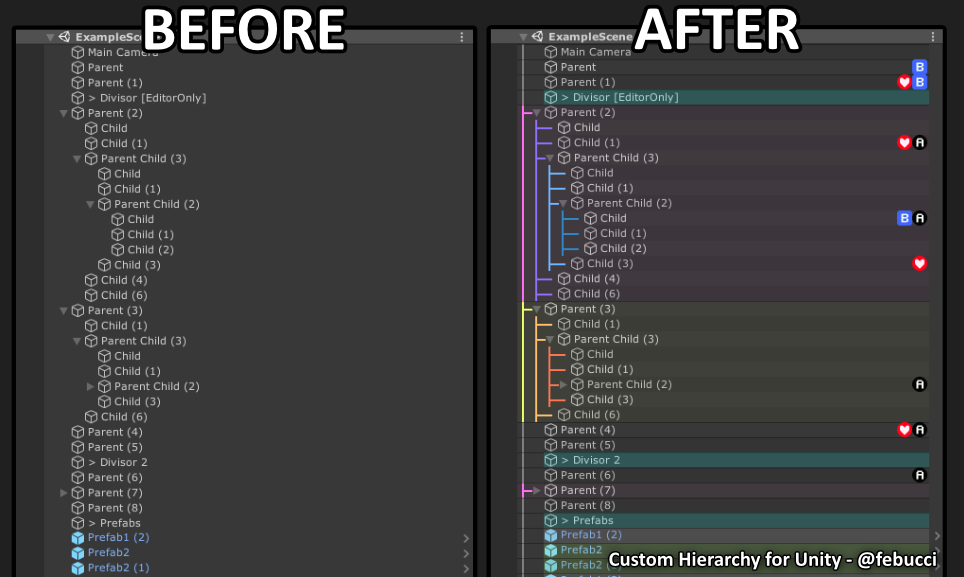
GitHub
Unity package to help having a clearer Hierarchy view, organizing everything in a “tree view” and including extra informations like Components Icons and groups/divisors. - GitHub - febucci/unitypac...
velvet ice
Ahh tysm
mellow hawk
velvet ice
Ahh tysm
make sure you're not inside a prefab btw, you would see something like this in the top left:
cant upload from with in one.
 kindred venture
mellow hawk
Im using this one:
https://github.com/febucci/unitypackage-custom-hierarchy
kindred venture
mellow hawk
Im using this one:
https://github.com/febucci/unitypackage-custom-hierarchy
ah nice ^^
mellow hawk
Its a helpful one imo lol
kindred venture
I use a different tool for that, but yours looks good to ^^

 wooden ginkgo
does anyone know if there's a prefab for this but for avatars? https://booth.pm/ja/items/2657402

※English Description below [2021/08/17] v2.1 Unity2019対応。VRChatのログに大量のログを出力してしまうことがある不具合を修正。 VRChatワールドに配置できるポテトチップスです。 ギミックにより食べることができます。音が鳴ったりエフェクトが出ます。 SDK3 + UdonSharp専用ですが、Udon知識ゼロでも簡単に導入できます。 更にUdon Chips対応でポテチに課金しちゃおう。 サンプルワールド:
kindred venture
Uhhh, ik that Hai made the Avatar who had this but I don't know if you can get it somewhere
 brazen locust
I don't quite understand the difference between grabbing and posing and the documentation doesn't help - anyone able to explain it please?
Ah I get it now - posing allows the player to fix the bone in its position after letting go.
 arctic tangle
Is there a tutorial anywhere to follow for applying effects when slapped? Every tutorial I find is particles or facial expressions. I'm just trying to figure out how to make a handprint appear with a slap sound effect when hit =[
velvet ice
@kindred venture hey another quick question
jolly crane
kindred venture
ahhh, right lick on your avatar and press "unpack prefab"
this is bad advice
they most likely did not need to unpack, they most likely tried to drag an object between two bones, rather than onto a bone in the hierarchy
keeping FBX link is very useful for future updates
timber saddle
arctic tangle
Is there a tutorial anywhere to follow for applying effects when slapped? Every ...
Sippbox made one for high five. Just change it to recieving

With the avatar dynamics system of features, Contacts allow you to drive animations on your avatar when you or other players interact with them! This allows many features like grabbable objects, or having your avatar's face react when headpatted! This tutorial will show you how Contacts work, and also show you how to set up a high five particle ...
I literally used this to make a comic book i can bap people with like totless
reacts to "head", makes bap sound and uses that particle to make it look like i'm whapping the daylights outta someone
Actually i used her comic book model, just retextured it, heheh..
timber saddle
mellow hawk
should look something like this
oh i love that your hierarchy is colored. How do you get that?
neeeeeeeevermind, scrolled and saw
arctic tangle
@timber saddle Have been sent that 3 times now. Not what I'm looking for =/
timber saddle
it's a guide on making something happened when slapped..
instead of using your hand and using someone else's hand as the sender, you use your face, make it a contact reciever looking for hand
I also used what i learned from that to make it so that when someone boops my avatar's nose, she blushes
finger - > nose = blush animation
timber saddle
mellow hawk
should look something like this
Actually, weird thing. i get an error when i try to add the git url from that page to package manager...
 arctic tangle
I figured out I can apply the handprint via the "Decal" option onto my avatar. But sadly my avatar has a mirrored skin. So the handprint appears on both...
timber saddle
a little work in blender could fix that
arctic tangle
Don't know blender
timber saddle
either un-mirror your skin, or make a shapekey with the handprint on it like my blush
blender is actually pretty easy to learn.
arctic tangle
That's all foreign to me. I've no idea how to do any of this. I've literally been looking for tutorials on how to do this for hours.
timber saddle

there is no shortage of videos on how to do avatar stuff in blender. Most from vrchat users
arctic tangle
I just want anyones hand, even my own, to come into contact with butt. Followed by slap sound effect with handprint to appear and fade after a second.
I can't use the decal option cause my bloody skin is mirrored and that'd look stupid.
timber saddle
people just like us who learned
leverain, the hand thing is literally taught to you by sippbox's video
make a contact on butt, tell it to use "hand" as it's input
done.
set it to run a parameter, maybe "buttslap"
arctic tangle
Yes, it explains the contact. But I can't get the handprint to appear. And it's assuming you know how to make animations and the like
timber saddle
right click, create animation >
and again there are shit tons of videos on how to do this...
arctic tangle
I don't even know what a shapekey is. Or how to make one
timber saddle
you'd have to make a shapekey in blender
arctic tangle
Fucking blender....
timber saddle
it's basically a slider which moves vertices of the model around
for my blush up there i cut out like, 12 faces
duplicated them, put a texture on them, then pushed them under the face. made a shapekey, which is actually easy.
shapekey makes them move up, so they're seen.
it literally took me less than 5 minutes in blender.
I know it SEEMS daunting, but blender is NOT hard.
it's not 3dsmax or maya, it's MADE to be user friendly
arctic tangle
Aside from not knowing what cut out faces means, or how to use blender and duplicate things, apply textures, just anything to do with blender. I don't even know how to port my avatar to blender.
This is all chinese basically to me and I need stuff explained like I'm 5, lol
timber saddle
again. loooooots of videos
on youtube.
kung even made a series of them.
ya know, kung, up at the top right there.
that kung
and sippbox, also on the right there.. purple name
the resources are there.
there are videos on youtube that can walk you through from making a single vertex to doing some crazy shit
arctic tangle
The video from sippbox shows how to make the contacts. How to edit the shape of it, how to let self/others effect it. How to adjust the receiver and velocity and such. But I'm not trying to make a particle play. I'm trying to make a handprint appear and play a sound.
What his video DOESN'T say, is how to do that. Which apparently requires blender.
timber saddle
it does if you have a mirrored skin and want a handprint, yes.
butthere are videos on HOW to add things like that to your avatar.
arctic tangle
It's assuming you have all the resources which I don't. I just wanted to do this in unity if possible.
timber saddle
and even how to MAKE an avatar, from scratch
considering your skin is mirrored, that's not likely possible.
and you -have- the resources
blender is free, and so is youtube.
arctic tangle
Equivalent of saying, "You CAN make a rocket on your own. Free online classes and information is available on youtube and google. Resources ARE there."
Doesn't account for time and being able to understand so much new stuff at once.
jolly crane
@arctic tangle rather than un-mirroring your whole main texture, you could make a new UV map for the decal
basically each texture slot in Poiyomi allows you to pick which UV channel to use
you can make a new UV map, select the part of the model you want the decal applied to, and unwrap it onto that new UV map
and then have all of the other UV vertices of the model jammed into the 0,0 corner
arctic tangle
There a video tutorial for that somewhere? >.>
Or laid out instructions?
I've no idea how to make a new UV map or anything

I see the UV channels
Do I have to use Blender to make a new UV map or something? Googling it is bringing me to all sorts of videos without much help. Kind of a time waster to sit and watch each 30-60 minute tutorial one by one till I find the right video mentioning what I need to do..
jolly crane
yes, this is something you do in blender
Unity is not a tool for editing models
it's more of an "asset placing" program
it's a game engine after all
timber saddle
learning blender isn't a time waster, blender is how you make 3d assets for vrchat.
and many other things

Want to make your own Anime style avatar? For Things like VRChat, Vtubing/streaming and game creation? Stick around, I'm going to let you in on all my secrets to making something simple, optimised, looks good and works well.
I've been using blender for over a year now, I put a lot of effort into researching useful things related to Avatar creat...
unless you want to pay someone else to make shit for you, learn blender.
at least on a basic level.
Heck i went back to ffxiv modding wit ha whole new understanding of how to do things in blender and was like "yeah, i could make darn near anything now"
arctic tangle
Tried exporting FBX from unity. Took forever. Tried importing into blender. Error.
Yay...
timber saddle
uh.
if you havethe model you have the fbx, there's no "export"
it's on your PC already
right click your avatar, pick "select prefab root"
it will take you to the fbx, right click that and hit "show in explorer"
then it will open a windows folder
copy the address from the top , open blender. file > import > fbx
feed it the address
there's your fbx.
ta'dah, now it's in blender
timber saddle
these are pretty basic windows functions dude.
arctic tangle
Finally got it into blender....
Now to choose. Attempt to find out how to make a second UV map. Or attempt to figure out how to make my skin not mirrored...
arctic tangle
I think I made another UV map in blender. But not sure how to implement it in Unity...
 inland stirrup
Is it a known and accepted thing that having different amounts of Physbone components on a Quest avatar and PC avatar (less and more, respectively) causes all physbone grabbing and syncing to break?
Or having them set up differently.
Example, You have identical setups on both with a chest component and bones, tail, ears and hair. However, you'd like to add some to the rear on PC, but quest is at it's limits. So, you add and properly identify all components with roots and appropriate setups. However, upon testing cross platform interaction, instead of simply (in terms of end user result) syncing up all the ones that can and ignoring the "rear" bones entirely on Quest, suddenly grabbing bones has no effect. OR, worse, it grabs entirely unrelated bones.
At one point, grabbing my tail and stretching it was causing my chest to be grabbed and stretched accordingly.
Which is funny but undesirable.
Is there a way to take advantage of each platforms limits to their fullest (Medium on Both) while also still maintaining grab/pull/pose syncing across platforms?
Otherwise, the PC avatar is completely at the mercy of Quest Limits. (in my case, 6 components, 32 transforms).
Which I can live with, if no other option exists.
I realized I did not check the time and this probably wont get any attention. lol I'll just copy it to bring up another time just in case.
kindred venture
There is a canny for that yeah
inland stirrup
Oh good, alright. Usually I just come here check a bit and I'm vindicated so I never get that far. My bad!
I must miss when it's a topic. Guess it's time to pin the Canny to bookmarks.
 supple garden
quick question:
If I want to use contact receivers, but want them to be properly synced, do I have to make it local and drive an avatar parameter with it?
jolly crane
supple garden
quick question:
If I want to use contact receivers, but want them to be properly...
pretty much
supple garden
so I can't really use the parameter that gets created by the contact receiver, because it could be different on the other end?
jolly crane
supple garden
so I can't really use the parameter that gets created by the contact receiver, b...
correct
supple garden
aight
I suppose I shouldn't tick the "Local Only" checkbox in the parameter driver?
supple garden
wait...
can't I just set it to local in the receiver, and then put the same parameter in the ExpressionParameter list?
jolly crane
I haven't tried to do that, but you're totally free to try it
supple garden
jolly crane
I haven't tried to do that, but you're totally free to try it
I guess you just made a seperate animation layer, and drive the parameter there?
jolly crane
that's one way you could do it yes
I made a simple toggle system using a receiver and parameter drivers
here it is if you want to take a look
this could be used for things like buttons on avatars. there's a set cooldown which you can customize by changing the transition duration on 2 of the transitions
supple garden
naa, it's fine, I know how to set that up. But I was wondering if you could save animation layers (they aren't free performance wise)
supple garden
jolly crane
I haven't tried to do that, but you're totally free to try it
I guess I'll try it with the next thing I'll implement
arctic tangle
I'm still trying with mine....trying to make a decal appear and play a sound when interacted with. Not many tutorials specify how. Specially with sound. I'm at a loss x_x
jolly crane
arctic tangle
I'm still trying with mine....trying to make a decal appear and play a sound wh...
Sippbox made a tutorial on contacts. should watch that
adding sound is as simple as adding an audio source to an object, and enabling that object via an animation
arctic tangle
That video everyone keeps pointing me to expects you know about animations. Which I do not.
jolly crane
that's kind of a fundamental lol
arctic tangle
And I keep trying to find proper tutorials on something which is apparently as simply as that but it's just apparently expected.
jolly crane
right click anywhere in your assets, Create > Animation Controller. call it "_Dummy". drag this controller into the Animator component of your avatar. now you're able to use the Animation window
to make an animation, click the dropdown under the record button and click Create new clip. to add properties to the animation, either hit record and change something, or click Add property and find the property you want
arctic tangle
Trying, "add property" I don't see the sound effect I have saved anywhere. Only the hierarchy
jolly crane
did you already create an empty object and put your audio source component on it?
the object should be parented to the hips
call it like "Slap_SFX"
arctic tangle
Why hips instead of body?
jolly crane
arctic tangle
Why hips instead of body?
Body is your mesh, the origin of which is at 0,0,0
you want to position the audio source where it's supposed to come from
and you want it to move with the hip bone
 toxic dawn
How do you add physbones onto long sleeves without the hand/arm going through it?
do u just add physbones at the end of the long sleeves?
 torn tendon
does the root bone (that has the component) move i forgot
 knotty oracle
Little Problem: I have an avatar with fluffy ears.. so i did put some physbones into them.. but they dosnt move o.O Even the dynamics stuff that normally shows up the blue capsels etc dosnt show up.. it seems like the bone dosnt get regonized.. anyone knows what the problem? We checked in blender and the ears a called HeadL_Root (or R)
Thx, this was the problem ^^
timber saddle
I have a question. How do people make these things you can grab with physbones that are not part of their body? Such as the popular among us follower
I want to make a little camera bot that follows me but I can grab it and change it's location
Really. So it doesn't have to have an actual link to you?
You know, I also tried to make a floating sword on a dynamic bone once and that went all sorts of wrong. I assumed it had to be connected to me to follow me ..
jolly crane
timber saddle
You know, I also tried to make a floating sword on a dynamic bone once and that ...
the follower is based on a world constraint and the ancient particle driver system to detect when it's in the rest position for the animations, not really the same thing
the reason as to why it's using the particle driver system rather than contacts is so it can be self contained
no messing with FX
timber saddle
hm
jolly crane
if you want to leave stuff in the world, that's just a world constraint
timber saddle
that sounds a bit above my understanding of how to work with..
jolly crane
as for the stuff you can grab, you'd use physbones
you can make a self-referencing physbone so that there is no limit to how far it can go
timber saddle
no, i wanted something that followed me, but i could grab it and move it's follow position
jolly crane
possible, but would not be synced
timber saddle
doesn't really need to
jolly crane
like
if it was on your left, and you grab it to move it to your right, late joiners still see it on your left
timber saddle
i use a unity camera when streaming instead of the vrchat camera with a huge beam
jolly crane
or whereever the default is
timber saddle
and that's what i wanted to make float
jolly crane
right
timber saddle
hence "camera bot"
so really it only matters where i see it
plus it'll go invisible when i'm not repositioning it
i jsut don't like the vrchat camera because if you go to any public world you become a target via that big red beam
people trying to get in front of your camera, cursing and using other slurs
jolly crane
how is the unity camera set up so that it doesn't fuck with your view in VR?
timber saddle
displays on right eye only, and i put it far on the edge of my view

i can -barely- see that, in VR
but when i capture right eye with OBS, well, there it is
jolly crane
I see
timber saddle
like to see the camera display i have to pretty much PRESS my headset against my face, it's that far off on the edge of the view
torn tendon
can someone tell me how to toggle an object with recievers without sending me to sippbox's tutorial? Im learning nothing from that video.
I just need to know how to make an object stay once its spawned
I know how to set everything up except how to make the object stay
arctic tangle
Been trying that for a day. They just send you back to the same video. That or they send a tutorial that just assumes you have prior knowledge of different mechanics in Unity. Not really many good walkthroughs for newcomers like myself. Just vague tutorials with very broad wording.
torn tendon
I learned nearly everything i need avatar related from sippbox's videos but that one is too in depth. I dont want to watch and decode through 7 minutes of stuff. I just need a quick how-to like nearly all his other videos do but I cant get a straight answer
I didnt need to even think about bools or floats and suddenly i do with no knowledge
arctic tangle
Good luck. They'll send you to a series of tutorial videos each 60 minutes long then. "The information is there! You have the tools at your disposal!"
Some people may know what they're doing in Unity and blender, sure. But man.....they are not good teachers.
 silent lava
when doing contact animations (like headpats) and you create a default state that sets these blendshapes to 0 doesn't that conflict with facial expressions that normally use these?
🤔
 simple elk
set 2 conditions to trigger, they wont
silent lava
simple elk
set 2 conditions to trigger, they wont
can you go more in-depth 👀
arctic tangle
Hell, I spent all yesterday trying to learn to make new UV map to apply decals. Finally got it working. Got both decals placed individually on my avatar (which I had to do since it's a mirrored skin) and was finally happy I made progress. Turns out the entire avatar got botched somehow in transferring to unity. Lost all toggles and everything. Shoddy attempt at an animation didn't even work to boot. There's so much that can be done via blender and unity it's difficult finding a tutorial for EXACTLY what you want.
simple elk
contact parameter = false allow to do normal stuff, if petted, contact parameter = true -> you are now not allowed to do normal stuff until its back to false
silent lava
that sounds useful. where do i add this parameter 🤔
i didn't bother with dynamics much until now
i do know the basics
simple elk
2nd condition on stuff you dont want to interfere,
silent lava
so when headpat parameter is 0 it also puts contact to 0 you're saying? but how does that free the blendshape from the default state?
a transition to exit with the contact parameter?
basically i am using a few blendshapes in my headpat expression for my facial expressions and that kinda conflicts
all i got from that now is a bool with the name contact but.. nothing else
simple elk
if petted = you are now not allowed to do this gesture (exsample)

it must be false to trigger
silent lava
isn't that my problem but backwards
simple elk
I use wd on , off is a pain and more work then its worth having to mask stuff to behave
silent lava
simple elk
I use wd on , off is a pain and more work then its worth having to mask stuff to...
so.. either the tutorials i was looking at did the wrong setup or this is a non-issue
let's say i use the same blendshapes i use in some of my facial expressions in the headpat animation. but for the default state (off) i need to put these blendshapes to 0 right? so if i do that doesn't that override any of the facial expressions i use for these specific blendshapes to 0?
unless this is the wrong layer setup people have been posting idk
arctic tangle
All I wanted was to add a handprint that plays a slap sound effect when hit by someone. Now the entire avatar is broken. I'd like to die now, thanks.
supple garden
@jolly crane Oi!
I confirmed it. You don't need a seperate layer to have synchronized parameters with contact receivers, just set it to local, and put it in the expression parameters list, done.
jolly crane
nice, good to know
kindred venture
supple garden
<@93092275638251520> Oi!
I confirmed it. You don't need a seperate layer to have...
Yup, that's actually how the documentary says to do it if I remember correctly.
hardy estuary
Question about the physbones, what causes my radius to be absurdly large. i have to set it to .001 to be small enough.
simple elk
avatar scaled 1.1.1 in scene?
hardy estuary
yup
 gloomy linden
, with the ik 2.0 update physbones break for fullbody as they become jittery and like double image
simple elk
'isanimated' bug, fixed in open beta one
supple garden
simple elk
'isanimated' bug, fixed in open beta one
they have to wait for the QA team to recover from their weekend hangover ;)
short narwhal
it's also Memorial Day today so they might have work off
 errant notch
supple garden
they have to wait for the QA team to recover from their weekend hangover ;)
errant notch
supple garden
they have to wait for the QA team to recover from their weekend hangover ;)
If only they hired me, I don't get hangovers lol
arctic tangle
So I got the "game objects" in both left and right set as "contact receivers". They're both activated by hand and it's set to "on enter" with a velocity of .2

On the same "game object" that is the contact receiver, I have a, "VRC Spatial audio source" with the sound file attached. This is done for both left and right so each one SHOULD be activated individually.

"Gain" and "far" both set to 1. I am not sure what to do after this o__o
Oh and they're set to be under the "Hips" of my avatar. Dunno if that matters
 peak jackal
so, with the new physbones, can and should we remove the duplicated bones needed for dynamic bones in the past?
 wet quiver
Anyone know why I can't find vrc phys bone component

 ripe sphinx
wet quiver
Anyone know why I can't find vrc phys bone component
ripe sphinx
wet quiver
Anyone know why I can't find vrc phys bone component
Just search phys
 toxic granite
Just to make sure I'm not going crazy, I nabbed the latest vrc SDK avatars and now physbones the collision radius seems ... insane, anyone else have this?
ripe sphinx
If your armatures default scale is 100
You’ll need very tiny radii
My physbones radii is like 0.0001
toxic granite
I see, I wonder how that happened
ripe sphinx
Just normal unity scaling things
toxic granite
Well previous version of my avatar it didn't do that, though, cats seems broken atm for the version of blender I'm using, and it won't let me export
 thorn tendon
hey i wanted to ask, do phys bones have the same exclusion function as dynamic bones?
where for example i could exclude one bone from the hair root
kindred venture
ripe sphinx
Just normal unity scaling things
It's not really a Unity scaling thing, more a not proper exporting out of Blender thing
kindred venture
Yeah you have to change a setting in your export window, or just use cats
thorn tendon
thorn tendon
hey i wanted to ask, do phys bones have the same exclusion function as dynamic b...
i couldnt find the answer anywhere online so im asking here
toxic granite
kindred venture
Yeah you have to change a setting in your export window, or just use cats
Cats is broken in current blender, can't find the version
 kindred venture
Yeah it's called Ignore Transforms
Im surprised you couldn't find it, it's described in the Phys Bone documentation
thorn tendon
i got confused because it's referred to in a different way
kindred venture
ripe sphinx
Just gotta account for that with scaling stuff
It can cause issues with Phys Bones, especially if you want to use parameters like Stretch or Angle
 rugged steeple
ripe sphinx
Not big issue
rugged steeple
ripe sphinx
Not big issue
Just for future reference, a lot of bugs in the past were related to improper scaling and trying to just compensate Unity-side. So properly exporting would be the first thing to check if things start acting unexpected ways.
ripe sphinx
kindred venture
It can cause issues with Phys Bones, especially if you want to use parameters li...
I see, however I haven’t had any issues yet
jolly crane
ripe sphinx
I export my avi at 1 scale
you always need to export with "Apply scalings" set to FBX All
if you want to ensure it's always set that way, export using CATS
or make your own export preset
should also disable "Add leaf bones"
kindred venture
On bones you want to add Phys Bones to it's recommendations to either manually add end bones in Blender, or in Unity with an empty object or to set an end position on the Phys Bone script if you disable leaf bones in Blender.
timber saddle
wait a sec. is there a worlds dynamics SDK? Like can dynamics interact with stuff in worlds? Like could you make a contact receiver on an object in a world and when your hand touches it, an alarm goes off?
or a dummy for checking collision items against
simple elk
not yet
simple elk
after ui update my guess 2023
 gloomy jewel
can someone help me out something real quick related to contact receivers?
rugged steeple
timber saddle
wait a sec. is there a worlds dynamics SDK? Like can dynamics interact with stuf...
I was going to start something similar back before VRC initially broke stop-action animators when they added parameter persistence to 3.0. If they added that contact support to worlds, I expect huge things.
That was also well before Udon released as well. So my plans could be even more easily fleshed out by then. The aspects of Udon I required, that is. *
 vocal vigil
could anyone help with this error -.- ... even making a Default setting Phybone still puts out the same error
 timber saddle
rugged steeple
I was going to start something similar back before VRC initially broke stop-acti...
timber saddle
rugged steeple
I was going to start something similar back before VRC initially broke stop-acti...
I mean my thought was a regular dummy that i could test my contacts on, such as hand slap, comic book whap, and other weapon-hitters. I guess the only real way to test is grab a friend or alt account. Would be nice if they make something for worlds we can make this stuff interact with, though. Like imagine custom pool sticks for the pool games in vrc. use your own
rugged steeple
timber saddle
I mean my thought was a regular dummy that i could test my contacts on, such as ...
Was thinking a world that drives your avatar's parameters. Make a set of avatars with specified contact tags or put instructions for how to make your own in the "lobby". Go out into the world and say, advance a blood dissolve to show damage, change clothes at a shop using contacts to make purchases, or remove a limb if you find a decent trap. Etc.
timber saddle
heck even more than that, contacts could be used for combat worlds
rugged steeple
Instead of just the avatar and the world functioning as separate entities, they are one cohesive set.
timber saddle
bullet contacted torso
bullet contacted head
do damage
Honestly i've sat here and went "could i make a gun have a contact bullet that "shoots" by animating forward from the gun? it would hit someone's "chest" or "head" then trigger a blood spatter and sound, and would not require projectiles
rugged steeple
Bullet part is difficult because most default to particles for projectiles, but that would require objects. Which, I enjoy making, but are admittedly a hassle sometimes.
rugged steeple
timber saddle
Honestly i've sat here and went "could i make a gun have a contact bullet that "...
Yes.
timber saddle
only thing is there's nothing to detect walls, so you could shoot people across the world
rugged steeple
Oh, no. They can detect walls fine.
rugged steeple
Not a bone, but an object yes.
You can use objects as projectiles. Very versatile. A lot easier now than like 3 years ago.
And AD makes it fairly simple. And much easier to sync.
timber saddle
oh wait you can throw a prefab into a particle can't you?
so make that have a dynamics collider, and there you go, a bullet that knows it hit your torso
rugged steeple
I don't think that's possible.
timber saddle
isn't that how you made a 3d object like a shell casing model spit out of a gun?
a prefab object in the particle emitter
rugged steeple
Particles are purely visual and locally simulated.
Unless scripting.
That's a mesh particle.
It's basically like taking a bunch of billboard particles and organizing them into that mesh's shape and then applying the UV.
Oversimplified, but think of it that way.
There are a few ways to project an object. The important part is kind of like setting up the sync.
Can use looping root motion animators on some null and animate the scale to adjust speed.
Then constraint to that.
Best bet would be a raycast working with all of that in tandem. 😅
timber saddle
does new SDK mean i HAVE to upload to fix my vibrating tail?
or is it just fixed now and thats it?
rugged steeple
The issue was client-side, so it's corrected.
timber saddle
woo!
wet quiver
ripe sphinx
Just search phys
I did that I just found out that I ues the Wong sdk I have like five of them on my desk top
 austere python
How is this possible, 132 colision checks and i have one colider and 7 physibones components

All of em have the coliders set to one
Only the hair roots have coliders set, is it doing a colision check for every transform?
 molten blade
austere python
Only the hair roots have coliders set, is it doing a colision check for every tr...
molten blade
austere python
Only the hair roots have coliders set, is it doing a colision check for every tr...
yes, that is how physbones works
austere python
Ah ok that makes sense
Is there a way i could keep the dynamics on most of the hair whilst dropping the transform count?
jolly crane
austere python
Is there a way i could keep the dynamics on most of the hair whilst dropping the...
severely reduce the amount of hair bones
austere python
Yeah but that means blender
jolly crane
yep
austere python
Ima just jimmy rig it
jolly crane
if you don't fall under the physbone limit, they will all be removed
austere python
Yeah ik
 onyx vapor
austere python
Is there a way i could keep the dynamics on most of the hair whilst dropping the...
onyx vapor
austere python
Is there a way i could keep the dynamics on most of the hair whilst dropping the...
You could add a bunch of exceptions for the end parts of your hair bone chains
kindred venture
jolly crane
if you don't fall under the physbone limit, they will *all* be removed
You actually can't even upload when you are above the limit
 latent mirage
austere python
Yeah ik
latent mirage
austere python
Yeah ik
Do you sincerely need colliders for the hair? Perhaps constraining the angle and rotating it away from the head will work
kindred venture
Especially for a Quest version
 fair sundial
or try using physbone limits, that could work to prevent clipping
kindred venture
fair sundial
or try using physbone limits, that could work to prevent clipping
I think that's what @latent mirage meant.
kindred venture
Yeah they are, but with "constraining" they just meant limiting. As snekko said, it's just worded wierd.
latent mirage
Yeah, my brain is not all there anymore (blame covid), so my sentences are a little off, but that’s what I meant haha
kindred venture
no problem ^^
 torn tendon
Does anyone have an idea why this happens to my breasts all of the sudden O__o ?
It's also not caused by any Collision either
rugged steeple
But the breast itself doesn't move?
torn tendon
Yeah its weird af
rugged steeple
Unless there's something outside of that script on its own, everything looks alright aside from that spazzing.
Like, does it move alright when grabbed or moved?
torn tendon
Okay nvm, its the collider size, its not normalized to 0-1
Guess i forgot while exporting the FBX
Nothing a good old /100 can't fix in the number input ;)
(Yes, you can do math inside of scalar fields)
 normal meadow
Is it possible to set up some dynamics in such a way that would let others steal my hat?
rugged steeple
normal meadow
Is it possible to set up some dynamics in such a way that would let others steal...
Depends on how good you want it to look.
Without rotation, it's about as easy as adding stretch and enabling posing.
If you want them to be able to wear it themselves, you'd need to use a contact tracking rube goldberg, but that still wouldn't handle rotation.
normal meadow
i can live without rotation
rugged steeple
Without rotation, it turns when you turn its parent bone, etc.
normal meadow
so if they steal it and i look down then the hat will turn as if it was on my head? right?
rugged steeple
Probably. Unless they keep hold of it and the stretch is right.
If it's a chain it could have angles.
normal meadow
what if i made it parent with a parent constraint and just have it turn off when its not close enough to my head?
like have it only track my head when its close enough
rugged steeple
As long as you don't mind not seeing it.
Because things on head are shrunk down locally.
normal meadow
yeah but if it gets far away enough wont i see it?
rugged steeple
Nope.
normal meadow
ah
rugged steeple
Because it's still weighted to head and the VRC setup for that doesn't distinguish.
normal meadow
i was going to have it not weighted to the head
rugged steeple
Then it'd possibly be in your camera at all times, but if you didn't mind that.
normal meadow
and use a parent constraint to have it connect when no one steals it
I'll try the first idea for tonight tho, using just physbones
rugged steeple
normal meadow
and use a parent constraint to have it connect when no one steals it
Because of contacts/IsGrabbed being a thing, you could enable a second mesh when they grab it so you could avoid the head stuff too, btw.
normal meadow
i could do that
I'll try them all out n see what works best
thanks for your help!
rugged steeple

torn tendon
ripe sphinx
But I didn’t know Unity did it too
Yeah, it's great
latent mirage
Anyone good with world constaints + physbones know how to leave an object and connect it back to yourself?
timber saddle
Interesting idea...
rugged steeple
latent mirage
Anyone good with world constaints + physbones know how to leave an object and co...
Any different from a typical world dropped object ooor?
Like _IsGrabbed true advances to a state that has a transition from it on _IsGrabbed false to toggle the parent constraint.
Just rip off someone's bones and drop them in the world. EZPZ
If you wanted to make it easily reattachable, just add some simple contacts.
latent mirage
Ok, thank you!
 nocturne salmon
Is it possible to change properties of an VRC Receiver in an animation? I can see it changing in unity itself but not ingame... I debugged it too- does it even work in game?
 floral junco
Is there a way to make physbones stretch without grabbing it?
 thorny isle
nope
thorny isle
floral junco
Is there a way to make physbones stretch without grabbing it?
can vote this canny
https://feedback.vrchat.com/avatar-dynamics-reports-and-feedback/p/feedback-inside-colliders-stretch
 hardy estuary
Is the capsule receiver working now ?
i remember a few weeks back it didn't work and i had to use the sphere but i wanted to know if this was addressed
 trail vapor
Is there a easy way to do spring ball joint in unity? Can you add phys bone to a bone-less obj and attach it to armature?
mellow hawk
hardy estuary
i remember a few weeks back it didn't work and i had to use the sphere but i wan...
Should be able to do it now, the sdk didn't show height before.
trail vapor
I want to make this halo spring over my head and able to be grabbed, but all I managed to do is to make it follow along the head
mellow hawk
For grabbing, you need phys bones to have a radius.
trail vapor
it does have radius, right now it's fixed to the head and won't move relative to the head at all
The obj had no bones in it to begin with, it's simply an mesh obj. Could this be the problem?
trail vapor
hmmm?
rugged steeple
What do you want to do when you Grab it?
Pull it away from where it sits or just make it pivot?
trail vapor
Pull it away, and itself should be able to spring back and forth as the head moves
just like hair
rugged steeple
You have a grandparent and parent object?
trail vapor
 rugged steeple
It needs another object between them so it knows what to pivot from.
And it needs an offset so it has a distance to pivot with.
So Hat Root has the script, then Ring Parent then Ring.
Could put Ring Parent between those two objects.
trail vapor
hmmmm lemme create another object just for the ring
trail vapor
rugged steeple
Could put Ring Parent between those two objects.
It works! but grabbing is still weird. lemme see what to tweak,,, ty
 rugged steeple

onyx vapor
Is there a performance way to detect where on a contact a collision occurred?
For example- I have a big contact covering my torso and I want a particle system to move to and emit some particles at the point where someone touches with their hand.
My only two ideas are:
-Have like 10 smaller receivers to detect a bit more accurately where the contact happened
-have a particle system that emits a scattered field of invisible particles that die on collision then trigger a sub emitter (although I think that would only work for player capsules...)
 calm owl
If raycasts are allowed in vrc, ive seen some neat physbone stuff in editor using them to do that sort of effect. The article was in japanese so i didnt quite understand it or had the time/chance to reverse engineer it
 shrewd lotus
I cant get my "SwordCarry" parameter to change despite the fact that I set the receiver to set it to 1 when the right hand collides


The "SwordCarry" float doesnt change
rugged steeple
onyx vapor
Is there a performance way to detect where on a contact a collision occurred?
F...
So you can do some stuff similar with emitters on yourself and just using a single torso collider as a trigger. You may be able to get a contact tracker setup that does that with others so you just attach your own particle emitter to their finger. It depends on what you want it to do. If it's just the emission, it may not be so bad.
kindred venture
shrewd lotus
I cant get my "SwordCarry" parameter to change despite the fact that I set the r...
Aren't you touching it with your left hand in that picture?
shrewd lotus
It's my right, that photo is taken in a mirror
Regardless neither hand does anything
kindred venture
Hm weird
shrewd lotus
I check the parameter in debug mode and nothing
kindred venture
You don't even need to look for that, of a Contact Reciver is getting activated it would turn green in the overlay
shrewd lotus
Oh
kindred venture
shrewd lotus
I cant get my "SwordCarry" parameter to change despite the fact that I set the r...
So if it would work, it would trun green.
Random Question but do you have "Self Interact" disabled?
(Ingame Quick Menu settings page)
shrewd lotus
I don't think I do have it disabled, I will need to check later
Usually I grab my tail on one of my other avatars so I'd be surprised if it was disabled
kindred venture
Hm weird
 solar cypress
General question. I'm trying to make a stretch some bones that have phybones on and the bones drift out of position. like the hair is interreacting with itself and bending up or down, or ontop of itself. any insight as to why this is happening?
 cedar helm
I made a Physbones interactable where I can grab and pull out a sword, but it seems to get desynced for some people where it doesn’t pull out at all. The only way to fix it is to reset the avatar. Is there a way for it not to desync?
 crude wyvern
anyone got any ideas on how i PUSH a physbone in a button and not have to GRAB it and pull it (prefferable so parameter_Stretch works with it)?
mellow hawk
You probably want to use a contact receiver with proximity if want to push and not grab.
 severe kite
Is there any common "standard" that players use for combat objects on avatars, some means that I can use to detect if my avatar has been hit by a gun or melee weapon (granted the attacker uses these aforementioned hypothetical standards)?
I wanted to have some haptic feedback for that stuff mostly just as an experimental thing. My thinking now was to use velocity for melee since that is fairly universal and simple, the concept of "fast moving thing making sudden impact = hurt", but I am not sure of if I can listen for particle impacts or not
jolly crane
severe kite
Is there any common "standard" that players use for combat objects on avatars, s...
one group I'm in uses the tag "Damage" for their weapon interaction
severe kite
Hmm
To the best of my knowledge only melee is feasible under avatar dynamics, I am not sure if recognizing particles is even possible
kindred venture
jolly crane
one group I'm in uses the tag "Damage" for their weapon interaction
Yup, Damage is also what people agreed on during the Open Beta period, I would highly recommend to use that one. ^^
swift sentinel
severe kite
To the best of my knowledge only melee is feasible under avatar dynamics, I am n...
I've seen something from Firelis... One person takes a hit from someone going around them.
mellow hawk
Someone really should make a table for all the most used tags lol
hardy estuary
do you have tips to make small objects not wiggle like crazy when moving. I tried having a bunch of different stiffness and cranking the immobile and regardless the earing just vibrates a lot.
https://gyazo.com/57a9e65f71c04a30bd9a88c2c734514e
 hardy estuary
as of now it's
 rugged steeple
severe kite
To the best of my knowledge only melee is feasible under avatar dynamics, I am n...
rugged steeple
severe kite
To the best of my knowledge only melee is feasible under avatar dynamics, I am n...
You can fire objects, the problems is the rate of fire.
I'm doing that now. If we're saying Damage is a tag, maybe I'll toss some tags on my bolts.
severe kite
Rate shouldn't be much of a problem for me, not looking to make it perfect, just functional
rugged steeple
I want to have believable gravity, so I'm not happy with it enough to release it, but if it's just firing in straight lines at variable velocities, that's done.
Refuse to use physics because the sync is poor af. But most would just resort to that. So if you want something quick and dirty, there's that.
hardy estuary
i tried with everything at 0 and as long as im pulling it in a direction it wiggles instead of getting dragged behind.
rugged steeple
Pull could be a bit lower too. Dunno about momentum down a "lot" though.
hardy estuary
ill show you want everything down to 0 does
rugged steeple
Stiffness could be 0 and Gravity Falloff at 1 rather than 0 so it's not acting like force from DB and more like actual gravity from DB.

 rugged steeple
Something's not right if 0 pull has it trying to return to rest state still.
hardy estuary
its the gravity
rugged steeple
0 pull is like elasticity 0, Gravity Falloff 1 means gravity wouldn't kick in until you rotate the parent.
You're just sliding pos, not rot.
So it's acting strange. It's not supposed to be excluded from some other script that might be affecting it?
hardy estuary
Here's what it looks like without the gravity , same wiggle error
https://gyazo.com/00979baf84ae20a9f8ba2919d5f371a9


everything is at 0 on that
 steel thistle
hardy estuary
Here's what it looks like without the gravity , same wiggle error
https://gyazo....
steel thistle
hardy estuary
Here's what it looks like without the gravity , same wiggle error
https://gyazo....
It's more like that you have another physbone component controlling the same
hardy estuary
pretty sure i do not but let me check everything again
actually that was it, i made a copy mistake and left another bone reference somewhere else affecting it . Thanks for the help
 rough dove
does anyone know how to make a prop that other people can grab from your avatar? i've been having trouble and whenever someone grabs it, the object starts rotating weirdly.
 daring compass
Is it intended behavior that only one Contact Receiver can impact a parameter?
I have 3 receivers for one parameter and only one of them actually affects the parameter.
If this is intended, it should really be documented. Would have saved a massive headache 😅
calm owl
logically you have three things changing one parameter. Its not gonna choose the highest of the three its going to, in order, set what they believe the parameter should be
hardy estuary
Im getting a lot of desync with the sender receiver , where oftern if i touch to quickly , the animation plays out for me but not for the people watching. Any idea if there's a fix?
daring compass
calm owl
logically you have three things changing one parameter. Its not gonna choose the...
It is not difficult to take the max of 3 inputs. Which is why I assumed it would work that way 🤷♀️
If their implementation doesn't do that, it should be documented that it doesn't. I'd be surprised if I was the only one bit by this.
hardy estuary
If they remain this way i don't think i'll use them much since too much relies on guessing if everyone is seeing the right thing
mellow hawk
daring compass
Is it intended behavior that only one Contact Receiver can impact a parameter?
The contacts are just animation drivers, Just throwing together together a quick demo to test it.
I sets the value to 1 if any contact is inside it and sets it to 0 when any exits.
daring compass
mellow hawk
The contacts are just animation drivers, Just throwing together together a quick...
Well, that's a bummer. I was able to work around it be adding some additional parameters and complex transition logic. Seems a bit silly but here we are.

Each receiver now changes a different parameter.

Though, thinking back on it I do have two receivers affecting the same parameter and they're working just fine. I think it may be because the 3 receivers in question are proximity receivers and the 2 that work are simply constant receivers.
rugged steeple
daring compass
Well, that's a bummer. I was able to work around it be adding some additional pa...
Why not just use parameter driving state behaviors though. I had to do the same with a radial I wanted to separately animate in my menu but still allow others to animate via proximity.
daring compass
rugged steeple
Why not just use parameter driving state behaviors though. I had to do the same ...
Because I know enough Unity to be dangerous but not enough to be smart about it. Could you explain further?
rugged steeple
It depends on what you want to do. I had a local int that I could advance via parameter drivers with a proximity contact. Once the Int increases to a specified value, it jumps to another state. I can also reverse the driving with an inversion of that same Int.
Original

Proxy

LOL It works flawlessly, but it probably is weird from a distance if you dunno what you're looking at.
daring compass
So, the idea was to have the Heartbeat blend tree's parameter increase the closer someone got to a hand or the chest and decrease the further they got until a value of zero. So I had 3 proximity receivers. One on each hand and one on the chest.
Nothing else controls the heartbeat
rugged steeple
Proximity contacts will just take closest of whatever sender, yeah. So I have like 3 tags for my proximity and I still have full control from my menu.
daring compass
Yep, correct. That's not the issue
The issue is that having more than one proximity receiver feeding the parameter causes two of the receivers to break and not affect the Heartbeat
rugged steeple
I know what you're saying. I just explained the solution I came to above, is all.
daring compass
My bad
rugged steeple
You can make that single float from the proximity contact be driven in a control layer using a local int.
Actually, wait.
Why are you using 3?
Just use 1 and add 3 tags to it?
daring compass
I am very confused now
rugged steeple
A receiver can have more than 1 tag.
If you don't need to use your menu for it still, just add all 3 tags to that one receiver.
It'd take the closest of the 3.
daring compass
 rugged steeple
That makes more sense.
I thought you meant someone else's multiple contacts and your 1 chest reciever.
So you want to mess with just 1 float using all 3 of those separately. I would still rely on parameter drivers for this. If yours works, the work is done in your way and it'll be good enough.
If it doesn't, you can always try what I described.
daring compass
It does work, but if the way you've described to me is easier than I think that's preferable to my implementation
 robust pecan
How would I make it so only one bone in a chain is collidable/grabbable?
I want the entire chain to move with it
but I only want the end bone to be interactable
jolly crane
robust pecan
How would I make it so only one bone in a chain is collidable/grabbable?
can't grab something that has 0 radius, so maybe use a radius curve to make the radius of every other bone in the chain 0?
robust pecan
jolly crane
can't grab something that has 0 radius, so maybe use a radius curve to make the ...
Thanks
rugged steeple
You can actually grab 0 radius bones, but they'll probably figure that out.
robust pecan
rugged steeple
You can actually grab 0 radius bones, but they'll probably figure that out.
Much more difficult tho
rugged steeple
Not true.
At all.
Your hand grab spheres are huge and will grab anything inside when you do the inputs.
0 radius isn't actually 0.
It's just a thread. And a huge sphere still grabs that thread.
It'd be nice if it were true.
Because I'd have liked to not have done a standard VRC hack-level work-around.
Collision on the other hand is different. But they said grab.
 cerulean agate
rugged steeple
You can actually grab 0 radius bones, but they'll probably figure that out.
cerulean agate
rugged steeple
You can actually grab 0 radius bones, but they'll probably figure that out.
you've never been able to grab 0 radius
it phases through your hands. I've tried a lot. every one of my avatars has 0 radius bones, and none of the dynamic bones are interactable at all. a lot of friends have tried too
I wish it weren't the case, but I've never seen it work
if it's 0.001 then you would be right because it's not 0 any more and it's small but still possible to grab
if radius=0 works for you but not for me, I'd be interested to see what the difference is. Or is it only converted dynamic bones with radius 0 that don't work?
jolly crane
in my experience, 0 radius does not work. however, if you set a radius on a chain, but then use a curve to make the radius of every bone except the last 0, I'm hoping that it would actually not allow you to grab those first bones with 0 radius
kindred venture
cerulean agate
it phases through your hands. I've tried a lot. every one of my avatars has 0 ra...
I think it's a cool thing that a radius of 0 = no collision. With that you can use curves to disable collision for some sections of the chain for example. One thing that could have been done better is to give all bones a minimum collision radius of something like 0.001 after auto conversion, so that people who never change the collider radius on their DB would still be able to move them around.
 turbid badger
jolly crane
in my experience, 0 radius does not work. however, if you set a radius on a chai...
turbid badger
jolly crane
in my experience, 0 radius does not work. however, if you set a radius on a chai...
doesnt exist
0 radius * anything is still 0
robust pecan
How would I go about making something toggled on by contacts on an avatar?
I wanna make it so when someone triggers basically a button on my avatar it'd toggle a prop
I have this setup to happen when my contact parameter is 1 but it doesn't seem to actually work and I'm confused as to why
 turbid badger
u can multiply by 0 but not increment
turbid badger
robust pecan
How would I go about making something toggled on by contacts on an avatar?
I wan...
i dont think it works in unity only in game
no idea why the parameter driver stuff isnt done in editor
robust pecan
turbid badger
i dont think it works in unity only in game
It doesn't work in game though!
and I don't know why
The contact works it sets Hit to 1/True but then Hit doesn't set HitToggle to true and I have no idea why
Here's the transition as maybe it's the problem?

I'm trying to get something network synced so Quest can shoot/select an avatar and have it do stuff even though the way I have shooting/select set up doesn't work on the Quest side
 broken quartz
uhhhhh am i blind or is there no height option?

the capsule is rly tall but i cant seem to change it
do i need to reimport? =w=
robust pecan
broken quartz
do i need to reimport? =w=
Possibly as there's supposed to be a height option under radius
broken quartz
;w; ok e
turbid badger
broken quartz
uhhhhh am i blind or is there no height option?
probably older sdk
broken quartz
yeah i had to update.. it was only a week old tho ;;
wait is there supposed to be a height orientation tho
like on y or x axis
or is that db
aaah u can rotate it
rugged steeple
cerulean agate
you've never been able to grab 0 radius
You're not correct. I'm sorry. The line that shows the PB remains and the only thing that reducing it to 0 effects is the proximity you have to be in order to grab it. Collision still even works at 0 radius, it's just more diffcult to do. But you can still grab the "0" strands.
Like, you can literally still see the grab points in the PB debug in-game too even.
cerulean agate
I have never, ever been able to grab a 0 radius bone on any avatar, nor have I seen anyone else do it
I'm sorry, but it's to the point where I would need actual working proof of this
like, a model with radius 0 that works, or a video or something
rugged steeple
Also, yes, for context, I used both a script without a curve setting it directly to 0 and a curve with it setting only parts of the chain to 0.
cerulean agate
that's different, and may work
I'm talking about the case where there is no curve, or the radius box itself says 0
or converted from DB with radius 0
rugged steeple
Both are grabbable regardless, though.
rugged steeple
The conversion was bad, I started over in every case of conversion.
cerulean agate
if it's infintessimally small and works 1 in 1000 times, I don't consider it working
yeah, the problem is I have a lot of SDK2 avatars, or avatars I can't easily reupload
though I guess I could make a tool to edit the .vrca and change the radius, then reupload
wait.... actually that might be doable
lol
rugged steeple
cerulean agate
I'm sorry, but it's to the point where I would need actual working proof of this
I think I'm in the same boat. Only, it'd have to not just be PB being broken, which is very often without you even realizing it.
cerulean agate
I don't think PB still breaks that much
haven't run into it since the previous update
kindred venture
cerulean agate
I have never, ever been able to grab a 0 radius bone on any avatar, nor have I s...
If you set it to 0 with a curve you can still grab it from what I know, not when just setting it 0 in general. (At least this was an issue during the beta idk if that's still the case though)
rugged steeple
I have friends that need to toggle every setting on a regular basis in order for them to grab or collide with PB again and I'm more thinking maybe that's where you are.
cerulean agate
kindred venture
If you set it to 0 with a curve you can still grab it from what I know, not when...
yeah I think that's right
rugged steeple
Especially if you say you just set them all to 0 by default so you wouldn't even know if they were broken, because you've been banking on them not working.
kindred venture
PB conversion is fine for most Avatars but can look really funky on some others, as stated in the docs, it's not perfect and will probably never be.
cerulean agate
rugged steeple
Especially if you say you just set them all to 0 by default so you wouldn't even...
huh?
rugged steeple
cerulean agate
it phases through your hands. I've tried a lot. every one of my avatars has 0 ra...
Here.
cerulean agate
I set them to 0, because I assigned the radius on the colliders. DynamicBone simply took distance by adding the two radii, so it didn't matter which one was 0
so with DynamicBone I used to set like radius 0 on the bone and radius 0.02 or something on collider, and I was able to interact with them before
but with PhysBone, that no longer works
rugged steeple
cerulean agate
so with DynamicBone I used to set like radius 0 on the bone and radius 0.02 or s...
This is confusing. So your avatar is scaled weirdly?
rugged steeple
0 Radius worked on DB for me. So something is weird.
cerulean agate
you didn't have a curve. and your DynamicBones converted to PhysBone worked despite having radius 0
rugged steeple
They worked shodily so I redid them from scratch, but yeah.
cerulean agate
maybe it's possible. all I'm saying is I've not personally seen it. I tried every avatar I ever uploaded (all had radius 0, because I didn't even know dynamic bones had a radius setting: I always thought it was only in the collider)
rugged steeple
smh
The 0 radii DB worked. The 0 radii PB do not.
As intended, that is.
Goofy,
cerulean agate
well maybe someone reading this will have their own experience to add to this discussion. all I know is what I've seen, and all you know is what you've seen, and clearly they don't line up
ripe sphinx
I don’t get how you expect to calculate the collision between two meshes when one of them has literally 0 thickness
cerulean agate
a collision occurs if two colliders overlap.
Mathematically, this is often done by taking the distance between two objects and subtracting both radii. If the result is negative, a collision occurred
for example, two spheres whose centers are 3 units apart. one sphere has radius 2, and the other sphere is radius 1.5.
3 - 2 - 1.5 = -0.5 which is negative, hence collision
in the same way, I could have set one sphere to radius 3.5, and the other to radius 0.
The formula would say
3 - 3.5 - 0 = -0.5 which is negative
so that's how 0 radius spheres work as colliders
kindred venture
DB was weird, there was literally no documentation for it and the script was just a list of all the settings. I also never really understood it.
cerulean agate
indeed, it was just this wonky thing that everyone had to learn and understand
kindred venture
Phys Bones in comparsion were quiet easy to understand, even without looking at the documentaion since everything has a short explenation in editor when hovering above the settings.
robust pecan
robust pecan
How would I go about making something toggled on by contacts on an avatar?
I wan...
^ Aaahhhh
 spark moss
So, physbones question. Is there a way to make a bone with a toggle/parameter only react to one certain person or item?
For example, I want 2 rings or 2 necklaces, one on me and one on a friend. And you can connect the necklaces are like those best friends necklaces irl, like a puzzle. But when they connect I want an effect to pop up and I only want it to work with that necklace and nothing else, so it wont work for other people.
Does anyone know if thats possible to do?
steel thistle
spark moss
So, physbones question. Is there a way to make a bone with a toggle/parameter on...
Contact sender/receiver can have custom tag on it, and will only interact with the one with matching tag
spark moss
oh, so, is the tag what the item is called or what the sender/receiver has on the other persons item?
steel thistle
A tag is an arbitrary string of text you can set it to anything you want. Take a look in the contact receiver component and you will see that you can set a custom tag on it.
 slender gale
i’m trying to create a toggle that switches between 0 gravity and 0.02 gravity on a physbone. it works fine, except it only updates if i update the bone in some way. may that be turning it off and back on or quickly grabbing it. i have “isanimated” checked as well. am i doing something wrong?
peak jackal
what are dynamics outside of bones?
 little briar
peak jackal
what are dynamics outside of bones?
little briar
peak jackal
what are dynamics outside of bones?
Wdym
peak jackal
just... what does it constitute?
little briar
Everything
peak jackal
wha
peak jackal
no, not everything
peak jackal
so animations?
peak jackal
orz
little briar
What exactly are you aiming for
peak jackal
but not just with bones?
not aiming for anything, just wanna understand the term "avatar dynamics systems"
I only know of dynamic bones in this context, if it's more than that I'd like to know
little briar
Well, VRchat no longer uses dynamic bones they use physbones
But the concept is regularly the same
I don’t know how to explain it
Let me try to write it up lol
peak jackal
right, but wouldn't physbones still be dynamic bones in... this field?
little briar
Yes
peak jackal
but in terms of VRC we separate them, that I understand
little briar
Like how all physbones are dynamic bones but not all physbones are dynamic?
little briar
It’s just permits secondary motion
peak jackal
those have bones yeah
little briar
Yeah
ripe sphinx
peak jackal
what are dynamics outside of bones?
Contact senders and receivers are also avatar dynamics
little briar
That’s what dynamics is used for
little briar
No not really
peak jackal
hmm ok
little briar
I’m sure it can be used for other things if you know what you’re doing
But that’s the main main use
ripe sphinx
little briar
No not really
Contact senders and receivers
peak jackal
so avatar dynamics systems are dynamic bone stuff
and so here is where physbones is mainly talked about
ok thanks
little briar
ripe sphinx
Contact senders and receivers
True but didn’t phys break that
ripe sphinx
Avatar dynamics consists of physbones and the contacts system
peak jackal
I'm going to try to add physbones today, if I can figure out my bone situation in Blender first
 lilac cloud
how can you like test dynamic bones in unity instead of ingame?
lilac cloud
when i press play its just a static image
 feral tundra
they've asked about their bones like 3 times now
peak jackal
I hope it's 1:1 now, it had at least improved last time I tried
ripe sphinx
Then you can go back to the scene and move around your avatar and see how they react
peak jackal
feral tundra
they've asked about their bones like 3 times now
me? (depends on in what sense...)
ripe sphinx
At least 6 times actaully
peak jackal
lilac cloud
when i press play its just a static image
you need to be in the right mode... I forgot
and move the model around
ripe sphinx
That’s literally what I just said
little briar
This server is laughable
ripe sphinx
Like if you’re gonna try to help don’t say something someone’s already said but in a less helpful way especially if you don’t even know what you’re talking about
little briar
@ripe sphinx do you by chance know css
peak jackal
but yeah my question has to do with bones, posted in #avatar-help
little briar
Can I dm you for some questions by chance? I’m switching from gumroad to Shopify and am having a hard time
little briar
Shopify gives you a theme and you can edit it however you like and I’m pretty satisfied I just can’t figure out how to change the overall background or where that would be in the code
 late bridge
for some reason ive recently had 3 of my pbs stop working. they just move to my hip and do nothing there. the only changes ive made to my armature were slight poses to the head bone, but that hasnt changed the pivot points or the parenting at all
torn tendon
How do I make my hair move by a player touching it?
 dawn sonnet
That was totally on purpose.
ripe sphinx
Fun fact, shut the fuck up
 haughty bone
Is it posible to make a bone streach with force like a spring?
I have the spring param all teh way up but the bone isn't streaching
ah, just needed to set the bone up like a spring.
 worthy hornet
Anyone know how to fix this? There is no collision radius, it just looks like this whenever I add a physbone onto it.

Some sort of weird glitch
timber saddle
peak jackal
so avatar dynamics systems are dynamic bone stuff
bones and colliders/contacts
 wanton bridge
Hi does anyone know how to fix the height not working? I changed it to a big number but the gizmo was still the same
 peak jackal
timber saddle
bones and colliders/contacts
peak jackal
timber saddle
bones and colliders/contacts
I see. thank you. though what are contacts exactly? like grabbing bones?
timber saddle
Nope! interactions!
Like high five, hitting someone with a hammer, hitting someone with a crowbar, slapping someone's bum
and making effects happen when you do
peak jackal
oh I see. thanks
 molten dagger
Hey, I’m looking to get into avatar dynamics, but I’m finding a slight issue with trying to figure out how to test the physbones in Unity? I watched Sippbox’s tutorial on it, but I never really understood what he did to make the hair move while he moved the entire body.
I also have collision radius enabled as well
 frank umbra
molten dagger
Hey, I’m looking to get into avatar dynamics, but I’m finding a slight issue wit...
frank umbra
molten dagger
Hey, I’m looking to get into avatar dynamics, but I’m finding a slight issue wit...
Did you turn on play mode
molten dagger
frank umbra
Did you turn on play mode
I saw that, but how do I do that?
molten dagger
Yeah, when I click on that, it just brings me to the game screen
The game screen is flat, at low resolutions
frank umbra
And then you need to go back to the scene
frank umbra
Make sure not to try to do too many things in play mode, the scene will go back to when you started it, once you stop
So you can move bones around, just don't make new parameters
molten dagger
Kk
molten dagger
@frank umbra Thank you so much! I just made my first avatar dynamics avatar thanks to you
frank umbra
you're welcome!
 glacial verge
Would anyone be willing to give my avatar phys bones?
Avatar help wasnt much help w this
 torn night
glacial verge
Would anyone be willing to give my avatar phys bones?
torn night
glacial verge
Would anyone be willing to give my avatar phys bones?
you mean you're trying to add physbones to your avatar in unity?
it's pretty easy to do
torn night
oh well do you have access to the unity file/scene
glacial verge
Not anymore, I reset my pc
torn night
for the avatar
glacial verge
The avatar itself yeah
torn night
so you have the avatar in a unity project?
glacial verge
No? I reset my pc, I have no programs downloaded
torn night
oh well you definitely need unity
unity is required for doing literally anything with avatars
but its free! so that's a plus
glacial verge
...
torn night
if u dont want to get unity urself u would have to have someone else do it, and they would most likely ask for payment
glacial verge
Thats, why im asking here.
torn night
oh
glacial verge
Like I stated, that I want someone to do it..
simple elk
Having other upload for you is a really bad idea, you would need unity
glacial verge
Im not asking for someone to upload it for me??
simple elk
big brain mode here how are you gonna upload then
torn night
...if you dont have unity you cant upload the avatar urself
glacial verge
They'll send me the file?
simple elk
seesh
glacial verge
I can get unity when I need to..
torn night
glacial verge
They'll send me the file?
you would still have to get unity to be able to open the file at all
glacial verge
Im just not going through the process again trying to add bones
Like I dont care abt the unity process its the bones I care abt 💀
Why does nobody ever understand what I mean out here 😦
errant notch
'When you reset your PC for no reason and then ask others to do work because you dont wanna do it yourself' moment
errant notch
torn tendon
and sonic fans
Sorry that you hate me, I used to play Sonic 2 & 3 all the time
torn tendon
i mean the guys who set tails to their icon and then do crystal meth and come into this discord
errant notch
xD
torn night
guys there's no reason to be rude
torn night
glacial verge
Why does nobody ever understand what I mean out here 😦
im sorry you're frustrated, we're just a little confused
torn night
in your situation i would recommend getting unity anyway bc even tho it is a hassle it is much safer and more convenient to add physbones urself than to have someone else do it then give u the file
 tepid tundra
what is the ideal dynamic bones settings for everything? does anybody have a settings like that
 echo lodge
So, question. Im trying to add a collider to my spine. And set it as a capsule. But.. THe size of the capsule is huge. Not the radius, the length. It's taller than my avatar, and none of the settings I change affect it. Am I missing a setting?
glacial verge
errant notch
'When you reset your PC for no reason and then ask others to do work because you...
for no reason? dude its a factory reset, I had a virus, Ive tried doing phys bones myself, it didnt work, dont assume shit just because you're mad im upset at people not being able to read
 little owl
glacial verge
Would anyone be willing to give my avatar phys bones?
little owl
glacial verge
Would anyone be willing to give my avatar phys bones?
This channel is for asking questions, not for asking for people to do stuff for you. Check out VRCTraders in #community-servers-old, you can commission somebody
little owl
well not really
glacial verge
💀
little owl
I mean yeah it is a question, but not what this channel is made for
torn night
glacial verge
for no reason? dude its a factory reset, I had a virus, Ive tried doing phys bon...
it may not have worked if u had the wrong avatars sdk, try downloading the latest version
glacial verge
i did that, I updted everything too
torn night
hmm
glacial verge
as soon as I got to the add the bone part, ig, it just didnt do anything
torn night
did u build and test it or did u just try to move it around in the scene? physbones only do the wobbly thing if ur in play mode like phasedragon said
torn night
ahhh i see
torn night
thats ok theres definitely a learning curve lol
the physbones probably did work but since u werent in play mode it wouldnt have looked like it
glacial verge
thats upsetting lol
torn night
it happens lol ive made the same mistake
little owl
could also have been put on a bone that didn't have any children
torn night
^ that too
torn night
it is a lil confusing lmao
glacial verge
a little?
torn night
well its very confusing to an absolute beginner
typically ppl learn very fast though so dont be discouraged!
glacial verge
im a slow learner
errant notch
glacial verge
for no reason? dude its a factory reset, I had a virus, Ive tried doing phys bon...
You gotta learn to browse smarter then. I haven't reset a single PC in 10 years. I installed Windows 10 in like 2019 overtop my old 7 install
errant notch
Be me
glacial verge
no thanks
torn night
dawg ur kinda beating a dead horse we've moved on from the reset pc lol
glacial verge
and I didnt browse anything, it kinda just started up
errant notch
I don't think that's how viruses work
glacial verge
okay?
torn night
but yeah beans i encourage u to redownload unity and try again with the physbones bc i bet it was just a simple mistake thats easily fixable
little owl
for the absolute basics I would recommend watching this tutorial https://www.youtube.com/watch?v=PTTnWUkswkU

Did this video help you? Consider sending me a tip on Ko-fi! https://ko-fi.com/sippbox
The Avatar Dynamics update recently dropped for VRChat, and with it brings the highly anticipated replacement for dynamic bones, PhysBones! With Physbones, you can apply secondary motion to parts of your avatar, such as hair or skirts, making avatars much mor...
glacial verge
you rlly cant tell me how MY virus got on MY pc..
torn night
little owl
for the absolute basics I would recommend watching this tutorial https://www.you...
HIGHLY recommend this tut
torn night
that tut is pretty easy to follow tho so i would just give it a try
little owl
not sure what you're expecting then. Gotta learn somehow. And if you need somebody to walk you through or do it for you every time then you're not going to learn
glacial verge
I literally dont need to or want to learn
little owl
then go to vrctraders
torn night
i mean its pretty handy to make ur own avatars
little owl
then use other people's avatars