#avatar-dynamics
1 messages · Page 14 of 1
 lofty walrus
but not what vrc needs
 junior prairie
no maybe change it to INT instead od bool
 torn tendon
Nah make it an Int
I am now only realizing converting physbones by hand and having to reduce it soon for quest compatibility will be a pain...
junior prairie
tbh no clue how this parameter is propagated to the anim controllers 🤔
torn tendon
Mechanim things, bitfield 01 =! true and bitfield 00 =! false
 rich blaze
Where can i report a bug in avatar dynamics?
torn tendon
remove headpat from the Parameters in that Layer
and then readd it
Do the same for every state change that calls for it
 near violet
Where do I find the new phys bones?
torn tendon
Unity is saying the instance doesnt exist
 harsh copper
Please, can someone tell me. Can we animate physbone sliders or not?
torn tendon
So get it to the point it DOESNT say that and press play
rich blaze
near violet
Where do I find the new phys bones?
Install the new SDK and they will become avalible
near violet
@rich blaze thats what i did what are they called?
torn tendon
it should clear those states
rich blaze
near violet
<@159687142807830528> thats what i did what are they called?
Phys bone.
near violet
I cant seem to find them when putting them under an armature
junior prairie
am gonna try this myself because docs are vrchat docs quality as usual
 devout star
Just as a quick question, what happens if your model is using PhysBones but others are using the legacy option in-game to view Dynamic Bone?
torn tendon
remove states
rich blaze
near violet
I cant seem to find them when putting them under an armature
Have you added any?
near violet
No cause I cant find it lol
rich blaze
near violet
No cause I cant find it lol
Click that button and search bone, they should come up
 rich blaze
Do you have Pumpkins avatar tools intalled?
near violet
yeah
rich blaze
Delete it
near violet
huh?
rich blaze
I had the same, it breaks stuff for some reason
rich blaze
Pumpkin made a new one, that one does work. The old one breaks everything
near violet
can i have the link to the newer one
rich blaze
Sure gimmy a sec

 near violet
@rich blaze Do I have to redo all the dynamic bones or will it transfer
rich blaze
near violet
<@159687142807830528> Do I have to redo all the dynamic bones or will it transfe...
It will have an auto conversion in the new SDK, but it isnt that great.
rich blaze
I sent you an invite to Pumpkins server btw
That has all the info, download links and such
Once you delete the old Pumpkin tool unity will either continue with an import process or you gotta drag the SDK on the project again to make it import it again, after that stuff should work.
junior prairie
The gesture layer is for bone animations
visemes go into FX
just for future reference
The network do have some delay, maybe it is worse on your end?
 tawdry bluff
Go to the official VRC canny, you can upvote this issue so it might get moved forward!
https://feedback.vrchat.com/avatar-dynamics-reports-and-feedback/p/1187-small-bones-no-longer-move-at-all-with-physbones
 rich blaze
Anyone know where i can report bugs?
tawdry bluff
junior prairie
The network do have some delay, maybe it is worse on your end?
I was in a room full of people last night and it never triggered for any of them unless I activated it myself. It always triggered on my end, even if they activated it
Pretty sure it's bugged
 eternal venture
rich blaze
Anyone know where i can report bugs?
eternal venture
rich blaze
Anyone know where i can report bugs?
the canny
rich blaze
Cuz after fiddeling with the sliders from Phys bones for a bit in play mode they just stop working. I can set them all to max or zero yet they dont respond
rich blaze
eternal venture
the canny
Oki, thankyou
 wet rune
junior prairie
The network do have some delay, maybe it is worse on your end?
wet rune
junior prairie
The network do have some delay, maybe it is worse on your end?
That video is me and well, me. Plus other things. Come through in half a second round trip. I think what's happening is the regular parameter sync system and the one for this are fighting so I need to resolve that.
 wispy sapphire
wet rune
wispy sapphire
wet rune
Need to take a break for now though I think. I've been fiddling with this all night and need some sleep. o.z
 median stream
I was wondering if anyone else was having troubles with Lyuma's 3.0 emulator for phys bones? I cannot seem to get this thing to let me test grabbing parts in it.
junior prairie
wet rune
That video is me and well, me. Plus other things. Come through in half a second ...
I see, i do have some delay on my end with the receiver as well
 formal raven
refering to a previous question is it possible to animate the gravity slider?
tawdry bluff
formal raven
refering to a previous question is it possible to animate the gravity slider?
Pretty sure someone specifically stated earlier that their gravity is animated
formal raven
cause in practice it's only set to max value?
 sage mist
why is my avatar hand is freaking out
 paper kestrel
Sorry for late reply, but that's very kind! Cause I do have an avi that I want phys bones on ^^
formal raven
the min value doesnt getregistered
 tacit stirrup
what's the limit for quest dynamics?
 bronze tree
paper kestrel
Sorry for late reply, but that's very kind! Cause I do have an avi that I want p...
bronze tree
paper kestrel
Sorry for late reply, but that's very kind! Cause I do have an avi that I want p...
no worries : D
 summer hollow
How the hell do people have avatars with 3000+ collision checks on physbones already?
In instances like this, it feels actually... roughly the same as dynamic bones.
harsh copper
because they had 10k+ checks with dynamic bones
formal raven
hmm, having issues trying to increase the gravity on my tongue by gesture weight
harsh copper
this community is beyond lazy and irresponsible dont expect much more
formal raven
it doesnt seem to increase past its idle state?
harsh copper
yeah does anyone know if we can animate physbone settings? Animating them doesnt seem to change anything at runtime
formal raven
apparently someone did but not sure how
unless just swap out the scrips turning one off and the other on
harsh copper
that would be awful
harsh copper
I mean the script can handle being changed at runtime
at least adjusting it manually works
I dont see why animations wouldnt work
formal raven
yeah
would like my blep anim to raise the weight so my tongue hangs out without the clipoing while its animation out the mouth on float
 barren wraith
how can i try the grab thing on unity? i'm lost and trying now the phys
formal raven
formal raven
would like my blep anim to raise the weight so my tongue hangs out without the c...
cause even 0 weight
formal raven
barren wraith
how can i try the grab thing on unity? i'm lost and trying now the phys
use the game window
you can clid drag in there
barren wraith
thanks ❤️
formal raven
one thing i noticed too is the contacts cant be tested in unity in runtime
only if the senders/rec's are in the AOI at the start
harsh copper
formal raven
use the game window
how can we test animation controllers that use a physbone parameter?
formal raven
same kinda way
harsh copper
basically I set it up so stretching a bone drives a shape key in my FX controller
but IDK how to test that in unity
median stream
I've been having troubles with this too
no idea how to test out dragging or anything like that
lyuma's 3.0 emulator doesn't work with this
harsh copper
yeah that was my first idea but it doesnt seem to work
formal raven
the game window allows for the bone manip and should work so long as the controller is on the avatar
so during say a streach, it should activate the neccisary params
median stream
nope does not do this for me
harsh copper
median stream
nope does not do this for me
yup same here. Doesnt work
lofty walrus
@tropic thorn Sorry, I dont understand what you are asking for "Or, ideally, can you post the ID of this avatar using PB?" Consider me a layman
sage mist
does anyone know how to fix my arm glitching it due to the new physic bone
torn tendon
Who’s joe
 fringe iron
keep getting this when trying to upload for quest. PC works fine

 noble ivy
do the new physbones automatically make quest avatars too low quality to use as a fallback or do i just have too many?
 sleek tangle
Is there any info on pc/quest desync for bone grabbing?? Players can't see me grabbing my goggles on the opposite platform and i'm kinda big sad about it 
Do the armatures need to match 1:1? I removed extra bones that are not needed on quest but it's identical otherwise.
I saw someone else bringing this up earlier but I don't think there was anything concrete figured out
 steel thistle
sleek tangle
Is there any info on pc/quest desync for bone grabbing?? Players can't see me gr...
steel thistle
sleek tangle
Is there any info on pc/quest desync for bone grabbing?? Players can't see me gr...
I'm trying to figure this out too.
One plan is removing unnecessary physbones components and have armature unaltered.
sleek tangle
That's what I'm about to try as a test. I'll have to update if that has any effect but I can't make any promises :/
it's frustrating since all the hierarchy paths are the same
steel thistle
There is another case I want to test too. Like having the component on each chain on PC, opposing from having one component on root object for quest.
sleek tangle
ooh true
 civic cedar
(Not sure if this is the right channel) any example guides created yet for how contact receiver/senders work? Having some issue connecting the dots using the documentation alone.
bronze tree
anyone know how to make it flow smooth when the avatar goes up and down?
 foggy forge
fringe iron
keep getting this when trying to upload for quest. PC works fine
foggy forge
fringe iron
keep getting this when trying to upload for quest. PC works fine
Try deleting the vrcsdk and vrcsdk.meta files when unity is closed and import the package again
rich blaze
How can i make bones grabable? And how can i check that in unity like grabbing it with your mouse or something cuz i saw a friend do that
 round shuttle
Hi, I wanted to know why the animation for grabbing my sword is not direct ?
rich blaze
bronze tree
anyone know how to make it flow smooth when the avatar goes up and down?
Dont think you can, Phys bones dont have all the features Dynamic bones have.
bronze tree
rich blaze
How can i make bones grabable? And how can i check that in unity like grabbing i...
you go into play mode and then into game mode, there you can grab and pull and see how it looks.
rich blaze
bronze tree
you go into play mode and then into game mode, there you can grab and pull and s...
I suspected thats how it works, but i still cant do it, which means the grabbing probably isnt enabled.
bronze tree
there is a grab option than needs to be checked in ur phys bones settings
 willow sand
So we are basically forced to update to physbones, because all my avatars appear broken to everbody who has them active.
My 1st question would be: why is the opt out not per avatar + visible for everybody ? (like: disable physbone conversion for avtar X and everybody sees it disabled fore only this avatar)
Disabling them globally + local for the user makes really no sense!
On the other hand I cant convert my projects because the new SDK is only throwing tons of exceptions.
Any ideas ?
 bronze tree
willow sand
So we are basically forced to update to physbones, because all my avatars appear...
bronze tree
willow sand
So we are basically forced to update to physbones, because all my avatars appear...
i had this problem as well! i deleted my pumpkin tool from the unity project and after that my sdk worked fine, so maybe there is some stuff that needs to be deleted
lofty walrus
bronze tree
i had this problem as well! i deleted my pumpkin tool from the unity project and...
pumpkin WILL break on the new sdk
 open kettle
Question: On a quest avatar, if I put more than 8 Physbones Component, the physbones just don't work ingame?
willow sand
bronze tree
i had this problem as well! i deleted my pumpkin tool from the unity project and...
Yes you are right! I had to remove pumpkin to make it load at all. Now it loads and I see the VRC SDK dialogue - but there are still many errors in the console. Dont you have them ?
rich blaze
bronze tree
you go into play mode and then into game mode, there you can grab and pull and s...
So i enabled grabbing, but i still cant grab it
any idea why this is happening or how to fix it? Cuz im lost
bronze tree
willow sand
Yes you are right! I had to remove pumpkin to make it load at all. Now it loads ...
hmm i didnt have any errors after deleting pumpkin tool whats the errors its still giving at the moment?
bronze tree
rich blaze
So i enabled grabbing, but i still cant grab it
do you have grab movement set to something above 0? maybe that does the trick?
 iron relic
rich blaze
any idea why this is happening or how to fix it? Cuz im lost
iron relic
rich blaze
any idea why this is happening or how to fix it? Cuz im lost
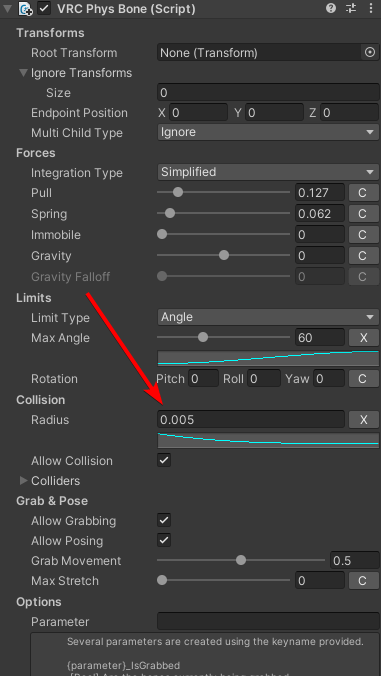
Ensure you have a a radius in Collision > Radius, as that's what people grab in the VRC Phys Bone (Script)
willow sand
bronze tree
hmm i didnt have any errors after deleting pumpkin tool whats the errors its sti...
see my screenshot from above
Also my avatar went to "very poor" after converting to PhysBones ... that's a joke really. They are even supposed to be more performant ...
Seriously ... fuck the PhysBones update
 sour goblet
I am trying to make an animation play when I put my fists together.
I am trying to use the VRC Contact Receiver for this but I cannot get it to work in unity.
How would I fix this?
is there some kind of way to emulate avatar dynamics in unity?
 tidal heath
lofty walrus
pumpkin WILL break on the new sdk
tidal heath
lofty walrus
pumpkin WILL break on the new sdk
there is an updated pumpkin's tools that works on the newest sdk but yeah unless you update it, it will break
bronze tree
willow sand
see my screenshot from above
Are all errors still there after deleting pumpkin tool ?
willow sand
yes
tidal heath
if you have the avatar emulator then it needs to be updated as well or it throws errors
bronze tree
willow sand
yes
Then I have no idea
willow sand
I completly removed Pumpkin @tidal heath
bronze tree
Maybe remove lyuma is that’s in your project ?
tidal heath
I was talking about Lyuma
willow sand
I mean it says Unity dependencies are missing ! The math lib
tidal heath
that should have installed itself with the sdk so thats odd
rich blaze
iron relic
Ensure you have a a radius in Collision > Radius, as that's what people grab in ...
That fixed it, thank you❤️
rich blaze
willow sand
Seriously ... fuck the PhysBones update
Can agree, its lagging the hell out of unity play mode, sometimes just stops working forcing you to restart playmode, misses features, its just a shitshow honestly.
rich blaze
bronze tree
do you have grab movement set to something above 0? maybe that does the trick?
It was the coliders but thank you for your help anyway❤️
bronze tree
rich blaze
It was the coliders but thank you for your help anyway❤️
Glad you figured it out ! : D
 crisp valve
can someoen help me hwo to add physboens on vroid avatars
steel thistle
willow sand
I mean it says Unity dependencies are missing ! The math lib
Does "reload sdk" menu work?
rich blaze
rich blaze
Can agree, its lagging the hell out of unity play mode, sometimes just stops wor...
I do have to say, that if they fix it this, then it will be better then dynamic bones, cuz grabbing and it being free.
paper kestrel
What are the type of phys bones? I know there is a grab and pull one and the one thatmoves upon movement, but what else?
willow sand
Last night, the bones on most of my friends were messed up / broken. Disabled the auto-converison ... then I figured out its only locally for me so everybody still sees me broken xD
crisp valve
can someone help me
rich blaze
steel thistle
Does "reload sdk" menu work?
Reimport the SDK, that should work. If not, delete the SDK folder and reimport then.
rich blaze
paper kestrel
What are the type of phys bones? I know there is a grab and pull one and the one...
Its all one bone, just different checkboxes ticked on or off
rich blaze
willow sand
Last night, the bones on most of my friends were messed up / broken. Disabled th...
Yea it autoconverts unless you have the local setting to view it unconverted
paper kestrel
rich blaze
Its all one bone, just different checkboxes ticked on or off
I see, can you have 8 of each or 8 just phys bones[no matter what type]?
steel thistle
rich blaze
Reimport the SDK, that should work. If not, delete the SDK folder and reimport t...
Not me btw. It's the person I replied to
willow sand
rich blaze
Yea it autoconverts unless you have the local setting to view it unconverted
dont u think it make more sense to disable it per avatar (on those which are broken) ? And also for everbody because other people can not be bothered to judge if my avatar looks normal like that or not ^^
crisp valve
;<
rich blaze
paper kestrel
I see, can you have 8 of each or 8 just phys bones[no matter what type]?
Yep, i currently have a tail on my model that can be grabbed/pulled, responds to movement and stretches
paper kestrel
rich blaze
Yep, i currently have a tail on my model that can be grabbed/pulled, responds to...
8 of each checkbox?
rich blaze
willow sand
dont u think it make more sense to disable it per avatar (on those which are bro...
Later, yes, but right now EVERY avatar is going to be broken until its reuploaded, so in about a week i think a lot of creators will have fixed their models and then you can judge them individually, right now its gonna be to much work in my opinion
steel thistle
willow sand
dont u think it make more sense to disable it per avatar (on those which are bro...
It's just up to vrchat team to adjust auto conversion to be less broken. Can't tell if it's a plan for them.
rich blaze
paper kestrel
8 of each checkbox?
Nah, a single component can controll a whole string of bones, so the first bone of my tail has the component linked to it, and the rest is controlled by the same component.
willow sand
rich blaze
Reimport the SDK, that should work. If not, delete the SDK folder and reimport t...
Ok I did that: removed SDK, reimport, restart, clicked "reload SDK" .. but this one error will persist :3
 crisp valve
can someone please help me
paper kestrel
rich blaze
Nah, a single component can controll a whole string of bones, so the first bone ...
Oooh so you must have 8 starting points, and everything else needs to be "linked" to that point? As long as it is 8 or less
steel thistle
crisp valve
can someone please help me
VRChat
PhysBones is a set of components that lets you add secondary motion to avatars, permitting you to add motion to things like hair, tails, ears, clothing, and more! Using these well will make your avatar seem more dynamic and real. PhysBones is a replacement for Dynamic Bones. While both systems share...
rich blaze
paper kestrel
Oooh so you must have 8 starting points, and everything else needs to be "linked...
No, hold up i will sent a pic
paper kestrel
rich blaze
No, hold up i will sent a pic
Okay tyt
crisp valve
i will read it ty
rich blaze
paper kestrel
Okay tyt
This one tab you see open controls the whole tail. It has a bunch of settings, like the "allow grabbing" and "allow posing", is those are ticked on for this one component, every bone of the tail will become grabbable/posable
 paper kestrel
rich blaze
This one tab you see open controls the whole tail. It has a bunch of settings, l...
paper kestrel
rich blaze
This one tab you see open controls the whole tail. It has a bunch of settings, l...
Okay I see
rich blaze
the "tail1" is the parent bone of all the other tail bones, and all the child bones copy the parent bones settings essentially. If you start using curves and such then you can alter it more accurately and change things in the child bones that are different from the parent bone, but in a nutshell this is how it works
Also fun thing: Because all the child bones copy the parents, if you link the root bone of the mode (often the hip) to the component, everything linked to the hip goes floppy cuz they are all copies of the parent. (atleast in Dynamic bones it did that)
paper kestrel
So the main bone can have smaller ones for better movement
rich blaze
No, they are connected like a rope, all following the first bone
ignore the curves and stuff for now, i dont fully understand them either
rich blaze
Yes, one Phys bone object can controll up to 265 armature bones i think.
paper kestrel
Okay so 1 phys bones can have 265[somewhere] components? Or parts
torn tendon
How do I make it so the power cord on the back of my avatar's head doesn't go through the head when I move?
paper kestrel
Or sections?
steel thistle
rich blaze
Yes, one Phys bone object can controll up to 265 armature bones i think.
It's physbones component though
bronze tree
torn tendon
How do I make it so the power cord on the back of my avatar's head doesn't go th...
add a head collider
rich blaze
steel thistle
It's physbones component though
Its like a fuse box, each fuse is like a phys bone component, if you pull 1 fuse, part of the house goes dark cuz thats where its assigned to. This works the same, you assign a Phys bone component to a bone and that bone and all its children will then be controlled by the component. If you turn it off, the bone and all of its children turn off.
torn tendon
bronze tree
add a head collider
Like this? https://gyazo.com/de0174b17921337ae06b94d3aeb045d3 (sorry for the ping btw. forgot to turn of the ping button)
 paper kestrel
Also do you need to download phys bones for unity to add them?
rich blaze
paper kestrel
Also do you need to download phys bones for unity to add them?
No, they come with the newest SDK
paper kestrel
Aaa
torn tendon
why is my interactions not working, even if i added a phys bones component
bronze tree
torn tendon
Like this? https://gyazo.com/de0174b17921337ae06b94d3aeb045d3 (sorry for the pin...
yes ! in the phys bone you can then add this collider so it collides with the head collider and it shouldnt go through (:
 scarlet marsh
How do you get into the Open Beta stuff on Quest?
bronze tree
torn tendon
why is my interactions not working, even if i added a phys bones component
do you have a radius added to collider?
bronze tree
yes ! apparently thats what people grab (:
torn tendon
thank you very much btw
bronze tree
no worries (:
scarlet marsh
I want to know how to update to Open Beta on the Quest 2?
steel thistle
scarlet marsh
I want to know how to update to Open Beta on the Quest 2?
You don't need to. Avatar dynamic is live now.
scarlet marsh
oh
sour goblet
I am trying to make an animation play when I put my fists together using the VRC Contact Receiver for this but I cannot get it to work in unity.
How would I fix this?
is there some kind of way to emulate avatar dynamics in unity?
torn tendon
bronze tree
no worries (:
oh no, why can't i see it in my pov?
 strange warren
hey boys
do you need to put a phys collider on your hands to be able to touch the phys bones? like you had to do with dynamic bones
 swift sentinel
strange warren
do you need to put a phys collider on your hands to be able to touch the phys bo...
swift sentinel
strange warren
do you need to put a phys collider on your hands to be able to touch the phys bo...
I didn't do it, and I can touch dem bones... (provided they don't have 0 radius)
torn tendon
bronze tree
yes ! in the phys bone you can then add this collider so it collides with the he...
How do I add the collider? https://gyazo.com/f5ba8743cde4f26c3b3835276509ca0b
 bronze tree
torn tendon
How do I *add* the collider? https://gyazo.com/f5ba8743cde4f26c3b3835276509ca0b
bronze tree
torn tendon
How do I *add* the collider? https://gyazo.com/f5ba8743cde4f26c3b3835276509ca0b
change the size to one and hit enter and then select or drag ur head in the first option (:
torn tendon
bronze tree
change the size to one and hit enter and then select or drag ur head in the firs...
I changed the size to 1 and a new option appeared https://gyazo.com/26f47f078201be22ce62756e6b85c612
 bronze tree
yes in element you drag your head from ur armature on the left
torn tendon
okey!
hello i have a problem i had a skin from a person except that i can't do the dance to do a backflip how do you use it?
 gritty valley
if u can find a tutorial or video or just how to do this lmk pls
 deep cosmos
Do I need to buy dynamic bones to use physbones?
gritty valley
i got enough to make my avatar using it
 brave bear
It's might be because your bones are too small
steel thistle
deep cosmos
Do I need to buy dynamic bones to use physbones?
You don't need to
 orchid silo
Does anybody have a fix or workaround for the bug of phys bones getting stuck in place due to animation to toggle the component on and off. to be more specific, I have two game objects changing which root bones im using for my jogger draw strings, they switch depending on if the shirt is on or off, if the shirt is off, then i turn it back on, the top part of the draw strings get stuck in place clipping through the shirt, most of my avatars have features like this so most of them are broken now, I really love the new phys bones its amazing but im really hoping the team is aware of this issue
 torpid sphinx
soo uhm im confused about the parameters, how do i set a value from the (parameter)_angle so the avatar knows when to play a animation?
sour goblet
I am trying to make an animation play when I put my fists together using the VRC Contact Receiver for this but I cannot get it to work in unity.
How would I fix this?
is there some kind of way to emulate avatar dynamics in unity?
 calm owl
torpid sphinx
soo uhm im confused about the parameters, how do i set a value from the (paramet...
calm owl
torpid sphinx
soo uhm im confused about the parameters, how do i set a value from the (paramet...
Type word in blank box, it becomes word_angle
torpid sphinx
i know but how do i set it up so when somebody moves my hair it plays an animation
like i know how to create bool toggles and floats for color change but this one is confusing me
to explain more i want to play a sound when the angle is being changed
torpid sphinx
calm owl
Type word in blank box, it becomes word_angle
if u have a picture for me of the setup i would be thankful because i only know how isgrabbed works and not the other one
noble ivy
quick question about bones for physbones. i got hair and chest working already and now want to do my skirt. but i kinda forgot a step in blender and now my armature looks like this:

is there a way to parent the right leg skirt bones in unity or do i have to go back to blender?
calm owl
noble ivy
quick question about bones for physbones. i got hair and chest working already a...
Yeah feel free to just right click the pipko alt outfit and unpack, itll let you reorder in scene. Or just click what the error says and itll open up the prefab editor. Be sure to drag it back into the assets folder to make a new prefab
noble ivy
actually i CAN'T fix it in blender, CATS won't even see the bones as parentable

in unity? i'll try that. how do i add the middle bone (like L SKirt Parent in the example) that they will be parented to?
cool that i can do
calm owl
torpid sphinx
if u have a picture for me of the setup i would be thankful because i only know ...
Theres a behavior one can add to an animator state called Vrc Avatar Parameter Driver that sets values.

 wicked spear
Hello, Is this where i get phys bone help?
tacit stirrup
what is the limit for phys bones etc for quest? is it really bad?
 short narwhal
8 components and 64 transforms
 grizzled copper
tacit stirrup
what is the limit for phys bones etc for quest? is it really bad?
grizzled copper
tacit stirrup
what is the limit for phys bones etc for quest? is it really bad?
VRChat
The Avatar Performance Ranking System allows you to see how much a user's avatar is affecting performance via analysis of the components on that user's avatar. You can also use it on yourself to see how performant your avatar is. This system is provided to inform users what is likely the most perfor...
 valid topaz
How might I achieve this? Afaik if only using a single parameter when the button is pressed, the parameter will go back to off state when the button is released
torpid sphinx
calm owl
Theres a behavior one can add to an animator state called Vrc Avatar Parameter D...
im still confused sowwy ;_;
 mellow citrus
noble ivy
quick question about bones for physbones. i got hair and chest working already a...
mellow citrus
noble ivy
quick question about bones for physbones. i got hair and chest working already a...
You should be able to right click on avatar, unpack prefab and drag them to where you want. I'd test this of course before publishing, but it's something I've done before in Unity2018.
wicked spear
I'm trying to create a boop animation for an avatar. I've followed multiple tutorials and from what I can tell its all right but It just wont work.
its like the receiver wont activate the peramater
 upbeat pewter
How might I make an object toggle with the contacts?
 simple elk
contact parameter > parameter driver set something active, touch contact again tell it to be off with parameter driver
lofty walrus
noble ivy
actually i CAN'T fix it in blender, CATS won't even see the bones as parentable
Parent them manually in blender
mellow citrus
Okay, I can't FOR THE LIFE OF ME figure out how to fix this physbones issue without having to change the root transform. Any insight will be greatly appreciated. This is the only avatar I use and I REALLY don't want it to be scuffed.
 vapid narwhal
uhhhh.... the tail needs to be at a WAY different angle. anyone else having this issue?
 torn tendon
when uploading an avatar, do we need to import dynamic bones still? and is physbones automatic like dynamic bones or will we have to set up everything?
simple elk
only needed if you are converting old dyn to phys otherwise not needed in project
torn tendon
okay thank you, does it auto put it in or will i have to everything individual?
mellow citrus
torn tendon
when uploading an avatar, do we need to import dynamic bones still? and is physb...
To my understanding, if the avatar already has DB, you need to import them. You can auto convert..
If you need to add physbones, you have to add them manually, however, I think there are tools on gumroad you can buy to make things more automatic.
simple elk
mellow citrus
Okay, I can't FOR THE LIFE OF ME figure out how to fix this physbones issue with...
is animated on ?
vapid narwhal
vapid narwhal
uhhhh.... the tail needs to be at a WAY different angle. anyone else having this...
Using physbones btw
 snow marlin
vapid narwhal
uhhhh.... the tail needs to be at a WAY different angle. anyone else having this...
snow marlin
vapid narwhal
uhhhh.... the tail needs to be at a WAY different angle. anyone else having this...
Oh my, he is just happy to see someone
😄
mellow citrus
simple elk
is animated on ?
there is a tail wag animation, but it shouldn't make the tail go into the avatar.
simple elk
physbone requires is animated to be on , or it goes abit blergh
torn tendon
mellow citrus
To my understanding, if the avatar already has DB, you need to import them. You ...
could you link me some?
simple elk
(only if it actually animates)
snow marlin
There's the sdk auto conversion tool
mellow citrus
simple elk
(only if it actually animates)
isanimated is checked on
simple elk
you should put that animation in gesture tho (its own layer) , not adding another animator
vapid narwhal
I will auto convert mine to see if i can fix the tail issue
Will that fix it though??
mellow citrus
simple elk
you should put that animation in gesture tho (its own layer) , not adding anothe...
this was a 2.0 avatar from a long time ago. I upgraded to 3.0 a few months ago.
I removed the animation and it looked better. I'll add it to the layer now and see if it's good. Thank you :3
Edit: seems to have worked!
valid topaz
simple elk
contact parameter > parameter driver set something active, touch contact again ...
Could you possibly elaborate on this a tad?
 toxic birch
@mellow citrus are your angle limits correct, i would also say to do them with a curve. so the base of the tail cant rotate into the body
https://i.imgur.com/deedjlu.png
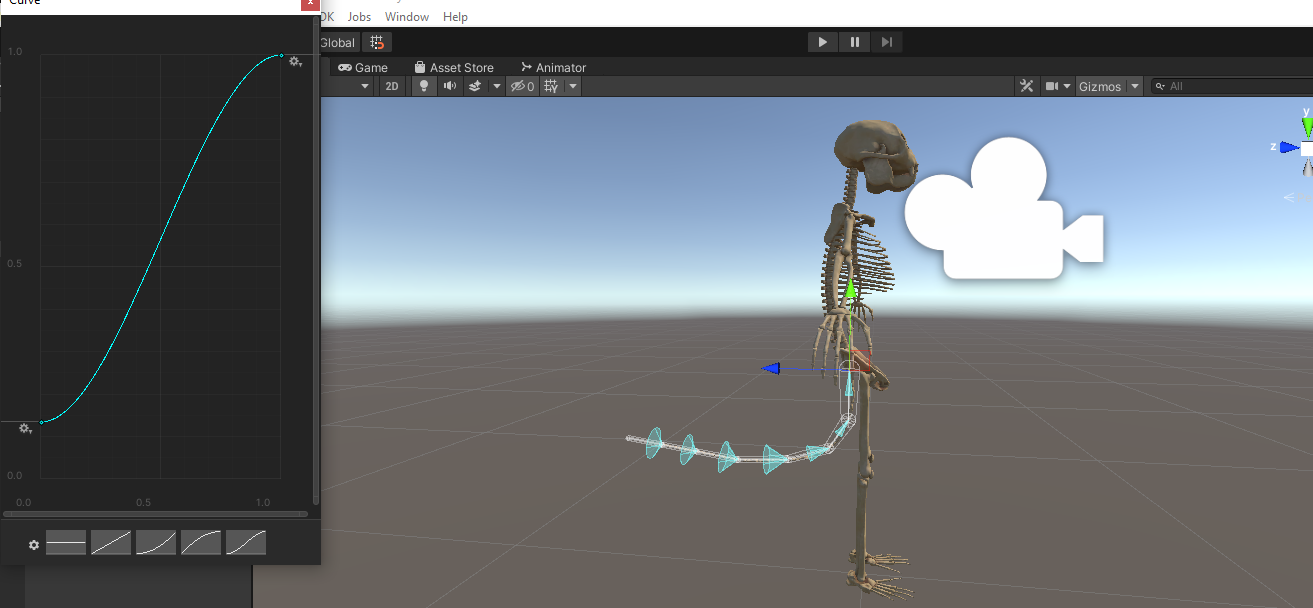
like this
mellow citrus
toxic birch
<@743053979944222801> are your angle limits correct, i would also say to do them...
I think that worked too, thanks!
simple elk
valid topaz
Could you possibly elaborate on this a tad?
exsample, whenever that is touched -> tells fx - m1 is being touched - parameter driver set a bool to true > enable object, next time it get touched > parameter driver change the bool to false > disable object

 civic dagger
Does anyone have a link to the tool that does better auto conversion for Physbones?
valid topaz
simple elk
exsample, whenever that is touched -> tells fx - m1 is being touched - parameter...
Alright I think I understand. How many layers would be utilized?
 turbid ridge
How do I rotate the phys bones to match up with the ears?

 fringe basin
Blender
 dusty saddle
I'm a bit at a loss here 😄 Anyone that can explain why only the end-bone moves by the rules?
 simple elk
turbid ridge
How do I rotate the phys bones to match up with the ears?
simple elk
turbid ridge
How do I rotate the phys bones to match up with the ears?
eeeh you wanna fix that in blender, end lenght can move somewhat
simple elk
dusty saddle
I'm a bit at a loss here 😄 Anyone that can explain why only the end-bone moves ...
your bones are too small
go merge em
dusty saddle
Oof, alright. Thanks for the quick response!
simple elk
if i see a radius 0.00x its usually too small
willow sand
so is this a "feature" that bones get stuck mid air sometimes ? It looks like they were placed by posing, but posing is off and I am in unity ... lol

they get stuck in VRC too
turbid ridge
simple elk
eeeh you wanna fix that in blender, end lenght can move somewhat
The ear bones are positioned correctly in blender
mellow citrus
willow sand
so is this a "feature" that bones get stuck mid air _sometimes_ ? It looks like ...
It's most likely your head collider if you have one. That's been an issue on every avatar I've looked at so far.
 finite plume
So im confused as hell, I have him ALL set up. Android says nothing about being limited. I upload him on Android/Quest and NOTHING is moving. I'm guessing thats a glitch going on atm ?
 turbid ridge
The ear bones are positioned correctly in blender
turbid ridge
turbid ridge
The ear bones are positioned correctly in blender
In Unity they look like this for some reason
toxic birch
even on the base normal armature before the phys bones?
 little owl
turbid ridge
In Unity they look like this for some reason
little owl
turbid ridge
In Unity they look like this for some reason
add another bone at the end. Blender doesn't export bone endpoints so if you just positioned the tips of the bones at the tips of the ears, unity doesn't know anything about that
 dawn sonnet
finite plume
So im confused as hell, I have him ALL set up. Android says nothing about being ...
dawn sonnet
finite plume
So im confused as hell, I have him ALL set up. Android says nothing about being ...
Quest got them limitations.
 dry panther
For the greater good
valid topaz
simple elk
exsample, whenever that is touched -> tells fx - m1 is being touched - parameter...
What might the layer for this in the animator window look like?
finite plume
dawn sonnet
Quest got them limitations.
Yeah bbut the SDK would TELL you if I need to delete stuff and it hasnt
willow sand
mellow citrus
It's most likely your head collider if you have one. That's been an issue on eve...
deleted call colliders. Only de default avatar descriptor colliders are there
willow sand
mellow citrus
It's most likely your head collider if you have one. That's been an issue on eve...
Ok I also disabled the head collider from the avatar descriptor. Still it gets stuck in the air! That shit completely broken sorry
They just get stuck like that ... no matter which settings you use. Only of you set "pull" to a really high value which basically kills dynamic movement by holding them in place - then I get rid of that bug
 finite plume
I'm so confused only 15 Phys bone components and nothing moves on quest x.x-
 mellow citrus
finite plume
I'm so confused only 15 Phys bone components and nothing moves on quest x.x-
mellow citrus
finite plume
I'm so confused only 15 Phys bone components and nothing moves on quest x.x-
You can only have 8 components for Quest.
finite plume
mellow citrus
You can only have 8 components for Quest.
Then why doesnt the SDK TELL me that x,x;
mellow citrus
willow sand
They just get stuck like that ... no matter which settings you use. Only of you ...
Does anything still show when you drop down on the tiny colliders section in the script?
dawn sonnet
#announcements basically tells you.
mellow citrus
finite plume
Then why doesnt the SDK TELL me that x,x;
https://docs.vrchat.com/docs/avatar-performance-ranking-system It's this page.
VRChat
The Avatar Performance Ranking System allows you to see how much a user's avatar is affecting performance via analysis of the components on that user's avatar. You can also use it on yourself to see how performant your avatar is. This system is provided to inform users what is likely the most perfor...
simple elk
sdk tells
 toxic birch
i mean it tells me aswell
valid topaz
What does “synced Avatar Parameter list” mean
snow marlin
willow sand
They just get stuck like that ... no matter which settings you use. Only of you ...
Put a little gravity in it
I wonder if your hair has weird rolls in blender or something
willow sand
NICE, and now they crashed unity when hitting play mode. 2h of work gone.
snow marlin
save
willow sand
This feature is pre-alpha mature
 fallow nacelle
hey so i used dynamic bones and i know they automatically convert into physbones, but, in the document it said you'd still be able to interact with them (collide and stuff), even when others interact with you, but it doesn't happen for me?? i have done so everybody can interact with me and stuff, what am i doing wrong?
little owl
fallow nacelle
hey so i used dynamic bones and i know they automatically convert into physbones...
they still need a collision radius, they probably don't have that if you can't touch them
 civic halo
Hello!~
I'm adding bones to my avatars tongue and it clips through the mouth when it wiggles.
I was wondering if anyone could help me fix it?
fallow nacelle
little owl
they still need a collision radius, they probably don't have that if you can't t...
how do i fix that then?
wicked spear

These pop up when I try to upload. I cannot for the life of me find what its talking about. Any ideas?
 little owl
fallow nacelle
how do i fix that then?
little owl
fallow nacelle
how do i fix that then?
if you uploaded the avatar yourself, just add a collision radius. If not, there's nothing you can do
fallow nacelle
no, i mean if i still use dynamic bones, is there a way to fix it? (without the physbones script)
mellow citrus
wicked spear
did you import dynamic bone scripts?
little owl
fallow nacelle
no, i mean if i still use dynamic bones, is there a way to fix it? (without the ...
collision radius is exactly the same between physbones and dynamic bones
you don't need to convert to physbones to add it
fallow nacelle
little owl
collision radius is exactly the same between physbones and dynamic bones
well i already have collision radius thing

 little owl
no you don't
the fact that you see those white sticks means they don't have a collision radius
if they did, there would be a thick blue region around the sticks
fallow nacelle
what do the settings look like in the original dynamic bone things then
so i can fix
little owl
 wicked spear
mellow citrus
did you import dynamic bone scripts?
wicked spear
mellow citrus
did you import dynamic bone scripts?
Turns out I missed a couple. THank you
valid topaz
What is this

 stiff prairie
valid topaz
What is this
valid topaz
stiff prairie
valid topaz
What is this
valid topaz
Thank you
toxic birch
oh thats what it is
valid topaz
So the parameter the contact thing uses only needs to be defined in the animator or w/e it called
 dusty ridge
ok sorry for me but i getting mad now you new sdk brake every singal one of my avis non will let me upload them
it keeps spitting out this nonsense and creating a prefab ive tryed uploading 3 avis now and its broke each one of them updating the sdk ive tyed puting it in a new project as well it still breaks
 mellow citrus
dusty ridge
ok sorry for me but i getting mad now you new sdk brake every singal one of my a...
mellow citrus
dusty ridge
ok sorry for me but i getting mad now you new sdk brake every singal one of my a...
what other errors are in the console?
dusty ridge
 mellow citrus
dusty ridge
mellow citrus
dusty ridge
you have script compile errors. I'm not familiar with this issue entirely, but it looks like maybe you have duplicate sdk scripts?
you did try starting a new project that was completely empty, right?
simple elk
dusty ridge
remove pumkin tools
dusty ridge
ok
simple elk
There is a newer pumkin tools, but it requires you have dynamic bone or it will break
 azure sinew
So when i put phys bones on a game object it doesnt seem to affect any of the childrens in that gameobject? Is that something thats going to be fixed?
I mean empty not game object
 amber karma
Anyone figure out a way to 'shrink'(stretch inwards) a phys bone? or stretch a phys bone without having someone grab it (to allow it to decrease in stretch)? [to be clear, i mean decrease the distance between 2 bones, instead of increasing it like when you stetch it]
 rugged badger
Looks like it's not currently possible to animate gravity of a physbone. This used to be possible with dynamic bones, making it possible to put gravity on a slider, but now the change in gravity does not take effect unless I disable and reenable the physbone, which is not ideal. Does anyone know if this is a bug or if it's intended behavior?
 little owl
azure sinew
So when i put phys bones on a game object it doesnt seem to affect any of the ch...
little owl
azure sinew
So when i put phys bones on a game object it doesnt seem to affect any of the ch...
that should work, but it depends. Do you just have a single object with a bunch of children and the children don't have any children of their own? In that case, then you need to set multichild mode to something other than ignore. If those children have children of their own, then each chain should work independently just fine
dusty ridge
dusty ridge
hang on i think i can fix this my self
formal raven
having a weird issue where toggled Physbone items freak on when grabbed
and if the parent is grabbed itdeletes the whole mesh
azure sinew
little owl
that should work, but it depends. Do you just have a single object with a bunch ...
Ive tried that and it doesnt quite move like it used to. Even after i fool around with the settings
little owl
azure sinew
Ive tried that and it doesnt quite move like it used to. Even after i fool aroun...
This difference is due to the fact that dynamic bones simulates by moving the children with position but physbones simulates by moving the parent by rotation so if you absolutely need each child to be simulated independently, you'll have to make each child have it's own separate parent instead of putting them all in the same parent
willow sand
Nice, uploaded avatar with new SDK build ... now it shows as "ERROR". I think this patch broke everything that is theoretically possible to break
 bitter girder
Having an issue where my gesture to move my ears no longer works after setting them as Physbones, is there an animator script I need to add to let gestures override the physbones settings? I would ideally like them to still be dynamic when posed
for context: the ear on the left has it's physbone disabled
 willow sand
bitter girder
Having an issue where my gesture to move my ears no longer works after setting t...
willow sand
bitter girder
Having an issue where my gesture to move my ears no longer works after setting t...
set the animated flag at the bottom of the physbone
willow sand
np
 buoyant pagoda
Anyone have a good preset for tail ground colliders that doesn't cause the tail to arch hard while laying down?
bitter girder
I just use the plane collider
set the armature as the root bone, is this a depreciated method?
buoyant pagoda
have you tested it while laying on your back?
 torn tendon
willow sand
set the animated flag at the bottom of the physbone
torn tendon
willow sand
set the animated flag at the bottom of the physbone
fuck i jsut realized this was my problem
meant to turn ping off but whatever
bitter girder
torn tendon
fuck i jsut realized this was my problem
I didn't notice it because of the parameter info box T.T
buoyant pagoda
bitter girder
here I am as a normal human laying down yes
try testing it in game. heres a quick diagram of what ive found happens with the plane collider
 torn tendon
bitter girder
I didn't notice it because of the parameter info box T.T
torn tendon
bitter girder
I didn't notice it because of the parameter info box T.T
yeah , me too
buoyant pagoda
where before it laid flat on the ground
torn tendon
it takes up so much space its weird
bitter girder
buoyant pagoda
try testing it in game. heres a quick diagram of what ive found happens with the...
ohhhh, yeah I'm not sure, you might want to edit the settings on the tail bone to fix this
do you have some gravity on it?
buoyant pagoda
i don't. thats a good idea though, i'll see if adding gravity helps
 magic thicket
yall for the life of me i cant find the sdk with the new bones
bitter girder
yeah, fine tuning the collider on the tail can help too, try to use the curve to get the collider to match the shape of the tail you want to be "solid", like how much fluff should flatten when it lays down
magic thicket
i downloaded the newest sdk three from the website
bitter girder
magic thicket
yall for the life of me i cant find the sdk with the new bones
if you just imported it, just try restarting unity
dusty ridge
i getting this error now guys
 bitter girder
dusty ridge
i getting this error now guys
bitter girder
dusty ridge
i getting this error now guys
might want to be careful that has a long file path in it
magic thicket
like the sdk is in there but the new bone scripts are not
bitter girder
dusty ridge
i getting this error now guys
like your real name and avatar ID are in there >>
 vestal hearth
dusty ridge
i getting this error now guys
vestal hearth
dusty ridge
i getting this error now guys
Every time I’ve seen a Library Package Cache error, moving everything into a new project has fixed it. I’m not sure how to fix issues like that without doing that
 lethal ember
I have a setting that bunny turns black when ears are being stretched. I put this parameter in both ear bones, but its only working when pulling right ear. Is it not allowed? having same parameters in more than 1 bone so that action will occur no mater which bone is being interacted with?
 little owl
you'll need to use one component for both or a different parameter for each component
lethal ember
lethal ember
I have a setting that bunny turns black when ears are being stretched. I put thi...
thank you
valid topaz
this touch trigger stuff is confusing lol
valid topaz
me trying to find out how to just make a touch toggle 🧠
lethal ember
valid topaz
me trying to find out how to just make a touch toggle 🧠
in what part are you stuck?
valid topaz
i'm so confused on how to do the parameter logic in the animator
 upper raven
just make it so on enter it changes a parameter and then make an animation that will be toggled by that parameter
lethal ember
valid topaz
i'm so confused on how to do the parameter logic in the animator
so did you set name to the parameter in physbones?
valid topaz
can you mute vc so i can screenshare my unity window?
lethal ember
example, my parameter is called bunearR
if i want to make something happen when that bone is grabbed, i just need to make a toggle with any animation and parameter under FX called "bunearR_IsGrabbed
now that im writting it idk how to do if just want it to activate upon touching


probably same thing just add this component to your bone
valid topaz
so use on enter & not a constant?
lethal ember
i think depends on what you wanna do.
snow marlin
question: Is the rest position wherever the bone is originally oriented, or the middle of the gizmo's cone of movement?
valid topaz
lethal ember
i think depends on what you wanna do.
what i wanna do is have it so when i press button, it make an object appear & then if i hit the button again, the object disappears
lethal ember
i think middle of cone IS where bone is originally oriented, no?
lethal ember
valid topaz
what i wanna do is have it so when i press button, it make an object appear & th...
then on enter, probably works as a true/false toggle and constant would work as a button
valid topaz
hm i see
valid topaz
do the parameters need to be put in the sync avatar parameter list
lethal ember
in layer, fx for example, yes
but the parameter that is under menu, no, that is only for menu toggles and stuff
valid topaz
under menu
wdym by that?
lethal ember
valid topaz
> under menu
wdym by that?
that you dont need to add to this list
 valid topaz
ok so these all go in here
 lethal ember
yes
upper raven
lethal ember
that you dont need to add to this list
oh, Portuguese?
valid topaz
so then theoretically there isnt a hard cap on the touch toggles u use on ur avatar?
lethal ember
valid topaz
so then theoretically there isnt a hard cap on the touch toggles u use on ur ava...
and here as well
 tacit stirrup
Question, will any Physbone component collide with the default avatar colliders? torso, hands, etc?
lethal ember
upper raven
oh, Portuguese?
brazilian but yes~
upper raven
you mean Portuguese?
lethal ember
language yes
upper raven
oh ok
lethal ember
valid topaz
so then theoretically there isnt a hard cap on the touch toggles u use on ur ava...
idk what you mean by hard cap
valid topaz
like in the "under menu" parameter list there's a hard cap of parameter menory u can have
128
valid topaz
awesome
lethal ember
cause that is the limit for things in the menu you open in game
but the turn on/off of phys bones is actions you do
nothing with menu
upper raven
parameters on the contacts don't need to be on the parameter menu
valid topaz
lethal ember
cause that is the limit for things in the menu you open in game
oh i see
lethal ember
when i saw "stretch" and "float" i was like "there goes 8 spaces of my parameters" but in reality no
dusty saddle
Is there any way to make the parameter set on a Contact Receiver stick? Or a way to set an avatar parameter using the animator after a collision has occured?
 inland sky
How do I fix this? I've got physbones on the hair, and I've got colliders on the chest and spine already
 upper raven
dusty saddle
Is there any way to make the parameter set on a Contact Receiver stick? Or a way...
upper raven
dusty saddle
Is there any way to make the parameter set on a Contact Receiver stick? Or a way...
stick as in toggle it off and on when touching it? use parameter drivers on a state
and drive the parameter to the value you desire to stick
lethal ember
inland sky
How do I fix this? I've got physbones on the hair, and I've got colliders on the...
did you set the colliders to the bones?
 valid topaz
so to get this touch toggle to work, do i only need 1 layer in the fx to work with?
& 2 fx parameters
inland sky
Oh so that's how you do that!
Thanks
upper raven
valid topaz
so to get this touch toggle to work, do i only need 1 layer in the fx to work wi...
i only use one parameter for it to work
dusty saddle
upper raven
stick as in toggle it off and on when touching it? use parameter drivers on a st...
In this case I'd like to switch model of my ears if it gets pulled beyond a certain point. And then I imagine it snapping back if they pull to far.
valid topaz
really?
upper raven
yeah
lethal ember
inland sky
Oh so *that's* how you do that!
Thanks
drag each bone to the space. bone wont go in if it has no colliders
valid topaz
upper raven
yeah
may i see what your animator looks like?
upper raven
dusty saddle
In this case I'd like to switch model of my ears if it gets pulled beyond a cert...
yeah that works fine
inland sky
Perfect, exactly what the doctor ordered
upper raven
valid topaz
may i see what your animator looks like?
huuuh sorry I'm not home but just make it so on enter it changes a parameter and then make that parameter toggle something, just that
valid topaz
my brain is deciding to be slow today
lethal ember
inland sky
Perfect, exactly what the doctor ordered
just a quick note, its exhaustive to do that for each hair string so i suggest doing it for 1 string, then you copy component and paste in the other strings. Finnally, you just change the root transform to each bone (cause they will copy like the first bone you did)
 valid topaz
how do you make the parameter toggle something ?
upper raven
just like any other toggle on the FX layer
make an animation state, then make a transition with that parameter as a condition
sour goblet
So I'm getting a weird error with the sender and receiver thingies.
[VRCAvatarParameterDriver]: outermost Animator is not known: Leema (UnityEngine.Animator). If you changed something, consider resetting avatar
Does anyone know how to fix this?
upper raven
hmmm never seen it
 scenic steppe
How do I fix this? Its dynamic bones and not the new dynamic's.

 charred spire
Hello. I am trying to use the "is grabbed" parameter, but it doesn't seem to be doing anything when I am grabbing things? Do the Parenthesis need to be in the parameter?
inland sky
Doesn't need to be an inside bounds collider does it? It does nothing when it's not an inside bounds collider but becomes a black hole when it is
torn tendon
How do I enable Phys bones on quest? Sorry for being a total dunce lol
inland sky
lethal ember
did you set the colliders to the bones?
It just lets me use the avatar itself as the collider group though, I figure that just means it uses all its attached colliders
Oh wait, you put it on the bone on the bone, not on the avatar
Whoops? 🤔
I figured it would work either way
noble ivy
does anyone have advice on limits for fabric components, specifically skirts? i'm clipping my legs through my skirt a lot and am not sure how to limit it to solve this
little owl
A polar limit where you make the side-to-side motion small but the up-down motion big should work pretty well
short narwhal


Angle limits are so powerful. No skirt clipping at all with only 2 colliders.
Likes
126
 Twitter
·
inland sky
Twitter
·
inland sky
@lethal ember Nope, it's still doing the thing
... I needed to set the radius for the physbone's collision didn't I.
Yep. Needed a radius on physbones.
 floral junco
Need some help with contacts, specifically recievers
It doesn't appear to be updating my parameters in my animator, any reason why? The parameter names are the same, and the receiver detects contact senders.
lethal ember
inland sky
It just lets me use the avatar itself as the collider group though, I figure tha...
oh does it?
inland sky
It seemed to have that effect. I just couldn't tell because I had no radius on physbones lmao
 cloud gate
torn tendon
How do I enable Phys bones on quest? Sorry for being a total dunce lol
cloud gate
torn tendon
How do I enable Phys bones on quest? Sorry for being a total dunce lol
I was wondering the same question. Does the new update actually changes anything on quest ?
lethal ember
is it safe to add contact receiver to humanoid bones as HEAD?
lethal ember
cloud gate
I was wondering the same question. Does the new update actually changes anything...
it does change. It works same way. Only reason why avatars are not automatically having physbones for quest in game is cause the automatic update turned dynamic bones to physbones, and regular quets avis had NO dynamic bones before
torn tendon
How can I make a leash/chain work with physbones? Mine just gets stiff as soon as I upload it with physbones.
But in the unity scene it moves freely.
cloud gate
lethal ember
it does change. It works same way. Only reason why avatars are not automatically...
Oooh okay I see, thanks
So i guess there's nothing to do or is there a way ?
lethal ember
just get the regular avi, make project android and make whatever u need to make it quest compatible. Just this time wont need to delete dynamic bones, cause physbones are allowed
floral junco
Looking through the documentation, it seems like my receiver doesnt have a value option.
this isnt normal, is it?
 inland sky
What do you have for receiver type options?
I'd figure your options at the bottom change based on type
swift sentinel
8 max components(?) on a quest avatar
lofty walrus
short narwhal
https://twitter.com/CompatibleVRC/status/1517934863415980032?s=20&t=tuKFmZWZMkcA...
WHAT!?
floral junco
inland sky
What do you have for receiver type options?
none of the receiver types have a value option
 short narwhal
lofty walrus
WHAT!?
short narwhal
lofty walrus
WHAT!?
yes angle limits are very helpful
lofty walrus
short narwhal
yes angle limits are very helpful
not sure how "limits" would effect clipping if said skirt had no limits prior
I'd like to see how many bones that skirt has though
short narwhal
you can easily setup angle limits in your skirt

The Avatar Dynamics update recently dropped for VRChat, and with it brings the highly anticipated replacement for dynamic bones, PhysBones! With Physbones, you can apply secondary motion to parts of your avatar, such as hair or skirts, making avatars much more dynamic! This tutorial will show you how to properly use the VRC PhysBone component.
...
 summer abyss
floral junco
none of the receiver types have a value option
summer abyss
floral junco
none of the receiver types have a value option
Setting value was in the beta and required a float but was changed to only either taking on a value of 0 or 1 when they allowed bools or ints to be used
lofty walrus
ph n\m, it shows the bones in the video
lofty walrus
short narwhal
you can easily setup angle limits in your skirt
I mean, I'm familiar with the limits. What I'm having issues with is the colliders when the legs are raised. The skirt kinda breaks apart and or clips through the leg collider when it didn't used to with dbones
so it doesnt make sense for a limiter to stop that from happening when the legs is "pushing it"
floral junco
summer abyss
Setting value was in the beta and required a float but was changed to only eithe...
So what parameter type should I use for a constant receiver type? I tried using a bool and int but neither seemed to work
 haughty mango
Hi, Im looking at the ExampleDynamicsAvatar and have noticed that the "grab ear" function does not trigger the expression change. How is this fixed?
summer abyss
floral junco
So what parameter type should I use for a constant receiver type? I tried using ...
You can use whatever suits your situation better. If you just want to know if something is being touched or not then use a bool.
 toxic granite
Is there a button somewhere in unity that lets you visualize the colliders and bones and what not like the ingame system?
haughty mango
toxic granite
Is there a button somewhere in unity that lets you visualize the colliders and b...
gizmos
haughty mango
it should still be viewable
lofty walrus
short narwhal
you can easily setup angle limits in your skirt
his twiiter had a good explanation of this
Compatible 🦊
@CompatibleVRC
·
36m
If you want your legs to move your skirt, the limit on Yaw keeps the bones from moving too far to the side and going around the colliders instead of sitting on top of them.
haughty mango
toxic granite
What about the auto-generated ones
were you able to see them by clicking gizmos in the top right corner of the display screen? make sure to be in the scene, game mode wont let you view the hand colliders
toxic granite
haughty mango
were you able to see them by clicking gizmos in the top right corner of the disp...
I'm seeing none for the auto-generated hand ones, unless those doesn't show up till I go to upload
 haughty mango
@lethal ember Hi, Im having issues with the grab function. Im looking at the example in the VRCSDK folder. When I grab the robots ears it is supposed to change expressions, however it is not. Do you know why this might be?
 sick trench
Hey I have been trying to make a head pet thing for my model. It makes my ears and my tail wag on my model when someone is rubbing my head but I can determine if someone is moving their hand or not back and forth
upper raven
toxic granite
I'm seeing none for the auto-generated hand ones, unless those doesn't show up t...
your avatar needs to be set as humanoid and have the finger bones set inn the configuration
 spiral bane
Question. Do you have to add Receiver parameters to your avatar parameters as well?
toxic granite
upper raven
your avatar needs to be set as humanoid and have the finger bones set inn the co...
Both are set correctly
spiral bane
Okay cool
 upper raven
toxic granite
Both are set correctly
upper raven
toxic granite
Both are set correctly
on your Avatar descriptor on the bottom you see see the automatic colliders
you have to click on your Avatar as well yeah
toxic granite
Ah I see, no one told me I needed to specifically hit the drop down for colliders on the avatar descriptor
toxic granite
I didn't eithor till just now
haughty mango
haughty mango
<@258787211170938880> Hi, Im having issues with the grab function. Im looking at...
For those who are also having issues with the VRC Grabbing / Not seeing Faces when grabbed: you will only see the expression change in game. for some reason it is not viewing in unity. Copy the EXACT layout from the example avatar and simply plug in your details. :)
 faint dagger
do i need a reviver on my avatar? putting the variable (i named Button_Angle on the bone / fx controller) in the fx does nothing?
 lost hedge
Does animating the Immobile slider work for disabling dynamics on a bone chain in-game? It doesn't work in the Unity preview.
lofty walrus
@short narwhal hey man, thanks for posting about that tweet. It was very helpful
short narwhal
glad it was helpful
 azure salmon
Has anyone been able to drive a parameter with contacts proximity mode? I haven't been able to get it to drive a local or synced param (in game).
 fading topaz
the updated collider handling seems to have interpreted an existing avatar's colldiers differently from in the prior version, what are the "automatic" collider radii based on? do the bones in my model have some bogus radius metadata that it's now using?

(they seem to be out by exactly 100 times, so at least it should be easy to manually fix)
lethal ember
azure salmon
Has anyone been able to drive a parameter with contacts proximity mode? I haven'...
it only works with float
lethal ember
fading topaz
the updated collider handling seems to have interpreted an existing avatar's col...
easier to fix than to understand how it happened, I believe
maybe try comparing with another avi that automatic converted correctly
fading topaz
just trying to work out if it's an error a friend made exporting in maya or something I've done wrong on import to unity, really
(we've had some other problems exporting from Maya, anyway; the bones are named differently too, which I've yet to work out how to fix)
 violet carbon
I have an issue with phys bone hand colliders
I set the finger colliders manually within the avatar descriptor to fit the side of my avatars finger, but it seems that it ignores my manual "height" setting upon upload
the colliders in game are a lot longer than what I manually set, so even though I have the colliders within the fingers, in game they extend beyond the fingers as well as extent towards the hand
fading topaz
hmm, looking at little deeper, the collider radii appear to be identical between the model that works and the one that doesn't; both are 0.03, but one is being interpreted as much, much larger
aha! the armature was scaled to 100
ohhh except now the model is 1/100 the size
violet carbon
fading topaz
ohhh except now the model is 1/100 the size
are you doing Blender work on your model?
I've had scaling mess up whenever I export incorrectly from Blender
fading topaz
this is from maya, but yeah, with modifications
just struggling to work out how to fix it
violet carbon
when you export from Blender, are you using "FBX Units Scale"?
fading topaz
I am not in blender!
violet carbon
oh
fading topaz
okay! it was a scale issue on import, yeah
violet carbon
hm. I'm not sure how the scaling of avatar elements would have become super large then, but you may be able to work around it by scaling the components themselves by a factor of 100
fading topaz
turning off "convert units - 1cm to 0.01m" fixes it
not clear why that scales everything except the colliders, but i'll take it!
violet carbon
I guess whatever you're using behaves similar to blender with scaling where it can export the mesh at the right size, but all bones will be really huge
 violet carbon
the colliders in game are a lot longer than what I manually set, so even though ...
violet carbon
violet carbon
the colliders in game are a lot longer than what I manually set, so even though ...
What I've set vs what appears in game


 jolly crypt
hi so imm making a panel that replaces my radial menu. it has buttons that anyone can press, and the intention is to have each button toggle something on my avi, synced across everyone.
im having issues with others not seeing the changes when they press a button, even though all the buttons are defined in the synced parameter list.
so for instance, i have a button that toggles a springjoint. anyone can press it and i see it toggled on and off pretty consistently, but other people either dont see it happening at all, or its very inconsistent
mellow citrus
Do physbones not work for certain bones??? Her tongue is supposed to be wiggly.
 abstract pivot
Is it possible to animate the phys bone's gravity slider? i tried it in so many ways but it does seem to work.
 fresh wasp
is there a way to link bones? like if you move 1 you also move the other one even if they are not part of the same root
 solemn sedge
Hey. So my avatar's tongue is broken here since the update. This was even before I reuploaded it with PhysBones replacing Dynamic Bones.

How do I fix this?
The tongue is supposed to be straight.
fresh wasp
well just check on unity if you don't have a collider doing something weird there
or just rotate the bone with the Phys script
solemn sedge
I'm not really that familiar with how PhysBones works, so..
Even after reading the documentation.
fresh wasp

try with ''Pitch'' ''Roll'' and that
it shows a cone with the dynamic angle
it must be pointing straight
solemn sedge
Alright. I notice it was set to '180' for some reason (after the conversion from Dynamic Bones to PhysBones). So I will try this.
violet carbon
solemn sedge
Hey. So my avatar's tongue is broken here since the update. This was even before...
I just figured that issue out today, at least for 1 avatar. Make sure the animation to stick the tongue out doesn't have a "scale" property applied to the bone that the phys script is on
you can have scaling on the child bones, but removing the scaling from the bone that the script was on fixed the tongue issue for me
upper raven
mellow citrus
Do physbones not work for certain bones??? Her tongue is supposed to be wiggly.
bones are too small
 versed tartan
anybody got any good physbones settings for hair, tail breasts
mellow citrus
versed tartan
anybody got any good physbones settings for hair, tail breasts
My settings for this avatar. I don't know how well it will work for your avatar.
I show the settings for long hair, then tail, then breasts. You'll have to pause and type the settings. I don't want to spam.
versed tartan
mellow citrus
My settings for this avatar. I don't know how well it will work for your avatar....
TYSM!!
 wise hinge
mellow citrus
Do physbones not work for certain bones??? Her tongue is supposed to be wiggly.
wise hinge
mellow citrus
Do physbones not work for certain bones??? Her tongue is supposed to be wiggly.
you didnt apply the Tongue Paramaters in the phys bones component
mellow citrus
wise hinge
you didnt apply the Tongue Paramaters in the phys bones component
what would i type? i dont know anything about physbone params..
azure salmon
lethal ember
it only works with float
Yeah I am using floats, but it still won't drive the param at all.
Im just wondering if anyone HAS been successful in driving a (float) param in game with proximity mode
upper raven
receivers now work with bools not just floats
 covert marlin
Question, cause of the Phys Bones on the feathers my lower arm is going pretty weird. Is there a way to fix it that the arm isn´t affected anymore?
 upper raven
azure salmon
Im just wondering if anyone HAS been successful in driving a (float) param in ga...
upper raven
azure salmon
Im just wondering if anyone HAS been successful in driving a (float) param in ga...
yes
my phone system uses them
upper raven
sure, tho idk how much help i can be since I'm not home until tomorrow, I'm out the country
azure salmon
alright no prob I just want to make sure im not missing some change i didnt see or whatevs
azure salmon
upper raven
yes
also you are using proximity mode right?
faint dagger
do i have to name my variable v_Angle both in my fx and the bone params?
azure salmon
because all the other modes work fine for my stuff
proximity mode is the only mode that doesnt work for me
 upper raven
torn tendon
I put Phys Bones on my avi but no one can mess with them?
upper raven
torn tendon
I put Phys Bones on my avi but no one can mess with them?
in game settings, choose to allowed everyone to move them
and make sure in unity you checked "allow others"
 leaden wing
torn tendon
Wait in unity?
leaden wing
torn tendon
Wait in unity?
There is a setting in-game but there is also a setting in Unity for each physbone.
torn tendon
i turn the one ingame on but did not see a unity one
toxic granite
with the contact receiver is there no way to specify an index? Lets say I have 4 distinct shirts controlled from 1 parameter and I have 4 recievers, am I not able to specify them?
leaden wing
unity
 leaden wing
torn tendon
maybe its my in game setttings?
leaden wing
torn tendon
maybe its my in game setttings?
maybe theirs too
faint dagger
do i have to have a VRCContactReceiver for my own bone to update a variable on my fx?
wise hinge
mellow citrus
what would i type? i dont know anything about physbone params..
Example:
1st parameter, Tongue
2nd parameter, Tongue_IsGrabbed
3rd parameter, Tongue_Angle, then Tongue_Stretch
The 1st parameter is what you put in the phys bones parameter section
 honest inlet
So i have a quick question. i have some bones that should have jiggle like tummy, thighs. some other parts that got converted to physbones and i checked if there's a physbone on them. there is, but it isnt always visible but they dont even move anymore at all. just wondering what ive done wrong because they worked fine with dynamic bones.
wise hinge
Then you put all those parameter in your fx layer
upper raven
toxic granite
with the contact receiver is there no way to specify an index? Lets say I have 4...
yes you are
toxic granite
upper raven
yes you are
how, I'm not seeing a section for that in the reciever
upper raven
you choose the parameter you want it to change when interacted with
and the value you want it to get
toxic granite
where?
 versed tartan
Hey I'm having an issue where my bones won't keep its shape with physbones. I want it to be more rigid. What setting should I mess with?
upper raven
you have to use parameter drivers with empty animations just to server as placeholders to have a parameter driver to driver a parameter to the value you want
toxic granite
Would you be able to point me at a tutorial or a video or something for it?
upper raven
you make an empty animation with nothing and then in a new layer place it and add a parameter driver to it that sets a parameter to any value you want
and use the parameter that changed with the receiver as a condition to play that animation
there's no tutorial for that unfortunately
faint dagger
do i need a VRCContactReceiver for a bone on my avatar to effect my fx layer?
upper raven
no
toxic granite
so then for example, if I have 4 shirts I make 4 FX paramters labeled top 1, top 2, top 3, top 4. The reciever gets top 1. Top 1 gets an empty thingy thing, which then drivers top with a value of 1 and then that will change my top
upper raven
you just set a parameter to that bone
upper raven
toxic granite
so then for example, if I have 4 shirts I make 4 FX paramters labeled top 1, top...
no just an int
faint dagger
hmm, doesnt seem to work, my param is called v_Angle
toxic granite
Why did they make this so complicated, haha
faint dagger
same with my fx layer
upper raven
like make each receiver with different parameters, and in FX make it use that parameter as a condition to play an empty animation that has a parameter driver that would set the parameter value as anything you'd want
wish I was home
toxic granite
so yah 4 bool type FX parameters one for each receiver all which alter the singular top parameter, right?
upper raven
yeah so basically 4 bools that you just need to put in the FX and 1 synced int
toxic granite
That seems really over complicated in my opinion, but college is almost over so I can script this in my free time because this will be a pain in the booty eventually
 languid glade
How do I make it where my hair wont be crazy when i move?
upper raven
toxic granite
That seems really over complicated in my opinion, but college is almost over so ...
yeah VRchat didn't make it so you can choose the value of a parameter driven by the receiver so we have to do it like this
upper raven
languid glade
How do I make it where my hair wont be crazy when i move?
Change the phys bones settings
 sonic flint
theres a bug i noticed when developing with avatar dynamics, Using the "on enter" with velocity wont play the animation for other users. i had a hit animation that would play when hitting someone (entering the head contact point at a velocity of 4, but it would refuse to show up on other peoples ends. idk if theres a fix for it, but just letting yall know\
tacit stirrup
anyone has an efficient way of doing a facial gesture upon hair stretch when the front hair isn't using the same dynamic settings on all strands?
i could make a condition for multiple parameters in the fx layer but i assume that's not good performance wise?
torn tendon
I got the phys bones to work for my breast but not my hair even though its set to allow grab and posing
 olive tulip
torn tendon
I got the phys bones to work for my breast but not my hair even though its set t...
olive tulip
torn tendon
I got the phys bones to work for my breast but not my hair even though its set t...
Have you set up the radius?
torn tendon
no I haven't how do i set that up?
olive tulip
There's an option called radius, just change the number in there till the orbs surround the hair strands
torn tendon
wait I see it now under collision?
olive tulip
Yep
torn tendon
Thank you omg
olive tulip
No problem
torn tendon

faint dagger
do i have to have my bone component on the root of my avatar for the param to work?
azure salmon
azure salmon
proximity mode is the only mode that doesnt work for me
answering myself here. Proximity only works with sphere type atm.
languid glade
How do I test out grabbing and posing for physbones?
toxic granite
I believe you can through the game window in playmode in unity or ingame
 thorny isle
Made 2 cannys regarding PhysBones if any of you want to pop a vote on them.
[Bug] Animated PhysBone when grabbed resets Max Angle.
Grabbing an animated physbone treats the max angle as if it were at rest when grabbed.
My animation moves the physbone to the extreme end of the max angle limit, so I should not be able to drag it past that point.
This bug treats the pose I grabbed it at as rest pose, which offsets the max angle past the extreme point.
https://youtu.be/7CJ2AFd9Q9o
[Bug] Grabbing a grabbed PhysBone freezes the bone for remote players.
If I grab a physbone locally and someone else attempts to steal it from me, it'll freeze in place on their screen.
languid glade
Yeah grabbing is not working. I have it checked for allow grabbing so why is it not working?
toxic granite
From what I've seen it should work with everyone, but it only works with yellow-tagged friends
languid glade
no in unity not vrchat
toxic granite
oh
languid glade
i saw sippbox do it in his new youtube video so its kinda weird that i cant
 latent cove
I downloaded the latest SDK but I can't find the Phys Bones Script
torn tendon
How does one make a receiver activate an animation that stays after the contacts are no longer touching?
(For example, toggling an object after a touch)
 zenith jetty
is there a way to have contact receivers set a value of an int? Like have one set an int to 1 and another to 2
faint dagger
theres no info on how parameters on the bone work? tried setting fx params to same name and no luck...


 zenith jetty
you're not supposed to have _IsGrabbed on the physbone component
only in the fx layer
faint dagger
ah ok ty
 cedar maple
has anyone figured out how to properly animate a phys bone?
i wish to increase gravity on a phys bone component through an animation, this used to work fine in dynamic bones by simply recording the animation and increasing gravity, but it doesnt seem to work that way for phys bones
upper raven
torn tendon
How does one make a receiver activate an animation that stays after the contacts...
parameter driver
upper raven
zenith jetty
is there a way to have contact receivers set a value of an int? Like have one se...
parameter driver
torn tendon
Gotcha, time to research that
zenith jetty
I mean having the contacts themselves control the ints, I dont want a bunch of bools using up memory
upper raven
they don't use memory
because tou don't need to put them in the parameter menu
only on the fx
the only parameter you need to be synced is the int
zenith jetty
oh, I thought that was only for the grabbed, angle and stretch params
upper raven
that's the only way, you can't set a specific value to an int directly through a receiver
upper raven
zenith jetty
oh, I thought that was only for the grabbed, angle and stretch params
no, the parameters on the receivers don't need to be synced
just parameters to use as conditions to drive synced parameters on the FX
 crisp bough
Hey
I try to put an item on the head of my avi
It has bones is in the amature hierarchy placed correctly but does not stay on my avatar when it moves/plays
any idea?
It was the root bone in the skinned mesh renderer of the item I tried to put in!!!
put it to Head and it works
thx anyway
lost hedge
Does animating the Immobile slider work for disabling dynamics on a bone chain in-game? It doesn't work in the Unity preview.
crisp bough
nevermind
It stays put but the whole object moves around still.
 snow spire
So I set up the IsGrabbed parameter, do I also have to put this parameter in the Expression Parameter?

Like add _IsGrabbed here

And in the Animator Parameter
 crisp bough
U just put in sth. like "Hair" in the phsy script itself
From there you go to your inspector, there in the parameters you refer to the bool with "Hair_IsGrabbed"
 stoic wadi
Hey question, when making a contact point do you have to define the parameter in your general avatar parameters file? Trying to just make a simple clap/slap and having issue when I cant get it to trigger. TBH I am pretty clueless on audio trigger in general so overall advice would be great
I do know already they have to be a float and stuff
I can post an image of my hand trigger and my FX layer if it helps
thorny isle
snow spire
So I set up the IsGrabbed parameter, do I also have to put this parameter in the...
It tells you in the tooltip that itll append _IsGrabbed, _Stretch, and _Angle automatically.
If you put "Bone" in the parameter slot, itll create 3 parameters in your animator: "Bone_IsGrabbed", "Bone_Angle", "Bone_Stretch"
thorny isle
snow spire
Like add _IsGrabbed here
You do not need to add the parameter to your VRCExpressionParameters list, Avatar Dynamics runs on all clients so it does not need to be manually synced.
thorny isle
snow spire
And in the Animator Parameter
Just add it to the animator only.
 fallow owl
I’m not really sure if I can see people grabbing my tail?? I was in a random world yesterday and some stranger wanted to grab my tail but I’m not certain if they were able to
I have the “allow” thing turned on too
 bitter mason
fallow owl
I’m not really sure if I can see people grabbing my tail?? I was in a random wor...
bitter mason
fallow owl
I’m not really sure if I can see people grabbing my tail?? I was in a random wor...
I have the same issue, all of the physics work, but none of the colliders. Hair goes right through the chest collider and I cant move my own hair with my hand colliders.
 idle scroll
snow spire
So I set up the IsGrabbed parameter, do I also have to put this parameter in the...
idle scroll
snow spire
So I set up the IsGrabbed parameter, do I also have to put this parameter in the...
Shameless plug haha, but I just released a video explaining using the _Stretch value on physbones for animations. Here's a link if you're interested: https://www.youtube.com/watch?v=612jHghFGWA

SDK DOCUMENTATION: https://docs.vrchat.com/v2022.1.2/docs/avatar-dynamics
WRITE DEFAULTS OFF: https://www.youtube.com/watch?v=Eiu7jMC7mgg
NOSEBOOP TUTORIAL: https://www.youtube.com/watch?v=t4mMA3gZlSs
In this video, I am covering how to use the "_Stretch" value with Physbones to play face animations, but this could be used for a multitude of ...
fallow owl
bitter mason
I have the same issue, all of the physics work, but none of the colliders. Hair ...
Ahh well for me the colliders work just fine and I can grab my own tail, just not sure if others are though :o
short narwhal
idle scroll
Shameless plug haha, but I *just* released a video explaining using the _Stretch...
awesome & and I've been sharing your videos a bunch to folks wanting to learn Avatar Dynamics
snow spire
Aah Much appreciated.
Thanks Wolfy and NotAKid
idle scroll
short narwhal
awesome & and I've been sharing your videos a bunch to folks wanting to learn A...
Thank ya! I'll be working on more tutorials to help people out with AD contact system and Physbones. Lots of stuff to cover, but I think it's really important people know how this stuff works so we can see some awesome avatars made and be more interactable!
short narwhal
yeah I know definitely be excited for those new tutorials as there's so much cool stuff people can do and it'll be interesting to see if people make any Unity extensions that help make this kind of stuff
sick trench
No one can interact with my receivers, does the animator need to be on a certain playable layer for this to work or?
fallow owl
Uhh guys I tried following the steps for importing the new SDK to one of my SDK2 avatars but I don't think it's doing anything??
It has the new SDK in the project but there are errors saying "AvatarDescriptor does not exist in the namespace VRCSDK2"
And when I try to open the dropdown menu, it shows "reload SDK" instead
idle scroll
sick trench
No one can interact with my receivers, does the animator need to be on a certain...
You'll want to make sure your FX controller in your FX layer.

 errant carbon
allow posing should work if checked and I can move my hair but it doesn't. Any setting that I'm missing? The hair moves right back.
 unique spruce
so im trying to make a phone using the new phys bones, do i have to add bones where the buttons would be? cuz i cant get the bone spheres to appear
like the home button on an iphone for example
i dont need the button to actually move, just register when its pressed
i saw someone do something like this in the beta version
honest inlet
this sounds like a stupid question and probably is but is there a way to make the physbone into an orb and not a cylinder?
sick trench
so when ever my hand touches my receiver or when ever anyone touches it, in the contacts debug display thing all my senders and receviers on my model flash when touched and don't do what they are suppose to
 bright bolt
updating the quest version of my avatar with physbones, and realized rotation constraints aren't supported on quest, which really sucks as i use that to reduce the number of dynamic bones/physbones needed (without affecting the look) and much more of my avatar would be able to be dynamic within the performance limits with them
 brazen moth
Is it possible to grab a Physbone object and place it anywhere you want it?
Instead of it having it Position Constraint?
 craggy warren
What would be the best settings to get physbones to act in the same way hinge joints do?
gritty valley
saw a video and it said the parameter from receivers are always floats is that true?
 jolly crane
gritty valley
saw a video and it said the parameter from receivers are always floats is that t...
jolly crane
gritty valley
saw a video and it said the parameter from receivers are always floats is that t...
no, they can be bools too
gritty valley
thanks chief
 quasi cliff
forgetting atm, whats the component called where you can play an animation via someone entering the touch zone
short narwhal
VRChat
Contacts are a new system that allows avatars to detect collisions with itself or other avatars. These collisions can then be used to drive the animation controller and perform all sorts of fun effects. These are separate from standard Unity colliders. Contacts are broken down into senders and recei...
jolly crypt
why cant my friends see the contact i have its actually killing me at this point
 graceful marlin
hey i want some physbones avatars can someone help me out
short narwhal
it's going to take time for people to upload them
graceful marlin
i found some already so is it out of beta then or...
like is it only certain ones rn?
brave bear
One question, so if you have a Physbone's avatar on, would people that have Dynamic Bone enabled/Physbone off be able to see your bones move?
graceful marlin
yes
short narwhal
brave bear
One question, so if you have a Physbone's avatar on, would people that have Dyna...
yes as that setting only if Dynamic Bone Auto converted not what to do with Native physics bones
 stable stone
guys what is the work around for when phys bones dont want to detect the front hair
i somehow fixed it but dont know how to replicate it again
 lament lintel
With the physbones added to a protogen avatar the face disappears, but shows when doing emotes via controller
 vague grotto
what makes physbones different from the original dynamic bones? why were dynamic bones so bad with performance?
vague grotto
can you explain? i got my physbones to work perfectly
torn tendon
it was working fine earlier, and I just got on and can’t see it on myself or others with the same settings on
short narwhal
vague grotto
what makes physbones different from the original dynamic bones? why were dynamic...
physics bones perform a lot better because they were written for vrchat in particular and multi-threaded so it can more properly utilize your computer's resources
vague grotto
torn tendon
it was working fine earlier, and I just got on and can’t see it on myself or oth...
do you remember what you changed from before?
 bleak light
having an odd issue with phys bones on all my avatars, when people interact with them i can only see them being moved in a mirror or camera, but not from my actual view point, what do i do to fix? L:
torn tendon
vague grotto
do you remember what you changed from before?
i haven’t changed any settings.
bleak light
bleak light
having an odd issue with phys bones on all my avatars, when people interact with...
ive tried ik beta and live, same thing
 vocal frigate
 bleak light
🥺
vocal frigate
Simple Head proximity expression change
If somebody's head gets close enough to mine, my expression changes
bleak light
bleak light
having an odd issue with phys bones on all my avatars, when people interact with...
anyone?
example
ahg, really annoying. people interacting with my hair is super common now and without seeing it its really immersion breaking, im craptastic at blender so doubt id be able to do it
i understand the culling being good for the front part so you dont just have hair in your viewpoint constantly but with pigtails it really is a nuisance
thorny isle
^ that’s what i do for my hair
i duplicated head bone, named it HeadParent, parented to neck, moved hair over, and constrained HairParent to Head in Unity
vocal frigate
You guys can avoid all of that by just adding a scale constraint to anything you don't want to scale down, and setting the source to anything else in your avatar that isn't on your head.
Like your descriptor
@bleak light @void helm @thorny isle
Unless you're on quest, yes
constraints are PC only but the scale constraint is great
I only recently discovered it
it's been pretty useful
thorny isle
vocal frigate
You guys can avoid all of that by just adding a scale constraint to anything you...
what kind of magic do you inhale 
thank you
snow spire
For the claping effect, do you use Contact Receiver or Contact Sender
torn tendon
Hey do any one know why i cant see ppl mess with my Physbones in game but thay see it?
torn tendon
torn tendon
Hey do any one know why i cant see ppl mess with my Physbones in game but thay s...
is it becuse i turned off the animated setting on my bones?
snow spire
Not sure if this is the right set up for the clap/slap effect

 fair wave
I try to make a PB parameter at my Tail that someone grab my tail would make facial change
But nothing change in game view and scene with play mode :
- Tail PB script added parameter keyname call "Tail"
- Animator controller add parameter call "Tail_isGrabbed" then set type bool
3.New layer conditions use "Tail_isGrabbed" Ture to facial animation ,false to idle
I'm confuse looks the step not doing fault, may someone solve this ?
 toxic dawn
How do I move my model to see if the physbones are working correctly in Unity?
idle scroll
fair wave
I try to make a PB parameter at my Tail that someone grab my tail would make fac...
Capitalize "Is"
 frosty orchid
any1 got those errors after importing the sdk and converting bones? / I think about redoing the project
 vocal frigate
 bronze tree
frosty orchid
any1 got those errors after importing the sdk and converting bones? / I think ab...
bronze tree
frosty orchid
any1 got those errors after importing the sdk and converting bones? / I think ab...
Do you have pumpkin in your project ?
fair wave
idle scroll
Capitalize "Is"
I fix it now but still not working when i grab in the game view with play mode
 frosty orchid
@bronze tree no / I'm aware of the pumpkin update
bronze tree
frosty orchid
<@267652571399716864> no / I'm aware of the pumpkin update
Hmm ! I remember I had lots of errors as well idk if those were there I will keep an eye out for you and see if there is an solution (:
fair wave
I do it again it still not working
Have i miss something ?


 rustic oracle
I tried animating the phys bone values, but only turning on and off the whole script, allow collission/grabbing/posing worked.
toxic dawn
How do you move your model to test if the physbones that were added works? I tried moving it and no physbones appeared. Referring to this video. https://www.youtube.com/watch?v=PTTnWUkswkU
The Avatar Dynamics update recently dropped for VRChat, and with it brings the highly anticipated replacement for dynamic bones, PhysBones! With Physbones, you can apply secondary motion to parts of your avatar, such as hair or skirts, making avatars much more dynamic! This tutorial will show you how to properly use the VRC PhysBone component.
...
bronze tree
toxic dawn
How do you move your model to test if the physbones that were added works? I tri...
did you go into play mode and then game ? do you also have a radius added ?
 cobalt girder
how do you get the radius to match the exact same way as your avatar

for the colliders
snow marlin
toxic dawn
How do you move your model to test if the physbones that were added works? I tri...
Go into play mode
toxic dawn
snow marlin
Go into play mode
aaaa thank uuu soo much <33, pretty new to unity, thank u for being patient wit me :D
toxic dawn
bronze tree
did you go into play mode and then game ? do you also have a radius added ?
tank uu for being patient wit me :D
bronze tree
toxic dawn
tank uu for being patient wit me :D
no worries (: have u been able to test the move on the phys bones? (:
wet rune
@junior prairie @tawdry bluff I managed to resolve the issue I was having with Contacts not working. Having the contact match a name with one that was already on the Sync'd Parameter list was making them fight.
wet rune
cobalt girder
how do you get the radius to match the exact same way as your avatar
Making the number smaller and smaller? I found I needed quite small fractions.
junior prairie
wet rune
<@264895148389826560> <@239474024533458944> I managed to resolve the issue I was...
oooh i guess that's why they say you don to have to add them to the sync parameter list
but that it is making issues is mentioned nowhere x3 ye those docs quality is .. eh
toxic dawn
bronze tree
no worries (: have u been able to test the move on the phys bones? (:
yup, trying to fix the tail
cobalt girder
i had to play around with the curve to get the size
 strange whale
is it only me or can't you exclude the first Bone in the Chain? For instance: I want to use for my hair 1 Script. So i put it in head and exclude everything that is not needed. The issue i have now is that the head is always slightly twitchting when moving
also if i exclude the bone itself
 remote ferry
strange whale
is it only me or can't you exclude the first Bone in the Chain? For instance: I ...
remote ferry
strange whale
is it only me or can't you exclude the first Bone in the Chain? For instance: I ...
You are correct
toxic dawn
I keep getting this problem and can't seem to fix it, how do I move the tail back to its original place? (the back of the model)
 remote ferry
You have to create an empty Gameobject as a child to your head and then drag all of your hair bones into the empty Gameobject as children
And then put the Phys Bone Component on the empty
@strange whale
strange whale
Oh god Thanks.. i was like: Do i really have to go into blender and add a "Ghost Bone"
bronze tree
toxic dawn
I keep getting this problem and can't seem to fix it, how do I move the tail bac...
is it doing that in play mode? because then a collider could push it forward that way
toxic dawn
yes its in gamemode, should i try turning off each collider to see which one's causing it?
bronze tree
toxic dawn
yes its in gamemode, should i try turning off each collider to see which one's c...
yes i would suggest turning off colliders one by one to see if one of them is pushing the tail in that position (:L
toxic dawn
Thank you!!
Btw, how do i test on the pulling and grabbing on my model? (I have it ticked on)
bronze tree
toxic dawn
Btw, how do i test on the pulling and grabbing on my model? (I have it ticked on...
you go into play mode and then click on game instead of scene, there you can just grab parts that have radius collider (:and make sure to place ur camera in a position so its visible in game play mode (:
toxic dawn
oo, thank u! <3
bronze tree
toxic dawn
oo, thank u! <3
no worries !!
 frosty orchid
Create a dice or something and put a collider on it
toxic dawn
How do i create a dice?
I don't really want a second tail so i tried deleting it but didnt work, it says to open a prefab or smth
steel thistle
toxic dawn
I don't really want a second tail so i tried deleting it but didnt work, it says...
You can remove SkinnedMeshRenderer component in the tail object too
toxic dawn
nvm i fixed it, accidentally doubled the avatar xD
How do I give movement to the tail when the player moves ?
steel thistle
toxic dawn
How do I give movement to the tail when the player moves ?
What kind of movement? Like some specific animation, or just letting physbone to the movement?
steel thistle
If you already added physbone component and it should already be doing that
toxic dawn
hmm, then how do i add in a tail animation?
steel thistle
To add more motion than physbones does?
toxic dawn
yup
nvm, its alr i fixed it with the immobilization thingy
:D
another questionn, when i pull on my tail and release it, how do i make it go more bouncy whne its returning into its original place?
steel thistle
toxic dawn
another questionn, when i pull on my tail and release it, how do i make it go mo...
I think adding more spring or momentum to the bone.
 gritty helm
I'm sorry to interrupt, I have a constrained extra hand but I need a global physbones collider on the parented hand. Is there any method to set the global collider in the avatar descriptor to the custom hand? or make a physbones collider into a global one. (image is just an example). Thank you 🙂
 toxic dawn
steel thistle
I think adding more spring or momentum to the bone.
toxic dawn
steel thistle
I think adding more spring or momentum to the bone.
amma look into it rn
 west yoke
wait so
does "is animated" not work on quest?
it seems to work fine on pc but doesn't animate on quest
steel thistle
I saw you asking since yesterday. Have you tried to come up with one idea?
There're more things to consider. For example, the state of the cloth while being grabbed, how it would react when pulling, tearing, etc.
First thing is just thinking about idea in depth, then implementation will come later
Or it just could be simple as turning off cloth if grabbed.
Which demo?
 halcyon vault
damn, what demo did I miss
???
it was in Open Public beta for a long ass time. You had access to it too
 shell yarrow
Everyone had access to it at the same time
Not sure why you're trying to spread misinformation
Avatar dynamics has been in open beta for almost two months
tawdry bluff
wet rune
<@264895148389826560> <@239474024533458944> I managed to resolve the issue I was...
Thanks a lot for the update! Will put it to the test later 
shell yarrow
It was internal only back then, so literally impossible
steel thistle
Technically it could be done even before avatar dynamic.
halcyon vault
Do you have any proof of the system being used before the beta opened March 5th?
shell yarrow
Then you misunderstood what the tweet was
halcyon vault
Find proof instead of labelling an entire race as "Entitled"
halcyon vault
or with particle drivers/constraints
shell yarrow
Sure, position constraints
halcyon vault
cloth and/or dynamic bones
shell yarrow
It's just bones/objects
The tweet was probably showcasing a concept that would be made easier by avatar dynamics
halcyon vault
I've seen people pick up and carry wedding dresses with it all being cloth, a default unity component
jolly crane
could have been Hai's Track constraint system
complex and tedious to set up
most avatar creators don't have the knowledge/patience
halcyon vault
Because if it was easy then you wouldn't be asking how to do it
thorny isle
jolly crane
could have been Hai's Track constraint system
that’s most likely it, i dmed them a tweet about it a while ago
thorny isle
it’s complicated 
halcyon vault
I'm still looking forward to seeing this 'showcase' that was mentioned
steel thistle

"Constraint Track Animation Creator "は、制約条件を利用してオブジェクトをトラックに沿ってスライドさせるアニメーションを作成するギミックを自動化するものです。 Documentation / 説明書 / 설명서: https://hai-vr.notion.site/Constraint-Track-Animation-Creator-b8e60b42401140e28b2ba05ff21b71bd GitHub: https://github.com/hai-vr/av3-constraint-track-animation-creator
thorny isle


Constraint Track Animation Creator
https://t.co/ILOtQKD4kF
Likes
1276
Retweets
504
Twitter
·
in our dms
steel thistle
So just the same one
thorny isle

halcyon vault
okay so they're not grabbing it. It's a toggle in the menu and they're acting
steel thistle
btw, think Hai is a Vietnamese, not Japanese
halcyon vault
looks really really cool though
thorny isle
ohh looking in our dms i helped with the misunderstanding at the time 
 hushed marsh
Just Curious. Do i need a special sdk for PhysBones? Because in the normal SDK3.0 it doesnt show up..
halcyon vault
they're definitely there.
What sdk patch do you have?
and do you have any console errors?
thorny isle
hushed marsh
Just Curious. Do i need a special sdk for PhysBones? Because in the normal SDK3....
latest sdk from the website
 ember goblet
Looks really cool temporarily. But it looks like something that's not future proof. For example, could be broken in the next avatar 4.0 update
jolly crane
since OSC became a thing
 hushed marsh
cough racism cough
shell yarrow
I mean, Hai is french 
ember goblet
The keyword is competency
steel thistle
shell yarrow
I mean, Hai is french <:teehee:700833850347225118>
Ah, my apologize
halcyon vault
I mean, when you see 50 people doing amazing things it's easy to ignore the 50,000 who can do nothing
There are talented people from everywhere
steel thistle
Didn't they?
halcyon vault
a lot of the time it's a product so they don't give away free lessons on how to build it.
steel thistle
I think even told, it'd be hard to digest.
ember goblet
The joker from batman said "If you're good at something, never do it for free"
halcyon vault
It's also really difficult because you could show half the people here just a showcase and they could suggest multiple different ways to make it.
It's hard to keep something a secret
simple elk
Right , if i see something i could probably figure it out, would not be the same way they do it
halcyon vault
true, but once you know how to do it there's always the chance you won't buy it. Assuming it's a product which a few of them tend to be
 cursive hinge
I need to make a spoon people can grab & rotate with their hand, is that doable with physbones? it seems to just bend with the movement direction instead of following wrist rotation
lethal ember

craziest thing


credits to this person here btw

ikr
tacit stirrup
hey guys do I need to set up a wrist collider and put it in the phys script or does by default my Hand interacts with any phys bone?
simple elk
You have one auto
 jagged sigil

Now that Avatar Dynamics are out in VRChat, I'm going to have a lot of fun setting up avatar interactions so avatars can be more, dynamic. And of course I started with a butt slap effect because it was too obvious. I'll probably do a showcase once I finish setting up a few things.
Don't forget to like/comment/subscribe and check out my Patreon ...
 marsh plank
Hi guys i'm trying to place a physbone on my finger and make it not move uless grabbed so that people can pull my finger but my fingers start to twist weirdly and im not sure how to fix it does anyone have ideas for settings that might work
tacit stirrup
simple elk
You have one auto
thank you
jolly crane
marsh plank
Hi guys i'm trying to place a physbone on my finger and make it not move uless g...
set angle limits?
and set the max stretch to ~0.2?
marsh plank
Figured it out but thanks for the help 😋
 opaque glen


 toxic dawn
Am i supposed to be concerned abt this-
 halcyon vault
toxic dawn
Am i supposed to be concerned abt this-
halcyon vault
toxic dawn
Am i supposed to be concerned abt this-
Quest has hard limits. Surpass the limits and they all get removed. If you don't get it under those limits it will act as if they're not there at all
toxic dawn
halcyon vault
Quest has hard limits. Surpass the limits and they all get removed. If you don't...
Where can i delete the physbone transform? what is it?