
#avatar-dynamics
1 messages · Page 4 of 1


 calm owl
once its moved to hand or head it really shouldnt ever leave that state, the exits are invalid due to the warning. There has to be a lower layer overriding whats happening in movwe ti head
 carmine jewel
do i need to set the conditions for those as well?? sippbox didnt do that in their own tutorial
so in that case, what should i set it to ?
or am i misunderstanding
never mind
i think i get it
animation needs a source
i see my brain complerly overlooked why the exits didnt work, becuase i ddint notice the warnings when they were right there
lmao
i need sleep
calm owl
yis and bottom most layer takes prio in regards to animating the same thing
 stiff glen
oh
haha that's also my problem
funny.
yep, totally was, I need some masks. Thanks, even though you weren't answering my question 🙂
calm owl
2 for 1 hell yeah
stiff glen
I'm actually doing things in a world though and was trying to combine stuff in an animator but of course layers are still a problem and I shouldn't be combining 🙂
carmine jewel
after fiddling around seems to be a distance issue rather than duration??
dunno what im doing wrong
 fair galleon
Trying to reduce the amount of unneeded physbones i have and so i am trying to remove 2 completely stationary ones from my ears but i cant reproduce the same floaty effect,
https://short.catboy.win/kvhoq5h9vs
https://images-ext-1.discordapp.net/external/amlMbeCi3OxhXyPAOCbfvny2kaa6ZnSgmg8NWpRDdQU/https/short.catboy.win/j7wxep49in
https://short.catboy.win/pkibvdpmn9
https://short.catboy.win/r59wpy65i7
Anyone have any ideas of how to fix it?

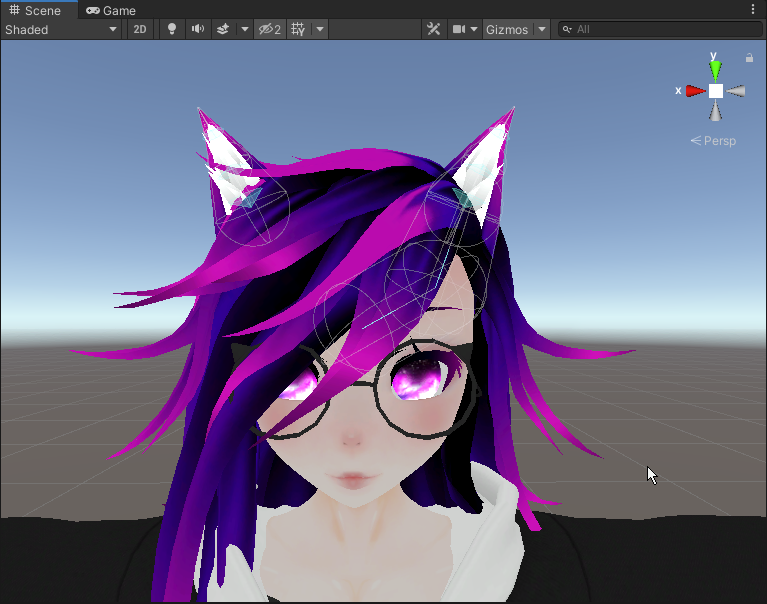
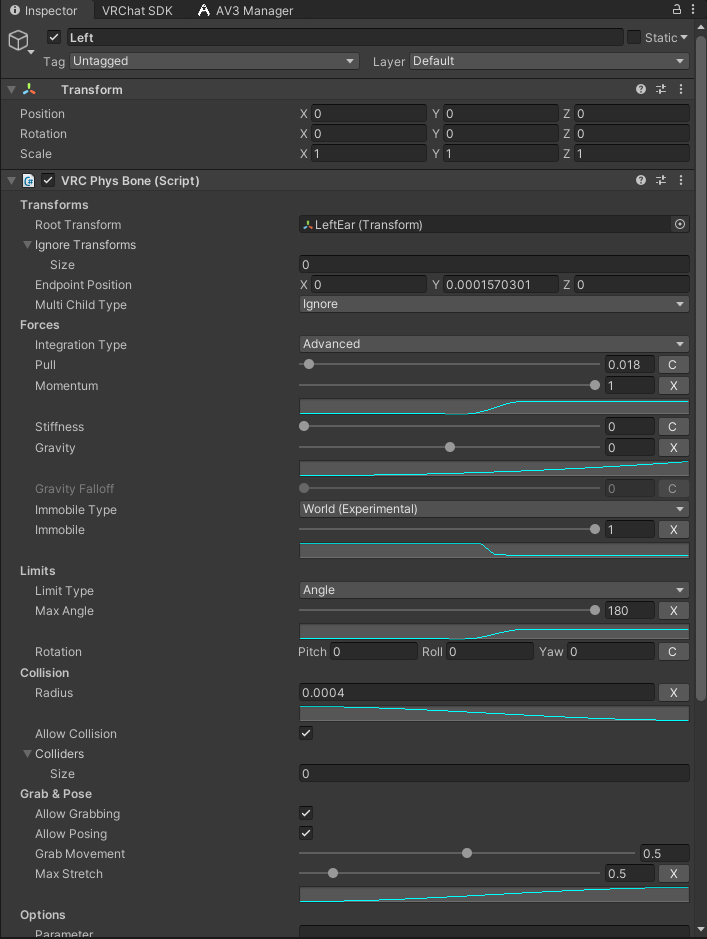
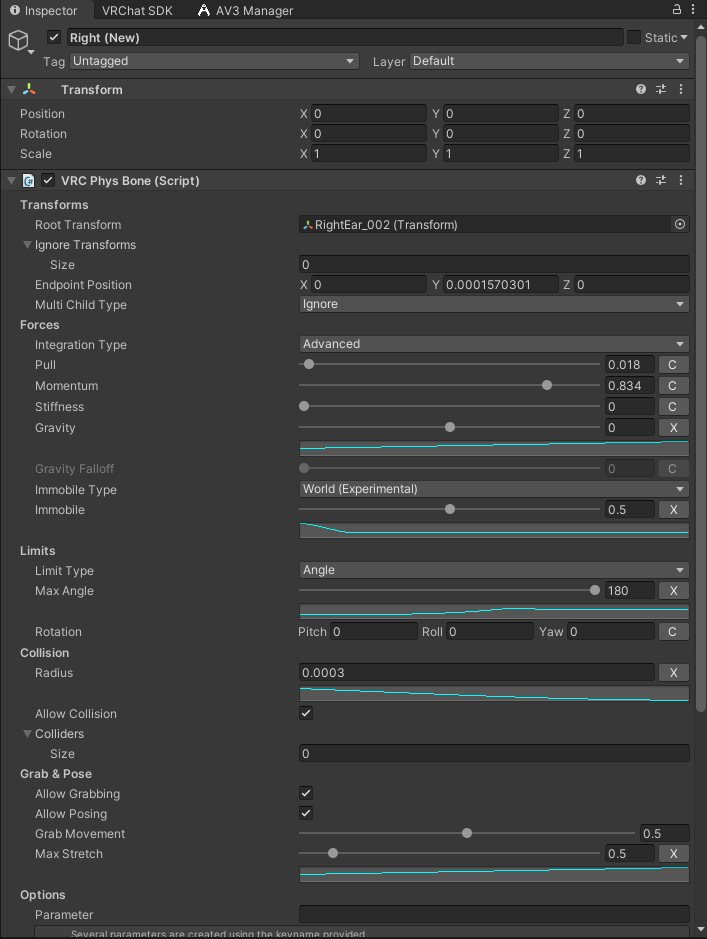
I have no idea how i got the effect in the first place but its been around so long ive gotten rather attached so if possible i really want to keep it, if i cant ill have to give up on removing those extra physbones :(
carmine jewel
finally got my hat to be grabbed but looks like a weird trasition where sometimes when it grabs there looks like the physbones jitter wildly sometimes?
carmine jewel
seems like its not physbones just..general flicker
bc i turned physbones off, still did it
 swift spear
Does anyone know how to make a toggle with Avatar Dynamics?
I wanna make a toggle trigger if i press a button on the wrist of my avatar and then turn it off the same way
I know how to make normal toggles, and you know grab props from my body and such, but making one simple button that will toggle a complete texture/material change and stay that way, idk how to do that
stiff glen
Yes - you use VRC Avatar Parameter Driver to have your button toggle another boolean on or off depending on its current state
so button inverts the next variable, and that variable is what controls whether your prop is shown
swift spear
ahhh great, Parameter drivers.... never liked dealing with those but thank you!
stiff glen
They work really well in this case!
 mellow hawk
swift spear
Does anyone know how to make a toggle with Avatar Dynamics?
I wanna make a toggl...
mellow hawk
swift spear
Does anyone know how to make a toggle with Avatar Dynamics?
I wanna make a toggl...
Here is a has exit time example: #avatar-dynamics message
And synced state machine example:

 lime prawn
im laughing at the varying qualities of your annotations @mellow hawk
mellow hawk
(I really should remake this one lol)
Slapped this one out a while ago like 3am in ms paint
carmine jewel
everything on my hat grab works, except, when grabbed for a split second, my physbones start shaking wildly, tried it without physbones, then it just blinks in and out for a few seconds between grab and Not grab transitons
dunno how i did that
sounds like an animation issue, but, i dont...know how it could be, because the animation i did only has one frame


i..think as i was screenshotting, i may of found the issue XD
both my prop toggles were sent to true
not true false
hopefully that fixes it XD
carmine jewel
xD was indeed the issue
 mellow hawk
 final coral
anyone got any quest eyebrows i can use for this model
final coral
anyone got any quest eyebrows i can use for this model
The eyebrows are already on the avi
final coral
mellow hawk
The eyebrows are already on the avi
no when i try to put it in quest black gose all around the eyebrows
mellow hawk
Just move the texture to the head and remove the mesh where the eyebrows were.
final coral
??????
final coral
mellow hawk
Just move the texture to the head and remove the mesh where the eyebrows were.
am also quite new to this
mellow hawk
Basically, a lot of the build-a-bear avatar maker such as vroid use a quod and a texture with transparency. The quest dose not support transparently at all. So if you remove that quod and move the texture to the head texture, it will look exactly the same.
mellow hawk
You know how to use a 2d editor, like photoshop or equivalent?
mellow hawk
All you really need to do is open the texture with the head, then open the eyebrows in a mother layer. Scale, rotate and transform it above the eyes. Save and export.
Open the avid in blender, hit tab to edit the mesh, click on the 4 verts where the eyebrows should be, and delete them. Re export the avatar as fbx fil and bring it into unity
mellow hawk
Could always just have black box eyebrows lol
mellow hawk
For your exact problem? No.
For all the steps listed above? Yes.
final coral
could u make a quick video for me if that ok
mellow hawk
I'm on a bus lol. Would have to wait 10 hours for me to get off work.
Probably best to learn some basic editing skills in the mean time lol.
final coral
mellow hawk
All you really need to do is open the texture with the head, then open the eyebr...
will anyone make a video of this so i can fix my eyebrow for my quest avi
final coral
@mellow hawk i dont have photoshop is there another way i can edit the eyebrows
stiff glen
final coral
<@144149882460962816> i dont have photoshop is there another way i can edit the ...
gimp is a free program for editing such things, you could try that. Really any image editor can do this.
 night plover
I always forget, what was PhysBones pull on 1 again? Immobile or just somewhat stiff
I'm going crazy trying to make a bone stop smoothly at its limit, currently have it go to Pull 1 at the end of its range using a curve, but its just slamming into it without any sort of like smooth stop

 torn tendon
After the damned "VRC Creator Assistant" software migrated my files, the shader in my software was damaged
 dark drift
@night plover all curves are working along the bones, their length, not some limits, time or anything.
 elder magnet
somebody can explain how to use the stretch parameter?
calm owl
for example if you were to put Bone as the parameter, you would get a Bone_Stretch that you'd be able to put in an animator parameters to use for transitions
elder magnet
so i use it well 🤔 need to see the problem
 halcyon vault
elder magnet
somebody can explain how to use the stretch parameter?
halcyon vault
elder magnet
somebody can explain how to use the stretch parameter?
- An instance I used the _Stretch was to pull on hoodie strings and tighten the hoodie around the face.
- Pulling/pushing up the sleeves of a shirt/jacket.
- Another was to stretch something that was linked to my pants belt loop and 'break' it off at a certain amount changing the constrained source from the hip to the hand.
- I've seen it be used for slides of handguns to pull it back a certain distance and to know how far back it's been pulled to show the loaded round/eject or not.
- Removing clothing by grabbing strings attached to knots, pull to 'loosen' and remove
Functionality wise it'll be a float value from 0.0-1.0 depending on the max amount you allow it to be stretched which is based on the original rest length of the bone(s). it'll use {parameter}_Stretch which you can check for in any and all playable layers.
elder magnet
example if i got a katana with a blend shape to move it around the scabbard and i want to use a physbone to move it around (hi deadpool) and want to make 2 different parameter for both katana if i stretch the physbone should i name them example L_Stretch and R_Stretch then on the blend tree use this exact condition as a float ?
dark drift
@elder magnet you can just use one animation with two frames (katana in/out) and motion time set to L_Stretch (disable looping), blendtrees are useful (not excessive) only when you have many stages or need nonlinear motion.
otherwise yes, that exactly how pulling out swords is made, and when you reach stretch 1 toggle sword to your hand
ps: by saying exactly, i dont think theyre using blendshapes normally. but whatever, if it works
elder magnet
dark drift
ps: by saying exactly, i dont think theyre using blendshapes normally. but whate...
there is a blendshape for making the sword slide until its reach a very end then since its 2 item compact together i can hide it to do a animation to hide this sword and spawn the same sword but in my hand
dark drift
@elder magnet just saying that having sword weighted to the bone that youll use anyway to grab feels more logical
elder magnet
wanted mostly to move quickly the katana in the scabbard out and in while its inside of it to do a particle animation for one of them and since the sword was capable with blendshape i wanted to move it with the blendshape but even if my float get to 1 the animation dont trigger
calm owl
1 is not greater than 1
 rugged field
What is causing this physbone to be so large?
 stiff glen
rugged field
What is causing this physbone to be so large?
stiff glen
rugged field
What is causing this physbone to be so large?
weird avatar scaling due to blender export settings not being set to FBX ALL?
rugged field
Oh, I didn't know that was a thing. I'll give that a try, Thanks!
That was it! Thanks!
stiff glen
nice!
 frank minnow
I have some contact sender-receivers that occasionally have a pretty short activation period. they don't seem to always successfully activate on remote clients, presumably due to IK interpolation. can I just sync those parameters to guarentee that my conditions are met and animations fire properly on remote clients?
 upper raven
frank minnow
I have some contact sender-receivers that occasionally have a pretty short activ...
upper raven
frank minnow
I have some contact sender-receivers that occasionally have a pretty short activ...
Set then contact to constant, on enter have syncing problems because sometimes the single frame the parameter is on is skipped on remote client's
frank minnow
upper raven
Set then contact to constant, on enter have syncing problems because sometimes t...
they already are constants
 upper raven
For better syncing you can also select "Local" and then put the parameter in your avatar VRchat parameters
 solid spruce
How to Make a avatar on a Mac
upper raven
same way you make on windows, make model in a 3d modelling software, put it in unity, set it up, upload
solid spruce
How to import hammer assets into blender?
 primal haven
Heyo! i am trying to setup a physbone zipper but the _Stretch parameter of the component isnt comunicating with the Animator parameters at all
Any reason for this?
cuz im seeing the parameter change as i grab it in the component but the same parameter in the animator remains unchanged where as i understand they are supposed to link
 acoustic ridge
Can I make a toggle hiding and showing a gameobject that contains a contact receiver to enable and disable it?
Or will it mess up the contact receiver or not work at all?
mellow hawk
acoustic ridge
Can I make a toggle hiding and showing a gameobject that contains a contact rece...
You totally can. But you get into state machine logic and network sync states.
It gets a bit confusing but if you want to do it you sure can.
Feel free to ping/dm if you need help with those things.
acoustic ridge
mellow hawk
You totally can. But you get into state machine logic and network sync states.
I...
...please explain 🥹
 tired drift
anyone have good physbones settings for large ears and tails?
or know where i can find them?
acoustic ridge
tired drift
anyone have good physbones settings for large ears and tails?
best way to find what works is to experiment
what i would do is duplicate my model, put a looping walk/run animation on it, go into play mode, and start playing around with the settings
tired drift
acoustic ridge
best way to find what works is to experiment
yeah i have, but i dont really know how ear physics work so i wanted to know how other people did theirs
acoustic ridge
tired drift
yeah i have, but i dont really know how ear physics work so i wanted to know how...
each person has their own view of it! that's why you cant get one universal setting, its whatever looks good to you
and you can ask what other people think of it after
 crisp elm
Does anyone know if it's better to toggle off physbones with the mesh on a mesh toggle? Does it help with optimization? OR for example: If I have 2 hairs, when I have 1 hair on I toggle of all the physbones for the other hair
Does it actually improve performance?
crisp elm
IF anyone is looking for this information, the answer is: YES. Toggling of physbones when they're not needed does improve performance
stiff glen
crisp elm
Does anyone know if it's better to toggle off physbones with the mesh on a mesh ...
Yes absolutely you want to do that
 native dock
does attaching a contact to a physbone just make them not work? I'm trying to make it so that when you pull away the physbone then the sender is no longer touching the receiver, but the contact values never change even when they've stopped touching.
native dock
I guess contacts in general just don't work in play mode because I had it on one that wasn't on a physbone and still nothing
 pulsar minnow
what would be the ideal Phys Bones settings for a tail that is defaulted to a straight back position


current settings and the result
 lone cypress
pulsar minnow
lone cypress
pulsar minnow
settings are going to be different for everyone, set your gravity pretty high, make sure to have a collider on the body and one on the armature aka floor and then test it
 errant vale
anyone know how to made the collider radius shorter?
The width is great but its so long XD

 rugged field
errant vale
anyone know how to made the collider radius shorter?
The width is great but its ...
rugged field
errant vale
anyone know how to made the collider radius shorter?
The width is great but its ...
Probably can't do much about it in unity. In blender, just make your bone shorter. Also make sure you're exporting your .fbx with scaling set to FBX All.
 errant vale
rugged field
Probably can't do much about it in unity. In blender, just make your bone shorte...
errant vale
rugged field
Probably can't do much about it in unity. In blender, just make your bone shorte...
Does the bone need to extend that far to function? This model didn't have belly physics so I copied what I found on another model and made the bones stick out the same amount
rugged field
Bone length shouldn't be a problem with your physbone. However, now that you mention that you added it, did you weight paint the stomach?
errant vale
rugged field
Bone length shouldn't be a problem with your physbone. However, now that you men...
Sure did! Jiggle works great IMO just the colliders are so long it jiggles when someone touches around him lol 😂
rugged field
Ah good. Yea so now when you make the bone shorter, think of the end of the bone as the point of where the physbone component will create the collider from. So try to put it in the middle of your stomach area.
The physbone script just takes the two ends of the physbones as center points and creates spheres for collisions, then ties them together into a pill shape
errant vale
Oh ok! Can I change the length in blender without affecting anything else?
rugged field
Yea, as long as you don't mess with anything else, you should be fine to drop it back into unity
errant vale
Fantastic I'll give that a go tomorrow, thank you SO much!!!
rugged field
NP
 stray verge
Can anyone help with chest phys bones?
 errant vale
rugged field
NP
errant vale
rugged field
NP
So i think i did something wrong...
I shrank the bone, and reported and didnt change


I think it might be cause on export a "belly_end" bone was added? But if I delete that bone the whole collider vanishes
rugged field
Was the bone shrank already in that blender photo? Because it doesn't look like it is. Grab the end portion and pull it in. Also, when you export your model as a .FBX, make sure you go to scale and change it to FBX All. Then also go to armature and uncheck the leaf bones. That's where the belly_end came from
errant vale
Ya it was shrank in the blender photo already, I was previously much further out. So it should go in even further?
What does the fbx all do? I don't think I've every used that setting before. Good to know about the leaf bones tho!
 simple elk
way more in with the bone, radius goes at end of it , see other one the green arrow end - is where the bone stop

 errant vale
simple elk
way more in with the bone, radius goes at end of it , see other one the green ar...
errant vale
simple elk
way more in with the bone, radius goes at end of it , see other one the green ar...
No way that much further?! 😱 That seems like a program error lol
rugged field
The tips of the bones are the center points for the physbones collision spheres. So if you have a spherical object such as your belly, you want the center of it to be where the end of the physbone is.
stiff glen
errant vale
I think it might be cause on export a "belly_end" bone was added? But if I delet...
In the armature section of the export from Blender, this got added when 'add leaf bones' was checked - you generally don't need this.
 oak barn
stray verge
Can anyone help with chest phys bones?
oak barn
stray verge
Can anyone help with chest phys bones?
How did u get it like that
 rich birch
not sure if this is a dynamics or rigging thing but how in the heck would you go about making phsbones work on a loop, i.e. a chain, or a ribbon?
my friend has brought me this topic and i was suprised at how difficult it seems to do this when i thought it would be easy:

the only "solution" ive found that (kinda works) is to rig them in pairs, as such:

and while that kinda works, i was hoping maybe playing with contraints and limits and making two bone chains that meet on that center link would work:

but, the middle link just gets streched no matter what i do lol
errant vale
rugged field
Was the bone shrank already in that blender photo? Because it doesn't look like ...
So i exported with the FBX All setting, and got these errors
So I went into configure and he now looks like...a blob with ears...

 calm owl
at the bottom of that mapping menu, there is a reset t pose and enforce t pose button in a drop down menu. Clicky those
errant vale
I think that worked! Are "end" bones needed? One i turned off that "add leaf bones" my collider doesnt work anymore?
stiff glen
errant vale
I think that worked! Are "end" bones needed? One i turned off that "add leaf bon...
No
errant vale
stiff glen
No
oh.. what could they be stopping them from working then?
simple elk
physbone requires 2 'bones' if its 1 just add endpoint
stiff glen
yeah - this is true
simple elk
 errant vale
ooooh ill try that!
simple elk
they do not count so its one way to save if you are limited on amount of physbone transforms
stiff glen
the issue with that setting is that you don't need leaf bones everywhere, so you'll want to specifically make your physbones two or more bones
errant vale
end bones dont count or endpoints dont?
calm owl
end bones count, end length does not.
errant vale
So i shrank/moved the bones and that helped so much with the collider length and size, but i feel like the physics are much more jittery now?
Like the jiggle at the end is perfect but on a jump it not smooth at all? (ignore the floating physbones, i didnt feel like attaching them until the belly was fixed)
calm owl
it looks like the bone length is about 0.000001cm so yeah, not a whole lot to work with
errant vale
I dont think its THAT short lol, i just shrank it to where others over told me too
...Clyde Bot isnt letting me send pix anymore...
ok well theres a link to it for now...
 modern quest
So, I'm having an interesting problem with the physics script. It works perfectly fine for self collision but external colliders (aka other players colliders) do not affect the phys bones. Other players are only able to grab the bone to manipulate, but their colliders don't activate when coming into contact. Any ideas?
Keep in mind, this bug only appeared twice out of 10 other avatars created. Those work perfectly fine.
calm owl
Its 1 bone, so it just goes off of end transform length
errant vale
calm owl
Its 1 bone, so it just goes off of end transform length
So since the end transform length is right at the outside of his tummy, how do i fix it?

 calm owl
1e-05 lol i wasnt far off. Uhh by having a smaller tummy collision, or multiple smaller bones
as in multiple bones that will have their own collision
just spread out to use a smaller radius
just keep in mind that unity only cares where the root of the bone is and how it is rotated, the "tip" of the bone in blender isnt considered in unity
errant vale
ugh, lol
That all sounds like way to much just to get his tummy to function
 floral junco
any idea why I can't click and drag physbones in unity anymore? I used to be able to test stretching and stuff all within unity but now it just doesn't work
and yes radius is not set to 0
 onyx vapor
floral junco
any idea why I can't click and drag physbones in unity anymore? I used to be abl...
onyx vapor
floral junco
any idea why I can't click and drag physbones in unity anymore? I used to be abl...
Make sure you are dragging in the Game window while in play mode, not the scene window.
floral junco
I am
onyx vapor
Ah, perhaps try repositioning the camera to a diff angle/zoom in more? Might be something else is catching the mouse click instead of the bone
 hollow delta
what's the best approach to toggling a physbone between pose-able and standard behavior?
I'd like to have a tail that swings around freely normally, but is completely pose-able (and stays in place) when I want it to. Should be an easy toggle with two animations that change some values, and setting Pull and Gravity to 0 would give me the desired effect. But the physbone component doesn't seem to react to those two values being changed by an animation. Am I missing something?
modern quest
modern quest
So, I'm having an interesting problem with the physics script. It works perfectl...
It has taken me 2 - 5 weeks and the answer no one could give to fix it is: Readd the component or modify the sliders and upload until the prefab finally registers it.
dark drift
@hollow delta physbones settings are not meant to be animated and applied only after turning component off and back on.
hollow delta
dark drift
<@311141957743280129> physbones settings are not meant to be animated and appli...
ah, i see. ty
could technically have two physbone components and toggle one on and the other off i guess
dark drift
@hollow delta if youre just trying to animate isGrabbable then just animate one component. also chances of any of configurstions breaking while in transition are high.
hollow delta
i want to be able to pose the physbone and have it stay exactly the way it is, not just make it grabbable or not
upper raven
state behaviours
 grand mist
Hi everyone !!! I just want to know if there is there a way for change the physique on a Physbone component throw an animation... I tried adding a radial puppet to change the Pull, but it doesn't work on my animations...
mellow hawk
grand mist
Hi everyone !!! I just want to know if there is there a way for change the physi...
The physbone script needs to be reinstantiated if you change settings.
Ie, turn the script component off and back on again.
 storm crater
Is it possible to have multiple motion limit types in one root? Messing around with limbs and I'd like to make the knee a hinge and hip joint polar.. When I try setting up multiple components with an ignore transform it stops the knee from bending at all.
dark drift
@storm crater polar includes hinge, just play with curves
storm crater
Oh! Thank you. For some reason I didn't think you could use curves with polar.
 shell jay
is there a way to get physbones to only be grabbable by certain hands
for example i want a gun prop with a grip and it works but i can accidentally grab it with the hand the prop is in so is there any way to disable that?
dark drift
@shell jay what. by grip you mean slide? if you have an extea layer that reads physbone stretch and converts it into movement you can add extra checks with contacts to not animate it if second hand is not close enough or smth
shell jay
dark drift
<@548216999365312523> what. by grip you mean slide? if you have an extea layer t...
But then you could still grab it with the wrong hand whenever the other is near the handle
dark drift
what stops you from just adjusting colliders in the first place so it wont overlap
simple elk
contact or reciver if its correct hand enable the grab, otherwise ignore (random idea never tried also forgot wich one detect the hand)
shell jay
dark drift
what stops you from just adjusting colliders in the first place so it wont overl...
because with the Phys bone it will pivot from the start of the collider
which is in the hand that is holding the gun
shell jay
simple elk
contact or reciver if its correct hand enable the grab, otherwise ignore (random...
yeah but that still has the same problem from before that if the hand you want to grab the grip with is close and enables the physbone the hand holding the gun could still grab it
 verbal vault
It is true that all avatars come with built-in contact senders on the fingers/hands upon upload, right?
shell jay
verbal vault
It is true that all avatars come with built-in contact senders on the fingers/ha...
fingers hands head chest and feet i think
dark drift
@shell jay i dont get it, just add extra bone inbetween so you can move grabbable parts
verbal vault
shell jay
fingers hands head chest and feet i think
Sweet. Thank you
shell jay
dark drift
<@548216999365312523> i dont get it, just add extra bone inbetween so you can mo...
hold on ill get some screenshots so i can try to explain how im doing it
shell jay
dark drift
<@548216999365312523> i dont get it, just add extra bone inbetween so you can mo...
so basically you've got the point it will pivot from when grabbed which is the object position
and the Phys bone which is what you grab to move it

it works fine except for accidentally grabbing it with the right hand
which is what im trying to avoid
dark drift
@shell jay oh, lol. just reduce collider size with curves
i thought you had small pistol with a slide
shell jay
dark drift
i thought you had small pistol with a slide
oh
so just have it be 0 until you get to the grip
dark drift
yep, a ball
or if you want it to be grip-shaped add extra bone and set limits to 0 with once again curves so only root one can actually rotate
shell jay
dark drift
yep, a ball
i tried to do that and there were 2 results
if i started at just over 0 it looked like this
if i started at 0 the whole bone would have a radius of 0
 dark drift
@shell jay i see youre using endpoint position, better add actual empty object or two along the axis. i cant check my setup rn
shell jay
dark drift
<@548216999365312523> i see youre using endpoint position, better add actual emp...
ah the problem with that is that if i use an empty game object wont the gun just pivot around that instead of the fist
dark drift
@shell jay
 shell jay
Ah I've figured it out
Thank you
dark drift
yep, 3 objects
both root of gun AND handle dont have collides, handle2 is object that has collisions
4 objects for capsule
 shell jay
@dark drift quick question
could you use the parameter on the physbone to make it so that when the grip is selected a guns bloom is reduced
this would be by making an animation of the guns particle system having a larger or smaller angle
dark drift
@shell jay theres isGrabbed parameter for physbones if i get you correctly
shell jay
dark drift
<@548216999365312523> theres isGrabbed parameter for physbones if i get you corr...
yeah thats what i mean
so if grabbed is true then the animation would decrease the angle on the particle systems to decrease bloom
dark drift
should totally work
 wide harbor
so my physbones flip over to random positions when grabbed, any idea why that might be?

 fair sundial
Oh, mine did that too earlier. I think i fixed it by adding an angle limit
Hopefully it works for you aswell
@wide harbor ill ping in case you dont check here often ^
wide harbor
Thanks! someone on another site said the same thing so hopefully that’s just it
fair sundial
alright, good luck ^-^
wide harbor
Alright so looks like unfortunatley I’m getting the same results
wide harbor
fair sundial
Oh, mine did that too earlier. I think i fixed it by adding an angle limit
did yours look like this?
 fair sundial
oh your collider is also huge
woah
hmm uh
try lowering the collision radius maybe?
wide harbor
fair sundial
oh your collider is also huge
yah it was the only way to get it to fit the whole neck of the guitar
fair sundial
hm, whats the armature for the guitar like?
could you put another component on like, a neck bone?
wide harbor
fair sundial
hm, whats the armature for the guitar like?
just two bones
wide harbor
 wide harbor
fair sundial
i see
wide harbor
fair sundial
i see
thought just making two would simplify things
fair sundial
i think its cause the bone is pretty big
upper raven
what you want to do is make the collider small and add an endpoint to extend the bone so it covers the neck of the guitar while still being small
wide harbor
upper raven
what you want to do is make the collider small and add an endpoint to extend the...
how do you add an endpoint?
upper raven
in the physbones
wide harbor
upper raven
in the physbones
could you elaborate a little more on that please
upper raven
 wide harbor
upper raven
wide harbor
upper raven
thx!
 jade cypress
question: has anyone figured out if it's possible to have an object on an avatar that can be grabbed by other people and posed in the world? like I have a prop in my hand that I want other people to be able to pick up and move around
What I've come up with so far:
- Have an empty object, A, as the physbone root, another empty B as the tip (which should be grabbable), and the prop X as a child of B (or maybe just parent constraint'd to B)
- Set physbone to max stretch, zero springiness (it'll basically just follow wherever it's grabbed)
- Whenever IsGrabbed goes from 1->0, play an animation that a) fixes X to the world via ParentConstraint, then b) translates the PhysBone root A to X's position by toggling a ParentConstraint, then c) disables X's world fixture and fixes it back to the tip bone
docs say you can't translate the root physbone component though - maybe I can just toggle the component in the animation?
dark drift
@jade cypress https://github.com/ThatFatKidsMom/Avatar-Prop grabbable and rotatable prop via 17 contacts
GitHub
Prefab to spawn in props that can be moved and rotated by other players - GitHub - ThatFatKidsMom/Avatar-Prop: Prefab to spawn in props that can be moved and rotated by other players
jade cypress
dark drift
<@234818020550115330> https://github.com/ThatFatKidsMom/Avatar-Prop grabbable a...
tyty, that seems to be exactly what I was looking for
my attempts just have the physbones zoomin out in front of me so far lol
 karmic sinew
I don't suppose anyone's ever made a working rotary encoder (that can be grabbed and twisted) using avatar dynamics before? 😅
 lost pebble
i have these colliders that i want to interact with each other but they wont react with each other, how should i do so they work?

both colliders are added to the physbone collider components
lost pebble
oh alright
lost pebble
upper raven
what you want are "Contacts"
would that be the same way to set them up with components?
upper raven
yes
lost pebble
there is 2 different contacts, what one would be used for this situation?
lost pebble
upper raven
yes
since there is receiver and sender
the point is so the mantel should get pushed away by the tail
upper raven
oh for that then yeah you'll need a collider that pushes the physbones on the tail
and you need to set that physbones collider to collide with the tail
manually
lost pebble
upper raven
oh for that then yeah you'll need a collider that pushes the physbones on the ta...
thank you, it is working like it should now!
 woeful forum
How could i get better syncing on the physbone parameters?
Since they are local and not network synced i run into a lot of desync issues because i use the _Stretch Value to drive animations and states but they tend to behave different for different ppl espeacially in bigger lobbies...
I tried writing the local physbone parameters into actual synced parameters with parameter drivers but not only is it very unperformat since in need to do that multiple times a second but also it makes the animations that are driven by the parameter verry choppy
upper raven
physbone parameters are network synced
copying the values to another synced parameter is redundant
makes little to no difference
woeful forum
hmm i guess the sync polling rate is not fast enough to drive the state machine consistently
upper raven
probably
woeful forum
well in that case i try bigger thresholds and hope that reduces the issue a bit at least
upper raven
honestly i have no idea what the rate for physbone parameters are, im thinking either the same rate as playable layers or IK but probably playable
woeful forum
ok yeah i have conditions that check for example if the stretch value is above 0.98 and i guess thats too precise
upper raven
oh yeah definitely, thats in the threshold of float synced precision
from my ouijaboard system, floats only match locally and remotely by 0.02 or more
so if you have animation that does somthing at 0.01 and something different at 0.02 it will get confused because for the remove client 0.01 and 0.02 is pratically the same
woeful forum
yeah makes sense just need to rebuild some stuff and maybe just increase the threshholds maybe change the bone sizes aswell to still get the same effect
ty
upper raven
yeah thats pretty much what i did for the ouija board, each letter was 0.01 more than the last letter, so the A was 0.01, B was 0.02 etc etc, it worked perfectly locally but then i found out it didnt sync right for remote players, when it was b for me for example 0.02 for me, it was still A for the other person, would desync like that, i fixed it by making each letter be 0.02 more than the last, A is 0.02, B is 0.04 etc, fixed that

GitHub
With OSC as a new feature, we should definitely be able to send high precision floats e.g. 0.0003 and so on over the network, sadly, VRChat sends it very imprecise, Example: https://files.moonvrc.c...
its been an issue for some time, they havent done anything about it yet
woeful forum
what im also gona do just as a fail save is that after the transition it will set the stretch value to 1 by parameter driver
im not sure how that will play out but my hope is it will force it to sync and then also play the animation on the network side how its supposed to
 trail pelican
"Pull - Amount of force used to return bones to their rest position."
does higher values make the physics faster or slower?
dark drift
@trail pelican faster
you can grab stuff in game window in play mode and adjust parameters on the go, then copy component to not lose changes
trail pelican
ohhh okay
 wheat cradle
I don't suppose anyone can help me as I can't find this anywhere online, my custom model isn't moving it's head up and down, it's just static when I do it, all the bones are mapped correctly but I genuinely can't find anything on this at all, appreciate any help!
wheat cradle
wheat cradle
I don't suppose anyone can help me as I can't find this anywhere online, my cust...
Nevermind, I had physbones on the head for the hair instead of each strand!
halcyon vault
wheat cradle
Nevermind, I had physbones on the head for the hair instead of each strand!
You should use a root bone for your hair. It’ll act like the head does in the way that 1 component works on all the hair chains but isn’t a humanoid bone so you retain control over your body.
 idle frost
dark drift
<@234818020550115330> https://github.com/ThatFatKidsMom/Avatar-Prop grabbable a...
idle frost
dark drift
<@234818020550115330> https://github.com/ThatFatKidsMom/Avatar-Prop grabbable a...
Hey gamers, so i'm wanting to use this to create a tray of different items, like - a piece of bread, a piece of meat, a tankard of beer - just a tray of STUFF, using this prefab to allow players to actually grab things that are on the tray. My original idea was to put all of the food-items into individual object containers of this prefab, then just set those as children to the tray. But, since the game object has actual FX commands that are then bound to the FX controller of the model, creating multiple instances doesn't seem... possible? Since I don't think multiple instances of the object can be bound to the same animation? I'm not quite knowledgable enough to know how that works. As such, since I'm still kinda new, I thought I'd see if anyone has done something similar before, or knows a way to make this possible and would potentially be able to teach me.
(Oh shoot, sorry Leastmost for the tag reply, I didn't even think about it)
dark drift
@idle frost please dont, its 17 contacts per prefab, two of them wont work and tray full of them will kill frames most likely
idle frost
Oh geez, yeah, I didn't exactly think about that.
Is it possible to just make physbones on the independent objects and let them be "grabbed"? Or would that not work because it's parented to the tray?
upper raven
yeah just a few months ago i tried doing the exact same thing, it worked perfectly, but it was like 50+ contacts so i just went with constraints
kinda like this

Avatar baking system made by gonsodany#8035 and assets by yamuVR
Avatar NOT included and is not affiliated with us, the system is currently only for sale on an upcoming avatar.
MUSIC is by
https://freemusicarchive.org/music/Kai_Engel/Sustains
----------...
idle frost
That's so cool
So you say you did this with constraints? How does that work?
I love the "No gloves needed" part
upper raven
each item has a single contact receiver that listen for "hand" then i have Target objects in my hands, when that specific contact gets activated and i make a grip gesture it activates a parent constraint to the target until i let go of the gripping button
dark drift
@idle frost for food that does not care about rotation stretchy bones could be easy solution
idle frost
OH! I've used those before! The contact receivers and stuff!
So, if I were to make the items on the tray have receivers that interact with hands, how exactly would I go about making it so other people can GRAB them?
upper raven
oh yeah if you just want it to be grabbable an not have rotation you can use ThatFatKidsMom Grabbable prop, it only uses 1 contact per item
idle frost
dark drift
<@118233421280444418> for food that does not care about rotation stretchy bones ...
See, I thought if maybe I just yeeted the motion settings to 0 it'd be fine?
upper raven

Preview of our christmas tree decorating system on our up coming christmas avatar
system made by gonsodany#8035 and assets by yamuVR
place your tree and ornaments in any world
have fun with your friends decorating the tree
place the star on top for the final touch~
-----------------------------------------------------------------------------...
like that
each ball its only one contact
idle frost
Now what exactly do you mean by rotation? Like, if someone turns their hand?
upper raven
yeah
it will always be in the same rotation
will just be moved around
if you see the balls can be moved around but they'll always face the same direction
idle frost
Ahhh, that's a shame.
upper raven
if its something you dont really need rotation you can do it that way
idle frost
What if it's just one of the items?
upper raven
then yeah you can do it, that'll cost you around 17 contacts tho
idle frost
That's so many heckin' contacts aaaaa
@upper raven (Sorry for the @ ) Would you mind if I DM'ed you for some guidance?
upper raven
yeah sure
idle frost
upper raven
yeah sure
Awesome, thank you in advance
 gloomy tiger
How can I make it so, when a contact receiver triggers "on enter", it'll keep the state it toggles on active, until I toggle it back to the default state? Basically, I am trying to make it so someone can touch part of my avatar & make it "disappear" using on-enter, & have that part of my avatar stay hidden until I toggle the main toggle off again (having it reset).
dark drift
@gloomy tiger vrc parameter driver. and you probably want reciever to be local only so its synced
VRChat
When you've got a specific state selected in the Animator view, you'll be able to add State Behaviors. They're a bit like components for states. They do different things. Try adding them, and you'll see what they can do! All state behaviors run on the first frame of the transition into that state. S...
and you dont want onEnter for this, constant probably would work better unless you need speed.
gloomy tiger
dark drift
and you dont want onEnter for this, constant probably would work better unless y...
Constant would not work, as I don't want them to pull anything off my model. I want them to touch something & have it disappear.
gloomy tiger
dark drift
<@255041722231291904> vrc parameter driver. and you probably want reciever to be...
hmmm, I suppose I'll try this
upper raven
gloomy tiger
Constant would not work, as I don't want them to pull anything off my model. I w...
that can be done with constant
dark drift
gloomy tiger
Constant would not work, as I don't want them to pull anything off my model. I w...
constant becomes 1 - object dissapears immediately. It just more consistent than on contact
upper raven
dark drift
constant becomes 1 - object dissapears immediately. It just more consistent than...
^
dark drift
you need on contact only if something can be smashed repeatedly fast or you need speed value
gloomy tiger
dark drift
constant becomes 1 - object dissapears immediately. It just more consistent than...
But if they pull their hand away it'd re-appear?
dark drift
why would it, it will only drive vrc parameter drivcer
once
and that parameter controls your clothes
so it will be stuck untill you do it via radial menu or whatever
its 2 different parameters
gloomy tiger
dark drift
its 2 different parameters
wait, two parameters?
dark drift
...
dark drift
did you read about parasmeter driver?
gloomy tiger
Yes.
dark drift
so
someone touch your contact with param Touch
that causes you locally to go to empty animation that has driver
that sets Clothes to 1
and other layer check Clothes and if 1 turns them off
well, true/false, since bool is ok
gloomy tiger
I'm using int
dark drift
and you can put clothes as toggle in menu
gloomy tiger
but probably doesn't matter
upper raven
kinda does, contacts can only 1 or 0 for ints, so make sure the toggle off you want to use is using either 1 or 0 of that int
but if its a simple 1 object toggle on and off why not use a bool and save 7 memory
gloomy tiger
upper raven
but if its a simple 1 object toggle on and off why not use a bool and save 7 mem...
I feel like I've undersold myself, let me explain how I have set this up 😅
The object that I want to have toggled off is also being toggled on in an emote. I made a synched parameter, called "Grab" & have applied it to my parameter list. I wanted to set it up in a separate layer, & did try adding the parameter driver, however it wasn't working just now. It did work in the same emote layer that toggles the emote on/off, however I'd need to adjust how I've done that emote (which would be a pain), which is why I want to do this in another layer.
gloomy tiger
upper raven
but if its a simple 1 object toggle on and off why not use a bool and save 7 mem...
Becuase int is way more versatile for what I usually do. Just got used to using int I guess.
upper raven
gloomy tiger
I feel like I've undersold myself, let me explain how I have set this up 😅
Th...
i understood exactly what you're trying to do, have something that when someone touches it toggles off, and can only be toggled back on in the menu, like i said using parameter drivers to when the contact is touched it goes to a buffer state that sets the synced toggle parameter to off (or whaterver value it is to toggle off)
gloomy tiger
Using a parameter driver isn't working for me so maybe I'm setting this up wrong.
upper raven
maybe
gloomy tiger
I fixed it, once again I was overcomplicating things by adding extra steps.
 celest pasture
can animators be used to manipulate values in a VRC Phys Bone script?
I've never been able to get this to work... perhaps I'm missing a step?
for example... I have this immobilize value set to 1, and want to use a float to adjust it during playback.

I can keyframe it no problemo, but in playback; even as the value updates in the inspector, the object in the scene stays imobilized
calm owl
They cannot be animated. They values can be changed but it requires a toggle of the script for (2? correct me here) a couple of frames to re-initialize and load the new values
and toggling a phys bone script usually is more strange than not at all
celest pasture
ok... I'll stick with my 'animate weight of a constraint bone' method then
shame it doesn't work on quest
gloomy tiger
upper raven
maybe
nobody can see it disappear, only local for some reason...any ideas?
dark drift
@gloomy tiger you didnt check is local for parameter driver?
gloomy tiger
dark drift
<@255041722231291904> you didnt check is local for parameter driver?
i did, and vice versa
mellow hawk
celest pasture
can animators be used to manipulate values in a VRC Phys Bone script?
I've neve...
The script needs to be deactivated to release the inheritance it has over the child objects. That way, it can be updated. Once this has happened, it needs to be reenabled to have the edits applied. This also resets the local values of any child objects to their pre-FK states. Ie making it snap back to default.
celest pasture
so theoretically.... I could use a radial menu's first param to trigger a wait state where the physbone script is turned off, while the param rotation is being set?
mellow hawk
Yes
celest pasture
neat -- I'll give it a try
mellow hawk
Quite common actually. Seen it on a hand full of try physbones avatars.
gloomy tiger
I have islocal not set in the avatar parameter driver (& have tried it with it on), but can't seem to have it sync over the network. I'm trying to make it so a part of my avatar goes invisible when someone hovers their hand over the contact area. I can see it work when they connect the contacts, but they can't, so I'm stumped.
dark drift
@gloomy tiger is parameter that being driven is in your vrc expression parameters list?
gloomy tiger
yes
dark drift
and it uses separate layer for animation itself? have you put this parameter on radial menu toggle and tried toggling it
gloomy tiger
no it is all under the same layer
dark drift
thats wrong
dark drift
dark drift
and other layer check Clothes and if 1 turns them off
this
gloomy tiger
if it's wrong, why is it working for me?
dark drift
Cause its local
gloomy tiger
this is how it's set up for me.
 dark drift
Step 1: create just oldschool toggle that you can drive from radial menu for everyone back and forth, on=clothes off animation
Step 2: add extra layer with 2 empty states, transition to second if Touch true, it has param driver. transition to first if Touch false
dark drift
typo
dark drift
i tried to do some same stuff with isLocal states and it never worked for me, only separate layers for local stuff
gloomy tiger
Also why is it called "isLocal" if it does the opposite?
gloomy tiger
do I have to set the contact itself to local only?
or is that actually "local only"
dark drift
you see the touch - you toggle driver globally - everyone sees it
it adds a bit of delay but that way its synced and everyone sees same stuff 100%
gloomy tiger
dark drift
you see the touch - you toggle driver globally - everyone sees it
so I did that, but as I suspected, it now only toggles off if the colliders are touching.
parameter driver doesn't do anything in another layer.
dark drift
gloomy tiger
so I did that, but as I suspected, it now only toggles off if the colliders are ...
what toggles off
gloomy tiger
the object I want to toggle off will toggle off only if the contacts are touching, since it's using constant.
dark drift
your toggleable object and contact at this poijt should be connected only by parameter driver
like object xontrolled by var Clothes or smth. And contsct controls Touch or smth
gloomy tiger
so you're saying I don't need two states, one for on & one for off?
gloomy tiger
they are not.
dark drift
or youre trying to use only one variable
gloomy tiger
dark drift
or youre trying to use only one variable
I am.
because what other variable is there to use?
dark drift
??
dark drift
dark drift
Step 1: create just oldschool toggle that you can drive from radial menu for eve...
do this.
with some variable Clothes or smth. Not the one you use for contact
gloomy tiger
You don't understand how this is set up. I am toggling an emote that then toggles the object that I want to turn invisible with contacts.
dark drift
dark drift
Step 2: add extra layer with 2 empty states, transition to second if Touch true,...
then this.
that drives Clothes parameter
so in step one all your transitions use Clothes var
gloomy tiger
The object is already being toggled on by a different layer though.
dark drift
in layer 2 all transitions use Touch var
gloomy tiger
that is exactly what I am doing
dark drift
if object is already toggled on different layer make sure your new toggling layer is lower in animator
gloomy tiger
it is
 glossy jacinth
is there a way to tie sound volume to the angle of a bone?
 sonic meadow
hi would something like this work
probably not but i have no clue


its for headpat reaction
this is my first time customising avi
sonic meadow
 fair sundial
What does the transition between any state and head pat add blends look like?
sonic meadow
fair sundial
What does the transition between any state and head pat add blends look like?
I have no idea
I’m new to unity I can barely upload
halcyon vault
sonic meadow
hi would something like this work
probably not but i have no clue
Having the parameters in the menu be floats is interesting. What is the intended function of your menu buttons?
torn tendon
Physbones' is animted say, "Each frame bone rest position will be updated according to what was animated." does this mean, it'll only be updated if an animation that affects the transformations is active? it wouldn't increase lag if an animation isn't running, and the physbone would effectively continue on as if is animated is off?
upper raven
Make sure you're not using a IsLocal parameter in your transitions
dark drift
@copper silo check animation itself: temporary rename or disable contact reciever, put that same parameter you use to toggle animation into vrc expression parameters and put in onto toggle for radial menu. and see if it works as a simple toggle
no camera component involved?
add radom cube to the avatar and to toggle animations
uuuuh
are your second account allows for custom animations in safety
calm owl
the multiverse is not fun to think about. You and your locally controlled avatar vs somebody else and your remote avatar with defined sync'd parameters
dark drift
would be nice to have remote local only contact (person x touches you - your animation goes only for them) tho.
Actually. How do I convert onEnter to synced value? Since it do be a bit of a problem
speed i mean
mellow hawk
If you wanna force sync put the pram in synced prams list
 unreal ermine
Do physbones appear on PC fallback?
mellow hawk
Yes, the avatar must be good or better to be a fallback, so you can use some
Here is the chart:
https://docs.vrchat.com/docs/avatar-performance-ranking-system

VRChat
The Avatar Performance Ranking System allows you to see how much a user's avatar is affecting performance via analysis of the components on that user's avatar. You can also use it on yourself to see how performant your avatar is. This system is provided to inform users what is likely the most perfor...
mellow hawk
Quite a lot you can do with a decently optimised avi. Hair, ears, and or a tail can often fit in these limits
 rapid fox
Been wondering for a while, is there a way to allow the foot colliders to also collide with/interact with bones, like hair?
upper raven
yes, if you set it up
rapid fox
I cant find any info on how to set it up
upper raven
in the physbones you need to setup the bone colliders as colliders
in the part "colliders"
rapid fox
Im not sure you understand what I mean, I want to allow other people to use their "auto generated" foot colliders to interact with parts of my avatar 🤔
I know how to work with the colliders and everything, just not how to get the foot colliders added since by default they arent (From my understanding) added as a collider to bones with collission enabled
as this screenshot when hovering over "Collission->Allow Collision" setting on a bone says https://i.imgur.com/Jle8TL6.png
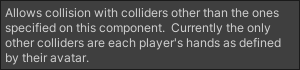 dark drift
rapid fox
Im not sure you understand what I mean, I want to allow other people to use thei...
dark drift
rapid fox
Im not sure you understand what I mean, I want to allow other people to use thei...
theres no default foot colliders, there only contact senders. Only hands are getting 'default' colliders and only this colliders are interacting between players. You need to create your own and add them to the list of collisions for desired physbones, you cannot use them to interact with other people.
rapid fox
Ah the documentation and how its labeled on the avatar descriptor is a bit confusing then
 granite crater
2 questions ! ! ! is there a way to get physbones with 2 static points working?? i know its not like, physically an option but maybe i can juke it with clever colliders/constraints or something

2nd issue!!!! this skirt is made with physbones, with a root bone that controls rotation constraints on all of them to the legs. it works fine when the avatar is looking down, but breaks whenever it looks up. i have. NO clue what could possibly cause this, ,, ,
ok so its definitely something with constraints, cus its still doing it even without physbones on
stiff glen
pretty sure physbones only have one anchor point, so you'd have to do something more complex for that string
you could just put one on the top part and leave the bottom anchored and it might look ok if weighted well...
granite crater
oh absolutely, im just wondering if anyone else has tried this b4 and macgyvered a solution lol
stiff glen
I've seen a few with chains, but haven't looked in detail yet
granite crater
i think the cloth component lets u do stuff like that but ngl ,, ,, that one,,, scares me, , , ,
stiff glen
it does, but it's really not great and it's pretty expensive in terms of processing
Magica Cloth does this nicely but well, that's not available. *pokes VRChat devs*
granite crater
exactly!!! plus i do plan on making a quest compatible version at some point and would rather NOT add yet another layer of complexity id have 2 deal with
stiff glen
oof, no constraints, so that's going to be really hard
hmm not sure it does cloth either, I'd guess not
granite crater
yeah,, ,, for most stuff (like the skirt) im just planning on. removing physbones entirely and just weight painting it 2 the legs, ,, ,
granite crater
might end up having 2 do that with the wires by default tbh
still have no idea whats goin on with the skirt thing tho
literally the only thing i could think of is maybe??? something to do with it not being actively looked at?? so its like, not affecting it or whatever, but honestly thats just speculation at this point
stiff glen
ok I played the video now - really like your avatar. You could try using colliders on the legs to kick the skirt around, my friend did this on a trenchcoat she's got on her avatar and it works reasonably well
granite crater
ive tried that, but activating colliders on the skirt makes it go a lil,, , , ,funky, , ,, part of it is just due to the default finger colliders clipping into the skirt just at a rest pose tbh
stiff glen
You can limit which colliders can collide though
limit it just to the upper leg bone ones
granite crater
not with the default vrchat ones unfortunately
stiff glen
I'm pretty sure this is what my friend did
granite crater
,, , howd they do that , , ,, , 👁️ 👁️
stiff glen
I'll ask!
granite crater
i know u can also adjust/disable the colliders on the fingers as well. that could be what they did
stiff glen
actually I don't need to, it's in the physbone settings, the colliders option lets you provide a list of what can affect it
yeah that takes a VRC Phys Bone Collider
granite crater
no no i mean like. even if that list is COMPLETELY EMPTY, the default vrchat colliders in the hands will still automatically affect it as long as that little "allow collision" box is ticked
stiff glen
right, if you put stuff in there, it'll limit to just those colliders
fair sundial
granite crater
no no i mean like. even if that list is COMPLETELY EMPTY, the default vrchat col...
This ^
granite crater
stiff glen
right, if you put stuff in there, it'll limit to just those colliders
im saying that list doesnt affect default colliders lol.
granite crater
i had this issue b4 with an avatar that had a puppet, i had a collider for the lil,,, puppet,,, coatsleeve thing so that itd shape itself around the arm when u moved it around, but the fingers kept clipping it
i just. got rid of the finger colliders at that point LMAOO
might end up doing that here too
stiff glen
I've asked my friend anyway, though I'm pretty sure she's at a Superb Owl party
granite crater
this constraint glitch is so weird,, , ,it doesnt even look like it disables all rotation constraints when i look up, only a few.
woahh wait its specifically when the avatar does the like, tiptoes thing that happens when u look up really high.
do avatars do that in vr?!?! do they do the tiptoe thing ,,,
i think they do it if u like, raise ur head a lil actually
stiff glen
If you've got your viewpoint or perhaps floor height set wrong, yeah
or your view ball is too far from your head center, like down a furry's muzzle
granite crater
problem also is, u cant even rlly just like,,, not look up that far,,,, bcs this avatar is. 4 foot tall.
stiff glen
that should work okay
granite crater
grr its bugging me an unreasonable amount i am going to win this fight damnit ! !!!
(it is a fight between me and. vrchat)
stiff glen
I know this fight.
granite crater
hmmm is ther elike a world that lets u??? visualize the bones in ur model somehow. thatd help ,,,
granite crater
i know a world that shows u the humanoid rig bones !!! but not anything else
 foggy loom
Any idea why my tail ignores my head collider but not my hands?
 stiff glen
oh that's probably all it can do
granite crater
head isnt a collider, its a reciever i think
stiff glen
You can add one though if you really want 🙂
foggy loom
Yeah, thats the main point of me clawing through... I've lost count how many errors today
Restoring my head colider as to not clip into my tail when I loop up
granite crater
such is the way of avatar creators tbh
foggy loom
Like so?
 granite crater
id recommend putting the script on the head bone itself, makes it easier 2 keep track of things
granite crater
hrmm, , ,did u add it into the list of collisions?
foggy loom
What is that, and how do I find such a list?
 foggy loom
idk where that even is, looking up and down the prefab seaching for this
foggy loom
ty btw ❤️
 river frost
Does PhysBone(Dynmaic Bone) work with scaling size animation?
I tried that with “animated” enabled and it nothing works.
simple elk
have some it works (do it anywhere but fx)
river frost
Are you saying that make it work on Gestures animator instead of FX?
simple elk
if its a humanoid bone i got no clue if it will do anything (physbone shouldnt be on those) got one that has headscale but its just a shapekey , other have other parts scaleable
river frost
It’s a humanoid bone, I was trying to make it work on the tail scalable size so anyone can interact the tail.
mellow hawk
river frost
It’s a humanoid bone, I was trying to make it work on the tail scalable size so ...
Sticking a physbone script on a humanoid bone will cause that bone and any child bones not to have tracking.
Physbones are a blocking script, ie meaning they do not let other scripts edit the transform data. In effect, making it so that the tracking controller for that part, can not function while it's enabled.
The IsAnimated is different in how they are processed as the values can be passed in.
river frost
Hmm
Oh well, I guess I have alternative to create a several PhysBones size on the tail bone with toggles when scaling the tail.
 amber crane
Uhh... Tail is not a humanoid bone though
river frost
I’m not sure. Tail is rigged to humanoid bone
simple elk
humanoid ones (toes / fingers optional) anything else easy to scale

tail isnt one ,just scale from its root
river frost
Hmm, my avatar is Rexouium, it does have tail rigged
dark drift
rigged!=humanoid
simple elk
rex definatly have
mellow hawk
Youll often see something like this, the "tailroot" in this case, is not humanoid bones but the "Hips" are.

 digital basin
Haven't really done a avatara in awhile, does anyone know how ppl are doing dampening avatar receivers to create effects like where you punch somewhere fast enough and it toggles a effect?
torn tendon
digital basin
Haven't really done a avatara in awhile, does anyone know how ppl are doing damp...
there's a speed button in the bottom of it, how fast something must mvoe through to trigger
 mellow heart
Does anyone know how to use parameter driver? I can't make it work by any possible means. I do all the same as in tutorial video, but nothing happens. It changes nothing. Maybe it can't work in unity test mode at all? maybe it needs CC? maybe it works only in additional animator controllers? I have no any idea><
halcyon vault
mellow heart
Does anyone know how to use parameter driver? I can't make it work by any possib...
Animation state behaviors don’t run in unity unless you drive it within an emulator like Gesture manager or Lyumas emulator.
mellow heart
halcyon vault
Animation state behaviors don’t run in unity unless you drive it within an emula...
supposedly I have to add from CC 1. avatars 3.0 manager or 2. Gesture manager or 3. something else?
halcyon vault
Well the 3.0 manager won’t make Pdrivers run in unity but it’s a helpful tool to have.
The Gesture manager will run them when simulating the scene with it present.
mellow heart
halcyon vault
The Gesture manager will run them when simulating the scene with it present.

Just nowhere no any info about that parameter driver doesn't work in unity play mode ><
halcyon vault
None of the state behaviors do, nor the pose space or the tracking control. Emulators are needed to test them.
 sour goblet
when I put physbones on my arms and legs the model is forced into a T-Pose, how can I make my arms have physbones on them without T-Posing
simple elk
physbones cant be on humanoid ones without locking them up
sour goblet

upper raven
if im not wrong you can put it on your avatar root and ignore everything else you dont want to be wiggly, make sure to check the "is animated"
I think that might work but dont quote me
 thin knot
Anyone knows the best physbone parameter for cat tail
mellow hawk
thin knot
Anyone knows the best physbone parameter for cat tail
Here's an old post with good starting settings. As well as an image explaining how the settings work to really dial it in.
#avatar-dynamics message
 narrow mulch
so ive got a button on my avi using the proximity contact but then the value reaches 1 it goes back to the first frame of the animation, any way to fix this?
halcyon vault
Disabling loop time
narrow mulch
halcyon vault
Disabling loop time
where could i find this?
mellow hawk
narrow mulch
where could i find this?
Click on the animation clip itself
 narrow mulch
mellow hawk
Click on the animation clip itself
narrow mulch
mellow hawk
Click on the animation clip itself
nice, thank you
torn tendon
mellow hawk
Youll often see something like this, the "tailroot" in this case, is not humanoi...
Hey what plug in colors the avatar tree like that? Because that would make looking at it wayyy easier
simple elk

Febucci
'Custom Hierarchy for Unity' helps you organizinig all your gameObjects automatically, drawing icons for each Component, a 'tree view' and more.
 idle vale
Can anyone tell me what I'm doing wrong?

it was there and it disappeared at some point
The collider is a child of the breast_L object for the record
halcyon vault
idle vale
Can anyone tell me what I'm doing wrong?
You probably have more than 1 child so both child bones are being ignored by the phys bone
 sleek rapids
mellow hawk
sleek rapids
mellow hawk

 muted bone
Here's a question: Will naming a parameter on a contact reciever the same as a parameter in the avatar parameters thingy link them together? So if one is toggled on itll be treated as it being toggled on for both
upper raven
muted bone
Here's a question: Will naming a parameter on a contact reciever the same as a p...
yes
if you put your contact parameter in the paramaters list it will be synced, make sure to check the "is local" box in the contact if you do that tho
 twilit jay
im having an issue where my avatars hair physbones will get stuck in weird positions like this and wont go back to their original shape until i reset the avatar fully, releasing poses doesnt fix it either


(its normally meant to look like that)

these are my physbone settings, can anyone spot anything wrong that might be causing this? im not too skilled with this stuff myself
 calm owl
Have you scaled the hair bones in any way?
 crude oracle
What would cause a toggle on the hand menu to not do anything whatsoever? It should just turn on and stay on right?
 calm owl
this parameter is set by vrchats hand gesture system
crude oracle
How would I do it for the toggle menu? Cause the toggle shows up, but it doesn't even start when I select it
Here's my animator. Base Layer has no connections

 sullen ledge
you'd have to separate the facial animation from the gesture parameter
crude oracle
I set the parameter to ExpressionInt
sullen ledge
for the parameter list, menu, and the FX layer?
crude oracle
It's just weird that selecting the Bored toggle that shows up in the menu ring does nothing
Oh wait, I'm dumb. I just needed to do it on the base layer. For future readers, if you are just doing the toggle wheel, do all your animation state work on the base layer
 chrome locust
Does anyone know ow physbones setting for an object that doesn't move but you can pull and stretch it
upper raven
if you dont want to move it from side to side and just want to pull it you put limits to angle and put an angle of 1-ish
you can still pull it but wont be able to move it side to side
now if you mean you dont want the physbones to move when you move around but want to be able to grab it and move it to wherever you want then just set the Immobile to 1
chrome locust
Ok !
torn tendon
Hey for some reason I am not able to grab any phys bones on my models. It works if I use something else, and idk why it is doing that. Anyone able to help?
mellow hawk
torn tendon
Hey for some reason I am not able to grab any phys bones on my models. It works ...
Do they have a radius?
torn tendon
mellow hawk
Do they have a radius?
Yes they do
mellow hawk
Did you move the root of the avatar and have custom colliders on the hands?
torn tendon
mellow hawk
Did you move the root of the avatar and have custom colliders on the hands?
I do have custom colliders on the hands and did check if that was the problem. I had them removed and it was still not working
mellow hawk
There was an old issue where if you touched the custom colliders and move the root it would offset the grab point 2x until you change the collider values a bit.
torn tendon
And the phy bone that is near the hand isn’t grabable
torn tendon
mellow hawk
Check ingame with the pb debug menu open
check if the colliders are offset?
mellow hawk
Yeah, the in game debug menu for physbones shows it regardless. So look for the purple hand orb, and the blue physbones
torn tendon
mellow hawk
There was an old issue where if you touched the custom colliders and move the r...
So when I move the model in unity this could happen?
mellow hawk
It was an issue from the Avatar Dynamics beta, idk if it was ever fix lol
torn tendon
mellow hawk
It was an issue from the Avatar Dynamics beta, idk if it was ever fix lol
Because I do remember moving the model to the center when I was messing with my world constraint
 empty shard
Is there some kind of workaround for animating the properties of physbones, or is that still unsupported/not possible without really hacky solutions?
I have a theory about it, but I'm not even sure if it would work the way I'm thinking.
 sour badge
Trying to upload this avi I made in Vroid studio so i put dynamic bones on her hair and the bones are their but not connected to her hair?
 trim path
sour badge
Trying to upload this avi I made in Vroid studio so i put dynamic bones on her h...
trim path
sour badge
Trying to upload this avi I made in Vroid studio so i put dynamic bones on her h...
What are the settings
For your dynamic bones script
dark drift
@empty shard physbones are not meant to be animated in the first place by design. You can update values by turning component off/on but it will be glitchy at transition.
@sour badge grab some hair bone outside of playmode and drag it (ctrl-z after), hair doesnt move. why? vertex groups for hair doesnt match bones' names. Or you have multiple armatures.
empty shard
dark drift
<@215709405608411136> physbones are not meant to be animated in the first place ...
Yeah I saw that, unfortunate.
torn tendon
mellow hawk
Yeah, the in game debug menu for physbones shows it regardless. So look for the ...
Yep the purple orb is gone. How do I get it back?
granite crater
hallo! !!! how do u preview/test grabbing stuff in unity,,,, ive seen ppl do it before i just dunno how 2 do it myself hehe
halcyon vault
granite crater
hallo! !!! how do u preview/test grabbing stuff in unity,,,, ive seen ppl do it ...
The phys bone needs a collision radius and you use the Game window.
granite crater
OHHH ok! !!!
fair sundial
granite crater
hallo! !!! how do u preview/test grabbing stuff in unity,,,, ive seen ppl do it ...
make sure to be in play mode too!
 still lotus
how performant is physbone and contacts? is it ok to have a lot of them and always on? (like 5 scrips with 20 bones each and 25/25 contact sender/receiver)?
 devout star
Surprisingly, pretty performant past the initial component. Not sure what magic they rigged up for Physbones, but the data I've seen is impressive. Still, with anything, use 'em within reason
dark drift
@still lotus unlike vram, shaders and animators, dynamics are measured by performance ranks so refer to it and dont think about it, your example is almost medium (and ofc in current reality anything that is not very poor is actually excellent, because its one out of ten anyway)
still lotus
alright, thanks, I was wondering if im making performance heavy stuff
oak barn
@still lotus well, you can turn them off if u want to make sure people or yourself could interact with other physbones without grabbing one that is not in use
Or triggering the right contact
chrome locust
how do you make a physbone grab-able but when you let go it stays in place. I am not talking about clicking your trigger to pose it. Like a slider. I want to make my glasses move up and down my face through physbone
 chrome locust
simple elk
these will lock them wherever you leave it
chrome locust
simple elk
these will lock them wherever you leave it
thanks a lot!!!
 short hornet
Is there a way to detect the "speed" in which a player touched a contact point?
So if I gently touch it vs. punching it
And what speed as a float
mellow hawk
short hornet
Is there a way to detect the "speed" in which a player touched a contact point?
Yeah, stick a contact point on for every speed bump you wanna check for. Example: one for Constant, one for medium speed, and one for fast speed. Mess around with the Min Velocity value and add these to an animator.
I've used this with a two stage setup before to check if I was getting a head pat vs getting punched in the face lol.
short hornet
mellow hawk
Yeah, stick a contact point on for every speed bump you wanna check for. Example...
It isn't as accurate but I like the idea because it's waaaay simpler than my plan XD
I was thinking of using 2 contacts: 1 exterior one and 1 inside it. When they touch the exterior it starts a timer then when they touch the interior it uses the diff as the speed
mellow hawk
You could, depending on how accurate you need the speed.
short hornet
mellow hawk
You could, depending on how accurate you need the speed.
Do you know what "1" for minimum velocity is?
I set my speed bumps to 0, 0.33 and 0.66
Trying to debug it now but it's so clunky waiting for test builds
dark drift
@short hornet running speed is 4
short hornet
dark drift
<@242638949737168896> running speed is 4
Thanks!
chrome locust
simple elk
these will lock them wherever you leave it
when using this setting can i still grab and stretch the mesh attached to this script??
still lotus
short hornet
Is there a way to detect the "speed" in which a player touched a contact point?
or, you can use a physbone chain and 1 proximity contact receiver to do the detection
or even simpler, just single physbone chain
contact receiver:
let the bone chain have no spring, gravity and immobile.
the Pull is the force to bring the bone chain back to its rest position, so lets say a punch, your hand movement is making the bone chain move, the force/speed is against the Pull
higher the speed is, farther the bonechain is gonna move away from its rest position
put a bone chain on your hand, limit its rotation to a 2d half circle, put a sender on the end of the bone chain, then put a receiver to a place you think is suitable.
so if you punch hard enough, the bone chain will reach the receiver
or, you dont need any contact balls, just set the physbone parameter, and use
xxxx_Angle
to decide if the speed is enough.


dont mind my ugly handwriting
short hornet
Cool idea! Ill give it a try
 gilded escarp
Is it possible to have a contact activate a "sound animation " when coming into contact with a floor collider?
dark drift
@gilded escarp you have Grounded variable without any need for contacts.
gilded escarp
I'm new to contacts n such. Could you elaborate a bit more please?
For example I want to have an audio of footsteps while walking in VR if thats even possible
dark drift
@gilded escarp oh, then thats not it, i was thinking about landing after jump/fall. I think for more or less reliable and fbt comoatible solution you can place contact recievers under your feet and postion constrain them to feet bones with y axis disabled (so they follow your feet in top view but always remain on ground level). but thats theory, may be full of missfires.
hard to imagine it overall, i guess we tend to barely lift our feet when wandering around the room
still lotus
If you are just looking for playing a sound everytime you "grouded", then there is a parameter called "Grounded"
Grounded = true
when you are standing on ground, else it will be false
it is a built in parameter, you can find it in vrchat documentation "Animator Parameter" page, search it.
if you want to detect if something reaches the ground,
easy solution is place a contact sender/receiver on the ground hight of.your avatar, notice that it will move with you horizontaly and vertically if you use thumbsticks to move
or a harder but a better solution, you.may use FinalIK(limbs and grounder) to let it find the floor for you. this is a bit complicated therefore I could not explain in simple sentence, you have to search for tutorial
mellow hawk
gilded escarp
Is it possible to have a contact activate a "sound animation " when coming into ...
Stick the contact receiver on the feet and a sender on the root. When you contact, play your animation. As always, with auto sound animations, have a toggle to disable it.
Have seen people use world particles for step trails, though. Looks neat.
If you are looking to get the transform data from the location that is remote. Such as audio at a gunshot hit location. Use a ground plane collider on the root of the avatar and a physbone moving by an interpolated animation ray cast. Physbone needs to be immobile 100%. When the physbone hits the plane, the {parameter}_Angle will change.
To get the relevant transform just set a world constraint at the physbone location when _Angle changed.
 fading drift
Anyone know how to toggle a bool with a contact reciever? I'm kinda new lol
I know how contacts work but I think the animation part of it is confusing
fading drift
nevermind I figured it out lol
Is there a way to toggle a contact sender based on a hand gesture value?
 fluid wadi
just add it as a condition
gestureleft/gestureright
VRChat
This is a list of Parameters (case-sensitive) that can be added to any Playable Layer (animation controller) and change across all Playable Layers that include this parameter. User created parameters that are not in this list will exist only locally within that animation controller and are not curre...
mellow hawk
fading drift
Anyone know how to toggle a bool with a contact reciever? I'm kinda new lol
Contact point toggles are a bit more complex than normal toggles. Because of how they operate, you either need to have them exit automatically, or use a sync state to deal with late joiners.
Here is a quick example of my normal synced contact toggle:
 scenic crown
I'm struggling to setup physbone grabbing Parameter to enable people to lift my shirt up, however, I can't seem to get the Shirt_Stretch to start going up unless I have Max Stretch set to like, 3 or more. This is the size of the pull target

 scenic crown
(Edit: I kind of figured it out. It jumps from 0 to 0.5 but I messed with my animations to offset it and stuff so it looks fine)
 eternal vigil
anyone know why my avatar just alternates between this pose and lying down on ground sliding?

 reef ocean
eternal vigil
reef ocean
eternal vigil
is the rig set to humanoid?
it might be a rigging issue but it might also be something else entirely
eternal vigil
yea. humanoid
amber crane
that's a funny issue... it's basically caused by default VRChat base or action layers. If you will do a looping emote and do anything else that causes your body to be taken control by an animation, such as falling down or sitting down, you will enter this weird mixed state.
Solution: don't use VRChat's default locomotion and action layers.
 rancid pulsar
Hello
I'm willing to make an avatar with long hair in the back.
But I don't want it to be stationary and move with the head; I want it to be able to move freely
 rancid pulsar
You know how a person's hair flows in the wind, especially people with long hair?
mellow hawk
Sure
halcyon vault
Sounds like a desire for secondary movement
rancid pulsar
Secondary movement, huh?
halcyon vault
yeah, dynamic bones, phys bones, cloth, it's secondary movement. You move and it follows.
like long hair, a cloak or a cape
mellow hawk
Could add artificial wind by just rotating the root bone of one of these systems a bit.
 ashen inlet
How do I add Facial Expression via Hand gestures onto this?
Do I just follow a random guide to make a Hand layer and make them toggle ExpM_SadSilent, ExpM_SadTalking, ExpE_SadEyes when Hand value is 2?
The Talking and Silent part look hard to manage though.
 rancid pulsar
halcyon vault
yeah, dynamic bones, phys bones, cloth, it's secondary movement. You move and it...
rancid pulsar
halcyon vault
yeah, dynamic bones, phys bones, cloth, it's secondary movement. You move and it...
So how do I set those up?
Especially when it comes to back hair and bows and stuff?
Maybe something like this?
 rancid pulsar
I just parented what's about to be the Dynamic Bones / PhysBones to the head bone after joining the armatures together.
 dark drift
@rancid pulsar if you want symmetrical things you want a parent bone for them (you cannot put physbone onto humanoid bones, like head), so add extra bone after the head
that way you wont have to add separate script for each side
dark drift
doesnt matter
it wont move
just extrude from head and no need to weightpaint it, it exists only for hierarchy
rancid pulsar
Like this?
 rancid pulsar
Now, how do I convert them to Physbones?
fair sundial
its a unity component
rancid pulsar
Oh, I see.
fair sundial
you basically add the component on to the bone chain you wanna make wiggle
here, ill get the video
fair sundial
rancid pulsar
Oh, I see.

Did this video help you? Consider sending me a tip on Ko-fi! https://ko-fi.com/sippbox
The Avatar Dynamics update recently dropped for VRChat, and with it brings the highly anticipated replacement for dynamic bones, PhysBones! With Physbones, you can apply secondary motion to parts of your avatar, such as hair or skirts, making avatars much mor...
this should help
rancid pulsar
So, do I have to do any extra weighting for the bones which are soon to become physbones?
 sage saddle
Anyone had this issue when you hit Build and Publish?

Trying to locate the script but am not sure where it is...
 oak dove
if i put a contact reciver on a projectile, would it work at range? or is there something else i need to do for it.
sage saddle
FileNotFoundException does not exist, I looked for any dynamic bones and there isnt any. I also looked through all the files in the Hierarchy. Its only tossing me this error when I hit Build and Publish... So its calling to something but am not sure what is happening
can this be due to file location or ???
mellow hawk
sage saddle
FileNotFoundException does not exist, I looked for any dynamic bones and there i...
File not found, and script errors mean you have other errors. If it's only those two in the console, reboot unity and look at the console again. Should show new errors.
sage saddle
mellow hawk
File not found, and script errors mean you have other errors. If it's only those...
I'l try that and let you know
sage saddle
sage saddle
I'l try that and let you know
 mellow hawk
in the assets, folder delete the "VRC SDK" folder.
Its contents are already in your packages folder and unity is confused about what one to use.
sage saddle
it worked thank you!
 exotic pulsar
This is an odd question, but has anyone ever encountered physbones no longer physing in unity only?
Well, rather, they appear to compute one physics frame, then stop.

To narrow the issue down as much as possible, I made an empty scene with just a simple chain of cubes and nothing else.
There's a single frame from gravity computation but then it just... stops.
 dense hawk
exotic pulsar
There's a single frame from gravity computation but then it just... stops.
dense hawk
exotic pulsar
There's a single frame from gravity computation but then it just... stops.
I think you set your gravity too strong. Try using a smaller value, like 0.05
exotic pulsar
No, 1 is just to make the 1 frame effect more obvious.
It happens with any physbone with any values.
 ionic drift
Anyone got some advice for skirts and physbones? Trying to avoid legs clipping my skirt but whatever I set up just keeps messing up the entire skirt

Normally I might just give up here or smth and just let it go without the physbones even though it would look super awkward and stuff but I actually really like how this one is turning out
without physbones ⬇️
 jovial pebble
Hello guys sorry to bother you i have a problem that breaking my head since 30 minute and idk if you know how to solve it
So in unity i see the physbone and there moving and all but in game there not here

 dark drift
@jovial pebble uhhhh its not very clear whats supposed to do what. make sure youre not using any of humanoid bones for physbones script
jovial pebble
Im sure 🥺
 cerulean karma
How would I add a rimm light toggle? Additionally how would I add a color wheel for it
 idle fossil
avatar phys bones refuse to move after adding custom clothing
mellow hawk
idle fossil
avatar phys bones refuse to move after adding custom clothing
Did you merge the armature so it has a reference of where weights should be?
idle fossil
mellow hawk
Did you merge the armature so it has a reference of where weights should be?
explain
ahhhh wait
let me check this
mellow hawk
Bones cant move the mesh unless the mesh knows what bones to look at. If you get an asset that adds extra functionality such as extra clothing. Just moving mesh objects of the clothing on the avatar won't do anything. As the mesh is looking for the bones on the old armature, not the new one.
idle fossil
how do i "merge the armature"
mellow hawk
You need to either use blender, the CATS plugin has some tools to make it a lot quicker.
Or you would need a plugin in unity. As unity does not have any native support for this.
idle fossil
mellow hawk
Links to plugins:
1: https://github.com/absolute-quantum/cats-blender-plugin
2: ...
holy thank you it worked
 prime hemlock
ionic drift
Anyone got some advice for skirts and physbones? Trying to avoid legs clipping m...
prime hemlock
ionic drift
Anyone got some advice for skirts and physbones? Trying to avoid legs clipping m...
Show pics of the unity set up. Probably needs a curve on the collider radius size
Like on the physbones
ionic drift
prime hemlock
Show pics of the unity set up. Probably needs a curve on the collider radius siz...
Alright, I've been experimenting with a few different things, I'll just send what I have set up currently
Oh I think they're just set to the defaults rn since the last time I was working on it

The only thing that's not set to a default is CenterSkirtA1
If you want me to set em up like how I tried to earlier, just lemme know
I tried setting up only the up front ones to keep it from getting a very poor rating
prime hemlock
Yeah try making the phybones have a size curve on the radius. Then just honestly go in play mode and play with the settings until it looks decent.
Curves are your best friend because you can change the strength of a setting over time/length
Just remember exiting play mode will revert your changes so don't forget to copy the physbone component you changed first.
You can also adjust all of them at the same time by having them all selected at once with shift
rancid pulsar
ionic drift
I forget this character's name every time, but it's awesome that they're being ported to VRChat!
ionic drift
It's Flandre Scarlet from Touhou.
I remember back in 2017 or so there was this really nice one I liked but the creator took down their avi world and their avis because of UK copyright laws and stuff going on at the time
If I ever get this working I'll show it off in #avatar-showcase
ionic drift
prime hemlock
Yeah try making the phybones have a size curve on the radius. Then just honestly...
Am I able to get a bit more detail than just "make sure they have a size curve". Play mode isn't the most useful because most of the changes I make aren't reflected in the editor since I'm trying to reduce the legs clipping the skirt when im running, crouching, or crawling
prime hemlock
So for the green physbone colliders are those just spheres or capsules?
Because I think the issue is they're not capsules. So you have a gap there in between the upper leg and lower leg maybe?
ionic drift
Switched to spheres because I thought they might work better, but I'll have to check
prime hemlock
Ah I see, yeah no a capsule would be better
One for upper leg and one for lower leg
You can also like bend the leg In play mode to see how the skirt rests on it
ionic drift
Also tried increasing the collision radius to keep the skirt farther away from the legs, which keeps it from clipping during running but also does this
Anyway I'll try switching to capsules
prime hemlock
Judging by this video it just looks like your colliders are too big at the top of the leg
But yee switch to capsules
ionic drift
This is from me increasing the size of the colliders in to see if it would keep them away from the legs easier
Would it be wise to put a collider on hips or nah?
I've been making a bunch of changes and didn't get to see if they were impactful at all because VRChat wasn't updating it when I would build a test avatar so now I'm restarting the game to fix that
Yeah I've made little to no progress here I'm genuinely stuck
Starting to wonder if any of my changes do anything
crude oracle
Under Avatar Performance Ranking, Physbones Components means Unity-components, and PhysBones Affected Transforms means how many bones they affect? Basically I need to know how many "jigglebone" appendages I can have and still be Quest/Fallback compatible
dark drift
@crude oracle yes
cerulean karma
How would I remove the ears of of a model and add a new set of them using Blender?
 wise hinge
Well it's kind of that simple you would merge both of the models together in blender (using a kebind ctrl+J) and to prevent you some trouble you would add then to the rig of the armature. If you don't know how to do that then youtube will assist in that
wise hinge
cerulean karma
How would I remove the ears of of a model and add a new set of them using Blende...
^
 amber fable
does anyone know why some phys bones are difficult to grab eventhough i have the radius pretty big
cerulean karma
Avatar texture seem to glitch out when in blender and I haven't a clue why
 mellow hawk
ironic seeing the visor image
 remote sky
cerulean karma
Avatar texture seem to glitch out when in blender and I haven't a clue why
remote sky
cerulean karma
Avatar texture seem to glitch out when in blender and I haven't a clue why
if you've already tried resetting normals, you could also check to make sure your viewport clipping distance isn't set to 0/an extremely small value, that sometimes causes viewport glitching. One other thing is making sure applied materials don't have a weird transparency setting turned on, hope one of those fixes works out for you!
lone cypress
cerulean karma
Avatar texture seem to glitch out when in blender and I haven't a clue why
Backface culling looks like
sullen ledge
that honestly just looks like alpha blend being on
 midnight spindle
hey hey!
im having a bit of a problem with the "is animated" parameter since the latest update.
basically one of my projects has knee joints that are affected by the physbone script
i had an issue when i set this up the first time where the legs would be stiff as a board because of this but i fixed it by setting the physbone scripts as "is animated"
one of the latest VRC updates seem to have broken this though as they are right back to being stiff as a board and i cant seem to do anything about it beside removing the scripts.
this is only actually a problem when the avatar is uploaded... works just fine in engine.
and yes i have made sure to update the SDK to latest version... sadly the problem persists.
dont know if there's anything i can actually do about it but i figured i'd toss it here anyway in case someone else has a similar issue.
 little owl
midnight spindle
hey hey!
im having a bit of a problem with the "is animated" parameter since the...
little owl
midnight spindle
hey hey!
im having a bit of a problem with the "is animated" parameter since the...
you shouldn't use physbones on humanoid bones, that's always been unsupported
midnight spindle
well they only affect the knee in order to properly affect some fluff attached to the lower leg
i could in theory work around this but it would basically double the ammount of scripts i'd need
at this point i may have to do that anyway >_>
though it is certainly a bit more of a wonky solution
little owl
do you have multiple fluff bones?
midnight spindle
i have as small of a chain as i can make basically but about two chains for each leg
little owl
then put them all under one parent bone that is not humanoid, and put the physbone on that
physbones move children by rotating the parent which means that putting it on a humanoid bone and trying to have it affect the children means that it will also affect the parent, so even if you don't actually want to affect the humanoid bone, it's still incorrect to put it on the humanoid bone. You should have an extra bone for being the parent, and that is the most correct method
torn tendon
does it rotate by any significant amount? I always place a hair root then parent the bones to it. The hair root's physbone component never rotates the root. Parent never seems to rotate. I also make use of physbones on humanoid bones very often. It works entirely fine, so long they aren't locked in place. Even if this is unrecommended by the docs, but in some cases the solution (fluff bones) would require parent constraints, and that wont be Quest compatible.q
midnight spindle
think i was just too stuck on the fact that it was acting wierd... completely forgot to think of actual solutions xD
yeah i have even done the hair root bone thing for other avatars before... nor sure why i didn't think to do it this time
welp... still not sure what is causing the inconsistent behaviour between the in-game physbones and in-engine physbones but i suppose i will just set it up properly instead of worrying about it x)
@little owl @torn tendon thanks for the help you two :3
torn tendon
Well I didn't really do anything but sure
cerulean karma
sullen ledge
that honestly just looks like alpha blend being on
My man you are a genius Thank you
 drifting badger
If I set up posable physbones in vrchat, is there some way for me to un-pose them ingame?
little owl
drifting badger
If I set up posable physbones in vrchat, is there some way for me to un-pose the...
yes, there's a reset poses button in the action menu under expressions
 limber nest
I am unable to Grab PhysBone after uploading a new avatar.
torn tendon
When I add physbones to my character's jaw (broken down animatronic, just for context), it works fine, except they seem to move in the opposite direction that they should be. For example, I move upwards but the jaw also moves upwards, move right but it also moves right, etc.
I'm still unsure why this is happening, or what's causing it. I've tried fiddling with the bone's roll in Blender, and even adding both negative and positive gravity values. Nothing seems to change.
 tepid herald
midnight spindle
hey hey!
im having a bit of a problem with the "is animated" parameter since the...
tepid herald
midnight spindle
hey hey!
im having a bit of a problem with the "is animated" parameter since the...
yo just to let you know, it is broken. The docs say that physbones on humanoid bones aren't supported, but that itself isn't the issue. IsAnimated is broken on any physbone where 'multi-child type: ignore' has removed the physics on that bone, since it also seems to disable the IsAnimated tag when it does so, not just for humanoid bones.
Just so you know that it will probably be fixed soon/eventually and you can likely go back to your original solution if it works better for your specific avatar
wide harbor
anyone know what might keep my bird from flapping in game? in unity it flaps and goes up and down but in game just goes up and down in t pose

 sullen ledge
wide harbor
anyone know what might keep my bird from flapping in game? in unity it flaps and...
sullen ledge
wide harbor
anyone know what might keep my bird from flapping in game? in unity it flaps and...
Do it in the FX layer instead of a child animator
wide harbor
sullen ledge
Do it in the FX layer instead of a child animator
ok so i reanimated it in my avatars fx but now my avatar goes into the idle animation pose when I activate the fx, is there a way for it to effect my bird and not my avatar?
torn tendon
how can i remove a bone i need to remove one to make my avi quest
dark drift
@torn tendon dynamic one? just set ignore list higher than 0 and drag it (some most useless one, like first or last one) there.
lime prawn
i didnt know you could do that tbh
dark drift
@lime prawn you think it counts even ignored transforms? maybe
dense hawk
An advanced question here. Does anybody knows how one can make world drops that other players can interact with? The other day I saw a user with an avatar that could spawn different signs and collars that not only could be picked up by other players, but also be placed on them (for example, anyone could pick up a collar and place it on any other players neck and it would actually become "parented" to it). I know how to make regular world drops, but have never seen anything like that before. Don't even know how it can be done
dark drift

GitHub
Contribute to VRLabs/Contact-Tracker development by creating an account on GitHub.
GitHub
Prefab to spawn in props that can be moved and rotated by other players - GitHub - ThatFatKidsMom/Avatar-Prop: Prefab to spawn in props that can be moved and rotated by other players
dense hawk
dark drift
<@703331828580483153> https://github.com/VRLabs/Contact-Tracker https://github....
Thank you very much!
dark drift
does _Angle parameter works all the time or only when grabbed/posed?
calm owl
always on
 junior marsh
would it be possible to make an avatar that has their head joint locked to a specific axis of rotation, or map the head joint's rotation to a specific axis on another bone?
 dusky crest
anyone know if you can animate Allow Grabbing on a physbone at runtime?
onyx vapor
dusky crest
anyone know if you can animate Allow Grabbing on a physbone at runtime?
You can have it allowed but with a radius/ size of 0 (do it effectively can't be grabbed. Then you can animate the radius to be bigger than 0 to be grabbable (You may need to then disable and reneable the phys bone so it uses the new peoperty)
That's useful for animating with islocal, so you can have it grabbable by other people, you still see it get grabbed, but you can't accidentlly grab that specific bone yourself (or vice versa)
(If you can't animate the property of is grabbable)
dusky crest
hmm ok i guess we'll just have to see, thanks for the tip
 ripe sphinx
the newest patch has broken my parameter drivers. the floats are now having 0.3 added instead of 0.1
amber crane
It seems like these are executed on mirror and shadow clones when they shouldn't.
 civic herald
Hi hi!
Does anyone know what would make the 'scale' of the physbone settings vary drastically from avatar to avatar? Even when it's nearly the same avatar but just a slightly different FBX it can happen.
For example on a normal version of my avatar setting the collider radius to 0.03 looks perfect. On a SFW version of that same avatar with a different FBX I have to use 0.0003 otherwise the colliders are HUGE. Same goes for the mesh bounding boxes, and the end point positions.
dark drift
@civic herald fbx units scale, if you forgot to set it in blender your avatar scaled with 100
civic herald
dark drift
<@196092976391258113> fbx units scale, if you forgot to set it in blender your a...
Ohh, there's a scale option in the exporter too lol.
I was just looking at the scale of the meshes themselves. I used to use CATs plugin and I guess that took care of it for me when I used it to export.
Thank you!
prime hemlock
limber nest
I am unable to Grab PhysBone after uploading a new avatar.
make sure it has a radius of not 0
 willow sand
Question: when will the physbone system be fixed ?
When you scale a bone that is affected by a physbone on a single axis, the physbone physics will be completely broken. Also when you scale all axes to a very small scale.
This bug exists since first implementation and has not been fixed yet.
halcyon vault
willow sand
Question: when will the physbone system be fixed ?
When you scale a bone that is...
Has this behaviour been noted/brought up in any official bug report locations?
willow sand
halcyon vault
Has this behaviour been noted/brought up in any official bug report locations?
well is there an official bug report location that is actually taken care about ? last time i used this board the tickets were laying around for months ... even important ones
this one - https://feedback.vrchat.com/bug-reports
halcyon vault
Canny seems to be the active place to go
willow sand
I mean I searched for "physbone" but thats just too many results. idk what to search for.thought somebody with knowledge could answer
well is this the canny ?
halcyon vault
yeah, that links to the most active feedback site.
Though, just 'cause a post is made doesn't mean it'll be worked on. There's a 'fk EAC' post in there with 5 digit upvotes, you can see how interested in that idea the team is.
willow sand
lol its at least reported 3 times already:
- https://feedback.vrchat.com/sdk-bug-reports/p/when-bone-scales-are-small-the-physbones-stop-working-properly
- https://feedback.vrchat.com/avatar-dynamics-reports-and-feedback/p/1992bug-irregular-behaviour-when-scaling-the-y-axis-of-a-root-bone-used-in-a-phy
- https://feedback.vrchat.com/sdk-bug-reports/p/animating-physbones-from-an-initial-scale-of-0-causes-improper-function-of-the-s
... all over a year ago ... and nobody cared until now
cant believe that such a massive bug that breaks the whole phsybone system is ignored since such a long time.
 feral tundra
devs only rlly started moving in high gear after they got review ratioed on steam
the original canny for changing the individual volume from other players was implemented 2 or maybe 3 years after lols
little owl
willow sand
Question: when will the physbone system be fixed ?
When you scale a bone that is...
That's literally impossible to support properly. Scaling bones on only one axis will completely mess up every other bone that is a child of it, that's just how unity works and has nothing to do with physbones, heck it's not even unity's fault because it's doing exactly what you told it to do
if you want to stretch a bone out on one axis, you should instead be animating the position of the child. That feature doesn't cause any weird unity jank and is fully supported by physbones
little owl
willow sand
lol its at least reported 3 times already:
- https://feedback.vrchat.com/sdk-bug...
Physbones can only go so small because they are a simulation and if they are zero scale, then the simulation is given zeroes and infinities for things like mass and momentum, which cannot be simulated properly.
These canny posts will not be fixed because that behavior is unsupported and not recommended. All you have to do is scale to 0.001 instead of 0 and it should work
 median plaza
how do I test contacts in Unity. I heard of an emulator or something, where do I get that
nvm, found a way
 exotic mason
Would there be a way to somehow connect those bone strands so the physbones move together when grabbed in vrc. Now the dress gets stretches when grabbed
 willow sand
little owl
That's literally impossible to support properly. Scaling bones on only one axis ...
willow sand
little owl
That's literally impossible to support properly. Scaling bones on only one axis ...
Hi, thanks for the answer!
I know that children will be distorted in a way shown in the video clip you posted. But that was not my point- there is another bug that prevents you from doing asymmetric scaling, related to physbones.
Lets say you have a reason to scale asymmetrically - for example, you are scaling the end bone and there are no further bones (boob slider, ears maybe) - or you want to scale them, because their children will not get bent in the way shown in the video (or at least not much, e.g. ear slider). So there are definitely use-cases to scale bones asymmetrically - either only on 1 axis or scaling it on one axis more then the other axes.
And the bug that appears is, that physbones will get "stuck" in an angled position the next time you move around after the scale. So for example imagine a boob slider - when you scale them down to make them flatter, then moving around will make them stuck in one direction to the side (e.g. nipples pointing outwards or inwards). There actually IS a workaround for this: when the user closes the radial menu, disable and re-enable the physbone component for a second and the system is re-initialized with the correct dimensions and the bug disappears.
So it is possible to make a good looking boob slider with this, it just requires annoying workarounds to re-initialize the PB system. Would be nice if the system could do this "on-the-fly".
 gritty valley
does anyone know how to set an armature(chain) with like 30 fuckin bones to only move like 10 of them
dark drift
@gritty valley theres ignore transforms list, you can populate it with rigid stuff
 dapper shadow
I'm having this issue in unity when I import my model, the bottom bone on this dress looks like it's rotated, and the dress is crimped as in this photo. If I simply rotate it to look straight, in vrc it's still crimped. Anyone know what might be causing this?
 torn tendon
willow sand
Hi, thanks for the answer!
I know that children will be distorted in a way show...
torn tendon
willow sand
Hi, thanks for the answer!
I know that children will be distorted in a way show...
Curious, you do have IsAnimated on? I have scaling toggles for hair, breasts, everything. nothing get stucks, but I do use IsAnimated. even tho that's appearently been broken for quite a bit according to the changelog. ...huh?!
reinitalizing the physbone system at runtime isn't supported.
According to the docs, it'll predict unpredictable results (which I've seen) or work, but probably be broken in a future update. It does baffle me how VRC could invent something that defeated DynamicBones, then move onto the next project.
This is never going to get solved.
gritty valley
dark drift
<@239659588545282048> theres ignore transforms list, you can populate it with ri...
Thx
carmine jewel
there a way to make an avatar dynamic trigger an emote ???
i know of a way but im having the issue listed in the #animation channel preventing my one way of doing it
the way i was considering was, having a duplicate model of my avi, on the armature, being enabled upon contact /sender reciver enter
but that issue is preventing me from it
so as a work around, does anyone know, of how to make it trigger an emote, instead?
gritty valley
carmine jewel
so as a work around, does anyone know, of how to make it trigger an emote, inste...
I’d say define emote?
carmine jewel
wait, i feel dumb, i remember trying this before, but cannot remember why it wasnt an option
hold on..
gritty valley
dark drift
<@239659588545282048> theres ignore transforms list, you can populate it with ri...
wait how do you populate it



 carmine jewel
i rememeber what the issue is, defining VRCEmote in parameters prevents the use of my other Go loco emotes
when it is specified in the contact sender that is
short hornet
Why would my PhysBone randomly stop working on my avatar but only for me?
I have other PhysBones (ears, cheek bones, tongue, etc.) but this one on my clothing randomly stops being interactive and stops moving. But only for me. Other players it works fine
willow sand
torn tendon
Curious, you do have IsAnimated on? I have scaling toggles for hair, breasts, ev...
Yes ofc I set the IsAnimated flag.
Anyway, here is how to reproduce:
Make a slider that changes the scale (mostly) on one axis. For example ears/ boobs length. Simulate Avatar in Playmode (or try in game) and shake it a bit. When increasing your scaling slider, you will notice, that the bones get stuck in an angled position at some threshold. Shake avatar - they will flick from left to right but still stay bent.
Now disable the physbone component and enable it again (while in Playmode and while you have asymmetrically scaled the bone). The weird behaviour will disappear.
There is a workaround that does this automatically: when the radial menu closes (tracked by 2nd parameter on the radial menu), you disable the PB component for 1 second. It it's just annoying to implement this ugly workaround everywhere.


Also you have to apply the workaround when the avatar is loaded (controller initialized) by setting the default state right
willow sand
little owl
That's literally impossible to support properly. Scaling bones on only one axis ...
So as I showed, there are definitely use-cases and it works by applying above workaround. So why not just change PB system, that it re-initializes / recalculates correctly after the scale of a bone changed?
torn tendon
i dont know if this is the right channel but is there anyway to see a list of all the physbones on an avatar?
amber crane
You can use this: https://github.com/lilxyzw/lilAvatarUtils

GitHub
Utilities for avatar modification. Contribute to lilxyzw/lilAvatarUtils development by creating an account on GitHub.
stiff glen
exotic mason
Would there be a way to somehow connect those bone strands so the physbones move...
I've heard of people trying to do this with rotation constraints...
 quick crystal
little owl
Physbones can only go so small because they are a simulation and if they are zer...
quick crystal
little owl
Physbones can only go so small because they are a simulation and if they are zer...
sorry for the late reply (only stumbling right now over it), will even stuff like this not be supported? https://feedback.vrchat.com/avatar-dynamics-reports-and-feedback/p/bugsdk-3110build-1260-transform-scale-with-isanimated-enabled-has-unpredictable ( The scaling does only 0.85:0.7:0.85 ) Would be nice to know an answer to that 🙂

@willow sand this is basically the case (or similar) your describing from two days ago i think
willow sand
quick crystal
<@329921903873753091> this is basically the case (or similar) your describing fr...
Yes that's pretty much what I described. But I guess all we get is an "These canny posts will not be fixed because that behavior is unsupported and not recommended", while referring to a completely unrelated issue.
So I gave up reporting bugs at this point ...
quick crystal
willow sand
So I gave up reporting bugs at this point ...
its sometimes that bad, but please do continue reporting bugs.
And i do know that Tupper has at least seen that one, since he said "oh thats an old canny post" in the beta channel to it 😆 But yeah, more people would use scaling via bones if it would be properly supported
 turbid rain
Are physbones in game meant to be different than physbones in unity? I'm struggling.
Crouching in game, vs crouching in Unity has two very different results. Am I doing something wrong?

 torn tendon
I believe there different idk. I’m still new to avatar creating.
 unborn shoal
turbid rain
Are physbones in game meant to be different than physbones in unity? I'm struggl...
unborn shoal
turbid rain
Are physbones in game meant to be different than physbones in unity? I'm struggl...
You need collision
turbid rain
I have collision setup, and it works perfectly in Unity. I can put the leg at almost any angle and it doesn't clip,but as soon as I drop it in VRC it's clipping galore. It's working to some extent, just not as well as it does in Unity.
I have capsule colliders on both thighs & the backside. Radius is setup on the skirtbones.
little owl
turbid rain
Are physbones in game meant to be different than physbones in unity? I'm struggl...
the bones themselves should be similar, but there's so many other factors in game such as IK and world movement, and framerate that will be different
 covert sail
Found a bug in the SDK anyone know a work around?


this breaks all contactors that are self interactions
interacting with other players works just fine
Found a workaround!
setting the FX animator into the animator section of the avatar seems to mitigate the issue will need to hop on vrc to verify the bodge
 simple elk
yellow errors arent much of a issue , controller get replaced in vrchat - or use av3 emulator in unity
covert sail
simple elk
yellow errors arent much of a issue , controller get replaced in vrchat - or use...
yes but that is the only explanation for why contact receivers that have self option enabled dont work
simple elk
made a few av's with contacts/revcivers lately ,none of them break in vrchat
covert sail
the best part is on my second avatar that i have not changed a single contact on just textures they are broken as well they were both uploaded in the same time span
on the 22nd
simple elk
someday they will fix sdk splash screen but for now i gotto check vcc ,
 covert sail
got 3.1.11
stiff glen
covert sail
in my sleep must have disabled self interaction
me when I realize I've been muted for 10 minutes and it's not that people are just ignoring me
 kindred summit
does anyone know how to do physbones
 light helm
SO I wanna do a contact on this map to where I tap it, it opens up
but I have to tap it again for it to close
how would I set that up?
I know I need an "On Enter" contact, but how do I get it to stay open until tapped again instead of closing as soon as my hand leaves the contact area?
 halcyon vault
light helm
SO I wanna do a contact on this map to where I tap it, it opens up
but I have to...
halcyon vault
light helm
SO I wanna do a contact on this map to where I tap it, it opens up
but I have to...
Use the contact triggering and parameter drivers to set a bool between True and False.
Tap sets True, Tap sets False, Tap sets True…
light helm
ohh alright, tytysm!!
kindred summit
i need help with this avatar i’m making everything i do doesn’t seem to work can someone please help me
mellow hawk
kindred summit
i need help with this avatar i’m making everything i do doesn’t seem to work can...
Explain
 grim osprey
Hello everyone! 👋 I hope you are doing well.
Currently i am working on contact toggles. It works with a gun to get out of the jacket. But now i want to add bullet impacts, blood stream etc on my body too. So when players shoot with their gun they made and the bullet flies in the constraint area or they like touch, cut those areas i want the prefabs to activate. And is the custom option meaning that it doesn't matter if they use the r hand, left leg etc?
dark drift
@grim osprey no, theres no such thing, sadly devs never thought about giving us some default vocabulary outside of default body parts. i heard tag 'damage' is closest to commonly used thing.
grim osprey
dark drift
<@265579650816671754> no, theres no such thing, sadly devs never thought about g...
There is no way? I saw people having knives and when they touch players with the knife it toggle a blood animation. I can use that with my body.
Thats strange
dark drift
their knife touches default senders (body, head), thats easy
no way for you to know how their knife is called
ofc you can brainstorm and add as many tags as you can think of, some people do so
but then again most of weapons are actually just recievers, not much point in adding senders as well.
 wise meteor
Anyone one know how to fix hand gestures ?
calm owl
Fix? Latest version really doesnt like fx layer masks. If you have any remove them along with any finger movement animation data, layer masks and bone transforms work in the gesture layer.
wise meteor
calm owl
Fix? Latest version really doesnt like fx layer masks. If you have any remove th...
I should have explained more in detail I bought this avi and her hands don't do gestures and I tried to id looking in animations but idk what to do from there
calm owl
if your fx animator came with masks on any layer, remove them
kindred summit
mellow hawk
Explain
are you still able to help
mellow hawk
Yeah whast up
mellow hawk
If you must, you'll often get better advice posting images or videos here because more people can see it.
fair sundial
wise meteor
I should have explained more in detail I bought this avi and her hands don't do ...
Uh, do they not do them in game?
You might not have them enabled..