#avatar-general
351 messages · Page 7 of 1
 zinc sparrow
Desktop?
 shy rose
Oh, the leg crisscross problem? Odds are their knee bones aren't bent enough.
zinc sparrow
ye known issue, but not IK
 neon finch
VR here
 naive sedge
I take it there are no solutions for my problem yet then?
 sturdy smelt
fix shouldnt take too long, its just that they set things wrong
neon finch
Lol tbh I smell a roleback coming in soon on this update
 prisma glade
^
sturdy smelt
its your upper lip
neon finch
Perhaps
zinc sparrow
Theres like 1 or 2 actual issues, why would they rollback 🤔
neon finch
The memory leak problem needs to be answered once and for all. It's getting seriously out of hand
Still VRC stops memory leaking at a point
23-25GBs of ram usage
shy rose
It can't be helped. People just don't optimize their avatars.
shy rose
So you get people with like 20 materials that are 4k x 4k resolution each.
On the albedos, I mean.
neon finch
The game needs to off load what is no longer needed
Like if someone changes avatars...off load the previous avatar instead of keeping it in memory
Not that hard actually
its kinda dumb we need 32gb for the game to run good
Ikr
 deft lodge
well at least now you can gatekeep avatars using size limit
 cobalt yew
I've got 16gb and i never experienced memory issues with vrc before?
deft lodge
^ same
cobalt yew
Vrc never even got over like 50% of my ram anytime i actively monitored it.
neon finch
Desktop users only need 16GBs
 cerulean wave
same cactus (index)
deft lodge
i only had issues with CPU not ram tho, but cpu is like very weak
cobalt yew
My cpu is 9years old and i'm still pulling 45fps in crowded rooms lol
deft lodge
saame haha
neon finch
Hmm what gfx setting are you all using?
neon finch
I'm running VR High but have tessellation manually capped to 4x
deft lodge
settings depends on what i'm doing - sometimes i set vrhigh and when in a quite a bit crowded places vrlow
cobalt yew
I'm at whatevers the default.
shy rose
Yeah, I'm on the default too.
deft lodge
but considering my rig that should be fine, and that doesn't really affect ram usage as much
neon finch
My vram usage is pretty much always at 8GBs
 craggy stump
the default is actually pretty decent
cobalt yew
I never bothered eith the settings as i always assumed they didn't actually do anything since the content itself would need to support those kinda of things which to my knowledge we can't even support if we wanted to.
deft lodge
7.5 usually for me or something like that
neon finch
Is default VRLow?
craggy stump
idk what you mean cactus
 meager prairie
@neon finch VRhigh
neon finch
Gotcha
neon finch
Ooof that much AA
meager prairie
yea its a bit high
neon finch
I'll have to force that off then
cobalt yew
I mean the fuck do the graphics settings actually change? I tried all different settings before and never noticed a difference in my performance so i thought it didn't actually do anything and it was just a placebo effect for most people.
neon finch
At least AMD has nice overrides
deft lodge
msaa changes quite a bit, almost breaks my eyes at times with those sharp edges
neon finch
If we could TSAA that would be nice but FXAA is much lighter
meager prairie
@cobalt yew @neon finch #development-advanced
See the Pinged messeges should show you vrc settings indepth
neon finch
Kk I'll take a look
 urban dew
May wanna wait on the avatars until next update
meager prairie
Fxaa i dont like it much as it blurs same with TSAA
deft lodge
yeah, tsaa from every game i played that had it was really bad, sooo blurry fxaa is better in fact
craggy stump
msaa is fine with me
 grizzled acorn
Rip remeasure avatar state behaviour, I hope to see you again soon 
neon finch
So I just need to override msaa and pick what I want
meager prairie
Then TXAA
@neon finch Never tested overides
Would be amazing to know your results
its hard to till in VR
meager prairie
Nvida ones should work too but not sure
neon finch
AMD software offers much better control
Especially tessellation it can get seriously out of control in vrc
64x is stupid high
cobalt yew
On the other hand AMD Drivers seem to break every other major game release based on what i heard from my buddy.
neon finch
I haven't seen that
meager prairie
Hmmm so AMD got there Software Solid Nice to see i will adjust the settings and see didnt know vrc had it 64x tho
cobalt yew
Worst case i remember was back when gtav came out. Litterally had to install a special driver to play gtav but no other games would work with it so he he had to keep installing back and forth until that was fixed. He'd been having issued like that for years. He finally gave up and went to nvidia since earlier this year and have heard nothing from him since. Then again he is known in our friend group as the unluckiest person on the planet so might just be him
neon finch
Ah GTA5
Yeah that game is still broken
LoL
It's just held together with duck tape
Although this game is just a bunch of unity plugins mushed together
meager prairie
GTA V i remember too was pretty bugy on driver at the first day had to DDU
neon finch
Still the memory leaking is a huge pain. At least it does stop in the mid 20GB range
I don't crash from that anymore
meager prairie
Didnt pay attention to gta v memory i know that vrc has a really bad leak that to clear load into 2 empty worlds then go on your way
 sand wren
dynamic bones surprisingly eats a lot of cpu overall
so disabling it usually garners frames back
meager prairie
Yea True thinking of having a 100 limt so far i play on no limter but sometimes people put 1k on there ass
sand wren
although it cant be disabled as a safety setting
neon finch
Shouldn't have to be that way. It's just never been addressed
sand wren
well theres also assholes that put like 300 colliders on every hand
meager prairie
Why does my CPU have to work for your ugly ass to move
deft lodge
i noticed the opposite for some reason, the more my pc works to block things the more it lags, so i sometimes even disable safety entirely with dynamic bones limit
sand wren
because "it needs to be accurate"
meager prairie
@deft lodge Playing with None just beware of high bone users they will cut your fps
cobalt yew
Its 8am and i havn't slept yet cuz i've been reading up on all the whining in general.. Fuck..
deft lodge
same haha 
meager prairie
@cobalt yew @deft lodge xD Time Rest i guess Night night
deft lodge
it's great really, just please log-in
sand wren
its from enthralled users
meager prairie
Canny is dead
cobalt yew
I still like how general was like "the majority of the community is complaining" then you check canny and theres like 30 people there.. Out of like what 10000 people?
 visual dagger
yeah, the 'majority' of the community being the 20 people that didn't read the instructions and broke their avatars for no reason
meager prairie
ohhh did they clear the requests
deft lodge
i'm honestly a bit tired of the whole complaining thing i can't go to a single game today where people don't complain about every update released, and it's like that in every game i feel like now, and every game is "Dying" haha
visual dagger
everyone else is just using what they have because they work fine
cobalt yew
I had some perfect timing today myself. I started working in a full rework of my avatar in prep for 3.0 3 hours in suddenly 3.0 drops. So i got to set it up in release 3.0 and get it all ingame in one sitting. Was nice.
shy rose
Reading is hard. So is following instructions. So is motivating yourself to do something. Especially when you have to start over because of a mistake you made. I've always said that the process of avatar making is a lot like playing Getting Over It With Bennet Foddy, except it doesn't have an "end". Just a place you're satisfied with and will stop for a while.
deft lodge
i guess all three came to me because i'm just overall was very excited about it and wanted to know how it works and stuff
i don't know why but everyone just feels forced for some reason to install that AV3 without knowing anything about it and then complaining that something broke after installing it on top of their SDK2 project
sand wren
well its probably because vrchat might not be doing a good job of warning people but honestly
most people are clueless and just upload content they downloaded off random websites
or hardly know how to use unity in the first place
cobalt yew
I mean they been telling us about this for how long now?
visual dagger
i clicked the download link for the sdk and it goes to the download page with a giant warning in the middle of the screen, no excuses 😛
meager prairie
They didnt test the last beta update and rolled it out in 5 hours of its release .
sand wren
so some info in the SDK when it installs would probably be great
with big red flags and describing the new sdk
but most people would still prob just click past it and be like
"no one told me"
cobalt yew
Digital equivelant of natural selection at this point
shy rose
"That warning won't stop me, because I can't read!"
sand wren
whats worse is theres people going like this:
visual dagger
ah, if only we allowed natural selection to be a thing we'd have fewer problems like this
sand wren
bruh! avatar3.0 is broken and my avatar won't work anymore when i switched sdk
meager prairie
xD
sand wren
pretending like sdk2 doesnt exist and was unsupported
 icy pelican
"We included instructions above the SDK links to help you migrate, so follow those."
Where? I don't see that help links :c
sand wren
and a lot of people just ignore every single announcement channel on this server
and go "what is this round thing"
cobalt yew
Scroll a little more in thst same post @icy pelican
shy rose
They're in #avatar-development-links. I can understand it's a lot to read and absorb.
icy pelican
Let's see...
 hasty hemlock
honestly wish vrchat had a use a vrm straight without touching Unity option so that's all the amateur users can go use one of those Anime Avatar generators
sand wren
na i hate that
icy pelican
Nope, there's no tutorial for migrate
sand wren
using something away from unity is a horrible idea unless you do a very very very good job
cobalt yew
We'd get even more generic avatars
meager prairie
Cant you convert vrm models easily converting vrc models to vrm takes 1 min
shy rose
Yeah, you just make a new Unity Project.
sand wren
the descriptor is basically the same
icy pelican
I talk about change from SDK 2 to 3 in unity deleting the older sdk
hasty hemlock
yeah but that requires reading SAADHERO
shy rose
The only thing you'll be migrating is your old .fbxes and textures, most likely.
sand wren
then u install sdk3-avatars
deft lodge
honestly i wish we had whatever way dynamics work in VRM and MMD because it's so reliable and doesn't clip through the mesh like dynamic bones does
sand wren
because they use good physics systems
icy pelican
Pfff~ 🤷♀️
sand wren
dynamic bones made by some random dude
idek why vrchat uses it
theres many other systems like it
and more performant ones
but its a bit too late to change it now...
hasty hemlock
probably cuz vrm didn't exist at the time
cobalt yew
They don't use it. They allow it. Big difference
meager prairie
@hasty hemlock At that point you should not be lazy and expect to work on the model and the feeling of finishing a model and using it is a reword
sand wren
no they do use it
the developers themselves have avatars with it
and they did modify the scripts a little
visual dagger
from what i saw it was the best option at the time, if used in moderation
shy rose
At this point? It's probably there because it's been there since before 5.6 and they don't want to have people buy something again.
sand wren
some people do illegal things tho
 iron niche
hey, thewre is some way to disable taht the avatar is moving in calibrate move ? Atm when i click calibrate and trying to use place mover to place tre leg trackes in proper way the model is also moving : (
hasty hemlock
yeah but there should be more room for low-skill having something somewhat distinctive considering video games have character creators all the time
visual dagger
problem is, people are adding 600 bones ina skirt instead of the 2 they need
cobalt yew
So 300 hairbones right @visual dagger
sand wren
like including dynamicbone and muscle animation editor and finalik in their unitypackages for their avatars
technically illegal
sand wren
assholes be like:
200 skirt bones
50 colliders per hand
haha frames go brrrr i need every centimeter to be accurate
meager prairie
Should make it like before the update
icy pelican
The biggest impact on performance in VRChat is dynamic bone collisions.
A default wolf-girl avatar uses between 1,500 and 4,000 collisions. I encourage you to block these avatars.
iron niche
@meager prairie ty
meager prairie
@iron niche Your welcomed happy to help
sand wren
theres the limit option sure
but thats not like Shader for example
u can turn off Shaders on an avatar
icy pelican
Just press the "hide avatar" button, hahaha
deft lodge
the problem is that even with this crazy amount of bones you sometimes have those clipping issues
meager prairie
@sand wren There is a file to edit the limits of the bones with limter
sand wren
and the hidden bot doesnt adapt to their proportions
meager prairie
@deft lodge Weight painting
visual dagger
its a give and take, you hide the avatars or deal with their crappy avatars
shy rose
When I go into publics, there are performance blocked robots everywhere. I rarely bother showing them.
deft lodge
i was talking about dynamic bones just to let you know but weight painting just makes thing more stiff
sand wren
I'm very mad at vrchat
my avatar with all the clothing options enabled is like 20k polygons
but thats Very Poor on quest
visual dagger
I rarely have issues with avatars so I don't care, but i'd just hide ones that cause issues
 wary iris
Mate everything is very poor on quest lol
visual dagger
wait, you're mad at vrchat because the quest is crap?
wary iris
xD
sand wren
kinda yea
wary iris
Bruh
sand wren
some programs don't limit quest like that
shy rose
Can't be helped. You're running a VR headset on the equivalent of cell phone hardware.
meager prairie
@shy rose Sadly very poor is awarded for going over poly limit by a small number and sometimes people with truly trash models get very poor while some are over the limit by a small value i hope they add a new rank.
sand wren
^^^
visual dagger
well i'm mad at Chevy because it doesn't drive like a bugatti
sand wren
quest poly limit for Very Poor is literally 10k triangles i cant exaggerate this
wary iris
Just get a better headset. Like don't get me wrong I criticize the VRC Devs for fucking up alot of shit but they don't deserve flack for the quest being shit.
hasty hemlock
a fighting game PS2 character
visual dagger
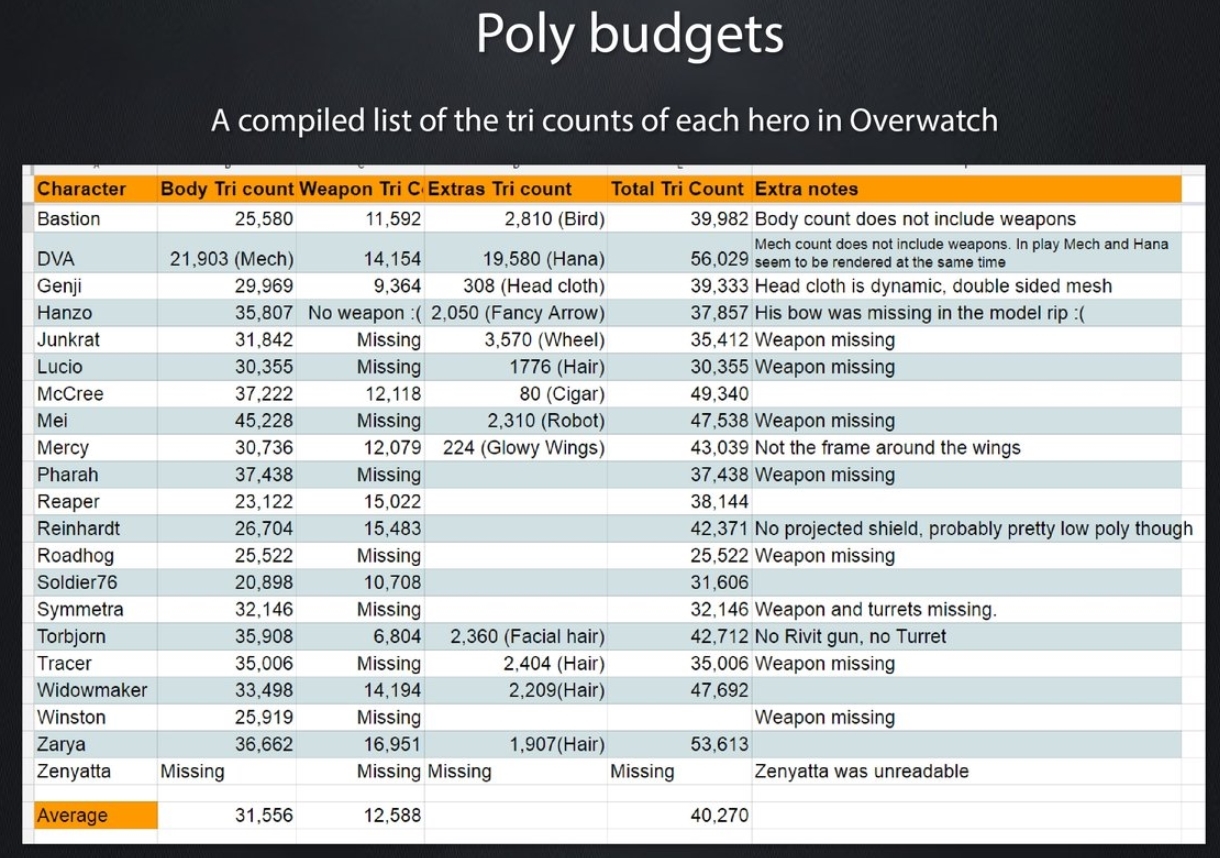
not that bad, overwatch is something like ~20K poly
 arctic reef
yo how am I supposed to calibrate weirdly proportioned avatars for fbt with the new calibration? The old method using OVR advanced settings doesnt work with it
meager prairie
Quest is by far the best HMD for the price you get wireless PC support and abilty to play without PC
wary iris
Then tell them to get a better headset! There's nothing the VRC Devs can do just because their headset is shit
meager prairie
@arctic reef
--legacy-fbt-calibrate
Have this in the Steam run option
arctic reef
thanks
sand wren
idk why people complain
meager prairie
will revert it to old Cali
sand wren
i think its bc people cant touch their toes or something
meager prairie
@arctic reef Glad to help you
sand wren
but i don't care about that
hasty hemlock
visual dagger
lol, i'd like to see the demographics on how many vrchat users can actually touch their toes
sand wren
everything is working perfectly
i can go into public lobbies
and sing in my full body compatible animal crossing avatar without even using my mic
excellent experience
hasty hemlock
yeah KK Slider looks like a lot of fun
hasty hemlock
https://polycount.com/discussion/141061/polycounts-in-next-gen-games-thread and here's a pretty good list showing off polygon count in various games
sand wren
i already made a lot of my avatars in sdk2 customizable
but i ignored any customization
like actually implementing it
but its set up to be very easy to integrate into av3.0
so all i have to do is copy and upgrade
hasty hemlock
cool myself I need to get around to learning 3.0 now that it's out
sand wren
i will make a space for them in my avatar world soon
so everyone can go around the world singing as kk slider
in any lobby they choose
hasty hemlock
cool
 rich snow
haha, I love how VRC's solution to a connection timeout is to just crash.
sand wren
^^^^^^^^
sometimes my internet goes off and i check my router and i come back like
"wheres vrchat..??"
sturdy smelt
Game closes better when timeout than hitting X on the window
meager prairie
@rich snow Modern problems require Modern solutions
deft lodge
new meta of closing the game, unplug the cable
rich snow
tfw games made in 1993 have better network design
deft lodge
the first variant works too haha
meager prairie
True
hasty hemlock
the game in 1993 probably wasn't a student project
rich snow
true
someone's made a clone of it that was a student project though 😛
with mostly identical network code
(and it's in no way sophisticated design either)
craggy stump
i do like the features of 3.0
cuz it opens the possibility for having one avtar that can do it all
new outfits
tons of emotes and gestures
etc
 wintry glade
Then you get hidden due to file size limits lol
deft lodge
i don't even know what you need to do to somehow get over 200mb limit
sturdy smelt
yea the default limit is wild
deft lodge
i already reduced it to 60 or something but i'm still experimenting with it, not sure if it's a good value yet
sturdy smelt
im at like 50mb
 drowsy sigil
most avatars should be at about 20 maybe 30 max
deft lodge
the problem is "should be"
wintry glade
My worst is 80mb because of recorded anims and texture sheets, average less that 10
drowsy sigil
check ur import settings for ur blendshape normals and texture size
sturdy smelt
yea like a normal model with nothing on it, its vrca will be like 1-5 mb
drowsy sigil
mine with many different meshes and 50 materials is at 20mb
deft lodge
My av3 avatar is 5.22
But i'm still planning to add a bunch of stuff
drowsy sigil
but thats just cause i have inventory system with bunch of clothes options
 maiden mesa
really hate the action menu.. ;C
 mental river
Anyone else have an issue where calling "Reset Avatar" from the expressions menu breaks wrists/hand tracking?
Hands move but they don't seem to rotate at the joint properly. Extremely snappy.
mental river
Local testing.
cobalt yew
Reset avatar doesn't work properly on local avatars. Try walking after resetting its hilarious.
mental river
avatard
😂
cobalt yew
I mean that describes the result nicely.
mental river
It does haha. Thanks, appreciate it. <3
AV3 sure is convoluted when diving into it but daaayum is it powerful. Big game changer.
cobalt yew
But yeah. To reset a test avatar gotta use the avatar menu again
 dapper hearth
I was reading the comments in one of @hasty hemlock 's links and saw this:
If you build a 20k mesh that need 20 materials, it will probably cost more than a 100k mesh with a single material using atlases.
cobalt yew
It looks a lot more difficult then it is at first glance really
hasty hemlock
draw calls get expensive quick
sand wren
its probably due to texture resolution
a lot of people end up with like 16k resolution textures
bc they dont care about actually optimizing
just clicking a button
that and if it has transparent parts it might be more computationally intensive
dapper hearth
Just the parts rendered transparent or the entire texture the transparent render comes from?
hasty hemlock
well if you enable transparency it has to consider transparency for the whole texture
sand wren
yea thats why its best to separate transparent materials from solid ones
and things like double sided materials should really never be used when u can make double sided polygons
icy pelican
It's good use eyelids shape key for eye tracking? It's the same system than 2.0?
icy pelican
mmmm...
Ok i was wrong i thought it was lowerlid.
What is "looking up" and "looking down" options in eyelid for?
We have 3 blendshapes for that. I understand the "Blink" one, but the other two?
rich snow
I'd imagine it does what it says 😛
icy pelican
🤨
rich snow
when you look up/down irl, your eyelids change position
record yourself looking up and down and watch it :3
icy pelican
I want to test it but I don't now if the result will be fine
Weekend of testing, yaay
 humble wadi
is it intentional now to cancel gesture animations while moving now or will that be resolved and fixed
 modest sun
what do you mean?
motion and gestures shouldn't affect each other if they are on different playables.
humble wadi
turning with the right disables any gestures/animations you do, moving with the left disables them until you stop moving even if you have the gesture locked
 glad kayak

 thick root
i need it
 rigid turret
bHaptic Support be brook again I cri
glad kayak
If you use SteamVR, a binding for that is returning.
 severe glen
@merry tangle have u actually fixed like 10+ models so far? im curious to what the issue with a lot of a few has been, just wanting to see what kind of problems are going to be common so i can point people in the right direction when they ask around :p
 merry tangle
most of them the dynamic bones have been really messed up some werent even connecting with the hair strands ez fixs but i had one where i put the fbx in and everything is where it shouldnt be all at once
animations and stuff like that are fcked as well
neon finch
Gonna need to find a way to try and revert this, the one click option was way, way better. Also, the rig changes did nothing. Still need rig-fixes for full body.
 pale cargo
My opinion of the 3.0 avatars is mixed. Navigating the menu without either holding "open hand" to override everything or turning off gestures every time you open the menu results in your face spasming expressions as you go around the menu
(at least with vive controls)
 eager horizon
can we just talk about how the new default animations are complete garbage?
for example
your hip doesnt even revert to the right position when you crouch and than stand up
it stays tilted down
 mossy kite
Bruh cant even calibrate properly
meager prairie
@mossy kite
Paste this into Steam run options for vrchat
--legacy-fbt-calibrate
mossy kite
Already did
mossy kite
No
meager prairie
It fixed my issue
mossy kite
Should anything in the animation clips be different than in avatar2?
I just reused them
 rain light
what are some good world recemondations?
 latent girder
You don't have the power of udon on avatars 3.0?
neon finch
no
latent girder
So no code for me i see
 opaque forge
Does anyone know if they plan to make the parameters that you mess with for like, toggling outfits or changing colors of things, persistent across worlds in the future? Or if theres a way to do that? It would be great to have customizable skin colors on avatars but it would really suck to have to customize it every time you change worlds
neon finch
opaque forge
Thanks!
severe glen
Kinda related to Store avatars states when changing worlds, Does the AFK Toggle stay saved or not between swapping world, I forgot to check for myself when I was poking around and was told it does not
 tired sequoia
What does the gestures button do?
 restive rivet
I think the config stays the same across worlds
severe glen
Hopefully!
restive rivet
What does the gestures button do?
Turns on and off animations toggled with gestures
It's the gesture toggle that used to be exclusive for Index controllers
restive rivet
It can be useful for other controllers as when turned off it locks the state of the gestures, so you don't have to hold them
I think they did that at the end but I didn't check
tired sequoia
Yeah well, I'm on pc
 real tusk
is it litterally possible to import a sdk2 model into sdk3?
restive rivet
You can use the same model but not configuration
What would you lose by starting over with the model file?
severe glen
^ you can use the same model and such you just have to redo the descriptor/animations, thats really the only huge thing to change.
restive rivet
If you worry about losing inventory systems and such, yeet that out the window you don't need it anymore lol
You can make it yourself without weird hacks in av3
restive rivet
It's a bit tedious but you can screenshot them and remake them
real tusk
I have a document saved with the settings i use for all my models 😛
 drowsy gazelle
So i see that they changed the way that players activate gesture overrides for toggling things like weapons, but did they change the process for settings up those animation overrides in the SDK? I've always hated having to makes those weird 1 frame animations that make my avatar rides a motorbike.
real tusk
is there any set up that is required for the fancy stuff that was shown in the video like the size and stuff?
restive rivet
So i see that they changed the way that players activate gesture overrides for toggling things like weapons, but did they change the process for settings up those animation overrides in the SDK? I've always hated having to makes those weird 1 frame animations that make my avatar rides a motorbike.
It changed completely, now you set parameters and use them in Unity animators
Insanely powerful and no need for weird tricks
is there any set up that is required for the fancy stuff that was shown in the video like the size and stuff?
Not for resizing yet, it's currently disabled
drowsy gazelle
Its a Christmas Miracle!
real tusk
ok
restive rivet
Yeah hand poses changed but you can revert it I think
real tusk
okay
 valid jackal
pad
real tusk
what stuff is required to set up?
restive rivet
The avatar descriptor is different now, it lets you set up blinking and eye movement properly
Also the viewpoint can be manually moved
real tusk
oh cool
restive rivet
At the bottom there's the slots for the custom animators and expression menus, make sure to check the documentation to use that
valid jackal
hey lets plays dota 2 @real tusk
real tusk
no
restive rivet
Ye it's there I think
 marsh haven
No
restive rivet
You could do that I guess but idk how viable it would be
 glad cloak
With these emotes, I can still make one prop disappear with a dupe appearing in my hand in 1 emote right
marsh haven
@restive rivet Wouldn't make sense any person who Rips can just revert those shapekeys
restive rivet
Depends on how it's made but yeah
marsh haven
Really not.
restive rivet
With these emotes, I can still make one prop disappear with a dupe appearing in my hand in 1 emote right
Don't use duplicates, use parent constraints
marsh haven
With the current system you cannot prevent ripping.
restive rivet
Yeah trying to prevent it is just more work for nothing tbh
glad cloak
Oh? Just move it from my hip to my hand, seems i got some learning to do cheers
restive rivet
The parent constraint is really cool, it lets you change to what object it's attatched to. You don't even have to put it inside of the armature, just parent it to the hip with the script and then reparent it to the hand with an animation
I have an empty object with all my items outside of the armature and I parent them when I want them to show
glad cloak
Alright, you said script, does that mean i dont use an animation
restive rivet
Oh no I meant that you have to add the script to the object
Then you can animate its properties
restive rivet
Good luck!
 blazing raven
 soft crown
god, tfw you keep "huh why isn't this working." 10 mins later "goddam i forgot to set the layer weight to 1 AGAIN"
real tusk
I Have A very simple question!
 strong bear
welp off to port an avatar
guess once i figure out the basics of sdk3 ill wait for the pro guys to pull off some real stuff with the sdk3's abilities
making your own emote wheels are cool but how far can the sdk3 go
nothing better than reading through your unity files and having a mini stroke because something doesnt make sense
 rose siren
i dont understand the new avatar stuff
 pallid fable
Have you read the reference docs by tupper
rose siren
reference docs?
pallid fable
If you go into the avatars 3 info channel there are links to reference documentation that explains the new avatar sdk
rose siren
oh ok
 split bronze
bruh why did you need to move the emote in R menu
restive rivet
It's weird for av2 avatars but faster to access and use
 safe mirage
I don't get why people would do their facial expression via a menu, those facial expressions are basically reactions to fit into situations and with that menu, it will take a few seconds to give the other person your expression or reaction. we have facial expressions just like sdk2 and in av3 now with even more combinations. Imo the menu is a little bit useless compared to the old version. not a huge difference, you could say that this is just an UI change with more than 8 options. But I'd like to know why many put their blendshapes on the menu? I see a lot of these in showoff.( obviously)
restive rivet
Well you can close the menu while on the expressions menu and it will stay there, it's as easy as pressing a button and moving the joystick. As everything in av3 it's personal prefference but it's more organized
Also for public avatars they won't go insane trying to figure it out
restive rivet
🤷♂️
safe mirage
but then you may forget it that you have it on after you closed the menu
split bronze
bruh
 mossy jacinth
You can still do it the old way
restive rivet
But you can open the menu and see what expression is on
 fluid grotto
I don't get why people would do their facial expression via a menu, those facial expressions are basically reactions to fit into situations and with that menu, it will take a few seconds to give the other person your expression or reaction. we have facial expressions just like sdk2 and in av3 now with even more combinations. Imo the menu is a little bit useless compared to the old version. not a huge difference, you could say that this is just an UI change with more than 8 options. But I'd like to know why many put their blendshapes on the menu? I see a lot of these in showoff.( obviously)
@safe mirage You can still tie them to hands. the difference is now you can open up your menu and use that to switch to an entirely different set of hand gestures, in fact, you can have unlimited amount of sets to switch to.
safe mirage
yes I know now(edit not now I knew that. don't know where that now came)
I just don't get why ppl do it on the menu rly
mossy jacinth
🤷♂️
fluid grotto
It will take some time for people to learn the new system and what is easiest
mossy jacinth
If they like is so be it
fluid grotto
people are using the menu for everything, because the menu is new
I find it's better for inventory toggles or puppeting
split bronze
the emotes not facial expressions
safe mirage
I also don't get why many put their facial expressions as a "showoff"
the inventory toggle is a big plus I'll give them that but nobody really uses that tbh
fluid grotto
It will take time for more impressive things to be done with it. It hasn't even been out a day yet
safe mirage
and if you have 10 guns or 2-3 glasses or 5 outfits it takes a lot of polys
It will take time for more impressive things to be done with it. It hasn't even been out a day yet
@fluid grotto beta was the same.
fluid grotto
No one uses beta tho
safe mirage
wdym
fluid grotto
Probably less than 0.05% of users use beta
safe mirage
moving a tail is also meant
fluid grotto
people need time to learn
safe mirage
guess you're right
 silver mango
Just wiped the beta sdk and picked up the sdk from the site, and I don't see the gesture and additive layers anymore? where did they go?
 upper remnant
@silver mango random cancer. try re-adding your descriptor possibly. not sure what causes this but ive seen it a few times
silver mango
heh. I'll try that. I literally went as far right now as to wipe vrc registery keys with regedit and they're still not there
starting to wonder if the vrc sdk on the website has issues
wintry glade
Nah I got mine from there and it was fine, made a new project for it though
 edgy grotto
hey i just wanna ask how can i get into the beta from the SDK3.0 ? sorry im not really found something !
silver mango
I guess I'll make a new project, so weird because I converted a 2.0 project to 3.0 when it was in beta and it worked perfectly fine
new project seems to work ok
 fast crane
even though i'm uploading with the avatar SDK3, i keep getting error avatars and the debug log says "Found SDK2 avatar descriptor."
upper remnant
well, there is probably an sdk2 avatar descriptor somewhere
is this a new project or did you upgrade an sdk 2 project?
fast crane
this is a fresh project imported with only sdk3
fast crane
i copied over the FBX and the textures, without any meta files (so i had to e.g. redo the humanoid rig)
nothing else was copied from any other projects
upper remnant
if you click on the error does it highlight anything in your scene
fast crane
there's no errors in the unity project, the avatar shows up as the error robot when i choose it in game
and the logs vrchat dumps in appdata/locallow say "Found SDK2 avatar descriptor." after i switch into them
the avatars in the AV3 test world work fine and say "Found SDK3 avatar descriptor" instead
but all the ones i upload seem to be wrongly detected as being SDK2
upper remnant
are you sure you're uploading to the right blueprint
fast crane
i uploaded the avatars fresh, so their blueprint ID was generated by SDK3 upon uploading
strong bear
well since im having fun figuring out sdk3 and im full of ideas, first one being this gem of an afk animation https://www.youtube.com/watch?v=IVnobauTepg
 echo arch
quick question, avatars 3 needs SDK3 right, despite the vrchat homepage saying otherwise?
strong bear
im probably not the guy to help with updating anything because i nearly borked it
echo arch

strong bear
well not majorly, just meant i had to do something a bit more technical also known as read the troubleshooting page
fast crane
i'm gonna try deleting my SDK and reimporting to see if that helps
strong bear
devon
Follow the correct steps on removing your SDK by closing Unity and removing all the SDK related folders and their related .meta files.
Go to your Project Settings and find Scripting Define Symbols under Player > Other Settings.
Remove the symbols that are not associated with the SDK your project was made on. For projects made with SDK2 remove "UDON" and "VRC_SDK_VRCSDK3". For projects made with SDK3 remove "VRC_SDK_VRCSDK2". The symbols are separated by ;. Afterwards save changes by pressing Enter.
Import the correct SDK into the project.```if thats your error
fast crane
my project was fresh on SDK3 but once it's done reimporting i'll check to make sure i don't have any symbols too
strong bear
basically if you were going from sdk2 to 3. remove anything from sdk2 there
if you are updating and still getting spatial audio error
delete the sdk3 ones too and reimport
fast crane
i'm not getting any errors in the editor, vrchat just seems to detect the avatar as SDK2 in-game
strong bear
thats strange
fast crane
and this project was fresh on SDK3
silver mango
does FBX size 1:1 translate to download size in VRC?
ofc textures not taking into account ^
 topaz moss
Is there something in Avatars 3.0 that lets you change which armature you're controlling in an avatar? I swear I might've seen something on this, or maybe my brain's making it up.
restive rivet
I don't think you can as the avatar config only refers to one armature
But people do crazy stuff so who knows
At least not in a simple way
fast crane
@upper remnant i'll get back to you if i figure out how to fix this
whatever it is, it seems like something about the avatar causes vrchat to detect it as sdk2 instead of sdk3
wintry glade
Yeah if you want multiple armatures youll have to do the old thing with multiple armatures interfacing with constraints
Then use AV3 for just a nice toggle system
 charred lynx
Hey has anyone noticed how much better elbows/heads move in 3.0? Also wheb you have a menu screen open and turn your body you don't get all twisted up anymore
I'm sure everyone has talked about it already lol but
I'm very happy about it
Now all they have to do now is fix the shoulders lol
silver mango
They do move so much better. I found out they changed how they move because my rig had some righacks and the results were quite hilarious
Like my head went into my stomach when I moved, but after getting rid of the righacks it works perfectly
charred lynx
Its got something where the forearms/upper arms don't clip theough each other, like if the bones meet it pushed the elbow point back which is wayyy more natural
Also turning the head doesn't move the entire body quite as much anymore
 wicked bramble
Man, this update would happen when my power is out and I cant touch it :(
charred lynx
At keast without fullbody
DANNNG im sorry! If its any consolation, they still gotta fix a lot of bugs so
wicked bramble
Lol I've just been watching all the cool things people have been doing 😂
 stone pilot
Are twist bones counted as a rig hack/do they work as normal in the new update?
wintry glade
Twist bones are fine
stone pilot
Awesome! I’m safe then
wintry glade
rig hacks are just stuff like flipping the hip, 0 length neck
Twist bones are industry standard in almost any game nowadays
stone pilot
Mhm, just wanted to make sure in case I start having issues
fluid grotto
If do it in unity it’s probably not a rig hack
safe mirage
is there a pumkin tool for 3.0 out yet?
neon finch
no
safe mirage
yikes
 alpine willow

fast crane
i put an avatar descriptor on a cube and even that comes up as an error avatar
strong bear
wouldn't it shout at you for you know, not having a rig
fast crane
yes but that shouldn't matter
strong bear
fairs
fast crane
you only need a humanoid rig if you want your avatar to animate
if a cube is erroring out it indicates something more fundamental is broken
strong bear
so with the x and y thing you can do you can just plug it into a blendmap and have more than just 4 emotes-, thats pretty cool
fast crane
yeah and it isn't in my case
so i'm guessing something is broken with my SDK setup
gonna try doing a full reimport and clear registry keys and what not
restive rivet
What's pumpkin tool?
neon finch
wintry glade
Lets you copy dynamic bones and stuff from one avatar to another (assuming they are the same)
restive rivet
Oh nice
pale cargo
Giving my avatar a dedicated wag wheel
I was testing it way longer than I probably should have XD
fast crane
@upper remnant i fixed it - i have a remote cache server set up for unity (in edit > preferences > cache server) and evidently it was vending me some bad files, possibly loading some of the files from the beta
clearing the cache server, removing the vrchat/etc folders and their metafiles, then deleting Library/Obj/Temp to force unity to reimport, and then loading the scene up and importing the SDK fresh got me a working AV3 upload
strong bear
@upper remnant kinda feel bad pinging you but how could one use avatars 3 to toggle For example a cube to appear and dissapear by toggling one button and if possible keeping multiple in one layer
stone pilot
Pumpkins tool doesnt work with AV3 unless you have this version - https://cdn.discordapp.com/attachments/741330673188732939/741330693195563099/SDK3_Pumpkin_Avatar_Tools_v0.9a_by_Alucard.unitypackage
@safe mirage
Hotfix made by Alucard, be sure to use in a new project and import after the AV3 package
fluid grotto
It’s Dracula spelled backwards from castlevania
fluid grotto
It was a game. Wait. Was it a show?
safe mirage
netflix?
fluid grotto
Binge time
safe mirage
hell yes
sturdy smelt
yea it was very well received too
safe mirage
worth it
sturdy smelt
wait wtf, theres 3 seasons lmao
sturdy smelt
renewed for a 4th too where have i been
 iron saddle
idk if i asking to much
but it would be nice that we have ability to save our avatar settings
without doing avatar configuration every time we join in other worlds
split bronze
avtar 3 just gets in the way for leap motion
iron saddle
@split bronze
what ?
are you saying that this kind of avatars will support leap motion and finger movement as well
just like NEOS VR ?
 shell cedar
I really wish there was a toggle for 3.0, so people who don't like it could revert back to 2.0
sturdy smelt
the only gameplay difference is emotes are moved to the wheel, that needs to be done since the UI menus are also changing VRSoon
split bronze
@iron saddle see in avatar 3 help
 bold jewel
can you convert 2.0 models to 3.0?
 vale fox
yes
pretty much every avatar in the game plays nicely with 3.0 stuff
its like that by design
the actual client component is backwards compatible with stuff from the 5.6 days lol
as long as you have your project files youc an just drop your avatars into a project with the new sdk and get to work
 naive loom
Are there any editor scripts/tools out there that simplifies adding simple emotes for 3.0? I figured out how to do it, and it's easy but somewhat tedious.
vale fox
if its possible to make extra tools for it someone will probably do it soon
naive loom
Definitely more involved than going to an animation controller and saying "For emote1, use this .anim file"
vale fox
we've had a shitload of unity scripts and assets made for av 2.0 for the longest time so
inb4 pumkin's avatar tools becomes 3.0
that would be amazing lol
naive loom
In avatars 3.0 you need a custom action animator copied from examples, you need to let it transition to standing emotes when VRCEmote > 16 so you don't override the default slots, 1-8 being default standing emotes and 9-16 being default sitting emotes (or you use your own param), then you need to set up a new state with that .anim, with a transition equal on one side from standing to VRCEmote == 17, and if looping another transition exiting to VRCEmote != 17, then you need to add a menu item that sets VRCEmote to 17. All to add one .anim to a menu. Is there an easier workflow for this?
Seems like something that can be automated by an editor tool fairly easily regardless.
vale fox
that does sound like a pain at first ^ ^` i havent worked with it yet but im pretty good at coming up with workflows for stuff so when i get around to it later tonight / tomorrow morning ill know for sure what its like
i would make automated tools myself but i cant fucking script for shit yet so i mean
naive loom
Yeah it's actually pretty easy, but there are definitely a few gotchas, and definitely more involved than "set emote1 to this .anim" lol
Like avatar 3.0's improvements are amazing for creating state machines and config settings for animations, but for simple emotes the flow seems more complex than before
Just what I've seen from looking up the tutorials and trying it myself
Maybe I've been making it complex on myself and there's an easier way?
 hasty marsh
Im thinking in terms of list what are the possibilities so far with the avatars 3.0:
-unique gestures in each hand and combinations
-item toggles
-color changes
-puppet a limb
-facial blendshapes togles
-change limb size (avatr size?)
-sub menus
-what else am i missing?
naive loom
You can make config menus for anything that can be parameterized in an animation
So that should include full particle systems as well, volume of sounds, things like that
hasty marsh
What else, i know the general but i want specific ideas so i can have them in mind in case i havent think of them
naive loom
Also I find it cool that in-game params can also be used as conditions
like viseme state, crouch/standing state, velocity values, etc
those can all be tied to triggering different animations
Like lets say you had a sonic model and wanted to trigger a ball roll when your speed got past a certain point in the forward direction
Or let's say you're falling faster, you can make your character do a more wild falling animation to show that
vale fox
i fuckin dig little details like that
naive loom
just some ideas
vale fox
i have plans for all of my avatars to have a massive amount of "default" animation sets that i want to use
mostly tho im glad that i can edit individual animations
now i can bind that to eyebrow shape
so i can alternate between happy full of energy vibes and fuckin dead inside looks
naive loom
Another thing is to have avatars with ears/tails that react to those states
so they can move in a certain way when you talk or move a certain way
hasty marsh
Is it posibble to asign the visems to another mesh for example have two faces with diferent meshes materials and independen but both talk at the same time, so i can toggle the face on and off? Or am i crazy
naive loom
you were already able to do that with the old system too actually with combining them into the blend shapes in blender
hasty marsh
Yeah buts thats the point i dont eant them to be combined
naive loom
I did that to have a pair of floating speakers have viseme animations
hasty marsh
I dont want*
naive loom
you can probably do that with the new system though, yeah
hasty marsh
Or is it an avaatr descriptor limitation?
naive loom
all of the viseme params are available to animations now
vale fox
i no longer have to do cursed viseme combinations
naive loom
Like it's an integer state between like 0 and 15 or something
hasty marsh
I need more than 16 param lol
naive loom
and each state corressponds to like sil, aa, oo, etc
hasty marsh
Like it's an integer state between like 0 and 15 or something
@naive loom ohhh gotchaaa
naive loom
like you can have an animator condition that says
"if viseme is equal to aa, do this animation"
hasty marsh
Yess that makes sense!
naive loom
And I'm guessing you could have a "if viseme is greater than 0, do this animation" which would translate to "if the person is talking, animate this"
 odd plaza
 queen comet
legs brocken, visemes brocken, animations brocken and cuttet, view point in fbt brocken. great update, have to fix nearly 30 avatars
rly good job
strong bear
big f
fluid grotto
You can keep separate ones after you combine them
 hidden kernel
i'm seeing avatars with fbt with broken legs
and when using the default vrchat walk
strong bear
to be fair ive had problems with fbt for a long time
most of it is my sheer laziness
i cant be bothered to figure out why my foot is floating.
 silver adder
legs brocken, visemes brocken, animations brocken and cuttet, view point in fbt brocken. great update, have to fix nearly 30 avatars
And THAT is why you backup your project before upgrading.
strong bear
for me ive just decided any problems which i dont really have much of in my sdk2 is just done with.
upload the final thing and update the whole thing mainly because im trying to make excuses for my lazy way of devving.
"if it doesnt work. thats tomorrows problems"
you ever have one of those days where steamvr is just doing everything you want it not to do
such as failing constantly in hot weather where you just want to get it over with so you can go outside and not die of heatstroke
sand wren
well funnily enough my hdd failed when i was about to test
but now its working fine like nothing happened
strong bear
not my hdd just steam vr not booting properly.
brits were never supposed to get hot weather
we are way too underprepared for anything above like 15 degrees.
 fast basalt
 cursive path
I wish I could say the same... really not happy with the full body tracking. just reverted back via --legacy-fbt-calibrate
stone pilot
I mean as far as the Unity side since thats all I've dealt with
cursive path
almost all my avatars are either on stilts off the floor, or underground. yes I followed the documentation to the letter as well
stone pilot
Im loving this stuff
cursive path
ah, havn't tried that stuff out yet
stone pilot
Im sure ill come back here frustrated once i see how many of my avis are broke in game lmao
cursive path
it's minor issues, played around for a few hours to get a feel for everything. I Love the fact I just T-pose so quickly, but the accuracy/estimation is just not good for a majority of my humanoids with odd leg lengths
neon finch
is it possible to make an int slider system to make it so it can switch through 1-4 numbers and change outfits on each number?
cursive path
yeah, unity is all good, just use the new SDK @marsh raft
vale fox
yeah were never not gonna use unity for avatars unless one day randomly the dev team was actually galaxy brain and said "were gonna completely change engines"
 marsh raft
there is a new sdk now?
vale fox
which would be lowkey amazing to watch but i digress
neon finch
whats wrong with unity engine?
marsh raft
i would rather use unity and not work on this new AVATAR 3.0
cursive path
@marsh raft new SDK here https://docs.vrchat.com/docs/choosing-your-sdk
cursive path
I mean, besides the new UI and my full body issues, this Avatar 3.0 thing is pretty needed for the game. going to be some learning curves though for me
marsh raft
hope my avatars dont break
silver adder
yeah were never not gonna use unity for avatars unless one day randomly the dev team was actually galaxy brain and said "were gonna completely change engines"
That won't happen, because VRChat itself is made in Unity, which is why Unity is used for content creation.
cursive path
they won't break, you can still use and upload all 2.0 Avatars, just can't convert avatars straight from 2.0 to 3.0
fluid grotto
Avie 3.0 is a lot to take in at once but you are learning proper unity now instead of filling in a VRChat specific UI, so at least this is useful knowledge if you are interested in unity dev
cursive path
Play space mover is probably what you are referring to @neon finch
silver adder
Lol at the amount of people complaining in #user-support-old. They are just outright overreacting to change.
neon finch
ah well my friends have vr but ci press end key and it goes afk
fluid grotto
I think stuff like that is expected. It will die down, especially when they realize SDK2 still works
cursive path
@silver adder that's to be expected. I'll be a boomer and grumble about mute making a 'POP' sound, and full body being a bit new, but people complaining about change is nothing new
fluid grotto
Most of them are upgrading to 3.0 but not doing any 3.0 specific stuff they are better off still using 2.0 if it has everything they need
silver adder
The only thing people DO have a reason to complain about is the exploit that lets hackers steal your account.
cursive path
oh jesus, what
fluid grotto
I don’t think that’s a thing
cursive path
anywhere I can read about any claims of this?
silver adder
It is, devs made a post clarifying it's a known issue.
fluid grotto
I’ll believe it when I see it
cursive path
welp, private worlds for me it is then just to be safe
silver adder
Actually, the exploit involves private worlds.
cursive path
rip
silver mango
dont misunderstand that I'm affiliated with it, but there are clients out there that had code in it that would hijack your account once its up and running
those people complaining might have been using some stupid client like that
 rain marlin
my avatar 2.0 is fully working, perfectly, there is any way to make it super custom and cool like it show in the video of the 3.0 avatars? or its too soon to ask for help
fluid grotto
There are at least three reasons this topic should be ended immedately but the easiest is that this is the wrong channel for it
cursive path
yeah, the best you could do I assume is mask your IP, stay with friends and pray. nothing you can do about malicious client use
silver adder
The only people complaining are the ones that broke their project trying to "upgrade" to AV3. When the devs clearly said that's not supported.
cursive path
true, yeah back to 3.0 topic
I mean, I just shake my head at that. like... you converted an entire 2.0 SDK project.. to a 3.0 SDK, and expected it to be all good
rain marlin
you need to make a new avatar totaly for a 3.0?
rain marlin
mm nice then
i was making a new avatar right now, gonna start doing it on the new version
were do i donwload the avatar sdk 3.0? like normaly?
cursive path
yeah, I've started dragging my assets over for a new 3.0 project as of today as well.
rain marlin
and i have a question
fluid grotto
Vrchat.com download section
silver mango
yep i thought u could do that too. I converted a 2.0 project to 3.0 back in beta and it was fine. I thought I could simply wipe the beta sdk and I'd be fine. turns out even that has issues. make a new project
fluid grotto
Y... yes you can still use animations in VRChat
 final turtle
What's the difference between vrc_AvatarV3HandsLayer and vrc_AvatarV3HandsLayer2?
silver adder
2 represents the animations from SDK2.
rain marlin
Y... yes you can still use animations in VRChat
@fluid grotto i mean if the animations you used on the 2.0 still work for the 3.0, or you need to edit those
fluid grotto
Layer is a new idle hand pose. Layer2 is 2.0s if you don’t like the new one
vale fox
every avatar stil works as expected
final turtle
Alright, thanks c:
vale fox
you dont need to touch avatars from the 5.6 days
cursive path
ah interesting, they added new idle poses? an significant difference visually?
silver mango
a lot more 'reactive' if you ask me
fluid grotto
The idle hand is gripped a little more to represent how you hold controlers
vale fox
apparently the finger movement thing is more prominent but thats been in the game for a loon gtime. other than that afk idle is now a thing
cursive path
heh, that's kind of cool
marsh raft
allot of avatars are broken that i have in my fav
fluid grotto
The default stand is new too you stand a little taller and don’t slouch
rain marlin
a huge improvement to avatars
fluid grotto
Can use old one if you want
cursive path
@fluid grotto omg that might be why my latest 2.0 avi stands on his tip toes
 wide thicket
my 2.0 ones always did that
rain marlin
can install the new SDK over a alredy made SDK2?
wide thicket
until height adjust workaround
fluid grotto
No
cursive path
I'm all worried, I don't have the blender files for this avitar, I'm hoping I can fix some of his calibration issues with 3.0 conversion
rain marlin
@fluid grotto omg that might be why my latest 2.0 avi stands on his tip toes
@cursive path you fix that putting your avatar descriptor a little bit on the back
not in the eyes but into the spine
fluid grotto
You cannot upgrade a SDK2 project to. SDK3 project. If you get it working, cool, but you will probably run into problems and it’s not supported. Make a new project
rain marlin
the view its practicaly the same but you dont stand on your tip toes anymore
cursive path
wait, really? so for a human, back of the skull almost for the descriptor?
rain marlin
yeah
i usually put it on 0
almost not diference into the view but now its almost imposible to be dancing like a moron
cursive path
wow, I'll give that a whirl now, that's interesting. makes a loot of sense for the 'head tracking' aspect of the full body calibration tweak they made
rain marlin
yeah like
if you have your camera in your eyes, and you look back, youre whole hip is going up
if you have the camera in youre spine zone that doesnt happend
fluid grotto
You should absolutely 100% always put the avatar descriptor where you want the view position to be. this becomes extremely important in full body because the head is forced to be at the view position now
cursive path
riiight, because its like an entire y axis going straight through the model now, am I on the right track in that thinking?
wide thicket
...so in the eyes then
fluid grotto
Not always in the eyes. Lining up shoulders is more important
wide thicket
that isn't 100% then
rain marlin
i share my avatars with people with full tracking, and no one had any problem with it being on the spine
fluid grotto
I meant your view position will be locked to where you put that ball
rain marlin
and again the tippy toes problem is fixed
cursive path
my descriptor was beyond the eyes/nose, with tip toes. I'll change it this second and upload and see how it goes
wide thicket
I have been putting mine at .05 forever and it has been working for me
silver mango
same limabean, putting it on a 0 position is new to me too
wide thicket
but it does depend on the model's default stance, right
silver mango
so im uploading one at 0 position rn to see if its better
rain marlin
it totaly depends on the model
my recomendation its putting it on 0, trying it and going 0.1 0.2 if you dont like the view
and if you see the tippy toe problem go back to the last one you did
but the view 0 its pretty much exaclty the same
silver mango
do you keep your toes mapped?
rain marlin
so it should not be any bother
mmm on some models
since i have done this i dont have the issue so i forgot to erase them XD
silver mango
i mean if this kinda gets rid of tippy toe'ing., leaving toes mapped is np
wide thicket
it's nice to be able to go on tippy-toes when you actually do it though
rain marlin
yeah
silver mango
gonna try that
rain marlin
good luck
silver mango
👍
rain marlin
im gonna try now to make a nanachi on the new 3.0 model
cursive path
ill try the extreme right now with 0 on the z axis right now just for giggles and see
rain marlin
yeah
i usually leave all on 0
because it looks good and its the one with less issues
silver mango
doing that too lima, will report back here too ^^
rain marlin
tho in some avatars your position its kinda sitting when you look down, so you have to move them a little bit foward
cursive path
uploaded, interesting, all good on desktop. trying vr full body now
rain marlin
good luck
 robust glen
Avatar performance is FUBAR'd theres no Material counter
 jolly oxide
so i tested it out some more. avatars with extra bones for auxilery parts (wings, tails, etc..) that have gesture toggles to alter their transform seam to be locally in random places at times. this fixes when loading intoa new world and occurs during calibration
will test with legacy calibration method later
for exmaple, harpy avatar has wings, and a gestur toggle can make then fluff out. afte calibration one wing has bones displaced at odd angles.
silver mango
same here, looks pretty good
jolly oxide
this happens idly without the gesture being on, and fixes when the gesture is used, but then returns back to the odd misangled state when released
cursive path
fun, I use --legacy-fbt-calibrate one time to revert back to the old calibration. now that I removed it from launch options, full body is flat out broken
jolly oxide
did it work while you had it set?
silver adder
Most people don't read changelogs. So not many people even know about that launch option, or how to use it.
rain marlin
im seeing the new changes on the 3.0, i see that the default face expresions of this avatar are now unexistent, same with mouth movement
i asume thats normal?
sand wren
what
visemes and gestures will remain unchanged if its a 2.0 avatar
if you are trying to port a 3.0 avatar there is no way to do it without setting it all up in the new system
bold jewel
in unity, if you save a scene with packages installed (like shaders/dynamic bones) will it save if you exit out and quit? installing the packages takes forever
sand wren
yea
i mean it doesnt matter if u save or not
unity creates a bunch of binary and metadata files in the background once you import content
 rigid pulsar
is there any avatar 3.0 avatar worlds yet
rigid pulsar
there is barelily any avatars here at the avatar 3.0 hub just wandering is there any more avatar 3.0 worlds
sand wren
mine only has 2 avatars so
 sly fulcrum
whats the world called
rigid pulsar
i am looking for a cute loli avatar 3.0 made
sly fulcrum
@sand wren
 fallow bobcat
nice thx for only bugs
 barren sinew
So you can't use sdk 2 anymore?
rigid pulsar
@sand wren what is your avatar world called
sand wren
if u look up my username its literally the only world i have
but its not updating my world for some reason
so eventually it will have my 3.0 avatars
barren sinew
Is that a no or
barren sinew
Don't?
sand wren
only if you want to use an entirely new system
barren sinew
Yeah I tried it
barren sinew
You can't override animations
rain marlin
thats the point
sly fulcrum
which 1 is 3.0 @sand wren
sand wren
the whole point of avatar 3.0 is that you can override literally any animation
and make your own animation controllers
sand wren
then u need to learn and read up docs
barren sinew
I'll get up to that
sly fulcrum
which avatars are 3.0 @sand wren
sly fulcrum
lets us know when its live
sand wren
kk
cursive path
Most people don't read changelogs. So not many people even know about that launch option, or how to use it.
@silver adder I literally read about the launch option from the changelogs itself though
silver adder
I said most people don't.
cursive path
gotcha, misinterpreted, my bad
Such a strange bug, reverting back to the no launch option, even verifying file integrity and my full body just refuses to act '3.0'-esque again
rain marlin
lima bean, the head thing worked for you?
cursive path
couldn't try it out due to the mentioned bug sadly
my full body is just acting busted. really don't want to have to reinistall if that's the case (rip my cache)
sand wren
mines ok
silver mango
i seriously have some issues with the new fbt calibrating too but it's a shame, I really want to use it since I like it a lot
like my proportions are right on my limbs, but playspace moving my HMD into place is obviously not possible and yea well... I don't really want to be a 6'3" loli to be fair
i wonder how you'd go about fixing that though..
cursive path
yeeeah... I'm so split, I love the speed and concept of the new t-pose. but it just feels like the devs went "People only calibrate on 1:1 humanoid models to their actual height" here.
6 foot loli's could be the new knuckles
wintry glade
Its not height its proportions
silver mango
yeah exactly unless i'm completely misunderstanding the way fbt now works.. its odd
cursive path
not once did I ever do full body and go "damn, I wish the game would break unless my proportions were perfect". My latest human model has longer limbs, so I basically float when tip toeing. 1 day ago, it was fine as it was. I'm a bit frustrated
silver mango
I've made sure my limbs proportions are correct. I set my user real height to 1.90 (6'3") and then scaled my limbs to whatever it had to be
and now the only problem is the hmd
cursive path
I'm hoping the next week or 2 has some tweaks, because I just can't fully support the new calibration as it currently is.
wintry glade
I tried it in beta and it was fine for the avatars that I previously had fixed for FBT proportion wise (2-7 feet). Havent gotten in VR since the update as im trying to fix whats broke
You can always try using the old calibration
 winged vale
Any one know why it seems to make prefab for my avatar rather than just uploading it when I click build and publish?
 versed hill
I will agree that it being based on the arms is a bit weird (seems like the head would be the obvious place)
cursive path
I tried using the old calibration, and it broke full body tracking for me. Made it non-full body and the hmd was placed on the neck
silver mango
basicaly @wintry glade my proportions on my arms and legs are correct but I just for the love of god cannot get the HMD into place
like burn me if im wrong, but the only fix I see is scaling my model to 6'3" rather than just playspacemoving my hmd into place
wintry glade
Scaling the model doesnt seem right. I dunno though the system is really new. I havent played with it at all really
opaque forge
Isnt the hmd position for fbt calibrating based on the viewball now?
Sorry if I'm completely wrong
 late token
 upper remnant
wew
silver mango
I'm not sure @opaque forge , I do think that is placed right though
fluid grotto
@opaque forge yes In full body your head will always be calibrated to the view ball
opaque forge
Thanks Adeon!
cursive path
@late token it's an answer that is a bit too long to explain in a few comments. Best way to learn is via youtube, with something to start off with like "How to upload a custom avatar".
opaque forge
So yeah Alctrap, try moving the viewball and see if that helps
silver mango
Hmm so you could move the viewball down/up more to get your HMD into place?
opaque forge
Yep
opaque forge
Basically the hmd stuck to the viewball now so
silver mango
Guess it wouldn't? eh
silver mango
Weird so we're looking at viewpointballs that are in the neck xD
 safe wigeon
any reason local testing avatar wont let me select it?
wintry glade
You are selecting it, just doesnt tell you
 tawdry sand
is there a way to either configure the new menu or remove it entirely, i really dont like it the way it is?
cursive path
only thing I'm wanting to know, is if I put the descriptor/viewball deep inside a thick head, put it at 0 on the z axis, would I not have materials in my view?
wintry glade
@cursive path Your head is scaled to 0 locally
cursive path
I'm hearing eyes and head, so that's where I'm getting the confusion
sand wren
you might have to raise or lower it
so FBT works
@sly fulcrum @rigid pulsar i uploaded it just now, the 3.0 avatars have "3.0" on their pedestals
reload the world if necessary
the KK Slider avatar is meant to be used with both hand menus open at the same time
neon finch
UPDATED tutorial series
https://www.youtube.com/watch?v=aNUHpFFEZzo
Not specifically on parameters or whatnot, but focused on what you all need(TM) Facial expressions and stuffs
Next one will be toggles/different kind of menus and such
silver mango
Thanks Moon
cursive path
I'll try this out now, thanks Moon
opaque forge
Thank you! Was just watching your old ones last night, appreciate you updating
neon finch
Thanks for the big support uwu
sturdy smelt
no, thank you
neon finch
Download the Rad Doll avatar from booth, its free and CUTE!
link is in the desc.
how do you try out the beta?
I went into the world but have no clue how to use the features?
Oh it's released now, its not beta anymore
ah, okay
silver mango
That part with auto-footsteps for 3 and 4 point tracking was really useful info Moon
Was seriously bummed when I noticed it, and didn't know it was that
Also, Instead of using the proxy anims, we shouldn't run into problems if we take our old anims, split transform from blendshapes, so we have 2 different animations for each finger gesture now, one that controls the transform, and the other that controls the blendshapes, and then let the gesture layer handle the transform anim and the fx layer handle the blendshape anim? same conditions in both animators @neon finch