#avatar-general
351 messages · Page 6 of 1
 fluid grotto
 strong whale
Modifying FBX data is much more complicated than you think. I'd like to keep my changes to Unity's configuration as much as possible
fluid grotto
I don’t know man if you used SDK3 I think that’s way tiers above merging a shapekey lol
 versed hill
Ok, just say its for v2 or v3 when you make it for em
 deft lodge
You could say the same about something like inventory toggles on sdk2 but hey we had prefabs and it's just that much easier to use
Isn't it the same thing that's gonna happen with sdk3 where everyone will want to use it and people will be watching tutorials and following those despite barely knowing what they are doing
doesn't mean they know how to work with blender though, they might have just bought a model from somewhere else or whatever
fluid grotto
Yeah going forward would be best to include all three, left, right, and both. That way you can use it for SDK2 or 3. Most models, unless made from scratch, already have a “both eyes closed” shape key.
strong whale
I think just adding one more menu items would keep it compatible with the AV2.
Did I say something wrong?
strong whale
lol
deft lodge
unless you can login with that sweet @vrchat.com email
fluid grotto
I’m on the “please just release this” stage lol
versed hill
Canny right not cannot =p
deft lodge
i mean hey, it's pretty soon - can't wait though, to go back to live i have to go back to AV2 and create the avatar again for it
 neon finch
does anyone have like a gesture with only the thumb and pinky out that they can give me?
deft lodge
wrong channel though
fluid grotto
I’ve already converted most of my stuff so I’m stuck on beta
deft lodge
yeah, same.
going back and not having all the stuff you made with av3 is just kinda awkward haha
strong whale
Sigh, I'll play with Blender when I feel like it, and I'll post a few things on canny.
fluid grotto
It’s 10 seconds in blender tops you don’t even need to enter edit mode I promise
deft lodge
it's much more to send it to everyone who bought it though haha
fluid grotto
What platform is it being sold on? Most people I see just let the new version be available for download
I know Gumroad just uploads a new version and it handles sending out emails saying there’s a new version
Unless you are doing it all yourself god help you
strong whale
I could edit it and re-distribute new versions, but, just want to keep the difference as small as possible.
 silver mango
can i ask a simple playable layer question here or should i go to av3 help?
deft lodge
if it's a short simple question you could probably ask here, since i would expect help to be more of actually trying to solve an entire problem that's existing
fluid grotto
Just for reference @strong whale https://cdn.discordapp.com/attachments/634400495707881502/740608916047790189/HcFslJhuJh.gif
strong whale
thx, of course i know that
silver mango
i hope it is. got a question about the responsibility of each layer (did read the doc, just need a bit of confirmation)
I placed the animations affecting my blend shapes and gameobject toggles (like clothing toggles) on the FX layer
Emotes like dances, backflips cheer yadayada on the action layer
Finger gestures anims on the gesture layer. (In addition got a 2nd question, say I want to toggle a gameobject on a gesture, would I then put that logic in the fx layer and not in the gesture layer? or is it fine to just put it in the gesture layer)
I started today with av3 so I'm pretty new and still learning
 upper remnant
you are pretty much correct. for your second question, yes use the fx layer for game object toggles
fluid grotto
Locomotion: Stuff that should either always play or react to movement or the state of your avatar (running, crouching, falling, etc)
Additive: Stuff that locomotion is already using, but you want to add to it (like breathing animations)
Gestures: Things triggered by hand OR expression menus. you can also use this for anythig you want to add to locomotion (custom wings, tails, ears, etc) Position, rotation, or scale only.
FX: Same as gestures, but everything that isn't a position, rotation, or scale.
Action: Full override, similar to 2.0 style menu emotes
silver mango
that is so helpful, thank you both of you. that really deserves a pin if u ask me ^
upper remnant
there is one time that you want to use the FX layer for transform animations, which is if you are animating the transform of something at the base of avatar and not part of armature
fluid grotto
Ah, I've been giving the root game object multiple children and animating them on gesture. is that not as good?
upper remnant
on gesture layer?
fluid grotto
just like
Armature
└Hip
└ExtraThing
upper remnant
Avatar
└Armature
└ExtraThing
extra thing transform animations have to be done in FX layer
fluid grotto
Ah got you. I always just make them their own floating bones
keeps it all one mesh
but i didn't know that, thanks for letting me avoid future headaches
upper remnant
yeah there was some masking issue after the build meant to fix material changes not persisting, and the result was that the action layer could not animate transform animations on objects outside of the armature any longer
so the FX layer is the only place you can do that now
which works fine, even though the mirror is doing some things and syncing FX layer
fluid grotto
oh and then there's 3 more playable layers
Sitting: Obvious
T-pose: anything you want to happen while your avatar is T-posed during full body calibration
IK-Pose: Use this to bend the knees so the game knows which way your knees bend, you don't have to do it on your actual model anymore, they can stay straight
you usually don't need to override those though
deft lodge
Now instead of Full-body calibration TPose you will be seeing Jojo poses, isn't it great
silver mango
oh thank you so much for the extra info, screenshotted ur answer for whenever I forget. thanks!
 restive rivet
Now instead of Full-body calibration TPose you will be seeing Jojo poses, isn't it great
Oh shit, this + isLocal will be fun
 sonic spade
hope isLocal stays a thing
 lost niche
It could be great for showing a preview of where you'll go in an animation so you can aim it locally before showing it to others
like the jumping into a wall emote, or vaulting over objects
fluid grotto
My only issue with IsLocal is syncing things back up after a local/remote fork
lost niche
Well, as long as both ends of the split have a transition back to a shared point by the same means, it should work fine
 rigid turret
Would love to see when this finally gets put into VRC to have someone collect all the cool prefabs into a collection
Having the color changing, scaling, etc having ease of accessibility would be cool
 merry swan
making one with random stuff in it for myself so i can remember how/what i did , but never know if ill ever actually finish (attention span?)
would help to have one in the sdk for exsamples,
 cobalt yew
... so reset avatar is broken for local/testing avatars. but tbh i love what it does. xD https://gyazo.com/705f5321956f6ad221b6f8eb433f61c4
merry swan
No U drunk , yeh i gotten that too
 woeful ruin
@fluid grotto I'm stealing and rewording your tl;dr of the layers above 🙃
very well put
restive rivet
Having the color changing, scaling, etc having ease of accessibility would be cool
I think we will mostly be seeing tutorials, most cool av3 stuff is hard to share but fairly easy to replicate
 hollow tangle
I have spent so much time today breaking down all my AV2 knowledge and re-learning AV3 to get back up to the level I was at. Grueling.... but finally I'm back up where I used to be and I can start building cool stuff!
 grim mirage
Hey, does anyone have any sort of idea or approximation of when AV3 will go live?
Like, no longer a beta, available to Quest users?
I can't get Virtual Desktop to work anymore all of a sudden, so no PC for me.
 wintry glade
They plan to release it this week
grim mirage
!
thank you so much! where did you find this info, id like to know where to look next time!
wintry glade
Give me a second, it was in their weekly update IIRC
"The team is heads-down fixing the last few bugs in our upcoming release, VRChat 2020.3.2. We expect to ship this week if all goes well!"
wintry glade
I just hope the right bugs get fixed 😅
restive rivet
Oh shit av3 will be a blessing for that avatar
 simple maple
So AV3 coming out ?
 sand wren
within the next few hours the update will be released according to #open-beta-announcements
simple maple
Yeah, read that but i am just in disbelief 😂
sand wren
im waiting for my project to finish duplicating just in case the sdk breaks something
 strong bear
so reading through the info page.
you can just click a button and quickly create a local version of your avatar which basically just bypasses public upload so you can tweak without the 3-5 minute publishing process?
damn tho just looking through the walkthroughs and i can already see the sdk is so much easier to use and tweak
 opaque sequoia
So... They removed Remeasure Avatar. Unfortunately this means that scaling will have to wait until they re-add it.
 sly spear
sonic spade
sly spear
sonic spade
😔
strong bear
seriously though i love this.
it renders the pain of setting up animation after animation just for more emote slots and any desyncs that can cause gone
i am looking at an interesting thing
whats the specifics of the afk parameter?
since im just reading through the walkthroughs to get the overview before i render like 2 months of on off unity messing done in like 2 hours.
sand wren
u either press End on desktop or take off ur headset in VR
and the bool is True if so, and False if not
strong bear
like how does that work, is it looking for a specific thing?
strong bear
how does it know you take headset off?
sand wren
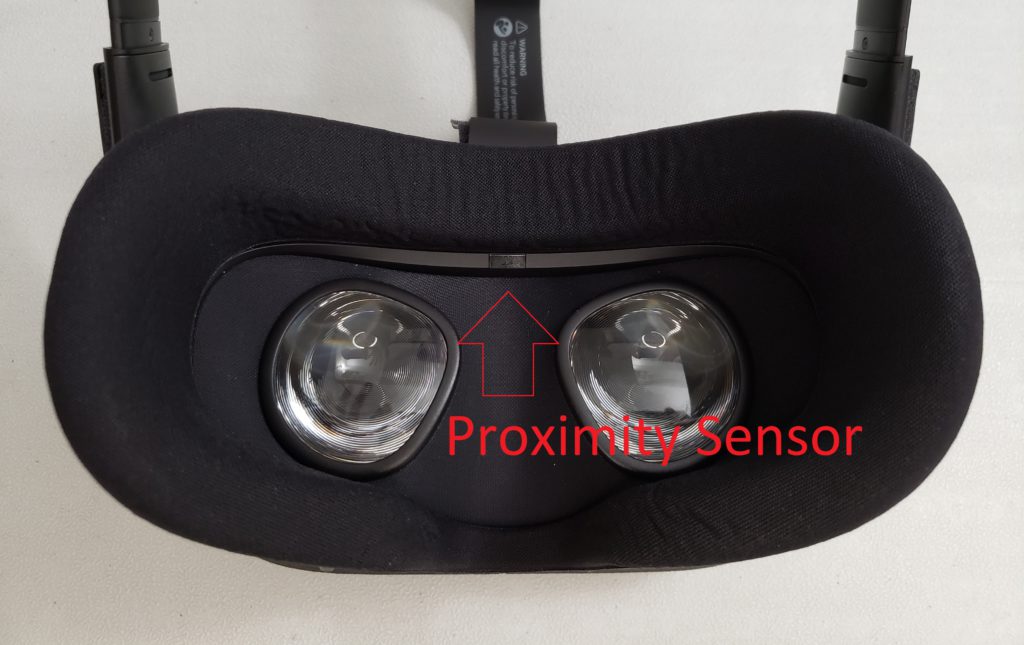
well doy
most headsets have a sensor or something
usually it has a tiny light next to it
strong bear
you learn every day-
sand wren
if it detects something in front of it it changes color or turns off
on oculus its a white light that turns off
strong bear
man the vr hardware builders really were thinking about this stuff
so we have some inbuilt variables we can detect which is always a bonus
strong bear
probably safe to say the index has one of these because im pretty sure valve would get jealous that their headsets dont have a spotlight built in to detect if somebody is actually using their tech
opaque sequoia
I knew that it was buggy and may not have made it in, but at least they've promised it'll come back eventually.
 pulsar lagoon
Ugh, that sucks. That was one of my favorite features with avatars 3.0. Hopefully it doesn't stay gone for too long
 wet portal
I hope the version we get in the future supports running constantly
Would be nice to see your own size change
I doubt it though
 ivory grail
Want to make sure I read this right. If all goes well then this is the official release build of 3.0
wet portal
Yes
 red jackal
yay, that means i need to learn the new stuff i guess
sand wren
@strong bear afaik almost any headset has that
its something very cheap and simple to add bc most of the time its literally just shooting infrared
cobalt yew
except for a bunch of WMR headsets.
sand wren
the majority of the high quality ones like hp reverb, vive, valve, oculus, pimax, etc
strong bear
its something so simple to think of too that im pretty sure any mainstream headset has one
cobalt yew
which was noted by the people complaining about being stuck in AFK mode because these headsets never reported being worn :P
sand wren
never happened to me and my cv1 is old as hell
cobalt yew
pretty sure most headsets have this purely so they can turn off the headset if it's not worn. to save the hardware as much as possible.
and wulfe i'm talking about a few of the cruddy WMR headsets
sand wren
oh
well its kinda obvious why it exists aside from not using hardware
if ur not wearing it why would it need to render anything
its kinda like auto shutoff/sleep for laptops and phones
sand wren
probably because theyre one step off from being google cardboard
except theyre made of plastic instead
hollow tangle
WMR Headsets likely have an automatic screen shutoff which would be triggered by the headset not moving for a while
Logic like that would be extremely easy to implement
Higher end headsets do have a proximity sensor though
sand wren
ive seen some chinese produced headsets that were literally old and cheap phones repurposed and stashed into a plastic container
with lenses on it
also theres a few problems with that
one of them is that some people sleep in vr or play in bed and thus dont really move their head at all, or could be watching a movie
and another is inaccurate / shitty tracking systems where the headset is constantly moving anyway so it would be impossible to detect
hollow tangle
Yeah but if it's a cheap system, I doubt they would take sleepers or playing in bed into account
 left parcel
is it just me or vrc station doesn't work on avatar 3.0 anymore?
sand wren
i havent tested those but im assuming they worked
ive seen some users spawn portals with stations to teleport users
left parcel
i don't know yet
sand wren
u would have to have a version that was upload with the older sdk to test
strong bear
unity wise ive probably figured out most of the things i need to make an avatar.
guess i should finally haul my ass and figure out how to 3d model beyond the basics of blender.
but its nearly midnight, thats tomorrow stuff
back in 20 minutes
left parcel
the chairs work fine from the older version
this updated sdk blocks my vrc station on avatar
i'll make a new project
yep
it's the updated sdk av3
 lime plume
is remeasure avatar the avatar scale change thing
cobalt yew
yes
opaque sequoia
Yes
cobalt yew
sad days
lime plume
sad
opaque sequoia
I'm not gonna stop working on it though. They said it'll come back eventually. When it does, I'll be ready.
lime plume
I've been playing a bit of neos vr, it's interesting to see how it compares to vrc
cobalt yew
... can you work on it though if you can't test or use it? :thonk:
opaque sequoia
Well, the part used in game was already sorta finished and any changes I made to it were because of bugs an update may have caused. Nothing's stopping me from working on the UI for setting it up and making that part easier and more intuitive for creators.
opaque sequoia
I already had plans for improving it anyway that this technically doesn't change. So for now I'll just continue working on them for a big "revival" update.
cobalt yew
let's hope it's soon!
opaque sequoia
Plus if they end up taking too long and I run out of things to do I'll just start working on some other tools for the AV3 community to use while I wait.
cobalt yew
you great man
opaque sequoia
Honestly I could probably make a small tool for replacing Animations in Animators using the code I already have fairly easily.
sand wren
they can also make it so that u can just put in animation overrides
or make an animation override applier
that creates a duplicate animator with the new animations
opaque sequoia
They won't do the override support. They've kind of made that apparently clear in a canny response.
I can see how it would cause issues when layering the Overrides so it makes sense.
 whole venture
whoops
Was actually going to ask, is there a possibility with this version to have more expressions?
neon finch
from open beta channel, deleting some things that gave console errors, fixed it.
wet portal
My 3.0 avatars are errors in the non open beta
fluid grotto
It just got pushed to live. Use the newest SDK
 neon mortar
 violet field
Do I need to do anything special with my avatar or do I simply need to make a new project in unity and reimport everything?
wet portal
How do I update my sdk without losing all my stuff again?
lime plume
live hype
woeful ruin
 silver adder
How do I update my sdk without losing all my stuff again?
@wet portal Check changelog in #open-beta-announcements, they told how to update without losing your state behaviors.
lime plume
time to update my meme animations
 quiet zodiac
noooo you cant just update the game without optimizing it-
vrchat 3.0 avatars go brrrrrrr
 vestal gazelle
Vrchaterrorsoundeffect
wet portal
@vestal gazelle you and your sound effects
vestal gazelle
memes
 vapid hornet
Oooo this is exciting huh? I’ll mess around with it tomorrow
wet portal
Oh I'm big dumb, vrchat didn't update yet
lime plume
i just got the update
 tropic lava
do the old avatars still work?
 unborn lava
Yeah
 sharp fjord
is the 3.0 world still up?
woeful ruin
yes
sharp fjord
what was the name again?
deft lodge
@sharp fjord Avatar 3.0 Beta Hub, you can also just type Tupper into search haha
 mossy crown
Oh boy
I just updated and my hands are wrong
I don'
t know why but my hands are in the wrong place
on oculus
 polar mirage
So is it true that Villar eyes are broken? Heard rumors that they will be. ...And I don't know any alternatives.
 short pawn
can we get a settings toggle to turn off the 3.0 hand menu? i prefer just using index hands and the main menu
the hand menu is more steps than necessary
click on click off is much better
 snow geyser
did they remove the steps to update to the new sdk?
short pawn
sdk is not needed for it its on all avatars
snow geyser
I'm talking about installing the sdk, I have a open beta project what are the steps to update it? I thought it was different then normal
silver adder
Yay, update broke all of my AudioSource's due to how they changed the scripts...
short pawn
oof
 keen nacelle
why in the hell every avatar without idle animation have it now?
unborn lava
That’s weird, audiosources are a part of unity
short pawn
i dislike this update
keen nacelle
and even worse, it's male animation set
unborn lava
It’s a rough transition it seems, but I’m excited for the new features
 brisk light
I noticed they changed the way the hand motions work on vive. Hopefully it goes back to the old way it worked
silver adder
VRChat uses a custom script to control the AudioSource's. And that script got changed, which removed the script from all of my AudioSource's...
tropic lava
i cant see the #730973243904753705
neon finch
We'll get it. Hopefully, anyways.
silver adder
Can't wait for there to actually be people to show stuff off to now in-game!
 long oasis
lol calibration nd playspace
 junior relic
please just allow us to disable the menus
unborn lava
Are the menus retroactively added to 2.0 avatars??
unborn lava
Huh
junior relic
it ruins my jump/playspace mover, and constantly turns on
restive rivet
Oh you're complaining about the remap, not the menus, then
snow geyser
yes
junior relic
have a setting to just go disable the menu
unborn lava
The new one is on the website
restive rivet
Yep, the SDK3 is split between worlds (Udon) and avatars (av3)
 drowsy ember
It's to ensure that your avatar's head is properly aligned with your HMD when you calibrate
 dreamy spade
please let us customize controlls
drowsy ember
It helps avoid the head pulling issue where your head would get pulled away from your camera
dreamy spade
pls lol
 fringe cobalt
yooooooooo It is out pog
lime plume
i havent use av3 since it was first in beta time to relearn all of it lol
did you follow the update instructions
 zinc sparrow
x
 vale bobcat
d
neon finch
does 3.0 not come with a tutorial avatar? i cant rescale my avatar correctly without it
restive rivet
Tupper: please don't do this
Everyone: haha sdk2 to sdk3 goes brrrrr
 teal path
Bruh it deadass released on the day I went on vacation
Well it is possible to update from sdk2 to sdk3
if you know how lol
 visual dagger
you mean like the huge warning when you click the download link that says it's not compatible?
 silver adder
Man, Build & Test is SO useful for troubleshooting.
neon finch
it's pretty good, faster than uploading yeah
unborn lava
you mean like the huge warning when you click the download link that says it's not compatible?
@visual dagger that means you can’t have both in the same project.
visual dagger
correct
 vernal rain
pain
neon finch
where can i find the tutorial/example avatar in the new sdk?
 odd zinc
Well at least I focused entirely on blender till now
neon finch
im following this video even though it's 3 weeks out of date, it mostly works: https://youtu.be/2OkLurN4ntw
unborn lava
@visual dagger but you can convert to 3.0 following the correct steps.
odd zinc
So it's not a an absolute loss
 plush marten
why are all my female avatars using the damn male idle animations after this 3.0 update?
visual dagger
@unborn lava yes, thanks, i've been using the beta since it came out
visual dagger
I was talking to someone that is complaining about their 'upgrade' to 3 not working
 desert latch
guys you dont get, all 7 of the super private beta tester 100% thing the fbt changes are perfect
u guys sillllyyy
odd zinc
Astronaut: gun
teal path
The fbt changes do work
 sturdy smelt
it was in open beta for everyone
neon finch
i never beta tested anything and here i am under an hour after release and can toggle items and have my descriptor set up, i think it's fine
visual dagger
I guess now that it's officially out, I should update my youtube tutorials since a few things changed



 desert latch
just play recroom if u salty
restive rivet
Why is everyone so salty about things as small as default animations
Jesus, chill, you'll get used to it
 harsh brook
Please don't ruin this experience for the full body users, it just pops up a fucking menu every time you actually try to move
well at least in playspace mover
restive rivet
Rebind the controls
neon finch
crouching in vr is bugged as shit
 fast basalt
my pc doesnt want to update
xD
i get a message that my firewall if blocking it
but... i have it set to allow it
 alpine willow
Lawl.
fast basalt
could be maybe the steam version
teal path
restart your steam
 past python
no more custom overrides how do we do gestures?
fast basalt
i launch it tho from occulus
deft lodge
@past python Using Animators or staying back on SDK2
past python
tutorials?
restive rivet
Gestures are still a thing, you can set up an animator that triggers stuff when a certain gesture is on
But don't try to do everything through gestures, there's better ways now
past python
2.0 was so simple this is beyond confusing
unborn lava
I have no idea how to make this work, prob just gonna keep working through av2 lol
 hexed mica
You should make things customizable like other games, where you can choose what your buttons do and such, keeping the menus like the old ones but having an option with the new one.
restive rivet
Ngl 2.0 was shit and we just swallowed it up
We just stacked hack after hack to do stuff
Learning 3.0 is worth it
wintry glade
Jokes on you I need more hacks to get my old hacks to work lol
restive rivet
You don't need hacks to make 3.0 do stuff pls don't rehack your hacked hacker hacks
past python
could we have some sort of tutorial, i'm so confused
unborn lava
It seems good, just a lot harder for me to set up honestly
restive rivet
There's a few on youtube even if slightly outdated
unborn lava
It would be nice if there was an example fx controller
 fickle jewel
Hey, quick question, is Avatars 3/The action menu retroactive? Will you be able to control actions and expressions on old avatars, or will they need to be set up?
restive rivet
There can't be an example FX
 shy rose
I think there's just going to be a lot of complaining until the beta people make tutorials on how to use the new features and how to calibrate full body properly.
restive rivet
There's no FX by default
unborn lava
Ik but a lot of people have facial expressions
restive rivet
Just put anything outside of avatar animations there
Those are easy, just go from parameters
deft lodge
@fickle jewel Avatars must be done with AV3SDK in order to have new functionality
shy rose
Biggest hint to full body calibrating properly is to get to a mirror asap.
fickle jewel
alright, thanks
restive rivet
If gesture X is on, do this
hexed mica
Its okay in some parts, but in other areas it's not so great. You(The Devs) could take all the negative feedback and take it into contrastive criticism. But really making things more customizable could help
 visual mulch
So wait avatar overrides can't be used anymore?
restive rivet
They don't exist in 3.0 but 2.0 still works
teal path
Dear god cant ever look at the docs or yknow test betas
unborn lava
I just don’t have experience with animators, which is why I’m having such a hard time lol
deft lodge
a lot of people who got into av3 haven't had experience with animators at first and learned in a matter of like a day or so
teal path
Cant wait to come home in 2 weeks and then ill have to update all my avatars
Cuz my brains like: bro u gotta
unborn lava
How do you add the parameters to the animator
restive rivet
I had zero experience with it and learned how this works in a day, just chill and actually read the docs and watch tutorials
The animator tab has a section on the left with the layers, at the top you can switch between layers and parameters
unborn lava
I added the ones it said i needed to but i cant get them into the graph area
restive rivet
Add a parameter with the same name and type as the one in your parameters script
You don't put them in the graph area, you put them in the transitions
Transitions between states can have conditions
unborn lava
Then how do I set something to happen with said parameters
sand wren
transitions
if shirt == 0
go to this animation
that takes off shirt
if shirt == 1
unborn lava
How do you add transitions???
restive rivet
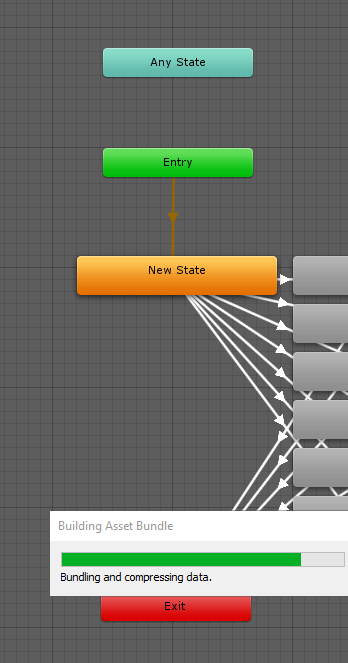
In FX it usually goes like
any state --( if parameter equals 1)--> animation_1
past python
where do we add gestures if theres no more custom overrides?
 simple basin
This update fuckin sucks
unborn lava
I’m so confused
restive rivet
What the fuck lmao
odd zinc
Chill
restive rivet
Just learn don't go saying it sucks
Or stick to 2.0
This is one of the best things to happen to VRC
unborn lava
Do i need to create an empty state or something?
odd zinc
Wither be pleab and stick to 2.0 or suck it up and learn 3.0
restive rivet
Ye create empty states for every animation
Then transitions and put conditions in them
odd zinc
3.0 is the future like it or not
unborn lava
I dont know how to add either or those
odd zinc
I'm prepared
simple basin
No im not talking about the sdk im talking about the entire update in general
odd zinc
Since I didn't learn much in 3.0
restive rivet
where do we add gestures if theres no more custom overrides?
You have to create animators in the Action layer for hand poses and FX layer for anything else, check the documentation
The only thing I dislike about the update are the control changes but you can remap them
simple basin
The quest hands are misaligned
unborn lava
I can’t figure out how to change Entry or Any State
visual dagger
There are a few things out of date from these videos, but most stuff is still correct https://www.youtube.com/playlist?list=PLYeEcl-XxYVmXyXtQ0c33jXB54nklug2n
at the very least it should help get around the new concepts
restive rivet
These cannot be changed, it will go from Entry to the orange box first ans then start going through transitions
unborn lava
How do i make transitions?
restive rivet
You can use any state to start from there at any point when a condition is met
Right click a node, add transition, click destination
Then click on the arrow that you created to see its properties
deft lodge
@unborn lava right click the state
unborn lava
Ah i think i see now
restive rivet
If exit time is checked it will wait until that % of the animation is done, transition time is the time it takes to change between animations
unborn lava
There’s already a transition from entry, is that supposed to be there?
restive rivet
It's weird at first but you'll get it soon
Yeah there has to be a default state
You can change it anytime though
unborn lava
Does there need to be a transition to exit?
grim mirage
are threre any av3.0 avatars with scaling for quest yet?
grim mirage
oof
restive rivet
Does there need to be a transition to exit?
Exit goes back to Entry, you can either go back manually or use Exit. Or, if you are using Any State, it's not needed at all since it can move from any point
grim mirage
are there any things i can try on quest?
restive rivet
Not many I bet, it came out right now
I don't think any of the people in the beta has done quest stuff so far
We focused on trying the system out
 blazing timber
@grim mirage Paci is right. The devs temporarily removed the ability to remeasure avatar, which "breaks" what was developed during the beta. However, according to the patch notes it'll be fixed up in the future. No ETA as of yet.
neon finch
hmm, i can't seem to be able to get my gestures working
teal path
I hope most issues are able to be fixed in the next week or so
So I can update my avatars when im home lol
They are still on a very old sdk3 version
neon finch
Oh i see
restive rivet
I bet many will be fixed soon
alpine willow
I hope.
neon finch
confusing, looks like gestures go on the action layer rather than gesture layer?
neon finch
@restive rivet what do you mean by using any state? does this mean i don't need transitions from the gestures to the exit? how do i 'use' the any state in that sense?
teal path
changes to the hand animation go to the gesture layer
and to shapekeys in the fx layer
so old sdk2 animations wont work
versed hill
FX is for any non-transform (toggling active, shape keys, ect)
 potent pebble
any full body 3.0 samples out there already?
neon finch
oh, i have those animations on the FX layer already, but i dont seem to be able to see any of my facial expressions when using a gesture
https://i.gyazo.com/71223a7025e63b490148b71dc9b21627.png is it supposed to look like this?
 teal path
do you have transitions and such to them and is the layee weighted?
neon finch
layer weight is 1 and i set the transitions up using that GestureRight param
 noble patrol
Uploaded my first avatar today, did a few edits then attempted to upload again, right at 5:23 (my time) right as they were doing the client update lol 😆 my luck be like~
 shell crane
Avater build and test does not build. It simply opens a window thats says "built". And nothing else.
restive rivet
@restive rivet what do you mean by using any state? does this mean i don't need transitions from the gestures to the exit? how do i 'use' the any state in that sense?
@neon finch conditions from "any state" will trigger anytime from anywhere when the condition is met
 muted gazelle
Did you actually check in game under avatars afterwards @shell crane ?
teal path
Yeah test and build creates an avatar in your avatar menu you can switch to
it doesnt launch the game or anything
 maiden mango
This has probably been asked 50 times, but does anyone know of any Avatar 3.0 worlds? I wouldn't mind testing one out despite being on desktop >.>
 past rover
Depends if the avatar authors have updated them with a fairly recent SDK
restive rivet
This has probably been asked 50 times, but does anyone know of any Avatar 3.0 worlds? I wouldn't mind testing one out despite being on desktop >.>
@maiden mango there's one by Tupper
 raven ruin
so since avatar 3.0 is out will avatars 2.0 be depricated? or will people who choose to use the old sdk beable to continue making avatars more simplistically?
maiden mango
Well shoot.. @restive rivet Thanks for the suggestion, though sadly all of the avatars are female sadly
the good ones anyways
restive rivet
Yeah but it works as a demo
The update just came out, wait s few days and amazing stuff will be out
The potential is just so big
 jolly oxide
is there a way to revert index controller gesture toggle behaviour?
maiden mango
Gotcha
 clever venture
these buttons in this sdk hurt my thinky sponge
deft lodge
@desert latch wait, how long ago they started doing new eye-tracking? That's always that one is the one i received from cats long time ago and got used to doing it myself all the time
desert latch
idk, since beta? the new eye tracking is good, our avatars just arent made, we basically need cats to revert the fix somehow and make it better then its dope
deft lodge
I remember long time ago i got it and learned that eye setup from cats and was doing it on most of the avatars, so i was a bit confused as to why you were saying it's not when it is, but apparently it got changed and i had no idea
neon finch
anyone know if this is a bug when u calibrate the avatar ur avatar moves with u? and also the Proportion? all my avatars proportion are so scuffed now
in fbt
desert latch
thats normal
unborn lava
Idk, maybe it says in the new full-body docs
raven ruin
ah alright thx @restive rivet and @teal path i dont have any complex stuff right now so good that i can still use v2
teal path
@neon finch the avatar now follows your head but the armature stuff either means you used a CATS fix or the rig is bad
neon finch
my avatars were ALL full body ready and had perfect proportion, and since now they are really really bad proportion
so rig is completly fine
maybe should try Fix Model again in blender REEE
teal path
Not if they used any CATS fix
neon finch
idk
teal path
Any type of fullbody rig "hacks" can break the model
neon finch
and whats the point that u cant align your b alls anymore correct without a mirror?
 lofty prism
Sorry to jump into the convo so abruptly, but I have a question. Are we being forced into the 3.0 format or can we still setup and upload avatars in the same way we have?
desert latch
thats a feature lul
its dtupid, but thats how they fix your viewball, naybe it will change maybe not no idea
desert latch
we know
neon finch
does it says in the doc somewhere?
desert latch
itsbbeen in beta and marked as anfeautrur
neon finch
i cant find it maybe im blind
neon finch
gimme link
desert latch
idk, ask tupper
neon finch
then the person lied if its not a bug
desert latch
obviously
neon finch
i HOPE its a bug or something because this new calibration in my oppinion is shit
u need a mirror everytime to calibrate correctly if u switch avatars
desert latch
nah
neon finch
whats the point
i dont get it
u can stand still and look forward
then apply
it works
desert latch
it sucks ye but its not that bad
neon finch
but sometimes it doesnt and ur in the floor
desert latch
lol what
neon finch
weird stuff
if u look down and apply Calibration, ur avatar is scuffed
u have to look straight forwarde
desert latch
ye
neon finch
because if the viewpoint or so idk
shy rose
You need a mirror if your settings aren't right yet. But once they are right, you just stand up straight, look straight ahead, and pull the triggers.
neon finch
i dont like that
teal path
Just wait and be patient, the bug report website is botted rn but things will get fixed
neon finch
but the proportion is broken on many avatars
idk what happened <.<
i want old thing back
teal path
With a big update stuff breaks and beta testers cant find all of them
Mind sending an image of your armature?
sturdy smelt
yea new fbt calibration is pretty alright
shy rose
The proportions are broken because of "fixes" people use, and you have to find the right combination of height and playspace moving. This is not a new thing.
teal path
I cant test if they changed anythinf in terms of fbt between now and the last bet because im on vacation
@neon finch can I see the armature
shy rose
You just have been doing it in 2.0 for so long that it's become second nature.
neon finch
yeah one sec
deft lodge
what does it mean "Full body ready" fixes will now break everything, they told a lot of times to not use those anymore
sturdy smelt
the old cats fbt fixes
 bitter escarp
did viewpoint height change get removed?
I cant seem to find the behaviour anymore
sturdy smelt
yea, they needed to rework it
teal path
Yeah its broken
desert latch
ye
neon finch
idk lul
sturdy smelt
sad to hear since one of the main things shared was that guy doing his rescaling
 native warren
half my avi world is broken
 craggy stump
I await some epic afk animations
desert latch
ye
teal path
Yeah but people never try betas lmao
bitter escarp
he had one where his avatar walks on a "link between world" tile, and the sound played and his avatar wobbled away into the other world
teal path
I saw on twitter when the beta released
craggy stump
That’s awesome
teal path
If you encounter issues, please make a post on the canny!
desert latch
it works perfectly
neon finch
who wanted a screenshot?
teal path
Me
neon finch
ah
desert latch
just proved it ingame pepega
 white osprey
sooooo is there not gonna be support for migrating a project from 2.0 to 3.0?
teal path
Please use the canny website to report any issues you might have and think they are actual bugs okay?
@white osprey okay it is possible but its a bit more complicated
upper remnant
lol
 eager horizon
I think I encountered a bug, not sure if anyone can help me out with this it would be appreciated
white osprey
my emote toggles that I manually made (never liked the inv system prefab) still work so yay
 primal sand
looks like i have to be civil: I am HERE to voice my DISPLEASURE at the removal of the avatar remeasure parameter, please add it back asap thank you
eager horizon
emote toggles work just fine
 candid forum
drek i think they changed the name of it to something else
if i remember correctly it may have been the other way around
primal sand
yea the changelog in the beta before the release
candid forum
o rip
sturdy smelt
it was jank so theyre trying to remake it
teal path
Yeah its not removed its just being fixed
sturdy smelt
hopefully it wont turn into avatar chairs #2
 shy lantern
Give people the ability to change controller settings in game, cant be that I mute and unmute myself while using spacedrag with ovr advanced settings thats probably the most annoying thing in sdk3 for avatars right now
 sweet pollen
so can you use vrcsdk3 to create avatars in the game or no? because the website says you can still only use vrcsdk2
bitter escarp
^ they are
junior relic
Anyone using oculus try and use these settings for Controller Keybindings, I shared it publicly, "Like Legacy Controls, With new menu On X" It changes the Right thumbstick back to jump, makes the new menu only on the X button, it sacrifices the ability to use the menu on the right hand, worth a shot On steam
bitter escarp
SDK2 World/Avatar
SDK3 Avatar
SDK3 World
grim mirage
@grim mirage Paci is right. The devs temporarily removed the ability to remeasure avatar, which "breaks" what was developed during the beta. However, according to the patch notes it'll be fixed up in the future. No ETA as of yet.
@blazing timber oof.
blazing timber
😉
neon finch
huh? so calibrating is a bug?
or the cats blender plugin working still?
im confused
where's the avatar 3.0 documentation
desert latch
please give index usersna dedicated gesture lock binding again, goinng through the menu is just annoying, give is the option to bind it
teal path
In fbt the model is supposed to move with your head yes
 soft tundra
"If you prefer the old calibration method for some reason, launch VRChat with the --legacy-fbt-calibrate launch option."
 weary orbit
Yeah "Let's get rid of all streamlining and bind THREE buttons to the same useless menu because for some reason debug options are in such demand we need them on three of the same radial menus"...bruh
soft tundra
via Steam Launch options*
desert latch
#bringBackGestureToggleBinding
weary orbit
only thing that's been improved is your viewpoint clipping into your chest when leaning back in full body...which is great...but it was already fixed just by playspacing below the floor in any map
soft tundra
Please add a lockout for this new menu so i can playspace drag without getting forced into it or having to change my bindings i've had for 2k hours.
also reimplement the ability to close hands for fist slowly via the triggers' again without having to force vive advanced control off please. tow big things that're annoying as hell with this new update.
neon finch
Please add an option to disable this new menu. It keeps popping up and I accidentally keep clicking stuff so I have to constantly go back and undo the stuff I clicked.
weary orbit
literally just go back in every UI/calibration change
junior relic
Allow us to use Emotes in menu too, why remove that feature?
I don't care to use the new menu
pulsar lagoon
Emotes only exist in the context of AV2. In AV3, they're more varied and the old menu won't really work for the newer emote system.
Additionally, the UI in general is due for an overhaul. The old menu probably wont be around in a few months, which is why it's being moved to the new one.
weary orbit
nobody in vr uses emotes regularly enough to justify unbinding gestures
sand wren
unbinding gestures..?
weary orbit
gesture toggling
sand wren
i still have facial gestures bound to my face
weary orbit
it's important for Index
pulsar lagoon
gesture toggling is still there though.
weary orbit
in a three step process
yes
there's literally already two other buttons bound for the radial menu...don't take away gesture toggling for a third button
 zenith epoch
How to i join stae mbeat branch
junior relic
This whole menu just makes everything so much more complicated then making it easier
pulsar lagoon
I thought they added a SteamVR binding input to directly control gesture toggle.
Besides, the new menu is a necessity for the newer features of 3.0
 supple oak
if there is one I can't find it
deft lodge
it's making it more advanced while keeping it relatively simple, i'm not sure what you are on about
zenith epoch
The men usimplyfies thinsg for me
teal path
Hahaaaaa early access game made a change
pulsar lagoon
Not only that, frankly, this was in beta for more than a month. If it was an issue, it should've been brought up before release.
supple oak
wasn't that what the number 1 canny post was asking about?
at the time
pulsar lagoon
Most frustrating thing to me is both that the canny is down, and also that I can't find the AV3 announcements.
pulsar lagoon
Because I'm pretty sure there was something they did using steamvr binding and I wanna find it again.
jolly oxide
any reason why some of my older avtars now have some of their auxilery bones bending in different directions randomely
pulsar lagoon
Is it possibly due to the new idle animations?
jolly oxide
and by older i mean yesterday
no, thats tied to the IK bones
these are not Ik bones
extra bones in the wrist for wings
but only some of them are being effected so it isnt due to the wrist idle
and i have index so wrist idles arent a factor
sand wren
are they in the correct order
jolly oxide
yes
sand wren
Any extra bones have to follow after the IK bones
jolly oxide
and were working before the new update just fine
jolly oxide
i know, i have it ordered correctly
sand wren
o
jolly oxide
2 of the 3 avatars i recently made all following the same style and order for the wwings
have this issues
 dusty gulch
Idk if it's just me but this update doesn't seem very oculus friendly
Why has one of my gestures been assigned to microphone toggle? And on the other controller, jump
:(
odd zinc
Reeeeee how do I convert sdk 2 animation into sdk 3?
jolly oxide
additionally some friends saw it scuffed while for others it looked fine
neon finch
i love how vrchat tested stuff before to find bugs and errors xddd not, was the open beta not enough?
WeirdChamp
 proper salmon
Is there a way to get the default gesture toggle back on the index controllers?
desert latch
https://streamable.com/r5sez1 love the new 3.0 feauture of breaking your neckmxd
jolly oxide
also i really hope i dont have to reupload all my final IK leg avatars
teal path
It appears that the update came with some issues that were not existant in the beta
jolly oxide
but scions still testing that out
teal path
If you encounter any issues, please post on the canny
pulsar lagoon
Not gonna lie, I'm lowkey a little annoyed they just released to live with a different SDK, but oh well.
deft lodge
oh lord, no way how did that happen, never happened before haha 
jolly oxide
currently final IK based legs have super high step speed and super low step distance
supple oak
i made a canny post about the gesture toggle change
now i guess we wait
proper salmon
Gestures on index are annoying enough, an actual feat that they managed to make it even more so.
neon finch
This menu kinda ruined it for me, if they make a toggle button for the new menu or something like that then I’ll be fine. But it’s just annoying.
sand wren
can an admin please pin somewhere that people should use SDK2 if they want to make avatars and only use SDK3-AVI if they wish to use the features of the new av3 system? And that it is entirely different from the old setup?
soft tundra
wait i just realized; there's two bindings for this new gesture / overlay menu for Vive; can we have the ability to take it off the regular menu buttons; or better yet; allow us to select what key / gesture etc to set this to? it can be filed in under something like advanced settings.
 rich snow
It's not so bad once you've gotten it set up 😛
neon finch
^ people are scared of change
you wait for the ui change people will loose there shit lol
--legacy-fbt-calibrate if someone wants the old calibration for fbt back
visual dagger
inb4 the solution is to just do it right to begin with
neon finch
and people cba learning too most people expect prefabs handed to them xd
rich snow
honestly, I think this will end up being easier
you get to use unity animation controllers properly
instead of hacking everything together
visual dagger
for the most basic of things, not as easy but for the more advanced things it's super easy
and way more expansive
rich snow
they have examples of the controllers, just copy those and work from there :3
visual dagger
pretty much
i ended up making youtube tutorials because even the people adventurous enough to do the beta had issues figuring it out
now that it's public, there'll be no end to the same stupid questions
rich snow
I didn't do much in the beta, it's not very useful if I can't just normally use the avatars and still interact with people 😛
I did break the avatar preview with my old AV3 avatar though
it gets stuck in the loading animation forever
(even when selecting other avatars, or closing the menu)
super edge case issue though
 waxen briar
Definitely wish I could change the new 3.0 menu to a different keybind.
'R' is pretty annoying.
tropic lava
is 2.0 still supported
 proud veldt
yeah, if you just wanna do simple stuff @tropic lava
 cold jacinth
LOL the ik
 sly fulcrum
any avatar 3.0 worlds other than the beta world
 spiral valve
one of the avatars came up as an error for me and idk how to fix that tried reloading but didn't really work anyone got advice?
craggy stump
is making dance emotes like in avatar 2.0 possible? like where the animation still plays even after you exit the menu and/or until the animation finishes?
deft lodge
Yes
deft lodge
 quick cedar
can you even use that in blender?
fluid grotto
So I've made an avatar 3.0 for someone. If I zip it up, not including the SDK (as per guidelines), will the menus and stuff still work when they re-import SDK3 themselves?
visual dagger
it should
would probably be better to create a unity package that they can import into a sdk3 project
fluid grotto
Yeah, I meant to say that. I still think of .unitypackages as zips, lol
visual dagger
yeah, as long as they have sdk3 in the project before importing the avatar it should be fine
 thorny wing
Is setting up Avatar 3.0 the same as 2.0?
visual dagger
no
thorny wing
So it's different
craggy stump
is the setup for eye movement in the new sdk for eyetracking?
visual dagger
yes
fluid grotto
It's the same old eyetracking system, but now you can define rotation limits
 topaz moss
Just to make sure I understand this, is the Gestures layer functionally the same as the existing avatar controller in SDK2? (Eg; using sections of the vive touchpad for Rock-and-roll, Handgun, etc)
pulsar lagoon
Well, yes, but actually no.
fluid grotto
The example hand controller is the same as SDK2. but, now you are free to edit it or supply your own. add extra layers, create new nodes, edit it however you like.
if you just want to replace the animations, you can do so
additionally ,since you have left and right layers, you can put different animations on each
craggy stump
do i still need to set up the rig for the avatar by clicking on the avatar itself?
outside of the sdk
pulsar lagoon
Gestures layer is for hand movements. If you only want hand movements, that's fine.
However, if you wanted to do something like turn a prop on with a gesture override in SDK3, you need to use the gesture parameter for your animation.
topaz moss
Oh of course, I'm just making sure I grasp the basics and to see if the existing hand-gesture stuff works still.
craggy stump
oh okay, so now you can just do hand gestures without them being tied to emotes and such?
topaz moss
I guess what I'm asking here is is if I just dump an existing 2.0 avatar animation controller into the Gesture layer and upload, will it behave exactly the same as it did in its Avatar 2.0 form?
fluid grotto
if you want, yes, you can separate hand gestures from the animations they trigger
that will save you baking the hand pose into your animations
visual dagger
@topaz moss likely any existing animation controller you have won't work in 3.0
quick cedar
Can you use the 3.0 in blender??
craggy stump
its not for blender
quick cedar
well that sucks
visual dagger
blender isn't related to the sdk
fluid grotto
Models made in blender continue to work with the new SDK, if that's what you are asking
quick cedar
they should at least make an OBJ for it
visual dagger
for what?
fluid grotto
I feel you might be a little confused
visual dagger
it's not a model
quick cedar
yeah most likly Adeon
craggy stump
so when i set up eyetracking in the new SDK, which eye bones do i need to use?
fluid grotto
SDK3 is just a new version of the SDK. the process of setting models (no matter where they came from) up in untiy is a little different now, but you've got way more open-ended features.
visual dagger
@craggy stump the ones that move the eyes
craggy stump
whats usually the difference between Eye_R and RightEye?
same with left
idk which matters
fluid grotto
so when i set up eyetracking in the new SDK, which eye bones do i need to use?
@craggy stump any that you want, though if you are coming from CATS plugin, it's LeftEye and RightEye. Cats will probably be changed in the future since doubled eye bones is no longer needed, now that we have rotation limits.
topaz moss
@visual dagger so are the old "finger gestures" still used/usable (eg; touching areas on a trackpad, index finger positions, etc), or is it ALL through the action menu for Avatar 3.0? Not saying I want to avoid that, but I'm just trying to get a feel for the baseline before I start rebuilding a whole lot of existing avatars.
visual dagger
@topaz moss by default, if you do not use a custom gesture controller, the avatar will have normal hand gestures
fluid grotto
Yes, hand emotes still are there and work fine - add the example hand layer to your avatar descriptor on the gesture layer, it's set up with all the old hand emotes if that's the system you'd like to use. but you are free to edit it or change it.
craggy stump
how come its LeftEye and RightEye even though the CATS plugin uses Eye_R and Eye_L for eyetracking?
fluid grotto
That's a system that cats made. It's not part of VRChat
craggy stump
oh ok
visual dagger
right, what @fluid grotto said, you have to use the example controller
craggy stump
btw, i asked earlier, but do i still need to configure my models rig in unity?
topaz moss
Cool. I'm just trying to make sure I understand, because my fuzzy toy avatars use the gestures for quick expression changes, plus a second gesture to squeak.
fluid grotto
Yes. the only real thing that changes with SDK3 comes in after adding the avatar descriptor. all steps beforehand are the same
craggy stump
oh okay
visual dagger
expressions will have to be setup separately in the FX layer, they're no longer tied to hand gestures
craggy stump
so even though i use LeftEye and RightEye for the new eyetracking, i still should select Eye_R and Eye_L when i configure the model?
fluid grotto
expressions can be controlled or control any of the layers, it's not tied to FX specifically
craggy stump
for the rig
visual dagger
expression animations are FX specific
fluid grotto
they aren't - FX is just for non-transforms. you can make expression menus effect any playable layer
fluid grotto
not true - FX is for non-transforms, like changing materials or shape keys
fluid grotto
there's nothing wrong with using expression menus on transforms, which would be on gesture layer, or for triggering actions, which would be action layer. for example, you can make a menu wag a tail, or trigger an old-style emote, or change your walking animation
fluid grotto
It doesn't, you misread
visual dagger
unless something changed in the last beta update
quick cedar
can someone send me a link for what i need to use to use 3.0?
fluid grotto
most Non-transform animations go on FX layer, but expression menus can control anything
visual dagger
i'm not talking about menus
fluid grotto
@quick cedar #avatar-development-links
quick cedar
thanks
fluid grotto
ok that's a different thing.
depends on how the face expressions are made. if they are made of bones, it goes on gesture
visual dagger
and also, the documentation DOES say "Transform animations only' for all layers besides FX
topaz moss
Yeah, I'm looking at the right now and it specifically says "everything that isn't a transform/muscle animation should go into the FX layer."
fluid grotto
Yes, but facial expressions aren't always non-tranasforms
visual dagger
generally they're blendshapes, especially with 2.0 conversion
topaz moss
This includes (but is not limited to) things like enabling/disabling GameObjects, components, material swaps, shader animations, particle system animating, etc.
visual dagger
blendshapes are not transforms
topaz moss
On mine they're meshes turned on/off, so it's relevant to me.
fluid grotto
Yes, I'm just being overly pandentic I suppose. best to say transforms and non-transaforms, facial animations aren't always blendshapes
visual dagger
yeah, same thing, transforms are specifically anything that moves a tracked joint/muscle
craggy stump
such as dancing emotes?
visual dagger
if your facial animation moves tracked joints then it needs to be separated
fluid grotto
There is cases where transforms do go on FX, if you are animating something outside of the armature, it goes on FX, even if it's a transform.
fluid grotto
For starting out I recommend just putting all 5 example playable layers on all 5 slots. so you can actually see what they're all doing, then you're free to edit
topaz moss
So, if I understand this right, hand gestures (for a general "2.0-input" blanket term) can still be used to trigger an animation in the new layer system? I just set something using, say, rock-and-roll and anything turning on/off into the FX layer related to that?
visual dagger
yeah
topaz moss
Now I think I get it, thanks.
fluid grotto
@topaz moss That's correct. Add the example hand gesture layer to the hand playable layer on your avatar descriptor, and you will be able to edit the slots in there the same way as 2.0
The difference is now there will be two layers, one for left and right, so, you can put different animations on each
topaz moss
Cool. I'm assuming it's possible to do something like have an animation play ONLY while the trigger is held down and not just sit in the GRIP animation like in SDK2.0?
fluid grotto
Here's a visual example of how to set animations on a hand pose using the example hand gesture layer
 deft lodge
I like the name of your project haha
 strong gulch
did the unity version change? its not showing me a control panel anymore :(
topaz moss
Cheers. And I just stick that on the FX layer?
@strong gulch Did you try to update your SDK to Avatar 3.0 in an existing project? Because that doesn't work.
strong gulch
no, new project
deft lodge
check console log for errors, we are still 2018.4.20f1
 cedar pumice
Wait, can you not just update avatars from 2.0 to 3?
topaz moss
Nope.
deft lodge
possible but risky, not recommended
strong gulch
lol it was using the wrong version. lemme update that ill be back
cedar pumice
Is it even worth updating an avatar though, that's my question.
fluid grotto
It is not worth updating your project unless you are going to use a 3.0-specific feature.
If you make a new project, though, use 3.0
cedar pumice
Can't I just use the same project but make a new scene?
fluid grotto
both SDK's can't exist in the same project. Your old scene will break.
craggy stump
what is the process to replace locomotion and idle animations in the new sdk?
where can i learn how
cedar pumice
oh that's true...
fluid grotto
Use the example locomotion controller
cedar pumice
damn that's going to be a huge pain to update avatars.
specially for people who have dozens of avatars
fluid grotto
@craggy stump \VRCSDK\Examples3\Animation\Controllers\vrc_AvatarV3LocomotionLayer.controller, then most of them are hidden inside the Standing node
deft lodge
you don't have to update them though unless you need those specific features
craggy stump
is it just as simple as replacing the default animations assigned in the example controller?
deft lodge
yeah, pretty much
cedar pumice
Well having an afk animation would be really neat
fluid grotto
yes, drag new ones in. do not edit the animations, it looks for the name "proxy_" and just replaces it with the defaults.
cedar pumice
but yeah that's true
fluid grotto
Blank, you don't need to update to 3.0 to get the the afk animation. all 2.0 uploads have it retroactively
strong gulch
lol it was using the wrong version. lemme update that ill be back
@strong gulch still busted https://i.imgur.com/eMaWHhW.png
 deft lodge
and considering dozens of avatars - a bunch of them for a lot of people are probably just outfit variations which can be merged thanks to the new system
cedar pumice
Not from what I've seen.
deft lodge
press end key on desktop
fluid grotto
You do. it happens when you take off the headset (VR) or press End (Desktop)
cedar pumice
Ohh
deft lodge
they should have it by default too
cedar pumice
I see.
fluid grotto
in VR it also happens when you open the steam menu
cedar pumice
I heard you can also edit the scale of your avatars using the new system..?
Is that true?
fluid grotto
It's a planned feature, it didn't make it to live
cedar pumice
ohh okay
topaz moss
Damn, I had some fun ideas for that.
cedar pumice
Same lol
topaz moss
Also you just KNOW there's gonna be a rush to see who turns out the first Antman avatar.
fluid grotto
It will happen, they just need it to be less buggy
craggy stump
is the potential amount of emotes you avatar can have limitless now?
fluid grotto
yes
cedar pumice
That's going to warrant crashers, without a doubt.
fluid grotto
You have been given maximum avatar file size auto-blocking for a reason! :D
deft lodge
ahhh, emotes are infinite as long as you keep them within the max amount of parameters allowed
strong gulch
Assets/VRCSDK/Dependencies/VRChat/Editor/ShaderStripping/StripPostProcessing.cs(11,34): error CS1644: Feature `expression bodied members' cannot be used because it is not part of the C# 4.0 language specification nani
topaz moss
So how do hand gestures play into the new Action menu, out of curiosity? Can we set up a separate set of gestures for a toggled state? Eg; pulling out a gun and using hand-gestures for firing modes/ammo types.
visual dagger
if all emotes use the same parameter then the technical limit is the 255 numerical limit of an int parameter, though you can use multiple parameters and have other conditions to increase the numbers
deft lodge
@strong gulch How does your Project settings > Player > Other settings > Configuration > Scripting define symbols and Scripting runtime version look like
fluid grotto
If you want to use the menu system, you get a bunch of widgets. there's radial dials (0 to 100 float), toggles (integers that switch between 0 and a set value), two axis menus that are controlled by joystick position, etc
each of them can drive an animator however you want
 mystic axle
is there a new unity version to use now too?
deft lodge
no, still 2018.4.20f1
fluid grotto
menus are great for toggles, they can effectively be inventory systems. https://streamable.com/bkqqp5
strong gulch
@strong gulch How does your Project settings > Player > Other settings > Configuration > Scripting define symbols and Scripting runtime version look like
@deft lodge
https://i.imgur.com/sDfnEIN.png
 deft lodge
oh boy...
visual dagger
and yes, you could change hand gestures based on a toggle if you wanted
for multiple sets
strong gulch
i can guess its not correct ...
deft lodge
@strong gulch That's what it should be
https://i.imgur.com/owqwwoG.png
 strong gulch
wtf how is it so wrong
cedar pumice
do you have to use the menu with 3.0 or can you still just do regular gestures with 3.0?
topaz moss
As has just be discussed, yes you can.
visual dagger
you don't have to use a menu to do gestures
topaz moss
Hand gestures totally still exist, you can even rig them to specific hands now.
cedar pumice
huh...that's going to be super interesting then haha.
deft lodge
am i the only who's obsessed over making all the custom icons for the new ui to make them look like part of VRChat's default icon pack? like this gray-ish to white gradient color
visual dagger
probably 😛
fluid grotto
do you have to use the menu with 3.0 or can you still just do regular gestures with 3.0?
@cedar pumice Regular hand-triggered emotes continue to work fine
visual dagger
I don't even use icons for most of my stuff
cedar pumice
can you blend between gestures using hand emotes though? @fluid grotto
that would be cool
okay you know, I'm going to actually test this with my avatar instead of asking questions lol.
deft lodge
pretty much anything you can make an animation out of can be used by AV3SDK
fluid grotto
yes. in fact, a menu icon could change your hand gestures into an entirely different set if you wanted, infinite different sets.
fluid grotto
yep.
strong gulch
@deft lodge thanks for the help
fluid grotto
isgud
shy rose
The Test Build option is your best friend!
topaz moss
Actually a quick question on the hand controllers; Are they flexible enough to rig it to play an animation before transitioning to another gesture or do they need to exist verbatim and only have animations slotted into the existing states?
fluid grotto
am i the only who's obsessed over making all the custom icons for the new ui to make them look like part of VRChat's default icon pack? like this gray-ish to white gradient color
@deft lodge I am obsessed with taking render-camera pictures of all my inventory items. I've got a unity script to speed it up lol
deft lodge
haha, same i also take picture of stuff in unity and make an icon out of them and then color them through photoshop into vrchat style icon to make it have that little gradient they have
 modest sun
Hey everyone! I've updated my Avatars 3.0 Emulator tool here: https://github.com/lyuma/Av3Emulator/releases
You can debug your state machine and test the combinations of playable layers, inside the Unity editor itself, and see the operation of the thing in the Unity Animator window.
Uploading is still a great idea too, but this can be helpful for debugging things like Parameter Drivers
If you have an older version, you may get an error caused by the removal of the RemeasureAvatar script, so updating will fix that.
neon finch
So being able to control gestures with the normal hand controls is no longer a thing?
craggy stump
its possible still
but not innately linked
so if you wanted you could just have gestures
that dont do anything
and also animations
seperately
but through a UI window
neon finch
I see
That's really annoying that I can't just do facial expressions like always before
visual dagger
you can, it just doesn't do it for you
neon finch
Yeah not sold on this then
visual dagger
yeah, the unlimited possibilities is a huge downer for not being lazy :/
neon finch
As long as this doesn't break my existing avatars
shy rose
You can, you just have to make them again with the new system.
visual dagger
existing avatars are not affected
craggy stump
what ill prob do is create a lot of gestures that are toggleable and somehow assign Shift+F1 to still be what is is with 2.0 to turn back to the idle state or w/e
neon finch
I really don't like the key bindings
Using A to jump feels unnatural
Holding B already toggles the new menu...I don't see why we need two toggles
 sage raft
Please tell me Im not the only person whos avatars broke with AV 3.0
All of my main avatars that uses the same base has raptor legs https://twitter.com/MillerPC_/status/1291557331357126667/photo/1
neon finch
My old avatars seem fine
sage raft
Literally all of my avatars can't crouch
or its knees will snapback
this happened right after AV 3.0 was pushed to main branch
sage raft
At this point, im just gonna create worlds from now on.
cobalt yew
Sound like your avatars legs were fully straight instead of slightly bent like they should be and with the new animations vrc's procedural animation now cant figure out what way your legs are meant to bend @sage raft
sage raft
Thats the thing, its the same model, yet others work perfectly fine.
Others of my models*
The armatures and its position never changed
neon finch
They still haven't fixed the system memory usage bug either...needing 23.5GBs to run this game is pretty ridiculous
sage raft
I give up lol
 slim panther
This has probably been asked already but are there any example packages for avatars 3.0?
It would be helpful to be able to pick apart something already put together properly and learn from it
deft lodge
ah, not really, but there is example animator layers shipped with SDK and stuff as well as documentation on the whole thing
neon finch
I understand, having to go through and republish everything using the new SDK is a lot of work
slim panther
yeah
I messed with it a bit during the beta but there's a lot of stuff to go through
deft lodge
you don't have to republish everything using the new SDK
neon finch
I don't blame Miller
visual dagger
apparently the admins/devs should post something saying people should not 'update' their avatars unless they want to use the new features
it's a big task for some setups, and completely not required
 gilded slate
One of the people I know got so angry they quit vr for vrchat because of almost all of their avatars broke like nearly all of them big rip this update lol
This reminds me of when they moved to unity 2017 and so many avatars broke
shy rose
I mean, if they want the old way, just use 2.0 avatars and use the old calibration method.
sage raft
I don't have the choice now
If you looked at my tweet i posted earlier, my legs are raptor legs now.
Something in 3.0 broke my 2.0 avatar
neon finch
New IK system broke your avatar
ivory grail
Is the spider ik broken?
 naive sedge
Yo, I just tried out the new sdk and the uploaded result doesn't animate. As in gets stuck in the ground and just floats around. Am I doing something wrong here?
neon finch
The IK is kinda bad imo
sage raft
i don't understandd why does it keep getting changed. It goes from great, to horrible to tolerable to horrible again
craggy stump
IK?
shy rose
You can always make your own IK in avatars 3.0.