#udon-general
59 messages · Page 31 of 1
 unborn hornet
Oh right, I meant like
var players = new VRCPlayerApi[VRCPlayerApi.GetPlayerCount()];
VRCPlayerApi.GetPlayers(players);
mainly just emphasizing the use of GetPlayerCount as an option to track all players in the world regardless of amount.
 hoary echo
Is there any way to tell udon to pause/delay/run a timer for X amount of time before continuing?
 fiery yoke
No, but you can implement your own Wait function
hoary echo
Oh?
fiery yoke
Simply count up a float in Update with deltaTime until you reach the limit then continue where you left off
Its a little complicated
hoary echo
Hmm, ok, I think I can get up a janky workaround for now. Thanks for the info!
 floral dove
@hoary echo there's a Timer example in the UdonExampleScene that may help with the basics of setting a time and doing something when it's done
right now it runs on a loop but you could change it to be one-time use
floral dove
yeah, think that's been in for a long time
unborn hornet
Aight. Guess I'm just blind lol
Or maybe because almost all my sync variables are private 
hoary echo
Hmm, do for loops in udon wait for one loop to complete before starting the next?
floral dove
I believe they should finish executing the first loop before moving to the second, yes - but they won't "wait" on something like a timer. What do you want it to wait for?
hoary echo
I'm trying to build a fancy jukebox, basically, as a way to get a better hang of udon in general. I'm seeing if I can get a janky 'wait' working by setting a while loop at the end of each for loop that runs 'while audio is playing'
unborn hornet
Wouldn't events make more sense for something like that?
hoary echo
Not gonna lie, I have no idea, I'm taking my limited programming knowledge and try to apply it to whatever new thing I want to do, haha
 grand temple
While loops run instantly. If you check the time within a while loop it's always going to be the same
hoary echo
There was a reason all of my programming assignments in college were marked as "Not optimized" and "not efficient"
Ahh, good to know
grand temple
It's very easy to lock up the whole program doing millions of while loops if there is no way to exit
But udon will detect it and shut it down after 10 seconds ish
hoary echo
Yeah, I just saw that error pop up
unborn hornet
public void mrBonesWildRide() => while(true) mrBonesWildRide();
grand temple
If you want a delay, you need to check the time in update. I like to do something like
nexteventtimer = time.timesincelevelload + 5;
Then on update,
If (nexteventtimer != -1 && time.timesincelevelload > nexteventtimer)
{
nexteventtimer = -1;
nextevent()
}
 scarlet lake
How do I control the animation of an object using a slider ingame?
floral dove
@scarlet lake - what do you want to do? Trigger a new animation state? Change the speed?
hoary echo
Well, the first half worked. I really need to start learning how to do all this in Udon#, but, it's all graphs for now.
Jesus, I set two static variables in an Op Greater Than and wondered why it never triggered
scarlet lake
@scarlet lake - what do you want to do? Trigger a new animation state? Change the speed?
@floral dove I want to change the position and rotation of a mirror
 next summit
I'm not sure if I'm asking in the right place here tbh, I'm trying to make a working pack of card for a games room. Does anyone know how I could do this? (I've never used scripts before just fyi.) Or know of something that would help me?
floral dove
@scarlet lake - then why a Slider? You could use a button, toggle or Interact-able GameObject to set a Trigger or Bool on an Animator in order to do that instead of a slider. Do you want the slider to 'shuttle' back and forth through your animation?
@next summit - you can do it with our programming tools. I'd recommend you start here: https://docs.vrchat.com/docs/getting-started-with-udon
next summit
What tools though?
I've read though all that and honestly didn't help me all that much ;-;
floral dove
Have you downloaded the SDK and Unity?
next summit
Yeah I've downloaded all that, I've start out with a skeleton for the room and got everything laid out, just need to start actually adding stuff
I've made and customized my own avatars, So I know my way around unity in that sense. But when it comes to scripts and stuff, I honestly am at a loss
floral dove
Ok great! Have you got the UdonExampleScene working in Build & Test?
next summit
Yeah 😄
scarlet lake
I want to be able to control the exact position of my mirror, I want the mirror to slide between a wall and the ceiling, like a garage door. And a Slider would fit well in this case. @floral dove
floral dove
Awesome. Have you read through the Readme.pdf alongside it? That should take you through all the examples in that room so you can start to understand how things connect. This tutorial also sheds some insight into how objects in a scene connect up together: https://www.youtube.com/watch?v=95jRByYHE4Y&list=PLe9XHNvXcouQjg5GULWGLj1tMzeythnQi&index=3

These features are currently available only on our Open Beta version - check our Discord for more information.
Learn how to make doors that automatically open and close to let players through. This tutorial will use the Udon Graph to work with Player Triggers, Haptics (a...
For a pack of cards, I'd start by importing a few objects to use as cards, then figure out how to randomize their order. Learning about how Arrays work in C# and Unity will probably be important.
scarlet lake
I mean, I don't just want to just switch between two positions, but also between middle points
floral dove
Ok @scarlet lake - that makes sense. You could use the OnValueChanged event on a slider to change the time value on a Timeline which has your animation.
fiery yoke
You could also set a Float Animator Parameter, and use it as the Normalized Time Parameter in a State
 cobalt valley
How to make vs code autocomplete correctly for udon scripting? I installed several extensions but they don't seem to be giving me the relevant methods and such
floral dove
@scarlet lake - here's an example graph showing how you can have a slider drive a timeline:
@cobalt valley - I recommend you check out UdonSharp Discord for support of that tool.
hoary echo
Thank you all you beautiful bastards, the Jankbox v1.0 is now functional
 cunning mist
@cobalt valley Getting VSCode to do those correct autofills is pretty annoying, you may want to swap to VS2019 instead.
floral dove
for UdonSharp questions and support, check the official Wiki:
https://github.com/MerlinVR/UdonSharp/wiki
floral dove
floral dove
for UdonSharp questions and support, check the official Wiki:
https://github.com...
scarlet lake
Is it possible to do this using only OnValueChanged? Or do I need the graphs? Could you explain in more detail? I don't really know what to do @floral dove
I have my mirror. I made an animation for it and I have my slider. but I don't know what to put on OnValueChanged
floral dove
Sorry, but the .time value of the Timeline takes a double, so OnValueChanged won't control it directly, you need to go through the graph.
Point it at UdonBehaviour.RunProgram with the string that matches the custom event in your graph. In my graph, I called the event "OnValueChanged" for simplicity. If you've never done this, take a look at all the interactive UI elements in the UdonExampleScene, I use this pattern a lot.
I won't be able to help more than that as I'm away from my computer tonight, but hopefully that steers you in the right direction.
scarlet lake
@floral dove Is not working
The graph is the same as yours. When I enter the game, my mirror keeps looping the animation.
floral dove
ah - you need to change the target for the OnValueChanged Action on the Slider. Take a look at the Slider on the "SliderSync" object in the UdonExampleScene for a reference to work from.
fiery yoke
Also "MonoScript.name"? 🤔
floral dove
That's what I'm saying, just trying to show them where to look for more answers instead of giving a one-time "here's how to fix it" answer
fiery yoke
What I meant is that I have never seen that property ever :P (Because I didnt know what a MonoScript is, but I read up on it now)
scarlet lake
I opened UdonExampleScene. I cannot copy the SliderSync properties. SliderSync is in C# and seems to be in/connected to this example scene, so I can't use it in my OnValueChanged. But the SDK provides a SliderSync in graph, which does not give the same options for me to make it equal to UdonExampleScene.
floral dove
@scarlet lake - just look at how the SliderSync is set up.
it targets the UdonBehaviour, which also gets a reference back to the Slider so it can look up its value. Highly recommend you go through the Readme included with the Example scene and check out the graphs so you can start to understand how all of these pieces come together. It's a lot to learn if you're new to Unity and/or Programming.
floral dove
You need to add an UdonBehaviour on the same GameObject as your Slider, set the Graph you made as the UdonBehaviour's ProgramSource, and then target that UdonBehaviour from your slider and make it trigger UdonBehaviour.SendCustomEvent instead of UdonGraphProgramAsset.name.
Again - I highly recommend you go through the Readme and spend some time exploring how things are all connected.
It helps to learn some basics about Unity, too. In this case, how UI Events work.
 next dove
Can I use Udon in my own Unity project or does it depend on VRChat
floral dove
it depends on the Udon VM, which is only available in VRChat.
scarlet lake
You need to add an UdonBehaviour on the same GameObject as your Slider, set the Graph you made as the UdonBehaviour's ProgramSource, and then target that UdonBehaviour from your slider and make it trigger UdonBehaviour.SendCustomEvent instead of UdonGraphProgramAsset.name.
@floral dove
There is no UdonBehaviour.SendCustomEvent here
floral dove
Sorry, I'm heading to bed. You have my recommendations above :)
Good luck!
unborn hornet
Drag the asset into there.
@scarlet lake
Then take the object that the udon behavior containing the graph is on, drag into the On Value Change field and pick the SendCustomEvent method.
Based on your screenshot, it looks like you attempted to drag the graph asset DIRECTLY from the assets folder into the slider OnValueChange field in the inspector, which is not correct. Reproduced here:
next dove
@floral dove well, that's a shame, I was just going after some wishful thinking I guess, I was playing around with a Unity project thinking it would be cool if I could use the same Udon code from my my VRChat world in my Unity project
 valid basin
I have a general interaction sound for clicking buttons and stuff, but not every button is using the same Udon Sharp script. Is there any way to write the "play sound" code once and call it from other scripts where the code bit is not actually included? I realize it's only like a single line of code but i'd prefer not rewriting any code if unnecessary
floral dove
Sure @valid basin - you can use SendCustomEvent to trigger your PlaySound program from another program.
 upper sluice
Weird question, but has anyone else had issues where hitting build and test is taking you to your home world instead of the world you're trying to test?
floral dove
@upper sluice - check the path you have set for VRChat in your settings.
https://docs.vrchat.com/docs/using-build-test
upper sluice
Yeah, it's the right path
floral dove
Any errors in your console?
floral dove
Hm yeah, looks ok. Those are the two main reasons I've seen a Build not work for someone.
Check your logs for more info about what's going on: https://docs.vrchat.com/docs/debugging-udon-projects
VRChat
What is Debugging? Debugging is how you learn about what's going on under the hood in the VRChat client and your world. It's a key skill to develop for programming in general, and for building your worlds. VRChat Logs When you use the VRChat client, it saves logs about things ...
Doesn't sound like a reinstall issue to me unless you've been having other client-only issues.
You might try closing the Unity project, deleting the contents of the Library folder, then opening it back up and running Build and Test again.
upper sluice
floral dove
Hm - check your Spawn Point transforms on the VRCWorld object, maybe?
scarlet lake
@unborn hornet Thanks for really trying to help instead of giving me a treasure hunt. Apparently I did it, but what do I add in these fields? When I enter the game the mirror keeps repeating its animation in a loop.
unborn hornet
Same as how you added the udonbehavior to the slider event. You drag the gameobject onto the field in the inspector that has the desired component you wish to use.
upper sluice
I think that actually is what it was, but I decided to start a new world, I messed up a lot of things 😅
unborn hornet
Been there done that lol
floral dove
ouch! I've been trying to help you learn how to learn - if you rely on exact step-by-step instructions, what happens with the next barrier you run into? You need more exact step-by-step instructions.
(re: "Thanks for really trying to help instead of giving me a treasure hunt")
unborn hornet
With all due respect Momo, some people have an easier time learning by instruction rather than exploration.
One can easily get lost in the examples that exist without understanding the underlying steps taken to get to that state.
fiery yoke
It is always two parts. Understanding WHAT youre trying to do and then understanding HOW to do it.
unborn hornet
The learning curve on the how is generally larger than the what. Sometimes a helping hand is more beneficial than just "you can figure it out".
But at a certain point, yes, one must be able to simply "figure it out".
floral dove
understood and agreed on different learning styles, @unborn hornet. In my experience, I've seen many newbies come in, ask for exact instructions on how to solve a problem they've hit, and then come back time and time again asking for more exact instructions, with little progress being made on understanding what they're doing. I believe everyone is capable of figuring it out, but many people don't give it a real try, hoping for another exact solution instead.
unborn hornet
It'd be nice if there was an official wiki that contained various step by step processes for common tasks in Udon.
🤔
one that we could simply reference directly for new people.
floral dove
the UdonExampleScene has so many of these examples, and a Readme that explains what each part does.
I find that many-to-most beginners posting here have not gone through it.
fiery yoke
Well from someones perspective it might look like someone giving you a solved rubiks cube and saying "this is how it looks solved" and then expecting them to know how to solve it themselves...
unborn hornet
My experience has not been the best looking through the examples tbhwy.
floral dove
I think that means we need to do a better job explaining them, and offering other learning styles - like videos that go through them, and maybe some in-world examples and breakdowns.
unborn hornet
That would be very helpful actually.
Though I would still recommend doing a website wiki instead of just a readme.
That way it's easier to reference.
floral dove
True - the Readme is there so that the examples have their own reference right alongside, but yeah it would be great to point to the Timer Example reference page on the website.
fiery yoke
Well you have to remember that this is a subject very close to actual programming. Its not scripting, but the programming concepts like objects, references, "events", loops, variable etc etc. are still the same.
Some people want to make a door that opens when you approach it, but have absolutely no interest in learning about programming. And yeah you could argue "cant help you then", but even if they are interested, it doesnt come quickly to a lot of people.
unborn hornet
Image references in the Readme/wiki would go a long way as well.
Many are visual learners (such as myself).
floral dove
Yeah, that makes sense. It was originally just a plain-text doc - I think transitioning it into the official VRChat docs and filling it out with images and videos would help.
fiery yoke
What is the exact "target group" for Udon? Is it people that are familiar with basic programming concepts, or is it people that are completely new to it?
unborn hornet
You guys could even write it up in markdown and use pandoc to convert to whatever format you need.
floral dove
Udon is for anyone that wants to make interactive worlds in VRChat. BUT - I'd say that in it's current state, it's best-suited for people who know their way around the Unity Editor, some basic programming concepts, and C# basics.
This is one reason I try to guide people towards reading through online documentation - I think learning how to find and read through docs (as well as the motivation to do so) are fundamental skills for learning how to program.
As are learning to pull apart working examples and modify them - figuring out how they work and how you can tweak them through some trial and error.
 wispy belfry
Is there any ETA for an equivalent vrc_panorama for udon to load external images? I read somewhere it's in the works.
unborn hornet
@floral dove 🤔 I do agree to a point. There is a varying barrier to entry when it comes to learning how to read documentation on an inverse proportion scale.
The less documentation and information there is (in either quantity, quality or format), the more skill that is required to parse and understand OR the more time it takes to create such a mental model in one's head.
For a new person, they would need extra time, but not everyone wants to spend the time to stare at words over and over again until they comprehend what's being said. That would make people give up and stop trying to make content cause they got impatient due to the learning curve being too high.
floral dove
@wispy belfry - no ETA given yet, no.
unborn hornet
better documentation reduces the curve for both time and skill needed, so I'd love to see the VRChat team pursue that.
wispy belfry
Thanks for the info! I think i need to use a video player/rendertexture combo for to make this work for now.
unborn hornet
A final point on my mind that I'd like to mention is that I think it is more valuable to learn how to put something together from scratch, rather than trying to figure out how to break what already works. From my perspective, Udon is advertised not as a plug-n-play system where there are components that "just work" (even though it technically kinda is cause Unity), but rather as a platform where one has the freedom to make entire worlds and beings from scratch. There is a lot of people that probably come into Udon with that mentality, with the docs that exist supporting that idea to a degree.
Telling those people to go look at what's already been done and figure out how it works (read: figure out how to break it) seems counter to the original idea to me, as useful as such a process may actually be. It can produce some confusion.
||Kinda tags onto Helper's rubiks cube comment but oh well||
scarlet lake
What about the Timeline slot? Apparently I have nothing to drag there @unborn hornet
unborn hornet
Timeline field (PlayableDirector is the actual component type) is a unity specific thing. https://docs.unity3d.com/2018.4/Documentation/Manual/class-PlayableDirector.html

The api for the component https://docs.unity3d.com/2018.4/Documentation/ScriptReference/Playables.PlayableDirector.html
You'd create that component on a game object, make whatever changes needed, then drag the gameobject to the field as usual.
scarlet lake
That went a long way. I was not trying to be rude to whoever is helping me, but while trying to make this mirror move with the slider i had to update my SDK, which apparently has broken my world, giving me more problems than solutions. Many hours later I still didn't get what I wanted and I still broke my world. Making a world for VRchat is already difficult enough, english not being main language doesn't help either, so please don't make it even worse than it already is. And I don't just say this for myself, but for everyone who is trying to create content for VRchat. Without this content, the game dies. If you have an answer, give it. It will certainly help more than this treasure hunt that only leads people to frustration.
@floral dove
fiery yoke
What youre trying to do just isnt explained in two or three sentences. There is multiple solutions which all have different pros and cons. Even if someone would explain it into the most detail, then you would probably come back later because you need help with something else. Making a world in VRChat that has a lot of interactive functionality is indeed not easy, so you have to expect that you will have to learn about the Unity Engine and Programming Concepts if you want to make more complex things. The more complex something is the more you'll have to learn.
And making an object move linearly along a predefined path based on a normalized value from a UI Slider is not as "simple" as it may seem at first. There is a lot of different components involved in that.
scarlet lake
You're right, it's a lot of work for people to still complain about my world, even though it is better than 60% of what already exists on VRchat. I'm just going to humbly give up on this idea and stop updating my world.
floral dove
I definitely need to make a tutorial on using Timeline (PlayableDirector) - it makes stuff like this easier but I think a lot of people haven't used it yet.
fiery yoke
Well I would say its quite overkill
Just having an Animation Parameter thats used as the Normalized Parameter in an Animation is a much simpler solution for something like this
floral dove
I disagree! I made what Scarecrow is trying to do in about 2 minutes with a Timeline. It's just a different approach - but I think it's actually simpler for n00bs.
plus a timeline lets you easily animate other objects without making individual animations for each one.
it is nice that the time is normalized in your approach, though - I did have to change the slider length to match the timeline length in mine.
fiery yoke
I just havent used the Timeline much yet. Cool thing about the normalized method is you could even use it before in SDK2 (thats a SDK2 world of mine)
valid basin
Do SDK3 avatars support Udon scripts?
fiery yoke
No. Udon is world exclusive (atm)
valid basin
thanks!
 smoky heron
Is there any method to store data before uploading a UDON world? Specifically I want to create an array of URLS for a media player playlist
fiery yoke
...you create a public array of Urls. And then edit them in the inspector of the UdonBehaviour. Thats exactly what you do. Or what do you mean?
smoky heron
hmm, Ok so I Created a bunch of URL Text Fields to store the information, I then created an array for those fields in UDON. I made a function that is supposed to allow me to change using a prev and next button between positions in that array
fiery yoke
You dont need to do that
fiery yoke
In the graph create variable of type "VRCUrl[]" and make it public. You can then in the Inspector of the UdonBehaviour Component set the size of the array and fill each element with the URL string you want. You can then use that Array as you normally would with any array.
VRCUrl's are basically specially protected strings
smoky heron
Ooooh
fiery yoke
You just cant construct them at runtime
But you can still have them be constructed in an array in the editor.
smoky heron
Ok that explains why they just up and disappear
So to have them show up in url fields I would just want to cycle through the array get the url and change the field to that URL
this list, can it be extended, say I wanted to have new entries into the list.
or would an existing element need to be overwritten?
fiery yoke
Arrays are fixed in size. You cant add elements to them. And even if you could it would need to be done through a VRCUrlInputField
Im assuming youre making a playlist
smoky heron
I already have the video player working, getting the data from one of those fields shouldnt be too hard to have it entered in. So in conclusion I would need to make this list large enough to suit the needs of the users
yes
fiery yoke
I dont think anyone will have more than 10 urls in a playlist
unborn hornet
->
fiery yoke
But maybe thats just me
unborn hornet
totally not
fiery yoke
I dont get playlists lul
unborn hornet
nope. Definitely not like my browser tabs <-<
smoky heron
hmmm
fiery yoke
But be warned that making a fully synced Video Player with many Utilities is definitely not an easy task. Networking is currently very finicky.
smoky heron
I havent even figured out how to make actions performed by one avatar affect others yet sooo.. that isnt going to happen
unborn hornet
-> https://discordapp.com/channels/189511567539306508/657394924433571870/767955252409532466
I can attest to that fact lmao
smoky heron
Like, to enter my world you need to take a floppy disk and insert it into an old Apple II PC
everyone seems to have their own instance
Also makes locking the PC difficult
 edgy moss
Hey there. I'm a noob. I'm simply trying to create a trigger zone that, when walked through, toggles one game object active and another game object inactive (so that I don't have to have rooms rendered if nobody is in them). I can't find this exact thing anywhere, and I don't understand the udon nodes enough to tweak what i can find to make it what i need. To be precise, I need exactly what he does between about 5:50-8:00 of this video https://www.youtube.com/watch?v=KF0_5eYry2M&t=302s&ab_channel=EricBakutis Any help would be greatly appreciated 😭 ❤️
fiery yoke
if it is just about rooms not being rendered, when unnessecary, you probably want to look into Occlusion Areas. They are a development technique built-into Unity.
floral dove
@edgy moss - you can check out my tutorial for Automatic Doors, and simply replace the two Animator.SetBool nodes with GameObject.SetActive nodes that target the parent object you want to toggle.
edgy moss
@fiery yoke I spent a couple days on the built in Occlusion in Unity, and no matter what i did, when i clicked Bake, it would go through the process, but there would never be any baked data saved. I scoured the internet for solutions, watched 7 tutorials, copied everyone's steps, and it wouldn't work. However it's all very well, because now I've decided turning the entire room off might even help performance better. Thank you so much for the tip though 🙂
@floral dove GREAT! thank you soooo much, I'll try that right now
edgy moss
@floral dove works perfectly. it was so insanely easier than i thought it would be with your guidance. I really appreciate your help.
floral dove
glad to hear it! we're lucky that it was a pretty straightforward mod of an existing tutorial. I need to make more 😄
hoary echo
What is the difference between Get/Set and Get/Set Value?
floral dove
@hoary echo - not sure, can you show us what you're looking at?
hoary echo
And:
I see that Get Value results in Object, instead of int
But I'm not really 100% on the practical implications of that
fiery yoke
One is the auto-generated method, the others are static array class-methods I think
In 99% you want to just use Set/Get
hoary echo
I'll flip everything around and give that a go.
Is int[] Set laid out the same? (Top to bottom, instance --> Value --> Index)?
Ok, next question that should make or break this real quick. Can you run a for loop On Update?
smoky heron
how would I check to see if an item I select from a list is blank? I am taking a shot that I need to convert to string and compare to "" but I would think there is an easier way
scarlet lake
can someone help me with this?
Translation:
VRChat.exe has stopped working
smoky heron
because trying to launch a video from a invalid url seems to crash entire script
floral dove
@scarlet lake - try #user-support-old, this channel is for people making interactive worlds
@smoky heron - you could compare the VRCUrl object to null instead, just make sure you use System.Object equals and not UnityEngine.Object equals
smoky heron
hmm Ok thanks!
hoary echo
I got my issue figured out, had nothing to do with my loops. I had a single variable node feeding into several other objects, just needed to separate so it was 1:1. My wife is also making me say that she helped, lol
And that, kids, is (most likely the worst possible method to) create a randomly generated, non-repeating music playlist that re-generates every time it loops through everything:
 compact schooner
Helped* More like I figured it out XD
 hollow juniper
Anyone see what i messed up here ?
other then just expecting the string to be the same size as the udon behaviour
unborn hornet
You are trying to get the length of an UdonBehavior array, but using the UdonEventListener type instead?
Bottom left, 2nd
Nope nvm
This seems broke....
🤔
unborn hornet
Mmmm cheese
fiery yoke
and Udon will do all of the conversion stuff for you
 serene moat
or a Component array
fiery yoke
Well yeah. Any type that is a generalization of UdonBehaviour
 dire orchid
Anyone know what the default values are for the Avatar Audio fields?
unborn hornet
Is there a way to modify the proximity for an interact like there is for a pickup?
floral dove
@unborn hornet - check pins for "To change the Interaction Text on an UdonBehaviour..." - same thing for proximity
unborn hornet
Ah. Eh... might just use my PickupAsInteract script instead.
floral dove
ok
unborn hornet
🤔 weird behavior with Mobile mode...
unborn hornet
Hmm...
unborn hornet
Yea no idea what's going on. Made a bug report.
smoky heron
VRCurl[] get length works here
But not here
any ideas why?
I tested the top part of second image with subtraction, that worked, the addition didnt work and it appears that the playListArray it putting out a length of 0 there
where in the image above it correctly shows there are three elements
floral dove
I'm on mobile so can't see the detail of your graphs, but I find that sometimes the graph balks at reusing the outputs of nodes. In that case, you can use another instance of the node to generate the right code.
smoky heron
The node is reused since they are both in two different areas of the script. I'm running a test right now to see what is stored in the array
from Start, it initializes the video player and updates the label for the control panel to show array position 0/3, so here it is able to tell it has three fields in the array
when prev or next is touched, it changed the first digit. 1/3 2/3 3/3
The issue is in that second image it calls on the same set of nodes it does in the label set to get the the second number. 3
and for some reason it appears to putting out 0 now instead
hollow juniper
Any reason you are not allowed to use on awake with udon?
 pseudo pebble
Hello everyone! If I understand correctly, "synchronize position" is not the same thing for an object that is picked up or moved by an animation? It seems that my objects moved with animation doesn't synchronize, with other players, even if I did check that box on them.
pseudo pebble
I know, but I thought that if I just simply move the object with an animation, the position would still synchronize while synchronizing position in on, since it's not the animation that I want to synchronize, but the new position. Seem like I was wrong. Thanks for confirming me that I just didn't do something incorrect with it. Will check out how I should do this otherwise
 flint urchin
Even so, you're moving the object with a animation. So the way things are synced changes and needs to be handled differently
What you could do is use Constraint
pseudo pebble
I suppose it because the animation doesn't "play" for other players, so the object doesn't move, from the basic state, for them so there nothing to sync or something like that. Thanks again for clarifying that out. I'll see if I can find a tutorial for synching something like that. I want to do a synched door
pseudo pebble
since it's a scifi environment, I want to do a force field as a bedroom door. I want it to be deactivated by default and activated, on demand, from a button inside the room. making it "impossible" to enter. For now it work, but only in local. At first I made it appear and disappear at the same place, but, trying the position sync, I made it just go throw the floor up and down
flint urchin
Use synced and local variable
Bool isOpen = false
Bool _isOpen = false
Button Press -> ClaimOwnership -> _isOpen = unarynegation(_isOpen) -> Update Animation Bool
OnPreSerialization -> isOpen = _isOpen
OnDeserialization -> if _isOpen is not equal isOpen -> Update _isOpen -> Update Animation Bool
Then you also got late joiners with the same state 🙂
pseudo pebble
I'm fairly sure I understood all of this (sorry about that, still in a state of "couple of days new" to all this) I'll try that thanks!
flint urchin
No worries 🙂 Try it out and if it doesn't work for you, ping me (with screenshots, as I guess you're using the graph)
pseudo pebble
Alright! yes I'm using graph for now. is it alright? I mean I'm not a programmer but I know my way with c#, should I eventually switch to it?
flint urchin
That's up to you and how you feel about it 🙂
If you know your way around C#, then I would highly recommend U# though.
But in the end, it's up to you 🙂
pseudo pebble
is there any limitation on graph, compared to U#, or is it only a different way to get the same result of U#, even in the most complex one?
flint urchin
A bit of both really
You could probably still start with the graph, learn how things function, then move to U# if you want to.
Anything outside of the graph is only documented by the community, so not much there yet
 jade flax
Haven't touched avatar creation in a long time.. What is udon?
Programming on avatars?
flint urchin
It's not for avatars
 severe tree
yet. Currently it's programming for worlds. They plan on bringing it over to avatars somehow though I'm not sure how that'll go
next dove
Can Udon work with shaders?
flint urchin
Yup
next dove
Compute shaders?
flint urchin
Nope
next dove
Can it handle IO from shaders?
pseudo pebble
@flint urchin Sorry about that, it may be a stupid question, but that's the only part where I'm stuck with your instructions. What do you mean by ClaimOwnership?
flint urchin
pseudo pebble
ah I see and I suppose I give the ownership of the object which has the animator ?
pseudo pebble
I'm not entirely sure about that @hollow juniper but could it be because you've took "GameObject[]" instead of "GameObject" while creating your variable?
hollow juniper
? that is meant to be GameObject[], allows me to effect more then one without needing multiple GameObject variables
it's the flipstate that wont display in the inspector
pseudo pebble
ok never mind, sorry about that. I'm not experimented enough to help you ^^
hollow juniper
The fuck bot
Bot just removed my msg saying no spamming, gg bot can fall down a very large hole
flint urchin
@pseudo pebble you take ownership over the gameobject that has the behaviour on it. That behaviour controls the animator state. So you never sync the animator itself, just the state
hollow juniper
Well attempt number 2
seems i can't even turn gameobjects public off now to, think the file may some how be corrupt
flint urchin
And War, restart Unity
hollow juniper
Tried sadly, going to try making new script and copy paste
somehow my nodes kill it
Something in this kills Variables
o hold up, already see how i screwed it alittle
Still ded
flint urchin
can you paste a copy of the graph code? (mark all -> ctrl c)
hollow juniper
Major Screeeeee, have until tomorrow to finish the map and udon keeps fighting me T-T
flint urchin
2 sec
hollow juniper
was made to be like light switch, so you can't hit on multiple times and toggle it
had an issue with a single button falling out of sync
flint urchin
out of sync, as in some lights off while others on?
this is the same as you had
application/vnd.unity.graphview.elements AO1Z3W7bNhR+lUDXJsHDn0MyQC+6/qHY0A1Im5shMEiK8rwpUmHL3YK0T7aLPdJeYUd24qayi2lLvLnY4NxYsuXD8/0dMr//+tt18S7Uq1ycfn9dVKu6fhUu6U1xHhbzEOs8Pbtadvnyq7atc2iKSbGal3TbVhUCVJpVXjmmo4nMoUJmjHXCBROdRfrw23Y57+ZtU5xeF78UpwyFclxqDVqgNJPiiq6BAs1BelQOLThrPkyKpi3zm5dPl1RVQY/5+HcxKaq6/fnm3sXmk+f9ApbrFayaeXf1bfwxp+58s6zrYt4su9Ck/PJpcSro4ctuMW9mN7eLzfr4zQInJ5fL1C7qeZycnOfFkmp/pLnoX5OTJ6u6Wy3yoyavukWoJyffrWI9T1/nq9ftT7l5FK0NJhkEr3QWzr9/HuplLj5M7lHX2friA5dVz9+edaG7Z2nH2rJjresQUDZtQ1Vd9HXtE++bvtZnzWze5Bd0a1P148UiXG2VHJ12WEVkFh0ybcGy6CtkXgQXXCnKKtg9StYGgBsrFGx1LNFxB1JZ60nN/7iQjw+cdl3H8gjZ/Hqx+l9k9xTZWe6mt0LbqkmrimQQDHNQKaZVaUhN2fa6oseaLHySu2pSwnPpnTcCvLmjKG25RUNJuaskEN4ZpzMjrWamdZbMBXqbsNehi2VU/nBpeYgujxopjo4b46oecud5u9hSpkyu0lAm5hUA0zJZ5iMiAwulT0ZJg2KPASvgVjrQ/pNhynnukKxZKqH3W7DNANG7xKIp+4KlZU4IQQwNIuWEOga/a9CFKCUFglcMwGjiGxDfKiKdyhGErqIMBuhro/j/gER82XRKPiyi4n4kO0BFcIwVDSn97F1uuumT1bJrL7fcdiisCZYIg6ZkGkRm0WIiOsToS2OlUHoPt6UX3ApNLyOt0jRR3LBbcoFaCWGUJQNUbkjvAWlHSevIbbFrZ7M63xnZh43//IzHp9MZhdQ3uZl1P0xvdnJrNnzcx41zgx2AHHANjsDxkowO5AYgKbkFSh+npV3jhgOAMAQdZLBkj5rswStyEaUMSxq9jIF+DA6RWrtNe7EvvEdVt2cU9op7S47YU9JujNgqrrWgLgjv8c+ZeuQcHLVHGEdM4iQNTo9TN3+Xp58eLty+PW8JjVtMRubOAJN9kDDkzjpKTPRW7puqwMgy+6CYCSZQdln6qZQDQ1v6jEkGsdZCCS5UOggWU5B94isWBQIr6esSUmlyMO/F0IoexGaOd2T/S6bUi++uG03371O3HBgJzIADYLH3KCsA1sdKaxIgBYtW2ntrjDPEjaEwR3rA2GQ5qj3uYYalnX3RXU0T2u1bgjcsrl7lWejh+YzqhyeMY2S2C7pE5MKhvzMTgzXcGLqiBGJ/eRhKiqaRKgWaSlRFWKLSLKJHVuqKBnudKM+qHUF/IUePo3JvTAN2W+01Vyhvz3puWm25V5R3VAfsa/WXFXt/b2/3QPwftcHfNT1hOTgFwugtKr0pcYmacHI0cVuhBqhEialSpSQzSxTv6CLzWWrmcpIQQimVPOBZwr9O/1HL3/O/DODOe0DvJdxp9UYBRmgwQnlh/xMKuPjwBw==
Thats more or less this, but allows the same button to be pressed over and over
flint urchin
On the one you posted above, you toggled it based on it's own current state
yeah, but you are getting active self
hollow juniper
also used jetdogs synced toggle but that has a tiny chance to break
flint urchin
so if 2 lights are on, they will be out of sync from the rest
hollow juniper
the flip did it to, so i can fip the state of all game objects with an on off button
flint urchin
That will flip the bool every for
hollow juniper
allows me to swap things in and out with other things
ops thought i fixed it one sec
oo i did in the copy
flint urchin
Okey
hollow juniper
might just need to spit it into 2 scripts >~<
flint urchin
no...
hollow juniper
? no
flint urchin
Look at the one I posted, that will not be out of sync, and all lights will be either on or off.
hollow juniper
it was if people joined as the script was running it fell out
flint urchin
That's because everything is local
hollow juniper
thats the issue i was having with jetdogs
flint urchin
if you want late joiners to also have the same, you need to sync it
hollow juniper
This is jetdogs one that i was using, it was made to stay in sync
only issue is if people join as it's running it can fall out of sync or just fully crash
flint urchin
That will not be in sync for late joiners
it will only be in sync for current players
hollow juniper
? it was when i tested it
flint urchin
Are you sure the sync variables have synced checked?
hollow juniper
100%
flint urchin
You also can't guarentee that Start will have variables synced by the time it runs
hollow juniper
main reason i was doing it the other was because i can't guarantee it
flint urchin
Another thing I see too, is that there is no setOwner. So this will only work for Master
flint urchin
Then it's Start that don't have the sync value when it's run.
So you got to use OnDeserialization to ensure it's fully synced.
Then you can also drop a lot of the send custom network events.
hollow juniper
will give Deserialization a try and see if it can hold things in sync
flint urchin
All this will be much better once Manual sync comes out
pseudo pebble
@flint urchin your instruction worked, thanks again! I have a little question though, once you check "synced" on variables, in graph, it gave me 3 choice "none", "linear" and "smooth" what are the differences ?
flint urchin
Just how they are synced over the network.
Those are more for when you sync Vector and such
pseudo pebble
alright so as it is, I just let it to none since it's not very much useful for me?
flint urchin
Yeah, default is also none if I remember correctly
pseudo pebble
Alright, Thanks again! 👍
pseudo pebble
I think I've misused the set owner thingy, other players can't close the "door" . Well it does close, on their side only, for a split of second and open again.
what should be the "VRCPlayerAPI" setting on the Set Owner node?
 finite drift
I have a question, I'm trying to show the person that's standing inside of the dj booth on the screen behind him.
Does anyone know how I could achieve this?
smoky heron
camera and render texture?
finite drift
hm? Please elaborate, I've never done that before 😛
flint urchin
@pseudo pebble Networking LocalPlayer
finite drift
Oo
smoky heron
if you dont have one right click the asset folder and create one to use
create a material for your screen, set the texture to your render texture
pseudo pebble
@flint urchin I was just about to test this one out right now (took a look on a video player udon graph) I'll get back to you with the result
it doesn't work, still only affected by the master, here a screenshot of the graph if that can help
smoky heron
I believe so...
smoky heron
try with everything first to confirm it is working
then work your way down from there
pseudo pebble
you sure? since I've made this change, it doesn't sync anymore
both account can change the state of the door, but it doesn't sync anymore between them
flint urchin
Yeah, pretty sure. You only want it to change if they aren't the same
I only have a U# example, but yeah, that's what I am doing
hollow juniper
ooo make sure to set your test dummy to player @finite drift
pseudo pebble
that do make sense actually, I understand the idea behind it. but my synching doesn't work anymore
hollow juniper
or you testing in game
flint urchin
Slap some Debug Log on there Alias, that should tell you the state in the logs
hollow juniper
oo does OnDeserialization run before or after Start?
flint urchin
After
hollow juniper
hmm 🤔 alrighty
im gut you bot
    public void toggleOn()
    {

        if (Networking.IsOwner(transform.gameObject))
        {
            for (int i = 0; i < Gameobjects.Length; i++)
            {

            }
        }
        else
        {
            SendCustomNetworkEvent(VRC.Udon.Common.Interfaces.NetworkEventTarget.Owner, "toggleOn");
        }

    }
    public void toggleOn()
    {
        if (!Networking.IsOwner(gameObject))
            Networking.SetOwner(Networking.LocalPlayer, gameObject);

            for (int i = 0; i < Gameobjects.Length; i++)
            {

            }


    }
what way do you think will be more reliable
swapping owner or making the owner trigger
will also be using OnDeserialization, just noticed both methods above can be used is all, and not sure whats better
pseudo pebble
@flint urchin ok, I made it work in the end. I test it out by putting it back at "false", like I was before, at the != (Yes I can be a rebel when I want 😎) and my main problem was because I put the wrong object for the set owner (🤦♂️). Now it's working on both side. I still do understand that I should put it to "true" but it work the way it is now 💁♂️
flint urchin
Please keep U# related questions/support to the U# discord
hollow juniper
🤷♂️ it is still udon, and whats in that u# can be converted into udon and still be same question
flint urchin
When you deal with C#, it's U#
If we can avoid U# related questions here, the better it is for others that are starting with graph
finite drift
@hollow juniper
idk breh, the cube is set to the player layer
nvm found the issue
😛
finite drift
yeee I got it working, I initially wanted an outline of my character while dj-ing
hollow juniper
oo teeeheee thats what i have
hollow juniper
I used a screen space shader and made the camera look through it
Will get you a pic of mine
hollow juniper
2 1/2 days of screaming to make this somewhat work
to much only works in unity and then vrchat sticks it's finger up and says NAU not allowed, took awhile to work out what it would allow
hollow juniper
Screen space shader if my hint, them same effect some music avatars do just slapped over the render camera
finite drift
So I think I gotta just stick with either an outline or just wireframe
hollow juniper
nops, 0 frame drops
finite drift
hollow juniper
but 1 person was dying looking at it, so thing some hardware can't deal with it
finite drift
This is kinda what I wanted to achieve
hollow juniper
Go look for some music avatar shaders might be best place to start
 mighty fjord
Could probably set up a separate model in that world with a shader you'd like, and then just make the armature borrow the transforms from yours
unborn hornet
How do I access a new udon world I just uploaded? I don't see it in my account's world listings in-game, and when I try to go to it from the website ala launch.bat, it just tosses me into VRChat Home...
 dapper lion
@unborn hornet did set a spawn point?
unborn hornet
Yea. I set it to the location of the VRCWorld object.
dapper lion
is it set to have at least 1 spawn? are there any errors?
unborn hornet
Like, it doesn't even seem to try to load it. I know the world is somewhere above 45MB, but is just insta-loads into VRChat Home without trying to get the world data.
I know the spawn works, I've tested this stuff locally 100's of times.
dapper lion
are there any errors?
unborn hornet
In the console during upload? Didn't pay attention to that I guess. I'll try again and have a look.
dapper lion
ok
unborn hornet
hoh boy that's dumb.
I had methods called Reset in my U# scripts, which for some reason was getting called during the build phase. Also was getting a null pointer exception in an Update method for Networking.LocalPlayer.GetTrackingData (player was null). Fixed those two and am trying again.
Yea nope. Still not working.
Even tried the invite me link, which did produce an invite with the correct world name, but still didn't work.
dapper lion
any other errors?
unborn hornet
Nope. Just my custom Debug.Log statements.
 ashen bolt
can anyone help me? the SDK won't show the control panel anymore. All of a sudden it just didnt want to show it. Ive tried deleting the VRC Folder, re importing, deleting the Udon folder and the udon.meta and that didnt work.. please help i would appreciate it. I have been stressing about it

here are my errors
this is SDK3 Worlds
dapper lion
@unborn hornet then i have no other suggestions except create a new scene or project and see if it uploads correctly
cunning mist
Have you reimported UdonSharp as well?
unborn hornet
Nuke the VRCSDK, VRChat Examples, Udon and UdonSharp folders.
Then re-import the SDK and UdonSharp.
ashen bolt
UdonSharp?
cunning mist
You have assets in your project calling for UdonSharp, a C# compiler addon for Udon.
unborn hornet
dapper lion
did you manually reimport them or just clicked the reimport button?
ashen bolt
just re import
dapper lion
@ashen bolt what version unitypackage is your sdk?
that might also be an issue
and what version unity too
dapper lion
huzzah
ashen bolt
I thank you guys @dapper lion @cunning mist @unborn hornet
ive been a baby and stressed about it ever since last night. thank god its solved.
unborn hornet
sigh the only other thing I can think of is that I'm on 2018.4.22 instead of 2018.4.20
 bleak widget
I recently added quest compatibility to my world but when i did that update, it broke a lot of the interactables in the world (buttons, chairs, etc). The odd thing is that this only seems to be when you are in vr. If you are in desktop, you can interact with things just fine it seems. I am not really sure where to start when it comes to debugging this issue
floral dove
the interactibles are broken in Desktop VR as well?
bleak widget
No they seem to be ok on desktop. just broken in vr
It doesnt bring up the highlight to interact with the object either
 lean lake
in VRChat\Scripts\Validation\WorldValidation\UnityeventFilter.cs I'm getting the error "the type or namespace 'Cinemachine' could not be found'"
and the control panel isn't working It works! the control panel is back. Thanks @floral dove
floral dove
@lean lake - use the Unity Package Manager to import Cinemachine
Window > Package Manager
@bleak widget - but do they work on Desktop VR like SteamVR or Oculus?
bleak widget
No, they do not @floral dove
serene moat
Interacts usually break for VR if you have a trigger volume that covers the interact object, make sure you don't have any trigger volumes that cover the interact object or player
bleak widget
Ohh you know what? That might just be it! Thank you thank you. I will work on that and see if that will fix it
dapper lion
has there ever been a web browser created in udon before? is that even possible?
fiery yoke
No. And if it was, it would be probably be considered a vulnerability and get patched.
Unless you mean a "internal" browser, where the "internet" exists only inside the world itself.
dapper lion
oh i see then, well i was mainly wondering if you could have like a search bar and get a website to appear and you could read from it in vr
sort of like how the video players can really only play urls, what if there was some of other kind of player that could maybe search for videos to play instead of copying from desktop and into the game
fiery yoke
Security and Software engineering wise that might be possible, but everything but trivial. So my guess would be: Not happening in the foreseeable future.
dapper lion
hmm ok then
floral dove
@lapis whale - got a screenshot or log? Never seen that.
 lapis whale
nope
floral dove
ok - it should show up in your logs if you know the general day/time that it happened.
C:\Users\BobTheCat\AppData\LocalLow\VRChat\VRChat\output_log_14-45-42.txt, something like that.
lapis whale
i have no idea which one is the log
floral dove
bummer. Well, if it's something that happens again, provide the log and we can take a look. Cheers.
unborn hornet
So I had to delete the old world that had those errors in it in order for my uploading to work. Got it fixed.
Wouldn't just update the world that had those errors it seems... weird.
When uploading the world, does it upload EVERYTHING in the Asset folder, or is there some asset stripping (skipping unused assets) going on? Trying to determine what influences world file size.
 lethal isle
anyone have any luck making a player audio override on enter trigger yet?
would come in handy to understand how that works >.>
floral dove
@unborn hornet - it will upload everything referenced in your scene.
unborn hornet
So if there is an unused high poly model, it won't include it, right?
floral dove
@lethal isle - sure, combine the example in UdonExampleScene under 'PlayerAudio' which use Interact with the example under 'PlayerDetection/PlayerTrigger' which uses OnPlayerTriggerEnter
@unborn hornet - that's right. You can use this cool tool from @native estuary to see everything that goes into your build: https://github.com/oneVR/VRWorldToolkit
floral dove
oops - was just looking for your name, 1. Sorry for the ping 😛
lethal isle
does this look like it'll work? lmao
floral dove
@lethal isle - you can connect the flow directly from OnPlayerTriggerEnter to the Block if you don't care about setting the player's name onscreen.
same for OnPlayerTriggerExit.
lethal isle
oooo didn't know that
floral dove
A good place to understand how to 'read' a graph is to follow the flow (the white lines that connect from arrow to arrow). So right now, your graph reads like this: "OnPlayerTrigger Enter, Set the Text of this text field, then Set their VoiceDistance, then set their Avatar Audio distance"
You can change it to just read "OnPlayerTrigger Enter, Set their VoiceDistance... etc"
hollow juniper
if you set local players audio on interact would that work for boosting a single users audio for everyone?
or would you need an ontrigger
lethal isle
that should work, but they would need another interact to disable it right?
thats actually a good idea tho
mobile DJ
hollow juniper
just unsure if it will update that users audio for everyone or not
lethal isle
oooo I see whatcha mean
hollow juniper
the example just updates everyone t-t
floral dove
@hollow juniper - when you change a player's audio, you only change that setting for the Local Player. You can change how a Local Player hears another player, or you can change how a Local Player hears everyone.
So - in order to change a player's volume for everyone, you'll need to run the program on everyone.
You can do that by running something on the Start event, which will run for each person as they join the world.
Or you can use 'SendCustomNetworkEvent' with target 'All' to send a Custom Event that will be triggered for everyone. You can use this Custom Event to then change audio levels for each Local Player.
hollow juniper
what would be the best way to set a single user on button press tho without scanning over all users to find that ones name?
can't really think of one >~< other then using ontrigger
guess could also make a small collider spawn when you trigger the button to grab the player
floral dove
Hm, that's a little tricky! I have a solution, but it's not easy. If you only need it to work for one player, you could:
Have an UdonBehaviour on the object, we'll call it "LoudPlayer".
When the player interacts with the cube, set them as the Owner of the object.
Have an 'OnOwnershipTransferred' event on the LoudPlayer graph. This will fire when the ownership is fully changed. Wire this up to VRCPlayerApi.SetVoiceGain.
An issue with the above method is that it will not reset the gain when someone else becomes the owner. With our upcoming Networking changes, this OnOwnershipTransferred event will tell you the old owner as well as the new one, but that's a few weeks away at least. In the meantime, you can loop through every player and check if they are the owner. If they are, do SetVoiceGain to the boosted level. If not, set them to the default level.
 copper ocean
Anyone else having issues with video players after the recent update?
hollow juniper
o: neat.
hollow juniper
What layer are players on x,,,,,x have mirror set to show player and local player but they are not visible
fiery yoke
PlayerLocal is your Avatar, but without the Head. MirrorReflection is the "Mirror Clone" which is your avatar, but with everything.
And Player is all other players that are not you.
hollow juniper
oo do i need mirror reflect on
ree
just noticed that its a layer
ima test, just need to wait for test build 
Tyty it was MirrorReflection
 hexed haven
Does anyone know how to force the unity Video Player component loop field to = true after the UdonSyncPlayer (Unity) invokes it? It is defaulting to false which is causing my video to have a short pause before it starts again. Please see below:
floral dove
@hexed haven change it in the graph. The example sync graph makes it false because the sync logic doesn't work with looping videos.
It's one of the first things at the top.
 weary jungle
So i have a graph that toggles certain objects depending on whether or not your the master of a lobby
like a master only UI thats supposed to only show for the master (Like admin world controls)
heres the graph
and i use the default "ToggleSync" graph provided by the latest sdk to sync any toggles from the master to the user
what i have figured out is that since the admin UI wont show up for the normal users, the toggles that are on that admin ui that toggle things the normal sees changed in realtime, dont show up
because apparently its off, and the ToggleSync graph doesnt change anything if its off for the other users
My issue is i need another way to sync master toggles such as a toggle on a GUI and clicked buttons
but i dont want the normal users to "see" those options either, just the master
those options would globally affect all the users too
Any help would be much appreciated
 mortal star
Ohai, is it possible to make up a world with two sets of baked lightmaps (for lights on and off for example) and switch between them in-game?
Example renders in Blender
floral dove
@weary jungle - toggle the .enabled of the renderers instead of the whole GameObject so the data stays active for everyone.
hexed haven
@floral dove Thanks for getting back to me regarding the video. Please excuse my newbieness when it comes to the Udon graph. I'm still learning this. On the UdonSyncPlayer (Unity) prefab I opened the Udon Graph on the Udon Behavior Script but I can't figure out where to "change it in the the graph". Would you be so kind as to show me where with a screen capture and what to actually do? I'm actually surprised about how tricky this visual graph coding is. I've been developing in Unity for years professionally in straight-up C# but this graph coding just isn't clicking yet. Thank you!
floral dove
@hexed haven I'm not at my computer, but can you see a node near the top of the graph that references the loop property?
fiery yoke
@hexed haven If you prefer coding with scripts, then I recommend looking into UdonSharp. It is an experimental compiler, that translates normal C# code into Udon Assembly (when possible) and has many Utility functions. It was developed by an active community member and they are very responsive and active in their discord.
floral dove
@hexed haven the second one
weary jungle
@floral dove I just wish for the Master Only UI to be shown to the master only but all the toggles on it have an affect on everyones end
hexed haven
ok, got it. the 2nd one. What do I change?
floral dove
Well, it looks like you have it turning the loop on, which is what you want, I think. But if you want the graph to have no effect on the state of the loop so you can set it on the prefab, delete all three nodes in the 'Start' group.
hexed haven
Hmm, this is tricky to explain
floral dove
Ok @Dexstar - turn off the .enabled property of the renderers you want to hide for non-Master players
hexed haven
I don't believe those nodes are the issue. I did delete the nodes but this did not resolve the issue.
the problem is the "Loop" field in the Unity Video Player component (that seems to be invoked on run-time) is showing as false
If I manually click it to TRUE during play mode my video loops fine. However, as the Unity Video Player component seems to only show during run-time, I can't permanently set the Loop field to TRUE. I thought that maybe this Unity Video Player component Loop field was somehow controlled in the Udon Graph but its not? Maybe this is something that is set somewhere in a compilled DLL that we can't get to?
Again to be clear, the problem is not with the Loop field in the VRC Unity Video Player. That shows as True and stays set to True
floral dove
If you set the VRC player to loop and remove the set loop nodes in the graph, the Unity Video Player does not have its loop turned on when it is created?
hexed haven
That is correct
floral dove
If so, that's a bug - it should set that property when it creates the player.
hexed haven
any ideas for a work-around?
Can we access the unity Video Player component in the normal way via code somehow, e.g. GetComponent<VideoPlayer>().isLooping = true;
I tried writing a little script that did exactly this and placed it on the UdonSyncPlayer (Unity) prefab and it worked during Playmode but did not during Build and Test
floral dove
You can find a bug on Canny so we can track it and fix it if it's reproducible. Unfortunately, custom scripts will not work in VRChat, that's why we made Udon.
 lean pasture
floral dove
lean pasture
floral dove
@lean pasture here's some info on getting started with Udon: https://docs.vrchat.com/docs/what-is-udon
VRChat
What’s this Udon thing anyways? VRChat Udon is a programming language built completely in-house by the VRChat Development Team. It is designed to be secure, performant, and easy to use via the VRChat Udon Node Graph, a built-in visual programming interface that uses nodes and ...
hexed haven
@floral dove I tried submitting the bug to Canny and I used the suggested Template. But it doesn't show up in the list in the Bug report. I tried 2 times. Maybe it needs to be approved first?
Version: VRCSDK3
Here is the description of the bug:
On the UdonSyncPlayer (Unity) prefab VRC Unity Video Player script: I set Loop field = True, I disable the Udon Behavior but when I going into Play Mode the Native Unity Video Player that is invoked at run-time on the UdonSyncPlayer (Unity) Prefab does not have its Loop field set to True. It remains False and this stops my video from properly looping smoothly with a short pause at every loop.
 golden tide
Hey all! Sorry to bug, but I'm trying to make a teleport for my map? Basically, a door object that teleports a player when touched or clicked
I'm very new to Udon, so I'm not sure how it would be done.
fiery yoke
"Interact" Event Node => VRCPlayerApi.TeleportTo : Networking.Get LocalPlayer, Vector3 position, Quaternion rotatation (position and rotation can be done with Transform.get position/rotation, then just have a public Transform variable, which will be your target object)
weary jungle
Can someone tell me what the sync options do for variables? like Linear and Smooth
 pallid roost
Is there A way I can make a Send custom even item not send to a specific instance, but instead to everything that's listening for that event?
I have a prefab seat with a collider on it, that disables when it gets a "ToggleCollider" event, but raising that event like this on an interact doesn't seem to trigger it
 stark adder
I just noticed this When you enable extra options .. What is this ?
 warped shard
Might be a dumb question, but I'm trying to use the udon nodes system to create a teleporter. I've created a teleporter on interact but when I use on On Collision Enter in its place it doesn't register properly.

Every tutorial I've taken has been a different method because the functions change so often, so much so that it makes it difficult to follow.
grand temple
normal physics interactions don't work for vrchat players, you need to use onplayertriggerenter
you'll also want to check if the player is local so that you don't teleport everybody in the instance when one player enters it
For that you just need to plug the playerapi from onplayertriggerenter into a "vrcplayerapi islocal" node, then plug the result of that into a branch. And on the true side of that branch, do the teleportto
@warped shard
warped shard
Thanks I'll give it a shot really quick, out of curiosity does it just register that the object its attached to is the collision object? @grand temple
grand temple
correct
the collider will need to be set to istrigger as well. This won't work for just standing on top of an object
onplayercollisionenter is a thing, but that's for when a collider with a rigidbody bumps into the player, not for when the player stands on or bumps into an unmoving object
warped shard
alright, testing it now. The trigger enter replaces the one I've got now, except with the is local attached to it?
grand temple
yeah
warped shard
It worked perfect, thank you ❤️
grand temple
before you go, I just want to make sure, could you take a picture of how you did the branch? If you didn't do it correctly, it might work perfectly fine when you test it alone, but it would be very problematic when there are multiple people
 grand temple
yeah, you're not doing anything with the islocal. It returns a boolean, and you need to plug that boolean into a branch
warped shard
oh, where do I plug it into?
grand temple
a branch
warped shard
Anywhere I take it then? I'm very new.
grand temple
the branch controls the flow (white lines), so you need to plug the flow from onplayertriggeenter into the branch, then the true side of the branch goes into the teleport
 grand temple
the branch and the teleport are correct, but the onplayertriggerenter is still going directly to the teleport
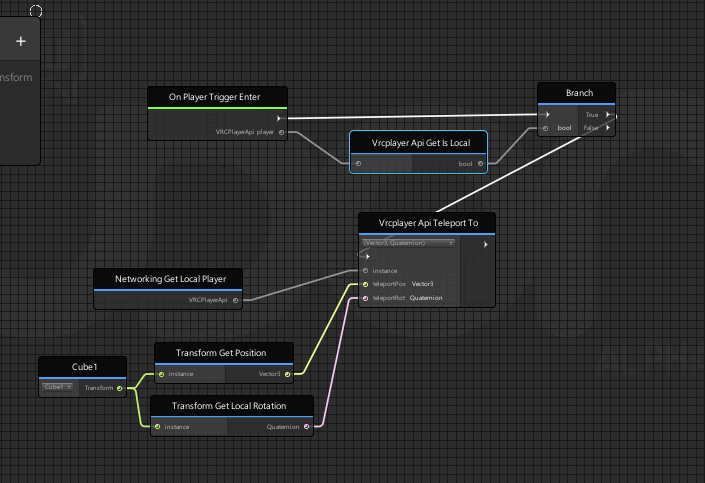 grand temple
yep that should do it
grand temple
the branch is used to prevent non-local players from activating the teleport
if you watch someone else walk into the trigger, you will receive the onplayertriggerenter event with their playerapi. Without the branch, it would teleport you. So you're just checking that the player that entered is local, and if it is then you pass the branch
technically you could plug the player from onplayertriggerenter into the teleport because you can't teleport non-local players, but who knows if that might change
warped shard
Awesome, thanks for the help again 😮
stark adder
How many max on average should world have udon behavior scripts ? I am at 60 already.. And i feel like I'm doing something wrong because 60 scripts is quite a lot i'd say
unborn hornet
Depends on how heavy the scripts are.
grand temple
It really depends more on what those scripts are doing, especially on update. If you are careful you can get several hundred scripts before running into issues
stark adder
It varies a lot
grand temple
Are you doing anything on update that would be expensive? Things like getcomponent or vector3.distance
stark adder
Yea i guess you're right 😄 Theres like 5 that are heavy rest don't do super lot
grand temple
or large for loops
unborn hornet
ponders about a tool that would track how much time is spent inside udon scripts compared to the rest of the game loop.
🤔
grand temple
It doesn't scan inside udon scripts, but it will notify you of a lot of performance-hogging mistakes
unborn hornet
True, I meant of one that does it during runtime. Would have to be a "native" (read: made by VRChat team) tool obviously.
More of just a musing about something that would be nice to have one day.
🙂
grand temple
well unity's built in profiler does work, but of course it will be difficult to test anything that relies on players or networking
smoky heron
Does calling on Vrcurl To String change the variable to a string or just product an instanced output of the variable as a string?
stark adder
Any idea what this is ? Is this Network Overload ?
 solid apex
How to fix this error ? (I use sdk 3 v 0.18.6)
smoky heron
@solid apex Vowgan put out a video on how to fix that here:https://www.youtube.com/watch?v=yGbqLH9T7GU
This is a short explanation of a bug you might run into when updating to this latest SDK, it's pretty simple and just relaunching Unity will fix it, but I know most people will likely run into this, so I figured I would just explain it quick!
Join my Discord!
https://discord....
hollow juniper
Are seats fully bugged atm? 1st click on a seat seems to always break, then sound moves it to correct spot
this is just the straight default seat out of udon examples with mesh replaced
Holdup, just noticed, send click makes you do this
It's so random what way you will end up when sitting x,,,,,,x
cunning mist
What exactly are you trying to make happen when you click on the seat?
hollow juniper
just to sit normally, worked out the first image is it working correctly and the others are it bugging out
cunning mist
I'm uncertain what issue you're encountering, but for general development questions (not udon-based) you'll want to ask them in #user-support-old under Development.
hollow juniper
it's the udon prefab seat just remeshed
0 clue if udons interaction or what is making this happen
cunning mist
My guess is it's likely an issue with avatar animations. If you changed nothing about the original outside of visuals than try it out in different avatars. If the problem persists try using the original version of the prefab and check that out.
hollow juniper
it is the original, i just swapped the mesh, will go try it with other avatars to check to see if thats why
atleast now i also know it's not an avatar 3.0 thing x,,,,x
 fathom parrot
With the Loop box checked the audio streamed from soundcloud should loop right?
 grizzled trout
dumb question but how do i make it so when people grab stuff in my world everyone sees the same thing? the problem i am having is when somone grabs ,say a broom, only the person holding it see them holding it no one sees it move and can be holding there own if they want(sorry kinda hard to explan
 copper mortar
Can someone just make my map for me because Jesus Christ I cannot understand Udon whatsoever! I already made all of the actual models, I just can’t do anything with Udon or else I’ll break my screen! I’m not smart enough for this!
grizzled trout
@copper mortar this might help you out, making a world is simapler then you might think https://www.youtube.com/watch?v=DB-ugW7xGhk

In this video I show you how to create a world in Unity for VRChat.
Timestamps:
Download Unity and the VRChat SDK 0:17
Build the world 2:33
Add textures and materials 5:18
Change skybox 7:29
Add a mirror and button 8:23
Add a VRC_SceneDescriptor and spawn point 10:15
Test in V...
it uses the sdk 2 but unless you are dealing with special things the main thing is the same
 rough beacon
what make a key respond to obj for toggle or button like system?
cunning mist
To know if someone is pressing a certain key, you would do Input -> GetKeyDown, and chose the key that you want to check for. This results in true when someone presses a button for the first time, so you need to use a Branch to check for this during Update.
smoky heron
any way to effectively get any information from VideoError in the On Video Error event?
right now I just have it output "I am Become Error, Destroyer of worlds" but it would be nice to have it put out some data so I can see what went wrong.
 lament scarab
Is there anyway to programmatically determine avatar performance rank? I see people like @drifting sage suggesting that people monitor map users for their avatars, but its a real bummer to have to do that for so many reasons. One way I've sort of gotten around it in one of my worlds is providing 9 avatar pedestals and requiring people to click on one before entering. This works pretty well, I'd just like a way to formalize it a bit more.
 drifting sage
Udon doesn't provide access to avatar performance stats, unfortunately. Best you can do is advise your map occupants and hope they follow.
lament scarab
For context my wife and I throw dance events and often push 80 people,any of whom use full body
Well, I've taken it a step further in New Nebula, they actually can't get into the map unless they click on an avatar pedestal. In general people are respectful and don't switch back out, but providing that many avatars that are properly licensed is a ton of work
drifting sage
Anything beyond 50 people and we typically are resigned to shrugging and saying "you're kind of on your own" in regards to performance and etc for the moment 🙂
but providing performant avatars definitely helps
lament scarab
It actually worked out really well when we had Muzz a few weeks back, 80 people for a long time and most everyone was at 20 or so frames
hollow juniper
Be nice if we could place a max limit on avatar stats for a world, or at least make it so we can force hidden on them instead of blocking it
club world gets big stutters as someone joins and can be really bad depending on the avatar
lament scarab
^this
hollow juniper
looked into forcing avatars to change on join but the other one starts loading first t-t
lament scarab
I've found it necessary to sequester the lobby
Now that I've finally finished work on my udon video Player maybe I'll open an sdk3 world and see how that goes
 bronze light
Every time I click play or build + test and my Unity crashes then I have to drag all of my U# scripts onto game objects which is a pain. Is there a way to identify why it crashed and fix it?
fiery yoke
I mean its not up to the world creator to decide which avatar someone is wearing. Thats why performance blocking was introduced. Its up to everyone by themselves if they want to see poor avatars or not.
lament scarab
Is that a stated fact, or your own opinion?
fiery yoke
Well sort of both.
lament scarab
It seems reasonable that vrchat devs wouldn't mind offering a tool that allows world creators to ensure the performance of their events. The performance settings are clunky and we are forced to spend a lot of time explaining them to people
fiery yoke
Right now its a fact. That might be subject to change, if VRChat decides that they want to give world creators the power to do that. But I dont think they would. Since avatar and world are usually very seperated. Only in very specific instances does it make sense.
The reason is that your avatar is and should be your personal choice. You dont want to be forced into a male avatar as a female or vice versa maybe. Or even if its gender neutral you might have tons of reasons why you wouldnt want to keep someone forced in an avatar until they leave your world (You can force someone into an avatar temporarily currently, but thats more or less by accident and not by design. Plus they can always change back).
lament scarab
Oh, but on certain occasions we do force people into avatars because its necessary to ensure a quality experience. In reality we have never had to kick someone for switching out of a provided avatar, but we would
fiery yoke
But thats my point. If you want to "ensure a quality experience" its up to everyone to decide on their own which avatar accounts to that and which does not. If you dont like a specific avatar you can hide them. And if you just want a stable framerate in general you can performance block all very poor or even poor avatars.
Theres no reason why you as a world creator should want or even need to be responsible for that.
lament scarab
There are plenty of reasons. My particular reason is that my worlds are used to throw events that push 60+ people.
fiery yoke
Yeah. Then tell everyone that they either need to bring a good avatar or provide one as a fallback. Then everyone just needs to performance block poor avatars just in case someone joins with a bad one and youre golden.
I was just attending a halloween party yesterday with 50+ people and we didnt have a problem once, because everyone agreed to bring a good avatar, or risk getting performance blocked. Constant 20-30 fps
lament scarab
Im going to leave it at this since it is way off topic for this room. Our event last night peaked at 80 and hosted 60+ for at least 6 hours. It worked because of the education you mentioned. But the cost of doing this is way too high and difficult to sustain. We constantly lose new people who don't understand and get frustrated. Its a big burden on the people helping throw the party. Just because something can be done, doesn't mean it can't be improved.
serene moat
Yep there are a lot of ways to improve on educating people, but yeah sometimes it can be difficult to find what's effective for the given situation. A short message that shows up when people join the world to explain the rules and why they're like that can go a long way if you're hosting events in a world you made. If people aren't complying with the rules you set, you don't need to explain to them or do weird things to force them to comply, you can just tell them they violated the rules you set and kick them.
grizzled trout
dumb question but how do i make it so when people grab stuff in my world everyone sees the same thing? the problem i am having is when somone grabs ,say a broom, only the person holding it see them holding it no one sees it move and can be holding there own if they want(sorry kinda hard to explan
 deep raptor
@grizzled trout add an udon behaviour and make sure "Synchronize Position" is checked
grizzled trout
OOh ok thanks!
deep raptor
has anyone attempted making a simple state machine in udon (udonsharp) using classes for different states? my AI code is getting really messy when everything is crammed into one file.
next dove
Can udon use compute shaders
serene moat
serene moat
ville, you could separate the states into different behaviours and call into them for each state, but there is a much higher overhead in Udon for interacting between different behaviours so it's generally best to keep things in one behaviour when it's feasible
deep raptor
i see. thank you
scarlet lake
How do I debug Udon worlds? I have some buttons that aren't working but I'm not sure how on to figure out why. In the editor, I get a message: An exception occurred during EXTERN to 'VRCSDKBaseVRCPlayerApi.__IsUserInVR__SystemBoolean'.
which i guess is a limitation to udon in the editor
ashen bolt
Hi everyone is there a udon prefab for a mirror?
dapper lion
@ashen bolt yes, it is in vrcsdk examples i believe
 proud cedar
Hi everyone! I wanna upload my new avatar 3.0 but I cannot type anything at new avatar scene
 flat belfry
what is udon?
dapper lion
@proud cedar any errors?
dapper lion
have you rebuilt the build and see if you can type again?
proud cedar
I had same problem yesterday i remade my unity file but It's still happening
 runic harness
Not sure where to ask this: But I've been having problems updating my world i've built using SDK3, yet nothing changes. I even tried to upload a copy of the same world and that one won't load at all. Does anyone have any advice?
dapper lion
@proud cedar i assume youre using the right version, and if you made a new project, then im not sure whats wrong. have you restarted your pc?
proud cedar
humm I can try that
dapper lion
@runic harness esta errors?
runic harness
esta? (sorry idk what that means)
dapper lion
what is your errors
proud cedar
@dapper lion Okay.. i restarted my pc but still not working..
dapper lion
@runic harness is the upload time faster than normal?
@proud cedar i donot know what may be inhibiting you
runic harness
a little, yeah
dapper lion
you might want to reimport the sdk
runic harness
wont that remove my progress?
 last briar
ehm... @runic harness remove the file "Assets/AllSkyFree/AllSkyFree_Menu.cs"
runic harness
ok i'll try that
If that doesnt work, then ill readd the sdk
last briar
I had a similar problem with that unity asset as well in the past, and you don't need that menu script anyway
runic harness
So after fixing this and adding new sky box, i made a new mistake
The nameplates are missing from users here
 raven rapids
@runic harness This is on our end, we're working on it
 gloomy swan
getting this in my console, any idea what im doing wrong?https://cdn.discordapp.com/attachments/124267382351855616/772918280997699624/unknown.png


im not understanding.
unborn hornet
Sorry, I mis-read the graph.
unborn hornet
Is there a specific thing that needs to be set for a trail renderer to show up in a mirror reflection? I've tried combinations of layer adjustments, occlusion adjustments, changing the reflection and lighting settings... nothing makes it show up. I'm using the Default-Line material on it.
floral dove
@gloomy swan - Networking.GetLocalPlayer will be null in the Editor - that only works in the Client.
gloomy swan
@floral dove ok then what do i use?
 vagrant coral
I dont think there is a work around to get network related stuff in unity. gotta test that in game @gloomy swan
Also.... this node is not supposed to be a global event right?
for some reason that node triggers for everyone in the instance and there are no network events tied with it 🤔
unborn hornet
It is. The client detects when a player reference enters the related trigger then fires the event. Since the triggers are all available client-side (unless some funky stuff is going on) each client independently triggers that event. You'll have to add conditionals for checking for instance master, local player or object owner to have it trigger only under certain conditions.
vagrant coral
oh... every time i used that one before now it has only triggered for the player walking into the area, and when i wanted it to be a thing for everyone in the world i had to add a network event. Confusing.
unborn hornet
I'll add the caveat that even though I'm pretty sure that's the case, I still might be wrong about it.
vagrant coral
it does make sense thats how it could be, since its behaving like that now in a new project. but in my old ones it never did 😄
floral dove
Hm @vagrant coral - yeah, as far as I know, OnPlayerTriggerEnter should only work for the local player. I'll have to check up on that.
@gloomy swan - xCirrex is correct, you need to Build and Test to work with VRCPlayerApi: https://docs.vrchat.com/docs/using-build-test
vagrant coral
@floral dove its very possible ive done something for it to behave like that. Im trying to port over an old sdk2 world to udon. I got rid of all sdk2 stuff from the world itseslf, then prefabed it. made a new udon project and then imported the prefab with only the worlds game objects in it. but maybe something sdk2 managed to crawl through 🤔
fiery yoke
@vagrant coral OnPlayerTriggerEnter is a "global" event. However its not itself that is networked, but the cause: Player positions.
Thats the reason why it gives you a player api. It is the api of the player that entered the trigger. You can then simply do a branch and check against VRCPlayerApi.Get_isLocal.
vagrant coral
im getting different vibes all over now 😄
fiery yoke
Im 99% sure that Im correct :P
unborn hornet
We both are. You just said it better tbh.
fiery yoke
Ohh I completely skipped over what you said lul
But yeah its basically networked, because the cause of that event is networked. So just do a isLocal check and youre good.
fiery yoke
Yeah thats a good description
vagrant coral
huh.... it did work to do that. but the udons in laserdome never use that logic and in there they work fine. I think its time for bed 😄
fiery yoke
Well this node didnt exist when you made laserdome right?
vagrant coral
it didnt. but i had to redo all those events using it when it arrived
fiery yoke
Well whatever logic you used before to detect players, only detected local player then.
There is two layers in VRChat for players: Player and PlayerLocal. And the player collision nodes in Udon detect both.
vagrant coral
huh... makes sense yeah
thats for walking in to the spectator area in there
and it only triggers locally
Oh waaaait.... yeaaaah you are correct
since i made a new layer for those triggers that only collides with the local player for the system i made myself, it only detects the local one.
they are still on that layer.
fiery yoke
Yeah thats another factor
the collision nodes will only call the events, if they receive the collision events. So if you have them on an Object that doesnt collide with players, they will never be called. Or in this case if it only collides with local, they will only be called for local.
vagrant coral
yupyup! everything is clear now 😄

 stable nebula
Hello, I'm looking for a guide/prefab/script or something else, that handles the "DJ STAGE WORLD MIC" setting a lot of worlds have, where anyone on the stage has a amplified Microphone that the whole world can hear them, or at least boosted. I am building a world for a community, and want to have that setup for our stage in the world. Any info would be much appreciated! I've been looking for hours today and many days before looking and can't find anything, I am probably dumb and looking up wrong terms or something 🤪
Thank you in advance!
 eternal oar
Hey asking about my unity startup. I go to build and test a world and it flashes on my vrchat that it’s going to the test world then it yanks me from there and puts me into a vrchat home instead no matter how many times I restart my unity
 native estuary
@eternal oar that isn't usually fixed by restarting you could check either if you have valid spawn points or try setting the sdk client path to point directly to the vrchat.exe in the sdk settings
eternal oar
Alright appreciate it 🙏🏾
scarlet lake
Hi! I have a small hiccup going on that I'm not really sure why it is going on. Strangely, whenever I try to open the Udon Graph in my editor, it spits out the following error and stops me being able to swap between my tabs in Unity (Scene, Game, etc).
To fix it stopping me seeing what I want to see, I have to reset my layout to default, but when I try to open the udon graph again the error continues
flint urchin
What Unity version? Have you tried to remove the SDK and import it again?
scarlet lake
I'm using the current unity version, and I have tried a clean reimport. The error is still persisting
I'll try it a third time
flint urchin
What does current version mean then? Seen a lot of different versions being used.
Could also be that you’re missing files in general for Unity, so a reinstall of that could do it.
 rotund willow
What's the udon equivalent to the custom renderer behaviour script?
next dove
So who leads the Udon assembly project at VRChat?
 sharp shadow
Has anyone thought of using udon to get a material texture from a url? like having an auto updating instagram or web picture frame in world? Or is that kind of thing not whitelisted?
flint urchin
Can’t get from image url itself, but you can use the video player
lament scarab
Is there a way to send a event with data? I need to make a keypad and am really hoping I don't have to make a separate event for each button
 fringe relic
i've seen occasional cases of being able to climb things in vr, stuff like climbey, to the top, stuff where you actually physically pull yourself around to climb. how would i do that in vrchat? is a ladder not as simple as i think it should be?
fringe relic
well it seems like what i planned to make already exists but i'll see if i can still make it anyways. might be fun to try
 ancient spindle
is there a way to make an object able to be picked up only by 2 people? so for instance, a couch in a house im later going to make, only able to be moved if 2 people are holding the object, and the objects rotation/position coordinates at the center of those 2 people.
fiery yoke
Yeah thats possible, but as always in VR there is no physical feedback or restrictions so you have to deal with that.
And its really annoying to test two player VR features
 nimble vortex
Looking at creating and managing our own space, potentially scripting full games with Udon (ye old PlayStation Home style). I'm just checking out the api and I'm wondering
a) Any way to limit the avatars to hand approved ones via script? It's meant to be a very family friendly space, so we have to be in control of the avatars that appear in that space
b) Any plans for commercialisation? Ways that as a professional studio we can bring in revenue via the sale of in-game items or access to games/events within the game world?
fiery yoke
@nimble vortex
a: We've had that discussion here before so Im just gonna repeat: Currently VRChat does not support limiting Avatars in your world. This might or might not be by intention, but my guess would be that it is, since someones avatar should be everyones personal choice (my opinion). As a User you can always decide whos avatars you show using a combination of safety settings and manual adjustments. You can hide all strangers avatars and only enable friends or people you specificially pick out.
b: Im not sure if VRChat allows in-app commercialisation, but outside of it you can always sell models and tickets to special events yes.
 winter sable
how does the pickup sync work in a 3.0 world?
 pallid mango
Is there a way to branch based on which platform is currently being built (PC/Quest)
fiery yoke
Usually its easiest to have a boolean you manually set for each build
pallid mango
Thanks that works
serene moat
you can check the platform directives if you're using U# https://docs.unity3d.com/Manual/PlatformDependentCompilation.html
pallid mango
Yeah I saw them in sharp but didn’t know if you could do it with nodes
fiery yoke
Ohh yeah thats basically what I proposed but automatically. So yeah another thing where UdonSharp shines
hoary echo
Add udon to gameobject, don't add an udon script, then check the "Synchronise Position" box
I'd take a SS but I'm baking
floral dove
@winter sable - take a look at the PickupSphere in the UdonExampleScene under UdonVariableSync/PickupSphere.
it uses an 'empty' Udon graph to simply sync its transform data:
 pliant storm
does anyone know where i can find an udon script of how to toggle one thing on but also toggle other things off? i made a script following a vowgan tutorial to do the simple target toggle but for music or mirrors you have to turn off the music or mirror your switching off to and its a pain because it can lead to 2 mirrors being on or multiple music tracks playing
fathom parrot
So I am trying to do something simple. make the barrier so you can pick it up and yeet it. is it the mesh collider? or am I missing something?
 fallen prawn
does anyone know where i can find an udon script of how to toggle one thing on but also toggle other things off? i made a script following a vowgan tutorial to do the simple target toggle but for music or mirrors you have to turn off the music or mirror your switching off to and its a pain because it can lead to 2 mirrors being on or multiple music tracks playing
@pliant storm
I think just simpletoggle groupcan do it.
According to https://docs.vrchat.com/docs/latest-release#:~:text=Fixed Unity Video Player not handling more than one audio track
index is according to MP3 one or Opus one?
https://en.wikipedia.org/wiki/Surround_sound#:~:text=ANSI%2FCEA-863-A identification for surround sound channels
and how about 1.1(is it still now?), 2.1 one how the LFE(I called is Subwoofer to prevent confusion) index is? (LR-S) or (LRS)?
 urban pivot
@fathom parrot Try using a VRC Pickup Component on your mesh, you can use a Box Collider if you wish! If you want this to sync while moving. *If using Udon, attach the “Empty” Udon behavior into a Udon Behavior Component slot. It should then update when you pick it up for other players.
Inside the Pickup script you can also define how you interact with it. If you want it to have gravity, how heavy it is- etc. Have fun testing it out!
fathom parrot
thing is I am using the VRC Pickup Component. I think I might have figured it out testing had set to "None" script not empty
fallen prawn
If you use mesh collider, collider MUST be "Convex" to work with rigidbody. (I saw on picture it's not.)
urban pivot
Yeah just use a Box Collider then
fathom parrot
that looks like it fixed it 🙂
 fossil anvil

 cunning mist
Programming, but instead of typing out words, you connect boxes together with different functions and features!
(Though if you still want to type for your programming, that's still an option with UdonSharp haha)
unborn hornet
Basically as I understand it is, instead of tying a bunch of pre-defined logic pieces together (ala triggers and such from SDK2), it allows people to define custom logic (ala Noodles) within a secured runtime environment.
floral dove
we have a docs page for exactly this: https://docs.vrchat.com/docs/what-is-udon
VRChat
What’s this Udon thing anyways? VRChat Udon is a programming language built completely in-house by the VRChat Development Team. It is designed to be secure, performant, and easy to use via the VRChat Udon Node Graph, a built-in visual programming interface that uses nodes and ...
unborn hornet
Is there a doc page that describes a comparison between SDK2 and SDK3(Udon) for accomplishing common things? Like a toggle-able mirror, or a door that is openable. If not, I think a side-by-side comparison between the two would be nice for new people who are just starting out with VRChat but has no (or very little) idea how to conceptualize the difference between the versions (there is a lot of good older content still out there). May even help some of the SDK2 veterans convert into the new flow easier.
ashen bolt
Hi I have an question Upon clicking on New program I do not get the option below it to say Open Udon Graph , I only get copy assembly code. How do I get it to where it can say Open Udon Graph? This is when I add a udon behavior script to an object
floral dove
@unborn hornet we don't have one, but I think that's a great idea. Certainly we could show how to remake all the old examples in Udon. I'm trying to put the most-requested items into the UdonExampleScene to expand that over time to cover the most common programs people want to make.
@ashen bolt - pick Udon Graph from the dropdown, it sounds like it defaulted to an Assembly Program instead.
 eager olive
How does SetOwner affect the children of an object?
fiery yoke
It does not. At least not directly.
eager olive
Thanks!
 worldly gorge
How would I even go about to making a music visualizer. Im not wired to understand coding so I've just been using prefabs
 west mural
you can get the audiospectrum of an audio source. you can then use that to control lights, speakers etc. or pass it to a shader as an array with SetFloatArray
you can see all of that in effect in my video in #udon-showoff
fiery yoke
To make a good audio visualizer you need to understand a lot about Audio Signal Processing though. And thats a very deep rabbit hole.
west mural
to make an ok one you don't. i have no fucking clue of it and i think mine looks fine
except for people who know how it should look probably xD
worldly gorge
How would you use the audiospectrum to controll lights? same way with the setfloatarray?
 burnt jackal
Is there a way to swap the skybox with another?
burnt jackal
Awesome, thanks.
ashen bolt
heres another question
the video player in SDK3 can the master option be taken off?
so that anyone can play a video
dapper lion
uh which sdk3 player
ashen bolt
unity one
dapper lion
I think 🤔 there is, but i dont usually mess witg that one
i bet someone in udon knows
ashen bolt
is there a prefab for a video player that works for everyone? for SDK3 of course
dapper lion
yea, but most of them have the master set up by default but usually your able to set the local /global player api to default everyone to master, and delete the master only part entirely
but usually the udon channel people would know how to explain it well enough to help you figure out how to do so
fiery yoke
Unfortunately that isnt as trivial as it might seem. In order to have a synced video player you need to have a synced variable holding the url. And in order to change that variable, you need to be the owner. Which requires the Video Player or at least parts of it to be passed around, which creates a plethora of networking complications.
dapper lion
wait, then how come some udon players are able to change from master to all-players then?
does it need an addressed owner first then have it be released in some way?
fiery yoke
Because they are made by people that know how to get around those complications.
And in SDK2 it was a completely different deal all together, so those do not account for this.
dapper lion
interesting, thats good to know lol
ashen bolt
so there are no prefabs that exist that already are set to all players
dapper lion
no, but there might be a script that can tell the player to allow all guests once the owner enters the room? but im not sure if thats technically possible
ashen bolt

wispy belfry
unity event filter removes all prohibited methods from a button scripts but not from a toggle script like setting an audioclip or parents. is this behavior intended or will the eventfilter also removes prohibited methods from a toggle script?
fiery yoke
It should filter all UI Events including those on Toggles.
 runic charm
Pardon, I'm trying to debug and use the node GetProgramVariableType and turn it into string so I can read the debug log. Is there any particular node for this?
fiery yoke
Does Debug.Log not suffice?
runic charm
TIL It does plug directly in! I just can't add other strings, except if i add more debug entries
Thanks!
fiery yoke
Well you can always do Type.ToString() or String.Format as alternatives.
runic charm
as an assembly? I can't seem to find the Type node... only Type[]
fiery yoke
The full qualified name is System.Type.ToString()
But it might not be exposed. Thats always a possibility with Udon
runic charm
Ahhh that explains
In the graph, it's under System > System.Type
whereas other Types doesn't have the "System." part. That's why when I scrolled by T I didn't see any "Type"
runic charm
Got an error of "Don't know how to encode GameObject".
What is this usually caused by? I'm currently running a script on the owner side, and it's only showing on the owner's client
fiery yoke
 flat musk
waat
fiery yoke
I suppose thats what you mean
flat musk
i mean i get what that is, but why tho?
ima send a major fix to my world but that is really specific
I will let you know if that works, just gata wait for it to upload now
But ya what I did was I made different zones where onplayertrigger enter and exit do a thing, but other buttons are inside these zones
and only desktop players could interact with anything
fiery yoke
The raycast-system that is being used for VR is somehow stopped by the trigger, the MirrorReflection layer is used for the players reflection in mirrors. Basically mirrors are just cameras, but since your actual player models head is being scaled to 0 (so you dont see your own head), you would have no head in mirrors. Thats why there is a seperate clone of you that is only visible to mirror cameras. And for some odd reason the VRC raycasts ignore that layer (even if it shouldnt have a collider anyway).
The interaction system is probably almost as old as VRChat itself and has apperantly not been adjusted yet.
Changes to a live platform with content as much as 2 years old with a high priority on backwards compatibility are practically impossible without a lot of testing.
Even simple QoL changes have to go through an intense testing phase to ensure compatibility. Which basically cripples the ability to fix old mistakes or improve old systems.
flat musk
yaaa I get that, thank you for the technical explanation, now I gata figure out why my controls are all messed up
also i appologize if i came off strong, 10 things just broke on me at once and that got me frustrated.
 outer lion
tem algum br aqui?
flat musk
@fiery yoke that fixed it, thank you so much for saving me from more frustration
fiery yoke
Youre welcome
flat musk
ok next i gata figure out how to make the trigger zones local only
ya everything is set to none sync but on player trigger enter and exit are called when another person hits the trigger
fiery yoke
It will give you a player api. Check that api for "IsLocal"
flat musk
Like this?
fiery yoke
Yeah then use that in a branch
flat musk
so if local true then launch code, else nothing?
fiery yoke
yes
fiery yoke
Are you going to ask if youre correct everytime you do something now? :P
Just try it out xD
flat musk
well the reason I do that is it takes awhile for my world to compile and test
fiery yoke
Okay then think about it logically and tell me why that wouldnt be correct.
flat musk
It's the "get" part that trips me up since I would assume logicially it would need to set something
fiery yoke
Get means that youre getting a field or property of the PlayerAPI in this case "isLocal" which is set in the class itself.
It just tells you if the player api youre looking at is the local playerapi or a remote one.
Aka you or someone else
flat musk
ya I was worried it would output to false if I didn't set something first
I will give this a try and return when I upload it
...ok my brain started to work again and I just got the logic XD
I am so sorry X3
flat musk
@fiery yoke it worked, thank you so much, i just had a lot of stress removed now that these things work.
runic charm
Trying out the sync variables gameobjects from the example scene. I copied it over to a different scene and it still worked. I changed the trigger into interact and now it refuses to sync properly.
I'll share over some of my findings:
- Owner can increase value from 0 to 1, but Owner cannot increase it further
- I used Debug Log to check values of the click count before and after. Using a non-Owner, the values increase properly, but using the Owner client, the values seem to revert to the amount of clickCount before being clicked afterwards. It was (Interact > Value is at 2 > Value after is at 3), but when as the Owner I interact again, the same messages are logged.
Using Unity UI gameObjects, the behavior is as expected. Is this behavior as intended as well?
flint urchin
Something isn't correct with your graph.
I also think you claim ownership first before you do the custom event.
Which one specifically did you copy?
runic charm
I copied the Variable Sync Object from Udon Example scene
I'm using the same graph as the example too. Put both the exact same graph from the example onto my interact object, with slight edit of the interact event\
oddly, I tried the example object (the one which uses Unity UI) and it worked just fine, while my interact object just did the mentioned effect
I also think you claim ownership first before you do the custom event.
@flint urchin I'm a bit lost on ownerships in VRChat. Is there a suggested resource? afaik, I didn't check the switch ownership on collision
 vapid kettle
Guys is there the bug again of worlds not updating in vrchat?
pallid mango
Make sure you drop a portal to a new instance, if the portal goes to the instance you’re already in, it will still be the same version.
vapid kettle
its a test world
anyone has that guide of how to update manually the world when local test doesn't work from when that bug occurred a few months ago?
native estuary
If your build & test isn't working the first thing to check would be if it's actually building a new version or if there's something interrupting the build from happening
vapid kettle
how would you go about checking that?
oh wait I see there might be something wrong
You were right there were scripts that didn't complie
 tropic lance
Is this where we ask questions? (I'm new here)
pallid mango
For udon programing, yes. If it’s something else it might be better to ask in #vrchat-general-2
tropic lance
Ok thank u!
flint urchin
@runic charm there isn’t much info on it atm sadly. Will have to look at that behaviour again before I can tell you what’s up.
runic charm
Pardon, I'd like to add more details for the other day's case.
Calling functions via Interact runs the behavior as expected, but calling the function via CustomEvent causes the variable to not sync.
Furthermore, I'm currently trying via un-synced variables. Even in a single client, calling the methods via custom event leads to the previously mentioned logged to be added. The one where it's logged that it's increased, but after the log ends, the value seems to revert
also, if the method is called via custom event before running the method via Interact at least once, the owner client straight up crashes
flint urchin
If you want it to sync, you need to use SendCustomNetworkedEvent
runic charm
the custom event was sent from non-Owner to Owner, just like the one in the example scene
cmiiw, but only Owner instances can sync their variables to other UdonBehavior of that instance, right?
runic charm
reporting that a brand new project worked... Probably a project faulty'
sorry for the hubbub]
sharp shadow
anyone figured out how to use udon to change textures on a material? Like an image slideshow using an array of textures?
stark adder
Get MeshRenderer of the "screen" and Set material to next material in your array of Materials.. Can't tell you how to do that exactly as i work with U# not Graph editor :/
sharp shadow
yeah i've been using material settexture with an iterator variable and an array of textures, maybe materials will work better than textures
stark adder
I am unsure which one will be better as i have not tried setting texture of material.. All i know is that setting material works perfectly fine for me
sharp shadow
textures[0] works, textures[1] always resolves to null texture on the material
i'll try a mat swap, just seems like a waste to have 1 mat for every slideshow image
stark adder
.
vapid kettle
does anyone know if a list is supported in Udon?
vapid kettle
alrighty 👍
fiery yoke
Depending on the situation you can some things with dynamic arrays, but that requires a little bit of knowledge and setup
vapid kettle
Yeah I will try to implement what I'm going for using simpler elements
vapid kettle
I have a few issues with UI I can't seem to solve. first being the scrollbar moves when I walk in game, second being the input box gets input even when not selected and third is the button is only interactable when pressing esc and showing menu yet its at default layer... anyone has an idea how to solve those issues?
urban pivot
@vapid kettle I believe it has something to do with Navigation. Set this to “None” under UI setting in Inspector.
Also if you can only interact with the UI system when your menu is open you may need a Graphic Raycaster Component on the object; or if the Canvas is a child of a normal Gameobject or Empty simply move it out of that object.
Make sure to also have an Event System.