#udon-general
59 messages · Page 15 of 1
 plush wadi
has been for a while and theres NO docs
It's indefencible that the devs expect anyone to do anything with the alpha while not even trying to tell them how while knowing how impossible it is to work with
Sorry but like, they did bad
and are doing bad
We can accept that and maybe talk to them about doing better and doccumenting how ANYTHING actually works
 twilit breach
I have 2 months experience with Unity, programming, code anything like that and I'm figuring it out
 zealous mason
and this isn't an udon question, its a rant, take it to the feedback. https://feedback.vrchat.com/vrchat-udon-closed-alpha-feedback
twilit breach
you miss my point
plush wadi
My point is, there should be docs. The docs should be accurate. Without them, most people will give up on udon when it's most important for people to pick it up now
that's all I have to say about it tbh
just my opinion, but putting in an issue isn't going to do anything lol
 vagrant coral
Sounds like some has entered the phase of anger in the udon development... Ive been there as well... many times...
 flint urchin
It's not really important for people to pick it up during alpha stage
Too many bugs and lack of features (that SDK2 has)
twilit breach
theres unity official docs, photon official docs, helpful creators making YT videos, a forum they made specifically for questions that the VRC devs answer in, a discord with many helpful creators that the devs talk in
theres support out there
plush wadi
I mean when VR is a dying market and you're one of the only games people recognize (a large % of steams share) but your market is shrinking...
that's the time to wow people or loose it
 light fjord
Vr isnt a dying market lol.
vagrant coral
vr is a growing market...
zealous mason
especially now
plush wadi
Steam just cut VR on mac because less peopel are using it
 digital swan
try order a new headset
light fjord
thats MAc LOL...
plush wadi
look at actual stats, not just sequestered people who happen to have a headset on lockdown
light fjord
eh.
plush wadi
the numbers are shrinking, Alyx was the peak, but it's been going down since
light fjord
nope
 dense wave
Alright Alright, guys and girls, I think you guys just need to take a break from Udon, grab some tea and calm your minds and then im sure u'll come up with a solution
cmon, take my hand and walk with me and lets count to 10
light fjord
its going up
twilit breach
this is a nice break from messing with pos sync tbh
as long as nobody gets too heated and we respect each other with the goal of making awesome stuff as the overall idea its cool
plush wadi
My goal is to make awesome stuff, it's just almost impossible lol
it seems liek udon was built with the opposite intent of hanging out together in a shared world
dense wave
Nothing is impossible aslong as you keep going my friend 🙂
plush wadi
like just Doing something with someone else, is the hardest part... and that seems to be the point of VRCHat
twilit breach
it can be frustrating at times, but we can figure it out as a community of creators and the devs are working every day
just give it time and think positive about the awesome goal you have to work towards
plush wadi
After 4 days of strait work, i'm almost done with just a script that can manage a handful of players to give them consistent visible huds for everyone in the instance
it just sucks to suddenly learn that synced strings are limited to "40" characters, meaning my manager probably can only handle like 10 players
like what's going on here with networking?
  void Update() {
    SendCustomNetworkEvent(VRC.Udon.Common.Interfaces.NetworkEventTarget.All, "updateDebugText");
  }``` This is the function on the player manager script.

It should send an update for the text to everyonethis is what it shows for the other user.
    if (debugText != null && compressedUserIDs != null && compressedUserIDs != "") {
      string playerList = "";
      int playerIndex = 0;
      foreach (string worldID in getPlayerWorldIDs()) {
        if (worldID != null && worldID != "") {
          playerList += playerIndex.ToString() + ": " + getPlayer(playerIndex).displayName + "(" + worldID + "), ";
        } else {
          playerList += playerIndex.ToString() + ": Empty(-1), ";
        }
        playerIndex++;
      }

      debugText.text = "User List:\n" + playerList;
    } else {
      if (debugText != null) {
        debugText.text = "waiting on manager to load players";
      }
    }
  }```


  /// <summary>
  ```/// The user's world IDs ordered in a useable compressed array, compressed into a string for syncing.
  /// EX: 1/5/4/6/7/8/
  /// </summary>
  [UdonSynced(UdonSyncMode.None)] string compressedUserIDs = "";
and only the master player ever edits the string
what am I doing wrong?
I literally have a if (Networking.LocalPlayer.isMaster) { before every edit of synced the variable
zealous mason
I've had experience in different languages where asking if something was null and asking if it was empty, would cause a fault if it were null. Like the first if statement you have there. I fix that by first asking if its null, then if its not, then asking if its empty
plush wadi
What do you mean? I'm always checking null first afaik
 fiery yoke
String.IsNullOrEmpty(string)
zealous mason
best I got
plush wadi
I just am wondering what you got, I don't see that in my code. Thanks for the suggestion though, just not sure if it applies here
  /// If the string is null or empty and this player owns it, make sure it is just empty.
  /// </summary>
  void checkAndFixEmptyCompressionString() {
    if (Networking.IsOwner(Networking.LocalPlayer, gameObject) && string.IsNullOrEmpty(compressedUserIDs)) {
      compressedUserIDs = "";
    }
}``` adding this function to `start` and to `OnPlayerJoined`. Hoping it fixes any inconsistenty/null issuesThat is pretty redundant
if a string is "" it is empty
that is what String.Empty will return
plush wadi
yea but I can't consistently find which part of the script gets hit first, and sometimes compressedUserIDs seems to be null, and sometimes its not
so might as well force consistency
since there's none in Udon, I need to make my own
fiery yoke
That is a U# related problem
The UdonGraph will always set the default value for strings to ""
plush wadi
yea, and this is the only fix I can find atm.
I noticed the graph is different from u# for strings... especially tricky for arrays
replaced all checks with nullOrEmpty just to be safe... trying again
also suuuucks that you have to publish it to test multiuser stuff each time. I wish you could spawn a fake user avatar or something with a test button.
that would save me HOURS of work lol
vagrant coral
i made a second account for that 😄
light fjord
soo how do i transfer ownership of a object btw?
vagrant coral
also! anyone experimented with the haptic feedback?

like max values for the amp and freq....
fiery yoke
@light fjord Networking.SetOwner however there is yet again a bug/problem with that afaik
light fjord
oo? what kind
plush wadi
I also have two accounts lol
fiery yoke
From what I heard you can only "take ownership". You cannot make someone else owner. Unless youre the master, where it apperantly works. Dont know about how true any of that is
plush wadi
networking.SetOwner will need a queue in update to check if it's happened yet since it takes a few frames.
Wait WHAT?
@fiery yoke that's nuts lol.
light fjord
wait so if i spawn a object and do setOwner it wont happen unless its the master?
plush wadi
I mean, I guess it's consistent but how the heck was anyone supposed to figure that one out XD
vagrant coral
@fiery yoke that explains a lot for an issue i have
zealous mason
@vagrant coral I've used it, infact I made a made a whole world around the idea
@vagrant coral https://vrchat.com/home/world/wrld_f1f9fc2d-869d-46a6-8c26-b65d3d78f1e4 if you're interested, you pickup a ball and can 'touch' other players with it, it uses that haptic event when people are close
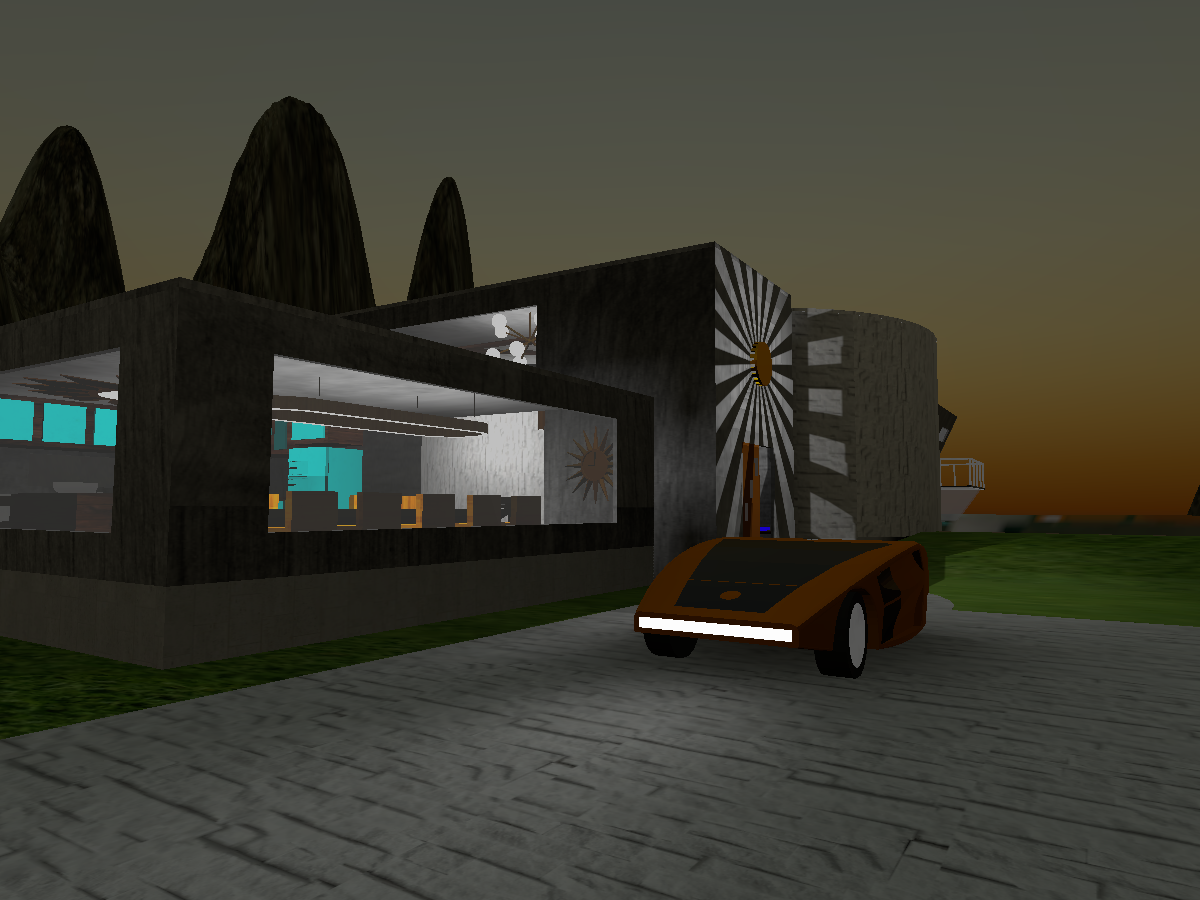
60s Bachelor Pad with Haptic balls‚ touch another player with oneǃ
plush wadi
So if an object is instanciated for everyone using VRCInstanciate, everyone is the owner of their own client version of the object b/c they aren't network linked right?
so here's my networking caveat list atm... tell me if I get ths
do UdonSync vars also take frames to propagate?
vagrant coral
@zealous mason Very nice! thanks! ill check it out 🙂
fiery yoke
Nope thats not correct Meep
I said you can only take ownership. You cant give someone ownership.
 jade slate
ok
fiery yoke
Meaning that currently only SetOwner(Networking.LocalPlayer) works. (Unless youre the master?)
plush wadi
Wait...
fiery yoke
And the last point is half correct
plush wadi
so... how can you transfer ownership? Can you just... not right now?
I guess only on interact
fiery yoke
Not really. There is ways, but its not easy
light fjord
i have seen interact transfer works just fine. but other ways maybe not?
plush wadi
Yea like... how do you give a player an object?
I guess you can do
 public override void OnPlayerJoined(VRCPlayerApi player) {
    if (player == Networking.LocalPlayer) {
      SetOwner.(player, objectToGiveOwnershipOnJoin);
    }
}```@fiery yoke what did you mean by "unless you're the master"? What's that caveat
fiery yoke
Welp as I said its a bug. No one really knows whats currently going on there
plush wadi
what's the part of the bug involving the master bit though?
also is it object owner, or session master you mean?
light fjord
yikes. so that kind fucked up my plan to use objects to find out who they are
fiery yoke
This is what TCL said about it:
Ohh wait
Im an idiot
maybe he corrected it
But it says doesnt
plush wadi
I just don't know what "it doesn't work properly for master" means
fiery yoke
Welp I guess that means that the master cant SetOwner
plush wadi
like... masters can't set it at all? It's inconsistent if masters can set it at all? Sometimes, masters can ovveride the bug?
fiery yoke
but everyone else can
light fjord
the onJoin is send to everyone so.
fiery yoke
Well Im still not entirely sure on that myself. Afaik if an Object doesnt have a Network ID there is no owner.
Or you are the owner yourself which then its correct. So yeah not sure
plush wadi
yea, so i'll leave that one there as is because it's functionally correct 👌
@light fjord yes but it's also called for every joining player.
If you are the one joining, only one of the calls of onPlayerJoin will have you as the player param, but it will still be called by everyone. Only the one that's actually called by yourself (player == networking.localplayer) should set the ownership to the player that's you. (all players will try to set the ownership to you, but only you will succeed)
That's what i'm getting anyway.
light fjord
atm i am just trying to do the trigger stuff still. being able to log anyone who enters a trigger and show this to everyone. so its the same name etc.
plush wadi
I'm also working on that exact thing haha
Just a player manager that assigns an ID to each player that I can check and retrieve and use to index arrays of size maxplayer
if I have that, then I can use array[maxplayer] and universal network calls to store the same huds in the same places for each player
fiery yoke
I have a simple PlayerTrigger system. However its not quite finished yet
light fjord
atm it seems like the master overrides all ownerships.
plush wadi
At the same time, master can't take items back it seems though (b/c bug)
light fjord
even then i cant seem to assign ownership to other players through the OnJoin.
it just ekeps being the same user.
plush wadi
so as long as an item never changes ownership, it's safe to assume the player with the lowest VRCPlayerAPI.playerID is the owner of the object
(i learned this bit from a japanese help site lol)
fiery yoke
Yeah that should be the case
light fjord
how do i even check if if a owner has changed? yet?
fiery yoke
You dont
plush wadi
There's a lot more japanese than english docs
fiery yoke
I mean you can
plush wadi
Networking.GetOwner()
 worthy beacon
player with the lowest player id would be the same as the master wouldnt it?
fiery yoke
Networking.LocalPlayer.IsOwner(gameobject).isMaster
plush wadi
or Networking.IsOwner I think is the better one
fiery yoke
Yes
plush wadi
why the IsMaster?
light fjord
right. so OnJoin ownership is not possible.
worthy beacon
master is default owner
fiery yoke
You can then check if the owner is still the master or not
light fjord
cause it seems like the Master is taking ownership of all objects i spawn.
plush wadi
master is not always the owner though if something else takes ownership away
worthy beacon
master owns everything by default
light fjord
but u can't even assign ownership atm..
litterly doing that part atm.
and it wont change.
plush wadi
I still think this should work
worthy beacon
when are you setting ownership?
light fjord
OnJoin
plush wadi
public override void OnPlayerJoined(VRCPlayerApi player) {
if (player == Networking.LocalPlayer) {
SetOwner.(player, objectToGiveOwnershipOnJoin);
}
}
The player joining will always try to take ownership itself
so it should work
light fjord
might be but it wont.
worthy beacon
that will run for everyone right?
light fjord
it wont work.. tested it multiple times now.
plush wadi
yes, but it only matters when the player who joined is equal to the client player, so the code under there should only run once for them on their own join
light fjord
simply wont do it
worthy beacon
basicly would be equivilent to the latest player who joined
plush wadi
did you give it time in update to see if it changed? how are you checking @light fjord ?
it takes a few frames for the data to change
light fjord
OnJoin how would you check if it changed? cause its a single frame
plush wadi
so you'll need to just debug out the owner in update and see if it changes eventually
worthy beacon
i really wish there was a good way to do a timer event >.<
fiery yoke
@worthy beacon I have a DelayService on my GitHub which basically is timer events if I understand you correctly
plush wadi
SetOwner is a network event, so it needs to be sent and have time to change
light fjord
even then Meep it wont happen..
worthy beacon
somthing like that, whats the project called, ill take a look
plush wadi
can you send the code you're using hostile?
it should just be the join and update functions right?
light fjord
Networking.SetOwner(player, localTrackedObject); that i do
fiery yoke
light fjord
oop
plush wadi
Also note, sometimes it's better to use Start() than onPlayerJoined. Because Start() is only called for the one local player, not everyone.
worthy beacon
thanks! ive been trying to find good ways to get my code out of my updates, and a timer would be great for when people to join to verify the ownership stuff was set
plush wadi
Hmmm, i weirdly prefer just using the update function as my timer/waiter myself. Neat to look at this though.
worthy beacon
ah...this isnt an event so much as an update timer
plush wadi
@fiery yoke let me know if you think that code I posted seems like it will work. I'm going to go fold clothes quick lol.
light fjord
Meep. it wont matter. if the ownership nevere happens and onjoin shouldn't cause the problem unless it runs SetOwner on the master to for the other player
worthy beacon
id like to user the system.timer event, but udon sharp and udon graph dont suppor tit
because it lets you create a delayed event that goes off after a set time, so that way you save if checks on an update
fiery yoke
Well yeah, but that isnt supported
worthy beacon
ya >.<
fiery yoke
There is some other more optimized ways to do timer based stuff, but those are based on some premises
worthy beacon
oh right, wanted to ask, do you know why GetComponentsInChildren even with includeinactive might not grab child objects reliably?
light fjord
has any of you actually managed to setowner with success?
fiery yoke
Yes
worthy beacon
i have ya
light fjord
okay and how do you make sure it changed? and where do you do it?
worthy beacon
compare the owner to the local player or what ever player should be owning the object
fiery yoke
To make sure it changed I use GetOwner().displayName in a Debug.Log and I do it with Networking.LocalPlayer
light fjord
so you dont use the player that comes from OnJoin?
twilit breach
helper you know what im thinking
however they restrict synced vars and network ID items of that nature
the player owns his own api as a net ID object
light fjord
eh? that makes no sense Helpful. if u have a object you want to assign a owner to on join lol?
twilit breach
so only the player can adjust his own net id ownership bit
fiery yoke
What do you mean @twilit breach
twilit breach
yeah i worded that bad
you know how only an "owner" can set synced variables?
a similar system must be implemented with setting player ownership
and only you yourself own your player api
so only you yourself can change said player apis ownership
which is why you cant set owner somebody else's player
cuz you can never own their player api
fiery yoke
Nah I dont think thats the case
twilit breach
mmm just a thought
fiery yoke
Maybe, but unlikely
plush wadi
@light fjord I think the problem is the opposite, where the master can't take ownership, but local players can
fiery yoke
PlayerApi is a class not a GameObject
light fjord
and yet OnJoin seems to give the master ownership of all objects.
plush wadi
start is only called once for the one player who's joining
light fjord
eh? Start is local and wont do anything
plush wadi
If the object is pooled, and you set it's ownership in start then it should work
say you havea hud that exists and is disabled in an array.
Say player joins, and i assign them ID3
I can get huds[3] and set the current player in start() to the owner of that hud can't I?
And then if that hud is synced positionwise it should follow them
light fjord
why do you assign the id manually?
fiery yoke
You dont need to Network Ownership. Ownership is handled on the network
light fjord
mhm
plush wadi
what do you mean?
fiery yoke
If you locally do SetOwner(Networking.LocalPlayer) then everyone will know that youre the new owner
plush wadi
start () {
int playerID = getplayerID(Network.Localplayer);
Networking.SetOwner(Networking.Localplayer, Huds[playerID]);
}```and theres more then 10 seconds before a new person joins.
plush wadi
would this not work?
oh okay, wait were you agreeing with me Helpful?
I wish discord had replies lol
fiery yoke
Well if two players join roughly the same time, that will break
Networking in Udon is currently much much much harder than you might think.
light fjord
hmm.
plush wadi
what will break?
light fjord
i still dont get why GetOwner only gets the actual master of the world atm.
even if its locally.
fiery yoke
If two players join roughly the same time, they will both try to become owner
plush wadi
much harder than you think isn't impossible, so i'd like to know what i'm doing wrong
only of the item with their ID
hence player IDs
and only the master can assign ids and I have a wait system in place if a player doesn't have an ID yet
fiery yoke
Ahh sorry yeah that should work then
plush wadi
in game design, I see it as always best to use the Update() function for delays and waits, so you don't pause execution
light fjord
i rarely use Update lol.
worthy beacon
awake happens before start right?
light fjord
i always do my best to use Events
plush wadi
update (){
if (waitingBehavior.isLoaded) {```or other functions
fiery yoke
@worthy beacon Yeah, but its not exposed
worthy beacon
damnit >.<
light fjord
how long does taking ownership take?
plush wadi
yea sadddly awake isn't explosed
i want a constructoooor 😢
between 1 and 5 frames i'd say Hostile
worthy beacon
i realized why my getchildcomponents wasnt getting all the child objects i thought, and i think its because in the start child gameobjects, they might be running before the parent, least thats my theory
light fjord
oo thats really low. but how come it still say the objects are the same owner?
worthy beacon
which those childs have scripts which set the parent of objects i need
plush wadi
Unity does script order weird.
Basically the first is random, but if you reference scripts in other scripts (with getcomponent or drag and drop in unity's inspector) it runs those linked scripts first
@light fjord I run this every update for my HUDDistributor:
    GameObject hudObject = hudQueue[queueIndex];
    if (hudObject != null) {
      Debug.Log("MEEPLOG:: waiting resource found at queue spot #" + queueIndex.ToString() + " for player " + playerQueue[queueIndex].displayName);
      FollowHUD hud = hudObject.GetComponent<FollowHUD>();
      // if the follow hud has loaded for a gameobject, assign it to the waitng player
      if (hud != null) {
        Debug.Log("MEEPLOG:: loaded follow hud found in resource at queue spot #" + queueIndex.ToString() + " for player " + playerQueue[queueIndex].displayName);
        hud.equipTo(playerQueue[queueIndex], hudManager);
        // then clear the spot in the queue
        if (debugText != null) {
          debugText.text = playerQueue[queueIndex].displayName + " has recieved their HUD!";
        }
        hudQueue[queueIndex] = null;
        playerQueue[queueIndex] = null;
        playersWaiting--;
      } else {
        Debug.Log("MEEPLOG:: follow hud not loaded for resource at queue spot #" + queueIndex.ToString() + " for player " + playerQueue[queueIndex].displayName);
        if (debugText != null) {
          debugText.text = playerQueue[queueIndex].displayName + " is waiting for a HUD behavior to load";
        }
      }
    } else {
      Debug.Log("MEEPLOG:: no resource waiting in queue spot #" + queueIndex.ToString());
    }
}```eh getComponent isnt exposed through?
fiery yoke
it is
worthy beacon
hmm...on enable is explosed
actually i think i have a better soluation, ill just keep the "start" stuff in a method, call a custom event from the parent after i get what i need, and have the parents start handle the child's start effectivly
does the own players start happen before the onplayerjoined event or after?
fiery yoke
My guess would be before. But not sure
plush wadi
onplayerjoined happens first sometimes
I have a hud that's unmanaged that gets distributed before my PlayerManager's Start goes off
I've seen it in debug
worthy beacon
thats a bit annoying, and could account for some of the buggyness ive been having
plush wadi
NOPE wait, that hud distribution is in start too
worthy beacon
XD
plush wadi
sorry lol, I think I moved it because it was more consistent XD
light fjord
@fiery yoke @twilit breach is AddComponent exposed?
fiery yoke
no
plush wadi
I just make variable pool behaviors
GameObject.Find("Sun").getComponent<SyncedVarStorage>();
light fjord
@fiery yoke just got a wierd problem 2020.05.13 22:25:53 Exception - The Object you want to instantiate is null.
even through its assigned in the object as something i want to instantiate.
@plush wadi do you know if GetComponent will get the U# Source program or the other one?
light fjord
does anyone know how to get the Udonsharpassembly program and assign on runtime?
'
plush wadi
you can't assign one to an object on runtime, but you can grab specirfic behaviors at start()
light fjord
oh? like how
plush wadi
  void Start() {
    // get the hud manager
    GameObject TheSun = GameObject.Find("Sun");
    if (TheSun != null) {
      hudManager = TheSun.GetComponent<HUDManager>();
    }

    // init arrays
    playerQueue = new VRCPlayerApi[MaxQueueSize];
    hudQueue = new GameObject[MaxQueueSize];
    poolHUDIDQueue = new int[MaxQueueSize];

    // if we want to dispense the hud when the player joins, we give it to them on the load of this script.
    if (dispenseOnJoin) {
      addToQueue(Networking.LocalPlayer);
    }
}```this is one of my start functions. I use the sun gameobject to store the hud manager
light fjord
the reason why i am asking is because apprently u cant assign a instance of a Behaviour in a array.
plush wadi
you could also do something like
public HUDManager hudManager;
and then in unity, a spot will appear for you to drag the "Sun" object into.
behaviors are like monobehaviors afaik, so you can't instantiate them anyway
I don't think you can attach them using udon either
light fjord
like if you wanna instantiate objects that has a udon behaviour. but the cloned object wont get assigned to a array of that class..
plush wadi
Sorry but I didn't follow that, can you maybe re-explain?
light fjord
soo i got a Array of Classes called Playerdata
this Playerdata class is attached to a udonbehaviour that is a prefab
plush wadi
is playerData also an udonBehavior class?
light fjord
now on start/ creation of the prefab i want it to assign it self to the array
yes
all of my classes inherits from UsharpBehaviour
plush wadi
so, you have the class:
    public PlayerData[] playerdata;
}```how are you trying to do a set?
light fjord
dangit
plush wadi
lol bad bot
light fjord
'ss'
plush wadi
woo!
light fjord
fuuck.
plush wadi
whyyyyyy bad bot
you can pm it to me
<@&397642795457970181> any idea why it's saying their code is spam?
 opaque sage
Please dont ping the emergency ping role for that 
It has a lot of duplicates and a bot can hardly tell what is what
there is always pastebin and similar if it doesnt work

plush wadi
didn't know it was emergency, sorry. My discord ediquite is apparently lacking haha. Thank you FPaul.
 cedar cove
Out of curiosity: I noticed in the Vket4 worlds, when the volume in the custom menu was changed, it would remember when moving to another Vket4 world. Is there some form of data persistence in Udon?
plush wadi
Something's weird, a sync'd variable is not syncing and I'm making sure that only the owner is ever editing it;
  void Update() {
    SendCustomNetworkEvent(VRC.Udon.Common.Interfaces.NetworkEventTarget.All, "updateDebugText");
  }```
public void updateDebugText() {
if (debugText != null && compressedUserIDs != null && compressedUserIDs != "") {
string playerList = "";
int playerIndex = 0;
foreach (string worldID in getPlayerWorldIDs()) {
if (!string.IsNullOrEmpty(worldID)) {
playerList += playerIndex.ToString() + ": " + getPlayer(playerIndex).displayName + "(" + worldID + "), ";
} else {
playerList += playerIndex.ToString() + ": EMPTY(-1), ";
}
playerIndex++;
}
  debugText.text = "User List:\n" + playerList;
} else {
  if (debugText != null) {
    debugText.text = "waiting on manager to load players";
  }
}
}
}
/// <summary>
/// The user's world IDs ordered in a useable compressed array, compressed into a string for syncing.
/// EX: 1/5/4/6/7/8/
/// </summary>
[UdonSynced(UdonSyncMode.None)] string compressedUserIDs = "";
And before ever changing the var, I have this check:
```bool isCurrentOwnerOfNetworkedObject = Networking.IsOwner(Networking.LocalPlayer, gameObject);```

Anyone know why the var isn't syncing? Is this a bug? neat star
Does anyone know if it is possible to drop an item with OnPickupUseUp or OnPickupUseDown?
 halcyon tree
What world is this
plush wadi
Yea, this sync just doesn't seem to work
I have 2 sets of logs. On the first player to join I can see it update the variable and confirm they're the master. On the second player it doesn't try to update it, confirms it's not the master, but it tries to read it and it's empty.
 solid cairn
My world takes forever to build and test with udon imported, because for some reason it wants to scan (and choke on errors/warnings) every asset in my project.
Any workaround for this? It also affects clicking the play button. The issue isn't apparent when udon is not imported.
It floods my console with errors/warnings that mimic what I see when importing assets for the first time.
UnityEditor.PrefabUtility:LoadPrefabContents(String)
VRC.Udon.Editor.EditPrefabAssetScope:.ctor(String) (at Assets/Udon/Editor/UdonEditorManager.cs:400)
VRC.Udon.Editor.UdonEditorManager:PopulatePrefabSerializedProgramAssetReferences(String) (at Assets/Udon/Editor/UdonEditorManager.cs:203)
did they change the input for oculus? On my world i had the grip value == 1 to indicate if it was pressed. Now it seems like users have to hold the button down for 2 seconds to register as pressed, and a Rift S user couldnt use the grips at all
this was not the same behavior prior to the update
 stuck jasper
Can someone dumb it down for me what is Udon? I looked at info and I'm still very confused
twilit breach
the short version is Udon compiles scripts for use in the unity game engine. I could type up a more detailed explanation if that isnt enough
stuck jasper
Ah, okay I get it now
twilit breach
if you have an interest in learning to use Udon to make a world feel free to post in this section of the discord. there are a few helpful videos and documents that can get you started. we also have several helpful people in chat that will respond when they're on
 cunning dock
quick question: is this how I should call my custom events from UI elements?
 jagged crow
Has anybody used THH's object pooling system?
Trying to figure out how to check for ownership in it
cant use the regular Networking.IsOwner cause the master owns all the objects that haven't been claimed by other people yet
 jade otter
So im getting this error atm. using the graph Udon
[<color=yellow>UdonBehaviour</color>] An exception occurred during Udon execution, this UdonBehaviour will be halted.
VRC.Udon.VM.UdonVMException: The VM encountered an error!
Exception Message:
  An exception occurred during EXTERN to 'UnityEngineInput.__GetButtonDown__SystemString__SystemBoolean'.
      Parameter Addresses: 0x00000009, 0x00000007

  Input Button Oculus_CrossPlatform_Button4 is not setup.
 To change the input settings use: Edit -> Settings -> Input
I get its something to do with the controller inputs
It worked before
Ah, just noticed the question above
i think they changed inputs?
Can someone else confirm?
Oculus_CrossPlatform_Button4
Oculus_CrossPlatform_Button2
inputs im using
jagged crow
        menuLeft = Input.GetButton("Oculus_CrossPlatform_Button4");
        menuRight = Input.GetButton("Oculus_CrossPlatform_Button2");
that's what I've got in my input script
also huh, looks like THH deleted their object pooling script o.O
 mortal star
how do you use Interact function in U#?
jade otter
Welp, I dont know what the issue is. I cant compile while using controller inputs.
light fjord
does anyone know if Objects that u VRCInstantiate are local or global?
 west plover
Local.
light fjord
so only the local user can see it?
west plover
Yup.
light fjord
so what if i spawn 256 objects for a local user will it affect other people?
at all?
light fjord
i guess ye.
hmm.
so that would mean a person will only ever see 16 objects okay
thanks
 shrewd bluff
how do i check if someone is in their main menu?
or when someone is in their menu...
oh..
uhm
nvm
i just had to scroll up...
anyway, is menuLeft = Input.GetButton("Oculus_CrossPlatform_Button4"); menuRight = Input.GetButton("Oculus_CrossPlatform_Button2"); for people without vr too?
fiery yoke
Nope. You then have to check for the Escape button.
But this can go very wrong very easily. If you move youre not in the menu anymore, without pressing any buttons.
Getting correct input is not very straight forward
shrewd bluff
oof, so i will have to create some kind of disclaimer i guess
alright thx
another question, is there a way to get the master of a game? because even if i try to use vrcplayerapi.allplayers, i cant get it to work. for some reason udon hates lists from system.collections.generic
perhaps player = VRCPlayerApi.GetPlayerById(0); works?
fiery yoke
Nope
The easiest way of getting the master api, is by using Networking.GetOwner on a GameObject that under no circumstance changes owner (unless the old master leaves)
shrewd bluff
which it would then change the value of networking.getowner right
which would then have to get checked by the variable i put it on, to see if hte master left and if they did... update
also... im getting the suspicion udon hates me
        {
            transform.position = VRCPlayerApi._GetBonePosition(player, HumanBodyBones.Head);
}``` i expect this to work... but uh[UdonSharp] Assets\Game\Code\****.cs(23,46): System.Exception: Invocation requires method expression!
the name is irrelevant
;)
fiery yoke
Youre using the static method. Use the instance method instead.
And yeah if the old master leaves, a new player becomes master, which is then the owner of that GameObject so you dont need to worry about that.
 covert creek
all the time i launche vrchat and he's rotate to left and i can't stop it
can help me ?
shrewd bluff
now that is a great question
good luck with that one helper, thx for helping me btw
fiery yoke
@covert creek You probably have something colliding with the player that is attached to the player.
light fjord
@fiery yoke @twilit breach do you guys know this error
2020.05.14 16:11:03 Exception - ApplicationException: Cannot create a path for an invalid NetID on PlayerDataObject(Clone)
fiery yoke
What are you using/doing?
light fjord
creating objects
16 of them to be specific when a player joins
does anyone know how to fix invalid netid?
twilit breach
are you instantiating?
twilit breach
yeah thats the issue
light fjord
oh?
twilit breach
normally you create what is commonly called dynamic prefabs, we did this in the vrc world prefab in sdk2
light fjord
okay?
twilit breach
this gives items you will clone logic for net ids
light fjord
i put this into VrcWorld i assume?
twilit breach
but they dont support that atm
i mean you could try, it might help
here ill show ya 1 sec
light fjord
gonna see ye
twilit breach
light fjord
well that seems to have worked.
twilit breach
you drag the prefab in there from asset folder
light fjord
no longer getting the netid error
light fjord
i guess
twilit breach
thats fancy i thought we didnt have it
PhotonNetwork.Instantiate
To create networked GameObjects, use PhotonNetwork.Instantiate instead of Unity's Object.Instantiate. Any client in a room can call this to create objects which it will control.
thats a copy paste from official photon server docs
i was under the impression they didnt implement PhotonNetwork.Instantiate in udon yet, which is why we cant get network ids on instantiate
if your messing with instantiation you might as well give this a read if you haven't already. https://doc.photonengine.com/en-us/pun/current/gameplay/instantiation
Photon Unity Networking framework for realtime multiplayer games and applications with no punchthrough issues. Export to all Unity supported platforms, no matter what Unity license you have!
 foggy raven
Still can't manage to make a custom sitting pose on SDK3 ;w;
 rain pendant
does Physics.ComputePenetration not work in udon?
the direction parameter is always zero for me
plush wadi
So wait, I'm confused @twilit breach
They didn't impliment it in UDON but... it works?
Or are you saying unity's normal Instantiate uses PhotonNetwork.Instantiate despite what we were told about not using Instantiate?
Or did we just confirm that VRCInstanciate works with networked objects as long as they're in the dynamic prefab list?
light fjord
also does anyone know exactly how the Synced values work? its only if the master changes the value it propergates to all others?
plush wadi
For synced values, only the owner of the object can change them. There's rumors that if someone who isn't the owner tries to change it, then sync breaks
fiery yoke
Sync shouldnt break, it just will be weird and should be avoided.
light fjord
riight hold up.
so if i make a value sync
if a non master changes it does it break it ?=
fiery yoke
non-owner
light fjord
non owner
 raven peak
by default the master will own all the objects till you set it to be owned by another player.
plush wadi
So wait. If VRCInstanciate works with networked objects... is the only difference between a local and networked instanciation whether or not you've added the prefab to the list of instantiateable prefabs?
does it just depend on if VRCInstanciate is called by just one client vs all clients then?
light fjord
so i found a solution that isnt great. but non the matter it seems to work. with text, basicly i can sync up based of a ID given to a person and then do some char manipulation and find a ID based on that. and change that ID's value to true because only if it has touched a platform it will be shown.
plush wadi
@light fjord @shy notch any idea on how the network id stuff happens?
This means we can instaniate objects with network ids so we don't need to pool things anymore right?
I'm just confused beause that was how I was instantiating local items myself.
light fjord
eh. no i dont sadly.
i just put the prefab into the dynamic prefabs on the Vrcsettings
that should give it a networkd id
network id
plush wadi
I also had that, but when i instanciated via Interact() it only created one loal item
*loal
*local
light fjord
mm
plush wadi
Is the network id just meaningless in this case because the object will only be clientside anyway?
fiery yoke
Yeah pretty much
 dusk lance
Did I read that right? Adding something to the dynamic prefabs list will allow for assigning net ids?
If true, we no longer need my dropdown hack to manually assign net ids.
fiery yoke
That sounds kinda weird tho. They keep saying that Networked instantiation isnt implemented (fully?)...if it were then they wouldnt be saying that right?!
dusk lance
It may not be ready, but it could be something that works ¯_(ツ)_/¯
Some please try it again and confirm or deny.
light fjord
@fiery yoke do you know if we can a colliders bounds cotains a point?
light fjord
mhm.. cause it wont trigger off the fact a persons position is inside. i wonder if its because its a trigger?
fiery yoke
What are you doing?
light fjord
just testing to see if its possible to get some information based on if a person triggers a collider.
fiery yoke
Yeah I have a prefab for that
light fjord
by checking it its inside a collision box
fiery yoke
You can use that with Boxes and Spheres.
light fjord
whats that?
fiery yoke
Probably exactly what you need
light fjord
these are not networked events ye?
fiery yoke
No they are not. But you can make them Networked
it is meant to act as an API. You can put your own Udon script in the MessageReceiver slot and it will get the events. You can then do whatever you need to do.
fiery yoke
That is binary
light fjord
ah how do i get the binary of a custom one imade?
fiery yoke
There is better ways to do that
I just wanted it to be hard coded for whatever reason
fiery yoke
LayerMask.NameToLayer for example
light fjord
wait if i include the PlayerLocal it should collide with a player to ye?
plush wadi
I'm testing a new hud management system using what we found @dusk lance
though not sure if netIDs will matter for what i'm doing...
dusk lance
Net ids only matter for spawning right now. My object pool didn’t have net id issues.
zealous mason
@light fjord I made a player conveyor using that method, here it is if it helps you
plush wadi
i'm making a system that. When a user interacts with the dispensor, the dispensor stores their ID as a sync'd variable and sends a network call to set "networkedplayerwaiting" to true on all versions of the dispenser on all clients.
In each client side dispenser update, they will all create a new local prefab of the HUD, and set that hud's equiped player ID to the synced one.
The hud itself then uses this player ID to check if the player currently running update is the equiped player.
If they are, it makes them the owner of this object.
light fjord
yea. i assume it wont trigger if its on a one time update?
plush wadi
what do you mean?
zealous mason
? it should trigger every millisecond-ish right? The update-event?
light fjord
actually no. it should only happen when someone walks into the trigger. but that seems to not work lo.
plush wadi
yup.
networkedplayerwaiting sets to false after the individual client creates and equips a hud on their end to the sync'd player
it then opens up the dispensor to take a new person. Only one person is allowed in the queue at a time
I guess my method is sort of faking network ids by making sure everyone has the same storage array of client side objects. And as long as each client has each object set to the same player as all the other clients, it should work fine... I hope
light fjord
@fiery yoke does not seem like the Physicsl.overlapbox works
fiery yoke
I tested it tho?
 lyric trellis
I was playing VR Chat when a black glitchy box appeared on my screen I think it was triggered when I was changing avatars. If it helps I was playing on the Quest. I had a similar thing happen to me in Arizona Sunshine.
light fjord
Finally. got a system working for tracking the correct player etc..
i am using position of the trigger zone and the player.
and on trigger it takes the last frames position and matches it against a range of values that is fixed. if player is equal or within it matches
mortal star
I got an odd question... Why do the clap bound map not work only for me?
notes never appear
twilit breach
umm I missed all that earlier, but I never confirmed network instantiation to be working. Last time I tried it it would make 2 clones without proper net IDs. I haven't seen an SDK update saying they fixed it yet but idk if you guys have tested it at all
it just sounded like hostile had something going but Idk how it played out. maybe ill try a tester, I can think of several reasons it wouldnt be working or would break shortly after though
 dark raft
Are VRCPlayerApi.GetBonePositions in some weird space? testing with HumanBodyBones.LeftHand and right hand, they seem to follow the local player (implying world space), but not the hands of the armature; instead they're hovering roughly at shoulder height; almost looks like T-pose position, but with short arms
dark raft
weird, if I switch avatars, for a small moment, HumanBodyBones.LeftHand and RightHand snap to the correct hand positions, but as soon as Y-bot loads, they go back to floating around, this time near the hips on the left and right side, apparently parented to the hip
plush wadi
why is it saying I need a net ID for vrcintanciate?
@twilit breach seems like the opposite error before. I have my prefabs in the dynamic spot...
dusk lance
Probably because putting the object there doesn’t actually assign it an id. That was the same error I was getting before deciding to just do that part manually.
plush wadi
what part manually? I haven't changed anything I was doing before and now it's breaking... which is why i'm confused lol
last time I used VRCInstanciate my prefab was also dragged into "dynamic prefabs" manually. This one is dragged in there manually now and it's throwing the error
@dusk lance do you mean I should remove the prefabs from dynamic prefab list?
dusk lance
I’m suggesting that networked instantiate is still broken.
plush wadi
I'm not trying to networked instantiate though afaik
i'm just instantiating the same way i've always been
      Debug.Log("MEEPLOG:: creating a managed local HUD for" + Networking.LocalPlayer.displayName);
      GameObject hudObject = VRCInstantiate(hudPrefabs[hudType]);
Networking.SetOwner(Networking.LocalPlayer, hudObject);```Am i not supposed to be using VRCInstantiate? I'm confused lol
dusk lance
I assume that error will always happen when instsntiating until they fix it. From what I saw, it didn’t block anything other than that spawned object can’t perform anything synced. So no synced variables or custom network events. Local stuff should still work.
plush wadi
I definitely wasn't getting the error before, and now i'm not seeing an item spawn with the error
 bright grotto
guys
how can i fix this
Two delegators in existence.
UnityEngine.Debug:LogError(Object)
VRC.Core.UpdateDelegator:OnEnable()
Destroy may not be called from edit mode! Use DestroyImmediate instead.
Also think twice if you really want to destroy something in edit mode. Since this will destroy objects permanently.
UnityEngine.Object:Destroy(Object)
VRC.Core.UpdateDelegator:OnEnable()
NullReferenceException: Object reference not set to an instance of an object
VRCSDK2.RuntimeWorldCreation.Start () (at Assets/VRCSDK/Dependencies/VRChat/Scripts/RuntimeWorldCreation.cs:82)
plush wadi
"Destroy may not be called from edit model" is an error i've fixed by restarting unity before
twilit breach
yeah I mean network instantiation has been broke/bugged since udon released. people just keep ignoring it when we tell them this. im busy atm but ill do a little write up as to why that is I've read up on the network host they use and have a decent understanding of what they haven't implemented yet
solid cairn
quick question about how stuff gets synced/networked.
Using SetActive, say on a button or something, will that affect the visibility of objects only for the local player that triggered it, or not? If not, is there a way to set it so it only affects a given player?
 fickle stirrup
@solid cairn everything is local unless you setup networking events/etc hard stuff as i know
solid cairn
awesome, works for me then
bright grotto
NullReferenceException: Object reference not set to an instance of an object
VRCSDK2.RuntimeWorldCreation.Start () (at Assets/VRCSDK/Dependencies/VRChat/Scripts/RuntimeWorldCreation.cs:82)
^
help
jagged crow
Is there a guaranteed order of execution for udon events?
for example will interact always happen after update
I've found a chart but it only covers the built in unity events
cunning dock
How to access public variables block at editor using my own editor scripts?
cunning dock
nvm I learned about UdonBehaviour.publicVariables.TrySetVariableValue()
 cedar bison
just wondering how I could go about attach an object to my head with Udon (hat)
light fjord
hmm sometimes VRCPlayerApi is invaild and wont set it self
 deep furnace
I have made a noodle that has a rotating collider that is supposed to teleport the player when they collide. Trouble is at the moment it only teleports a short distance and teleports every player in the world. Can any one tell me what's wrong?
 brisk shoal
I'm not sure at all, but I'm GUESSING it has something to do with it being local only... just like sdk2... but only, i don't know how to do that yet in udon... hmm
deep furnace
Thanks anyway @brisk shoal
 shadow tundra
@deep furnace Use UdonSharp, it is a lot better to code than the graph because some times the graph didn't show some errors when you compile.
@deep furnace Your script may have not compiled since some runs
try to look if you have assembly errors
deep furnace
I'm afraid i dot know how to code in Udon sharp can you suggest a good place to begin learning
shadow tundra
It is easier than what you think
just install the package
then create U# file
and assign it to the udonbehaviour object
In the code it is really simple
Each event is a method
to place event :
just do
public override void OnPickup()
{
//Do some stuff
}
public is to let access to other scripts
override is a keyword needed for VRC Events
void is to make a method without return
And OnPickup() is the Event name
I'll write quickly your script in UdonSharp :
I think you shouldn't use collider with the player
@deep furnace The error may be due to attempt a collision with the player, I think that's better to create an hitbox which follows player and then make a collision with it
deep furnace
Thanks @shadow tundra
twilit breach
is it set to only collide with PlayerLocal layer?
shadow tundra
I got a lot of bugs by trying to get access to the collision with player directly
@deep furnace There is also another problem because you used a null quaternion in teleportRot, you should use Quaternion.identity
I can't post my code...
@deep furnace I would try this in UdonSharp
deep furnace
ok thanks
shadow tundra
Your hitbox must be in the scene and not in prefab(with this code in particular)
shadow tundra
deep furnace
thanks
jade otter
Can someone please help me figure out why im getting this error?
VRC.Udon.VM.UdonVMException: The VM encountered an error!
Exception Message:
  An exception occurred during EXTERN to 'UnityEngineInput.__GetButtonUp__SystemString__SystemBoolean'.
      Parameter Addresses: 0x00000009, 0x00000007

  Input Button Oculus_CrossPlatform_Button4 is not setup.
 To change the input settings use: Edit -> Settings -> Input
----------------------
Program Counter was at: 132
----------------------
Stack Dump:
According to someone else, the graph is correctly set.
fiery yoke
In the editor most of the "Oculus_CrossPlatform" buttons arent setup. Meaning that it will only work in game-
jade otter
But the error pauses the Udon compiler
fiery yoke
Thats not the compiler. Thats the UdonVM
jade otter
And it causes th view to somehow be flipped in desktop mode
 stray hare
how do you change the "interact" distance of an object with udon?
like I have something to interact with, but I want the hand to have to be closer to it before it lights up and accepts input
fiery yoke
Custom Network Events should always arrive in order right?
shadow tundra
Hey, do you know how to make a player release a pickup_item by force? (with UDON)
I think I found it : "((VRC_Pickup)GetComponent(typeof(VRC_Pickup))).Drop();"

 fast horizon
I didn't know that was what caused it-- i have been having that problem now and then and it does create the udon program, it just doesn't actually put it into the reference
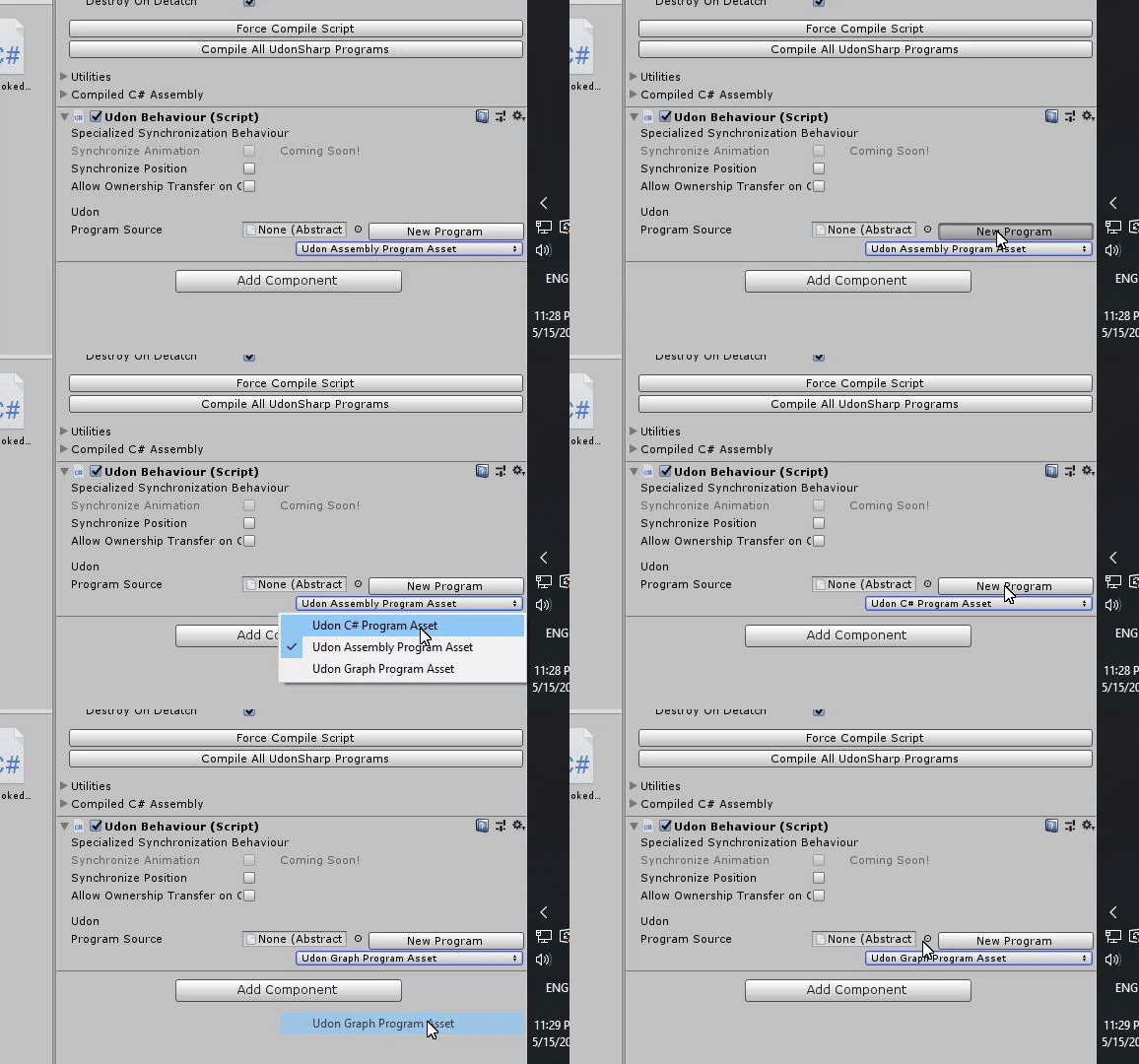
plush wadi
I also have the problem in the scene where I'll click "new program" it will seem to run but not change, and then i click it again and the stuff appears for the new program
cedar bison
is Udon tooltip customizable? ("use")
dark raft
yes, same as the old interact trigger
plush wadi
As is the distance which you can reach it at... I always do 5 minimum, otherwise small players can
t reach haha
 shrewd mural
I'm going to assume that marking a variable as "public" doesn't make them static as well
fiery yoke
No. In fact there is no such concept as static in Udon currently.
shrewd mural
Ah, ok
I have this weird bug in my graph where it tries to teleport the local player to a certain transform, but it always just brings me to (0,0,0)
fiery yoke
Did you actually set the Transform in the inspector?
shrewd mural
Yup
Don't worry, I triple checked that one
The method I'm using works fine in another graph that does something similar
 oblique talon
I'm developing a world using U#, however I seem to be having trouble with UdonSynced variables.
I have a start button that is supposed to activate once at least 2 players have joined a lobby, however the start button does not seem to activate when that happens. It only seems to work once I make changes to the code, however once I add something else to the code, the syncing stops working.
Here is my synced variable code to add to the player count, the AddPlayer event is called when a player has joined the game lobby from a director object.
    [UdonSynced(UdonSyncMode.None)]
    public int PlayersInLobby = 0;

    public void AddPlayer()
    {
        Networking.SetOwner(Networking.LocalPlayer, gameObject);

        if (PlayersInLobby < MaxPlayersInLobby)
        {
            PlayersInLobby++;
        }
        else
        {
            PlayersInLobby = MaxPlayersInLobby;
        }

        UpdateCanStart();
    }

    private void UpdateCanStart()
    {
        bool canStart = PlayersInLobby >= 2;

        if (canStart)
StartButtonBehaviour.SendCustomNetworkEvent(VRC.Udon.Common.Interfaces.NetworkEventTarget.All,
            "SetCanInteract");
        else
StartButtonBehaviour.SendCustomNetworkEvent(VRC.Udon.Common.Interfaces.NetworkEventTarget.All,
            "SetCannotInteract");
    }
Any help would be appreciated.
fiery yoke
Cant help you with your problem, but doing Networking.SetOwner when a player joins, without any extra precautions can fail, when players join too quickly, especially since when you join a world, all the people that are in the world will cause an OnPlayerJoined event to happen for you as well (including yourself)
oblique talon
ah, forgive me, I should have explained better. But the join lobby is actually a button that is pressed in the world, and not when a player joined the map.
fiery yoke
Welp the problem still remains. People pressing that button too quickly can cause issues
fiery yoke
Networking is hard.
oblique talon
Yup, haha. Ive had networking classes in uni, I have a fair idea of how tough it can be.
but thanks anyway
 lofty monolith
Hey, been trying to figure this one out: where exactly can I get information about the player's left/right controllers? right now I am using bones for transforms, but it seriously feels off when one is actually using them if the character has shorter or longer arms than the player.
Using UdonSharp.
oblique talon
I think it's Networking.LocalPlayer.GetTrackingData(VRCPlayerApi.TrackingDataType.Head / LeftHand / RightHand)
Or rather thats an example for the local player, but replace the local player with the player you want
As in accessed via the VRCPlayerAPI
lofty monolith
Hmm Ill check it out, thanks!
oblique talon
np, hope it helps 🙂
 feral elk
Hey yall! I'm having a rather odd issue where some simple UDON code does not seem to be compiling. Attached is the udon graph in question and the outputted assembly. The second wire becomes disconnected after switching to another udon graph and back, and the game objects under the gameobject.setactive nodes never save. Any ideas what I might be doing wrong?
fiery yoke
@feral elk That has been an issue for a while. Reload the C# Assembly by Enterin and Exiting playmode or restarting the editor. Alternatively you can duplicate the graph asset and delete the old one
feral elk
I'll try that! Thanks!
Did not work, unfortunately. I tried restarting the editor, switching in and out of playmode, and duplicating the graphs. Every time only one wire remained connected
fiery yoke
Ohh I didnt even see what you were doing. Yeah that is not how youre supposed to do that
Use blocks to split up flow
Otherwise the graph has no idea what thing you want to happen first
feral elk
Ohhh alright. Changed that and now i'm getting somewhere. The only issue now is it does not seem to keep the game objects I set in the properties. Am I doing this correctly?
 dark star
I'm small brained when it comes to Udon stuff. I'm trying to figure out how to set up multi toggle buttons.
Basically I have button A button B and button C, I want it each button to activate a different object so that Button A will toggle Object 1 and so on, but also deactivate Object 2 and 3. But I also want it so that when I press Button A the second time, it'll deactivate Object 1 but keep Object 2 and 3 disabled.
plush wadi
anyone know why an udon behavior on a client would run start() but not update() without throwing any exceptions?
oh nvm, it looks like an ownership set just isn't working 😦
Anyone know why this ownership set won't work?
        Debug.Log("MEEPLOG:: creating a local unmanaged HUD for" + Networking.LocalPlayer.displayName);
        GameObject hudObject = VRCInstantiate(hudToDispense);
Networking.SetOwner(Networking.LocalPlayer, hudObject);```i thought it was find as long as the local player is the one taking ownership
plush wadi
It's clearly creating the object on the client, I can see the debug from the update... setowner just doesn't seem to ever work?
 lapis sable
 scarlet lake
hey is there anywhere i can find some simple udon scripts so i can look at them and start learning how it all works?
Is there ever going to be an update where quest players dont have to press show avatar on every character
 gentle halo
I can imagine all those quest users crashing or getting low fps because of unoptimized avatars. VRChat now has a problem in their hands.
Not a Quest user, but don't you guys have it on the safety settings and set performance ranking to 'very poor'?
 cedar cairn
How should i modify this to be able to toggle multiple things?
 dreamy sentinel
Is there a way to ignore collisions of specific objects instead of the whole class of object?
Well more specifically is there a way to create an exception for specific objects while ignoring collisions of all other of those objects?
Cause all the solutions I've found online(layers, physics.ignorecollision) don't allow me to set specific exceptions and it's frustrating
 chilly aspen
Can you send custom events with variable input parameters attached?
Like: GameObject.GetComponent<UdonSharpScript>().SendCustomEvent("CustomEvent(input_1, input_2)");
fiery yoke
Nope. But maybe SoonTM
fiery yoke
Does a disabled UdonBehaviour/GameObject still handle Ownership correctly?
chilly aspen
Not sure, I went the "private bool isActive" route for all my Game Objects.
fiery yoke
wdym?
chilly aspen
I do all Game Objects active and assigned to the master, using custom variables to determine whether they're active. Had some odd executions when I had this.gameObject.SetActive to false.
fiery yoke
The problem is that I want to avoid performance hit for object-pooled objects, so they need to be disabled, however I dont know if that will cause any issues with setting ownership
twilit breach
I did some light testing on that helper
they cant transfer ownership if they are off on game load
but after you activate them the first time, then even if they are set inactive later you can set ownership of the inactive objs
fiery yoke
Okay thats what I expected
twilit breach
but even in that instance for some reason only master can't set ownership anymore
fiery yoke
Yeah that has been a bug for a while
twilit breach
D:
also when they first get set active, the transform pos they are at becomes their respawn for vrc world resets
if thats related for yours
fiery yoke
No its not, but thats good to know
twilit breach
and this is how its sposed to work obviously but setting a moving object inactive keeps the velocity for the next time its set active
aaaaand the udon behavior pos sync seems to run on update, so having pickups off until used saves a lot of processing memory
fiery yoke
Yeah thats the main reason why Im doing that
twilit breach
yeah I have a shop with items to TP/ "buy" and when i turned them all inactive before tping my memory usage got reduced to like a third
its crazy, even though they were resting
they all had pos sync too so idk
something is expensive
fiery yoke
Udon 😅
twilit breach
xD
dreamy sentinel
Do layers even work atm? I have one object on pickup layer and another on reserved2 and the instantiated copies are still interacting.
gah why is this so difficult, I'm trying to get all of one type of object to ignore collision of all of another type of object, but it seems like there's no way to do that except running through an array for each object that holds all of the other instantiated objects to manually physics.ignorecollision for each one but that's seems like such a performance waste for something that feels like it should have an easier solution
if only instantiate also copied over the state of physics for the object, that would make things so much easier.
light fjord
mhm there are some interesting problems if multiple people join at the same time. for a world.
twilit breach
the reserved layers tend to be wonky, I wouldnt trust em. i always make new ones past the VRC set ones cuz they run some code on some layers in some way
Does anyone know how to make a UI or button that links to a website & opens it in browser? or something that could do that
fiery yoke
Thats problaby not "allowed/wanted". You can only give them a link they can copy & paste, which is pretty annoying for VR Users
twilit breach
yeah I suppose there would be quite a lot of issue from opening random links, ah well
shadow tundra
Hey everyone, how do I handle the OnValueChange of a toggle in Udon?
fiery yoke
The only way I know how to do that is to SendCustomEvent to an UdonBehaviour, and then in the UdonBehaviour have a boolean, and set that boolean to UIToggle.isOn on the event
shadow tundra
I can also just use Update function, but this is not optimized
I'm going to do that
just for a mirror true and false
 amber pulsar
Hello, does anybody here use Udon#? I have question about, how to reference players as gameobjects (for colliders), since tags dont work.
So like how would you write it in the code?
Also i found out, that when i build a "reset button" for items. In that pressing the button, all the items would return to an empty game object, the items go out of sync for the players and the reset button is kinda buggy (sometimes not even working, sometimes works, but other people see the objects still in place)
fiery yoke
@amber pulsar "Players" are accessible by their PlayerApi. To get a reference to one there is multiple ways. Most notably Networking.LocalPlayer and the OnPlayerJoined event. However the last one requires a bit of readup to understand fully.
To properly reset a GameObject you have to tell everyone to reset it, which is done with SendCustomNetworkEvent. Also if you use a Rigidbody then make sure to also reset the velocity as well as the angular velocity.
twilit breach
Also if the items have udon pos sync checked they will jitter between the synced pos the owner is relaying and the TP pos you sent. The best solution is to give them a little distance to fall so the rigidbody stays awake and sets the new udon sync pos (or force awake the rigidbody on update for a short time)
if it instant TPs and is touching the ground perfectly the frame after TP the owner will still think its asleep, which means they won't update the transform synced var and other clients will tp it for one frame, get the network update of the old transform synced var and then start jumping between the two
also you can just have a set owner to the player who locally clicks the reset button, so they will instantly see it, and if they pick it up it will quickly sync the pos for others
Another trick is to TP it below your world respawn limit (default -100 y) and let the VRC world script reset spawn pos and set rigidbody velocity to 0, but sync is still wonky just the way it falls asleep so fast leaving "old" synced transforms elsewhere in the world
 proud snow
How are alwaysunbuffered and alwaysbufferedOne triggers done now in Udon?
fiery yoke
You dont. Buffering is not a thing atm.
proud snow
So how would I turn on a bridge for all players and late joiners?
With a set gameobject active motion
fiery yoke
Two ways.
Main way: Synced bool
proud snow
So via animation state and synced parameters? With takeownership?
fiery yoke
No animation states. In udon
proud snow
oh ok
 primal maple
 feral elk
Hi yall!
I need help again.
Specifically, I have an Interact event in my UDON graph, and everything looks to be compiling correctly, but the object is not interactable in game. Is there something that needs to be done to make it interactable?
scarlet lake
Anyone know why you can still see the triggerbox when putting down the VRChairs?
 keen onyx
is there any way to have hand tracking with just controllers and no headset? like with nintendo switch joycons?
dreamy sentinel
@twilit breach Bit late but thanks, custom layers do work as expected
And unfortunately, contrary to what I was hoping, physics.ignorecollision(false) does not override non interacting layers so I'm gonna have to think of another trick to create special exceptions to layers
chilly aspen
For desktop users, is it possible to raycast from the center of their screen?
Never mind found a source explaining it. (http://vrchat.wikidot.com/worlds:guides:player-tracking)
dreamy sentinel
small bookend update for those who care I solved my issue by just checking oncollision if the object i wanted them to interact with was the object they were colliding with and if it wasn't then just issuing a physics.ignorecollision command
That may result in a problem later where since it checks on collision whether to ignore it, it may still affect it slightly the moment it collides but oh well.
scarlet lake
Does Oculus Go work on PC/ vrchat or vrgames?
scarlet lake
is there already an audio sync prefab in udon? i would like to keep an audio track in sync for the players even if they join later
 green plinth
Is it just me or does Late Update suddenly not work (tested using the play button in unity)?
 summer monolith
Does anyone know how much time does it take for me to be able to publish skins in Unity with VrchatSDK?
 high socket
Just play the game more and you will rank up eventually.
summer monolith
Thankyou
 fleet blade
guys can anyone tell me why am I getting all these errors, maybe somebody had this issue already? really want fix this cuz 999+ errors don't look good lol
it happens after I bake the lighting 😄
plush wadi
Anyone know why sendCustomNetworkEvent would only call the delegate on the client it's sent from, even when sending to NetworkEventTarget.All?
 gleaming fractal
I know OSC is slated to come out but is/will it be possible to grab a set of colors from a livestream/video feed in udon in the near future to toggle a trigger?
Say if I devote a corner of the stream to a trigger by putting a logo or color deprived tiny image into it.. then to trigger a color square to trigger a world event for everyone locally... that would be a great means of synchronizing a world show element for people across multiple instances.. audio would be in sync and all..
fiery yoke
@gleaming fractal Not exactly sure what youre trying to describe, but "colors" are a topic of rendering. And rendering happens in the GPU in parallel, meaning that its pretty expensive and complicated to go form the GPU back into the CPU.
gleaming fractal
i described it more here: https://vrchat.canny.io/feature-requests/p/livestream-syncing-triggers-across-worlds
imagine a color picker looking for a color range within a livestream
in a region of the screen defined.. when color is reached or near enough then it will toggle a world trigger
see it as a color QR code in a video to trigger idea
fiery yoke
Yeah Livestreams sent image data. And the image data is just passed to the GPU for rendering. You could analyze it in the CPU, however that is performance expensive and not implemented yet/at all.
gleaming fractal
that means everyones session will trigger on time with their livestream.. as everyones latency is different
I bet it can be done lightweight actually through a more loose system
i used to make simple botting applications (for fun only) in early mmos that just did a pixel look up.. was only looking for one color or (in the range of) which is needed because we are dealing with color compression.
right now its sorta already being done in worlds ive seen for objects checking whats underneath them.. so technically it can already be done (god i wish i had taken a picture in that world of it) but you cannot assign a trigger to it yet
fiery yoke
I have no idea what youre talking about.
gleaming fractal
someone made a lighting like desk in vrchat that was able to change colors of pieces in the world based on what you put a pion on over a livestream feed
it color grabbed in essence
so if we can use color in a video region for a local world trigger then there is something that can be used that's persistant across multiple world instances.
It's hard to explain I think
but i understand it would use some cpu overhead
fiery yoke
If it changed the color of something else then thats done in Shaders in the GPU.
gleaming fractal
yeah likely. but i think its worth it even if it would be a cpu taker.. I see large benefits having a means to synchronize livestream world events across worlds. going to a vrchat event spread over world instances means little people would be left out from actually entering such an event.
chilly aspen
What would be the best approach to having a player instantiate a cube, and having that cube be visible to all players?
fiery yoke
Hahahaha ohh boy.
That depends on what functionality you expect
if its just a static mesh then its easy
chilly aspen
The cube would likely have an Udon script attached, which is able to function upon instantiation.
fiery yoke
If you want the script to cross-communicate between players then youre in for a ride
chilly aspen
What would the static mesh approach look like?
fiery yoke
Just calling SendCustomNetworkEvent >> VRCInstantiate
However that wont work for Network dependant objects, since the instantiated objects are not "linked" to one another
chilly aspen
Hmm, does the Networking.Instantiate function do anything differently?
fiery yoke
Its not exposed/implemented properly
plush wadi
Does VRchat store a different version of your world as "home" if you update it?
Go home never seems to update the world with new changes for me... weird.
 maiden sundial
Should it be possible to use a branch and then both outcomes would still return to the "normal" path? For some reason this doesn't work and when the "false" path is taken, the following functions don't execute.
fiery yoke
I think thats even the "intended way" according to the canny about this being closed with the comment from @floral dove
https://vrchat.canny.io/vrchat-udon-closed-alpha-feedback/p/exit-flow-for-branch-node
maiden sundial
Strange... there's no exception or any error being thrown, it just works if it's true and it doesn't if it's false.
I moved the branch to the end of the functions, guess that's a work around this
fiery yoke
Thats not always possible if the actions after the branch depend on the branch tho
maiden sundial
Oh yeah for sure, gladly isn't my case... yet
Maybe I'll try to debug it
 floral dove
@maiden sundial - yes that should be possible, I tested branching flows that returned to a single entry point. I'll test it again though in case there was a regression.
maiden sundial
Oh, yes please, thank you!
 flat musk
Not sure if this is the right place but I am having an issue with some vrc_pickup items where in desktop and vr they tend to glitch about a few frames untill they are released
where other items do not have the same issue
hold up all items seem to have that issue
even the vr camera
 brazen matrix
Is sdk3 video player possible at this time?
 cunning mist
Not at the moment. They're entirely redoing them, so it may take a while, but when they're back they'll be better than ever!
(A little unfortunate for hangout worlds at the moment however)
plush wadi
Does setting a gameobject to active reset it's ownership?
I have a script that has a bunch of inactive objects, sets the owner of one to the player I want to use it on, and then i double check the gameobject with GetOwner and make sure the owner is who I want, but when I turn it on it claims it's owner is the Master player again arbitrarily
worthy beacon
no but in my experience attempting to set ownership of inactive objects has the chance of ownership not changing
plush wadi
I'm validating the owership:
          if (Networking.GetOwner(hudActivationQueue[index]).playerId == playerIDsWaitingForHUDActivation[index]) {
Debug.Log($"MEEPLOG:: HUD ownership confirmed to be the same player waiting for the hud: {Networking.GetOwner(hudActivationQueue[index]).displayName}. Turning hud on and clearing this item from the queue");```so it has to be changing back somewhere
worthy beacon
its possible it sets it then, but when it comes time for the network to update said ownership it fails to change the ownership. Im not exactly sure what goes on, all i know is i had a test where when i tried to set ownership of the inactive objects, later on ownership didnt change, and when i set them to active, change ownership, and on lateupdate turn them off, ownership was transfered
plush wadi
what do you mean it fails? How could it validate if it failed?
This seems like a bug to me
worthy beacon
when i say fail, i mean failed to transfer ownership
ie, on a later frame the ownership didnt change
it may change on that frame, but the network update might be setting it back
plush wadi
but i confirm it transfers externally in post, after all setOwner calls are long done, and then after it's active, i confirm the object says it has a different one
I even have a queue to wait to make sure the ownership is set before continuing
worthy beacon
i dunno, just sharing my experience. Id recommend just trying to set it to active before transferring ownership and see if it doesn't randomly transfer back ownership anymore
worst case scenario, it doesn't work and something else is wrong
but i can confirm that deactivating and reactivating an object does not change its ownership, because my system does that every time they open the world menu
plush wadi
The issue is the whole strategy i'm going for is using the object ownership to know who to equip it to
but because VRchat has no docs we don't know if this is a bug or intended so woooooooo
worst case scenerio is i've hit yet another week long dead end of just trying to make it so players can interact with eachother in a game focused on player interactions in virtual space, because the devs refuse to doc things.
worthy beacon
are you using theHelpfulHelpers object ownership manager or making your own?
plush wadi
Trying to make my own. I've looked over his though and worked with him on this a bit with help
worthy beacon
ah, well all i can say is the networking stuff is funky XD
plush wadi
that's all anyone can say... even the devs apparently
I'm going to try to put all the huds in empty transform containers, set the ownership of the container, and then have the child object; with the behavior on it, check it's parent's ownership and take that from it.
A gameobject doesn't need a behavior to have an owner right? I think Udon just uses like a list of gameobjects and owners to track it
amber pulsar
if i have a code that goes like:
public Collider cball1, cball 2;
public GameObject ball1, ball2;
public Transform newplace;
void OnTriggerEnter(Collider other)
if (other = cball1){
ball1.transform.position = ballbag.position;}
if(other=cball2){
ball2.transform.position = ballbag.position;}
Why does just putting one ball into the collider still teleport both the balls?
 silk marsh
is there really no way to set the text on TextMesh Pro from Udon?
plush wadi
Not supported yet, use old text
silk marsh
is that something that's going to be added relatively soon? was hoping to be able to have text shadows...gonna be really hard to read otherwise
plush wadi
No one knows, probably not
devs seem focused on making the noodles look nice before functionality
silk marsh
ah yes, the noodles that everybody definitely use instead of UdonSharp 😛
silk marsh
the decision for drag-drop? yeah
plush wadi
There's no benefit to 'pretty design' over functionality in a game focused on building interactable stuff
they ended up making a set of networking functions that can barely network while focusing on making it "not look too hard".
so it backfired spectacularly
silk marsh
yeah 🤦
plush wadi
Now it looks easy but nothing works
I mean, technically we don't know if nothing works too, cause there's no docs
silk marsh
I just love trying to explain UdonSharp. "It's a C#-based wrapper around UdonAssembly which is a wrapper around Mono written in C#, oh and Mono is a reimplementation of the .NET Framework, so it's really a wrapper around a wrapper around a wrapper"
plush wadi
it's a culling of most of unity's functionality and photon's networking
And then to test networking, you need to upload any tiny one line change to the servers, launch two games, log out of one, make a fake account, log into the fake account, wait for the incredibly slow friend hud to load, invite yourself and then accept the invite then accept the acceptance of the invite
and then you get one round of tests
silk marsh
yes it's fantastic 👌
I spent 3 hours trying to get networking to work in the local test clients before I found a buried forum thread saying that networking doesn't work in the local test clients
plush wadi
Yup, and even most of the old forum posts are out of date or just guesses that are actually wrong.
some important networking caveats/bugs i've found and documented myself
also sync'd vars take time to propogate too
ALSO ALSO there seems to be an issue where sync'd vars don't ever propogate if the item has another network call in it's update function cause it blocks the update for the var from going out
ATM im just tryign to get a var to sync and it just won't
silk marsh
fuck, you can't sync VRCInstantiate'd objects?!
that may completely screw up my entire thing
unless I just have a TOOOOOOONNNNNNNN of sync'd variables in the controller
plush wadi
yes its the main thing
twilit breach
So random info to help from my tests regarding ownership to save some time for you
you can only set ownership on an inactive object that has atleast been active once before (the first activate sets some logic it needs)
this, as well as other things don't apply to the master (he has trouble with ownership, if you check debug log default "master" is blank, so you will see a message like ownership transferred from to 2 , 2 being the second player to join, the blank space presumably the server or something
but if the master gets ownership of the same item here ^ it will say transferred from 2 to 1, so "masters" have like two network actors or something, probably why it gets bugged
and lastly , normally unity/photon supports 999 net ids per player, VRC sends death errors a little past ~200 so they may have limited it
also as more text wall the way photon assigns "net ids" theres one per client (which we dont see in our debug logs) , so item net id say 5 starts as 5, when player 2 gets it it is techinically 2-5 , then when master gets it its 1-5, so theres a lot going on here and obviously something isn't working atm
but hopefully this info is helpful at troubleshooting your own stuff? sorry for text wall just hope my tests save some time
maiden sundial
@silk marsh I would suggest using object pooling if possible? I was having the same thing. I couldn't sync somet VRCInstantiate objects so I just went for enabling and disabling objects
Also, is U# just as good as using the graph system? I feel better actually coding stuff, but I have read that U# has some drawbacks
silk marsh
it seems to have 1:1 parity with the graph but it's 8 million times easier to do literally everything @maiden sundial
maiden sundial
Is it easy to set up for a project?
silk marsh
and yeah, I'm using pooling now. I'm instantiating the actual GameObjects dynamically but I have fixed controller objects for them and I'm hooking that up client-side
maiden sundial
I would really appreciate being able to actually write down code instead of using the graph system.
I honestly have 0 experience networking wise so I am learning a lot on the go right now
silk marsh
yeah it's super easy to set up; you just import the package like you would the SDK
instructions are on their github
god, I wish you could pass parameters to custom events...
 mossy gyro
I have a question
So i was playing non vr vr chat and It keeps spinnning me. i have no plugins and meny doesnt work HELP PLS
How do i fix pls
silk marsh
@mossy gyro how is that Udon-related? are you in a world you made with Udon?
mossy gyro
what isnt this just a normal questions place
mossy gyro
wheres normal questions coz i really want to fix my game
silk marsh
you might want to start in #vrchat-general-2 and someone can tell you where to go from there; i'm not sure
silk marsh
anybody found a way of hooking a onClick for a button with Udon?
I heard that VRCInstantiated objects lose their UdonBehaviours sometimes; I have a way to do this if that was not the case
 fossil osprey
Hey does anyone know if this is something I should be worried about? And if so how do I fix it? Along with that the publish menu is no longer showing when I attempt to publish it either.
silk marsh
hm yeah so when running my script in Unity, VRCInstantiate'd objects get their own UdonBehavior correctly, but in actual VRChat, they don't, and it's throwing errors about duplicate key exceptions in Photon for the netid of the prototype object I'm Instantiating
so there's clearly some discrepancy in the actual netcode of VRChat
I'm guessing that's the same issue as "VRCInstantiate does not instantiate objects with network IDs" reported above; they technically do get instantiated with one, but it's the same as the prototype
they should all receive a fresh one
scarlet lake
how to change username when im on the game
 acoustic delta
@scarlet lake Not an udon related question. You can change your username by logging into the VRChat website. #user-support-old
scarlet lake
I made a microphone arm. Am I able to make players grab the empty to move it around using the Udon update?
 valid basin
You need to create a new project to use VRCSDK3 and Udon. We do not support “migrating” or “upgrading” VRCSDK2 projects to VRCSDK3 and Udon.
what exactly is meant by this?
If my world makes extremely limited use of SDK2 interaction then why would it be a problem?
and are there any guides available that explain how to go about saving some time and effort when recreating SDK2 worlds in SDK3 ?
maybe i shouldn't ask and just do as instructed, but is there anyone maybe from the devs or somone else that can tell me if this works?
remove all references to and usage of SDK2 stuff > remove SDK 2 with unity closed > import SDK3 ?
 spare pike
@valid basin Tupper made a statement about this. https://discordapp.com/channels/189511567539306508/657394772603830360/694975945823617104
valid basin
great news, thanks @spare pike
 small osprey
how do i get the herbert the pervert avatar
 oak marten
Hi guys, which node should I be using to replicate the old "On Enter Collider" trigger?
fiery yoke
@oak marten OnCollisionEnter. If you want a Trigger then OnTriggerEnter
oak marten
Thanks man, and if you want to use OnTriggerEnter do you need to specify the triggering entity on the udon graph, or will the old box collider "is trigger" work?
plush wadi
box collider needs to be set to is trigger for OnTrigger events. OnTrigger events provide the collider that triggered the event as a param
maiden sundial
So here's another question. When sending a custom network event. What's the difference between the target being Owner vs All?
I can understand if you select All, that means everyone in the room has to execute the function, no issues with that. But what would owner mean? Wouldn't that be the same as "SendCustomEvent" cause it's only working for you, the owner already?
fiery yoke
@maiden sundial You are not always the owner of an object. By default the master is owner, which would be you if you joined first. But if someone else joins first they are master and owner. Also ownership can be transferred. So sending it to the owner is not at all like the local version.
maiden sundial
Oooooo! Okay! That does clear up a bit. I saw that ownership is transferred as soon as the object goes through an specific process (colliding, being grabbed or merely by code) Right?
fiery yoke
Yeah there is special circumstances where ownership is transferred.
plush wadi
to make something only clickable by all players EXCEPT the local player.... whuch layer?
 uneven solstice
I have 270 hr on VRChat and im not uploading avatars. now im green. so how many hr i need to be orange?
 drowsy terrace
do you have a VRchat account?
acoustic delta
@drowsy terrace You need a VRChat account to upload content, but you don't need one if you only want to rank up.
 idle kite
Anyone know how to make a button that toggle's between a normal mirror and a optimised mirror? So the mirror is off by default, first click turns on normal mirror, second click turns on optimised mirror and turns off normal, then third click goes back to the mirror being off.
 candid dome
@idle kite If it still works as before, you could make a second button in the same spot as the first one and basically have them toggle thru each other with each click
1st click -> optimised mirror + initial button disabled -> second button active to click
2nd click -> better mirror + 2nd button disabled -> button 1 active
(If you want to disable the mirror, just add a 3rd button in the same spot, so you could repeat the process for the next click)
I hope this helps you!
idle kite
ohhhh i didn't think of that thank you!
 calm yoke
or have a variable track a value and based on it activate an object while disabling others
plush wadi
Anyone know of a way to tell what bone would be the highest and lowest bones on a non-human avitar?
I have a hud resizer and it uses head and foot atm, but breaks if someone has a non human avi~
plush wadi
Also how do you make canvases not block the menu? Do you need to set it to a certain layer?
flat musk
Does anyone know what momentum transfer method is and it's other options?
worthy beacon
jw, does anyone know of any known bugs or issues where when you set a collider onto a custom layer designed to not interact with the player, glitches and up messing up the controls either with small avatars or some other weird situations? Specifically causing the user to spin out of controller by just moving their head
 lavish frigate
https://cdn.discordapp.com/attachments/337672341041446912/712495178040082453/unknown.png I'm trying to build a Quest world with Udon but when I change my build platform the SDK window only shows this


 quartz epoch
I have a door that locks and open and closes. So far its only for one person. So if someone were to open a door it would open for them only and stay closed for everyone else. So how do I make it so if one person opens it it opens for everyone else and same thing for closing and locking the door. How do I fix this?
silk marsh
you'd need to sync the variables representing the open/closed and locked/unlocked state
candid dome
So, I'm pretty new to Udon and I would like to know if there's a way to make a trigger object "play a sound" once the player touches it (hand touches it or mouse)
The object itself already has an audio trigger on itself for playing a sound on interact (the audio for that is on the object as an audio source and plays the audio once the player uses the trigger)
Could someone please help me on the setup or tell me on what I need to look for (Udon components)
Thanks in advance
 empty glade
Quick question about VRCPlayerApi.SetVelocity, I have an object that I triggers when entering a player's collider that follows them, I was hoping to make this trigger move the other player. I have it set the player's velocity and I can get the velocity from the player right after and see that it is showing the correct value but the player doesn't move in game, does setting the velocity of a player only work under certain conditions or something?
scarlet lake
.br
chilly aspen
Is there a limit to how many objects in a scene I can have Udon Behaviour Synchronize Position enabled?
 smoky heron
With the introduction of UDON do worlds now have the ability to store and retrieve data through databases?
 proper oar
Why dose this happen all i do is run the instantiate node but it just dose this
the nodes
fiery yoke
@smoky heron No not yet. Maybe in the future
smoky heron
Dang, well thanks, how about queries to websites? I know they can already pull video and such, but is it possible to pull webpages?
plush wadi
I'm having an issue where a sync'd var will only update the second time its set, despite the owner being confirmed. Does anyone know why this is happening? I've encountered this bug several times now and see no reason these variables shouldn't sync
     pokeMessage = $"{playerWhoPoked.displayName} poked {equipedPlayer.displayName}";```
poked message is a sync'd string


(yes i know it's U# but I think this is a sync issue)

the debug confirms that the owner is the same as the localplayer, then sets it, but when other clients run this in update:
```      if (previousPokeMessage != pokeMessage) {
        debug($"previousPokeMessage {previousPokeMessage} is not longer equal to {pokeMessage}. Updating text.");
        updateDisplayedText();
      }```

they don't see a change and skip updating the displayed text.
(previousPokeMessage is non synced, it's changed only in updateDisplayedText)Is there a limit to how many objects in a scene I can have Udon Behaviour Synchronize Position enabled?
theoretically I don't think there's a limit, but practically, there's a very low limit of gameobjects you can rely on being reliably synced across clients. For non-rigidbodies or kinematic bodies, I think the practical limit is in the small 10s (32ish) and for non-kinematic (physical) rigidbodies, I can't even get 16 to sync reliably without the objects exploding into the sky or slowly lerping into weird past positions.
valid basin
I'm getting the following errors in my console. Any tips what to do about them?
i haven't done anything yet other than import SDK3
plush wadi
When does start() (in udonbehavior) run for gameobjects that spawn inactive? I know that currently udon behaviors don't load right on inactive gameobjects.... but does start somehow still run on object spawn or does it wait for it to be set active?
fiery yoke
plush wadi
Oh heck lol, I misremembered. Thanks!
 merry wyvern
Anyone know I I sync objects so players can see eachother moving objects?
 heady herald
hello
floral dove
@merry wyvern just turn on 'Synchronize Position' on the UdonBehaviour. I recommend you take a look at the Examples and Readme included in VRChat Examples, they show this off and much more.
 fresh tide
how can i stop geting timed out please somone help
floral dove
@fresh tide in Udon?
quartz epoch
Wait so as long as I have sync position it will have the same state for everyone so if its locked itll be locked for everyone
My door^
fresh tide
yes
fast horizon
Any known problems with EnterTriggerEvents? (detecting player) Having a lot of random issues where an identical udon will work in one situation, but not another all other things equal as well.
Some weird hierarchy situation?
 paper hemlock
Having issues with teleporters, its teleporting the camera but not the avatar itself. Not sure what the issue would be
 fluid delta
I have a button that just instantiates a game object, but it only does it locally for some reason when I need it to be a global thing. The same thing happens when I enable/disable a particle effect, nobody else can see it happen but me. How would I go about getting these to become global? Any help is greatly appreciated.
cedar cairn
How do I make a toggle sync with other players?
shadow tundra
@cedar cairn With this, only master can set toggles, this script may be not perfect
It allows to send the data of trigger when master changed value, or when a new player joins
Don't forget to assign the Toggle of the object on this script
It is 1 script per Toggle
PS : Don't use graph for now, it is very laggy, use UdonSharp, it is a lot better
Also never instantiate a prefab with a script on it
fresh tide
@quartz epoch how do i get rid of udon
quartz epoch
@shadow tundra do you have the graph version of that? And then can you also try explaining it to me because I don't know how to make it specified for me.
@fresh tide I do not
cedar cairn
Of what?
cedar cairn
Yeah i figured. 😄
quartz epoch
He didnt have a pfp
paper hemlock
When teleporting, I seem to to only teleport the players camera / view point, the model itself doesnt go with it. I have followed multiple tutorials as well as deleting / duplicating graphs yet it does it still.
fluid delta
Does anyone know how to make button triggers and/or particle triggers be global instead of local? In other words, since Object Sync is gone, how can this be done?
shadow tundra
@fluid delta I can do it if you want
@quartz epoch Don't use graph, it is very laggy compared to udonsharp, sometimes it doesn't show errors and it doesn't compile
fluid delta
@shadow tundra Ok, thank you. What do you mean by do it? Do you already know, or are you offering to figure it out?
shadow tundra
@fluid delta Put the state on 3 and set the objects in targets
fluid delta
Ok, I will, thank you for your help @shadow tundra
shadow tundra
@paper hemlock What do you talk about? You mean models attached to player or player avatar?
paper hemlock
@shadow tundra The players avatar itself
shadow tundra
@paper hemlock Did you tried to change avatar?
What method are you using?
Can I see your code?
paper hemlock
@shadow tundra It follows Vowgans Player Teleportation tutorial
cunning mist
👋
paper hemlock
Ohh hey 😅 I havent been able to get your teleportation tutorial to work,
I have attempted it several times. It only teleports the viewpoint/camera and not the model.
Im not sure if I have wrong colliders or other specific related components missing like rigidbodys
cunning mist
Oooo, the player's viewpoint teleports but not the player itself? Oh this is going to need some screenshots. That's a bug right there.
paper hemlock
If I replicate it again, I will post a screenshot of the out of body experience 😅